tow AUDI RS5 CABRIOLET 2013 User Guide
[x] Cancel search | Manufacturer: AUDI, Model Year: 2013, Model line: RS5 CABRIOLET, Model: AUDI RS5 CABRIOLET 2013Pages: 286, PDF Size: 71 MB
Page 70 of 286
68 Seats and storage
Tie-downs
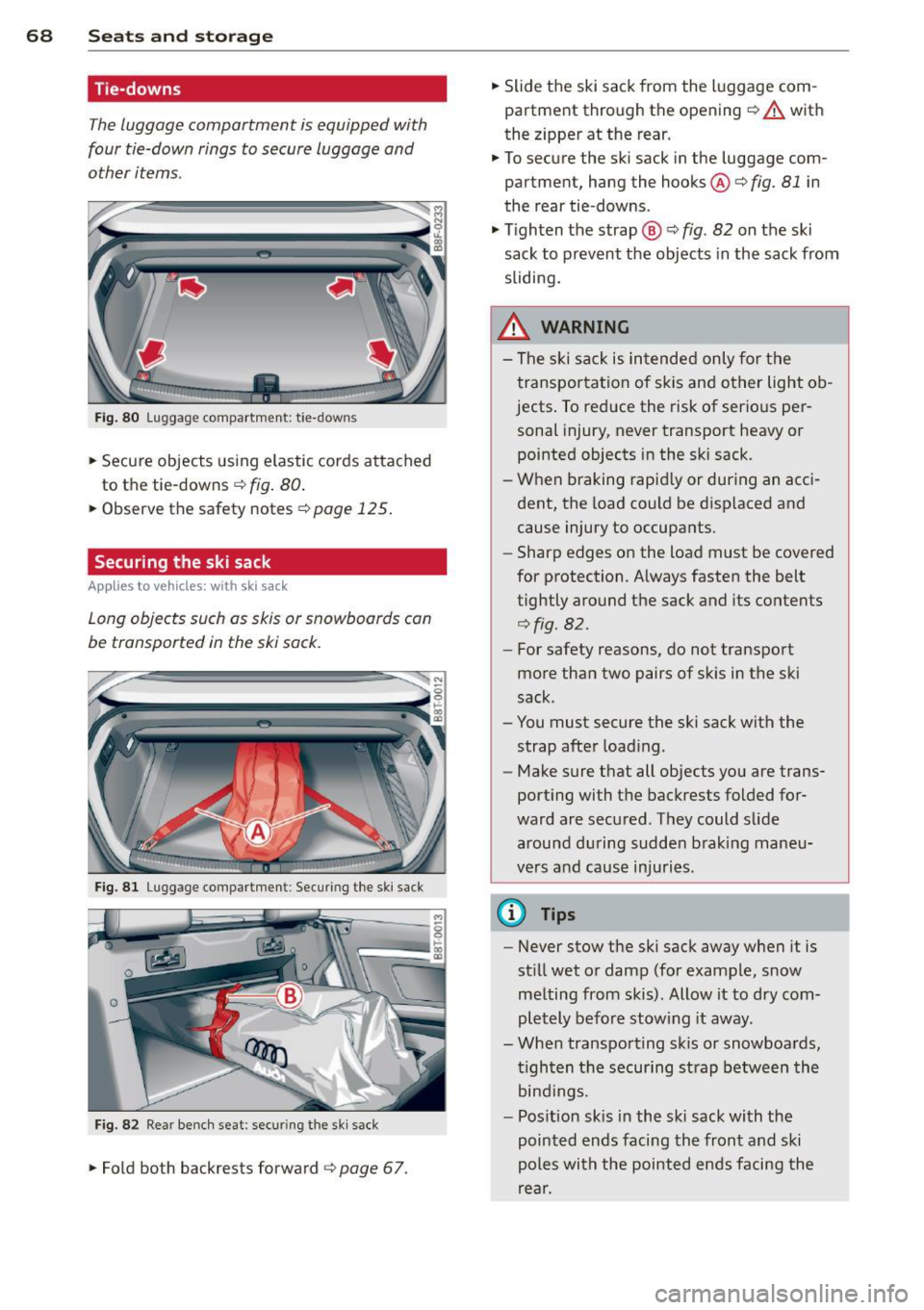
The luggage compartment is equipped with
four tie-down rings to secure luggage and
other items.
Fi g. 80 Luggage compartment: tie-downs
.. Secure objects us ing e lastic cords attached
to the tie-downs¢
fig. 80 .
.. Observe the safety notes¢ page 125.
Securing the ski sack
Applies to vehicles: with ski sack
Long objects such as skis or snowboards can
be transported in the ski sack.
Fig. 8 1 Luggage compartment : Securi ng the ski sack
Fig. 82 Rear benc h seat : secu ring the sk i sack
.. Fold both backrests forward ¢ page 67. ..
Slide the ski sack from the luggage com ·
partment through the opening ¢
A with
the zipper at the rear.
.. To secure the ski sack in the luggage com
partment, hang the hooks ®¢
fig. 81 in
the rear tie-downs .
.. Tighten the strap@¢
fig. 82 on the ski
sack to prevent the objects in the sack from
sliding.
_& WARNING -
- The s ki sack is in tended only fo r the
transportat ion of sk is and other light ob
jects . To reduce the risk of serio us per
sonal injury, never transport heavy or
pointed objects in the ski sack .
- When braking rapid ly or during an acci
dent, the load could be displaced and
cause injury to occupants.
- Sharp edges on the load must be covered
for protection. A lways fasten the belt
tightly around the sack and its contents
¢fig. 82.
-For safety reasons, do not transport
more than two pairs of skis in the ski
sack.
- You must secure the ski sack with the
strap after load ing.
- Make sure that all objects you are trans
port ing with the backrests folded for
ward are secured. They could slide
around d uring sudden b rak ing maneu
vers and cause injuri es.
(i) Tips
- Never stow the ski sack away when it is
st ill wet or damp (for example, snow
melting from skis). Allow it to dry com
pl etely before stow ing it away.
- When transporting sk is or snowboards,
t ighten the securing strap between th e
bind ings.
- Pos ition skis i n the sk i sack with the
pointed ends facing the front and ski
poles with the pointed e nds facing the
rear.
Page 73 of 286
switching recirculation mode on when driving
through a tunnel or when sitting in traffic
c::>_& .
The IAU TOI button or I@ F RONT I button
switches recircu lation mode off .
IAUTO I Switching automatic mode on
Automatic mode mainta ins a constant tem
peratu re in side the vehi cle. Air temperature,
airflow and air distribution are controlled au
tomatically.
Adjusting the temperature
Temperatures between 60 °F (+16 °C) and
84
°F (+ 28 °C) can be set . Outside of this
range,
LO or HI will appear in the climate con
trol system display. At both of these settings,
the climate control system runs continuously
at maximum cooling or heating power. There
is no temperature regu lation.
~ Adjusting the airflow
You can adjust the airflow manually to suit
your needs . To have the airflow regulated au
tomatically, press the IAUTO ! button.
~Adjusting the air distribution
You can manually select the vents where the
a ir will flow. To have the air d istr ibution regu
lat ed automatically, press the
IAUTOI button.
~ Adjusting seat heating*
Pressing the button switches the seat heating
on at the highest sett ing (level 3). The LEDs
indicate the temperature leve l. To reduce the
temperature, press the button again. To
switch the seat heating off , press the button
repeatedly until the LE D turns off.
After 10 minutes, the seat heating automati
cally switches from level 3 to level 2.
[ill Adjusting seat ventilation*
Pressing the button switches the seat ventila
tion on at the highest setting (level 3) . The
LE Ds ind icate the ventilat ion level. To reduce
the ventilation leve l, press the button aga in.
To switch the seat ventilat ion off, press the
button repeatedly until the LED turns off.
Warm and cold 71
l F RON T I Switch the defroster on/off
The w indshield and side windows are defrost
ed or cleared of condensation as quickly as
possible . The maximum amount of air flows
main ly from the vents below the windshield.
Recirc ulation mode switches off. The tempera
ture should be set to 72
°F (22 °() or higher.
The temperature is controlled automatically.
The
! AUTO I button switches the defroster off.
lliil R EAR ! Switching rear window heater
on/off
The rear window heater on ly operates when
the engine is running .
It switches off auto
matically after a few minutes, depending on
the outside temperature.
To prevent the rear window heater from
switching off automatically, press and hold
the
l oo REARI button for more than 2 seconds.
This remains stored until the ign ition is
switched off .
Air vents
You can open and close the center and rear air
vents using the thumbwheels . The levers ad
just the direction of the airflow from the
vents.
In vehicles with a 3-zone deluxe automatic cli
mate control system*, you can adjust the air
temperature in the rear by turn ing the thumb
whee l toward the red side to make it warmer
or toward the b lue side to make it cooler .
A WARNING
-Do not use the recirculation for extended
periods of time. The windows could fog
up since no fresh air can enter the vehi
cle. If the windows fog up, press the air
recircu lation button again immediately
to switch off the air recirc ulation func
tion or se lect defrost.
- Individuals with reduced sensitivity to
pain or temperature could develop burns
when using the seat heating function. To
reduce the risk of injury, these indiv idu
als should not use seat heating.
Page 85 of 286

A WARNING ,~
- Always pay attention to the traffic
around you whe n the cruise contr ol is in
o peration . You are always responsi ble for
your s peed and the distance between
yo ur vehicle and other vehicles.
- For reasons of safety, cruise contro l
should not be used in the city, in stop
and-go traff ic, on twisting roads and
when road conditions are poor (su ch as
ice, fog, grave l, heavy rain and hydro
planing) -risk of accident.
- T urn off the cru ise control tempo rar ily
when entering turn lanes, highway exit
lanes or in construction zones.
- Please note that inadvertent ly "rest ing"
yo ur foot on the accelerator peda l causes
the cruise control not to brake. Th is is
because the cr uise control is overridden
by the driver's acce lerat ion.
- If a brake system malfunction such as
overheat ing occurs when the cruise con
tro l system is sw itched on, the braking
function in the system may be switched
off. The other cruise control f unctions re
main active as long as the i nd icator light
lij jUJ~i4 (US models) lli,'I (Canad ian mod
els) is on.
(D Tips
The brake lights illuminate as soon as the
bra kes apply automat ica lly.
Changing speed
.,. To increase/dec rea se the speed in incre
ments, tap the lever in the
0 10 d irection
~ page 82, fig. 94.
.,. To increase/dec rease the speed quickly, hold
the lever in the
0 10 direction unti l the de
s ired speed is displayed.
You can also press the accelerato r peda l down
to increase your speed, e .g. if yo u want to
pass someone. The speed yo u saved earlier
will resume as soon as you let off of the accel
erator pedal.
On th e ro ad 83
If, however, you exceed yo ur saved speed by
6 mph (10 km/h) for longer than 5 minutes,
the cr uise contro l wi ll be t urned off tempora
rily. The green symbol in the disp lay t urns
white. The saved speed remains the same.
Presetting your speed
You can preset your desired speed while the
vehicle is not moving.
.,. Switch on the ignition.
.,. Pull lever into position
(D ¢ page 82,
fig . 94.
.,. Press the lever in the 0 or O direction to
increase or decrease your speed .
.,. Release the lever to save that speed .
This function makes it possib le, for examp le,
to save the speed you want before dr iving on
the highway. Once on the highway, act ivate
the cr uise control by pulling the leve r toward
(D .
Switching off
Temporary deactivat ion
.,. Press the b rake pedal, or
.,. Press the lever in to posi tion @(n ot clicked
into place)
¢ page 82, fig . 94, or
.,. Drive fo r longer than 5 min utes at more
than 6 mph (10 km/h) above the stored
speed.
Switching off completely
.,. Press lever into position @(clicked into
place), or
.,. Switch the ignit ion off .
T he speed you saved will be retai ned if the
c ruise control has been swi tched off tempora
rily. To resume the saved speed, let up on the
brake and p ull the lever to position
(D .
Swi tc hi ng the igni tion off e rases the saved
speed.
Page 93 of 286
![AUDI RS5 CABRIOLET 2013 User Guide gear. Drive to your authorized Audi dealer or
qualified repair facility immediate ly to have
the ma lfunction corrected.
[O] Transmi ssion m alfu nction: Sto p ve hicle
a nd shift t o](/img/6/57645/w960_57645-92.png "AUDI RS5 CABRIOLET 2013 User Guide gear. Drive to your authorized Audi dealer or
qualified repair facility immediate ly to have
the ma lfunction corrected.
[O] Transmi ssion m alfu nction: Sto p ve hicle
a nd shift t o")
gear. Drive to your authorized Audi dealer or
qualified repair facility immediate ly to have
the ma lfunction corrected.
[O] Transmi ssion m alfu nction: Sto p ve hicle
a nd shift t o park .
Do not continue driving. Select the P selector
lever position and see your authorized Audi
dealer or qualified repair facility for assis
tance.
(D Note
If the transmiss ion sw itches to emergency
mode, you shou ld take the vehicle to an
authorized Audi dealership as soon as pos
sible to have the condition corrected.
Selector lever emergency release
If the vehicle's power supply fails, the s elec
tor lever can be released in an emergency.
Fig. 101 Front center console: Removing the ash tray
i nser t
Fig. 102 Selector lever emergency release
.. To access the emergency release mecha
nism, remove the ashtray insert @ using the
release switch @r:!>
fig. 101 .
.. Loosen and remove the cap in the ashtray
mount.
T ra n sm iss io n 9 1
.. You now have access to a pin. Using a screw
driver or simi lar object, press the pin down
and hold it in that position
<=>fig. 102.
.. Now press the release button and move the
selector lever to the N position.
The selector lever can only be moved from the
P position if the key is in the lock and the igni
tion is switched on. If the power supply fails
(for example , the battery is discharged) and
the vehicle must be pushed or towed, move
the selector lever to the
N position first using
the emergency release.
Page 94 of 286

92 Audi adaptive cruise control and braking guard
Audi adaptive cruise
control and braking
guard
Introduction
App lies to vehicles: with Audi adaptive cruise co ntrol
The adaptive cruise control system assists the
driver by regulating vehicle speed and helping
to maintain a set distance to the vehicle
ahead, within the limits of the system .
If the
system detects a moving vehicle up ahead,
adaptive cruise control can brake and then ac
celerate your vehicle. This he lps to make driv
ing more comfortable on long highway
stretches.
The braking guard system can warn you about
an impending collision and initiate braking
maneuvers
c:::> page 98.
Adaptive cruise control and braking guard
have technical limitations that you must
know, so please read this section carefully, un
derstand how the system works and use them
properly at all times.
General information
General information
Applies to vehicles: with Audi adaptive cruise co ntrol
Fig. 103 Front of the vehicle: Position of radar senso r
The area that contains the radar sensor
c:::> fig. 103 must never be cove red by stickers
or other objects or obstructed with dirt, in
sects, snow or i ce that will interfere with the
adaptive cruise control system and braking
guard. For information on cleaning, refer to
c:::> page 193. The same applies for any modifi
cations made in the front area . T
he function of the adaptive cruise cont rol
system and braking guard is limited under
some condit ions:
- Objects can only be detected when they are
within sensor range
c:::>page 94, fig . 106.
-The system has a limited ability to detect
objects that are a short d istance ahead, off
to the side of your vehicle or moving into
your lane.
- Some kinds of vehicles are hard to detect;
for examp le motorcycles, vehicles with high
ground clearance or overhanging loads may
be detected when it is too late or they may
not be detected at all.
- When driving through curves
c:::> page 93.
- Stat ionary objects c:::> page 93 .
A WARNING
-
Always pay attention to traffic when adap-
tive cruise contro l is switched on and brak
ing guard is active. As the driver, you are
still respons ible for starting and for main
tain ing speed and distance to other ob
jects. Braking guard is used to assist you.
The driver must always take action to avoid
a col lision. The driver is always responsible
for braking at the correct time.
- Im proper use of adaptive cruise con trol
can cause collisions, other accidents and
serio us personal injury.
- Never let the comfor t and convenience
that adaptive cruise control and braking
guard offer distract you from the need to
be alert to traffic conditions and the
need to remain in full control of your ve
h icle at a ll times,
- Always remember that the adaptive
cru ise contro l and brak ing guard have
lim its -they will not s low the vehicle
down or maintain the set distance when
you drive towards an obstacle or some
thing on or near the road that is not
mov ing, such as vehicles stopped in a
traffic jam, a stalled or disabled vehicle.
If registered by the radar sensor, vehicles
or obsta cles that are not moving can
trigger a co llision warning and if
Page 96 of 286
94 Audi adaptive cruise control and braking guard
Audi adaptive cruise
control
Description
Applies to vehicles: with Audi adap tive cruise co ntrol
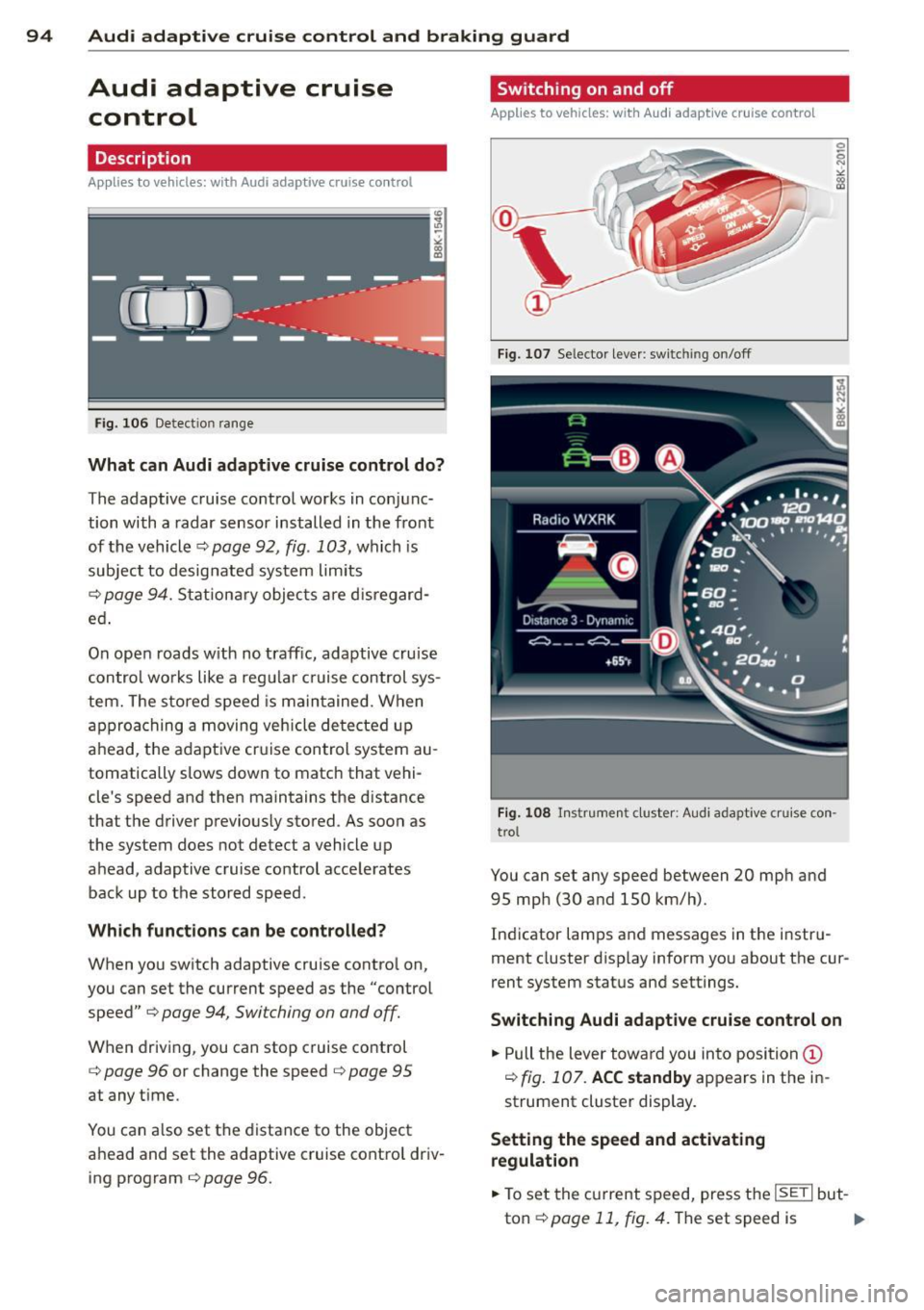
Fig. 106 Detection range
What can Audi adaptive cruise control do?
The adaptive cruise control works in conjunc
tion with a radar sensor installed in the front
of the vehicle¢
page 92, fig. 103, which is
subject to designated system limits
¢
page 94. Stationary objects are disregard
ed .
On open roads w ith no traffic, adaptive cruise
control works like a regular c ruise control sys
tem. The stored speed is maintained. When
approaching a moving vehicle detected up
ahead, the adaptive cruise control system au
tomatically slows down to match that vehi
cle's speed and then maintains the distance
that the driver previously stored. As soon as
the system does not detect a vehicle up
ahead, adaptive cruise control accelerates back up to the stored speed.
Which functions can be controlled?
When you switch adaptive cruise contro l on,
you can set the current speed as the "control
speed"
¢ page 94, Switching on and off.
When driving, you can stop cruise control
¢
page 96 or change the speed ¢ page 95
at any time.
You can also set the distance to the object
ahead and set the adaptive cruise control driv ing program
¢page 96.
Switching on and off
Applies to vehicles: with A udi adapt ive cruise contro l
Fig. 107 Selecto r lever: sw itching on/off
Fig. 108 Instrument cluster: Audi adaptive cruise con
trol
You can set any speed between 20 mph and
95 mph (30 and 150 km/h).
Indicator lamps and messages in the instru
ment cluster disp lay inform you about the cur
rent system status and settings.
Switching Audi adaptive cruise control on
.,. Pull the lever towa rd you into position@
¢
fig. 107. ACC standby appears in the in
strument cluster display.
Setting the speed and activating
regulation
.,. To set the current speed, press the ISETI but-
ton¢
page 11, fig. 4. The set speed is .,..
Page 103 of 286

Audi side assist Lane change assistant
Description
Applies to vehicles: with Audi side assist
Fig. 114 Sensor dete ction ra n ge
Fig. 115 Disp la y on the exterio r mirro r
Side assist he lps you mon itor your blind spot
and traffic behind you r veh icle. With in the
limits of the system, it warns you about
vehicles that are coming closer or that are
traveling w ith you within sensor range
(D
c::, fig . 114 : if a lane change is class ified as crit
ical, the display@ in the exterior mirror
c::> fig. 115 turns on.
The display in the left exterior mirror provides
assistance when making a lane change to the
le ft, while the display in the right exterior mir
r or provides assistance when making a lane
change to the right.
Information stage
As long as you do not activate the turn signal,
side assist
informs you about vehicles that are
detected and classified as crit ical. The display
in the respective mirror turns on, but is d im.
Audi side assist 101
The display remains dim intentionally in the
information stage so that your view toward
the front is not disturbed .
Warning stage
If you activate the turn signal, side assist
warns you about vehicles that are detected
and classified as critical. The display in the re
spective mirror blinks brightly . If this hap
pens, check traff ic by glanc ing in the rearview
mirror and over your shoulder
c::> A in General
information on page 102 .
@ Tips
-You can adjust the brightness of the dis
play @
c::, page 103.
General information
Applies to vehicles: with A ud i side ass ist
®
®
©
Fig. 116 D riving s it u atio ns
Fig . 117 Rea r of th e ve hicl e: pos it io n of the senso rs
Page 111 of 286

Park assist 109
General Information tance signal to sound again at the normal vol-
Applies to vehicles: with parking system (rear, with rear u me.
view camera)
Fig . 125 Covered area (D and uncove red area @of the
rear view came ra
Fig. 126 Trunk lid : Locatio n of the rear view camera
Sensor s in the bumper
Sensors are located in the rear bumpers. If
these detect an obstacle, audible and visual signals warn you. The range at wh ich the sen
sors beg in to measure is approximately:
To the side
2 ft (0.60 m)
Center rear 5.2 ft (1.60 m)
Distance warning when reversing starts when
an obstacle is detected in the range of the
parking assist system. As the distance de
creases, the time interval between the audible
tones becomes shorter.
When the distance is less than 1ft (0.30 m),
the tone becomes continuous. At this point
you should stop backing up.
If the distance to an obstacle stays the same,
the volume of the distance signal chime is
gradually reduced after about 4 seconds (does not affect the continuous s ignal tone). Ap
proach ing another obstacle w ill cause the dis-
Rear view camera coverage area
The MMI display shows the area covered by
the rear view camera
¢fig. 125 ©-Objects
that are not in the area covered @are not
shown on the MMI display.
We recommend that you pract ice pa rking with
the rear view camera in a traffic-free location
or parking lot to become familiar with the sys
tem, the orientation lines, and their function.
When doing this, there should be good light
and weather conditions.
In the MMI display, objects or vehicles appear
closer or further away if:
- you are driving in reverse gear from a level
surface onto an inclin e, or a downward
slope,
- you are driving in reverse gear towa rd pro
truding objects,
- the vehicle is carrying too mu ch load in the
rear.
The accuracy of the orientation lines and blue
surfaces diminishes if:
- the rear view camera does not provide a reli
able image, for example, in poor visibility
conditions or if the lens is dirty,
- the image on the screen is not visible due to
sun glare and reflection.
Caring for the rear view camera lens
The rear v iew camera is located above the rear
license plate bracket. For the parking assist to
operate, the lens
¢ fig . 126 must be kept
clean:
- Dampen the lens w ith a household a lcohol
based glass cleaner, and clean the lens with
a dry cloth
¢ (D.
-Remove snow with a hand brush and ice
preferably with a de-icing spray¢()).
Page 118 of 286

116 Homelink®
Programming the transmitter
(version B)
Applies to vehicles: with Homelink
Fig. 133 Distance between t he rad iator grille and the
hand transm itter
P rogramming: phase 1 on th e control unit
1. Sw itch on the ign it ion (do not start the
engine) .
2. Press and hold both of the outer Home
Link buttons
¢ page 114, fig. 131 unti l
the LED @turns off completely (about
20
seconds). Th is procedure clears the stand
ard codes that were set at the factory and
does not need to be repeated again to
p rogram the other buttons .
3 . Briefly press the Homelink button that
you would like to prog ram .
4. Wai t unti l the LED @ beg ins to blin k
q uickly. The Homelink module wi ll now
remain in learning mode for
5 minutes .
5. Now stand in front of your vehicle with
the original hand transmitter for the ga
rage door opener or for the device that
you would like to allocate to the Home
Link button .
P rogramming: pha se 2 on the radiator
gr ille
6 . Hold the orig inal hand transmitter some
what towa rds the center of your vehicle's
r adiato r grille ¢
fig. 133 .
7. Now activate (p ress) the hand transmit
ter.
8 . Pay attention to the tu rn signals fo r your
vehicle when activating the hand trans
mitter . If the emergency flashers blink
three times, the programming was suc
cessful. If the emergency flasher only blinks one time, the S minute time limit for the adaptation has expired or the pro
gramming was unsuccessful. Repeat the
programming from step 3 on the controls
or select another distance from the radia
tor grille.
9 . If the garage door or other devices still
fail to be activated w it h the HomeL ink
control buttons after programming is
comple ted, it is possib le tha t these sys
tems mig ht be work ing with a roll ing code
instead of the normal f ixed code .
A Roll
ing code pro gramming must be per
formed
¢ page 117 .
Program the remaining two buttons accord ing
to the instructions mentioned above . Begin
similarly with the 3rd step if the program
ming connection was successful for the first
button.
Remote contro l units for garage door openers
in Canada are set to stop transmitting radio
frequency signa ls after two seconds. This time
may not be suffic ient for the Homelink sys
tem to learn the radio frequency signa l. Per
form all other steps as described above.
E rasing the button s
.,. Switch on the ignition (do not start the en
gine).
.,. Press and hold both of the outer buttons un
til the LED @turns off completely (about
20 seconds) to erase all of the buttons si
multaneously .
.. Programmed buttons cannot be erased ind i
vidua lly. Reprogram the buttons if necessa
ry .
Reprogramming the buttons
.. Switch on the ignition (do not start the en
gine) .
.. To reprogram an individua l button, press
and hold the b utton until the L ED@starts
to f lash quickly (after abo ut ten seconds).
Release the button immedia tely. The Home
Link module will now remain in learning
mode for 5 minutes.
.,. Continue with step 5.
Page 122 of 286
120 Driving Safely
• Always keep both feet in the footwell so
that you are in control of the vehicle at all
times.
For detailed information on how to adjust the
driver's seat, see
¢page 62.
A WARNING
Drivers who are unbelted, out of position
or too close to the airbag can be seriously
injured by an airbag as it unfolds. To help
reduce the risk of serious personal injury:
- Always adjust the driver's seat and the
steering wheel so that there are at least
10 inches (25 cm) between your breast
bone and the steering wheel.
- Always hold the steering wheel on the
outside of the steering wheel rim with
your hands at the 9 o'clock and 3 o'clock positions to help reduce the risk of per
sonal injury if the driver's airbag inflates.
- Never hold the steering wheel at the
12 o'clock position or with your hands at
other positions inside the steering wheel
rim or on the steering wheel hub. Hold
ing the steering wheel the wrong way
can cause serious injuries to the hands,
arms and head if the driver's airbag de
ploys.
- Pointing the steering wheel toward your
face decreases the ability of the supple
mental driver's airbag to protect you in a
collision.
- Always sit in an upright position and nev
er lean against or place any part of your
body too close to the area where the air
bags are located.
- Before driving, always adjust the front
seats and head restraints properly and
make sure that all passengers are prop
erly restrained.
- Never adjust the seats while the vehicle
is moving . Your seat may move unexpect
edly and you could lose control of the ve
hicle.
- Never drive with the backrest reclined or
tilted far back! The farther the backrests
are tilted back, the greater the risk of in- jury due to incorrect positioning of the
safety belt and improper seating posi
tion.
- Children must always ride in child safety
seats ¢
page 158. Special precautions
apply when installing a child safety seat
on the front passenger seat¢
page 13 7.
Proper seating position for the front
passenger
The proper front passenger seating position
is important for safe, relaxed driving .
For your own safety and to reduce the risk of
injury in the event of an accident, we recom
mend that you adjust the seat for the front
passenger to the following position :
• Move the front passenger seat back as far as
possible . There must be a minimum of
10 inches (25 cm) between the breastbone
and the instrument panel¢,&. .
• Adjust the angle of the seatback so that it is
in an upright position and your back comes
in full contact with it whenever the vehicle is
moving.
• Applies to vehicles with adjustable head re
straints: Adjust the head restraint so the up
per edge is as even as possible with the top
of your head. If that is not possible, try to
adjust the head restraint so that it is as
close to this position as possible.
• Keep both feet flat on the floor in front of
the front passenger seat.
• Fasten and wear safety belts correctly
¢page 132.
For detailed information on how to adjust the
front passenger's seat, see
¢ page 61.
A WARNING
-
Front seat passengers who are unbelted,
out of position or too close to the airbag
can be seriously injured or killed by the air bag as it unfolds. To help reduce the risk of
serious personal injury: