turn signal AUDI RS5 CABRIOLET 2013 User Guide
[x] Cancel search | Manufacturer: AUDI, Model Year: 2013, Model line: RS5 CABRIOLET, Model: AUDI RS5 CABRIOLET 2013Pages: 286, PDF Size: 71 MB
Page 105 of 286

Have your authorized Audi dealer or au
thorized Audi Service Facility check their
function.
@ Tips
- If the window glass in the driver's door
or front passenger's door has been tint
ed, the display in the exterior mirror may be misinterpreted .
- For Declaration of Compliance to United
States FCC and Industry Canada regula
tions
¢ page 267.
Activating and deactivating
Applies to vehicles: with Audi side assist
Fig. 118 Drive r's d oor : Sid e ass ist bu tton
.. Press the button ¢.&. in General informa
tion on page 102
to switch the system on/
off . The LED in the button turns on when
side assist is switched on.
Adjusting the display brightness
Applies to vehicles: with Audi side assist
The signal brightness can be set in the radio
orMMI* .
.. Select : ICARI function button> Audi side as
sist.
.. Select : I CARI function button > Car systems*
control button > Driver assist > Audi side
assist.
The display brightness adjusts automatically
to the brightness of the surroundings, both in
the information and in the warning stage. In
very dark or very bright surroundings, the dis play is already set to the minimum or maxi
mum level by the automatic adjustment. In
Audi side assist 103
such cases, you may notice no change when
adjusting the br ightness, or the change may
only be noticeable once the surroundings
change.
Adjust the brightness to a level where the dis
play in the information stage will not disrupt
your view forward. If you change the bright
ness, the display in the exterior mirror will
briefly show the brightness level in the infor
mation stage. The brightness of the warning
stage is linked to the brightness in the infor
mation stage and is adjusted along with the
information stage adjustment.
(D Tips
- Side assist is not active while you are
making the adjustment.
- Your settings are automatically stored
and assigned to the remote control key
being used.
Driver messages
Applies to vehicles: wit h Aud i side ass ist
If side assist switches off by itself, the LED in
the button turns off and a message will ap
pear in the instrument cluster display:
Audi side assist unavailable: Sensors blocked
The radar sensors' vision is affected . Do not
cover the area in front of the sensors with bike
wheels, stickers, dirt or other objects. Clean
the area in front of the sensors, if necessary
¢page 101, fig . 117.
Audi side assist: Currently unavailable
Side assist cannot be switched on temporarily
because there is a malfunction (for example,
the battery charge level may be too low) .
Audi side assist: System fault!
The system cannot guarantee that it will de
tect vehicles correctly and it is switched off.
The sensors have been displaced or are faulty.
Have the system checked by an authorized
Audi dealer or authorized Audi Service Facility
soon.
Page 112 of 286

110 Park assist
8_ WARNING
-The parking aid cannot replace the driv
er's attention . The driver alone is respon
sible for parking and similar driving ma neuvers.
- Always keep your eyes on the vehicle's
surroundings, using the rear view mirror
as well.
- Do not allow yourself to be distracted
from traffic by the rear view camera pic
tures.
- If the position and the installation angle
of the camera has changed, for example,
after a rear end collision, do not continue
to use the system for safety reasons. Have it checked by a qualified dealership.
0 Note
- Low obstacles already signaled by a
warning can disappear from the system's
detection range as they are approached
and will not continue to be signaled. Ob
jects such as barrier chains, trailer draw
bars, thin painted vertical poles or fen
ces may not be detected by the system, posing risk of damage.
- Never use warm or hot water to remove
snow or ice from the rear view camera
lens -danger of crack formation on the
lens!
- When cleaning the lens, never use prod
ucts that are abrasive.
Switching on/off
Applies to vehicles: with par king system (rear, with rear
view camera)
The rear view camera switches on automati
cally together with the acoustic park assist
when you put the vehicle in reverse.
Switching on
.,. Put the vehicle in reverse gear, the acoustic
parking system with rear view camera is ac
tivated automatically . Activation of the
acoustic parking system is confirmed by a
brief acknowledgement sound.
Switching off
.,. Drive faster than 9 mph (15 km/h) , or
.,. take the vehicle out of reverse gear. The
acoustic parking system is immediately de
activated , and the rear view camera picture
is deactivated autom atically after a period
of about 15 seconds, or
.,. switch off the ignition.
The delay in deactivating the camera provides an uninterrupted view behind the vehicle es
pecially when maneuvering in tight parking
spaces and prevents the picture from turning off the every time you shift out of reverse .
If the warning message appears in the display
but not the rear view camera picture, read and
confirm the warning message . The acoustic
distance signal is always active.
If you press a function button on the MMI
control console, the rear view camera picture
disappears. The rear view camera picture reap
pears the next time you park .
Further information on the warning message
and the MMI control console can be found in
the MM I instruction booklet .
(D Tips
-The rear view camera picture is available
as soon as the MMI Display or the MMI is
switched on, or the start -up phase is
completed .
- Keep the sensors in the rear bumper and
the rear view camera lens clean and free
of snow and ice, so that the parking sys
tem can work properly. Please follow the
additional notes on
~page 113.
Page 113 of 286

Reverse Parking
Applies to vehicles: with parking system (rear, with rear
view camera)
Parking mode 1 can be used when parking in
a garage or parking space.
F ig. 127 MMI Display : Aiming at a p arking spot
Fig . 128 MMI Disp lay : A lignin g th e ve hicle
• Sw itch the MMI on and se lect the reverse
gear.
• Turn the steering wheel until the orange ori
entation lines
(D appear in the parking spot
c> fig . 12 7. Use the markings @to help you
estimate the distance from an obstacle .
Each marking corresponds to 3
ft (1 m) . The
blue area represents an extension of the ve
hicle 's outline by approximately 16
ft (5 m)
to the rear.
• While driving in reverse gear, adj ust the
steer ing wheel angle to fit the parking space
with the aid
of the orange orientation lines
¢ (D. @ marks the rear bumper . You should
stop driving in reverse as soon as and no lat
er than when the red orientation line@
abuts a n object ¢_&. !
A WARNING
- The rear view came ra does no t show the
entire area beh ind the veh icle
Par k ass ist 111
¢ page 109, fig . 12 5. Watch out espe
cially for small children and animals. The rear view camera cannot always detect
them, posing risk of an accident!
- Please note that objects not touching the
ground can appear to be further away
than they really are (for example, the bumper of a parked vehicle, a trailer
hitch, o r the rear of a truck). In this case,
you shou ld not use the help lines to help
with parking, wh ich poses danger of an
accident!
(D Note
- Low obstacles a lready s ignaled by a
warning can disappear from the system's detect ion range as they are app roached
and wi ll not continue to be signaled. Ob
jects such as barrier chains, trai ler draw
bars, thin painted vert ica l poles or fen
ces may not be detected by the system,
posing risk of damage.
- In the MMI display, the direction of trav
el of the vehicle rear is represented de
pending on the steering wheel angle .
The vehicle front swings out more than
the vehicle rear . Maintain plenty of d is
tance from an obstacle so that your out
side mi rror or a corner of you r vehicle
does not co llide w ith any obsta cles -dan
ger of accident !
Page 114 of 286

112 Park ass is t
Parallel Parking
App lies to vehicles: with park ing system (rear, with rear
view camera)
Use parking mode 2 to help you park on the
edge of a street.
Fig. 129 MMI Display : blue surfa ce in the parking spot
Fig . 130 MMI Display: Blue curve on the curb
The following steps apply only when there is
no obstacle (such as a wall) near the parking
spot. Otherwise, please read the "Tips on
Parking Next to Obstacles".
.. Activate the turn signal.
.. Switch the MMI on and se lect the reverse
gear. The parking aid turns on and parking
mode 1 appears on the display.
.. Position your vehicle parallel to the edge of
the street, approximately 3 ft (1 m) from a
parked vehicle .
"Press the
Mode¢ fig. 129 © control button
on the MMI control console . Parking mode 2
appears .
.. Back up in reverse gear and align your vehi
cle so that the blue area
@ borders on the
rear end of the vehicle or on the parking
spot line. The blue area represents an exten
sion of the vehicle's outline by approximate
ly 16 ft (5 m) to the rear . The long side of the blue area
should be on the curb. The en
tire blue area must fit into the parking spot.
.. Wh ile the vehicle is stationary, turn the
steering wheel to the right as far as it will
go.
" Back into the parking spot. Stop the vehicle
as soon as the blue curve is nea r the curb
r:::;, fig . 130 ¢0.
" W hile the vehicle is stat ionary, turn the
steer ing whee l to the left as fa r as it will go .
.. Continue to back up into the parking spot
until the vehicle is parked parallel to the
curb .@ marks the rear bumper. You should
stop driving in reverse as soon as and no lat
er than when the red orientation line@
abuts an object¢_&. ! Keep an eye on the
front of your vehicle while do ing this
¢ 6) .
Parking ne xt to obstacl es
When there is an obstacle (such as a wa ll)
next to the parking spot, choose a spot with
more space on the sides. Position the long
s ide of the blue area so that there is suff ic ient
space from the curb . The area must not be on
the curb . You will a lso need to start turning
the steer ing wheel much ea rlier . There should
be a sufficient amount of space between the
curb and the blue curve, and t he blue curve
¢
fig. 130 m ust n ot touch the c urb.
A WARNING
- The rear view camera does not show the
entire area behind the vehicle
¢
page 109 , fig. 12 5. Watch out espe
cially for small children and anima ls. The
rear view camera cannot always detect
them, posing risk of an acc ident!
- Please note that objects not touching the
ground can appear to be further away
than th ey really are (for example, the
bumper of a parked vehicl e, a trailer
h itch, o r the rea r of a truck). In this case,
you sho uld not use the help l ines to help
with parking, which poses dange r of an
accident!
.__ _____________ _J ...
Page 115 of 286

(D Note
-In the MMI display, the direction of trav
el of the vehicle rear is represented de
pending on the steering wheel angle.
The vehicle front swings out more than
the vehicle rear. Maintain plenty of dis
tance from an obstacle so that your out
side mirror or a corner of your vehicle
does not collide with any obstacles -dan
ger of accident!
- Remember to maintain sufficient clear
ance from the curb to avoid damaging
the wheel rims.
(j) Tips
The left or right orientation lines and sur
faces will be displayed, depending on the
turn signal being used.
Adjusting the display and warning tones
Applies to vehicles: with parking system (rear, with rear
view camera)
The display and warning tones are adjusted in
the radio or MM!*.
.. Select : I CARI function button > Parking sys·
tern.
Or
.. Select: ~I C~A~R~I function button > Car systems*
control button> Driver assist> Parking aid.
Display
- Off -when the parking system is switched
off, only audible signals are given.
- On -when the parking system is switched
on, the picture from the rear view camera is
displayed.
Warning tones
- Rear volume -
rear sensor volume
-Rear frequency -rear sensor frequency
-Music volume while parking -when the
parking system is switched on, the volume
of the active audio source is lowered.
The newly adjusted value is briefly heard from
the signal generator. The settings are auto matically stored and assigned to the remote
control key.
Park assist 113
A WARNING
- Always make sure that the volume and
frequency of the warning tones is adjust
ed so that you can easily hear the acous
tic distance signal even if the radio is
playing, the air-conditioner blower is on
High or there is a high level of outside
noise.
- Check the settings whenever someone
else has driven the vehicle before you.
@ Tips
- The warning tones can also be adjusted
directly from the rear view camera im
age. Simply press the Settings* control
button.
- Changed settings are activated when
parking assist is switched on again.
Error messages
Applies to vehicles: with parking system (rear, with rear
view camera}
If a warning tone is audible for about five sec
onds when you turn on the ignition, there is a
malfunction in the system. Have the problem
corrected by your authorized Audi dealer.
Keep the sensors in the rear bumper clean and
free from ice so that the acoustic park assist
system can function properly.
Page 117 of 286
.. To open the garage door, press the p rog ram
med button . The LED® will light up or
flash.
.. To close the garage door, press the button
again.
@ Tips
To open the garage door, press the button,
but do not press it for longer ten seconds
or the Homeli nk modu le w ill switch to
programming mode.
Programming the transmitter (version A)
A pp lies to vehicles : wit h Homelink a nd MMI
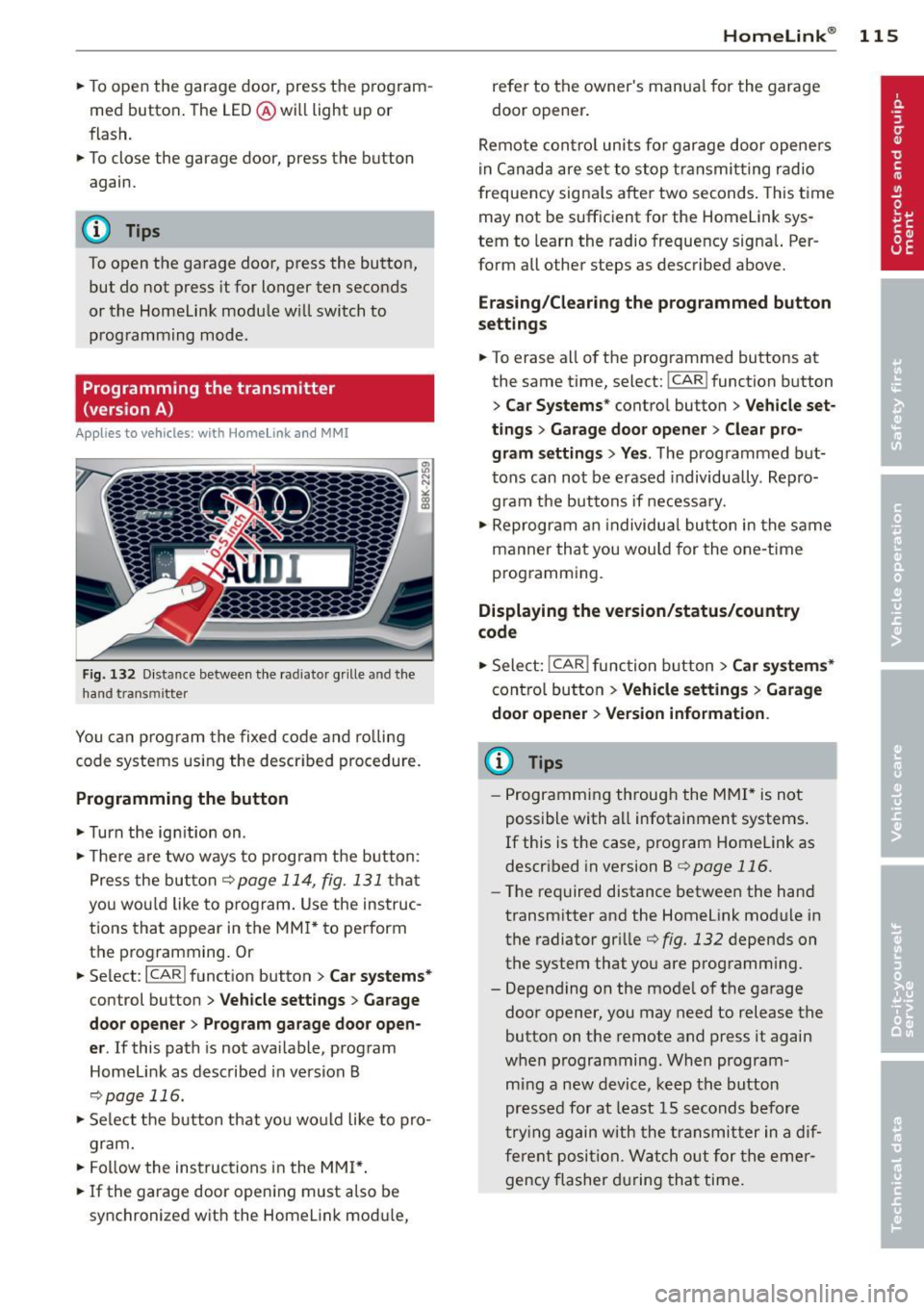
Fig. 132 D istance between t he radia tor grille and t he
hand transmitter
You ca n program the fixed code and ro lling
code systems us ing the described procedure.
Programming the button
.. Turn the ign it ion on .
.. The re a re two ways to prog ram the button:
Press the but ton
¢page 114, fig. 131 that
you wou ld like to program. Use the instruc
tions that appear in the MM I* to perform
the p rogramming. Or
.. Select :
I CARI function button > C ar system s*
control button > Vehicle sett ings > Garage
door opene r> Program garage door open ·
er .
If this path is not ava ilable, program
Homelink as described in vers ion B
¢page 116.
.. Se lect the b utton that you wo uld like to pro
gram.
.. Fol low the instructions in the MMI* .
.. If the garage door open ing must a lso be
synchronized wit h the Homelink mod ule,
Homelink ® 115
refer to the owner's manua l for the garage
door opener .
Remote con tro l units fo r garage door opene rs
in Canada are se t to stop transmit ting radio
frequency signa ls after two seconds . This t ime
may not be sufficient for the Home Link sys
tem to learn the radio frequency signal. Per
form all other steps as described above.
Erasing/Cl earing th e programmed button
s etting s
.. To erase all of the programmed buttons at
the same time, select:
I CAR! function button
> Car Sy stems * contro l button > Vehicle set ·
tings > Garag e door open er > Clear pro·
gr am settings > Yes .
The programmed but
tons can not be erased individua lly . Repro
gram the buttons if necessary .
.. Reprogram an individua l button in the same
manner that you would for the one-time
programming .
Displaying the version /status /country
code
.. Select: !CAR ! function b utton > C ar sy stem s*
cont ro l button > Vehicle setting s > Garage
door opener > Version information .
(D Tips
-Programming through the MMI* is not
possible with a ll infotainment systems .
If this is the case, program Homelink as
descr ibed in version B ¢
page 116.
-The required distance betwee n the hand
transm itter and the Homelink module in
the radiator grille¢
fig. 132 depends on
the system that you are programm ing .
- Depend ing on the mode l of the garage
door opener, you may need to release the
button on the remote and press it again
when programming. When program
m ing a new device, keep the button
pressed for at least 15 seconds before
t ry ing again with the transmit ter in a dif
ferent position. Watch o ut for the emer
gency flasher during tha t time .
Page 118 of 286

116 Homelink®
Programming the transmitter
(version B)
Applies to vehicles: with Homelink
Fig. 133 Distance between t he rad iator grille and the
hand transm itter
P rogramming: phase 1 on th e control unit
1. Sw itch on the ign it ion (do not start the
engine) .
2. Press and hold both of the outer Home
Link buttons
¢ page 114, fig. 131 unti l
the LED @turns off completely (about
20
seconds). Th is procedure clears the stand
ard codes that were set at the factory and
does not need to be repeated again to
p rogram the other buttons .
3 . Briefly press the Homelink button that
you would like to prog ram .
4. Wai t unti l the LED @ beg ins to blin k
q uickly. The Homelink module wi ll now
remain in learning mode for
5 minutes .
5. Now stand in front of your vehicle with
the original hand transmitter for the ga
rage door opener or for the device that
you would like to allocate to the Home
Link button .
P rogramming: pha se 2 on the radiator
gr ille
6 . Hold the orig inal hand transmitter some
what towa rds the center of your vehicle's
r adiato r grille ¢
fig. 133 .
7. Now activate (p ress) the hand transmit
ter.
8 . Pay attention to the tu rn signals fo r your
vehicle when activating the hand trans
mitter . If the emergency flashers blink
three times, the programming was suc
cessful. If the emergency flasher only blinks one time, the S minute time limit for the adaptation has expired or the pro
gramming was unsuccessful. Repeat the
programming from step 3 on the controls
or select another distance from the radia
tor grille.
9 . If the garage door or other devices still
fail to be activated w it h the HomeL ink
control buttons after programming is
comple ted, it is possib le tha t these sys
tems mig ht be work ing with a roll ing code
instead of the normal f ixed code .
A Roll
ing code pro gramming must be per
formed
¢ page 117 .
Program the remaining two buttons accord ing
to the instructions mentioned above . Begin
similarly with the 3rd step if the program
ming connection was successful for the first
button.
Remote contro l units for garage door openers
in Canada are set to stop transmitting radio
frequency signa ls after two seconds. This time
may not be suffic ient for the Homelink sys
tem to learn the radio frequency signa l. Per
form all other steps as described above.
E rasing the button s
.,. Switch on the ignition (do not start the en
gine).
.,. Press and hold both of the outer buttons un
til the LED @turns off completely (about
20 seconds) to erase all of the buttons si
multaneously .
.. Programmed buttons cannot be erased ind i
vidua lly. Reprogram the buttons if necessa
ry .
Reprogramming the buttons
.. Switch on the ignition (do not start the en
gine) .
.. To reprogram an individua l button, press
and hold the b utton until the L ED@starts
to f lash quickly (after abo ut ten seconds).
Release the button immedia tely. The Home
Link module will now remain in learning
mode for 5 minutes.
.,. Continue with step 5.
Page 277 of 286

K
Key ... .... .. .. .... .. .... ... .. .. .... 32
Battery rep lacement ... ... .. .. .. .. .. 33
Check light ..... ...... ... .. .. .. .... 33
Emergency key . . . . . . . . . . . . . . . . . 32, 76
Ignition/engine on/off ............... 74
Key replaceme nt . . . . . . . . . . . . . . . . . . . 32
Mechanical key . . . . . . . . . . . . . . . . . 32, 33
removing . . . . . . . . . . . . . . . . . . . . . . . . . 76
u nl ocking/ locking . . . . . . . . . . . 34, 35, 36
Kick-down . . . . . . . . . . . . . . . . . . . . . . . . . . 89
Knee airbags .... .. ..... ... .. .. .. ... 152
Descript io n ..... .. .... ... .. .. .. ... 152
How t hey work . ... .... ... .. .. .. ... 153
Important safety instructions . . . . . . . . 154
L
Lane Change Ass istant
refer to side assist ..... ... .. .. .. .. . 10 1
L ap time r .. .. .... ......... .... .. .. .. 28
E v a lu ating times . . . . . . . . . . . . . . . . . . . 29
Pausing tim ing . .. ..... ... .. .. .. .. .. 28
Starting ... .. .. ...... ... .. .. .. .... 28
L A T CH .. .. ...................... .. 172
D escr ip ti on ..... ......... .... .. .. . 173
I ns tall ing a chi ld res traint ........... 174
L ocat ion . . . . . . . . . . . . . . . . . . . . . . . . . 17 3
M ounting and releasing the ancho rage
hook . ..... .. ... ..... ... .. .. .. ... 174
L aunch Cont ro l Program .............. 90
Leather . . . . . . . . . . . . . . . . . . . . . . . . . . . 198
C leaning . ................ ...... .. 199
L eaving home . . . . . . . . . . . . . . . . . . . . . . . 53
L eft ha nd d rive . ........... .. .. .. .... 54
Lifting jack .. ............. .... .. ... 248
L ifting vehicle .. .. .. .... ... .. .. .. ... 259
Light adapt ive light ...... ...... .. .. .. .. .. 52
Com ing/ Leavi ng home ............... 53
D aytime r unning lig hts . . . . . . . . . . 52, 53
E xterior lighting . . . . . . . . . . . . . . . . 5 2, 53
I nter ior/reading .. ..... ... .. .. .. .. .. 55
L ow beam . ... .... .... ... .. .. .. .... 52
Rear fog lights . . . . . . . . . . . . . . . . . . . . . 52
Side marker lights . . . . . . . . . . . . . . . . . . 52
Travel mode . . . . . . . . . . . . . . . . . . . . . . . 54
Inde x 275
Light/ rain senso r
Head lights . ... .... . ... ...... ... .. . 52
Intermittent (w indshie ld w ipers) ... .. . 57
Sensor defective . . . . . . . . . . . . . . . . . . . . 22
L ights
E mergency flashe rs . . . . . . . . . . . . . . . . . 54
Hig h beam . ..... ... .. .. ..... ... .. . 53
Turn signals ... .. .. .. ... ..... ... .. . 53
Locking Re ar li d ... .... .. .. . ............... 37
Locking/unlock ing
at the lock cylinder . . . . . . . . . . . . . . . . . . 36
by remote control . . . . . . . . . . . . . . . . . . 34
with t he centra l locking sw itch ... .. .. . 35
wi th t he conve nien ce key .......... .. . 35
Low beams . . . . . . . . . . . . . . . . . . . . . . . . . 52
Lower anchorage locator button ... .. .. 173
Lower universal a nc horage bars (Canada) 172
Lower universal anchorages (Canada) 172
Luggage Stow ing . ... .... .. . .. .. ..... ... .. 124
Luggage compartm ent . . . . . . . . . . . . . . . . 67
En larging . .. .. .. ................. . 67
Li d ............................... 37
L oad ing ... .. .... .. . .. .. ..... ... .. 124
S ki sack ... .. .... .. . .. .. ..... ... .. . 68
Tie-downs . . . . . . . . . . . . . . . . . . . . 68, 125
Luggage compar tment l id
E mergency un lock ing .. ......... .. .. . 38
Lumbar support . . . . . . . . . . . . . . . . . . . . . 62
M
Maintenance .. .. .. .... ........... .. 264
Malfunc tion Ind icator Lamp (MIL) . . 20, 29
Matte finish paint ................... 192
Mechan ica l key . . . . . . . . . . . . . . . . . . 32, 33
Memo ry func tion . . . . . . . . . . . . . . . . . . . . 64
Mileage Average ................ ........... 25
Instantaneous ... .. . .. .... ...... .. . 25
Mirrors Adjusting the exterior mirrors . . . . . . . . . 5S
Compass .. .. .. .. ................. . 59
dimming .. ... .... ........... ...... 56
Vanity mir ro rs .... ........... ...... 57
Monitoring the Advanced Airbag System 148
•
•