instrument cluster AUDI RS5 CABRIOLET 2013 Owners Manual
[x] Cancel search | Manufacturer: AUDI, Model Year: 2013, Model line: RS5 CABRIOLET, Model: AUDI RS5 CABRIOLET 2013Pages: 286, PDF Size: 71 MB
Page 11 of 286

CD
@
®
©
®
®
Door handle
Power locking sw it ch
Memory buttons (dr iver's seat)
Button for side ass ist
A ir outlets
Control leve r for :
- Turn signal and high beam
0 Multi-function steering wheel
with:
- Horn
- Driver's airbag ...... ... .. .
- Audio/video , telephone and
navigation buttons
- Rocker switches for tiptron ic
operation .... .... ... .... .
@ ISETI button .... ....... .... .
® Instrument cluster ......... .
@ Reset button for trip odometer
@ Switches for:
- Windsh ield wiper/washer .. .
- Trip computer ............ .
- Lap -Timer ............ ... .
@ Ignition lock ... .... ... .... .
@ Adju stable steer ing column
@ Control lever for:
- Cruise contro l ....... ... .. .
- adaptive cruise cont ro l ... .. .
@ Instrument lighting .... .. .. .
@ Release lever for the engine
hood .. .. .... .. .. .. ....... .
@ Data Link Connector for On
Board Diagnost ics (OBD II) . .. .
35
64
101
53
14 1
89
11
10
12
57
25
28
74
74
82
92
55
207
29
@ Lig ht switch . . . . . . . . . . . . . . . . 52
@ Adjuster control fo r outside mi r-
rors . . . . . . . . . . . . . . . . . . . . . . 55
@ Power window switches . . . . . . 39
@ Radio-Disp lay or MM I-Disp lay
@ Depending on options:
- Radio system
- CD changer
@ Emergency flasher . . . . . . . . . . 54
@ Glove compartment ( lockable) 6 7
@ Front passenger's a irbag . . . . . 141
Instrument s and control s 9
@ Depending on options, switches
for :
- drive select .. .. . .. ... ... . . 104
- Electron ic Stabili zation Con-
trol ...... .. .. . ... ...... .
- parking sy stem ....... .... . 176
107
@ Deluxe automat
ic cl imate con-
t ro l .... .. .. .. ........... . .
69
@ Se lector lever for automatic
transmission .. .... ........ .
85
@) Ashtray with cigarette lighter 65
@ Depending on options:
- MMI control console or
- drive select . . . . . . . . . . . . . . . 104
- Electronic Stabili zation Con-
trol button . . . . . . . . . . . . . . . 176
- parking system . . . . . . . . . . . . 107
@ Central power w indow swi tch
@ Power top switc h . . . . . . . . . . . . 44
@ I S T AR T ENGINE S TOPI button 77
§) Electromechanical parking
brake . . . . . . . . . . . . . . . . . . . . . 79
(D Tips
- Some of the equipment or features
show n in the general illustration may be
standard equ ipment on your vehicle or
may be opt ional equ ipment depending
on your model. Always as k yo ur au thor
ized Audi dea ler if you have a quest ion
about your ve hicle .
- Ope rat ion of the Multi Med ia In terface
(MMI) is described in a separa te manua l.
Page 12 of 286
10 Instruments and warning/indicator lights
Instruments and warning/indicator Lights
Instruments
Instrument cluster and controls
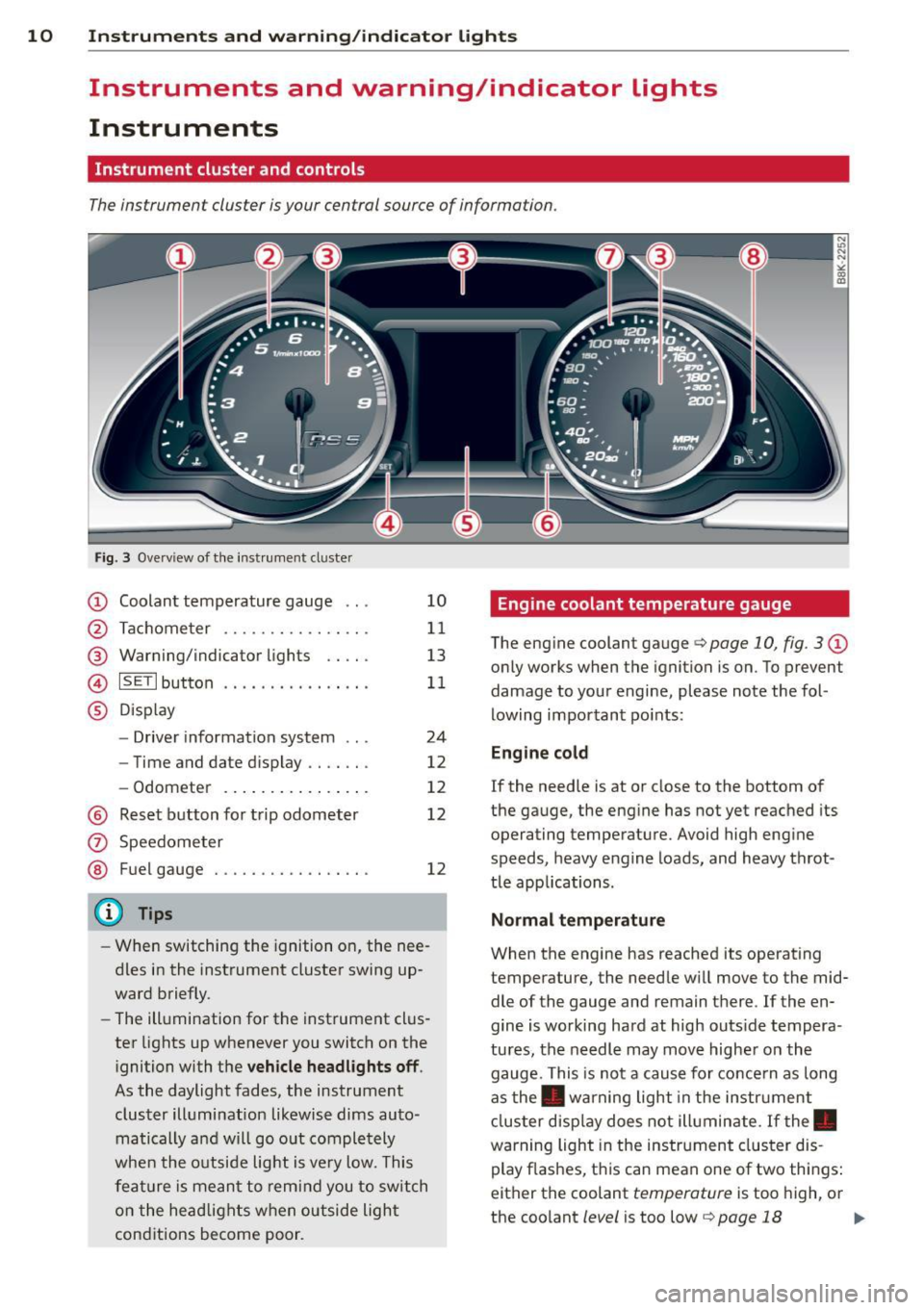
The instrument cluster is your central source of information.
Fig. 3 Ove rv iew of the instrument cluster
CD Coolant temperature gauge .. .
@ Tachometer ........... .. .. .
@ Warning/indicator lights .. .. .
© ISETlbutton .... .... .. .... . .
® Display
- Driver information system .. .
- Time and date d isplay .. .. .. .
- Odometer .......... ... .. .
@ Reset button for trip odometer
(z) Speedometer
@ Fuel gauge . .... ..... .. .. .. .
(D Tips
10
11
13
11
24
12
12
12
12
- When switching the ignition on, the nee
dles in the instrument cluster swing up
ward briefly.
- The illumination for the instrument clus
ter lights up whenever you switch on the
i gnition with the
vehicle headlights off .
As the daylight fades, the instrument
cluster illumination likewise dims auto
matically a nd will go out completely
when the outside light is
very low. This
feature is meant to remind you to switch
on the headlights when outside light
conditions become poor .
Engine coolant temperature gauge
The engine coolant gauge q page 10, fig. 3 CD
only works when the ignition is on. To prevent
damage to your engine, please note the fol
lowing important points:
Engine cold
If the needle is at or close to the bottom of
the gauge, the engine has not yet reached its
operating temperature. Avoid high engine
speeds, heavy engine loads, and heavy throt
tle app lications.
Normal temperature
When the engine has reached its operating
temperature, the needle will
move to the mid
dle of the gauge and remain there . If the en
gine is working hard at high outs ide tempera
tures, the needle may
move higher on the
gauge. This is not a cause for concern as long
as the . warning light in the instrument
cluster display does not illuminate. If the.
warning light in the instrument cluster dis
play flashes, this can mean one of two things:
either the coolant
temperature is too high, or
the coolant
level is too low q page 18 Ill-
Page 14 of 286
12 Instruments and warning/indicator lights
disabled. It is also important to notify your in
surance company about the loss .
Setting the speed warning
By pressing the I SETI button br iefly, you can
set threshold 1 of the speed warning while
you are dr iv ing
~ page 82. By mainta ining
pressure on the ISETI button, you de lete the
warning threshold.
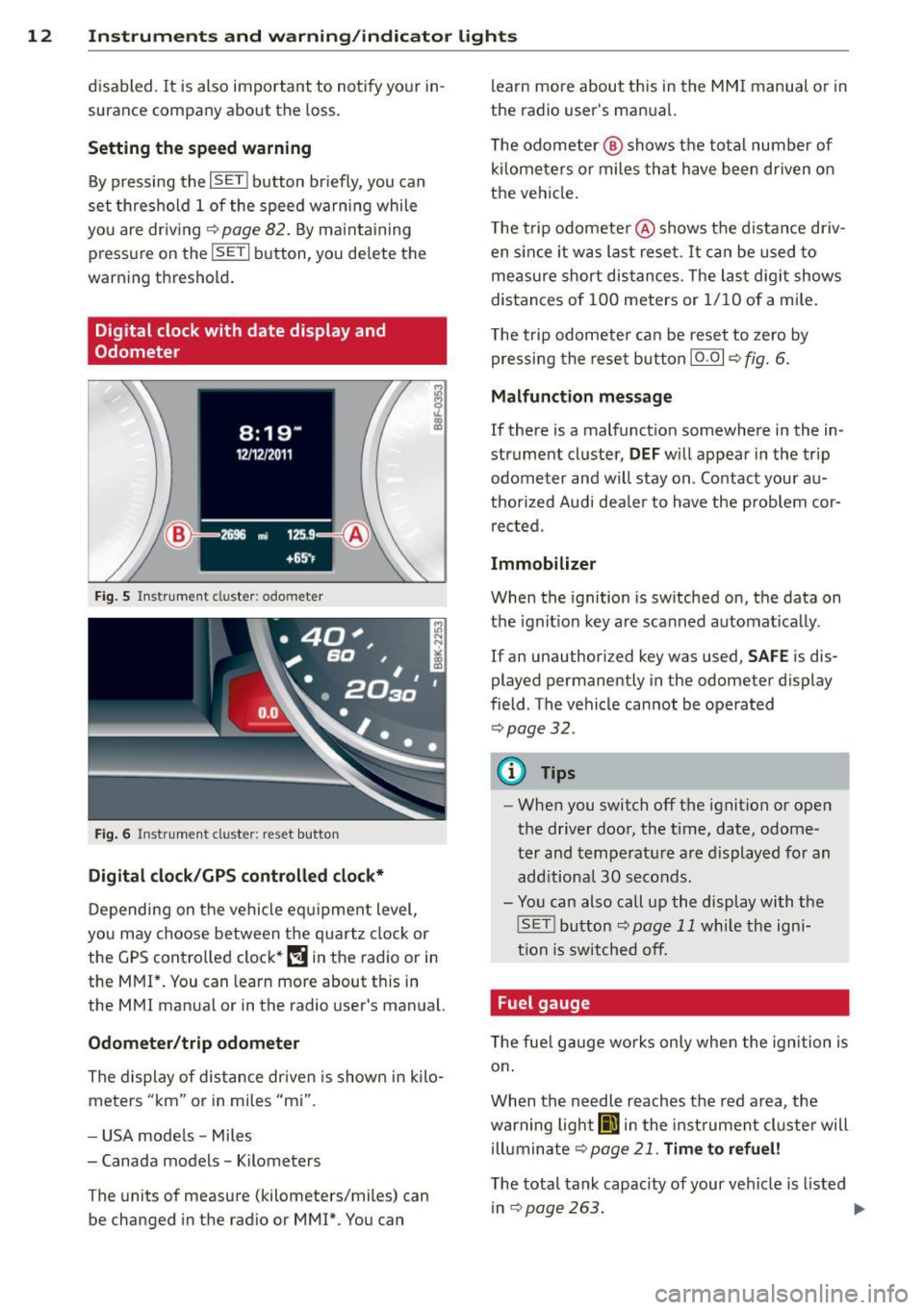
Digital clock with date display and
Odometer
Fig. 5 Instrument cl uster: odo meter
Fig. 6 Instrum ent cl uster : re se t button
Digital clock/GPS controlled clock*
Depending on the vehicle equ ipment level,
you may choose between the quartz clock or
the
GPS controlled clock* (!j in the radio or in
the MMI*. You can learn more about th is in
the MMI manual or in the radio user's manual.
Odometer /trip odometer
The display of distance dr iven is shown in kilo
meters "km" or in miles "mi".
- USA mode ls - Miles
- Canada models - Kilometers
T he units of measure (kilometers/miles) can
be changed in the radio or
MMI*. You can learn more about this in the MM
I manual or in
the radio user's manual.
T he odometer @ shows the total number of
kilometers or miles that have been driven on
the vehicle .
The trip odometer @shows the distance driv
en since it was last reset .
It can be used to
measure short distances. The last digit shows
distances of
100 meters or 1/10 of a mile.
T he trip odometer can be reset to zero by
pressing the reset button IO .OI
~ fig. 6.
Malfunction message
If there is a malfunction somewhere in the in
strument cluster,
DEF will appear in the trip
odometer and w il l stay on . Contact your au
thorized Audi dea le r to have the prob lem cor
rected.
Immobilizer
When the ignition is switched on, the data on
t h e ignition key are scanned automat ically .
If an unauthor iz ed key was used,
SAFE is dis
played permanently in the odometer display
field . The vehicle cannot be operated
~ page 32.
(D Tips
-When you switch off the ignition or open
the-driver door, the t ime, date, odome
ter and temperature are displayed for an
add itiona l
30 seconds.
- You can also call up the display with the
! SET !button
~page 11 wh ile the igni
tion is switched off.
· Fuel gauge
T he fue l gauge works only when the ignition is
on .
When the needle reaches the red area, the
warning light
Ii] in the instr ument cluster will
illuminate
Qpage 21 . Time to refuel!
The total tank capacity of your vehicle is listed
in
~ page 263. .,,.
Page 15 of 286
Instrument s and warnin g/indic ator ligh ts 13
(D Note
Never run the tank completely dry! An ir
reg ular supply of fuel can cause eng ine
m isfiring and fuel could enter into the ex
haust system. The catalyt ic converter
could the n overheat and be damaged .
Warning/indicator
Lights
Description
The indicator lights in the instrument cluster
blink or turn on . They indicate functions or
malfunct ions ¢,&. .
Messages may appear with some indicator
lights. A warning signal will sound at the
same time . The messages disappear again af
ter a short t ime . To display a message again ,
pressthelSE T!button
¢ page 11. If severa l
malfunc tions occu r, each of the indica to r/
warn ing lamps will be d isplayed in succession
for abo ut two seconds at a time .
Some ind icators lights in the disp lay can turn
on in several colors.
_& WARNING
- F ailure to heed warning lights and o ther
impor tant vehicle info rmation may result
in serious persona l injury o r vehicle dam
age.
- Whenever sta lled or stopped for repair,
move the vehicle a safe distance off the
road, stop the engine, and turn on the
eme rgency flasher¢
page 54.
-The e ngine compartment of any motor
vehicle is a potentially hazardous area.
Before you check anything in the engine
compartment, stop the engine and let it
cool down. Always exercise extreme cau
t ion when wor king under the hood
¢ page 200, Engine compartment
(D Tips
Ma lfunctions or faults w ill be identified ei
ther with a red symbo l (pr io rity 1 -Dan- ger!) or with a yellow symbol (prio
rit y 2 -
Warning).
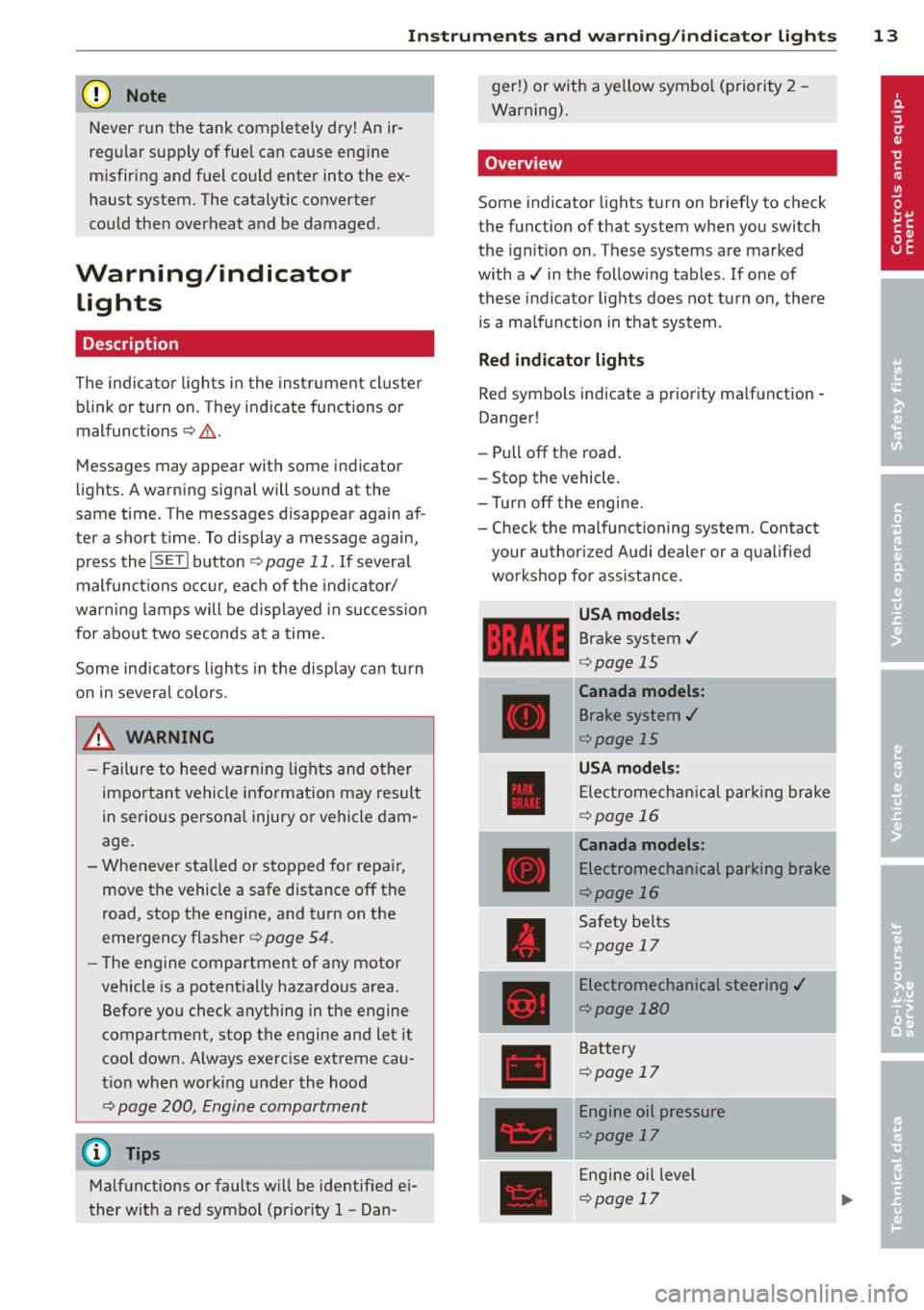
' Overview
Some indicator lights t urn on briefly to check
the function of that system when you switch
the ignit ion on . These systems are marked
with a../ in the fo llow ing tables . If one of
these indicator lights does not tu rn on, there
i s a ma lf u nct ion in that system.
Red indicator lights
Red symbo ls indicate a prior ity ma lfunction -
Danger!
- Pull off the road .
- Stop the vehicle.
- Tur n off the engi ne.
- Check t he malfunc tioning system. Contac t
your author ized A udi dealer or a q ualified
workshop for assistance.
USA models :
Brake system../
¢page 15
----~r~
Canada models:
Brake system ../
¢page 15
USA mod els :
Elec tromech anical parki ng br ake
¢ page 16
Canada models:
Electromechanical parking brake
¢page 16
Safety be lts
¢ page 17
Electromechanical steering ../
¢page 180
Battery
¢page 17
Engine oil pressure
¢page 17
Eng ine oil level
¢page 17
Page 21 of 286

Instruments and warning/indicator lights 19
!;.!~ Electronic Stabilization Control
(ESC)
If the Jjj indicator lamp blinks while driving,
the ESC or ASR (Anti-Slip Regulation) is active
l y regulating.
If the Ji) i ndicator lamp illuminates, the sys
tem has switched the ESC
off. In this case, you
can switch the ignition
off and then on to
switch the ESC on again. Th e system is func
tioning completely when the indicator lamp
switches
off.
If the II indicator lamp illuminates, the ESC
was switched
off with the I ~ OFF ! button.
Stabilization control (ESC/ABS): Fault! See
owner's manual
I f the indicator light Jj;] and the ABS ind icator
light
E (USA models) / ti] (Canada mod
e ls) turn on and the message appears, there is
a ma lfunction in the ABS system or e lectronic
differential lock. This also interrupts the ESC.
The brakes still function with their normal
power, but ABS is not active.
Drive to your authorized Audi dea le r immedi
ately to have the malfunction corrected .
For more information about the ESC
c:> page 176.
ABS/( §) Anti-lock braking system (ABS)
This warning/indicator light monitors the ABS
and the electronic differential lock (EDL).
The warning/ind icator light E (USA mod
els)/ ti] (Canada models) w ill come on for a
few seconds when the ignition is switched on.
The light will go o ut after an automatic check
sequence is completed.
There is a malfunction in the ABS when:
- The warning/indicator light does not illumi
na te when you switc h the ignition on.
- The warning/indicator light does not go out
after a few seconds.
- The warning/ind icator light illuminates
while driving. T
he ESC indicator light also illuminates if
there is a ma lfunction in the ABS . The mes
sage
Stabilization control (ESC): Fault! See
owner's manual
a lso appears in the instru
ment cluster d isplay and a warning tone
sounds.
The brake system will still respond even
without the assistance of the ABS system.
See your authorized Audi dealer as soon as
possible to restore full braking performance .
For more information regarding the ABS
c:>page 176.
Malfunction in the brake system
If the brake warning light c:> page 15 and the
ABS warning illum inate
together there may be
a malfunction in the ABS, and there may also
be a malfunction in the brake system itself
c:> &. The ABS will not work and you will no
tice a change in braking response and per
formance.
In the event of a malfunction in the brake
system
the warning/indicator light 1111
(USA mode ls)/ . (Canada models) in the in
strument cluster flashes
c:> page 15.
Malfunction in the electronic differential
lock (EDL)
The EDL works together with the ABS. The
ABS wa rning light will come on if there is a
malfunction in the EDL system
c:> page 176.
See your authorized Audi dealer as soon as
possible .
A WARNING
---=-if the E (USA mode ls)l ti] (Canada
models) warning light does not go out,
or if it comes on while dr iving, the ABS
system is not working properly. The vehi
cle can then be stopped only w ith the
standard brakes (without ABS). You w ill
not have the protection ABS provides.
Con tact your authorized Aud i dealer as
soon as possible.
- USA models: If the 1111 warning light
and the
E warning ligh t come on to
gether, the rear whee ls could lock up
Page 22 of 286

20 Instruments and warning /indicator lights
first under hard braking. Rear wheel lock
up can cause loss of vehicle control and
an accident. Have your vehicle repaired
immediately by your authorized Audi
dealer or a qualified workshop . Dr ive
slowly and avoid sudden, hard brake ap
plicat ions.
- Canada models: If the brake warning
light . and the ABS warning light
II]
come on together, the rear wheels could
lock up first under hard braking. Rear
wheel lock -up can cause loss of vehicle
control and an accident . Have your vehi
cle repaired immediately by your author
ized Audi dea ler or a qualified workshop.
Drive slowly and avoid sudden, hard
brake applicat ions.
I I !i.' Safety systems
The fl (USA models) ;fll (Canada models) in
dicator light monitors the safety systems (e .g.
a ir bags, pretensioners) and illuminates for a
few seconds each time you switch the ignition
on.
If the
I (USA models)/ E,I (Canada mode ls)
indicator light does not go out, or if it illumi
nates whil e you are driv ing, or if it sta rts to
blink, then there is a ma lf unct ion somewhere
in the system. If the light does not illuminate
when you switch the ignition on, this also
means there is a ma lfunction.
A WARNING
If you have a malfunction in the safety sys
tems, contact your authorized Audi dealer
immediately. Otherwise the safety sys
tems may not work properly in an acci
dent .
(0) Worn brake pads
EIJ Brake pads!
If the warn ing light illuminates, immediately
contact your authorized Audi dealer or quali-
l ) - : USA models onl y
fied workshop to have all brake pads inspect
ed. On USA models the warning light
EIJ
comes on together w ith the warning light
1111 . Both sets of brake pads on an ax le
must always be replaced at the same time.
A WARNING Co-- -
Driving with bad brakes can cause a colli
sion and ser ious personal injury.
- If the warn ing light
EIJ and the warn ing
light
11111> with the message Brake
pads!
comes on in the instrument cluster
d isplay, immediately contact you r au
thorized Audi dealer or qualified work
shop to have all brake pads checked or
replaced if necessary.
EPC Electronic power control
This warning/indicator light monitors the
electronic power control.
The
(m warning/indicator light (Electronic
Power Control) illuminates when you sw itch
the ignition on as a function check.
(D Tips
If this warning/ indicator l ight illum inates
while you a re driving, then there is a mal
funct ion in the engine electronics. Have
the malfunct ion corrected as soon as pos
s ib le by your authorized Audi dealer or
qualified repair facility.
o Malfunction Indicator Lamp (MIL)
The Malfunction Indicator Lamp (MIL) is part
of the On-Board Diagnostic (OBD II) system.
The symbol
¢.j lights up when the ignition is
switched on and will turn off after the engine
has started and has settled at a constant idle
speed. This indicates that the MIL is working
properly.
The warning light illuminates when there is a
malfunction in the engine electron ic system . ..,.
Page 27 of 286
Trip computer
Introduction
The trip computer gives you information on
current and average fuel mileage, average
speed, fuel range and driving time .
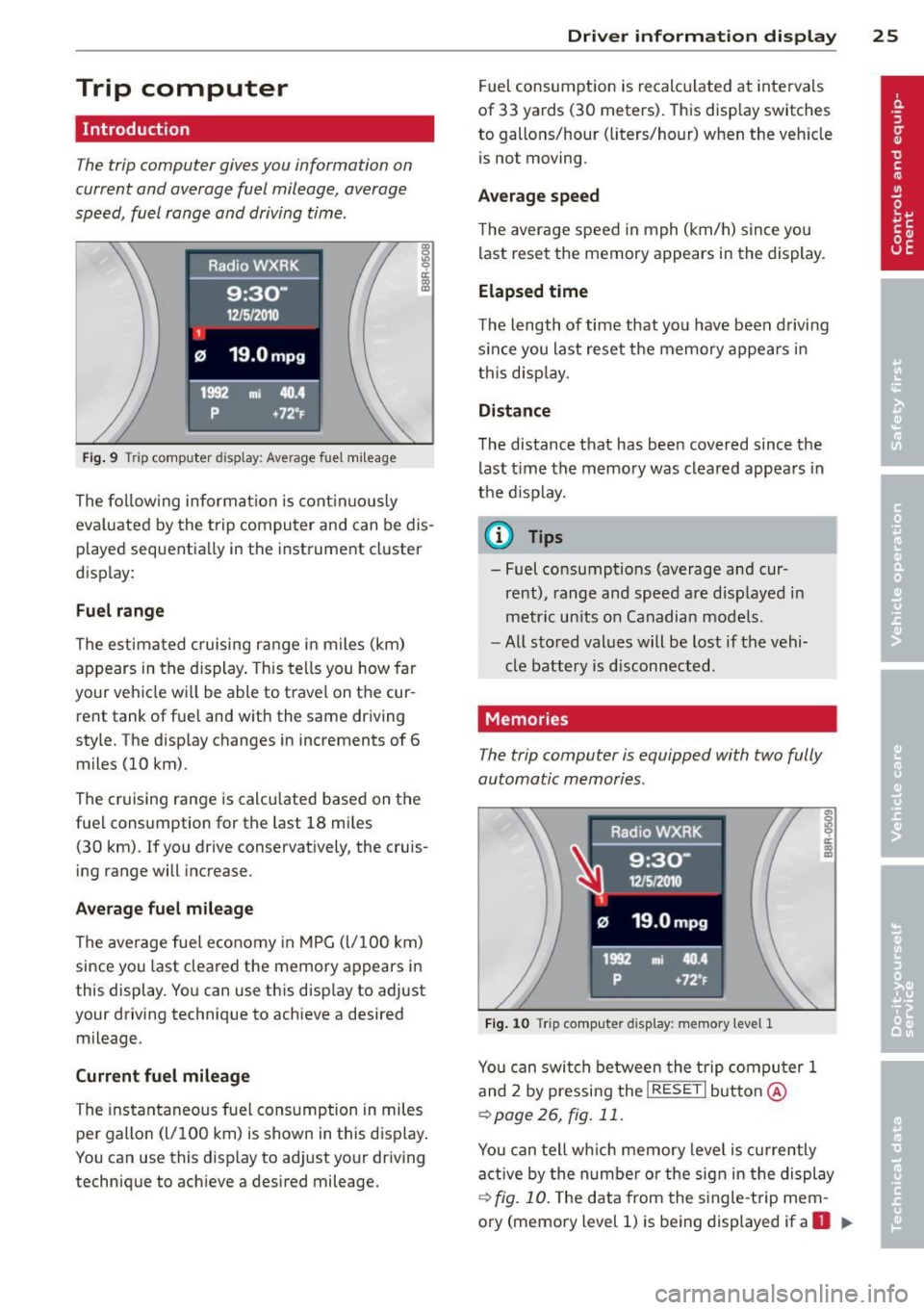
Fig. 9 Trip computer display: Average fuel mileag e
The following information is continuously
eva luated by the trip computer and can be dis
p layed sequentially in the instrument cluster
display:
Fuel range
The estimated cruising range in miles (km)
appears in the display. This tells you how far
your vehicle wi ll be able to travel on the cur
rent tank of fue l and with the same driving
style. The display changes in increments of 6
miles (10 km).
The cruising range is calcu lated based on the
fuel cons umption for the last 18 mi les
(30 km) . If you drive conservatively, the cruis
ing range will increase.
Average fuel mileage The average fuel economy in MPG (l/100 km)
since you last cleared the memory appears in
this display. You can use this disp lay to adjust
your driving technique to achieve a desired mileage .
Current fuel mileage
The instantaneous fuel consumption in miles
per gallon (l/100 km) is shown in this display .
You can use this display to adj ust yo ur driving
technique to ach ieve a desired mileage.
Driver information display 25
Fuel consumption is recalcu lated at intervals
of 33 yards (30 meters). This display switches
to gallons/hour (liters/hour) when the veh icle
is not moving.
Average speed
T he average speed in mph (km/h) s ince you
last reset the memory appears in the display.
Elapsed time
The length of time that yo u have been driving
s ince you last reset the memory appears in
th is disp lay.
Distance
The distance that has been covered since the
last time the memory was cleared appears in
the d isplay .
(0 Tips
- Fuel consumptions (average and cur rent), range and speed are displayed in
metric units on Canadian mode ls.
- All stored values will be lost if the vehi
cle battery is disconnected.
Memories
The trip computer is equipped with two fully
automatic memories.
Fig. 10 Trip computer display: memor y leve l 1
You can switch between the trip computer 1
and 2 by pressing the
I RESET I button @
r:=>poge 26, fig. 11.
You can tell which memory leve l is currently
active by the numbe r or the sign in the display
r:=>fig. 10. The data from the single-trip mem
ory (memory level 1) is being displayed if a
O II>
Page 28 of 286
26 Driver in formation d isplay
appears in the display . If a fJ is shown, then
the data from the total-trip memory is being
d isp layed (memory leve l 2) .
Single-t rip memory (Trip computer 1 )
The single-t rip memory s tores the trip infor
mat ion from the time the ignition is turned on
unti l it is tu rned off. If the trip is continued
within 2 hours from the time the ignition was
tu rned off, the new data will be included in
the calculation of the current trip informa
tion . If the trip is interrupted for
more than 2
hours
the memory is reset automatically .
Total-tr ip memory (Trip computer 2 )
Unlike the sing le-trip memory, the tota l-trip
memory is not reset automatically. Th is per
mits you to evaluate your driving data for the
entire period between manual resets.
Operation
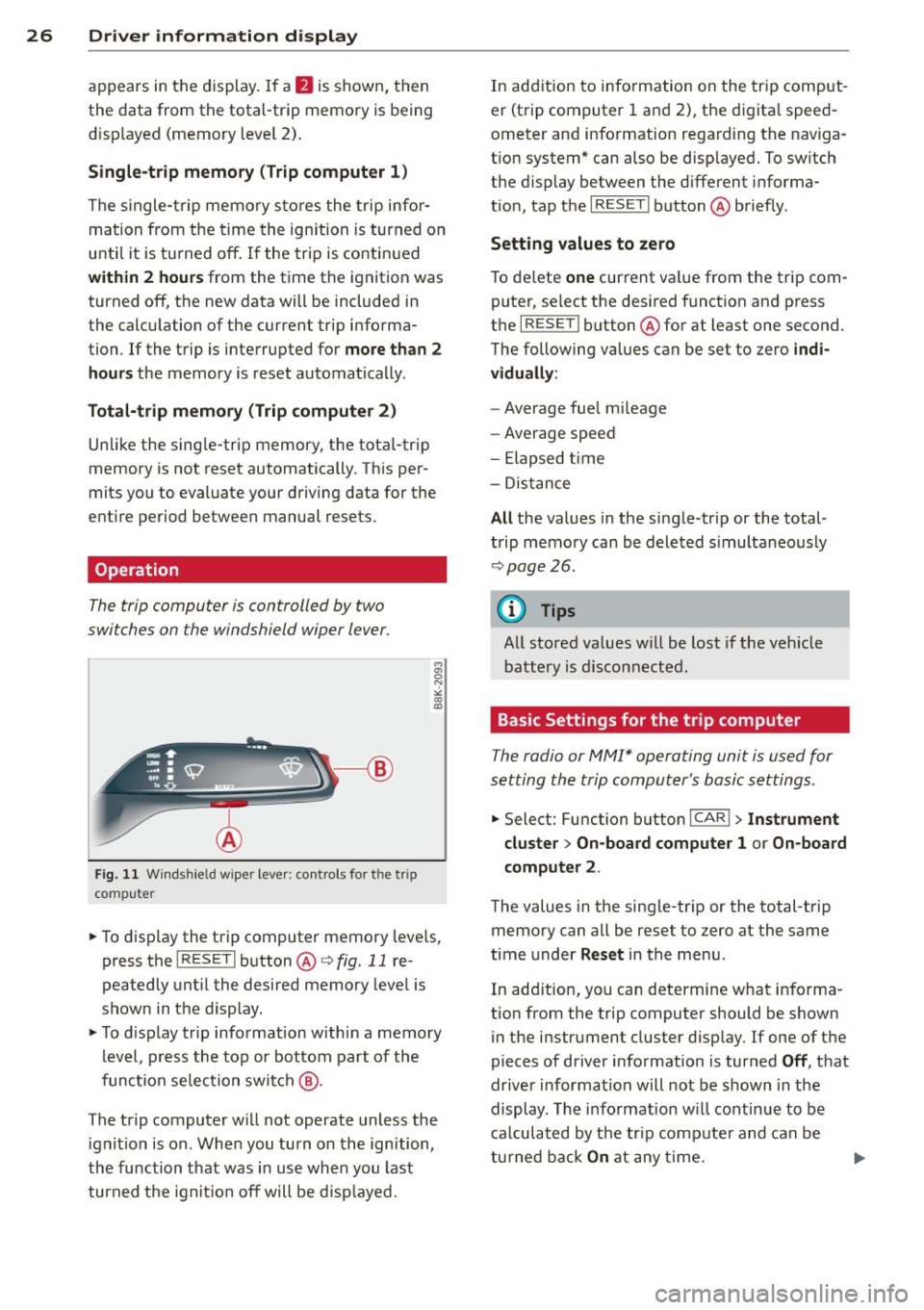
The trip computer is controlled by two
switches on the windshield wiper lever.
F ig. 11 Windsh ie ld wipe r leve r: co ntro ls for t he tri p
co mpute r
M
"' 0 N
><
"' a,
.. To display the trip computer memory leve ls,
press the
I RESE T I button @c:> fig. 11 re
peatedly unt il the desired memory leve l is
shown in the d isplay.
.. To d isplay trip information w ithi n a memory
level, press the top or bottom part of the
function selectio n switch
@ .
The trip computer w ill not operate unless the
ignit io n is on . When you turn on the ignition,
the function t hat was in use when you last
turned t he ignit io n off will be d isp layed. In add
ition to info rmation on the trip comput
er (trip com puter 1 and 2) , the digita l spee d
ometer and information regarding the nav iga
t ion system* can also be disp layed. To sw itch
the d isplay between the d ifferent i nforma
t io n, tap the
I RESE T I button @ briefly .
Setting value s to ze ro
T o de lete one cur rent va lue from the trip com
puter, se lect the des ired funct ion and press
the
I RESE T I button @for at least one second.
The following values can be set to zero
indi
vidually :
-Average fue l mi leage
- Average spee d
- Elapsed time
- Dis tance
All the values in the sing le -tr ip or the total
t rip memo ry can b e deleted s imultaneously
c:> page 26 .
(D Tips
All stored va lues w ill be lost if the veh icle
battery is disconnected.
Basic Settings for the trip computer
The radio or MMI* operating unit is used for
setting the trip computer's basic settings .
.. Select: Function button ICAR ! > Instrument
cluster > On-board computer
1 or On-board
computer 2 .
The values in the sing le-tr ip or the total-trip
memory can all be reset to zero at the same
time under
Reset in the menu .
In add ition, yo u can determine what info rma
tion from the trip computer should be shown in the instrument cluster disp lay. If one of the
pieces of driver information is turned
Off, t h at
drive r information will not be s hown in the
display . Th e info rmation w ill continue to be
ca lcula ted by t he tr ip comp ute r and can be
tu rned back
On at any time.
Page 31 of 286
Displaying intermediate time and pausing
timing
• To disp lay an intermediate time, press the
lower section of the wiper switch ®· The
timing continues to run in the background.
• To pause timing, press the lower section of
the wiper switch ® again .
• To continue t iming, press the upper section
of the wiper switch @.
If timing is paused, you can continue it later
even if you switch the ign it ion off.
Evaluating times and continuing or
resetting timing
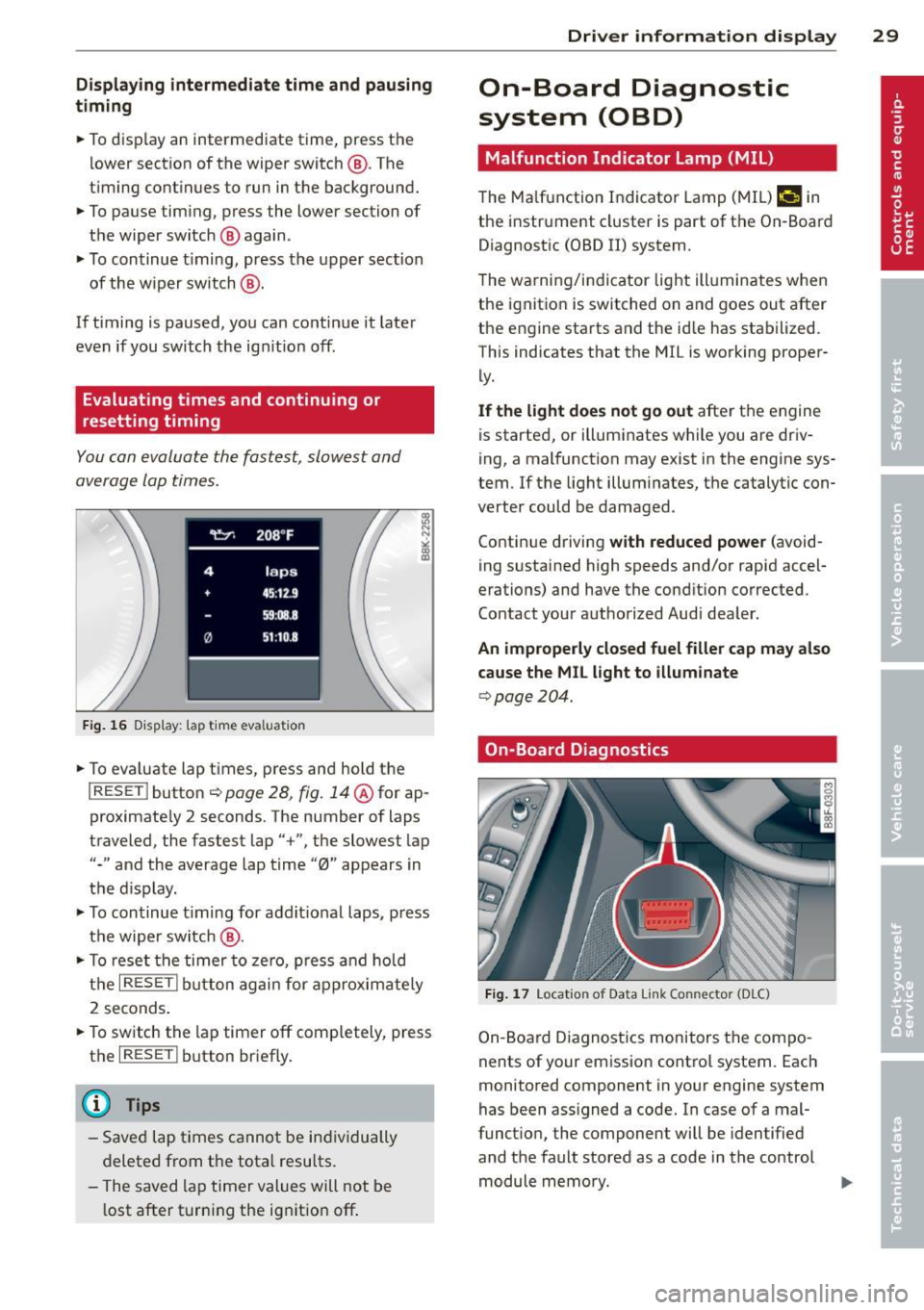
You can evaluate the fastest, slowest and
average lap times.
Fig. 16 Display : lap t ime eva luat ion
• To eva luate lap times, press and hold the
I RESE T I button ¢ page 28, fig. 14@for ap
proximate ly 2 seconds. The number of laps
traveled, the fastest lap"+", the slowest lap
"-" and the average lap time "0" appears in
the display .
• To continue timing for additional laps, press
the wiper switch @.
• To reset the timer to zero, press and hold
the
I RESET ! button again for approximately
2 seconds .
• To switch the lap timer off completely, press
the
I RESE T I button briefly.
(D Tips
-Saved lap times cannot be individually
deleted from the total resu lts.
- The saved lap timer values will not be
l ost after turning the ignition off .
Driver information display 29
On-Board Diagnostic
system (OBD)
Malfunction Indicator Lamp (MIL)
The Malfunction Indicator Lamp (MIL)¢• in
the instrument cluster is part of the On-Board
Diagnostic (OBD II) system .
T he warning/indicator light illuminates when
the ignition is switched on and goes out after
the engine starts and the id le has stabilized.
This indicates that the MIL is working proper
ly.
If the light does not go out after the engine
is started, or illuminates while you are driv
ing, a malfunction may exist in the engine sys
tem .
If the light illuminates, the catalytic con
verter could be damaged .
Continue driving
with reduced power (avoid
ing sustained high speeds and/or rapid accel
erations) and have the condition corrected.
Contact your authorized Audi dealer.
An improperly closed fuel filler cap may also
cause the MIL light to illuminate
¢ page 204.
On-Board Diagnostics
Fig. 17 Locat io n of Data Link Co nn ector (D LC)
On-Board Diagnostics monitors the compo
nents of your emission contro l system. Each
monitored component in your engine system
has been assigned a code. In case of a mal
funct ion , the component will be identified
and the fault stored as a code in the control module memory.
Page 44 of 286

42 Power top
Power top
Automatic power top
General information
The sophisticated design of the fabric power
top allows you to operate it easily and quickly.
You can open and close the power top while
driving as long as the vehicle is traveling be
low 30 mph. When open, the power top is
stored in a special compartment which is
equipped with a cover.
Under normal conditions, the power top is
wind- and waterproof . In rare cases, small
droplets of water may form under extreme
weather conditions such as torrential or pro longed rain. That is normal and no cause for
concern.
F ollow the maintenance instructions to main
tain the attractive appearance of the converti ble and to ensure that it does not leak
<=> page 192, Power top care. Also observe
the following:
- Only open and close the power top when it is
clean. Sharp-edged particles of dirt can
scratch the rear window when the power top
is folded and can cause abrasion that result
in damage to the power top over time. You
should also remove ice and snow before
opening the power top.
- Never remove snow and ice with sharp
edged objects. You can remove ice from the
rear window w ith a standard ice scraper .
- You should on ly open the power top when it
is completely dry. Opening the power top
and stowing it in the compartment when it
is wet can cause marks on the top that de
tract from its appearance. Mildew can also
form if the power top is stowed for an ex
tended period of time when it is wet.
- Do not leave the power top open for several
weeks at a time. Always close it between
uses to prevent discoloration and creases
from forming. This is especially important if
it was not completely dry when stowed.
- Opening or closing the power top in temper
atures below 32 °F
(0 °() is not recommend- ed because the flexibility of the fabric
de
creases is sub-zero temperatures .
A WARNING
--When operating the power top, make
sure the function is not affected by wind
or other factors and that it does not in
terfere w ith other dr ivers.
- Never drive when the power top is not
locked correctly. The wind from driving
could cause the power top to open . This
can result in injuries and damage to the
veh icle.
- When opening and closing the power
top, make sure no one will be injured by
the supports and other moving parts.
- Operating the power top reduces the
headroom in the rear of the vehicle.
Make sure there is enough clearance be
tween the rear passenger and the power
top when opening and closing it.
-
-When operat ing the power top, visibility
to the rear is limited . Avo id operat ing the
top while driving in reverse.
(D Note
-Always make sure there is enough clear
ance above the vehicle so the power top
is not damaged when opening and clos
ing it.
- Do not store any objects in the power top
compartment to avoid damage when
opening the top.
@ Tips
- To prevent the battery from discharg ing,
do not open or close the power top re
peated ly when the engine is switched
off.
-A message in the instrument cluster dis
play will a lert you if a protection function
was activated or if there is a malfunction
<=>page 43.
-The power top can also be operated
manually if there is a malfunction
<=> page 47, Power top emergency op
eration.
Have you authorized Audi dealer .,..