wheel AUDI RS5 CABRIOLET 2013 User Guide
[x] Cancel search | Manufacturer: AUDI, Model Year: 2013, Model line: RS5 CABRIOLET, Model: AUDI RS5 CABRIOLET 2013Pages: 286, PDF Size: 71 MB
Page 90 of 286

88 Transmission
-Unintended vehicle movement can cause
serious injury .
- Never leave your vehicle with the engine
running while in gear. If you must leave
your vehicle when the engine is running,
activate the parking brake and move the
selector lever to P .
- Power is still transmitted to the wheels
when the engine is running at idle. To
prevent the vehicle from "creeping", you
must keep your foot on the brake when
the engine is running and the selector
lever is in D/S or R or "tiptronic" mode is
selected.
- Do not press the accelerator pedal when
changing the selector lever position
while the vehicle is stationary and the
engine is running.
- Never shift into
R or P while driving.
- Before driving down a steep slope, re-
duce your speed and shift into a lower
gear with "tiptronic".
- Do not ride the brakes or press the brake
pedal too often or too long when driving
down a hill. Constant braking causes the
brakes to overheat and substantially re
duces braking performance, increases
braking distance or causes complete fail
ure of the brake system.
- To prevent the vehicle from rolling back
when stopping on inclines, always hold it
in place with the brake pedal or parking
brake .
- Never hold the vehicle on an incline with
a slipping clutch . The clutch opens auto
matically when it becomes too hot from
the overload . An indicator lamp
[O] illu
minates and a driver message appears
Q page 90 when the clutch is overload
ed.
- If the engine must remain running, never
have any driving position engaged when
checking under the hood. Make sure the
selector lever has securely engaged and
is locked in P with the parking brake set
Q page 200, Engine compartment . Oth
erwise, any increase in engine speed may set the vehicle in motion, even with the
parking brake applied.
@ Note
- When stopping on an incline, do not try
to hold the vehicle in place by pressing
the accelerator pedal while a driving gear is selected. This can cause the transmis
sion to overheat and can damage it. Acti
vate the parking brake or press the brake
pedal to prevent the vehicle from rolling .
- Allowing the vehicle to roll when the en
gine is stopped and the selector lever is
in N will damage the transmission be
cause it is not lubricated under those cir
cumstances.
(D Tips
For safety reasons, the parking brake is re
leased automatically only when the driv
er's safety belt is engaged in the buckle.
Hill descent control
The hill descent control system assists the
driver when driving down declines.
Hill descent control is activated when these
lector lever is in D/S and you press the brake
pedal. The transmission automatically selects
a gear that is suitable for the incline. Hill de
scent control tries to maintain the speed ach
ieved at the time of braking, within physical
and technical limitations. It may st ill be nec
essary to adjust the speed with the brakes.
Hill descent control switches off once the de
cline levels out or you press the accelerator
pedal.
On vehicles with the cruise control system*
Q page 82 , hill descent control is also activat
ed when the speed is set.
A WARNING -
Hill descent control cannot overcome
physical limitations, so it may not be able
to maintain a constant speed under all
Page 91 of 286

conditions. Always be ready to apply the
brakes.
Manual shift program
Using the manual shift program you can
manually select gears.
Fig. 99 Ce nter console: shift ing t he gea rs manually
Fig. 100 Stee ring wheel: S hift b uttons
Gear selection with selector lever
The tiptronic mode can be selected either with
the vehicle stationary or on the move.
.. Push the selector lever to the right from 0/
5. An M appears in the instrument cluster
display as soon as the transmission has
shifted.
.. To upshift, push the selector lever forward
to the plus position
0 c:> fig. 99 .
.. To downshift, push the lever to the minus
position
0 -
Gear selection with paddle levers*
The shift buttons are activated when these
lector lever is in 0/5 or the t iptronic manual
shift program .
.. To upshift, touch the button on the right
0
c> fig . 100. Transmission 89
.. To downshift, touch the button on the left
0.
.. If you do not press a sh ift button within a
short time while in the 0/5 position, the
transmission will return to automatic mode.
To keep shifting using the shift buttons,
move the selector lever to the r ight out of
the 0/5 position .
When accelerating, the transmission does
not
automatically shift to the next gear shortly
before the maximum permitted engine RPM is
reached.
If you have selected a lower gear than the cur
rent one, the automatic transmission will shift
down only when the engine will not be over
revved.
With kick-down, the transmission shifts into a lower gear depend ing on speed and engine
RPM .
(D Tips
Tiptronic is inoperative when the transmis
sion is in the fail-safe mode .
, Kick-down
Kick-down enables maximum acceleration.
When you depress the accelerator pedal be
yond the resistance point, the automatic
transmission downshifts into a lower gear, de
pending on vehicle speed and engine speed .
The upshift into the next higher gear takes
place once the maximum specified engine
speed is reached .
.&_ WARNING
Please note that the whee ls can spin if
kick-down is used on a smooth s lippery
road -there is a risk of skidding.
-
Page 92 of 286

90 Transmi ssion
Launch Control Program
Th e Launch Cont rol Program provides the
best accel eration possible when starting from
a st op .
R equirement : The engine must be at operat
i n g t emp eratur e and the steering wheel must
not be turned .
.,. Press the
I~ O FFI button c:> page 178 while
the engine is running. The
I) indicator light
i lluminates in the instrument cluster and
Stabilization contro l (ESC ): Sport . Warn
ing! Re stricted stability
appea rs in the dr iv
er information system d isplay.
.,. Move the selec tor lever to the D/S pos ition
to select sport mode (S) or select the
dy
nami c
driving mode in drive select*
c:> page 105.
... Press the brake peda l strongly with your left
foot and hold it down for at least 1 second.
.,. At the same t ime, press the accelerator ped
al down complete ly w ith your r ight foot un
t il t he engine reaches and maintains a h igh
RPM .
• Remove you r foot from the brake pedal
withi n S seconds
c:> &, .
&_ WARNING
-Always adapt you r driving to the traffic
flow .
- O nly use the Launch Control Program
when road and traffic con dit ions allow it
and other dr ivers will not be endangered
o r annoyed by yo ur dr iv ing and t he vehi
cle's acce lerat ion.
- Please note that the driving wheels can spin and the vehicle can break away
w hen ASR and ESC are in sport mode, es
p ecially when the road is slippe ry.
- Once yo u have accelerated, yo u should
switch the ESC back on by pressing the
1.$ O FF I button .
(D Tips
- The transm ission temperat ure may in
crease significantly after using the Launch Control Program . If that hap- pens, the p
rog ram may not be availab le
for a few minutes . It will be available
again after a cool-down period .
- When accelerating using the La unch
Cont ro l program, a ll vehicle parts are
subject to heavy loads. Th is can result in
increased wear.
Transmission malfunction
[O] Transmission: Press brake pedal and se
lect gear again .
Press the brake peda l and select the desired
selector lever position again. You ca n then
co nti nue driving .
[O] Transmission overheating: Please drive
conservatively.
T he transmiss ion temperat ure has inc reased
significantly due to the sporty d riving manner .
Drive in a less sporty manner until the tem
perature returns to the normal range and the
indicator light switches of.
[O] Transmission malfunction: You can con
tinue driving
T he re is a system mal func tion in the transm is
sion . You may cont inue driving .
Drive to yo ur
autho rize d Aud i dea le r or qualified repair fa
c ili ty soon to have the ma lfunction corrected.
[O] Transmis sion malfunction : Limited driv
ing functionality
T he re is a system malfunction in the t ransm is
s io n. The transm ission is swi tching to emer
gency mode. This mo de on ly shifts in to cer
tain gears or will no longer shift at all. The en
gine may sta ll. Drive to your authorized Audi
dealer or qualif ied repair facility immediately
to have the malfunction corrected.
[O] Ii] T ran smission malfunction : No re verse
You can continue driving
T he re is a sys tem mal func tion in the transm is
s io n. The transm iss ion is swi tch ing to eme r
gency mode. This mode on ly shifts into cer -
tain gears o r will no longer shift at all . The en
gine may sta ll. You cannot engage the
reverse liJJ,
Page 104 of 286

102 Audi side assist
Side assist functions at speeds above approxi
mately 19 mph (30 km/h).
(D Vehicles that are approaching
I n certain cases, a vehicle will be classified as
cr itica l for a lane change even if it is still
somewhat far away . The faster a vehicle ap
proaches, the sooner the display in the exteri
or mirror will turn on.
@ Vehicles traveling with you
Vehicles traveling with you are indicated in the
exterior m irror if they are classified as critica l
for a lane change. All vehicles detected by
side assist are indicated by the time they en
ter your "blind spot", at the latest.
@ Vehicles left behind
If you slowly pass a vehicle that side assist has
detected (the difference in speed between the
vehicle and your vehicle is less than 9 mph
(15 km/h), the disp lay in the exterior mirror
turns on as soon as the vehicle enters your blind spot.
The display will not turn on if you quickly pass
a vehicle that side assist has detected (the dif
ference in speed between the vehicle and your
vehicle is greater than 9 mph (15 km/h).
Functional limitations
The radar sensors are designed to detect the
left and right adjacent lanes when the road
lanes are the normal width. In certain situa
tions, the display in the exterior mirror may
turn on even though there is no vehicle locat
ed in the area that is critical for a lane change.
For example:
- if the lanes are narrow or if your are driving
on the edge of your lane. If this is the case,
the system may have detected the vehicle in
another lane that is
not adjacent to your
current lane.
- if you are driving through a curve. Side assist
may react to a veh icle that is one lane over
from the adjacent lane.
- if side assist reacts to other objects (such as
high or displaced guard ra ils). -
In poor weather conditions . The side assist
functions are limited.
Do not cover the rada r senso rs~
fig. 117 with
stickers, deposits, bicycle wheels or other ob
jects, because this will affect the function . For
information on cleaning, refer to~
page 193.
A WARNING
-
-Always pay attention to traffic and to the
area around your vehicle. Side assist can
not replace a driver's attention. The driv
er alone is always responsible for lane
changes and similar dr iving maneuvers .
- Improper reliance on the side assist sys
tem can cause coll is ions and serious per
sonal injury:
- Never rely on ly on side assist when
changing lanes.
- Always check rear view mirrors to make
s ur e that it is safe to change lanes.
- Side assist cannot detect all vehicles un
de r all conditions- danger of accident!
- Please note that side assist indicates
there are approaching vehicles, or
vehicles in your blind spot, only after
your vehicle has reached a driving speed
of at least 19 mph (30 km/h).
- In certain sit uations, the system may not
function or its function may be limited.
For example:
- if vehicles are approach ing or being left
behind very quickly. The disp lay may
not turn on in time.
- in poor weather conditions such as
heavy rain, snow or heavy mist.
- on very wide lanes, in tight curves or if
there is a rise in the road surface.
Vehicles in the adjacent lane may not
be detected because they are outside
of the sensor range .
([) Note
The sensors can be displaced by impacts or
damage to the bumper, wheel housing and
u nderbody. This can affect the system. .,..
Page 105 of 286

Have your authorized Audi dealer or au
thorized Audi Service Facility check their
function.
@ Tips
- If the window glass in the driver's door
or front passenger's door has been tint
ed, the display in the exterior mirror may be misinterpreted .
- For Declaration of Compliance to United
States FCC and Industry Canada regula
tions
¢ page 267.
Activating and deactivating
Applies to vehicles: with Audi side assist
Fig. 118 Drive r's d oor : Sid e ass ist bu tton
.. Press the button ¢.&. in General informa
tion on page 102
to switch the system on/
off . The LED in the button turns on when
side assist is switched on.
Adjusting the display brightness
Applies to vehicles: with Audi side assist
The signal brightness can be set in the radio
orMMI* .
.. Select : ICARI function button> Audi side as
sist.
.. Select : I CARI function button > Car systems*
control button > Driver assist > Audi side
assist.
The display brightness adjusts automatically
to the brightness of the surroundings, both in
the information and in the warning stage. In
very dark or very bright surroundings, the dis play is already set to the minimum or maxi
mum level by the automatic adjustment. In
Audi side assist 103
such cases, you may notice no change when
adjusting the br ightness, or the change may
only be noticeable once the surroundings
change.
Adjust the brightness to a level where the dis
play in the information stage will not disrupt
your view forward. If you change the bright
ness, the display in the exterior mirror will
briefly show the brightness level in the infor
mation stage. The brightness of the warning
stage is linked to the brightness in the infor
mation stage and is adjusted along with the
information stage adjustment.
(D Tips
- Side assist is not active while you are
making the adjustment.
- Your settings are automatically stored
and assigned to the remote control key
being used.
Driver messages
Applies to vehicles: wit h Aud i side ass ist
If side assist switches off by itself, the LED in
the button turns off and a message will ap
pear in the instrument cluster display:
Audi side assist unavailable: Sensors blocked
The radar sensors' vision is affected . Do not
cover the area in front of the sensors with bike
wheels, stickers, dirt or other objects. Clean
the area in front of the sensors, if necessary
¢page 101, fig . 117.
Audi side assist: Currently unavailable
Side assist cannot be switched on temporarily
because there is a malfunction (for example,
the battery charge level may be too low) .
Audi side assist: System fault!
The system cannot guarantee that it will de
tect vehicles correctly and it is switched off.
The sensors have been displaced or are faulty.
Have the system checked by an authorized
Audi dealer or authorized Audi Service Facility
soon.
Page 106 of 286

104 Audi drive select
Audi drive select
Driving settings
Introduction
App lies to vehicles: w it h Au di dr ive select
Drive select provides the possibility to experi
ence diffe rent types of vehicle settings in one
vehicle. For instance, us ing the three
Com
fort, Auto
and Dynamic modes, the driver can
switch from a sporty to a comfortab le driving
mode with the press of a button.
Addit ionally, in vehicles with MM I*, the vehi
cle setup for
Individual* mode can be cus
tomized by you. This makes it possib le to
combine settings such as a sporty engine tun
ing with comfortable steering.
A WARNING
Improper use of the Audi drive select can
cause collisions, other acc idents and seri
ous personal injury.
Description
App lies to vehicles: with Audi drive select
The vehicle setup in each mode depends on
the veh icle's features . However, the engine,
automatic transmission and steering are a l
ways involved.
-
Engine and automatic transmission
Depending on the mode, the engine and the
automatic transmission respond quicker or in
a more ba lanced manner to acce lerator pedal
movements. In the sporty dynamic mode, the
automatic transmission shifts at higher RPMs .
The engine sound is adjusted by opening or
closing the exhaust doors for the respective
mode.
Steering
The steering adapts in terms of steering effort
and steer ing ratios. Indirect steer ing that
moves easi ly, like the steering in comfort
mode, is best suited to long dr ives on a high
way. In contrast, dynamic mode provides
sporty, direct steering. The
following applies to vehicles with dynamic
steering*: the steering ratio changes based on
vehicle speed in order to ma inta in optimum
steering effort for the driver at all times. This
sets the steering to be less sensitive at higher
speeds in order to provide improved vehicle
control. At reduced speeds, however, steering
is more d irect in order to keep the steering ef
fort as minimal as poss ible when the driver is
maneuvering the veh icle. At low and average
speeds, dynamic steering additionally pro
vides more responsive steering performance.
Sport differential*
As a component of the all wheel dr ive system
(quattro ®)
~ page 181, the sport different ial*
distributes the driving power to the rear axle
depending on the situation . The distribution
of power varies depending on the mode se
l ected. The goal is a high level of agility and
ability to accelerate on curves. The vehicle is
very responsive to steering.
Audi adaptive cruise control*
The behavior when accelerating can be adjust
ed from comfortab le to sporty, depending on
the drive select mode . Adaptive cruise control
also responds to the driving behavior of the
vehicle ahead in a more conservative or sporty manner .
(D Tips
- In some models, the maximum vehicle
speed can only be reached in the
Auto
and Dynamic modes.
- Selecting the
Dynamic mode resu lts in
sporty shifting characteristics. The S
gear position engages automatically.
- In vehicles that have dynamic steering*,
operating noise is heard when start ing or
stopping the engine. This does not indi
cate a problem.
Page 113 of 286

Reverse Parking
Applies to vehicles: with parking system (rear, with rear
view camera)
Parking mode 1 can be used when parking in
a garage or parking space.
F ig. 127 MMI Display : Aiming at a p arking spot
Fig . 128 MMI Disp lay : A lignin g th e ve hicle
• Sw itch the MMI on and se lect the reverse
gear.
• Turn the steering wheel until the orange ori
entation lines
(D appear in the parking spot
c> fig . 12 7. Use the markings @to help you
estimate the distance from an obstacle .
Each marking corresponds to 3
ft (1 m) . The
blue area represents an extension of the ve
hicle 's outline by approximately 16
ft (5 m)
to the rear.
• While driving in reverse gear, adj ust the
steer ing wheel angle to fit the parking space
with the aid
of the orange orientation lines
¢ (D. @ marks the rear bumper . You should
stop driving in reverse as soon as and no lat
er than when the red orientation line@
abuts a n object ¢_&. !
A WARNING
- The rear view came ra does no t show the
entire area beh ind the veh icle
Par k ass ist 111
¢ page 109, fig . 12 5. Watch out espe
cially for small children and animals. The rear view camera cannot always detect
them, posing risk of an accident!
- Please note that objects not touching the
ground can appear to be further away
than they really are (for example, the bumper of a parked vehicle, a trailer
hitch, o r the rear of a truck). In this case,
you shou ld not use the help lines to help
with parking, wh ich poses danger of an
accident!
(D Note
- Low obstacles a lready s ignaled by a
warning can disappear from the system's detect ion range as they are app roached
and wi ll not continue to be signaled. Ob
jects such as barrier chains, trai ler draw
bars, thin painted vert ica l poles or fen
ces may not be detected by the system,
posing risk of damage.
- In the MMI display, the direction of trav
el of the vehicle rear is represented de
pending on the steering wheel angle .
The vehicle front swings out more than
the vehicle rear . Maintain plenty of d is
tance from an obstacle so that your out
side mi rror or a corner of you r vehicle
does not co llide w ith any obsta cles -dan
ger of accident !
Page 114 of 286

112 Park ass is t
Parallel Parking
App lies to vehicles: with park ing system (rear, with rear
view camera)
Use parking mode 2 to help you park on the
edge of a street.
Fig. 129 MMI Display : blue surfa ce in the parking spot
Fig . 130 MMI Display: Blue curve on the curb
The following steps apply only when there is
no obstacle (such as a wall) near the parking
spot. Otherwise, please read the "Tips on
Parking Next to Obstacles".
.. Activate the turn signal.
.. Switch the MMI on and se lect the reverse
gear. The parking aid turns on and parking
mode 1 appears on the display.
.. Position your vehicle parallel to the edge of
the street, approximately 3 ft (1 m) from a
parked vehicle .
"Press the
Mode¢ fig. 129 © control button
on the MMI control console . Parking mode 2
appears .
.. Back up in reverse gear and align your vehi
cle so that the blue area
@ borders on the
rear end of the vehicle or on the parking
spot line. The blue area represents an exten
sion of the vehicle's outline by approximate
ly 16 ft (5 m) to the rear . The long side of the blue area
should be on the curb. The en
tire blue area must fit into the parking spot.
.. Wh ile the vehicle is stationary, turn the
steering wheel to the right as far as it will
go.
" Back into the parking spot. Stop the vehicle
as soon as the blue curve is nea r the curb
r:::;, fig . 130 ¢0.
" W hile the vehicle is stat ionary, turn the
steer ing whee l to the left as fa r as it will go .
.. Continue to back up into the parking spot
until the vehicle is parked parallel to the
curb .@ marks the rear bumper. You should
stop driving in reverse as soon as and no lat
er than when the red orientation line@
abuts an object¢_&. ! Keep an eye on the
front of your vehicle while do ing this
¢ 6) .
Parking ne xt to obstacl es
When there is an obstacle (such as a wa ll)
next to the parking spot, choose a spot with
more space on the sides. Position the long
s ide of the blue area so that there is suff ic ient
space from the curb . The area must not be on
the curb . You will a lso need to start turning
the steer ing wheel much ea rlier . There should
be a sufficient amount of space between the
curb and the blue curve, and t he blue curve
¢
fig. 130 m ust n ot touch the c urb.
A WARNING
- The rear view camera does not show the
entire area behind the vehicle
¢
page 109 , fig. 12 5. Watch out espe
cially for small children and anima ls. The
rear view camera cannot always detect
them, posing risk of an acc ident!
- Please note that objects not touching the
ground can appear to be further away
than th ey really are (for example, the
bumper of a parked vehicl e, a trailer
h itch, o r the rea r of a truck). In this case,
you sho uld not use the help l ines to help
with parking, which poses dange r of an
accident!
.__ _____________ _J ...
Page 115 of 286

(D Note
-In the MMI display, the direction of trav
el of the vehicle rear is represented de
pending on the steering wheel angle.
The vehicle front swings out more than
the vehicle rear. Maintain plenty of dis
tance from an obstacle so that your out
side mirror or a corner of your vehicle
does not collide with any obstacles -dan
ger of accident!
- Remember to maintain sufficient clear
ance from the curb to avoid damaging
the wheel rims.
(j) Tips
The left or right orientation lines and sur
faces will be displayed, depending on the
turn signal being used.
Adjusting the display and warning tones
Applies to vehicles: with parking system (rear, with rear
view camera)
The display and warning tones are adjusted in
the radio or MM!*.
.. Select : I CARI function button > Parking sys·
tern.
Or
.. Select: ~I C~A~R~I function button > Car systems*
control button> Driver assist> Parking aid.
Display
- Off -when the parking system is switched
off, only audible signals are given.
- On -when the parking system is switched
on, the picture from the rear view camera is
displayed.
Warning tones
- Rear volume -
rear sensor volume
-Rear frequency -rear sensor frequency
-Music volume while parking -when the
parking system is switched on, the volume
of the active audio source is lowered.
The newly adjusted value is briefly heard from
the signal generator. The settings are auto matically stored and assigned to the remote
control key.
Park assist 113
A WARNING
- Always make sure that the volume and
frequency of the warning tones is adjust
ed so that you can easily hear the acous
tic distance signal even if the radio is
playing, the air-conditioner blower is on
High or there is a high level of outside
noise.
- Check the settings whenever someone
else has driven the vehicle before you.
@ Tips
- The warning tones can also be adjusted
directly from the rear view camera im
age. Simply press the Settings* control
button.
- Changed settings are activated when
parking assist is switched on again.
Error messages
Applies to vehicles: with parking system (rear, with rear
view camera}
If a warning tone is audible for about five sec
onds when you turn on the ignition, there is a
malfunction in the system. Have the problem
corrected by your authorized Audi dealer.
Keep the sensors in the rear bumper clean and
free from ice so that the acoustic park assist
system can function properly.
Page 121 of 286
.. Fasten your safety belt and wear it properly.
Also instruct your passengers to fasten their
safety belts properly ¢
page 129.
What impairs driving safety?
Safe driving is directly related to the condi
tion of the vehicle, the driver as well as the
driver's ability to concentrate on the road
without being distracted.
The driver is responsible for the safety of the
veh icle and a ll of its occupants . If your ability
to drive is impaired, safety risks for everybody
in the vehicle increase and you also become a
hazard to everyone else on the road ¢ ,&. .
Therefore:
.,. Do not let yourself be distracted by passen
gers or by us ing a cellular telephone.
.. NEVER drive when your driv ing ability is im
paired (by medicat ions, alcohol, drugs, etc.) .
.. Observe all traffic laws, ru les of the road
and speed limits and plain common sense.
.. ALWAYS adjust your speed to road, traffic
and weather conditions.
.. Take frequent breaks on long trips. Do not
drive for more than two hours at a stretch .
.. Do NOT drive when you are tired, under
pressure or when you are stressed.
A WARNING
Impaired driving safety increases the risk
of serious personal injury and death when
ever a vehicle is being used.
Driving Safely 119
Proper occupant
seating positions
Proper seating position for the driver
The proper driver seating position is impor
tant for safe, relaxed driving.
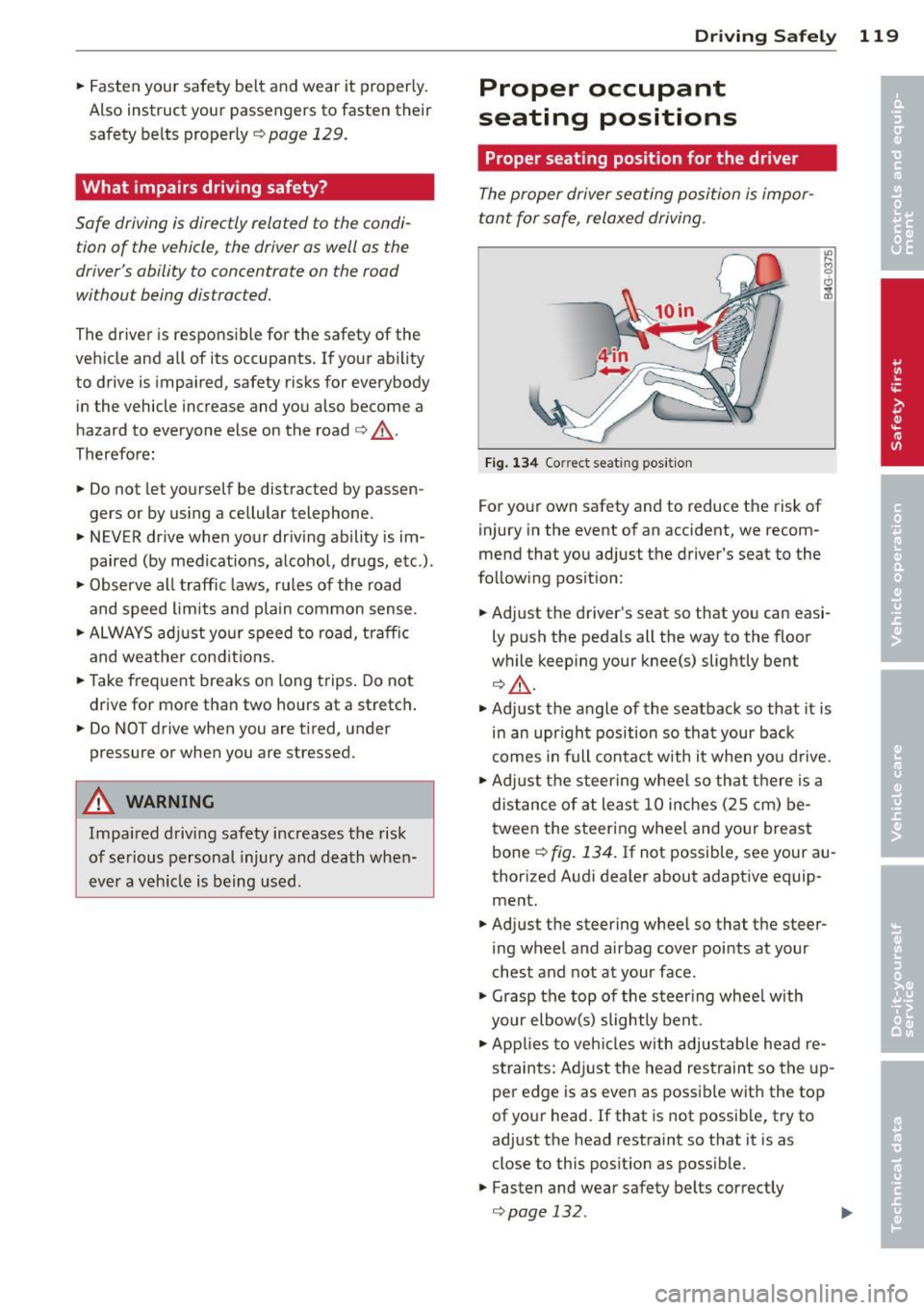
Fig. 134 Correct seat ing pos it ion
For your own safety and to reduce the risk of
injury in the event of an accident, we recom
mend that you adjust the driver's seat to the
follow ing pos ition:
.. Adjust the driver's seat so that you can easi
ly push the pedals all the way to the floor
wh ile keeping your knee(s) slightly bent
¢ ,&. .
.. Adjust the angle of the seatback so that it is
in an upr ight position so that your back
comes in full contact with it when you drive .
.. Adjust the steering wheel so that th ere is a
distance of at least 10 inches (25 cm) be
tween the steering wheel and yo ur breast
bone ¢
fig. 134. If not possible, see your au
thorized Audi dealer about adaptive equip
ment .
.. Adjust the steering wheel so that the steer
ing wheel and airbag cover points at your
chest and not at your face .
.,. Grasp the top of the steer ing whee l with
your elbow(s) slightly bent .
.. App lies to veh icles with adjustable head re
straints: Ad just the head restraint so the up
per edge is as even as possible with the top
of your head. If that is not possible, try to
adjust the head restraint so that it is as
close to this pos it ion as possible .
.. Fasten and wear safety belts correctly
¢page 132.