lights AUDI RS5 CABRIOLET 2013 Owner's Manual
[x] Cancel search | Manufacturer: AUDI, Model Year: 2013, Model line: RS5 CABRIOLET, Model: AUDI RS5 CABRIOLET 2013Pages: 286, PDF Size: 71 MB
Page 77 of 286

~ Press the key ¢ fig. 88 -the en gine will
start.
Switching the ignition on /off
If you wou ld like to switch the ignition on
without starting the engine, follow these
steps :
~ Insert the key into the ignition lock .
~ Press the key b riefly wi thout p ress ing the
brake pedal.
~ T o switch the ignition off, press the key
again .
When starting the engine, major e lectr ica l
l oads are switched off temporarily .
You can only remove the key w ith the ignition
sw itched off.
If the engine should not start immediately,
the starting process is automatically stopped
after a short time . Repeat sta rting procedure .
A WARNING
-Never allow the engine to ru n in confined
spaces -dange r of asphyxiation .
- Never remove the ignition key from the
ignition look whi le the vehicle is movi ng.
Otherw ise, the stee ring lo ck cou ld sud
denly engage and you would not be ab le
to steer the vehicle .
- Always ta ke the key with you wheneve r
yo u leave yo ur vehicle . Otherwise, the
engine could be started or e lectrica l
equipment such as the power windows
cou ld be operated. This can lead to seri
ous injury.
- Never leave ch ildren or persons requiring
assistance unattended in the vehicle. The
doo rs can be locked using the remote
transmitter, preventing people from es
caping from the vehicle on their own in
the event of an eme rgency . Depend ing
on the t ime of year, people inside the ve
hicle c an be exposed to very h igh or ve ry
low temperatures.
On th e ro ad 75
@ Note
Avoid high engine rpm, fu ll throttle and
heavy engine loads until the engine has
reached operating temperat ure -other
wise you r isk eng ine damage.
@ For the sake of the environment
Do not let the eng ine run w hile pa rked to
warm up. Begin dr iv ing immediately . Th is
reduces unnecessary emissions.
(D Tips
- If the key cannot be removed from the
ignition lock, you have to pull the me
chanical key out of the master key in or
der to be able to lock the vehicle
¢ page 34 .
-After starting a cold e ngine, there may
be a brief period of increased no ise be
cause the oil p ress ure must fi rst bu ild up
in the hydraulic va lve ad justers. This is
normal and not a cause for concer n.
- If you leave the veh icle w ith the ignition
switched on, the ig nitio n w ill switch off
afte r a cer tain per iod of t ime . Please
note that ele ctrical eq uipment such as
exterior lights will switch off as well
w hen that happens .
Page 80 of 286

78 On the road
note that e lectrica l equipment such as
exterior lights wi ll switch off as well
when that happens .
Switching engine off
Applies to vehicles: with conven ience key
._ Bring your vehicle to a complete stop.
._ Move the selector lever to the P or N pos i
t ion .
._ Press the
I START ENGINE STOPI button
9 page 77, fig. 91.
Steering lock
The steering locks when you turn the engine
off us ing the
I STAR T ENGINE STOP I button
and open the dr iver's door. The locked steer
i ng helps prevent vehicle theft .
Emergency off
If necessary, the engine can be sw itched off
with the selector lever in the R or D/S pos i
tions. To do so, step on the brake pedal and
press and hold the
I START ENGINE STOP I but
ton vehicle speed must be less than 6 mph (10 km/h).
_& WARNING
- N ever turn off the eng ine before the ve
hicle has come to a comple te stop . The
f ull function o f the brake booster and the
powe r steering is not guara nteed . You
must use more force to turn or brake if
necessary. Because you cannot steer and
brake as you usually would, this could
lead to crashes and serious injur ies.
- For safety reasons, you should always
park your vehicle with the se lector lever
in P. Otherwise, the ve hicle could inad
vertent ly roll away.
-The rad iator fan can continue to ru n for
up to 10 m inutes even afte r yo u have
tu rned off the eng in e and removed the
ignition key. The radiator fa n can also
t u rn on again i f th e e ngine cool ant hea ts
up because of intense sunlight or hea t
build -up in the engine compartment. -
Always take the key with you whenever
you leave your veh icle. Otherw ise, the
engine could be started or electrical
equ ipment such as the power windows
could be ope rated. This can lead to seri
ous injury.
(D Note
If the engine has been under heavy load
for an extended period, heat bu ilds up in
the e ngine compartment after the eng ine
i s sw itched off - there is a r isk of damag ing
the engine. Allow the engine to run at id le
fo r about two minutes before switching it
off.
Driver messages
Ignition i s on
This message appears and a warning tone
sounds if you open the driver's door when the
ignition is sw itched on.
No key ident ified
This message appears when the
I S TART ENGINE STOPI button is pressed if
t h ere is no master key ins ide the ve hicle or if
the system does not recognize it. For exam
ple, the master key cannot be recognized if it
i s covered by an object (e.g . al uminum brief
case) which
screens the radio s ignal. Electron
i c dev ices such as cell phones can also i nte r
f ere with the radio s ignal.
Pres s bra ke p edal to start engine
This message appears if you do not press the
brake pedal to start the eng ine .
Shift to N or P to start engine
Th is mess age appears w hen at tempt ing to
sta rt the eng ine if the selecto r lever for the
automatic transmission is not in the P or N
pos ition . The engine can only be started with
the selecto r in these positions.
Is the key in the vehicle ?
Page 81 of 286

This message appears if the master key is re
moved from the vehicle with the engine run
n ing.
If the master key is no longer in the ve
hicle, you cannot switch on the ignition after
stopping the engine and you also cannot start
the engine again . Moreover, you cannot lock
the vehicle from the outside w ith the key.
Shift to P otherwise vehicle can roll away.
Doors do not lock if lever is not in P.
This message appears for safety reasons
along w ith a warning signa l. It appears if the
selector lever for the automat ic transm ission
is not in the P position when switch ing off the
ignition. Move the selector lever to the P posi
tion, otherw ise the veh icle is not secured
against rolling away . You also cannot lock the
veh icle using the locking button* on the door
handle or using the remote key.
Convenience key defective! Use ignition lock
This message appears if the engine must be
started or stopped using the ignition key and
not the
I STAR T ENGIN E STOP ! button .
Electromechanical
parking brake
Operation
The electromechanical parking brake replaces
the hand brake.
F ig. 92 Cen ter console: Pa rk ing brake
.. Pull on the switch @c> fig . 92 to apply the
parking brake. The indicator light in the
switch illum inates .
.. Step on the brake pedal or the acce le rator
pedal and press the switch at the same time
On the road 79
to release the parking brake. The indicator
light in the switch goes out .
Your vehicle is equipped wi th an electrome
chanical parking brake. The parking brake is
designed to prevent the vehicle from rolling
unintentionally and replaces the hand brake.
In addition to the normal functions of a tradi
tiona l hand brake, the electromec hanical
parking brake provides various convenience
and safety funct ions .
When starting from rest
-The integral start ing ass ist helps you when
driving by automatically releasi ng the park
ing brake
¢ page 80, Starting from rest.
-When starting on inclines, the starting as
sist prevents the vehicle from unintentiona l
ly rolling back. The braking force of the
parking brake is not re leased until sufficient
driving force has been bui lt up at the
wheels.
Emergency brake function
An emergency brake ensures that the veh icle
can be slowed down even if the
normal brakes
fail
c> page Bl, Emergency braking.
Indicator lights
- If the parking brake is closed with the ign i
t ion
switched on the . (USA models) /
• (Canada models) indicator lights come
on in the instrument cluster and the switch.
- If the parking brake is closed with the igni
tion
switched off the. (USA models) /
• (Canada models) indicator lights come
on in the instrument cluster and the switch
for about 20 seconds.
A WARNING
If a drive range is engaged with the vehicle
stationary and the engine runn ing, you
must in no instance accelerate carelessly .
Othe rwise the vehicle w ill start to move
imm ediately- risk of an accident.
Page 85 of 286

A WARNING ,~
- Always pay attention to the traffic
around you whe n the cruise contr ol is in
o peration . You are always responsi ble for
your s peed and the distance between
yo ur vehicle and other vehicles.
- For reasons of safety, cruise contro l
should not be used in the city, in stop
and-go traff ic, on twisting roads and
when road conditions are poor (su ch as
ice, fog, grave l, heavy rain and hydro
planing) -risk of accident.
- T urn off the cru ise control tempo rar ily
when entering turn lanes, highway exit
lanes or in construction zones.
- Please note that inadvertent ly "rest ing"
yo ur foot on the accelerator peda l causes
the cruise control not to brake. Th is is
because the cr uise control is overridden
by the driver's acce lerat ion.
- If a brake system malfunction such as
overheat ing occurs when the cruise con
tro l system is sw itched on, the braking
function in the system may be switched
off. The other cruise control f unctions re
main active as long as the i nd icator light
lij jUJ~i4 (US models) lli,'I (Canad ian mod
els) is on.
(D Tips
The brake lights illuminate as soon as the
bra kes apply automat ica lly.
Changing speed
.,. To increase/dec rea se the speed in incre
ments, tap the lever in the
0 10 d irection
~ page 82, fig. 94.
.,. To increase/dec rease the speed quickly, hold
the lever in the
0 10 direction unti l the de
s ired speed is displayed.
You can also press the accelerato r peda l down
to increase your speed, e .g. if yo u want to
pass someone. The speed yo u saved earlier
will resume as soon as you let off of the accel
erator pedal.
On th e ro ad 83
If, however, you exceed yo ur saved speed by
6 mph (10 km/h) for longer than 5 minutes,
the cr uise contro l wi ll be t urned off tempora
rily. The green symbol in the disp lay t urns
white. The saved speed remains the same.
Presetting your speed
You can preset your desired speed while the
vehicle is not moving.
.,. Switch on the ignition.
.,. Pull lever into position
(D ¢ page 82,
fig . 94.
.,. Press the lever in the 0 or O direction to
increase or decrease your speed .
.,. Release the lever to save that speed .
This function makes it possib le, for examp le,
to save the speed you want before dr iving on
the highway. Once on the highway, act ivate
the cr uise control by pulling the leve r toward
(D .
Switching off
Temporary deactivat ion
.,. Press the b rake pedal, or
.,. Press the lever in to posi tion @(n ot clicked
into place)
¢ page 82, fig . 94, or
.,. Drive fo r longer than 5 min utes at more
than 6 mph (10 km/h) above the stored
speed.
Switching off completely
.,. Press lever into position @(clicked into
place), or
.,. Switch the ignit ion off .
T he speed you saved will be retai ned if the
c ruise control has been swi tched off tempora
rily. To resume the saved speed, let up on the
brake and p ull the lever to position
(D .
Swi tc hi ng the igni tion off e rases the saved
speed.
Page 87 of 286

Transmission S tronic ®
Introduction
The automat ic transm iss ion is controlled elec
tronically. The transmiss ion ups hifts or down
shifts automatically depend ing on which drive
program is se lected.
When a
modera te driving sty le is used, the
tra nsmission se lec ts the most econom ica l
driving mode.
It w ill then change up early and
de lay the downshifts to g ive better f uel econ
omy .
The transmis sion swit ches to a sporty mode
after a k ick-down o r when the driver uses a
s porty dri ving sty le characterized by quick ac
celerator peda l movements, heavy accelera
tion, frequent changes in speed and traveling
at the maximum speed.
I f desired, the drive r can a lso se lect the gears
manually ( tiptronic mode ) ~ page 89.
The S tronic ® is a dual-clutch transmission.
P owe r is transfe rred using two clutches that
work independently from one anothe r. They
rep lace the torq ue converter used in conven
tional automatic transmiss ions and allow the
vehicle to accelerate without a noticeable in
terruption in traction.
Selector lever positions
F ig. 96 Display in the instrument cluster: se lector lever
in pos itio n P
The selector lever position engaged appears
n ext to the selector leve r as well as in the in
strument cluster display.
Tran sm iss ion 85
P -Park
In this se lector lever posi tion the transm is
s ion is mechanica lly locked. Engage P on ly
when the vehicle is
completely stopped~&.
in Driving the automatic transmission on
page 87.
T o shift in or out of pos it ion P, yo u must first
press and ho ld the brake pedal and then press
the re lease button in the selector leve r hand le
whi le moving the selector lever to or from P.
You can shift out of this position only with the ignition o n.
R - Reverse
Se lect R on ly when the veh icle is at a full stop
and t he engine is running at idle speed~.&. in
Driving the automatic transmission on
page 87.
Before you move the se lector lever to R, press
both the re lease button in the hand le o f the
selector lever
and the brake pedal at the same
time.
When the ignition is on, the backup lights illu
minate when the selecto r lever is moved into
R.
N -Neutral
The transmiss ion is in neu tral in this pos ition .
S hift to t his position fo r standing with the
brakes app lied
~ .&. in Driving the automatic
transmission on page 87.
When the vehicle is stat iona ry or a t speeds
below 1 mph (2 km/h), yo u must always app ly
the footbrake before and whi le mov ing the
l ever o ut of
N.
D/S - Normal posit ion for driving forward
In the D/S pos it ion, t he tr ansmission c an be
operated either in the norma l mode D or in
the sport mode S . To select the sport mode S,
pull the selector lever back briefly. P ulling the
l ever back again will se lect the norma l mode
D. The instr ument cluster disp lay shows the
selected driving mode. ..,_
Page 89 of 286

lever is left in N (Neutral) for more than ap
prox imately 2 seconds, without the brake ped
a l being pressed .
Release button
The release button on the selector lever pre
ve nts the leve r from being accide ntally s hifted
into certain positions. Depending on the direc
tion of the shift, the se lector lever locks at d if
ferent positions. The positions are h ighlighted
in the ill ustration
c!> fig . 97.
Ignition key safety interlock
The key cannot be removed from the ignition
un less the se lector lever is in the P park posi
tion . When the ignition key is removed, the
se lector lever wi ll be locked in the P pos ition.
Driving the automatic transmission
Fi g. 98 Shift gate on t he cente r conso le: selector lever
wit h release butto n
Starting the engine
.. The selector lever must be in P or N.
Starting off
.. Press and ho ld the brake pedal.
.. Press and ho ld the release button in these
lector lever handle, se lect the desi red se lec
tor lever pos ition such as D/S and release
the b utton.
.. Wait br iefly until the transmission has shift
ed (you will feel a slight movement).
.. Remove your foot from the brake pedal and
acce le rate.
Stopping temporarily
.. Keep the vehicle stationary us ing the brak
ing pedal, for examp le at traffic lights.
Transm ission 87
.. Do not press the accelerator peda l when do
ing this .
.. To prevent the vehicle from ro lling when yo u
start driv ing, set the parking brake when
stopping on steep inclines
c!> _&. .
.. The parking brake will release automat ica lly
and the vehicle will start mov ing once you
p ress the acce lerator pedal.
Stopping /parking
If the selector lever is not in the P position
when you open the driver's door , the veh icle
could roll . The message
Transmis sion: Car
may roll! Shift to park! appears .
.. Press and hold the brake peda l until the ve-
hicle has come to a complete stop .
.. App ly the parking brake co
page 80 .
.. Select the P selector lever posit ion co_&. .
Stopping on an incline
.. Always press the brake pedal to ho ld the ve
hicle in place and prevent it from "rolling
back" co_&. . Do
not try to prevent the vehi
cle from "rolling back" when a gear is en
gaged by increas ing the engine speed co(!).
Starting on an incline
.. Activate the parking brake .
.. With the driving gear selected, press the ac
celerato r pedal carefully . The parking brake
w ill release automatically if your seat belt is
fastened .
U nder certa in circumstances, such as driving
in the mounta ins, it may be usefu l to sw itch
temporarily to the manual sh ift p rogram in or
d er to ad just the gears to the driv ing cond i
ti ons by hand co
page 89.
On slopes, activate the parking brake first and
then move the selector leve r to the P position .
T his prevents too much st ress from being
placed on the locking me chanism .
&_ WARNING
- T he vehicle can also roll when the engine
is s topped.
~
Page 97 of 286
Audi adaptive cruise control and braking guard 95
shown in the tachometer @and is also
shown briefly in the display @¢
fig. 108 .
Switching Audi adaptive cruise control off
~ Push the lever away from you into position
@ until it clicks into place. The message
ACC off appears.
@ Indicator lights
II-Adaptive cruise control is switched on . No
vehicles are detected up ahead. The stored
speed is ma intained.
I-A moving vehicle is detected up ahead .
The adaptive cruise control system regulates
the speed and distance to the moving vehicle
ahead and acce lerates/brakes automatica lly.
I -When automatic braking is not able to
keep enough distance to a previously detected
mov ing vehicle up ahead , you must take con
trol and brake ¢
page 9 7, Request for driver
intervention.
© Display
If adaptive cruise control is not shown in the
d isplay, you can call it up with the
I RES ET I
button ¢ page 24.
Based on the symbols in the d isplay, you can
determine if the system is maintaining a dis
tance to the vehicle ahead and what that dis
tance is.
No vehicle -No vehicle ahead was detected.
White vehicle -A vehicle ahead was detected .
Red vehicle -Prompt for the driver to take ac
tion
¢ page 97.
Both
arrows on the s cale © indicate the dis
tance to the vehicle ahead . No ar row appears
when the vehicle is on an open road and there
is no object ahead . If an object is detected
ahead, the arrow moves on the scale.
The green zone on the scale shows the stored
distance. For information on changing the
stored distance, refer to¢
page 96. If the
distance selected is too close or may soon be
come too close, th e arrows move into the red
zone on the scale .
A WARNING
Improper use of the adaptive cruise con
trol can cause collisions, other accidents
and serious personal injuries.
- Pressing the
!SET ! button when driv ing at
speeds below 20 mph (30 km/h), w ill au
tomatically accelerate the vehicle to
20 mph (30 km/h), which is the mini
mum speed that can be set.
@ Tips
-If you switch the ignit ion or the adaptive
cruise control off, the set speed is erased
from the system memory.
- The electronic stab ilizat ion control (ESC)
and the anti-slip-regulat ion (ASR) are au
tom atica lly turned on when the adaptive
cruise control is turned on. Both systems
cannot be turned off if the adaptive
cruise control is turned on . You cannot
switch the ESC to the sport mode when
adaptive cruise contro l is switched on.
Changing the speed
Applies to vehicles: wit h Audi adaptive cruise contro l
0
f
• 0
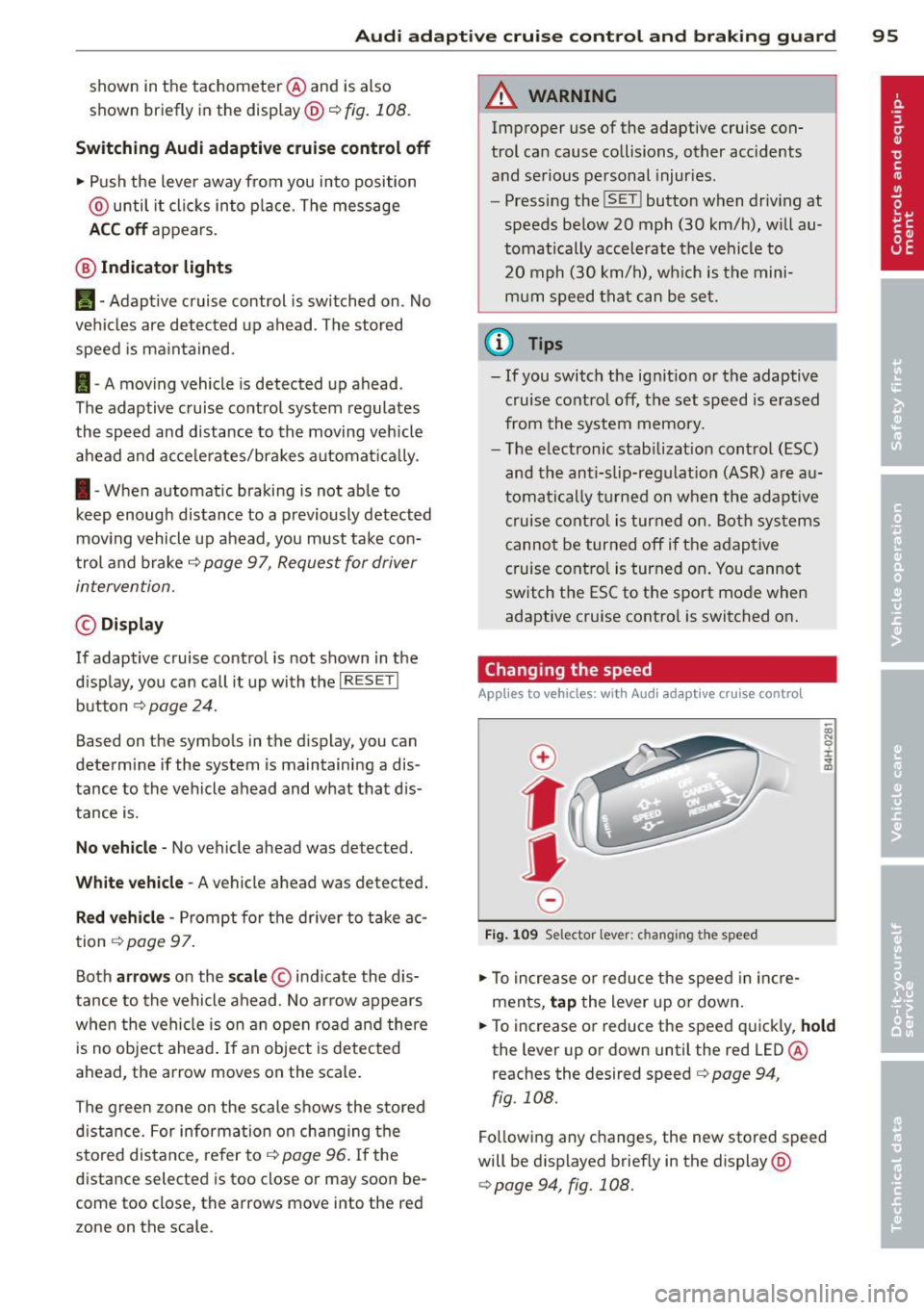
Fig . 1 09 Selector lev er: ch an gin g the speed
~ To increase or reduce the speed in incre
ments,
tap the lever up or down.
~ OI) N 0 ±
~
~ To increase or reduce the speed quickly, hold
the lever up or down unt il the red LED@
r eaches the desired speed
c> page 94 ,
fig . 108.
Fo llow ing any changes, the new stored speed
will be displayed brief ly in the display @
¢page 94, fig. 108.
Page 116 of 286

114 Homelin k®
Homelink ®
Universal remote
control
Description
Applies to vehicles: with Homelink
The HomeLink universal remote control can
be programmed with the remote control for
devices that are already present.
W ith Home Link, you can control devices such
as the garage door, security systems, house lights, etc. comfortably from the inside of you
vehicle.
Homelink makes it possible for you to replace
three d iffe rent remote controls from dev ices
in your home with one universal remote. This
feature works for most garage door and exte
rior door motor signals. Programming the in
div idual remote control for your remote con
trol takes place near the center of the radiator
grille. There is a control module attached at
this location .
A one -time programm ing of the sensor must
be performed before you are able to use sys
tems with Home link. If the system does not
activate after performing the one-time pro
gramm ing, check whether the system uses a
rolling code
q page 117 for vehicles without
the MMI*.
& WARNING
-
- Never use the Homelink ® transmitter
with any garage door opener that does
have not the safety stop and reverse fea
ture as required by federa l safety stand
ards. This includes any garage door open
er model manufactured before April 1,
1982.
- A garage door opener which cannot de
tect an object, signaling the door to stop
and reverse does not meet current feder
al safety standards. Using a garage door
opener without these features increases
risk of serious injury or death. -
For safety reasons never release the
parking brake or start the engine while
anyone is standing in front of the vehicle.
- A garage door or an estate gate may
sometimes be set in motion when the
Homelink ® remote control is being pro
grammed. If the device is repeatedly ac
tivated, this can overstrain motor and
damage its e lectrical components - an
overheated motor is a fire hazard!
- To avo id possib le injuries or property
damage, please always make absolutely
certain that no persons or objects are lo
cated in the range of motion of any
equipment being operated.
(D Tips
- If you would li ke more information on
Homel ink ®, where to purchase the
Homel ink ® compatib le products, or
would like to purchase the Homelink ®
Home Lighting Package, please call toll
free: 1-800-355-3515.
- For Declaration of Compliance to United
States FCC and Industry Canada regula
tions¢
page 267.
- For security reasons, we recommend that
you clear the programmed buttons be
fore selling the vehicle.
Operation
Applies to vehicles: wit h Ho meli nk
Fig. 131 Headl iner: controls
Requirement : The buttons must be program-
med ¢
page 115 or¢ page 116 . II>
Page 120 of 286

118 Driving Safely
Driving Safely
General notes
Safe driving habits
Please remember -safety first!
This chapter contains important information,
tips, instructions and warnings that you need
to read and observe for your own safety, the
safety of your passengers and others . We have
summarized here what you need to know
about safety belts, airbags, child restraints as
well as child safety. Your safety is for us
priori
ty number 1.
Always observe the information
and warnings in this section -for your own
safety as well as that of your passengers.
The information in this section applies to all
model versions of your vehicle . Some of the
features described in this sections may be
standard equipment on some models, or may
be optional equipment on others. If you are
not sure, ask your authorized Audi dealer.
A WARNING
- Always make sure that you follow the in
structions and heed the WARNINGS in
this Manual. It is in your interest and in
the interest of your passengers.
- Always keep the complete Owner's Liter
ature in your Audi when you lend or sell
your vehicle so that this important infor
mation will always be available to the
driver and passengers.
- Always keep the Owner's literature handy
so that you can find it easily if you have
questions.
Safety equipment
The safety features are part of the occupant
restraint system and work together to help
reduce the risk of injury in a wide variety of
accident situations.
Your safety and the safety of your passengers
should not be left to chance. Advances in
technology have made a variety of features
available to help reduce the risk of injury in an accident.
The following is a list of just a few of
the safety features in your Audi:
- sophisticated safety belts for driver and all
passenger seating positions,
- belt force limiters for the front seats,
- belt pretensioners for the seats,
- head restraints for each seating position,
- front airbags,
- side airbags in the front seats,
- special LATCH anchorages for child re-
straints,
- adjustable steering column.
These individual safety features, can work to
gether as a system to help protect you and
your passengers in a wide range of accidents.
These features cannot work as a system if
they are not always correctly adjusted and cor
rectly used.
Safety is everybody's responsibility!
Important things to do before driving
Sofety is everybody's job! Vehide ond occu
pant safety always depends on the informed
and careful driver.
For your safety and the safety of your passen
gers,
before driving always:
" Make sure that all lights and signals are op
erating correctly .
"Make sure that the tire pressure is correct.
"Make sure that all windows are clean and af
ford good visibility to the outside.
"Secure all luggage and other items carefully
¢page 66.
"Make sure that nothing can interfere with
the pedals.
"Adjust front seat, head restraint and mirrors
correctly for your height .
" Instruct passengers to adjust the head re
straints according to their height .
"Make sure to use the right child restraint
correctly to protect children ¢
page 158,
Child Safety.
"Sit properly in your seat and make sure that
your passengers do the same ¢
page 61,
Seats and storage. ..,
Page 180 of 286

178 Intelligent technolog y
@ Tips
-ABS and ASR on ly work correctly when
a ll four wheels are eq uipped w ith identi
ca l tires . Different tire s iz es can lead to a
r educt io n in engine power .
- You may hear no ises w hen the systems
described are wo rking.
- If the indicato r light
DJ or 11:11 (U SA
models) 1i] (Canada models) appears,
there may be a malf unct io n ¢
page 19,
c> page 19.
Switching on/off
ESC turns on au toma tically when you s tart
the engine.
Fig . 16 9 Ver sio n A : low er c ente r co nso le,~ OFF bu t·
to n
Fig . 17 0 Ve rsio n B: u ppe r ce nter conso le, ~ OFF but
to n
Switching sport mode on
Press the I;; OF F I button ¢ fig. 169 o r
c::> fig. 170 quickly. The act ions taken by the
E SC and ASR stabilize the vehicle a re limited .
T he
IJ ES C in dicator light tu rns on and the
me ssage
Stabilization control (ESC) : Sport .
Warning! Restricted stability
appe ars in the
d river info rmation disp lay
c::> A .
The following e xamp les are unusual situa
t io ns whe re it may ma ke sense to switch s port
mode on in order to allow the wheels to sp in:
- Ro cking the vehicle to free i t when i t is s tuck
- Dr iv ing in deep snow o r on loose g round
- Dr iving with snow chains
Sport mode can be sw itched on at a ny speed .
Switching ESC/ASR off
Press a nd ho ld the I~ OFF I but ton for three
secon ds. The
lfil•)H and fl indicator lights
turn on and the message
Stabilization con
trol (ESC) : off. Warni ng! Restricted stability
appears in the driver information display.
AS R is also switched off when ESC is switched
off . The stabilizat ion function is not ava ilable
c> A .
Switching on
Press the !.i, O FF I button ag ain to sw itch the
ESC back on . The
I indicator lig ht tu rns off
and the message
Stabilization control (ESC ):
On appears in the display.
A WARNING ,-
- Drive whee ls can sp in and you can lose
control of t he vehicle mo re eas ily w hen
ASR and ESC are in sport mode , especial
ly whe n the road is slippe ry .
- Sw itch to sport mode only when your
driving skills, traffic an d weather condi
tions per mit.
@ Tips
You cannot sw itch sport mode on whe n
adaptive c ruise co ntrol* is w ork in g.
Braking
What affects braking efficiency?
New brake pads
D uring the first 250 mi les (400 km), new
brake pad s do not possess the ir full b rak ing
effect, they have to be "broken in" first¢ &.
The break- in period can be considerably lon-
-
ger for ve hicles w ith ceram ic b rake rotors* . ll>