warning light AUDI RS5 CABRIOLET 2013 Owner's Manual
[x] Cancel search | Manufacturer: AUDI, Model Year: 2013, Model line: RS5 CABRIOLET, Model: AUDI RS5 CABRIOLET 2013Pages: 286, PDF Size: 71 MB
Page 42 of 286
40 Opening and clo sing
Convenience opening/closing
The windows can be opened and closed with
the mechanical key or the emergency key.
@
' ~-~
® '
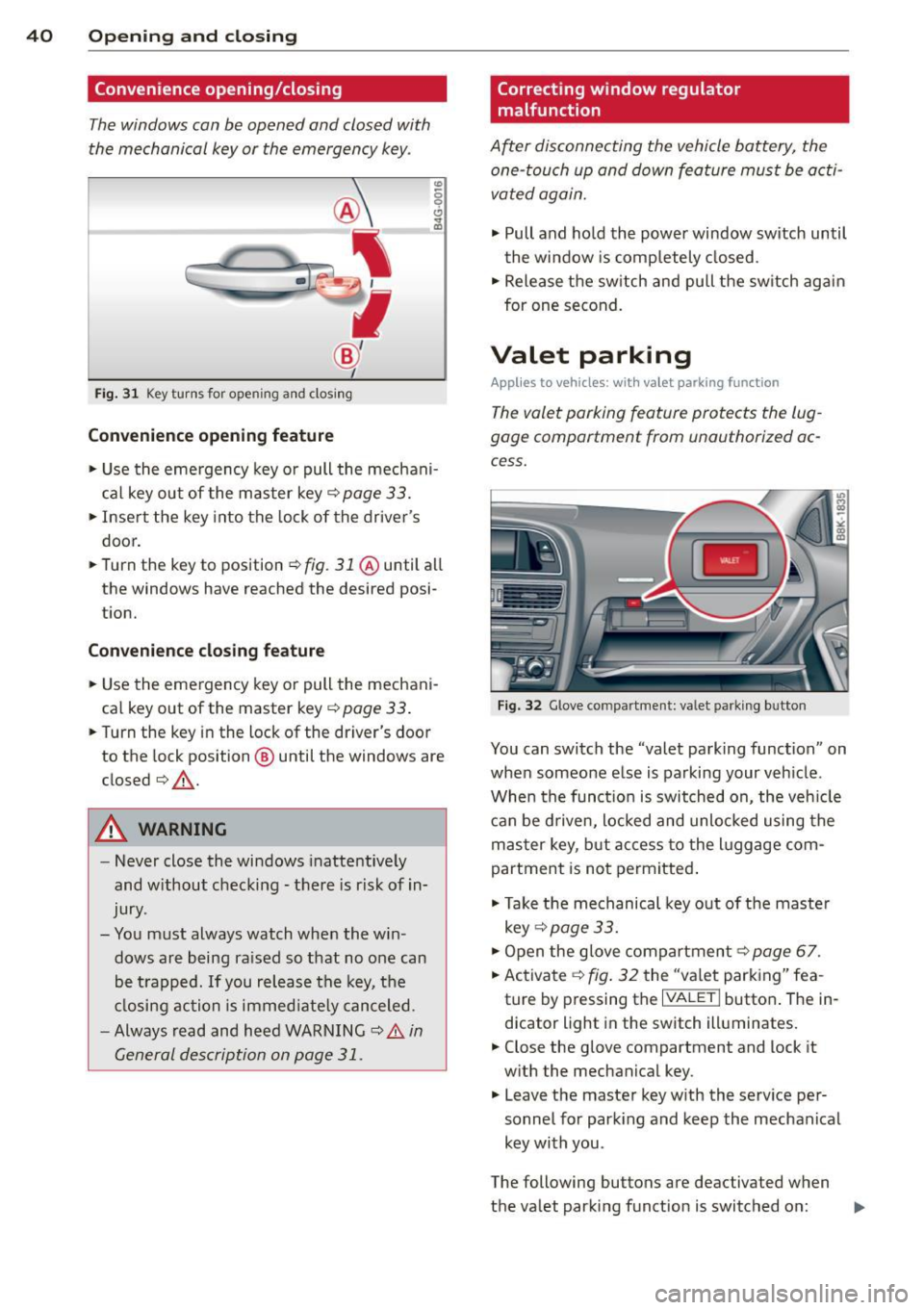
Fig . 31 Key turns for open ing an d clos ing
Conv eni ence open ing fe ature
"' 0 0 0
" m
• Use the eme rgency key or pull the mechani
cal key out of the master key¢
page 33.
• Inse rt the key into the lock of the driver's
door.
• Turn the key to position~
fig. 31 @until all
the windows have reached the desired posi
t ion.
Con venience clo sing f eature
• Use the emergency key or pull the mechani
cal key out of the master key¢
page 33 .
• Turn the key in the lock of the dr iver's door
to the lock position @ until the windows are
closed¢ &.
A WARNING
-Never close the windows inattentive ly
and w ithout checking -there is risk of in
jury.
- You must always watch when the win dows are being ra ised so that no one can
be t rapped. If you release the key, the
closing action is immed iate ly canceled.
- Always read and heed WARNING ¢
A in
General description on page 31.
Correcting window regulator
malfunction
After disconnecting the vehicle battery, the
one-touch up and down feature must be activated again.
• Pull and ho ld the power window switch until
the window is completely closed.
• Release the sw itch and pull the switch again
for one second.
Valet parking
App lies to vehicles: wit h va le t parking function
The valet parking feature protects the lug
gage compartment from unauthorized ac
cess.
F ig . 32 Glove compartme nt: valet parking button
You can switch the "valet parking function" on
when someone else is parking your veh icle .
When the funct io n is switched on, the veh icle
can be d riven, locked and unlocked using the
master key, but access to the l uggage com
partment is not permitted .
• Take the mechanical key out of the maste r
key ¢
page 33.
• Open the glove compartment¢ page 67.
• Activate ¢
fig. 32 the "va let parking" fea
ture by p ressing the
I VALET I button . The in
dicator light in the switch illuminates.
• Close the glove compartment and lock it
w ith the mechanical key .
• Leave the master key w ith the serv ice pe r
sonnel for park ing and keep the mechanical
key with you .
The following buttons are deactivated when
the valet parking function is switched on: ..,_
Page 45 of 286
correct the cause of the mal function as
soon as possible.
- If park ing the veh icle w ith the power top
open, remember that the ve hicle interior
will not be protected from the weather
or from unauthorized entry. Closing the
power top before leaving the vehicle is
r ecommended. If you leave items in the
vehicle, lock them in the trunk .
"' Power top operation
The indicator light monitors the power top.
The l'JI indicator light illuminates for approxi
mate ly 2 seconds when the ignit ion sw itches
on to check the function and then goes out
again . T he indicator light also:
- illuminates when the power top opens or
closes.
- blinks if the power top switch is operated
but the conditions for opening or closing the
power top are not met. A warning message
also appears in the instrument cluster dis
play
c::> page 43, Error message in the in
strument cluster display .
-if the power top d id not open or close com
pletely.
(D Tips
The indicator light stays on if the power
top was opened manually.
Error message in the instrument cluster
display
An error message appears if the power top
cannot open or close .
Several conditions must be met for the power
top to open or close automat ically .
An error message in the instrument cluster
d isp lay ind icates if one of the condit ions is not
met or there is a malfunct ion.
Power top: please close rear lid
The luggage compartment lid must be closed
when the power top is opening or closing . This
error message appears in the instrument cl us-
Power top 43
ter display if the luggage compa rtment lid is
not closed .
Storage bay not lowered. Please remove
obstruction
The power top sto rage bay must lower when
the power top is opening . This error message
appears in the instrument cluster display if
the storage bay is not lowered. If the storage
bay does not lower automat ically because of
objects in the luggage compartment, remove
the objects that are in the way from the stor
age bay area . Otherwise, you can operate the
power top storage bay manually
c::> page 45.
Power top : cannot be used
This error message appears if the convertible
cannot open or close automatically because of
safety reasons or if there is a malfunct ion . The
follow ing causes are possible:
- Vehicle speed too high: Power top opera
tion is deactivated and an error message ap
pears if the veh icle speed is too high. Re
duce the vehicle speed and ope rate the
sw itch again to open or close the powe r top.
- Battery voltage too low: The power top can
not be ope rated if the battery voltage is too
low. This ens ures the re will be enough bat
t ery vol tage le ft to sta rt the vehicle. The
power top can be operated again after the
eng ine is started .
-Rollover protection active: If the power top
is operated continuously for an extended pe
riod of time, rollover protection will activate
to prevent damage to the hydra ulic unit.
This protective funct ion prevents the power
top from opening or close for approx imately
15 to 30 minutes. It w ill function again af
ter that
c::> & .
-Malfunction: Failure of system components
is one possib le cause for malfunction . If this
happens, you can a lso ope rate the powe r
top by hand
c::> page 47.
Power top not secure
This message appears with a warning tone if
the power top is not
completely closed or
open and the vehicle speed is above 50 km/h.
ll-
Page 48 of 286
46 Power top
Wind deflector
Applies to vehicles: with wind deflector
The wind deflector decreases air movement
inside the vehicle and increases driving com
fort.
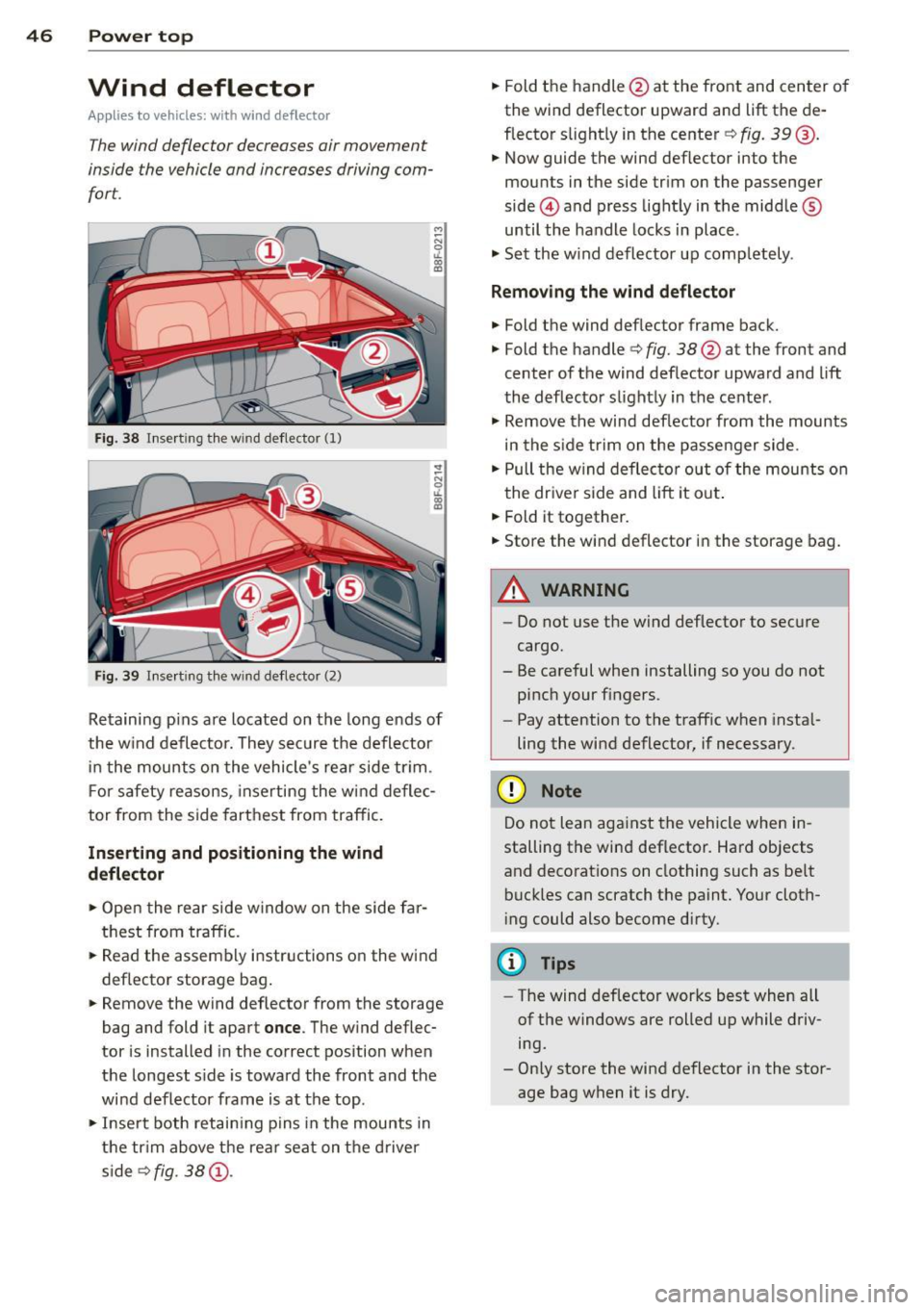
Fi g. 38 Insert ing the win d deflector (1)
Fig. 39 Inse rt in g the wind deflector (2)
Retaining pins are located on the long ends of
the w ind deflector. They sec ure the deflector
i n the mounts o n the vehicle's rear side tr im .
F or safety reasons, inserting the w ind deflec
tor from the side farthest from traffic.
Inserting and positioning the wind
d eflector
,.. Open the rear side w indow on the side far
thest from traffic.
,.. Read the assembly instructions on the wind
deflector storage bag .
,.. Remove the wind deflector from the storage
bag and fold it apart
once . The w ind deflec
tor is installed in the correct position when
the longest s ide is toward the front and the
wind deflector frame is at the top.
,.. Inse rt both retain ing pins in the mounts in
the tr im above the rear seat on the drive r
s ide s>
fig. 38 (D.
,.. Fold the handle @at the front and center o f
the wind deflector upward and lift the de
flector s light ly in the center s>
fig. 39@.
,.. Now guide the wind def lector into the
mounts in the side trim on the passenger
side @and press light ly in the middle ®
until the handle locks in place .
,.. Set the w ind deflector up comp letely .
Remo ving the wind deflector
,.. Fold the wind deflector frame back.
,.. Fold the handle
s> fig. 38@ at the front and
center of the wind deflector upward and lift
the deflector slightly in the center .
,.. Remove the wind deflector from the mounts
in the s ide trim on the passenger side .
,.. Pull the w ind deflector out of the mounts on
the driver side and lift it ou t.
,.. Fold it together.
,.. Store the wind deflector in the storage bag.
_8 WARNING
=
-Do not use the wind deflector to secure
cargo.
- Be careful when installing so you do not
pinch your f ingers.
- Pay attention to the traff ic when insta l
ling the wind deflector, if necessary.
(D Note
Do not lean aga inst the vehicle when in
stalling the wind deflector. Hard objects
and decorat ions on clothing such as be lt
buckles can scratch the paint. Your cloth
i ng could also become dirty.
{!) Tips
- The wind deflector works best when all
of the windows are rolled up while driv
ing.
- Only store the wind deflector in the stor
age bag when it is dry.
Page 54 of 286

52 Clear vis ion
Clear vision
Lights
Switching the lights on and off
Fig . 55 Instr ument pane l: headlight con trol switch
Light switch -~ -
Turn the switch c:> fig . 55 to the correspond ing
position . When the lights are switched on, the
,o o~ symbo l tu rns on.
0 -The lights are off or the dayt ime run ning
lights are on:
- USA model s: The daytime running lights are
activated when the light sw itch
c:> fig . 55 is
in the
O position or the AUTO position (o nly
in dayl ight conditions) . The daytime running
lights function can be turned on and off in
the radio or MMI* menu
Exterior ligh ting
c:> page 53 , c:> ,&..
-Canada model s: The daytime runn ing lights
are activated when the light sw itch
c:> fig . 55
is in the O position, :oo; position or the AUTO
pos it ion (on ly in daylight cond itions) . The
dayt ime running lights function cannot be
tu rned off
c:> &. .
AUTO* -Au toma tic h eadlights switch on and
off depending on b rightness, fo r example in
tw ilight, during rain or in t unnels
c:> &. .
:o o; -Side marker lights
io -Low beam headlights
Rear fog light (s)
Press the appropriate b utton c:> fig. 55:
0$ -Rear fog light(s)
adaptive light*
When switched on, adaptive ligh t adap ts to
curves in the road depend ing on the vehicle
speed and the steering ang le . This provides
b etter l ighting t hro ugh the curve . The system
operates at speeds between app roximate ly
6 mph (10 km/h) and 68 mph (110 km/h).
Static cornering light* (vehicles with adaptive
light) - the cornering light switches on at
speeds up to approximately 25 mph (40 km/
h) when a certain steering wheel angle is
reached or when a turn signa l is activated. The
area to the s ide of the vehicle is illuminated
better when turning .
The adaptive light and the cornering light only
funct ion when the switch is in t he AU TO posi
t ion (automatic headlights*) .
A WARNING
--
- Daytime r unning lights and automatic
headlights* are only inte nded to assist
the dr iver . Th ey do n ot relieve the driver
of his re s ponsibili ty to chec k the head
lights and to t urn them on manua lly ac
cordin g to the c urrent light and visibility
conditions . For examp le, fog cannot be
detected by the light sensors *. So a lways
sw itch on t he headlights
io under these
weather conditions and when driving in
the dark .
- Crashes can happen whe n you cannot see
the road ahead and when yo u cannot be
see n by other moto rists. Always tu rn on
the head lights so that you can see ahead
a nd so t hat other s can see your car fr om
the b ack.
- P lease obey all laws when using the
lighting sys tems descri bed here .
(D Note
The rear fog lights sho uld only be turned
o n in acco rdanc e with t raff ic regu lation, as
the lights are bright for following traffic. ..,
Page 55 of 286

(D Tips
-The light sensor * for headl ight control is
l ocated in the rear view m irror mount.
You should therefore not apply any st ick
ers to the windsh ield in this area in order
to prevent malfunctions or failures .
- Some exterior lighting functions can be
adjusted
¢page 53.
-When yo u remove you r key from the igni
tion w hile the vehicle's lights are turned
on, a buzzer sounds as long as the driv
er's door is open.
- In cool or damp weather, t he ins ide of
the headlights, turn signa ls and tail
li ghts can fog ove r due to the tem pera
ture diffe ren ce betwe en the inside and
outside. They will clear shor tly after
swi tching t hem on. This d oes not aff ect
the service life of the ligh ting.
- In the even t of a ligh t sensor malfunc
tion, the drive r is no tifie d in the inst ru
ment cluster disp lay ~
page 2 2.
Turn signals and high beam lever
The lever operates the turn signal s, the high
beams and the headlight flasher .
Fig. 56 T urn sig na l and high beam leve r
Turn signals ¢i ¢
The turn s ignals activate when you move the
l ever into a turn s ignal position when the ign i
tion is sw itched on.
(D -right turn signal
@ -Left turn signa l
The turn s ignal b links three times if you just
tap the lever .
Clear vision 5 3
High beams and headlight flasher @:D
Move the lever to the corresponding posit io n:
@ -high beams on
@-high beams off or headlight flasher
T he ind icator light
II in the instr ument clus
ter turns on .
Notes on these features
-The turn signals on ly wor k w it h t he ignition
t urned on. The indica tor l igh ts
11 or II in
the instrument cluste r also blink .
- Aft er you have tu rned a corner, the turn s ig
na l swi tches off au tom atically .
- The
high beam wo rks only when the head
lights a re on. The indicator Ligh t. in the
instrumen t clus ter illuminates when the
high beams are on .
- The
headligh t flasher works on ly as long as
you ho ld the lever -even if the re are no
lights switched o n. The ind icator light
Ill i n
the inst rument cluster illuminates when you
use the headlight flasher.
&_ WARNING
Do not use the h igh beam or head light
flasher if you kn ow that these could b lind
oncom ing traffic.
Adjusting exterior lighting
The functions are selected in the radio or
MM!* .
.. Select: !CAR I function button> Exterior
light ing .
Or
.. Select: !CAR I function button > Car systems*
contro l butto n > Vehicle settings > Exterior
lighting .
Coming home (light when leav ing car )*,
Leaving home (light when unlocking car)*
The coming home function illumi nates the
area around the vehicle when the ignition is
switched off and the drive r's door is open ed.
Depend ing on ve hicle equipment, t he fu nction
can be sw itched on and off or the length of
time the lights rem ain on* can be ad justed . .._
Page 58 of 286

56 Clear vis ion
Turn the knob to the desired position :
Q/P -In t his position , you can adjust the
driver's and front passenger's exter ior mirrors
by turn ing the knob in the des ired direction.
(jjjl -The mirrors are heated depending on the
outside temperatu re.
P assenger exterio r m irro r tilt func tion*
( onl y with memor y for ext erior mirrow s)
To help you see the curb when backing into a pa rking space, the surface of the m irror t ilts
slightly . The knob m ust be in the
P posit ion
for this to happen .
You can adjust the ti lted mirror surface by
turning the knob in the desired direction .
When you move out of reverse and into anoth
e r gear, the new mirror posi tion is stored and
assigned to the key you are using.
The mirror goes back into its origina l posit io n
once yo u drive forward f aster than 9 mph
(15 km/h) or switch the ignition off .
_& WARNING
Curved mirror s urfaces (convex or spheri
cal *) increase your field of view . Remem
ber that vehicles or other objects will ap
pear smaller and farther away than when
seen in a flat m irror. If you use this mirror
to estimate distances of following veh icles
when changing lanes, you could estimate incorrectly and cause an accident .
{CT) Note
- If you wash the vehicle in an automatic
ca r wash, you must fold the exterior m ir
r o rs in to reduce the r isk of damage to
the mirrors .
(i) Tips
- The exterior mirror settings are stored
with the memory funct ion*
~ page 64 .
-If there should be a ma lfunct ion in the
electrical system, you can st ill adjust the
exter ior mirrors by press ing the edge of
the m irror. Dimming the mirrors
F
ig. 62 Auto ma tic dimming rearview m irro r*
Manu al di mm ing re a rvi ew mirro r
• Pull the lever on th e bottom of the mirror
back .
Automat ic dimming rearvi ew mirror *
....
• Press the button @~ fig. 62. The indica to r
light @turns on . The rearview and exterior*
mirrors dim automatically when light shines
on them, for example from headlights on a
veh icle to the rear.
_& WARNING ..__
Electrolyte fluid can leak from automatic
d imm ing mirrors if the glass is broken .
Electrolyte fluid can irr itate skin, eyes and
r espiratory system.
- Repeated or prolonged exposure to e lec
trolyte can cause irritation to the respira
tory system, especially among people
with asthma or o ther resp ira to ry condi
tions . Get fresh air immediately by leav
ing the vehicle or, if that is no t possib le,
open windows and doors all the way.
- If electroly te gets into the eyes, flush
them thoroughly with large amounts of
clean water for at least 15 minutes; medical attention is recommended.
- If electrolyte contacts skin, fl ush affect
ed area with clean water for at least 15
minutes and then wash affected area
with soap and water; medical attention
is recommended. Thoroughly wash af
fected cloth ing and shoes before reuse.
Page 60 of 286

58 Clear vis ion
Cleanin g the headlights* . The headlight wash
er system* op erates on ly when the headlights
a re on. If you move the lever to pos ition
® ·
the head lights are washed in intervals.
A WARNING
- The ra in sensor is only intended to assist
the driver . The dr iver is still responsible
for manually sw itching the w ipers on ac
co rding to the vis ibility conditions .
- The windshie ld may not be treated w it h
water-repe lling windshie ld coat ing
age nts. Unfavorable conditions, such as
wetness , darkness, low sun, can res ult in
incre ase d gla re. Wiper b lade ch atter is
also possible .
- P roperly fu nctioning windshie ld w iper
blades are required for a clear view and
sa fe dr iving
¢ page 58, Replacing
windshield wiper blades.
(D Note
- In the c ase of fro st, check whether the
winds hield wiper blad es are frozen to
the windshie ld. Switching on the wind
s h ield wipers can damage the wiper
blades!
- Prior to using a car wash, the win dshield
wipe r system must be switched
off (lever
i n position @). This helps to prevent un
i ntent ional sw itchi ng on and damage to
t h e windshie ld w iper system .
- The w indshield wipers are switched
off
when the ignition is turned off . Activate
the windshie ld w ipers afte r the ignit ion
i s sw itched back on by mov ing t he wind
s h ield wiper leve r to any pos it io n.
- Worn or dirty windsh ie ld w iper blades
r esult in streaking . T h is can affect the
r ain senso r* function . Ch eck your wind
s h ield wiper blades regularly.
- The was her fluid nozzles of the wind
s h ield washer system are heated at low
temper atures w hen the ignit ion i s on.
- When stop ping temporarily , (e.g. at a
traff ic light) the se t speed of the wi nd- shield wipers is automatically
reduced by
one s peed.
Replacing windshield wiper blades
Wiper blad es in good condition help k eep th e
windshield clear.
Fi g. 6 5 Re mov ing w indsh ie ld wipe r bl ade
Wiper service posit ion /blade replacement
position
.. Switch the windshie ld w ipers off (position
@ ¢page 57, fig.
64) .
.. Select: !CARI function button> Windshi eld
wiper s> Service po sition > on .
Or
.. Select: !CARI function butto n> Car syst em s*
contro l button > Servicing & checks > Wiper
service po sition > On.
The windshield wipers
move into the service pos ition .
Removing the wiper blade
.,. Lift the windsh ie ld wiper arm up from the
w indshie ld.
.. Press the locking knob
(D ¢ fig. 65 on the
wiper blade . Ho ld the wipe r blade firmly .
.. Remove the wipe r blade in the direction of
the arrow .
Attaching the wiper blade
.. Insta ll the new w iper blade in the ret ainer
on t he wiper a rm @ unt il yo u hear i t click in
to p lace on the wiper arm.
.. Place the wiper arm back on the windshield.
.. To bring the w ipers back into the or igina l
position, press the windshield wiper lever .
Or
.. Select : !CARI function button> Windshield
wipers > Service position > off .
Or
Page 63 of 286

Seats and storage
General recommen
dations
Why is your seat adjustment so important?
The safety belts and the airbag system can
only provide maximum protection if the front
seats are correctly adjusted.
There are various ways of adjusting the front
seats to provide safe and comfortable support
for the driver and the front passenger. Adjust
your seat properly so that :
- you can easily and quick ly reach all the
switches and controls in the instrument
panel
- your body is properly supported thus reduc ing physical stress and fatigue
- the safety belts and airbag system can offe r
maximum protection
¢ page 137.
In the following sections, you will see exactly
how you can best adjust your seats .
There are special regulations and instructions
for installing a child safety seat on the front passenger's seat. Always follow the informa
tion regard ing child safety provided in
¢ page 158, Child Safety.
.&_ WARNING
-
Refer to ¢ page 118, Driving Safely for
important information, tips, suggestions
and warnings that you should read and fol
low for your own safety and the safety of
your passengers.
.&_ WARNING
Incorrect seating position of the dr iver and
all other passengers can result in serious
personal injury.
- Always keep your feet on the floor when
the vehicle is in motion -never put your
feet on top of the instrument panel, out of the w indow or on top of the seat cush
ion. This app lies especially to the passen-
S eat s an d sto rage 61
gers . If your seating position is incorrect,
you increase the risk of injury in the case
of sudden braking or an accident . If the
airbag inflates and the seating position
is incorrect, this cou ld result in pe rsonal
in jury or even death.
- It is important for both the driver and front passenger to keep a distance of at least 10 inches (25 cm) between them
selves and the steering wheel and/or in
s trumen t panel. If you're s itting any
closer than th is, the airbag system can
not protect you properly. In addition, the
front seats and head restraints m ust be
adj usted to your body height so that they
can give you max imum protect ion.
- Always try to keep as much distance as
possible between yourself and the steer
ing wheel or instrument panel.
- Do not adjust the driver's or front pas senger's seat whi le the vehicle is moving.
Your seat may move unexpectedly, caus
ing sudden loss of veh icle control and
pe rsonal injury. If you adjust you r seat
while the veh icle is moving, you are ou t
of po sit ion.
Driver's seat
The correct seat position is important for safe
and relaxed driving .
We recommend that you adjust the dr iver's
seat in the follow ing manner:
.., Adjust the seat in fore and aft direction so
that you can easily push the pedals to the
floor wh ile keeping your knees slightly bent
¢ .&, in Why is your seat adjustment so im
portant? on page 61 .
""Adjust the seatback so that when you sit
w ith your back against the seatback , you can
s ti ll grasp the top of t he steering wheel.
... App lies to veh icles with adjustab le head re
straints: Adjust the head restraint so the up
per edge is as even as possible wit h the top
of your head. If that is not possib le, try to
adjust the head restraint so that it is as .,.
Page 67 of 286

Remote control key
Applies to vehicles: with seat memory
To assign the d river 's sea t settings to the re
m ote cont ro l key when locking the vehicle, the
f u nction must be activ ated in the radio or
M MI*
.. Se lect :
I CAR I fu n ct io n but ton > Seat adjust
ment
> Driver's seat > Remote control key >
on .Or
.. Se lect:
~ I C - A- R~ I fu nction but ton > Car sy stem s*
co ntrol button > Vehicle settings > Seats >
Driver's seat > Remote control key > On .
@ Tips
If you do not want another driver's set
tings to be assigned to the remote key,
sw itch off the memo ry function us ing t he
rad io or MMI* or the
!ON/OF F I button
¢page 65.
Memory buttons
Applies to vehicles: with seat memo ry
F ig. 7 3 Driver 's door: mem ory fu nct io n buttons
The memory buttons are located i n the driv
er 's door .
Switching the memory function on/off
.. Pres s the I ON/OF F I butt on to swi tch the
memo ry function on/off . The wor d
OFF
lights up when the memory f unction is
switched off. Seat prof iles are not sto red .
Storing a seat profile
.. Press the ISET I button. W hen the word SET
ligh ts up, the memory is re ady to s tore se t
t ings .
Seats and storage 65
.. Press a memory bu tto n dil or ~ brie fly. A
tone conf irms that the settings were stored .
Accessing a seat profile
.. If the driver's door is open, pre ss a memory
but ton.
.. If the d river 's door is closed, p ress and hold
the memo ry but ton unti l the seat adjus t
ment is complete.
&_ WARNING
- For safety reas ons , the seat setting can
o nly be recalled when the vehicle is sta
tionary -otherwise yo u risk havi ng a n ac
cident.
- In an emergency the r ecall p roced ure ca n
be cancelled by pressing t he
IO N/O FF!
sw itch o r by ta pping the m emory bu t
tons.
Ashtray
Fi g. 74 Ce nter console: ashtray
Opening/closing
.. To open t he ashtr ay, slide t he cover up
c:> fig. 74.
.. To close the ashtray , press dow n on the cov
er .
Emptying the ashtray
.. To remove the in sert, s lide the l atch to the
r igh tc:>fig . 74-ar row -.
.. To ins ta ll th e insert, press it down i nto the
mou nt .
Page 68 of 286
66 Seat s and st o rage
A WARNING
Never put waste paper in the ashtray. Hot
ashes or other hot objects in the asht ray
could set waste paper on fire.
Cigarette Lighter
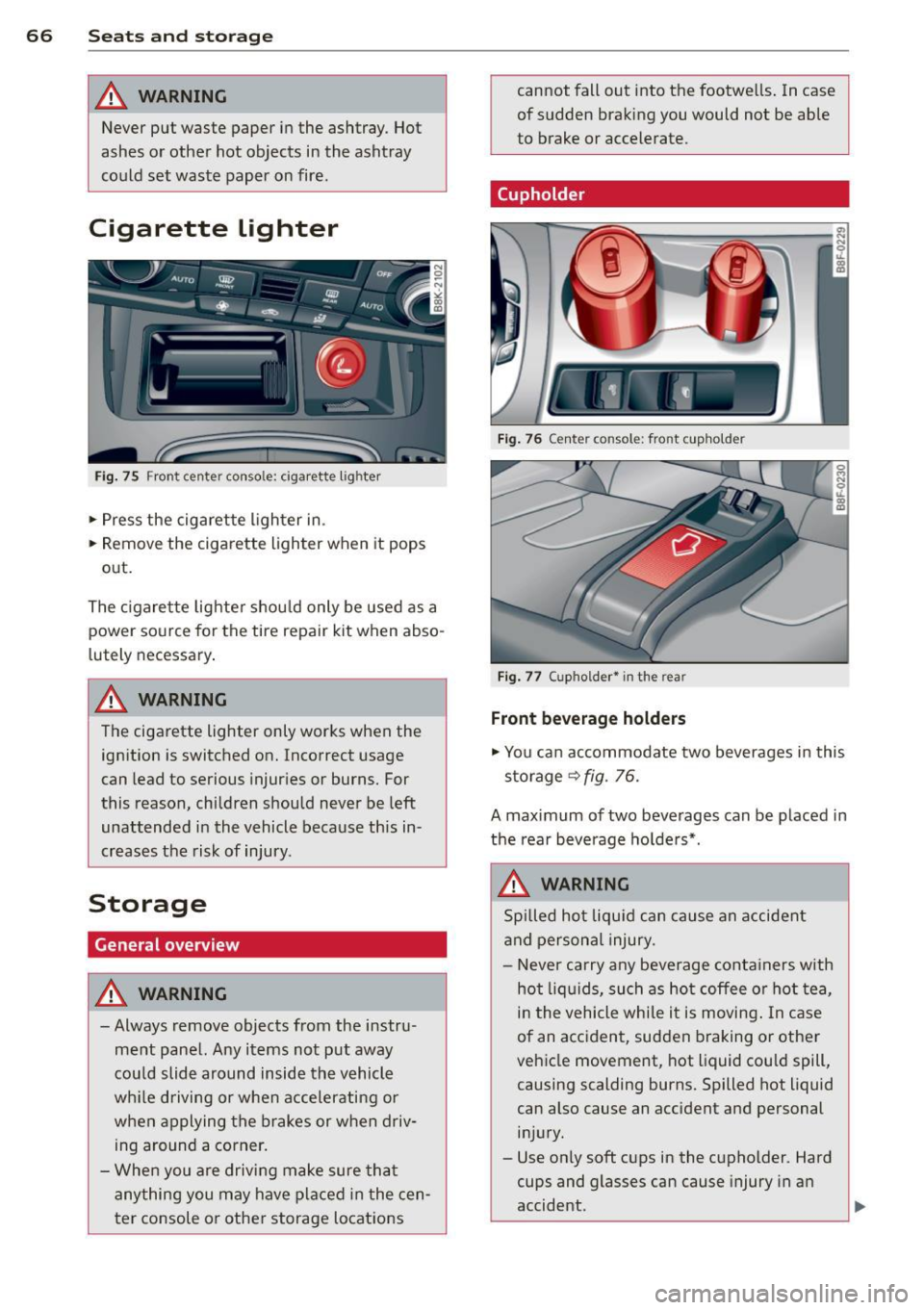
Fig . 75 Fron t center console: cigarette lig hter
.. Press the cigarette l ighter in .
.. Remove the cigarette lighter when it pops
out.
The c igarette lighte r shou ld only be used as a
power source for the tire repair
kit when abso
lutely necessary .
A WARNING
The cigarette lighter only works when the
ign ition is switched on. Incorrect usage
can lead to serious injur ies or burns. For
this reason, children should never be left
unattended in the vehicle because this in
creases the risk of injury.
Storage
General overview
A WARNING I A
- Always remove objects from the instru
ment pane l. Any items not put away
cou ld slide around inside the vehicle
wh ile driving or when accelerating or
when applying the brakes or when driv ing around a corner.
- Whe n you are drivi ng make sure that
anything you may have placed in the cen
ter console or othe r storage locat ions
-
cannot fall out into the footwe lls . In case
of sudden braking you would not be able
to brake or accelerate.
(upholder
Fig . 76 Center console : fro nt cupho lder
Fig . 77 (upholder• in the rear
Front bev erag e holder s
.. You can accommodate two beverages in this
storage
9 fig. 76.
A maximum of two beverages can be placed in
the rear beverage ho lde rs*.
A WARNING
Spi lled hot liqu id can cause an accident
and persona l injury.
-
- Never carry any beverage conta iners with
hot liq uids, such as ho t coffee or hot tea
I
in the vehicle while i t is moving . In case
of an accident, sudden braking or other
vehicle movement, hot liquid cou ld spill,
causing scalding burns. Spilled hot liquid
can also cause an accident and personal
i n jury.
- Use on ly soft cups in the cupholder. Hard
cups and glasses can cause injury in an
accident.
'--------------_J ~