warning lights AUDI RS5 CABRIOLET 2013 Owner's Manual
[x] Cancel search | Manufacturer: AUDI, Model Year: 2013, Model line: RS5 CABRIOLET, Model: AUDI RS5 CABRIOLET 2013Pages: 286, PDF Size: 71 MB
Page 85 of 286

A WARNING ,~
- Always pay attention to the traffic
around you whe n the cruise contr ol is in
o peration . You are always responsi ble for
your s peed and the distance between
yo ur vehicle and other vehicles.
- For reasons of safety, cruise contro l
should not be used in the city, in stop
and-go traff ic, on twisting roads and
when road conditions are poor (su ch as
ice, fog, grave l, heavy rain and hydro
planing) -risk of accident.
- T urn off the cru ise control tempo rar ily
when entering turn lanes, highway exit
lanes or in construction zones.
- Please note that inadvertent ly "rest ing"
yo ur foot on the accelerator peda l causes
the cruise control not to brake. Th is is
because the cr uise control is overridden
by the driver's acce lerat ion.
- If a brake system malfunction such as
overheat ing occurs when the cruise con
tro l system is sw itched on, the braking
function in the system may be switched
off. The other cruise control f unctions re
main active as long as the i nd icator light
lij jUJ~i4 (US models) lli,'I (Canad ian mod
els) is on.
(D Tips
The brake lights illuminate as soon as the
bra kes apply automat ica lly.
Changing speed
.,. To increase/dec rea se the speed in incre
ments, tap the lever in the
0 10 d irection
~ page 82, fig. 94.
.,. To increase/dec rease the speed quickly, hold
the lever in the
0 10 direction unti l the de
s ired speed is displayed.
You can also press the accelerato r peda l down
to increase your speed, e .g. if yo u want to
pass someone. The speed yo u saved earlier
will resume as soon as you let off of the accel
erator pedal.
On th e ro ad 83
If, however, you exceed yo ur saved speed by
6 mph (10 km/h) for longer than 5 minutes,
the cr uise contro l wi ll be t urned off tempora
rily. The green symbol in the disp lay t urns
white. The saved speed remains the same.
Presetting your speed
You can preset your desired speed while the
vehicle is not moving.
.,. Switch on the ignition.
.,. Pull lever into position
(D ¢ page 82,
fig . 94.
.,. Press the lever in the 0 or O direction to
increase or decrease your speed .
.,. Release the lever to save that speed .
This function makes it possib le, for examp le,
to save the speed you want before dr iving on
the highway. Once on the highway, act ivate
the cr uise control by pulling the leve r toward
(D .
Switching off
Temporary deactivat ion
.,. Press the b rake pedal, or
.,. Press the lever in to posi tion @(n ot clicked
into place)
¢ page 82, fig . 94, or
.,. Drive fo r longer than 5 min utes at more
than 6 mph (10 km/h) above the stored
speed.
Switching off completely
.,. Press lever into position @(clicked into
place), or
.,. Switch the ignit ion off .
T he speed you saved will be retai ned if the
c ruise control has been swi tched off tempora
rily. To resume the saved speed, let up on the
brake and p ull the lever to position
(D .
Swi tc hi ng the igni tion off e rases the saved
speed.
Page 89 of 286

lever is left in N (Neutral) for more than ap
prox imately 2 seconds, without the brake ped
a l being pressed .
Release button
The release button on the selector lever pre
ve nts the leve r from being accide ntally s hifted
into certain positions. Depending on the direc
tion of the shift, the se lector lever locks at d if
ferent positions. The positions are h ighlighted
in the ill ustration
c!> fig . 97.
Ignition key safety interlock
The key cannot be removed from the ignition
un less the se lector lever is in the P park posi
tion . When the ignition key is removed, the
se lector lever wi ll be locked in the P pos ition.
Driving the automatic transmission
Fi g. 98 Shift gate on t he cente r conso le: selector lever
wit h release butto n
Starting the engine
.. The selector lever must be in P or N.
Starting off
.. Press and ho ld the brake pedal.
.. Press and ho ld the release button in these
lector lever handle, se lect the desi red se lec
tor lever pos ition such as D/S and release
the b utton.
.. Wait br iefly until the transmission has shift
ed (you will feel a slight movement).
.. Remove your foot from the brake pedal and
acce le rate.
Stopping temporarily
.. Keep the vehicle stationary us ing the brak
ing pedal, for examp le at traffic lights.
Transm ission 87
.. Do not press the accelerator peda l when do
ing this .
.. To prevent the vehicle from ro lling when yo u
start driv ing, set the parking brake when
stopping on steep inclines
c!> _&. .
.. The parking brake will release automat ica lly
and the vehicle will start mov ing once you
p ress the acce lerator pedal.
Stopping /parking
If the selector lever is not in the P position
when you open the driver's door , the veh icle
could roll . The message
Transmis sion: Car
may roll! Shift to park! appears .
.. Press and hold the brake peda l until the ve-
hicle has come to a complete stop .
.. App ly the parking brake co
page 80 .
.. Select the P selector lever posit ion co_&. .
Stopping on an incline
.. Always press the brake pedal to ho ld the ve
hicle in place and prevent it from "rolling
back" co_&. . Do
not try to prevent the vehi
cle from "rolling back" when a gear is en
gaged by increas ing the engine speed co(!).
Starting on an incline
.. Activate the parking brake .
.. With the driving gear selected, press the ac
celerato r pedal carefully . The parking brake
w ill release automatically if your seat belt is
fastened .
U nder certa in circumstances, such as driving
in the mounta ins, it may be usefu l to sw itch
temporarily to the manual sh ift p rogram in or
d er to ad just the gears to the driv ing cond i
ti ons by hand co
page 89.
On slopes, activate the parking brake first and
then move the selector leve r to the P position .
T his prevents too much st ress from being
placed on the locking me chanism .
&_ WARNING
- T he vehicle can also roll when the engine
is s topped.
~
Page 97 of 286
Audi adaptive cruise control and braking guard 95
shown in the tachometer @and is also
shown briefly in the display @¢
fig. 108 .
Switching Audi adaptive cruise control off
~ Push the lever away from you into position
@ until it clicks into place. The message
ACC off appears.
@ Indicator lights
II-Adaptive cruise control is switched on . No
vehicles are detected up ahead. The stored
speed is ma intained.
I-A moving vehicle is detected up ahead .
The adaptive cruise control system regulates
the speed and distance to the moving vehicle
ahead and acce lerates/brakes automatica lly.
I -When automatic braking is not able to
keep enough distance to a previously detected
mov ing vehicle up ahead , you must take con
trol and brake ¢
page 9 7, Request for driver
intervention.
© Display
If adaptive cruise control is not shown in the
d isplay, you can call it up with the
I RES ET I
button ¢ page 24.
Based on the symbols in the d isplay, you can
determine if the system is maintaining a dis
tance to the vehicle ahead and what that dis
tance is.
No vehicle -No vehicle ahead was detected.
White vehicle -A vehicle ahead was detected .
Red vehicle -Prompt for the driver to take ac
tion
¢ page 97.
Both
arrows on the s cale © indicate the dis
tance to the vehicle ahead . No ar row appears
when the vehicle is on an open road and there
is no object ahead . If an object is detected
ahead, the arrow moves on the scale.
The green zone on the scale shows the stored
distance. For information on changing the
stored distance, refer to¢
page 96. If the
distance selected is too close or may soon be
come too close, th e arrows move into the red
zone on the scale .
A WARNING
Improper use of the adaptive cruise con
trol can cause collisions, other accidents
and serious personal injuries.
- Pressing the
!SET ! button when driv ing at
speeds below 20 mph (30 km/h), w ill au
tomatically accelerate the vehicle to
20 mph (30 km/h), which is the mini
mum speed that can be set.
@ Tips
-If you switch the ignit ion or the adaptive
cruise control off, the set speed is erased
from the system memory.
- The electronic stab ilizat ion control (ESC)
and the anti-slip-regulat ion (ASR) are au
tom atica lly turned on when the adaptive
cruise control is turned on. Both systems
cannot be turned off if the adaptive
cruise control is turned on . You cannot
switch the ESC to the sport mode when
adaptive cruise contro l is switched on.
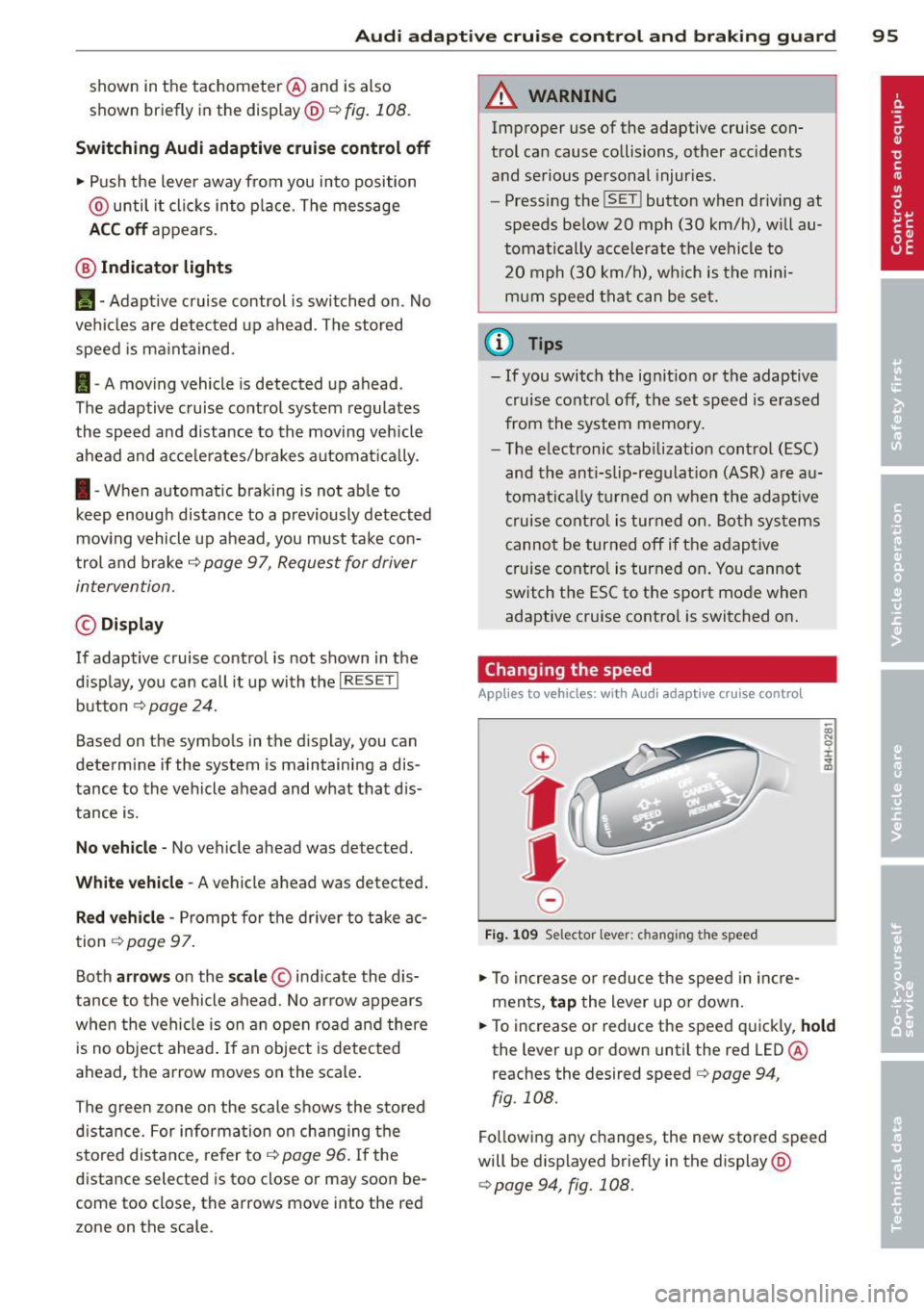
Changing the speed
Applies to vehicles: wit h Audi adaptive cruise contro l
0
f
• 0
Fig . 1 09 Selector lev er: ch an gin g the speed
~ To increase or reduce the speed in incre
ments,
tap the lever up or down.
~ OI) N 0 ±
~
~ To increase or reduce the speed quickly, hold
the lever up or down unt il the red LED@
r eaches the desired speed
c> page 94 ,
fig . 108.
Fo llow ing any changes, the new stored speed
will be displayed brief ly in the display @
¢page 94, fig. 108.
Page 116 of 286

114 Homelin k®
Homelink ®
Universal remote
control
Description
Applies to vehicles: with Homelink
The HomeLink universal remote control can
be programmed with the remote control for
devices that are already present.
W ith Home Link, you can control devices such
as the garage door, security systems, house lights, etc. comfortably from the inside of you
vehicle.
Homelink makes it possible for you to replace
three d iffe rent remote controls from dev ices
in your home with one universal remote. This
feature works for most garage door and exte
rior door motor signals. Programming the in
div idual remote control for your remote con
trol takes place near the center of the radiator
grille. There is a control module attached at
this location .
A one -time programm ing of the sensor must
be performed before you are able to use sys
tems with Home link. If the system does not
activate after performing the one-time pro
gramm ing, check whether the system uses a
rolling code
q page 117 for vehicles without
the MMI*.
& WARNING
-
- Never use the Homelink ® transmitter
with any garage door opener that does
have not the safety stop and reverse fea
ture as required by federa l safety stand
ards. This includes any garage door open
er model manufactured before April 1,
1982.
- A garage door opener which cannot de
tect an object, signaling the door to stop
and reverse does not meet current feder
al safety standards. Using a garage door
opener without these features increases
risk of serious injury or death. -
For safety reasons never release the
parking brake or start the engine while
anyone is standing in front of the vehicle.
- A garage door or an estate gate may
sometimes be set in motion when the
Homelink ® remote control is being pro
grammed. If the device is repeatedly ac
tivated, this can overstrain motor and
damage its e lectrical components - an
overheated motor is a fire hazard!
- To avo id possib le injuries or property
damage, please always make absolutely
certain that no persons or objects are lo
cated in the range of motion of any
equipment being operated.
(D Tips
- If you would li ke more information on
Homel ink ®, where to purchase the
Homel ink ® compatib le products, or
would like to purchase the Homelink ®
Home Lighting Package, please call toll
free: 1-800-355-3515.
- For Declaration of Compliance to United
States FCC and Industry Canada regula
tions¢
page 267.
- For security reasons, we recommend that
you clear the programmed buttons be
fore selling the vehicle.
Operation
Applies to vehicles: wit h Ho meli nk
Fig. 131 Headl iner: controls
Requirement : The buttons must be program-
med ¢
page 115 or¢ page 116 . II>
Page 120 of 286

118 Driving Safely
Driving Safely
General notes
Safe driving habits
Please remember -safety first!
This chapter contains important information,
tips, instructions and warnings that you need
to read and observe for your own safety, the
safety of your passengers and others . We have
summarized here what you need to know
about safety belts, airbags, child restraints as
well as child safety. Your safety is for us
priori
ty number 1.
Always observe the information
and warnings in this section -for your own
safety as well as that of your passengers.
The information in this section applies to all
model versions of your vehicle . Some of the
features described in this sections may be
standard equipment on some models, or may
be optional equipment on others. If you are
not sure, ask your authorized Audi dealer.
A WARNING
- Always make sure that you follow the in
structions and heed the WARNINGS in
this Manual. It is in your interest and in
the interest of your passengers.
- Always keep the complete Owner's Liter
ature in your Audi when you lend or sell
your vehicle so that this important infor
mation will always be available to the
driver and passengers.
- Always keep the Owner's literature handy
so that you can find it easily if you have
questions.
Safety equipment
The safety features are part of the occupant
restraint system and work together to help
reduce the risk of injury in a wide variety of
accident situations.
Your safety and the safety of your passengers
should not be left to chance. Advances in
technology have made a variety of features
available to help reduce the risk of injury in an accident.
The following is a list of just a few of
the safety features in your Audi:
- sophisticated safety belts for driver and all
passenger seating positions,
- belt force limiters for the front seats,
- belt pretensioners for the seats,
- head restraints for each seating position,
- front airbags,
- side airbags in the front seats,
- special LATCH anchorages for child re-
straints,
- adjustable steering column.
These individual safety features, can work to
gether as a system to help protect you and
your passengers in a wide range of accidents.
These features cannot work as a system if
they are not always correctly adjusted and cor
rectly used.
Safety is everybody's responsibility!
Important things to do before driving
Sofety is everybody's job! Vehide ond occu
pant safety always depends on the informed
and careful driver.
For your safety and the safety of your passen
gers,
before driving always:
" Make sure that all lights and signals are op
erating correctly .
"Make sure that the tire pressure is correct.
"Make sure that all windows are clean and af
ford good visibility to the outside.
"Secure all luggage and other items carefully
¢page 66.
"Make sure that nothing can interfere with
the pedals.
"Adjust front seat, head restraint and mirrors
correctly for your height .
" Instruct passengers to adjust the head re
straints according to their height .
"Make sure to use the right child restraint
correctly to protect children ¢
page 158,
Child Safety.
"Sit properly in your seat and make sure that
your passengers do the same ¢
page 61,
Seats and storage. ..,
Page 180 of 286

178 Intelligent technolog y
@ Tips
-ABS and ASR on ly work correctly when
a ll four wheels are eq uipped w ith identi
ca l tires . Different tire s iz es can lead to a
r educt io n in engine power .
- You may hear no ises w hen the systems
described are wo rking.
- If the indicato r light
DJ or 11:11 (U SA
models) 1i] (Canada models) appears,
there may be a malf unct io n ¢
page 19,
c> page 19.
Switching on/off
ESC turns on au toma tically when you s tart
the engine.
Fig . 16 9 Ver sio n A : low er c ente r co nso le,~ OFF bu t·
to n
Fig . 17 0 Ve rsio n B: u ppe r ce nter conso le, ~ OFF but
to n
Switching sport mode on
Press the I;; OF F I button ¢ fig. 169 o r
c::> fig. 170 quickly. The act ions taken by the
E SC and ASR stabilize the vehicle a re limited .
T he
IJ ES C in dicator light tu rns on and the
me ssage
Stabilization control (ESC) : Sport .
Warning! Restricted stability
appe ars in the
d river info rmation disp lay
c::> A .
The following e xamp les are unusual situa
t io ns whe re it may ma ke sense to switch s port
mode on in order to allow the wheels to sp in:
- Ro cking the vehicle to free i t when i t is s tuck
- Dr iv ing in deep snow o r on loose g round
- Dr iving with snow chains
Sport mode can be sw itched on at a ny speed .
Switching ESC/ASR off
Press a nd ho ld the I~ OFF I but ton for three
secon ds. The
lfil•)H and fl indicator lights
turn on and the message
Stabilization con
trol (ESC) : off. Warni ng! Restricted stability
appears in the driver information display.
AS R is also switched off when ESC is switched
off . The stabilizat ion function is not ava ilable
c> A .
Switching on
Press the !.i, O FF I button ag ain to sw itch the
ESC back on . The
I indicator lig ht tu rns off
and the message
Stabilization control (ESC ):
On appears in the display.
A WARNING ,-
- Drive whee ls can sp in and you can lose
control of t he vehicle mo re eas ily w hen
ASR and ESC are in sport mode , especial
ly whe n the road is slippe ry .
- Sw itch to sport mode only when your
driving skills, traffic an d weather condi
tions per mit.
@ Tips
You cannot sw itch sport mode on whe n
adaptive c ruise co ntrol* is w ork in g.
Braking
What affects braking efficiency?
New brake pads
D uring the first 250 mi les (400 km), new
brake pad s do not possess the ir full b rak ing
effect, they have to be "broken in" first¢ &.
The break- in period can be considerably lon-
-
ger for ve hicles w ith ceram ic b rake rotors* . ll>
Page 182 of 286

180 Intelligent technology
8_ WARNING
-New brake pads don't have the best stop
ping power and must be "broken -in" dur
ing the initial 100 to 150 miles (150 to
200 kilometers) of normal city driving .
The break-in period can be considerably
longer for vehicles with ceramic brake ro
tors*. You can compensate for this by pressing the brake pedal more firmly.
This also applies later when new pads are
installed.
- You should perform braking maneuvers
for the purpose of cleaning the brake
system only if road conditions permit.
Other road users must not be put at risk -
you may cause an accident!
- Before descending a steep grade, reduce
speed and shift transmission into a lower
gear or lower driving range. Do not ride
the brakes or hold the pedal down too
long or too often. This could cause the
brakes to get hot and diminish braking
efficiency .
- Do not "ride the brakes" by resting your
foot on the pedal when you do not intend
to brake . This may cause the brakes to
overheat, premature wear and increased
stopping distance.
- Under certain climatic and operating
conditions such as passing through wa
ter, driving in heavy rain or after washing
the vehicle, the effectiveness of the
brakes can be reduced. In winter, ice can
accumulate on the brake pads, linings,
discs and drums . Carefully apply brakes
for a test . Brakes will dry and ice coat
ings will be cleaned
off after a few care
ful brake applications.
- Driving for an extended period of time on
salt-covered roads without using your
brakes can also affect braking efficiency.
Clean
off accumulated salt coating from
brake discs and pads with a few careful
brake applications.
- If you damage the front spoiler, or if you
install a different spoiler, be sure the air
flow to the front brakes is not obstruct- ed
. Otherwise the brake system could
overheat reducing the effectiveness of
the entire brake system.
- Failure of one brake circuit will impair
the braking capability resulting in an in
creased stopping distance. Avoid driving
the vehicle and have it towed to the near
est authorized Audi dealer or qualified
workshop.
- Never let the vehicle roll to a stop with
the engine shut off.
- If the brake booster is not working, for
example when towing your vehicle, or
because the brake booster has somehow
been damaged, the brake pedal must be
pressed considerably harder to make up
for the lack of booster assistance.
Electro-mechanical
power assist, dynamic
steering
The electro-mechanical power assist helps
the driver when steering .
Power steering adapts electronically based on
the vehicle speed.
Indicator lights and messages
• Steering defective! Do not drive vehicle!
If this indicator light turns on and stays on
and this message appears, the power steering
may have failed.
Do
not continue driving . See your authorized
Audi dealer or other qualified repair facility
for assistance .
''!'Y Dynamic steering: System fault! You can
continue driving
If the indicator light turns on and the mes
sage appears, the steering may be more diffi
cult to
move or more sensitive than usual. The
steering wheel may also be at an angle when
driving straight .
Drive slowly to your authorized Audi dealer or
qualified workshop to have the malfunction
corrected. .,..
Page 184 of 286
182 Intelligent technology
-On wet road surfaces , be careful not to
dr ive too fast because the front wheels
cou ld beg in to slide on top of the water
(aquaplaning). If this should occur, you
will have no warning from a sudden in
c rease in engine speed as with a front
wheel drive vehicle. A lways d rive at
s peeds w hich a re suited to the road con
di tions -ris k of crash.
Energy management
Starting ability is optimized
Energy management controls the distribution
of electrical energy and thus optimi zes the
availabili ty of elec trical energy for s tarting
t he engine.
If a vehicle with a conventional energy system
is not driven for a long period of time, the bat
te ry is d ischarged by idling current consumers
(e.g . immobilizer) . In certain ci rcumstances it
can result i n there bei ng ins ufficient ene rgy
ava ilab le to start th e engi ne .
Intell igen t energy management in y our veh i
cle hand les the d istribution of electrical ener
gy. Starting ab ility is markedly improved and
the life of the battery is extended .
Basically, energy management consists of
battery diagnos is , idling current manage
ment
and dynamic en ergy management .
Battery diagnosis
Battery d iagnosis continuously determ ines
the state of the battery. Sensors determ ine
battery vo ltage, ba tte ry current and battery
temperature . This dete rm ines the current
state of charge and the powe r of the battery.
Idling current management
Idling current management reduces energy
consumption while the vehicle is stand ing.
W ith the igni tion switched off, it cont ro ls the
energy s upply to the va rious e lectr ica l compo
n ents . Data from battery diagnosis is consid
e red. D
epend ing on the ba tte ry's state o f cha rge ,
indivi dual cons umers a re g radually turned off
to prevent excessive discharge of t he battery
and th us maintain starting capability.
Dynamic energy management
While the vehi cle is being d riven, dynami c en
ergy management distr ibutes the energy gen
erated accord ing to t he needs of the indivi du
al components . It regulates consumption, so
t h at more electrical energy is not being used
t h an is be ing generated and ensures an opti
mal state of charge fo r the battery .
(D Tips
-But even ene rgy management cannot
negate the limits of physics. Consider
t ha t the powe r and life of a battery are
limited.
- If start ing ability is t hreatened , the indi
cator light(•) appears ~
page 17.
What you should know
The highest priority is given to maintaining
starting capability.
The battery is severe ly taxed in short-d istance
driv ing, in city traff ic and during the cold time
of yea r. Ab undant electrical e nergy is re
quired, but on ly a little is generated . It is also
c rit ical if th e engi ne is no t ru nning and e lectri
ca l c ompone nts are t urned on . In this in
sta nce ene rgy is be ing consumed but none i s
being gene ra ted .
It is in prec isely these s ituations that you will
not ice ene rgy management a ct ive ly reg ulat
in g t he di stribu tion of ene rgy.
Vehicle stands for an extended period
If you do not drive your vehicle over a period
of seve ral days or weeks , e lectr ica l compo
n ents a re g radually cut bac k or sw itched off.
T h is reduces energy consump tion and ma in
ta in s start ing c apabili ty over a longer pe riod .
Some of the convenience func tions may not
opera te, such as t he interio r lights or the
power seat adjustme nt. The convenience
ll-
Page 189 of 286
Avoid full throttle
Driving at moderate speeds saves fuel and
improves your mileage.
""Try and keep well below your car's maximum
speed.
Accelerating gently reduces fuel consump
tion, engine wear, and does not disturb the
environment.
Fu el consumption, exhaust emissions and en
g ine noise increase disproportionately at high
speeds. If you drive at approximately three
quarters of top speed, fuel consumption will
be reduced by one half. Never drive faster
than the posted speed limit and weather con
ditions permit .
Reducing unnecessary idling
Even when your car is just idling it burns up
fuel.
""Shut the engine off when you are not driving
the vehicle.
"" Do not warm up the vehicle by letting the
engine run at idle .
It makes sense to shut
off the engine in traff ic
jams, when waiting for trains to pass at ra il
road crossings, or at traffic lights that have
l ong wa its on red. Turning the engine
off for
just
30-40 seconds saves more fue l than is
burned starting the engine again .
It takes a long time for the engine to warm up
fully when it is running at idle. However, wear
and noxious emissions are especially high
when the engine is warming up. So you should
drive away as soon as you start the engine and
avoid running at high rpms while the engine is
still warming up.
(D Note
Do not leave engine idling unattended af
ter starting . If warning lights should come
on to indicate improper operation, they
would go unheeded. Extended idling also
produces heat, which cou ld result in over-
Driving and environment 187
'
heating or othe r damage to the vehicle or
other property.
Regular maintenance
A badly tuned engine unnecessarily wastes a
lot of fuel.
""H ave your veh icle serviced at regular inter-
vals.
By having your vehicle regu larly serviced by an
au thorized Aud i dea ler helps to ensure that it
runs properly and economic all y. The condition
of your veh icle not on ly affects its safety and
ability to hold its va lue, it a lso affects
fuel
consumption .
Check your oil each time you fill your tank.
The amount of o il used is related to engine
load and speed.
It is normal for the oil consumption of a new
engine to reach its lowest value after a certain
mileage has been driven.
You must drive your vehicle about 3,000 miles
(5,000 kilometers) before you can properly
assess oil consumpt ion.
This also app lies to fue l consumption and en
gine output.
(U) Note
- Have your vehicle maintained properly
and in accordance with the service rec
ommendations in your Warranty
& Main
tenance booklet. Lack of proper mainte
nance as well as improper use of the ve
hicle will impair the function of the
emission control system and could lead
to damage.
- Do not alter or remove any component of
the Emission Control System unless ap
proved by the manufacturer.
- Do not alter or remove any device, such
as heat shields, switches, ignition wires,
valves, which are designed to protect
your vehicle's Emission Control System
and other important vehicle compo
nents .
•
•
Page 193 of 286
(D Note
-Never try to remove dirt, mud or dust if
the surface of the vehicle is dry. Never
use a dry cloth or sponge, since this
could scratch your vehicle's pa int or w in
dows .
- Never wash your car in bright sunlight.
Drops of water act as magnifying lenses
and may damage your paint.
- When you wash your car in the w inter: if
you r inse your vehicle w ith a hose, be
careful not to aim the stream of water
direct ly at locks, or at door or hatch
openings - they can free ze shut.
- Never use sponges des igned to remove
i nsects, or any kitchen scouring sponges
or similar products. They can damage
you r paint finish.
- Never use a dry cloth o r sponge to clean
the headligh ts. On ly use we t cloths or
sponges to prevent scratches.
It i s best
to use soapy wate r.
- You sho uld remove debris (su ch as in
sects) from the head ligh t lenses on a
r egular basis, for example when refuel
ing your vehicle . Never use a dry cloth or
sponge to clean the head lights. Only use
wet cloths or sponges to prevent
scratches.
It is best to use soapy water.
@ For the sake of the environment
On ly wash the vehicle in facilit ies specially
designed for that purpose. Th is w ill reduce
the risk of d irty water contaminated with
oil from entering the sewer system. In
some areas, wash ing vehicles outs ide of
these facilit ies is prohib ited.
Washing your vehicle with a power
washer
Cleaning the exterior of your car with a high
pressure power washer is safe as long as you observe a few simple rules .
~ Before us ing the powe r washe r, make sure
yo u have re ad an d u nderstood the WARN-
Cleaning and protec tion 19 1
INGS ¢ A in General information on
page 189 .
~ Always follow the operating instr uctions for
the power washer.
~ Make sure that the jet on the spray hose pro
duces a "fan shaped sp ray" .
~ Do not hold the sp ray nozzle too close to
soft mater ials .
Never use a pow er washer to clean the power
top itself.
Keep a distance from soft materia ls s uch as
rubber hoses or insulating material as well as
sensors and camera lenses.
When cleaning the vehicle with a power was h
er
always follow the operating instructions .
This applies part icu larly to the operating pres
sure and the spraying d istance. Do not point
the spray d irectly at the seals around the s ide
windows, around the doo rs, on the rea r lid or
o n the powe r top. Likewise, do not po int it di
re ct ly at tires, rubbe r hoses, insulat io n ma te
ria l or senso rs
¢ page 193. Hold the spray
nozzle at leas t 1.3 ft (0. 4 m) away from the
vehicle.
Do no t use a high-p ressu re power was her to
remove snow and i ce .
Do not use a jet which sprays water in a d irect
stream o r one that has a rotat ing jet.
Water temperature should not exceed 140 °F (60
°() .
A WARNING
Neve r wash t ires with a jet t hat sprays wa
ter in a direct stream . Thi s could cause in
v isi ble d amage to the t ire s and weaken
them, even if the spr ay is from a re lative ly
l ong dis tance and for a sho rt time. Dam
aged and weakened tires can fail and cause
accidents and personal in jury.
([) Note
- Never use a power washer to clean the
powe r top itse lf .
•
•