power steering AUDI RS5 CABRIOLET 2013 Owners Manual
[x] Cancel search | Manufacturer: AUDI, Model Year: 2013, Model line: RS5 CABRIOLET, Model: AUDI RS5 CABRIOLET 2013Pages: 286, PDF Size: 71 MB
Page 5 of 286
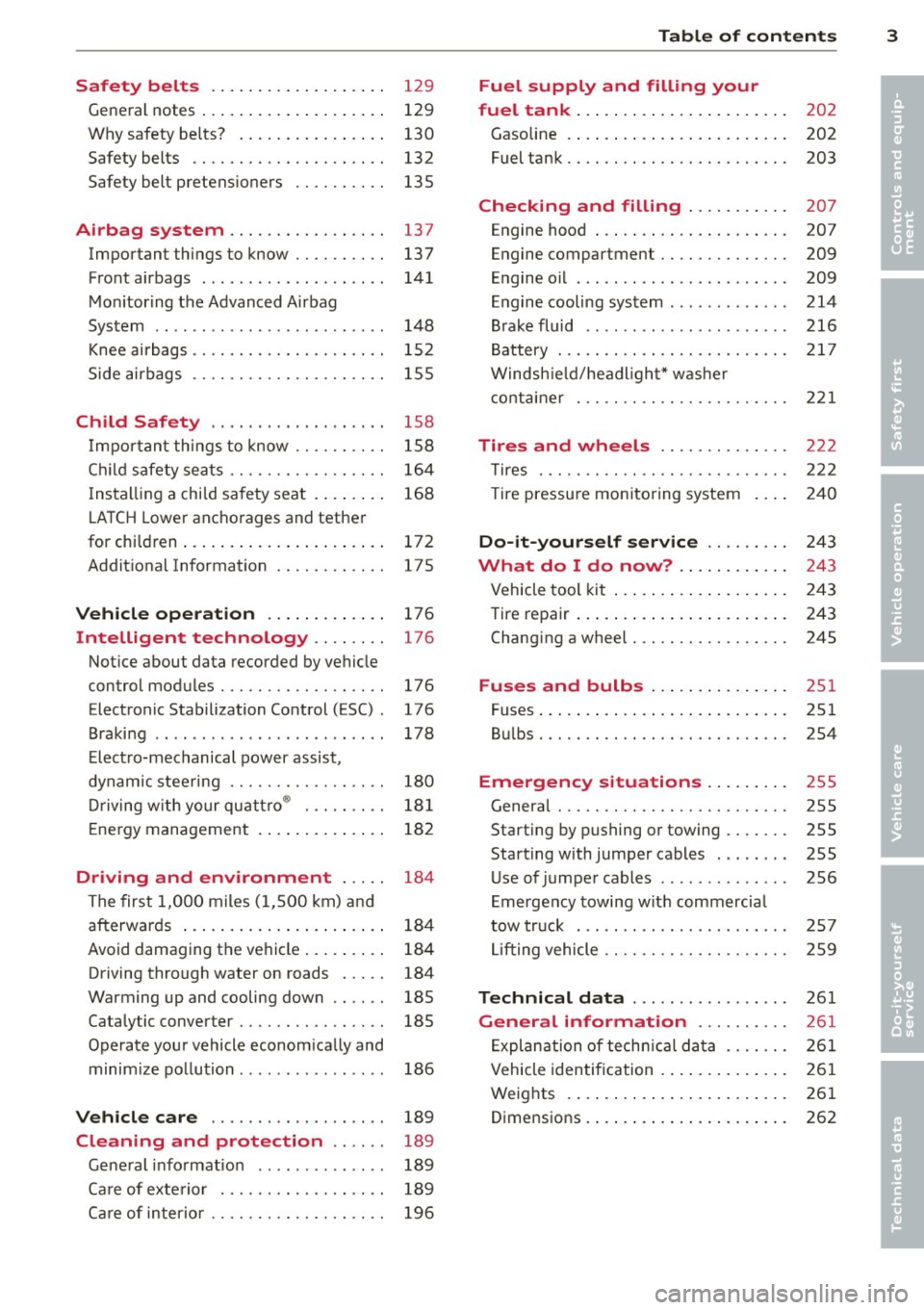
Safety belts . . . . . . . . . . . . . . . . . . . 129
General notes . . . . . . . . . . . . . . . . . . . . 129
Why safety be lts? . . . . . . . . . . . . . . . . 130
Safety belts . . . . . . . . . . . . . . . . . . . . . 132
Safety belt pretens ioners . . . . . . . . . . 13S
Airbag system ............. .. .. 137
Important things to know . . . . . . . . . . 137
Front airbags . . . . . . . . . . . . . . . . . . . . 141
Monitoring the Advanced Airbag
System . . . . . . . . . . . . . . . . . . . . . . . . . 148
Knee airba gs. . . . . . . . . . . . . . . . . . . . . 152
Side airbags . . . . . . . . . . . . . . . . . . . . . 155
Child Safety . . . . . . . . . . . . . . . . . . . 158
Import ant things to know .... .. .. . .
C hild safety sea ts ......... .. .. .. . .
I ns tall ing a chi ld safety seat . ... .. . .
L A T CH Lower anchorages and tether
for chi ldren ... ........... .. .. .. . .
Addit ional Information
Vehicle operation ............ .
Intelligent technology .. .. .. . .
Notice about data recorded by vehicle
control modules .......... .... .. . .
Electronic Stabilization Control (ESC) .
Braking .. ... ...... ......... .... .
E lect ro-mechanical power assist,
dynamic steering ............. .. . .
Driving with your qu attro ® ... .. .. . .
E nergy management ............. .
Driving and environment ... ..
The first 1,000 miles (1,500 km) and
afterwards ... ........... .. .. .. . .
Avoid damaging the vehicle ... .. .. . .
Driving through water on roads ... . .
Warming up and cooling down .. .. . .
Cataly tic converter ........ .... .. . .
Operate your vehicle econom ically and
minim ize pollution ......... ... ... .
Vehicle care .............. .. .. .
158
164
16 8
172
175
176
176
176
176
178
180
18 1
182
184
184
184
184
185
18S
186
189
Cleaning and protection . . . . . . 189
Gene ral i nfo rmation . . . . . . . . . . . . . . 189
Ca re of exte rior . . . . . . . . . . . . . . . . . . 189
Ca re of inter ior . . . . . . . . . . . . . . . . . . . 196
Table of contents 3
Fuel supply and filling your
fuel tank . . . . . . . . . . . . . . . . . . . . . . .
202
Gasoline . . . . . . . . . . . . . . . . . . . . . . . . 202
Fuel tank. . . . . . . . . . . . . . . . . . . . . . . . 203
Checking and filling . . . . . . . . . . . 207
Engine hood . . . . . . . . . . . . . . . . . . . . . 207
Engine compartment . . . . . . . . . . . . . . 209
Engine oil . . . . . . . . . . . . . . . . . . . . . . . 209
Engine cooling system . . . . . . . . . . . . . 214
Brake fluid ....... ............... 216
Battery . . . . . . . . . . . . . . . . . . . . . . . . . 217
Windshield/headlight* washer
container . . . . . . . . . . . . . . . . . . . . . . . 221
Tires and wheels ............. .
T ires ... .. .. .. .. .. . ............ .
T ire pressu re mon itoring system
Do-it-yourself service ........ .
What do I do now? ........... .
Vehicle tool kit ... .. . .. .......... .
Tire repair ... .. .... . ............ .
Chang ing a wheel ..... ........... .
Fuses and bulbs .. .. ... .... ... .
Fuses ..... .. .. .... .. ........... .
Bul bs ....... .. ...... ........... .
Emergency situations ........ .
General ... .. .. .. ............... .
Starting by pushing or towing ...... .
Starting with jumper cables ..... .. .
U se of jumper cables ... .. .. ... ... .
Emergency towing with commercia l
tow truck ... .. .. .. . ............ .
Lift ing vehicle .. .. .... ........... .
Technical data ... . .. .. ..... ... .
General information ......... .
Exp lanation of techn ic al data ...... .
Vehicle identification ........... .. .
Weights .. .. .... ... .. .......... .
Dimensions . ....... . .. .......... . 222
222
240
24
3
243
243
243
245
251
251
2S4
255
255
255
255
256
2 57
259
261
261
26 1
261
261
262
•
•
Page 11 of 286

CD
@
®
©
®
®
Door handle
Power locking sw it ch
Memory buttons (dr iver's seat)
Button for side ass ist
A ir outlets
Control leve r for :
- Turn signal and high beam
0 Multi-function steering wheel
with:
- Horn
- Driver's airbag ...... ... .. .
- Audio/video , telephone and
navigation buttons
- Rocker switches for tiptron ic
operation .... .... ... .... .
@ ISETI button .... ....... .... .
® Instrument cluster ......... .
@ Reset button for trip odometer
@ Switches for:
- Windsh ield wiper/washer .. .
- Trip computer ............ .
- Lap -Timer ............ ... .
@ Ignition lock ... .... ... .... .
@ Adju stable steer ing column
@ Control lever for:
- Cruise contro l ....... ... .. .
- adaptive cruise cont ro l ... .. .
@ Instrument lighting .... .. .. .
@ Release lever for the engine
hood .. .. .... .. .. .. ....... .
@ Data Link Connector for On
Board Diagnost ics (OBD II) . .. .
35
64
101
53
14 1
89
11
10
12
57
25
28
74
74
82
92
55
207
29
@ Lig ht switch . . . . . . . . . . . . . . . . 52
@ Adjuster control fo r outside mi r-
rors . . . . . . . . . . . . . . . . . . . . . . 55
@ Power window switches . . . . . . 39
@ Radio-Disp lay or MM I-Disp lay
@ Depending on options:
- Radio system
- CD changer
@ Emergency flasher . . . . . . . . . . 54
@ Glove compartment ( lockable) 6 7
@ Front passenger's a irbag . . . . . 141
Instrument s and control s 9
@ Depending on options, switches
for :
- drive select .. .. . .. ... ... . . 104
- Electron ic Stabili zation Con-
trol ...... .. .. . ... ...... .
- parking sy stem ....... .... . 176
107
@ Deluxe automat
ic cl imate con-
t ro l .... .. .. .. ........... . .
69
@ Se lector lever for automatic
transmission .. .... ........ .
85
@) Ashtray with cigarette lighter 65
@ Depending on options:
- MMI control console or
- drive select . . . . . . . . . . . . . . . 104
- Electronic Stabili zation Con-
trol button . . . . . . . . . . . . . . . 176
- parking system . . . . . . . . . . . . 107
@ Central power w indow swi tch
@ Power top switc h . . . . . . . . . . . . 44
@ I S T AR T ENGINE S TOPI button 77
§) Electromechanical parking
brake . . . . . . . . . . . . . . . . . . . . . 79
(D Tips
- Some of the equipment or features
show n in the general illustration may be
standard equ ipment on your vehicle or
may be opt ional equ ipment depending
on your model. Always as k yo ur au thor
ized Audi dea ler if you have a quest ion
about your ve hicle .
- Ope rat ion of the Multi Med ia In terface
(MMI) is described in a separa te manua l.
Page 16 of 286

14 Instrum ent s and w arn ing /indic ato r light s
Engine cooling system
r:::;,page 18
Steering column lock
r:::;, page 18
Ignition lock
r:::;,page 18
USA mod els:
Speed warning system
r:::;, page 81
Canada models :
Speed warning system
r:::;,page81
Adapt ive cru ise control./
r:::;, page 94
Yellow ind ic a tor lights
Ye llow symbols indicate a priority 2 ma lfunc
tion -Warning!
•
I
ESC OFF
m
ll!fJ
Power top operation
r:::;, page43
Electronic Stabilization Control
(ESC) ,/
r:::;, page 19
Electronic Stabilization Control ( E SC) ./
r:::;,page 19
Electronic Stabilization Control
(ESC)
r:::;,page 176
USA mod els :
Anti-lock braking system (ABS)
defective ,/
r:::;, page 19
Canada model s:
Anti-lock braking system (ABS)
defective ,/
r:::;,page 19
USA models :
Safety systems ./
r:::;,page20
Canada models :
Safety systems ,/
r:::;,page20
•
•
[I]
.,,,~,
~
•
Im
-
•
•
-
ml
II
•
m
!I
-
!!
l:J
E
II
Worn brake pads
r:::;, page20
Electromechanical parking brake
r:::;, page
79
I
Tire pressure monitoring
system./
r:::;, page 241
Tire pressure monitor ing system
r:::;, page2 41
Electronic power control./
r:::;, page 20
Malfunction indicator Lamp
(MI L),/
r:::;, page 2 0
Engine speed limitation
r:::;, page21
Engine oi l level
r:::;,page 17
Eng ine oi l sensor
r:::;, page 21
Battery
r:::;, page 17
Tank system
r:::;, page 21
Windshield washer fluid level
r:::;,page 21
Windshie ld w ipers
r:::;, page 21
Remote control key
r:::;, page
7 7
"
Battery in remote control key
r:::;, page33
Defective light bulb warning
r:::;, page 21
Rear fog light(s)*
r:::;, page 21
Headlight range control
r:::;, page 22
Page 35 of 286

keys. Unguarded access to the keys pro
vides children the opportunity to start
the engine and/or activate veh icle sys
tems such as the power windows etc. Un supervised operation of any vehicle sys
tem by ch ildren can result in serious in
jury.
- Do not remove the key from the ignition
lock until the vehicle has come to a com
plete stop. Otherw ise the steering col
umn lock cou ld suddenly engage -caus
ing the risk of an accident.
(D Tips
- The operation of the remote contro l key
can be temporarily disrupted by interfer
ence from transmit ters in the vici nity of
the vehicle working in the same frequen
cy range (e .g . a ce ll phone, radio equip
ment).
- Fo r security reasons, replacement keys
are on ly available from Audi dea lers .
- For Decla rat ion of Compliance to United
States FCC and Industry Canada regula
tions
¢ page 267.
Removing the mechanical key
Fi g. 19 Remote master key: remov ing the mechanical
key
.,. Press the release button @ c:> fig. 19.
.,. Pull the mechanica l key ® out of the master
key.
Using the mechan ical key, you can:
- lock and unlock* the glove compartment on
t h e passenger's side
c:> page 67 .
Op enin g an d clos ing 33
- lock and unlock the vehicle manually
i:> page 36 if this should not be possible
w ith the master key.
- use the ignition key emergency release
¢page 34.
Check light and battery in the master
key
Fig . 20 Remote master key: removing the battery hold
er
Check li ght in the mast er key
The check light @ i::> fig. 20 in the master key
provides information about different condi
tions.
.,. The check light turns on br iefly once when a
button is pressed, and during an "inquiry"
by the convenience key system.
.,. If the check light does not come on, the bat
tery is dead and has to be rep laced. In addi
tion, when the batte ry is dead
the m indica
tor light appears in the inst rument cl uste r
disp lay as well as the message
Ple ase
ch ange ke y battery .
Master key battery replacement
.,. Remove the mechan ica l key c:>page 33 .
.,. Press the release b utton @ c:> fig. 20on the
bat tery ho lder and at the same time pull the
battery ho lder out of the master key in the
direction of the arrow .
.,. Insta ll the new battery CR 2032 with the
"+ " sign facing down .
.,. Push the battery holder carefully into the
master key.
.,. Install the mechanical key.
Page 78 of 286

76 On the road
Starting the vehicle with the emergency
key
Applies to vehicles: with ig ni tion lock
You can use the emergency key as an ignition
key in on emergency.
Fi g. 89 Glove compar tme nt: Adapter for emergency
key
Fig. 90 Inse rt emergency key into the adapter
.. Take the adapter for the emerge ncy key out
of the glove compartment
c!> fig . 89 .
.. Push the emergency key c::> fig. 90 fully into
the adap ter . Make sure tha t the Aud i rings
are facing up.
.. Press the emergency key in the adapter
down until it latches audibly .
.. Inse rt the adapte r with the emergency key
forward into the ignit ion switch. The engine
can now be started as usual.
Stopping the engine
App lies to vehicles: with ig n ition lock
.. Bring the vehicle to a full stop .
.. Automatic transmission: Move the selector
lever to the P or N pos ition .
.. Press on the ignition key. The engine is
t ur ned off.
.. You can now remove the key.
Steering lock
T he s teeri ng locks when yo u remove the igni
t ion key. The locked steering helps prevent
ve
hicle theft .
Emergency off
If it is necessary in unu sual circumstan ces, the
engine can be switched off while the veh icle is
moving. The eng ine will be switched off if you
press on the key for an extended period .
A WARNING ~
-Never turn off the engine before the ve
hicle has come to a comp lete stop. T he
fu ll function of the brake booster and the
power steering is not guaranteed. You
must use more force to turn or brake if
necessa ry. Beca use you cannot steer and
brake as you usually wou ld, this could
lead to crashes and ser io us injuries.
- For safety reasons, you sho uld a lways
park your vehi cle with the sele ctor lever
in P. O therwise, the vehicle could in ad
ver ten tly roll away.
- The radiator fan can continue to run fo r
up to 1 0 minu tes
even after you have
t urned off the engine and removed the
ignit ion key. The radiator fan can a lso
turn on agai n if the engine coo lant heats
up because o f intense sunlight or heat
bu ild-up in the engine compartment.
- Always take the key with you whenever
you leave your ve hicle. Otherw ise, the
engine could be sta rted or electrical
equ ipment such as the power windows
could be operated. This can lead to seri
ous injury.
- Never leave childre n or persons requiring
assistance unattended in t he vehicle . The
doors can be locked using the remote
trans mitte r, preven ting people from es
c a ping from t he ve hicle on the ir own in
the event of a n emergency . Depe nding
on the time of year, peop le inside the
ve
h icle can be exposed to very high or very
low temperatures .
Page 80 of 286

78 On the road
note that e lectrica l equipment such as
exterior lights wi ll switch off as well
when that happens .
Switching engine off
Applies to vehicles: with conven ience key
._ Bring your vehicle to a complete stop.
._ Move the selector lever to the P or N pos i
t ion .
._ Press the
I START ENGINE STOPI button
9 page 77, fig. 91.
Steering lock
The steering locks when you turn the engine
off us ing the
I STAR T ENGINE STOP I button
and open the dr iver's door. The locked steer
i ng helps prevent vehicle theft .
Emergency off
If necessary, the engine can be sw itched off
with the selector lever in the R or D/S pos i
tions. To do so, step on the brake pedal and
press and hold the
I START ENGINE STOP I but
ton vehicle speed must be less than 6 mph (10 km/h).
_& WARNING
- N ever turn off the eng ine before the ve
hicle has come to a comple te stop . The
f ull function o f the brake booster and the
powe r steering is not guara nteed . You
must use more force to turn or brake if
necessary. Because you cannot steer and
brake as you usually would, this could
lead to crashes and serious injur ies.
- For safety reasons, you should always
park your vehicle with the se lector lever
in P. Otherwise, the ve hicle could inad
vertent ly roll away.
-The rad iator fan can continue to ru n for
up to 10 m inutes even afte r yo u have
tu rned off the eng in e and removed the
ignition key. The radiator fa n can also
t u rn on again i f th e e ngine cool ant hea ts
up because of intense sunlight or hea t
build -up in the engine compartment. -
Always take the key with you whenever
you leave your veh icle. Otherw ise, the
engine could be started or electrical
equ ipment such as the power windows
could be ope rated. This can lead to seri
ous injury.
(D Note
If the engine has been under heavy load
for an extended period, heat bu ilds up in
the e ngine compartment after the eng ine
i s sw itched off - there is a r isk of damag ing
the engine. Allow the engine to run at id le
fo r about two minutes before switching it
off.
Driver messages
Ignition i s on
This message appears and a warning tone
sounds if you open the driver's door when the
ignition is sw itched on.
No key ident ified
This message appears when the
I S TART ENGINE STOPI button is pressed if
t h ere is no master key ins ide the ve hicle or if
the system does not recognize it. For exam
ple, the master key cannot be recognized if it
i s covered by an object (e.g . al uminum brief
case) which
screens the radio s ignal. Electron
i c dev ices such as cell phones can also i nte r
f ere with the radio s ignal.
Pres s bra ke p edal to start engine
This message appears if you do not press the
brake pedal to start the eng ine .
Shift to N or P to start engine
Th is mess age appears w hen at tempt ing to
sta rt the eng ine if the selecto r lever for the
automatic transmission is not in the P or N
pos ition . The engine can only be started with
the selecto r in these positions.
Is the key in the vehicle ?
Page 106 of 286

104 Audi drive select
Audi drive select
Driving settings
Introduction
App lies to vehicles: w it h Au di dr ive select
Drive select provides the possibility to experi
ence diffe rent types of vehicle settings in one
vehicle. For instance, us ing the three
Com
fort, Auto
and Dynamic modes, the driver can
switch from a sporty to a comfortab le driving
mode with the press of a button.
Addit ionally, in vehicles with MM I*, the vehi
cle setup for
Individual* mode can be cus
tomized by you. This makes it possib le to
combine settings such as a sporty engine tun
ing with comfortable steering.
A WARNING
Improper use of the Audi drive select can
cause collisions, other acc idents and seri
ous personal injury.
Description
App lies to vehicles: with Audi drive select
The vehicle setup in each mode depends on
the veh icle's features . However, the engine,
automatic transmission and steering are a l
ways involved.
-
Engine and automatic transmission
Depending on the mode, the engine and the
automatic transmission respond quicker or in
a more ba lanced manner to acce lerator pedal
movements. In the sporty dynamic mode, the
automatic transmission shifts at higher RPMs .
The engine sound is adjusted by opening or
closing the exhaust doors for the respective
mode.
Steering
The steering adapts in terms of steering effort
and steer ing ratios. Indirect steer ing that
moves easi ly, like the steering in comfort
mode, is best suited to long dr ives on a high
way. In contrast, dynamic mode provides
sporty, direct steering. The
following applies to vehicles with dynamic
steering*: the steering ratio changes based on
vehicle speed in order to ma inta in optimum
steering effort for the driver at all times. This
sets the steering to be less sensitive at higher
speeds in order to provide improved vehicle
control. At reduced speeds, however, steering
is more d irect in order to keep the steering ef
fort as minimal as poss ible when the driver is
maneuvering the veh icle. At low and average
speeds, dynamic steering additionally pro
vides more responsive steering performance.
Sport differential*
As a component of the all wheel dr ive system
(quattro ®)
~ page 181, the sport different ial*
distributes the driving power to the rear axle
depending on the situation . The distribution
of power varies depending on the mode se
l ected. The goal is a high level of agility and
ability to accelerate on curves. The vehicle is
very responsive to steering.
Audi adaptive cruise control*
The behavior when accelerating can be adjust
ed from comfortab le to sporty, depending on
the drive select mode . Adaptive cruise control
also responds to the driving behavior of the
vehicle ahead in a more conservative or sporty manner .
(D Tips
- In some models, the maximum vehicle
speed can only be reached in the
Auto
and Dynamic modes.
- Selecting the
Dynamic mode resu lts in
sporty shifting characteristics. The S
gear position engages automatically.
- In vehicles that have dynamic steering*,
operating noise is heard when start ing or
stopping the engine. This does not indi
cate a problem.
Page 178 of 286

176 Intelligent technology
Intelligent technology
Notice about data
recorded by vehicle
control modules
Your vehicle is not equipped with an Event Da
ta Recorder (EDR), installed by some manu
facturers fo r the express purpose of capturing
data for retrieval after an accident or crash
event . EDR's are sometimes ca lled "crash re
corders".
Some state laws restrict the retr ieval or down
loading of data stored by EDR's that were in
stalled in a vehicle for the express purpose of
retrieving data after an accident or crash
event without the owner's consent.
A lthough your vehicle is not equipped with an
EDR, it is equipped with a number of electron
ic control modules for various vehicle systems
such as, for examp le, eng ine function, em is
sion control, as well as for the airbags and
safety belts.
These electronic contro l modules also record
vehicle-re lated data during normal vehicle op
eration for diagnostic and repair purposes.
The recording capacity of the electronic con
trol modules is limited to data (no sound is re
corded) and only a small amount of data is ac
tually recorded over a very limited pe riod of
time and stored when a system fault or other
condition is sensed by a control unit. Some of
the data then stored may relate to vehicle
speed, direction, braking as we ll as restraint
system use and performance in the event of a
crash or other condition. Stored data can only
be read and downloaded with special equip
ment.
Electronic Stabilization
Control (ESC)
Description
ESC helps to improve road holding and vehicle
dynamics to help reduce the probability of
skidd ing and loss of vehicle control. It works
only when the engine is running. ESC detects certain difficult driving situat
ions, including
when the vehicle is beginning to spin (yaw)
out of control and helps you to get the veh icle
back under control by se lectively braking the
wheels, and/or reducing engine power and
providing steering assistance to help hold the
vehicle on the driver's intended course. The in
dicator light
G) in the instrument cluster
blinks when ESC is taking action to help you
control the vehicle.
ESC has limitations.
It is important to remem
ber that ESC cannot overcome the laws of
physics. It wi ll not always be able to help out
under all conditions you may come up against.
For example, ESC may not always be able to
help you master situations where there is a
sudden change in the coefficient of friction of
the road surface. When there is a section of
dry road that is suddenly covered with water,
slush or snow, ESC cannot perform the same
way it wou ld on the dry surface . If the vehicle
hydroplanes (rides on a cushion of water in
stead of the road surface), ESC will not be
able to help you steer the vehicle because con
tact with the pavement has been interrupted
and the vehicle cannot be braked or steered.
During fast cornering, particularly on winding
roads, ESC cannot always deal as effectively
with difficult driving situations than at lower
speeds. When towing a trailer, ESC is not able
to help you regain control as it would if you
were not tow ing a trailer.
Always adjust your speed and driving style to road, traffic and weather condit ions. ESC can
not override the vehicle's physical limits, in
crease the available traction, or keep a vehicle
on the road if road departure is a result of
drive r inattention. Instead, ESC improves the
poss ibility of keeping the vehicle under con
trol and on the road during ex treme maneu
vers by using the driver's steering inputs to
help keep the vehicle going in the intended di
rection . If you are traveling at a speed that
causes you to run off the road before ESC can
provide any assistance, you may not experi
ence the benefits of ESC.
Page 179 of 286

ESC includes and/or works together with the
anti-lock brake system (ABS), brake assist sys
tem, anti -slip regulation (ASR) , e lectronic dif
ferential lock (EDL), dynamic steering* and se lective wheel torque control*. ESC is switched
on all the time. In certa in situations when you
need less t raction, you can sw itch off ASR by
p ress ing the button
ij] Q page 178, fig . 169
or ~ page 178, fig. 170. Be sure to sw itch
ASR on again when you no longer need less
traction.
Anti -lock braking system (ABS)
ABS prevents the wheels from locking up
when braking. The veh icle can still be steered
even du ring ha rd b raking . Apply steady pres
sure to the brake pedal. Do not pump the ped
al. A pulsing in the brake peda l indicates that
the system is he lping you to brake the vehicle .
Brake ass ist system
The brake assist system can decrease braking
d istance.
It increases braking power when the
driver presses the brake pedal qu ic kl y in eme r
gency situations . You must p ress and ho ld the
brake peda l until the situation is over. In
vehicles with adaptive cruise control*, the
brake assist system is more sensit ive if the
d istance detected to the vehicle ahead is too
small.
Anti- slip regulati on (ASR )
ASR reduces engine power when the drive
wheels begin to spin and adapts the force to the road condit ions. This makes it eas ier to
start, accelerate and drive up hills.
El ectronic diffe rential lock (EDL )
The ED L brakes wheels that are spinning and
transfers the drive power to the other wheels .
This function is available up to about 60 mph
(100 km/h).
I n extreme cases, ED L automatically switches
off to help keep the brake on the braked whee l
from overheating.
EDL wi ll switch on again au
tomatically when conditions have returned to normal.
Int ellig ent technolog y 177
Dynamic steering *
On vehicles with dynam ic steering*, ESC he lps
stabilize the steering in crit ica l sit uations.
Select ive wheel torque control*
The select ive wheel torque control operates
when d riving through curves. The front wheel
on the inside of the curve o r both wheels on
the ins ide of the c urve a re bra ked select ively
as needed. This minimizes sliding in the front
whee ls and allows for more precise driv ing
through curves. The app licable system may
not act ivate when dr iving in wet or snowy con
ditions.
A WARNING -
- ESC, ABS, ASR, EDL dynam ic steering*
and the select ive wheel torque control*
cannot ove rcome the laws of physics.
This is especially important on slippery
or wet roads.
If t h e systems beg in acting
to stabilize your veh icle, yo u should im
mediately change your speed to match
the road and traffic conditions . Do not
let the increased safety provided by
these systems tempt you to take r isks.
Doing so will increase the risk of a loss of
veh icle contro l, collision and ser ious per
sonal injur ies.
- Always adapt your speed to road, traffic
a nd weather conditions. The risk of Los-
ing contro l of the vehicle i ncreases when
driving too fast, espec ially through
curves and on slippery or wet roads, and
when dr iv ing too close to vehicles up
ahead. ESC, ABS, the brake assist sys
tem, ASR, ED L dynamic steering * and the
selective whee l torque control * cannot
prevent coll is ions.
- Always accelerate with spec ial care on
even, smooth surfaces such as those that
are wet or covered with ice and snow.
The drive wheels can spin even with
these assistance systems that can not al
ways he lp to red uce the risk of loss of ve
hicle control.
•
•
Page 182 of 286

180 Intelligent technology
8_ WARNING
-New brake pads don't have the best stop
ping power and must be "broken -in" dur
ing the initial 100 to 150 miles (150 to
200 kilometers) of normal city driving .
The break-in period can be considerably
longer for vehicles with ceramic brake ro
tors*. You can compensate for this by pressing the brake pedal more firmly.
This also applies later when new pads are
installed.
- You should perform braking maneuvers
for the purpose of cleaning the brake
system only if road conditions permit.
Other road users must not be put at risk -
you may cause an accident!
- Before descending a steep grade, reduce
speed and shift transmission into a lower
gear or lower driving range. Do not ride
the brakes or hold the pedal down too
long or too often. This could cause the
brakes to get hot and diminish braking
efficiency .
- Do not "ride the brakes" by resting your
foot on the pedal when you do not intend
to brake . This may cause the brakes to
overheat, premature wear and increased
stopping distance.
- Under certain climatic and operating
conditions such as passing through wa
ter, driving in heavy rain or after washing
the vehicle, the effectiveness of the
brakes can be reduced. In winter, ice can
accumulate on the brake pads, linings,
discs and drums . Carefully apply brakes
for a test . Brakes will dry and ice coat
ings will be cleaned
off after a few care
ful brake applications.
- Driving for an extended period of time on
salt-covered roads without using your
brakes can also affect braking efficiency.
Clean
off accumulated salt coating from
brake discs and pads with a few careful
brake applications.
- If you damage the front spoiler, or if you
install a different spoiler, be sure the air
flow to the front brakes is not obstruct- ed
. Otherwise the brake system could
overheat reducing the effectiveness of
the entire brake system.
- Failure of one brake circuit will impair
the braking capability resulting in an in
creased stopping distance. Avoid driving
the vehicle and have it towed to the near
est authorized Audi dealer or qualified
workshop.
- Never let the vehicle roll to a stop with
the engine shut off.
- If the brake booster is not working, for
example when towing your vehicle, or
because the brake booster has somehow
been damaged, the brake pedal must be
pressed considerably harder to make up
for the lack of booster assistance.
Electro-mechanical
power assist, dynamic
steering
The electro-mechanical power assist helps
the driver when steering .
Power steering adapts electronically based on
the vehicle speed.
Indicator lights and messages
• Steering defective! Do not drive vehicle!
If this indicator light turns on and stays on
and this message appears, the power steering
may have failed.
Do
not continue driving . See your authorized
Audi dealer or other qualified repair facility
for assistance .
''!'Y Dynamic steering: System fault! You can
continue driving
If the indicator light turns on and the mes
sage appears, the steering may be more diffi
cult to
move or more sensitive than usual. The
steering wheel may also be at an angle when
driving straight .
Drive slowly to your authorized Audi dealer or
qualified workshop to have the malfunction
corrected. .,..