steering wheel AUDI RS5 CABRIOLET 2013 Owners Manual
[x] Cancel search | Manufacturer: AUDI, Model Year: 2013, Model line: RS5 CABRIOLET, Model: AUDI RS5 CABRIOLET 2013Pages: 286, PDF Size: 71 MB
Page 5 of 286
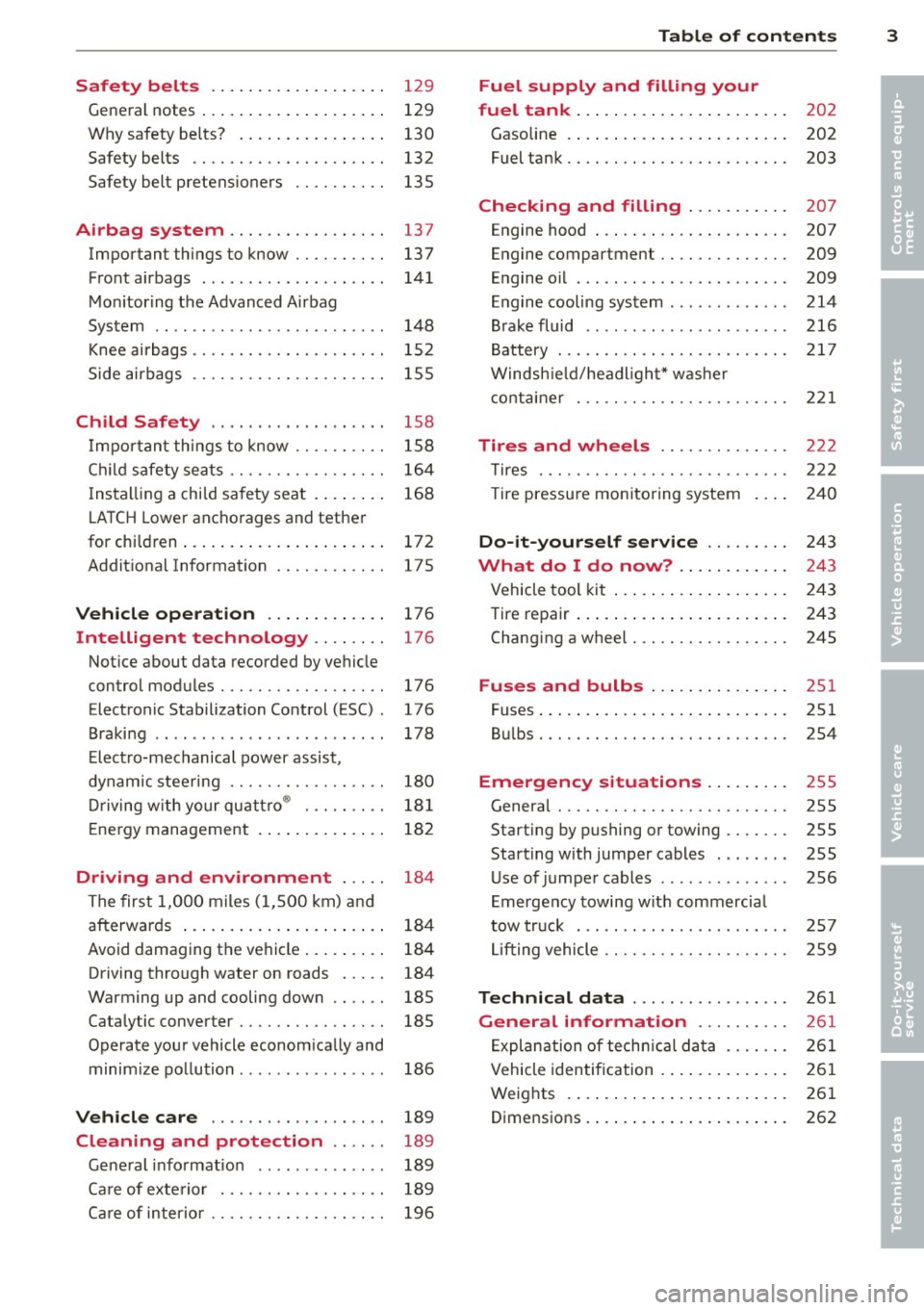
Safety belts . . . . . . . . . . . . . . . . . . . 129
General notes . . . . . . . . . . . . . . . . . . . . 129
Why safety be lts? . . . . . . . . . . . . . . . . 130
Safety belts . . . . . . . . . . . . . . . . . . . . . 132
Safety belt pretens ioners . . . . . . . . . . 13S
Airbag system ............. .. .. 137
Important things to know . . . . . . . . . . 137
Front airbags . . . . . . . . . . . . . . . . . . . . 141
Monitoring the Advanced Airbag
System . . . . . . . . . . . . . . . . . . . . . . . . . 148
Knee airba gs. . . . . . . . . . . . . . . . . . . . . 152
Side airbags . . . . . . . . . . . . . . . . . . . . . 155
Child Safety . . . . . . . . . . . . . . . . . . . 158
Import ant things to know .... .. .. . .
C hild safety sea ts ......... .. .. .. . .
I ns tall ing a chi ld safety seat . ... .. . .
L A T CH Lower anchorages and tether
for chi ldren ... ........... .. .. .. . .
Addit ional Information
Vehicle operation ............ .
Intelligent technology .. .. .. . .
Notice about data recorded by vehicle
control modules .......... .... .. . .
Electronic Stabilization Control (ESC) .
Braking .. ... ...... ......... .... .
E lect ro-mechanical power assist,
dynamic steering ............. .. . .
Driving with your qu attro ® ... .. .. . .
E nergy management ............. .
Driving and environment ... ..
The first 1,000 miles (1,500 km) and
afterwards ... ........... .. .. .. . .
Avoid damaging the vehicle ... .. .. . .
Driving through water on roads ... . .
Warming up and cooling down .. .. . .
Cataly tic converter ........ .... .. . .
Operate your vehicle econom ically and
minim ize pollution ......... ... ... .
Vehicle care .............. .. .. .
158
164
16 8
172
175
176
176
176
176
178
180
18 1
182
184
184
184
184
185
18S
186
189
Cleaning and protection . . . . . . 189
Gene ral i nfo rmation . . . . . . . . . . . . . . 189
Ca re of exte rior . . . . . . . . . . . . . . . . . . 189
Ca re of inter ior . . . . . . . . . . . . . . . . . . . 196
Table of contents 3
Fuel supply and filling your
fuel tank . . . . . . . . . . . . . . . . . . . . . . .
202
Gasoline . . . . . . . . . . . . . . . . . . . . . . . . 202
Fuel tank. . . . . . . . . . . . . . . . . . . . . . . . 203
Checking and filling . . . . . . . . . . . 207
Engine hood . . . . . . . . . . . . . . . . . . . . . 207
Engine compartment . . . . . . . . . . . . . . 209
Engine oil . . . . . . . . . . . . . . . . . . . . . . . 209
Engine cooling system . . . . . . . . . . . . . 214
Brake fluid ....... ............... 216
Battery . . . . . . . . . . . . . . . . . . . . . . . . . 217
Windshield/headlight* washer
container . . . . . . . . . . . . . . . . . . . . . . . 221
Tires and wheels ............. .
T ires ... .. .. .. .. .. . ............ .
T ire pressu re mon itoring system
Do-it-yourself service ........ .
What do I do now? ........... .
Vehicle tool kit ... .. . .. .......... .
Tire repair ... .. .... . ............ .
Chang ing a wheel ..... ........... .
Fuses and bulbs .. .. ... .... ... .
Fuses ..... .. .. .... .. ........... .
Bul bs ....... .. ...... ........... .
Emergency situations ........ .
General ... .. .. .. ............... .
Starting by pushing or towing ...... .
Starting with jumper cables ..... .. .
U se of jumper cables ... .. .. ... ... .
Emergency towing with commercia l
tow truck ... .. .. .. . ............ .
Lift ing vehicle .. .. .... ........... .
Technical data ... . .. .. ..... ... .
General information ......... .
Exp lanation of techn ic al data ...... .
Vehicle identification ........... .. .
Weights .. .. .... ... .. .......... .
Dimensions . ....... . .. .......... . 222
222
240
24
3
243
243
243
245
251
251
2S4
255
255
255
255
256
2 57
259
261
261
26 1
261
261
262
•
•
Page 11 of 286

CD
@
®
©
®
®
Door handle
Power locking sw it ch
Memory buttons (dr iver's seat)
Button for side ass ist
A ir outlets
Control leve r for :
- Turn signal and high beam
0 Multi-function steering wheel
with:
- Horn
- Driver's airbag ...... ... .. .
- Audio/video , telephone and
navigation buttons
- Rocker switches for tiptron ic
operation .... .... ... .... .
@ ISETI button .... ....... .... .
® Instrument cluster ......... .
@ Reset button for trip odometer
@ Switches for:
- Windsh ield wiper/washer .. .
- Trip computer ............ .
- Lap -Timer ............ ... .
@ Ignition lock ... .... ... .... .
@ Adju stable steer ing column
@ Control lever for:
- Cruise contro l ....... ... .. .
- adaptive cruise cont ro l ... .. .
@ Instrument lighting .... .. .. .
@ Release lever for the engine
hood .. .. .... .. .. .. ....... .
@ Data Link Connector for On
Board Diagnost ics (OBD II) . .. .
35
64
101
53
14 1
89
11
10
12
57
25
28
74
74
82
92
55
207
29
@ Lig ht switch . . . . . . . . . . . . . . . . 52
@ Adjuster control fo r outside mi r-
rors . . . . . . . . . . . . . . . . . . . . . . 55
@ Power window switches . . . . . . 39
@ Radio-Disp lay or MM I-Disp lay
@ Depending on options:
- Radio system
- CD changer
@ Emergency flasher . . . . . . . . . . 54
@ Glove compartment ( lockable) 6 7
@ Front passenger's a irbag . . . . . 141
Instrument s and control s 9
@ Depending on options, switches
for :
- drive select .. .. . .. ... ... . . 104
- Electron ic Stabili zation Con-
trol ...... .. .. . ... ...... .
- parking sy stem ....... .... . 176
107
@ Deluxe automat
ic cl imate con-
t ro l .... .. .. .. ........... . .
69
@ Se lector lever for automatic
transmission .. .... ........ .
85
@) Ashtray with cigarette lighter 65
@ Depending on options:
- MMI control console or
- drive select . . . . . . . . . . . . . . . 104
- Electronic Stabili zation Con-
trol button . . . . . . . . . . . . . . . 176
- parking system . . . . . . . . . . . . 107
@ Central power w indow swi tch
@ Power top switc h . . . . . . . . . . . . 44
@ I S T AR T ENGINE S TOPI button 77
§) Electromechanical parking
brake . . . . . . . . . . . . . . . . . . . . . 79
(D Tips
- Some of the equipment or features
show n in the general illustration may be
standard equ ipment on your vehicle or
may be opt ional equ ipment depending
on your model. Always as k yo ur au thor
ized Audi dea ler if you have a quest ion
about your ve hicle .
- Ope rat ion of the Multi Med ia In terface
(MMI) is described in a separa te manua l.
Page 54 of 286

52 Clear vis ion
Clear vision
Lights
Switching the lights on and off
Fig . 55 Instr ument pane l: headlight con trol switch
Light switch -~ -
Turn the switch c:> fig . 55 to the correspond ing
position . When the lights are switched on, the
,o o~ symbo l tu rns on.
0 -The lights are off or the dayt ime run ning
lights are on:
- USA model s: The daytime running lights are
activated when the light sw itch
c:> fig . 55 is
in the
O position or the AUTO position (o nly
in dayl ight conditions) . The daytime running
lights function can be turned on and off in
the radio or MMI* menu
Exterior ligh ting
c:> page 53 , c:> ,&..
-Canada model s: The daytime runn ing lights
are activated when the light sw itch
c:> fig . 55
is in the O position, :oo; position or the AUTO
pos it ion (on ly in daylight cond itions) . The
dayt ime running lights function cannot be
tu rned off
c:> &. .
AUTO* -Au toma tic h eadlights switch on and
off depending on b rightness, fo r example in
tw ilight, during rain or in t unnels
c:> &. .
:o o; -Side marker lights
io -Low beam headlights
Rear fog light (s)
Press the appropriate b utton c:> fig. 55:
0$ -Rear fog light(s)
adaptive light*
When switched on, adaptive ligh t adap ts to
curves in the road depend ing on the vehicle
speed and the steering ang le . This provides
b etter l ighting t hro ugh the curve . The system
operates at speeds between app roximate ly
6 mph (10 km/h) and 68 mph (110 km/h).
Static cornering light* (vehicles with adaptive
light) - the cornering light switches on at
speeds up to approximately 25 mph (40 km/
h) when a certain steering wheel angle is
reached or when a turn signa l is activated. The
area to the s ide of the vehicle is illuminated
better when turning .
The adaptive light and the cornering light only
funct ion when the switch is in t he AU TO posi
t ion (automatic headlights*) .
A WARNING
--
- Daytime r unning lights and automatic
headlights* are only inte nded to assist
the dr iver . Th ey do n ot relieve the driver
of his re s ponsibili ty to chec k the head
lights and to t urn them on manua lly ac
cordin g to the c urrent light and visibility
conditions . For examp le, fog cannot be
detected by the light sensors *. So a lways
sw itch on t he headlights
io under these
weather conditions and when driving in
the dark .
- Crashes can happen whe n you cannot see
the road ahead and when yo u cannot be
see n by other moto rists. Always tu rn on
the head lights so that you can see ahead
a nd so t hat other s can see your car fr om
the b ack.
- P lease obey all laws when using the
lighting sys tems descri bed here .
(D Note
The rear fog lights sho uld only be turned
o n in acco rdanc e with t raff ic regu lation, as
the lights are bright for following traffic. ..,
Page 63 of 286

Seats and storage
General recommen
dations
Why is your seat adjustment so important?
The safety belts and the airbag system can
only provide maximum protection if the front
seats are correctly adjusted.
There are various ways of adjusting the front
seats to provide safe and comfortable support
for the driver and the front passenger. Adjust
your seat properly so that :
- you can easily and quick ly reach all the
switches and controls in the instrument
panel
- your body is properly supported thus reduc ing physical stress and fatigue
- the safety belts and airbag system can offe r
maximum protection
¢ page 137.
In the following sections, you will see exactly
how you can best adjust your seats .
There are special regulations and instructions
for installing a child safety seat on the front passenger's seat. Always follow the informa
tion regard ing child safety provided in
¢ page 158, Child Safety.
.&_ WARNING
-
Refer to ¢ page 118, Driving Safely for
important information, tips, suggestions
and warnings that you should read and fol
low for your own safety and the safety of
your passengers.
.&_ WARNING
Incorrect seating position of the dr iver and
all other passengers can result in serious
personal injury.
- Always keep your feet on the floor when
the vehicle is in motion -never put your
feet on top of the instrument panel, out of the w indow or on top of the seat cush
ion. This app lies especially to the passen-
S eat s an d sto rage 61
gers . If your seating position is incorrect,
you increase the risk of injury in the case
of sudden braking or an accident . If the
airbag inflates and the seating position
is incorrect, this cou ld result in pe rsonal
in jury or even death.
- It is important for both the driver and front passenger to keep a distance of at least 10 inches (25 cm) between them
selves and the steering wheel and/or in
s trumen t panel. If you're s itting any
closer than th is, the airbag system can
not protect you properly. In addition, the
front seats and head restraints m ust be
adj usted to your body height so that they
can give you max imum protect ion.
- Always try to keep as much distance as
possible between yourself and the steer
ing wheel or instrument panel.
- Do not adjust the driver's or front pas senger's seat whi le the vehicle is moving.
Your seat may move unexpectedly, caus
ing sudden loss of veh icle control and
pe rsonal injury. If you adjust you r seat
while the veh icle is moving, you are ou t
of po sit ion.
Driver's seat
The correct seat position is important for safe
and relaxed driving .
We recommend that you adjust the dr iver's
seat in the follow ing manner:
.., Adjust the seat in fore and aft direction so
that you can easily push the pedals to the
floor wh ile keeping your knees slightly bent
¢ .&, in Why is your seat adjustment so im
portant? on page 61 .
""Adjust the seatback so that when you sit
w ith your back against the seatback , you can
s ti ll grasp the top of t he steering wheel.
... App lies to veh icles with adjustab le head re
straints: Adjust the head restraint so the up
per edge is as even as possible wit h the top
of your head. If that is not possib le, try to
adjust the head restraint so that it is as .,.
Page 76 of 286

7 4 On the road
On the road
Steering
Manually adjustable steering wheel
The steering wheel position is fully adjustable
up and down and forward and bock .
Fig. 87 Lever under the steering column
F irst, adjust the driver's seat correctly .
• Pull the lever
r:> fig . 87 <=> &_ .
• Move the steer ing whee l to the desired posi
t ion.
• Push the lever against the steering column
until it locks.
There must be at least 10 inches (25 cm) be
tween you r chest and the center of the steer
i ng wheel. If you cannot sit more than 10 in
ches (25 cm) from the steering whee l, see if
adaptive equipment is available to help you
reach the pedals and increase the distance
from the steering wheel.
F or detai led information on how to adjust the
driver's seat, see
r:> page 62.
A WARNING
Improper use of steeri ng wheel adjust
ment and improper seating position can
cause serious personal injury.
- Adjust the steering whee l co lumn on ly
when the veh icle is not moving to pre
vent loss of veh icle control.
- Adjust the driver's seat or steering wheel
so that there is a minimum of 10 inches
(25 cm) between your chest and the
steering wheel
¢ page 119, fig . 134 . If
yo u cannot mainta in this min imum dis- tance, the airbag system cannot protect
you proper ly.
- If physical limitations prevent you from
sitting 10 inches (25 cm) or more from
the steering wheel, check with your au
thorized Audi dealer to see if adaptive
equ ipment is ava ilable .
- If the steer ing wheel is aligned with your
face, the supplementa l driver's a irbag
cannot provide as much protection in an
accident . Always make sure that the
steer ing wheel is aligned with your
chest.
- Always hold the steering wheel w ith your
hands at the 9 o'clock and 3 o'clock posi
tions to reduce the risk of persona l injury
if the driver's airbag dep loys .
- Never hold the stee ring wheel at the 12
o'clock position or with your hands inside
the steeri ng wheel rim or on the steering
wheel hub . Holding the steering wheel
the wrong way can cause se rious injuries
to the hands, arms and head if the driv
er's airbag deploys.
Ignition lock
Starting engine with the key
Applies to vehicles : w ith ign ition lock
The ignition is switched on and the engine
started with the ignition key .
Fig. 88 Ignit ion key
Sta rting th e engine
• Insert the key into the ignition lock .
• Step on the brake pedal and move the selec-
tor lever to the P or N pos ition. ..,..
Page 92 of 286

90 Transmi ssion
Launch Control Program
Th e Launch Cont rol Program provides the
best accel eration possible when starting from
a st op .
R equirement : The engine must be at operat
i n g t emp eratur e and the steering wheel must
not be turned .
.,. Press the
I~ O FFI button c:> page 178 while
the engine is running. The
I) indicator light
i lluminates in the instrument cluster and
Stabilization contro l (ESC ): Sport . Warn
ing! Re stricted stability
appea rs in the dr iv
er information system d isplay.
.,. Move the selec tor lever to the D/S pos ition
to select sport mode (S) or select the
dy
nami c
driving mode in drive select*
c:> page 105.
... Press the brake peda l strongly with your left
foot and hold it down for at least 1 second.
.,. At the same t ime, press the accelerator ped
al down complete ly w ith your r ight foot un
t il t he engine reaches and maintains a h igh
RPM .
• Remove you r foot from the brake pedal
withi n S seconds
c:> &, .
&_ WARNING
-Always adapt you r driving to the traffic
flow .
- O nly use the Launch Control Program
when road and traffic con dit ions allow it
and other dr ivers will not be endangered
o r annoyed by yo ur dr iv ing and t he vehi
cle's acce lerat ion.
- Please note that the driving wheels can spin and the vehicle can break away
w hen ASR and ESC are in sport mode, es
p ecially when the road is slippe ry.
- Once yo u have accelerated, yo u should
switch the ESC back on by pressing the
1.$ O FF I button .
(D Tips
- The transm ission temperat ure may in
crease significantly after using the Launch Control Program . If that hap- pens, the p
rog ram may not be availab le
for a few minutes . It will be available
again after a cool-down period .
- When accelerating using the La unch
Cont ro l program, a ll vehicle parts are
subject to heavy loads. Th is can result in
increased wear.
Transmission malfunction
[O] Transmission: Press brake pedal and se
lect gear again .
Press the brake peda l and select the desired
selector lever position again. You ca n then
co nti nue driving .
[O] Transmission overheating: Please drive
conservatively.
T he transmiss ion temperat ure has inc reased
significantly due to the sporty d riving manner .
Drive in a less sporty manner until the tem
perature returns to the normal range and the
indicator light switches of.
[O] Transmission malfunction: You can con
tinue driving
T he re is a system mal func tion in the transm is
sion . You may cont inue driving .
Drive to yo ur
autho rize d Aud i dea le r or qualified repair fa
c ili ty soon to have the ma lfunction corrected.
[O] Transmis sion malfunction : Limited driv
ing functionality
T he re is a system malfunction in the t ransm is
s io n. The transm ission is swi tching to emer
gency mode. This mo de on ly shifts in to cer
tain gears or will no longer shift at all. The en
gine may sta ll. Drive to your authorized Audi
dealer or qualif ied repair facility immediately
to have the malfunction corrected.
[O] Ii] T ran smission malfunction : No re verse
You can continue driving
T he re is a sys tem mal func tion in the transm is
s io n. The transm iss ion is swi tch ing to eme r
gency mode. This mode on ly shifts into cer -
tain gears o r will no longer shift at all . The en
gine may sta ll. You cannot engage the
reverse liJJ,
Page 106 of 286

104 Audi drive select
Audi drive select
Driving settings
Introduction
App lies to vehicles: w it h Au di dr ive select
Drive select provides the possibility to experi
ence diffe rent types of vehicle settings in one
vehicle. For instance, us ing the three
Com
fort, Auto
and Dynamic modes, the driver can
switch from a sporty to a comfortab le driving
mode with the press of a button.
Addit ionally, in vehicles with MM I*, the vehi
cle setup for
Individual* mode can be cus
tomized by you. This makes it possib le to
combine settings such as a sporty engine tun
ing with comfortable steering.
A WARNING
Improper use of the Audi drive select can
cause collisions, other acc idents and seri
ous personal injury.
Description
App lies to vehicles: with Audi drive select
The vehicle setup in each mode depends on
the veh icle's features . However, the engine,
automatic transmission and steering are a l
ways involved.
-
Engine and automatic transmission
Depending on the mode, the engine and the
automatic transmission respond quicker or in
a more ba lanced manner to acce lerator pedal
movements. In the sporty dynamic mode, the
automatic transmission shifts at higher RPMs .
The engine sound is adjusted by opening or
closing the exhaust doors for the respective
mode.
Steering
The steering adapts in terms of steering effort
and steer ing ratios. Indirect steer ing that
moves easi ly, like the steering in comfort
mode, is best suited to long dr ives on a high
way. In contrast, dynamic mode provides
sporty, direct steering. The
following applies to vehicles with dynamic
steering*: the steering ratio changes based on
vehicle speed in order to ma inta in optimum
steering effort for the driver at all times. This
sets the steering to be less sensitive at higher
speeds in order to provide improved vehicle
control. At reduced speeds, however, steering
is more d irect in order to keep the steering ef
fort as minimal as poss ible when the driver is
maneuvering the veh icle. At low and average
speeds, dynamic steering additionally pro
vides more responsive steering performance.
Sport differential*
As a component of the all wheel dr ive system
(quattro ®)
~ page 181, the sport different ial*
distributes the driving power to the rear axle
depending on the situation . The distribution
of power varies depending on the mode se
l ected. The goal is a high level of agility and
ability to accelerate on curves. The vehicle is
very responsive to steering.
Audi adaptive cruise control*
The behavior when accelerating can be adjust
ed from comfortab le to sporty, depending on
the drive select mode . Adaptive cruise control
also responds to the driving behavior of the
vehicle ahead in a more conservative or sporty manner .
(D Tips
- In some models, the maximum vehicle
speed can only be reached in the
Auto
and Dynamic modes.
- Selecting the
Dynamic mode resu lts in
sporty shifting characteristics. The S
gear position engages automatically.
- In vehicles that have dynamic steering*,
operating noise is heard when start ing or
stopping the engine. This does not indi
cate a problem.
Page 113 of 286

Reverse Parking
Applies to vehicles: with parking system (rear, with rear
view camera)
Parking mode 1 can be used when parking in
a garage or parking space.
F ig. 127 MMI Display : Aiming at a p arking spot
Fig . 128 MMI Disp lay : A lignin g th e ve hicle
• Sw itch the MMI on and se lect the reverse
gear.
• Turn the steering wheel until the orange ori
entation lines
(D appear in the parking spot
c> fig . 12 7. Use the markings @to help you
estimate the distance from an obstacle .
Each marking corresponds to 3
ft (1 m) . The
blue area represents an extension of the ve
hicle 's outline by approximately 16
ft (5 m)
to the rear.
• While driving in reverse gear, adj ust the
steer ing wheel angle to fit the parking space
with the aid
of the orange orientation lines
¢ (D. @ marks the rear bumper . You should
stop driving in reverse as soon as and no lat
er than when the red orientation line@
abuts a n object ¢_&. !
A WARNING
- The rear view came ra does no t show the
entire area beh ind the veh icle
Par k ass ist 111
¢ page 109, fig . 12 5. Watch out espe
cially for small children and animals. The rear view camera cannot always detect
them, posing risk of an accident!
- Please note that objects not touching the
ground can appear to be further away
than they really are (for example, the bumper of a parked vehicle, a trailer
hitch, o r the rear of a truck). In this case,
you shou ld not use the help lines to help
with parking, wh ich poses danger of an
accident!
(D Note
- Low obstacles a lready s ignaled by a
warning can disappear from the system's detect ion range as they are app roached
and wi ll not continue to be signaled. Ob
jects such as barrier chains, trai ler draw
bars, thin painted vert ica l poles or fen
ces may not be detected by the system,
posing risk of damage.
- In the MMI display, the direction of trav
el of the vehicle rear is represented de
pending on the steering wheel angle .
The vehicle front swings out more than
the vehicle rear . Maintain plenty of d is
tance from an obstacle so that your out
side mi rror or a corner of you r vehicle
does not co llide w ith any obsta cles -dan
ger of accident !
Page 114 of 286

112 Park ass is t
Parallel Parking
App lies to vehicles: with park ing system (rear, with rear
view camera)
Use parking mode 2 to help you park on the
edge of a street.
Fig. 129 MMI Display : blue surfa ce in the parking spot
Fig . 130 MMI Display: Blue curve on the curb
The following steps apply only when there is
no obstacle (such as a wall) near the parking
spot. Otherwise, please read the "Tips on
Parking Next to Obstacles".
.. Activate the turn signal.
.. Switch the MMI on and se lect the reverse
gear. The parking aid turns on and parking
mode 1 appears on the display.
.. Position your vehicle parallel to the edge of
the street, approximately 3 ft (1 m) from a
parked vehicle .
"Press the
Mode¢ fig. 129 © control button
on the MMI control console . Parking mode 2
appears .
.. Back up in reverse gear and align your vehi
cle so that the blue area
@ borders on the
rear end of the vehicle or on the parking
spot line. The blue area represents an exten
sion of the vehicle's outline by approximate
ly 16 ft (5 m) to the rear . The long side of the blue area
should be on the curb. The en
tire blue area must fit into the parking spot.
.. Wh ile the vehicle is stationary, turn the
steering wheel to the right as far as it will
go.
" Back into the parking spot. Stop the vehicle
as soon as the blue curve is nea r the curb
r:::;, fig . 130 ¢0.
" W hile the vehicle is stat ionary, turn the
steer ing whee l to the left as fa r as it will go .
.. Continue to back up into the parking spot
until the vehicle is parked parallel to the
curb .@ marks the rear bumper. You should
stop driving in reverse as soon as and no lat
er than when the red orientation line@
abuts an object¢_&. ! Keep an eye on the
front of your vehicle while do ing this
¢ 6) .
Parking ne xt to obstacl es
When there is an obstacle (such as a wa ll)
next to the parking spot, choose a spot with
more space on the sides. Position the long
s ide of the blue area so that there is suff ic ient
space from the curb . The area must not be on
the curb . You will a lso need to start turning
the steer ing wheel much ea rlier . There should
be a sufficient amount of space between the
curb and the blue curve, and t he blue curve
¢
fig. 130 m ust n ot touch the c urb.
A WARNING
- The rear view camera does not show the
entire area behind the vehicle
¢
page 109 , fig. 12 5. Watch out espe
cially for small children and anima ls. The
rear view camera cannot always detect
them, posing risk of an acc ident!
- Please note that objects not touching the
ground can appear to be further away
than th ey really are (for example, the
bumper of a parked vehicl e, a trailer
h itch, o r the rea r of a truck). In this case,
you sho uld not use the help l ines to help
with parking, which poses dange r of an
accident!
.__ _____________ _J ...
Page 115 of 286

(D Note
-In the MMI display, the direction of trav
el of the vehicle rear is represented de
pending on the steering wheel angle.
The vehicle front swings out more than
the vehicle rear. Maintain plenty of dis
tance from an obstacle so that your out
side mirror or a corner of your vehicle
does not collide with any obstacles -dan
ger of accident!
- Remember to maintain sufficient clear
ance from the curb to avoid damaging
the wheel rims.
(j) Tips
The left or right orientation lines and sur
faces will be displayed, depending on the
turn signal being used.
Adjusting the display and warning tones
Applies to vehicles: with parking system (rear, with rear
view camera)
The display and warning tones are adjusted in
the radio or MM!*.
.. Select : I CARI function button > Parking sys·
tern.
Or
.. Select: ~I C~A~R~I function button > Car systems*
control button> Driver assist> Parking aid.
Display
- Off -when the parking system is switched
off, only audible signals are given.
- On -when the parking system is switched
on, the picture from the rear view camera is
displayed.
Warning tones
- Rear volume -
rear sensor volume
-Rear frequency -rear sensor frequency
-Music volume while parking -when the
parking system is switched on, the volume
of the active audio source is lowered.
The newly adjusted value is briefly heard from
the signal generator. The settings are auto matically stored and assigned to the remote
control key.
Park assist 113
A WARNING
- Always make sure that the volume and
frequency of the warning tones is adjust
ed so that you can easily hear the acous
tic distance signal even if the radio is
playing, the air-conditioner blower is on
High or there is a high level of outside
noise.
- Check the settings whenever someone
else has driven the vehicle before you.
@ Tips
- The warning tones can also be adjusted
directly from the rear view camera im
age. Simply press the Settings* control
button.
- Changed settings are activated when
parking assist is switched on again.
Error messages
Applies to vehicles: with parking system (rear, with rear
view camera}
If a warning tone is audible for about five sec
onds when you turn on the ignition, there is a
malfunction in the system. Have the problem
corrected by your authorized Audi dealer.
Keep the sensors in the rear bumper clean and
free from ice so that the acoustic park assist
system can function properly.