change time AUDI RS5 CABRIOLET 2015 User Guide
[x] Cancel search | Manufacturer: AUDI, Model Year: 2015, Model line: RS5 CABRIOLET, Model: AUDI RS5 CABRIOLET 2015Pages: 284, PDF Size: 69.56 MB
Page 85 of 284
M N
er
u..
co ,...., \!) 1.1"1 ,...., 1.1"1 ,....,
Transmission S tronic
Introduction
The automat ic transm iss ion is controlled elec
tronically. The transmiss ion upshifts or down
shifts automatically depend ing on which drive
p rogram is se lected.
When a
moderate driving sty le is used, the
transmission selects the most econom ica l
d riving mode.
It w ill then change up early and
de lay the downshifts to g ive better f uel econ
omy .
The transmis sion swi tches to a sporty mode
after a k ick-down or when the dr iver uses a
sporty driving sty le characterized by quick ac
celerator peda l movements, heavy accelera
tion, frequent changes in speed and traveling
at the maximum speed.
If desired, the drive r can a lso se lect the gears
manually ( tiptronic mode ) ~ page 87.
The S tronic is a dual-clut ch tra nsmission.
P ower is transfe rred using two clutches that
work independently from one another . They
rep lace the torq ue converter used in conven
tional automatic transmiss ions and allow the
vehicle to accelerate without a noticeable in
terruption in traction.
Selector lever positions
F ig. 96 Display in the instrument cluster: se lector lever
in pos itio n P
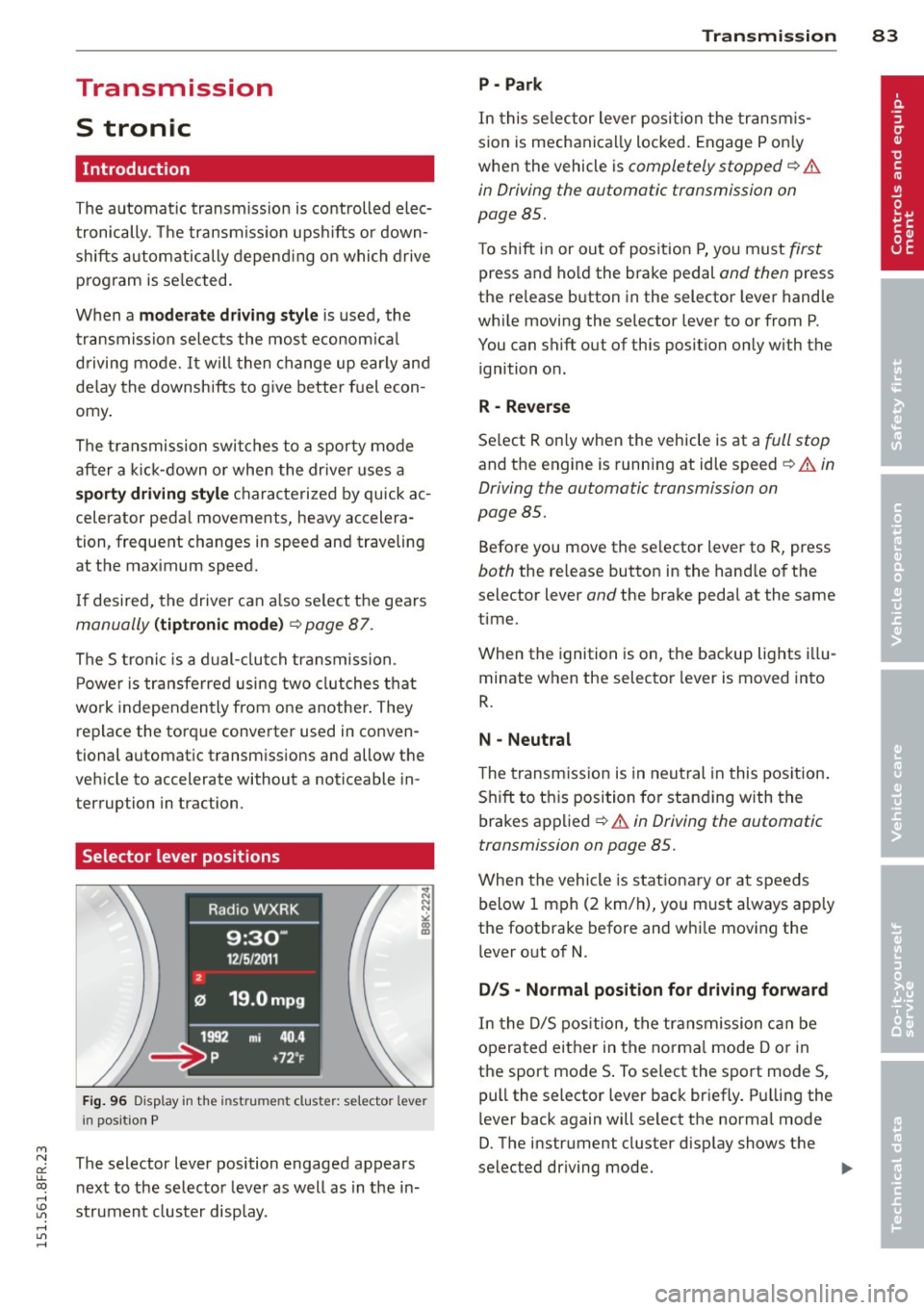
The selector lever position engaged appears
n ext to the selector leve r as well as in the in
strument cluster display.
Tran sm iss ion 83
P -Park
In this se lector lever posi tion the transm is
s ion is mechanica lly locked. Engage P on ly
when the vehicle is
completely stopped~&.
in Driving the automatic transmission on
page 85.
T o shift in or out of pos it ion P, yo u must first
press and ho ld the brake pedal and then press
the re lease button in the selector leve r hand le
whi le moving the selector lever to or from P.
You can shift out of this position only with the ignition o n.
R - Reverse
Se lect R on ly when the veh icle is at a full stop
and t he engine is running at idle speed~.&. in
Driving the automatic transmission on
page 85.
Before you move the se lector lever to R, press
both the re lease button in the hand le o f the
selector lever
and the brake pedal at the same
time.
When the ignition is on, the backup lights illu
minate when the selector lever is moved into
R.
N -Neutral
The transmiss ion is in neu tral in this pos ition .
S hift to t his position fo r standing with the
brakes app lied
~ .&. in Driving the automatic
transmission on page 85.
When the vehicle is stat iona ry or a t speeds
below 1 mph (2 km/h), yo u must always app ly
the footbrake before and whi le mov ing the
l ever o ut of
N.
DIS -Normal posit ion for driving forward
In the D/S pos it ion, t he tr ansmission c an be
operated either in the norma l mode D or in
the sport mode S . To select the sport mode S,
pull the selector lever back briefly. P ulling the
l ever back again will se lect the norma l mode
D. The instr ument cluster disp lay shows the
selected driving mode. ..,_
Page 94 of 284

92 Audi adaptive cruise control and braking guard
Audi adaptive cruise
control
Description
Applies to vehicles: with Audi adap tive cruise co ntrol
Fig. 106 Detect ion range
What can Audi adaptive cruise control do?
The adaptive cruise control works in conjunc
tion with a radar sensor installed in the front
of the vehicle¢
page 90, fig . 103, which is
subject to designated system limits
¢page 92. Stationary objects are disregard
ed .
On open roads w ith no traffic, adaptive cruise
control works like a regular c ruise control sys
tem. The stored speed is maintained. When
approaching a moving vehicle detected up
ahead, the adaptive cruise control system au
tomatically slows down to match that vehi
cle's speed and then maintains the distance
that the driver previously stored . As soon as
the system does not detect a vehicle up
ahead, adaptive cruise control accelerates
back up to the stored speed.
Which functions can be controlled?
When you switch adaptive cruise contro l on,
you can set the current speed as the "control speed"
¢ page 92, Switching on and off.
When driving, you can stop cruise control
¢
page 94 or change the speed ¢ page 93
at any time.
You can also set the distance to the object
ahead and set the adaptive cruise control driv ing program
¢page 94.
Switching on and off
Applies to vehicles: with A udi adapt ive cruise contro l
Fig. 107 Selector lever : switc hing on/off
Fig. 108 Instrumen t cluster: Audi adaptive cruise con
tro l
You can set any speed between 20 mph and
95 mph (30 and 150 km/h).
Indicator lamps and messages in the instru
ment cluster disp lay inform you about the cur
rent system status and settings.
Switching Audi adaptive cruise control on
.,. Pull the lever towa rd you into position@
¢
fig. 107. ACC standby appears in the in
strument cluster display.
Setting the speed and activating
regulation
.,. To set the current speed, press the ISETI but-
ton ¢
page 11, fig. 4. The set speed is .,..
Page 96 of 284
94 Audi adaptive cruise control and braking guard
Interrupting cruise control
Applies to vehicles: with Audi adaptive cruise control
Fig. 110 Selector leve r
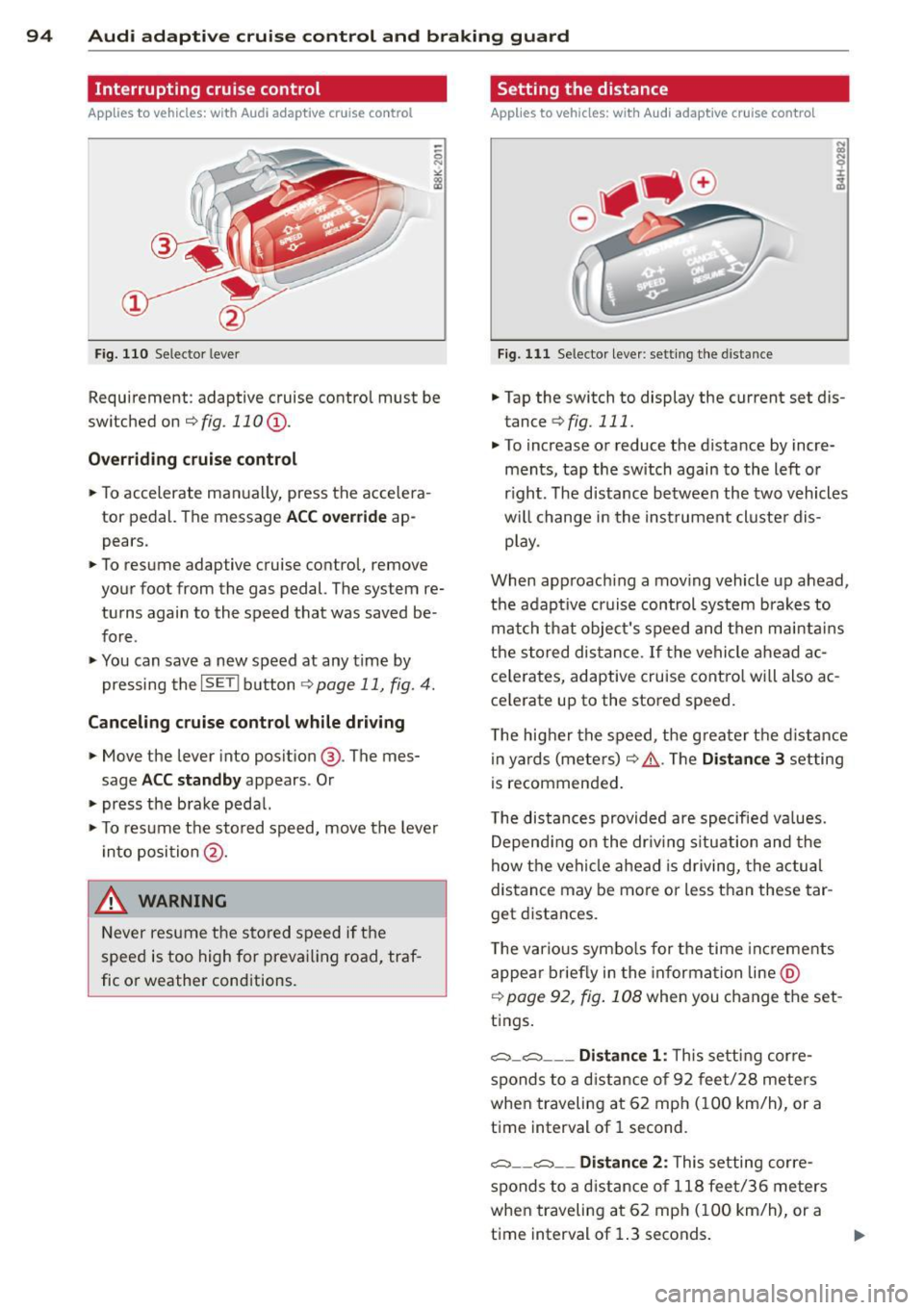
Requirement : adaptive cruise contro l must be
switched on
¢fig.110 (i).
Overriding cruise control
.. To accelerate ma nually, press the accelera
tor pedal. The message
ACC override ap
pears .
.. To resume adaptive cruise control, remove
your foot from the gas pedal. The system re
turns again to the speed that was saved be
fore .
.. You can save a new speed at any time by
pressing the
I SETI button ¢ page 11, fig. 4.
Canceling cruise control while driving
.. Move the lever into posit ion @. The mes
sage
ACC standby appears . Or
.. press the brake pedal.
.. To resume the stored speed, move the lever
into position @.
&_ WARNING
Never resume the stored speed if the
speed is too high for prevailing road, traf
fic or weather cond itions.
Setting the distance
Applies to vehicles: wit h Audi adapt ive cr uise contro l
Fig. 111 Selector lever : sett ing the distance
.. Tap the switch to display the current set dis
tance
¢ fig. 111 .
.. To increase or reduce the distance by incre
ments, tap the switch again to the left or
r ight. The distance between the two vehicles
w ill change in the instrument cluster dis
play .
When approach ing a moving vehicle up ahead,
the adaptive cruise control system brakes to
match that object's speed and then maintains
the stored dis tance. If the vehicle ahead ac
ce le rates, adaptive cruise control will also ac
ce lerate up to the stored speed.
T he higher the speed, the greater t he distance
in yards (meters)
c:::> /1.. Th e Distan ce 3 setting
is recommended .
T he distances provided are specified va lues .
Depending on the driv ing situation and the
how the veh icle ahead is driving, the actual
distance may be more or less than these tar
get distances.
T he various symbols for the time inc reme nts
appear briefly in the information line @
¢ page 92, fig. 108 when you change the set
tings.
c::::,_c::::, ___ Distance 1: Th is setting corre-
sponds to a distance of 92 feet/28 meters
when traveling at 62 mph (100 km/h), or a
time interval of 1 second.
c::::, __ c::::, __ Distance 2: This setting corre
sponds to a distance of 118 feet/36 meters
when traveling at 62 mph (100 km/h), or a
time interval of 1.3 seconds.
Page 102 of 284

100 Audi side assist
Side assist functions at speeds above approxi
mately 19 mph (30 km/h).
@ Vehicles that are approaching
In certain cases, a vehicle will be classified as
cr itica l for a lane change even if it is still
somewhat far away . The faster a vehicle ap
proaches, the sooner the display in the exteri
or mirror will turn on.
@ Vehicles traveling with you
Vehicles traveling with you are indicated in the
exterior m irror if they are classified as critica l
for a lane change. All vehicles detected by
side assist are indicated by the time they en
ter your "blind spot", at the latest.
© Vehicles left behind
If you slowly pass a vehicle that side assist has
detected (the difference in speed between the
vehicle and your vehicle is less than 9 mph
(15 km/h)), the disp lay in the exterior mirror
turns on as soon as the vehicle enters your blind spot.
The display will not turn on if you quickly pass
a vehicle that side assist has detected (the dif
ference in speed between the vehicle and your
vehicle is greater than 9 mph (15 km/h)).
Functional limitations
The radar sensors are designed to de tect the
l eft and right adjacent lanes when the road
lanes are the normal width. In certain situa
tions, the display in the exterior mirror may
turn on even though there is no vehicle locat
ed in the area that is critical for a lane change.
For example:
- if the lanes are narrow or if your are driving
on the edge of your lane. If this is the case,
the system may have detected the vehicle in
another lane that is
not adjacent to your
current lane.
- if you are driving through a curve. Side assist
may react to a veh icle that is one lane over
from the adjacent lane.
- if side assist reacts to other objects (such as
high or displaced guard ra ils). -
In poor weather conditions . The side assist
functions are limited.
Do not cover the rada r sensors
~ fig. 117 with
stickers, deposits, bicycle wheels or other ob
jects, because this will affect the function . For
information on cleaning, refer to ¢
page 184.
A WARNING
-
-Always pay attention to traffic and to the
area around your vehicle. Side assist can
not replace a driver's attention. The driv
er alone is always responsible for lane
changes and similar dr iving maneuvers .
- Improper reliance on the side assist sys
tem can cause coll is ions and serious per
sonal injury:
- Never rely on ly on side assist when
changing lanes.
- Always check rear view mirrors to make
sure that it is safe to change lanes.
- Side assist cannot detect all vehicles un
der all conditions- danger of accident!
- Please note that side assist indicates
there are approaching vehicles, or
vehicles in your blind spot, only after
your vehicle has reached a driving speed
of at least 19 mph (30 km/h).
- In certain sit uations, the system may not
function or its function may be limited.
For example:
- if vehicles are approach ing or being left
behind ve ry quickly. The d isp lay may
not turn on in time.
- in poor weather conditions such as
heavy rain, snow or heavy mist.
- on very wide lanes, in tight curves or if
there is a rise in the road surface.
Vehicles in the adjacent lane may not
be detected because they are outside
of the sensor range .
([) Note
The sensors can be displaced by impacts or
damage to the bumper, wheel housing and
u nderbody. This can affect the system. .,..
Page 108 of 284

106 Park ass is t
Visu al display
Using the red segments, you can est ima te the
d istance to an object in front of or behind the
vehicle
c::> fig. 122. As your vehicle comes clos
er to the obstacle, the segments move closer
to the vehicle. At the latest the collision area
has been reached when the next to last seg
ment is displayed. Do not continue driving far
ther forward or in reverse
c::> A !
A WARNING
-The parking system cannot rep lace the
dr iver's attention. The driver is always re
sponsible for safety d uring parking and
f or all o ther maneuvers.
- Sensors and cameras have blind spots in
wh ich peop le and objec ts cannot be de
tected . Be especially cautious of small
children and animals .
- Always keep your eyes on the veh icle's
surroundings, using the rear view mirro r
as well.
(D Note
Low obstacles al ready signa led by a warn
ing can disappear from the system's detec
tion range as they are approached and will
not continue to be signa led . Objects such
as barrier chains, trailer draw bars, thin
pa inted vertical poles or fences may not be
detected by the system, posing risk of
damage.
@ Tips
- You can change the volume and pitch of
the signals as well as the display
c::>page 111.
-What appears in the display is time-de
l ayed.
Parking system plus
with rear view camera
· Introduction
Applies to vehicles : wi th parking sy stem plus with rea r
v iew camera
F ig. 123 Park ing mode 1: reverse parking
Fig . 12 4 Park ing mode 2: parallel parking
In add ition to parking system plus
c::> page 105, this parking system also has a
rear view camera.
You can choose between two modes to assist
you w ith parking. For example, you can use
"parking model" when parking in a parking
space or garage
c::> fig. 123. When you want to
park parallel to the edge of the street, select
"pa rking mode 2"
c::> fig. 124.
The rear acoustic park ass ist system is inte
grated in the rear of the vehicle and the rear
view camera is integrated in the rear lid
c::> page 108.
A WARNING
--The rear view camera has blind spots, in
which ob jects canno t be detec ted. Be es
pec ia lly careful to che ck for small chil
dren and anima ls before backing up .
Sma ll children and animals will not a l
ways be detected by the sensors.
Page 110 of 284

108 Park assis t
8_ WARNING
- The parking aid cannot replace the driv
er's attention . The driver a lone is respon
sible fo r parki ng a nd s imilar driving ma
neuvers.
- Always keep your eyes on the veh icle's
surround ings, using the rear view mirro r
as well.
- Do not allow yourse lf to be d istracted
from traffic by the rear view camera pic
tu res.
- If the pos it io n and the installat ion angle
of the came ra has changed, fo r example,
afte r a rea r end collision, do not continue
to use the sys tem for s afety reasons.
Have i t checked by a q ualified dealership .
0 Note
-Low obs tacles already sig na led by a
w arning can di sappea r from the system's
dete ction r ange as they are approached
and will not contin ue to be signaled. Ob
j ects s uch as barrier cha ins, trailer draw
bars, thin painted vertical po les or fen
ces may not be detected by the system, pos ing risk of damage.
- Never use warm or hot water to remove
snow or ice from the rear v iew camera
l ens -danger of crack formation on the
l ens!
- When cleaning the lens, never use prod
u cts that are abras ive.
Switching on/off
App lies to vehicles: with par king system p lus w it h rear
view ca mera
T he rear view camera switches on automati
cally together with the acoustic park assist
when you put the vehicle in reverse.
Switching on
.,. Swi tch the M MI on and s hift into reve rse o r
.,. press the
P1#.4. button in the cente r console
¢ page 105, fig. 1 21 . A short con firmation
tone sounds and the LED in the button turns
on .
Switching between the rear view camera
and optic al di splay
.,. Press the Graphic control button ®
¢ page 109, fig. 12 7 to see the optical d is
play .
.,. Press the
Rearview control button to see the
rear v iew camera image.
Switching off
.,. Drive faster than 6 mp h (10 km/h), or
.,. press the
P111A button, or
.,. sw itch off the ignition .
If you press a function button on the M MI
control console , the rear view camera p icture
disappears. The rear v iew camera picture reap
pears the next t ime yo u park.
8_ WARNING ,-
- The MMI d isplay cannot show, or ca nnot
a d equately show, certain objects (such as
sma ll posts or grating) , recesses in the
g round and p rot ruding pa rts on ano ther
c a r.
- Onl y use t he rearview ca mera to assist
you if it shows a goo d, clear pic ture. F or
examp le, the im age may be affec ted by
t he s un s hining into the lens, d irt on the
lens or if t here is a defect.
- U se t he rearv iew camera only with the
rea r lid com plete ly closed . Make s ure any
objects you may have mounted on the rea r lid do n ot b lock the rearview cam
era .
(D Tips
- The rear view came ra picture is available
as soon as the M MI Display or the M MI is
switched on, or the start- up phase is
completed.
- The sensors m ust be kept clean and free
o f snow and ice for the park assist to op
erate .
- Yo u can change the vo lume and pitch of
the s ignals as we ll as the disp lay
¢page 111.
- What appears in the display is time-de
layed .
Page 146 of 284

144 Airbag sys tem
possible that the airba g will inf late when
it is not supposed to, or will not inflate
when it should.
A WARNING
If t he front airbag inflates, a ch ild without
a child restra int, in a rearward-facing child
safety seat or in a forward-facing child re
straint that has not been properly insta lled
w ill be seriously injured and can be k illed.
- Even though your veh icle is equipped
with an Advanced Airbag System, make c ertain that a ll children, especially 12
years and younger, a lways ride on the
back seat properly restrained for their
age and size.
- Always instal l forwa rd or rear-facing
child safety seats on the rear seat -even
with an Advanced Airbag System.
- If you must install a rearward -fac ing
child safety seat on the front passenger
seat because of exceptional circ umstan
ces and the
PASS ENG ER AIR BAG OFF
light does not appear and stay on, imme
diately install the rear-fac ing ch ild safety
seat in a rear seating position and have
the a irbag system inspected by you r au
tho riz ed Aud i deale r.
- A tight tether or other strap on a rear
wa rd-facing child restra int attached to
the front passenger seat can put too much pressure on the weight-sens ing
mat in the seat and register mo re weight
than is ac tually on the seat. The heavier
weight registe red can make the system
work as though an adu lt were on the seat
and dep loy the Advanced Airbag when it
must be suppressed caus ing serious or
even fatal injury to the child.
- If, in exceptional circumstances, you
must install a forward-facing child re
st raint on the front passe nger seat, a l
ways move the seat into its rearmost po
sit io n in the seat's fo re and aft adjust
me nt range, as f ar away from the airbag
as possib le. The b ackrest m ust be adjus t
ed to an upr ight position. Make sure that the
PA
SSEN GER AIR BAG OFF light
comes on and stays on all the time when
ever the ignition is switched on.
A WARNING
-
- If the PASSENGER AIR BAG OFF light
does not go out when an adult is sitting
on the front passenger seat after taking
the ste ps described above, make su re the
adu lt is prope rly seated and restra ined at
one o f the rea r sea ting pos itions.
- Have the airbag system inspected by
your author ized Audi dealer befo re trans
port ing anyone on the front p assenger
se at.
(D Tips
If the weig ht-sensing mat in the front pas
senger seat de te cts an empty seat, the
front air b ag on the p assenger side wi ll be
turned off, and
PASSENGER AIR BAG OFF
will stay on .
Repair, care and disposal of the airbags
Parts of the airbag system are installed at
many different places o n your Aud i. Insta lling,
removing, servicing or repa iring a part in an
area of the veh icle can damage a part of an
airbag system and p revent that system from
working p roperly in a coll is io n.
There are some important t hings you have to
know to make sure that the effectiveness of
the system w ill not be impaired and that dis
ca rded components do not cause inju ry or pol
lute the environmen t.
A WARNING
Imprope r care, serv ic ing and repair p roce
dur es can increase the risk of personal in
ju ry and death by prevent ing an a irbag
from deploying when needed or dep loying
an a irbag unexpectedly:
- Never cover, obstruct , or change the
steer ing whee l horn pad or airbag cover
or the instrument panel or mod ify them
in any way .
Page 173 of 284

M N
a! u.. co ,...., \!) ..,.,
,...., ..,., ,....,
@ Tips
Your vehicle may be equipped with Audi
connect. Your use of certain Aud i connect
features req uires wireless serv ices that are
provided by a third party wireless telecom
municat ions provider. For details regard
ing how information obtained through
Aud i connect is collected, processed,
transmitted, used, and shared, please see
your contra ct w ith the wire less telecom
municat ions provider and the "About A udi
connect" tab in your vehicle's MMI*:
!MENU ! button> Audi connect > About
Audi con nect .
Electronic Stabilization
Control (ESC)
Description
ESC helps to improve road holding and vehicle
dynamics to help reduce the probability of
skidd ing and loss of veh icle control. It works
only when the eng ine is running. ESC detects
certain difficult driv ing situations, including
when the vehicle is beginning to spin (yaw) out of cont ro l and he lps you to get the vehicle
back under control by select ively b rak ing the
wheels, and/or red ucing engine power and
p roviding steering assistance to help hold the
ve hicle on the driver's intended course . The in
dicator light
DJ in the instrument cluster
blinks when ESC is taking action to help you
control the vehicle.
ESC has limitations.
It is important to remem
ber that ESC cannot overcome the laws of
phys ics. It will not a lways be able to help out
under all conditions you may come up against.
For example, ESC may not always be able to
help you master situat ions where there is a
sudden change in the coefficient of fr iction of
the road surface. When there is a sect io n of
d ry road that is s udden ly cove red with water,
slush o r snow, ESC canno t perform the same
way it would on the dry su rface.
If the vehicle
hydroplanes (rides on a c ush ion of water in
stead of the road surface), ESC wi ll not be
ab le to he lp you steer the veh icle because con-
Int ellig ent technolog y 171
tact with the pavement has been interrupted
and the vehicle cannot be braked or steered .
D uring fast corner ing, particular ly on wind ing
roads, ESC cannot always deal as effectively
with difficult dr iv ing s ituations than at lower
speeds. When towing a trailer, ESC is not able
to help you regain control as it would if you
were not tow ing a trailer.
Always adjust your speed and driving style to road, traffic and weather conditions . ESC can
not override the vehicle's physical lim its, in
crease the availab le tract ion, or keep a veh icle
o n the road if road departu re is a result of
driver ina ttent io n. Instead , ESC imp roves the
poss ibility of keep ing the vehicle under con
trol and on the road during extreme maneu
vers by using the driver's steering i nputs to
help keep the vehicle go ing in the intended di
rect ion. If you are traveling at a speed that
causes you to run off the road before ESC can
provide any assistance, you may not experi
ence the benefits of ESC.
ESC is switched on all the time. In certain sit
uat ions when you need less traction, you can
switch off ASR by pressing the butto n
[ill
~ page 173, fig. 166 or~ page 173,
fig. 167. Be sure to sw itch ASR on aga in when
you no lo nger need less traction.
The following systems are integrated in the
ESC:
Anti-lock bra king sy stem (ABS )
ABS prevents the whee ls from locking up
when brak ing. T he vehicle can st ill be steered
even dur ing hard braking. App ly steady pres
su re to the brake peda l. Do not pump the ped
al. A pulsing in the brake pedal ind icates that
the system is helping you to brake the veh icle .
Brake assi st system
The brake ass ist system can decrease braking
distance. It increases brak ing power when the
drive r presses the brake peda l quickly in emer
gency s ituations. You must press and hold the
brake pedal unti l the s ituation is over. In
vehicles with adaptive c ruise control*, the
brake assis t system is more sensitive if the
•
•
Page 193 of 284

M N
er
u..
co ,...., \!) ..,.,
,...., ..,., ,....,
Many gasoline grades are blended to perform
especia lly we ll for winter or summer driving.
During seasonal change-over , we suggest that
you fill up at busy gas stations where the sea sonal adjustment is more likely to be made in
time.
Q;) Note
- Methanol fuels which do not meet these
requirements may cause corrosion and
damage to plastic and rubber compo
nents in the fuel system.
- Do not use fuels that fail to meet the
spec ified criter ia in this chapter .
- If you are unable to determine whether
or not a particular fuel blend meets the
spec ificat ions, ask your service station or
i ts fuel supplier .
- Do not use fuel for which the contents
cannot be identified.
- Fuel system damage and performance
problems resulting from the use of fuels
different from those specified are not
the respons ibility of Audi and are not
covered under the New Vehicle or the
Emission Control System Warranties.
- If you experience a loss of fue l economy
or driveability and performance prob l ems due to the use of one of these fuel
blends, we recommend that you switch
to unblended fuel.
Gasoline additives
A major concern among many auto manufac
turers is carbon deposit build-up caused by
the type of gasoline you use .
Although gasoline grades differ from one manufacturer to another, they have cer tain
things in common. All gasoline grades contain substances that can cause deposits to collect
on vital engine parts, such as fuel injectors
and intake valves. Although most gasoline
brands include additives to keep engine and
fuel systems clean, they are not equally effec
tive.
Fuel supply and filling your fuel tank 191
Audi recommends using TOP TIER Detergent
Gasoline . For more information on TOP TIER
Detergent Gasoline, please go to the official
website (www .toptiergas .com) .
After an extended period of using inadequate
fuels, built -up carbon deposits can rob your
engine of peak performance.
CJ) Note
Damage or malfunction due to poor fuel
quality is not covered by the Audi New Ve
hicle Limited Warranty.
Fuel tank
Fuel filler neck
The fuel filler neck is located on the right rear
s ide panel behind the fuel filler flap.
If the power locking system should fail, you
can still open the flap manually -for detailed
instructions see
~ page 193.
You can find the fuel tank capacity of your ve
hicle in
~page 262 .
The label on the inside of the fuel filler flap
tells you the correct fuel for your vehicle. For
more information about fuel specifications,
see
~ page 190 .
Your vehicle fuel tank has an on-board refuel
ling vapor recovery system. This feature helps
to prevent fuel vapors from escaping from the
tank and pollut ing the environment while you
refuel your vehicle. In order to fill the tank
properly while protecting the environment,
please follow this refueling procedure careful
ly.
A WARNING ~
Under normal operating conditions, never
carry additional fuel containers in your car.
Gas canisters and other containers used to
transport fuel can be dangerous. Such con
tainers, full or empty, may leak and could
cause a fire in a collision . If you must
transport fuel to use for your lawn mower, ..,.
•
•
Page 199 of 284

"' N
a: LL co
rl I.O
"' rl
"' rl
Checking and fillin g 197
Engine compartment
Engine compartment
These are the most important items that you can check.
Fig. 174 Typical layout for containers and engine oil filler cap
(D Coolant expansion tank (- L) . . . 202
@ Jump start point(+) under a cov-
er .. .. ... ....... ........ ..
207, 256
@ Engine o il filler cap (
head screw ............ .... .
207, 256
© Brake flu id reservoi r((())) . . . . . 204
® W indshie ld/headlight* washer
container
(0) . . . . . . . . . . . . . . 208
A WARNING
Before yo u check anything in the engine
compartment, always read and heed all
WARNINGS
q .& in Working in the engine
compartment on page 195.
-
Engine oil
Engine oil specifications
The engine oil used must conform to exact
specifications .
The service interval disp lay in the instrument
cluster of your vehicle will inform y ou when it
is time for an oil change. We recommend that
you have your oil changed by an authorized
Audi Se rv ice Advisor .
If you have to top off the o il between o il
changes, use the Audi o il quality standard
specified in the tab le.
Audi oil quality standard
Gasoline
VW 502 00 or
eng ine vw 504 00 ...