door lock AUDI RS5 CABRIOLET 2015 User Guide
[x] Cancel search | Manufacturer: AUDI, Model Year: 2015, Model line: RS5 CABRIOLET, Model: AUDI RS5 CABRIOLET 2015Pages: 284, PDF Size: 69.56 MB
Page 40 of 284

38 Openin g and clo sing
@ Tips
The emergency re lease lever shou ld never
be used as a handle for closing the lug
gage compartment lid.
Power windows
Controls
The driver can control all power windows .
Fig. 29 Section of the drive r's door: Controls
Fig. 30 Cen ter console: central power wi ndow sw itch
All power window switches ~ fig. 29 are pro
vided with a
tw o-po sit ion fun ction :
Opening th e window s
~ Press the switch to the first s to p and hold it
until the window reaches the des ired pos i
tion.
~ Press the sw itch br iefly to the sec ond stop
to au toma tically open the window.
Clos ing th e windows
~ Pull the switch to the first sto p and hold it
unt il the window reaches the desired pos i
t ion.
~ P ull the switch briefly to the se con d sto p to
automatically close the window .
Power window switches
@ Driver 's door
® Passenger's door
© Left rear window
@ Right rear window
You can open or close a ll the windows with
the switch
~ fig. 30 .
A WARNING
-- When you leave your vehicle -even if on
ly briefly -always remove the ignition
key. Th is app lies particularly when chil
dren remain in the vehicle. Otherwise the
children could start the engine or oper
ate electrical equipment (e.g . power win
dows) . The power w indows are function
al until the dr iver's door or passenger's
door has been opened.
- Pay close attention when closing the win dows to prevent p inching of hands o r
limbs.
- When locking the vehicle from outside, the vehicle must be unoccupied since the
windows can no longe r be opened in an
emergency.
0) Tips
- When you open the doors, the windows
automatically lower abo ut 10 mm.
- After the ignition has been switched off, the windows can st ill be opened or
closed for about 10 mi nutes . T he win
dow reg ulators are not sw itched until
the driver's or passenge r's door is
o pened .
Page 41 of 284

"' N
a: LL co
rl I.O
"' rl
"' rl
Convenience opening/closing
The windows can be opened and closed with
the mechanical key or the emergency key.
@
' -~
® ' I
Fig . 31 Key turns for opening and clos ing
Convenience opening feature
.. Use the emergency key or pull the mechani
cal key ou t of the master key¢
page 32 .
.. Inse rt the key into the lock of the driver's
door .
.. Turn the key to position¢
fig. 31 @until a ll
the windows have reached the desired posi
t ion.
Convenience closing feature
.. Use the emergency key or pull the mechani
cal key out of the master key~
page 32.
.. Turn the key in the lock of the driver's door
to the lock position @ until the windows are
closed ¢
_&..
A WARNING
-Never close the windows inattentive ly
and without checking -there is risk of in
jury.
- You must always watch when the win dows are being ra ised so that no one can
be trapped. If you release the key, the
cl osing action is immed iate ly canceled .
- Always read and heed WARNING ¢
& in
General description on page 30.
Opening and closing 39
Correcting window regulator
, malfunction
After disconnecting the vehicle battery, the
one -touch up and down feature must be acti
vated again.
.. Pull and hold the power window switch until
the window is completely closed .
.. Release the switch and pull the sw itch again
for one second.
Valet parking
App lies to vehicles: wi th vale t parking function
The valet parking feature protects the lug
gage compartment from unauthorized ac
cess .
Fig. 32 Glove compartme nt: valet parkin g button
You can switch the "valet parking function" on
when someone else is parking your vehicle .
When the function is switched on, the vehicle
can be driven, locked and unlocked using the
master key, but access to the luggage com
partment is not permitted.
.. Take the mechanical key out of the master
key¢
page 32.
.. Open the glove compartment ¢ page 66.
.. Activate ¢
fig. 32 the "valet parking" fea
ture by pressing the
I VALET I button . The in
dicator light in the switch illuminates.
.. Close the glove compartment and lock it
w ith the mechanical key .
.. Leave the master key with the serv ice per
sonnel for park ing and keep the mechanical
key with you.
The following buttons are deactivated when
the valet parking function is switched on :
Page 46 of 284

44 Power top
-When operating the power top, visibility
to the rear is limited . Avoid operating the
top while driving in reverse.
(D Note
- To prevent damage to the power top:
- do not store any objects in the power
top compartment.
- make sure there is enough space above
the vehicle when opening or closing
the power top.
- To reduce the risk of damage, make sure
there are no fragile objects within the
storage bay's range of motion.
@ Tips
-To prevent the battery from draining, do
not open or close the power top repeat
edly when the engine is switched off.
- A message will appear in the instrument
cluster display if there is a power top
malfunction
~ page 45.
- The power top can also be operated
manually if there is a malfunction
¢ page 47, Power top emergency op
eration.
The cause of the malfunction
should be corrected by an authorized
Audi dealer or authorized repair facility
as soon as possible.
- The vehicle is not protected from the
weather or from unauthorized entry if
the vehicle is left parked with the power
top open. Lock any objects you are leav ing in the vehicle in the luggage com
partment. Close the power top before
leaving the vehicle.
- The side windows lower slightly auto
matically when opening/closing the pow
er top .
Power top convenience opening/closing
Fig. 37 Remote control key: buttons
Fig. 38 Turning the key to open and close
Convenience opening with the driver's
door lock
.. Press them button on the remote control
key to unlock the vehicle.
N
~ co aJ
.. Turn the key once in the driver 's door lock to
the opening position @¢
fig. 38 .
.. Turn the key to the opening position again
within two seconds and hold it there until
the power top opens completely.
Convenience closing with the driver's door
lock
.. Turn the key once in the driver's door lock to
the closing position@¢
fig. 38.
.. Turn the key to the closing position again
within two seconds and hold it there until
the power top closes completely.
Releasing the key stops the opening or closing
process
immediately .
A WARNING
-Read and follow the important safety pre
cautions ¢
A in Opening/closing the pow
er top on page 43.
Page 48 of 284

46 Power top
Conv ertible top not secure
This message appears and a warn ing tone
sounds if the power top is no t comp letely
closed/open and the veh icle speed is above
50 km/h . Reduce the vehicle speed and try
closing/opening the power top again.
.&_ WARNING
Never drive when the power top is not
locked correctly . The w ind from dr iv ing
could cause the power top to open. T his
can result in injuries a nd damage to the
veh icle.
Wind deflector
Applies to vehicles: with wind deflecto r
The wind deflector reduces turbulence in the
passenger compartment and makes driving more comfortable.
F ig. 41 Rear of the vehicle: insert ing the win d deflec
t o r
(1 )
Fig. 42 Rear of the vehicle: insert ing the wind deflec
to r (2)
The wind de fle ctor is loca ted in the luggage
compartment in a storage bag* or under the
cargo floo r cove r.
Inserting and positioning the wind
defl ector
" Open the rea r door on the passenger's side.
" Remove the wind def lector from the lug-
gage compartment and fold it apart once.
The wind def lector is installed in the correct
position when the long side is toward the
front and the wind deflector frame is at the
top.
"I nsert both p ins on the wind deflector @
¢
fig. 41 on the driver's si de in t he mounts
in the s ide trim.
" Fold the handle @upward and lift the cen
ter of the wind deflector up slight ly @
¢fig. 42.
" Guide the wind deflector into the mounts on
the passenger's side @and press lig htly in
the center of the w ind deflector ® until the
handle locks in place.
" Raise the wind deflector comp letely .
Removing the wind deflector
" Fold t he wind def lector frame back.
" Fold the handle @¢
fig. 41 upward and lift
the cente r of the w ind deflector up slightly
@ ¢fig . 42.
" Remove the wind deflector from the mounts
in the s ide trim on the p asse nger side.
" Pull the w ind deflec to r out of the moun ts on
the dr iver side and lift it o ut.
" Fold the wind deflector together and store it
securely .
.&_ WARNING
-
- Do not use the wind deflector to sec ure
cargo.
- Be careful when installing so you do not
pinch your f ingers.
- Pay attention to traffic when instal ling
the wind deflector. Insta ll th e wind de
f lector from the s ide of the vehicle that
is farthest from traffic.
(D Note
Do not lean aga inst the vehicle when in
stalling the wind deflector . Hard objects
and decorat io ns on clothing such as be lt
buckles can scratch the pa int.
Page 54 of 284

52 Clear vis ion
@ Tips
- The light sensor* for headlight control is
located in the rear view m irror mount.
You should therefore not apply any st ick
ers to the windsh ield in this area in order
to prevent malfunctions or failures.
- Some exterior lighting functions can be
adjusted
¢page 52.
- When you remove your key from the igni
tion while the vehicle's lights are turned
on, a buzzer sounds as long as the driv
er's door is open .
- In cool or damp weather, the ins ide of
the headlights, turn signals and tail lights can fog over due to the tempera
ture difference between the inside and
outside. They will clea r shor tly after
switching them on. This does not affect
the service life of the lighting.
- In the even t of a light sensor malfunc
tion, the driver is no tified in the instru
ment cluster disp lay¢
page 22.
Turn signals and high beam lever
The lever operates the turn signals, the high
beams and the headlight flasher .
Fig. 56 Tu rn s ig na l and hig h beam lever
Turn sign als ¢i ¢
The turn signals activate when you move the
l ever into a turn s ignal pos ition when the ign i
tion is switched on.
(D -right turn signal
@-left tur n signa l
The turn s ignal blinks three times if you just
tap the lever .
High be ams and headlight flasher [D
Move the lever to the correspon ding posit io n:
@ -high beams on
@ -high beams off or headlight flasher
The indicator light
ii in the instrument cl us
te r turns on .
Notes on thes e features
-The turn signals on ly wor k w ith the ignition
t ur ned on. The indicator ligh ts
Ct or a in
the instrument cluster also blink.
- After you have turned a co rner, the turn s ig
na l switches off au toma tically .
- The
high beam works on ly w hen the head
lights a re on. The ind icator ligh t
II in the
instrument cluster illuminates when the
high beams are on .
- The
headlight flasher works o nly as long as
you ho ld the lever -even if there a re no
lights switched on . The indicator light
II in
the instrument cluster illuminates when you
use the headlight flasher.
A WARNING
--
Do not use the h igh beam or headlight
flasher if you know that these could blind
oncom ing traffic.
Adjusting exterior lighting
The functions ore selected in the radio or
MMI" .
.,. Select: !CARI function button> Exte rior
light ing .
Or
.,. Select: !CARI function button > Car systems *
control button > Vehicle s etting s> Exterior
lighting .
Coming home (light when leav ing car }*,
Leav ing home (light when unlocking car )*
The coming home function illuminates the
area around the vehicle when the ignition is
switched off and th e dr ive r's door is open ed.
Depend ing on veh icle equ ipment, the function
can be switched on and off or the length of
time the lig hts remain on* can be ad justed . ..,.
Page 65 of 284
"' N
a: LL co
rl I.O
"' rl
"' rl
Center armrest
The center armrest can be adjusted to several
levels .
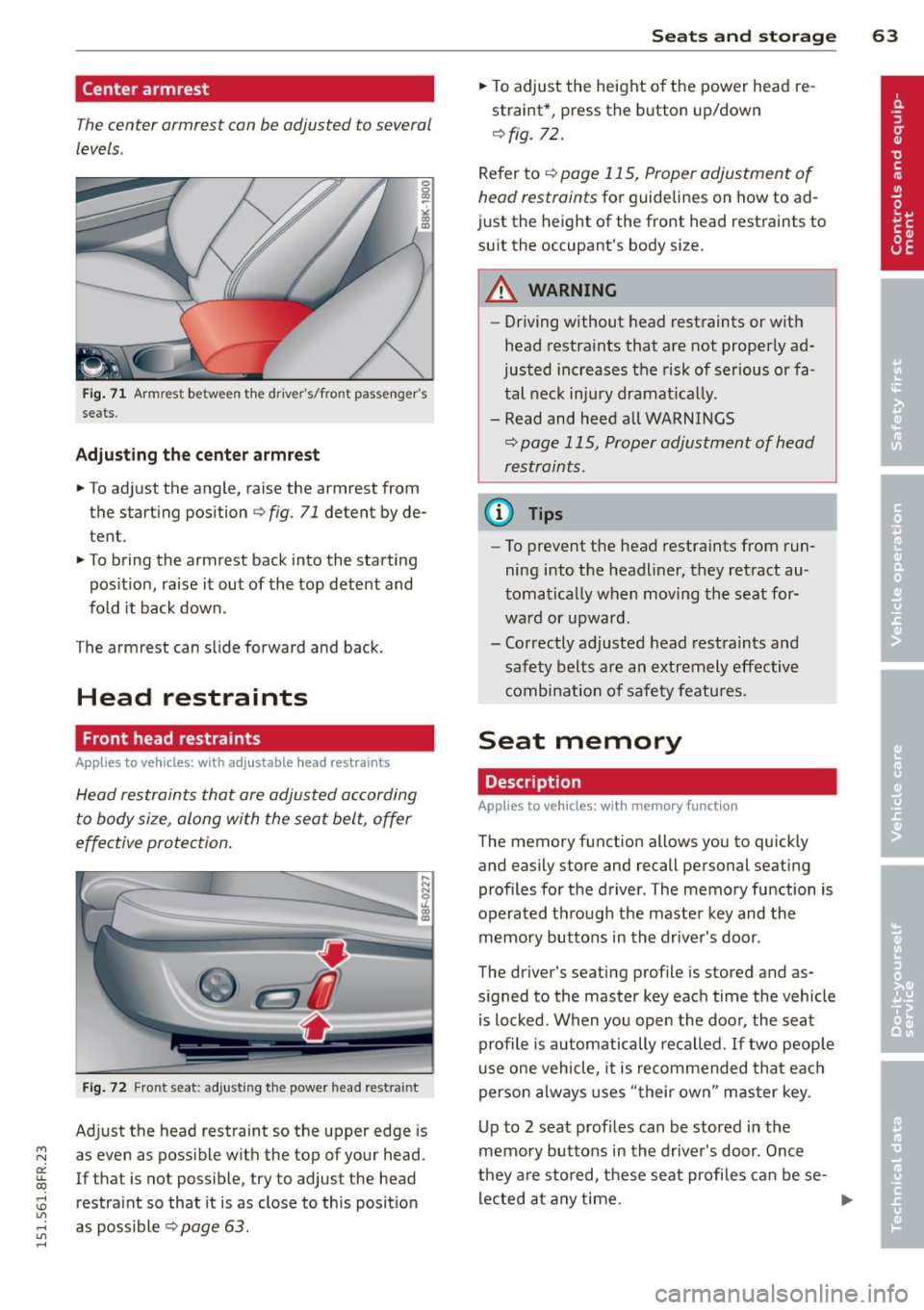
Fig. 71 Armrest between t he drive r's/front passenger's
seats.
Adjusting the center armrest
.. To adjust the angle, raise the armrest from
the starting position
r=:> fig. 71 detent by de
tent.
.. To bring the armrest back into the starting
pos ition, raise it out of the top detent and
fold it back down.
The arm rest can slide forward and back .
Head restraints
Front head restraints
Applies to vehicles: with ad justable head restraints
Head restraints that are adjusted according
to body size, along with the seat belt, offer
effective protection.
....
::::=;~~-..:.:::::~ I
Fig . 72 Fro nt seat: adjusting the power head restra int
Adjust the head restraint so the upper edge is
as even as possible with the top of your head.
If that is not possible, try to adjust the head
restra int so that it is as close to this position
as poss ible r=:>
page 63 .
Seats and storage 63
.. To adjust the height of the power head re
straint*, press the button up/down
<=:> fig. 72.
Refer to <=:> page 115, Proper adjustment of
head restraints
for guidelines on how to ad
just the height of the front head restraints to
suit the occupant's body size.
A WARNING
- Driving without head restraints or with
head restraints that are not properly ad
justed increases the risk of serious or fa
tal neck injury dramat ically.
- Read and heed all WARNINGS
<=:> page 115, Proper adjustment of head
restraints .
@ Tips
-To prevent the head restraints from run
ning into the headliner, they retract au
tomatically when moving the seat for
ward or upward.
- Correctly adjusted head restraints and
safety belts are an extremely effective
combinat ion of safety features.
Seat memory
Description
App lies to vehicles: wit h memo ry function
-
The memory fun ction allows you to quickly
and easily store and recall personal seating
profiles for the driver. The memory function is
operated t hrough the master key and the
memory buttons in the driver's door .
The driver's seating profile is stored and as
signed to the master key each time the vehicle
is locked. When you open the door, the seat
profile is automatically recalled . If two peop le
use one vehicle, it is recommended that each
person always uses "their own " master key.
Up to 2 seat profiles can be stored in the
memory buttons in the driver's door . Once
they a re stored, these seat profiles can be se-
lected at any time.
IJII,-
Page 66 of 284

64 Seats and storage
In addition to the driver 's seat settings, you
can also store and access the exterior mirror
ad justment settings* using the remote con
trol key or memory button.
Remote control key
Applies to vehicles: with seat memory
To assign the driver's seat settings to the re
mote contro l key when locking the vehicle, the
function must be activated in the radio or
MMI*
• Se lect :
I CAR I funct ion button> Seat adj ust
ment
> Dri ver's se at > Remote c ontrol k ey >
on .Or
• Se lect :
,..,I Cc-cAc-cRc-, 1 funct ion button > Car system s*
control button > Vehicle setting s > Seats >
Driv er' s s eat > Remot e cont rol key > On .
(D Tips
If you do not want another d river's set
tings to be assigned to the remote key,
sw itch off the memory function us ing the
rad io or MMI* or the
!ON/OFF I button
c:::>page 64.
Memory buttons
App lies to vehicles: with seat memory
Fig. 73 Driver 's door: memory functio n buttons
The memo ry but tons are located in the dr iv
e r's door .
Switching the memory function on /off
• Press the ION/O FF I button to switch the
memo ry fu nction on/off. The word
OFF
li ghts up when the memory funct io n is
swit ched off. Seat profi les are neither stored
nor recalled .
Storing a s eat p rofile
• Press the ISET I button. When the word SET
lights up, the memory is ready to store set
tings.
• Press a memory button
dII or [Ii) briefly . A
tone confirms that the settings were stored.
Acces sing a seat profile
• If the driver's door is open and the ignition
is switched off, press the memory button.
• If the driver's door is closed or the ignition is
switched on, press and ho ld the memory
button until the seat adjustment is com
plete .
A WARNING
-For safety reasons ., the seat setting can
only be recalled when the vehicle is sta
tionary -ot herwise you ris k having an ac
cident.
- I n an emergency the recall proced ure can
be cancelled by p ressing the
ION/OFF I
sw itch or by tapping the memory bu t
ton s.
Ashtray
Fig. 7 4 Center console : ashtray
Opening /cl osi ng
• To open the ashtray, slide the cover up
c:::> fig. 74.
• To close the ashtray, press down on the cov
er.
Emptying the ashtray
• To remove the insert, s lide the latch to the
right
c:::> fig. 74 -arrow- . ..,_
Page 68 of 284

66 Seats and st o rage
- Use only soft cups in the cupholder. Hard
cups and g lasses can ca use in jury in an
accident.
- Never use the cupholder or adapter as an
ashtray -risk of fire.
(D Note
On ly drink containers with lids should be
carried in the cupho lder. Liqu id could sp ill
out and damage your vehicle's e lectronic
equipment or stain the upholstery, etc.
Glove compartment
The glove comportment is illuminated and
can be locked .
Fig . 78 Glove compa rtment
.. To open the glove compartment, pu ll the
hand le in the direct io n of the arrow¢
fig. 78
and swi ng the cover down to open.
.. To close the glove compartment, pus h the
glove compartment lid upward until the lock
engages.
The glove compa rtment can be locked using
the mechanical key¢
page 32.
On the r ight side in the glove compartment is
a holder wi th the key body into which the
emergency key must be cl ipped to be able to
start the vehicle .
A WARNING
To reduce the risk of persona l injury in an
accident or sudden stop, always keep the
glove compartment closed wh ile driving.
Luggage compartment
General information
A WARNING ~
Read and follow the important safety pre-
cautions on ¢
page 118, Stowing lug
gage.
Enlarging the luggage compartment
The backrests con be folded forward either
separately or together.
F ig . 7 9 Luggage compartment: release lever
Folding th e backrest fo rwar d
.. Pull the release lever in the direction of the
arrow to fold the backrest forward .
Folding th e back res t b ack int o the upright
po sition
.. Fold the backrest back up again until it
latches securely¢ _&..
A WARNING
--The backrest must be securely latched in
position so that no items contained in
the luggage compa rtment can s lide fo r
ward upon sudden braking.
- Always check whether the la tc h is fully
engaged by pulling the seatback for
ward.
- Never a llow safety belts to become dam
a ged by be ing caugh t in door or seat
hardware.
- Torn or frayed safety belts can tear and
d a maged be lt hardware can break i n a
crash. Inspect the belts periodically .
Page 76 of 284
74 On the road
• Press the key¢ fig. 88 -the engine will
start.
Switching the ignition on/off
If you would like to switch the ignition on
without starting the engine, follow these
steps:
• Insert the key into the ignition lock .
• Press the key briefly
without pressing the
brake pedal.
• To switch the ignition off, press the key
again.
When starting the engine, major electrical
loads are switched off temporarily.
You can only remove the key with the ignition
switched off.
If the engine should not start immediately,
the starting process is automatically stopped
after a short time. Repeat starting procedure .
A WARNING
- Never allow the engine to run in confined
spaces -danger of asphyxiation.
- Never remove the ignition key from the
ignition look while the vehicle is moving.
Otherwise, the steering lock could sud
denly engage and you would not be able
to steer the vehicle.
- Always take the key with you whenever
you leave your vehicle. Otherwise, the
engine could be started or electrical
equipment such as the power windows
could be operated. This can lead to seri
ous injury.
- Never leave children or persons requiring
assistance unattended in the vehicle. The
doors can be locked using the remote
transmitter, preventing people from es caping from the vehicle on their own in
the event of an emergency . Depending
on the time of year, people inside the ve
hicle can be exposed to very high or very
low temperatures.
(D Note
Avoid high engine rpm, full throttle and heavy engine loads until the engine has
reached operating temperature -other
wise you risk engine damage.
@ For the sake of the environment
Do not let the engine run while parked to
warm up. Begin driving immediately. This
reduces unnecessary emissions.
(D Tips
- If the key cannot be removed from the
ignition lock, you have to pull the me
chanical key out of the master key in or
der to be able to lock the vehicle
¢page 33 .
-After starting a cold engine, there may
be a brief period of increased noise be
cause the oil pressure must first build up
in the hydraulic valve adjusters. This is
normal and not a cause for concern.
- If you leave the vehicle with the ignition
switched on, the ignition will switch off
after a certain period of time. Please
note that electrical equipment such as
exterior lights will switch off as well
when that happens.
Page 77 of 284
"' N
a: LL co
rl I.O
"' rl
"' rl
Starting the vehicle with the emergency
key
Applies to vehicles: with ignition lock
You can use the emergency key as an ignition
key in an emergency.
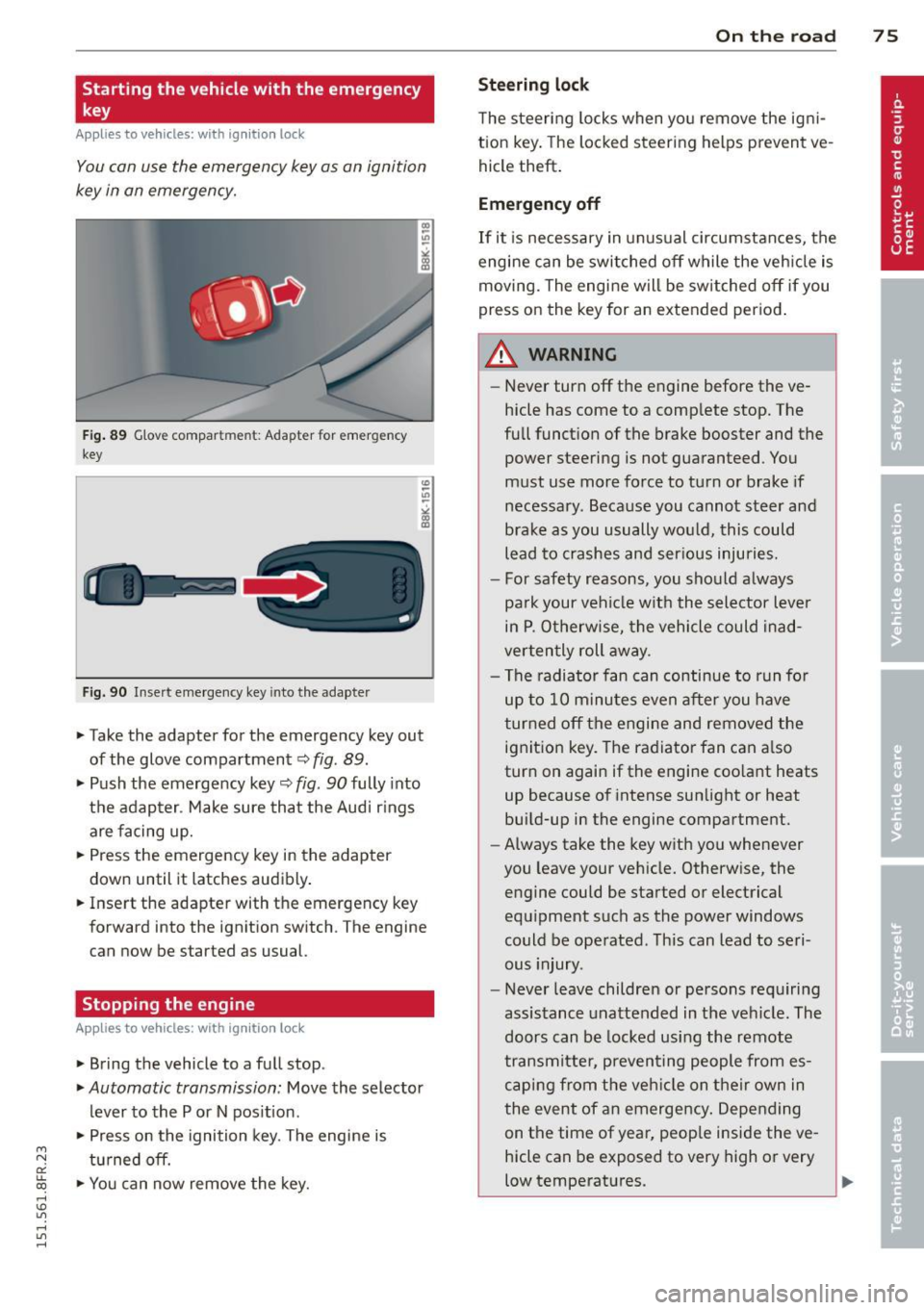
F ig . 89 G love compar tmen t: Adapter for emergency
key
Fig. 90 Insert emergency key into the adapter
.,.. Take the adapter for the emergency key out
of the glove compartment
c:> fig . 89 .
.,.. Push the emergency key~ fig. 90 fully into
the adap ter . Make sure that the Audi r ings
are facing up.
.,.. Press the emergency key in the adapter
down until it latches audibly .
.,.. Insert the adapter with the emergency key
forward into the ignition switch . The engine
can now be started as usual.
Stopping the engine
App lies to vehicles: with ig ni tion loc k
.,.. Bring the vehicle to a full stop.
.,.. Automatic transmission: Move the selector
lever to the P or N pos ition .
.,.. Press on the ignition key. The engine is
tu rned off.
.,.. You can now remove the key.
On th e road 7 5
Steering lo ck
The steering locks when yo u remove the ig ni
tion key. The lo cked steering helps prevent ve
hicle theft .
Emergency off
If it is necessary in unus ual circumstances, the
engine can be switched off while the veh icle is
moving. The engine will be switched off if you
press on the key for an extended period .
A WARNING
-Never turn off the engine before the ve
hicle has come to a comp lete stop. The
full funct ion of the brake booster and the
power steering is not guaranteed . You
must use more force to turn or brake if
necessary. Because you cannot steer and
brake as you usually would, this could
lead to crashes and ser ious injuries.
- For safety reasons, you should always
pa rk your vehicle w ith the selector lever
in P . Otherw ise, the vehicle could inad
verten tly roll away.
- The radiator fan can continue to run fo r
up to 10 minu tes even after you have
turned off the engine and removed the ignition key. The radiator fan can a lso
turn on again if the engine coo lant heats
up because of intense sunlight or heat
bui ld-up in the engine compartment.
- Always take the key with you whenever
you leave your vehicle. Otherw ise, the
engine could be started or electrical
equ ipment such as the power windows
could be operated . This can lead to seri
ous injury.
- Never leave children or persons requiring
assistance unattended in the vehicle. The
doors can be locked using the remote
transmitter, preven ting people from es
caping from the veh icle on their own in
the event of an emergency . Depending
on the time of year, peop le inside the ve
hicle can be exposed to very high or very
low temperatures. ..,.