instrument cluster AUDI RS5 CABRIOLET 2015 User Guide
[x] Cancel search | Manufacturer: AUDI, Model Year: 2015, Model line: RS5 CABRIOLET, Model: AUDI RS5 CABRIOLET 2015Pages: 284, PDF Size: 69.56 MB
Page 30 of 284

28 Driver information d isplay
If timing is paused, you can continue it late r
even if you sw itch the ignition off .
Evaluating times and continuing or
resetting timing
You can evaluate the fastest, slowest and
average lap times.
Fig. 16 Dis play : lap time eva luat ion
.,. To evaluate lap times, press and hold the
I RESET I button ¢ page 27, fig. 14 @for ap
proximate ly
2 seconds. The number of laps
t raveled, the fastest lap"+", the slowest lap
" -" and the average lap time "0" appears in
the display .
.,. To continue timing for additional laps, press
the wiper switch @ .
.,. To reset the timer to zero, press and hold
the
I RESET I button again for approximately
2 seconds .
.,. To switch the lap timer off comp letely, press
the
I RESET I button br iefly.
@ Tips
- Saved lap times cannot be ind ividually
deleted from the total results.
- The saved lap timer values will not be
l ost after turning the ignition off .
On-Board Diagnostic
system (OBD)
Malfunction Indicator Lamp (MIL )
The Malfunction Indicator Lamp (MIL) ¢"4 in
the instrument cluster is part of the On-Board
Diagnostic (OBD II) system. T
he warning/indicator light illuminates when
the ignition is switched on and goes out after
the engine starts and the id le has stabilized .
This indicates that the MIL is working proper
ly.
If the light does not go out after the engine
is started, or illum inates while you are dr iv
ing, a malfunction may exist in the engine sys
tem . If the light illuminates, the catalytic con
verter could be damaged .
Cont inue driving
with reduced power (avoid
ing sustained high speeds and/or rapid accel
erations) and have the condition corrected.
Contact your authorized Audi dea ler .
An improperly closed fuel filler cap may also
cause the
MIL light to illuminate
¢ page 192 .
On-Board Diagnostics
Fig. 17 Locat io n of Data Link Co nnector (O LC)
On-Board Diagnostics monitors the compo
nents of your emission contro l system. Each
monitored component in your engine system
has been assigned a code. In case of a mal
function, the component will be identified
and the fault stored as a code in the control
module memo ry.
The MIL light may also illuminate if there is a leak in the on-board fuel vapor recovery sys
tem .
If the light illuminates after a refueling,
stop the vehicle and make sure the fuel filler
cap is properly closed
¢ page 192.
In order to make an accurate diagnosis, the
stored data can on ly be displayed using spe
cial diagnostic equipment (generic scan tool
for 080) .
ll>-
Page 46 of 284

44 Power top
-When operating the power top, visibility
to the rear is limited . Avoid operating the
top while driving in reverse.
(D Note
- To prevent damage to the power top:
- do not store any objects in the power
top compartment.
- make sure there is enough space above
the vehicle when opening or closing
the power top.
- To reduce the risk of damage, make sure
there are no fragile objects within the
storage bay's range of motion.
@ Tips
-To prevent the battery from draining, do
not open or close the power top repeat
edly when the engine is switched off.
- A message will appear in the instrument
cluster display if there is a power top
malfunction
~ page 45.
- The power top can also be operated
manually if there is a malfunction
¢ page 47, Power top emergency op
eration.
The cause of the malfunction
should be corrected by an authorized
Audi dealer or authorized repair facility
as soon as possible.
- The vehicle is not protected from the
weather or from unauthorized entry if
the vehicle is left parked with the power
top open. Lock any objects you are leav ing in the vehicle in the luggage com
partment. Close the power top before
leaving the vehicle.
- The side windows lower slightly auto
matically when opening/closing the pow
er top .
Power top convenience opening/closing
Fig. 37 Remote control key: buttons
Fig. 38 Turning the key to open and close
Convenience opening with the driver's
door lock
.. Press them button on the remote control
key to unlock the vehicle.
N
~ co aJ
.. Turn the key once in the driver 's door lock to
the opening position @¢
fig. 38 .
.. Turn the key to the opening position again
within two seconds and hold it there until
the power top opens completely.
Convenience closing with the driver's door
lock
.. Turn the key once in the driver's door lock to
the closing position@¢
fig. 38.
.. Turn the key to the closing position again
within two seconds and hold it there until
the power top closes completely.
Releasing the key stops the opening or closing
process
immediately .
A WARNING
-Read and follow the important safety pre
cautions ¢
A in Opening/closing the pow
er top on page 43.
Page 54 of 284

52 Clear vis ion
@ Tips
- The light sensor* for headlight control is
located in the rear view m irror mount.
You should therefore not apply any st ick
ers to the windsh ield in this area in order
to prevent malfunctions or failures.
- Some exterior lighting functions can be
adjusted
¢page 52.
- When you remove your key from the igni
tion while the vehicle's lights are turned
on, a buzzer sounds as long as the driv
er's door is open .
- In cool or damp weather, the ins ide of
the headlights, turn signals and tail lights can fog over due to the tempera
ture difference between the inside and
outside. They will clea r shor tly after
switching them on. This does not affect
the service life of the lighting.
- In the even t of a light sensor malfunc
tion, the driver is no tified in the instru
ment cluster disp lay¢
page 22.
Turn signals and high beam lever
The lever operates the turn signals, the high
beams and the headlight flasher .
Fig. 56 Tu rn s ig na l and hig h beam lever
Turn sign als ¢i ¢
The turn signals activate when you move the
l ever into a turn s ignal pos ition when the ign i
tion is switched on.
(D -right turn signal
@-left tur n signa l
The turn s ignal blinks three times if you just
tap the lever .
High be ams and headlight flasher [D
Move the lever to the correspon ding posit io n:
@ -high beams on
@ -high beams off or headlight flasher
The indicator light
ii in the instrument cl us
te r turns on .
Notes on thes e features
-The turn signals on ly wor k w ith the ignition
t ur ned on. The indicator ligh ts
Ct or a in
the instrument cluster also blink.
- After you have turned a co rner, the turn s ig
na l switches off au toma tically .
- The
high beam works on ly w hen the head
lights a re on. The ind icator ligh t
II in the
instrument cluster illuminates when the
high beams are on .
- The
headlight flasher works o nly as long as
you ho ld the lever -even if there a re no
lights switched on . The indicator light
II in
the instrument cluster illuminates when you
use the headlight flasher.
A WARNING
--
Do not use the h igh beam or headlight
flasher if you know that these could blind
oncom ing traffic.
Adjusting exterior lighting
The functions ore selected in the radio or
MMI" .
.,. Select: !CARI function button> Exte rior
light ing .
Or
.,. Select: !CARI function button > Car systems *
control button > Vehicle s etting s> Exterior
lighting .
Coming home (light when leav ing car }*,
Leav ing home (light when unlocking car )*
The coming home function illuminates the
area around the vehicle when the ignition is
switched off and th e dr ive r's door is open ed.
Depend ing on veh icle equ ipment, the function
can be switched on and off or the length of
time the lig hts remain on* can be ad justed . ..,.
Page 80 of 284

78 On the road
This message appears if the master key is re
moved from the vehicle with the engine run
n ing.
If the master key is no longer in the ve
h icle, you cannot switch on the ignition after
stopping the engine and you also cannot start
the eng ine again . Moreover, you can not lock
the veh icle from the outside w ith the key.
Shift to P otherwise vehicle can roll away .
Doors do not lock if lever is not in
P.
This message appears for safety reasons
a long w ith a warning signa l. It appears if the
selector lever for the automat ic transm iss ion
is not in the P position when sw itch ing off the
ignition . Move the selector lever to the P pos i
tion, othe rwise the ve hicle is not secured
against rolling away . You also cannot lock the
vehi cle using the locking bu tton* on the door
han dle or using the remote key.
Convenience key defective! Use ignition lock
This message appears if the eng ine must be
started or stopped using the ignition key and
not the
I STAR T ENGIN E ST OP ! button .
Electromechanical
parking brake
Operation
The electromechanical parking brake replaces
the hand brake.
F ig. 92 Cen te r console: Parking brake
.., Pull on the switch @ c.> fig. 92 to apply the
parking brake. The indicator lights in the
switch and. (USA models)/. (Cana-
da models) in the instrument cluste r ill umi
nate. ..,
With the ignition switched on, step on the
brake peda l or the accelerator pedal and
press the switch @ at the same time to re
lease the parking brake . The indicator lights
in the switch and. (USA mode ls)/ . (Can
ada models) in the instrument cluster go
out.
Your vehicle is equipped with an electrome chanical parking brake. The parking brake is
designed to prevent the veh icle from rolling
u nintentionally and replaces the hand brake.
In add ition to the normal functions of a tradi
t ional hand brake, the electromechanical
parking brake provides various convenience
and safe ty funct ions .
When starting from rest
-The integral start ing ass ist helps you when
driving by automatically releasing the park
ing brake
c> page 79, Starting from rest .
- When start ing o n inclines, the starting as
sist prevents the vehicle from unintentional
ly rolling back. The braking force of the
pa rking brake is not released until suffic ient
driving force has been bui lt up at the
wheels.
Emergency brake function
An emergency brake ensures that the veh icle
can be slowed down even i f the normal brakes
fail ¢ page 79, Emergency braking.
A WARNING
If a drive rang e is engaged with the vehicle
stationary and the engine running, yo u
must in no instance accelerate carelessly.
Otherwise the vehi cle wi ll start to move
immediately -risk of an accident.
(0 Tips
-If the parking brake is applied with the
ign ition switched off, the ind icator lights
in the switch and - (USA models) .
(Canada mode ls) in the instrument clus
ter will go out after a certain period of
time.
Page 85 of 284
M N
er
u..
co ,...., \!) 1.1"1 ,...., 1.1"1 ,....,
Transmission S tronic
Introduction
The automat ic transm iss ion is controlled elec
tronically. The transmiss ion upshifts or down
shifts automatically depend ing on which drive
p rogram is se lected.
When a
moderate driving sty le is used, the
transmission selects the most econom ica l
d riving mode.
It w ill then change up early and
de lay the downshifts to g ive better f uel econ
omy .
The transmis sion swi tches to a sporty mode
after a k ick-down or when the dr iver uses a
sporty driving sty le characterized by quick ac
celerator peda l movements, heavy accelera
tion, frequent changes in speed and traveling
at the maximum speed.
If desired, the drive r can a lso se lect the gears
manually ( tiptronic mode ) ~ page 87.
The S tronic is a dual-clut ch tra nsmission.
P ower is transfe rred using two clutches that
work independently from one another . They
rep lace the torq ue converter used in conven
tional automatic transmiss ions and allow the
vehicle to accelerate without a noticeable in
terruption in traction.
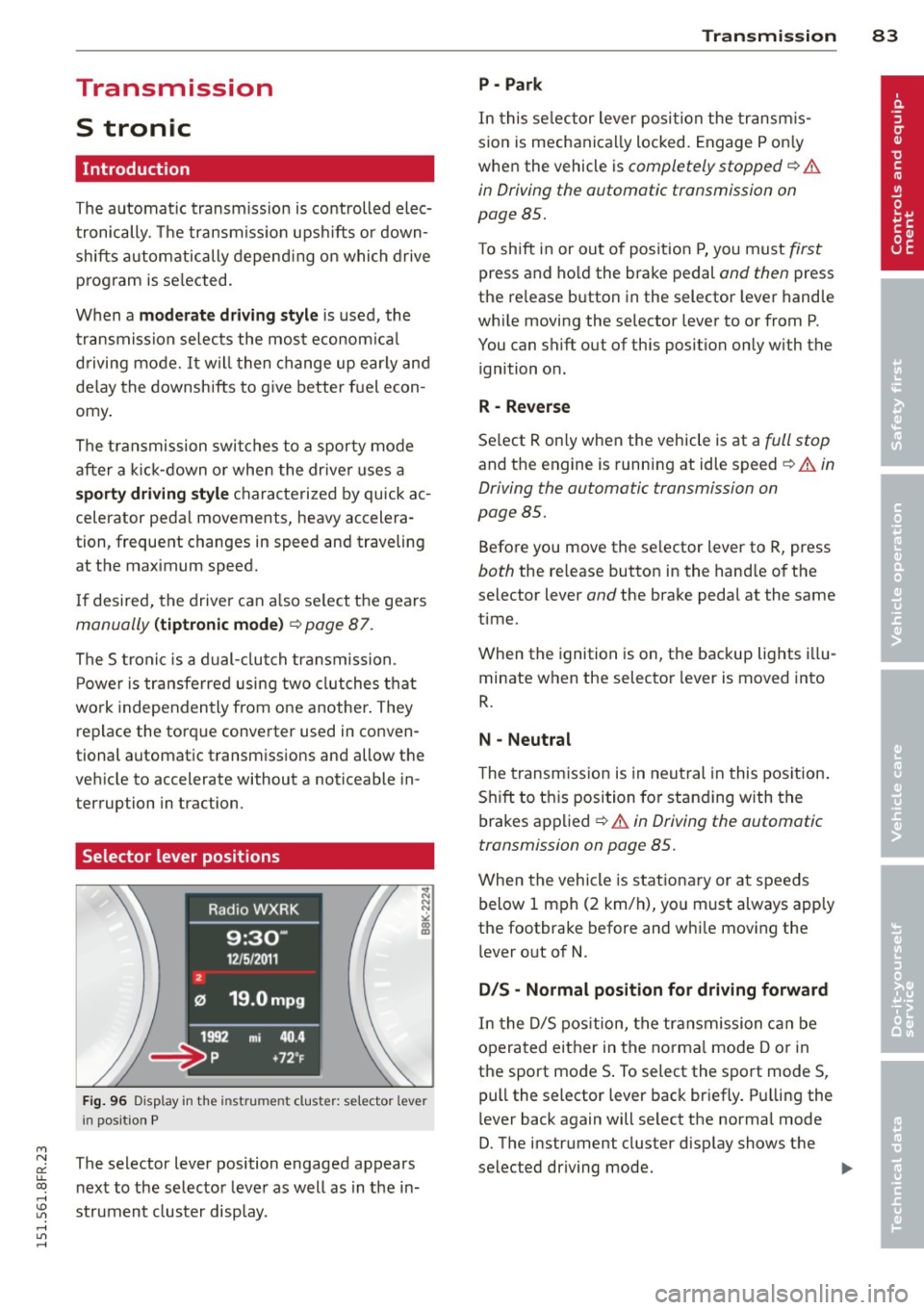
Selector lever positions
F ig. 96 Display in the instrument cluster: se lector lever
in pos itio n P
The selector lever position engaged appears
n ext to the selector leve r as well as in the in
strument cluster display.
Tran sm iss ion 83
P -Park
In this se lector lever posi tion the transm is
s ion is mechanica lly locked. Engage P on ly
when the vehicle is
completely stopped~&.
in Driving the automatic transmission on
page 85.
T o shift in or out of pos it ion P, yo u must first
press and ho ld the brake pedal and then press
the re lease button in the selector leve r hand le
whi le moving the selector lever to or from P.
You can shift out of this position only with the ignition o n.
R - Reverse
Se lect R on ly when the veh icle is at a full stop
and t he engine is running at idle speed~.&. in
Driving the automatic transmission on
page 85.
Before you move the se lector lever to R, press
both the re lease button in the hand le o f the
selector lever
and the brake pedal at the same
time.
When the ignition is on, the backup lights illu
minate when the selector lever is moved into
R.
N -Neutral
The transmiss ion is in neu tral in this pos ition .
S hift to t his position fo r standing with the
brakes app lied
~ .&. in Driving the automatic
transmission on page 85.
When the vehicle is stat iona ry or a t speeds
below 1 mph (2 km/h), yo u must always app ly
the footbrake before and whi le mov ing the
l ever o ut of
N.
DIS -Normal posit ion for driving forward
In the D/S pos it ion, t he tr ansmission c an be
operated either in the norma l mode D or in
the sport mode S . To select the sport mode S,
pull the selector lever back briefly. P ulling the
l ever back again will se lect the norma l mode
D. The instr ument cluster disp lay shows the
selected driving mode. ..,_
Page 89 of 284
"' N
a: LL co
rl I.O
"' rl
"' rl
conditions. Always be ready to apply the
brakes.
Manual shift program
Using the manual shift program you can
manually select gears.
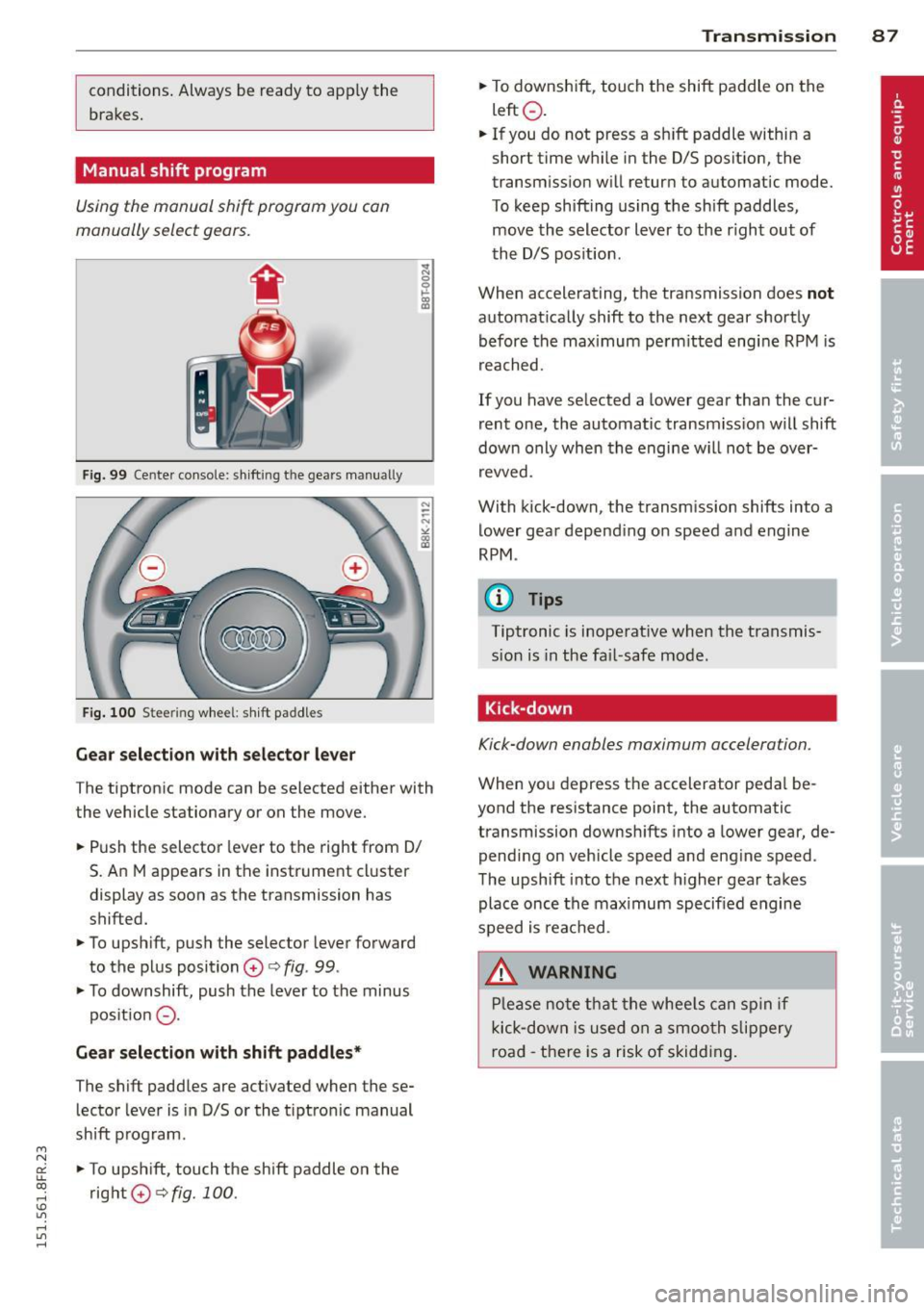
Fig. 99 Ce nter console: shift ing t he gea rs manually
Fig. 100 Stee ring wheel: shift paddles
Gear selection with selector lever
The tiptronic mode can be selected either with
the vehicle stationary or on the move.
.. Push the selector lever to the right from 0/
5. An M appears in the instrument cluster
display as soon as the transmission has
shifted.
.. To upshift, push the selector lever forward
to the plus position
0 c:> fig. 99 .
.. To downshift, push the lever to the minus
pos ition
0 -
Gear selection with shift paddles*
The shift paddles are activated when these
lector lever is in 0/5 or the t iptron ic manual
shift program.
.. To upshift, touch the shift paddle on the
right
0 c:> fig. 100. Transmission 87
.. To downshift, touch the shift paddle on the
left
0 .
.. If you do not press a sh ift paddle within a
short time while in the 0/5 position, the
transmission will return to automatic mode.
To keep shifting using the shift paddles,
move the selector lever to the r ight out of
the 0/5 position .
When accelerating, the transmission does
not
automatically shift to the next gear shortly
before the max imum pe rm itted engine RPM is
reached.
If you have selected a lower gear than the cur
rent one, the automatic transmission will shift
down only when the engine w ill not be over
revved.
With kick-down , the transm ission shifts into a
lower gear depend ing on speed and engine
RPM .
(D Tips
Tiptronic is inoperat ive when the transmis
sion is in the fail-safe mode .
, Kick-down
Kick-down enables maximum acceleration.
When you depress the accelerator peda l be
yond the resistance point, the automatic
transmission downshifts into a lower gear, de
pending on vehicle speed and eng ine speed .
The upshift into the next higher gear takes
place once the max imum specified engine
speed is reached .
.&_ WARNING
Please note that the whee ls can spin if
kick-down is used on a smooth slippery
road -there is a risk of skidding.
-
Page 90 of 284

88 Transmi ssion
Launch Control Program
Th e Launch Cont rol Program provides the
best accel eration possible when starting from
a st op .
R equirement : The engine must be at operat
i n g t emp eratur e and the steering wheel must
not be turned .
.,. Press the
I~ O FFI button c:> page 173 while
the engine is running. The
II ind icator light
i lluminates in the instrument cluster and
Stabilization control (ESC ): Sport . Warn
ing! Re stricted sta bility
appea rs in the dr iv
er information system d isplay.
.,. Move the selec tor lever to the D/S pos ition
to select sport mode (S) or select the
dy
nami c
driving mode in drive select*
c:> page 103.
... Press the brake peda l strongly with your left
foot and hold it down for at least 1 second.
.,. At the same t ime, press the accelerator ped
al down complete ly w ith your r ight foot un
t il t he engine reaches and maintains a h igh
RPM .
.,. Remove you r foot from the brake pedal
withi n S seconds
c:> &, .
&_ WARNING
-Always adapt you r driving to the traffic
flow .
- O nly use the Launch Control Program
when road and traffic con dit ions allow it
and other dr ivers will not be endangered
o r annoyed by yo ur dr iv ing and t he vehi
cle's acce lerat ion.
- Please note that the driving wheels can spin and the vehicle can break away
w hen sport mode is sw itched on, espe
c ially when the road is slippery .
- Once yo u have accelerated, yo u should
switch sport mode off by pressing the
I~ O FF I but ton .
(D Tips
- The transm ission temperat ure may in
crease significantly after using the Launch Control Program . If that hap- pens, the p
rog ram may not be availab le
for a few minutes . It will be available
again after a cool-down period .
- When accelerating using the La unch
Cont ro l program, a ll vehicle parts are
subject to heavy loads. Th is can result in
increased wear.
Transmission malfunction
['1 Transmission: Pre ss brake pedal and se
lect gear again .
Press the bra ke peda l and select the desired
selector lever position again. You ca n then
co ntinue driving .
['1 Transmission overheating: Please drive
conservatively.
T he transmiss ion temperat ure has inc reased
s ignificantly due to the sporty d riving manner .
Drive in a less sporty manner until the tem
perature returns to the normal range and the
indicator light switches of.
ID T ransmission malfunction: You can con
tinue driving
T he re is a sys tem malfunc tion in the transm is
sion . You may continue driving .
Drive to yo ur
autho rized Audi deale r or qualified repair fa
c ility soon to have the ma lfunction corrected.
['1 Transmis sion malfun ction : Limited driv
ing functionality
T he re is a system malfunction in the t ransm is
s io n. The transm ission is swi tching to emer
gency mode. This mo de on ly shifts in to cer
ta in gears o r will no longer shift at al l. The en
gine may sta ll. Drive to your authorized Audi
dealer or qualified repair facility immediately
to have t he malfunction corrected.
('1 ffl Transmi ssion malfunction: No reverse
You can continue driving
T he re is a sys tem mal func tion in the t ransm is
s io n. The transm iss ion is swi tch ing to eme r
gency mode. This mode on ly shifts into cer -
tain gears o r will no longer shift at all . The en
gine may sta ll. You cannot engage the
reverse liJJ,
Page 96 of 284
94 Audi adaptive cruise control and braking guard
Interrupting cruise control
Applies to vehicles: with Audi adaptive cruise control
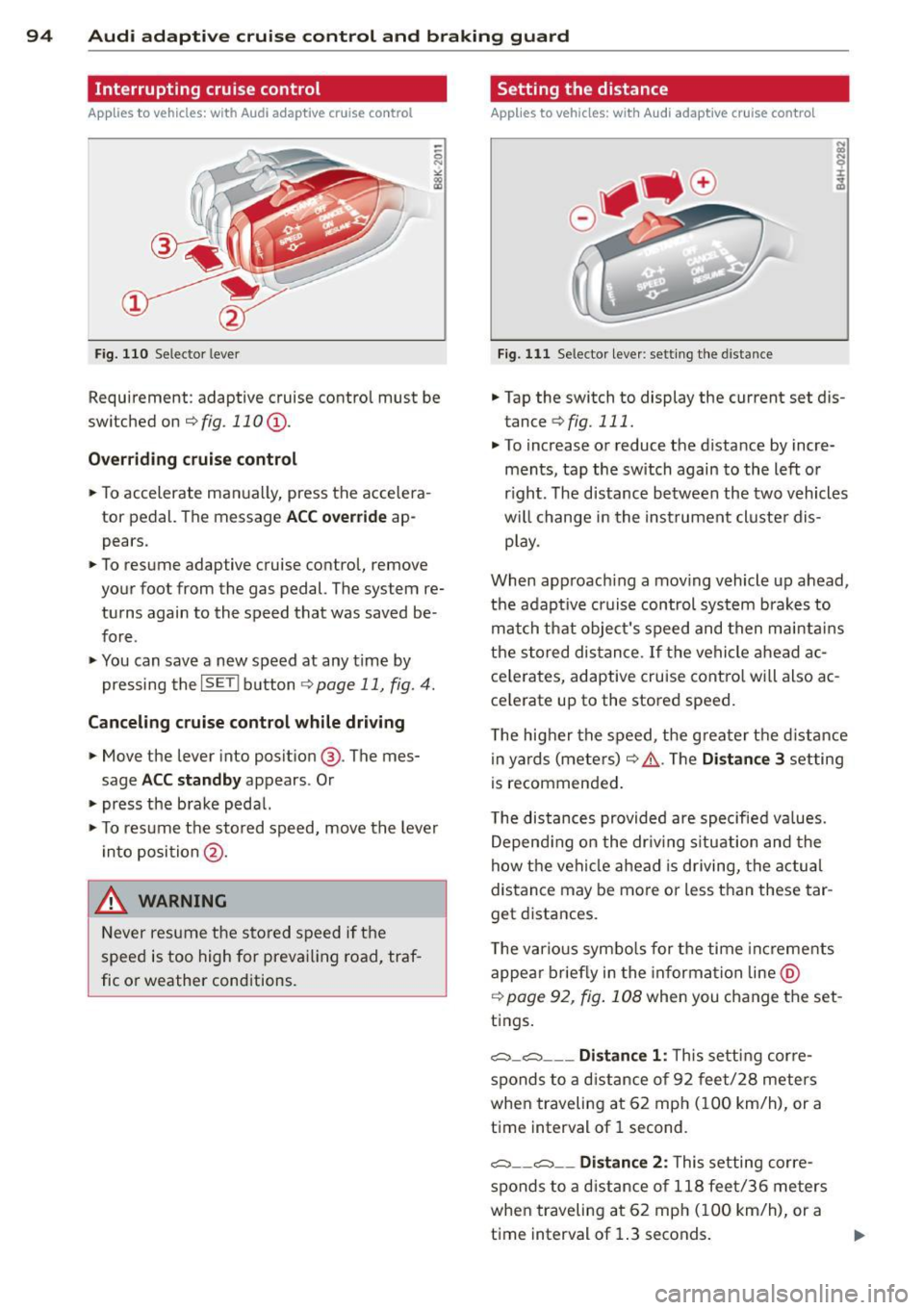
Fig. 110 Selector leve r
Requirement : adaptive cruise contro l must be
switched on
¢fig.110 (i).
Overriding cruise control
.. To accelerate ma nually, press the accelera
tor pedal. The message
ACC override ap
pears .
.. To resume adaptive cruise control, remove
your foot from the gas pedal. The system re
turns again to the speed that was saved be
fore .
.. You can save a new speed at any time by
pressing the
I SETI button ¢ page 11, fig. 4.
Canceling cruise control while driving
.. Move the lever into posit ion @. The mes
sage
ACC standby appears . Or
.. press the brake pedal.
.. To resume the stored speed, move the lever
into position @.
&_ WARNING
Never resume the stored speed if the
speed is too high for prevailing road, traf
fic or weather cond itions.
Setting the distance
Applies to vehicles: wit h Audi adapt ive cr uise contro l
Fig. 111 Selector lever : sett ing the distance
.. Tap the switch to display the current set dis
tance
¢ fig. 111 .
.. To increase or reduce the distance by incre
ments, tap the switch again to the left or
r ight. The distance between the two vehicles
w ill change in the instrument cluster dis
play .
When approach ing a moving vehicle up ahead,
the adaptive cruise control system brakes to
match that object's speed and then maintains
the stored dis tance. If the vehicle ahead ac
ce le rates, adaptive cruise control will also ac
ce lerate up to the stored speed.
T he higher the speed, the greater t he distance
in yards (meters)
c:::> /1.. Th e Distan ce 3 setting
is recommended .
T he distances provided are specified va lues .
Depending on the driv ing situation and the
how the veh icle ahead is driving, the actual
distance may be more or less than these tar
get distances.
T he various symbols for the time inc reme nts
appear briefly in the information line @
¢ page 92, fig. 108 when you change the set
tings.
c::::,_c::::, ___ Distance 1: Th is setting corre-
sponds to a distance of 92 feet/28 meters
when traveling at 62 mph (100 km/h), or a
time interval of 1 second.
c::::, __ c::::, __ Distance 2: This setting corre
sponds to a distance of 118 feet/36 meters
when traveling at 62 mph (100 km/h), or a
time interval of 1.3 seconds.
Page 97 of 284
"' N
a: LL co
rl I.O
"' rl
"' rl
Audi adaptive cruise control and braking guard 95
~--- ~-Di stance 3: This setting corre
sponds to a distance of 164 feet/SO meters
when traveling at 62 mph (100 km/h), or a
time interva l of 1.8 seconds .
~---- ~ Distance 4: This setting corre
sponds to a distance of 210 feet/64 meters
when traveling at 62 mph (100 km/h), or a
time interva l of 2.3 seconds .
A WARNING
Following other vehicles too closely in
creases the risk of collisions and serious
personal injury.
- Setting short distances to the traffic
ahead reduces the time and distance
available to br ing your vehicle to a safe
stop and ma kes it
even more necessary
to pay close attention to traffic.
- Always obey applicable traffic laws, use
good judgment, and select a safe follow
ing distance for the traffic, road and
weather conditions .
¢j) Tips
- Distance 3
is set automatically each time
you switch the ignition on.
- Your standa rd settings are automatically
stored and assigned to the remote con
trol key being used.
Setting the driving program
Applies to vehicles: with Audi adaptive cruise control
Depending on the se lected driv ing program
and distance, driving behavior when accelerat
ing will
vary from dynamic to comfortab le .
Setting the driving program for vehicles
without Audi drive select*
~ In the radio/MMI*, select: !CAR !funct ion
button >
Adaptive cruise control > Driving
prog .
> comfort, standard or dynamic. Or
~ Select: !CARI function button> Car systems*
control button > Driver assist > Adaptive
cruise control
> Driving program* > Com
fort, Standard
or Dynamic. Setting the driving mode for
vehicles with
Audi drive select*
Refer to ¢ page 103.
(D Tips
Your settings are automatica lly stored and
assigned to the remote control key being
used.
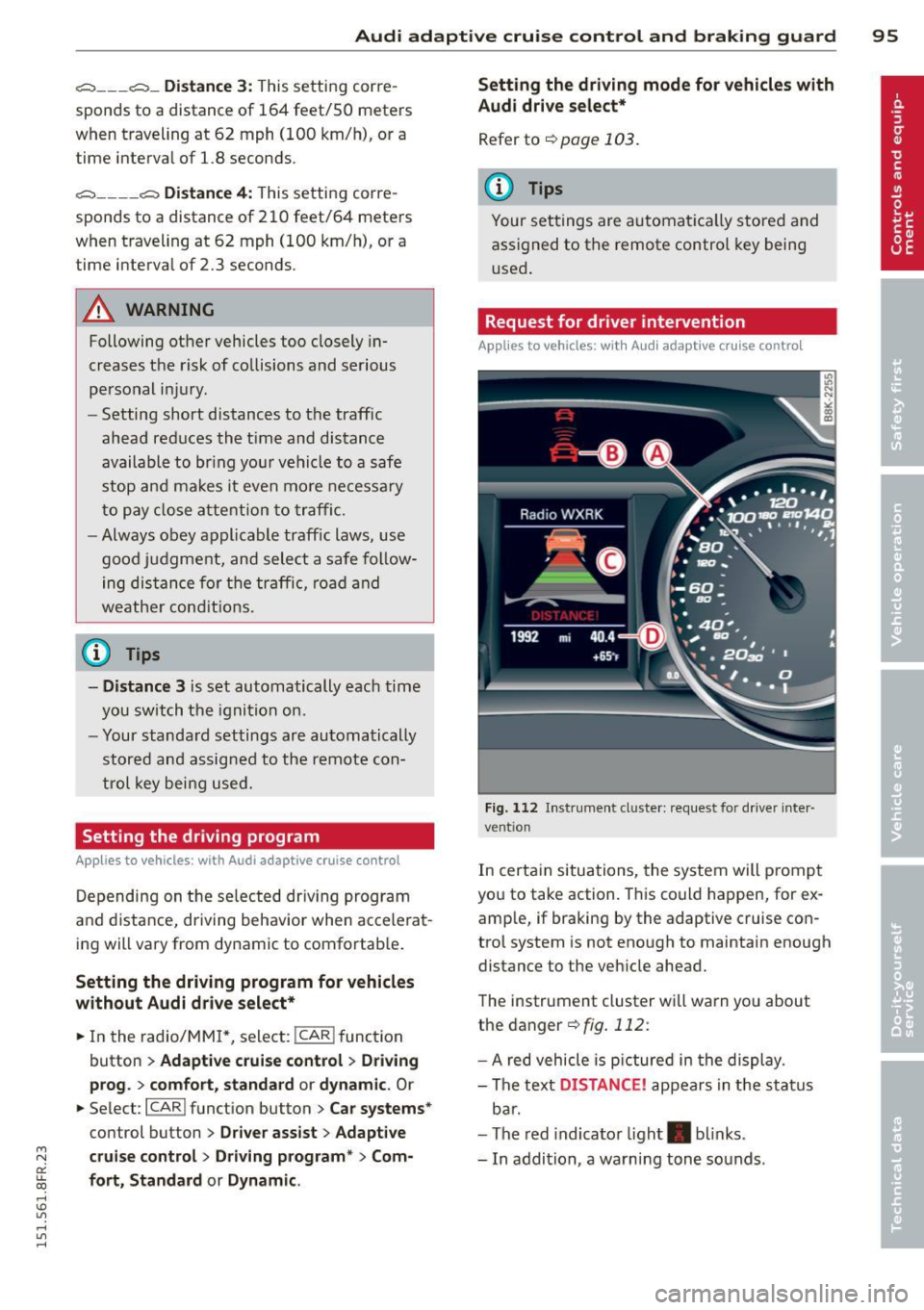
Request for driver intervention
Applies to vehicles : with Audi adaptive cruise contro l
Fig. 112 Instrument d uste r: request for drive r inte r
ve ntion
In certain situations, the system will p rompt
you to take action. This could happen, for ex
amp le, if braking by the adaptive cruise con
trol system is not enough to maintain enough
distance to the vehicle ahead.
The instrument cluster will warn you about
the danger ¢
fig. 112:
-A red vehicle is pictured in the display.
- The text
DISTANCE! appears in the status
bar.
- The red indicator light . blinks.
- In addition, a warning tone sounds .
Page 103 of 284

"' N
a: LL co
rl I.O
"' rl
"' rl
Have your authorized Audi dealer or au
thorized Audi Service Facility check their
function.
@ Tips
- If the window glass in the driver's door
or front passenger's door has been tint
ed, the display in the exterior mirror may be misinterpreted .
- For Declaration of Compliance to United
States FCC and Industry Canada regula
tions
¢ page 267.
Activating and deactivating
Applies to vehicles: with Audi side assist
Fig. 118 Drive r's d oor : Sid e ass ist bu tton
.. Press the button ¢.&. in General informa
tion on page 100
to switch the system on/
off . The LED in the button turns on when
side assist is switched on.
Adjusting the display brightness
Applies to vehicles: with Audi side assist
The signal brightness can be set in the radio
orMMI* .
.. Select : ICARI function button> Audi side as
sist.
.. Select : I CARI function button > Car systems*
control button > Driver assist > Audi side
assist.
The display brightness adjusts automatically
to the brightness of the surroundings, both in
the information and in the warning stage. In
very dark or very bright surroundings, the dis play is already set to the minimum or maxi
mum level by the automatic adjustment. In
Audi side assist 101
such cases, you may notice no change when
adjusting the br ightness, or the change may
only be noticeable once the surroundings
change.
Adjust the brightness to a level where the dis
play in the information stage will not disrupt
your view forward. If you change the bright
ness, the display in the exterior mirror will
briefly show the brightness level in the infor
mation stage. The brightness of the warning
stage is linked to the brightness in the infor
mation stage and is adjusted along with the
information stage adjustment.
(D Tips
- Side assist is not active while you are
making the adjustment.
- Your settings are automatically stored
and assigned to the remote control key
being used.
Driver messages
Applies to vehicles: wit h Aud i side ass ist
If side assist switches off by itself, the LED in
the button turns off and a message will ap
pear in the instrument cluster display:
Audi side assist unavailable: Sensors blocked
The radar sensors' vision is affected . Do not
cover the area in front of the sensors with bike
wheels, stickers, dirt or other objects. Clean
the area in front of the sensors, if necessary
¢ page 99, fig. 117 .
Audi side assist: Currently unavailable
Side assist cannot be switched on temporarily
because there is a malfunction (for example,
the battery charge level may be too low) .
Audi side assist: System fault!
The system cannot guarantee that it will de
tect vehicles correctly and it is switched off.
The sensors have been displaced or are faulty.
Have the system checked by an authorized
Audi dealer or authorized Audi Service Facility
soon.