radio AUDI RS5 CABRIOLET 2015 Owner's Manual
[x] Cancel search | Manufacturer: AUDI, Model Year: 2015, Model line: RS5 CABRIOLET, Model: AUDI RS5 CABRIOLET 2015Pages: 284, PDF Size: 69.56 MB
Page 98 of 284

96 Audi adaptive cruise control and braking guard
Audi braking guard
Descript ion
Applies to vehicles: with Audi adaptive cru ise control
Fig . 11 3 Instrumen t cl uste r: approach warn ing
Braking guard uses a radar sensor. It also
functions within the limits of the system
when adaptive cruise cont ro l is switched off .
What can Audi braking guard do? When detected i n time, the system ca n assess
situations when a vehicle ahead brakes sud
denly or if your own veh icle is traveling at a
hi gh speed and approachi ng a ve hicle up
a head that is moving more slowly . Brak ing
guard does not react if i t can not detect the
situation.
The system advises you of various situations :
- The distance warning is given if you are too
close to t he vehicle ahead for a long time . If
the vehicle ahead b rakes sharply, you w ill
not be ab le to avoid a c oll is io n. The indicator
li ght . i n the disp lay comes o n.
- The approach warning is given when a de
tected vehicle up ahead in your lane is mov i ng much more slowly tha n you are or if it
brakes sha rply . W hen th is w arning is given,
i t may only b e possib le to avoid a collision
b y swerving or braking s harply . Th e in dicator
l igh t. and indic ator in the di sp la y w ill
warn you about the danger
i:> fig . 113. Yo u
will a lso hear a n acoustic signa l.
I f yo u do not reac t fas t enoug h or do not reac t
a t all to the situ ation , Br aking gu ard will i n-
ll This is not ava ilable in some co untri es .
tervene by b rak ing and the message braking
guard intervention will appea r.
- If a coll is ion is imm inent, the sys tem wi ll
fi rst provi de an acute warning by br iefly an d
sharply a pplying the brakes.
- If you do not re act to the acu te w arn ing,
bra king g uard can brake w it hi n the lim its of
the system . T his red uces the vehicle speed
in the event of a collision .
- At speeds un der 20 m ph (3 0 km/h), t he sys
tem can initiate a comp lete deceleration
short ly before a co llision
ll .
- If the bra king g uard senses that yo u are not
bra king hard enough w hen a co llision is im
m inent, it can inc rease the brak ing force.
Which functions can be controlled?
You can swi tch braki ng gu ard and t he dis
tance/ap proa ch warn ing on or off in the rad io
o r MM I
r:!;>page 97, Settings in the radio/
MMI.
A WARNING
-Lack of attention can cause collisions, oth
er accidents and serio us pe rsonal injuries.
The braking gua rd is an assist system and
ca nnot preve nt a collision by itself. The
dr ive r must alway s intervene. Th e dr ive r is
al ways res po nsib le fo r braking a t the co r
r e ct ti me.
- Always pay clos e attent io n t o traffic,
eve n when the br aking gu ard is swi tched
o n . B e rea dy t o int erve ne and be re ad y to
t ake com plete control w he never nece ssa
ry. Always keep the safe and legal dis
tance between your ve hicle an d veh icles
up ahead.
- Braking gua rd wo rks within limits and
will not res po nd outside the system lim
its, for examp le w hen approachi ng a
sto pped veh icle o r stationary o bstacle
(end of a traffic jam or ve hicle that has
b roken dow n in t ra ffi c).
Page 99 of 284

M N
er
u..
co ,...., \!) 1.1'1 ,...., 1.1'1 ,....,
Audi adaptive cru ise control and brakin g guar d 97
-Always remember that the radar sensor
for the braking guard works only within
defined detection and range limits that
may prevent the proper detection of oth
er vehicles.
- The radar sensor's function and range
can be reduced by rain, snow and heavy
spray. Moving vehicles up ahead may not be promptly detected or may not be de
tected at al l.
- Reflective surfaces includ ing crash barr i
ers or tunnel ent ran ces may impair the
function of the radar sensor.
- You can cance l the braking that is initiat
ed by the system by braking yourself, by
accelerating noticeab ly or by swerving.
- Bra king guard error messages
<> page 97.
-Keep in mind that braking guard can
brake u nexpectedly . Always secure any
ca rgo or objects that you are transport
i ng to reduce the risk of d amage or in
ju ry.
Settings in the radio/MM!
Applies to vehicles: with Audi adaptive cruise co ntrol
~ Se lect: ICARI f u nction button> Car system s*
control button > Dri ver assist > Audi brak
ing guard .
Or
~ Select : I CARI funct ion button > A udi braking
guard .
System -
Switch Audi braking g uard On and
Off . When you switch the ignition on, the
message
Aud i braking guard off appears if
the system is sw itched off .
Early warning -The distance and app roac h
warn ings in the display can be switched
On /
Off .
(D Tips
-Your settings are automatica lly stored
and ass igned to the remote control key
being used at the t imes the settings are
made. -
If you restrict or sw itch off the ESC, the
braking gua rd also switches itself off
<> page 173.
-Switch braking guard off when you a re
loading the vehicle onto a vehicle carrier,
train, ship or other type of transporta
tion. This can prevent undesired warn
ings from the braking guard system.
Messages
App lies to vehicles : wit h Audi ada ptive c ruise contro l
Braking guard : Off
This driver message appears if the system is
turned off via the radio/MMI *. Otherwise, if
the system is turned off, the informat ion ap
pears every t ime shortly after the start of the
trip.
The driver message a lso appears if the system
is not ava ilable d ue to a malfunct ion or if the
ESC is not switched
on <> page 173. If this is
the case, the system w ill not prov ide warnings
about a poss ible collision.
Braking guard : Acti vated
T h is dr iver message appears if sharp b rake
pressure was applied due to an acute warning.
•••
Three white dots appear if a sett ing cannot be
selected w ith the operating lever . For exam
ple, this happens if you want to raise/lower
the speed even thoug h there was no previous
l y saved speed.
ACC: S ensor blo cked
This message appears if the sensor v iew is ob
structed, for examp le by leaves, snow, heavy
spray or d irt. Clean the sensor<>
page 90,
fig. 103 .
ACC: not a vailable
The driver message appears if there is a mal
functio n. The adaptive cruise contro l tu rns off .
A chime sounds as a reminder . Have the sys
tem checked by an authori zed Aud i dea ler or
authorized Aud i Service Fac ility.
ACC: unavailable ll-
Page 103 of 284

"' N
a: LL co
rl I.O
"' rl
"' rl
Have your authorized Audi dealer or au
thorized Audi Service Facility check their
function.
@ Tips
- If the window glass in the driver's door
or front passenger's door has been tint
ed, the display in the exterior mirror may be misinterpreted .
- For Declaration of Compliance to United
States FCC and Industry Canada regula
tions
¢ page 267.
Activating and deactivating
Applies to vehicles: with Audi side assist
Fig. 118 Drive r's d oor : Sid e ass ist bu tton
.. Press the button ¢.&. in General informa
tion on page 100
to switch the system on/
off . The LED in the button turns on when
side assist is switched on.
Adjusting the display brightness
Applies to vehicles: with Audi side assist
The signal brightness can be set in the radio
orMMI* .
.. Select : ICARI function button> Audi side as
sist.
.. Select : I CARI function button > Car systems*
control button > Driver assist > Audi side
assist.
The display brightness adjusts automatically
to the brightness of the surroundings, both in
the information and in the warning stage. In
very dark or very bright surroundings, the dis play is already set to the minimum or maxi
mum level by the automatic adjustment. In
Audi side assist 101
such cases, you may notice no change when
adjusting the br ightness, or the change may
only be noticeable once the surroundings
change.
Adjust the brightness to a level where the dis
play in the information stage will not disrupt
your view forward. If you change the bright
ness, the display in the exterior mirror will
briefly show the brightness level in the infor
mation stage. The brightness of the warning
stage is linked to the brightness in the infor
mation stage and is adjusted along with the
information stage adjustment.
(D Tips
- Side assist is not active while you are
making the adjustment.
- Your settings are automatically stored
and assigned to the remote control key
being used.
Driver messages
Applies to vehicles: wit h Aud i side ass ist
If side assist switches off by itself, the LED in
the button turns off and a message will ap
pear in the instrument cluster display:
Audi side assist unavailable: Sensors blocked
The radar sensors' vision is affected . Do not
cover the area in front of the sensors with bike
wheels, stickers, dirt or other objects. Clean
the area in front of the sensors, if necessary
¢ page 99, fig. 117 .
Audi side assist: Currently unavailable
Side assist cannot be switched on temporarily
because there is a malfunction (for example,
the battery charge level may be too low) .
Audi side assist: System fault!
The system cannot guarantee that it will de
tect vehicles correctly and it is switched off.
The sensors have been displaced or are faulty.
Have the system checked by an authorized
Audi dealer or authorized Audi Service Facility
soon.
Page 107 of 284

"' N
a: LL co
rl I.O
"' rl
"' rl
Park assist
Parking system
Applies to vehicles: with parking system plus/parking sys
tem plus with rear view camera
The parking system may be used for parking
or maneuvering.
Depending on your vehicle's equipment, vari
ous parking aids will help you when park ing
and maneuvering.
The
parking system plus assists you when
parking by audibly and visually indicat ing ob
jects detected
in front of and behind the vehi
cle
~p age 105.
The parking system plus with rear view cam
era
shows the area behind the vehicle in the
d isplay. This display assists you when you are
reverse or parallel parking<=>
page 106. In ad
dition, you are assisted by the functions from
the parking system plus~
page 105.
_& WARNING
Make sure the sensors are not covered by
st ickers, deposits or any other obstruc
tions as it may impair the
sensor function.
For information on cleaning, refer to
~page 184.
Parking system plus
Description
Applies to vehicles: with parking system plus
Audi parking system plus provides audio and
visual signals when parking.
Sensors are located in the front and rear
bumpers. If these detect an obstacle, visual
and audible s ignals warn you. The range at
which the sensors begin to measure is approx
imately:
side
front 3 ft (0.90 m)
center
4 ft (1.20 m)
side 2 ft (0 .60 m)
rear
center S.2 ft (1.60 m)
Park assist 105
The
closer you get to the obstacle, the shorter
the interva l between the audible signals. A
continuous tone sounds when the obstacle is less than approximately 1
ft (0.30 m) away.
Do not continue driving farther!
If the distance to an obstacle stays the same,
the volume of the d istance signa l chime is
gradually reduced after about
4 seconds (does
not affect the continuous signal tone).
Switching on/off
Applies to vehicles: with parking system plus
''"•• ~.....J n,.. -' --· ( l ~-- --~ _#,,___.._...
Fig. 121 Center console: f'> •! button
Fig. 122 In fotainment: visual distance display
Switching on
... Switch the radio/MM I* on .
.,. Shift into reverse or
... Press the
P"'A bu tton in the cente r console
<=> fig. 121. A short confirmation tone
sounds and the LED in the button turns on.
Switching off
... Drive forward faster than 6 mph (10 km/h),
or
.,. press the
P1#A button, or
... switch the ignition off.
Page 113 of 284
M N
er
u..
co ,...., \!) ..,.,
,...., ..,., ,....,
(D Note
-In the MMI display, the directio n of trav
el of the vehicle rear is represented de
pending on the steering wheel angle.
The vehicle front swings out more than
the veh icle rear . Maintain plenty of dis
tance from an obstacle so that your out
s ide mirro r or a corner of your veh icle
does not collide with any obstacles -dan
ger o f accident!
- Remember to ma inta in sufficie nt clear
ance from the curb to avoid damaging
the wheel rims.
(j) Tips
The left or right orientation lines and sur
faces will be di splayed, depend ing on the
t ur n signa l being use d.
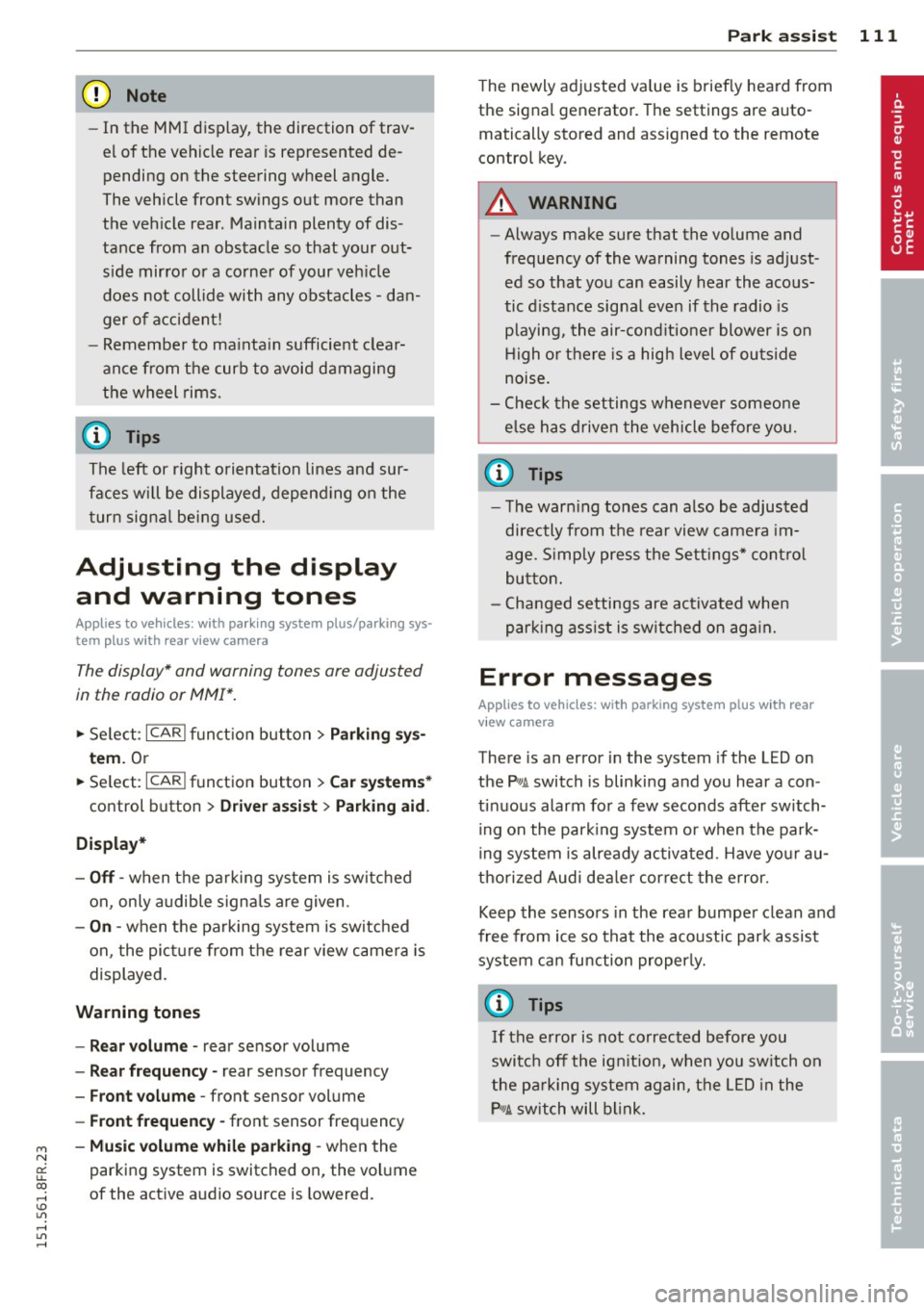
Adjusting the display
and warning tones
Applies to vehicles: with parking system plus/ parking sys
tem plus with rear view camera
The display* and warning tones are adjusted
in the radio or MMI*.
,.. Se lect : I CARI fu nct ion button > Parking sy s
tem.
Or
,.. Se lect : ~ I C~ A,..., R,..., I function button > Car system s*
control button > Drive r assist > Parking aid .
Display*
-Off -when t he parking system is sw itch ed
on, only a udib le signa ls are given .
-On -when the parking sys tem is switched
on, the pict ure from the rear view camera is
displayed.
Warning tones
- Rear volume -
rear sensor volume
-Rear frequency -rear sensor frequency
-Front volume -front sensor volume
-Front frequency -front sensor freq uency
- Mu sic volume while pa rking -when the
parking system is switched on, the vol ume
of the activ e audio source is lowered.
P ark a ssis t 11 1
The newly adj usted va lue is briefly hea rd from
the sig na l generato r. Th e settings are auto
matically stored and assigned to the remote
control key.
A WARNING
- Always make sure that the vo lume and
frequency of the warning tones is ad just
ed so that yo u can easily hear the acous
tic d istance signa l even if the radio is
p laying, the air-cond itio ne r blower is on
High or there is a high level of ou ts ide
noise.
- Chec k the settings whenever someone
e lse has drive n the vehicle before yo u.
(D Tips
- The warn ing tones can also be adjus ted
directly from t he rear view came ra im
age. S imp ly press the Sett ings* cont ro l
bu tton.
- Cha nged settings are ac tiva ted whe n
park ing ass ist is swi tc hed on aga in.
Error messages
Applies to vehicles: with parking system plus with rear
view camera
There is an error in the system if the LED on
the
p, ,; A switch is blinki ng and you hear a con
tinuous alarm fo r a few seconds after switch
ing on the park ing system or when the park
ing system is already activated . Have yo ur au
t h orized Aud i dea le r cor re ct the e rror.
Keep th e senso rs in the rea r bumpe r clean and
free from ice so that the acoust ic par k assist
system can fu nction properly.
@ Tips
If the error is not corrected before you
switc h off the ig nitio n, when you sw itch on
the p arking system again, the LED in the
P" JA switch will b link.
Page 147 of 284
M N
er
u..
co ,...., \!) 1.1'1 ,...., 1.1'1 ,....,
-Never attach any objects such as cu
pholders or telephone mountings to the
surfaces covering the airbag units.
- For cleaning the horn pad or instrument
panel, use only a soft, dry cloth or one
moistened with plain water. Solvents or
cleaners could damage the airbag cover
or change the stiffness or strength of the
material so that the airbag cannot de
ploy and protect properly.
- Never repair, adjust, or change any parts
of the airbag system.
-All work on the steering wheel, instru
ment panel, front seats or electrical sys
tem (including the installation of audio
equipment , cellular telephones and CB
radios, etc.) must be performed by a
qualified technician who has the training
and special equipment necessary.
- For any work on the airbag system, we
strongly recommend that you see your
authorized Audi dealer or qualified work
shop.
- Never modify the front bumper or parts
of the vehicle body .
- Always make sure that the side airbag
can inflate without interference:
- Never install seat covers or replace
ment upholstery over the front seat backs that have not been specifically
approved by Audi.
- Never use additional seat cushions that
cover the areas where the side airbags
inflate.
- Damage to the original seat covers or
to the seam in the area of the side air
bag module must always be repaired
immediately by an authorized Audi
dealer.
- The airbag system can be activated only
once. After an airbag has inflated, it must be replaced by an authorized Audi
dealer or qualified technician who has
the technical information, training and
special equipment necessary.
- The airbag system can be deployed only
once. After an airbag has been deployed,
it must be replaced with new replace-
Airbag system 145
ment parts designed and approved espe
cially for your Audi model version . Re
placement of complete airbag systems
or airbag components must be per
formed by qualified workshops only. Make sure that any airbag service action
is entered in your Audi Warranty
& Main
tenance booklet under
AIRBAG REPLACE
MENT RECORD.
- In accidents when an airbag is deployed,
the vehicle battery separates the alterna
tor and the starter from the vehicle elec
trical system for safety reasons with a pyrotechnic circuit interrupter.
- Work on the pyrotechnic circuit inter
rupter must only be performed by a
qualified dealer -risk of an accident!
- If the vehicle or the circuit interrupter
is scrapped, all applicable safety pre
cautions must be followed.
@ For the sake of the environment
Undeployed airbag modules and preten
sioners might be classified as Perchlorate
Material -special handling may apply, see
www .dtsc.ca.gov/hazardouswaste/per-
ch lorate. When the vehicle or parts of the
restraint system including airbag modules
safety belts with pretensioners are scrap
ped, all applicable laws and regulations
must be observed. Your authorized Audi
dealer is familiar with these requirements
and we recommend that you have your
dealer perform this service for you.
Other things that can affect Advanced
Airbag performance
Changing the vehicle's suspension system can
change the way that the Advanced Airbag Sys
tem performs in a crash. For example, using
tire-rim combinations not approved by Audi ,
lowering the vehicle, changing the stiffness of
the suspension, including the springs, suspen
sion struts, shock absorbers etc. can change
the forces that are measured by the airbag
sensors and sent to the electronic control unit. Some suspension changes can, for
•
•
Page 180 of 284

178 Intelligent technology
operate, such as the inter ior lights or the
power seat adjustment. The convenience
functions will be ava ilable again when you
switch on the ignit ion and start the engine.
With th e engine turn ed off
If yo u listen to the radio, for example, with
the engine turned off or use other MMI fu nc
tions, the battery is being discharged .
I f sta rting capabi lity is jeopa rdized due to en
e rgy consumpt ion, the fo llowing warning ap
pears in the MMI display:
Please start the eng ine soon or th e syste m
will be turned off .
The warning ind icates that the system will be
turned off automatically after 3 m inutes. If
you wish to con tinue us ing t he functions, you
have to s tart the engi ne.
With the engine running
A lthough electrical energy is generated when
the veh icle is be ing dr iven, the battery can be
come discharged . T his happens most ly when
little energy is be ing generated a nd a great
deal consumed and the battery 's state o f
charge is no t optima l.
To br ing the energy balance back into equili
b rium, consumers which require especially
l arge amo unts of energy are tempo rari ly cut
back or switched off. Heating sys tems in par
ticular require a great dea l of energy . If you
notice, for example, that the heated seats* or
the heated rear window are not heating, they have been temporar ily cut back or switched
off. These systems will be ava ilable again as
soon as the energy ba lance has been restored.
You will a lso notice that engine idle speed has
been increased slightly. This is norma l and not
a cause for concern . By increasing engine idle
speed the add itiona l energy required is gener
ated and the batte ry is charged .
Page 214 of 284
212 Tires and wheels
-If you notice unusual vibra
tion or if the vehicle pulls to
one side when driving, al
ways stop as soon as it is
safe to do so and check the
wheels and tires for dam
age.
0 Note
-Please note that summer and winter tires are de
signed for the conditions
that are typical in those sea
sons. Audi recommends us
ing winter tires during the
winter months. Low tem peratures significantly de
crease the elasticity of
summer tires, which affects
traction and braking ability. If summer tires are used
in
very cold temperatures, cracks can form on the tread
bars, resulting in perma
nent tire damage that can
cause loud driving noise and
unbalanced tires. Audi is not
responsible for this type of
damage.
-Burnished, polished or chromed rims must not be used in winter road condi
tions. The surface of the
rims does not have suffi
cient corrosion protection
for this and could be perma
nently damaged by road salt
or similar substances.
Glossary of tire and loading terminology
Accessory weight
means the combined weight (in
excess of those standard items
which may be replaced) of auto matic transmission, power
steering, power brakes, power
windows, power seats , radio,
and heater, to the extent that
these items are available as fac
tory-installed equipment (whether installed or not).
Aspect ratio
means the ratio of the height to
the width of the tire in percent.
Numbers of 55 or lower indi
cate a low sidewall for im
proved steering response and
better overall handling on dry
pavement.
...
Page 243 of 284
![AUDI RS5 CABRIOLET 2015 Owners Manual M N
er
u..
co ,...., \!) ..,.,
,...., ..,., ,....,
Warning symbol s
ti] Loss of p ressure in at least one tire c::> ,&. .
Check the tire or tires and replace o r repair if
necessary](/img/6/57644/w960_57644-242.png "AUDI RS5 CABRIOLET 2015 Owners Manual M N
er
u..
co ,...., \!) ..,.,
,...., ..,., ,....,
Warning symbol s
ti] Loss of p ressure in at least one tire c::> ,&. .
Check the tire or tires and replace o r repair if
necessary")
M N
er
u..
co ,...., \!) ..,.,
,...., ..,., ,....,
Warning symbol s
ti] Loss of p ressure in at least one tire c::> ,&. .
Check the tire or tires and replace o r repair if
necessary . The indicator light
ti] in the instru
ment cluster also illuminates
c::> page 13.
Check/correct the pressures of all four tires
and reset TPMS v ia radio or MMI*.
liif:I ( T ire Pressure Monitoring System) Ti re
p ressu re : Sys tem malfun ction !.
Ifffi:m appears after sw itching the ign ition on
or while driving and the indicator light
ti] in
the instrument cluster blinks for approxi
mate ly one min ute and then stays on, there is
a system malfunction. Attempt to store the
correct t ire pressure
c::> page 241. If the ind i
cator light does not turn off or if it turns on
shortly thereafter, immediately drive your ve h icle to an authorized Audi dealer or author
i zed repair facility to have the malfunction
corrected.
_& WARNING
- If the t ire pressure indicator appea rs in
the instrument cl uster display, one or
more of you r tires is significantly under
inflated. Reduce your speed immediately
and avoid any hard steering or braking
maneuvers. Stop as soon as possible and
check the t ires and the ir pressures . In
flate the tire pressure to the proper pres sure as indicated on the vehicle's t ire
pressure label
c::> page 217. Driving o n a
signific antly under-inflated tire ca uses
the tire to overhea t and can lead to tire
f ailure. Under-inflation also is likely to
impair the vehicle's handling and stop
ping ability.
- The driver is responsible for maintaining
the correct tire pressures . You must
check the t ire pressures regular ly.
- Under certain cond itions (such as a spor
ty driving style, w inter condit ions or un
paved roads), the pressure monitor ind i
cator may be de layed.
-Ask your authorized Audi dealer if run flat tires may be used on your veh icle.
Tire s an d wheel s 241
(D Tips
-The tire pressure monitor ing system may
stop working when there is an ESC ma l
function.
- Using snow c hains may res ult in a system
ma lf u nction.
- The tire pressure mon itoring system on
your Audi was deve loped using tires with
the "ROl" identificat ion on the tire side
wall
c::> page 230. We recommend using
these tires.
Reset tire pressure monitoring system
App lies to vehicles : wit h tire p ress ure mo nitor ing system
If the tire pressure is adjusted, wheels ore ro
tated or changed, the TPMS must be reset via
radio or MM!*.
.,. Before storing the new t ire pressures, check
that the current pressures on all four tires
correspond to the specified va lues and
adapt the pressures to the current load
c::> page 217 .
.,. Switch on the ignition.
.,. Select: the
I CARI fu nct ion button > Tir e pre s
sure monitoring
> Store now . Or
.,. Select: the
I CAR I fu nction button > Car s ys
tem s*
contro l butto n > Servicing & checks >
Tire p ressure monitoring > Sto re tire pres
sures
> Yes , store now .
(D Tips
Do not store the tire pressure if there are
snow cha ins on the tire. Otherwise, a sys
tem malfunction may occur.
•
•
Page 254 of 284
252 Fuses and bulbs
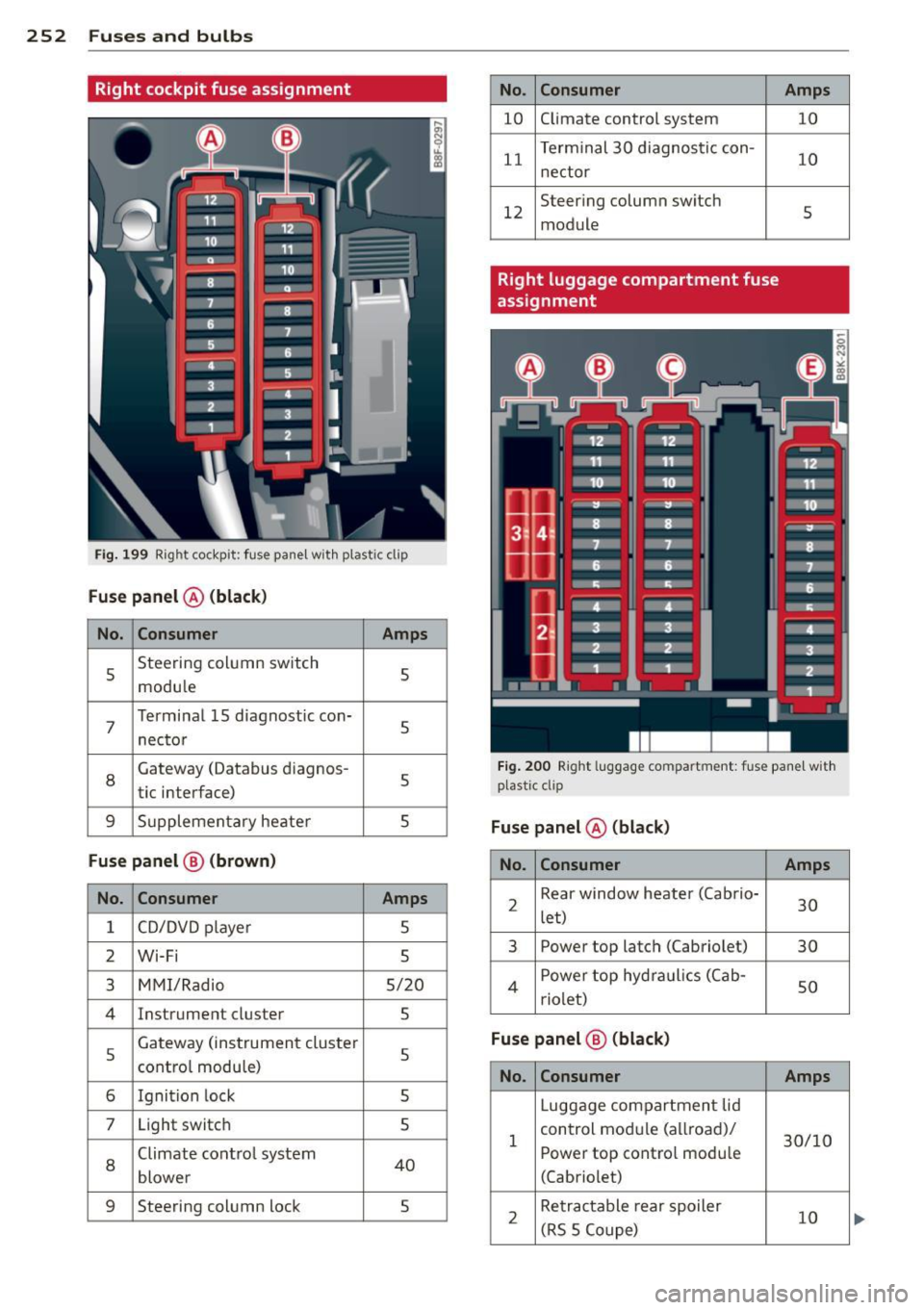
Right cockpit fuse assignment
Fi g. 199 Right cockpit: f use pane l w it h plastic clip
Fuse panel @ (black )
No. Consumer Amps
5 Steering col
umn switch
5
modu le
7
Terminal 15 d iagnostic con-
nec tor 5
8
Gateway (Databus d
iagnos -
5
tic interface)
9 S u pplemen tary heate r 5
Fuse panel @ (brown )
No. Consumer
Amps
1 CD/DVD p laye r 5
2 Wi·Fi 5
3
M MI/Radio 5/20
4 Instrume nt cluster
5
5
Gateway (ins trumen t cluster
5 contro l modu le)
6 Igni tion lock
5
7 Light switch
5
8
Climate contro l system 40
blowe r
9 Steering column lock 5
No . Consumer
10 C
limate control system
11 T
erm inal 30 diagnosti c con-
n ectar
12 Steer
ing column switch
module
Right luggage compartment fuse
assignment Amps
10
10
5
F ig . 2 00 Right lu ggage compartment: fu se pane l w it h
plast ic clip
Fuse panel @ (black)
No . Consumer Amps
2 Rear window heater (Ca b
rio-
30
let)
3 Power
top latch (Cabriolet)
30
4 Power top hyd ra ulics ( Cab-
so rio let)
Fuse panel @ (black)
No. Consumer Amps
Luggage compartmen t lid
1 control mod
ule (a llroad)/
30/10
Power top contro l modu le
(Cabriolet)
2 Re
tra ctable rear spoiler
10
( R S 5 Coupe)