warning AUDI RS5 CABRIOLET 2015 Workshop Manual
[x] Cancel search | Manufacturer: AUDI, Model Year: 2015, Model line: RS5 CABRIOLET, Model: AUDI RS5 CABRIOLET 2015Pages: 284, PDF Size: 69.56 MB
Page 76 of 284
74 On the road
• Press the key¢ fig. 88 -the engine will
start.
Switching the ignition on/off
If you would like to switch the ignition on
without starting the engine, follow these
steps:
• Insert the key into the ignition lock .
• Press the key briefly
without pressing the
brake pedal.
• To switch the ignition off, press the key
again.
When starting the engine, major electrical
loads are switched off temporarily.
You can only remove the key with the ignition
switched off.
If the engine should not start immediately,
the starting process is automatically stopped
after a short time. Repeat starting procedure .
A WARNING
- Never allow the engine to run in confined
spaces -danger of asphyxiation.
- Never remove the ignition key from the
ignition look while the vehicle is moving.
Otherwise, the steering lock could sud
denly engage and you would not be able
to steer the vehicle.
- Always take the key with you whenever
you leave your vehicle. Otherwise, the
engine could be started or electrical
equipment such as the power windows
could be operated. This can lead to seri
ous injury.
- Never leave children or persons requiring
assistance unattended in the vehicle. The
doors can be locked using the remote
transmitter, preventing people from es caping from the vehicle on their own in
the event of an emergency . Depending
on the time of year, people inside the ve
hicle can be exposed to very high or very
low temperatures.
(D Note
Avoid high engine rpm, full throttle and heavy engine loads until the engine has
reached operating temperature -other
wise you risk engine damage.
@ For the sake of the environment
Do not let the engine run while parked to
warm up. Begin driving immediately. This
reduces unnecessary emissions.
(D Tips
- If the key cannot be removed from the
ignition lock, you have to pull the me
chanical key out of the master key in or
der to be able to lock the vehicle
¢page 33 .
-After starting a cold engine, there may
be a brief period of increased noise be
cause the oil pressure must first build up
in the hydraulic valve adjusters. This is
normal and not a cause for concern.
- If you leave the vehicle with the ignition
switched on, the ignition will switch off
after a certain period of time. Please
note that electrical equipment such as
exterior lights will switch off as well
when that happens.
Page 77 of 284
"' N
a: LL co
rl I.O
"' rl
"' rl
Starting the vehicle with the emergency
key
Applies to vehicles: with ignition lock
You can use the emergency key as an ignition
key in an emergency.
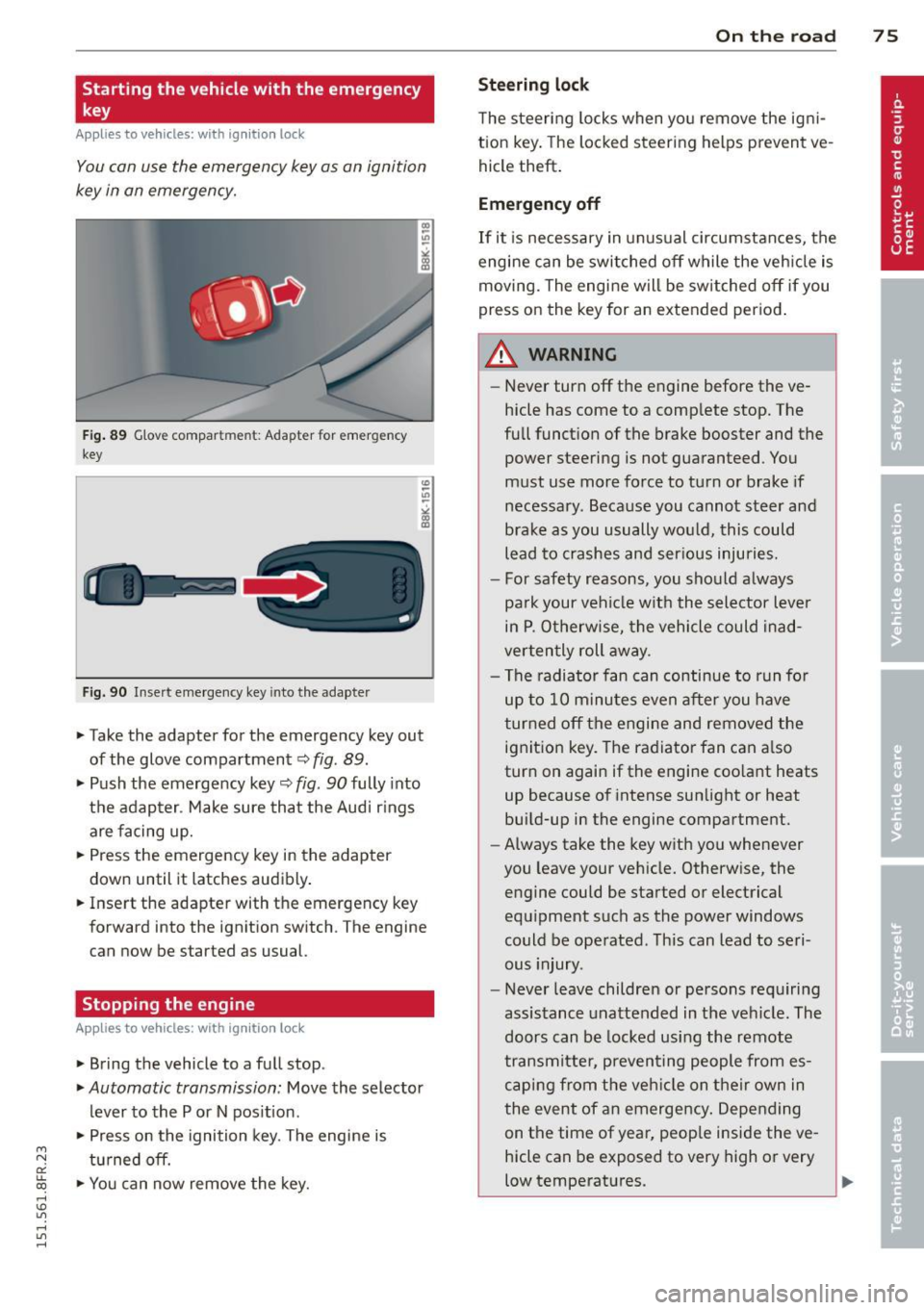
F ig . 89 G love compar tmen t: Adapter for emergency
key
Fig. 90 Insert emergency key into the adapter
.,.. Take the adapter for the emergency key out
of the glove compartment
c:> fig . 89 .
.,.. Push the emergency key~ fig. 90 fully into
the adap ter . Make sure that the Audi r ings
are facing up.
.,.. Press the emergency key in the adapter
down until it latches audibly .
.,.. Insert the adapter with the emergency key
forward into the ignition switch . The engine
can now be started as usual.
Stopping the engine
App lies to vehicles: with ig ni tion loc k
.,.. Bring the vehicle to a full stop.
.,.. Automatic transmission: Move the selector
lever to the P or N pos ition .
.,.. Press on the ignition key. The engine is
tu rned off.
.,.. You can now remove the key.
On th e road 7 5
Steering lo ck
The steering locks when yo u remove the ig ni
tion key. The lo cked steering helps prevent ve
hicle theft .
Emergency off
If it is necessary in unus ual circumstances, the
engine can be switched off while the veh icle is
moving. The engine will be switched off if you
press on the key for an extended period .
A WARNING
-Never turn off the engine before the ve
hicle has come to a comp lete stop. The
full funct ion of the brake booster and the
power steering is not guaranteed . You
must use more force to turn or brake if
necessary. Because you cannot steer and
brake as you usually would, this could
lead to crashes and ser ious injuries.
- For safety reasons, you should always
pa rk your vehicle w ith the selector lever
in P . Otherw ise, the vehicle could inad
verten tly roll away.
- The radiator fan can continue to run fo r
up to 10 minu tes even after you have
turned off the engine and removed the ignition key. The radiator fan can a lso
turn on again if the engine coo lant heats
up because of intense sunlight or heat
bui ld-up in the engine compartment.
- Always take the key with you whenever
you leave your vehicle. Otherw ise, the
engine could be started or electrical
equ ipment such as the power windows
could be operated . This can lead to seri
ous injury.
- Never leave children or persons requiring
assistance unattended in the vehicle. The
doors can be locked using the remote
transmitter, preven ting people from es
caping from the veh icle on their own in
the event of an emergency . Depending
on the time of year, peop le inside the ve
hicle can be exposed to very high or very
low temperatures. ..,.
Page 78 of 284

76 On the road
(D Note
If the engine has been under heavy load
for an extended period, heat builds up in
the engine compartment after the engine
is switched off -there is a risk of damaging
the engine. Allow the engine to run at idle
for about two minutes before switching it
off.
Convenience key
Starting the engine
Appl ies to vehicles: w it h co nve nience key
The I STAR T ENGINE S TOP! button switches
the ignition on and starts the engine .
Fig. 91 Center conso le: S TART ENGINE STOP butto n
Starting the engine
.. Step on the brake pedal and move the selec
tor lever to P or N
q &, .
.. Press On the ,.., I s=T=-= A--=R =T '""' E::;,N C7":=G-;"CI N;-;--;:::: E--=s:-:;T =::O :;-;: P:;-, 1 button
q fig . 91 -the engine w ill start .
Switching the ignition on /off
If yo u wou ld like to switch the ignition on
without starting the engine, follow these
steps:
.. Press the
I STAR T ENGINE STOP! button
without pressing the brake peda l.
.. To switch the ignition off, press the button
again.
If the engine should not start immediately,
the starting process is automatically stopped
after a short time . Repeat starting procedure.
When starting the engine, major e lectr ica l
loads are switched off temporarily. After a
cold engine is started, there may be a
brief period of increased noise because oil
pressure must first build up in the hydrau lic
valve adjusters. This is normal and not a cause
for concern.
A WARNING
=
- Never allow the engine to run in confined
spaces -danger of asphyx iat ion.
- Never turn off the engine until the vehi
cle has come to a complete stop.
- Always take the key with you whenever
you leave your veh icle . Otherw ise, the
engine could be started or electrical
equ ipment such as the power windows
could be ope rated. Th is can lead to seri
ous injury.
- Never leave children or persons req uiring
a ssis tance unattended in the vehi cle. The
doors can be locked usi ng the remote
transmitter, preventing people from es
caping from the veh icle on the ir own in
the event of an emergency . Depending
on the time of year, peop le inside the ve
hicle can be exposed to very high or very
low temperatures.
(D Note
- Avoid high engine rpm, full thrott le and
heavy eng ine loads unt il the eng ine has
reached operating temperature -other
w ise you risk engine damage.
® For the sake of the environment
Do not let the engine run wh ile parked to
warm up. Begin dr iving immediately. This
reduces unnecessary emissions .
¢j) Tips
- After starting a co ld engine, there may
be a brief period of increased noise be
cause the oil pressure must first bu ild up
in the hydraulic valve adjusters. This is
normal and not a cause for concern.
- If you leave the veh icle with the ignition
switched on, the ignit ion w ill switch off
afte r a certain per iod of t ime . Please
1JJ1,
Page 79 of 284

M N
er
u..
co ,...., \!) 1.1'1 ,...., 1.1'1 ,....,
note that electrica l equipment such as
exterior lights wi ll switch off as well
when that happens.
Switching engine off
App lies to vehicles: with conve nien ce key
.,. Bring your vehicle to a complete stop.
.,. Move the selector lever to the P or N pos i
t ion.
... Press the
I START ENGINE STOPI button
~ page 76, fig. 91 .
Steering lock
The steering locks when you turn the engine
off us ing the
I STAR T ENGINE STOP I button
and open the dr iver's door. The locked steer
ing helps prevent vehicle theft.
E mergenc y off
If necessary, the eng ine can be sw itched off
with the selector lever in the R or D/S pos i
tions. To do so, step on the brake pedal and
press and hold the
I STAR T ENGINE STOP I but
ton vehicle speed must be less than 6 mph (10 km/h).
.&, WARNING
- Never t urn off the eng ine be fore the ve
hicle has come to a complete stop . The
f ull function of the brake booster and the
power steering is not guaranteed . You
must use more force to turn or brake if
necessary. Because you cannot steer and
brake as you usually would, this could
lead to c rashes and serious injur ies.
- For safety reasons, you should always
park your vehicle with the se lector lever
in P. Otherwise, the veh icle could inad
vertent ly roll away.
- The rad iator fan can continue to run for
up to 10 minutes eve n afte r you have
tu rned off the eng ine and removed the
ignition key. The radiator fan can also
turn on again if the eng ine coolant hea ts
up because of intense sunlight or hea t
build -up in the engine compartment.
On th e ro ad 77
-Always take the key with you whenever
you leave your ve hicle. Otherw ise, the
e ngine could be started or electrical
equipment such as the power windows
could be operated. This can lead to seri
ous injury.
(D Note
If the engine has been under heavy load
for an extended period, heat bu ilds up in
the eng ine compartment after the engine
i s sw itched off - there is a r is k of damag ing
the e ngine. A llow the eng ine to run at id le
for abo ut two minutes before switching it
off.
Driver messages
I g nition i s on
This message appears and a warning tone
sounds if you open the d river's door when the
ignition is sw itched on.
No key ident ified
This message appears when the
I START ENGINE STOP I button is pressed if
there is no master key ins ide the ve hicle or if
the system does not recognize it . For exam
ple, the master key cannot be recognized if it
i s covered by an object (e .g . aluminum brief
case) which
screens the radio s ignal. Electron
ic dev ices such as cell p hones can also inte r
f ere with the radio s ignal.
Pr ess brake p edal to start engine
This message appears if you do not press the
brake pedal to start the eng ine .
Shift to N or P to start eng ine
T his message appears w hen attempt ing to
star t the eng ine if the selecto r lever for the
automatic transmiss ion is not in the P or N
pos ition . The engine can only be started with
the se lector in these positions.
!I I s the ke y in the vehicle?
Page 80 of 284

78 On the road
This message appears if the master key is re
moved from the vehicle with the engine run
n ing.
If the master key is no longer in the ve
h icle, you cannot switch on the ignition after
stopping the engine and you also cannot start
the eng ine again . Moreover, you can not lock
the veh icle from the outside w ith the key.
Shift to P otherwise vehicle can roll away .
Doors do not lock if lever is not in
P.
This message appears for safety reasons
a long w ith a warning signa l. It appears if the
selector lever for the automat ic transm iss ion
is not in the P position when sw itch ing off the
ignition . Move the selector lever to the P pos i
tion, othe rwise the ve hicle is not secured
against rolling away . You also cannot lock the
vehi cle using the locking bu tton* on the door
han dle or using the remote key.
Convenience key defective! Use ignition lock
This message appears if the eng ine must be
started or stopped using the ignition key and
not the
I STAR T ENGIN E ST OP ! button .
Electromechanical
parking brake
Operation
The electromechanical parking brake replaces
the hand brake.
F ig. 92 Cen te r console: Parking brake
.., Pull on the switch @ c.> fig. 92 to apply the
parking brake. The indicator lights in the
switch and. (USA models)/. (Cana-
da models) in the instrument cluste r ill umi
nate. ..,
With the ignition switched on, step on the
brake peda l or the accelerator pedal and
press the switch @ at the same time to re
lease the parking brake . The indicator lights
in the switch and. (USA mode ls)/ . (Can
ada models) in the instrument cluster go
out.
Your vehicle is equipped with an electrome chanical parking brake. The parking brake is
designed to prevent the veh icle from rolling
u nintentionally and replaces the hand brake.
In add ition to the normal functions of a tradi
t ional hand brake, the electromechanical
parking brake provides various convenience
and safe ty funct ions .
When starting from rest
-The integral start ing ass ist helps you when
driving by automatically releasing the park
ing brake
c> page 79, Starting from rest .
- When start ing o n inclines, the starting as
sist prevents the vehicle from unintentional
ly rolling back. The braking force of the
pa rking brake is not released until suffic ient
driving force has been bui lt up at the
wheels.
Emergency brake function
An emergency brake ensures that the veh icle
can be slowed down even i f the normal brakes
fail ¢ page 79, Emergency braking.
A WARNING
If a drive rang e is engaged with the vehicle
stationary and the engine running, yo u
must in no instance accelerate carelessly.
Otherwise the vehi cle wi ll start to move
immediately -risk of an accident.
(0 Tips
-If the parking brake is applied with the
ign ition switched off, the ind icator lights
in the switch and - (USA models) .
(Canada mode ls) in the instrument clus
ter will go out after a certain period of
time.
Page 81 of 284

M N
er
u..
co ,...., \!) ..,.,
,...., ..,., ,....,
-Occasiona l noises when the parking
brake is applied and re leased are norma l
and are not a ca use for concern .
- When the vehicle is parked, the parking
brake goes through a se lf-test cycle at
regular intervals. Any associated noises
are norma l.
Parking
.,. Press the brake pedal to stop the vehicle .
.. Pull the switch@¢
page 78, fig . 92 to set
the parking brake .
.,. Move the selecto r leve r to P .
.. Turn the eng ine off ¢,& .
.. When on incl ines or decli nes, tu rn the steer
ing wheel so that the vehicle w ill roll into
the cu rb if it begins to move .
_& WARNING
--When you leave your veh icle -even if on
ly briefly -always remove the ign ition
key . This applies part icularly when chil
dre n remain in the vehicle. Otherw ise the
children cou ld start the engine, release
the parking bra ke or operate electrical
equipment (e .g. power wi ndows). There
is the r is k of an accident .
- Whe n the vehicle is loc ked, no one -par
t ic ularly not c hild ren sho uld remain in
the vehicle . Locked doors make it more
difficult for emergency workers to get in
to the vehicle -putting lives at risk .
Starting from rest
The starting assist function ensures that the
parking brake is released automatically upon
starting.
Stopping and applying parking brake
.,. Pull the switch @ ~ page 78, fig. 92 to ap
ply the pa rk ing brake.
On th e ro ad 79
Starting and automatically relea sing the
parking brak e
.. When you sta rt to drive as usual, the park
ing brake is autom atically released and your
veh icle begins to move.
When stopping at a traffic signa l or stopping
in c ity traffic on v ehicl es with an automatic
tran smission, the pa rking b rake can be ap
plied . The vehicle does not have to be held
with the footbrake . The parking brake elimi
nates the tendency to creep w ith a dr ive range
engaged . As soon as you d rive
off as usual ,
t h e pa rking bra ke is re leased automat ically
and t he veh icle s tarts to move .
Starting on slopes
When sta rting on inclines, the sta rting assist
prevents the vehicle from un intent ionally roll
ing back . The braking force of the parking
brake is not re leased unti l su ff ici ent d riving
f orce has been built up at the wheels .
(D Tips
For safety reaso ns, the pa rking brake is re
l eased automatically o nly when the d riv
e r's safety belt is engaged in the buckle.
Emergency braking
In the event that the conventional brake sys
tem fails or locks .
.. In an emergency , pull the switch @
¢
page 78, fig . 92 and continue to pull it to
slow you r vehicle down with the parking
br ak e.
.. As soon as you re lease the swi tch @ or ac-
celerate, the braking process stops.
If you p ull the swi tch@ and hold it above a
speed o f abo ut 5 mph (8 km/h), the eme rgen
cy bra king f unct ion is initiated. The ve hicle is
braked at all four whee ls by activating the hy
draulic b rake system. The brake pe rformance
is sim ilar to making an emergency stop¢
A.
In orde r not to act ivate the eme rgency brak -
ing by mistake, an audib le wa rning tone (bu z
zer) so unds when the switch @ is pulled. As
ll>
Page 82 of 284
80 On the road
soon as the switch @is released, or the accel
erator pedal is depressed, emergency braking
stops .
.&_ WARNING
Emergency braking should only be used in
an emergency, when the normal foot brake
has failed or the brake pedal is obst ructed.
Using the parking brake to perform emer
gency braking will slow yo ur vehicle down
a s if you had made a full brake application.
The laws of physics cannot be s uspended
even w ith ESC and its associated compo
nents (ABS, ASR, EDS). In corners and
when road or weather conditions are bad,
a full brake application can cause the vehi
cle to skid or the rear end to break away -
r isking an accident.
Speed warning system
Overview
The speed warning system helps you to keep
your driving speed below a set speed limit.
The speed warning system warns if the driver
exceeds a prev iously stored maximum speed.
A warning ton e will sound as soon as the vehi
cle speed exceeds the set speed by about
3 mph (3 km/h). At the same time, a warning
symbol appears in the d isplay . The symbol's
appearance might be d ifferent in some mod
e ls.
The speed warning sys tem has two warn ing
thresholds that function independently of
each other and that have somewhat different
purposes:
Speed warning 1
You can use speed warning 1 to set the maxi
m um speed whil e you are dr iv ing . This setting
will remain in effect until you turn off the igni
tion, assuming that you have not changed or reset the setting .
The. (USA models)/ . (Canada models)
speed warning symbol in the warning 1 dis
play appears when you exceed the maximum speed
. It goes out when the speed falls be low
the stored maximum speed.
T he speed warning symbol will also go out if
the speed
exceeds the stored maximum speed
by more than about 25 mph (40 km/h) for at
least 10 seconds . The stored maximum speed
is de leted .
Speed warning 2
Storing warning 2 is recommended if you al
ways
want to be rem inded of a ce rtain speed,
f or example when you are traveling in a coun
try that has a general maximum speed limit,
or if you do not want to exceed a specified
speed for winter tires.
The. (USA models)/ . (Canada models)
speed warning 2 symbol appears in the dis
play when you exceed the stored speed Limit.
Unlike warning 1, it will not go out until the
vehicle speed drops below the stored speed
limit .
Setting speed warning 2
c> page 81 .
(D Tips
Even though your vehicle is eq uipped with
a speed warning system, you should still
watch the speedometer to make sure you
are not driv ing faster than the speed limit.
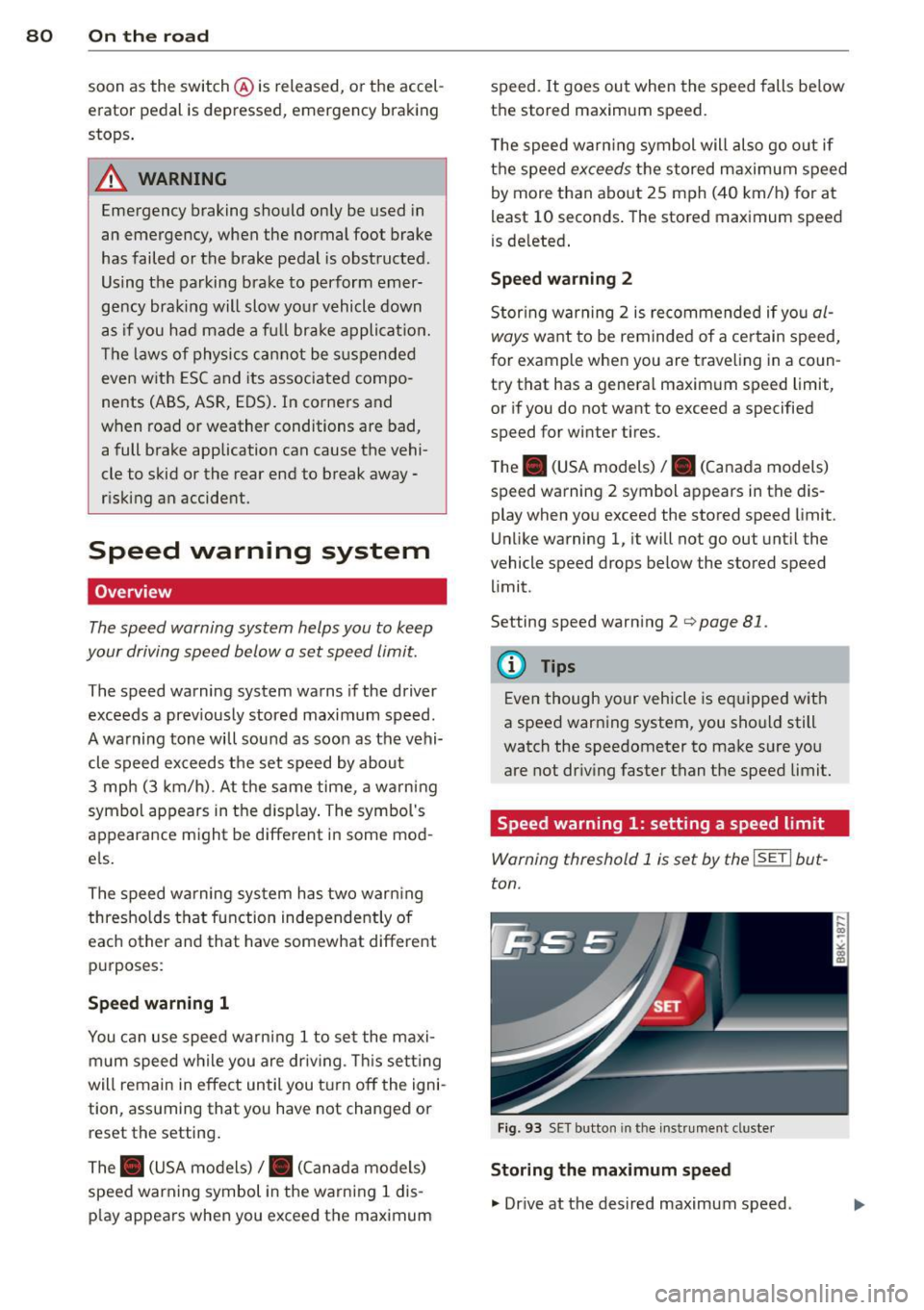
Speed warning 1: setting a speed limit
Warning threshold 1 is set by the ISETI but
ton.
Fig . 93 SET button in the instr umen t cluste r
Storing the maximum speed
., Dr ive at the desired maximum speed .
Page 83 of 284

"' N
a: LL co
rl I.O
"' rl
"' rl
.. Press the !SET ! button in the instrument
panel display
9 fig. 93 for 1 second.
Resetting the maximum speed
.. Drive the vehicle at a speed of at least
3 mph (5 km/h)
.. Press the
!SE T! button for mo re than 2 sec-
onds.
The . (USA models) /. (Canada models)
speed warning symbol will appear briefly in
the display when you release the
!SE TI button
to indicate that the maximum speed has been
stored successfully.
The maximum speed remains stored until it is
changed by pressing the
!SETI button again
briefly or until it is de leted by a lengthy push
on the button.
Speed warning 2: setting a speed limit
The radio or MMI* control unit is used to set,
change or delete warning threshold
2 .
.. Se lect : ICAR I function button> Instrument
clu ster > Speed warning.
Or
.. Select : I CARI function button > Car systems*
control button > Driver assist > Speed warn
ing.
Warning threshold 2 can be set in the speed range starting from 20 mph to 150 mph (30
km/h to 240 km/h). Settings can each be ad
justed in intervals of 6 mph (10 km/h).
On the road 81
Cruise control
Switching on
The cruise control system makes it possible to
drive at a constant speed starting at
20 mph
(30 km/h) .
0
f
~
0
Fig. 94 Contro l lever w ith pus h-b utton
Fig. 95 Display: Se lected speed
.. Pull the lever to position (!)¢ fig. 94 to
sw itch the system on.
.. Drive at the speed to be controlled .
.. Press button @to set that speed.
a,
~ 0 er a, a,
The sto red speed and the green symbol
cij;(i)~1j (US mode l)/ Iii (Canadian model) are
shown in the display¢
fig. 95. The display
may vary, depending on the type of display in
your vehicle.
The speed is kept constant by modifying en
gine power or through an active brake inter
vention.
A WARNING
- Always pay attention to the traffic
around you when the cruise control is in
operation . You are always responsible for
your speed and the distance between
your veh icle and other vehicles . .,,.
Page 84 of 284

82 On the road
-For reasons of safety, cruise contro l
should not be used in the city, in stop
and-go traff ic, on twisting roads and
when road conditions are poor (such as
ice, fog, gravel, heavy rain and hydro
planing) - risk of accident .
- Turn off the cruise control temporar ily
when ente ring turn lanes, highway exit
lanes or in construction zones.
- Please note that inadvertently "rest ing"
yo ur foot on the accelerator peda l causes
the cruise control not to brake. This is
because the cr uise con trol is overridden
by the d river 's acce lerat ion.
- If a bra ke system malfunction such as
overheat ing occurs when the cru ise con
tro l system is sw itched on, the braking
function in the system may be switched
off. The othe r cruise control f unctions re
ma in active as long as the indicator light
@;rn~i~ (US models) !lB (Canadian mod
els) is on.
The brake lights illuminate as soon as the brakes apply automatically.
Changing speed
.,. To increase/decrease the speed in incre
me nts, tap the lever in the
0 10 d irection
q page 81, fig . 94 .
.,. To increase/decrease the speed qu ickly, hold
the leve r in the
010 direction unti l the de
s ired speed is d isplayed.
You can also press the accelerator pedal down
to increase your speed, e.g. if you want to
pass someone. The speed yo u saved earl ier
will resume as soon as you let off of the accel
erator pedal.
I f, however, you exceed your saved speed by
6 mph ( 10 km/h) for longe r than 5 m in utes,
the cruise cont ro l w ill be turned off tempo ra
rily. The green symbol in the display turns
white. The saved speed remains the same.
Presetting your speed
You can preset your desired speed while the
vehicle is not moving .
.,. Switch on the ign ition.
.,. Pull lever into position
(D q page 81,
fig . 94 .
.,. Press the lever in the 0 or 0 direction to
increase or decrease your speed .
.,. Release the lever to save that speed .
This function makes it poss ible, for example,
to save the speed you want before dr iving on
the h ighway. Once on the h ighway, act ivate
the cr uise control by pulling the lever toward
(D .
Switching off
Temporary d eacti vat ion
.,. Press the b rake pedal , or
.,. Press the lever into position @(not clicked
into place)
q page 81, fig. 94, or
.,. Dr ive for longer than 5 m inutes at more
than 6 mph (10 km/h) above the stored speed.
S w itching off complete ly
.,. Press lever into position @(clicked into
p lace), or
.,. Switch the ignit ion off.
The speed you saved will be retained if the cruise control has been switched off tempora
rily . To resume the saved speed, let up on the
brake and pull the lever to posit ion
(D .
Switching the ignition off erases the saved
speed.
A WARNING "'---
You shou ld only return to the saved speed
if it is not too fast for the current traffic
conditions - r isk of an accident!
Page 86 of 284
84 Transmi ssion
In the no rm al m ode D, the transmission auto
matica lly selects the suitab le gear ratio. It de
pends on eng ine load, veh icle speed and driv
ing style.
Select the
s p or t mode S for spo rty driving.
The vehicle makes full use of the eng ine 's
power. Shifting may become noticeab le when
accelerating.
When the vehicle is stationary or at speeds
be low 1 mph (2 km/h), you must always apply
the foot brake before and while mov ing the
lever to D/S out of N.
A WARNING
Read and follow all WARNINGS c> .&. in
Driving the automatic transmission on
page 85 .
(D Note
-
Coasting downh ill with the transmission in
N and the engine not running w ill result in
damage to the automatic transmiss ion
and possibly t he catalyt ic converter .
(D Tips
-On vehicles with drive select*, you can
adjust the sporty shift characteristics in
the
Dynamic d riving mode.Swill appear
i n the instrum ent cluster disp lay instead
ofD.
- If you accidentally select N whil e driv ing ,
take your foot off the acce le rator pedal
i mmedia tely and wait fo r the engine to
s low down to idle be fore se lecting D/S.
- If there is a power failure, the se lector
l ever will not move out of t he P posi tion.
The eme rgency release can be used if
th is happens<=>
page 89.
Automatic Shift Lock {ASL)
The Automatic Shift Lock safeguards you
against accidentally shifting into a forward or
the reverse gear and causing the vehicle to
move unintentionally.
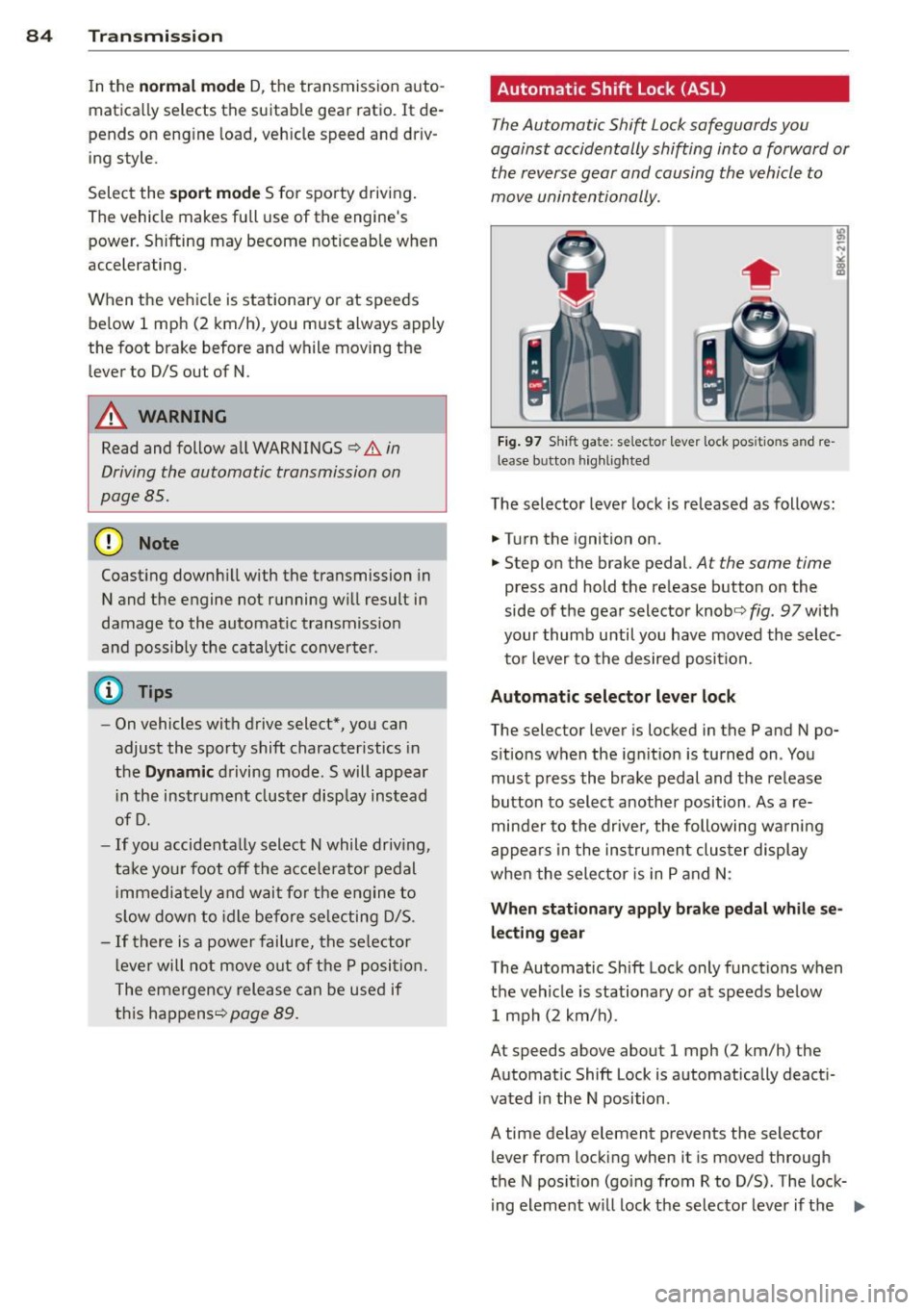
Fi g. 9 7 Shi ft ga te : se lecto r le ver lock pos itio ns and re
lease b utto n hig h lighted
The selector lever lock is released as follows:
.. Turn the ignition on .
.. Step on the brake pedal.
At the same time
press and hold the release button on the
side of the gear selector knob<=>
fig. 97 with
your thumb until you have moved the selec
to r lever to the desired position.
Automatic selector leve r lock
The selector lever is locked in the P and N po
s itions w hen the ign ition is turned on . You
must p ress the brake pedal and t he release
button to select anothe r position . As a re
minde r to the drive r, the following wa rni ng
appea rs in the in strumen t clus ter di splay
when the sele ctor is in P and N:
When stationar y apply brak e pedal while se
lecting gear
The Automatic Shift Lock only funct ions when
t h e veh icle is stationary or at speeds be low
1 mph (2 km/h) .
At speeds above about 1 mph (2 km/h) the
Automat ic Shift Lock is automatically deact i
vated in the N position .
A time delay element prevents the selector lever from locking when it is moved through
the N pos it ion (go ing from R to D/S) . The lock
ing element w ill lock the selecto r leve r if t he
Ill>