turn signal AUDI RS5 CABRIOLET 2015 Owners Manual
[x] Cancel search | Manufacturer: AUDI, Model Year: 2015, Model line: RS5 CABRIOLET, Model: AUDI RS5 CABRIOLET 2015Pages: 284, PDF Size: 69.56 MB
Page 11 of 284
M N
er
u..
co ,...., \!) 1.1'1 ,...., 1.1'1 ,....,
CD
@
®
©
®
®
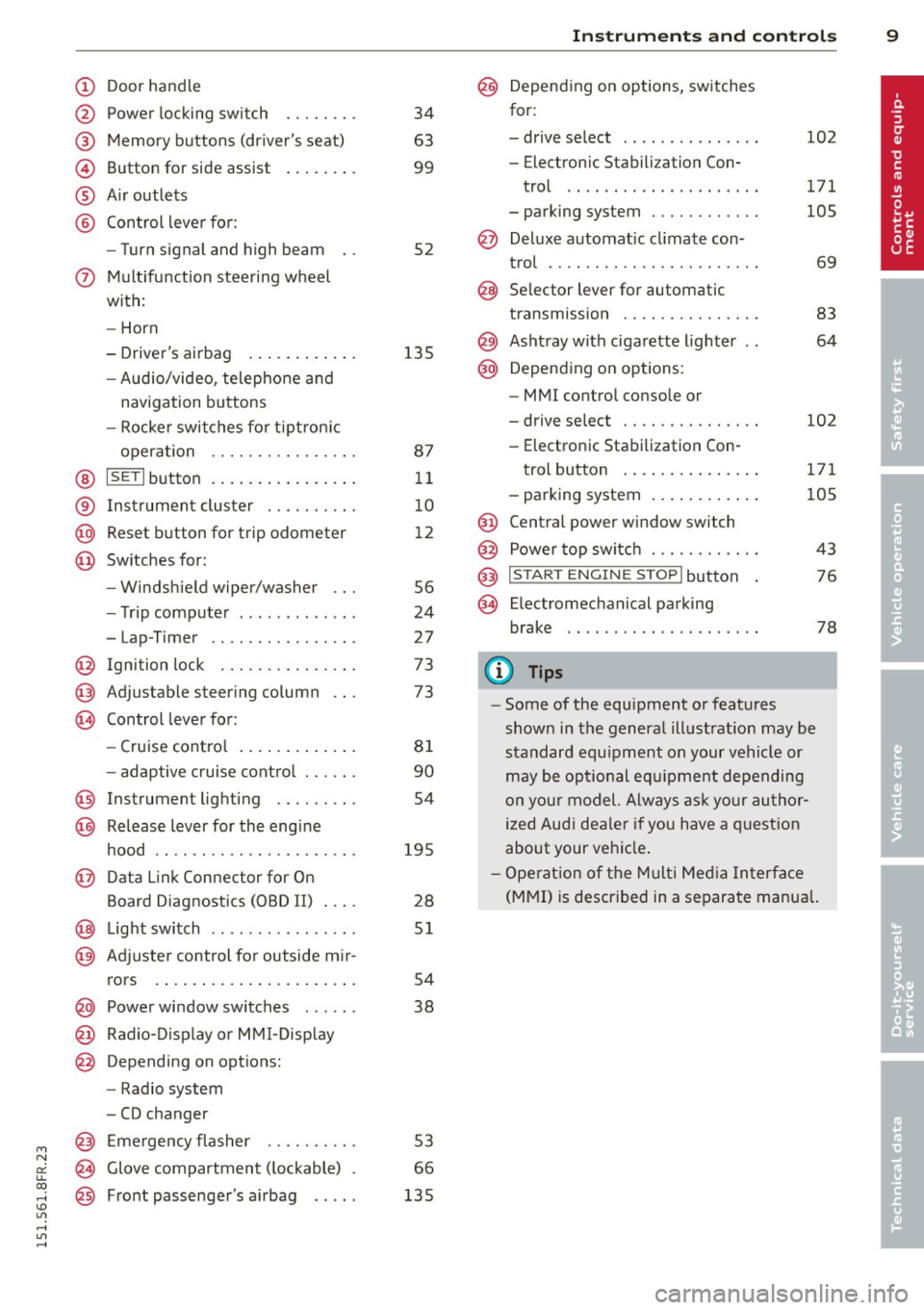
Door handle
Power locking switch
Memory buttons (driver's seat)
Button for side assist
A ir outlets
Control leve r for :
- Turn signal and high beam
0 Multifunction steering wheel
with:
- Horn
- Driver's airbag ...... ... .. .
- Audio/video, telephone and
navigation buttons
- Rocker switches for tiptron ic
operation ............... .
@ ISETI button ............... .
® Instrument cluster ..... .. .. .
@ Reset button for trip odometer
@ Switches for:
- Windsh ield wiper/washer .. .
- Trip computer ..... ... .. .. .
- Lap-Timer .... .... ... .. .. .
@ Ignition lock .............. .
@ Adjustable steering column
@ Control lever for:
- Cruise contro l ....... ... .. .
- adaptive cruise cont ro l ..... .
@ Instrument lighting ........ .
@ Release lever for the engine
hood .. .. ................. .
@ Data Link Connector for On
Board Diagnostics (OBD II) .... 34
63
99
52
135 87 11
1 0
1 2
56
24
27
73
73
81
90
54
195 28
@ Lig ht switch .. .. .. .. .. .. .. .. 51
@ Adjuster control fo r outside mi r-
rors . . . . . . . . . . . . . . . . . . . . . . 54
@ Power window switches . . . . . . 38
@ Radio-Disp lay o r MM I-Disp lay
@ Depending on options:
- Radio system
- CD changer
@ Emergency flasher ......... .
@ Glove compartment ( lockable)
@ Front passenger's a irbag .. .. . 53
66
135
In
strument s and control s 9
@ Depending on options, switches
for:
- drive select .. .. . .. .... ... . 102
- Electron ic Stabilization Con-
trol .... .. .. ............ .
- parking system ........... . 171
105
@ Deluxe automat
ic cl imate con-
t ro l .... .. .. .............. .
69
@ Se lector lever for automatic
transmission .............. .
83
@) Ashtray with cigarette lighter 64
@ Depending on options:
- MMI control console or
- drive select . . . . . . . . . . . . . . . 102
- Electronic Stabilization Con-
trol button . . . . . . . . . . . . . . . 171
- parking system . . . . . . . . . . . . 105
@ Central power w indow switch
@ Power top switc h . . . . . . . . . . . . 43
@ I START ENGINE STOPI button 76
§) Electromechanical parking
brake . . . . . . . . . . . . . . . . . . . . . 78
(D Tips
-Some of the equipment or features
show n in the general illustration may be
standard equ ipment on your vehicle or
may be opt ional equ ipment depending
on your model. Always as k yo ur au thor
ized Audi dea ler if you have a q uest ion
about your ve hicle .
- Ope rat ion of the Multi Med ia In terface
(MMI) is described in a separa te manua l.
Page 15 of 284
M N
er
u..
co ,...., \!) 1.1'1 ,...., 1.1'1 ,....,
Instrument s and warnin g/indic ator ligh ts 13
misfiring and fuel could enter into the ex
haust system . The catalytic converter
could then overheat and be damaged .
Warning/indicator
lights
Description
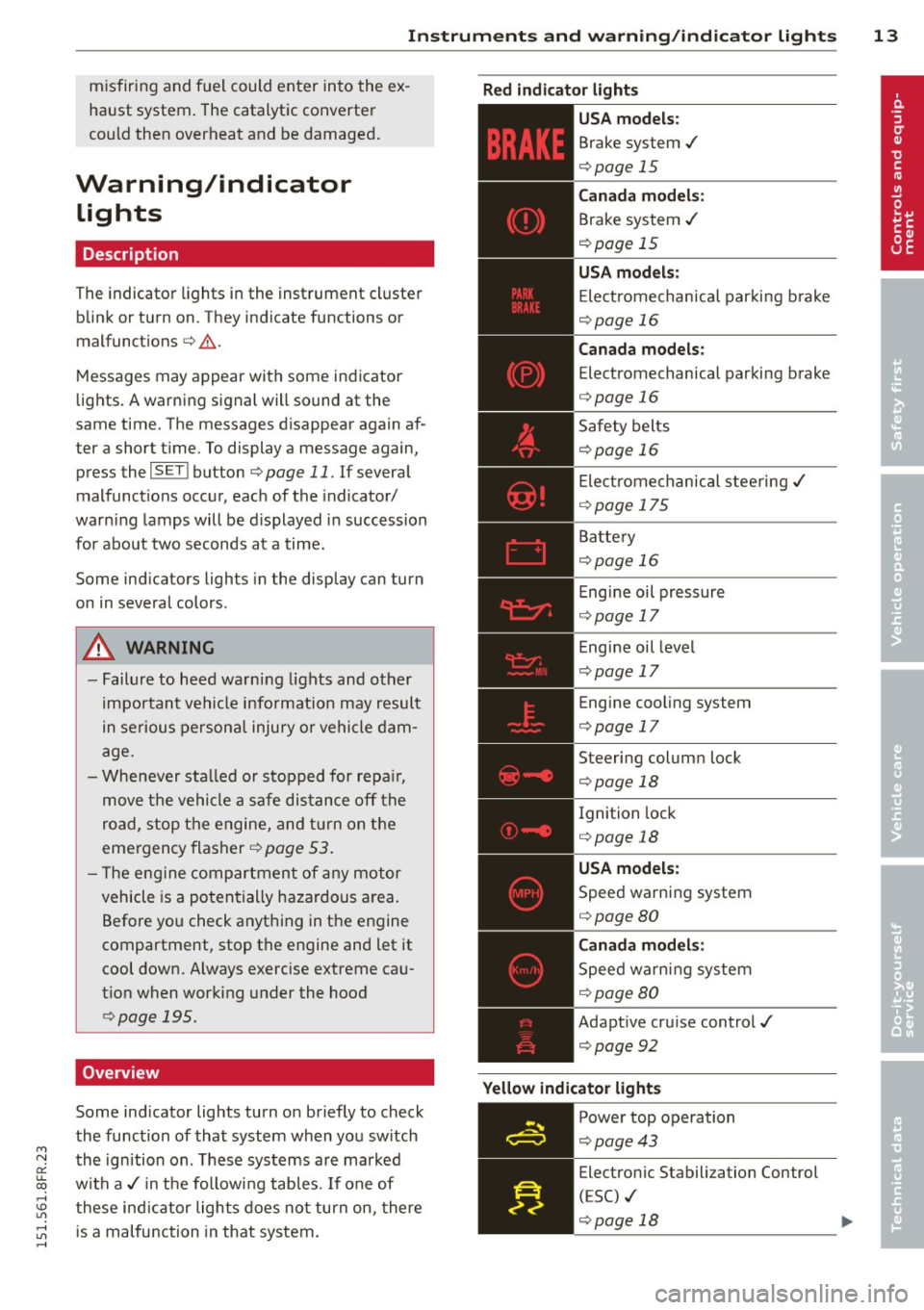
The indicator lights in the instrument cluster
blink or turn on. They indicate functions or
m alfunctions
c::> .&. .
Messages may appear with some indicator
lights. A warning signal will sound at the
same time . The messages disappear again af
ter a short t ime. To display a message again,
press the
I S ET I bu tton c::> page 11 . If several
malfunction s occur, each of the indicator/
warn ing lamps will be d isplayed in succession
for about two seconds at a time.
Some ind icators ligh ts in the display can turn
on in several colors.
A WARNING
- Failure to heed warning lights and other
important vehicle info rmation may result
in serious personal injury o r vehicle dam
age.
- Whenever sta lled or s topped for repa ir,
move the vehicle a safe dis tance off the
road, stop the engine, and turn on the
emergency flasher
c::> page 53.
- T he engine compartment of any motor
vehicle is a poten tially hazardous a rea.
Before you check anything in the engine
compartment, stop the engine and let it
cool down. Always exercise extreme ca u
t ion when working under the hood
c::> page 195.
Overview
Some ind icator lights turn on briefly to check
the function of that system when you switch
the ignition on . T hese systems are marked
with a./ in t he followi ng tab les. If one of
these ind icator lights does no t turn on, there
is a malfunction in that system.
R ed indicator lights
-------------
U S A models:
Brake system ./
c::> page 15
Canada model s:
Brake system ./
c::>page 15
USA m odel s:
Electromechanical par king b rake
c::> page 16
Canada models :
Electromechanical parking brake
c::> page 16
Safety belts
c::> page 16
Electrome chanical stee ring ./
c::> page 175
Batte ry
c::> page 16
Eng ine oil pressure
c::> page 17
E ngine oil level
c::> page 17
Engine cool ing system
c::> page 17
Steering column lock
c::> page 18
Ignition lock
c::> page 18
USA model s:
Speed warning system
c::> page 80
Canada model s:
Speed warning system
c::> page 80
Adaptive cru ise control./
c::> page 92
Y ellow indic ator light s
-------------
Power top operation
c::> page 43
Electron ic Stabili zation Control
( E SC) ./
c::> page 18 ..,
Page 16 of 284
14 Instruments and warning/indicator lights
TPMS
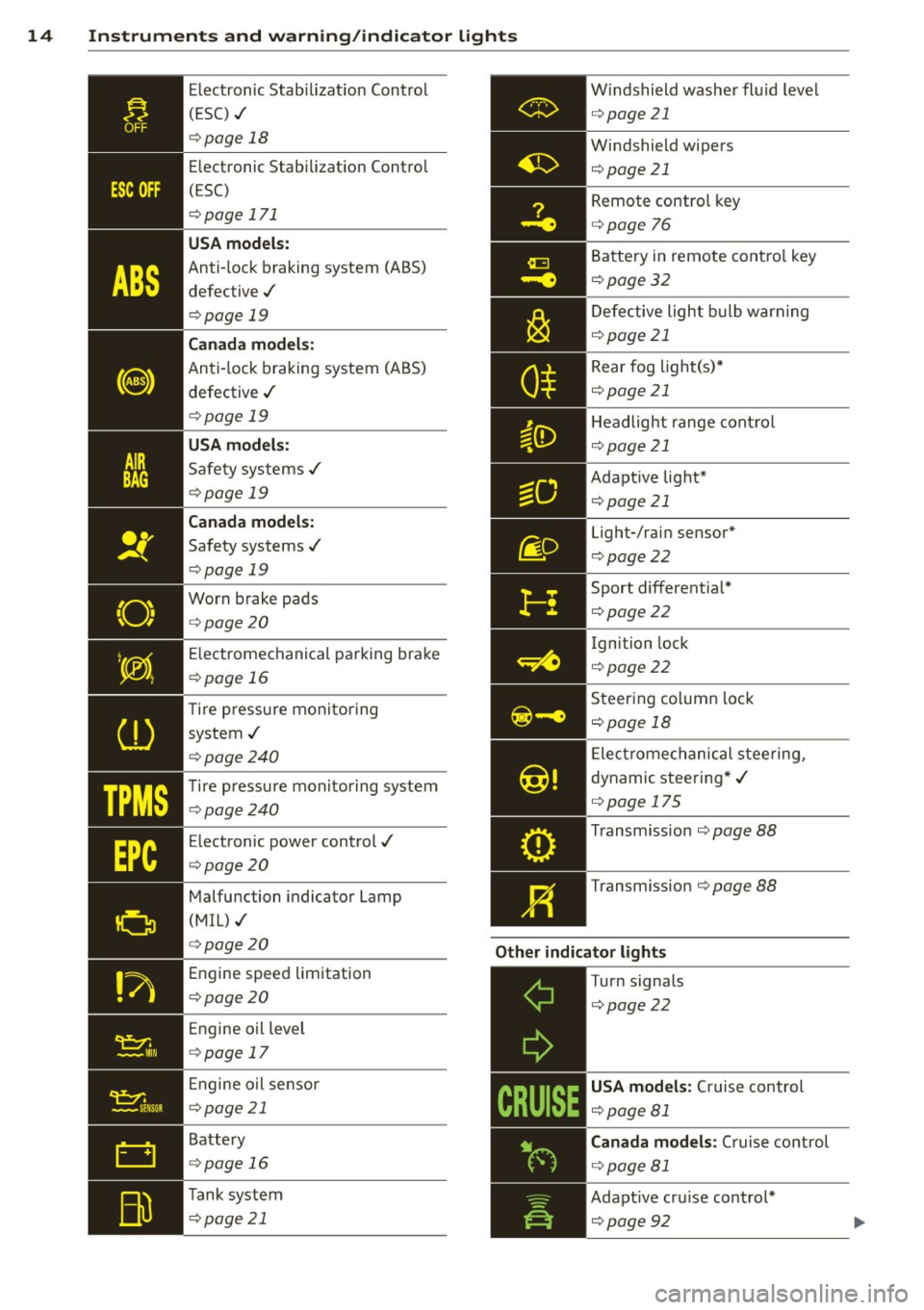
Electronic Stabilization Control
( ES C) ./
¢page 18
Electronic Stabilization Control
(ESC)
¢ page 171
USA models:
Anti-lock braking system (ABS)
defective ./
¢ page 19
Canada models:
Anti-lock braking system (ABS)
defective ./
¢ page 19
USA models:
Safety systems ./
¢page 19
Canada models:
Safety systems ./
¢ page 19
Worn brake pads
¢ page 20
E lectromechanical parking brake
¢ page 16
T ire pressu re monitoring
system ./
¢ page240
Tire pressure mon itoring system
¢page240
Electronic power control./
¢ page20
Malfunction indicator Lamp
(MIL) ./
¢ page 20
Engine speed limitation
¢ page20
Engine oil leve l
¢ page 17
Engine oil sensor
¢page 21
Battery
¢ page 16
Tank system
¢ page 21 Windshield
washer fluid level
¢ page21
Windshield wipers
¢page21 Remote control key
¢page
76
Battery in remote control key
¢page32
Defective light bulb warning
¢page21
Rear fog light(s)*
¢page21
Headlight range control
¢page 21
Adapt ive light*
¢page21
Light-/rain sensor*
¢page22
Sport differentia l*
¢page22
Ignition lock
¢ page22
Steering column lock
¢page 18
Electromechanical steering,
dynamic steering*./
¢ page 175
Transm ission ¢page 88
Transm ission ¢page 88
Other indicator lights
-------------
Turn signals
¢page22
USA models : Cru ise control
¢page 81
Canada models : Cruise control
¢ page81
Adapt ive cru ise control*
¢page92
Page 24 of 284
22 Instruments and warning/indicator lights
If the indicator light turns on and this mes
sage appears, there is a malfunction in the
adaptive light system. The headlights still
function.
Go to an authorized dealership to have the
headlights or the control unit for the adaptive
light repaired.
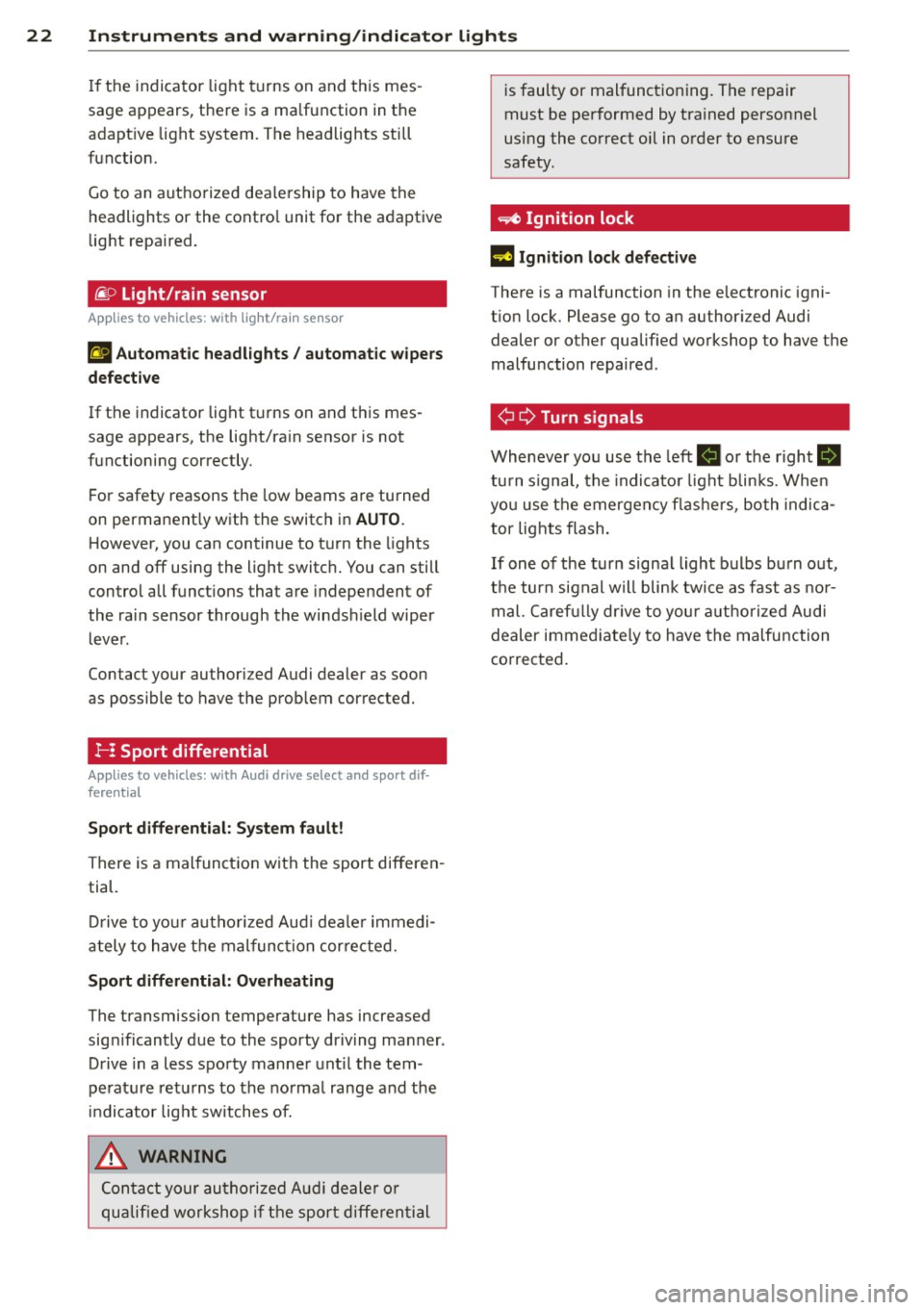
~ o Light/rain sensor
App lies to vehicles: with light/ra in sensor
El Automatic headlights/ automatic wipers
defective
If the indicator light turns on and this mes
sage appears, the light/rain sensor is not
functioning correctly.
For safety reasons the low beams are turned
on permanently with the switch in
AUTO.
However, you can continue to turn the lights
on and off using the light switch. You can still
control all functions that are independent of
the rain sensor through the windshield wiper
lever.
Contact your authori zed Audi dealer as soon
as possible to have the problem corrected.
r- : Sport differential
App lies to vehicles: with Audi drive select and sport dif
f e re ntial
Sport differential: System fault!
There is a malfunction with the sport differen
tial.
Drive to your authorized Audi dealer immedi
ately to have the malfunction corrected.
Sport differential: Overheating
The transmission temperature has increased
significantly due to the sporty driving manner.
Drive in a less sporty manner until the tem
perature returns to the normal range and the
indicator light switches of.
.&_ WARNING
-
Contact your authorized Audi dealer or
qualified workshop if the sport differential is
faulty or malfunctioning. The repair
must be performed by trained personnel
using the correct oil in order to ensure
safety.
~ Ignition lock
l3 Ignition lock defective
There is a malfunction in the electronic igni
tion lock. Please go to an authorized Audi dealer or other qualified workshop to have the
malfunction repaired .
¢ Q Turn signals
Whenever you use the left II or the right Ill
turn signal, the indicator light blinks. When
you use the emergency flashers, both indica
tor lights flash.
If one of the turn signal light bulbs burn out,
the turn signal will blink twice as fast as nor
mal. Carefully drive to your authorized Audi
dealer immediately to have the malfunction
corrected.
Page 32 of 284

30 Openin g and clo sing
Opening and closing
Power locking system
General description
The power locking system locks or unlocks all
doors and the rear lid simultaneously.
You can lock and unlock the vehicle centrally.
You have the following choices:
- Remote master key~
page 33,
-Door handles with convenience key*
~page 34,
-Lock cy linder at the dr iver's door
~ page 35, or
- Power loc king switch inside
~ page 34.
Automatic l ocking
The automatic locking feature locks all the ve
h icle doors and the rear lid when you drive
faster than 9 mph ( 15 km/h) .
The car is unlocked again once the ignition key is removed. In addition, the veh icle can be un
locked if the opening function in the power
lock ing system switch or at one of the door
leve rs is actuated. The Auto Loc k function can
be turned on and off in the rad io or
MMI*
~ page 35.
Addit ionally, in the event of a crash with a ir
bag deployment the doors are automatically
un locked to allow access to the veh icle.
Selective unlocking
When you lock the vehicle, the power locking
system w ill lock the doors and the rear lid .
When unlocking, you can set in the rad io or
MMI* whether
only the dr iver's door or the
enti re ve hicle should be unlocked
~ page 35.
Anti -th eft alarm warning system
If the anti-theft alarm warning system de
tects a break- in into the vehicle, acoust ic and
visua l wa rning signals are triggered.
The anti -theft warn ing system is act ivated au
tomatically when you lock the vehicle .
It is de
activated when u nlocking using the remote key, with the mechanica
l key, and when yo u
switch on the ignition.
T he alarm a lso t urns off when t he a la rm cycle
has expired.
Turn signals
When you u nlock the veh icle, the turn s ignals
flash twice , when you lock it once . If they do
not flash, one of the doo rs, the luggage com
partment lid or the hood is not locked or the
ignition is s till sw itched on.
Unint entionally locking yourself out
In the follow ing cases there safegua rds to
prevent you lock ing you r remote master key in
the vehicle:
- The vehicle does not lock w ith the power
lock ing switch ~
page 34 if the drive r's
door is open .
- On veh ides with convenience key*, if the
most recently used master key is in the lug
gage compa rtment, the rear lid is automat i
cally un locked again after it is closed.
Do not lock your veh icle w ith the remote mas
ter key or convenience key* unt il all doors and
the rea r lid a re closed . In this way you avoid
locking yourself out accidentally .
A WARNING
-
-When you leave t he veh icle, alw ays re
move the ignition key and take it with
you . This will prevent passengers (chil
dren, for example) from acc identally be
ing locked in the vehicle should they acci
dentally press the power locking switch in the front doors .
- Do not leave ch ildren inside the vehicle
unsuperv ised. In an emergency it would
be imposs ible to open the doors from
the o utside without the key .
(D Tips
- In the event of a crash with airbag de
ployment all locked doors will be auto
matically unlocked to give access to the
vehicle occupants from the outside.
Page 43 of 284

"' N
a: LL co
rl I.O
"' rl
"' rl
door opener> Program garage door open
er.
If this path is not available, program the
button as described in version
Bqpage41 .
.,. Follow the instructions in the MMI.
Erasing button programming
The programmed buttons cannot be erased
individually. They must all be erased together.
Reprogram the buttons if necessary .
.,. Select:
ICARI function button> Car systems*
control button > Vehicle settings > Garage
door opener> Clear program settings
>
Yes .
Displaying the version/status/country
code
.,. Select: I CARI function button > Car systems*
control button > Vehicle settings > Garage
door opener > Version information.
@ Tips
-Programming through the MMI* is not
possible with all infotainment systems.
If this is the case, program the buttons
as described in version B
c:> page 41.
- The required distance between the hand
transmitter and the HomeLink module in
the radiator grille
c:> page 41; fig. 35
depends on the system that you are pro
gram ming.
- Depending on the model of the system,
you may need to release the button on
the remote control during programming
and press it again. Hold each position
you try for at least 15 seconds before
trying another position. Keep the turn
signals on your vehicle in view when do
ing this.
- After programming the garage door
opener, it may be necessary to synchroni ze the motor with the system. Refer to
the manufacturer's instructions.
Opening and closing 41
Programming the buttons (version 8)
Applies to vehicles: with garage door opener (Homelink)
Fig. 35 Distance be tween the ra diato r grille and the
hand transmitter
Programming the button: Part 1 with the
controls
1. Switch the ignition on.
2. Press and hold both outer buttons in the
roof headliner
c:> page 40, fig. 34 until the
LED @turns off completely (after about
20 seconds). This procedure clears the
standard codes that were set at the facto
ry and does
not need to be repeated again
to program the other buttons.
3. Briefly press the button on the roof head
liner that you would like to program.
4. Wait until the LED @ begins to blink
quickly. Programming mode is active for 5
minutes.
5. Move in front of your vehicle while hold
ing the original remote control for the
system that would like to program to a
button in the roof headliner.
Programming the button: Part 2 at the
radiator grille
6. Hold the remote control up to the radiator
grille on your vehicle
c:> fig. 35.
7. Press and hold the remote control until
the turn signals on your vehicle blink. This
may take up to 30 seconds.
8. If the emergency flashers blink three
times, the programming was successful.
If the emergency flashers only blink one
time, the 5 minute time limit for the pro
gramming has ended or the programming
was not successful. Repeat the program
ming from the third step, or try changing
t he distance to the radiator grille. .,.
Page 44 of 284

42 Openin g and clo sing
9 . I f the garage door or other system does
not open using the buttons in the roof
headliner even though the programming
was successful, the system may use a roll ing code instead of a fixed code.
Roll ing
code pro gramming
must be performed
¢ page 42.
The other two buttons in the roof headliner
can be programmed according to the instruc
tions above . Begin with the third step .
Erasing butt on progr amming
The programmed buttons cannot be erased
individually . They must all be erased together.
Reprogram the buttons if necessary.
.. Switch the ignition on.
.. Press and ho ld both outer buttons in the
roof headline r until the LE D @ turns off
completely (after about 20 seconds).
Re prog ramming th e button s
.. Switch the ignition on.
.. To reprogram an individual button, press
and hold the button until the LED@ starts
to flash quick ly (after about 10 seconds) .
Re lease the button immediately. Program
ming mode is active for 5 minutes .
.. Continue with the fifth step .
(D Tips
-Programming using the buttons in the
roof headliner is not possible with all In
fota inment systems. If this is the case,
program the buttons as described in ver
s ion A¢ page 40 .
- The requ ired distance between the hand
transmitter and the Home Link module in
the radiato r grille ¢ fig. 35 depends on
the system tha t you are programming.
- Depend ing on the model of the system,
you may need to release the but ton on
the remote contro l during programming
and press it again . Ho ld each position
you try for at least 15 seconds before
trying another position. Keep the turn
s ignals on your vehicle in v iew when do
i ng th is.
Rolling code programming
Applies to vehicles: with garage door opener (Homelink)
Rolling code programming is also needed for
some systems .
Identifying a rolling cod e
.. Press and hold the button in the roof head
liner that was already programmed .
.. Watch the LED@¢ page 40, fig. 34. If the
LE D blinks quickly, the systems (such as a
garage door) is equipped with a rolling code .
.. Program the rolling code as follows:
Acti vating the moto r unit in a system
.. Locate the programming button on the sys
tem's motor un it. The exact location and
color of the button may vary depend ing o n
the brand of the system.
.,. Press the programming button on the ga
rage door opene r moto r unit (this will usual
ly activate an " indicator" on the motor unit) .
Yo u now have approximate ly
30 second s to
program the b utton in the roof headliner .
Programming the button in the roof
headlin er
.,. Press and hold the previo usly programmed
button in the roof headliner for 2 seconds .
.. To end ro lling code programming , press and
hold the button again for 2 seconds.
.. With some systems, the button may need to
be pressed a third t ime to end the program
m ing process .
After programm ing, the system sho uld detect
the signal and begin moving when the button
in the roof headliner is pressed . Now you may
program the other buttons as needed .
(D Tips
-The rolling code can be programmed
more quickly and more easily with the
help of a second person.
- If you have difficulty programming the
roll ing code, referr ing to the user guide
for the system may help .
Page 53 of 284

"' N
a: LL co
rl I.O
"' rl
"' rl
Clear vision Lights
Switching the lights on and off
F ig . 55 Instrument pane l: headlight control switch
Light switch ·'t/,·
i
Turn the switch c> fig . 55 to the correspond ing
position . When the lights are switched on, the
:oo: symbol turns on.
0 • The lights are off or the dayt ime running
lights are on:
- USA model s: The daytime running lights are
activated when the light sw itch
c> fig . 55 is
in the
O position or the AUTO position (only
in daylight conditions). The daytime running
lights function can be turned on and off in
the radio or MMI * menu
Exterior lighting
¢page 52, c> &_ .
-Canada model s: The daytime runn ing lights
are activated when the light sw itch ¢
fig. 55
is i n the O position, :oo: position or the AUTO
pos it io n (on ly in daylight cond itions) . The
daytime running lights function canno t be
turned off¢&. .
AUTO* -Au tomatic headlights switch on and
off depending on b rightness, fo r example in
tw ilight, during rain or in tunnels¢,& .
:oo: -Side marker lights
~D -Low beam headlights
Rear f og light (s)
Press the appropriate b utton c> fig. 55:
0$-Rear fog ligh t(s)
Clear vi sion 51
adaptive light*
When switched on, adap tive ligh t adapts to
curves in the road depend ing on the vehicle
speed and the steering ang le. This provides
better light ing through the curve. The system
operates at speeds between approximate ly
6 mph (10 km/h) and 68 mph (110 km/h).
Stati c corner ing light* (vehicles with adaptive
light) -the cornering light switches on at
speeds up to approximately 25 mph (40 km/
h) w hen a certain steering wheel angle is
reached o r when a turn signal is activated. The
area to the s ide of the vehicle is illuminated
bette r whe n turn ing .
The adaptive light and the cornering light only
functio n when the switch is in the AUTO posi
t ion (automatic headlights*) .
A WARNING
-Daytime r unning lights and automa tic
headlights* are only intended to ass ist
the driver . T hey do n ot relieve the driver
of his responsibili ty to che ck the head
lights and to t urn them on manua lly ac
cording to the current light and visibility
conditions. For examp le, fog cannot be
detected by the light sensors*. So a lways
sw itch on the headlights
~D under these
weather conditions and when driving in
the dar k.
- Cras hes can happen when you cannot see
the road ahead and when yo u cannot be
see n by other motoris ts. Always tu rn on
the head lights so that you can see ahead
a nd so that ot hers can see your car from
t he b ack.
- P lease obey all laws when using the
lig hting sys tems descr ibed here.
(D Note
The rear fog lights shou ld only be turned
on in acco rdance with t raff ic regu lation, as
the lights a re bright for following traffic. ..,.
Page 54 of 284

52 Clear vis ion
@ Tips
- The light sensor* for headlight control is
located in the rear view m irror mount.
You should therefore not apply any st ick
ers to the windsh ield in this area in order
to prevent malfunctions or failures.
- Some exterior lighting functions can be
adjusted
¢page 52.
- When you remove your key from the igni
tion while the vehicle's lights are turned
on, a buzzer sounds as long as the driv
er's door is open .
- In cool or damp weather, the ins ide of
the headlights, turn signals and tail lights can fog over due to the tempera
ture difference between the inside and
outside. They will clea r shor tly after
switching them on. This does not affect
the service life of the lighting.
- In the even t of a light sensor malfunc
tion, the driver is no tified in the instru
ment cluster disp lay¢
page 22.
Turn signals and high beam lever
The lever operates the turn signals, the high
beams and the headlight flasher .
Fig. 56 Tu rn s ig na l and hig h beam lever
Turn sign als ¢i ¢
The turn signals activate when you move the
l ever into a turn s ignal pos ition when the ign i
tion is switched on.
(D -right turn signal
@-left tur n signa l
The turn s ignal blinks three times if you just
tap the lever .
High be ams and headlight flasher [D
Move the lever to the correspon ding posit io n:
@ -high beams on
@ -high beams off or headlight flasher
The indicator light
ii in the instrument cl us
te r turns on .
Notes on thes e features
-The turn signals on ly wor k w ith the ignition
t ur ned on. The indicator ligh ts
Ct or a in
the instrument cluster also blink.
- After you have turned a co rner, the turn s ig
na l switches off au toma tically .
- The
high beam works on ly w hen the head
lights a re on. The ind icator ligh t
II in the
instrument cluster illuminates when the
high beams are on .
- The
headlight flasher works o nly as long as
you ho ld the lever -even if there a re no
lights switched on . The indicator light
II in
the instrument cluster illuminates when you
use the headlight flasher.
A WARNING
--
Do not use the h igh beam or headlight
flasher if you know that these could blind
oncom ing traffic.
Adjusting exterior lighting
The functions ore selected in the radio or
MMI" .
.,. Select: !CARI function button> Exte rior
light ing .
Or
.,. Select: !CARI function button > Car systems *
control button > Vehicle s etting s> Exterior
lighting .
Coming home (light when leav ing car }*,
Leav ing home (light when unlocking car )*
The coming home function illuminates the
area around the vehicle when the ignition is
switched off and th e dr ive r's door is open ed.
Depend ing on veh icle equ ipment, the function
can be switched on and off or the length of
time the lig hts remain on* can be ad justed . ..,.
Page 55 of 284

"' N
a: LL co
rl I.O
"' rl
"' rl
The leavin g home function i lluminates the
area around the vehicle when unlock ing it.
T his function can be switched on and off.
The
c o ming h om e and lea ving home func
tions on ly operate when it is dark and the
light switch is in the AUTO posit ion
¢ page 51 , fig. 55.
Auto headlight s*
When the light switch is in the A UTO
¢ page 51 position, the switch-on po int of the
lights can be changed in the automatic driving
light function.
Daytime running lights
USA m odel s:
You can switch the dayt ime run
ni ng lights
on and o ff .
Canada mod els:
The function cannot be
turned off .
It is activated a utomat ica lly each
time the ignition is switched on.
Travel mode*
T he headlight beam is asymmetrical. This pro
v ides stronger illum ination on the s ide of the
road on wh ich you are driving .
If you are driv
i ng in a country that d rives on the opposite
side of the road from your own country, th is
will cause glare for on coming drivers. To pre
vent glare:
- Trave l mode must be selected in vehicles
with Xenon headlights*.
- In veh icles with halogen headlights, ce rtain
areas of the head light lenses must be cov
ered with wate rproof adhesive covers that
prevent light from passing thro ugh. For
more informat ion, please see your author
i z ed Audi dea ler or author ized repa ir faci lity .
(D Tips
When trave l mode is activated, a display in
the driver information system indicates
this each time you switch the ignit io n on.
Clear vi sion 5 3
Emergency flashers
Fig. 5 7 Center co n sole : em erge ncy flasher sw itc h
The emergency flashers makes other moto
rists aware that you or your vehicle are in an
emergency situation .
.. Press the switch
Gil ¢ fig. 57 to turn the
emergency flashers on or off .
When the emergency f las hers are on, all four
turn s ignals b link at the same time. The turn
s ignal indicator lights .
1B in the instru
ment cluster, as well as the light in the emer
gency flasher switch ~ blink likewise.
You can indicate a lane change or a tu rn w hen
the emergency flashers are switched on by us
ing the turn signal lever. The emergency flash
ers stop temporarily .
T he emergency flashers also work when the
ign it ion is turned off .
T he emergency flashers w ill turn on a utomat i
ca lly if yo u are in an accident where the airbag
has deployed.
(D Tips
You sho uld turn on the emergency f lashers
when:
- yo u are the last veh icle standing in a t raf
fic jam so that any other vehi cles coming
can see you, or whe n
- your vehicle has bro ken down or you are
in an eme rgency s ituation, or when
- yo ur vehicle is be ing towed by a tow
truck or if you are tow ing another vehicle
beh ind you.