Engin Light AUDI RS5 COUPE 2015 Owner's Manual
[x] Cancel search | Manufacturer: AUDI, Model Year: 2015, Model line: RS5 COUPE, Model: AUDI RS5 COUPE 2015Pages: 254, PDF Size: 64.12 MB
Page 78 of 254
Driving
"'Pu ll on the switch @ ¢fig. 79 to apply the
parking brake . The indicator lights in the switch
and . (USA models)/ . (Canada mode ls) in
the inst ru ment cluste r il lum inate.
"' With the ign ition switched on, step on the
brake pedal or the accelerator pedal and press
the switch @ at the same t ime to release the
parking b rake . The indicator lights in the switch
and . (USA models)/ . (Canada mode ls) in
the instr ument cluster go o ut.
Your veh icle is equipped w ith an electromechan i
cal parking b rake. The par king b rake is designed
to p revent the veh icle from rolling unintentional
ly and replaces the hand brake.
In addition to the norma l funct ions of a tradit ion
a l hand bra ke, the e lectromechan ical pa rking
b rake provides var ious convenience and safety
f u nctions.
When start ing f rom rest
- The integral starting assist helps you when
driv ing by automat ically releasing the parking
brake ¢
page 76, Starting from rest.
-When sta rting on inclines , the starting assist
prevents the vehicle from un intent ionally roll
ing back. The bra kin g for ce of the par kin g b rake
is no t released until sufficien t driv ing fo rce has
been built up at the wheels .
Emergency brake function
An emergency brake ensures that the vehicle ca n
be slowed down even if the
normal brakes fa il
¢ page 77, Emergency braking.
A WARNING
If a drive range is eng age d with the vehicle
stationary and the engine running, you mus t
in no instance accelerate careless ly . Otherwise
the vehicle will start to move immed iate ly
r isk of an accident.
(D Tips
- If the parking brake is applied with the igni
tion switched off, the indicator lights in the
switch and -(USA models) . (Cana
da models) in t he instrument cl uster will go
out after a certa in period of time.
76
- Occasional noises when the pa rking brake is
applied an d released a re norma l and are not
a cause for concern .
- Whe n the vehicle is pa rked, the park ing
brake goes through a self-test cycle at regu
lar intervals. Any associated noises are nor
ma l.
Parking
"'Press the brake pedal to stop the veh icle .
"' Pull the sw itch @¢
page 75, fig. 79 to set the
parking brake .
"' Move the se lector lever to P.
"' Tur n the engine off ¢_& .
"' When on inclines or de clines, turn the steering
wheel so that the veh icle will roll into the curb
if it begins to move.
A WARNING
-
- When you leave your vehicle -even if only
briefly - always remove the ignition key. This
applies pa rticularly when children remain in
the vehicle . Otherwise the ch ild ren could
start t he engine, release the parking b rake
or operate elect rical equipment (e.g. power
w indows). There is the risk of an acc ident.
- When the veh icle is locked, no one -part icu
larly no t chi ld ren shou ld remain in the ve hi
cle. Lo cked doors m ake it more d ifficul t for
emergency workers to get into the veh icle -
putting lives at risk.
Starting from rest
The star ting assist function ensures that the
parking brake is released automatically upon
starting .
Stopping and applying parking brake
"' Pull the sw itch @¢ page 75, fig. 79 to apply
the par kin g b rake.
Starting and automatically releasing the
parking brake
"' When you sta rt to dr ive as usual, the park ing
bra ke is automatically released and yo ur vehicle
beg ins to move. .,_
Page 81 of 254

M N
0:: loo ,...., \!) ,.,.,
N ,.,., ,....,
• Pull the lever to position CD¢ fig. 81 to switch
the system on.
• Drive at the speed to be contro lled .
• Press button ® to set that speed.
The stored speed and the green symbol
[ij;(i )~i4 (US model)/ Bl (Canadian model) are
shown in the display r::>fig . 82. The disp lay may
vary, depending on the type of display in your ve
h icle .
The speed is kept constant by modify ing engine
power or thro ugh an active brake intervention.
A WARNING
- Always pay attention to the traffic around
yo u when the cruise control is in operation .
You are always responsib le for your speed
and the dista nce between yo ur vehicle and
other vehicles .
- For reasons of safety, cruise cont ro l should
not be us ed in the city, in stop-and-go t raf
fic, on twisting roads and w hen road condi
tio ns are poor (such as i ce, fog, gr avel,
heavy rain and hyd rop laning) - r is k of acci
dent.
- T urn off t he cr uise control temporari ly w hen
en ter ing turn lanes, highway exit lanes or in
constr uction zones .
- P lease note tha t inadvertent ly " rest ing"
yo ur foot on the accelerator peda l causes
the cruise control not to brake. This is be
cause the cruise contro l is overridden by the
dr iver's acceleration .
- If a brake system malfunction such as ove r
heating occurs when the cruise control sys
tem is switched on, the braking function in
the system may be sw itched off. The other
cruise control func tions remain act ive as
lo ng as the indicato r light
[ij;(l)~i4 (US mo d
els)/ . (Canadian mode ls) is on.
(D} Tips
The brake lights illuminate as soon as the
bra kes apply automat ica lly.
Dri ving
Changing speed
• To inc rease/decrease the speed in in cr ements,
t ap t he leve r in the
010 direction¢ page 78,
fig. 81.
• To increase/decrease the speed quic kly, hold
the lever in the
0 10 di rect ion until the de
sired speed is displayed.
You can also press the accelerator pedal down to increase yo ur speed, e.g . if yo u want to pass
someone . The speed you saved ear lie r will re
s u me as soon as you let off of the accelerator
pedal.
If, however , you exceed yo ur saved speed by
6 mph (10 km/h) for longer than 5 minutes, the
cruise control will be turned off temporarily . The
green symbo l in the d isplay turns white. The
saved speed rema ins the same .
Presetting your speed
You can preset your desired speed while the vehi
cle is not moving.
• Switch on the ignition.
• Pull lever into position CD r::> page 78, fig. 81.
• Press the lever in the
0 or O direction to in-
crease or decrease your speed.
• Release the lever to save that speed .
This function makes it possible, for examp le, to
save the speed you want before dr iv ing o n the
highway. Once on the highway, activate the cru ise
control by pu lli ng the lev er toward CD-
Switching off
Temporary deactivation
• Press the brake pedal, or
• Press the leve r into position @ (not clicked into
p lace) ¢page 78, fig. 81, or
• Dr ive fo r longe r th an
5 m inu tes a t mo re t han
6 mph ( 10 km/h) above the store d spee d.
Switching off completely
• Press lever into position @(clicked into place),
or
• Swi tch the ignit ion off.
79
Page 83 of 254
M N
0:: loo ,...., \!) 1.1"1
N 1.1"1 ,....,
Automatic transmission
S tronic
Introduction
The automatic transmission is controlled elec
tronically. The transmission upshifts or down
shifts automatically depending on which drive
program is selected.
When a
moderate driving style is used, the
transmission selects the most economical driving
mode.
It will then change up early and delay the
downshifts to give better fuel economy.
The transmission switches to a sporty mode after
a kick-down or when the driver uses a
sporty driv
ing style
characterized by quick accelerator pedal
movements, heavy acceleration, frequent
changes in speed and traveling at the maximum
speed.
If desired, the driver can also select the gears
manually (tiptronic mode) ~ page 85.
The S tronic is a dual-clutch transmission . Power
is transferred using two clutches that work inde
pendently from one another. They replace the
torque converter used in conventional automatic
transmissions and allow the vehicle to accelerate
without a noticeable interruption in traction.
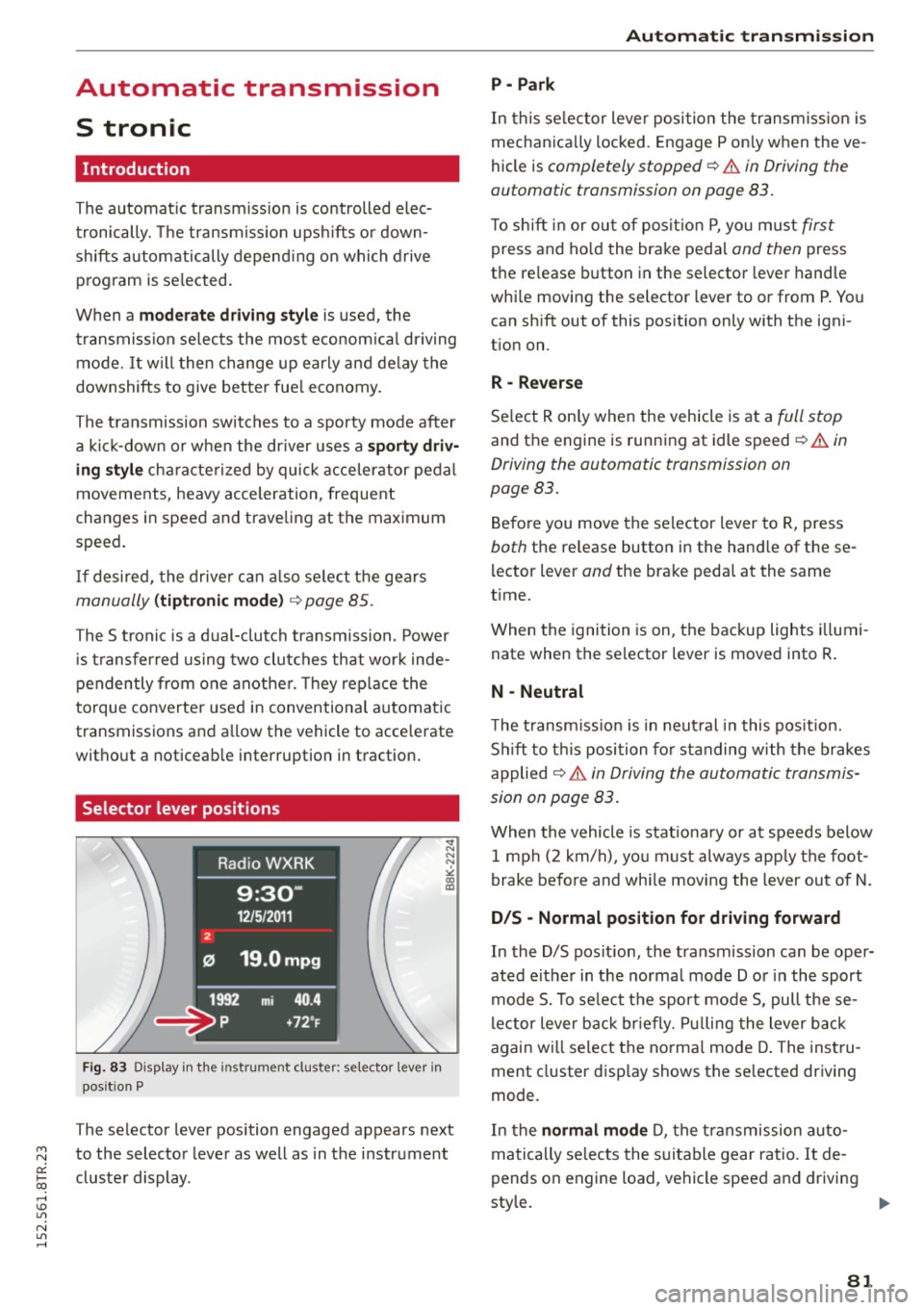
Selector lever positions
Fig. 83 Display in the instru ment cluster: selector lever in
pos it ion P
The selector lever position engaged appears next
to the selector lever as well as in the instrument
cluster display .
Automatic transmission
P - Park
In this selector lever position the transmission is
mechanically locked. Engage P only when the ve
hicle is
completely stopped¢.& in Driving the
automatic transmission on page 83.
To shift in or out of position P, you must first
press and hold the brake pedal and then press
the release button in the selector lever handle
while moving the selector lever to or from P. You
can shift out of this position only with the igni
tion on.
R- Reverse
Select R only when the vehicle is at a full stop
and the engine is running at idle speed¢.& in
Driving the automatic transmission on
page 83.
Before you move the selector lever to R, press
both the release button in the hand le of the se
lector lever
and the brake pedal at the same
time .
When the ignition is on, the backup lights illumi
nate when the selector lever is moved into R.
N - Neutral
The transmission is in neutral in this position.
Shift to this position for standing with the brakes
applied
~ .& in Driving the automatic transmis
sion on page 83.
When the vehicle is stationary or at speeds below
1 mph (2 km/h), you must always apply the foot
brake before and while moving the lever out of N.
D/S - Normal position for driving forward
In the D/S position, the transmission can be oper
ated either in the normal mode Dor in the sport
mode S. To select the sport mode S, pull these
lector lever back briefly. Pulling the lever back
again will select the normal mode D. The instru
ment cluster display shows the selected driving
mode.
In the
normal mode D, the transmission auto
matically selects the suitable gear ratio. It de
pends on engine load , vehicle speed and driving
style.
11o-
81
Page 84 of 254
Automati c tra nsmi ssio n
Select the spo rt m ode S for sporty driving. The
vehicle makes full use of the engine's power.
Shift ing may become not iceable when accelerat
ing.
When the vehicle is stationary or at speeds below 1 mph (2 km/h), you must always apply the foot
brake before and while moving the lever to D/S
out of N.
_&. WARNING
Read and follow all WARNINGS¢.& in Driv
ing the automatic transmission on
page 83 .
(D Note
Coasting downh ill with the transmission in N
and the engine not running will result in dam
age to the automatic transmission and possi
bly the catalytic converter .
(D) Tips
-On vehicles with drive select*, you can ad
just the sporty shift characteristics in the
Dy namic driv ing mode.Swi ll appear in the
i nstrument cluster display instead of D .
- If you accidentally select N while driving, take your foot off the accelerator pedal im
mediately and wait for the engine to slow
down to idle before selecting D/S.
- If there is a power failure, the se lector lever
will not move out of the P pos it ion. The
emergency release can be used if this hap
pens¢page 87.
82
.
Automatic Shift Lock (ASL)
The Automatic Shift Lock safeguards you against
accidentally shifting into a forward or the re
verse gear and causing the vehicle to move unin
tentionally.
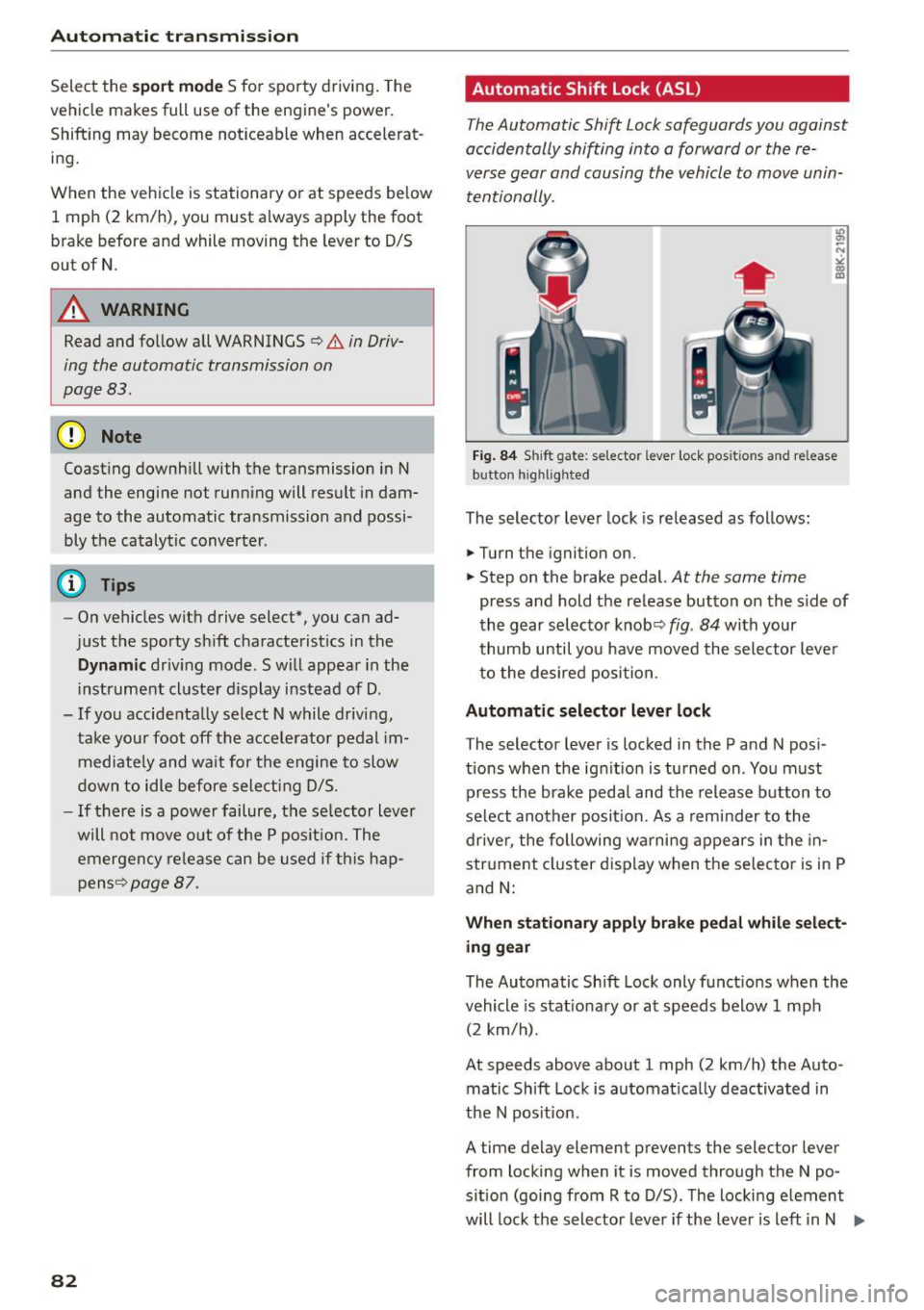
Fig . 84 Sh ift gate : se lecto r lever lock pos itio ns and re lease
button h ig h lighted
The selector lever lock is released as fol lows:
.,. Turn the ignition on .
.,. Step on the brake pedal.
At the same time
press and hold the release button on the s ide of
the gear selector knobq
fig. 84 with your
thumb until you have moved the sele ctor lever
to the desired position.
Automatic selector leve r loc k
The selector lever is locked in the P and N pos i
tions when the ignit ion is turned on . You must
press the brake peda l and the release button to
select another posit ion. As a reminder to the
drive r, the following warni ng appears in the in
str ument cluster display when the se lector is in P
and
N:
When sta ti onar y appl y brak e peda l wh ile select
ing g ear
The Automatic Shift Lock only funct ions when the
vehicle is stat iona ry or at speeds below 1 mph
(2 km/h).
At speeds above about 1 mph (2 km/h) the Auto
matic Shift Lock is automat ica lly deactivated in
the N pos ition.
A time delay element prevents the selector lever
from locking when it is moved through the N po
s ition (going from R to D/S) . The locking e lement
will lock the selector leve r if the lever is left in N .,..
Page 85 of 254
"' N
0:: loo
rl I.O
"'
(Neutral) for more than approximately 2 seconds,
without the brake pedal being pressed.
Release button
The release button on the selector lever prevents
the lever from being accidentally shifted into cer
tain positions. Depending on the direction of the
shift, the selector lever locks at different posi
tions . The positions are highlighted in the i llus
tration ¢
fig. 84.
Ignition key safety interlock
The key cannot be removed from the ignition un
l ess the selecto r lever is in the P park position .
When the ignition key is removed, the selector
lever will be locked in the P position.
Driving the automatic transmission
M N 0 0 .,:.
gi
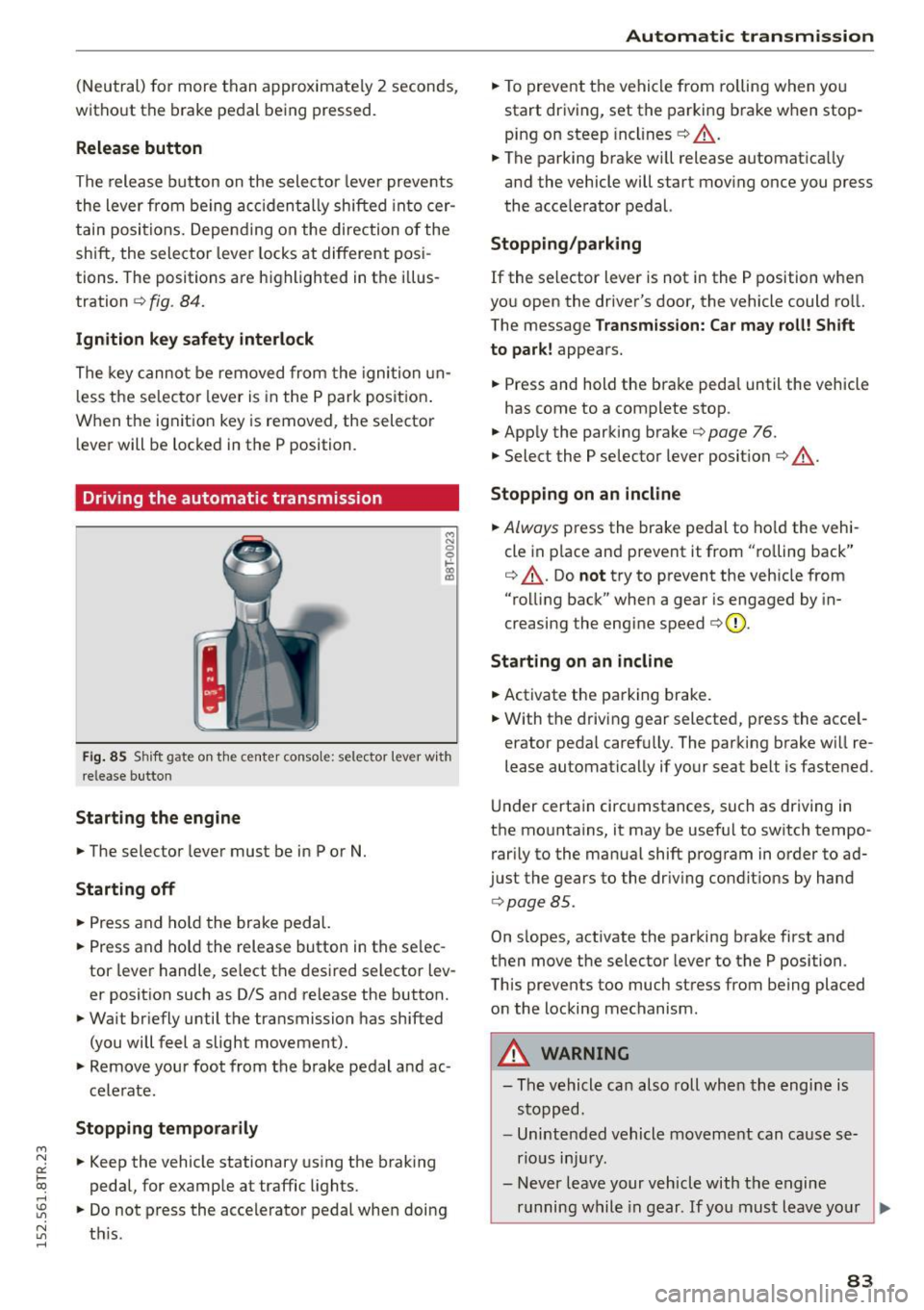
Fig. 85 Shift gate on the center conso le: selector lever with
release butto n
Starting the engine
.,. The selector lever must be in P or N.
Starting off
.,. Press and hold the brake pedal.
.,. Press and ho ld the release button in the se lec
tor lever handle, select the desired selector lev
er position such as D/S and release the button.
.,. Wait briefly until the transmission has shifted
(you will feel a slight movement).
.,. Remove your foot from the brake pedal and ac
celerate.
Stopping temporarily
.,. Keep the vehicle stationary using the braking
pedal, for example at traffic lights.
.,. Do not press the accele rator pedal when doing
~ t hi s. rl
Automatic transmission
.,. To prevent the vehicle from rolling when you
start driving, set the parking brake when stop
ping on steep inclines¢ &_.
.,. The parking brake wi ll release automatica lly
and the vehicle will start moving once you press
the acce lerator pedal.
Stopping /parking
If the selector lever is not in the P position when
you open the driver's door, the vehicle could ro ll.
The message
Transmission: Car may roll! Shift
to park!
appears.
.,. Press and hold the brake peda l until the vehicle
has come to a complete stop.
.. App ly the parking brake¢
page 76.
.,. Select the P selector lever posit ion ¢ &_ .
Stopping on an incline
.,. Always press the brake pedal to hold the vehi
cle in p lace and prevent it from "ro lling back"
¢ &_ . Do
not try to prevent the veh icle from
"rolling back" when a gear is engaged by in
creasing the engine speed ¢(D .
Starting on an incline
.,. Activate the parking brake .
.,. With the driving gear selected, press the acce l
erator pedal carefu lly. The parking brake will re
lease automatically if your seat belt is fastened.
Und er certain circumstances, such as driving in
the mountains, it may be useful to switch tempo rarily to the manual shift program in order to ad
just the gears to the driving conditions by hand
¢page 85 .
On s lopes, activate the parking brake first and
then move the selector lever to the P position.
This prevents too much stress from being placed on the locking mechanism .
_& WARNING
-
-The vehicle can also roll when the engine is
stopped.
- Unintended vehicle movement can cause se
rious injury.
- Never leave your vehicle with the engine
running while in gear. If you must leave your
~
83
Page 88 of 254
Automatic transmi ssion
"' Move the selector leve r to the D/S position to
select sport mode (5) or select the
dyn ami c
driv ing mode in drive select* ¢ page 102 .
"'Press the brake peda l strongly with your left
foot and hold it down for at least 1 second.
"' At the same time, press the accelerator pedal
down completely with your right foot until the
engine reaches and maintains a high RPM .
"' Remove your foot from t he b rake pedal w it hi n 5
seco nds ¢,& .
A WARNING
-Always adapt you r driving to the traffic flow.
- Only use the La unch Control P rogram when
road and t raff ic conditions a llow i t and oth
er drivers wi ll not be endangered or annoye d
by your driving and the veh icle's accelera
t ion.
- Please note that the driving wheels can spin
and the vehicle can brea k away w hen spo rt
mode is switched on, especially when the
road is slippery.
- Once you have accelerated, yo u should
switch sport mode off
by pressing the
I ~ OF FI button.
(D Tips
- The t ransmission tempe ratu re may inc rease
significantly after using the La unch Control
Program. If that happens, the program may
not be available for a few minutes. It will be
ava ilable again after a coo l-down period .
- When accelerat ing using the Launch Contro l
program, all vehicle pa rts a re subject to
heavy loads. This can result in increased
w ear.
Transmission malfunction
[i1 Transmission : Press brake pedal and sele ct
gear again .
Press the brake pedal and se lect the desi red se
lecto r leve r pos it ion aga in . You can then continue
d riving.
[O] Transmi ssion overheating: Please drive con
servativ ely.
86
The transm ission temperat ure has inc reased s ig
nificantly d ue to the sporty driving manner. Drive
i n a less sporty manne r until the temperature re
turns to the normal range and the indicator light
switches of.
[i1 Trans mission malfunction: You can continue
driving
The re is a system mal func tion in the t ransm is
s ion . You may contin ue driving . Drive to yo ur au
thorized Audi dea ler or qualified repa ir facility
soon to have the malfunction corrected .
[i1 Transmission malfun ction : Limited driving
functionality
There is a system malfunct ion in the t ransm is
s io n. The t ransm ission is swi tching to eme rgency
mode. This mode on ly shifts in to cer tain gears or
will no longer shift at al l. The engine may stall.
D rive to your authorized A udi dealer or qualified
repair fac ility immediately to have the mal func
tion corrected.
[il ffl Trans mission malfunction: No reverse
You can continue dri ving
There is a system malfunct ion in the t ransm is
s ion. The t ransm ission is swi tch ing to eme rgency
mode. This mode on ly shifts into certain gears or
will no longer shift at al l. The engine may sta ll.
You cannot engage the reverse gear. Drive to yo ur
authori zed Aud i dea ler or q ualified repa ir facility
i mmediately to have the malfunct ion corrected.
[i1 Transmission malfunction: Stop vehicle and
shift to park.
Do no t con tinue dr iv ing . Se lec t the P sele ctor lev
er position and see your au thorized A udi dealer
o r q ualified repai r facility for assistance.
(D Note
If th e tr ansmission swi tches to emer gen cy
mode, you should take the ve hicle to an au
thorized Audi dea lership as soon as possible
to have the condition corrected.
Page 171 of 254

M N
0:: loo ,...., \!) 1.1"1
N 1.1"1 ,....,
shared, please see your contract with the
wireless telecommunications provider and the
"About Aud i connect" tab in your vehicle's
MMI*:
IMENU I button> Audi connect > About
Audi connect .
Electronic Stabilization
Control (ESC)
Description
ESC helps to improve road holding and vehicle
dynamics to help reduce the probability of skid
ding and loss of vehicle control. It works only
when the engine is running. ESC detects certain
d ifficu lt driving situations, including when the ve
hicle is beginn ing to spin (yaw) out of control and
helps you to get the vehicle back under control by
selectively braking the whee ls, and/or reducing
engine power and prov iding steer ing ass istance
to help hold the vehicle on the driver's intended
course. The indicator light
Bl in the instrument
cluster blinks when ESC is taking action to help
you control the veh icle.
ESC has limitations.
It is important to remember
that ESC cannot overcome the laws of physics. It
will not always be able to help out under all con
ditions you may come up against. For example, ESC may not always be able to help you master
situations where there is a sudden change in the
coefficient of frict ion of the road surface . Whe n
there is a section of dry road that is suddenly cov
ered with water, slush or snow, ESC cannot per
form the same way it wou ld on the dry surface. If
the vehicle hydroplanes (rides on a cushion of wa
ter instead of the road surface), ESC will not be
ab le to he lp you steer the vehicle because contact
with the pavement has been interrupted and the
vehicle cannot be braked or steered . During fast
cornering, particularly on winding roads, ESC
cannot always deal as effectively with difficult
driving situations than at lower speeds. Whe n
tow ing a trailer, ESC is not able to help you regain
con trol as it wou ld if you were no t towing a trail
er .
A lways adjust your speed and dr iving sty le to
road, traffic and weather conditions. ESC cannot
override the vehicle's physical limits, increase the
Smart Technology
available traction, or keep a vehicle on the road i f
road departure is a result of driver inattention.
Instead, ESC improves the possibility of keeping
the vehicle under control and on the road dur ing
extreme maneuvers by using the driver's steering
inputs to help keep the vehicle go ing in the in
tended direction. If you are traveling at a speed
that causes you to run off the road before ESC
can prov ide any assistance, you may not expe ri
ence the benefits of ESC.
ESC is switched on all the time . In certain situa
t ions when you need less traction, you can switch
off ASR by pressing the button
[ru ~ page 170,
fig. 152 or ~page 170, fig . 153. Be sure to
switch ASR on again when you no longer need
less traction.
T he following systems are integrated in the ESC:
Anti-lock braking system (ABS)
ABS prevents the wheels from locking up when braking. The vehicle can still be steered even dur
i ng hard braki ng. Apply steady pressure to the
brake pedal. Do not pump the pedal. A pulsing in
the brake pedal indicates that the system is he lp
ing you to brake the vehicle.
Brake assist system
The brake ass ist system can decrease braking dis
tance . It increases braking power when the driver
presses the brake peda l quickly in emergency sit
u at ions. You must press and hold the brake pedal
until t he situat ion is over. In vehicles with adap
tive cruise control*, the brake assist system is
more sensitive if the distance detected to the ve
hicle ahead is too sma ll.
Anti-slip regulation (ASR)
ASR red uces eng ine power when the drive wheels
begin to spin and adapts the force to the road
conditions. This makes it easier to start, acce le r
ate and drive up hills.
Electronic differential lock (EDL)
T he EDL brakes whee ls that are spinning and
transfers the drive power to the other wheels.
T his function is available up to about 60 mph
(100 km/h).
169
Page 174 of 254
Smart Technolog y
-Manua l retraction: At speeds up to about
10 mph (20 km/h) , retract the rear spoiler by
pressing and holding the switch. At speeds be
tween 10 mph (20 km/h) and 75 mph (120 km/h), retract the rear spoiler by tapping
on the switch
Ind icat or light
- Rear sp oile r: sy st em m alfu ncti on
The rear spoiler may not have extended due to a
malfunct ion . This cou ld change the vehicle's driv
ing characteristics at high speeds . Do not drive at
speeds above 85 mph (140 km/h) . Drive to the
nearest authorized Audi dealer or qualified repair
facility to have the malfunction corrected.
A WARNING
Dr iv ing at higher speeds w ithout the rear
spoiler deployed can impa ir handling charac
teristics, mak ing the veh icle harder to co ntrol.
- Always make sure that the spoiler is de-
ployed when driving at speeds over 85 mph
(140 km/h) . If the rear spoiler warn ing/ indi
c ator light in t he instrument cluster comes
on, the rear spoi ler may not have deployed .
- Never dr ive at speeds highe r than 85 mph
(140 km/ h) if the spoiler is not deployed.
Have the spo iler inspected as soon as possi
ble by an author ized Audi dealer or qualif ied
workshop.
- Always obey speed limi ts and o ther traffic
laws .
A WARNING ,.__.__
Improper ope ration of the rear spoiler can
cause crushing injuries .
- Always make sure that nobody, espec ia lly
children, is in the way when the rear spo iler
is deployed or retracted .
(D Note
Never push the vehicle or apply fo rce to the
rea r spo ile r - i t cou ld be damaged.
(D Tips
Clean the spo ile r compartment every 2 to 3
months. The spoiler compartment m ust al-
172
-
ways be free of ice, snow, leaves or other de bris .
Braking
What affects braking efficiency?
New brake pads
During the first 250 miles (400 km), new brake
pads do not possess their full braking e ffect, they
have to be "broken in" first¢.&. . The break -in pe
riod can be considerably longe r for vehicles with
ceramic brake rotors*. You can compensate for
th is slightly reduced braking power by pushing
harder on the brake pedal. Avoid heavy braking
loads during the b reak-in period.
Op era ting condition s and dri ving h abit s
The brakes on today's automobiles are still sub
j ect to wear, depending largely on operating con
dit ions and driving habits ¢.&, . On vehicles that
are either dr iven most ly in stop-and-go city traf
fic or are driven hard, the brake pads should be
checked by yo ur autho rized Aud i dealer more of
ten than specified in the
Warranty & Mainte·
nan ce bookl et.
Fail ure to have you r brake pads
i nspected c an resu lt in red uced b rake pe rform
ance.
On steep slopes, you shou ld use the braking ef
fect of the engine. This way, you prevent unnec
essary wear on the bra ke system. If yo u must use
you r brakes, do not hold the brakes down contin
u ously. Pump the brakes at intervals .
Operating noise
Noises may occur when brakin g depending on the
speed, braking force and ou ts ide cond itions su ch
as tempera ture and hum idity.
Due to the nature of the materials used in ceram
i c bra ke roto rs*, noises may become mo re appa
r ent at low speeds.
Effect of water and road salt
In certa in situations, for examp le after driv ing
through water, in heavy rain, after overnight con
densation or after washing your car , the braking
effect can be redu ced by moistu re or ice on the
1111>
Page 176 of 254
Smart Technolog y
-If y ou dama ge the front spo iler, or if you in
sta ll a di fferent spoile r, be sure the air flow
to the front brakes is not obstructed . Other
wise the brake system co uld overheat reduc
ing the effectiveness o f the enti re brake sys
tem .
- Failure of one brake c ircuit will impair the
braking capab ility r esult ing in a n increased
stopp ing distance. Avoid driving the veh icle
and have it towed to the nearest au thorized
Audi de aler or qualified workshop.
- Never let the vehicle ro ll to a stop with the
engine shut off .
-If the brake booster is not work ing, the
brake pedal must be pressed considerably
harder to make up for the lack of booste r as
sistance .
Electro-mechanical
power assist, dynamic
steering
The electro-mechanical power assist helps the
driver when steering .
Power steering adapts electronically based on
the vehicle speed .
Indicator lights and me ss a ges
• Steering defe cti ve! Do not dri ve vehicle!
If th is indicator light tu rns on and stays on and
this message appears, the power steering may
have fa iled .
D o
n ot co ntinue driving. See yo ur authorized
Audi dealer or a qua lified repair fac ility for assis
tance.
l;r-ij Dynamic steering : System fault! You can
c on tinu e drivin g
If the indicator light tu rns on and the message
appears, the steer ing may be more difficult to
move or mo re sensitive than usual. The steer ing
wheel may a lso be at an ang le when dr iv ing
straight.
Drive s low ly to your author ized Audi dealer or
qua lified wor kshop to have the malfunction cor
rected.
174
':r-ij Dynamic stee ring: initializing
If this drive r message appears and the indicator
li gh t is flashing on the instr ument pane l, dynam
i c s teer ing* is being rein itia lized. After sta rting
the engine, the steering wheel w ill move slightly.
Re-initialization might be necessary if the steer
i ng whee l was moved hard to the left and right
while the vehicle was not moving. The display goes out as soon as initialization is comp lete.
A WARNING
H ave the dynamic steering* system malfunc
tion repaired as soon as possible by an author ized A udi dealer or qualified wo rkshop -risk
of accident!
@ Tips
- If the . or ':rfl indicator light only stays on
for a sho rt time, you may cont inue driving.
- The dynamic steering* stab ility systems are
not availab le in the event of a system mal
function.
- For add itiona l information on dynamic
steering*, refer to~ page 101.
Driving with your quattro
With all-wheel drive, all four wheels are driven .
General information
With all-wheel drive, power is distributed to all
four wheels . This happens automatically depend
i ng on your driving style and the road conditions
at the t ime . See also ~ page 169.
A center d ifferential distributes the driving power
variably to the front and rear axle. It works to
gether w ith select ive whee l torque control, which
activates w hen d rivi ng throug h curves
~ page 170 . With the spo rt diffe rential*, power
dist ribution to the rear wheels is variab le and can
be adjusted with drive select~ page 101.
The all-whee l dr ive concept is des igned for hig h
engine power . Yo ur vehicle is exceptiona lly pow
e rfu l and has excellen t drivi ng cha racte rist ics
both unde r normal d riving condi tions and o n
snow and ice . Always read and follow sa fe ty pre-
ca utions ~& .
1111>
Page 178 of 254

Smart Technolog y
(D Tips
-But even energy management cannot neg
ate the limits of physics. Consider that the power and life of a battery are limited.
- If starting ability is threatened, the indica
tor light (•)appears
Qpage 16.
What you should know
The highest priority is given to maintaining start
ing capability.
The battery is severely taxed in short-distance
driving, in city traffic and during the co ld time of
year . Ab undant electrical energy is required, but
only a little is generated. It is also critical if the
engine is not runn ing and electrical components
are turned on. In this instance energy is being
consumed but none is being generated.
It is in precisely these situat ions that you wi ll no
tice energy management actively regulating the
d istr ibut io n of energy.
Vehicle s tand s for an exte nded p eriod
If you do not drive your vehicle over a period of
several days or weeks, e lectrica l components are
gradually cut back or switched off. This reduces
energy consumption and maintains starting ca
pability over a longer period. Some of the con
ven ience funct ions may not operate, such as the
interior lights or the powe r seat adjustment. The
conven ience functions will be ava ilable again
when you sw itch on the ign it io n and start the en
g ine.
With th e engine turned off
If you listen to the radio, for example, with the
engine turned off or use other MMI funct ions,
the battery is being discha rged .
If starting capability is jeopardized due to energy
consumption, a message appears in the MMI dis p lay . The message ind icates that the system will
be sw itched off automat ica lly in a moment. If
you wish to cont inue using the functions , you
have to start the engine .
176 With the en
gine running
Although elec trical energy is generated when the
vehicle is being d riven, the battery can become
discharged . This happens mostly when litt le en
ergy is being generated and a great deal con
sumed and the battery's state of charge is not
optimal.
T o bring the energy ba lance back into equilibri
u m, consumers whic h req uire especially large
amounts of energy are temporari ly cut back or
switched off. Heating systems in part icular re
quire a great deal of energy. If you notice, for ex
ample, that the heated seats* o r the heated rear
window are not heating, they have been tempo
r ari ly cut back o r switched off . Th ese systems w ill
be ava ilable again as soon as the ene rgy ba lance
has been res tored.
You w ill also notice that engine id le speed has
been increased slightly . Thi s is normal and not a
ca use for concer n. By increasing eng ine idle
speed the addi tional energy required is gene rated
and the battery is charged.