tow AUDI RS5 COUPE 2015 Owners Manual
[x] Cancel search | Manufacturer: AUDI, Model Year: 2015, Model line: RS5 COUPE, Model: AUDI RS5 COUPE 2015Pages: 254, PDF Size: 64.12 MB
Page 5 of 254
M N
0:: loo ,....,
Airbag system . . . . . . . . . . . . . . . . . . . . 128
Important information . . . . . . . . . . . . . . . 128
Front ai rbags . . . . . . . . . . . . . . . . . . . . . . . 132
Mon ito ring the Advanced A irb ag Sys tem . 138
Knee airbags . . . . . . . . . . . . . . . . . . . . . . . . 142
Side airbags . . . . . . . . . . . . . . . . . . . . . . . . 144
Side curta in a irbags . . . . . . . . . . . . . . . . . . 1 47
Ch ild safety . . . . . . . . . . . . . . . . . . . . . . 150
Important informat ion . . . . . . . . . . . . . . . 150
Ch ild seats . . . . . . . . . . . . . . . . . . . . . . . . . 155
Secur ing c hild seats . . . . . . . . . . . . . . . . . . 159
L A TC H system (Lower anchorages and
tethers for chi ldren) . . . . . . . . . . . . . . . . . . 163
Addit ional info rmation
167
Driver messages . . . . . . . . . . . . . . . . . 168
Smart Technology . . . . . . . . . . . . . . . 16 8
N otice about data recorded by the Event
Data Recorder and vehicle cont rol
modules . . . . . . . . . . . . . . . . . . . . . . . . . . . 168
Electronic Stabili za tion Control (ESC) . . . . 169
Rear spoiler . . . . . . . . . . . . . . . . . . . . . . . . 171
Braking . . . . . . . . . . . . . . . . . . . . . . . . . . . . 172
Elect ro-mechanical power assist , dynamic
steer ing . . . . . . . . . . . . . . . . . . . . . . . . . . . 174
Dr iving w ith your quat tro . . . . . . . . . . . . . 17 4
E ne rgy management . . . . . . . . . . . . . . . . . 17 5
Driving and the environment . . . . 177
B rea kin g in . . . . . . . . . . . . . . . . . . . . . . . . . 177
Avoid damaging the vehi cle . . . . . . . . . . . . 17 7
D riving through water on roads . . . . . . . . 177
Warming up and cooling down . . . . . . . . . 178
Cata lytic converter........ .... .. .. .. . 17 8
Shutt ing down veh icle . . . . . . . . . . . . . . . . 179
Economical and environmentally-friend ly
driving . . . . . . . . . . . . . . . . . . . . . . . . . . . . 179
Operating instructions . . . . . . . . . . . 181
Care and cleaning . . . . . . . . . . . . . . . . 181
Ge ne ral i nfo rmat ion . . . . . . . . . . . . . . . . . 181
Ca r washes ............... ...... ... .
Pl acing your veh icle out of se rv ice 18
1
18 2
Fuel and Refueling . . . . . . . . . . . . . . . 183
F ue l... .. .. ................. .. .... . 183
~ Refue ling . . . . . . . . . . . . . . . . . . . . . . . . . . 184
N l/'I ,....,
Tab le of conten ts
Checking and Filling . . . . . . . . . . . . .
187
Hood . . . . . . . . . . . . . . . . . . . . . . . . . . . . . . 187
Engine compartment . . . . . . . . . . . . . . . . . 189
Engine oil . . . . . . . . . . . . . . . . . . . . . . . . . . 189
Cooling system . . . . . . . . . . . . . . . . . . . . . . 192
Brake fluid . . . . . . . . . . . . . . . . . . . . . . . . . 195
Battery . . . . . . . . . . . . . . . . . . . . . . . . . . . . 196
Windsh ie ld/headlight* washer conta iner. 200
Wheels .. .. .. .. .. ... .. ... ..... .. .. 201
Whee ls and T ires . . . . . . . . . . . . . . . . . . . . 201
T ire pressu re monito ring system 213
Troubleshoot ing .............. ... 216
Emergency assistance ... .. .. ... . 216
Vehicle tool kit . . . . . . . . . . . . . . . . . . . . . . 216
T ire repa ir set .. . .. .......... .... .. . . 216
Rep lac ing whee ls . . . . . . . . . . . . . . . . . . . . 2 18
Fuses and bulbs . . . . . . . . . . . . . . . . . . 224
F uses ... .. .. .. .. .. .... .... ... .. .. .. 224
B ul bs . . . . . . . . . . . . . . . . . . . . . . . . . . . . . . 2 27
Emergency situations . . . . . . . . . . . . 228
Genera l . . . . . . . . . . . . . . . . . . . . . . . . . . . . 2 28
Starting by pushing or towing . . . . . . . . . . 228
Starting with jumper cabl es . . . . . . . . . . . 228
U se of jumper cables . . . . . . . . . . . . . . . . . 229
Towing with a tow truck . . . . . . . . . . . . . . . 230
Raising the vehicle . . . . . . . . . . . . . . . . . . . 232
Technical data . . . . . . . . . . . . . . . . . . . . 233
Technical data . . . . . . . . . . . . . . . . . . . . 233
Vehicle identification . . . . . . . . . . . . . . . . . 233
Weights . . . . . . . . . . . . . . . . . . . . . . . . . . . 233
D imens io ns . . . . . . . . . . . . . . . . . . . . . . . . . 234
Capaci ties . . . . . . . . . . . . . . . . . . . . . . . . . . 234
Gasoli ne engines . . . . . . . . . . . . . . . . . . . . 235
Consumer information . . . . . . . . . . 236
W arranty cove rages . . . . . . . . . . . . . . . . . . 236
Operatin g your ve hicl e outs ide the U.S.A.
o r Canada . . . . . . . . . . . . . . . . . . . . . . . . . . 236
Audi Se rvice Repair Manuals and
Literature . . . . . . . . . . . . . . . . . . . . . . . . . . 236
Maintenance . . . . . . . . . . . . . . . . . . . . . . . . 236
3
Page 19 of 254
M N
0:: loo ,...., \!) 1.1'1
N 1.1'1 ,....,
~ If the engine oil level is correct and the indica
tor light still turns on, turn the engine off and
do not continue driving. Seek profess ional as
sistance.
(D Tips
- The engine oil pressure symbol. is not
an indicator for a low engine oil level. Do
not rely on it. Instead, check the oil level in
your engine at regular intervals, preferably
each time you refuel, and always before
going on a long trip.
- The yellow oil level warning indication
Ill
requires oil refill or workshop service with
out delay. Do not wait until the red oil
pressure warning. starts to flash before
you respond to the low oil level warning
m. By then, your engine may already have
suffered serious damage.
'1::1'., Engine oil level
• WARNING : Please add oil immediately
If the indicator light and the message appear,
add engine oil immediately ¢ page 189.
l!I Add oil, max XXXX l. You may cont . driv.
When the symbol Ill and driver message appea r,
add the amount of oil appearing in the display at
the next opportun ity ¢
page 189 .
-L Engine cooling system
A malfunction in the engine cooling system must
be repaired as soon as possible .
• Turn off engine and check coolant level
If the indicator light turns on and the message
appears , the coolant temperature is too high or
the coolant level is too low .
~ Pull off the road.
~ Stop the vehicle .
~T urnoff the engine.
~ Check coolant level.
~ Add coolant if necessary¢ page 193 .
~ Continue driving only after the eng ine coolant
warning/indicator light goes out .
Instruments and indicator lights
~ Contact your authorized Audi dealer for assis
tance if necessary .
If the engine coolant level is cor rect, then the ra
diator fan may be the cause o f the malfunction .
A WARNING
--If your vehicle should break down for me
chanica l or other reasons, park at a safe dis
tance from moving traffic, turn off the en
gine and turn on the hazard warn ing lights
¢ page 45, Emergency flashers .
-Never open the hood if you see or hear
steam or coolant escaping from the eng ine
compartment -you risk being scalded . Wait
until you can no longer see or hear steam or
coolant escaping.
- The engine compartment of any vehicle is a
dangerous area. Before you perform any
wo rk in the eng ine compartment, turn of
the engine and allow it to cool. Follow the
warn ing stickers
¢ page 187 .
d) Note
Do not continue dr iv in g if the . symbol illu
minates. There is a malfunction in the engine
cooling system -you could damage your en
gine.
iii! -Steering column lock
• Steering defective! Do not d rive vehicle!
If the indicator light turns on and the message
appea rs, there is an electronic steering column
lock malfunction. You cannot switch the ignition
on .
Do
not tow your vehicle because it cannot be
steered . Seek professiona l assistance.
1!;11 Steering lock : Contact dealer!
If the indicator light turns on and the message
appears, there is an elec tronic steering column
lock malfunction .
Drive to your authorized Audi dealer immediate ly
to have the malfunction corrected. ..,.
17
Page 20 of 254
Instruments and indicator lights
A WARNING
Your vehicle must not be towed in the event
of a malfunct ion in the electron ic steer ing col
umn lock because it cannot be stee red due to
the locked steering .
If it is towed w ith the
steering locked, there is the risk of an a cci
dent .
©-Ignition lock
• Ignition lock defective. Conta ct dealer!
If the indicator lig ht t urns on and the message
appears, do
not sw itc h the ignition off because
you may not be able to switch it on again.
Dr ive to your authorized Aud i dea ler immediately
to have the ma lfunction co rrected .
O n ve hicles w ith convenience key*, the engine
should not be sw itched off using the
I STAR T ENGIN E ST OP I button because the engine
cannot be sta rted again afte r the ig nit ion has
been swi tc h ed off .
@ Tips
The symbol's appearance might be different
in some mode ls .
!;. !~ Electronic Stabilization Control (ESC)
If the Ji) indica to r li ght blink s while driving, the
E SC or ASR (An ti- Slip Reg ulation) is ac tively regu
lating.
If t h e DJ indicato r light tur ns on, the system has
sw itche d the ESC off. In th is ca se , you can swi tch
t he ign ition off and then on to swi tch the ESC on
again. The indicator light t urns off when the sys
tem is function ing fully.
If the II indica to r li ght tur ns on, ESC was re
s tric ted or swi tched off using the
I~ O FFI bu tton
c::> page 169.
Stabilization control (ESC /ABS ): Fau lt! S ee
owner 's manual
If the ind icator lig ht Q] and the ABS i ndicator
light ~ (USA models)
111] (Canada mode ls)
tur n on and the message ap pea rs, the ABS or
18
electronic differentia l lock is mal functioning. This
a lso causes the ESC to malfunction . The brakes
still f unct ion wit h their norma l powe r, b ut ABS is
not act ive.
Drive to your authori zed A udi dealer immediate ly
to have the malfunction corrected .
Fo r more information abo ut the ESC
c::> page 169.
A WARNING
If the 11111 (USA models) . (Canada mod
e ls) b rake system indicator light turns on to
gether with the ABS and ESC ind icator lights,
the ABS/ESC regulat ing funct ion may have
failed. F unctions that stabilize the vehicle are
no longer availab le. This could cause the vehi
cle to swerve and increase the risk of slidi ng.
D riv e ca refully to the nea rest authorized A udi
d eale r and have the m alfunc tion corre cte d.
@ Tips
Fo r additional informat ion on ESC and ABS,
ref er to c::> page l 69 .
ABS /(8 ) Anti-lock braking system (ABS)
This warning/indicator light monitors the ABS
and the electronic differential lock (EDL).
The warning/indicator light ~ (USA models)/
Ii] (Canada mode ls) will come on for a few sec
onds when the ignition is sw itched on . T he light
will go out after an automatic check sequence is
completed .
There is a malfunction in the ABS when:
-The war ning/ indicator light does not illum inate
when you sw itch the ignition on.
- The warning/ indicato r light does not go o ut af
ter a few seconds.
- The warning/ indicato r light illum inates while
driving.
The ESC in dicator lig ht also illuminates if there is
a malfunction in the ABS. The message
Stabiliza
tion control (ESC ): Fault! See owner's manual
also appears in the instrument cluster display
and a warn ing tone sounds.
Page 39 of 254
"' N
0:: loo
rl I.O
"' N
"' rl
,&_ WARNING
-After closing the rear lid, a lways pull up on
it to make sure that it is properly closed.
Otherwise it could open suddenly when the
vehicle is mov ing .
- To he lp prevent poisonous exhaust gas from
being drawn into the vehicle, a lways keep
the rear lid closed wh ile driving. Never
transport objects larger than those wh ich fit
completely into the luggage a rea, because
then the rear lid cannot be fully closed .
- Never leave your vehicle unattended espe
cially w ith the rear lid left open. A child
cou ld craw l into the car through the luggage
compartment and pull the lid sh ut, becom
ing t rapped a nd unable to get ou t. To red uce
t he risk of personal inj ury, neve r let children
play in or around your vehicle. Always keep
the rear lid as well as the vehicle doors
closed when not in use.
- Always ensure that no one is w it hi n range of
tile rear lid when it is moving , in particular
close to the hinges - fingers or hands can be
pinched.
(D Tips
When the vehicle is locked, the rear lid can be
opened separately by pressing the button
c::5
on the master key. When yo u close the rear lid
aga in , it locks automatica lly .
Trunk escape handle
In cas e of an emerg ency, th e luggag e compart
men t lid can be opened f rom the inside using the
trunk escape handle .
Fig. 2 8 Trunk e scape hand le: vi ew fro m in sid e th e clo se d
r e ar lid
Open ing and clo sing
To open luggage compartment lid
.,. Pull the handle down towards the bumper
q fig . 28.
T he trunk escape hand le inside the l uggage com
partment lid is made of fluorescen t ma teria l to
glow in the da rk .
.&_ WARNING
The t runk escape handle is to be used only in
an emergency .
(1) Tips
The emergency release lever sho uld never be
u se d as a handle for closing the luggage com
partment lid .
Power Windows
Controls
The driver can operate the window regulator for
the driver's door with the left switch and the win
dow regulator for the passenger's door with the
right switch .
Fig. 29 Drive r's doo r: co ntro ls
T he power window switches have a two-pos it ion
fun ction :
Opening the windows
.,. Press the swi tc h t o the first stop and ho ld it un
t il the w indow reaches the desired posit ion .
.,. Press the switc h briefly to the
s e cond stop to
automatically open the window.
Closing the windows
.,. Pull the sw itch to the fir st stop and hold it until
the window reaches the des ired pos ition. .,.
37
Page 47 of 254
"' N
0:: loo
rl I.O
"' N
"' rl
The coming home and leaving home functions
only operate when it is dark and the light switch
is in the AUTO position ¢
page 43, fig. 36.
Auto headlights*
When the light switch is in the AUTO¢ page 43
position, the switch-on point of the lights can be
changed in the automatic driving light function.
Daytime running lights
USA models: You can switch the daytime running
lights
on and off.
Canada models: The function cannot be turned
off. It is activated automatically each time the ig nition is switched on.
Travel mode*
The headlight beam is asymmetrical. This pro
vides stronger illum ination on the s ide of the
road on which you are driving. If you are driving
in a country that drives on the opposite side of
the road from your own country, this will cause
glare for oncoming drivers. To prevent glare:
- Travel mode must be selected in vehicles with
Xenon headlights*.
- In vehicles with halogen headlights, certain
areas of the headlight lenses must be covered
with waterproof adhesive covers that prevent light from passing through . For more informa
tion, please see your authorized Audi dealer or authorized repair facility.
(0 Tips
When travel mode is activated, a display in
the driver information system indicates this
each time you switch the ignition on.
Lights and Vision
Emergency flashers
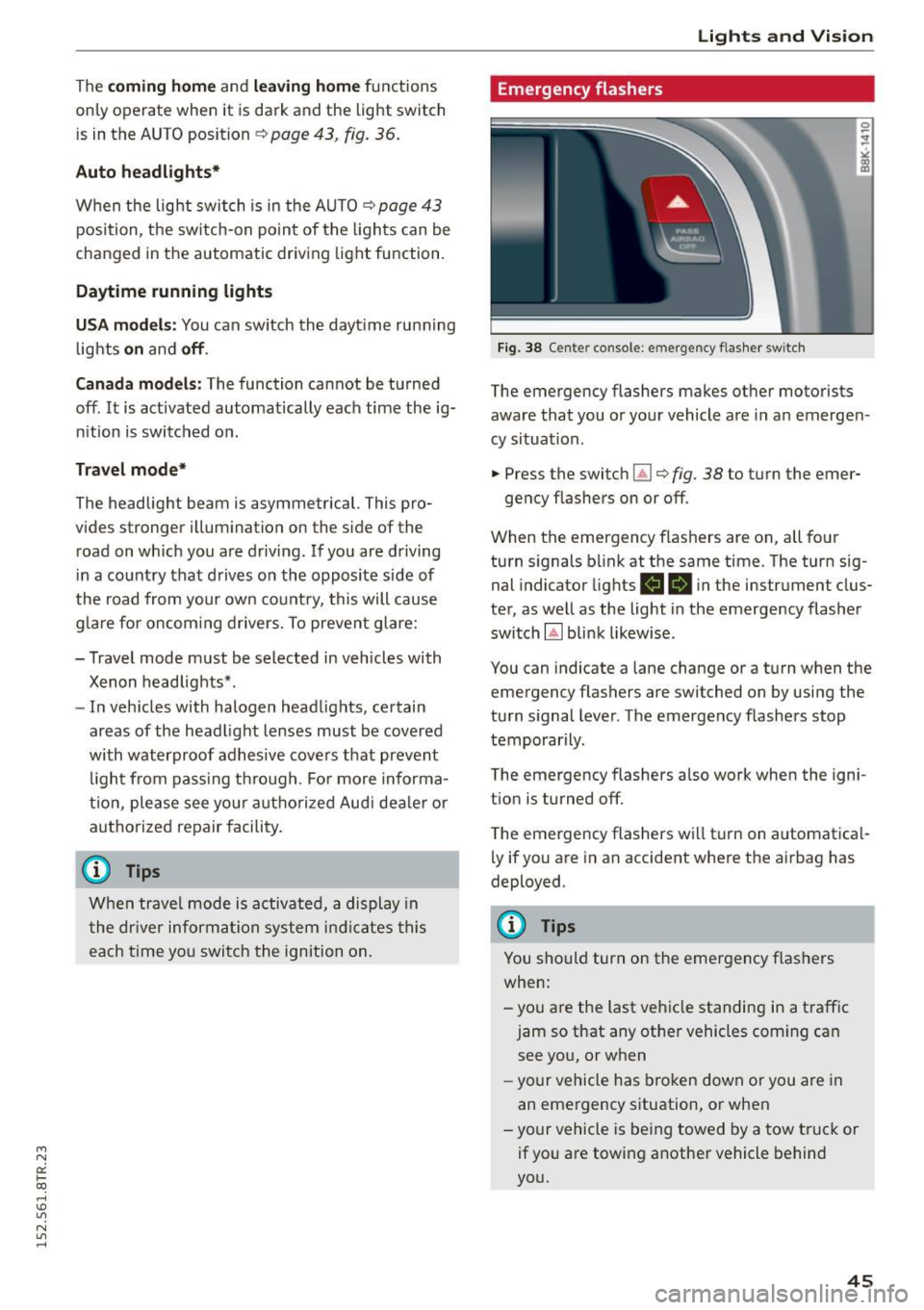
Fig. 38 Center console: emergency flasher switch
The emergency flashers makes other motorists
aware that you or your vehicle are in an emergen
cy situation .
.. Press the switch~ ¢
fig. 38 to turn the emer-
gency flashe rs on or off.
When the emergency flashers are on, all four
turn signals blink at the same time. The turn sig
nal indicator lights
R 1B in the instr ument clus
ter, as well as the light in the emergency flasher
switch
Gil blink likewise .
You can indicate a lane change or a turn when the emergency flashers are switched on by using the
turn signal lever. The emergency flashers stop
temporarily.
The emergency flashers also work when the igni
t ion is turned off.
The emergency flashers will turn on automatical
ly if you are in an accident where the airbag has
deployed .
(D Tips
You should turn on the emergency flashers
when:
- you are the last vehicle standing in a traffic
jam so that any other vehicles coming can see you, or when
- your vehicle has broken down or you are in
an emergency situation, or when
- your vehicle is being towed by a tow truck or
if you are towing another vehicle behind
you.
45
Page 48 of 254
Lights and Vi sion
Interior Lighting
Front/rear interior lights
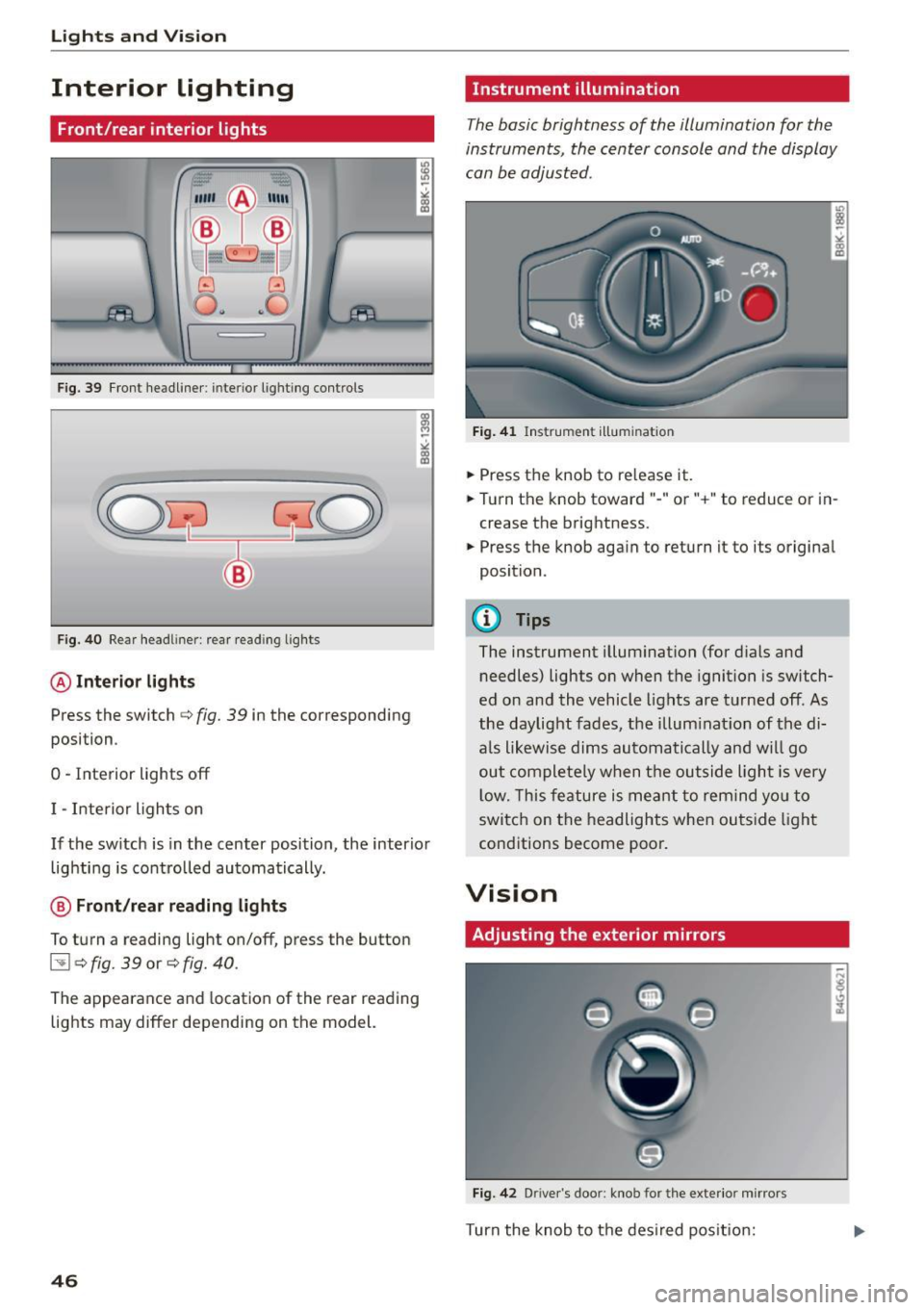
Fig. 39 Fr on t headliner : interior lig htin g contro ls
F ig. 40 Rear head liner: rear read ing lig hts
@ Interior lights
Press the switch c:> fig. 39 in the corresponding
posi tion .
0 -Inte rior lights off
I -Interior ligh ts on
If the sw itch is in the center position, the interio r
lig hti ng is controlled automatically.
@ Front/rear reading lights
To turn a reading light on/off, press the button
l:!l c:> fig. 39 or c:> fig. 40 .
The appearance and location of the rear reading
lights may differ depending on the model.
46
Instrument illumination
The basic brightness of the illumination for the
instruments, the center console and the display
can be adjusted .
Fig. 4 1 Ins trume nt illum in ati on
.,. Press t he knob to re lease it .
.,. Turn the knob toward" -" or"+" to reduce or i n
crease the brightness .
.,. Press the knob again to return i t to its origina l
position .
(!) Tips
The instrument illum inat ion (for dials and
needles) lights o n when the ignition is switch
ed on and the vehicle lights are turned off. As
the daylight fades , the illum inat ion of the di
a ls likewise dims automatically an d wi ll go
out comple tely w hen t he ou tside light is very
l ow. This fe ature is me ant to remind yo u to
switc h on the headlights when ou tside light
cond itions become poor.
Vision
Adjusting the exterior mirrors
Fig . 42 D rive r's doo r: knob fo r the exter io r mi rrors
Turn the knob to t he des ired pos it io n:
Page 50 of 254
Lights and Vision
-If electrolyte gets into the eyes, flush them
thoroughly with large amounts of clean wa
ter for at least 15 minutes; medical atten
tion is recommended .
- If electrolyte contacts skin, flush affected
area with clean water for at least 15 mi
nutes and then wash affected area with
soap and water; medical attention is recom
mended . Thoroughly wash affected clothing
and shoes before reuse.
- If swallowed and person is conscious, rinse
mouth with water for at least 15 minutes .
Do not induce vomiting unless instructed to
do so by medical professional. Get medical
attention immediately.
(D Note
Liquid electrolyte leaking from broken mirror
glass will damage any plastic surfaces it
comes in contact with. Clean up spilled elec
trolyte immediately with clean water and a
sponge.
(D Tips
- Switching off the dimming function of the
inside rear view mirror also deactivates the
automatic dimming function of the exterior
mirrors.
- Automatic dimming for the mirror only op
erates properly if the sun shade* for the rear
window is not in use or the light striking the
inside mirror is not hindered by other ob
jects.
- The automatic dimming mirrors do not dim when the interior lighting is turned on or
the reverse gear is selected.
48
Sun visors
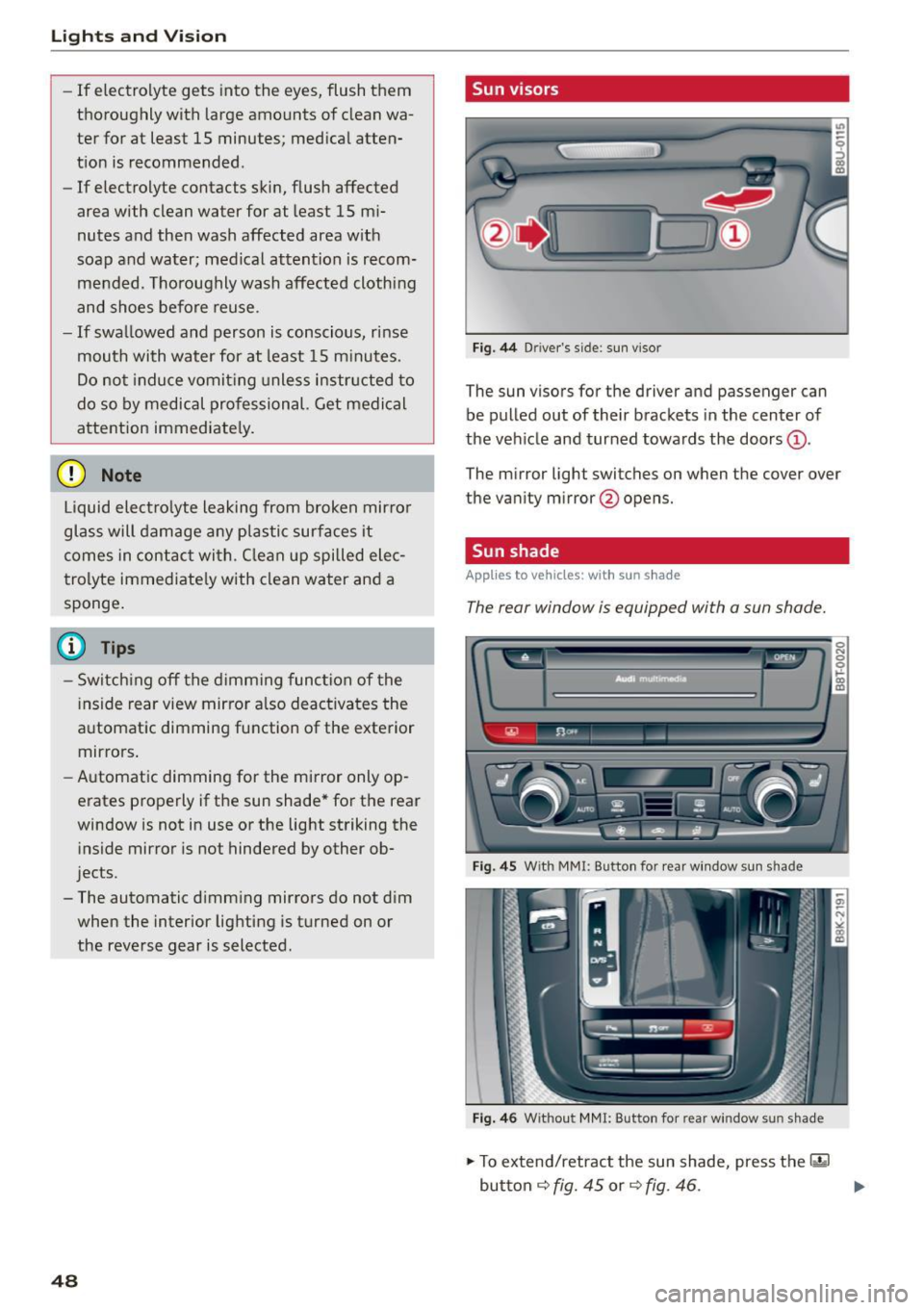
Fig. 44 Driver 's s ide: sun v iso r
The sun visors for the driver and passenger can
be pulled out of their brackets in the center of
the vehicle and turned towards the doors@.
The mirror light switches on when the cover over
the vanity mirror @opens.
Sun shade
App lies to vehicles: with sun shade
The rear window is equipped with a sun shade.
Fig. 45 With M MI: Button for rear window sun s had e
Fig. 46 Withou t MMI: Button for rear w in d ow s un sha.de
.,. To extend/retract the sun shade, press the 1·•~ 1
button ¢ fig. 45 or¢ fig . 46 . .,.
Page 67 of 254
"' N
0:: ICC
rl I.O
"' N
"' rl
@ Tips
- You can open the pass-through from the
luggage compartment. Push the release
button down and push the cover forward.
- You can lock or unlock the pass-through us
ing the mechanical key. This prevents any
access to the luggage compartment from
the vehicle interior.
Securing the ski sack
Applies to vehicles: with sk i sack
The ski sock must be secured in the luggage com
portment.
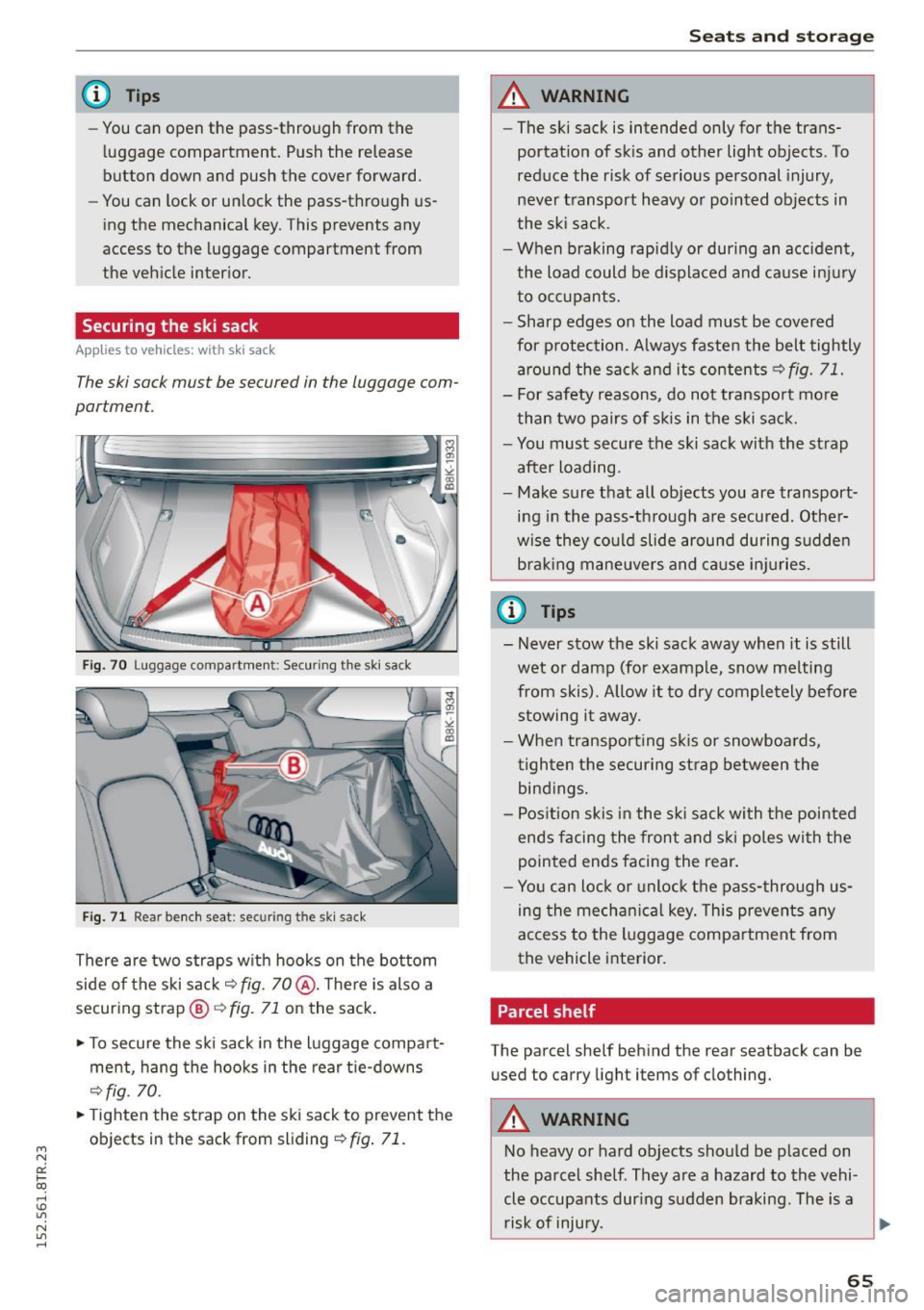
Fig. 70 Luggage compartment: Securing the ski sack
Fig. 71 Rear bench seat: securing the ski sack
There are two straps with hooks on the bottom
side of the ski sack~
fig. 70@. There is also a
securing strap®~
fig. 71 on the sack.
~ To secure the ski sack in the luggage compart
ment, hang the hooks in the rear tie-downs
C?fig. 70.
~ Tighten the strap on the ski sack to prevent the
objects in the sack from sliding
~ fig. 71.
Sea ts and sto rage
A WARNING
-- The ski sack is intended only for the trans-
portation of skis and other light objects . To
reduce the risk of serious personal injury,
never transport heavy or pointed objects in
the ski sack.
- When braking rapid ly or during an accident,
the load could be displaced and cause injury
to occupants.
- Sharp edges on the load must be covered for p rotection. Always fasten the belt tightly
around the sack and its contents~
fig. 71.
- For safety reasons, do not transport more
than two pairs of skis in the ski sack.
- You must secure the ski sack with the strap after loading.
- Make sure that all objects you are transport
ing in the pass-through are secured. Other
wise they could slide around during sudden b rak ing maneuvers and cause injuries.
(l} Tips
- Never stow the ski sack away when it is still
wet or damp (for example, snow melting
from skis). Allow it to dry completely before stowing it away.
- When transporting sk is or snowboards,
tighten the securing strap between the bindings.
- Pos ition skis in the sk i sack with the pointed
ends facing the front and ski poles with the
pointed ends facing the rear.
- You can lock or unlock the pass-through us
ing the mechan ical key. This prevents any
access to the luggage compartment from
the vehicle interior.
Parcel shelf
The parcel shelf behind the rear seatback can be
used to carry light items of clothing.
A WARNING
-
No heavy or hard objects should be placed on
the parcel shelf. They are a hazard to the vehi
cle occupants dur ing sudden braking. The is a
risk of injury.
~
65
Page 71 of 254
M N
0:: loo ,...., \!) 1.1'1
N 1.1'1 ,....,
1- 1 Switching recirculation mode on /off
In re circul ation mode, the air inside the ve hicle is
circu lated and fi ltered . This prevents the unfil
tered air outside the vehicle from enteri ng the
ve hicle interio r. We recommend sw itching recir
culation mode on when dr iv ing through a tunne l
or when sitting in traffic
c> ,& .
The IAU TO I button o r I® FRONT I button switches
reci rc ul ation mode off .
IAUTO I Switching automatic mode on
Automatic mode m ainta ins a con stant tem pera
ture inside the vehicle. A ir tem per atu re, ai rflow
and a ir distribution are controlled automa tica lly .
Adjusting the temperature
Temperatures between 60 °F (+16 °C) and 84 °F
( + 28 °C) ca n be set. O utside of this range,
LO o r
HI will appear in the climat e control sys tem d is
p la y. At bo th of these setti ngs, the climate con
trol system r uns con tinuously at maximum cool
i ng or heating power. There is no tempe rat ure
regulat ion.
[!] Adjusting the airflow
You can a dju st the airflow manu ally to s uit your
needs . To have the airf low reg ulate d automatic al
l y, press the
IAUTOI button .
~ Adjusting the air distribution
You can manually se lect the vents whe re the air
will flow. To h ave the air distr ibution reg ulated
a utom atic ally, pres s the
!AUTO I bu tto n.
QJ Adjusting seat heating*
Press ing the button switches the seat heat ing on
at the highest set ting (level 3). The LEDs indicate
the tempe ratu re leve l. To red uce the tempe ra
ture, press the b utt on again . To swi tch the seat
h eat ing off, pres s the bu tto n repea tedly unt il th e
L ED turns off .
Afte r 10 minutes, the seat heat ing automatica lly
sw itches from leve l 3 to leve l 2.
[ill Adjusting seat ventilation*
Pressi ng the button switches the seat venti lation
on at the highest se tt ing ( leve l 3) . T he L EDs ind i-
Warm and cold
cate the ventilat ion leve l. To reduce the vent ila
t ion level , press t he b utton again. To switch the
seat venti lation off, press the button repeatedly
u nt il the LED t urns off.
I@ FRONT I Switch the defroster on /off
T he w indshield and side w indows are defros ted
o r cl eared of condensation as q uick ly as possib le .
The maxim um amount of air flows mainly from
the vents below the windsh ield. Recircu lation
mode switches off. The temperature should be
set to 72 °F (22 °C) or higher. The temperature is
controlled automatica lly .
The
! AUTO I button sw itches the defroster off.
lliil REAR I Switching rear window heater on/
off
T he rea r window heate r o nly operates w hen the
engine is running . It switches off a utomat ica lly
after a few minutes, dependi ng on the outside
temperature.
T o p revent the rea r window heate r from switch
ing off automatically, press and hold the
l oo REAR I
button f or more than 2 sec onds. T his re mains
stored until the ignit io n is switched off.
Air vents
You can open and close t he center and rear air
vents using the thumbwhee ls . T he levers ad just
the d irection of the a irflow from the vents.
In veh icles with a 3-zone deluxe au toma tic cli
mate control system *, yo u can adjust the air tem
perature in the rear by tu rning the th umbwheel
toward the red side to make it warmer or toward
t h e b lue side to make it cooler.
A WARNING
-
- Do not use the recirc ulation for extended
peri ods of time. The w indows could fog up
since no fresh air can en ter the vehicle. If
the windows fog up, pre ss the ai r rec ircula
tion button agai n immed iate ly to sw itch off
the air recir culation func tion or se lec t d e
frost.
- I ndivi duals w ith re duced s ensi tivi ty to p ain
or tem pera ture could deve lop burns when
using the sea t heat ing f unct ion . To re duce
69
Page 81 of 254

M N
0:: loo ,...., \!) ,.,.,
N ,.,., ,....,
• Pull the lever to position CD¢ fig. 81 to switch
the system on.
• Drive at the speed to be contro lled .
• Press button ® to set that speed.
The stored speed and the green symbol
[ij;(i )~i4 (US model)/ Bl (Canadian model) are
shown in the display r::>fig . 82. The disp lay may
vary, depending on the type of display in your ve
h icle .
The speed is kept constant by modify ing engine
power or thro ugh an active brake intervention.
A WARNING
- Always pay attention to the traffic around
yo u when the cruise control is in operation .
You are always responsib le for your speed
and the dista nce between yo ur vehicle and
other vehicles .
- For reasons of safety, cruise cont ro l should
not be us ed in the city, in stop-and-go t raf
fic, on twisting roads and w hen road condi
tio ns are poor (such as i ce, fog, gr avel,
heavy rain and hyd rop laning) - r is k of acci
dent.
- T urn off t he cr uise control temporari ly w hen
en ter ing turn lanes, highway exit lanes or in
constr uction zones .
- P lease note tha t inadvertent ly " rest ing"
yo ur foot on the accelerator peda l causes
the cruise control not to brake. This is be
cause the cruise contro l is overridden by the
dr iver's acceleration .
- If a brake system malfunction such as ove r
heating occurs when the cruise control sys
tem is switched on, the braking function in
the system may be sw itched off. The other
cruise control func tions remain act ive as
lo ng as the indicato r light
[ij;(l)~i4 (US mo d
els)/ . (Canadian mode ls) is on.
(D} Tips
The brake lights illuminate as soon as the
bra kes apply automat ica lly.
Dri ving
Changing speed
• To inc rease/decrease the speed in in cr ements,
t ap t he leve r in the
010 direction¢ page 78,
fig. 81.
• To increase/decrease the speed quic kly, hold
the lever in the
0 10 di rect ion until the de
sired speed is displayed.
You can also press the accelerator pedal down to increase yo ur speed, e.g . if yo u want to pass
someone . The speed you saved ear lie r will re
s u me as soon as you let off of the accelerator
pedal.
If, however , you exceed yo ur saved speed by
6 mph (10 km/h) for longer than 5 minutes, the
cruise control will be turned off temporarily . The
green symbo l in the d isplay turns white. The
saved speed rema ins the same .
Presetting your speed
You can preset your desired speed while the vehi
cle is not moving.
• Switch on the ignition.
• Pull lever into position CD r::> page 78, fig. 81.
• Press the lever in the
0 or O direction to in-
crease or decrease your speed.
• Release the lever to save that speed .
This function makes it possible, for examp le, to
save the speed you want before dr iv ing o n the
highway. Once on the highway, activate the cru ise
control by pu lli ng the lev er toward CD-
Switching off
Temporary deactivation
• Press the brake pedal, or
• Press the leve r into position @ (not clicked into
p lace) ¢page 78, fig. 81, or
• Dr ive fo r longe r th an
5 m inu tes a t mo re t han
6 mph ( 10 km/h) above the store d spee d.
Switching off completely
• Press lever into position @(clicked into place),
or
• Swi tch the ignit ion off.
79