abs AUDI RS7 SPORTBACK 2014 Owners Manual
[x] Cancel search | Manufacturer: AUDI, Model Year: 2014, Model line: RS7 SPORTBACK, Model: AUDI RS7 SPORTBACK 2014Pages: 292, PDF Size: 73.56 MB
Page 15 of 292
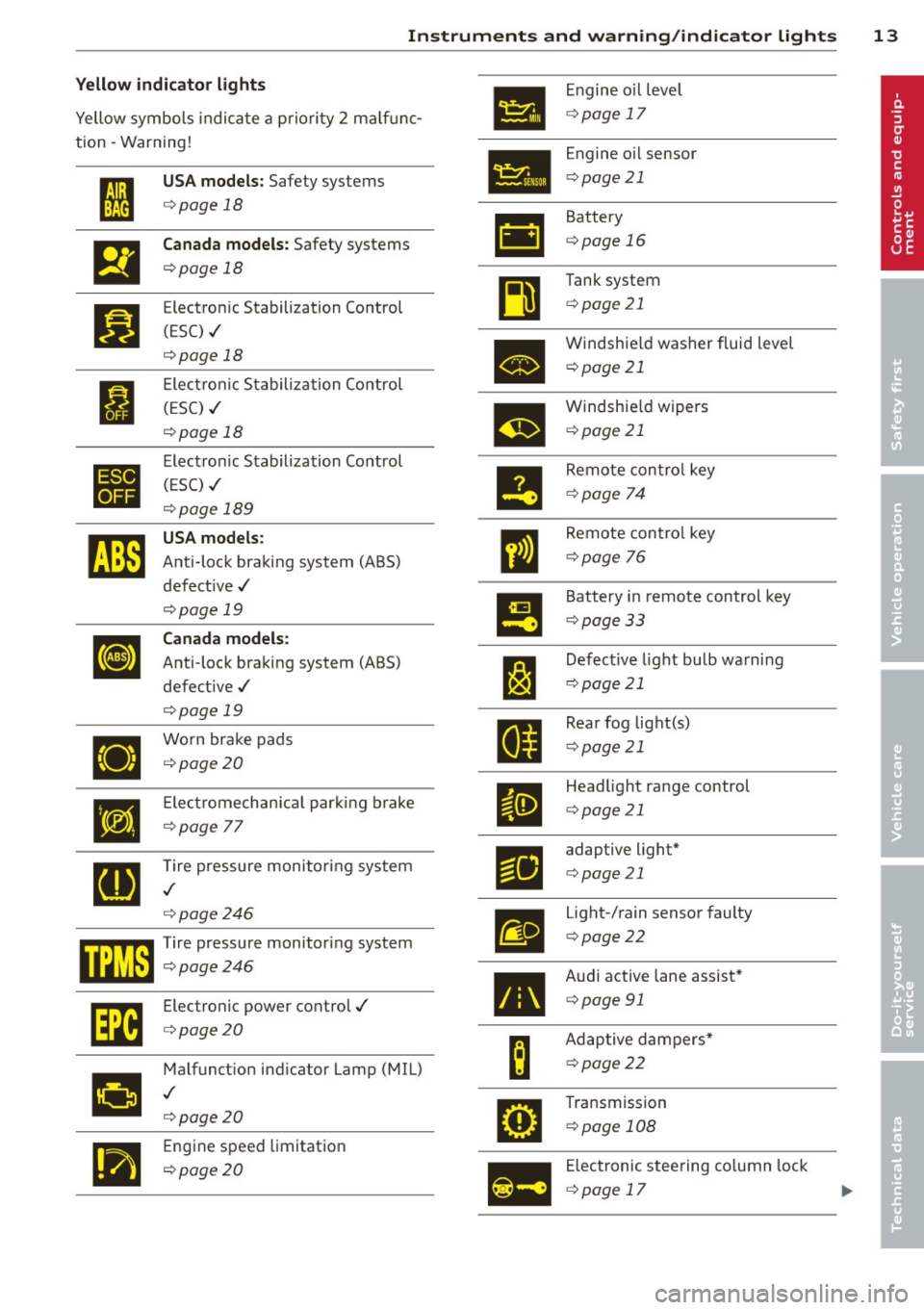
Instrument s and warnin g/indic ator ligh ts 13
Yellow indi cator li ght s
•
Engine o il level
Yellow symbols indica te a priority 2 ma lf u nc-
c> page 17
tion -Warning!
Engine oil sensor
• I
US A models : Safety systems c>page 21
c> page 18
• Battery
&1
El
Canad a models : Safety systems c>page 16
c>page 18
Tank system
~
Bl
Electronic Stabilization Control c>page 21
(ESC) ./
c>page 18
•
Windshie ld washer fluid level
c> page 21
Electronic Stabiliza tion Control
I (ESC) ./
m
Windshie ld wipers
c> page 18 c>
page 21
•
Electronic Stabilization Control
Remote control key
( E SC) ./
II c>page 74
c>page 189
rJi3
USA models :
ll
Remote contro l key
Anti-lock braking system (ABS)
c>page 76
defect ive ./
c>page 19
!9
Battery in remote control key
Canada models :
c>page 33
[I] Anti-lock braking system (ABS)
J:I
Defective light bulb warning
defect ive ./
c>page 21
c>page 19
Rear fog lig ht(s)
•
Worn brake pads
II c>page 21
c>page20
•
E lect romechan ica l par king brake
II
Head light range control
c>page 21
c>page
77
[g
Tire pressure monitoring system
Fil
adaptive light*
c> page 21
./
c>page246
m
Light-/rain sensor faulty
mm Tire pressure monitor ing system c> page 22
c:::>page246
•
Audi active lane assist*
Im
Electronic power control./ c>page 91
c:::>page20
B
Adaptive dampers*
Malfunct ion ind icator Lamp (MIL)
c>page22
•
./
c>page20
•
Transmission
c> page 108
.,
Engine speed limitation
c> page20
Ill
Electronic steering column lock
c> page 17
Page 16 of 292
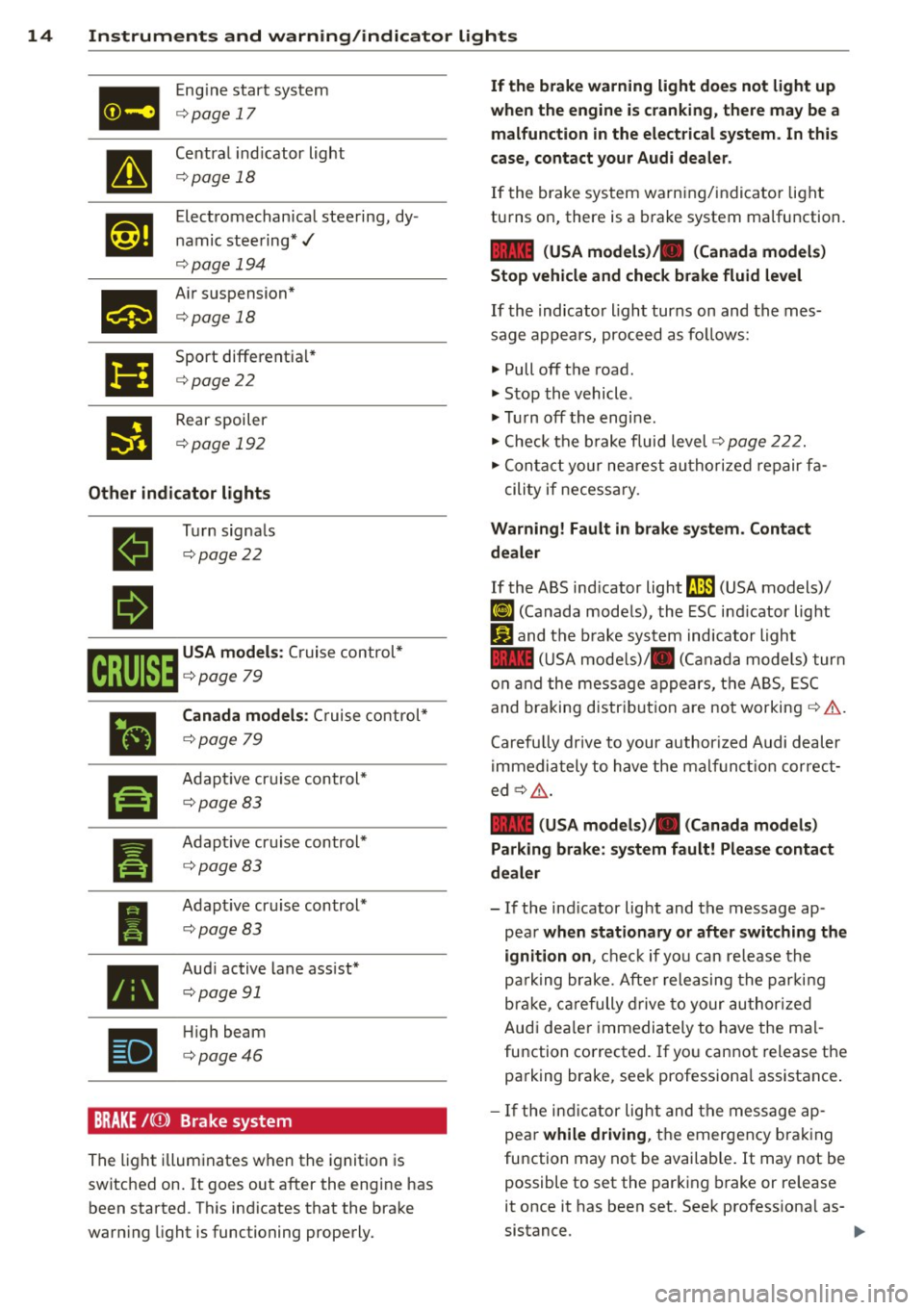
14 Instruments and warning/indicator lights
a
Eng ine start sys tem
¢page 17
Central ind icator light
¢pag e 18
Elect romechan ica l stee ring, dy·
n amic stee ring *./
¢pag e 194
Air s uspension *
c:::;,page 18
Sport different ia l*
c:::;,page22
R ear spoiler
c:::;,poge 192
Other indicator lights
ll
•
•
I
•
T u rn signa ls
c:::;,pog e22
Canada models: Cr uise co nt rol *
¢page 79
Ada pti ve cr uise con tro l*
¢ page 83
Adapt ive cr uise control*
¢page 83
Adapt ive cr uise control*
¢pag e 83
Aud i active lane ass ist *
c::>pag e 91
High beam
c::>page46
BRAKE /((J)) B rake system
T he light illum inates when t he ignition is
switched on. It goes out after the engine has
been started. T his in dicates that the bra ke
war ning light is functioning properly.
If the brake warning light does not light up
when the engine is cranking , there may be a
malfunction in the electrical system . In this
case, contact your Audi dealer.
If the brake system wa rn ing/indica tor light
tu rns on, there is a b rake system ma lfunction.
1111 (USA models)/ . (Canada models)
Stop vehicle and check brake fluid level
If th e i ndicato r ligh t turns on and th e mes ·
sage appe ars, pro ceed as fo llows:
.. Pull off t he road .
.. Stop the vehicle .
.,. Tur n off th e engi ne.
.,. Che ck t he b ra ke fluid level
c:::;, page 2 22.
.,. Conta ct yo ur ne arest au th oriz e d rep air fa -
c ili ty if necess ary.
Warning! Fault in brake system . Contact
dealer
If th e ABS ind icat or light 9 (USA models)/
[IJ (Canada mode ls), the ESC ind icator lig ht
J_j) and t he br ake system ind icator light
1111 ( U SA mode ls)/ . (Canada model s) tur n
o n a nd the mess age app ea rs, the A BS, ESC
and braking distr ibution ar e no t working
c:::;, ,& .
Carefu lly drive to your author iz e d Audi d ealer
i mmedia tely to have the ma lf u n cti on corre ct
ed¢ _&.
1111 (USA models )/. (Canada models)
Parking brake: system fault! Please contact
dealer
- If the ind icator lig ht and t he message ap·
p ea r
when stationary or after switching the
ignition on ,
check if yo u can re lease the
pa rki ng brake. Afte r relea sing the par kin g
b rak e, car efully drive to y our au thor ized
Aud i dea le r i mmedia tely to have the ma l
fu nction corrected . If yo u cannot release the
pa rking brake, seek professiona l assistance .
- If the in dicat or lig ht and the mes sage ap ·
pea r
while driving, th e emergen cy b ra ki ng
fu nction may not be availab le. It may not be
possible to set the par king brake or re lease
it once it has been set. Seek profess io na l as
sistance.
Page 17 of 292
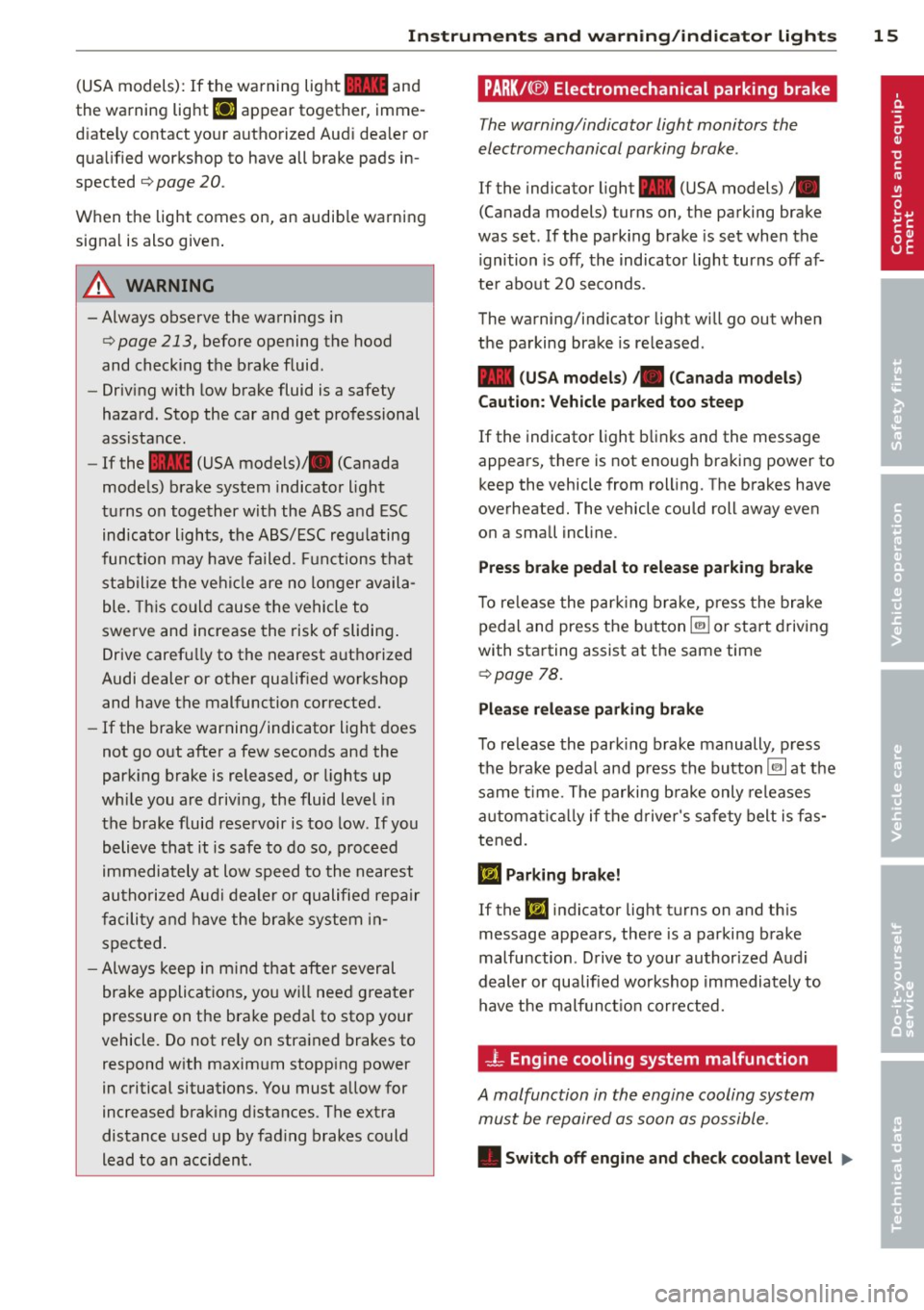
Instrument s and warnin g/indic ator ligh ts 15
(USA models): If the warnin g light 1111 and
the warning light
EiJ appear together, imme
d iate ly contact your authorized Aud i dea ler or
qua lified workshop to have all brake pads in
spected
¢ page 20 .
When t he light comes on, an audib le warning
signal is also given .
A WARNING
-Always observe the warnings in
¢ page 213, before opening the hood
and checking the brake fluid.
- Driv ing with low brake fluid is a safety
hazard . Stop the car and get professional
assistance.
- If the 1111 (USA models)/ . (Canada
mode ls) brake system indicator light
tu rns on together with the ABS and ESC
indicator lights, the ABS/ESC regu lating
function may have failed. Functions tha t
stabilize the ve hicl e are no longer availa
ble. This cou ld cause the vehicle to
swerve and increase the risk of sliding .
Drive carefully to the nearest a uth orized
Audi dealer or other qualified workshop
and have the malfunction corrected.
- If the brake warning/indicator light does
not go out after a few seconds and the
park ing brake is released, or lights up
wh ile you are drivi ng, the fluid level in
the brake fluid reservoir is too low .
If you
b elieve that it is safe to do so, proceed
immediately at low speed to the nearest
autho riz ed Au di d ealer o r qualifie d re pair
f acili ty and have the bra ke system in
spected.
- Always kee p in m ind tha t afte r several
brake applicat ions, yo u will nee d greater
pressure on the brake peda l to stop your
vehicle. Do not re ly on strained brakes to
respond w ith maxim um stopping power
in critical situations. You must allow for
increased braking distances . The extra
distance used up by fad ing brakes could
lead to an acc ident.
PARK!< ®> Electromechanical parking brake
The warning/indicator light monitors the
electromechanical parking brake .
If the indicator light- (USA models)/ .
(Canada models) turns on, the parking brake
was set . If the park ing brake is set when the
ignition is off, the indicator light turns off af
te r abo ut 20 seconds.
The warning/indic ator light will go out when
the parking brake is re leased .
-(USA models ) ,. (Canada models )
Caut ion: Vehicle parked too steep
If the indicator light b links and the message
appears, there is not enough braking power to
keep the vehicle from roll ing. The brakes have
overheated. The vehicle could roll away even
o n a small incl ine .
Press brake pedal to release parking brake
To re lease the par king brake, press the brake
peda l and press the button ~ or start driv ing
with starting assist at the same time
¢ page 78.
Pl eas e r elease parking brake
To re lease the park ing b rake manually , press
the b rake peda l and press the button~ at the
same time. The parking b ra ke only releases
a ut omat ica lly if the d river 's sa fe ty belt is fas
tened.
Ill Parking brake!
If the DI indicator lig ht turns on and th is
message appears, there is a parking brake
malfu nction . D rive to your authorized Audi
deal er or qualified workshop immediately to
have the malfun ct io n corrected.
-L Engine cooling system malfunction
A malfunction in the engine cooling system
must be repaired as soon as possible .
• Switch off engine and check coolant lev el liJI,
Page 20 of 292
18 Instruments and warning/indicator lights
Drive to your authorized Audi dea ler immedi
ately to have the malfunction corrected .
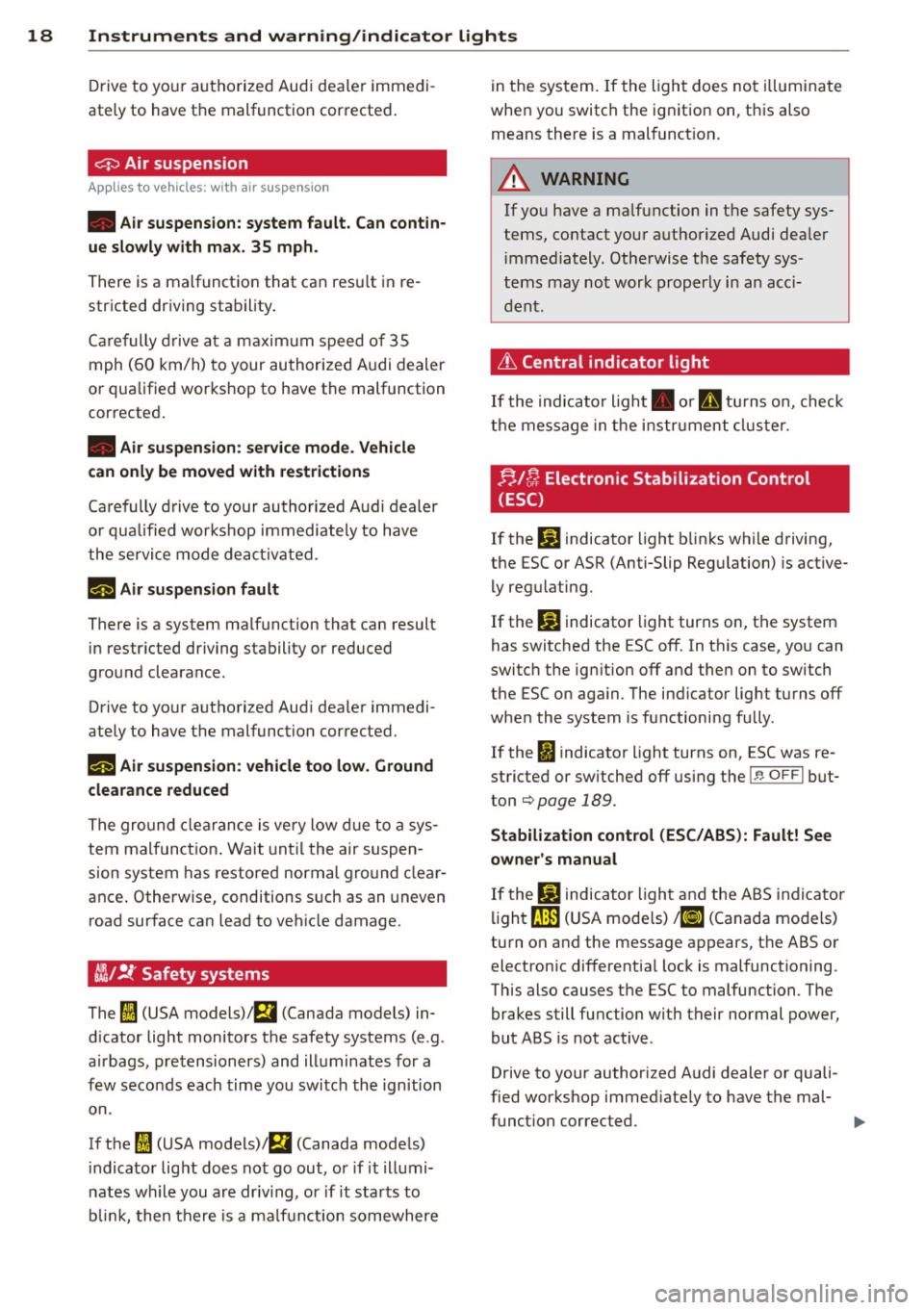
0 Air suspension
Applies to vehicles: with air suspe nsion
• Air suspension: system fault. Can contin
ue slowly with max. 35 mph .
There is a malfunction that can resu lt in re
stricted driving stability .
Ca refully drive at a maximum speed of 35
mph
(60 km/h) to your authorized Audi dealer
or qualified workshop to have the malfunction
corrected .
• Air suspension: service mode. Vehicle
can only be moved with restrictions
Carefully drive to your authorized Audi dealer
or qua lified workshop immediate ly to have
the service mode deactivated.
II Air suspension fault
There is a system malfunction that can result
in restr icted driving stability or reduced
ground clearance .
Drive to your authorized Audi dea ler immedi
ately to have the malfunction corrected.
II Air suspension: vehicle too low. Ground
clearance reduced
The ground clearance is ve ry low due to a sys
tem malfunction . Wait until the air suspen
sion system has restored normal ground clear
ance . Otherwise, conditions such as an uneven
road surface can lead to vehicle damage.
tfsl !f Safety systems
The fl (USA models) ;fll (Canada models) in
d icator light monitors the safety systems (e.g.
a ir bags, pretensioners) and illuminates for a
few seconds each time you switch the ignition
on.
If the
fl (USA models)I E,I (Canada models)
indicator light does not go out, or if it illumi
nates while you are driv ing, or if it starts to
blink, then there is a malfunction somewhere in
the system. If the light does not illuminate
when you switch the ignition on, this also
means there is a malfunct ion .
A WARNING "--
If yo u have a ma lfunction in the safety sys-
tems, contact your authorized Audi dea ler
im mediately . Otherwise the safety sys
tems may not work properly in an acc i
dent.
Lt Central indicator light
If the indicato r light . or II turns on, check
the message in the instr ument cluster.
f;,J [); Electronic Stabilization Control
(ESC)
If the lj] indicator light blinks while driving,
the ESC or ASR (Anti-Slip Regulation) is active
ly regulating.
If the
lj] indicator light turns on, the system
has switched the ESC off. In this case, you can
switch the ign ition off and then on to switch
the ESC on aga in. The ind icator light turns off
whe n the system is functioning fully.
If the
fl indicator light turns on, ESC was re
stricted or sw itched off using the
l.i; O FFI but
ton
¢page 189.
Stabilization control (ESC/ABS): Fault! See
owner's manual
If the J.j] indicator light and the ABS indicator
light
fJln (USA mode ls) ,1IJ (Canada models)
turn on and the message appears, the ABS or electronic differentia l lock is malfunctioning.
This also causes the ESC to malfunction. The
brakes still function with their normal power,
but ABS is not active .
Drive to your author ized Audi dealer or quali
fied workshop immed iately to have the mal-
funct ion corrected. .,,_
Page 21 of 292
Instrument s and warnin g/indic ator ligh ts 19
A WARNING ,~ ~
If the ~ (USA models)/ . (Canada
models) brake system indicator light turns
on together with the ABS and ESC indica
tor lights, the ABS/ESC regulating function
may have failed. Functions that stabilize
t he vehicle are no longer avai lab le. This
cou ld cause the vehicle to swerve and in
crease the risk of sliding . Drive caref ully to
the nearest a uthorized Audi dea ler or oth
er qualified workshop and have the mal
function corrected.
@ Tips
For addit ional information on ESC and
ABS, refer to
c:::> page 189 .
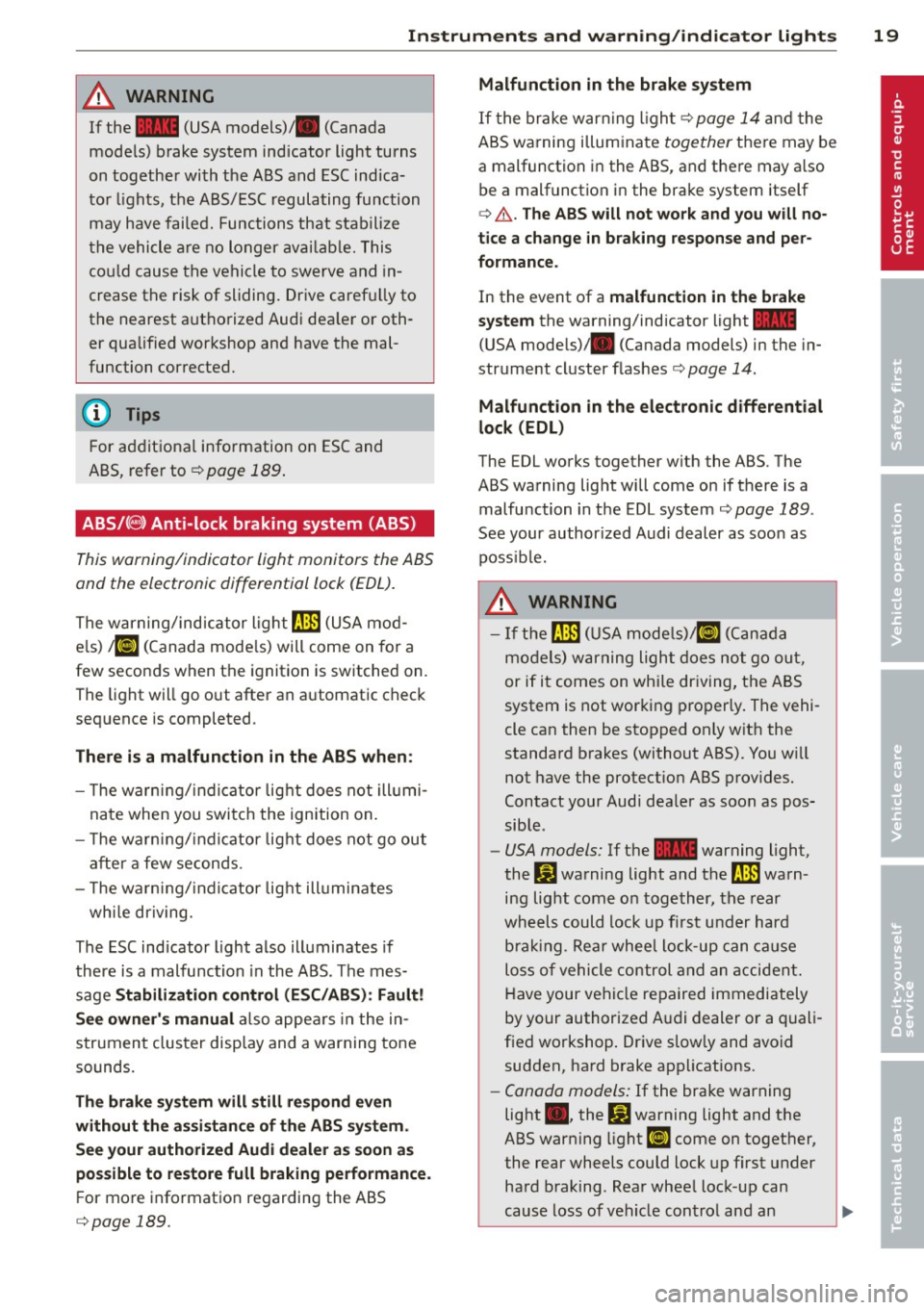
ABS/(8) Anti-lock braking system (ABS)
This warning/indicator light monitors the ABS
and the electronic differential lock (EDL).
The warning/indicator light rlB (USA mod
els)
1iJ (Canada models) will come on for a
few seconds when the ignition is switched on.
The light will go out after an automatic check
sequence is completed .
There is a malfunction in the ABS when :
- The warn ing/indi cator lig ht does not ill umi
nate when you switch the ignition on.
- T he warn ing/indi cator lig ht does not go out
after a few seconds .
- T he wa rn ing/ ind icator lig ht ill uminates
wh ile driving.
The ESC indicator light also illuminates if
there is a malfunction in the ABS . T he mes
sage
Stabilization control (ESC /AB S): Fault!
See own er's manual
also appea rs in the in
strument cluster disp lay and a warning tone
sounds.
Th e br ake sy ste m will still re spond even
with out the assis tan ce of th e ABS sy ste m .
See your authorized Audi dealer a s soon as
po ssible to re store full braking performance .
For more information regarding the ABS
c::> page 189.
Malfunction in the brake sy stem
If the brake war ning l igh t c:::> page 14 and the
ABS warning illuminate
together the re may be
a malfunction in the ABS, and there may a lso
be a malfunction in the brake system itself
c:::> A . The AB S will not wo rk and you w ill no
tice a change in b raking response and per
formance .
In the event of a malfunction in the brake
s y stem
the warning/indicator light~
(USA mode ls)/ . (Canada models) in the in
strument cluster flas hes
c:::> page 14.
Malfunction in th e ele ctronic diff erential
lock (EDL)
The EDL works together w ith the ABS. The
ABS warning light will come on if there is a malfunction in the EDL system
c:::> page 189 .
See your author ized Audi dealer as soon as
poss ible.
A WARNING
-
- I f the rlB (USA mode ls)/ [IJ (Canada
models) warning light does not go ou t,
or if it comes on while dr iving, the ABS
system is not working properly. The vehi-
cle can then be stopped only w it h the
standard brakes (without ABS). You w ill
not have the protect ion ABS prov ides.
Contact your Audi dea ler as soon as pos
sible .
-USA models: If the ~ warning light,
the:
GJ warning light and the rlB warn
ing light come on together, the rear
wheels could lock up f irst under hard
bra king. Rear wheel lock-up can ca us e
loss of vehicle control and an a ccident.
Have your vehi cle repaired immediately
by your authorized A udi dealer or a quali
fied workshop . Drive slow ly and avoid
sudden, ha rd brake applications.
- Canada models: If the brake warning
light •• the
DJ warning light and the
ABS warning light
[I] come on together,
the rear wheels could lock up first under
hard braking . Rea r whee l lock-up can
cause loss of vehicle control and an .,._
Page 25 of 292
Instrument s and warning /indicator lights 23
Driver information
display
Overview
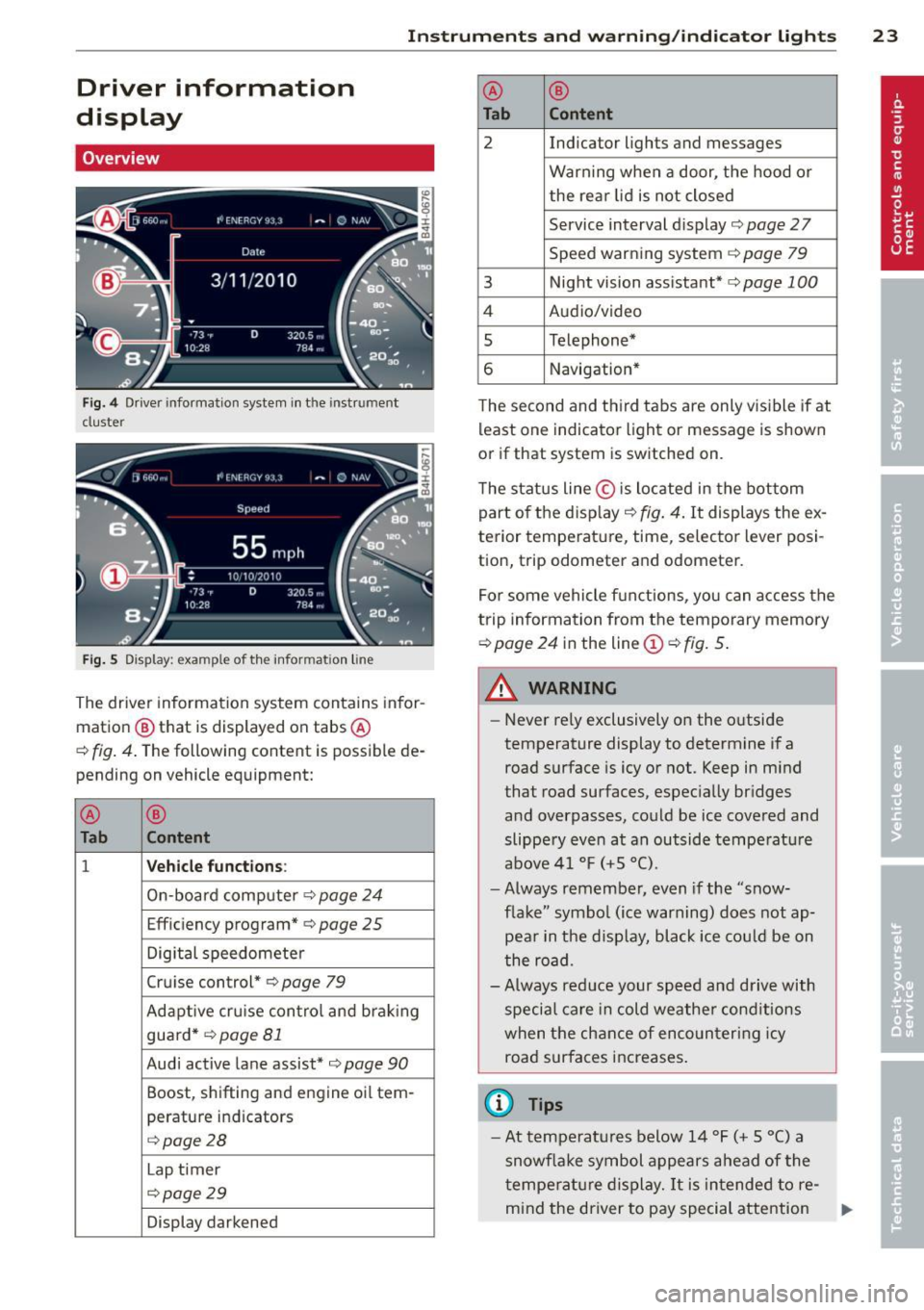
Fig. 4 Driver info rmation system in the instrument
cluster
Fig . 5 Display: example of the informat ion line
The driver information system contains infor
mation
@ that is displayed on tabs ®
c::> fig. 4. The following content is possible de
pending on vehicle equipment:
®
®
Tab Content
1 Vehicle functions :
On-boa rd computer c::> page 24
Effic iency program* c::> page 25
Digital speedometer
Cruise control*
c::> page 79
Adaptive cru ise control and braking
guard *
c::> page 81
Audi active lane assist* c::>page 90
Boost, shifting and engine oil tern-
perature indicators
c::> page 28
Lap t imer
c::> page 29
Display darkened ®
®
Tab Content
2 Indicator lights and messages
Warn
ing when a door, the hood or
the rea r lid is not closed
Service interval dis play
c::> page 2 7
Speed warning system
c::> page 79
3 Night vision assistant* c::> page 100
4 Audio/video
5 Telephone*
6 Navigation*
The second and th ird tabs are only v isible if at
least one indicator light or message is shown
or if that system is sw itched on.
The status line © is located in the bottom
part of the disp lay
c::> fig. 4. It displays the ex
terior temperat ure, time, selector lever posi
tion, trip odometer and odometer.
For some vehicle functions, you can access the
trip information from the temporary memory
c::> page 24 in the line © c::> fig. 5.
A WARNING
-
- Never rely exclusively on the outside
temperature display to determine if a
road surface is icy or not. Keep in mind
that road surfaces, especially bridges
and overpasses, could be ice covered and
slippe ry even at an outside temperature
above 41 °F
(+5 °().
-Always remember, even if the "snow
flake" symbol (ice warning) does not ap
pear in the d isplay, black ice could be on
the road.
-Always reduce your speed and drive with
special care in cold weather cond itions
when the chance of encountering icy
road surfaces increases.
(D Tips
- At temperatures below 14 °F (+ 5 °C) a
snowf lake symbol appears ahead of the
t emperature display.
It is intended to re-
mind the driver to pay special attention .,._
Page 26 of 292
24 Instruments and warning /indicator lights
to ice on the road ¢ & . If the vehi cle is
stationary, o r if you are dr iving at a very
l ow speed, the tempe rat ure shown in the
display might be slightly higher t han the
actua l o utside temperature. This is
ca used by the heat being rad iated from
t h e eng ine.
- You can se lect the un its used for temper
atu re, speed a nd other measurements in
the MMI.
- Fo r informat ion on the a udio/video and
nav iga tion* functions, refer to the sepa
r ate MMI owner's manual.
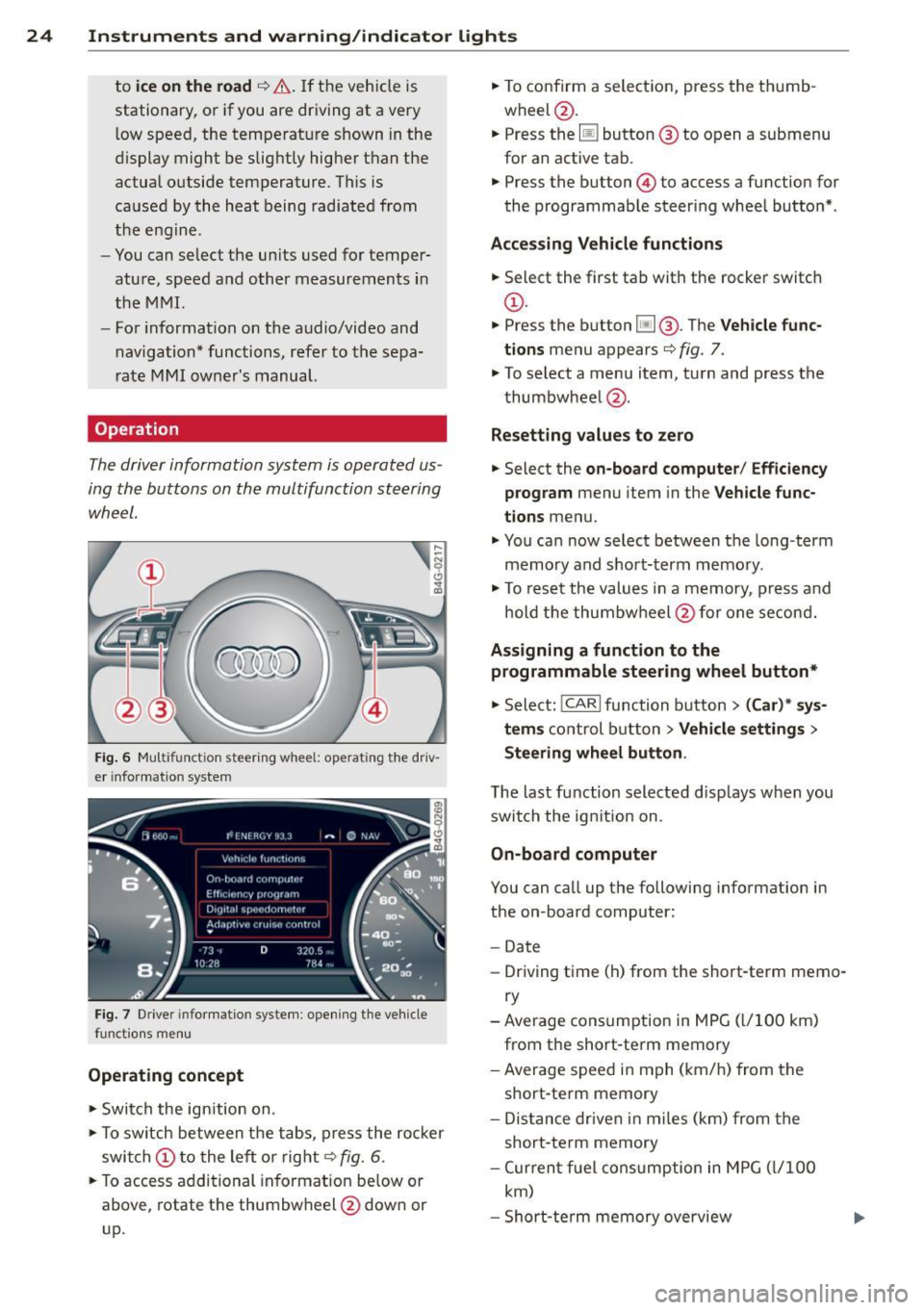
Operation
The driver information system is operated us
ing the buttons on the multifunction steering
wheel.
,... ~ N 0 Cl
"' m
Fig. 6 M ultifunction steer ing wheel: operating"the driv
e r in fo rm atio n system
Fi g. 7 Driver infor mat ion syste m: opening t he ve hicle
functio ns me nu
Operating concept
.. Swi tch the ign ition on.
.. To switch between the t abs, press the ro cker
swi tch
(D to the le ft or r ight¢ fig. 6 .
.. To access additional in format io n be low or
above, rotate t he thumbw heel @dow n or
up. ..
To confirm a selec tion, press the th umb
wheel @.
.. Press the
[jJ button @ to o pen a submenu
for an active tab .
.. Press the button@ to access a function for
the programmab le steer ing whee l butto n*.
Acces sing Vehicle functions
.. Select the first ta b with the rocker switc h
(D.
.. Press t he b utton [jj @. The Vehicle func
tions
menu appears¢ fig. 7.
.. To select a menu item, turn and press the
t humbwheel @.
Resett ing values to ze ro
.. Select the on-board computer / Efficiency
program
menu item in the Vehicle func
tions
menu .
.. You ca n now select between the long-term
memory and s ho rt -t erm memory.
.. To res et the valu es in a me mory, press a nd
hold t he thumbw heel @for one se con d.
Assigning a function to the
programmable steering wheel button*
.. Select: !CARI function button> (Car) * sys-
tem s
control button > Vehicle settings >
Steering wheel button .
The last function selected disp lays w hen you
swi tch the ig nition on.
On-board computer
You can ca ll up the followi ng info rmation in
the on-board computer:
- Date
- Dr iving time (h) from the short-term memo-
ry
-Average consumption in MPG ( l/1 00 km)
from the short-te rm memory
- Average spee d in m ph ( km/ h) fr om the
short-te rm memory
- Dis tance driven i n m iles (km) from the
short -te rm memory
- Cur ren t fu el con sumption in MPG ( l/1 00
km)
- Short-te rm memory overview
Page 81 of 292
even with ESC and its associated
components (ABS, ASR, EDL). In corners
and when road or weather conditions are
bad, a full brake application can cause the
vehicle to skid or the rear end to break
away· risking an accident.
Speed warning system
Introduction
The speed warning system helps you to stay
under a specified maximum speed.
The speed warning system wa rns you if you
are exceeding the maximum speed that you
have set. You will hear a warn ing tone when
your speed exceeds the stored value by ap
proximately 3 mph (3 km/h). An indicator
light . (USA models)/ . (Canada models) in
the instrument cluster display also turns on at
the same time. The indicator light ••
turns off when the speed decreases below the
stored maximum speed .
Setting a threshold is recommended if you
would like to be reminded when you reach a certain max imum speed . Situations where you
may want to do so include driving in a country
with a general speed limit or if there is a
specified maximum speed for winter tires.
@ Tips
Even though your vehicle is equipped with
a speed warning system, you should st ill
watch the speedometer to make sure you
are not driving faster than the speed limit.
Setting the threshold
You can set, change and delete the threshold
in the MMI.
.. Se lect : I CARI function button > (Car)* sys
tems
control button > Driver assist > Speed
warning .
You can set any threshold between 20 mph
(30 km/h) and lS0 mph (240 km/h) . Settings
can each be adjusted in inc rements of 6 mph
(10 km/h).
On the road 79
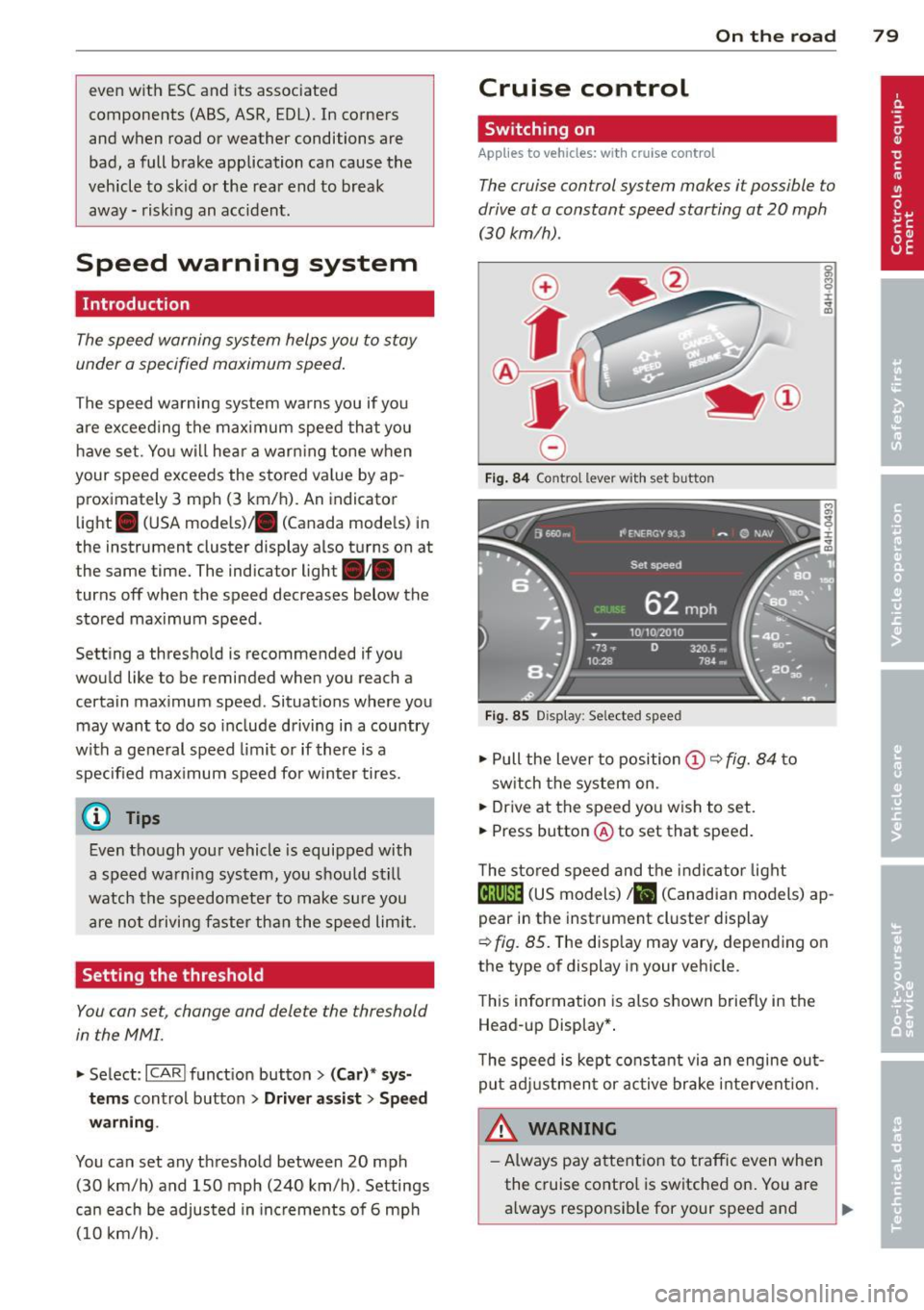
Cruise control
Switching on
Applies to veh icles: w ith cruise control
The cruise control system makes it possible to
drive at a constant speed starting at 20 mph (30km/h) .
0
f
®t
0
Fig. 84 Contro l lever w ith set b utto n
Fig. 85 Display: Se lected speed
.. Pull the lever to position@¢ fig. 84 to
sw itch the system on .
.. Drive at the speed you wish to set.
.. Press button @ to set that speed.
T he stored speed and the indicator light
@;\1)~14 (US models) Iii (Canadian models) ap
pear in the instrument cluster display
¢
fig. 85. The disp lay may vary, depending on
the type of display in your veh icle.
This information is also shown briefly in the
Head -up Display*.
T he speed is kept constant via an engine out
put adjustment or active brake intervent ion.
A WARNING .c
- Always pay attention to traffic even when
the cruise control is switched on. You are always responsib le for your speed and ...
Page 123 of 292
Homelink
Universal remote
control
General information
Applies to vehicles: with Home link unive rsal remote con
tro l
The Homelink universal remote control can
be programmed with hand-held transmitters
from existing equipment
With Home link, you can control devices such
as the garage door, security systems, house
lights, etc. comfortably from the inside of you
vehicle.
Homelink makes it possible for you to replace
three different remote controls from devices
in your home with one universal remote . This
feature works for most garage door and exte rior door motor signals. Programmi ng the in
d iv idual remote control for your remote con
trol takes place near the center of the radiator
grille. There is a control module attached at
this location .
A one-t ime programming of the sensor must
be performed before you are able to use sys
tems with Homelink.
A WARNING , .,.
- Never use the Homelink transmitter
with any garage door opener that does
have not the safety stop and reverse fea
ture as required by federal safety stand
ards . Th is includes any garage door open
er model manufactured before April 1, 1982.
- A garage door opener which cannot de
tect an object, signaling the door to stop
and reverse does not meet current feder
al safety standards . Us ing a garage door
opener without these features increases
risk of serious injury or death.
- For safety reasons
never release the
parking brake or start the engine while
anyone is standing in front of the vehicle .
- A garage door or an estate gate may sometimes be set in motion when the
H ome link 121
Homelink remote control is being pro
grammed. If the device is repeatedly ac
tivated, this can overstrain motor and
damage its electrical components -an
overheated motor is a fire hazard!
- To avoid possible injuries or property
damage, please always make absolutely
certa in that no persons or objects are lo
cated in the range of motion of any
equipment being ope rated.
(D Tips
- If you would like additional information
on the Home link Universal Transce iver
I
Homel ink compatib le products, or to
purchase other accessories such as the
Homelink Lighting Package, please con
tact Homelink at 1-800-355 -3515 or on
the Internet at www. homelink.com.
- For Declaration of Comp liance to United
States FCC and Ind ustry Canada reg ula
tions~
page 2 76.
- For security reasons, we recommend that
you clear the programmed buttons be
fore selling the vehicle .
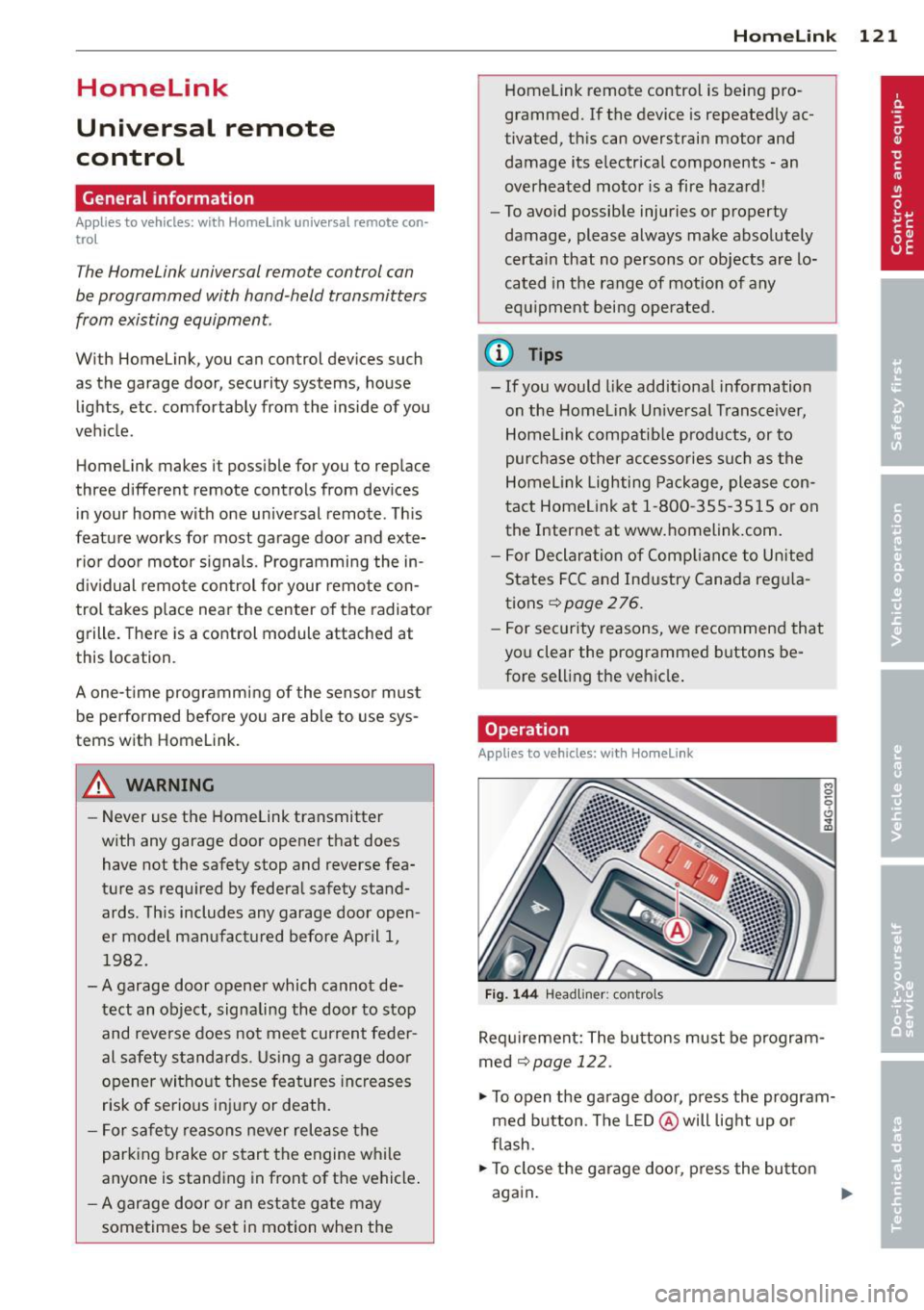
Operation
Applies to vehicles: with Homelink
Fig. 144 Headliner : cont rols
Req uirement: The bu ttons must be program
med
~ page 122.
.,. To open the garage door, press the program
med button . The LED @ will light up or
flash.
... To close the garage door , press the button
again .
II>
Page 132 of 292
130 Driving Safely
&_ WARNING
-
To help prevent poisonous exhaust gas
from being drawn into the vehicle, always keep the rear lid closed while driving .
- Never transport objects larger than
those fitting completely into the luggage
area because the rear lid cannot be fully
closed.
- If you absolutely must drive with the rear
lid open, observe the following notes to
reduce the risk of poisoning:
- Close all windows,
- Close the power roof*,
- Open all air outlets in the instrument
panel,
- Switch off the air recirculation,
- Set the fresh air fan to the highest
speed.
&_ WARNING
Always make sure that the doors, all win
dows, the power roof* and the rear lid are
securely closed and locked to reduce the
risk of injury when the vehicle is not being
used.
- After closing the rear lid, always make
sure that it is properly closed and locked.
- Never leave your vehicle unattended es
pecially with the rear lid left open. A
child could crawl into the vehicle through
the luggage compartment and close the
rear lid becoming trapped and unable to
get out . Being trapped in a vehicle can
lead to serious personal injury.
- Never let children play in or around the
vehicle .
- Never let passengers ride in the luggage
compartment . Vehicle occupants must
always be properly restrained in one of
the vehicle's seating positions.
(D) Tips
- Air circulation helps to reduce window fogging. Stale air escapes to the outside
through vents in the trim panel. Be sure
to keep these slots free and open .
-
-The tire pressure must correspond to the
load. The tire pressure is shown on the
tire pressure label. The tire pressure la
bel is located on the driver's side B-pillar.
The tire pressure label lists the recom mended cold tire inflation pressures for
the vehicle at its maximum capacity
weight and the tires that were on your
vehicle at the time it was manufactured.
For recommended tire pressures for nor
mal load conditions , please see chapter
r::!) page 232.
Tie-downs
The luggage compartment is equipped with
four tie-downs to secure luggage and other
items.
Use the tie-downs to secure your cargo prop
erly ¢
page 129, Loading the luggage com
partment.
In a collision, the laws of physics mean that
even smaller items that are loose in the vehi
cle will become heavy missiles that can cause
serious injury. Items in the vehicle possess en
ergy which vary with vehicle speed and the
weight of the item. Vehicle speed is the most
significant factor.
For example , in a frontal collision at a speed
of 30 mph (48 km/h), the forces acting on a 10-lb (4.5 kg) object are about 20 times the
normal weight of the item. This means that
the weight of the item would suddenly be about 200 lbs. (90 kg). You can imagine the
injuries that a 200 lbs . (90 kg) item flying
freely through the passenger compartment
could cause in a collision like this.
&_ WARNING
Weak, damaged or improper straps used
to secure items to tie-downs can fail dur
ing hard braking or in a collision and cause
serious personal injury.
- Always use suitable mounting straps and properly secure items to the tie-downs in ..,.