brakes AUDI RS7 SPORTBACK 2014 Owners Manual
[x] Cancel search | Manufacturer: AUDI, Model Year: 2014, Model line: RS7 SPORTBACK, Model: AUDI RS7 SPORTBACK 2014Pages: 292, PDF Size: 73.56 MB
Page 17 of 292
Instrument s and warnin g/indic ator ligh ts 15
(USA models): If the warnin g light 1111 and
the warning light
EiJ appear together, imme
d iate ly contact your authorized Aud i dea ler or
qua lified workshop to have all brake pads in
spected
¢ page 20 .
When t he light comes on, an audib le warning
signal is also given .
A WARNING
-Always observe the warnings in
¢ page 213, before opening the hood
and checking the brake fluid.
- Driv ing with low brake fluid is a safety
hazard . Stop the car and get professional
assistance.
- If the 1111 (USA models)/ . (Canada
mode ls) brake system indicator light
tu rns on together with the ABS and ESC
indicator lights, the ABS/ESC regu lating
function may have failed. Functions tha t
stabilize the ve hicl e are no longer availa
ble. This cou ld cause the vehicle to
swerve and increase the risk of sliding .
Drive carefully to the nearest a uth orized
Audi dealer or other qualified workshop
and have the malfunction corrected.
- If the brake warning/indicator light does
not go out after a few seconds and the
park ing brake is released, or lights up
wh ile you are drivi ng, the fluid level in
the brake fluid reservoir is too low .
If you
b elieve that it is safe to do so, proceed
immediately at low speed to the nearest
autho riz ed Au di d ealer o r qualifie d re pair
f acili ty and have the bra ke system in
spected.
- Always kee p in m ind tha t afte r several
brake applicat ions, yo u will nee d greater
pressure on the brake peda l to stop your
vehicle. Do not re ly on strained brakes to
respond w ith maxim um stopping power
in critical situations. You must allow for
increased braking distances . The extra
distance used up by fad ing brakes could
lead to an acc ident.
PARK!< ®> Electromechanical parking brake
The warning/indicator light monitors the
electromechanical parking brake .
If the indicator light- (USA models)/ .
(Canada models) turns on, the parking brake
was set . If the park ing brake is set when the
ignition is off, the indicator light turns off af
te r abo ut 20 seconds.
The warning/indic ator light will go out when
the parking brake is re leased .
-(USA models ) ,. (Canada models )
Caut ion: Vehicle parked too steep
If the indicator light b links and the message
appears, there is not enough braking power to
keep the vehicle from roll ing. The brakes have
overheated. The vehicle could roll away even
o n a small incl ine .
Press brake pedal to release parking brake
To re lease the par king brake, press the brake
peda l and press the button ~ or start driv ing
with starting assist at the same time
¢ page 78.
Pl eas e r elease parking brake
To re lease the park ing b rake manually , press
the b rake peda l and press the button~ at the
same time. The parking b ra ke only releases
a ut omat ica lly if the d river 's sa fe ty belt is fas
tened.
Ill Parking brake!
If the DI indicator lig ht turns on and th is
message appears, there is a parking brake
malfu nction . D rive to your authorized Audi
deal er or qualified workshop immediately to
have the malfun ct io n corrected.
-L Engine cooling system malfunction
A malfunction in the engine cooling system
must be repaired as soon as possible .
• Switch off engine and check coolant lev el liJI,
Page 20 of 292
18 Instruments and warning/indicator lights
Drive to your authorized Audi dea ler immedi
ately to have the malfunction corrected .
0 Air suspension
Applies to vehicles: with air suspe nsion
• Air suspension: system fault. Can contin
ue slowly with max. 35 mph .
There is a malfunction that can resu lt in re
stricted driving stability .
Ca refully drive at a maximum speed of 35
mph
(60 km/h) to your authorized Audi dealer
or qualified workshop to have the malfunction
corrected .
• Air suspension: service mode. Vehicle
can only be moved with restrictions
Carefully drive to your authorized Audi dealer
or qua lified workshop immediate ly to have
the service mode deactivated.
II Air suspension fault
There is a system malfunction that can result
in restr icted driving stability or reduced
ground clearance .
Drive to your authorized Audi dea ler immedi
ately to have the malfunction corrected.
II Air suspension: vehicle too low. Ground
clearance reduced
The ground clearance is ve ry low due to a sys
tem malfunction . Wait until the air suspen
sion system has restored normal ground clear
ance . Otherwise, conditions such as an uneven
road surface can lead to vehicle damage.
tfsl !f Safety systems
The fl (USA models) ;fll (Canada models) in
d icator light monitors the safety systems (e.g.
a ir bags, pretensioners) and illuminates for a
few seconds each time you switch the ignition
on.
If the
fl (USA models)I E,I (Canada models)
indicator light does not go out, or if it illumi
nates while you are driv ing, or if it starts to
blink, then there is a malfunction somewhere in
the system. If the light does not illuminate
when you switch the ignition on, this also
means there is a malfunct ion .
A WARNING "--
If yo u have a ma lfunction in the safety sys-
tems, contact your authorized Audi dea ler
im mediately . Otherwise the safety sys
tems may not work properly in an acc i
dent.
Lt Central indicator light
If the indicato r light . or II turns on, check
the message in the instr ument cluster.
f;,J [); Electronic Stabilization Control
(ESC)
If the lj] indicator light blinks while driving,
the ESC or ASR (Anti-Slip Regulation) is active
ly regulating.
If the
lj] indicator light turns on, the system
has switched the ESC off. In this case, you can
switch the ign ition off and then on to switch
the ESC on aga in. The ind icator light turns off
whe n the system is functioning fully.
If the
fl indicator light turns on, ESC was re
stricted or sw itched off using the
l.i; O FFI but
ton
¢page 189.
Stabilization control (ESC/ABS): Fault! See
owner's manual
If the J.j] indicator light and the ABS indicator
light
fJln (USA mode ls) ,1IJ (Canada models)
turn on and the message appears, the ABS or electronic differentia l lock is malfunctioning.
This also causes the ESC to malfunction. The
brakes still function with their normal power,
but ABS is not active .
Drive to your author ized Audi dealer or quali
fied workshop immed iately to have the mal-
funct ion corrected. .,,_
Page 21 of 292
Instrument s and warnin g/indic ator ligh ts 19
A WARNING ,~ ~
If the ~ (USA models)/ . (Canada
models) brake system indicator light turns
on together with the ABS and ESC indica
tor lights, the ABS/ESC regulating function
may have failed. Functions that stabilize
t he vehicle are no longer avai lab le. This
cou ld cause the vehicle to swerve and in
crease the risk of sliding . Drive caref ully to
the nearest a uthorized Audi dea ler or oth
er qualified workshop and have the mal
function corrected.
@ Tips
For addit ional information on ESC and
ABS, refer to
c:::> page 189 .
ABS/(8) Anti-lock braking system (ABS)
This warning/indicator light monitors the ABS
and the electronic differential lock (EDL).
The warning/indicator light rlB (USA mod
els)
1iJ (Canada models) will come on for a
few seconds when the ignition is switched on.
The light will go out after an automatic check
sequence is completed .
There is a malfunction in the ABS when :
- The warn ing/indi cator lig ht does not ill umi
nate when you switch the ignition on.
- T he warn ing/indi cator lig ht does not go out
after a few seconds .
- T he wa rn ing/ ind icator lig ht ill uminates
wh ile driving.
The ESC indicator light also illuminates if
there is a malfunction in the ABS . T he mes
sage
Stabilization control (ESC /AB S): Fault!
See own er's manual
also appea rs in the in
strument cluster disp lay and a warning tone
sounds.
Th e br ake sy ste m will still re spond even
with out the assis tan ce of th e ABS sy ste m .
See your authorized Audi dealer a s soon as
po ssible to re store full braking performance .
For more information regarding the ABS
c::> page 189.
Malfunction in the brake sy stem
If the brake war ning l igh t c:::> page 14 and the
ABS warning illuminate
together the re may be
a malfunction in the ABS, and there may a lso
be a malfunction in the brake system itself
c:::> A . The AB S will not wo rk and you w ill no
tice a change in b raking response and per
formance .
In the event of a malfunction in the brake
s y stem
the warning/indicator light~
(USA mode ls)/ . (Canada models) in the in
strument cluster flas hes
c:::> page 14.
Malfunction in th e ele ctronic diff erential
lock (EDL)
The EDL works together w ith the ABS. The
ABS warning light will come on if there is a malfunction in the EDL system
c:::> page 189 .
See your author ized Audi dealer as soon as
poss ible.
A WARNING
-
- I f the rlB (USA mode ls)/ [IJ (Canada
models) warning light does not go ou t,
or if it comes on while dr iving, the ABS
system is not working properly. The vehi-
cle can then be stopped only w it h the
standard brakes (without ABS). You w ill
not have the protect ion ABS prov ides.
Contact your Audi dea ler as soon as pos
sible .
-USA models: If the ~ warning light,
the:
GJ warning light and the rlB warn
ing light come on together, the rear
wheels could lock up f irst under hard
bra king. Rear wheel lock-up can ca us e
loss of vehicle control and an a ccident.
Have your vehi cle repaired immediately
by your authorized A udi dealer or a quali
fied workshop . Drive slow ly and avoid
sudden, ha rd brake applications.
- Canada models: If the brake warning
light •• the
DJ warning light and the
ABS warning light
[I] come on together,
the rear wheels could lock up first under
hard braking . Rea r whee l lock-up can
cause loss of vehicle control and an .,._
Page 22 of 292
20 Instruments and warning /indicator lights
accident. Have your vehicle repaired im
mediately by your authorized Audi dealer
or a qualified workshop. Drive slowly and
avoid sudden, hard brake applications .
(0) Worn brake pads
EIJ Brake pads!
If the warn ing light illuminates, immediately
contact your authorized Audi dealer or quali
fied workshop to have all brake pads inspect
ed. On USA models the warning light
EIJ
comes on together with the warn ing light
1111-Both sets of brake pads on an axle
must always be replaced at the same time.
A WARNING
Driv ing with bad brakes can cause a colli
sion and serious personal injury.
-If the warning light EIJ and the warning
light
11111> with the message Brake
pads!
comes on in the instrument cluster
display, immediately contact your au
thorized Audi dealer or qualified work
shop to have all brake pads checked or replaced if necessary.
EPC Electronic power control
App lies to vehicles: with gaso line engine
This warning/indicator light monitors the
electronic power control .
The ~ warning/indicator light (Electronic
Power Control) illuminates when you switch
the ignition on as a function check .
(D Tips
If this warning/indicator light illuminates
while you are driving, then there is a mal
function in the engine electronics. Have
the malfunction corrected as soon as pos sible by your authorized Aud i dealer or
qualified repair facility.
l) - : USA models only
-
o Malfunction Indicator Lamp (MIL)
T he Ma lfunction Indicator Lamp (MIL) is pa rt
of the On-Board Diagnostic (OBD II) system.
The symbo l
¢.j lights up when the ignition is
switched on and will turn off after the engine
has started and has settled at a constant idle
speed. This indicates that the MIL is work ing
properly.
The warning light illuminates when there is a
malfunction in the engine electronic system.
Contact your authorized Audi dea ler and have
the malfunction corrected.
An improperly closed fuel filler cap may a lso
cause the MIL light to illuminate
¢ page 210.
For more information
¢ page 30.
!?) Engine speed limitation
lfl Engine speed maximum XXXX RPM
The eng ine speed is automatically limited to
the speed displayed in the driver information
system. This protects the engine from over
heating.
T he eng ine speed limitation deactivates once
the engine is no longer in the critical tempera
ture range and you have re leased the accelera
tor pedal once.
If the engine speed limitation was activated
by an engine control malfunction, the indica
tor light ~ also turns on. Make s ure that the
speed does not go above the speed displayed.
Drive to your authorized Audi dealer immedi
ately to have the malfunction corrected.
@ Tips
The engine speed is limited when the en
gine is cold - the full engine output is not
available . When the engine is at operating
temperature, the red area in the tachome
ter moves to a h igher RPM range.
Page 64 of 292
62 Seats and storage
-Compartments* on the back of the front
seat backrests
- Garment hooks on the sides of the pillars in
the rear of the vehicle and in the rear grab
handles
- Compartment in the rear center armrest
- Storage in the trim panels in the luggage
compartment
~ WARNING
-
- Always remove objects from the instru
ment panel. Any items not stored could
slide around inside the vehicle while driv
ing or when accelerating or when apply
ing the brakes or when driving around a
corner.
- When you are driving make sure that
anything you may have placed in the cen
ter console or other storage locations
cannot fall out into the footwells. In case
of sudden braking you would not be able
to brake or accelerate.
-Always keep the lid of the compartment
for (sun)glasses* closed while driving to
reduce the risk of injury during a sudden
braking maneuver or in the event of an
accident.
- Any articles of clothing that you have
hung up must not interfere with the driv
er's view. The coat hooks are designed
only for lightweight clothing. Never hang
any clothing with hard, pointed or heavy
objects in the pockets on the coat hooks.
During sudden braking or in an accident -
especially
If the airbag is deployed -
these objects could injure any passen
gers inside the vehicle.
- To reduce the risk of personal injury in an
accident or sudden stop, always keep the
glove compartment closed while driving.
- Read and follow all WARNINGS
~ page 164, Important safety instruc
tions on the side airbag system.
-Hang clothes in such a way that they do
not impair the driver's vision.
- The coat hooks must only be used for
lightweight clothing. Do not leave any
heavy or sharp edged objects in the pock- ets which may interfere with the side cur
tain airbag deployment and can cause
personal
injury in a crash.
- Do not use coat hangers for hanging
clothing on the coat hooks as this can in
terfere with proper deployment of the side curtain airbags in an accident.
- Do not hang heavy objects on the coat
hooks, as they could cause personal in
jury in a sudden stop.
(D Note
Objects located on the rear shelf that rub
against the rear window could damage the heating wires for the rear window defog-
ger .
Roof rack
Description and mounting locations
Additional cargo can be carried with a roof
luggage rack.
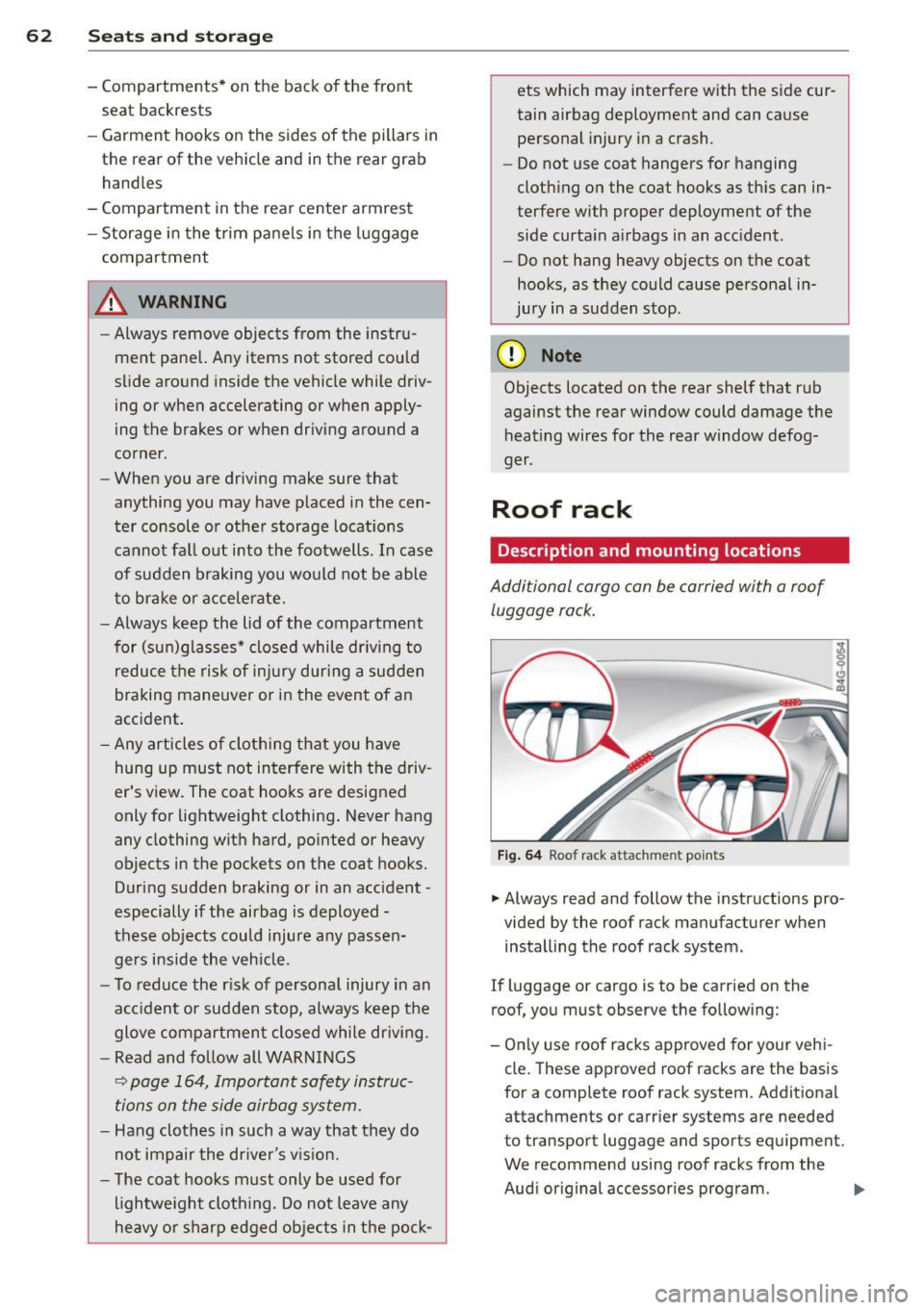
Fig. 64 Roof rack attachment po ints
... Always read and follow the instructions pro
vided by the roof rack manufacturer when installing the roof rack system.
If luggage or cargo is to be carried on the
roof, you must observe the following:
- Only use roof racks approved for your vehi
cle. These approved roof racks are the basis
for a complete roof rack system. Additional
attachments or carrier systems are needed
to transport luggage and sports equipment.
We recommend using roof racks from the
Audi original accessories program . .,..
Page 79 of 292
Electromechanical
parking brake
Operation
The electromechanical parking brake replaces
the hand brake.
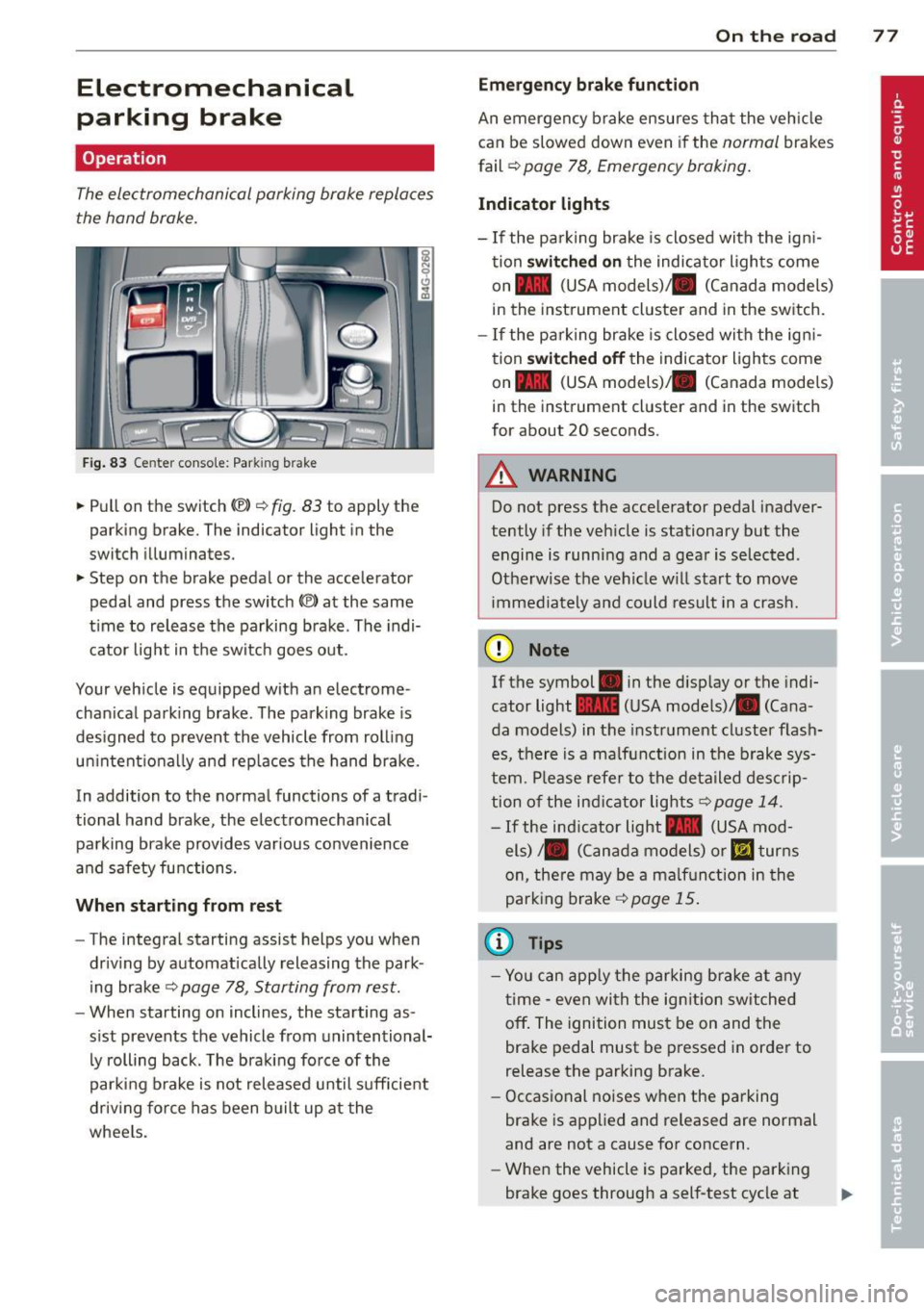
Fig. 83 Center conso le: Park in g brake
.. Pull on the switch (®) c:::> fig . 83 to apply the
parking brake. The indicator light in the
switch illuminates.
.. Step on the brake pedal or the accelerator
pedal and press the switch
(®) at the same
t ime to release the parking brake. The indi
cator light in the switch goes out.
Your vehicle is equipped with an electrome
chan ical park ing brake . The parking brake is
designed to prevent the vehicle from rolling
un intent ionally and rep laces the hand brake.
In addition to the normal functions of a tradi
tional hand brake, the electromechan ical
parking brake provides var ious convenience
and safety functions.
When starting from rest
-The integral starting assist helps you when
driving by automat ically releasing the park
ing brake ¢
page 78, Starting from rest.
- When starting on inclines, the starting as
sist prevents the vehicle from unintentional
ly rolling back . The braking force of the
parking brake is not released until suff icient
driv ing force has been built up at the
wheels.
On the road 77
Emergency brake function
An emergency brake ensures that the vehicle
can be slowed down even if the
normal brakes
fail ¢
page 78, Emergency braking.
Indicator lights
-If the parking brake is closed with the ign i
tion
switched on the indicator lights come
on - (USA
models) ,1111 (Canada models)
in the instrument cluster and in the switch.
- If the parking brake is closed with the ign i
tion
switched off the indicator lights come
on - (USA
models) ,1111 (Canada models)
in the instrument cluster and in the switch
for about 20 seconds.
A WARNING
Do not press the accelerator pedal inadver
tently if the veh icle is stationary but the
engine is running and a gear is selected .
Otherwise th e vehicle w ill start to move
immediately and could result in a crash.
(D Note
If the symbol . in the disp lay or the indi
cator light
1111 (USA models)/ . (Cana
da models) in the instrument cluster flash
es, there is a malfunction in the brake sys
tem. Please refer to the deta iled desc rip
tion of the indicat or lights
r::::>page 14.
-If the ind icator light - (USA mod-
els) /. (Canada models) or
mJ turns
on, there may be a malfunction in the
parking brake
c:::> page 15.
(0 Tips
-Yo u can apply the parking brake at any
time -even with the ignition switched
off. The ignition must be on and the
brake pedal must be pressed in order to
release the parking brake.
- Occasional noises when the parking
brake is applied and released are normal
and are not a cause for concern.
- When the vehicle is parked, the parking
brake goes through a self-test cycle at
Page 82 of 292
80 On the road
th e dista nce between yo ur vehicle and
other vehicles .
- For safet y rea son s, the cruise control
should not be used in the city, i n stop
and-go traff ic, on twist ing roads and
when road conditions are poor (such as ice, fog, gravel, heavy rain and hydro
planing) -risk of accident .
- Turn off the cruise control temporar ily
when ente ring turn lanes, highway exit
lanes or in construct ion zones.
- Please note that inadvertent ly "rest ing"
yo ur foot on the accelerator pedal causes
the cruise control not to brake. This is
because t he cr uise con trol is overridden
by the d river 's a cce le rat ion.
- If a bra ke system malfunction such as
overheat ing occurs when the cru ise con
t ro l system is sw itched on, the braking
f unction in the system may be switched
off. The other cruise control f unctions re
ma in active as long as the indicator light
[~ jrn~14 (US models) !El (Canad ian mod
els) is on.
The brake lights illuminate as soon as the brakes decelerate a utomat ica lly.
Changing speed
Applies to vehicles: with cru ise control
.,. To increase/decrease the speed in incre
me nts, tap the lever in t he
0 10 d irection
¢ page 79, fig . 84
.,. To increase/dec rease the speed qu ickly, hold
the leve r in the
010 direction until the de
s ir ed speed is d isplayed.
You can a lso p ress the accelerato r pedal down
to inc rease your speed, e .g . if you want to
pass someone. The speed yo u saved earlier
will resume as soon as you release the acceler
ator peda l.
I f, however, you exceed your saved speed by
6 mp h (1 0 km/h) fo r longe r th an 5 m inutes,
the cruise cont ro l w ill tu rn off tempora rily.
The green symbo l
@;\1)~14 (US models) !El
(Canadian mode ls) in the display will go out
but the saved speed remains the same .
Presetting your speed
Applies to vehicles: with cruise control
You can preset your desired speed while the
vehicle is not moving .
.,. Swi tch on the ign ition.
.,. Pull lever in to posi tion @¢
page 79,
fig. 84.
.,. Press the lever in the 0 or 0 direction to
increase or decrease your speed .
.,. Release the lever to save that speed.
This function makes it possib le, for examp le,
to save the speed you want before driving on
the highway. Once on the h ighway, act ivate
the cru ise control by pulling the lever toward
@ .
Switching the system off
Applies to vehicles: with cruise control
Temporary deactivation
.,. Press the brake pedal, or
.,. Press the lever into position @(not cl icked
into place)
~ page 79, fig . 84, or
.,. Dr ive fo r longer t han 5 m inutes at mo re
t han 5 mph (10 km/h) above the stored
spee d.
Switching off completely
.,. Press lever into position @ (clicked into
p lace), or
.,. Switch the ignit ion off .
The system retains t he saved speed if you de
activate the c ruise control temporar ily . To re
s u me the saved speed, re lease the brake ped
al a nd pull the leve r to pos it ion @.
Switch ing the ignition off erases the saved
speed .
A WARNING
-You sho ul d only ret urn to the saved speed
if it is no t too fast for the cur ren t traffi c
condi tions -ris k of an a cci dent!
Page 84 of 292
82 Audi ad apti ve cruise contr ol a nd bra king gu ard
vehicles or obstacles that are not moving
can trigger a collision warning and if con
firmed by the v ideo camera, an acute col
lis ion warn ing .
- For safety reasons, do not use adaptive
cruise co ntrol when driving on roads with
many curves, when the road surface is in
poor condit ion and/or in bad weather
(such as ice, fog, gravel, heavy rain and
hydroplan ing) . Using the system under
these cond it ions cou ld result in a co lli
sion .
- Swi tch adap tive c ruise control off tempo
rar ily when driv ing in turning lanes, on
expressway exits or in construction
zones. This prevents the vehicle from ac
celerat ing to the set speed when in these
situations.
- The adapt ive cruise control system wi ll
not brake by itse lf if you put your foot on
the accelerator pedal. Doing so can over
ride the speed and distance regulation .
- When approaching stationary objects such as stopped traff ic, adaptive cruise
co ntrol will not respond and braking
guard w ill have limited function.
- The adapt ive cruise control system and
braking guard do not react to people, an
imals, objects c rossing the road or on
coming objects .
- The function of the radar senso rs can be
affected by reflective objects such as
guard rai ls , the entrance to a tunnel,
heavy rain or ice.
- Never follow a ve hicle so closely that you
cannot stop your vehicle safe ly. The
adaptive cruise contro l canno t slow or
brake the vehicle safely when you follow
another vehicle too closely. Always re
member that the automatic braking
function cannot br ing the vehicle to a
sudden or emergency stop under these condit ions.
- To prevent unintended operation, always switch ACC off when it is not being used. (D Note
The sensors can be displaced by impacts or
damage to the bumper, wheel housing and
underbody. That cou ld affect the adaptive
cruise control system and brak ing guard.
Have your authorized Aud i dea ler or au
thorized Audi Service Facility check their
funct ion .
In curves
Applies to vehicles: with Audi adaptive cru ise contro l
I
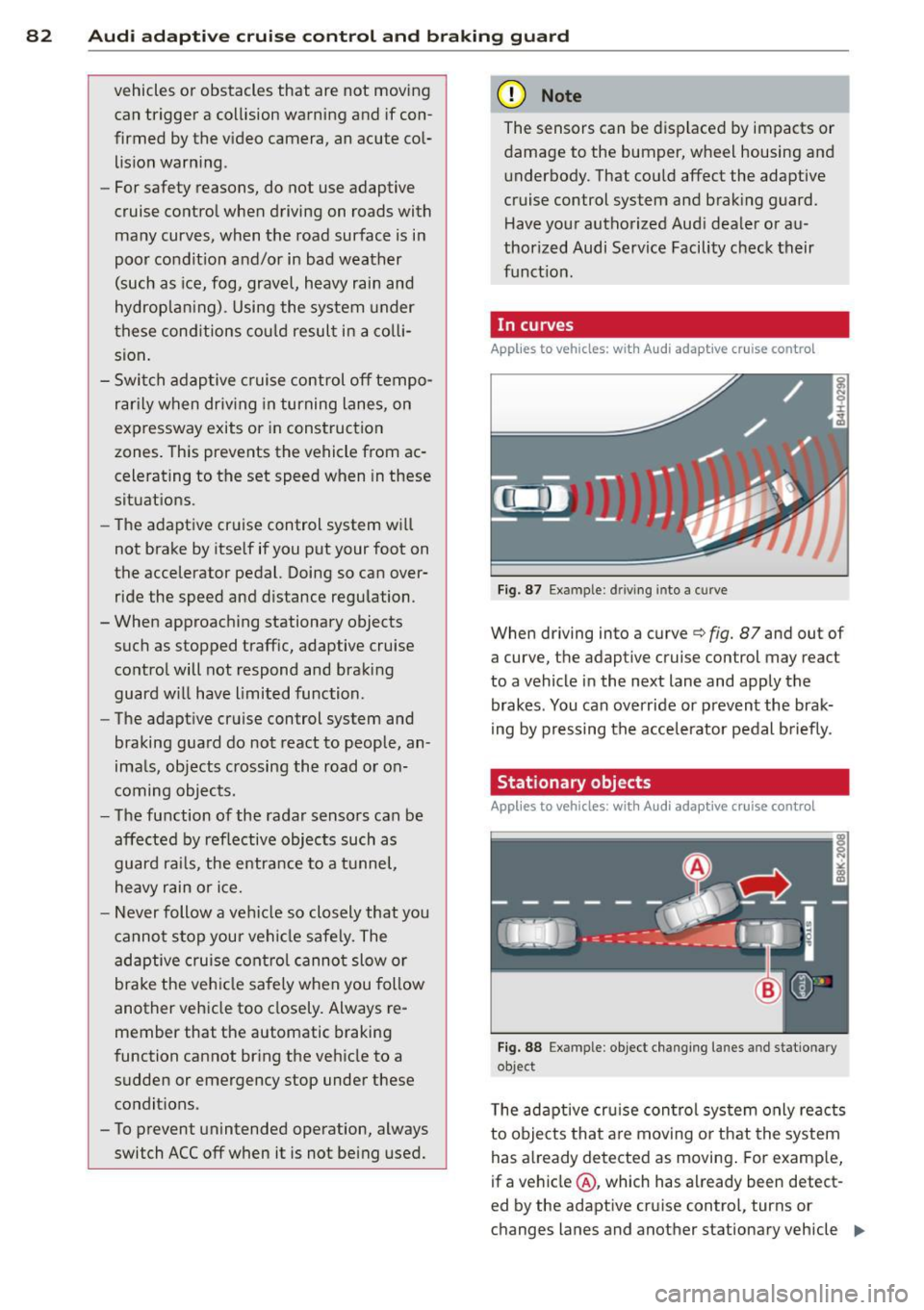
Fig. 87 Ex ampl e: dri ving in to a curve
When d riving into a curve c> fig. 87 and out of
a curve, the ad aptive cruise control may react
to a vehicle in the next lane and apply the
brakes. You can override or prevent the brak
i ng by pressing the acce lerator pedal briefly .
' Stationary objects
Applies to vehicles: with Audi adaptive cruise control
Fig. 88 Exampl e: objec t ch anging l anes and sta tio nar y
object
T he adaptive cru ise control system only reacts
to objects that are mov ing o r that the system
has already detected as moving . For examp le,
if a vehicle @, which has already been detect-
ed by the adaptive c ruise contro l, tu rns or
ch anges lanes and another stationary vehicle .,.
Page 86 of 292
84 Audi adaptive cruise control and braking guard
tachometer ® and is also shown briefly in
the display @¢fig.
91.
• You must also press the brake pedal when
the vehicle is stopped.
Switching adaptive cruise control off
• Push the lever away from you into position
@ until it clicks into place. The message
ACC off appears.
@ Indicator lights
f. j. Adap tive cruise control is switched on . No
vehicles are detected up ahead. The stored
speed is ma intained.
I -A moving vehicle is detected up ahead.
The adaptive cruise control system regulates
the speed and distance to the moving veh icle
ahead and acce lerates/brakes automat ica lly.
Si-Adaptive cruise control is switched on. A
moving vehicle up ahead was detected. You r
vehi cle remains stopped.
I-When automatic braking is not able to
keep enough distance to a previously detected
moving vehicle up ahead, you must take con
trol and brake ¢
page 86, Prompt for driver
intervention.
© Display
If adaptive cruise control is not shown in the
display, you can call it up with the multifunc
tion steering wheel buttons¢
page 23.
Based on the symbols in the display, you can
determ ine if the system is maintaining a dis
tance to the vehicle ahead and what that dis
tance is.
No vehicle -No vehicle ahead was detected .
White vehicle -A vehicle ahead was detected.
Red vehicle -Prompt for the driver to take ac
tion
c:::> page 86.
Both arrows on the scale © indicate the dis
tance to the vehicle ahead. No arrow appears
when the vehicle is on an open road and there
is no object ahead . If an object is detected
ahead, the arrow moves on the scale . T
he green zone on the scale shows the stored
distance. For information on changing the
stored distance, refer to ¢
page 85. If the
distance se lected is too close or may soon be
come too close, the arrows move into the red
zone on the sca le .
_&. WARNING
Improper use of the adaptive cruise con
trol can cause collisions, other accidents
and serious personal injur ies.
- Pressing the
ISET ! button when driv ing at
speeds be low 20 mph (30 km/h), will au
tomatically accelerate the vehicle to 20
mph (30 km/h), which is the minimum
speed that can be set.
© Tips
-If you switch the ignit ion or the adaptive
cruise control off, the set speed is erased
from the system memory.
- Th e electronic stabilizat ion contro l (ESC)
and the anti-s lip-regulat ion (ASR) are au
tomatically turned on when the adaptive
cruise control is turned on. Both systems
cannot be turned off if the adaptive
cruise contro l is turned on.
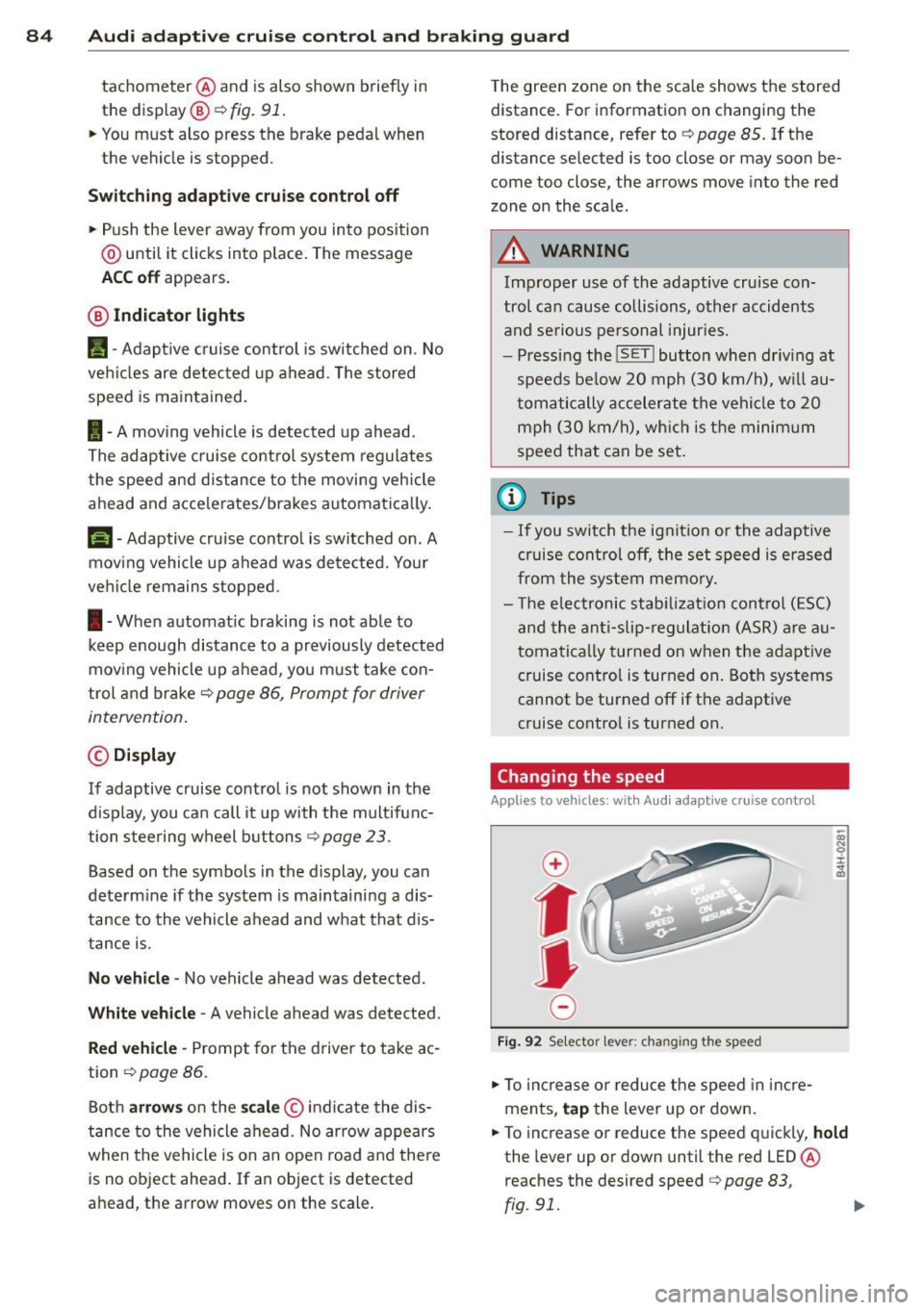
Changing the speed
Applies to veh icles: w ith Aud i adaptive cruise control
0
f
jJ
0
Fi g. 92 Selecto r lever: chang ing t he speed
• To increase or reduce the speed in incre
ments,
tap the lever up or down.
• To increase or reduce the speed quickly,
hold
the lever up or down until the red LED ®
reaches the desired speed
c:::> page 83,
rg . 91. ~
Page 88 of 292
86 Audi adaptive cruise control and braking guard
When approaching a moving vehicle up ahead,
the adaptive cruise control system automati
cally brakes to match that object's speed and
then maintains the stored distance. If the ve
h icle ahead accelerates, adaptive cruise con
trol will also accelerate up to the stored
speed.
The higher the speed , the greater the distance
in yards (meters)
c::> & . The Distance 3 setting
is recommended .
The distances prov ided are spec ified values .
Depending on the driving situation and the
how the vehicle ahead is driving, the actual
d istance may be more or less than these tar
get distances.
The various symbols for the time increments
appear briefly in the information line @
c::> page 83, fig . 91 when you change the set
tings .
~-~- --Distance 1 : This setting corre
sponds to a distance of 92 feet/28 meters
when traveling at 62 mph (100 km/h), or a
time interval of 1 second.
~--~- -Distance 2: This setting corre
sponds to a distance of 118 feet/36 meters
when traveling at 62 mph (100 km/h), or a
time inte rval of 1.3 seconds .
~--- ~-Distance 3: This setting corre
sponds to a distance of 164 feet/SO meters
when traveling at 62 mph (100 km/h), or a
time interval of 1.8 seconds .
~---- ~ Distance 4: This setting corre
sponds to a distance of 210 feet/64 meters
when traveling at 62 mph (100 km/h), or a
time interval of 2.3 seconds .
A WARNING ,. -
Following other vehicles too closely in
creases the risk of collisions and serious
personal inj ury.
- Setting short distances to the traffic
ahead reduces the time and distance
available to bring your vehicle to a safe
stop and makes it even more necessary
to pay close attention to traffic. -
Always obey applicable traffic laws, use
good judgment, and select a safe follow ing d istance for the traff ic, road and
weather conditions.
@ Tips
- Distance 3 is set automatically each time
you switch the ignition on.
- Your standard settings are automatically
stored and assigned to the remote con
trol key being used.
Selecting the driving mode
Applies to veh icles: w ith Audi adaptive cruise co ntrol
.,. Select the desired driving mode in drive se
lect
c::> page 96 .
(D Tips
Your settings are automatically stored and
ass igned to the remote control key being
used.
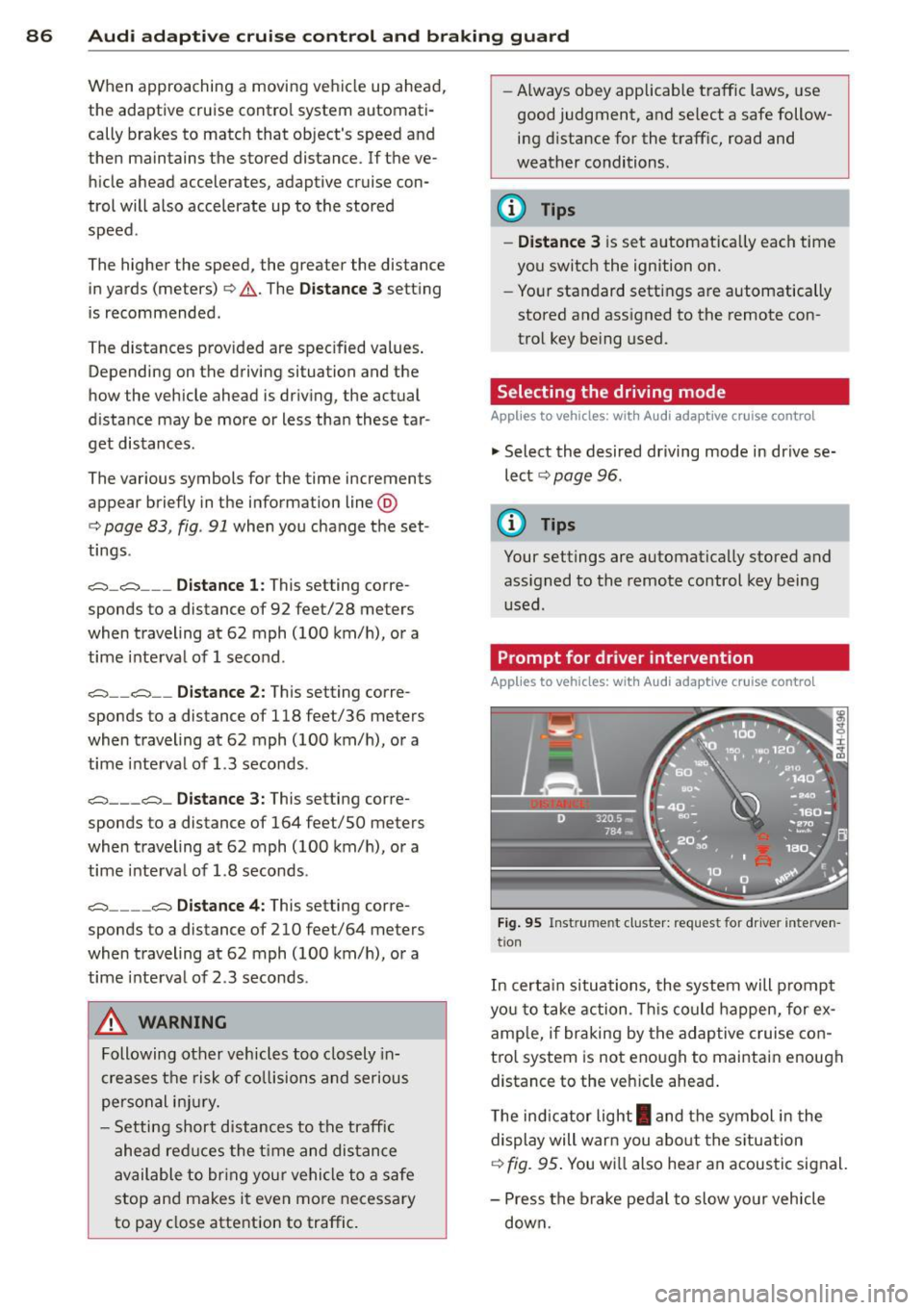
Prompt for dr iver intervention
Applies to veh icles: w ith Audi adaptive cruise co ntro l
Fig. 95 Instrume nt cluster: req uest fo r drive r inte rven
t ion
In certain situations, the system will prompt
yo u to take action . This could happen, for ex
amp le, if braking by the adap tive cruise con
tro l system is not enough to maintain enough
distance to the veh icle ahead .
T he indicator light
I and the symbol in the
display will war n you abo ut the situat ion
c::>fig. 95 . You wi ll also hear an acoustic signal.
- Press the brake pedal to slow yo ur vehicle
down.