mirror AUDI RS7 SPORTBACK 2015 User Guide
[x] Cancel search | Manufacturer: AUDI, Model Year: 2015, Model line: RS7 SPORTBACK, Model: AUDI RS7 SPORTBACK 2015Pages: 302, PDF Size: 74.76 MB
Page 96 of 302
94 Audi side assist
Side assist functions at speeds above approxi
mately 19 mph (30 km/h).
(D Vehicles that are approaching
I n certain cases, a vehicle will be classified as
cr itica l for a lane change even if it is still
somewhat far away . The faster a vehicle ap
proaches, the sooner the display in the exteri
or mirror will turn on.
@ Vehicles traveling with you
Vehicles traveling with you are indicated in the
exterior m irror if they are classified as critica l
for a lane change. All vehicles detected by
side assist are indicated by the time they en
ter your "blind spot", at the latest.
@ Vehicles left behind
If you slowly pass a vehicle that side assist has
detected (the difference in speed between the
vehicle and your vehicle is less than 9 mph or
15 km/h), the disp lay in the exterior mirror
turns on as soon as the vehicle enters your blind spot.
The display will not turn on if you quickly pass
a vehicle that side assist has detected (the dif
ference in speed between the vehicle and your
vehicle is greater than 9 mph or 15 km/h).
Functional limitations
The radar sensors are designed to detect the
left and right adjacent lanes when the road
lanes are the normal width. In certain situa
tions, the display in the exterior mirror may
turn on even though there is no vehicle locat
ed in the area that is critical for a lane change.
For example:
- if the lanes are narrow or if your are driving
on the edge of your lane. If this is the case,
the system may have detected the vehicle in
another lane that is
not adjacent to your
current lane.
- if you are driving through a curve. Side assist
may react to a veh icle that is one lane over
from the adjacent lane.
- if side assist reacts to other objects (such as
high or displaced guard ra ils). -
In poor weather conditions . The side assist
functions are limited.
Do not cover the rada r senso rs
~ fig. 106 with
stickers, deposits, bicycle wheels or other ob
jects, because this will affect the funct ion . For
information on cleaning, refer to
~ page 201.
A WARNING
-
- Always pay attention to traffic and to the
area around your vehicle. Side assist can
not replace a driver's attention. The driv
er alone is always responsible for lane
changes and similar dr iving maneuvers .
- Improper reliance on the side assist sys
tem can cause coll is ions and serious per
sonal injury:
- Never rely on ly on side assist when
changing lanes.
- Always check rear view mirrors to make
sure that it is safe to change lanes.
- Side assist cannot detect all vehicles un
der all conditions -danger of accident!
- Please note that side assist indicates
there are approaching vehicles, or
vehicles in your blind spot, only after
your vehicle has reached a driving speed
of at least 19 mph (30 km/h).
- In certain sit uations, the system may not
function or its function may be limited.
For example:
- if vehicles are approaching or being left
behind very quickly. The disp lay may
not turn on in time.
- in poor weather conditions such as
heavy rain, snow o r heavy mist.
- on very wide lanes, in tight curves or if
there is a rise in the road surface.
Vehicles in the adjacent lane may not
be detected because they are outside
of the sensor range .
([) Note
The sensors can be displaced by impacts or
damage to the bumper, wheel housing and
u nderbody. This can affect the system. .,..
Page 97 of 302
"' N
a:: I.J "". rl I.O
"' rl
"' rl
Have your authorized Audi dealer or au
thorized A udi Service Facility check the ir
function.
@ Tips
- If the win dow g lass in the driver 's door
or front passenger's door has been tint
ed, the disp lay in the exterior m irror may
be misinterp reted .
- For Decla rat ion of Compliance to United
States FCC and Industry Canada regula
tions ¢
page 285.
Activating and deactivating
Applies to vehicles: mit side assist
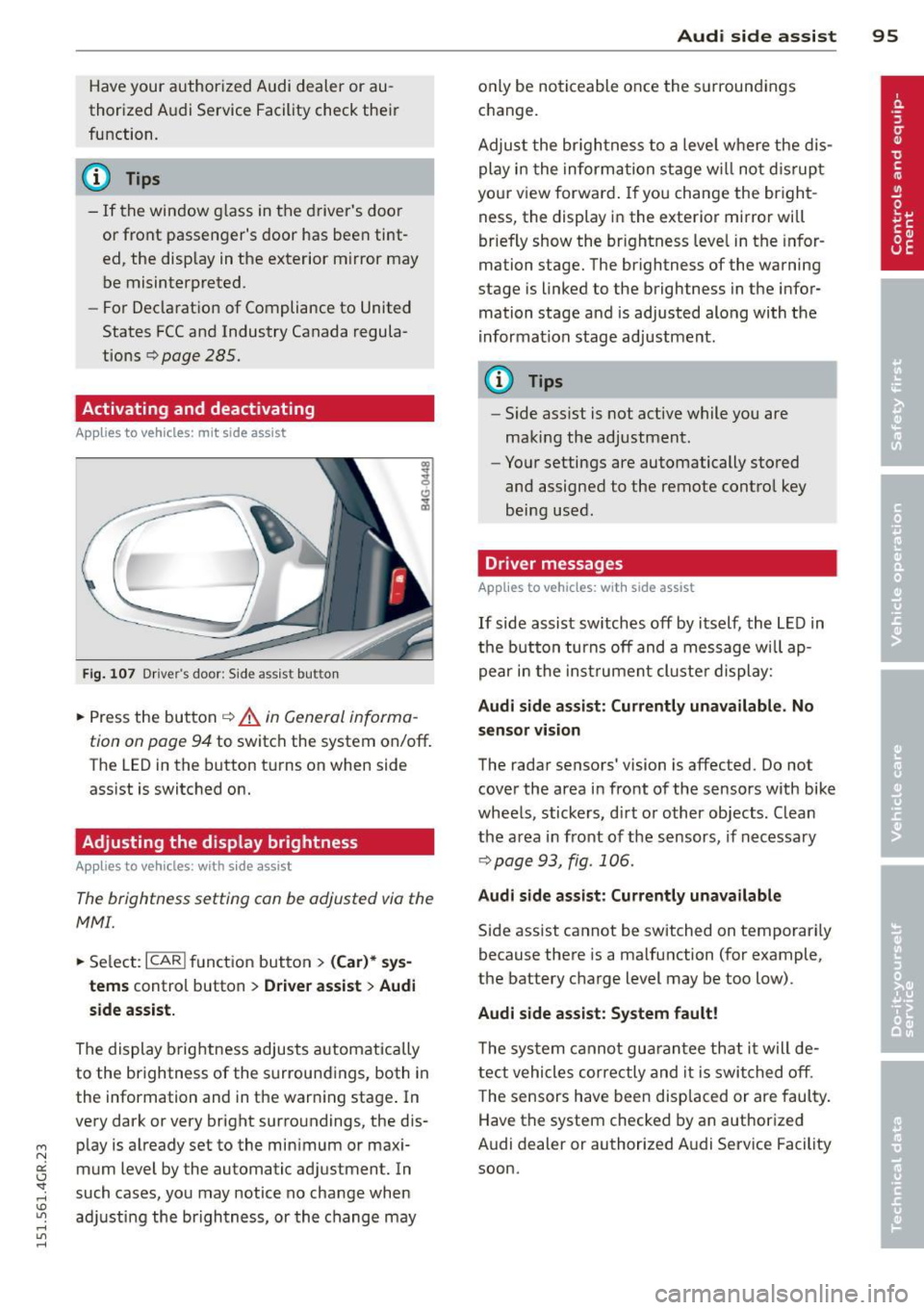
Fig. 107 Dr ive r's d oor : Sid e ass is t butt on
.. Press the but ton ¢ .&. in General informa
tion on page 94
to switch the system on/off .
The LED in the button t urns on when side
ass ist is switc hed on.
Adjusting the display brightness
Applies to vehicles: with side assist
The brightness setting can be adjusted via the
MMI.
.. Se lect : ICAR I function button> (Car)* sys
tems
contro l button > Drive r assist > Audi
side assist.
The display brig htness adjusts a utomatically
to the brightness of the surroun dings, both in
the information and in the warn ing stage . In
very dark or very bright surro undings, the dis
p lay is a lready set to the min imum or maxi
mum Level by the automatic ad justment. In
such cases, you may notice no cha nge when
a d ju sting the brightness, or the change may
Aud i side assist 95
only be no ticeable once the s urround ings
c hange.
Adjus t the br igh tness to a leve l where the dis
play i n the informa tion stage w ill no t dis rup t
your view forward . If you change the br igh t
ness, the display in the exterior mirror will
brief ly show the br ightness leve l in the infor
mation stage. The brightness of the warning
stage is linked to the brightness in the infor
mation stage and is adjusted along with the
i nfor mation stage ad justment.
(D Tips
- Side ass ist is not act ive while you are
making the adjustment .
- Yo ur settings are automatically stored
and assigned to the remote contro l key
being used.
Driver messages
Applies to vehicles: with side assist
If side assist sw itches off by itself, the L ED in
t he b utto n turns off and a message wi ll ap
pe ar in the inst rume nt cl uste r d is play:
Audi side assist: Currently unavailable. No
sensor vi sion
The rada r sensors' vision is affected. Do not
cover the area in fro nt of the sensors with bike
whee ls, sticke rs, d irt o r other objects. Clean
the a rea in front of the sensors, if necessary
¢page 93, fig . 106.
Audi side assist: Currently unavailable
Side assist cannot be switched on temporari ly
because there is a malfunction (for example,
the battery c ha rge level may be too low) .
Audi side assist: System fault !
The sy stem cannot gu arant ee th at it w ill de
tect vehicles correctly and it is swi tched o ff.
T he sensors have been disp laced or are faul ty .
Have the system checked by an authorized
A udi dealer or authorized A udi Service Facility
soon.
Page 114 of 302
112 Parking systems
example, after a collision, do not contin
ue to use the system for safety reasons.
Have it checked by your authorized Audi
dealership or authorized repair facility .
- Only use the rear view camera to assist
you if it shows a good, clear picture. For
example, the image may be affected by
the sun shining into the lens, dirt on the
lens or if there is a system fault .
- Use the rear view camera only if the lug
gage compartment lid is completely
closed. Make sure any objects you may
have mounted on the luggage compart
ment lid do not block the rear view cam
era.
- The camera lens enlarges and distorts
the field of vision. The object appears
both altered and inaccurate on the
screen.
- In certain situations, people or objects in the display appear closer or further
away:
- For objects that do not touch the
ground, such as the bumper of a
parked vehicle, a trailer hitch or the
rear of a truck. Do not use the help
lines in this case.
- If driven from a level surface onto an
incline, or a downward slope.
- If driven toward protruding objects.
- If the vehicle is carrying too much load
in the rear.
@ Note
- Always read and follow the applicable
warnings
r:> (D in General information on
page 109.
- The orange colored orientation lines in
the Infotainment display show the vehi
cle path depending on the steering
wheel angle. The front of the vehicle
front swings out more than the rear of
the vehicle. Maintain plenty of distance
so that your outside mirror or a corner of
your vehicle does not collide with any ob stacles.
Switching on/off
Applies to vehicles: with parking system plus with rear
v iew camera
Switching on
.,. Shift into reverse or
.,. press the
P'QA button in the center console
r:>page 110, fig. 124. A short confirmation
tone sounds and the LED in the button turns
on .
Switching between the rear view camera
and optical display
... Press the Graphic control button ®
¢ page 113, fig. 130 to see the optical dis
play .
.,. Press the
Rearview control button to see the
rear view camera image.
Switching off
... Drive forward faster than 6 mph (10 km/h),
or
.,. Press the
P,,1~ button, or
.,. Switch the ignition off.
{D Tips
The visual display in the left part of the
display should help you detect the critical
vehicle areas.
Page 122 of 302
120 Driving Saf ely
Driving Safely
General notes
Safe driving habits
Please remember -safety first!
This chapter contains important information,
tips, instructions and warnings that you need
to read and observe for your own safety, the
safety of your passengers and others . We have
summarized here what you need to know
about safety belts, a irbags, ch ild restra ints as
well as child safety. Your safety is for us
priori
ty number 1.
Always observe the info rmat ion
and warn ings in th is sect ion -fo r yo ur own
safety as well as that of your passengers .
The information in this se ction app lies to all
model ve rsions of your veh icle . Some of the
feat ures described in this sec tions may be
standard equipment on some models, or may
be optional equipment on others . If you are
not sure, ask your authorized Audi dealer.
A WARNING
- Always make sure that you follow the in
struct ions and heed the WARNINGS in
this Manual. It is in your interest and in
the inte rest of you r passengers.
- Always keep the complete Owner's Liter
ature in your Audi when you lend or sell
your vehicle so that this important info r
mation will always be ava ilable to the
dr iver and passengers.
- Always keep the Owner's literature handy
so that you can find i t eas ily if you have
ques tions.
Safety equipment
The safety features are part of the occupant
restraint system and work together to help
redu ce the risk of injury in a wide variety of
accident situations.
Your safety and the safety of your passenge rs
should not be left to chance. Advances in
technology have made a varie ty o f fea tures
avai la bl e to he lp re duce the risk of injury in an accident
. The following is a list of just a few of
the safety features in your Audi:
- sophis tic ated s afety be lts fo r drive r and a ll
passenger sea ting pos it ions,
- safety belt prete nsioners ,
- safety belt force lim iters fo r the front seats,
- safety belt he ight adjustment systems for
the front seats ,
- front airbags,
- knee airbags for the front seats *
- side airbags in the front seats a nd outer rear
seats*,
- side curtain airbags ,
- specia l LATCH anchorages for child re-
straints,
- hea d restr aints for each sea ting pos ition,
- ad justab le s teer ing colum n.
These ind iv idual safety features, can work to
ge ther as a system to help protect you and
you r passengers in a wide range of accidents .
T hese features canno t wo rk as a system if
they are not always cor re ct ly adjusted and co r
rect ly used.
Safety i s everybody' s respon sibility!
Important things to do before driving
Safety is everybody 's job! Vehicle and occu
pant safety always depends on the informed and careful driver .
For your safety and the safety of your passen
gers,
befor e driv ing always:
.. Make s ure that all lights and signals are op
erating correctly.
.. Make sure that the t ire pressure is correct .
.. Make s ure t hat all windows are clean and af
ford good vis ibility to the outs ide .
.. Sec ure all luggage a nd other items caref ully
q page 64, q page 61 .
.. Ma ke s ure t hat nothing can interfe re wi th
the peda ls .
.. Adjust front seat, head restraint and mirrors
correctly for your height.
.. Instruct passengers to adjust the head re-
straints according to the ir height . .,..
Page 204 of 302
202 Vehicle care and cleaning
Rinse the vehicle tho roughly again and let it
air dry . Remove any water residue using a
shammy .
S tu bborn depos its s uch as bird dropp ings or
tree sap are best removed with plenty of wa
ter and a microfiber cloth.
A WARNING
- Only wash the vehicle when the ignition
is off and follow the instructions from
the car wash operator to reduce the risk
of accidents .
- To reduce the r isk of cuts, protect your
self from sharp meta l compone nts whe n
was hing t he underbody or the ins ide of
t h e whee l hous ings.
- After washing the vehicle, the braking ef
fect may be delayed due to mo isture on
the brake roto rs o r ice in th e winter . The
brakes mus t be dried first with a few
c a refu l br ake appli cat io ns.
(D Note
- If you wash t he veh icle in a n au tomatic
ca r wash, yo u m ust retrac t the r ear spoi l
er if necessary, and fo ld the exter io r mir
r o rs in t o reduce the r is k of dam age. P
ower fo lding ex terior mirrors * mus t on
ly be folde d in an d out using the powe r
folding function.
- To prevent paint damage, do not wash
the vehicle i n direct sunlight.
- T o reduce the ris k of damage to the sur
face, do not use insect removi ng spong
es, kitchen sponges or similar items.
- Matte finish painted vehicle compo
nents :
- To reduce the risk of damage to the
surface, do not use polishi ng agen ts or
ha rd wa x.
- N eve r use car wash cycles that apply
p rotectiv e wax .
It can des troy the
ma tte fi nish effect .
- D o not place any st ickers o r magnet ic
signs on v ehicle parts painted w ith
ma tte fi nish paint. The paint cou ld be
d am aged when the stickers o r m agne ts
a re removed.
~ For the sake of the environment
Only wa sh the ve hicl e in facili tie s sp eci ally
d esigne d for th at pu rpose. Thi s will re duce
the r is k of dirty wate r contam inated with
oi l from entering the sewer system.
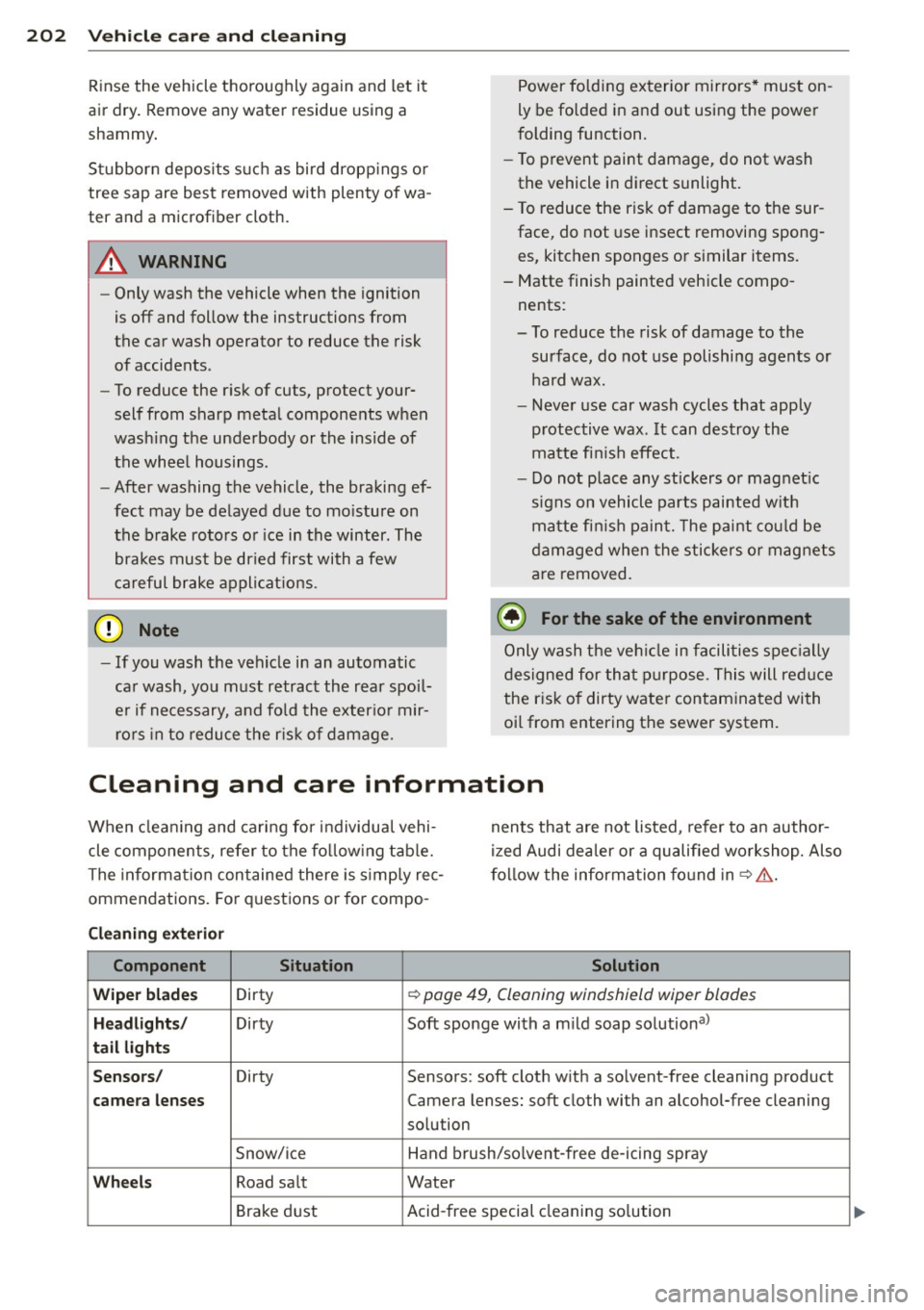
Cleaning and care information
When clea ning and cari ng fo r individua l vehi
cle components, refer to the fo llow ing tab le.
The informa tion con tained there is s imply rec
ommendations. Fo r q uest ions or for compo -nents that are not listed
, refer to a n author
i z ed Audi dea ler or a qu alified workshop. Also
f o llow the inform ation fo und in ~ .&. .
Cleaning exterior Component Situation Solution
Wiper blades Dirty
~ page 49, Cleaning windshield wiper blades
Headlights / Dirty Soft sponge with a m ild soap solution a>
tail lights
Sensors/ Dirty Sensors: soft cloth w ith a so lvent-free cleaning product
camera lenses Camera lenses: soft cloth with an alcohol-free cleaning
so lution
Snow/ice Hand b rush/so lvent-free de -icing spray
Wheels Road salt Water
Brake d ust Acid-free special cleaning so lution
Page 207 of 302
M N
0:: <.J 'SI: ,...., \!) 1.1'1 ,...., 1.1'1 ,....,
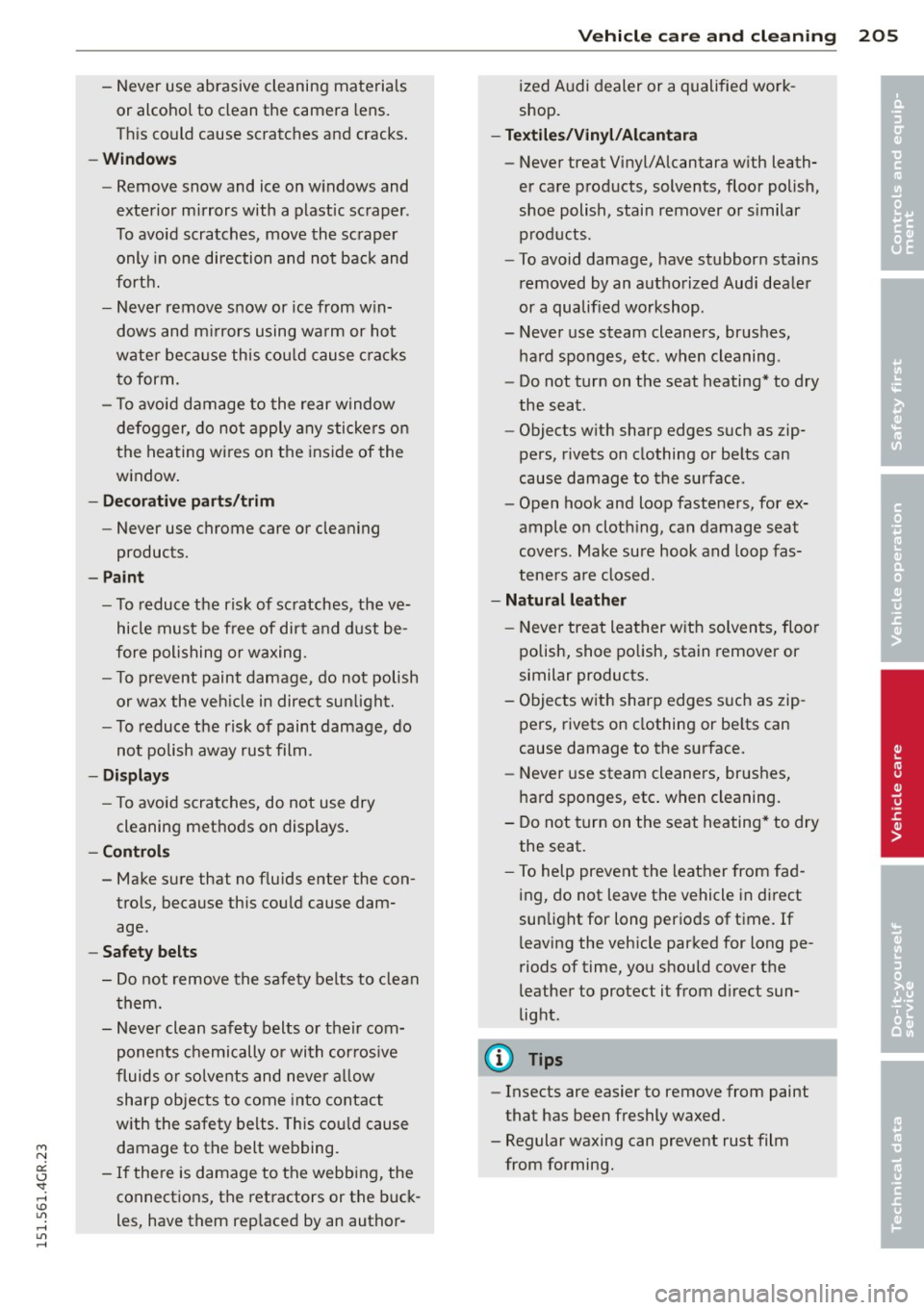
-Never use abrasive cleaning materials
or alcohol to clean the camera lens.
T his could cause scratches and cracks .
-Window s
-Remove snow and ice on w indows and
exterior mirrors with a plastic scraper .
To avoid scratches, move the scraper only in one direction and not back and
forth.
- Never remove snow or ice from w in
dows and m irrors using wa rm or hot
wate r because this cou ld cause crac ks
to form.
- To avoid damage to the rear window
defogger, do not apply any stickers on
the heating wires on the inside of the
w indow .
-Dec or ati ve p arts /trim
-Never use chrome care or cleaning
products.
-Paint
-To reduce the risk of scratches, the ve-
hicle must be free of dirt and dust be
fore polishing or waxing.
- To prevent paint damage , do not polish
or wax the veh icle in direct sunlight.
- To reduce the risk of paint damage, do
no t polish away rust film .
-Di splay s
-To avoid scratches, do not use dry
cleaning methods on displays .
-Controls
- Make sure that no flu ids enter the con-
trols, because this cou ld cause dam
age .
-Safet y belts
- Do not remove the safety belts to clean
t hem.
- Never clean safety belts or their com
ponents chemically or with cor ros ive
fluids or solvents and never a llow
sharp objects to come into contact
with the safety belts . This cou ld cause
damage to the belt webbing.
- If the re is damage to the webb ing, the
connections, the retractors or the buck
les, have them rep laced by an author-
V ehicl e ca re a nd cl eanin g 205
ized A udi dealer or a qualified work
shop.
- Te xtile s/Vin yl/ Alcant ara
- Never treat Vinyl/Alcantara w ith leath-
er care products, solvents, floor polish,
shoe polish, stain remover or s imilar
p rod ucts.
- To avoid damage, have stubborn stains
removed by an authorized Aud i deale r
or a qualif ied workshop.
- Never use steam cleaners, brushes,
hard sponges, etc. when cleaning .
- Do not turn on the seat heating * to dry
the seat .
- Objects with sharp edges such as zip
pers, rivets on clothing or be lts can
cause damage to the surface .
- Open hook and loop fasteners, for ex
ample on cloth ing, can damage seat
covers . Make sure hook and loop fas
tene rs a re closed .
-Natural leather
- Neve r treat leather w ith solven ts, floo r
polish, shoe polish, stain remover or
similar products.
- Objects with sharp edges such as zip
pers, rivets on clothing or be lts can
cause damage to the surface.
- Never use steam cleaners, brushes,
hard sponges, etc . when cleaning.
- Do not turn on the seat heating* to dry
the seat.
- To help prevent the leather from fad
ing, do not leave the vehicle in di rect
sunlight for long periods of time . If
leaving the vehicle parked for long pe
riods of time, you should cover the
leather to protect it from d irect sun
light .
(D Tips
-Insects are easier to remove from paint
that has been freshly waxed.
- Regular waxing can prevent rust film
from forming.
•
•
Page 273 of 302
"' N
a:: I.J "". rl I.O
"' rl
"' rl
No. Equ ipment Amps
8
Headlight range adjustment/ 5/7,5
adaptive lighting system
10
Left headlight (headlight with 7,5 adaptive light)
11 Supplementary heater s
Fuse p anel @ (bro wn)
No . Equipment Amps
1 Climate control 10
2
Climate control system blower 40
3
Diagnostic interface 10
4
E lectrical ignition lock 5
5
Power steering column adjust-
ment
5
6 Steering column switch module 10
7
Power steering column adjust-
ment
25
8 Light switch 5
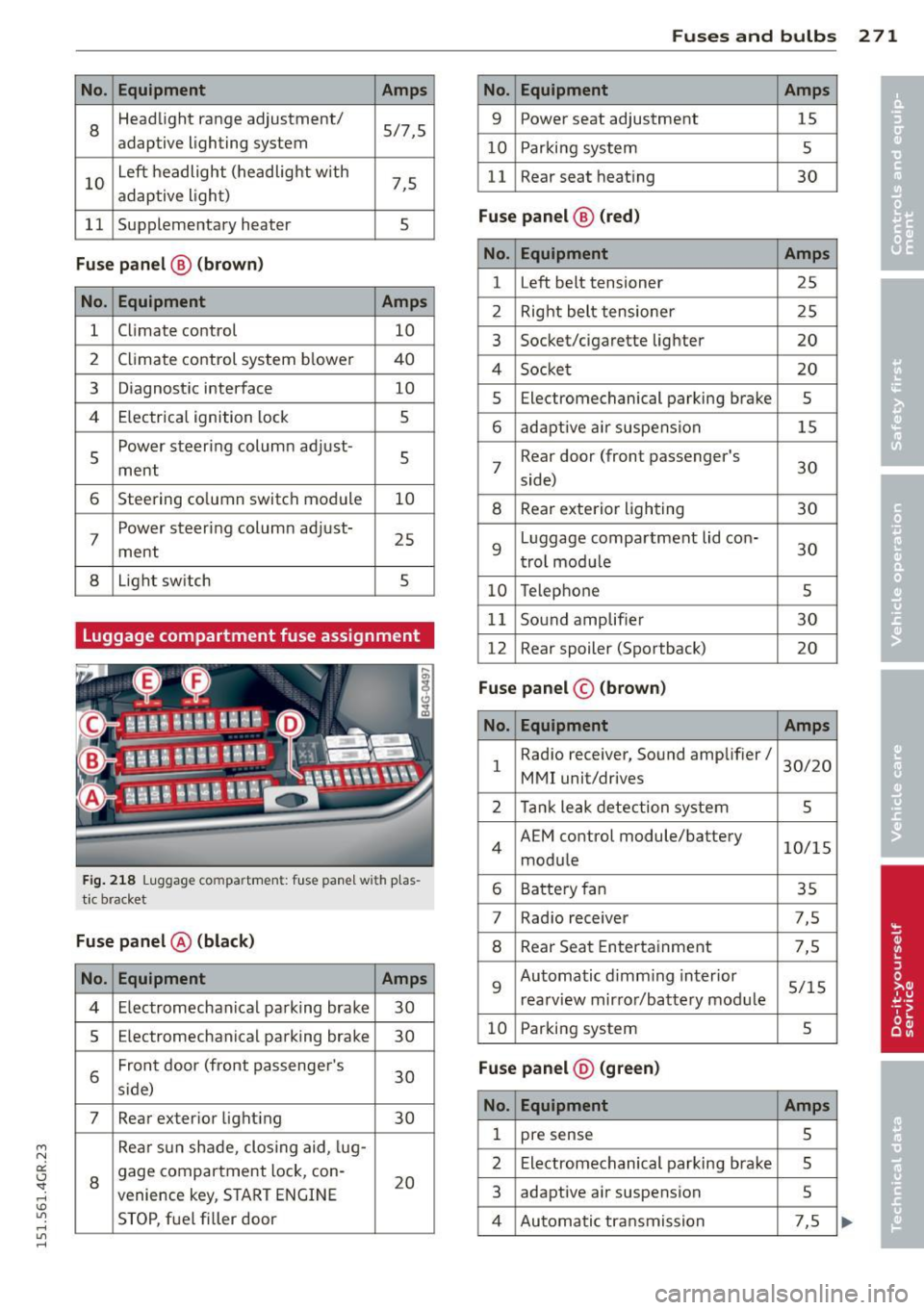
Luggage compartment fuse assignment
Fig . 218 Luggage compartment: fuse panel with plas
tic bracket
Fuse p anel @ (black )
No. Equipment Amps
4 Electromechan ical parking brake 30
5
Electromechanical parking brake 30
6
Front door (front passenge r's
30 s ide)
7 Rear exterior light ing 30
Rea r sun shade, closing aid, lug-
8
gage compartment lock, con-
20 venience key, S TART ENGINE
STOP, fuel filler door
Fu se s and bulb s 2 71
No. Equipment Amps
9 Power seat adjustment 15
10
Parking system 5
11
Rear seat heating 30
Fu se pan el@ (r e d )
No . Equipment Amps
1 Left belt tensioner 25
2
Right belt tensioner 25
3
Socket/cigarette lighter 20
4
Socket 20
5
Electromechanical parking brake 5
6 adaptive air suspension 15
7
Rear door (front passenger's
30 side)
8 Rear exterior lighting 30
9
Luggage compartment lid con-
30 trol mod ule
10 Telephone 5
11
Sound amplifier 30
12
Rear spoiler (Sportback) 20
Fuse panel © (brown)
No . Equipment Amps
1
Radio receiver, Sound amplifier/
30/20
MMI unit/drives
2 Tank leak detection system 5
4
AEM control module/battery 10/15
module
6 Battery fan 35
7
Rad io receiver 7,5
8 Rear Seat Entertainment 7,5
9
Automatic d imm ing interior 5/15
rearview mirror/battery mod ule
10 Parking system 5
Fu se pan el@ (gre en)
No . Equipment Amps
1 pre sense 5
2
Electromechanical parking brake 5
3
adaptive air suspension 5
4 Automatic transmission 7,5
Page 282 of 302
28 0 Techni cal data
designated s eating position) and luggage
w eight ¢.&, .
Gross Axle W eight Rating
The Gross Axle Weight Rating is the maximum
l oad that can be applied at each axle of the
vehicle ¢Lr!, .
Vehicle cap acit y weight
The vehicle capac ity we ight (max . load) is list
ed either on the dr iver's side B-pilla r or inside
the fuel filler flap.
_& WARNING
- T he actual Gross Axle Weight Rat ing at
the front and rear axles shou ld not ex
ceed the permissible weights, and their
combination must not exceed the Gross
Vehicle Weight Rating .
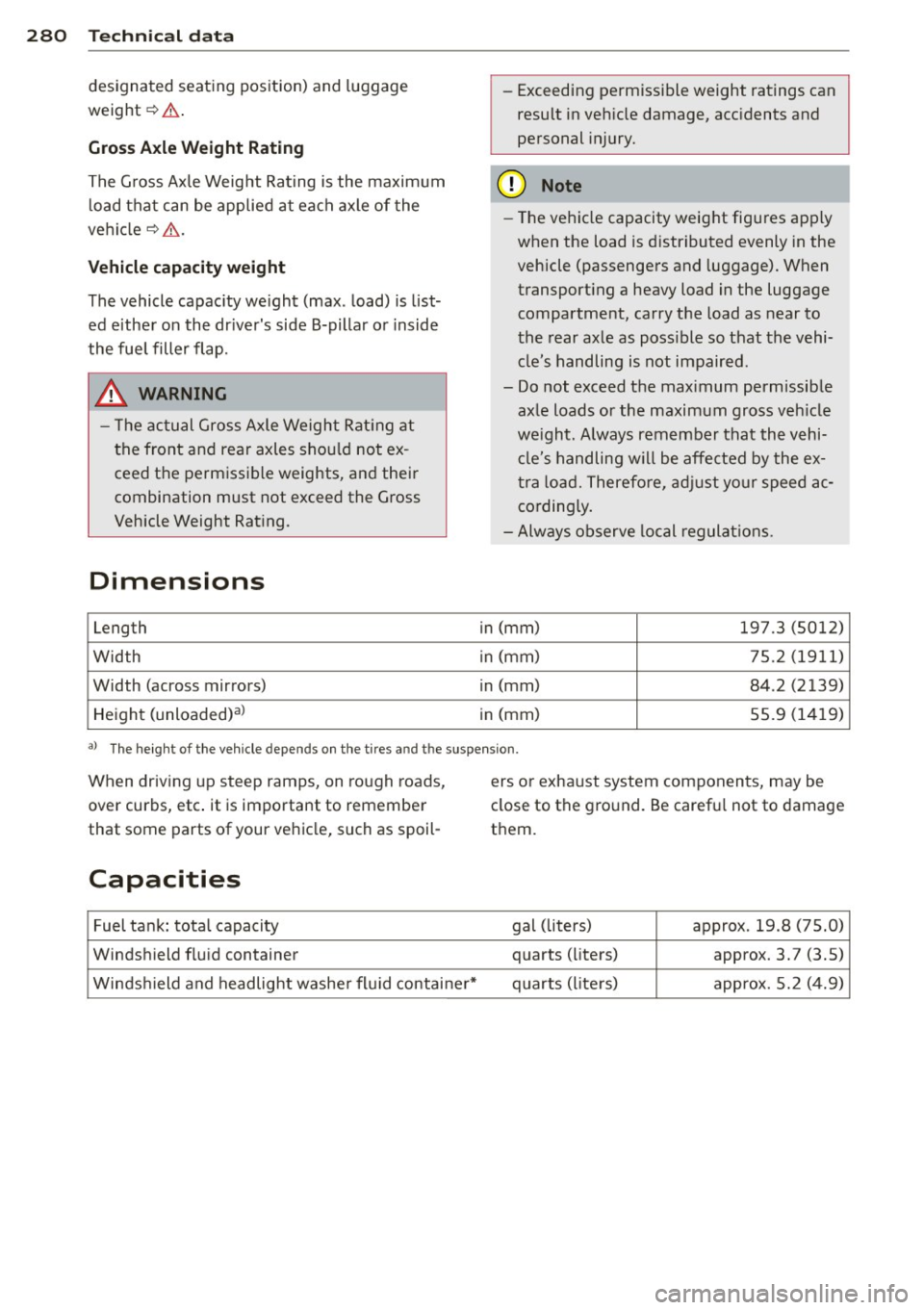
Dimensions
Length
Width
Width (across mirror s)
Height (unloaded) al
-
-Exceeding permissible weight ratings can
result in veh icle damage, acc idents and
personal injury.
(D Note
- The vehicle capacity weight figures apply
when the load is distributed evenly in the
vehicle (passengers and luggage). When
transport ing a heavy load in the luggage
compartment, carry the load as near to
the rear axle as poss ible so that the vehi
cle's handling is not impaired .
- Do not exceed the maximum permissible axle loads or the maximum gross veh icle
we ight. Always remember that the vehi
cle's handling w il l be affected by the ex
tra load. Therefo re, adj ust your speed ac
cordingly.
- Always observe local regulat ions .
in (mm )
197.3 (5012)
i n (mm) 75.2 (1911)
in (mm) 84.2 (2139)
in (mm) 55.9 (1419)
al The he igh t of the veh icle depen ds on the t ire s and th e su spen sion .
When driving up steep ramps, on rough roads,
over curbs, etc . it is important to remember
that som e parts of your veh icle, such as spoil-
Capacities
Fuel tank: total capacity
W indsh ield flu id conta iner
Winds hield and headlight washe r fluid containe ir* ers or exhaust system components, may be
close to
the ground . Be carefu l not to damage
them .
gal (liters) approx. 19 .8 (75.0)
quarts (liters) approx. 3. 7 (3.5)
quarts (liters) approx. 5.2 (4.9)
Page 292 of 302
290 Index
Changing ....... ..... ... .. .. .... . 216 F
Ch ecking the engin e oi l le vel .. .... .. . 215
Indications and cond it ions requ iring ex-
tr a checking .... .. .... ..... .. .. .. . 215
Indica tor ligh t . . . . . . . . . . . . . . . . . . . . . 17
Oil consumption .............. .. ... 214
Pressure malfunction .. .... .. .. .. .. . . 16
Recommended oil check intervals ..... 215
Sensor defective . . . . . . . . . . . . . . . . . . . . 20
Specification and viscos ity .. .. .. .. .. . 213
Temperature indicator ....... .. .. .. . . 28
Engine sound ... ... .... ..... .. .. .. .. 96
Engin e sp ee d lim ita tion ....... .. .... . . 20
E ng ine start system (indicator lights) .. . . 17
Environmen t
Break -in period ............ ... .. ... 196
Catalytic converter ......... ... .. ... 197
Disposing of your vehicle battery .. .. . 224
Driving at high speeds ..... .. .. .... . 199
Driving to minim ize pollution and noise 198
Fu el .. ... ....... ......... ... .... . 208
Fu el economy ............. ... .... . 198
Leaks und er your vehicle ........... . 211
Letting the veh icle st and and warm up . 199
Proper d ispo sal o f drained brake fluid . 220
Proper disposal of dra ined engine cool-
ant ..... .. ................ ... ... 218
Proper disposa l of dra ined engine
oil .. .. .. ...... .. ... .... .. .. 215 ,216
Recycling used engine oil . .. .. .. .... . 215
Un leaded fuel ... ... ... ... .. .. .. .. . 206
What should I do with an old battery? . 224
Event Data Recorder (EDR) ..... .. .. .. . 186
E xhaust t ail pipes
Cleaning . .. .. . .. ..... ... .. .. .. .. . 203
Expansion tank .............. .. .... . 217
Exterior lighting ............... .. .... 44
Ext erior mirrors
Ad justing .. .... .. ... ...... .. .. .. .. 50
Dimming ..... .... .... ..... .. .. .. .. 51
Heating .. .. ... ... .... ..... .. .. .. .. 50
Exterior temperature display ..... .... . . 22 Fastening
Booster seats .... ................. 174
Conv ertib le child saf ety seats ..... ... 172
I nfant seats . . . . . . . . . . . . . . . . . . . . . . 171
Floor mats .... .. .. ... .. ..... ... .... 125
Foot pedals ................. ....... 1 25
For the sake of the environm ent
Gasoline fumes and the env ironment . . 208
Reducing eng ine no ise by early upsh ift-
ing ... .... .. .. .. ...... .. ... ...... . 10
Refueling ............ ........... . 208
Sav ing fuel by early upsh ifting ...... .. 10
Four-zone automatic climat e control ... . 70
Front airb ags
Description . . . . . . . . . . . . . . . . . . . . . . . 143
How they work . . . . . . . . . . . . . . . . . . . . 149
Frontal coll is ions and the laws of phys ics 131
Front seats . . . . . . . . . . . . . . . . . . . . . . . . . 53
Adjusting . .. .. .. ... .. ..... ... .... 122
Child res tra ints in the fron t se at .... .. 141
Fuel Additives . ..... .. ................. 206
B lended gasoline .............. .... 206
Cur rent consump tion ... .. .. .. .. .. .. . 24
Economy mess ages (efficiency program) 25
Fuel filler flap emergency release .... . 209
Fuel filler neck ........ ........... . 207
Fuel gauge . . . . . . . . . . . . . . . . . . . . . . . . 11
Gasoline .... .. .. ... .. .. .. .. .. .... 206
Gasoline additives ...... ....... .. .. 207
Low fuel level symbol . . . . . . . . . . . . . . . 20
Octan e rating .... .............. ... 206
Recommendation ............... ... 206
Refuelling . .. .. .. ...... ....... .... 208
Reserve ... .. .. .. ... .. .. .. .. .. .... . 11
Tank capac ity . . . . . . . . . . . . . . . . . 11,280
Fuses Assignment ..... ... .......... .... 269
Rep lac ing . .. .. .. ....... ..... ..... 269
G
Garage door opener (Homelink) ... .. .. . 42
Garment hooks .... ... ............. .. 61
Page 293 of 302
Gauges Engin e coolant temperature . ... .. .. .. 10
Fue l gauge . . . . . . . . . . . . . . . . . . . . . . . . 11
Speedometer . . . . . . . . . . . . . . . . . . . . . . 25
Tachometer . . . . . . . . . . . . . . . . . . . . . . . 11
T rip odometer . . . . . . . . . . . . . . . . . . . . . 25
General illustration . . . . . . . . . . . . . . . . . . . 8
Generator (warn ing/indicator lights) .. .. 16
Glossary of tire and loading terminology 228
Glove compartment (cooled) ........... 61
Gross Veh icle Weight Rating (GVWR) .. . 279
H
Head-up Display ........... .... .. .... 27
Headlights Cleaning ... .. .............. ... ... 202
C leaning system .......... .. .. .. .. .. 48
Defective . . . . . . . . . . . . . . . . . . . . . . . . . 21
Headlight range control . . . . . . . . . 21, 44
Washer reservoir ................ .. 224
Head restraints . . . . . . . . . . . . . . . . . 56, 124
Adjusting .. .. ........... .. .. .. ... 124
Front seats . . . . . . . . . . . . . . . . . . . . . . . . 56
Rear seats .. .. ........... .. .. .. .... 57
Removing ................ ... ... ... 57
Heated exterior mirrors .................... 50
rear window (automatic climate control) 71
seats (automatic climate control) . . . . . . 71
Steer ing wheel ... ... ..... .. .. .. .. .. 72
windshield washer spray nozzles ...... 48
Heating ..... .. .............. ... .... 69
H eavy clothing and safety belts . .. .. .. . 133
High beam . .. ............. .... .. .... 46
High voltage warning label ... ... .. .. . 279
H ill descent control ............... .. 106
Homelink (garage door opener) .. .. .. .. 42
H ood (release lever) ........ .. .. .. .. . 211
H ooks .. .. ... ................... ... 67
Horn ............................... 8
H ow are child restraint system anchors re-
l ated to child safety ........ .. .. .. .. . 179
How many airbags does my vehicle have? 147
How often shou ld I check my tire pres-
sures? . ... .. .. ................ .... 239
H ow safety belt pretensioners work ... . 136
Index 291
Hydrop laning ..... .. ............... 245
I
Immobilize r .. .. .. .. .. ........... .. . 25
Important things to do before driving .. 120
Improper ly worn safety belts ........ .. 136
Ind icator lights
Dynamic steering . .. .. ......... .. .. 192
also refer to Warning/ind icator lights . . 11
Infant seats ...... .. ............... 171
Installing child safety seats Safety belts . . . . . . . . . . . . . . . . . . . . . . 176
Installing the upper tether strap on the
anchorage . . . . . . . . . . . . . . . . . . . . . . . . . 182
Instruments Adjusting the light ing ............. .. 47
Instruments and controls General illustration . . . . . . . . . . . . . . . . . . 8
Instrument cluster .... ... .... .... .. . 10
Interior lighting
Ambience lighting .. .............. .. 47
Front and rear . .. ................. . 47
Intermittent (w indshield wipers) .. .. .. . 48
J
Jack ..... .. .. .. .. .. . .. .......... .. 259
Jump-starting . .. .. .... ........... .. 273
Jumper cables ... .. .. ............... 274
K
Key ........ .. .. .. ... ............ ... 31
Battery replacement master key . . . . . . . 32
Emergency key ..... ................ 31
Key not recognized . . . . . . . . . . . . . . . . . . 76
Key replacement . . . . . . . . . . . . . . . . . . . 31
Master key . . . . . . . . . . . . . . . . . . . . . . . . 31
Mechanical key . .. ............... .. . 32
Kick-down tiptronic ... ... .. .. ............... 107
Knee a irbags .. .. .. .. .......... ..... 156
Description .. .. .. ................. 1S6
How they work . .. .... ............. 157
Important safety instructions ........ 158
•
•