ECO mode AUDI RS7 SPORTBACK 2016 User Guide
[x] Cancel search | Manufacturer: AUDI, Model Year: 2016, Model line: RS7 SPORTBACK, Model: AUDI RS7 SPORTBACK 2016Pages: 282, PDF Size: 70.78 MB
Page 70 of 282
Warm and cold
Operating
Applies to: vehicles with 4-zone deluxe automatic climate control
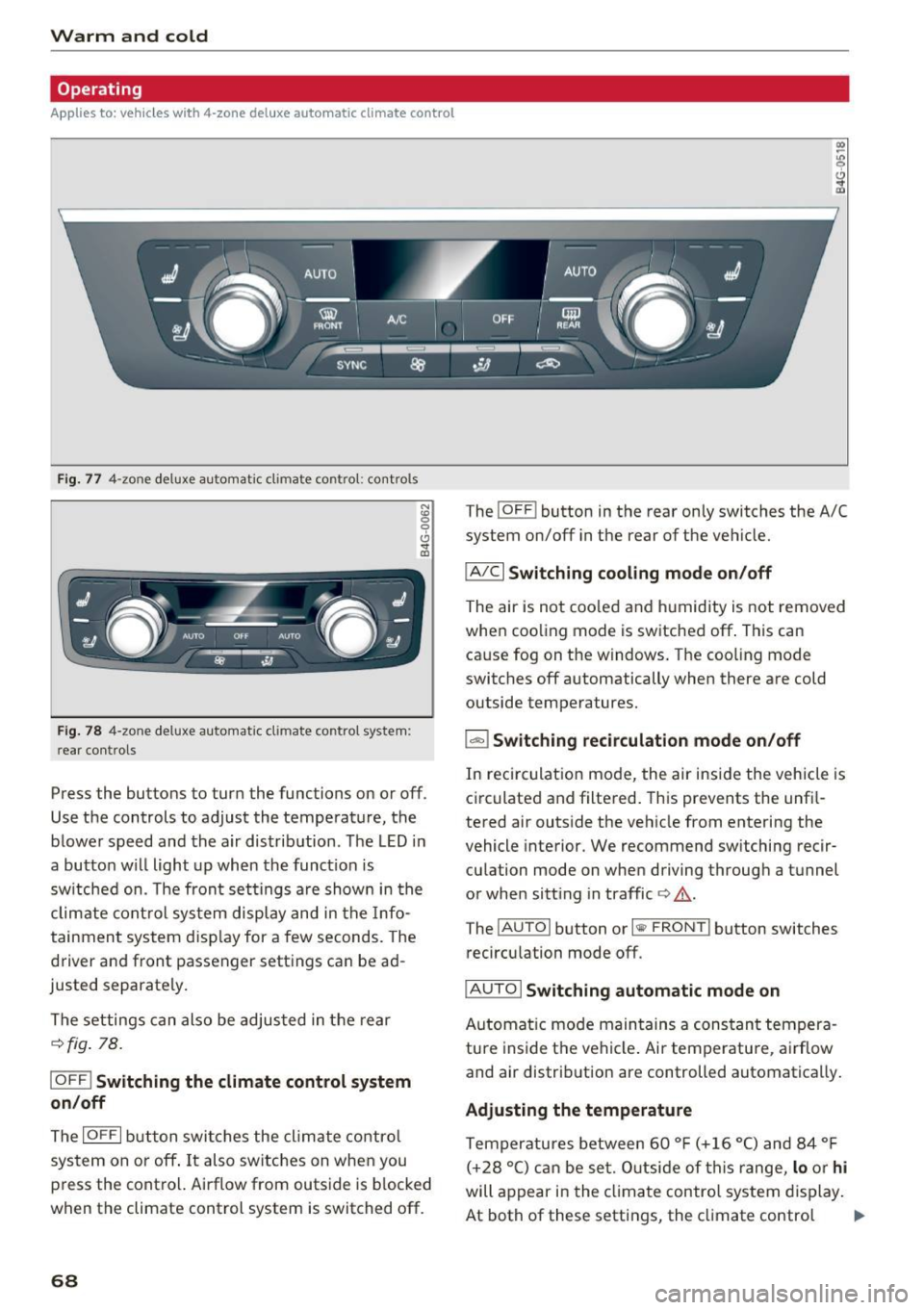
Fig . 77 4-zone deluxe a utomat ic climate contro l: cont rols
F ig. 78 4-zone deluxe automat ic climate contro l syste m:
rear controls
N :g
9 CJ
" lD
Press the buttons to turn the functions on or off.
Use the controls to adjust the temperature, the
b lower speed and the a ir distribution . The LED in
a butto n wi ll light up when the funct ion is
sw itched on. The front settings a re shown in the
clim ate cont rol sys tem display and in the Info
tainment system disp lay for a few seconds. The
driver and front passenger settings can be ad
justed separately.
The settings can also be adjus ted in the rear
¢fig . 78.
IOFF ! Switching the climate control syst em
on /off
The I OFF I b utton swi tc h es the clima te contro l
system on or off . It also switches on whe n you
p ress the control. Airflow from outside is b locked
when the climate control system is switched off.
68
The ! O FF ! button in the rear only switches the A/C
system on/off in the rear of the ve hicle.
IA/C l Switching cooling mode on /off
The air is not coo led and h umid ity is not removed
when coo ling mode is switched off . This can
cause fog on the windows. The coo ling mode
switches off automatically when there are cold outside temperatures.
l ""-'I Switching recirculation mode on /off
In recirculat ion mode, the air inside the vehicle is
c irculated and filtered. This prevents the unf il
tered air outs ide the ve hicle from entering the
vehicle interior. We recommend sw itching recir
cu lation mode on when driving throug h a tunnel
or when sitt ing in traffic ¢,&. .
The
! AUTOI button or l lllP FRONT ! button switches
recircu lation mode off.
IAUTO I Switching automatic mode on
Automat ic mo de main tains a constan t tempera
ture inside t he vehi cle. Ai r temperatu re, a irflow
and air distrib ution are controlled automatically.
Adjusting the temperature
Temperatures between 60 ° F (+ 16 °C) and 84 ° F
( + 28 °C) c an be se t. O utsi de of t his range,
lo o r hi
will appear in the cl imate control system display .
At both of these settings, the cl imate contro l
1111-
Page 71 of 282
system runs continuously at maximum cooling or
heating power. There is no temperature regula
tion.
Adjusting the blower~
You can adjust the volume of air generated by the
b lower to your preference. To have the blower
regulated automatica lly, press the
IAUTOI but
ton.
~ Adjusting air distribution
You can manually select the vents where the air
will flow. To have the air distribution reg ulated
automatically , press the
IAUTO ! button.
~ Adjusting seat heating*/seat ventilation*
Pressing the button switches the seat heating/
seat ventilat ion on at the highest setting (leve l
3). The LEDs indicate the temperature level. To
reduce the temperature, press the button again.
To switch the seat heating/seat ventilation off,
press the button repeated ly until the LED turns
off .
Afte r 10 minutes, the seat heating automatically
switches from level 3 to level 2.
I@ FRONT I Switching the defroster on/off
The windshield and s ide windows are defrosted
or cleared of condensation as qu ickly as possib le.
The maximum amount of air flows mainly from
the vents below the windshield. Recirculation
mode switches off. The temperature shou ld be
set to approximate ly 22
°C.
The IAU TOI button switches the defroster off.
IQiD REARI Switching the rear window defogger
on/off
The rear window heate r o nl y operates when the
engine is running.
It switches off automatical ly
after a few minutes, depending on the outs ide
temperature.
To prevent the rear w indow heater from switch
in g off automatically , press and hold the
IQiil REAR I
button for more than 2 seconds. This is stored
until the ignition is switched off.
Warm and cold
I SYNC ! Synchronization
When synchronization is switched on, the set
tings for the driver's s ide are applied to the front
passenger's side (except for seat heating/ventila
tion *). The settings in the rear are also synchron
ized. Synchronization switches off if the settings
are adjusted on the front passenger's side or in
the rear.
You can synchronize the settings in a row by
pressing and holding a control. For example, to
apply the settings for the front passenger's side
to the driver's side, press and hold the control on
the front passenger's s ide. The same applies to
the rear.
Residual heat*
With the ign ition turned off, you can activate the
residual heat function by pressing the~ button
<=> fig. 77. The residual heat from the coolant is
used to heat the veh icle inter ior. The residual
heat function sw itches off automat ica lly after
about 30 minutes.
Air vents
You can open or close the center and rear vents in
the cockpit and the
vents in the rear center con
sole and door pillars using the ridged thumb
whee ls. The levers adjust the direction of the air
flow from the vents.
_&. WARNING
-You should not use the recirculation mode
for an extended period since no fresh air is
drawn in. With the air-conditioning switch
ed off, the windows can fog up, which in
creases the risk of an accident.
- Individuals with reduced sensitivity to pain
or temperature could develop burns when
using the seat heat ing funct ion. To reduce
the risk of injury, these individuals should
not use seat heating .
(D Note
To avoid damage to the heating elements in
the seats, do not kneel on the seats or place
heavy pressure on one point of the seat.
69
Page 76 of 282
Driving
This message appea rs and a warning tone sounds
if you open the driver's door when the ignition is
sw itched on.
Pr es s brake pedal to start engine
This message appears if you do not press the
brake pedal whe n starting the eng ine.
fll I s key in the veh icle?
This indicator light turns on and th is message ap
pears if the ignition key was removed from the
ve hicle when the engine was running . If the igni
tion key is no longer in the veh icle, you can not
sw itch on the ig nit ion or start t he eng ine once
you stop i t. You also cannot loc k the vehicle from
the o utside.
Shift to P , otherwise vehicle can roll away .
Doors do not lock if lever i s not
in P.
This message appears for safety reasons if the
transmission is not in the P position when you
sw itch the ignition off . Move the selector lever to
the P pos ition. Otherwise the veh icle is not pro
tected from rolling and it ca nnot be locked .
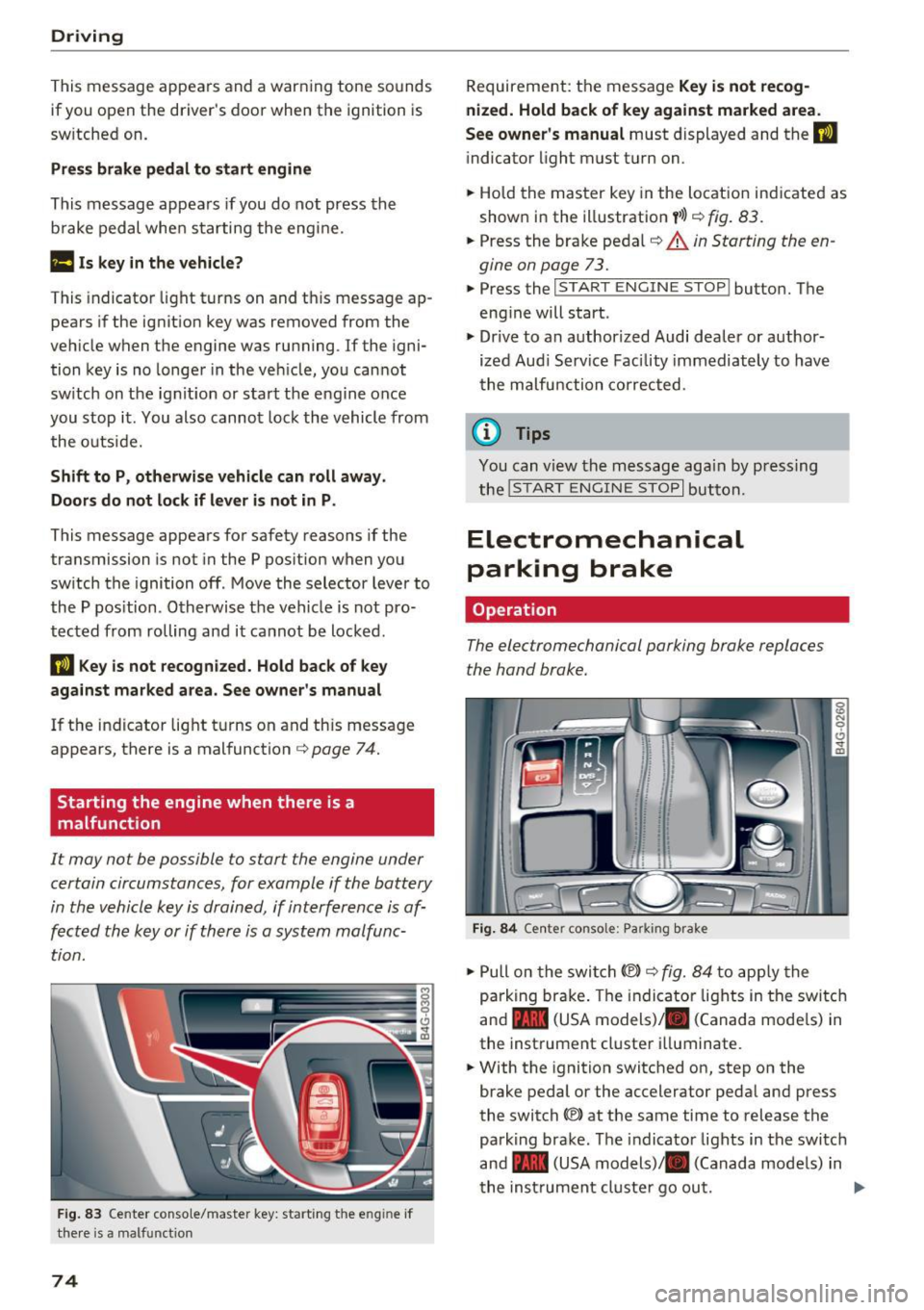
II Key is not recogn ized. Hold back of key
against marked area. Se e owner's manual
If the indicator light t urns on and th is message
appears, there is a malfunction
c:;, page 74.
Starting the engine when there is a
malfunction
It may not be possible to s tart the engine under
certain circumstances, for example if the battery
in the vehicle key is drained, if interference is af
fected the key or if there is a system malfunc tion.
F ig. 83 Center conso le/ ma ster key: sta rt in g t he e ng in e if
t h e re is a ma lfunction
74
Requirement : the messa ge Key i s not recog
nized. Hold back of key against marked area .
See owner's manual
must displayed and the II
indicator light must tu rn on .
.,. Ho ld the m aster key in the locat ion ind icated as
shown in the illustration
f >l) c:;, fig . 83.
.,. Press the brake pe dal c:;, &. in Starting the en
gine on page 73 .
.,. Press the ~ I S _T _A _ R_ T_ E_N _G _I _N _E _ S_ T_ O_ P~ I button. The
eng ine will start .
.,. Dr ive to an author ized Audi dealer or author
ized Aud i Serv ice Facility immediately to have
t he malfu nction corrected.
@ Tips
You can v iew the message aga in by pressing
the
! S TA RT ENGI NE S TOP I button.
Electromechanical
parking brake
Operation
The elec tromechanical parking broke replaces
the hand broke.
Fig. 84 Ce nte r conso le: Pa rk ing brake
.,. Pull on the swi tch@) c:;, fig. 84 to app ly the
parking br ake. T he indicator lights in the switc h
and - (USA models)/ . (Canada mode ls) in
the inst rument cluste r ill uminate .
.,. With the ignition switched on, step on the
brake pedal or the accelerator pedal and press
the switch ®lat the same time to release the
park ing brake. The indicator lights in the switc h
and - (USA models)/ . (Canada mode ls) in
t he inst rument cl uste r go ou t.
Page 78 of 282
Driving
back. The braking force of the parking brake is
only released if sufficient drive power has been built up at the wheels.
(D Tips
For safety reasons, the parking brake is only
released automatically when the driver's safe
ty belt is buckled.
Emergency braking function
This is used if the conventional brake system
fails or locks up.
... To brake your vehicle in an emergency , pull the
~ switch and hold it pulled .
... As soon as you release the~ switch or acceler-
ate, the braking stops.
If you pull the switch(®) and hold it above a
speed of about 5 mph (8 km/h), the emergency
braking function is initiated. The vehicle is braked
at all four wheels by activating the hydraulic brake system. The brake performance is similar
to making an emergency stop¢.&..
In order not to activate the emergency braking by
mistake, an audible warning tone (buzzer)
sounds when the~ switch is pulled. As soon as
the ~ switch is released, or the accelerator pedal
is depressed, emergency braking stops .
A WARNING
Emergency braking should only be used in an
emergency, when the normal brake pedal has
failed or the brake pedal is obstructed. Using
the parking brake for emergency braking will
slow your vehicle down as if you had made a
full braking maneuver. ESC and the associat
ed components (ABS, ASR, EDL) cannot over
come the laws of physics. In corners and
when road or weather conditions are bad, a
full brake application can cause the vehicle to
skid or the rear end to break away, which in
creases the risk of an accident.
76
Speed warning system
' Introduction
The speed warning system helps you to stay un
der a specified maximum speed .
The speed warning system warns you if you are
exceeding the maximum speed that you have set.
You will hear a warning tone when your speed ex ceeds the stored value by approximately 3 mph
(3 km/h) . An indicator light. (USA models)/.
(Canada models) in the instrument cluster dis
play also turns on at the same time. The indicator
light./. turns off when the speed decreases
below the stored maximum speed.
Setting a threshold is recommended if you would
like to be reminded when you reach a certain
maximum speed. Situations where you may want
to do so include driving in a country with a gener
al speed limit or if there is a specified maximum
speed for winter tires.
(D Tips
Even though your vehicle is equipped with a
speed warning system, you should still watch
the speedometer to make sure you are not
driving faster than the speed limit.
' Setting the threshold
You can set, change and delete the warning
threshold in the Infotainment system.
... Select: the I CARI function button > (Car)* Sys
tems
control button > Driver assistance >
Speed warning .
You can set any threshold between 20 mph
(30 km/h) and 150 mph (240 km/h). Settings
can each be adjusted in increments of 5 mph (10
km/h).
Page 86 of 282
Audi adapt ive crui se con trol a nd b rakin g guar d
The higher the speed, the greater the distance in
yards (meters)
c::;, .&. . The Distanc e 3 setting is
recommended .
The distances provided are specified values. De
pending on the driving situat ion and the how the
vehicle ahead is driving, the actual distance may
be more or less than these target d istances.
The various symbols for the time increments ap
pear briefly in the information line@q
page 81,
fig. 91
when you change the settings.
c:::, _c:::, __ _ Dist ance 1 : This setting co rresponds
to a distance of 92 feet/28 meters when travel ing at 62 mph (100 km/h), or a time interval of 1
second.
c:::, __ c:::, __ Dista nc e 2 : This setting corresponds
to a distance of 118 feet/36 mete rs when trave l
ing at 62 mph (100 km/h), or a time interval of
1.3 seconds .
c:::, ___ c:::,_ Distance 3: This setting corresponds
to a distance of 164 feet/SO mete rs when trave l
ing at 62 mph (100 km/h), or a time interval of
1.8 seconds .
c:::, __ __ c:::, Distance 4 : This setting corresponds
to a distance of 210 feet/64 mete rs when trave l
ing at 62 mph (100 km/h), or a time interval of
2.3 seconds .
A WARNING
Following other vehicles too closely increases
the risk of collisions and ser ious personal in
jury.
- Setting short distances to the traffic ahead
reduces the time and distance available to
br ing your vehicle to a safe stop and makes
it eve n mo re necessary to pay close atten
tion to traffic .
- Always obey applicable traffic laws, use
good judgme nt, and select a safe following
distance for the traffic, road and weathe r
condit ions.
(0 Tips
- Distanc e 3 is set automatically each time
you switch the ignit ion on .
84
- Your standard settings are automatically
stored and assigned to the remote control
key being used.
Selecting the driving mode
App lies to: vehicles with Aud i adapt ive cru ise control
.,. Select the desired driving mode in drive select
c::;,page95.
@ Tips
Your settings are automatically stored and as
signed to the remote contro l key being used.
Prompt for driver intervention
App lies to : vehicles with A udi ada ptive c ruise control
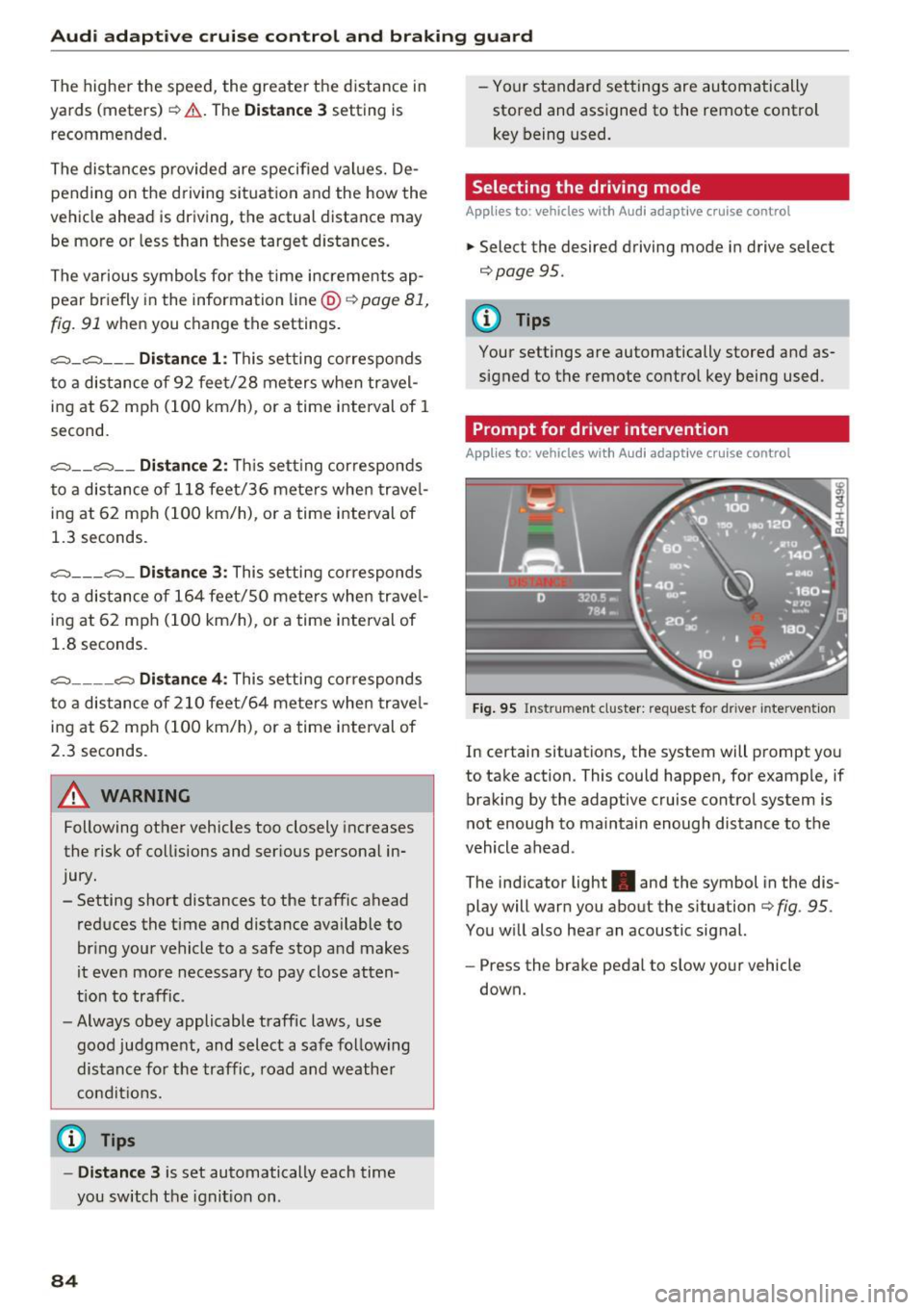
Fig . 95 Ins trume nt cluster: request for d river intervention
In c ertain situations, the system w ill prompt you
to take action. This could happen, for example, if
braking by the adaptive cruise control system is
not enough to maintain enough distance to the
vehicle ahead .
The ind icator light . and the symbol in the dis
play will warn you about the s ituation
c::;, fig . 95 .
You w ill also hear an acoustic signal.
- Press the brake pedal to slow your vehicle
down.
Page 97 of 282
Audi drive select Drive settings
Introduction
Drive select makes it possible to experience dif
ferent types of vehicle settings in one vehicle.
The driver can select
Comfort, Auto and Dynami c
modes in the Infotainment system to switch, for
examp le, between a sporty and a comfortab le
driving mode. In the
Individual mode, the set
tings can be adjusted to your personal preferen
ces. This makes it possible to combine settings
such as a sporty engine with smooth steering.
_& WARNING
-
Improper use of the Audi dr ive select can
cause collisions, other accidents and serious
personal inju ry.
Description
The follow ing systems are affected by drive se
lect:
Engine and transmission
Depending on the mode, the eng ine and the
transmission respond quicker or in a more bal
anced manner to accelerator pedal movements.
I n the sporty dynamic mode, the transmission
shifts at higher RPMs.
Air suspension*
The adaptive air suspension/adaptive air suspen
sion sport*
(A ir suspension in the MMI) is an
e lectronically controlled air suspension and
damping system. They are adjusted depending
on the se lected dr iv ing mode, the driver's steer
ing, braking and acceleration input and the road
surface, vehicle speed and load. A sporty setting
is generally used in vehicles with adaptive air sus
pension sport*.
The vehicle clearance varies depending on these lected mode and the speed.
The highway setting is activated automatically
when yo u drive above 75 mph (120 km/h) for
more than 30 seconds in the
Auto or Dynamic
Audi drive select
mode. The ground clearance is increased auto
matically if the speed drops be low 44 mph (70
km/h) for more than 120 seconds.
Steering
T he steering adapts in terms of steer ing effort
and steering ratios. Indirect stee ring that moves
easily, like the steering in com fort mode, is best
suited to long drives on a highway. In contrast,
dynamic mode provides sporty, direct steering.
T he following applies to vehicles with dynamic
steering*: the steering ratio changes based on
vehicle speed in order to maintain optimum
steering effort for the driver at all times . This
sets the steering to be less sensitive at higher
speeds in order to provide improved vehicle con
trol. At reduced speeds, however, steering is
more direct in order to keep the steering effort as
min imal as possible when the dr iver is maneuver
ing the vehicle. At low and average speeds, dy
nam ic steering additionally provides more re
sponsive stee ring performance.
Adaptive dampers*
The adapt ive dampers* use sensors to record in
format ion regard ing stee ring movements, brak
ing and accele ration operations by the driver,
road surface, driving speed, and load . This makes
it possible to adapt damping to the driving situa
tion virtua lly in real time. Drive select also makes
it possible to satisfy the desire for sporty suspen
s ion (Dynamic) and comfortable suspension
(Comfort) without giving up balanced tuning (Au
to) .
Sport differential*
As a component of the all whee l drive system
(quattro)
c::> page 184, the Sport differentia l*
distributes the driving power to the rear axle de
pending on the situation. The distribution of
power varies depending on the selected mode,
from balanced (comfort) to ag ile (dynamic) . The
goal is a high level of agility and ability to accel
erate on curves. The vehicle is very responsive to
steering.
95
Page 103 of 282
Automatic transmission tiptronic
Introduction
The automat ic transmission is controlled e lec
tron ically. The transmission upshifts or down
shifts automatically depending on wh ich drive
p rogram is selected.
When a
moderate driving style is used , the
transmission selects the most economical driving
mode.
It will then change up early and delay the
downshifts to give bette r fu el economy .
The transm iss ion switches to a sporty mode after
a kick-down or when the driver uses a
sporty
driving style
character ized by quick accelerator
pedal movements, heavy acceleration, frequent
changes in speed and traveling at the maximum
speed.
If desired, the dr iver can also select the gears
manually (tiptronic mode) ¢page 105.
In the tiptron ic transmission, power is transfer
red by a torque converte r.
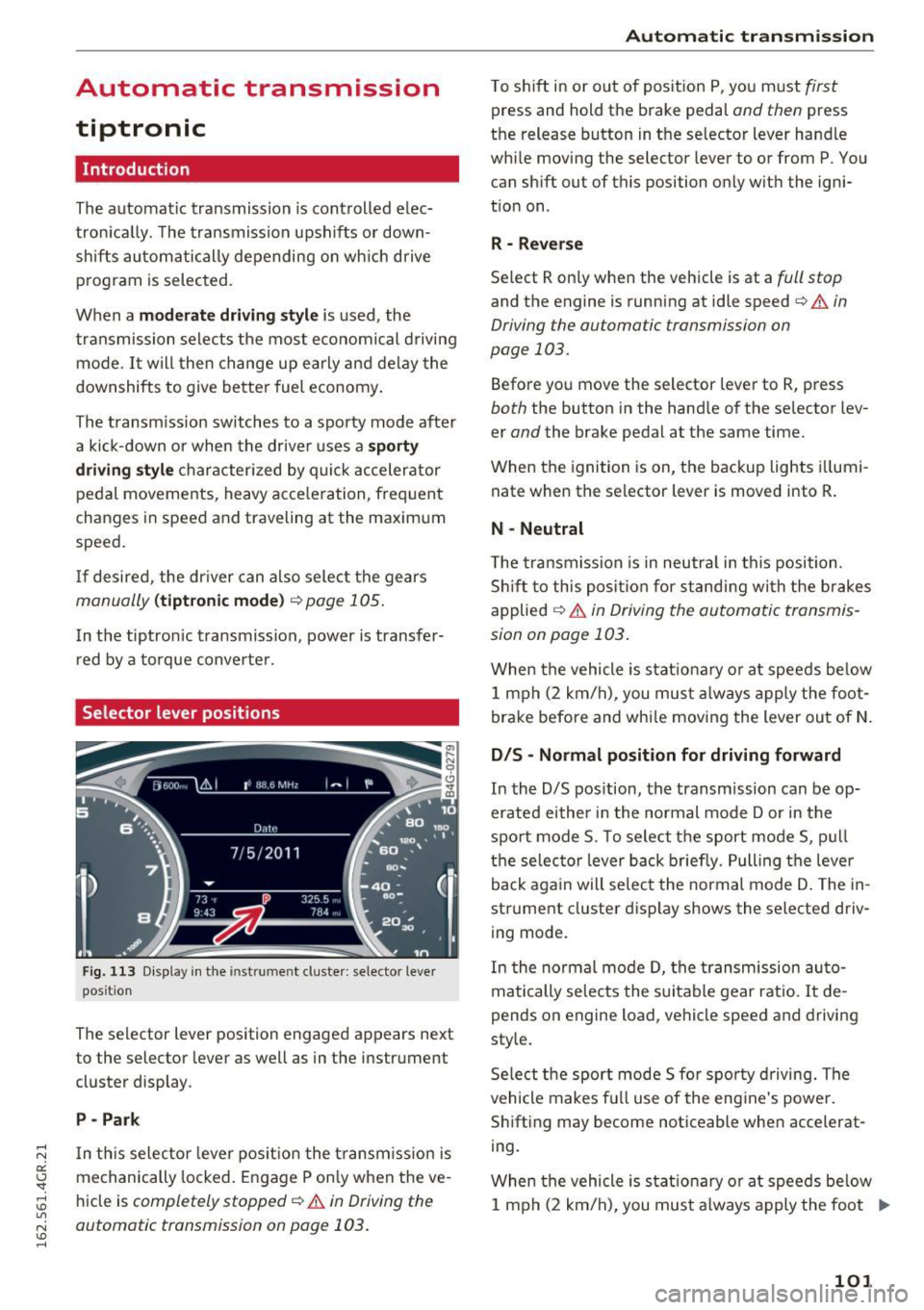
Selector lever positions
Fig. 113 Display in the instrument cluster : selector lever
position
The selector lever position engaged appears next
to the selector lever as well as in the instrument
cluster display .
P -Park
In th is selector lever pos ition the transm iss ion is
mechanically locked . Engage P only when the ve
hicle is
completely stopped¢.&. in Driving the
automatic transmission on page 103.
Automatic transmission
T o shift in or out of position P, you must first
press and hold the brake pedal and then press
the release button in the selector lever handle
while moving the selector lever to or from P . You
can shift out of this position only with the igni
tion on .
R - Reverse
Select R only when the vehicle is at a full stop
and the engine is running at idle speed¢ & in
Driving the automatic transmission on
page 103.
Before you move the selector lever to R, press
both the button in the hand le of the selector lev
er
and the brake pedal at the same time.
When the ignition is on, the backup lights illumi
nate when the selector lever is moved into R .
N -Neutral
The transmission is in neutra l in this position .
Shift to this position for standing with the brakes
applied
¢ & in Driving the automatic transmis
sion on page 103 .
When the vehicle is stat ionary or at speeds be low
1 mph (2 km/h) , you must always apply the foot
brake before and whi le moving the lever out of N.
DIS -Normal position for driving forward
In the D/S position, the transmission can be op
erated either in the normal mode Dor in the
sport mode S. To select the sport mode S, pull
the selec tor lever back briefly. Pulling the leve r
back again will select the normal mode D . The in
strument cluster display shows the selected driv
ing mode.
In the normal mode D, the transmission auto
matically selects the suitable gear ratio. It de
pends on engine load, vehicle speed and drivin g
style.
Select the sport mode S fo r spo rty driving. The
vehicle makes full use of the engine 's powe r.
Shifting may become noticeable when accelerat
ing.
When the vehicle is stat ionary or at speeds below
1 mph (2 km/h), you must always apply the foot ..,.
101
Page 104 of 282
Automatic transmission
brake before and while moving the lever to D/S
out of N.
A WARNING
Read and follow all WARNINGS r=':> & in Driv
ing the automatic transmission on
page 103.
(D Note
Coasting downhill with the transmission in N
and the engine not running will result in dam
age to the automatic transmission and possi
bly the catalytic converter.
{!) Tips
- Audi drive select: you can adjust the sporty
shift characteristics in the
Dynamic driv ing
mode .Swill appear in the instrument clus
ter display instead of D .
- If you accidentally select
N while driving,
take your foot off the accelerator pedal im
mediately and wa it for the engine to slow
down to idle before selecting D/S .
- If there is a power failure, the selector lever
will not move out of the P posit ion . The
emergency release can be used if this hap
pens
r=':> poge 106.
Automatic Shift Lock (ASL)
.
The Automatic Shift Lock safeguards you against
occidentally shifting into o forward or the re
verse gear and causing the vehicle to move unin
tentionally.
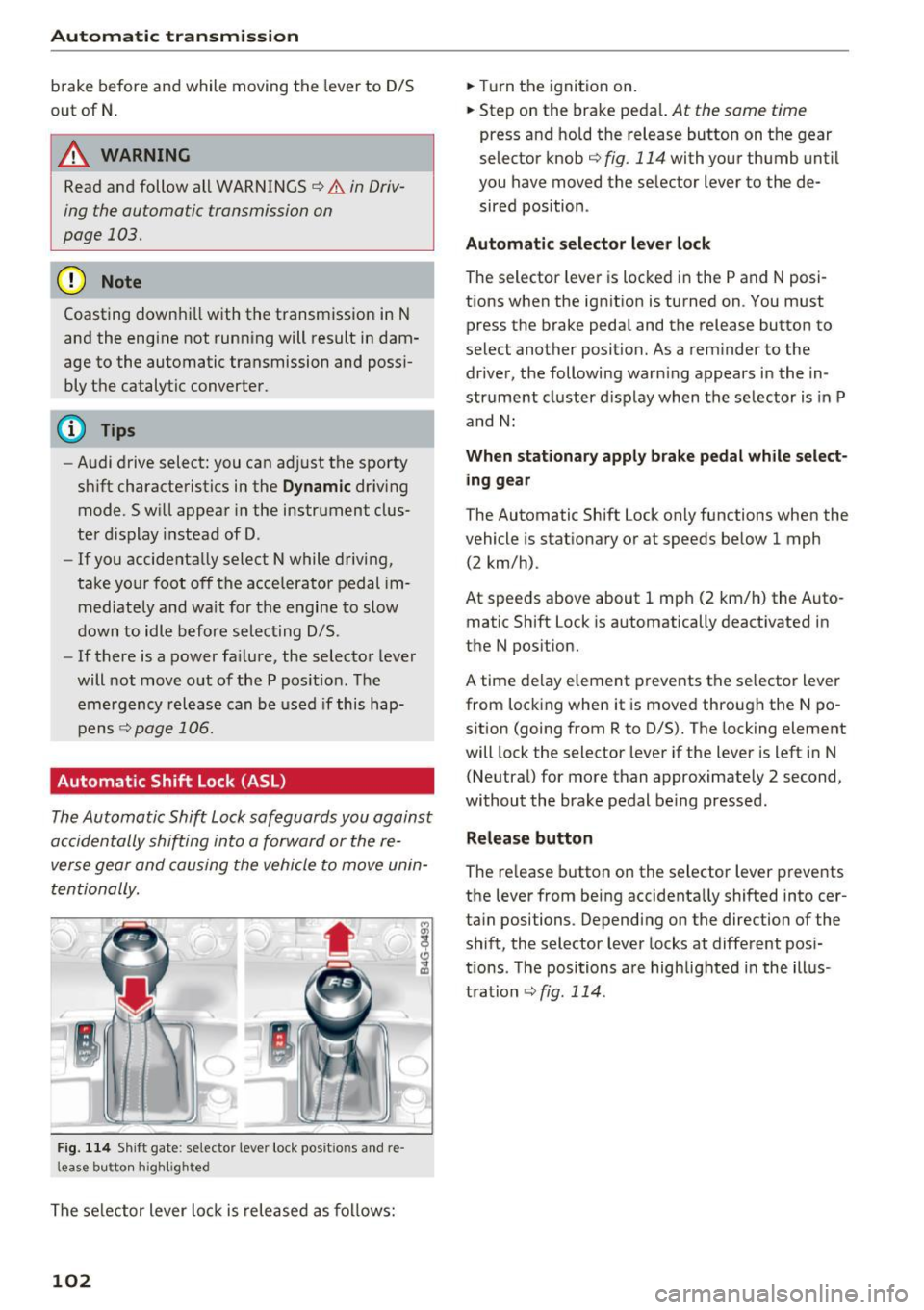
F ig. 114 Shift gate : selecto r lever lock posit io ns and re
l ease bu tton high light ed
The selector lever lock is released as follows:
102
.,. Turn the ignition on .
.,. Step on the brake pedal.
At the some t ime
press and hold the release button on the gear
selector knob
c::> fig. 114 with your thumb until
you have moved the selector lever to the de sired position .
Automatic selector lever lock
The sel ector lever is locked in the P and N posi
tions when the ignition is turned on . You must
press the br ake pedal and the release button to
select another position. As a reminder to the driver, the following warn ing appears in the in
strument cluster display when the selector is in P
and N:
When stationary apply brake pedal while select
ing gear
The Automatic Shift Lock only functions when the
vehicle is sta tionary or at speeds below 1 mph
(2 km/h) .
At speeds above about 1 mph (2 km/h) the Auto
matic Shift Lock is automatically deactivated in
the N position.
A t ime delay element prevents the selector lever
from locking when it is moved through the N po
sition (going from R to D/S). The locking element
will lock the selector lever if the lever is left in N
(Neutral) for more than approximately 2 second,
without the brake pedal being pressed .
Release button
The release button on the selector lever prevents
the lever from being accidentally shifted into cer
tain positions . Depending on the direction of the
shift, the selector lever locks at different posi
tions . The positions are highlighted in the illus
tration
<=:> fig . 114.
Page 148 of 282
Airbag syste m
A WARNING
Objects between you and the airbag will in
cr ease the risk of inju ry in a cras h by interfer
ing w ith the way the airbag unfol ds or by be
ing pushed into you as the a irbag inflates.
- Never hold th ings in your hands or on your
lap when the vehicle is in use.
- Never transport items on or in the area of
the front passenger seat . Objects could
move into the area of the front airbags du r
ing bra king or other sudden maneuve rs and
become dangerous projectiles that can
ca use serious pe rsonal injury if the a irbags
inflate.
- Never pl ace or attach accessor ies or o ther
objects (such as cup ho lders, te lephone
brackets, large, heavy o r bulky objects) on
the doors, over or near the area marked "AIRBAG" on the steering wheel, instru
ment pane l, seat backrests or between
those areas and yourself. These objects
could cause injury in a crash, especially
when the airbags inflate.
- Never recline the front passenger's seat to transport objec ts. Items can also move into
t h e a rea of the side airbag o r the front a ir
bag during braking or in a s udden maneu
ver. Objects near the airbags can become
projectiles and cause in ju ry, particularly
when the seat is reclined.
- Never pl ace or transport o bje cts on the
front passenge r seat . Objects on the front
passenge r seat co uld cause the capac itive
sensor in the seat to signal to airbag system
that the seat is occupied by a person when it
in fact is not, or that the person on the seat
is heavier than he or she actually is. The
change in elect ric capac itance because of
s u ch objects can cause the passenger front
airbag to be turned on when it shou ld be
off, or ca n cause the a irbag to wo rk i n a way
that is diffe rent from the way it would have
wor ked witho ut objects on the seat.
- Alway s m ake sure th at the re is nothing on
t h e fron t passenger seat that w ill cause the
capacit ive passenger detection system in
the seat to signa l to the Airbag System that
146
the seat is occup ied by a person when it is
not, or to signal that it is occupied by some
one who is heavier than the person actually
sitt ing on the seat . The presence of an ob
ject could ca use the passenger front airbag
to be turned on when it should be off, or
could cause the airbag to work in a way that is diffe rent from the w ay it would have
wo rked withou t the object on the seat.
A WARNING
-
The fine dus t created when airbags deploy c an
cause breathing prob lems for peo ple with a
h istory of asthma or othe r breath ing cond i
tions.
- To reduce the r is k of breathing p roblems,
those with asthma o r other respiratory con
ditions shou ld get fresh a ir right away by
getting out of the vehicle or opening win
dows or doors .
- If you are in a co llision in which airbags de
ploy, wash yo ur hands and face with m ild
soap and water before eating.
- Be ca refu l not to get the dust into your eyes,
or into any cuts or scratches.
- If the residue sho uld get into your eyes,
flush them w ith wate r.
Monitoring the
Advanced Airbag System
t~ (USA models) !!I: (Canada models)
Airbag monitoring indicator light
Two separate indicators monitor the function of
the Advanced Airbag System: the airbag moni
toring indicator light and the
PASSENGER AIR
BAG OFF
light.
The Advanced A irbag System as well as t he side
airbags and side curta in airbags w ith ejection
mitigation features (including the electronic con
tro l unit, senso rs and system w iring) are all
monito red cont inuo usly to make sure that they
a re functioning properly whenever the ignition is
o n. Every time you tu rn o n the ign ition, the air
bag sys tem indi cato r li ght
II (USA models) a
(Canada mode ls) will come on for a few seconds
(function check). .,.
Page 149 of 282
The system must be inspected when the indicato r light
II (USA models ) !E,I
( Canada models):
- does not come on when the ignitio n is switched
on,
- does not go out a few seconds after you have
switched on the ign ition, or
- comes on while driving.
I f an airbag system malf unct io n is de tected, the
indicator light wi ll first start flashing to catch the
driver's attention and then stay on co nti nuo usly
to se rve as a constant reminder to have the sys
tem i nspected immed iate ly.
If a malfunction occ urs that turns the front air
bag on the passenger si de
off, the PASSENGER
AIR BAG OFF
light will come on and stay on
whenever the ignit io n is on.
A WARNING
An airbag system that is not funct io ning prop
erly cannot provide supp lemen tal p rotec tion
in a front al c rash .
- If the air bag indicato r ligh t
c:;, page 17
come s whe n the vehicle is be ing use d, have
th e sys te m in sp ecte d im med iate ly by yo ur
au thoriz ed Au di deale r.
It is po ss ible that
th e air bag wi ll inf late w hen it is not sup
posed to, or will not i nfla te w hen it s hou ld .
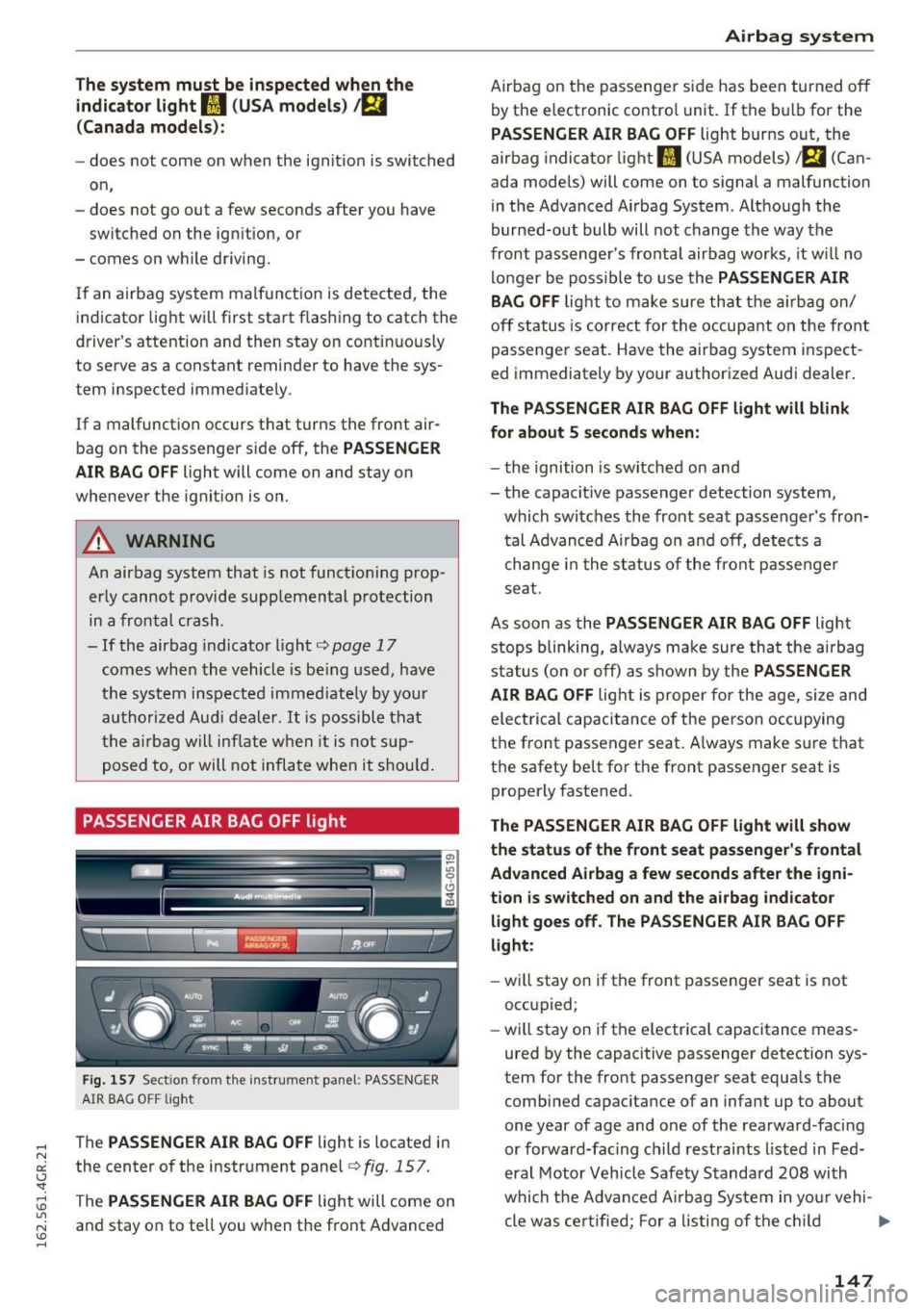
PASSENGER AIR BAG OFF light
Fi g. 157 Sect ion from t he inst rum ent pa ne l: PASSENGER
AIR BAG OFF lig ht
The PASSENGER AIR BAG OFF light is located i n
the center o f the instr ument panel
c:;, fig . 157.
The PASSENGER AIR BAG OFF light will come on
and stay on to te ll you when the front Advanced
Airbag system
Airba g on the pas senge r si de has been turned o ff
by the electronic contro l unit. If t he bulb for the
PASSENGER AIR BAG OFF light burns out, the
airbag indicato r light
II (US A models) a (Can
ada models) will come on to signal a malfunction
i n the Advanced Airbag System . Alt hough the
bur ned-out bulb will not change the way the
front passenge r's fronta l airbag work s, it w ill no
lo nger be poss ible to use the
PASSENGER AIR
BAG OFF
lig ht to ma ke sure th at th e air bag on/
of f st atus is corre ct for the occup ant on the fron t
p assenge r seat. Have the air bag system i nsp ect
ed immediately by your author ized Audi dealer.
The PASSENGER AIR BAG OFF light will blink
for about 5 seconds when:
- th e ignition is switche d on an d
- the capacit ive passenger detection system,
which switc hes the front sea t passe nger' s fron
t al A dva nced Airbag o n an d off, de tec ts a
ch ange in the st atu s of the fr ont passe nger
se at.
As soon as the
PASSENGER AIR BAG OFF light
s top s blinking , always m ake sure th at the air bag
s tatu s (o n or off) as shown by the
PASSENGER
AIR BAG OFF
lig ht is pr oper for the age, siz e and
ele ctrica l capaci tance o f the pe rso n occu pying
t h e front passenger seat. A lwa ys make s ure t hat
t h e safety be lt fo r th e front passen ger seat is
prope rly faste ned .
The PASSENGER AIR BAG OFF light will show
the status of the front seat passenger 's frontal
Advanced Airbag a few seconds after the igni·
tion is switched on and the airbag indicator light goes off. The PASSENGER AIR BAG OFF
light:
- will stay on if t he front passenger seat is not
occ upied;
- wi ll stay on if t he e lectrica l capacitance meas
ured by the capacitive passenger detection sys
tem for the front passenger seat equa ls the
combined ca pac ita nce of an infa nt up to ab out
one year of age and one of the rearwa rd -facing
or fo rwar d-fac ing ch ild rest raints l isted in Fe d
e ral Motor V ehicl e Safe ty S tandard 20 8 wi th
whi ch th e A dvanc ed Airbag Sys tem i n yo ur vehi-
cle w as ce rtifie d; For a listin g of t he c hild .,.
147