service indicator AUDI RS7 SPORTBACK 2016 User Guide
[x] Cancel search | Manufacturer: AUDI, Model Year: 2016, Model line: RS7 SPORTBACK, Model: AUDI RS7 SPORTBACK 2016Pages: 282, PDF Size: 70.78 MB
Page 186 of 282
Intelligent Technology
-Driving for an extended period of time on
salt-covered roads without using your
brakes can also affect braking efficiency .
Clean off accumulated salt coating from
brake discs and pads with a few careful
brake applications .
- If you damage the front spoiler, or if you in stall a different spoiler, be sure the air flow
to the front brakes is not obstructed. Other
wise the brake system could overheat reduc
ing the effectiveness of the entire brake sys
tem.
- Failure of one brake circuit will impair the
braking capability resulting in an increased
stopping distance. Avoid driving the vehicle
and have it towed to the nearest Audi dealer
or qualified workshop.
- Never let the vehicle roll to a stop with the
engine shut off.
- If the brake booster is not working, the
brake pedal must be pressed considerably
harder to make up for the lack of booster
assistance.
Electromechanical
steering, dynamic
steering
The electromechanical steering supports the
driver's steering movements.
Power steering adapts electronically based on
the vehicle speed .
Indicator lights and messages
• Do not drive vehicle: Steering defective
If this indicator light turns on and stays on and
this message appears, the power steering may
have failed .
Stop the vehicle in a safe location as soon as pos
sible. Do
not continue driving. See an authori zed
Audi dealer or authorized Audi Service Facility for
assistance.
'Jij Steering: System fault You can continue
driving
184
If the indicator light turns on and the message
appears, the steering may be more difficult to move or more sensitive than usual. The steering
wheel may also be at an angle when driving
straight.
Drive slowly to your authorized Audi dealer or au
thorized Audi Service Facility to have the mal
function corrected.
':r-ij Dynamic steering: Initializing
If the indicator l ight is blinking and this message
appears, dynamic steering* is being initialized.
The steering wheel will be easy to move after
starting the engine. Re-initialization might be
necessary if the steering wheel was moved hard
to the left and right while the veh icle was not
moving. The display turns off if the initialization
was successful.
(D Tips
- If the . or ':r-ij indicator light only stays on
for a short time, you may continue driving.
- The dynamic steering stability systems
opage 180 are not availab le in the event of
a system malfunction.
- For additional information on dynamic
steering, refer to
c> page 95.
All wheel drive (quattro)
Applies to: vehicles with all wheel drive
In all wheel drive, all four wheels are powered.
General information
In all wheel drive, the driving power is divided be
tween all four wheels. This happens automatical
ly depending on your driving behavior as well as
the current road conditions. Refer to
c> page 180,
Electronic Stabilization Control (£SC).
A center differential distributes the driving power
variably to the front and rear axle. It works to
gether with selective wheel torque control, which
activates when driving through curves
<=> page 181 . With the sport differential*, power
distribution to the rear wheels is variable and can
be adjusted with drive select
q page 95 . .,..
Page 208 of 282
Check ing and F illing
Using the proper engine oil is impo rtant for the
functionality and service life of the engine. Your engine was facto ry-filled with a h igh-quality oi l
which can usually be used throughout the entire
year.
@) Note
Your Limited New Vehicle War ranty does not
cover damage or malfunctions due to failure
to follow recommended maintenance and use
requirements as set forth in the Audi Owner's
Manual and Warran ty
& Maintenance booklet.
- Use only a high quality eng ine oil t hat ex-
p ressly complies with the Audi oil qua lity
standard specified for your vehicle's engine .
Using a ny o ther oil can cause serious engine
d am age.
- D o not mix any lubricants o r other addit ives
i nto the engine oil. Doing so ca n cause en
g ine damage.
(D Tips
I f you need to add oil and there is none availa
ble t hat meets the Audi o il quality standard
your eng ine requi res , you m ay ad d a tot al of
no more than 0.5 qu art /li ter o f a h igh-quality
"synthe tic"oil that meets t he following speci
fications.
- AC EA A3 o r API SM wi th a viscosity grade o f
SAE 0W-30, SAE SW-30 or SAE SW-40.
- F or more inform ation about engine o il that
has been approve d for your ve hicl e, please
contact eithe r you r a uthorized Audi dea le r
or A udi C ustome r Relat ions at
1 (800) 822-2834 or visit o ur web site at
www.audiusa.com or www.aud icanada.ca.
Engine oil consumption
T he engine in your vehicle depends on an ade
quate amoun t of oil to lubricate and cool all of
its moving par ts.
In order to p rovide effective lubr ication and cool
ing of internal engine components, all interna l
combustion engines consume a cer tain amount
of oil. Oi l co nsumption varies from engine to en
g ine and may change significant ly over the life of
the eng ine . Typically, eng ines with a specified
206
b reak -in period (see q page 188) consume more
oi l during the break-in period than they consume
after o il consumption has stab ilized.
U nder normal cond itions, the ra te of oil con
s u mption depends on the q ua lity and viscos ity o f
the oil , the RPM (revo lutions per minute) at
which the engine is operated, the amb ient tem
perature and road condit ions. Further facto rs a re
the amount of o il di lution from wate r condensa
tion or fue l resid ue a nd the oxidation level of the
o il. As any engine is subject to wear as mileage
builds up, the o il consumption may increase ove r
ti me until replacement o f wo rn components may
become ne cessary.
With a ll these va riables coming into p lay, no
standard rate of o il consumption can be estab
li sh ed or spec ified . T he re is no alte rnative to reg
u lar and freq uen t che cki ng of the oil level , see
Note .
If the yellow engine oil level warning symbo l in
the instr ument cluster
II lights up, yo u should
c h eck t he o il level as soon as poss ible
q page 207 . Top off the o il at your earlies t con
venience
q page 207.
_& WARNING
Before you check a nyt hing in the en gine com
partment, always read and heed all WARN
INGS
9 .&. in Working in the engine compart
ment on page 203.
((I) Note
D riving w it h an insuffic ient oil level is li ke ly to
cause severe damage to the engine.
(D Tips
- The oil pressure warning d isplay. is not
an indicator of the oil level. Do not rely on
it. Instead, check the oil level in your en
g ine at regular intervals, preferably each
time you refuel, and always befo re going
on a long trip .
-If you have the impress ion your engine con
sumes excessive amou nts of oil, we recom
mend that yo u consult your Aud i dea le r to
have the cause of yo ur conce rn prope rly .,.
Page 209 of 282
diagnosed. Keep in mind that the accurate
measurement of oil consumption requires
great care and may take some time. Your
Audi dealer has instructions about how to measure oil consumption accurately.
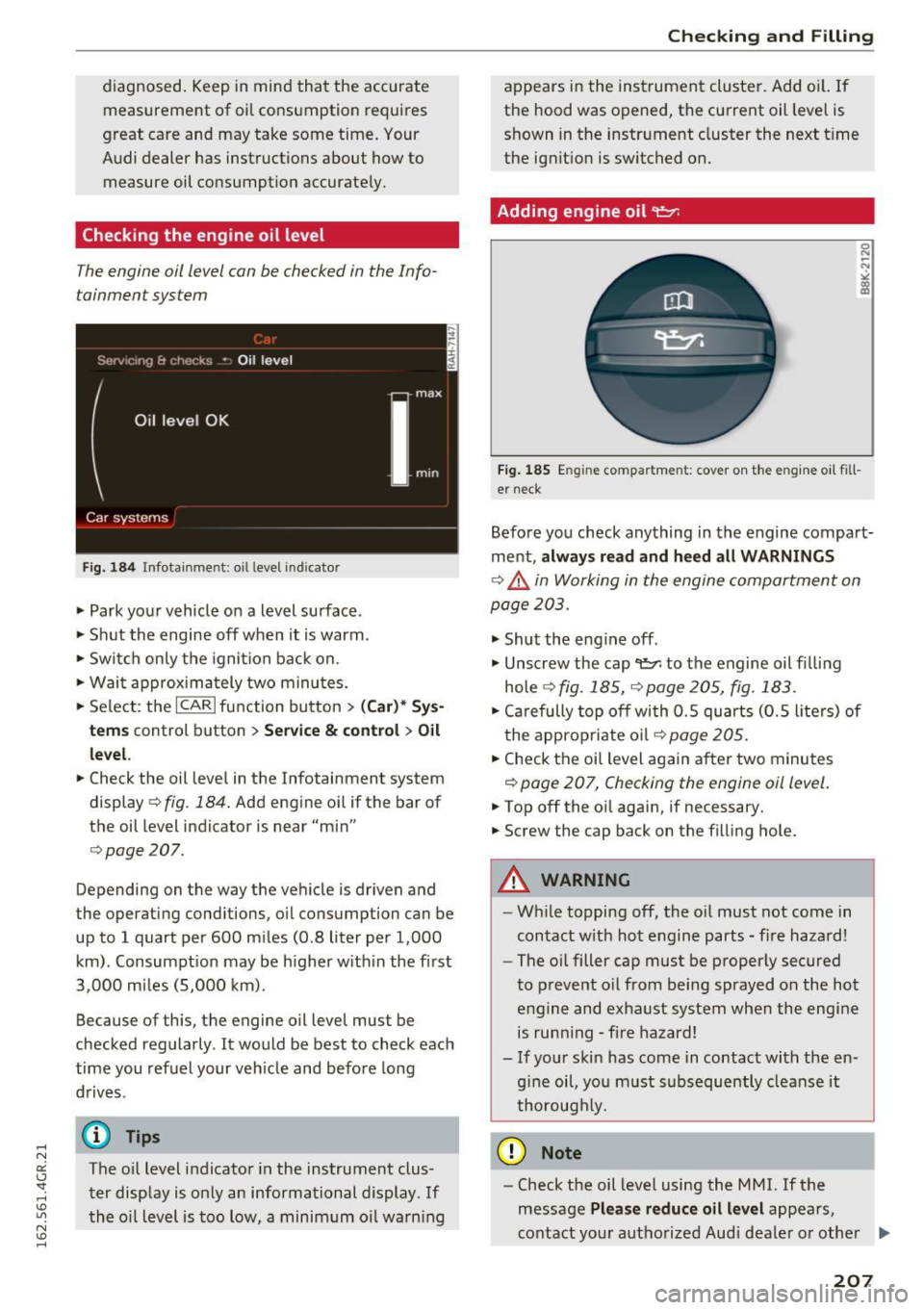
Checking the engine oil level
The engine oil level con be checked in the Info
tainment system
Fig. 184 Infotainment: oil level indicator
~ Park your vehicle on a level surface .
~ Shut the engine off when it is warm .
~ Switch only the ignition back on.
~ Wait approximately two minutes.
~ Select: the ICARI function button > (Ca r)* Sys
tems
control button > Service & control > Oil
level.
~ Check the oil level in the Infotainment system
display ¢
fig. 184. Add engine oil if the bar of
the oil level indicator is near "min"
¢page 207.
Depending on the way the vehicle is driven and
the operating conditions, oil consumption can be
up to 1 quart per 600 miles (0.8 liter per 1,000
km) . Consumpt ion may be higher within the first
3,000 miles (5,000 km).
Because of this, the engine oil level must be
checked regularly . It would be best to check each
time you refuel your veh icle and before long
drives .
(D Tips
The oil level indicator in the instrument clus
ter display is only an informational display. If
the oil level is too low, a minimum oil warn ing
Checking and Filling
appears in the instrument cluster. Add oil. If
the hood was opened, the current oil level is
shown in the instrument cluster the next t ime
the ignition is switched on.
Adding engine oil 9:::7:
Fig. 185 E ngine compar tmen t: cover on the engine oil fill
er neck
Before you check anything in the engine compart
ment,
always read and heed all WARNINGS
¢.,&. in Working in the engine compartment on
page 203 .
~ Shut the engine off .
~ Unscrew the cap~ to the engine oil filling
hole
q fig . 185, ¢page 205, fig. 183 .
~ Carefully top off with 0.5 quarts (0.5 liters) of
the appropriate oil
q page 205.
~ Check the oil level again after two minutes
q page 207, Checking the engine oil level.
~ Top off the oil again, if necessary.
~ Screw the cap back on the filling hole.
A WARNING
--While topping off, the o il must not come in
contact with hot engine parts - fire hazard!
- The oil filler cap must be properly secured
to prevent oil from being sprayed on the hot
engine and exhaust system when the engine
is running -fire hazard!
- If your skin has come in contact with the en
g in e oil, you must subsequently cleanse it
thoroughly.
(D Note
- Check the oil level using the M MI. If the
message
Please reduce oil level appears,
contact your authorized Aud i dea ler or other .,.
207
Page 214 of 282
Checking and Filling
"' Read the brake fluid level from the brake fluid
reservoir
¢ fig. 187, ¢page 205, fig. 183. The
brake fluid level must be between the "MIN"
and "MAX" markings.
The location of the brake fluid reservoir can be
seen in the engine compartment illustration
c>page205.
The fluid level may drop slightly after some time
due to the automatic adjustment of the brake
pads. This is not cause for alarm.
If the brake fluid level falls considerably below
the "MIN" mark, the brake warning/indicator
light
1111 (U.S. models)/ . (Canadian models)
will come on¢
page 14. Do not continue to oper
ate the vehicle. The complete brake system
should be thoroughly checked by an authorized
Audi dealer or other qualified facility and the
cause corrected . If the brake fluid level is too
low, the brake warning/indicator light will illumi
nate. Contact an authorized Audi dealer
immedi
ately.
Changing brake fluid
Have the brake fluid changed by an experienced
technician.
Brake fluid absorbs moisture from the air . If the
water content in the brake fluid is too high , cor
rosion in the brake system may result after a pe
riod of time. The boiling point of the brake fluid
will also decrease considerably and decrease
braking performance.
Therefore, the brake fluid must be changed
every
two years.
Always use new brake fluid which con
forms to Federal Motor Vehicle Standard "FMVSS
116 DOT 4".
The brake fluid reservoir can be difficult to reach,
therefore, we recommend that you have the
brake fluid changed by your authorized
Audi
dealer.
Your dealer has the correct tools, the
right brake fluid and the know-how to do this for
you.
212
A WARNING
-
- Brake fluid is poisonous. It must be stored
only in the closed original container out of
the reach of children!
- Brake failure can result from old or inappro
priate brake fluid. Observe these precau
tions:
- Use only brake fluid that meets SAE speci
fication
J 1703 and conforms to Federal
Motor Vehicle Standard 116. Always check
with your authorized Audi dealer to make
sure you are using the correct brake fluid.
The correct type of brake fluid is also indi
cated on the brake fluid reservoir .
- The brake fluid must be new. Heavy use of
the brakes can cause a vapor lock if the
brake fluid is left in the system too long .
This can seriously affect the efficiency of
the brakes as well as your safety. This
could result in an accident.
(D Note
Brake fluid will damage the paint of your vehi
cle.
@ For the sake of the environment
Because of the problem of proper disposal of
brake fluid as well as the special tools re
quired and the necessary expertise, we rec
ommend that you have the brake fluid
changed by your authorized Audi dealer .
Battery
General information
Under normal operating conditions, the battery
in your Audi does not need any maintenance.
With
high outside temperatures or long daily
drives we recommend that you have the electro
lyte level checked by a service facility. The elec
trolyte level should also be checked each time
the battery is charged ¢
page 214.
Have the battery checked when you take your ve
hicle in for service. You are well advised to re
place a battery that is older than S years.
Page 219 of 282
-Inspection or oil change due: If your vehicle
has reached an inspection or oi l change interval
or both intervals at the same time, the mes
sage
Inspection due! or Oil change due! or Oil
change and inspection due!
appears briefly af
ter switching the ignition on/off .
Checking service intervals
You can check the remaining distance or time un
til the next oil change or next inspection in the
Car menu. To do this, select: the
ICARI function
button
> (Car)* Systems control button > Service
& control > Service intervals.
Resetting the indicator
Your authorized Audi dealer or authorized Audi
Service Facility will reset the service interval dis
p lay after performing service.
I f you have changed the oil you rself, you must re
set the oil change interval.
To reset the indicator, select: the
ICARI funct ion
button
> (Car)* Systems control button > Service
& control > Service intervals. Turn the contro l
knob downward to
Reset oil change interval and
press the control knob.
@ Note
-Only reset the oil change indicator if the oil
was changed .
- Following the service inte rvals is critical to
maintain ing the service life and va lue of
your vehicle, especially the engine . Even if
the mileage on the vehicle is low, do not ex
ceed the time for the next serv ice.
- Calcu lating the time to the next o il change
i s interrupted when the vehicle battery is
disconnected. If the veh icle is not driven for
a long period of time, check the ma inte
nance schedule so that you can follow the
maintenance intervals.
Checking and Filling
217
Page 228 of 282
Wheels
-For technical reasons, it is not possible to use tires from oth
er vehicles - in some cases,
you cannot even use tires from
the same vehicle model.
-Make sure that the tires you select have enough clearance
to the vehicle. Replacement
tires should not be chosen
simply based on the nominal size, because tires with a dif
ferent construction can differ greatly even if they are the
same size. If there is not enough clearance, the tires or
the vehicle can be damaged and this can reduce driving
safety and increase the risk of
an accident.
-Only use tires that are more than 6 years old when abso
lutely necessary and drive
carefully when doing so.
-Do not use run-flat tires on your vehicle. Using them when
not permitted can lead to ve
hicle damage or accidents.
-If you install wheel covers on the vehicle, make sure they al
low enough air circulation to
cool the brake system. If they
do not, this could increase the
risk of an accident.
226
Tire wear/damage
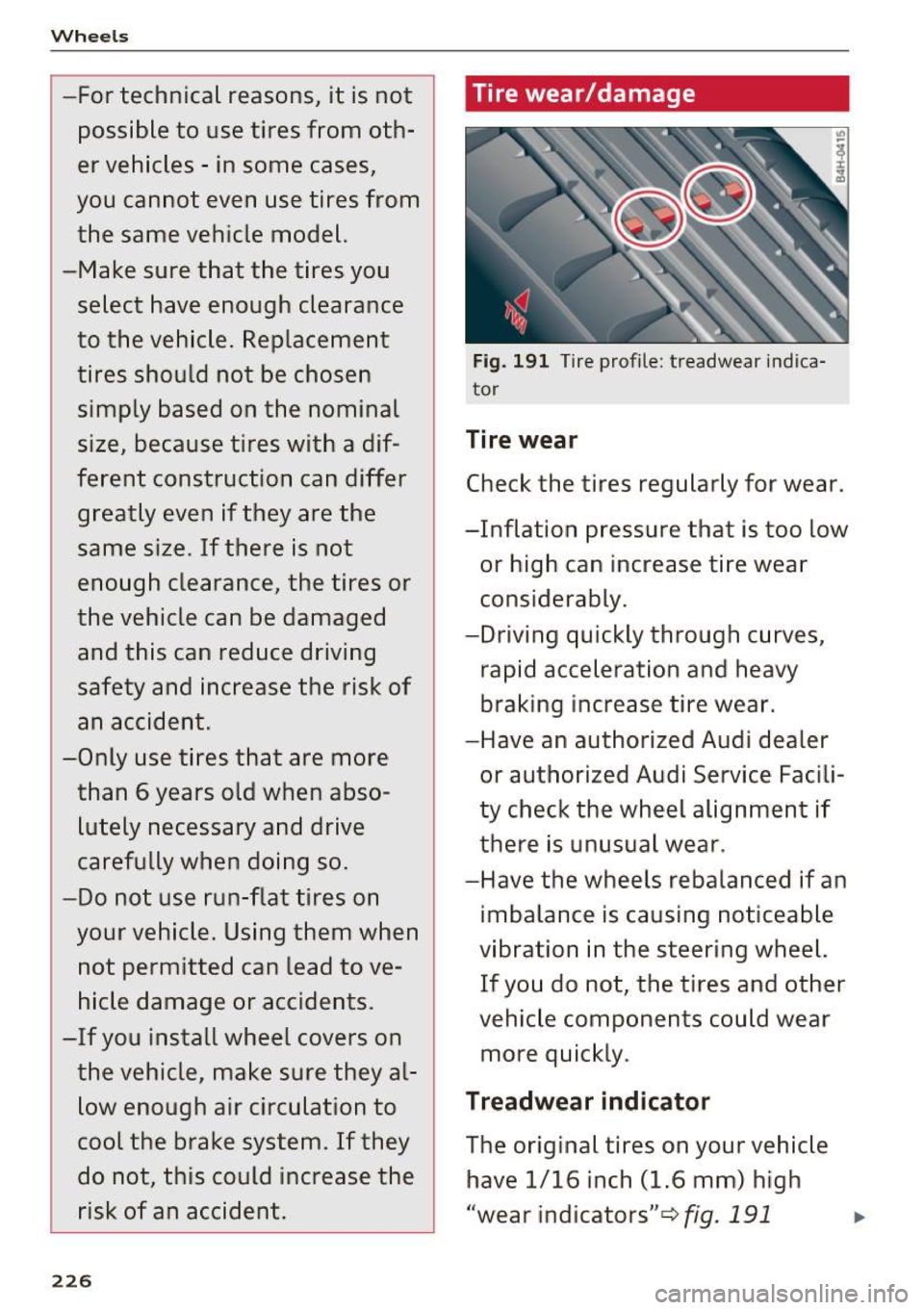
Fig. 191 Tire profile : treadwear indica
tor
Tire wear
Check the tires regularly for wear.
-Inflation pressure that is too low or high can increase tire wear
considerably.
-Driving quickly through curves, rapid acceleration and heavy
braking increase tire wear.
-Have an authorized Audi dealer
or authorized Audi Service Facili
ty check the wheel alignment if
there is unusual wear.
-Have the wheels rebalanced if an imbalance is causing noticeable
vibration in the steering wheel. If you do not, the tires and other
vehicle components could wear
more quickly.
Treadwear indicator
The original tires on your vehicle have 1/16 inch (1.6 mm) high
"wear indicators" ¢fig.
191 ...
Page 229 of 282
... N oi '-' ":
running across the tread. Marks
on the tire sidewall (for example "TWI" or other symbols) indicate
the positions of the tread wear in
dicators.
The tires have reached the mini mum tread depth
l ) when they
have worn down to the treadwear
indicators . Replace the tires with
new ones
¢ ,1,. .
Wheel rotation
Rotating the wheels regularly is
recommended to ensure the tires
wear evenly. To rotate wheels, in
stall the wheels from the rear
axle on the front axle and vice
versa. This will allow the tires to
have approximately the same
length of service life.
For unidirectiona l tires, make
sure the tires are installed accord
ing to the running direction indi
cated on the tire sidewall
¢page 247 .
Hidden damage
Damage to tires and rims can of
ten occur in locations that are hidden. Unusual vibrations in the
vehicle or pulling to one side may
~ l) Obey any applicable regulations in your
~ country . ...
Wheels
indicate that there is tire damage.
Reduce your speed immediately.
Check the tires for damage. If no
damage is visible from the out
side, drive slowly and carefully to
the nearest authorized Audi deal
er or authorized Audi Service Fa
cility to have the vehicle inspect
ed.
&_ WARNING
-
Tread that has worn too low or
different tread depths on the
tires can reduce driving safety.
This can especially have a nega tive effect on handling, on the
risk aquaplaning when driving
through water, when driving
through curves and when brak ing, which increases the risk of
an accident.
227
Page 238 of 282
Wheels
Your vehicle has also been equipped with a TPMS
malfunction indicator to indicate when the sys
tem is not operat ing properly . The TPMS mal
function indicator is combined with the low tire pressure telltale. When the system detects a
malfunction, the telltale will flash for approxi
mately one minute and then remain cont inuously
illum inated . This sequence will continue upon
subsequent veh icle start-ups as long as the ma l
function ex ists .
When the malfunct io n indicator is illuminated,
the system may not be able to detect or signal low tire pressu re as intended . TP MS ma lfunctions
may occur for a variety of reasons, including the
installation of replacement or alternate ti res or
wheels on the vehicle that prevent the TPMS
from functioning properly. A lways check the
TPMS malfunction telltale after replacing one or
more tires or wheels on your vehicle to ensure
t hat the replacement or alternate tires and
wheels allow the TPMS to continue to function
properly.
Description
The tire pressure monitoring system monitors
the pressure in the four tires when driving .
The system uses sensors that measure the tem
perature and pressure in the tires. The data is
sent from these sensors to the control module by
radio frequency .
The tire pressure monitoring system shows the current pressures and temperatures of the tires in the Infotainment system
c.>page 236. It also
compares the current t ire pressures with the
stored tire pressures and gives a warning in the
driver information system if the tire pressure is
d ifferent from what is stored¢
page 237.
The system does not detect if the stored t i re
pressures match the recommended tire pres
sures. You must resave the tire pressures
c.> page 23 7:
-every time the tir e pressures change, for exam
ple when the load in the vehicle changes,
- after replac ing a tire, or
- if wheels with new wheel sensors are used .
236
A WARNING ,_
- The tire pressure monitoring system ass ists
the dr iver in monitoring tire pressures. The
driver is responsible for having the tires in
flated to the correct pressure.
- Do not change the t ire pressure when the
temperature of the tire is high . This could
result in serious damage to the tire and
even cause the tire to burst, increasing the
ris k of an accident.
- A tire with low pressure flexes more. This
heats the tire up too much. This could cause
the tread to separate and even cause the
tire to burst, increasing the risk of an acci
dent .
- The tire pressure monitoring system does
not warn about damage or defects in the
tire construction that could cause the tire to burst, for example. Inspect your t ires regu
larly.
@ Tips
- If tires are replaced, the sensors/va lves do
not need to be removed or replaced. Just re
placed the va lve stem and, if necessary, the
valve and the wheel electronics. If you have
questions, see your authorized Audi dealer
or authorized Audi Service Facility.
- An incorrect display or a malfunction in the
tire pressure monitoring system can occur
after using the tire mobility kit. Have the
sensors rep laced by an authorized Audi
dealer or authorized Audi Service Facility.
Display tire pressures/temperatures
Requirement: the ignition must be switched off.
.,. Select: the
I CARI funct ion button > Car systems
> Service & control > Tire pressure monitor >
Display tire pre ssure .
The current tire pressures are shown in green and
yellow numbers in the Infotainment system:
-green: the current tire pressure and the spec i
fied tire pressure are approx imately the same .
-yellow: the current tire pressure is too low
compared to the spec ified t ire pressure .
Page 239 of 282
The specified tire pressure is the last tire pres
sure that was stored
¢ page 2 3 7 .
Note that the tire p ressure also depends on the
temperature of the t ire . Every 10 °C increase in
tire temperature results in the tire pressure in
creasing by approximate ly 0 .1 bar. The tire pres
sure increases as the eng ine becomes warmer
while driving.
A WARNING
Read and follow the important information
and notes <=>
page 236.
@ Tips
The tire pressure or temperature are not dis played in adaptation mode. Dashes ··.·· are
shown in place of the pressure and tempera
ture .
(D Tire pressure loss
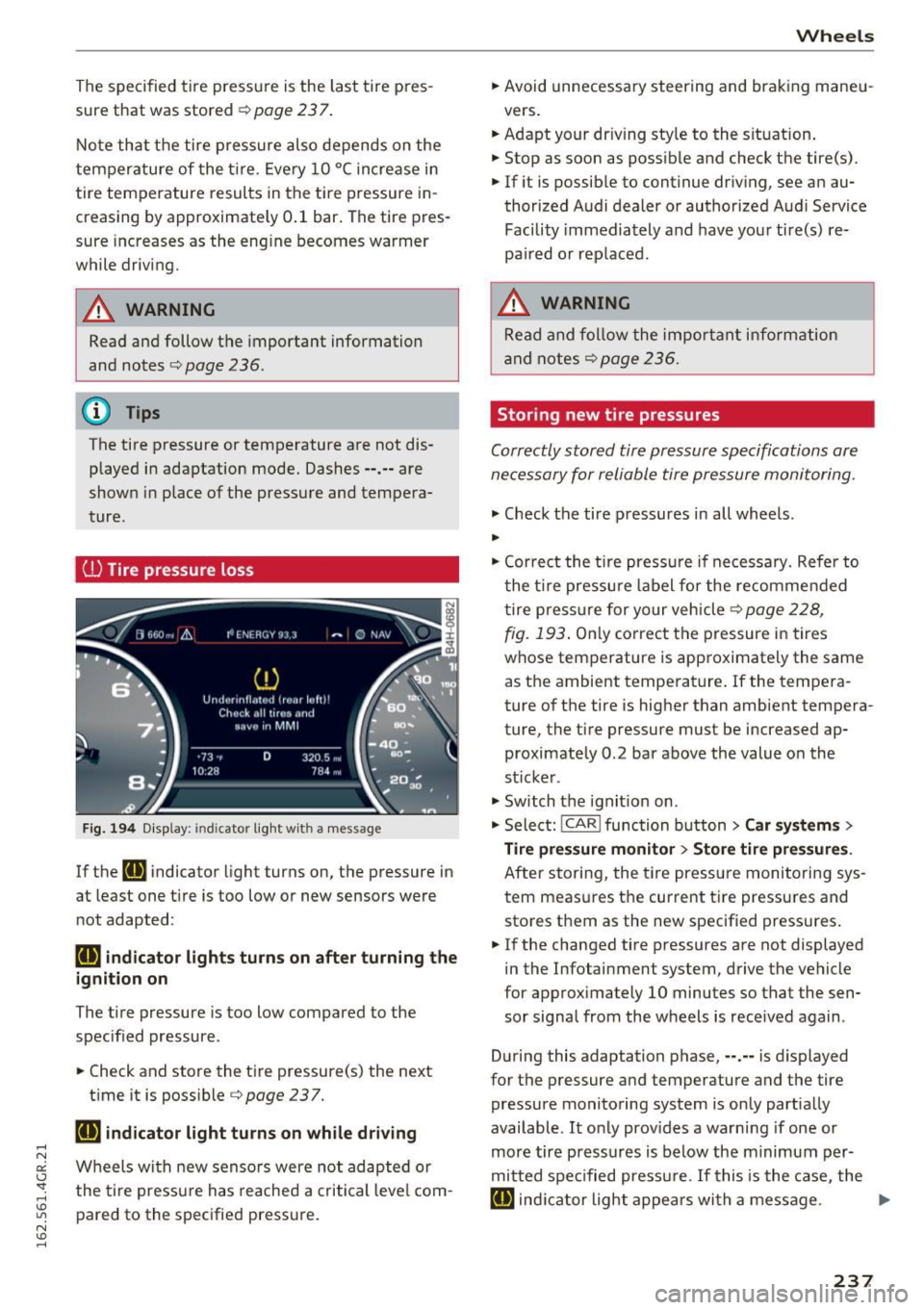
Fig. 194 Display : indic ato r light with a message
If the [IJ indicator light turns on, the pressure in
at least one t ire is too low or new sensors were
not adapted :
rt] indicator lights turns on after turning the
ignition on
The tire pressure is too low compared to the
specified pressure.
"' Check and store the tire pressure{s) the next
time it is possible<=>
page 237.
rt] indicator light turns on while driving
Wheels with new senso rs were not adapted or
the tire pressure has reached a critical leve l com
pared to the specified pressure.
Wheels
"' Avoid unnecessary steering and braking maneu-
vers .
"' Adapt your dr iving sty le to the situation .
"' Stop as soon as possible and check the tire(s).
"' If it is possib le to continue driving, see an au-
thorized Audi dealer or authorized A udi Service
Facility immediately and have your tire(s) re
pa ired or rep laced.
A WARNING
Read and follow the important i nformation
and notes
¢page 236.
Storing new tire pressures
Correctly stored tire pressure specifications are
necessary for reliable tire pressure monitoring.
"' Check the tire pressures in all wheels .
..
"'Cor rect the tire pressure if necessa ry. Refer to
the tire pressure label for the re commended
t ire pressure for your vehicle
c> page 228,
-
fig. 193 . Only correct the pressure in tires
whose temperature is approximately the same
as the ambient temperature. If the tempera
ture of the tire is higher than ambient tempera
ture, the tire pressure must be increased ap
proximately 0 .2 bar above the value on the
sticker .
"' Switch the ignition on .
"' Select:
!CAR ! function button> Car systems>
Tire pressure monitor > Store tire pressures .
After storing, the tire pressure monitoring sys
tem measures the current tire pressures and
stores them as the new specified pressures .
"'If the changed tire pressures are not displayed
in the Infotainment system, drive the vehicle
for approximately 10 minutes so that the sen
sor signal from the wheels is received again .
During this adaptation phase, ··.·· is displayed
for the pressure and temperature and the tire
pressure monitoring system is only partially
available .
It only prov ides a warning if one or
more tire pressures is below the minimum per
mitted spec ified pressu re. If this is the case, the
[IJ indic ator light appea rs with a message . ""
237
Page 240 of 282
Wheels
_& WARNING
Read and follow the important information
and notes¢
page 236.
Malfunctions
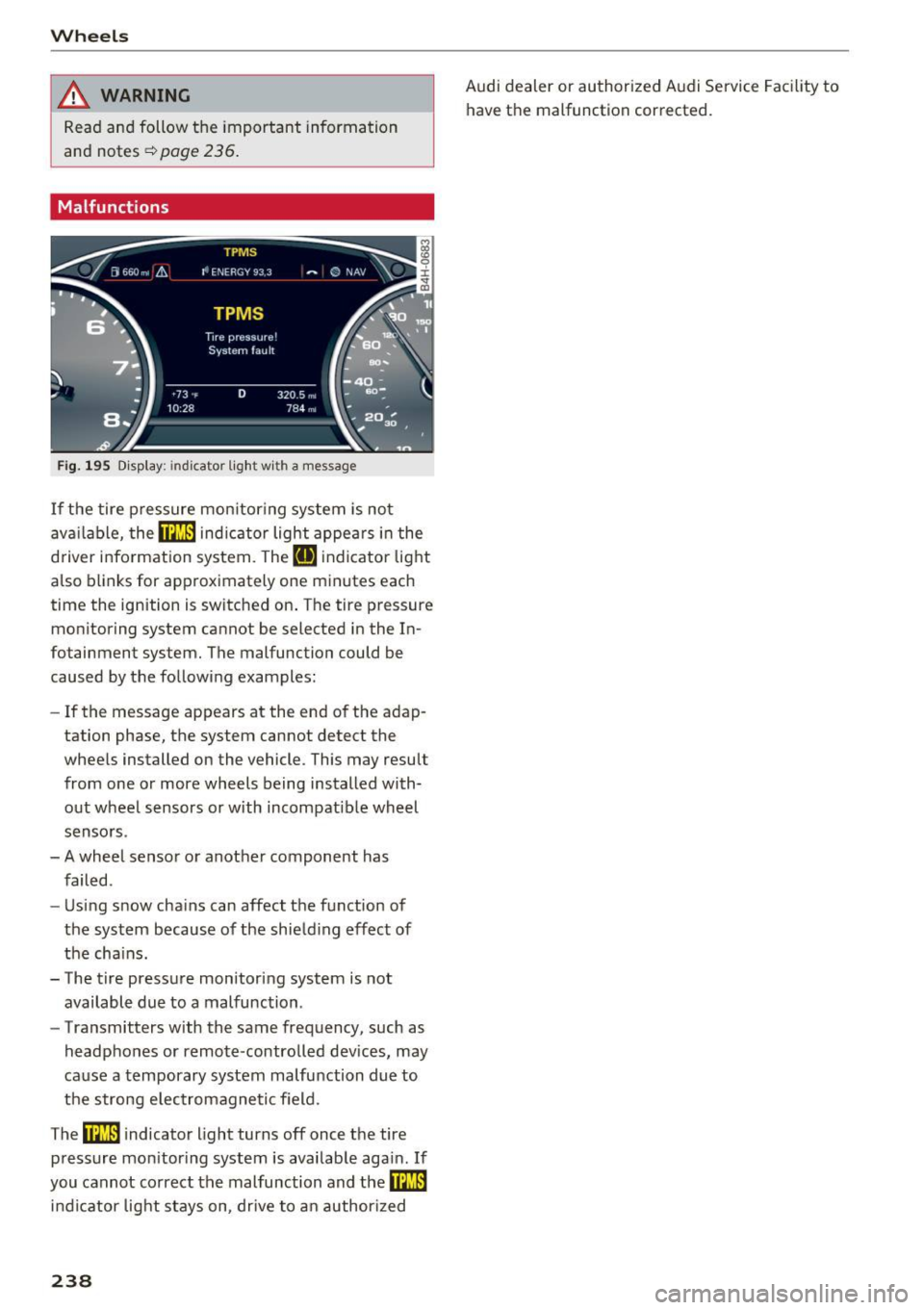
Fig . 195 D isp lay: indicator lig ht w ith a message
If the tire p ressure mon itoring system is not
ava ilable,
the m indic a tor light appea rs i n the
d river information system. The
RI] ind icato r light
also blinks for approximately one minutes each
time the ignition is switched on . The tire pressure
monitoring system cannot be selected in the In
fotainment system. The malfunction could be
caused by the following examples:
- If the message appears at the end of the adap
tation phase, the system cannot detect the
whee ls installed on the vehicle. This may result
from one o r more wheels being installed with
out wheel sensors or with incompatible wheel
senso rs.
- A wheel senso r or anot her component has
failed .
- Using snow cha ins can affect the function of
the system because of the shie ld ing effect of
the cha ins.
- The t ire pressure monitoring system is not
available due to a malfunction .
- Transmitters with the same frequency, such as
headphones or remote-controlled devices, may
ca use a temporary system malfu nction due to
the strong e lec trom agne tic field.
The
ffim i ndicator light turns off once the tire
pressure mon itor ing system is available aga in . If
you cannot correct the malfunction and
the m
in dicator light stays on, drive to an author ized
238
Audi dealer or authorized Audi Service Facility to
have the malfunction corrected.