stop start AUDI RS7 SPORTBACK 2016 User Guide
[x] Cancel search | Manufacturer: AUDI, Model Year: 2016, Model line: RS7 SPORTBACK, Model: AUDI RS7 SPORTBACK 2016Pages: 282, PDF Size: 70.78 MB
Page 77 of 282
Your vehicle is equipped with an electromechani
cal parking brake. The parking brake is designed
to prevent the vehicle from rolling unintentional
ly and replaces the hand brake.
I n addition to the norma l functions of a tradi
tional hand brake, the electromechanica l parking
brake provides various convenience and safety
functions.
When starting from rest
- The integ ral starting assist helps you w hen
driving by automatically releasing the parking
brake
r=:> page 75, Starting from o stop .
-When starting on inclines, the starting assist
prevents the vehicle from unintentiona lly roll
ing back . The braking force of the parking brake
is not released until sufficient driving force has
been built up at the wheels.
Emergency brake function
An emergency brake ensures that the vehicle can
be slowed down even if the
normal brakes fai l
r=:> page 76, Emergency broking function.
A WARNING
-
Do not press the accelerator pedal inadver
tently if the vehicle is stat ionary but the en
gine is running and a gear is selected. Other
w ise the vehicle will start to move immediate
ly and could result in a crash.
(D Tips
- If the parking brake is applied with the igni
tion switched off, the indicator lights in the
switch and -(USA models)/ . (Cana-
da models) in the instrument cluster will go
out after a certain period of time.
- Occasiona l noises when the park ing brake is
applied and released a re normal and are not
a cause for concern.
- When the vehicle is parked, the park ing
brake goes th rough a se lf-test cycle at regu
lar int ervals. Any associated noises are nor
mal.
Parking
• Press the brake pedal to stop the vehicle.
D riving
• Pull the switch~ to set the parking brake .
• Place the selector lever in P .
• Turn the engine off
r=:> .&, .
• Turn the steering wheel when parking on in
clines so that the wheels w ill roll into the curb
if the vehicle starts moving .
A WARNING
=
-Always take the vehicle key with you when
leaving the vehicle, even for a sho rt period
of time. This applies particularly when chil
d ren remain in the vehicle. Otherwise chil
dren cou ld start the engine, release the
parking brake or operate e lectrical equip
ment such as power windows, which in
creases the risk of an accident.
- No one should remain in the vehicle when it
is locked, especially chi ldren. Locked doors
make it more d ifficult for emergency work
ers to get into the vehicle, wh ich puts lives
at risk.
Starting from a stop
The start assist function ensures that the park
ing broke is released automatically upon start
ing.
Stopping and setting the parking brake
• Pull the switch~ to set the parking brake .
Starting and automatically releasing the
parking brake
• When you press the acce lerator peda l, the
parking brake is automatica lly re leased and
your veh icle begins to move .
T he parking brake can be set if you must stop the
vehicle at a stop light or in traffic. The vehicle does not have to be held with the brake pedal.
The parking brake elim inates the tendency to
creep when a selector lever posit ion is engaged.
The parking brake releases automatically and the
vehicle begins to move as soon as you press the
accelerator pedal as usual.
Starting on hills
When starting on incl ines, the hill start assist
prevents the vehicle from unintentionally rolling
Ill>
75
Page 81 of 282
Audi ada pti ve c ruise contr ol and br akin g gu ard
Audi adaptive cruise
control and braking
guard
Introduction
A ppl ies to: ve hicles with Audi adaptive cruise co ntro l
The adaptive cruise contro l system assists the
driver by regulat ing vehicle speed and helping to
maintain a set distance to the vehicle ahead,
within the limits of the system.
If the system de
tects a moving vehicle up ahead, adaptive cruise
control can brake and then accelerate your veh i
cle. This helps to make driving more comfortable
both on long highway stretches and in stop-and
go traffic.
The braking guard system can warn you about an impending collision and initiate braking maneu
vers¢
page 85.
Adaptive cruise control and braking guard have
technical limitations that you m ust know, so
please read this section carefully, understand
how the system works and use them properly at
all times.
General information
General information
App lies to: ve hicles with Audi adaptive cruise contro l
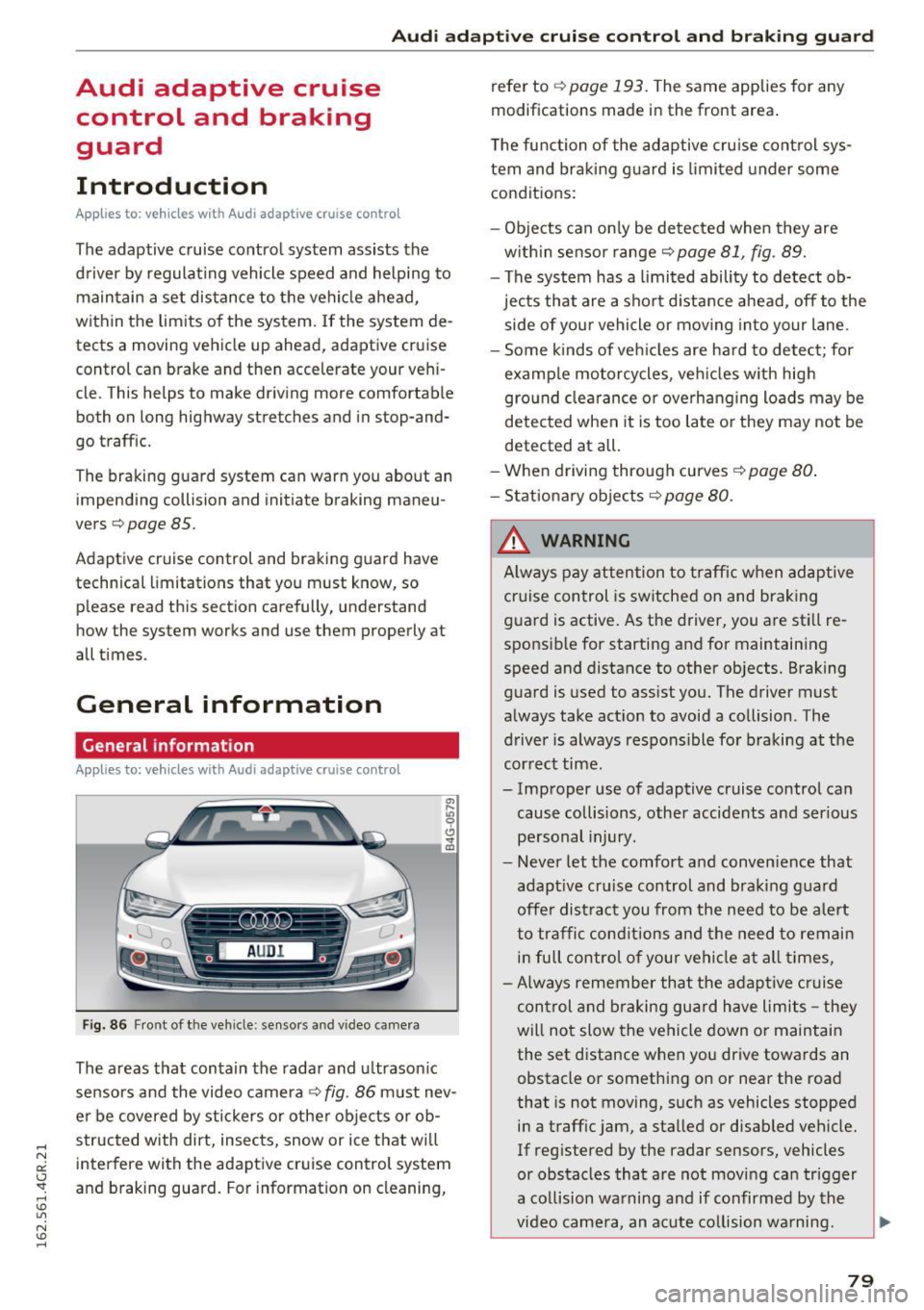
Fig. 86 Front of th e veh icle: sensors and vi deo camera
The areas that contain the radar and u ltrason ic
sensors and the video camera¢
fig. 86 must nev
er be covered by stickers o r other objects or ob
structed with dirt, insects, snow or ice that wi ll
interfere with the adaptive cruise control system
and braking guard. For information on cleaning, refer to
¢
page 193. The same applies for any
modifications made in the front area.
The function of the adaptive cru ise control sys
tem and braking g uard is limited under some
conditions:
- Objects can on ly be de tected when they are
w ith in sensor range¢
page 81, fig. 89.
- The system has a limited ability to detect ob
jects that are a short d istance ahead, off to the
side of your vehicle or mov ing into your lane .
- Some kinds of veh icles are hard to detect; for
examp le motorcycles, veh icles w ith high
gro und clea rance or overhanging loads may be
detected when it is too late o r they may not be
detected at all.
-When driving through curves
¢page 80 .
- Stat iona ry obje cts¢ page 80.
_& WARNING
A lways pay attention to traff ic when adaptive
cruise control is sw itched on and brak ing
guard is active . As the driver, you are still re
sponsible for starting and for maintaining
speed and distance to other objects. Braking
guard is used to assist you. The driver must
always take act ion to avoid a collision . The
driver is always respons ible for braking at the
cor rect time.
- Improper use of adaptive cruise control can cause collisions, other accidents and ser ious
pe rsonal injury.
- Never let the comfort and conven ience that
adapt ive cr uise control and braking g ua rd
offe r dist ract you from the need to be a lert
to traffic conditions and the need to remain
in full control of your vehicle at all times,
- Always remember that the adaptive c ruise
control and braking gua rd have limits -they
will not slow the vehicle down or maintain the set distance when you drive towards an
obstacle or something on or near the road
that is not moving, such as vehicles stopped
in a traffic jam, a stalled or disabled vehicle.
If reg istered by the radar sensors, vehicles
or obstacles that are not moving can trigger
a collision wa rning and if confirmed by the
video came ra, an acute co llision wa rning.
~
79
Page 85 of 282
Audi adaptive cruise control and braking guard
Driving in stop-and-go traffic
Applies to: vehicles with Audi adaptive cruise contro l
The adap tive cruise co nt rol sys tem also assis ts
y o u in stop- and-go t raffic.
Stopping automatically
If an object ahead stops, your ve hicle w ill bra ke
a nd stay a t a stop, w ith in th e lim its of the sys
tem.
Driving manually
.. Tap the acce lerato r pedal, o r
.. pull the lever toward you into position @.
{D) Tips
- If an o bstacle is detecte d w hen yo ur vehicle
starts movi ng , the dr iver intervent io n re
quest appears
c:> page 84 . You r vehicle
will drive more slowly w hen starti ng. This
m ay also happen in so me situati ons whe n
th ere is no appa rent o bstacle .
Interrupting cruise control
Applies to: vehicles with Audi adaptive cruise control
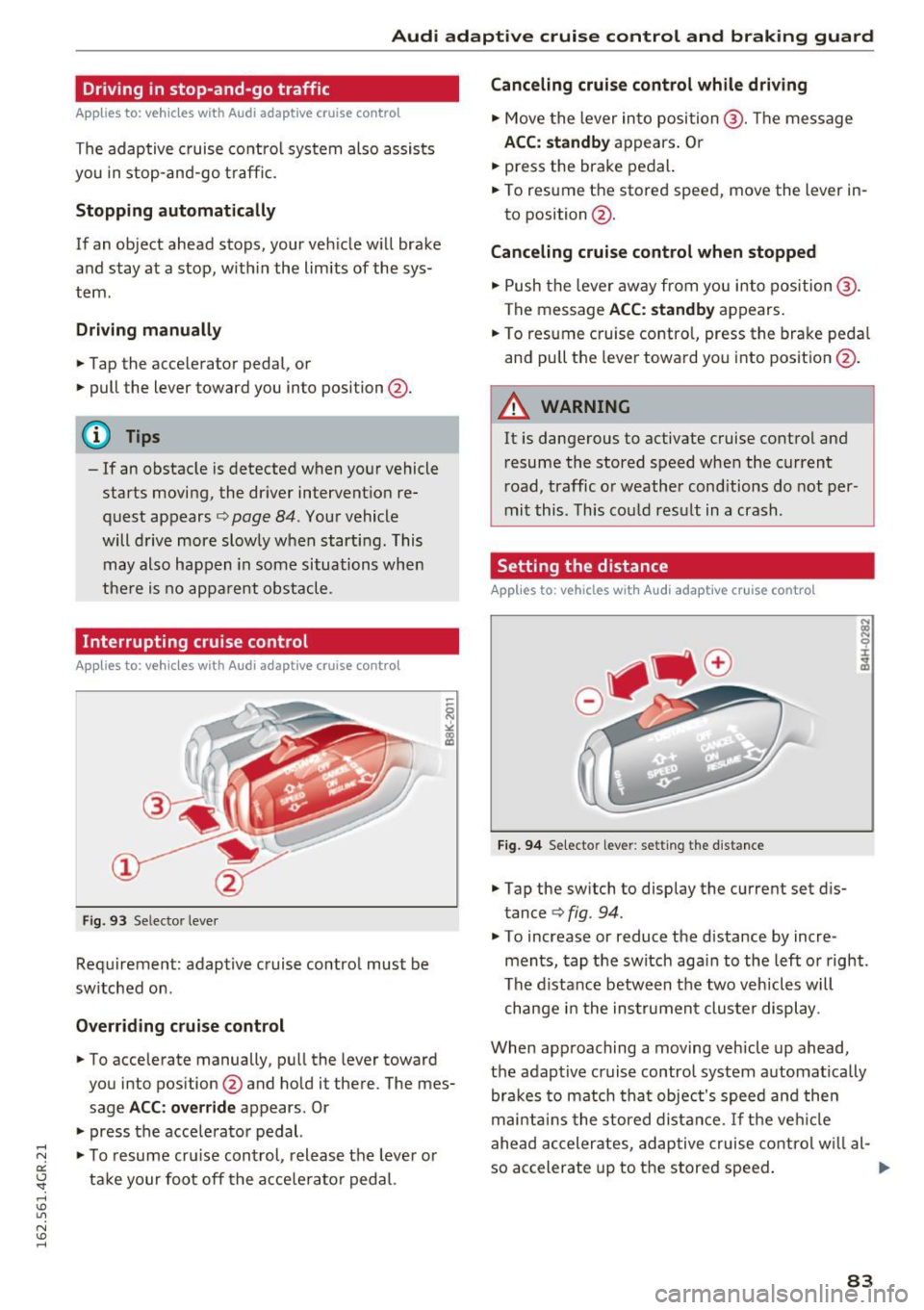
Fig . 93 Se lecto r leve r
Requi rement: adapt ive c ruise contro l must be
sw itched on .
Overriding cruise control
.. To accelera te manually, p ull the lever toward
you into pos ition @and hold it there. The mes
sage
ACC: override a ppears. Or
.. press the acce lera tor pedal.
.,. To resu me cr uise con trol , release t he leve r or
t ak e your foot off the a cce le rator pedal.
Canceling cruise control while driving
.. Move the lever in to position @. Th e message
ACC: standby appears . Or
.. press the brake pedal.
.. To resume the stored speed, move the lever in
to position @.
Canceling cruise control when stopped
.. Push the lever aw ay fr om yo u into position @.
The message
ACC: standby ap pears.
.. To res ume c ruise contro l, press the bra ke peda l
an d pu ll the leve r towa rd yo u into posit io n @ .
A WARNING
=
It is dangerous to activate cruise cont rol and
r esume the stored speed when the current
r oad, traffic or weathe r cond itio ns do not per
mi t this . T hi s co uld res ult in a crash.
Setting the distance
Applies to: vehicles with Audi adaptive cru ise control
Fi9 . 94 Selecto r lever : setting t he d istance
.. Tap the sw itch to display the current set d is
tance
c:> fig. 94.
.. To increase or reduce the d istance by incre
ments , tap the switch aga in to the l eft o r right.
T he di sta nce between t he two v eh icles w ill
c hange i n the ins trumen t clu ste r dis play.
When app roaching a moving veh icle up ahead ,
the adaptive cruise contro l system a utomat ically
br ak es to match tha t obje ct's spee d an d t hen
m ainta in s the stored dist an ce.
If th e ve hicle
ahe ad acc eler ates, a daptive cruise co ntro l w ill a l-
so accelerate up to t he store d speed .
llll>
83
Page 98 of 282
Audi dri ve s elec t
Cur ve ligh t*
The curve ligh t adapts to driving on curves . The
pivoting action and the lighting are also adapted
to the mode .
Adaptive cru is e control *
The behavior when accele rating can be adjusted
from comfortab le to sporty, depending on the
drive select mode. Adaptive cru ise control also
responds to the driving behavior of the vehicle
ahead in a more conservative or sporty manner.
Engine sound
The sound of the engine is adapted to the select
ed mode and ranges from subt le to sporty.
(D Note
- Make sure there is enough clearance above
and below the veh icle when parking. The
height of the vehicle can change once it is
parked due to temperature f luctuations,
changes to the load conditions and changes
to the driving modes, which can affect clear
ance.
- When transporting the vehicle on a car car
rier, train, ship or by other means, only tie
the vehicle down at the running surface of
the tires, which is the outer circumference.
Securing the vehicle at the axle compo
nents, suspension struts or towing eyes is
not permitted because the pressu re in the
a ir suspension struts can change dur ing
transport. The vehicle may not be secured
sufficiently if this happens.
@ Tips
- In some models, the maximum vehicle
speed can only be reached in the
Auto and
D ynami c modes.
- Se lec ting the
D ynami c mode results in spor
ty shifting characterist ics. The S gear posi
tion engages automatica lly.
96
- In veh icles that have dynamic steering *, op
erating noise is heard when starting or stop
ping the engine . This does not indicate a
problem.
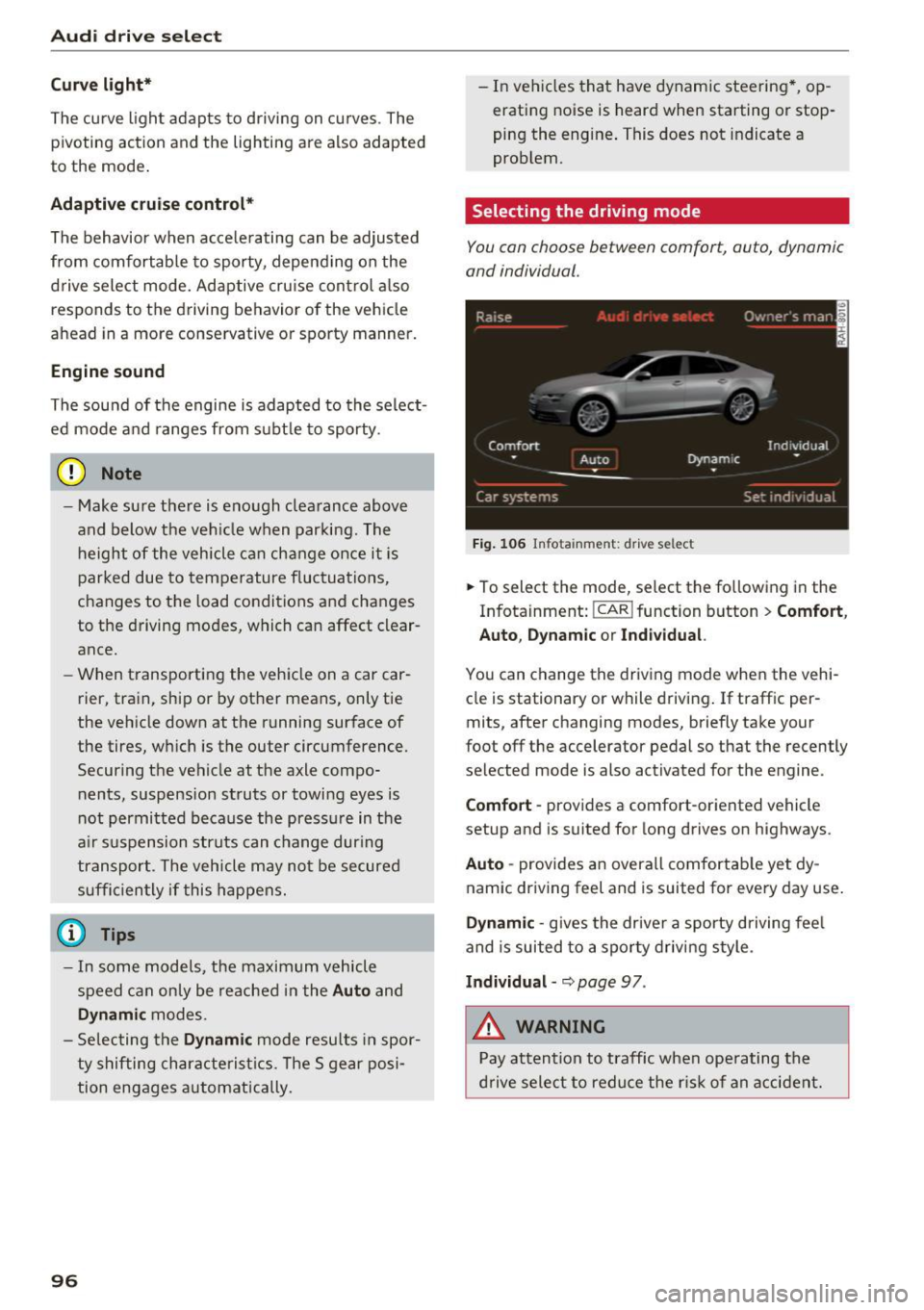
Selecting the driving mode
You con choose between comfort, auto, dynamic
and individual .
Fig. 106 Infota inment: drive se lect
.,. To select the mode, select the following in the
Infotainment:
! CAR ! function button > Comf ort ,
Auto , Dyn amic or In d iv idual.
You can change the driv ing mode when the vehi
cle is stationary or while driving . If traffic per
mits, after changing modes, briefly take your
foot off the accelerator pedal so that the recently
selected mode is also activated for the engine .
Comfo rt -prov ides a comfort-oriented vehicle
setup and is suited for long drives on highways.
Aut o -provides an overall comfortab le yet dy
namic driving feel and is suited for every day use.
Dynami c -gives the drive r a sporty d riving feel
and is suited to a sporty driving style .
Indi vidua l -~ page 97 .
&_ WARNING
Pay attention to traffic when ope rating the
d rive select to reduce the r is k of an accident.
-
Page 105 of 282
Driving the automatic transmission
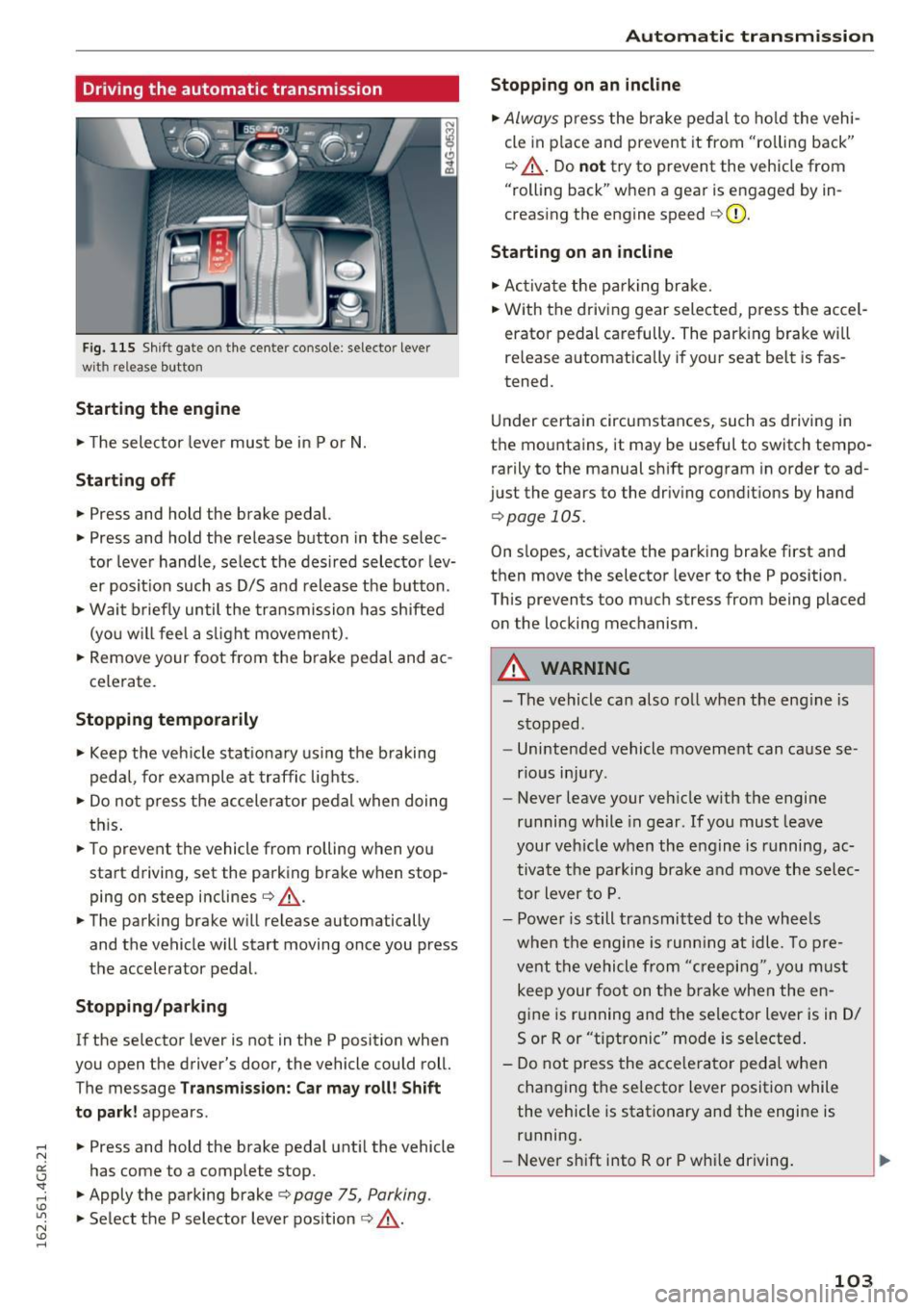
Fig. 115 Shif t gate o n the cente r conso le : selecto r lever
wi th release button
Starting the engine
.. The selector lever must be in P or N.
Starting off
.. Press and hold the brake pedal.
.. Press and hold the release button in the selec
tor lever handle, select the desired selector lev
er posit ion such as D/S and release the button .
• Wait briefly until the transmission has shifted
(you w ill feel a slight movement) .
.. Remove your foot from the b rake pedal and ac
celerate.
Stopping temporarily
.. Keep the vehicle stationary using the braking
pedal, for example at traffic lights.
.. Do not press the accelerator pedal when doing
this .
.. To prevent the vehicle from rolling when you
start driving, set the parking brake wh en stop
ping on steep inclines¢,& .
.. The parking brake will release au tomatically
and the vehicle will start moving once you press
the accelerator pedal.
Stopping/ parking
If the selector lever is not in the P position when
you open the drive r's door, the vehicle could roll.
The message
Transmission: Car may roll! Shift
to park!
appears .
.. Press and hold the brake pedal until the vehicle
has come to a complete stop .
.. Apply the parking brake¢
page 75 , Parking .
.. Select the P selector lever position ¢ ,& .
Automatic transmission
Stopping on an incline
.. Always press the brake pedal to hold the vehi
cle in pla ce and prevent it from "ro lling back"
¢ ,& . Do
not try to prevent the vehicle from
"rolling back" when a gear is engaged by in
creasing the engine speed ¢CI) .
Starting on an incline
.. Activate the parkin g brake .
.. With the driving gear selected, press the accel
erator pedal carefully. The parking brake will
releas e automatically if your seat belt is fas
tened.
Under certain circumstances, such as driving in
the mountains, it may be useful to switch tempo
rarily to the manual shift program in order to ad
ju st the gears to the driving conditions by hand
¢ page 105 .
On slopes, activate the parking brake first and
then move the selector lever to the P position .
This prevent s too much stress from being placed
on the locking mechanism.
A WARNING
=
- The vehicle can also roll when the eng ine is
stopped .
- Unintended vehicle movement can cause se
rious injury .
- Never leave your veh icle w ith the engine
running while in gear . If you must leave
your veh icle when the engine is running, ac
tivate the parking brake and move the selec
tor lever to P.
- Power is still transmitted to the wheels
when the engine is runn ing at idle. To pre
vent the vehicle from "creeping", yo u must
keep your foot on the brake when the en
gine is running and the selector lever is in D/
5 or R or "tiptronic" mode is selected .
- Do not press the accelerator pedal when
changing the se lector lever position while
the vehicle is stationary and the engine is running .
- Never shift into R or P whi le driving.
103
Page 113 of 282
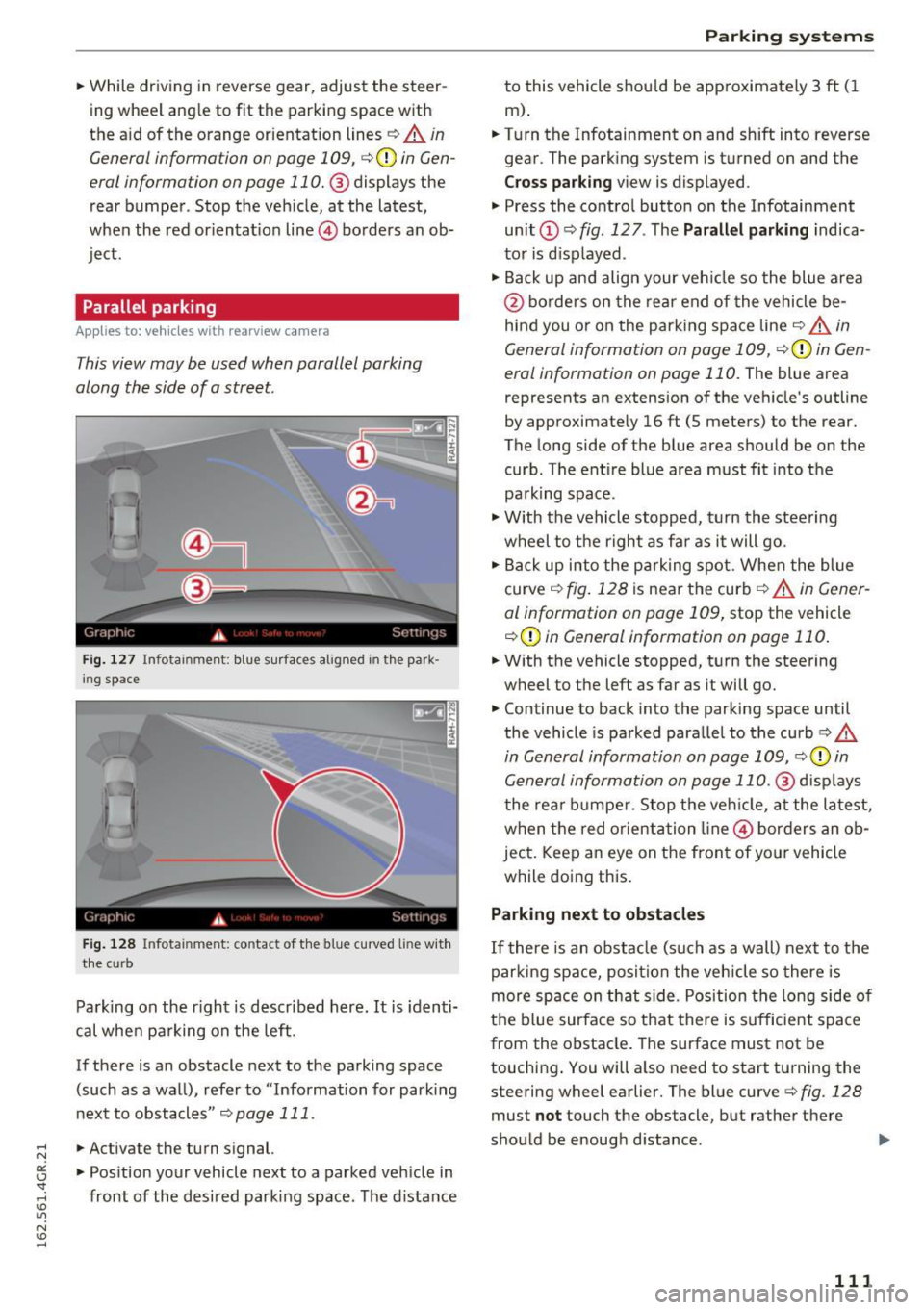
.. While driving in reverse gear, adjust the steer
ing wheel ang le to fit the parkin g space with
the a id of the orange orientation lines
c::> A in
General information on page 109 ,
c:>(D in Gen
eral information on page 110. @
displays the
rear bumper . Stop the veh icle, at the latest,
when the red or ientat io n line @ borders an ob
ject.
Parallel parking
App lies to: veh icles wit h rearv iew camera
This view may be used when parallel parking
along the side of a street.
Fi g. 127 Infotai nmen t: b lue surface s alig n ed in t he park
i ng s pace
Fig . 12 8 In fota inmen t: co ntac t of t he blue curved li ne w it h
t he curb
Park ing on the r ight is descr ibed here. It is iden ti
cal whe n pa rking on the left .
If there is an obstacle next to the pa rking space
(such as a wall), refe r to "Information for park ing
nex t to obstacles"
c:> page 111 .
.. Activate the turn s ignal.
.. Pos ition your vehicle next to a parked veh icle in
front of the desired parking space. The d istance
Parking systems
to this vehicle shou ld be app roximately 3 ft ( 1
m).
.. Turn the Infotainment on and shift into reverse
gear . The park ing system is turned on and the
Cross pa rking v iew is displayed .
.,. Press the contro l button on the Infotainment
un it
(D c:> fig . 127 . The Parallel parking indica
to r is d isp layed .
.,. Back up and align your veh icle so the blue a rea
@ bo rde rs on the re a r end of the vehicle be
hind you o r on the park ing spa ce line
c::> A in
General information on page 109,
c::> (D in Gen
eral information on page 110.
The blue area
represents an extension of the veh icle's outline
by approximate ly 16 ft (5 meters) to the rear.
The long side of the b lue area should be on the
curb . The ent ire blue area must fit into the
pa rk ing space .
.,. With the vehicle s topped, t urn the stee ring
wheel to the r ight as far as it will go .
.,. Back up into the park ing spot. Whe n the blue
curve
c::> fig . 128 is near the curb c::> A in Gen er
al information on page 109,
stop the vehicle
c::> (D in General information on page 110 .
.. W ith the vehicle stopped, t urn the steering
wheel to the left as far as it will go .
.. Continue to back into the parking space until
the vehicle is parked para llel to the curb
c:> .&.
in General information on page 109, c::> (D in
Gen eral information on page 110 .@
d isp lays
t he rea r bu mpe r. Stop the ve hicle, at the la test,
when the red o rient ation line @ bor ders an ob
ject. Keep a n eye on the fron t of yo ur vehicle
while do ing this.
Parking next to obstacles
If there is an obstacle (such as a wall) next to t he
par king space, posi tion the vehicle so there is
more space on th at s ide . Pos ition the long side o f
the b lue surface so that there is s ufficient s pace
from the obstacle. The surface must not be
touching . You will a lso need to start turning the
steering wheel earlier. The blue curve
c:> fig. 128
must not touch the obstacle, but rathe r the re
sho uld be enough d istance .
111
Page 186 of 282
Intelligent Technology
-Driving for an extended period of time on
salt-covered roads without using your
brakes can also affect braking efficiency .
Clean off accumulated salt coating from
brake discs and pads with a few careful
brake applications .
- If you damage the front spoiler, or if you in stall a different spoiler, be sure the air flow
to the front brakes is not obstructed. Other
wise the brake system could overheat reduc
ing the effectiveness of the entire brake sys
tem.
- Failure of one brake circuit will impair the
braking capability resulting in an increased
stopping distance. Avoid driving the vehicle
and have it towed to the nearest Audi dealer
or qualified workshop.
- Never let the vehicle roll to a stop with the
engine shut off.
- If the brake booster is not working, the
brake pedal must be pressed considerably
harder to make up for the lack of booster
assistance.
Electromechanical
steering, dynamic
steering
The electromechanical steering supports the
driver's steering movements.
Power steering adapts electronically based on
the vehicle speed .
Indicator lights and messages
• Do not drive vehicle: Steering defective
If this indicator light turns on and stays on and
this message appears, the power steering may
have failed .
Stop the vehicle in a safe location as soon as pos
sible. Do
not continue driving. See an authori zed
Audi dealer or authorized Audi Service Facility for
assistance.
'Jij Steering: System fault You can continue
driving
184
If the indicator light turns on and the message
appears, the steering may be more difficult to move or more sensitive than usual. The steering
wheel may also be at an angle when driving
straight.
Drive slowly to your authorized Audi dealer or au
thorized Audi Service Facility to have the mal
function corrected.
':r-ij Dynamic steering: Initializing
If the indicator l ight is blinking and this message
appears, dynamic steering* is being initialized.
The steering wheel will be easy to move after
starting the engine. Re-initialization might be
necessary if the steering wheel was moved hard
to the left and right while the veh icle was not
moving. The display turns off if the initialization
was successful.
(D Tips
- If the . or ':r-ij indicator light only stays on
for a short time, you may continue driving.
- The dynamic steering stability systems
opage 180 are not availab le in the event of
a system malfunction.
- For additional information on dynamic
steering, refer to
c> page 95.
All wheel drive (quattro)
Applies to: vehicles with all wheel drive
In all wheel drive, all four wheels are powered.
General information
In all wheel drive, the driving power is divided be
tween all four wheels. This happens automatical
ly depending on your driving behavior as well as
the current road conditions. Refer to
c> page 180,
Electronic Stabilization Control (£SC).
A center differential distributes the driving power
variably to the front and rear axle. It works to
gether with selective wheel torque control, which
activates when driving through curves
<=> page 181 . With the sport differential*, power
distribution to the rear wheels is variable and can
be adjusted with drive select
q page 95 . .,..
Page 191 of 282
CD Note
-Vehicle components such as the engine,
transm ission, suspension or electrical sys
tem can be severely damaged by driving
through water.
- Determine the depth before driv ing through
water.
- Do not stop the vehicle, drive in reverse or
switch the eng ine off when dr iving through
water.
- Keep in mind that oncoming veh icles may
create waves that raise the water level and
make it too deep for your vehicle to drive
through safely .
- Avo id d riving through salt water (corrosion).
Warming up and cooling
down
By carefully warm ing up and cool ing down your
veh icle, you can he lp ensure that it is not over
stressed un necessa rily during sporty driving.
When warming up, the vehicle is dr iven at a max
i mum eng ine speed of 6000 RPM in order to raise
the eng ine oi l temperature to a min imum of
140 °F (60 °C). The tires a lso on ly reac h their f ull
road ho ld ing capability once they have warmed
up .
The cooling fan can continue to run in your vehi cle after the engine is swi tched off. Howeve r,
d riving the vehicle to cool it dow n is particularly
important. D uring sporty dr iv ing, the engine and
brakes, the exhaust system, and the transmission
a ll become extremely hot. Before you park the
ve hicle, you shou ld drive it for a few m iles/kilo
meters at light load in the low rpm range to al
low it to cool down.
Driving and the envir onment
Catalytic converter
Applies to: veh icles w ith gasoli ne e ngi ne
It is very important that your emission control
system (catalytic converter) is functioning prop
erly to ensure that your vehicle is running in an
environmentally sound manner .
.. Always use lead-free gasoline¢ page 198,
Fuel supply.
.. Never run the tank down all the way to empty.
.. Never put too much motor o il in yo ur engine
¢ page 20 7, Adding engine oil 9:::r. .
.,. Never try to pus h- or tow-start your veh icle.
The catalytic co nverter is an efficient "clean-up"
device built into the exhaust sys tem of t he ve hi
cle. The catalyt ic conv erter b urns ma ny of the
po llutants in the exhaust gas before they are re
leased into the atmosphere.
The exclusive use of un leaded fuel is cr itically im
po rtant fo r the life of the catalytic converte r and
prope r fu nct io ni ng of the eng ine.
_&. WARNING
The tempe ra tu re o f th e exh aus t sys tem is
hi gh, bot h when driv ing and a fter stopping
the engine.
- Never tou ch the e xhaus t tail pipes on ce they
have become hot. This cou ld res ult in burns.
- Do not p ark or operate the vehicle in ar eas
where the hot exhaus t sys tem may come in
contact w ith dry grass, b rush, fuel spill or
other mate rial which can ca use a fire.
- Do not app ly additiona l undercoating or
r u stp roofing on or near the exhaust mani
fold, exha ust pipes, cata lytic converter or
heat shields. D uring driving, the substance
used for undercoat ing could overheat and
cause a fire.
CD Note
- Be aware that just one tank fi lling with
leaded fuel w ill already seriously degrade
the performance of the catalytic converter.
- Do not exceed the correct engine oil leve l
¢page 207.
189
Page 206 of 282
Checking and Filling
-Do not remove the engine cover under any
circumstances . This increases the risk of
burns.
- If work on the fuel system or the electrical
system is necessary:
- Always disconnect the battery.
- Never smoke or work near heaters or open
flames . Fluids in the engine compartment
could start a fire.
- Keep an approved fire extinguisher imme
diately available .
- To avoid electrical shock and personal injury
while the engine is running or being started,
never touch:
- Ignition cables
- Other components of the high voltage
electronic ignition system.
- If you must perform a check or repair with
the engine running:
- First, fully apply the parking brake, move
selector lever to P (Park) .
- Always use extreme caution to prevent
clothing, jewelry, or long hair from get
ting caught in the radiator fan, V -belts or
other moving parts, or from contacting
hot parts. Tie back hair before starting,
and do not wear clothing that will hang or
droop into the engine.
- Minimize exposure to emission and chemi
cal hazards
,=:, .&. -
A WARNING
California Proposition 65 Warning:
- Engine exhaust, some of its constituents,
and certain vehicle components contain or
emit chemicals known to the State of Cali
fornia to cause cancer and birth defects and
reproductive harm. In addition, certain flu
ids contained in vehicles and certain prod
ucts of component wear contain or emit
204
chemicals known to the State of California
to cause cancer and birth defects or other
reproductive harm .
- Battery posts, terminals and related acces
sories contain lead and lead compounds,
chemicals known to the State of California
to cause cancer and reproductive harms .
Wash hands after handling.
(D Note
When adding fluids, always make sure that
they are poured into the proper container or
filler opening, otherwise serious damage to
vehicle systems will occur.
@ For the sake of the environment
To detect leaks in time, inspect the vehicle
floor pan from underneath regularly . If you
see spots from oil or other vehicle fluids, have
your vehicle inspected by an authorized Audi
dealer.
Closing the engine hood
.,. Pull the hood down until the pressure from the
struts is reduced.
.,. Let the hood
drop down and latch in place. Do
not try to push it shut;
it may fail to engage
¢ _& .
A WARNING
A hood that is not completely latched could
fly up and block your view while driving .
- When you close the engine hood, check it to
make sure the safety catch has properly en
gaged . The hood should be flush with the
surrounding vehicle body parts.
- If you notice while driving that the hood is
not secured properly, stop at once and close it .
-
Page 244 of 282
Emergency assistance
Inflating tire
.,. Move the switch@¢ fig. 200 on the e lectric air
pump
ll to position I. After S minutes, tire
pressure must have reached at least 1.8 bar.
.,. Switch the electric air pump off- switch in posi
tion
0. If the required tire pressure of at least
1.8 bar has not been reached, follow the in
structions in the section
Re-inflating tire.
Re-inflating tire
.,. Remove the hose from the va lve and pu ll the
plug out of the socket.
.,. Drive the vehicle slowly 33 feet (10 meters)
backward or forward . This helps to distribute
the sealant better .
.,. Remove the empty inflation bottle and screw
the hose ®~
fig. 199 from the electric pump
directly onto the
valve.
.,. Inse rt the plug ©~ fig. 199 into the socket for
the cigarette lighter.
.,. Switch on the ignition .
.,. Move the switch @¢
fig. 200 on the electric air
pump
ll to posit ion I. After S minutes, tire
pressure must have reached at least 1.8 bar.
.,. Switch the electric air pump off- switch in posi
tion
0. If the required tire pressure of at least
1.8 bar has not been reached, it is not possible
to make a repair with the tire sea lant . Seek p ro
fessional assistance.
Disassembling Tire Mobility System
.,. Remove the hose from the valve and pull the
plug out of the socket .
.,. Screw the dust cap onto the
valve.
.,. Place the empty sealant bottle back in the orig
inal packaging and clip it in place under the
floor so that no tire sealant can ru n out into the
vehicle.
.,. Place the electric air pump in the luggage com
partment for the time being.
.,. Start driving right away so that the sealant is
distributed in the tire.
l ) The electric air pu m p sho uld never r un for lo ng er than 6
m in ute s.
242
A WARNING ,_ -
- Follow the manufacturer's safety instruc
tions on the decal for the air pump and the
sealant bottle .
- If a tire pressure of 1.8 bar cannot beach
ieved after pumping for S minutes, the tire
is too severely damaged . Do not continue to
drive .
- Seek professional assistance if it is not pos
sible to repair the tire with the tire sealant .
(D Tips
-Do not operate the e lectr ic air pump for
more than 6 minutes without stopping, oth
erwise it can overheat . When the air pump
has cooled down, you can continue to use it.
- If sealant has escaped, allow it to dry, then
you can peel it off .
· Final check
After driving for a short distance , tire
pressure must be checked
.,. After driving for about 10 minutes, stop and
check the tire pressure.
.,. If tire pressure is sti ll at least 1.3 bar, inflate
the t ire to specified pressure (see drivers side
B-pillar), drive to the next repair shop and have
the tire and the sealant bottle replaced.
.,. If tire pressure is less than 1.3 bar, the tire is
too severely damaged . Do not continue to
drive . Seek profess ional assistance .
A WARNING
If tir e pressure is less than 1.3 bar after driv
in g for 10 minutes, the tire is too severely
damaged. Do not continue to drive. Seek pro
fessional assistance.
(D Tips
After a tire repair , have the sealant bottle re
placed at a dealership. This restores full func
tionality to the Tire Mobility System.