sport mode AUDI RS7 SPORTBACK 2016 Owners Manual
[x] Cancel search | Manufacturer: AUDI, Model Year: 2016, Model line: RS7 SPORTBACK, Model: AUDI RS7 SPORTBACK 2016Pages: 282, PDF Size: 70.78 MB
Page 15 of 282
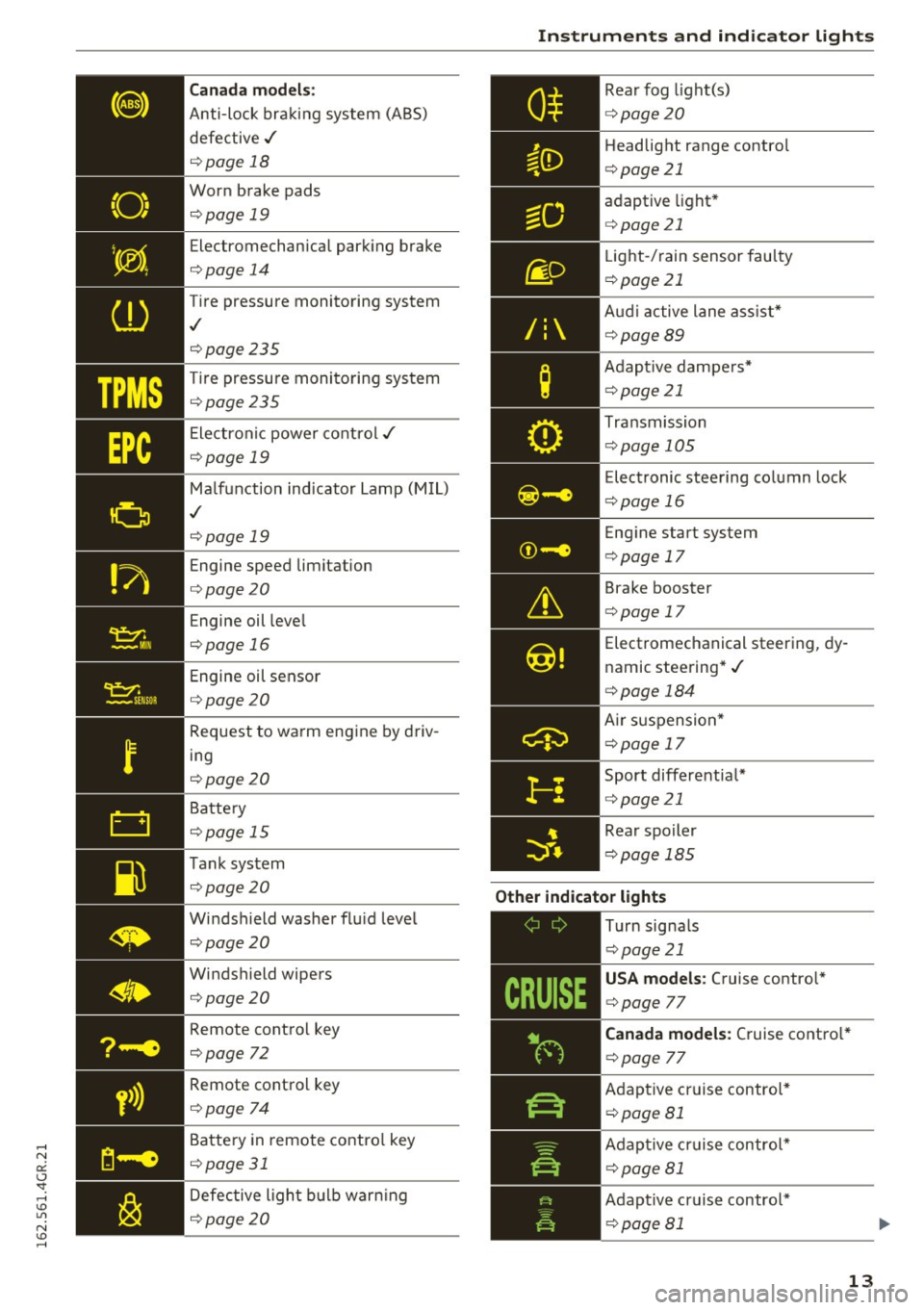
TPMS
Canada models:
Anti-lock bra king system (ABS)
defective ,/
¢page 18
Worn brake pads
¢page 19
Electromechan ica l park ing brake
¢ page 14
Tire pressure monito ring system
,I
¢page 235
Tire pressu re moni toring sys tem
¢page 235
Ele ct ron ic power co ntro l./
¢page 19
Malf u nction ind icator La mp (M IL)
,I
¢page 19
Engine speed limitation
¢page 20
Engine oil leve l
¢page 16
Engine oil sensor
¢page 20
Request to wa rm eng ine by driv
ing
¢ page 20
Battery
¢ page 15
T ank sys tem
¢page 20
Windshield washer flu id leve l
¢page 20
Windshield wipers
¢page 20
Remote cont rol key
¢page 72
Remote cont ro l key
¢ page 74
Battery in remote contro l key
¢page 31
Defective ligh t bulb warning
¢ page 20
Instruments and ind icator lights
R ea r fog light(s)
Headlight range contro l
¢page 21
ad aptive light *
¢page 21
Light-/ rain sensor fau lty
¢ page 21
Audi a ctive lane as sist*
¢ page89
Adap tive da mpe rs*
¢ page 21
Tra nsmission
¢pag e 105
Elec tronic steering column lock
¢ page 16
Engine start system
¢ page 17
Brake booster
¢page 17
Electromechanical steer ing, dy
namic stee ring* ./
¢page 184
Air su sp ensio n*
¢page 17
Sport differentia l*
¢page 21
Rear spoiler
¢ pag e 18 5
Other indicator lights
-------------
Turn signa ls
¢ pag e 21
USA models : Cruise contro l*
¢ page 77
Canada models: Cruise co ntro l*
¢ page 77
Adap tive c ruise contro l*
¢ page 81
Adap tive c ruise contr ol*
¢page 81
Adap tive cr uise contro l*
¢ page 81
13
Page 97 of 282
Audi drive select Drive settings
Introduction
Drive select makes it possible to experience dif
ferent types of vehicle settings in one vehicle.
The driver can select
Comfort, Auto and Dynami c
modes in the Infotainment system to switch, for
examp le, between a sporty and a comfortab le
driving mode. In the
Individual mode, the set
tings can be adjusted to your personal preferen
ces. This makes it possible to combine settings
such as a sporty engine with smooth steering.
_& WARNING
-
Improper use of the Audi dr ive select can
cause collisions, other accidents and serious
personal inju ry.
Description
The follow ing systems are affected by drive se
lect:
Engine and transmission
Depending on the mode, the eng ine and the
transmission respond quicker or in a more bal
anced manner to accelerator pedal movements.
I n the sporty dynamic mode, the transmission
shifts at higher RPMs.
Air suspension*
The adaptive air suspension/adaptive air suspen
sion sport*
(A ir suspension in the MMI) is an
e lectronically controlled air suspension and
damping system. They are adjusted depending
on the se lected dr iv ing mode, the driver's steer
ing, braking and acceleration input and the road
surface, vehicle speed and load. A sporty setting
is generally used in vehicles with adaptive air sus
pension sport*.
The vehicle clearance varies depending on these lected mode and the speed.
The highway setting is activated automatically
when yo u drive above 75 mph (120 km/h) for
more than 30 seconds in the
Auto or Dynamic
Audi drive select
mode. The ground clearance is increased auto
matically if the speed drops be low 44 mph (70
km/h) for more than 120 seconds.
Steering
T he steering adapts in terms of steer ing effort
and steering ratios. Indirect stee ring that moves
easily, like the steering in com fort mode, is best
suited to long drives on a highway. In contrast,
dynamic mode provides sporty, direct steering.
T he following applies to vehicles with dynamic
steering*: the steering ratio changes based on
vehicle speed in order to maintain optimum
steering effort for the driver at all times . This
sets the steering to be less sensitive at higher
speeds in order to provide improved vehicle con
trol. At reduced speeds, however, steering is
more direct in order to keep the steering effort as
min imal as possible when the dr iver is maneuver
ing the vehicle. At low and average speeds, dy
nam ic steering additionally provides more re
sponsive stee ring performance.
Adaptive dampers*
The adapt ive dampers* use sensors to record in
format ion regard ing stee ring movements, brak
ing and accele ration operations by the driver,
road surface, driving speed, and load . This makes
it possible to adapt damping to the driving situa
tion virtua lly in real time. Drive select also makes
it possible to satisfy the desire for sporty suspen
s ion (Dynamic) and comfortable suspension
(Comfort) without giving up balanced tuning (Au
to) .
Sport differential*
As a component of the all whee l drive system
(quattro)
c::> page 184, the Sport differentia l*
distributes the driving power to the rear axle de
pending on the situation. The distribution of
power varies depending on the selected mode,
from balanced (comfort) to ag ile (dynamic) . The
goal is a high level of agility and ability to accel
erate on curves. The vehicle is very responsive to
steering.
95
Page 98 of 282
Audi dri ve s elec t
Cur ve ligh t*
The curve ligh t adapts to driving on curves . The
pivoting action and the lighting are also adapted
to the mode .
Adaptive cru is e control *
The behavior when accele rating can be adjusted
from comfortab le to sporty, depending on the
drive select mode. Adaptive cru ise control also
responds to the driving behavior of the vehicle
ahead in a more conservative or sporty manner.
Engine sound
The sound of the engine is adapted to the select
ed mode and ranges from subt le to sporty.
(D Note
- Make sure there is enough clearance above
and below the veh icle when parking. The
height of the vehicle can change once it is
parked due to temperature f luctuations,
changes to the load conditions and changes
to the driving modes, which can affect clear
ance.
- When transporting the vehicle on a car car
rier, train, ship or by other means, only tie
the vehicle down at the running surface of
the tires, which is the outer circumference.
Securing the vehicle at the axle compo
nents, suspension struts or towing eyes is
not permitted because the pressu re in the
a ir suspension struts can change dur ing
transport. The vehicle may not be secured
sufficiently if this happens.
@ Tips
- In some models, the maximum vehicle
speed can only be reached in the
Auto and
D ynami c modes.
- Se lec ting the
D ynami c mode results in spor
ty shifting characterist ics. The S gear posi
tion engages automatica lly.
96
- In veh icles that have dynamic steering *, op
erating noise is heard when starting or stop
ping the engine . This does not indicate a
problem.
Selecting the driving mode
You con choose between comfort, auto, dynamic
and individual .
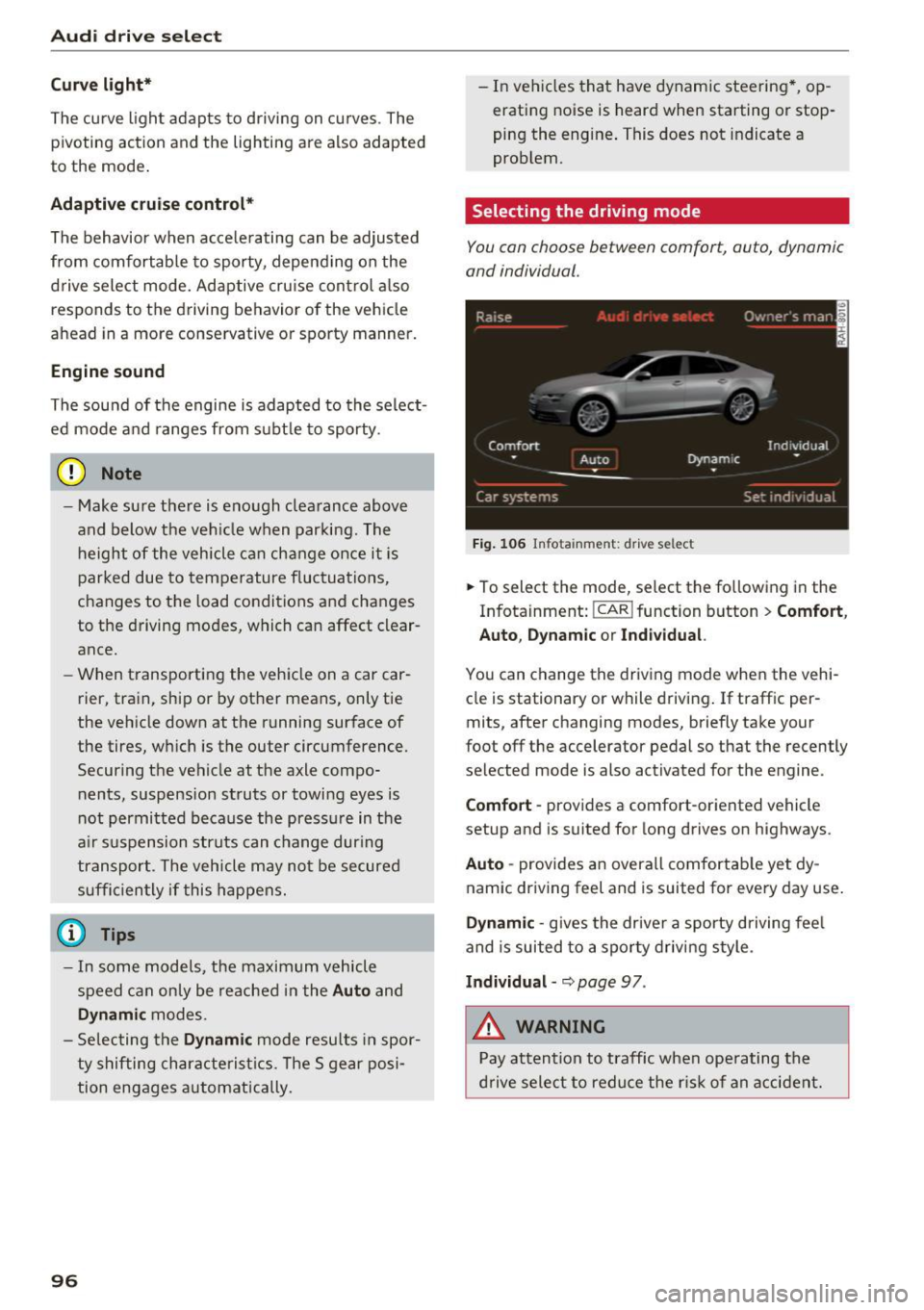
Fig. 106 Infota inment: drive se lect
.,. To select the mode, select the following in the
Infotainment:
! CAR ! function button > Comf ort ,
Auto , Dyn amic or In d iv idual.
You can change the driv ing mode when the vehi
cle is stationary or while driving . If traffic per
mits, after changing modes, briefly take your
foot off the accelerator pedal so that the recently
selected mode is also activated for the engine .
Comfo rt -prov ides a comfort-oriented vehicle
setup and is suited for long drives on highways.
Aut o -provides an overall comfortab le yet dy
namic driving feel and is suited for every day use.
Dynami c -gives the drive r a sporty d riving feel
and is suited to a sporty driving style .
Indi vidua l -~ page 97 .
&_ WARNING
Pay attention to traffic when ope rating the
d rive select to reduce the r is k of an accident.
-
Page 99 of 282
Audi drive select
Adjusting the Individual mode
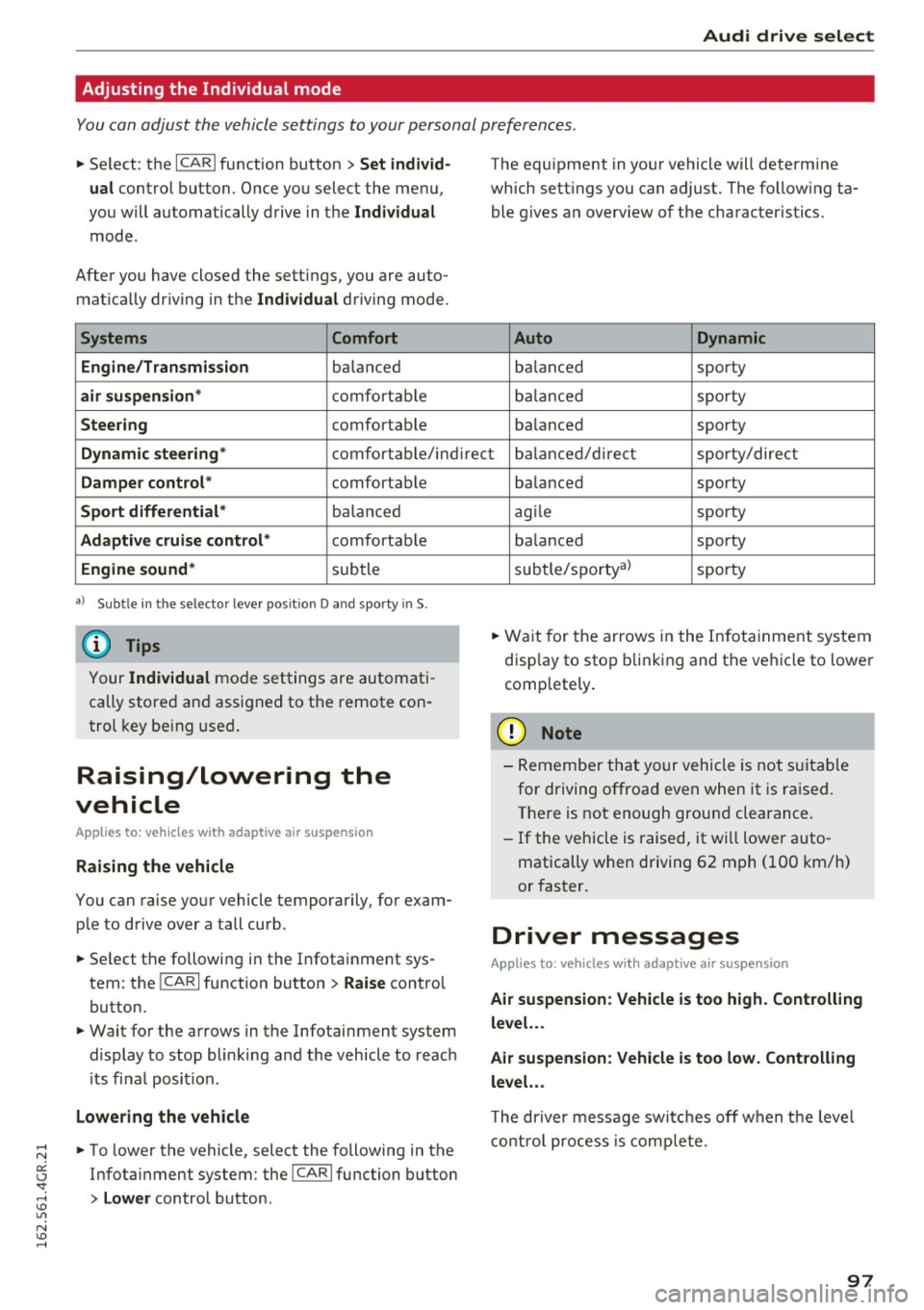
You can adjust the vehicle settings to your personal preferences.
~ Se lect : the ICARI function button > Set indiv id
ual
control button . Once you select the menu,
you wi ll automatically drive in the
Individual
mode .
After you have closed the sett ings, you are auto
mat ica lly dr iv ing in the
Individua l driving mode.
Systems Comfort
Engine/Transmission
balanced
air suspension * comfortable
Steer ing comfortable The equipment in yo
ur vehicle will determine
which sett ings you can adjust. The fo llow ing ta
ble g ives a n overview of the characteristics.
Auto Dynamic
balanced sporty
b alan ced sporty
ba lanced sporty
Dynamic steering * comfort able/in direc t bala nce d/d irect sporty/dire ct
Damper control * comfortable
Sport differential* balan ced
Adaptive cruise control * comfortable
Engine sound * subtle
a} Sub tle in th e se lector leve r po sitio n D a nd sporty in S.
(D Tips
Your Indiv idual mo de settings are automati
cally store d an d assigned to the remote con
t rol key be ing used.
Raising/lowering the
vehicle
Applies to: vehicles with adaptive air suspension
Raising the vehicle
You can raise yo ur vehicle temporarily, for exam
p le to drive ove r a tall curb .
~ Select the followin g in the Infota inment sys
tem : the
ICARI function button > Raise control
button.
~ Wait for the arrows in the Infotainment system display to stop blinking and the vehicle to reac h
its fi na l posi tion.
Lowe ring the vehicle
~ To lower the vehicle, select the following in the
Infotai nment system: the
!CAR I function button
> Lower control button . ba
lanced sporty
ag ile sporty
ba lanced sporty
subtle/sportyal sporty
~ Wa it for the arrows in the In fot ainme nt system
disp lay to stop b linking and the ve hicl e to lowe r
completely.
(D Note
- Remembe r that your vehicle is not s uita ble
for driving offroad even when it is ra ised.
There is not enough ground clearance.
- If the vehicle is raised, it wi ll lower auto
matically when driving 62 m ph (100 km/h)
or faster.
Driver messages
Applies to: vehicles with adaptive air suspension
Air suspension : Veh icle is too high . Controlling
level. . .
Air su spension : Vehicle is too low. Controlling
level. ..
T he driver message switc hes off w hen the leve l
con trol p rocess is com plete.
97
Page 103 of 282
Automatic transmission tiptronic
Introduction
The automat ic transmission is controlled e lec
tron ically. The transmission upshifts or down
shifts automatically depending on wh ich drive
p rogram is selected.
When a
moderate driving style is used , the
transmission selects the most economical driving
mode.
It will then change up early and delay the
downshifts to give bette r fu el economy .
The transm iss ion switches to a sporty mode after
a kick-down or when the driver uses a
sporty
driving style
character ized by quick accelerator
pedal movements, heavy acceleration, frequent
changes in speed and traveling at the maximum
speed.
If desired, the dr iver can also select the gears
manually (tiptronic mode) ¢page 105.
In the tiptron ic transmission, power is transfer
red by a torque converte r.
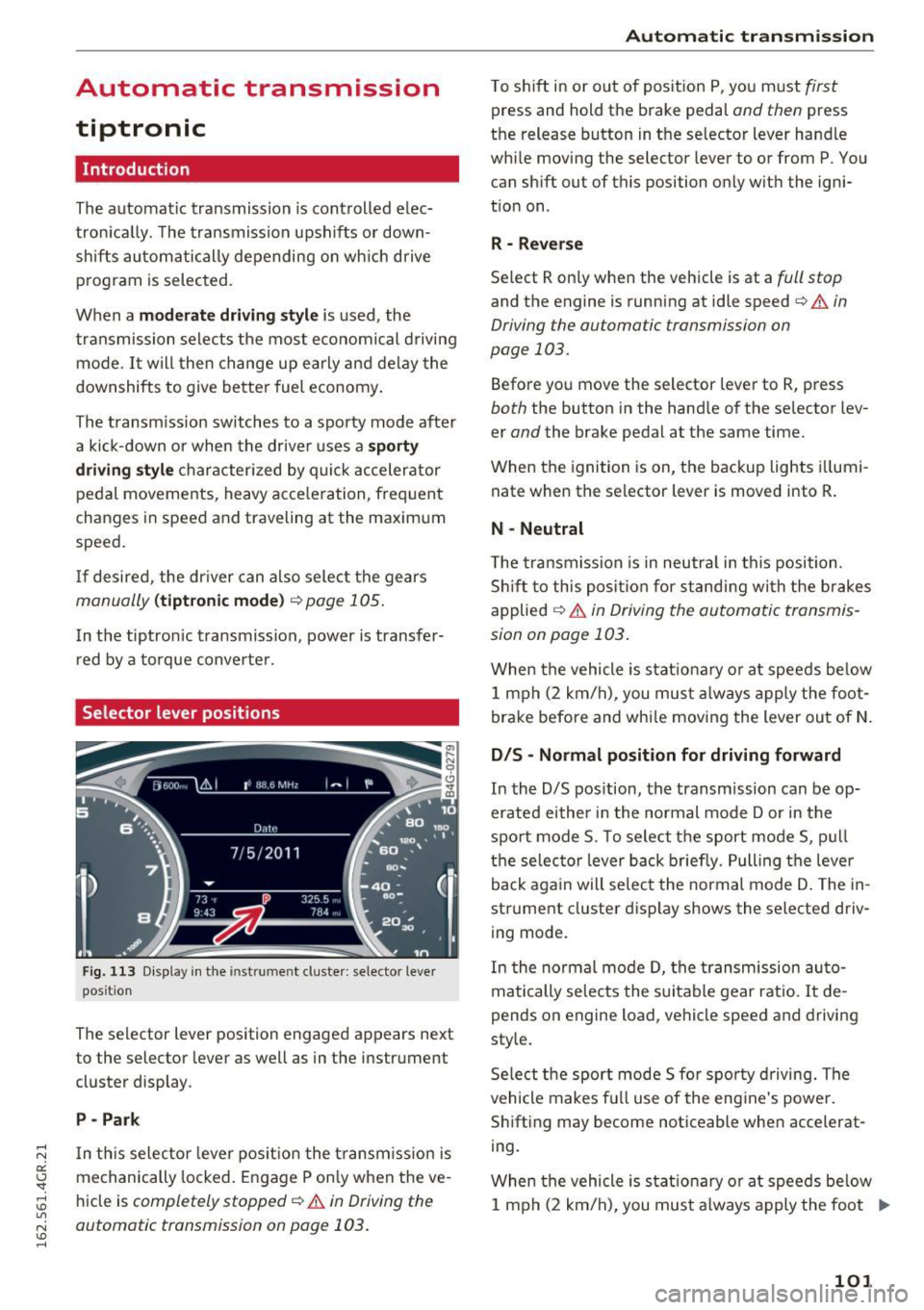
Selector lever positions
Fig. 113 Display in the instrument cluster : selector lever
position
The selector lever position engaged appears next
to the selector lever as well as in the instrument
cluster display .
P -Park
In th is selector lever pos ition the transm iss ion is
mechanically locked . Engage P only when the ve
hicle is
completely stopped¢.&. in Driving the
automatic transmission on page 103.
Automatic transmission
T o shift in or out of position P, you must first
press and hold the brake pedal and then press
the release button in the selector lever handle
while moving the selector lever to or from P . You
can shift out of this position only with the igni
tion on .
R - Reverse
Select R only when the vehicle is at a full stop
and the engine is running at idle speed¢ & in
Driving the automatic transmission on
page 103.
Before you move the selector lever to R, press
both the button in the hand le of the selector lev
er
and the brake pedal at the same time.
When the ignition is on, the backup lights illumi
nate when the selector lever is moved into R .
N -Neutral
The transmission is in neutra l in this position .
Shift to this position for standing with the brakes
applied
¢ & in Driving the automatic transmis
sion on page 103 .
When the vehicle is stat ionary or at speeds be low
1 mph (2 km/h) , you must always apply the foot
brake before and whi le moving the lever out of N.
DIS -Normal position for driving forward
In the D/S position, the transmission can be op
erated either in the normal mode Dor in the
sport mode S. To select the sport mode S, pull
the selec tor lever back briefly. Pulling the leve r
back again will select the normal mode D . The in
strument cluster display shows the selected driv
ing mode.
In the normal mode D, the transmission auto
matically selects the suitable gear ratio. It de
pends on engine load, vehicle speed and drivin g
style.
Select the sport mode S fo r spo rty driving. The
vehicle makes full use of the engine 's powe r.
Shifting may become noticeable when accelerat
ing.
When the vehicle is stat ionary or at speeds below
1 mph (2 km/h), you must always apply the foot ..,.
101
Page 104 of 282
Automatic transmission
brake before and while moving the lever to D/S
out of N.
A WARNING
Read and follow all WARNINGS r=':> & in Driv
ing the automatic transmission on
page 103.
(D Note
Coasting downhill with the transmission in N
and the engine not running will result in dam
age to the automatic transmission and possi
bly the catalytic converter.
{!) Tips
- Audi drive select: you can adjust the sporty
shift characteristics in the
Dynamic driv ing
mode .Swill appear in the instrument clus
ter display instead of D .
- If you accidentally select
N while driving,
take your foot off the accelerator pedal im
mediately and wa it for the engine to slow
down to idle before selecting D/S .
- If there is a power failure, the selector lever
will not move out of the P posit ion . The
emergency release can be used if this hap
pens
r=':> poge 106.
Automatic Shift Lock (ASL)
.
The Automatic Shift Lock safeguards you against
occidentally shifting into o forward or the re
verse gear and causing the vehicle to move unin
tentionally.
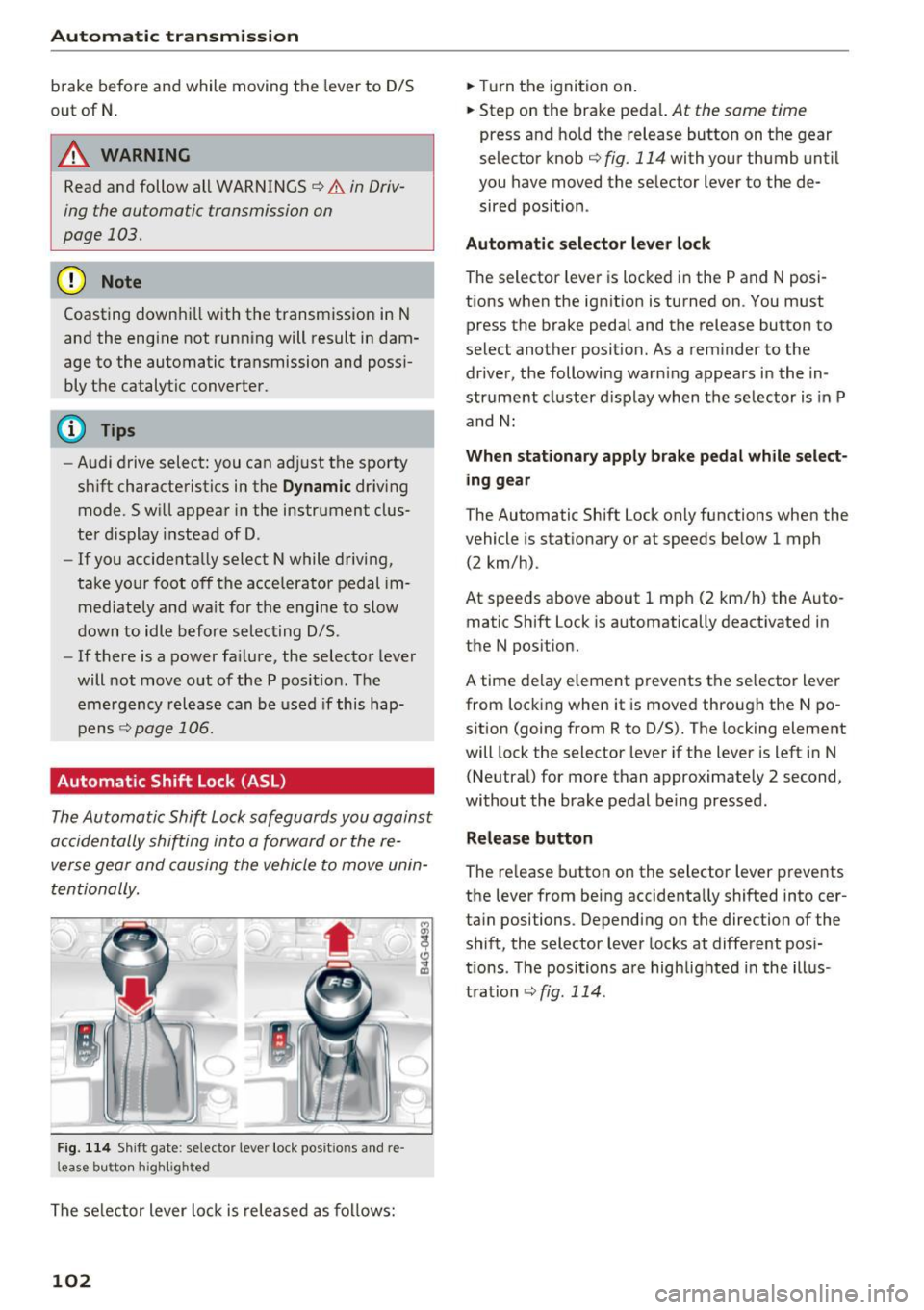
F ig. 114 Shift gate : selecto r lever lock posit io ns and re
l ease bu tton high light ed
The selector lever lock is released as follows:
102
.,. Turn the ignition on .
.,. Step on the brake pedal.
At the some t ime
press and hold the release button on the gear
selector knob
c::> fig. 114 with your thumb until
you have moved the selector lever to the de sired position .
Automatic selector lever lock
The sel ector lever is locked in the P and N posi
tions when the ignition is turned on . You must
press the br ake pedal and the release button to
select another position. As a reminder to the driver, the following warn ing appears in the in
strument cluster display when the selector is in P
and N:
When stationary apply brake pedal while select
ing gear
The Automatic Shift Lock only functions when the
vehicle is sta tionary or at speeds below 1 mph
(2 km/h) .
At speeds above about 1 mph (2 km/h) the Auto
matic Shift Lock is automatically deactivated in
the N position.
A t ime delay element prevents the selector lever
from locking when it is moved through the N po
sition (going from R to D/S). The locking element
will lock the selector lever if the lever is left in N
(Neutral) for more than approximately 2 second,
without the brake pedal being pressed .
Release button
The release button on the selector lever prevents
the lever from being accidentally shifted into cer
tain positions . Depending on the direction of the
shift, the selector lever locks at different posi
tions . The positions are highlighted in the illus
tration
<=:> fig . 114.
Page 107 of 282
Manual shift program
Using the manual shift program you can man
ually select gears.
)
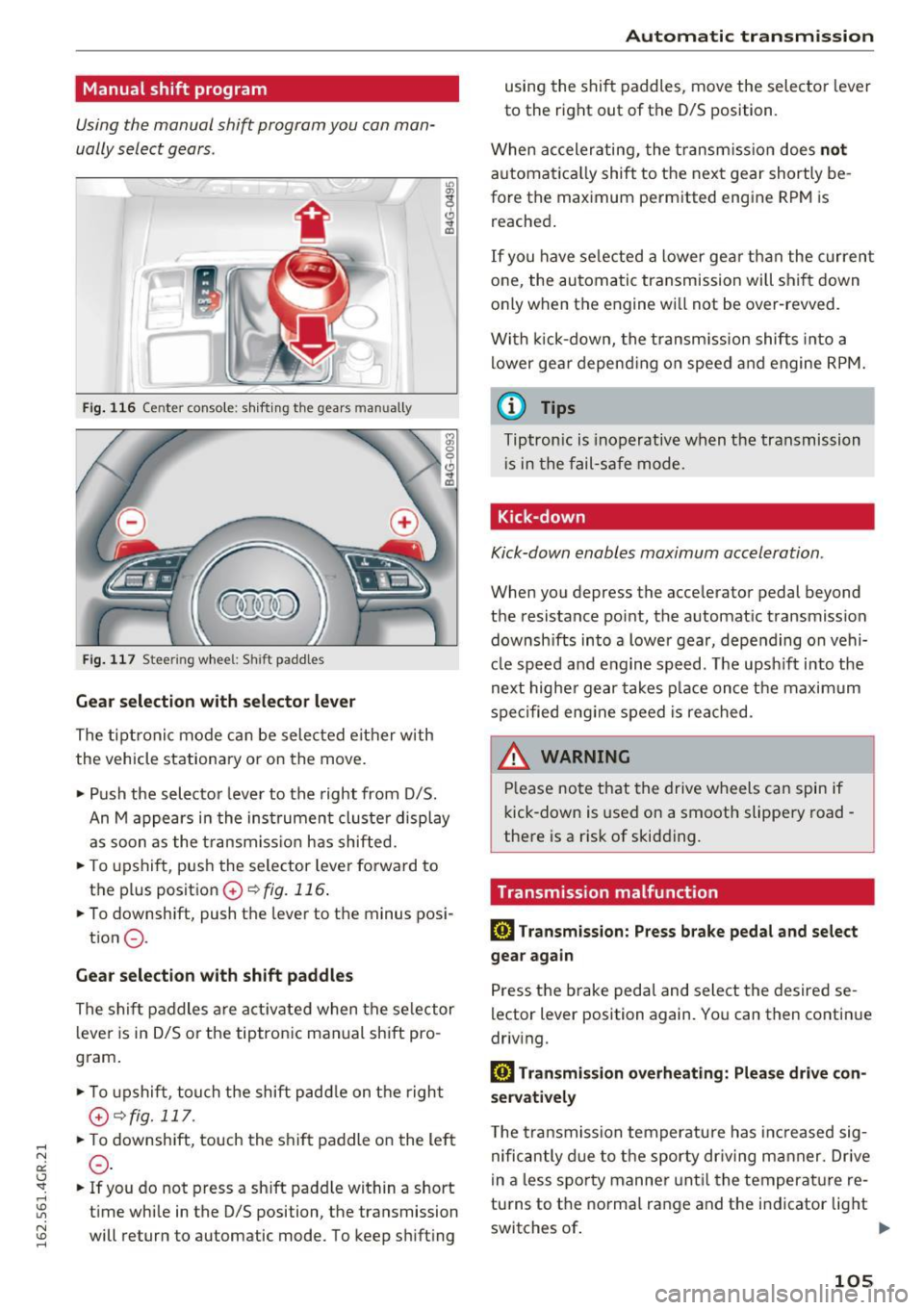
Fig. 116 Ce nter conso le: sh ifting the gears man ually
Fig. 117 Stee rin g whee l: Shi ft paddles
Gear selection with selector lever
The tiptronic mode can be selected either with
the vehicle stationary or on the move.
.. Push the selector leve r to the right from D/S.
An M appears in the instrument cluste r display
as soon as the transmiss ion has shifted .
.. To upshift , push the selector lever forward to
the p lus position
0 ~ fig. 116.
.. To downshift, push the lever to the minus posi-
tion
0 -
Gear selection with shift paddles
The shift paddles are activated when the selector
lever is in D/S or the tiptronic manual shift pro
gram .
.. To upshift , touch the shift padd le on the right
G~fig.111 .
.. To downshift, touch the shift paddle on the left
0-
.. If you do not press a shift padd le within a short
time while in the D/S position, the transmission
will return to automatic mode. To keep shifting
Automatic transmission
using the shift paddles, move the selector lever
to the right out of the D/S position.
When accelerating, the transmission does
not
automatica lly shift to the next gear shortly be
fore the maximum permitted engine RPM is
reached.
If you have selected a lower gear than the current
one, the automatic transmission will shift down
only when the engine wi ll not be over-revved.
With kick-down, the transmission shifts into a
lower gear depending on speed and engine RPM.
@ Tips
Tiptronic is inoperative when the transmission
i s in the fail-safe mode.
Kick-down
Kick-down enables maximum acceleration .
When you depress the accelerator pedal beyond
the resistance point, the automat ic transmission
downsh ifts into a lower gear, depending on vehi
cle speed and engine speed. The upsh ift into the
next higher gear takes place once the maximum
specified engine speed is reached.
& WARNING
Please note that the drive wheels can spin if
kick-down is used on a smooth slippery road -
there is a risk of skidding.
Transmission malfunction
DI Transmission: Press brake pedal and select
gear again
Press the brake pedal and select the desired se
lector lever position again. You can then continue
driv ing.
DI Transmission overheating: Please drive con
servatively
T he transmission temperature has increased sig
nificantly due to the sporty driv ing manner. Drive
in a less sporty manner until the temperature re
tu rns to the normal range and the indicator light
switches of.
II>-
105
Page 148 of 282
Airbag syste m
A WARNING
Objects between you and the airbag will in
cr ease the risk of inju ry in a cras h by interfer
ing w ith the way the airbag unfol ds or by be
ing pushed into you as the a irbag inflates.
- Never hold th ings in your hands or on your
lap when the vehicle is in use.
- Never transport items on or in the area of
the front passenger seat . Objects could
move into the area of the front airbags du r
ing bra king or other sudden maneuve rs and
become dangerous projectiles that can
ca use serious pe rsonal injury if the a irbags
inflate.
- Never pl ace or attach accessor ies or o ther
objects (such as cup ho lders, te lephone
brackets, large, heavy o r bulky objects) on
the doors, over or near the area marked "AIRBAG" on the steering wheel, instru
ment pane l, seat backrests or between
those areas and yourself. These objects
could cause injury in a crash, especially
when the airbags inflate.
- Never recline the front passenger's seat to transport objec ts. Items can also move into
t h e a rea of the side airbag o r the front a ir
bag during braking or in a s udden maneu
ver. Objects near the airbags can become
projectiles and cause in ju ry, particularly
when the seat is reclined.
- Never pl ace or transport o bje cts on the
front passenge r seat . Objects on the front
passenge r seat co uld cause the capac itive
sensor in the seat to signal to airbag system
that the seat is occupied by a person when it
in fact is not, or that the person on the seat
is heavier than he or she actually is. The
change in elect ric capac itance because of
s u ch objects can cause the passenger front
airbag to be turned on when it shou ld be
off, or ca n cause the a irbag to wo rk i n a way
that is diffe rent from the way it would have
wor ked witho ut objects on the seat.
- Alway s m ake sure th at the re is nothing on
t h e fron t passenger seat that w ill cause the
capacit ive passenger detection system in
the seat to signa l to the Airbag System that
146
the seat is occup ied by a person when it is
not, or to signal that it is occupied by some
one who is heavier than the person actually
sitt ing on the seat . The presence of an ob
ject could ca use the passenger front airbag
to be turned on when it should be off, or
could cause the airbag to work in a way that is diffe rent from the w ay it would have
wo rked withou t the object on the seat.
A WARNING
-
The fine dus t created when airbags deploy c an
cause breathing prob lems for peo ple with a
h istory of asthma or othe r breath ing cond i
tions.
- To reduce the r is k of breathing p roblems,
those with asthma o r other respiratory con
ditions shou ld get fresh a ir right away by
getting out of the vehicle or opening win
dows or doors .
- If you are in a co llision in which airbags de
ploy, wash yo ur hands and face with m ild
soap and water before eating.
- Be ca refu l not to get the dust into your eyes,
or into any cuts or scratches.
- If the residue sho uld get into your eyes,
flush them w ith wate r.
Monitoring the
Advanced Airbag System
t~ (USA models) !!I: (Canada models)
Airbag monitoring indicator light
Two separate indicators monitor the function of
the Advanced Airbag System: the airbag moni
toring indicator light and the
PASSENGER AIR
BAG OFF
light.
The Advanced A irbag System as well as t he side
airbags and side curta in airbags w ith ejection
mitigation features (including the electronic con
tro l unit, senso rs and system w iring) are all
monito red cont inuo usly to make sure that they
a re functioning properly whenever the ignition is
o n. Every time you tu rn o n the ign ition, the air
bag sys tem indi cato r li ght
II (USA models) a
(Canada mode ls) will come on for a few seconds
(function check). .,.
Page 164 of 282
Child safet y
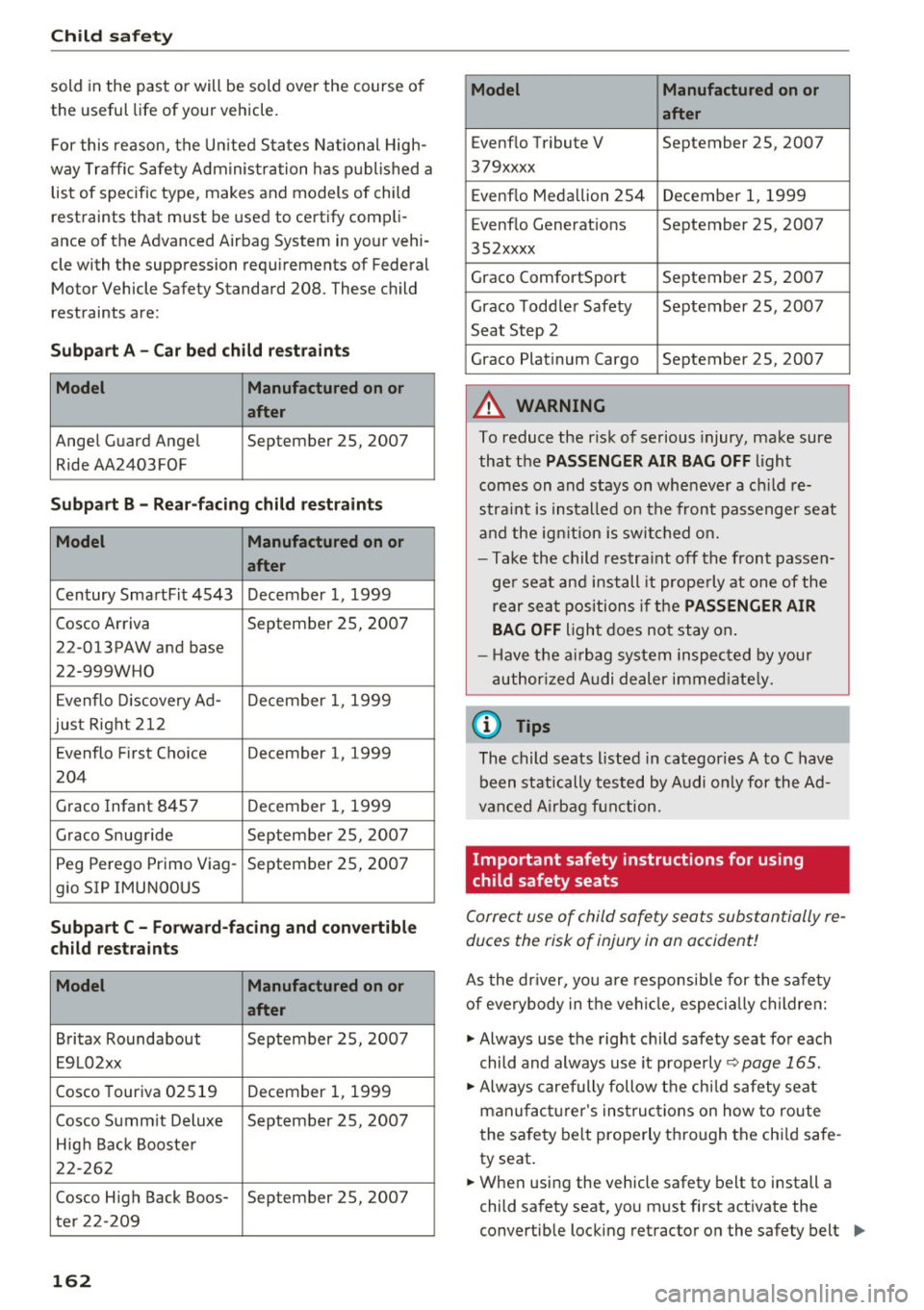
sold in the past or will be sold ove r the course of
the useful life of your vehicle.
F or this reason, the U nited States National High
way Traffic Safety Adm inis tration has p ublished a
list of specific type, makes and models of child
restraints that must be used to certify compli
ance of the Advanced Airbag System in your vehi
cle with the suppression requ irements of Federal
Motor Vehicle Safety Standard 208. These child
restraints are:
Subpart A - Car bed child re straint s
Model Manufactured on or
after
Angel Guard Angel September 25, 2007
Ride AA2403FOF
Subp art B -Rear-facing child restr aint s
Model Manufactured on or
after
Century SmartFit 4543 December 1, 1999
Cosco Arriva September 25, 2007
22-013PAW and base
22-999WHO
E venflo Discovery Ad- December 1, 1999
jus t Right 21 2
Evenflo First Cho ice December 1, 1999
204
Graco Infant 8457
December 1, 1999
Graco Snug ride September 25, 2007
Peg Perego Primo V iag- September 25, 2007
gio SIP IMUNOOUS
Subpart C - Forward -facing and convertib le
child restraint s
Model Manufactured on or
after
Britax Roundabout September 25, 2007
E9L02xx
Cosco Touriva 02519 December 1, 1999
Cosco S umm it Deluxe September 25, 2007
High Back Booste r
2 2-262
Cosco High Back Boos- September 25, 2007
ter 22-209
162
Model Manufactured on or
after
Evenflo Tribute V September 25, 2007
379xxxx
E venflo Meda llion 254 December 1, 1999
Evenflo Generat ions September 25, 2007
352xxxx
Graco ComfortSport September 25, 2007
Graco Toddler Safety September 25, 2007
Seat Step 2
Graco Plat inum Cargo September 25, 2007
A WARNING
To reduce the risk of serious injury, make sure
that the
PASSENGER AIR BAG OFF light
comes on and stays on whenever a ch ild re
stra int is installed on the front passenger seat
and the ign ition is swi tched on.
- Take the child restra int off the front passen
ge r seat and install it prope rly at one of the
rear sea t positions i f the
PASSENGER AIR
BAG
OFF light does no t stay on .
-Have the ai rbag system in spec ted by y our
author ized Audi dealer immed iate ly.
(D Tips
The child seats listed in categor ies A to C have
been statically tested by Audi only for the Ad
van ced A irbag fun ction.
Important safety instructions for using
child safety seats
Correct use of child safety sea ts substantially re
duces the risk of injury in an accident!
As the dr iver, yo u are responsib le for the safety
of eve rybody in the veh icle, e speci ally childre n:
.,. Always use the right c hild safety seat for each
child and always use it properly
~ page 165.
.,. Always carefully follow t he chi ld safety seat
man ufac turer's ins truc tions on how to route
t he sa fety belt properly th ro ugh the ch ild safe
ty seat.
.,. When using the vehicle safety belt to install a
child sa fety seat, yo u must first activate the
convertib le locking retracto r on the safety belt
Ill-
Page 179 of 282
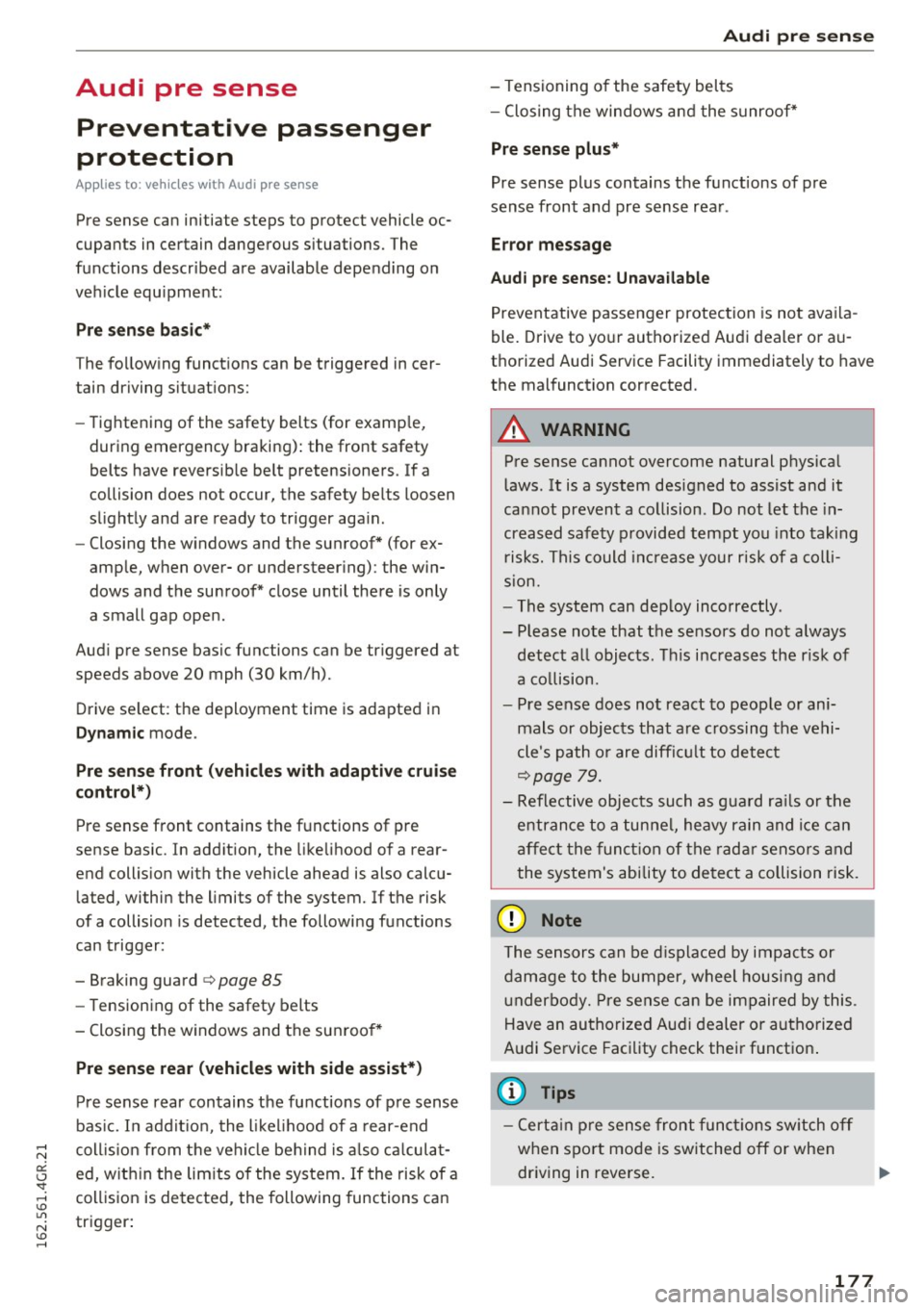
Audi pre sense Preventative passenger
protection
Applies to: ve hicles with Audi pre sense
Pre sense can initiate steps to protect vehicle oc
cupants in certain dangerous situations. The
functions described are available depending on
veh icle equ ipment:
Pre sense basic*
The following functions can be triggered in cer
tain driving situations:
- Tightening of the safety belts (for examp le,
during emergency braking): the front safety
belts have reversib le belt pretensioners. If a
collision does not occur, the safety belts loosen
slightly and are ready to trigger aga in.
- Closing the w indows and the sunroof* (for ex
ample, when over- or understeering) : the win
dows and the sunroof* close until there is only
a small gap open .
Audi pre sense basic functions can be triggered at
speeds above 20 mph (30 km/h). Drive select: the deployment time is adapted in
Dynamic mode .
Pre sense front (vehicles with adaptive cruise
control*)
Pre sense front contains the functions of pre
sense basic . In addition, the likelihood of a rear
end collision with the vehicle ahead is also calcu
lated, within the limi ts of the system. If the risk
of a collision is detected, the following functions
can trigger:
- Braking guard
c> page 85
- Tensioning of the safety belts
- Closing the windows and the sunroof*
Pre sense rear (vehicles with side assist*)
Pre sense rear contains the functions of pre sense
bas ic. In addit ion, the lik el ihood of a rear-end
coll is ion from the vehicle behind is also calculat
ed, within the limits of the system. If the risk of a
collision is detected, the following functions can
trigger:
Audi pre sense
-Tensioning of the safety belts
- Closing the windows and the sunroof*
Pre sense plus*
Pre sense plus contains the functions of pre
sense front and pre sense rear .
Error message
Aud i pre sense: Unavailable
Preventative passenger protection is not availa
ble. Drive to your authorized Audi dealer or au
thorized Audi Service Facility immediately to have
the malfunction corrected.
A WARNING
=
Pre sense cannot overcome natural phys ica l
laws . It is a system designed to assist and it
cannot prevent a collision . Do not let the in
creased safety provided tempt you into taking
risks. This could increase your risk of a colli
sion.
- The system can dep loy incorrectly .
- Please note that the sensors do not always
detect all objects . This increases the risk of
a collision.
- Pre sense does not react to people or ani
mals or objects that are crossing the vehi
cle's path or are difficu lt to detect
.:>page 79.
-Reflective objects such as guard ra ils or the
entrance to a tunnel, heavy rain and ice can
affect the function of the radar sensors and
the system's ability to detect a collision risk.
(D Note
The sensors can be displaced by impacts or
damage to the bumper, wheel housing and
un derbody. Pre sense can be impaired by this.
Have an authorized Audi dealer or authorized
Audi Service Facility check their function .
(D Tips
-Certain pre sense front functions switch off
when sport mode is switched off or when
driving in reverse. ..,.
177