warning lights AUDI RS7 SPORTBACK 2016 Owner's Manual
[x] Cancel search | Manufacturer: AUDI, Model Year: 2016, Model line: RS7 SPORTBACK, Model: AUDI RS7 SPORTBACK 2016Pages: 282, PDF Size: 70.78 MB
Page 49 of 282
.. To increase or reduce the brightness, turn the
knob and press it.
The interior lig hting turns on when you switch
the headlights on whi le the ignition is on .
(D Tips
The setting is automat ically stored and as
signed to the remote control key that is in
use.
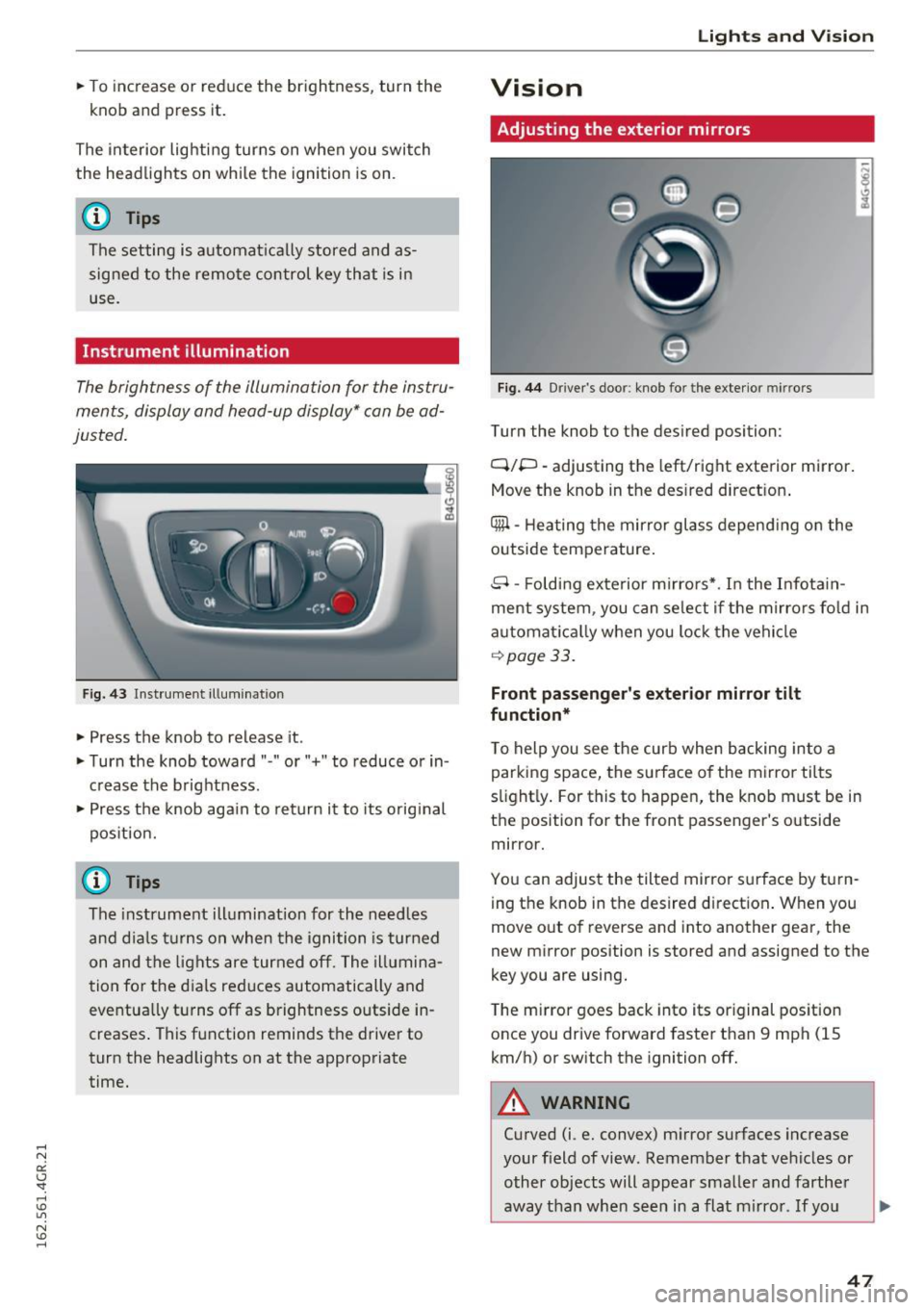
Instrument illumination
The brightness of the illumination for the instru
ments, display and head-up display* can
be ad
justed .
Fig. 43 Instrument illum ination
.. Press the knob to release it .
.. Turn the knob toward " -" or" +" to reduce or in
crease the brightness .
.. Press the knob aga in to return it to its o riginal
pos it ion.
@ Tips
The instrument illumination for the need les
and d ia ls t urns on when the ignition is turned
on and the lights are turned off. The illumina
tion for the dials reduces automatically and
eventua lly turns off as brightness outside in
creases . This function reminds the driver to
turn the headlights on at the appropriate
time.
Lights and V ision
Vision
Adjusting the exterior mirrors
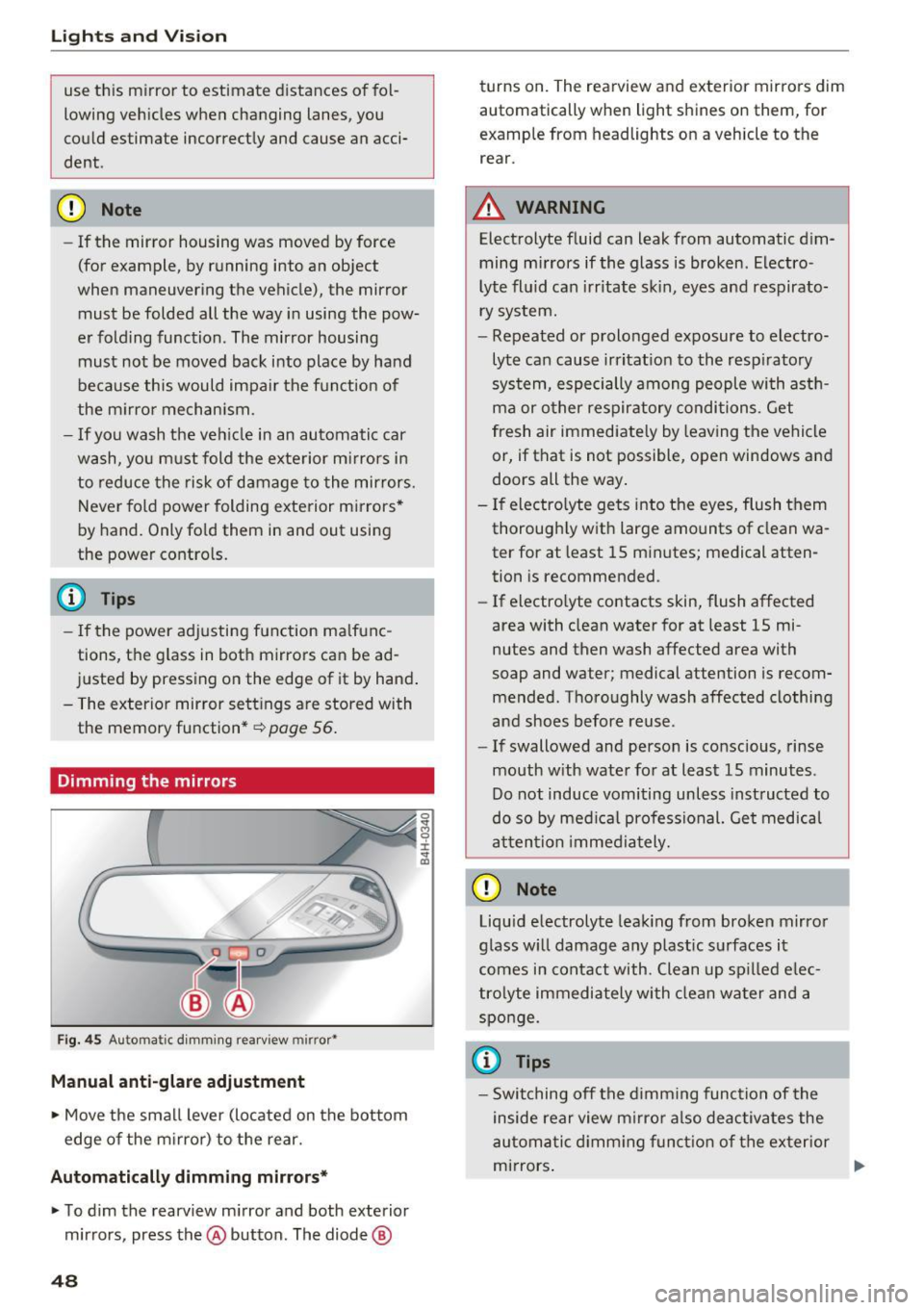
Fig. 44 Driver 's doo r: knob fo r the exterio r mirrors
Turn the knob to the desired position:
Q/P -adjusting the left/right exterior mirror.
Move the knob in the des ired direct ion .
Qill -Heating the mir ror glass depend ing on the
outside temperature .
8- Folding exte rior mirro rs* . In the Infota in
ment system , you can se lect if t he mirro rs fo ld in
automat ica lly when you lock the vehicle
~ page 33.
Front passenger 's e xterior mirror tilt
function *
To help you see the curb when backing into a parking space, the surface of the mirro r tilts
slight ly . For this to happen, the knob must be in
the position for the front passenger's outside
mirror.
You can adjust the tilted mir ror surface by turn
ing the knob in the desired direction . When you
move out of reverse and into another gear, the
new mirror position is stored and assigned to the
key you are using.
The m irror goes back into its or iginal pos ition
once you drive forward faster than 9 mph (15
km/h) or switch the ignition off.
A WARNING
-Curved (i .e. convex) m irror surfaces increase
your f ield of view. Remember that vehicles or
other objects will appear smaller and farther
away than when seen in a flat m irro r. If yo u
47
Page 50 of 282
Lights and Vision
use th is mirror to estimate d istances of fol
lowing veh icles when changing lanes, you
cou ld estimate incorrectly and cause an acci
dent .
CD Note
-If the mirror housing was moved by force
(for example, by running into an object
when maneuvering the vehicle), the mirror must be folded all the way i n using the pow
er folding function. The mirror housing
must not be moved bac k into place by hand
because this would impa ir the f unction of
the m irro r mech an ism.
- If you wash the ve hicle in an automatic car
wa sh, yo u m ust fold the e xte rior m irrors i n
to reduce the risk of damage to the mirrors.
Never fold power folding exterior m irrors*
by hand. Only fo ld them in and out usi ng
the power contro ls.
@ Tips
- If the power adj usting function ma lfunc
tions, the g lass in both mirrors can be ad
j u sted by press ing on the edge of it by hand .
- The ex terior mirror se ttings are stored with
the memory function" ~
page 56.
Dimming the mirrors
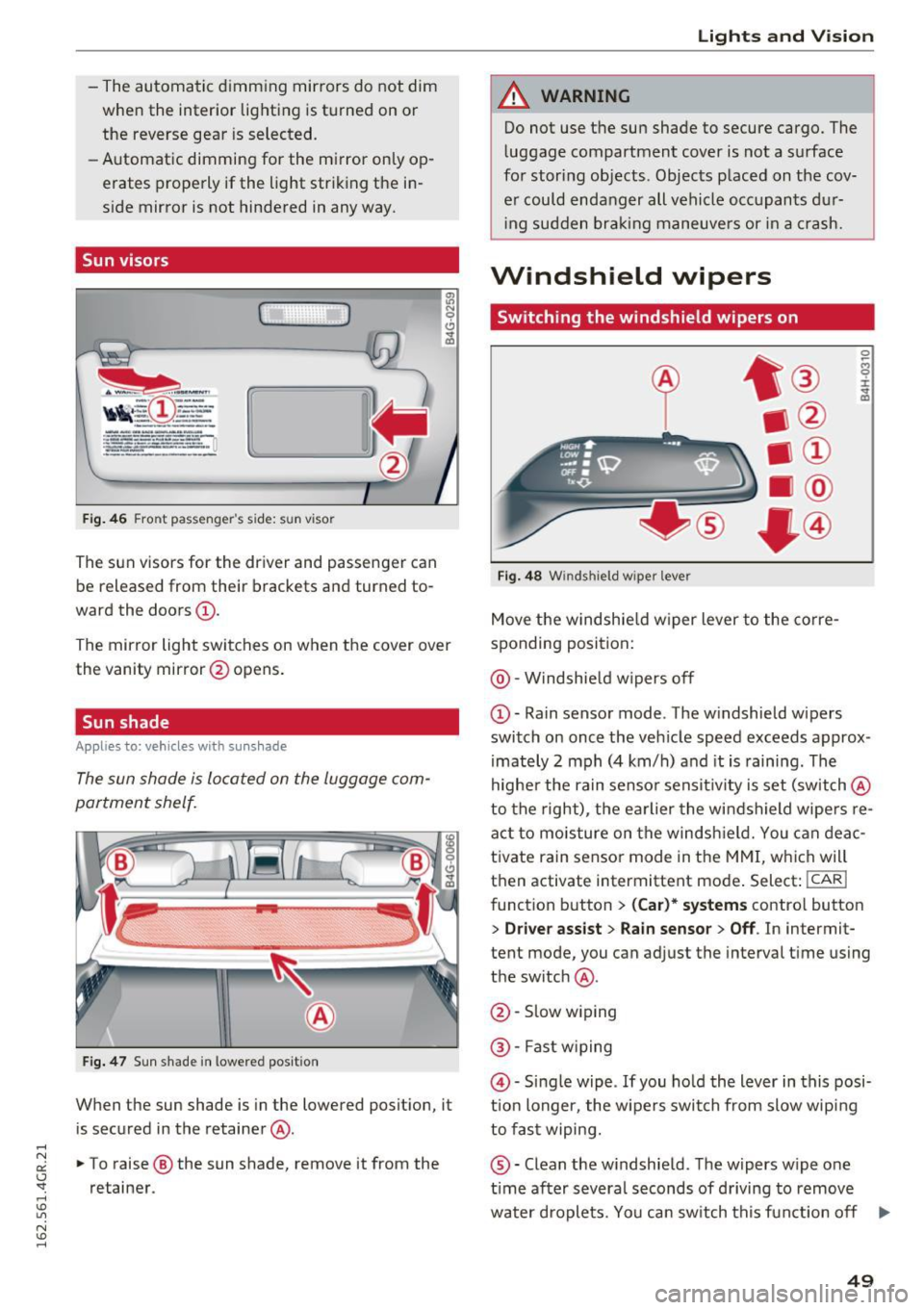
Fig. 4 5 Auto m atic d immin g rea rv iew mirr or*
Manual anti-glare adjustment
~ Move the sma ll lever (locate d on the bottom
edge of the m irror) to the rear.
Automatically dimming mirrors*
~ To dim the rearview m irror and both exterior
mirrors, press the@ button. The diode @
48
0 ... M 9 :x:
~
turns on. The rearview and exter ior mirrors dim
automat ically when light shines on them, for
example from headlights on a vehicle to the
rear.
A WARNING
Elect rolyte fluid can leak from automatic d im
ming mirrors if the glass is broken . Electro
lyte flu id can irr itate s kin, eyes and respirato
ry system.
- Repeated or prolonged exposure to electro
lyte can cause irritat ion to the resp iratory
sys tem, especially among people wi th ast h
ma or o ther respiratory conditi ons. Get
fresh air immediately by leaving the vehicle
or, if that is not possible, open windows and
doors all the way .
- If electro lyte ge ts into the eyes, flush them
thorough ly w ith large amounts of clean wa
ter for at least 15 min utes; medical atten
tion is recommended .
- If electro lyte contacts skin, flush affected
area with clean water for at least 15 mi
nutes and then wash affected area with
soap and water; medical attention is recom
mended . Tho ro ughly wash affected clothing
and shoes before reuse.
- If swallowed and person is conscious, rinse
mouth w ith wate r for at least 15 minutes .
Do not induce vomiting unless inst ructed to
do so by med ical professional. Get medical
a tt en tion immed ia tely.
CD Note
Liqu id e lectrolyte lea king from bro ken m irro r
glass w ill damage any plastic s urfaces it
comes in co ntact with . Clean up sp il led e lec
tro lyte i mmediately with clean wa ter an d a
spo nge.
(j) Tips
- Switching o ff the dimming functio n of the
inside rear view mirro r also deactiv ates the
au tom atic d imm ing fu nction of th e ex terior
mi rrors .
Page 51 of 282
-The automatic dimming mirrors do not dim
when the interior lighting is turned on or
the reverse gear is selected.
- Automatic dimming for the mirror only op
erates properly if the light striking the in
side mirror is not hindered in any way.
Sun visors
( J
Fig. 46 Front passenger 's side: sun viso r
The sun visors for the driver and passenger can
be released from their brackets and turned to
ward the doors
(D .
The mirror light switches on when the cover over
the vanity mirror @opens.
Sun shade
Applies to: veh icles with sunshade
The sun shade is located on the luggage com
portment shelf.
@ 0
.___ •a_:__.~ ,~
Fig. 47 Sun shade in lowe red position
When the sun shade is in the lowered position, it
is secured in the retainer@.
.. To raise @ the sun shade, remove it from the
retainer .
Lights and Vision
A WARNING
-Do not use the sun shade to secure cargo. The
luggage compartment cover is not a surface
for storing objects . Objects placed on the cov
er could endanger all vehicle occupants dur ing sudden braking maneuvers or in a crash.
Windshield wipers
Switching the windshield wipers on
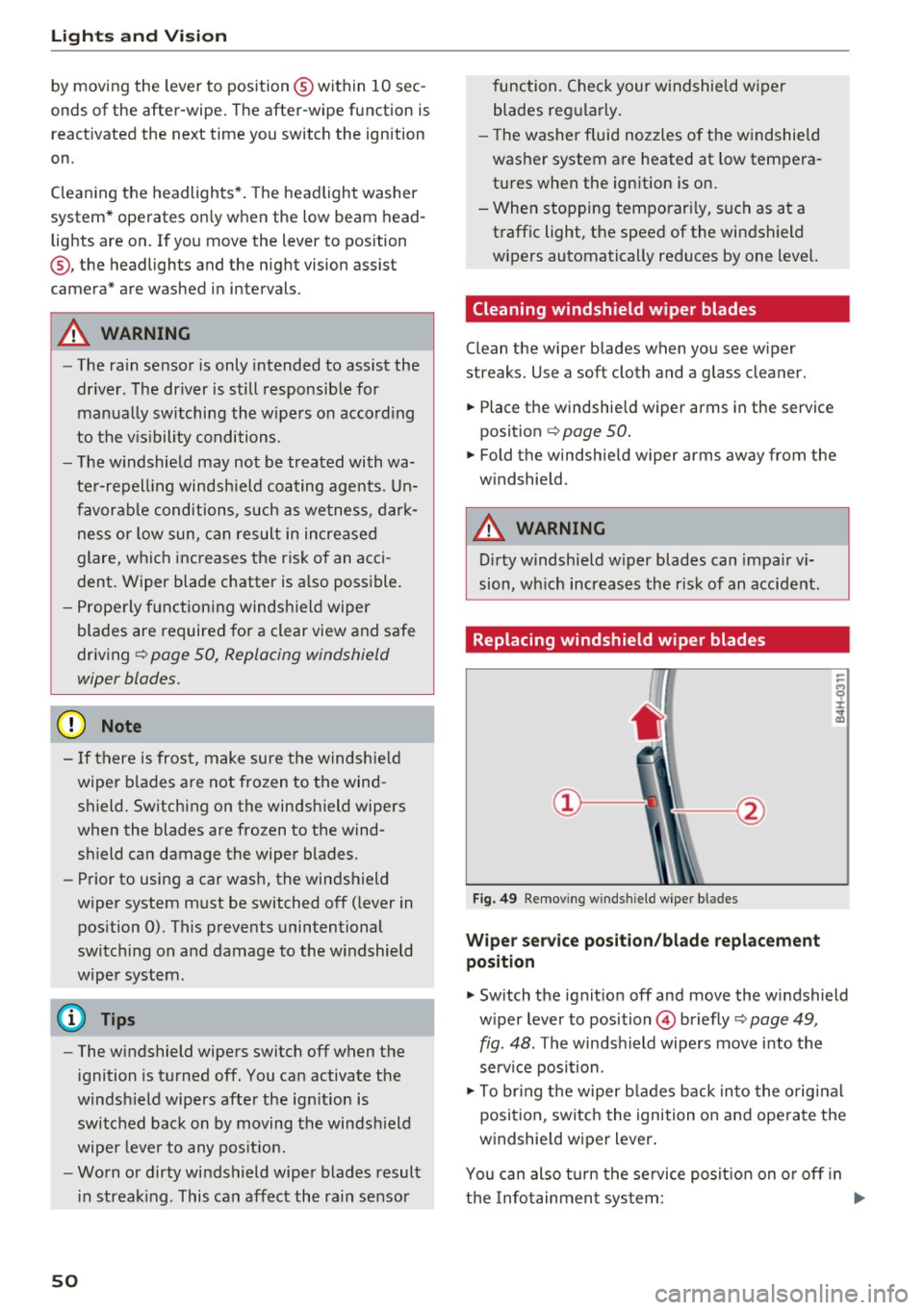
Fig. 48 Winds hield w iper lever
Move the windshield wiper lever to the corre
sponding position:
@ -Windshield wipers off
~
"' 0 :i:
switch on once the vehicle speed exceeds approx
imately 2 mph (4 km/h) and it is raining . The
higher the rain sensor sensitivity is set (switch @
to the right), the earlier the windshield wipers re
act to moisture on the windshield. You can deac
tivate rain sensor mode in the MMI, which will
then activate intermittent mode. Select:
! CARI
function button > (Car)* systems control button
> Driver assist> Rain sensor > Off. In intermit
tent mode, you can adjust the interval time using
the switch @.
@ -Slow wiping
@ -Fast wiping
@-Single wipe . If you hold the lever in this posi
tion longer, the wipers switch from slow wiping
to fast wiping.
®-Clean the windshield. The wipers wipe one
time after several seconds of driving to remove
water droplets. You can switch this function off .,,_
49
Page 52 of 282
Lights and Vision
by moving the lever to position® within 10 sec
onds of the after-wipe. The after-wipe function is
react ivated the next time you switch the ignition
on.
Cleaning the headlights*. The headlight washer
system* operates only when the low beam head lights are on. If you move the lever to position
@ , the headlights and the night vision assist
camera* are washed in intervals.
A WARNING
-The rain sensor is only intended to assist the
driver . The driver is still responsible for
manually switching the wipers on according
to the visibility conditions.
- The windshield may not be treated with wa
ter-repelling windshield coating agents. Un
favorable conditions, such as wetness, dark
ness or low sun, can result in increased
glare, which increases the risk of an acci
dent. Wiper blade chatter is also possible.
- Properly functioning windshield wiper
blades are required for a clear view and safe
driving ~
page 50, Replacing windshield
wiper blades.
(Jd) Note
- If there is frost, make sure the windshield
wiper blades are not frozen to the wind
shield. Switching on the windshield wipers
when the blades are frozen to the wind
shield can damage the wiper blades.
- Prior to using a car wash, the windshield
wiper system must be switched off (lever in position 0). This prevents unintentional
switching on and damage to the windshield
wiper system.
(Di Tips
- The windshield wipers switch off when the
ignition is turned off. You can activate the
windshield wipers after the ignition is
switched back on by moving the windshield
wiper lever to any position.
- Worn or dirty windshield wiper blades result
in streaking . This can affect the rain sensor
so
function. Check your windshield wiper
blades regularly.
- The washer fluid nozzles of the windshield
washer system are heated at low tempera
tures when the ignition is on.
- When stopping temporarily, such as at a
traffic light, the speed of the windshield
wipers automatically reduces by one level.
Cleaning windshield wiper blades
Clean the wiper blades when you see wiper
streaks. Use a soft cloth and a glass cleaner.
.,. Place the windshield wiper arms in the service
position
c:> page 50.
.,. Fold the windshield wiper arms away from the
windshield.
A WARNING
Dirty windshield wiper blades can impair vi
sion, which increases the risk of an accident.
Replacing windshield wiper blades
Fig. 49 Removing windshield wiper blades
Wiper service position/blade replacement
position
.,. Switch the ignition off and move the windshield
wiper lever to position
@ briefly c:> page 49,
fig. 48. The windshield wipers move into the
service position.
.,. To bring the wiper blades back into the original
position, switch the ignition on and operate the
windshield wiper lever.
You can also turn the service position on or off in
the Infotainment system:
IJll-
Page 53 of 282
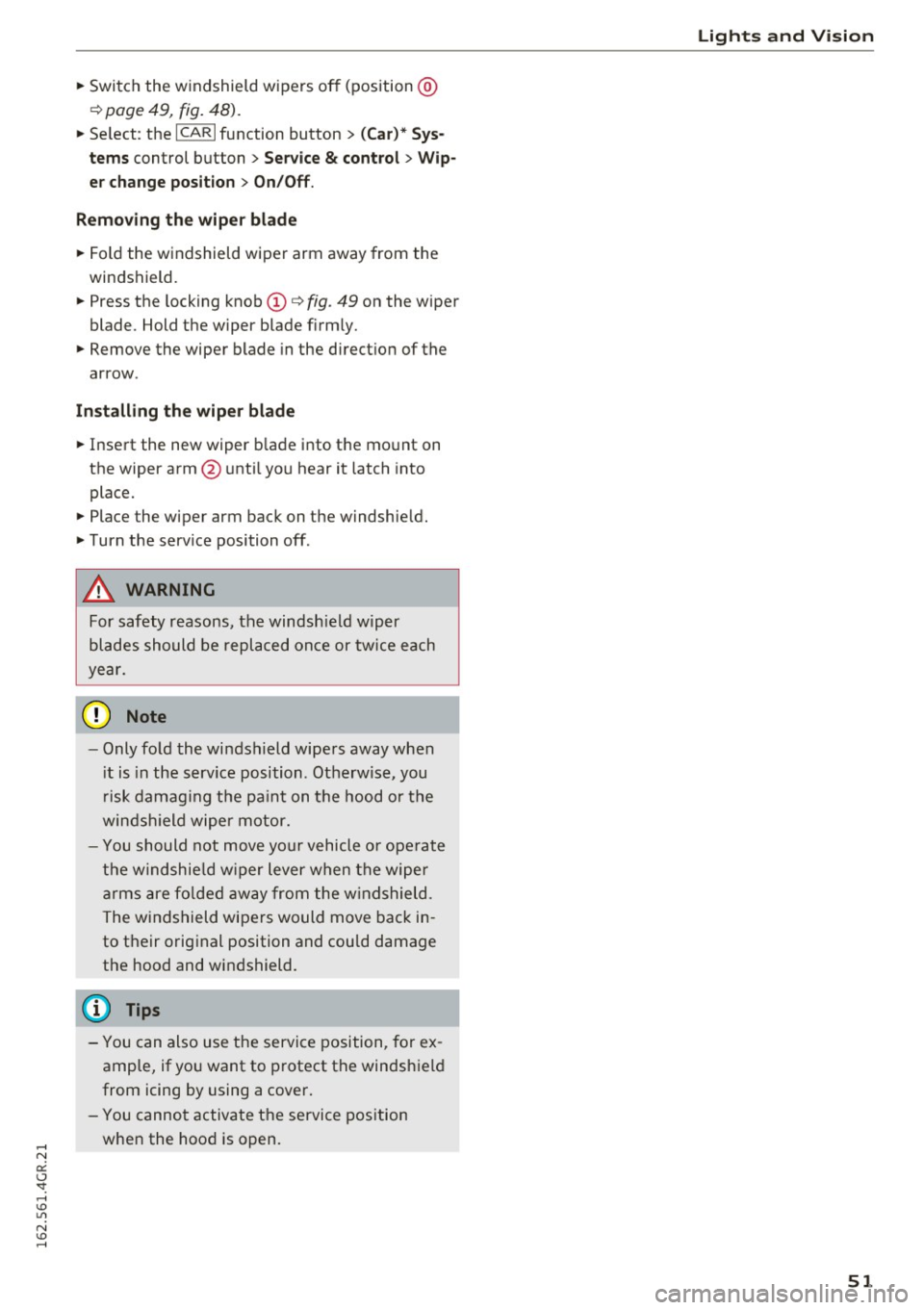
~ Switch the windshield wipers off (position@
¢page 49, fig. 48).
~ Se lect : the ICARI function button > (Car)* Sys
tems
control button > Service & control > Wip·
er change position
> On/Off.
Removing the wiper blade
~ Fold the windshield wiper arm away from the
windshield.
~ Press the locking knob(!)¢ fig. 49 on the wiper
blade . Hold the wiper blade firmly.
~ Remove the wiper blade in the direction of the
arrow .
Installing the wiper blade
~ Insert the new wiper blade into the mount on
the wiper arm@ until you hear it latch into
place.
~ Place the wiper arm back on the windshield.
~ Turn the serv ice position off .
A WARNING
-
For safety reasons, the windsh ield wiper
blades should be replaced once or twice each
year.
0 Note
- Only fold the windshield wipers away when
i t is in the serv ice position . Otherwise, you
r isk damaging the paint on the hood or the
windsh ield wipe r motor.
- You should not move your vehicle o r operate
the windshie ld wiper lever when the wiper
arms are folded away from the windshield.
The windshield wipers would move back in
to their original position and could damage
the hood and windshield.
(D Tips
- You can also use the service position, for ex
ample, if you want to protect the windshield
from icing by using a cover.
- You cannot activate the service position
when the hood is open.
Lights and Vision
51
Page 56 of 282
Sea ts and stor age
Multifunction button
Applies to: ve hicles w ith memory funct ion
You con adjust the massage function, lumbar
support, side bolsters and seating surface using
the multifunction button .
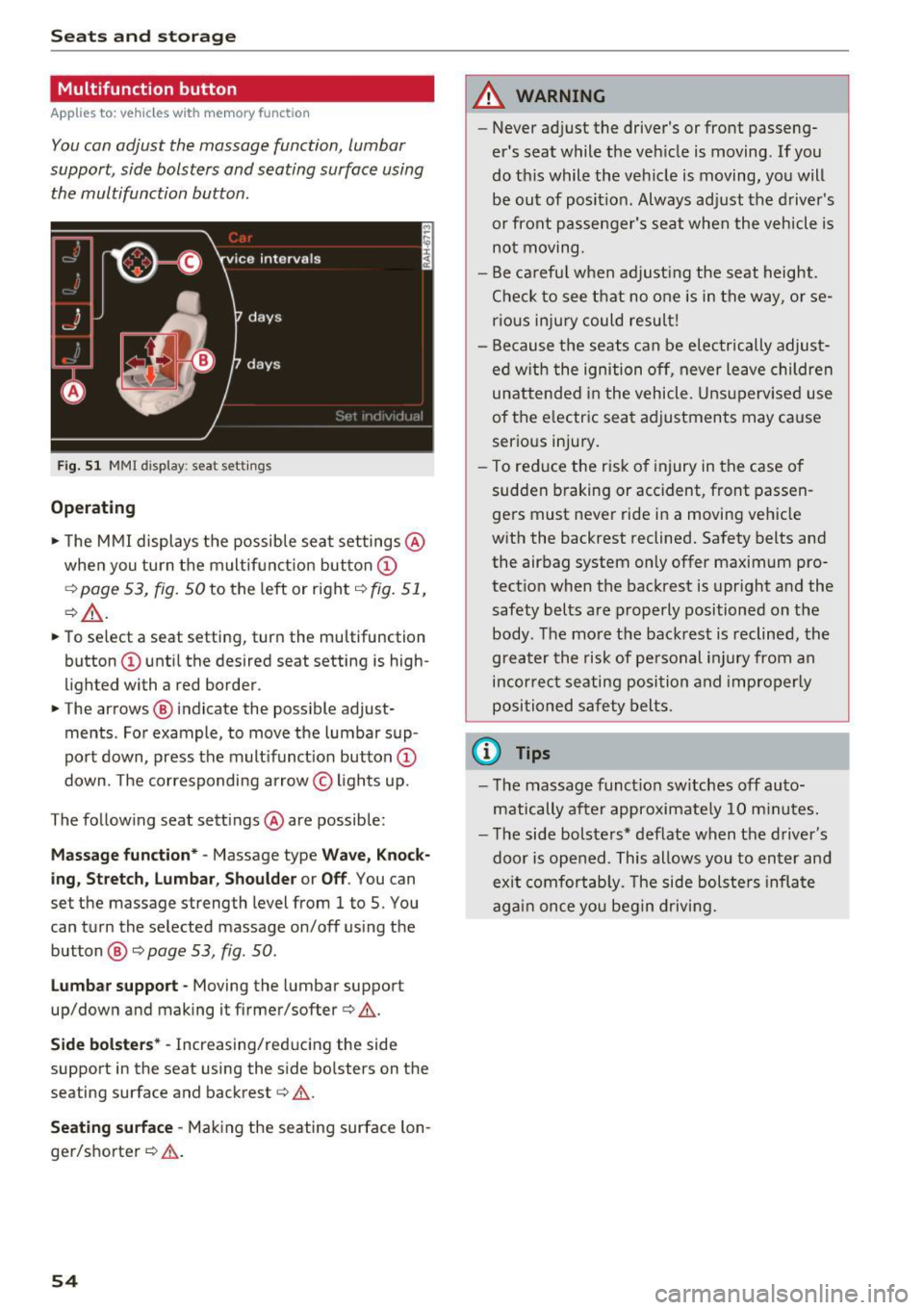
Fig . 5 1 MMI display: seat settings
Operating
.. The MMI displays the possible sea t settings @
when you turn the m ultif unct ion button
CD
¢ page 53, fig. 50 to the left or right¢ fig. 51,
¢ £ .
.. To select a seat setting, turn the multifunction
button
CD until the desired seat setting is high
lighted with a red border .
.. The arrows @ indicate the possible adjust
ments . For example, to
move the lumbar sup
port down, press the mult ifunct ion button
CD
down. The corresponding arrow © lights up.
The following seat sett ings @are possible:
Massage function* -Massage type Wave, Kno ck
ing, Stretch , Lumb ar, Shoulder or Off .
You can
set the massage strength level from 1 to S. You
can turn the selected massage on/off us ing the
button @¢
page 53, fig . 50 .
Lumbar support -Moving the lumbar support
up/down and making it firmer/softer¢&.
Side bolste rs* -Increasing/reducing the side
support in the seat using the side bo lsters on the
seating surface and backrest¢& .
Seating surfac e -Mak ing the seating surface lon
ger/shorter ¢& .
54
A WARNING
-Never adjust the driver's or front passeng
er's seat while the veh icle is moving. If you
do this while the veh icle is moving, you will
be out of posit ion . Always ad just the d river 's
or front passenger's seat when the vehicle is
no t moving.
- Be ca refu l when adjust ing the seat height .
Check to see t hat no one is in the way, or se
rio us inju ry could resu lt!
- Because the seats can be electrically adjust
ed w ith the ignition off,
never leave children
unattended in the vehicle . Unsupervised use
of the e lectric seat adjustments may cause
serious injury.
- To reduce the risk of injury in the case of
sudden braking or accident, front passen
ge rs must never ride in a moving veh icle
with the backrest reclined. Safety belts and
the airbag system only offer maximum pro
tect ion when the backrest is upr ight and the
safety bel ts are properly positioned on the
body. T he mo re the backrest is reclined, the
greater the risk of pe rsonal inju ry from an
incor rect seating posi tion and imprope rly
positioned safety belts .
(D Tips
- T he massage funct io n sw itches off auto
matically after approximate ly 10 m inutes.
- T he side bolsters* deflate when the driver's
door is opened . This allows you to enter and
ex it comfortab ly. The side bolste rs infla te
again once you begin driving.
Page 59 of 282
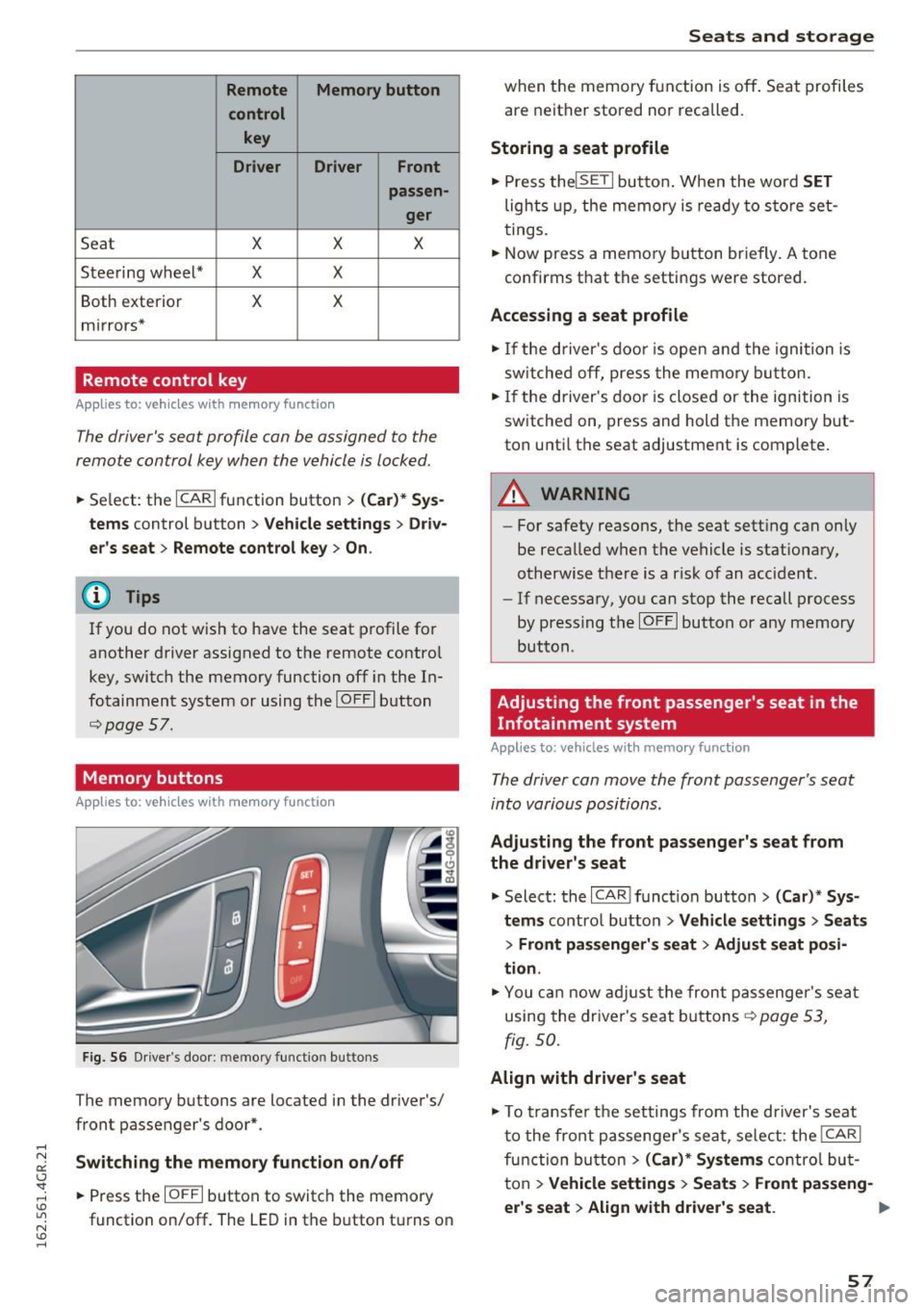
Remote Memory button control key
Driver D river Front
passen-ger
Seat X X X
Steering wheel* X X
Both
exterior X X
mirrors*
Remote control key
Applies to: vehicles with memory function
The driver's seat profile can be assigned to the
remote control key when the vehicle is locked.
• Select: the ICARI function button > (Car)* Sys
tems
control button > Vehicle settings > Driv
er's seat
> Remote control key > On .
(D Tips
If you do not wish to have the seat profile for
another driver assigned to the remote control
key, switch the memory function off in the In
fotainment system or using the IOFFI button
r:::;,pag e 57.
Memory buttons
Applies to: vehicles with memory function
Fig. S6 Driver 's door: memory function buttons
The memory buttons are located in the driver's/
front passenger's door*.
Switching the memory function on/off
• Press the IOFFI button to switch the memory
function on/off. The
LED in the button turns on
Seats and storage
when the memory function is off . Seat profiles
are neither stored nor recalled.
Storing a seat profile
• Press thelSETI button. When the word SET
lights up, the memory is ready to store set
tings .
• Now press a memory button briefly.
A tone
confirms that the settings were stored.
Accessing a seat profile
• If the driver's door is open and the ignition is
sw itched off, press the memo ry button.
.. If the driver's door is closed or the ignition is
switched on, press and hold the memory but
ton until the seat adjustment is complete .
A WARNING
-For safety reasons, the seat setting can only
be recalled when the vehicle is stationary,
otherwise the re is a risk of an accident.
- If necessary, you can stop the recall process
by press ing the IOFFI button or any memory
button.
Adjusting the front passenger's seat in the
Infotainment system
Applies to: vehicles with memory function
The driver can move the front passenger's seat
into various positions.
Adjusting the front passenger's seat from
the driver's seat
• Select: the I CAR I funct ion button > (Car) * Sys
tems
contro l button > Vehicle settings > Seats
> Front passenger's seat > Adjust seat posi
tion .
• You can now adjust the front passenger's seat
using the driver's seat buttons
r:::;, page 53,
fig.
so.
Align with driver's seat
• To transfer the settings from the driver's seat
to the front passenger's seat, select: the I CAR I
fu nction button
> (Car)* Systems control but
ton >
Vehicle settings> Seats > Front passeng-
er 's seat > Align with driver 's seat. ..,.
57
Page 76 of 282
Driving
This message appea rs and a warning tone sounds
if you open the driver's door when the ignition is
sw itched on.
Pr es s brake pedal to start engine
This message appears if you do not press the
brake pedal whe n starting the eng ine.
fll I s key in the veh icle?
This indicator light turns on and th is message ap
pears if the ignition key was removed from the
ve hicle when the engine was running . If the igni
tion key is no longer in the veh icle, you can not
sw itch on the ig nit ion or start t he eng ine once
you stop i t. You also cannot loc k the vehicle from
the o utside.
Shift to P , otherwise vehicle can roll away .
Doors do not lock if lever i s not
in P.
This message appears for safety reasons if the
transmission is not in the P position when you
sw itch the ignition off . Move the selector lever to
the P pos ition. Otherwise the veh icle is not pro
tected from rolling and it ca nnot be locked .
II Key is not recogn ized. Hold back of key
against marked area. Se e owner's manual
If the indicator light t urns on and th is message
appears, there is a malfunction
c:;, page 74.
Starting the engine when there is a
malfunction
It may not be possible to s tart the engine under
certain circumstances, for example if the battery
in the vehicle key is drained, if interference is af
fected the key or if there is a system malfunc tion.
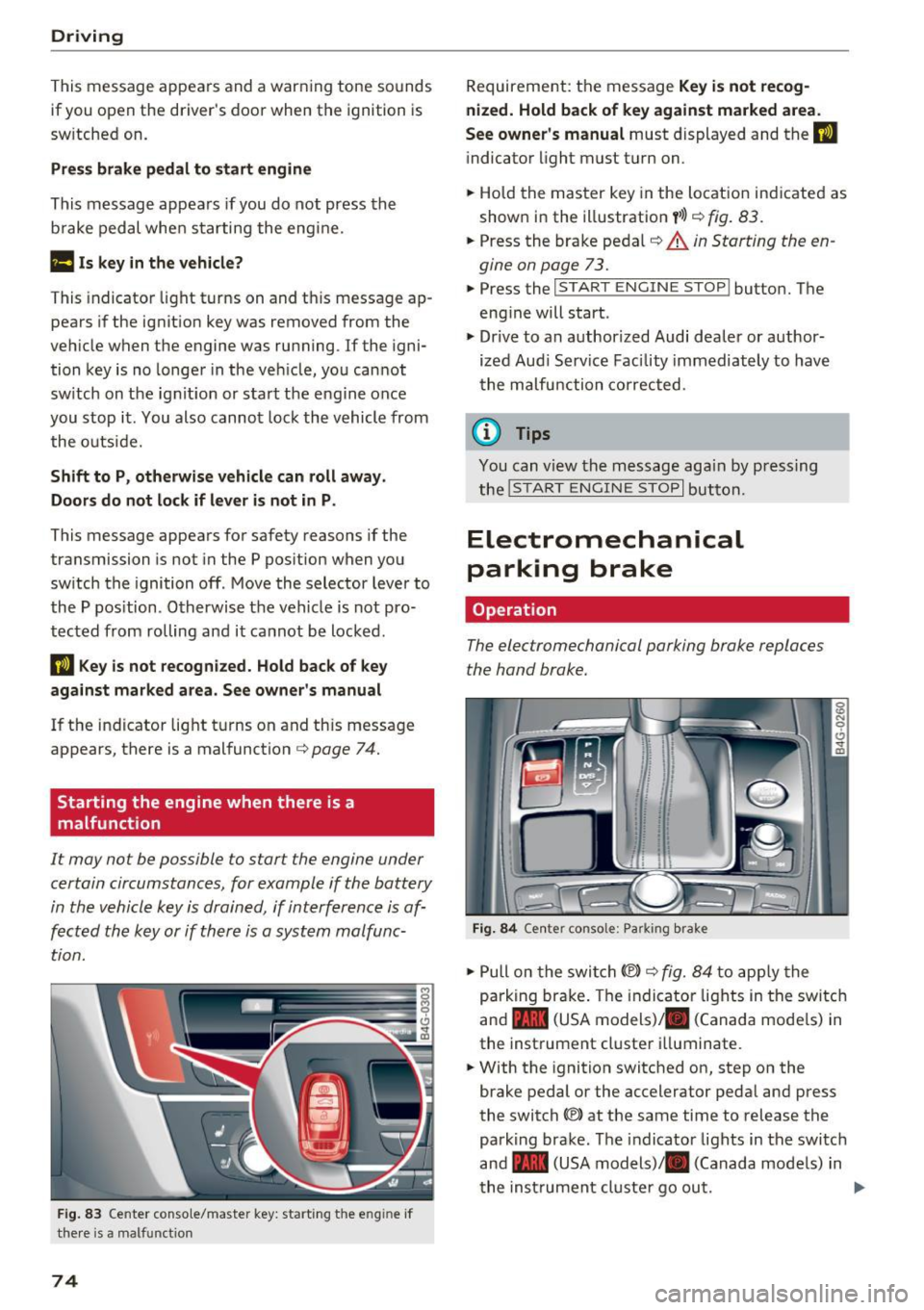
F ig. 83 Center conso le/ ma ster key: sta rt in g t he e ng in e if
t h e re is a ma lfunction
74
Requirement : the messa ge Key i s not recog
nized. Hold back of key against marked area .
See owner's manual
must displayed and the II
indicator light must tu rn on .
.,. Ho ld the m aster key in the locat ion ind icated as
shown in the illustration
f >l) c:;, fig . 83.
.,. Press the brake pe dal c:;, &. in Starting the en
gine on page 73 .
.,. Press the ~ I S _T _A _ R_ T_ E_N _G _I _N _E _ S_ T_ O_ P~ I button. The
eng ine will start .
.,. Dr ive to an author ized Audi dealer or author
ized Aud i Serv ice Facility immediately to have
t he malfu nction corrected.
@ Tips
You can v iew the message aga in by pressing
the
! S TA RT ENGI NE S TOP I button.
Electromechanical
parking brake
Operation
The elec tromechanical parking broke replaces
the hand broke.
Fig. 84 Ce nte r conso le: Pa rk ing brake
.,. Pull on the swi tch@) c:;, fig. 84 to app ly the
parking br ake. T he indicator lights in the switc h
and - (USA models)/ . (Canada mode ls) in
the inst rument cluste r ill uminate .
.,. With the ignition switched on, step on the
brake pedal or the accelerator pedal and press
the switch ®lat the same time to release the
park ing brake. The indicator lights in the switc h
and - (USA models)/ . (Canada mode ls) in
t he inst rument cl uste r go ou t.
Page 77 of 282
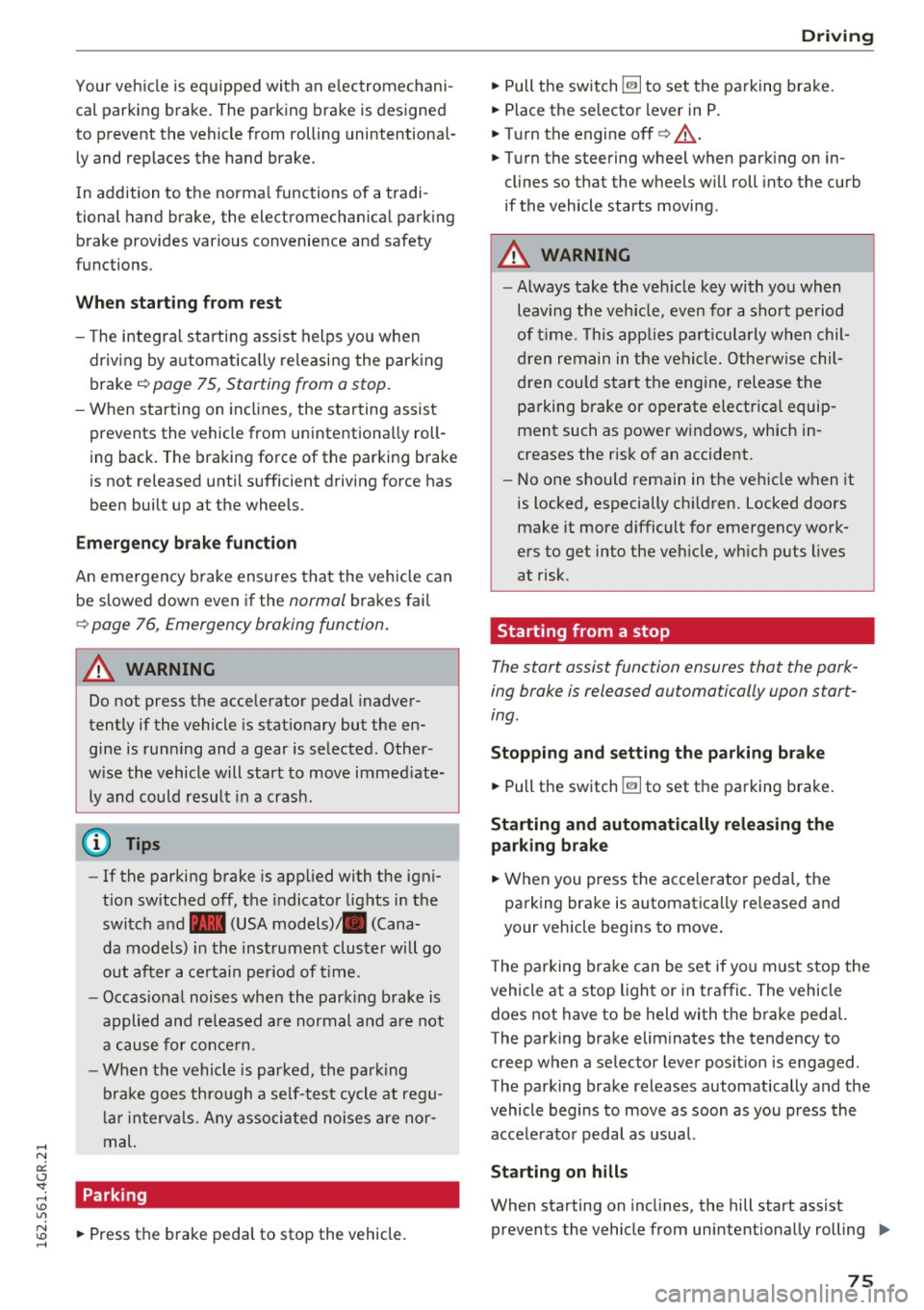
Your vehicle is equipped with an electromechani
cal parking brake. The parking brake is designed
to prevent the vehicle from rolling unintentional
ly and replaces the hand brake.
I n addition to the norma l functions of a tradi
tional hand brake, the electromechanica l parking
brake provides various convenience and safety
functions.
When starting from rest
- The integ ral starting assist helps you w hen
driving by automatically releasing the parking
brake
r=:> page 75, Starting from o stop .
-When starting on inclines, the starting assist
prevents the vehicle from unintentiona lly roll
ing back . The braking force of the parking brake
is not released until sufficient driving force has
been built up at the wheels.
Emergency brake function
An emergency brake ensures that the vehicle can
be slowed down even if the
normal brakes fai l
r=:> page 76, Emergency broking function.
A WARNING
-
Do not press the accelerator pedal inadver
tently if the vehicle is stat ionary but the en
gine is running and a gear is selected. Other
w ise the vehicle will start to move immediate
ly and could result in a crash.
(D Tips
- If the parking brake is applied with the igni
tion switched off, the indicator lights in the
switch and -(USA models)/ . (Cana-
da models) in the instrument cluster will go
out after a certain period of time.
- Occasiona l noises when the park ing brake is
applied and released a re normal and are not
a cause for concern.
- When the vehicle is parked, the park ing
brake goes th rough a se lf-test cycle at regu
lar int ervals. Any associated noises are nor
mal.
Parking
• Press the brake pedal to stop the vehicle.
D riving
• Pull the switch~ to set the parking brake .
• Place the selector lever in P .
• Turn the engine off
r=:> .&, .
• Turn the steering wheel when parking on in
clines so that the wheels w ill roll into the curb
if the vehicle starts moving .
A WARNING
=
-Always take the vehicle key with you when
leaving the vehicle, even for a sho rt period
of time. This applies particularly when chil
d ren remain in the vehicle. Otherwise chil
dren cou ld start the engine, release the
parking brake or operate e lectrical equip
ment such as power windows, which in
creases the risk of an accident.
- No one should remain in the vehicle when it
is locked, especially chi ldren. Locked doors
make it more d ifficult for emergency work
ers to get into the vehicle, wh ich puts lives
at risk.
Starting from a stop
The start assist function ensures that the park
ing broke is released automatically upon start
ing.
Stopping and setting the parking brake
• Pull the switch~ to set the parking brake .
Starting and automatically releasing the
parking brake
• When you press the acce lerator peda l, the
parking brake is automatica lly re leased and
your veh icle begins to move .
T he parking brake can be set if you must stop the
vehicle at a stop light or in traffic. The vehicle does not have to be held with the brake pedal.
The parking brake elim inates the tendency to
creep when a selector lever posit ion is engaged.
The parking brake releases automatically and the
vehicle begins to move as soon as you press the
accelerator pedal as usual.
Starting on hills
When starting on incl ines, the hill start assist
prevents the vehicle from unintentionally rolling
Ill>
75
Page 79 of 282
Cruise control system
Switching on
Applies to: vehicles with cruise control system
The cruise control system makes it possible to
drive a constant speed that is 30 km/h or higher.
0
f
®t
0
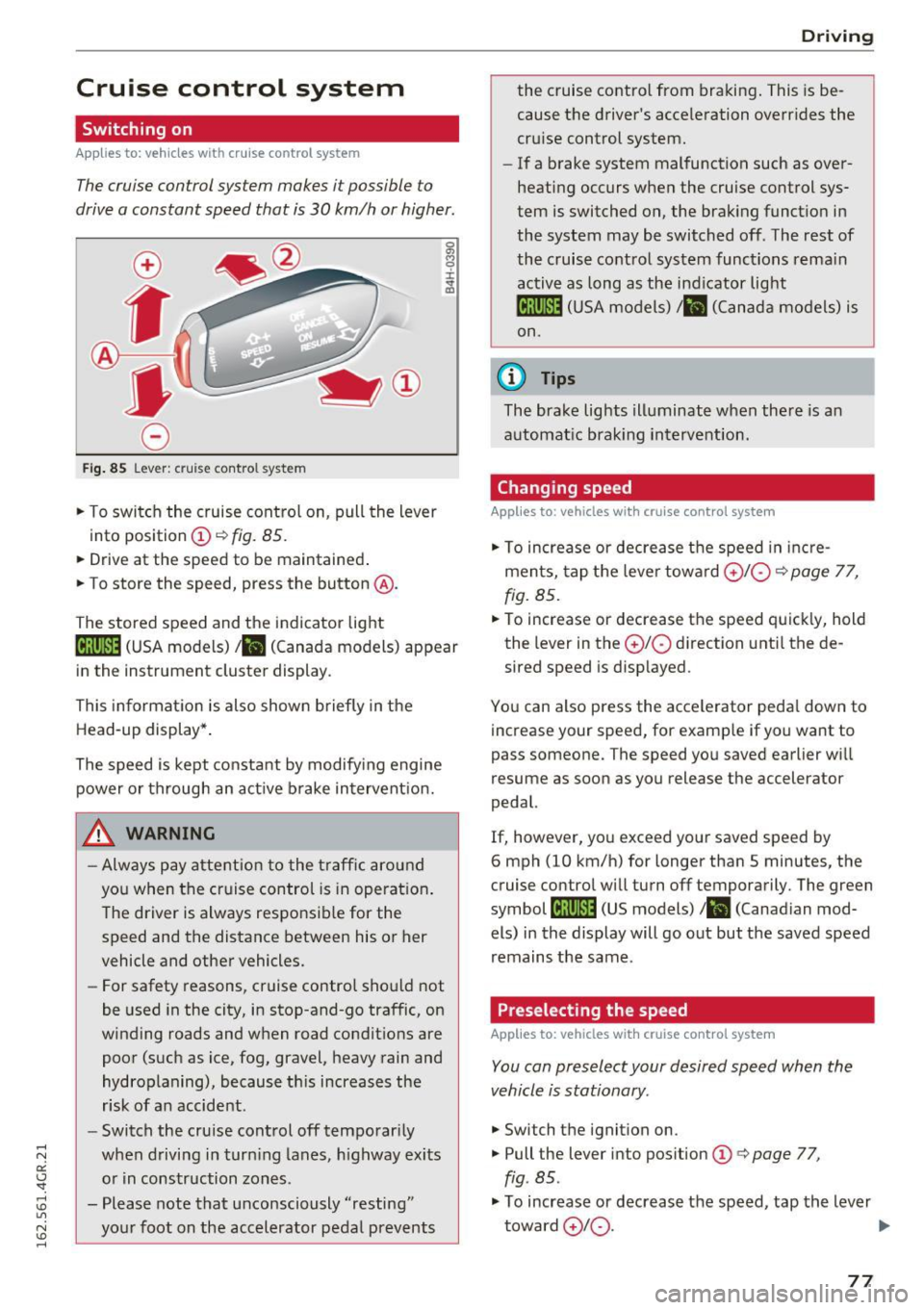
Fig . 85 Lever : cruise control system
.,. To switch the cruise control on, pull the lever
into position
(D ~ fig. 85.
.. Drive at the speed to be maintained .
.. To store the speed, press the button @.
The stored speed and the indicator light
tij;jl)~i4 (USA models)/ .. (Canada models) appear
in the instrument cluster display .
This informat ion is also shown briefly in the
Head-up display* .
The speed is kept constant by modify ing engine
power or through an act ive brake intervent ion.
_& WARNING
- Always pay attention to the traff ic around
you when the cruise control is in operat ion .
T he driver is always respo nsib le for the
speed and the distance between his or her
vehicle and other vehicles.
- For safety reasons, cruise control should not
be used in the city, in stop-and-go traffic, on
winding roads and w hen road condit ions are
poor (such as ice, fog, gravel, heavy rain and
hydroplaning), because th is increases the
r isk of a n accident.
- Switch the cruise control off temporar ily
when driving in turn ing lanes, h ighway exits
o r in construction zones .
- Please note that unconsciously "resting" yo ur foot on the accelerator pedal prevents
-
D rivi ng
the cruise co ntro l from bra king . This is be
cause the d river's accele ration overr ides the
cru ise control system.
- If a brake system malfunction such as over
heating occurs when the cruise control sys
tem is switched on, the brak ing funct io n in
the system may be switched off . The rest of
the cruise contro l system functions rema in
active as long as the ind icator light
ml1Jlm (USA models) / .. (Canada models) is
on.
(0 Tips
The brake lights illuminate when the re is an
automat ic brak ing intervent ion.
Changing speed
Applies to: vehicles with cruise control system
.,. To increase or dec rea se t he speed in inc re
ments, tap the leve r towa rd
0 10 ¢ page 77,
fig. 85 .
.. To increase or decrease the speed quick ly, hold
the lever in the
0 10 d irection unti l the de
sired speed is disp layed.
You can also press the accele rator peda l dow n to
increase your speed, for example if you want to
pass someone. The speed yo u saved earlier wi ll
resume as soon as you release the accelerator
pedal.
If, however, you exceed your saved speed by
6 mph (10 km/h) for longer than 5 minutes, the
cruise contro l will turn off temporarily . The green
symbol
li! j(9~14 (US models)/ .. (Canad ian mod
els) in the display will go out but the saved speed
remains the same.
Preselecting the speed
Applies to: vehicles with cruise control system
You can preselect your desired speed when the
vehicle is stationary.
.,. Switch t he ignition on .
.,. Pull the lever into pos ition
(D q page 77,
fig . 85.
.,. To increase or decrease t he speed, tap the lever
toward
0 10 . .,,_
77