warning lights AUDI RS7 SPORTBACK 2016 Owner's Guide
[x] Cancel search | Manufacturer: AUDI, Model Year: 2016, Model line: RS7 SPORTBACK, Model: AUDI RS7 SPORTBACK 2016Pages: 282, PDF Size: 70.78 MB
Page 84 of 282
Audi adaptive cruise control and braking guard
• You must also press the brake pedal when the
vehicle is stopped.
Switching adaptive cruise control off
• Push the lever away from you into position @
until it clicks into place. The message
ACC off
appears.
@ Indicator lights
• • Adaptive cruise control is switched on. No
vehicles are detected up ahead. The stored speed
is maintained .
• · A moving vehicle is detected up ahead. The
adaptive cruise control system regulates the
speed and distance to the moving vehicle ahead
and accelerates/brakes automatically.
r -.j · Adaptive cruise control is switched on . A
moving vehicle up ahead was detected. Your vehi
cle remains stopped.
• • When automatic braking is not able to keep
enough distance to a previously detected moving
vehicle up ahead, you must take control and brake
9 page 84, Prompt for driver interven
tion.
© Display
If adaptive cruise contro l is not shown in the dis
play, you can call it up with the multifunction
steering wheel buttons
9 page 22.
Based on the symbols in the display, you can de
termine if the system is maintaining a distance to
the vehicle ahead and what that distance is.
No vehicle· No vehicle ahead was detected.
White vehicle· A vehicle ahead was detected.
Red vehicle · Prompt for the driver to take action
9page84.
Both arrows on the scale© indicate the distance
to the vehicle ahead. No arrow appears when the
vehicle is on an open road and there is no object
ahead . If an object is detected ahead, the arrow
moves on the scale.
The green zone on the scale shows the stored dis·
tance. For information on changing the stored
distance, refer to
9 page 83. If the distance se·
82
lected is too close or may soon become too close,
the arrows move into the red zone on the scale.
A WARNING
Improper use of the adaptive cruise control
can cause collisions, other accidents and seri
ous personal injuries.
- Pressing the
ISETI button when driving at
speeds below 20 mph (30 km/h), will auto
matically accelerate the vehicle to 20 mph (30 km/h), which is the minimum speed
that can be set.
@ Tips
-If you switch the ignition or the adaptive
cruise control off, the set speed is erased
from the system memory.
- The electronic stabilization control (ESC)
and the anti-slip-regulation (ASR) are auto·
matically turned on when the adaptive
cruise control is turned on. Both systems
cannot be turned off if the adaptive cruise
control is turned on .
Changing the speed
Applies to: vehicles with Audi adapt ive cru ise control
0
f
JJ
0
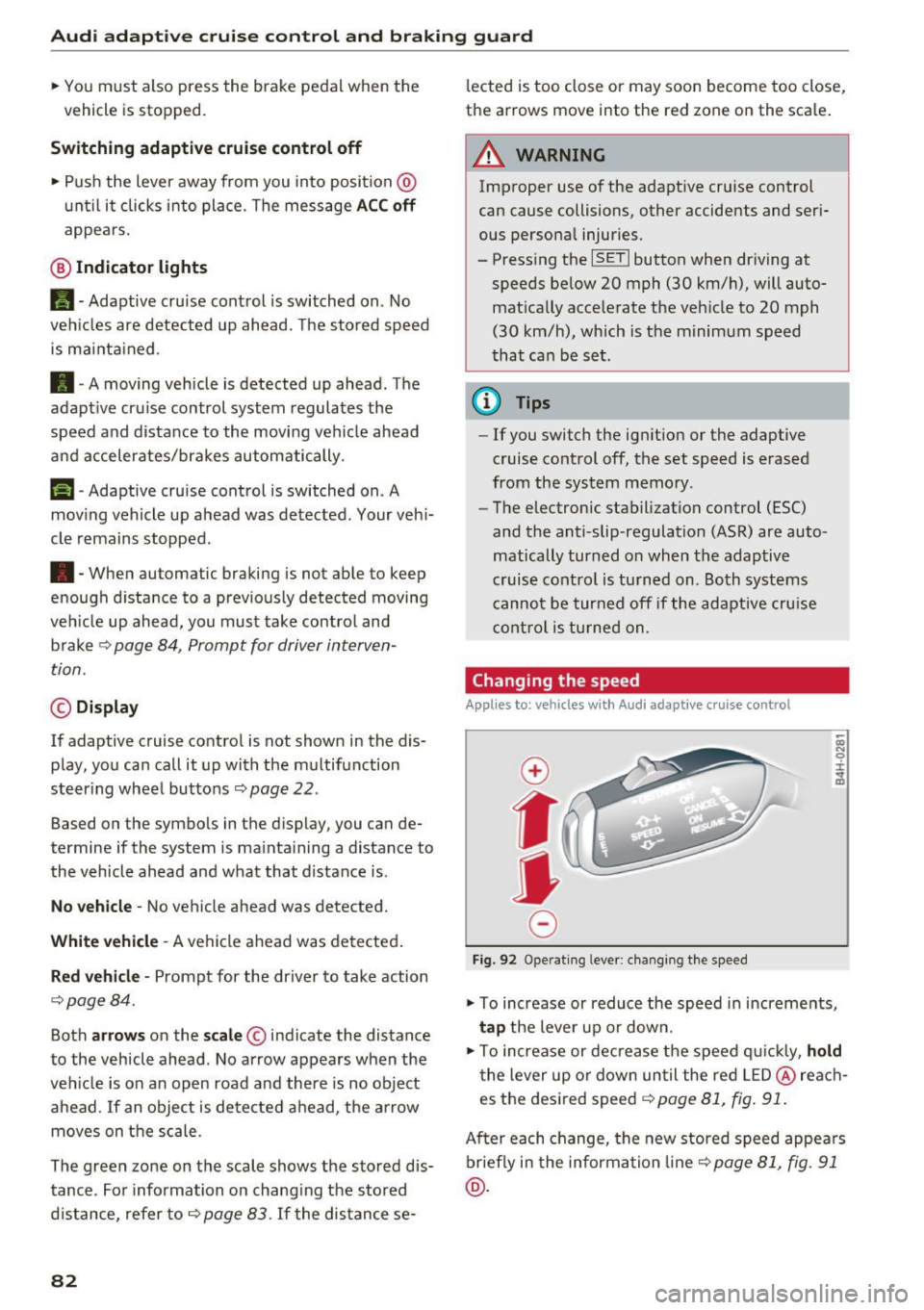
Fig. 92 Operating lever: changing the speed
;;; N 9 :c .., m
• To increase or reduce the speed in increments,
tap the lever up or down.
• To increase or decrease the speed quickly,
hold
the lever up or down until the red LED@reach
es the desired speed
9 page 81, fig. 91.
After each change, the new stored speed appears
briefly in the information line¢
page 81, fig. 91
@.
Page 100 of 282
Night vision assist
Night vision assist
Night vision assist with
pedestrian and wild
animal highlighting
Description
A pp lies to: ve hicles w ith night v isio n ass ist
The night vision assist can detect, highlight and,
if necessary, warn about pedestrians and large
wild animals.
Night vision assistant with pedestrian and wild
animal detection assists you in darkness by using
an infrared camera to monitor the area in front of
your vehicle, within the limits of the system.
It
can display objects up to approximately 1000 feet (300 meters) away . The heat image
detected by the camera is shown in th e instru
ment cluster display . Warm areas appear lighter
and cold areas appear darker.
Highlighting detected pedestrians and wild
animals
Applies to: ve hicles w ith n ig ht v isio n ass ist
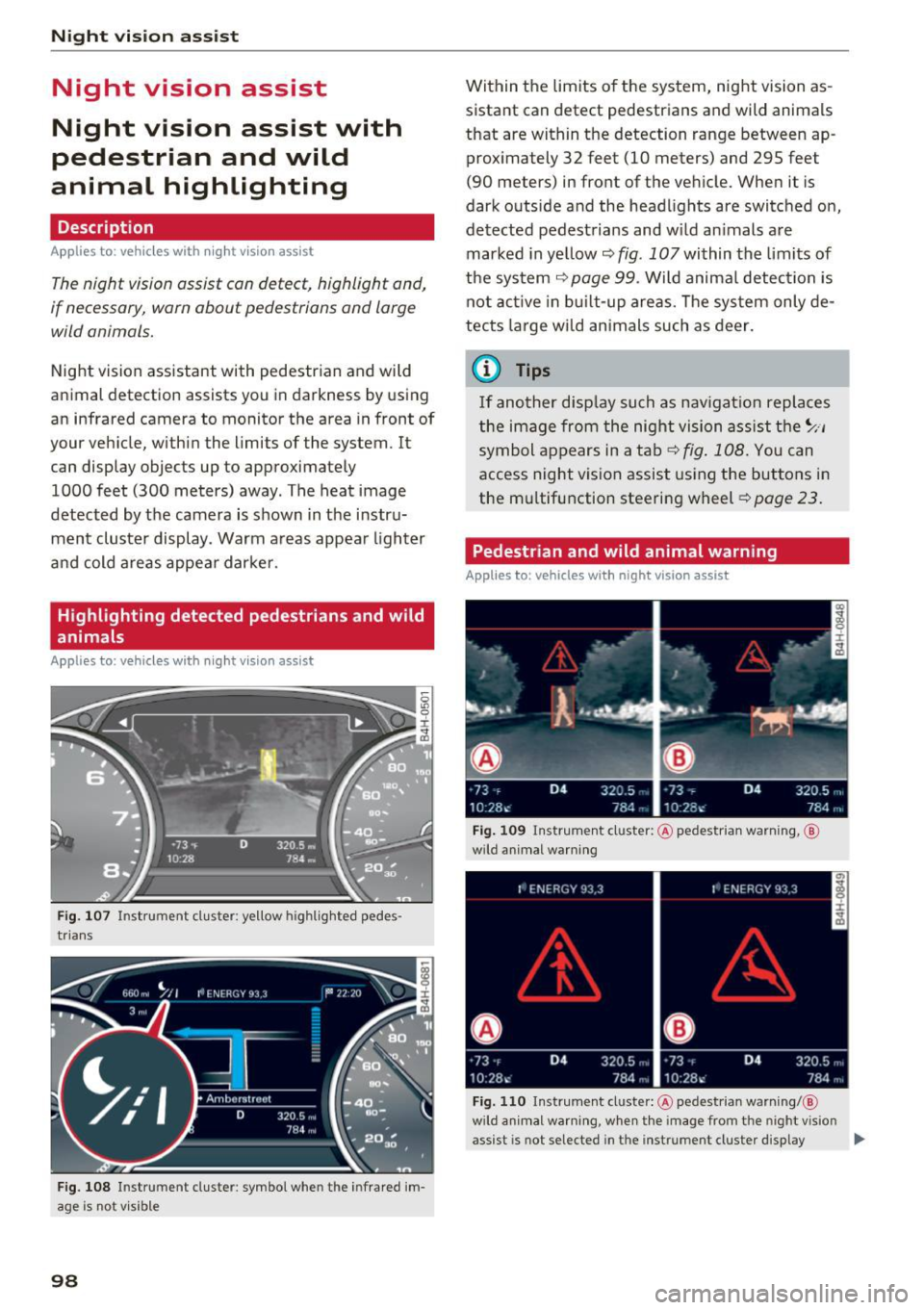
Fig . 107 Instrument cluster: ye llow h ighlig hted pedes
trians
Fig. 108 I n stru ment cluste r: symbol when the i nfrared im
age is not v isible
98
Within the limits of the system, night vision as
sistant can detect pedestrians and wild animals
that are within the detection range between ap
proximately 32 feet (10 meters) and 295 feet
(90 meters) in front of the vehicle. When it is
dark outside and the headlights are switched on,
detected pedestrians and w ild animals are
marked in ye llow
c::> fig. 107 within the limits of
the system
c::> page 99. Wild animal detection is
not active in built-up areas. The system only de
tects large wild animals such as deer.
@ Tips
If another display such as navigation replaces
the image from the night vision assist the~ .. ,
symbol appears in a tab
c::>fig . 108. You can
access night vision assist using the buttons in
the mu ltifunction steering wheel
c::> page 23.
Pedestrian and wild animal warning
Applies to: vehicles wit h night vision assist
Fig. 109 Instrument cl uster: @pedestrian warning, ®
w ild animal warning
Fig. 110 Instrument cluste r: @ pedes trian warning/ @
wild a nimal warning, w hen the image from the n ight v ision
assist is not selected in t he instrument cluster display ...
Page 101 of 282
Display in the instrument cluster/head-up
display*
If there are pedestrians or wild animals in an
area in front of you r vehicle that is classified as
critical, the system will direct your attention to
this :
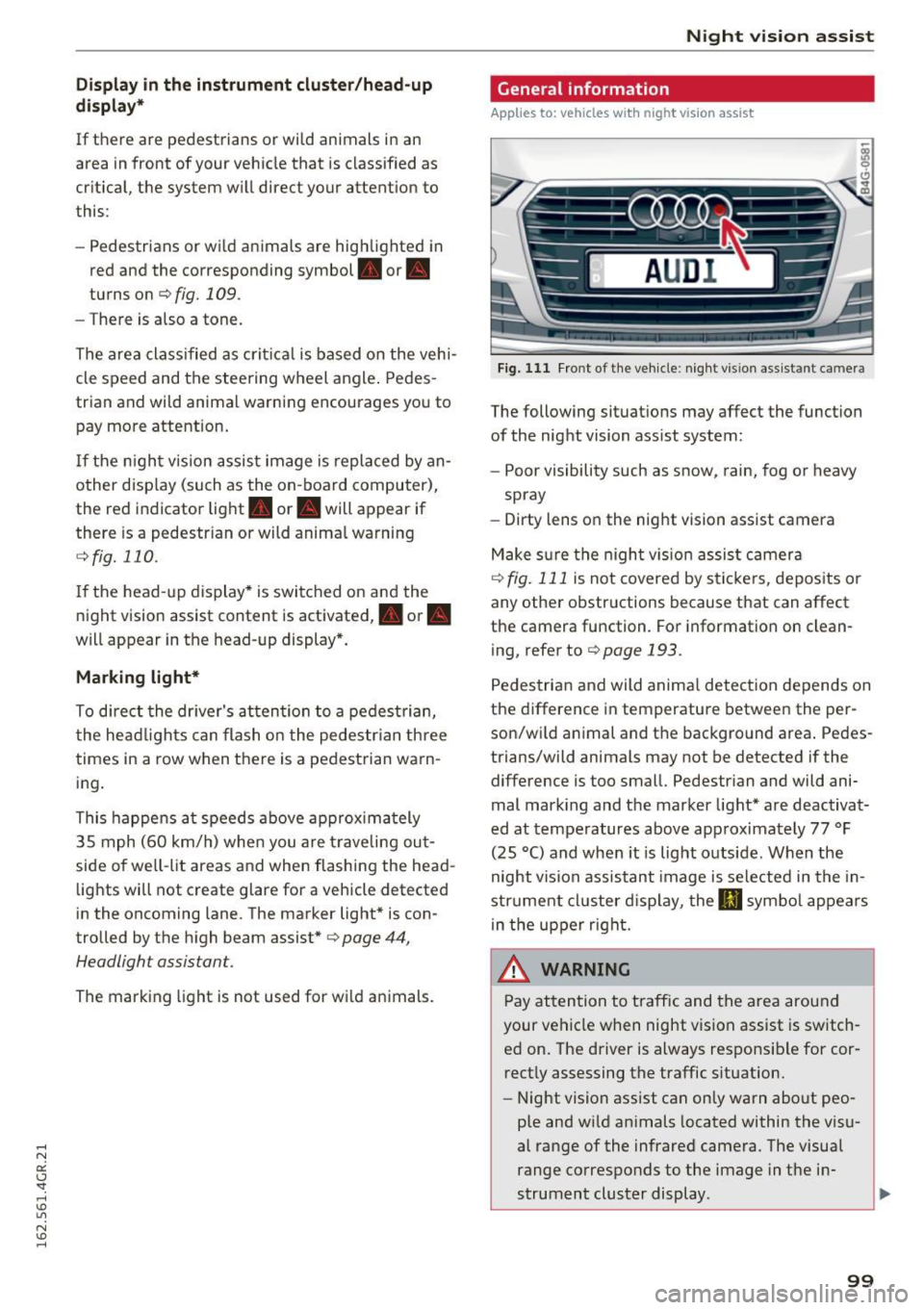
- Pedestrians or wild animals are highlighted in
red and the corresponding symbol. or.
turns on
¢fig. 109.
-There is also a tone.
The area classified as critical is based on the vehi
cle speed and the steering wheel angle. Pedes
trian and wild animal warning encourages you to
pay more attention.
If the night vision assist image is replaced by an
other display (such as the on-board computer),
the red indicator light . or. will appear if
there is a pedestrian or wild animal warning
¢ fig. 110 .
If the head-up display* is switched on and the
night vision assist content is activated, . or.
will appear in the head-up display*.
Marking light*
To direct the driver's attention to a pedestrian,
the headlights can flash on the pedestrian three
times in a row when there is a pedestrian warn
ing.
This happens at speeds above approximately
35 mph (60 km/h) when you are traveling out
side of well-lit areas and when flashing the head lights will not create glare for a vehicle detected
in the oncoming lane . The marker light* is con
trolled by the high beam assist*
c::;, page 44,
Headlight assistant .
The marking light is not used for wild animals.
Night vision assist
General information
Applies to : vehicles wit h night vision assist
Fig. 111 Front of the vehicle : night vis ion assist ant ca mera
The following situations may affect the function
of the night vision assist system:
- Poor visibility such as snow, rain, fog or heavy
spray
- Dirty lens on the night vision assist camera
Make sure the night vision assist camera
c::;, fig. 111 is not covered by stickers, deposits or
any other obstructions because that can affect
the camera function . For information on clean
ing, refer to
c::;, page 193.
Pedestrian and wild animal detection depends on
the difference in temperature between the per
son/wild animal and the background area. Pedes
trians/wild animals may not be detected if the difference is too small. Pedestrian and wild ani
mal marking and the marker light* are deactivat
ed at temperatures above approximately 77 °F
(25 °C) and when it is light outside . When the
night vision assistant image is selected in the in
strument cluster display, the
II symbol appears
in the upper right.
A WARNING
Pay attention to traffic and the area around
your vehicle when night vision assist is switch
ed on. The driver is always responsible for cor
rectly assessing the traffic situation.
- Night vision assist can only warn about peo
ple and wild animals located within the visu
al range of the infrared camera. The visual
range corresponds to the image in the in
strument cluster display .
-
99
Page 102 of 282
Night vision assist
-Night vision assist may not detect people or
wild animals and mark them if
- they are not in an upright posit ion, for ex
ample if they are sitting or lying down
and/or
- the silhouette in the display appears in
comp lete or interrupted, for example be
cause the person is partia lly covered by a
veh icle or an animal by tall grass. This
could increase the risk of an accident.
- Never try to swerve around animals if doing
so wi ll endanger you o r other road users, be
cause this increases the risk of an accident.
- Ev en though the system evaluat es the
shape and heat given off by all detected ob
j ects, there are limits to the system. There
may be false warnings.
- For technical reasons, the image pauses in
sp lit second intervals.
Switching on/off
Applies to: ve hicles w ith night visio n ass ist
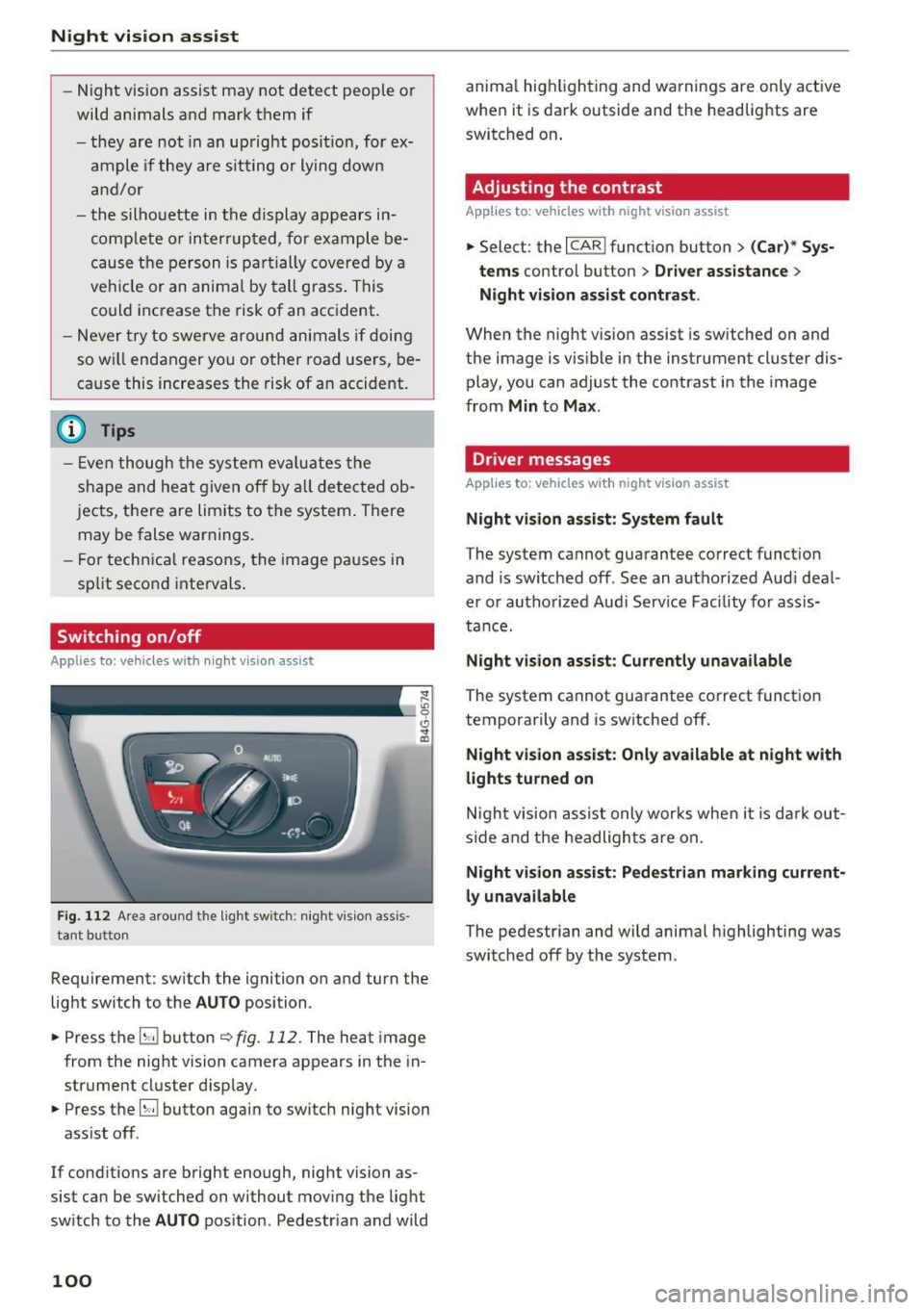
Fig. 112 Area arou nd th e light switch: nigh t v is ion ass is ·
tant bu tto n
Requirement: switch the ignition on and turn the
light switch to the
AUTO position .
.,. Press the
5J button ~ fig. 112. The heat image
from the night vision camera appears in the in
strument cluster display .
.,. Press the
B button again to switch night vision
ass ist off .
If cond itions are bright enough, night vision as
sist can be switched on without moving the light
switch to the
AUTO position . Pedestr ian and wild
100
anima l hig hlighting and warnings are only active
when it is dark outside and the headlights are
switched on .
Adjusting the contrast
Applies to : vehicles with night vision assist
.,. Select: the I CARI function button > (C ar)* Sys
tems
contro l button > Driver assistance >
Night vision assist contrast .
When the night vis ion assist is switched on and
the image is v is ib le in the instrument cluster dis
play, you can adjust the contrast in the image
from
Min to Max .
Dr iver messages
Applies to: vehicles with night vision assist
Night vision assist: System fault
The system cannot guarantee correct funct ion
and is switched off. See an authorized Audi deal
er or authorized Aud i Service Facility for assis
tance.
Night vision assist: Currently unavailable
The system cannot guarantee correct funct io n
temporarily and is switched off.
Night vision assist: Only available at night with
lights turned on
Night vision assist only works when it is dark out
side and the headlights are on.
Night vision assist: Pedestrian marking current
ly unavailable
The pedestrian and wild animal highlighting was
switched off by the system .
Page 105 of 282
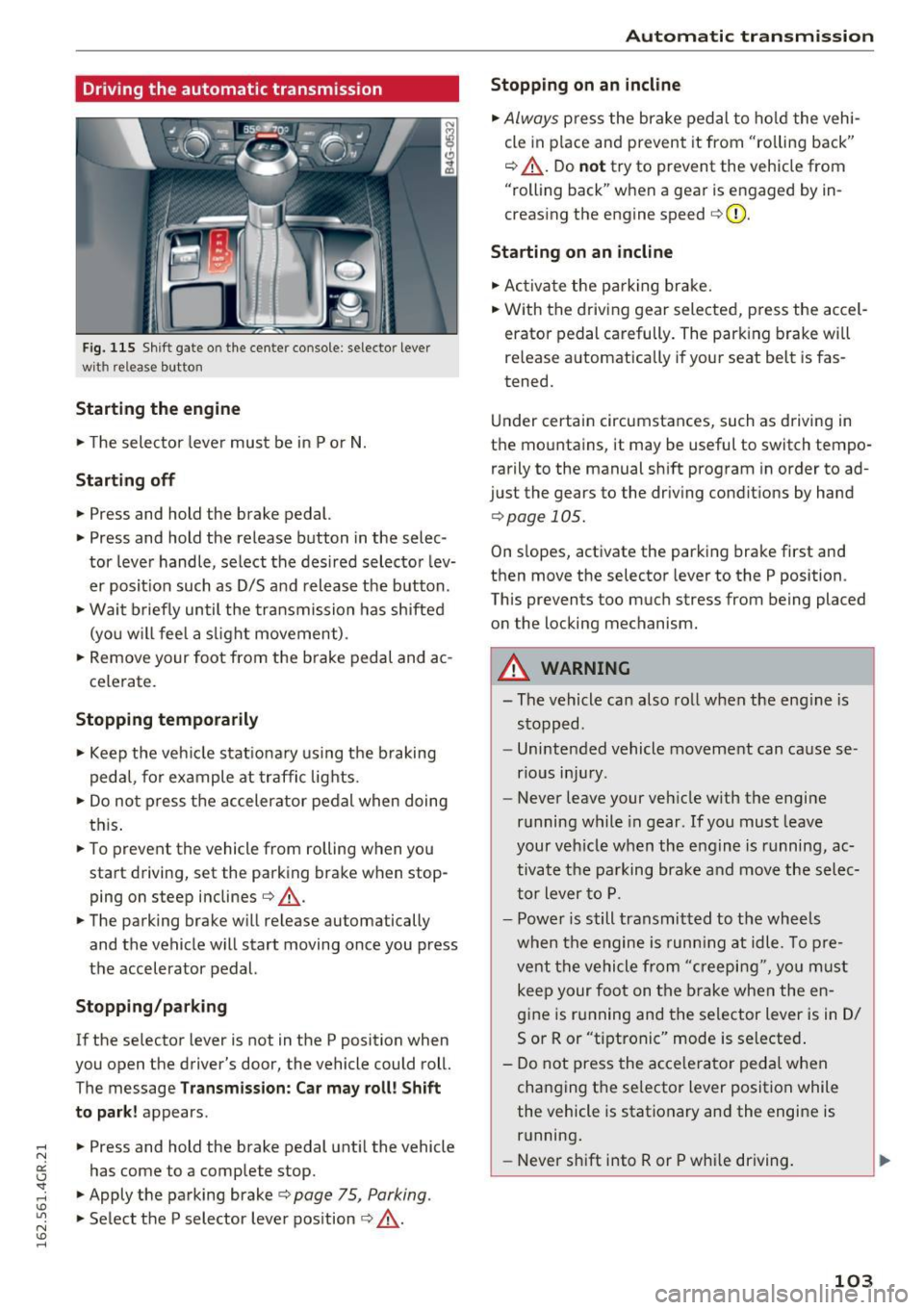
Driving the automatic transmission
Fig. 115 Shif t gate o n the cente r conso le : selecto r lever
wi th release button
Starting the engine
.. The selector lever must be in P or N.
Starting off
.. Press and hold the brake pedal.
.. Press and hold the release button in the selec
tor lever handle, select the desired selector lev
er posit ion such as D/S and release the button .
• Wait briefly until the transmission has shifted
(you w ill feel a slight movement) .
.. Remove your foot from the b rake pedal and ac
celerate.
Stopping temporarily
.. Keep the vehicle stationary using the braking
pedal, for example at traffic lights.
.. Do not press the accelerator pedal when doing
this .
.. To prevent the vehicle from rolling when you
start driving, set the parking brake wh en stop
ping on steep inclines¢,& .
.. The parking brake will release au tomatically
and the vehicle will start moving once you press
the accelerator pedal.
Stopping/ parking
If the selector lever is not in the P position when
you open the drive r's door, the vehicle could roll.
The message
Transmission: Car may roll! Shift
to park!
appears .
.. Press and hold the brake pedal until the vehicle
has come to a complete stop .
.. Apply the parking brake¢
page 75 , Parking .
.. Select the P selector lever position ¢ ,& .
Automatic transmission
Stopping on an incline
.. Always press the brake pedal to hold the vehi
cle in pla ce and prevent it from "ro lling back"
¢ ,& . Do
not try to prevent the vehicle from
"rolling back" when a gear is engaged by in
creasing the engine speed ¢CI) .
Starting on an incline
.. Activate the parkin g brake .
.. With the driving gear selected, press the accel
erator pedal carefully. The parking brake will
releas e automatically if your seat belt is fas
tened.
Under certain circumstances, such as driving in
the mountains, it may be useful to switch tempo
rarily to the manual shift program in order to ad
ju st the gears to the driving conditions by hand
¢ page 105 .
On slopes, activate the parking brake first and
then move the selector lever to the P position .
This prevent s too much stress from being placed
on the locking mechanism.
A WARNING
=
- The vehicle can also roll when the eng ine is
stopped .
- Unintended vehicle movement can cause se
rious injury .
- Never leave your veh icle w ith the engine
running while in gear . If you must leave
your veh icle when the engine is running, ac
tivate the parking brake and move the selec
tor lever to P.
- Power is still transmitted to the wheels
when the engine is runn ing at idle. To pre
vent the vehicle from "creeping", yo u must
keep your foot on the brake when the en
gine is running and the selector lever is in D/
5 or R or "tiptronic" mode is selected .
- Do not press the accelerator pedal when
changing the se lector lever position while
the vehicle is stationary and the engine is running .
- Never shift into R or P whi le driving.
103
Page 120 of 282
Driving sa fe ty
Driving safety
Basics
Safe driving habits
Please remember -safety first!
This chapter contains important information,
tips, instruct ions and warn ings that you need to
read and observe for your own safety, the safety
of your passengers and others. We have summar ized here what you need to know about safety
be lts, a irbags, child restra ints as well as child
safety. Your safety is for us
priority number 1 . Al
ways observe the i nfo rmation and wa rn ings in
this section - for your own safety as well as that
of your passengers.
The information i n this section applies to all
model versions of yo ur vehicle . Some of the fea
tures descr ibed in t his sections may be s tanda rd
equipment on some models, or may be optional
equipment on others . If you are not sure, ask
your authorized Audi dealer.
A WARNING
- Always make sure that you follow the in
structions and heed the WARNINGS in th is
Manual.
It is in your interest and in the in
te rest of your passengers.
- Always keep the comp lete Owner's Litera
ture in your A udi when you lend or sell your
vehicle so that this important information
will always be available to the d river and
passenge rs.
- Always keep the Owner 's literature handy so
that you can find it easily if you have ques
t ions.
Safety equipment
The safety features are part of the occupant re
straint system and work together to help reduce
the risk of injury in a wide variety of occident si t
uations.
Your safety and the safety of your passenge rs
should not be left to chance. Advan ces i n tech
nology have made a var iety of features avai lab le
to help reduce t he risk of injury in an accident .
118
The following is a list of just a few of the sa fety
features in your Audi :
- sophis tica ted safety be lts fo r dr ive r and all pas-
senge r seat ing pos itions,
- safety belt p retensioners,
- safety belt force lim ite rs fo r th e front seats,
- safety belt he ight adjustment systems for the
front seats,
- front airbags,
- knee airbags for the front seats*
- side airbags in the front seats and outer rear
seats*,
- side curtain airbags with ejection mitigation
features,
- special LATCH anchorages for child restraints,
- head rest raints fo r ea ch seating position,
- adj ustab le steering col umn.
These ind iv idual safety features, can work to
ge ther as a system to help protect you and your
passengers in a wide range of acc idents. These
features canno t wo rk as a sys tem if they are not
alw ays cor rec tly adj usted and cor rect ly used.
Safety is everybody' s re sponsibility!
Important things to do before driving
Safety is everybody's job! Vehicle and occupant
safety always depends on the informed and care
ful driver .
For your safety and the safety of your passen
gers,
before driving alway s:
.. Make sure that a ll lights and signals are operat
ing correctly.
.. Make sure that the tire pressure is correct.
.,. Make sure that all windows are clean and afford
good visibility to the outs ide .
.. Sec ure all luggage and othe r items carefully
~page 62, ~ page 60.
.. Ma ke sure that noth ing ca n interfere wi th the
peda ls .
.. Adjust front seat, head restraint and mirrors
correctly for yo ur height .
.. Instruct passengers to adjust the head re
straints according to their he ight.
Page 129 of 282
....
Safety belts
General information
Always wear safety belts!
Wearing safety belts correctly saves lives!
This chapter explains why safety belts are neces
sary, how they work and how to adjust and wear
them correctly.
~ Read all the information that follows and heed
all of the instructions and WARNINGS.
A WARNING
Not wearing safety belts or wearing them im
properly increases the risk of serious personal
injury and death.
- Safety belts are the single most effective
means available to reduce the risk of serious
injury and death in automobile accidents.
For your protection and that of your passen
gers, always correctly wear safety belts
when the vehicle is moving.
- Pregnant women, injured, o r physically im
paired persons must also use safety belts.
Like all vehicle occupants, they are more
likely to be seriously injured if they do not
wear safety belts. The best way to protect a
fetus is to protect the mother -throughout
the entire pregnancy.
Number of seats
Your Audi has a total of four seating positions:
two in the front and two in the rear. Each seating position has a safety belt.
A WARNING
Not wearing safety belts or wearing them im
properly increases the risk of serious personal
injury and death.
- Never strap more than one person, includ
ing small children, into any belt.
It is espe
cially dangerous to place a safety belt over a
N child sitting on your lap. er:
~ -Never let more people ride in the vehicle
~ than there are safety belts available. Lil
N v:, ......
Safety belts
-Be sure everyone riding in the vehicle is
properly restrained with a separate safety
belt or child restraint.
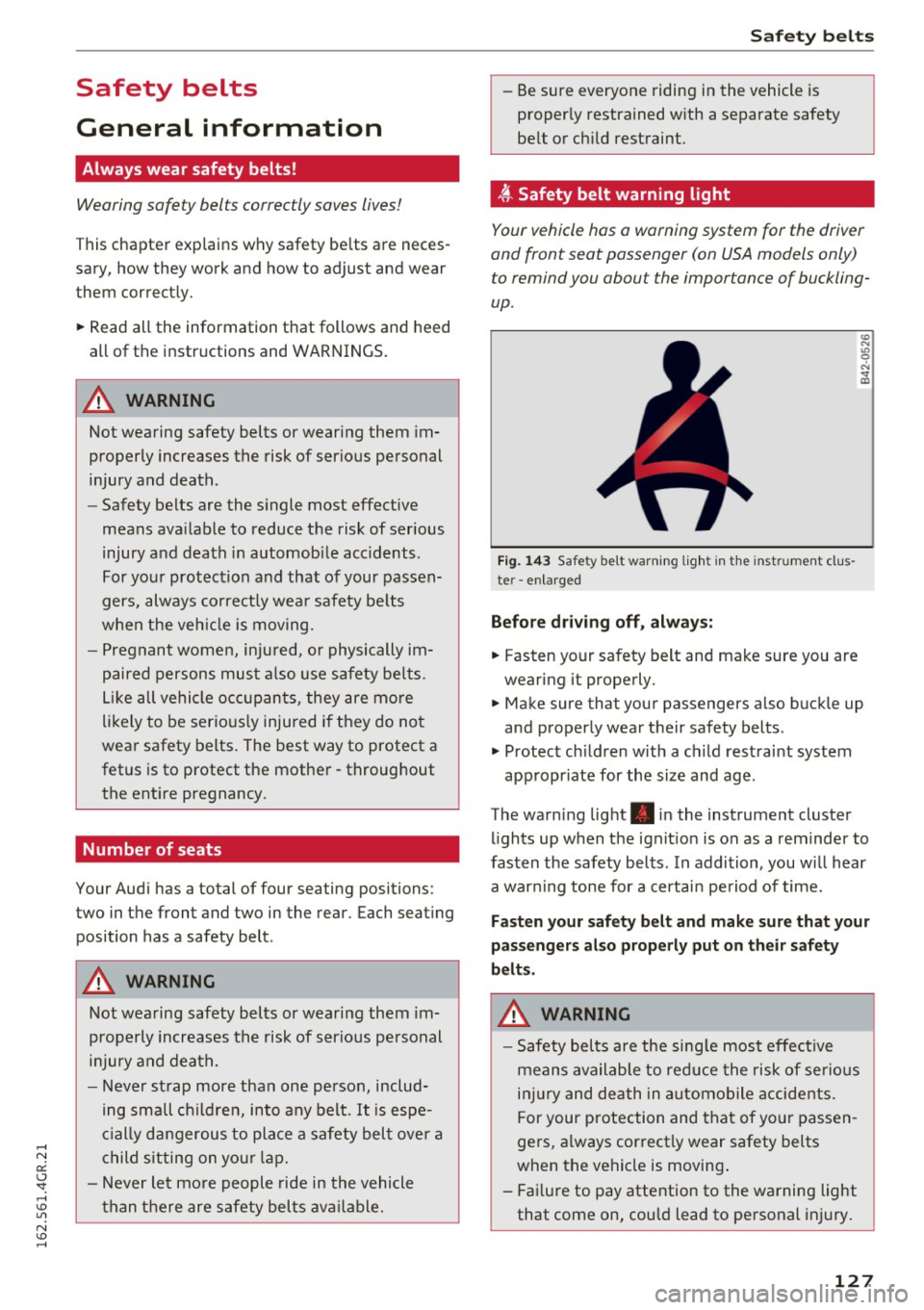
, ff. Safety belt warning light
Your vehicle has a warning system for the driver
and front seat passenger (on USA models only)
to remind you about the importance of buckling
up .
Fig. 143 Safety belt warn ing light in the instrument clus
te r -enlarged
Before driving off, always:
.. Fasten your safety belt and make sure you are
wearing it properly.
.,, N
"' 0 ..:, ., m
~ Make sure that your passengers also buckle up
and properly wear their safety belts .
~ Protect children w ith a ch ild restraint system
appropr iate for the size and age .
The warning light . in the instrument cluster
lights up when the ignit ion is on as a reminder to
fasten the safety belts. In addition, you wil l hear
a warning tone for a certain period of time.
Fasten your safety belt and make sure that your
passengers also properly put on their safety
belts.
A WARNING
-
- Safety belts are the sing le most effective
means available to reduce the risk of serious
injury and death in automobile accidents.
For your protection and that of your passen
gers, a lways correctly wear safety belts
when the vehicle is moving .
- Failure to pay attention to the warning light
that come on, could lead to personal injury.
127
Page 187 of 282
The all wheel drive concept is designed for high
engine power. Your vehicle is exceptionally pow
erful and has excellent driving characterist ics
both under normal driving conditions and on
snow and ice. Always read and follow safety pre
cautions
¢ ,&. .
Winter tires
By using all wheel drive, your vehicle has good
forward motion with standard tires in winter con ditions . However, in winter we recommend using
winter or all season tires on all four wheels, be
cause this will improve the braking effect.
Snow chains
If there are snow chain laws, snow chains must
also be used on vehicles with all wheel drive
¢ page 233, Snow chains .
Replacing tires
For vehicles with all wheel drive, only wheels with
the same rolling circumference should be used .
Avoid wheels with different tread depths
¢ page 225, New tires or wheels.
Offroad vehicle?
Your Audi is not an offroad vehicle -there is not
enough ground clearance. For this reason, avoid
difficult terrain.
A WARNING
-Also, in vehicles with all wheel drive, adapt
your driving style to the current road and
traffic conditions. Do not let the increased
safety provided tempt you into taking risks,
because th is increases the r isk of an acci
dent.
- The braking ability of your veh icle is limited
to the tract ion of the wheels . In this way, it
is not diffe rent from a two wheel drive vehi
cle. Do not be tempted to accelerate to a
high speed when the road is slippery this in
creases the risk of an accident.
- Note that on wet streets, the front wheels
can "hydroplane" if driving at speeds that
are too high . Unlike front wheel drive
vehicles, the engine does not rev higher sud
denly when the vehicle begins hydroplaning.
Intelligent Technology
For this reason, pay attention to the road
conditions reg a rd less of your speed to re
duce the risk of an accident .
Rear spoiler
The extendable rear spoiler increases driving sta
bility .
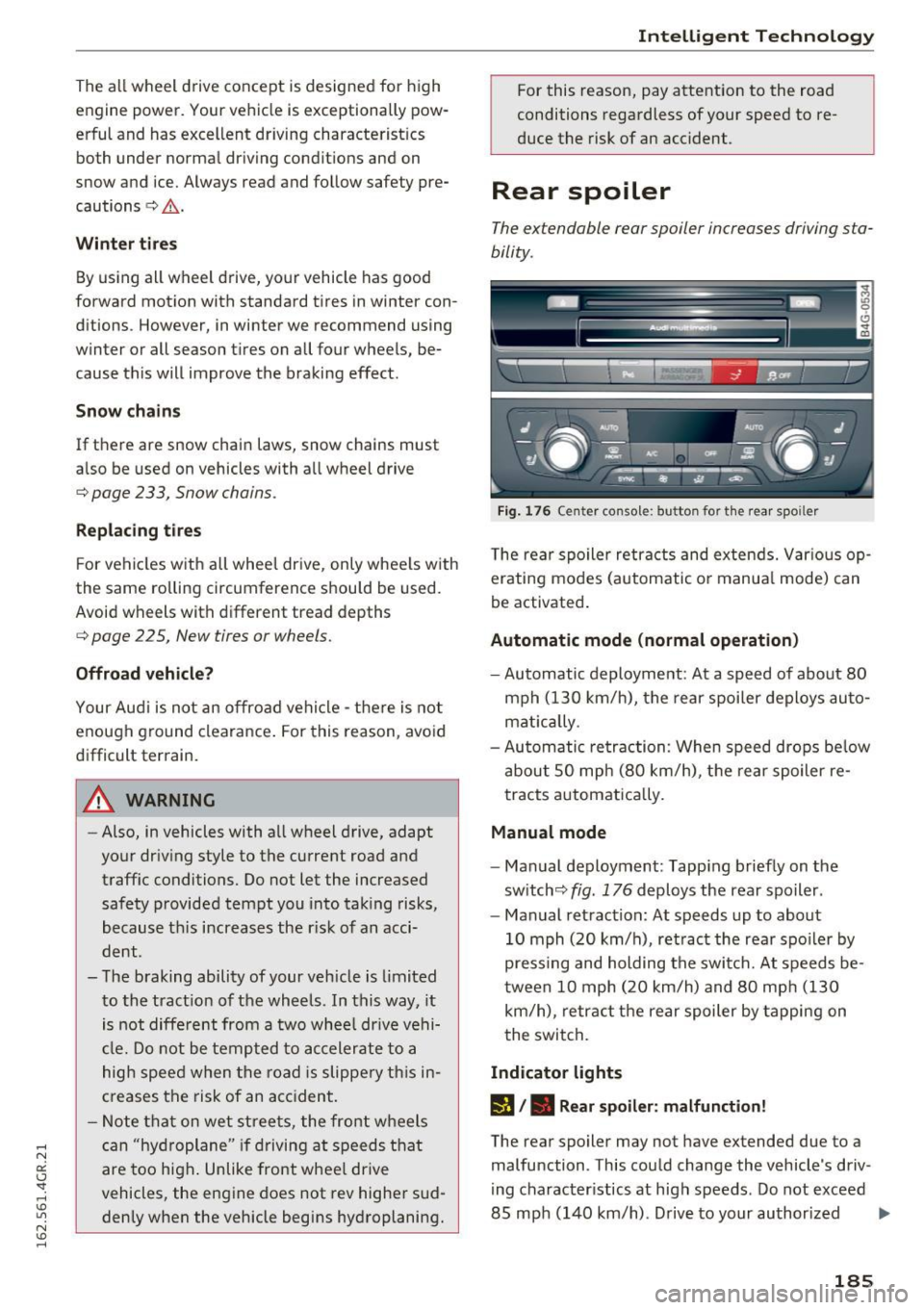
Fig. 176 Center console: button for t he rear spoiler
The rear spoiler retracts and extends. Var ious op
erating modes (automatic or manua l mode) can
be activated .
Automatic mode (normal operation)
-Automatic deployment : At a speed of about 80
mph (130 km/h), the rear spoiler deploys auto
mat ically .
- Automatic retraction: When speed drops be low
about SO mph (80 km/h), the rear spoiler re
tracts automatically.
Manual mode
-Manual deployment: Tapping briefly on the
switch<=:>
fig. 176 deploys the rear spoiler.
- Manual retraction: At speeds up to about
10 mph (20 km/h), retract the rear spoiler by
pressing and holding the switch. At speeds be
tween 10 mph (20 km/h) and 80 mph (130
km/h), retract the rear spoiler by tapping on
the switch.
Indicator lights
l'J /. Rear spoiler: malfunction!
The rear spoiler may not have extended due to a
malfunction . This could change the vehicle's driv
ing character istics at high speeds . Do not exceed
85 mph (140 km/h). Drive to your authorized ..,.
185
Page 193 of 282
Avoid full throttle
Driving at moderate speeds saves fuel and im
proves your mileage.
11-Try and keep well below your car's maximum
speed.
Accelerating gently reduces fuel consumption, engine wear, and does not disturb the environment.
Fuel consumption, exhaust emissions and engine
noise increase disproportionately at high speeds.
If you drive at approximately three quarters of
top speed, fuel consumption will be reduced by
one half. Never drive faster than the posted
speed limit and weather conditions permit.
Reducing unnecessary idling
Even when your car is just idling i t burns up fuel.
11-Shut the engine off when you are not driving
the vehicle.
11-Do not warm up the vehicle by letting the en-
gine run at idle .
It makes sense to shut off the engine in traffic
jams, when waiting for trains to pass at railroad crossings, or at traffic lights that have long waits
on red . Turning the engine off for just 30-40 sec
onds saves more fuel than is burned starting the
. . engine again.
It takes a long time for the engine to warm up
fully when it is running at idle. However, wear
and noxious emissions are especially high when
the eng ine is warm ing up. So you should drive
away as soon as you start the engine and avoid
running at high rpms while the engine is still
warming up.
CD Note
Do not leave engine idling unattended after
starting.
If warning lights should come on to
indicate improper operation, they would go
unheeded. Extended idling also produces
heat, which could result in overheating or
other damage to the vehicle or other proper
ty.
Driving and the environment
Regular maintenance
A badly tuned engine unnecessarily wastes a lot of fuel .
11-Have your vehicle serviced at regular intervals.
By having your vehicle regularly serviced by an
Audi dealer helps to ensure that it runs properly and economically. The condition of your vehicle
not only affects its safety and ability to hold its
value, it also affects
fuel consumption .
Check your oil each time you fill your tank.
The amount of oil used is related to engine load
and speed.
It is normal for the oil consumption of a new en
gine to reach its lowest value after a certain mile
age has been driven.
You must drive your vehicle about 3,000 miles (5,000 kilometers) before you can properly as
sess oil consumpt ion.
This also applies to fuel consumption and eng ine
output .
CD Note
-Have your vehicle maintained properly and
in accordance with the service recommenda
tions in your Warranty
& Maintenance book
let. Lack of proper maintenance as wel l as
improper use of the vehicle w ill impair the
function of the emission control system and
could lead to damage.
- Do not alter or remove any component of
the Emission Control System unless ap
proved by the manufacturer .
- Do not alter or remove any device, such as
heat shields, switches, ignition wires,
valves, which are designed to protect your
vehicle's Emission Control System and other important vehicle components.
Fewer short trips
Fuel consumption will always be relatively high
on short trips .
11-Try to avoid driving short distances with a cold
engine. .,.
191
Page 196 of 282
Care and cleaning
Rinse the vehicle thoroughly again and let it air
dry. Remove any water residue using a leather
cloth .
_& WARNING
- Only wash the vehicle when the ignition is
off and follow the instructions from the car
wash operator to reduce the risk of acci
dents .
- To reduce the risk of cuts, protect yourself
from sharp metal components when wash
ing the underbody or the inside of the wheel
housings .
- After was hing the vehicle, the bra kin g effect
may be delayed due to mo isture on the
bra ke rotors or ice in the winte r. The bra kes
must be d ried first w ith a few careful b rake
applica tions .
(D Note
-If you wash t he ve hicle in an automatic car
wash, you m ust retract the rear spoiler if
ne cessary, and fold the e xte rior mi rrors in
to reduce the risk of damage. Power fo ld ing
-
exterior mirrors* must only be fo lded in and
o ut using the power folding f unction .
- T o prevent pa int damage, do not wash the
vehicle in direct sunlight .
- T o red uce the risk of damage to the s urf ac e,
do not use insect removing sponges, k itchen
sponges o r similar items .
- Mat te finish painted vehicle components:
- To reduce the r isk of damage to the sur-
face, do not use polis hing agents or hard
wax.
- Never use protective wax. It can destroy
the matte finish effect.
- Do not place any stickers or magnetic
signs on vehicle parts painted with matte
finish paint. The paint could be damaged
when the stickers or magne ts are re
moved .
@) For the sake of the environment
Only wash the ve hicle in facilities spec ially de
signed for that pu rpose . This will reduce the
r isk of dirty wate r contaminated with o il from
entering the sewe r system.
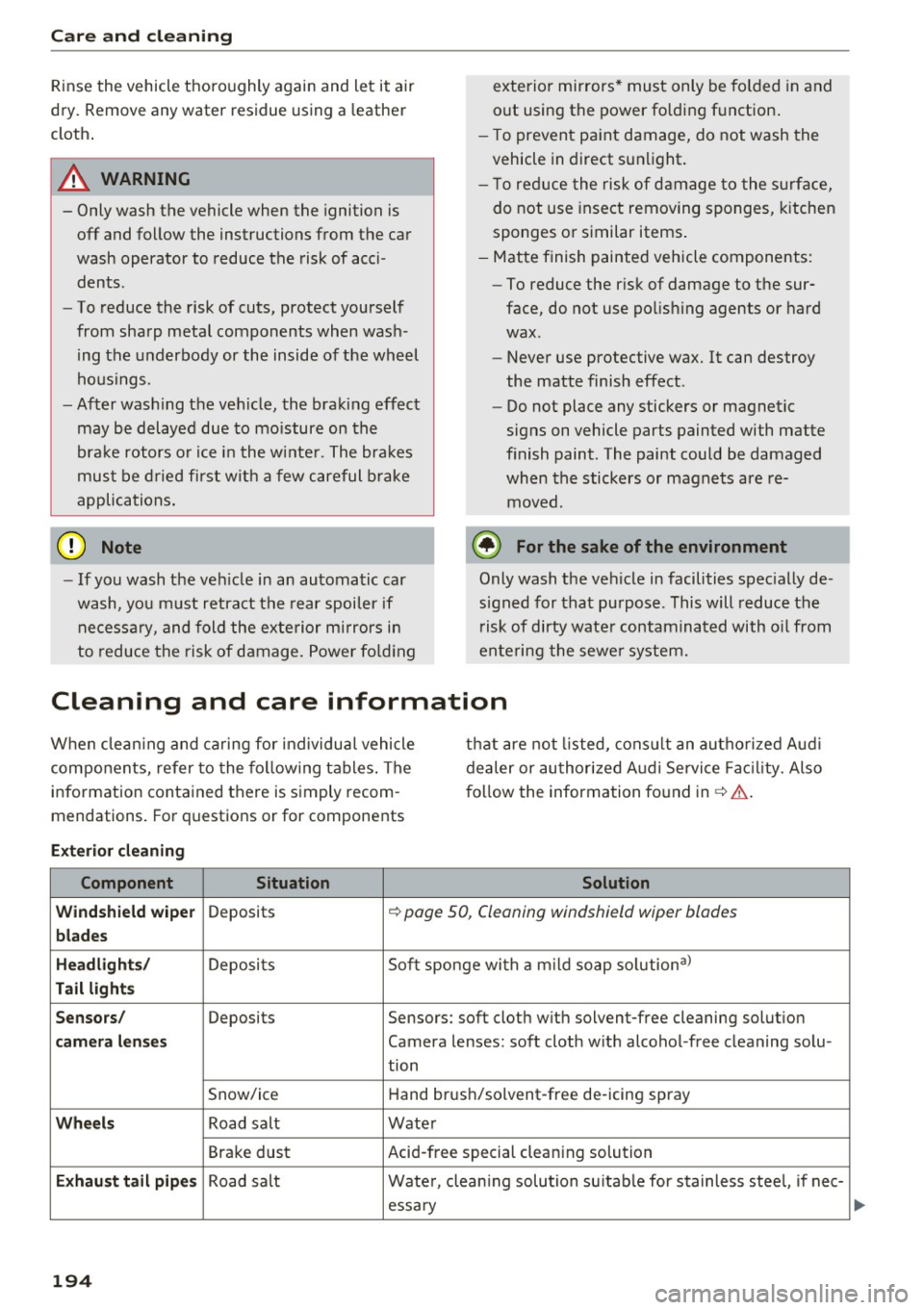
Cleaning and care information
When clean ing and caring for individua l vehicle
components, refer to the following tables . The
i n formation contained there is simply recom
mendations. Fo r questions or for components that are
not listed, cons ult an autho rized Aud i
dealer or au thori zed A udi Se rvice Fac ility. Also
f o llow the information fo und in¢&. .
Ext eri or cleaning
Component Situation Solution
Windshield wiper
Deposits ¢ page 50, Cleaning windshield wiper blades
blades
Headlights /
Deposits Soft sponge with a m ild soap solution3
)
Tail light s
S en sors /
Deposits Sensors: soft cloth with solvent-free cleaning solut ion
cam era lens es Camera lenses: soft cloth w ith alcohol -free cleaning solu -
tion
Snow/ice Hand brush/solvent-free de-icing spray
Wheels Road salt Water
Bra ke dust Acid-free special cleaning solution
Exhaust tail pipes Road salt
Water, clean ing solution su itab le for stainless stee l, if nee-
essa ry
194
...