engine AUDI RS7 SPORTBACK 2016 Owner's Guide
[x] Cancel search | Manufacturer: AUDI, Model Year: 2016, Model line: RS7 SPORTBACK, Model: AUDI RS7 SPORTBACK 2016Pages: 282, PDF Size: 70.78 MB
Page 104 of 282
Automatic transmission
brake before and while moving the lever to D/S
out of N.
A WARNING
Read and follow all WARNINGS r=':> & in Driv
ing the automatic transmission on
page 103.
(D Note
Coasting downhill with the transmission in N
and the engine not running will result in dam
age to the automatic transmission and possi
bly the catalytic converter.
{!) Tips
- Audi drive select: you can adjust the sporty
shift characteristics in the
Dynamic driv ing
mode .Swill appear in the instrument clus
ter display instead of D .
- If you accidentally select
N while driving,
take your foot off the accelerator pedal im
mediately and wa it for the engine to slow
down to idle before selecting D/S .
- If there is a power failure, the selector lever
will not move out of the P posit ion . The
emergency release can be used if this hap
pens
r=':> poge 106.
Automatic Shift Lock (ASL)
.
The Automatic Shift Lock safeguards you against
occidentally shifting into o forward or the re
verse gear and causing the vehicle to move unin
tentionally.
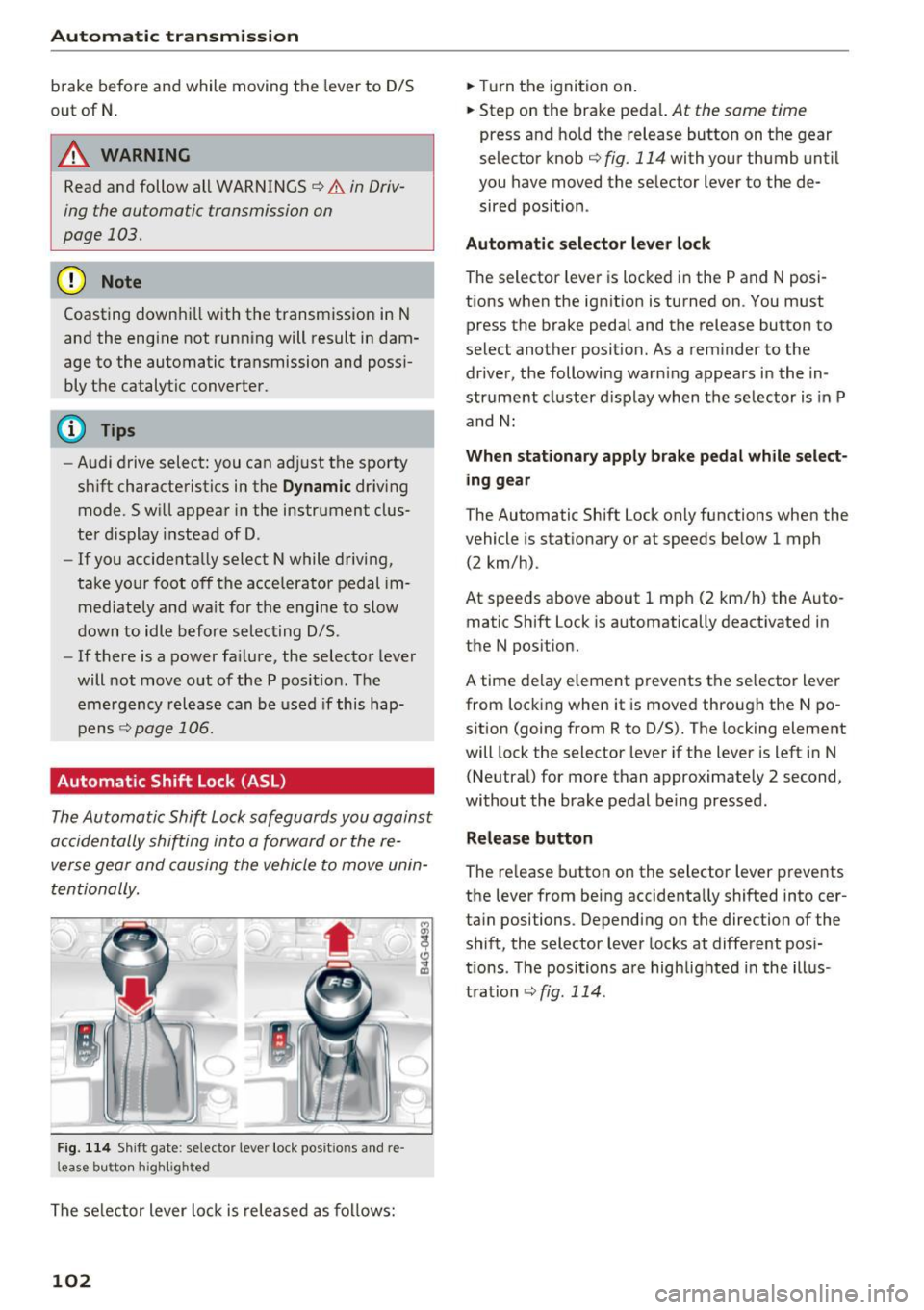
F ig. 114 Shift gate : selecto r lever lock posit io ns and re
l ease bu tton high light ed
The selector lever lock is released as follows:
102
.,. Turn the ignition on .
.,. Step on the brake pedal.
At the some t ime
press and hold the release button on the gear
selector knob
c::> fig. 114 with your thumb until
you have moved the selector lever to the de sired position .
Automatic selector lever lock
The sel ector lever is locked in the P and N posi
tions when the ignition is turned on . You must
press the br ake pedal and the release button to
select another position. As a reminder to the driver, the following warn ing appears in the in
strument cluster display when the selector is in P
and N:
When stationary apply brake pedal while select
ing gear
The Automatic Shift Lock only functions when the
vehicle is sta tionary or at speeds below 1 mph
(2 km/h) .
At speeds above about 1 mph (2 km/h) the Auto
matic Shift Lock is automatically deactivated in
the N position.
A t ime delay element prevents the selector lever
from locking when it is moved through the N po
sition (going from R to D/S). The locking element
will lock the selector lever if the lever is left in N
(Neutral) for more than approximately 2 second,
without the brake pedal being pressed .
Release button
The release button on the selector lever prevents
the lever from being accidentally shifted into cer
tain positions . Depending on the direction of the
shift, the selector lever locks at different posi
tions . The positions are highlighted in the illus
tration
<=:> fig . 114.
Page 105 of 282
Driving the automatic transmission
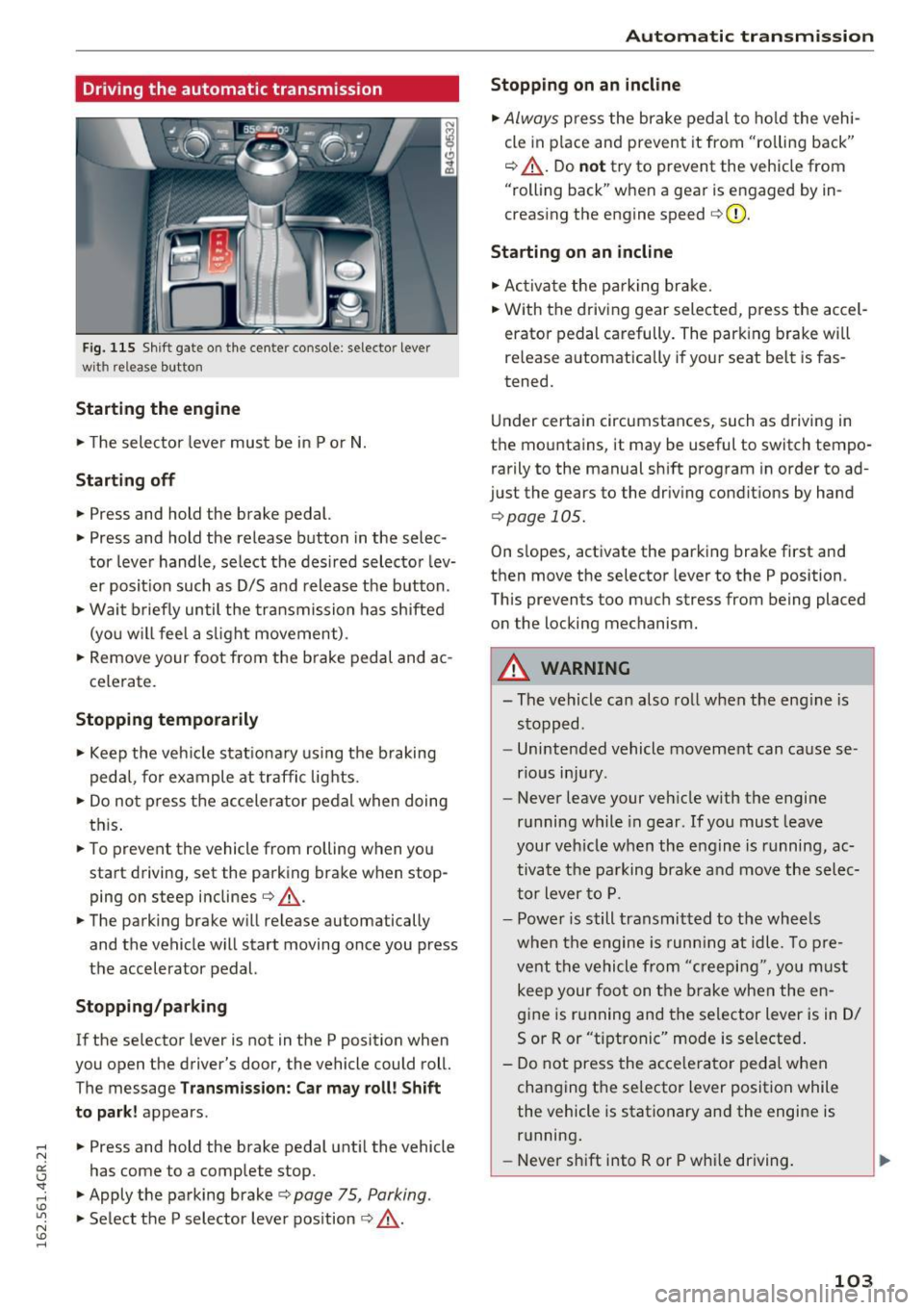
Fig. 115 Shif t gate o n the cente r conso le : selecto r lever
wi th release button
Starting the engine
.. The selector lever must be in P or N.
Starting off
.. Press and hold the brake pedal.
.. Press and hold the release button in the selec
tor lever handle, select the desired selector lev
er posit ion such as D/S and release the button .
• Wait briefly until the transmission has shifted
(you w ill feel a slight movement) .
.. Remove your foot from the b rake pedal and ac
celerate.
Stopping temporarily
.. Keep the vehicle stationary using the braking
pedal, for example at traffic lights.
.. Do not press the accelerator pedal when doing
this .
.. To prevent the vehicle from rolling when you
start driving, set the parking brake wh en stop
ping on steep inclines¢,& .
.. The parking brake will release au tomatically
and the vehicle will start moving once you press
the accelerator pedal.
Stopping/ parking
If the selector lever is not in the P position when
you open the drive r's door, the vehicle could roll.
The message
Transmission: Car may roll! Shift
to park!
appears .
.. Press and hold the brake pedal until the vehicle
has come to a complete stop .
.. Apply the parking brake¢
page 75 , Parking .
.. Select the P selector lever position ¢ ,& .
Automatic transmission
Stopping on an incline
.. Always press the brake pedal to hold the vehi
cle in pla ce and prevent it from "ro lling back"
¢ ,& . Do
not try to prevent the vehicle from
"rolling back" when a gear is engaged by in
creasing the engine speed ¢CI) .
Starting on an incline
.. Activate the parkin g brake .
.. With the driving gear selected, press the accel
erator pedal carefully. The parking brake will
releas e automatically if your seat belt is fas
tened.
Under certain circumstances, such as driving in
the mountains, it may be useful to switch tempo
rarily to the manual shift program in order to ad
ju st the gears to the driving conditions by hand
¢ page 105 .
On slopes, activate the parking brake first and
then move the selector lever to the P position .
This prevent s too much stress from being placed
on the locking mechanism.
A WARNING
=
- The vehicle can also roll when the eng ine is
stopped .
- Unintended vehicle movement can cause se
rious injury .
- Never leave your veh icle w ith the engine
running while in gear . If you must leave
your veh icle when the engine is running, ac
tivate the parking brake and move the selec
tor lever to P.
- Power is still transmitted to the wheels
when the engine is runn ing at idle. To pre
vent the vehicle from "creeping", yo u must
keep your foot on the brake when the en
gine is running and the selector lever is in D/
5 or R or "tiptronic" mode is selected .
- Do not press the accelerator pedal when
changing the se lector lever position while
the vehicle is stationary and the engine is running .
- Never shift into R or P whi le driving.
103
Page 106 of 282
Automatic transmission
-Before driving down a steep slope, reduce
your speed and shift into a lower gear with
"tiptron ic".
- Do not ride the brakes or press the brake
pedal too often or too long when driving
down a hill. Constant braking causes the
brakes to overheat and substantially re
duces braking performance, increases brak
ing distance or causes complete failure of
the brake system.
- To prevent the vehicle from rolling back
when stopping on inclines, always hold it in
place with the brake pedal or parking brake.
- Never hold the vehicle on an incline with a
slipping clutch. The clutch opens automati
cally when it becomes too hot from the
overload. An indicator lamp
[i'J illuminates
and a driver message appears
¢ page 105
when the clutch is overloaded.
- If the engine must remain running, never
have any driving position engaged when
checking under the hood. Make sure these
lector lever has securely engaged and is
locked in P with the parking brake set
¢ page 203. Otherwise, any increase in en
gine speed may set the vehicle in motion,
even with the parking brake applied .
@ Note
-When stopping on an incline, do not try to
hold the vehicle in place by pressing the ac
celerator pedal while a driving gear is se
lected . This can cause the transmission to
overheat and can damage it . Activate the
parking brake or press the brake pedal to
prevent the vehicle from rolling.
- Allowing the vehicle to roll when the engine
is stopped and the selector lever is in N will
damage the transmission because it is not
lubricated under those circumstances.
(D Tips
For safety reasons, the parking brake is re
leased automatically only when the driver's
safety belt is engaged in the buckle.
104
· Hill descent control
The hill descent control system assists the driver
when driving down declines .
Hill descent control is activated when the selec
tor lever is in D/S and you press the brake pedal.
The transmission automatically selects a gear
that is suitable for the incline. Hill descent con
trol tries to maintain the speed achieved at the
time of braking, within physical and technical
limitations. If may still be necessary to adjust the
speed with the brakes.
Hill descent control switches off once the decline
levels out or you press the accelerator pedal.
On vehicles with the cruise control system*
Q page 77, hill descent control is also activated
when the speed is set.
A WARNING
Hill descent control cannot overcome physical
limitations, so it may not be able to maintain
a constant speed under all conditions. Always be ready to apply the brakes.
Page 107 of 282
Manual shift program
Using the manual shift program you can man
ually select gears.
)
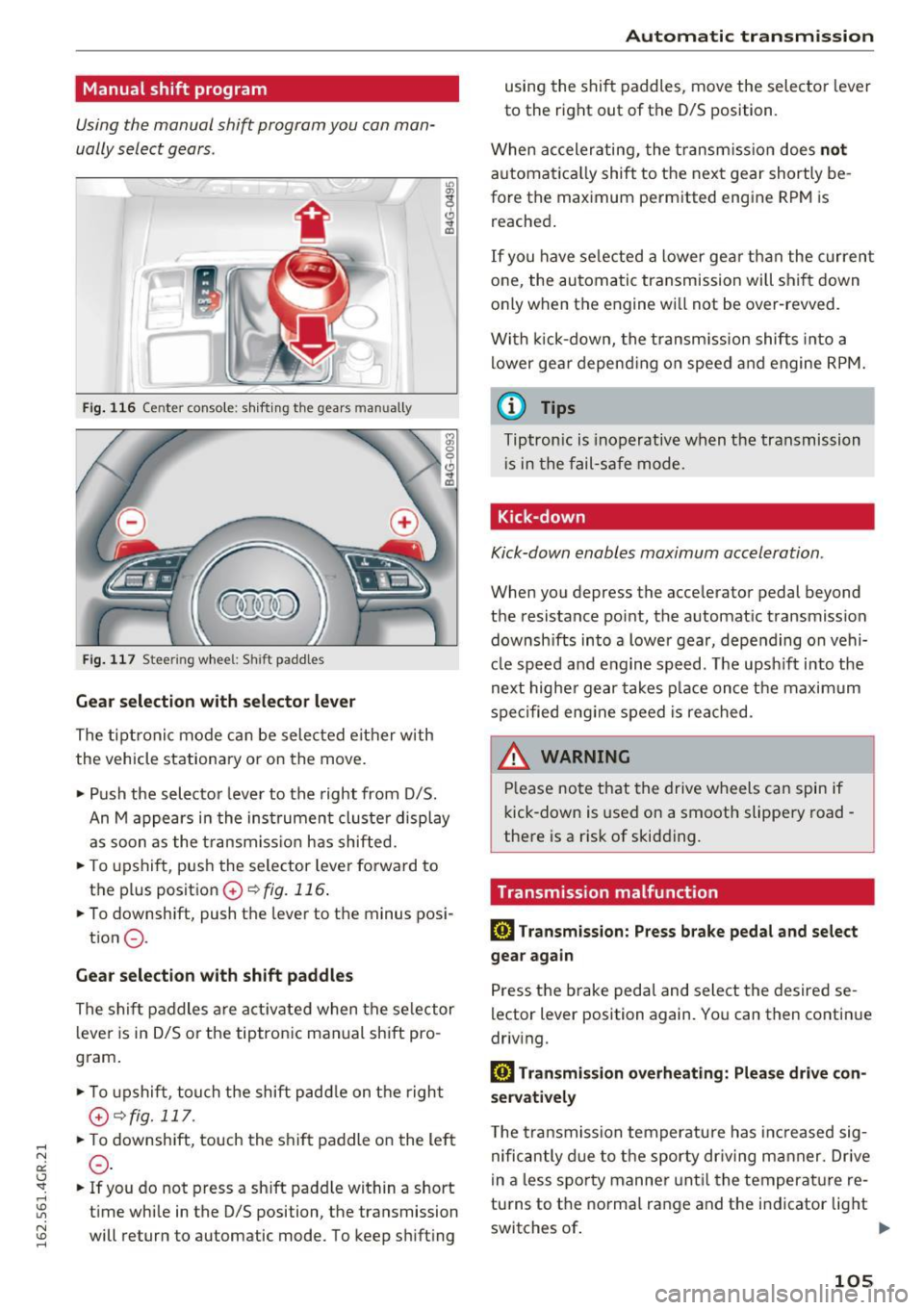
Fig. 116 Ce nter conso le: sh ifting the gears man ually
Fig. 117 Stee rin g whee l: Shi ft paddles
Gear selection with selector lever
The tiptronic mode can be selected either with
the vehicle stationary or on the move.
.. Push the selector leve r to the right from D/S.
An M appears in the instrument cluste r display
as soon as the transmiss ion has shifted .
.. To upshift , push the selector lever forward to
the p lus position
0 ~ fig. 116.
.. To downshift, push the lever to the minus posi-
tion
0 -
Gear selection with shift paddles
The shift paddles are activated when the selector
lever is in D/S or the tiptronic manual shift pro
gram .
.. To upshift , touch the shift padd le on the right
G~fig.111 .
.. To downshift, touch the shift paddle on the left
0-
.. If you do not press a shift padd le within a short
time while in the D/S position, the transmission
will return to automatic mode. To keep shifting
Automatic transmission
using the shift paddles, move the selector lever
to the right out of the D/S position.
When accelerating, the transmission does
not
automatica lly shift to the next gear shortly be
fore the maximum permitted engine RPM is
reached.
If you have selected a lower gear than the current
one, the automatic transmission will shift down
only when the engine wi ll not be over-revved.
With kick-down, the transmission shifts into a
lower gear depending on speed and engine RPM.
@ Tips
Tiptronic is inoperative when the transmission
i s in the fail-safe mode.
Kick-down
Kick-down enables maximum acceleration .
When you depress the accelerator pedal beyond
the resistance point, the automat ic transmission
downsh ifts into a lower gear, depending on vehi
cle speed and engine speed. The upsh ift into the
next higher gear takes place once the maximum
specified engine speed is reached.
& WARNING
Please note that the drive wheels can spin if
kick-down is used on a smooth slippery road -
there is a risk of skidding.
Transmission malfunction
DI Transmission: Press brake pedal and select
gear again
Press the brake pedal and select the desired se
lector lever position again. You can then continue
driv ing.
DI Transmission overheating: Please drive con
servatively
T he transmission temperature has increased sig
nificantly due to the sporty driv ing manner. Drive
in a less sporty manner until the temperature re
tu rns to the normal range and the indicator light
switches of.
II>-
105
Page 108 of 282
Automatic transmission
rm Transmi ssi on malfunction: You can continue
driving
There is a system malfunc tion in the t ransm is
sion . Yo u may con tinue dr iving . Drive to your au
thor ized Audi dealer or qualified repair fac ility
soon to have th e malfunction cor rected.
rm Transmi ssion malfunction: You can continue
driving with limited functionality
There is a system malfunct ion i n the transm is
sion . T he transmission is sw itching to emergency
mo de. This mode only shifts in to certa in gears o r
will no longer shift at all. The engine may st all.
Drive to you r aut ho rized Aud i dea ler o r q ualified
repair faci lity immediately to have the malfunc
tion corrected .
rm Transmission malfunction: Stop vehicle and
shift to P
D o not cont inue d riving. Select the P se lector lev
er position and see yo ur author ized Aud i de aler
or qu alified repa ir fa cility for assis tance .
(D Note
If the tran smissi on switches to emergency
m ode, you s ho uld t ake the veh icle to an au
t hori zed A udi dealer sh ip a s soon as po ssible
t o have the condi tion corrected.
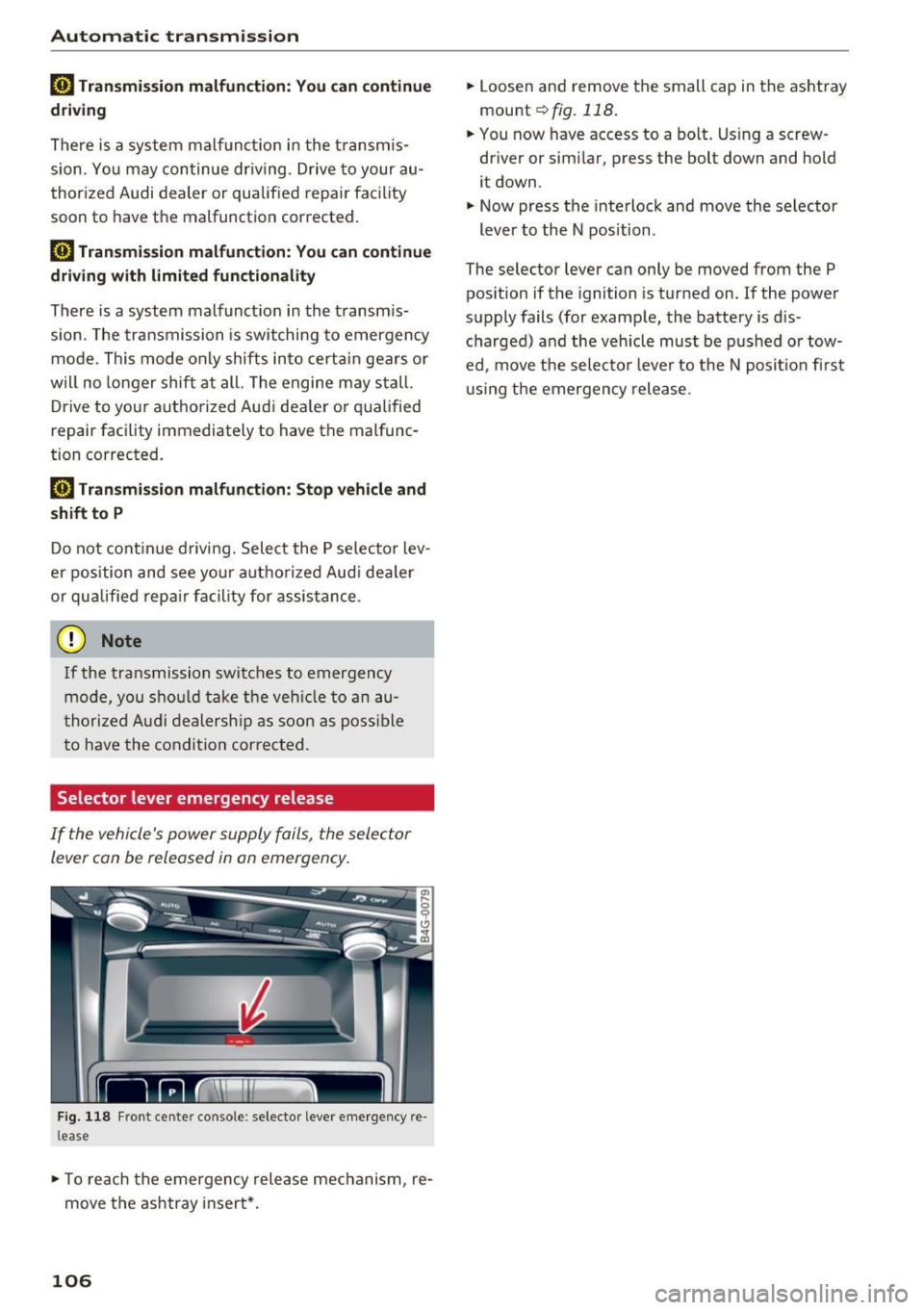
Selector lever emergency release
If the vehicle's power supply fails, the sele ctor
lever can be released in an emerg ency .
Fig . 118 Fro nt cen te r co nso le : selec to r lever e mergency re
l ease
.,. To re ach the emergency rele ase mech anism, re
move t he ashtray insert* .
106
.,. Loosen and remove the small cap in the as htray
mou nt
~ fig. 118 .
.,. You now have access to a bo lt. Using a screw
driver or simi lar , press the bolt down and hold
it down .
.,. Now press t he interlock and move the selector
lever to the N position .
The selector lever can only be moved from the P pos ition if the ignition is tur ned on.
If the powe r
supply fails (for examp le, the battery is d is
cha rged) and the veh icle must be p ushed o r tow
ed, move the selecto r lever to the N posit io n firs t
u sing the emergen cy rele ase .
Page 181 of 282
Intelligent Technology Notice about data
recorded by the Event
Data Recorder and
vehicle control modules
Event Data Recorder
This vehicle is equipped wi th an Event Data Re
corder (EDR) . The main purpose of an EDR is to
record, in certain crash or near crash-like situa
tions, such as an a irbag deployment or hitting a
road obstacle, data that will assist in understand
ing how a vehicle 's systems performed. The EDR
is designed to record data related to vehicle dy
namics and safety systems for a short period of
time, typically 30 seconds or less. The EDR in this
veh icle is designed to record such data as:
- How various systems in your vehicle were oper
at ing;
- Whether or not the driver and passenger safety
belts were buckled/fastened;
- How far (if at all) the driver was depressing the
accelerator and/or brake pedal; and,
- How fast the vehicle was traveling.
These data can he lp provide a better understand
ing of the circumstances in which crashes and in
juries occur. NOTE: EDR data are recorded by your
vehicle only if a non-trivia l crash situation occurs;
no data are recorded by the EDR under normal
driving conditions and no personal data (e .g .,
name, gender, age, and crash location) are re
corded . However , other parties, such as law en
forcement, could combine the EDR data with the
type of personally identifying data routinely ac
quired during a crash investigation.
To read data recorded by an EDR, specia l equip
ment is required, and access to the vehicl e or the
E DR is needed. In addition to the vehicle manu
facturer, other parties, such as law enforcement,
that have the specia l equipment, can read the in
formation if they have access to the vehicle or the
EDR.
Some state laws restrict the retrieval or down
l oading of data stored by ED Rs installed in a vehi
cle for the express purpose of retrieving data af-
Intelligent Technology
ter an accident or crash event without the own
er's consent.
Audi will not access the EDR and/or similar data
o r give it to others -
- unless the vehicle owne r (or lessee if the vehi
cle has been leased) agrees; or
- upon the official request by the police; or
- upon the order of a court of law or a govern-
ment agency; or
- for the defense of a lawsuit through the judicial
discovery process.
- Audi may also use the data for research about
veh icle operation and safety performance or
prov ide the data to a third party for research
purposes without identify ing the specific veh i
cle or information about the ident ity of its own
er or lessee and only after the recorded veh icle
data has been accessed.
Vehicle control modules
Your vehicle is also equ ipped w ith a number of
electronic control modules for various vehicle
systems, such as engine management, emiss ion
control, airbags, and safety belts .
These electronic control modules record data
dur ing normal vehicle operation that may be
needed by trained technicians for diagnostic and
r epa ir purposes. The recording capab ility of these
modules is lim ited to data (no sound is record
ed). Only a small amount of data is actua lly re
corded over a very limited period of time, or stor
ed when a system fault is detected by a control
module . Some of the data stored may relate to
vehicle speed, direction, or braking, as well as re
straint system use and performance in the event
of a crash. Stored data can also only be read and
down loaded w ith specia l equipment that is di
rectly connected to the vehicle.
(D Tips
Your vehicle may be equipped with Aud i con
nect. Your use of certain Audi connect fea-
tures requires wire less serv ices that are pro-
v id ed by a third party wireless telecommuni
cations provider. For details regarding how in
formation obtained through Audi connect is
collected, processed, transmitted, used, and ..,.
179
Page 182 of 282
Intelligent Technology
shared, please see your contract with the
wireless te lecommunications provider and the
"About Aud i connect" tab in your vehicle's
MMI:
! MENUI button> Audi connect > About
Audi connect .
Electronic Stabilization
Control (ESC)
Description
E SC helps to imp rove ro ad hold ing and vehicle
dynamics to help reduce the probab ility of skid
d ing and loss of veh icle control. It works only
when the engine is runn ing . ESC detects certain
d iffic ult dr iving situat io ns, including when the
ve hicl e is begin ning to spin (yaw) o ut of contro l
and h elps you to ge t the veh icle b ack u nde r con
trol by se lectively bra king the wheels, and/or re
ducing engine powe r and providing steering as
sistance to help hold the vehicle on the driver's
intended course. The indicator light
GI in the in
strument cluster blinks when ESC is tak ing action
t o he lp you contro l the vehicle.
ESC has lim itations. It is important to remembe r
that ESC cannot overcome the laws o f physics. It
will not a lways be able to help out under all con
d itions you may come up aga inst . For example,
ESC may not always be ab le to help you master
situations where there is a sudde n change in the
coeff ic ie nt of fr iction of the road surface. W hen
there is a se ction of dry roa d that is sudde nly cov
e red with w ater, slush o r sn ow , ESC c annot pe r
form the same way i t wou ld on the dry s urface. If
the vehicle hydrop lanes (rides on a cushion of wa
ter instead of t he road su rface), ESC w ill not be
ab le to he lp you stee r the veh icle because contact
with the pavement has been inte rru pted and the
ve hicle cannot be b raked or steered . Dur ing fast
cor nering, part icu la rly on w inding roads, ESC
can not always deal as effect ive ly w it h difficult
d riving situat ions than a t lowe r speeds .
Always ad just yo ur speed and driving sty le to
road, traffic and weath er cond itions . ESC canno t
over ride the vehicle's phys ical lim its, increase the
ava ilab le traction, o r keep a ve hicle on t he road if
roa d depa rture is a re su lt of driver in attention .
I nstead, ESC imp roves the possibili ty of keep ing
180
t h e veh icle unde r contro l and on t he road d uring
extreme mane uvers by using the driver's steer ing
i nputs to help keep the veh icle go ing in the in
tended direction. If you are traveling at a speed
that causes you to run off the road before ESC
can p rovide any assistance, you may not exper i
ence the be nefits of ESC.
ESC is switc hed on all the time. In certa in s itua
tions when you need less tract ion, you can sw itch
off ASR by press ing the button
[g] c:> page 181,
fig . 175 . Be sure to switc h ASR on aga in whe n
you no longer nee d less tract ion.
The following systems are integrated in the ESC:
Anti-lock braking system (ABS)
A BS prevents the w heels from locking w hen bra k
i ng . The veh icle can still be steered even dur ing
hard braking. App ly steady p ressure to the brake
pedal. Do not pump the pedal. A pulsing in the
brake peda l ind icates that the system is act ing to
stab ilize the veh icle.
Brake a ssist system
The brake assist system can decrease b raking dis
tance. It increases b raking powe r whe n the dr iver
presses the b rake peda l quickly in emergency sit
uat ions. You must press a nd hold the brake peda l
u nt il the dange rous situation is over . In vehicles
with adaptive cruise co ntrol*, the brake ass ist
syste m is more se nsitive if the distance detected
t o t he veh icle ah ead is too sm all. On vehicle s wi th
a ctiv ate d a nd fun ctioni ng nigh t vis ion assi st*, the
brake assis t sys tem can respond more sensit ively
i f there is a warning .
Anti-slip regulation (ASR )
ASR reduces e ngine powe r whe n the d rive whee ls
begin s pin nin g and ad apts the force to the ro ad
con ditions. This m akes i t easier to s tar t, a cce ler
ate and drive up incl ines .
Electronic differential lock (EDL)
E DL applies t he b rakes to a whee l th at s tarts
sp inning a nd transfers the dr ive power to the
othe r drivi ng whee ls . This fu nction is n ot a vail a-
b le at hig he r sp eeds . .,..
Page 183 of 282
In extreme cases, EDL automatically switches off
to keep the brake on the braked wheel from over
heating. The vehicle is still working correctly. EDL
will switch on again automatically when condi
tions have returned to normal.
Steering recommendation
The ESC helps to stabilize the vehicle by changing
the steering torque .
I n vehicles with dynamic steering*, ESC also
helps to stabilize the steering in critical situa
tions.
Selective wheel torque control
Selective wheel torque control is used when driv
ing on curves. The front wheel on the inside of
the curve or both wheels on the inside of the
curve are braked selectively as needed. This al
lows more precise driving in curves.
Automatic post-collision braking system
The "Automatic post-collision brak ing system"
can help to reduce the risk of sliding and of other
coll isions after an accident.
If the airbag control
module detects a collision above a certain vehicle
speed, the vehicle is braked by the ESC.
The vehicle does not brake automatically if:
- the driver presses the accelerator pedal, or
- the braking force generated by the pressed
brake pedal is greater than the brak ing force
that would be initiated by the system, or
- the ESC, the brake system or the vehicle electri
cal system are not function ing .
Switching on /off
Intelligent Technology
A WARNING
-- The ESC and its integrated systems cannot
overcome the limits posed by natural physi
cal laws. This is especia lly important on slip
pery or wet roads. If the systems begin act
ing to stabilize your vehicle, you should im
mediately alter your speed to match the
road and traffic conditions. Do not let the
increased safety provided tempt you into
taking r isks. This cou ld increase your risk of
a collision .
- Please note the risk of a collision increases
when driving fast, especially through curves
and on slippery or wet roads, and when dr iv
ing too close to objects ahead. The ESC and
its integrated systems cannot always pre
vent collisions -there is still a risk of acci
dents!
- Press the accelerator pedal carefully when
accelerating on even, slippery surfaces such
as ice and snow. The dr ive wheels can spin
even when these control systems are instal
led and this can affect driving stability and
i n crease the risk of a collision .
(j) Tips
-ABS and ASR only function correctly when
all four wheels are equipped with identical
tires. Different tire sizes can lead to a reduc
tion in engine power.
- You may hear noises when the systems de
scribed are working.
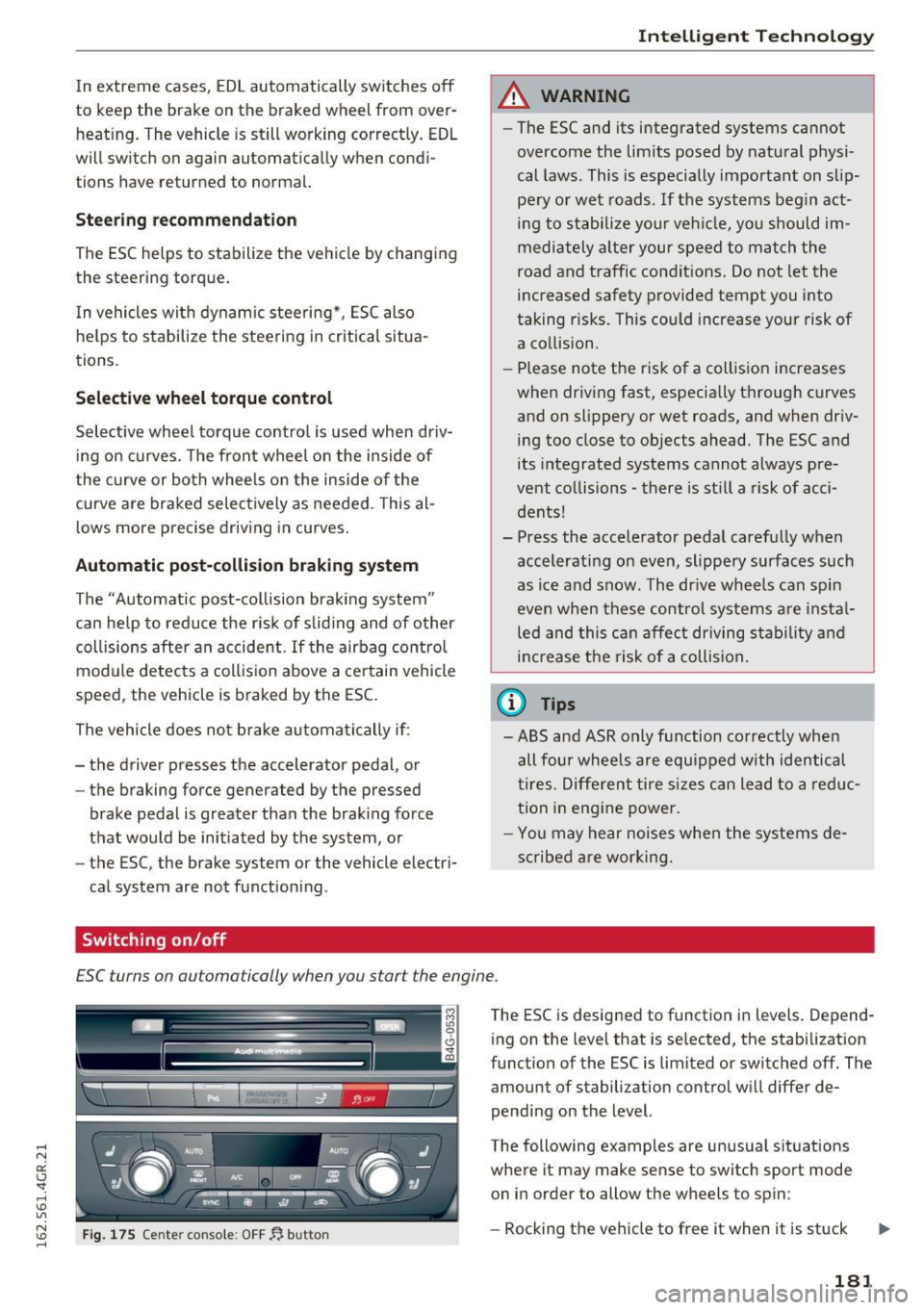
£SC turns on automatically when you start the engine.
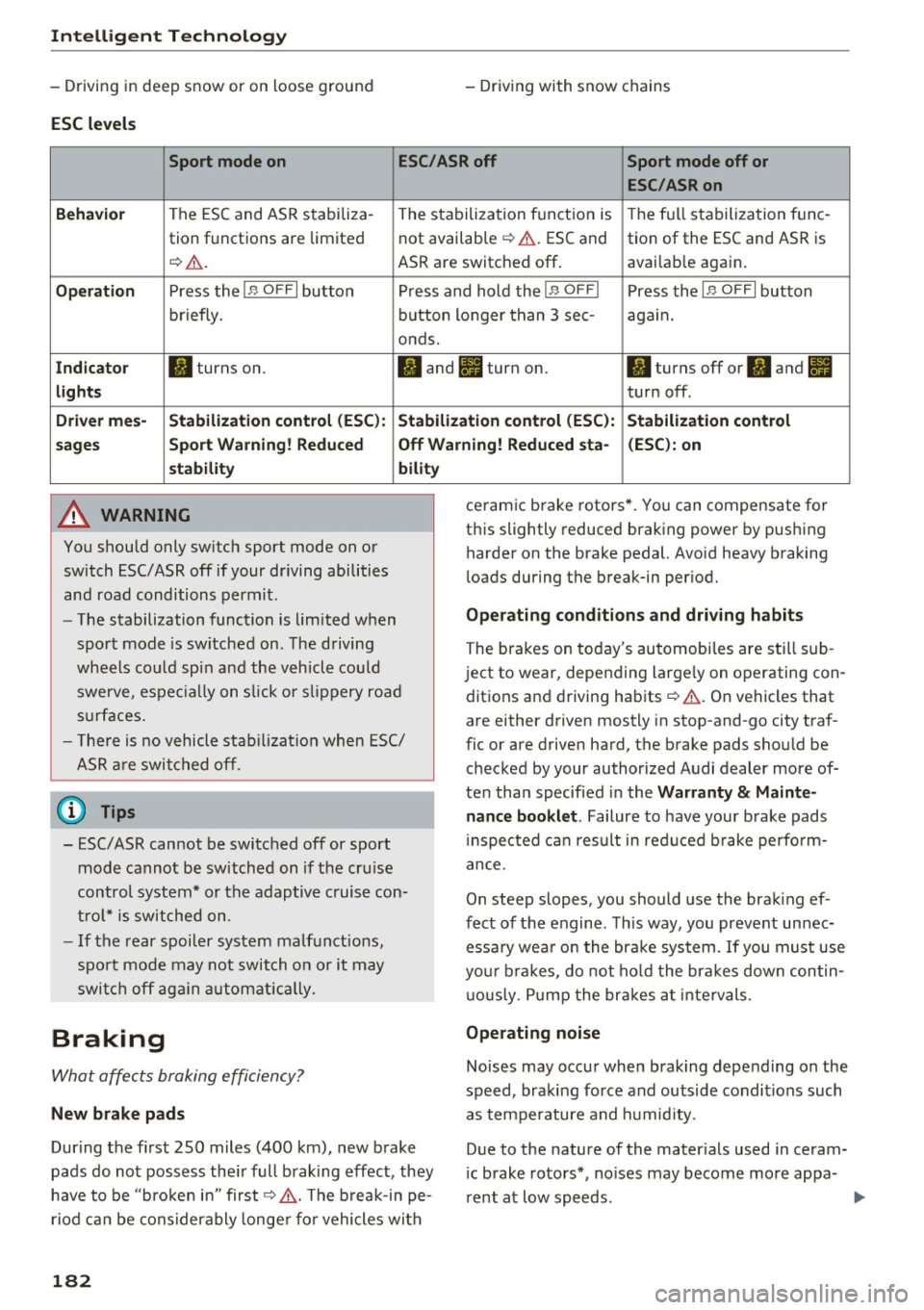
Fig. 175 Center console: OFF~ button
The ESC is designed to function in levels. Depend
ing on the level that is se lected, the stabilization
function of the ESC is limited or switched off. The amount of stabilization control will differ de
pending on the level.
The following examples are unusual situations
where it may make sense to switch sport mode on in order to allow the wheels to spin:
- Rocking the vehicle to free it when it is stuck ..,.
181
Page 184 of 282
Intelligent Technology
- Driving in deep snow or on loose ground
ESC levels
- Driv ing with snow chains
Sport mode on ESC/ASR off Sport mode off or
ESC/ASRon
Beha vior
The ESC and ASR stabiliza- The stabiliza tion function is The f ull stabilization tune-
tion f unctions are limited not available ¢
,&. ESC and
tion of the ESC and ASR is
¢
&. . ASR are switched off . avai
lab le aga in .
Op eration Press the I B OFF I button Press and hold the !B OFFI Press the IB OFFI button
briefly . button longer than 3 sec- again.
onds.
I n d ica to r II turns on. II and lit turn on. II turns off or II and II
light s turn off .
Driver me s- Stabili zation cont rol (E SC): S tabilization control (E SC ):
Stabili zation cont rol
s age s Sport Warning ! Redu ced Off Wa
rning! Reduced sta - (ESC ): on
st abilit y
A WARNING
You should only switch sport mode on or
switch ESC/ ASR off if your driving abilities
and road conditions permit.
bility
- The stabilization function is limited when
sport mode is sw itched on. The driving
wheels co uld spin and the vehicle could
swerve , espec ially on s lick o r slippery road
s u rfaces.
- The re is no vehicle stab ilizat ion when ESC/
ASR a re swi tched off .
(D Tips
-ESC/ASR cannot be switched off or sport
mode cannot be switched on if the cru ise
control system* or the adaptive cruise con
tro l* is switched on .
- If the rear spoiler system malfunct ions,
sport mode may not switch on or it may switch off ag ain automatically .
Braking
What affects braking efficiency?
New brake pads
During the first 250 miles (400 km), new brake
pads do not possess the ir full braking effect, they
have to be "broken in" first¢&, . The b reak-in pe
riod can be considerably longe r fo r vehicles with
182
ceramic brake rotors* . You can compensate for
this slightly reduced braking power by pushing harder on the brake pedal. Avoid heavy braking
l oads during the break-in per iod.
Op erating c ondition s and dri ving habits
The brak es on today 's automobiles are still sub
ject to wear, depending large ly on operating con
dit ions and driving habits ¢&, . On vehicles that
are either driven mostly in stop-and-go city traf
fic or are driven hard, the brake pads shou ld be
checked by your authorized Audi dealer more of
ten than specified in the
Warr ant y & Maint e
nance booklet .
Failure to have your brake pads
i nspected ca n result in red uced b rake perfo rm
ance.
On steep slopes, you should use the brak ing ef
fect of the engine . Th is way, you prevent unnec
essa ry wea r on the brake system. If you must use
you r brakes, do not ho ld the brakes down contin
u ous ly. P ump the brakes at intervals.
Operating noi se
Noises may occur when brak ing depending on the
speed, braking force and outside conditions such as temperature and h umid ity.
Due to the nature of the mater ials used in ceram
i c brake rotors*, no ises may become more appa-
rent at low speeds. ..,.
Page 185 of 282
Effect of wat er and road salt
In ce rtain situations, for example after driving
through water, in heavy rain, afte r ove rnight con
densation or after washing your car, the braking
effect can be reduced by moisture or ice on the
brake rotors and brake pads. The brakes must be
dried first w ith a few careful brake applications.
At higher speeds and with the windshie ld wipers
turned on, the brake pads press against the brake rotors for a short amount of time. Th is occurs at
regular intervals without the driver noticing and
provides for better brake response time under
wet conditions .
The effectiveness of the brakes can be reduced
when the vehicle is driven on a salt-covered road
and the brakes are not used. Likewise, you clean
off accumulated salt coat ing from brake discs
and pads with a few cautious applications of the b rake ¢_&. .
Due to their surface character istics, ceramic
brake roto rs* absorb mo isture in such condit ions.
This can cause a temporary reduc tion in braking
force compared to dry brakes. You can compe n
sate fo r th is by press ing the b rake peda l harder.
Corrosion
There may be a tende ncy for d irt to bu ild up on
the brake pads and corros ion to form on the discs
if the car is not dr iven regularly or only fo r sho rt
tr ips with little use of the brakes.
If the brakes are not used frequently, or if corro
sion has formed on the discs, it is adv isable to
clean off the pads and discs by brak ing firmly a
few t imes from a mode rately h igh speed ¢,& .
Faults in the brake system
If you should notice a sudden increase in brake
pedal travel, then one of the two brake c ircuits
may have failed
¢ ,& .
Low brake fluid le vel
Malfunct ions can occur in the brake system if the
brake fl uid level is too low. The brake fluid level
is monitored electronically .
Intelligent Technology
Brake booster
The brake boos ter works w ith v acuum press ure
which is crea ted on ly when the engine is running
¢ & .
Brake lining wear status
Brake lining wea r may be chec ked by visua l in
spe ct ion of the condition of the brake pads
t hr ough the openings in t he wheel. If necessary,
the wheel may be removed for this inspection
¢ page 243, Replacing wheels .
_8 WARNING "'----
-New b rake pads don't have the best stop
p ing power and must be "broken-in" d uring
the initial 250 miles (400 km). The b reak-in
period can be considerably longer for
veh icles with ceramic brake roto rs*. You can
compensate for this by pressing the brake
pedal mo re firmly. This also applies late r
when new p ads are inst alled.
- You shou ld pe rform braking maneuvers for
the purpose of cleaning the brake system
only i f road condit io ns pe rmit. O ther ro ad
users m ust no t be put at r is k - you may
cause an accident!
- Before descending a steep g rade, reduce
speed and shift transmission into a lower
gear o r lower driving range. Do not r ide the
brakes or hold the pedal down too long or
too often. This cou ld cause t he b rakes to get
hot and dimin ish braking effic iency.
- Do not " ride the brakes" by rest ing your foot
on the pedal when you do not intend to brake. This may cause the brakes to over
heat, premature wear and increased stop
p ing distance .
- Unde r certain climatic and ope rating condi
tions such as passing t hrough water, d riving
i n heavy rain o r afte r wash ing the veh icle,
the effectiveness of the brakes ca n be re
duce d. In winter, ice can accum ulate on the
b rake pads, lin ings, discs and dr ums. Care
fu lly apply brakes for a test. Brakes will d ry
an d ice coatings will be cleaned off after a
few ca refu l brake applications.
183