belt AUDI RS7 SPORTBACK 2016 Owners Manual
[x] Cancel search | Manufacturer: AUDI, Model Year: 2016, Model line: RS7 SPORTBACK, Model: AUDI RS7 SPORTBACK 2016Pages: 282, PDF Size: 70.78 MB
Page 5 of 282
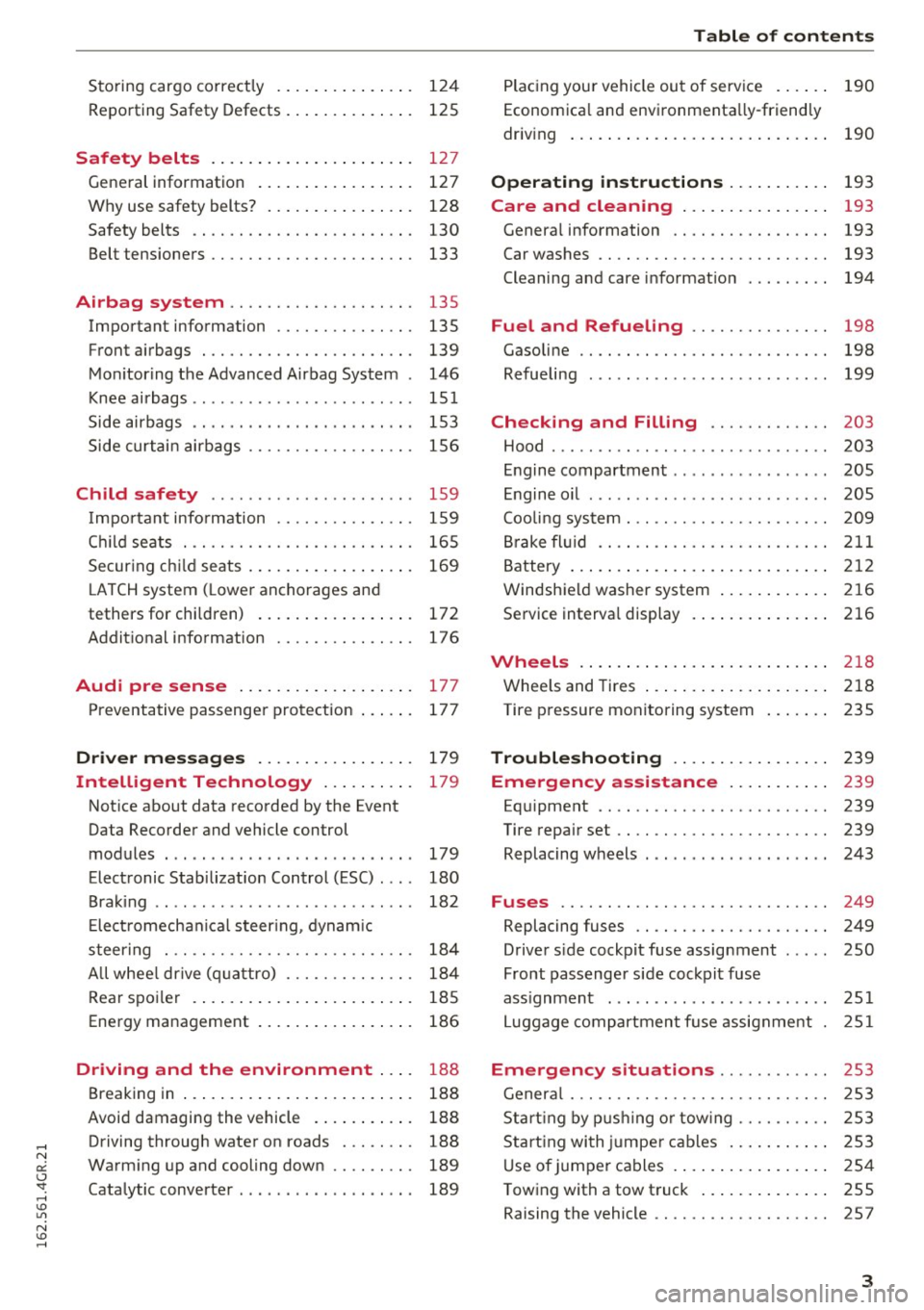
Storing cargo correct ly . . . . . . . . . . . . . . . 124
R epo rting Safety Defects . . . . . . . . . . . . . . 125
Safety belts . . . . . . . . . . . . . . . . . . . . . . 127
General information . . . . . . . . . . . . . . . . . 127
Why use safety belts? . . . . . . . . . . . . . . . . 128
Safety belts . . . . . . . . . . . . . . . . . . . . . . . . 130
Belt tensioners . . . . . . . . . . . . . . . . . . . . . . 133
Airbag system . . . . . . . . . . . . . . . . . . . . 135
Important information . . . . . . . . . . . . . . . 135
Front airbags . . . . . . . . . . . . . . . . . . . . . . . 139
Mo nitoring the Advanced Airbag System . 146
Knee airbags ...................... .. 15 1
Side airbags . . . . . . . . . . . . . . . . . . . . . . . . 153
S ide curtai n air bags . . . . . . . . . . . . . . . . . . 156
Child safety . . . . . . . . . . . . . . . . . . . . . . 159
I mpor tant info rmation . . . . . . . . . . . . . . . 159
C hi ld se ats . . . . . . . . . . . . . . . . . . . . . . . . . 165
Secur ing c hild seats . . . . . . . . . . . . . . . . . . 169
L ATCH system ( Lower anchorages and
tethers for chi ldren) . . . . . . . . . . . . . . . . . 172
Addit ional info rmation 176
Audi pre sense . . . . . . . . . . . . . . . . . . . 177
Preventative passenge r protection . . . . . . 177
Dri ver messages . . . . . . . . . . . . . . . . . 179
Intelligent Technology . . . . . . . . . . 179
Not ice about data reco rded by the Event
Data Recorder and vehicle control
modules . . . . . . . . . . . . . . . . . . . . . . . . . . . 179
Elect ronic Stabilizat ion Control (ESC) . . . . 180
B ra king . . . . . . . . . . . . . . . . . . . . . . . . . . . . 182
E lect romechanica l steer ing, dyna mic
steer ing . . . . . . . . . . . . . . . . . . . . . . . . . . . 184
A ll whee l dr ive ( quattro) . . . . . . . . . . . . . . 184
Rear spo iler . . . . . . . . . . . . . . . . . . . . . . . . 185
Energy management . . . . . . . . . . . . . . . . . 186
Driving and the environment . . . . 188
Breaking in . . . . . . . . . . . . . . . . . . . . . . . . . 188
Avoid damaging the vehicle . . . . . . . . . . . 188
Driving through wate r on roads . . . . . . . . 188
Wa rm ing up and cooling down . . . . . . . . . 189
Catalytic converte r . . . . . . . . . . . . . . . . . . . 189
Table of contents
Plac ing you r vehicle ou t of serv ice . . . . . . 190
Econ om ica l and env ironmenta lly-friend ly
driv ing . . . . . . . . . . . . . . . . . . . . . . . . . . . . 190
Operating instructions . . . . . . . . . . . 193
Care and cleaning . . . . . . . . . . . . . . . . 193
Genera l information . . . . . . . . . . . . . . . . . 193
Car washes . . . . . . . . . . . . . . . . . . . . . . . . . 193
Cleaning and care i nformat ion 194
Fuel and Refueling . . . . . . . . . . . . . . . 198
Gasoli ne . . . . . . . . . . . . . . . . . . . . . . . . . . . 198
Refueling . . . . . . . . . . . . . . . . . . . . . . . . . . 199
Checking and Filling . . . . . . . . . . . . . 203
Hood . . . . . . . . . . . . . . . . . . . . . . . . . . . . . . 203
En gine compartment . . . . . . . . . . . . . . . . . 205
En gine o il . . . . . . . . . . . . . . . . . . . . . . . . . . 205
Coo lin g sys tem . . . . . . . . . . . . . . . . . . . . . . 209
Bra ke fl uid .... ..................... 211
B attery . . . . . . . . . . . . . . . . . . . . . . . . . . . . 2 12
Windsh ie ld washer system . . . . . . . . . . . . 2 16
Se rvice interva l display . . . . . . . . . . . . . . . 216
Wheels .. .. .. . ... .... . ..... ... .. .. 2 18
Whee ls and Tires . . . . . . . . . . . . . . . . . . . . 218
Tire p ressure monitoring system
235
Troubleshooting . . . . . . . . . . . . . . . . . 239
Emergency assistance . . . . . . . . . . . 239
Eq uipment . . . . . . . . . . . . . . . . . . . . . . . . . 239
Tire repair set . . . . . . . . . . . . . . . . . . . . . . . 239
Replacing wheels . . . . . . . . . . . . . . . . . . . . 243
Fuses ............................. 249
Replacing fuses . . . . . . . . . . . . . . . . . . . . . 249
Drive r side cockpit fuse assignment . . . . . 250
Front passenger side coc kpit fuse
ass ignment . ... . .. ... ............ .. 251
L uggage com partment f use assignme nt . 251
Emergency situations . . . . . . . . . . . . 253
Gener al . . . . . . . . . . . . . . . . . . . . . . . . . . . . 253
S ta rt ing by p ushi ng o r tow ing . . . . . . . . . . 253
S ta rt ing wi th ju mpe r ca b les . . . . . . . . . . . 2 53
U se of jumpe r ca bles . . . . . . . . . . . . . . . . . 2 54
T owing with a tow t ruck . . . . . . . . . . . . . . 255
Raising the vehicle . . . . . . . . . . . . . . . . . . . 257
3
Page 14 of 282
Instruments and indicator lights
-Whenever stalled or stopped for repair,
move the vehicle a safe distance off the
road, stop the engine, and turn on the
emergency flasher
c> page 46.
- The engine compartment of any motor vehi
cle is a potentially hazardous area. Before
you check anything in the engine compart
ment, stop the engine and let it cool down.
Always exercise extreme caution when work
ing under the hood
c> page 203.
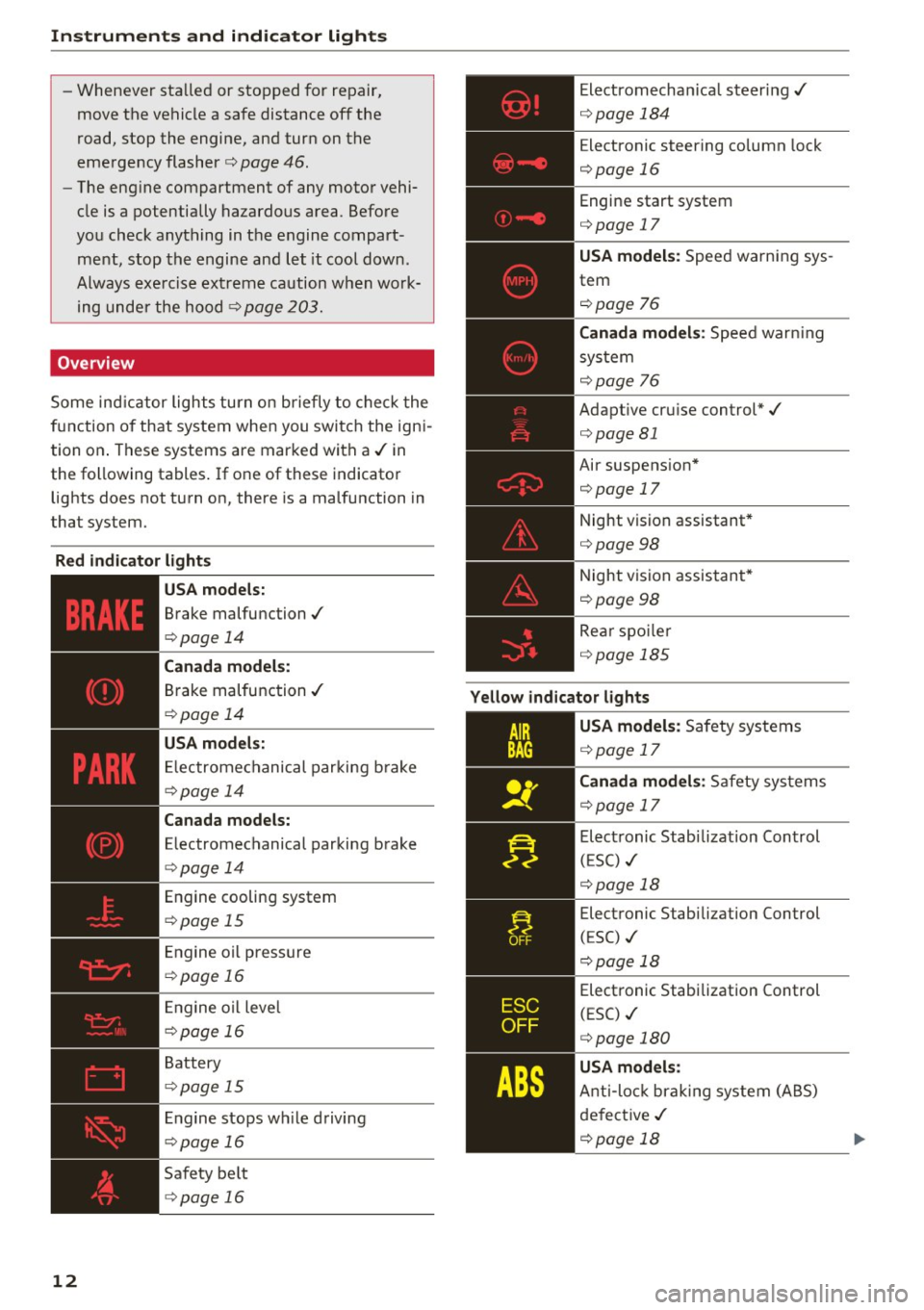
Overview
Some indicator lights turn on briefly to check the
function of that system when you switch the igni
tion on. These systems are marked with a../ in
the following tables. If one of these indicator
lights does not turn on, there is a malfunction in
that system.
Red indicator lights
12
-------------
US A models:
Brake malfunction../
c>page 14
Canada models:
Brake malfunction../
c>poge 14
USA models:
Electromechanical parking brake
c>page 14
Canada models:
Electromechanical parking brake
c>page 14
Engine cooling system
c>poge 15
Engine oil pressure
c>poge 16
Engine oil level
c>poge 16
Battery
c>page 15
Engine stops while driving
c>page 16
Safety belt
c>page 16
Electromechanical steering../
c>page 184
Electronic steering column lock
c>page 16
Engine start system
c>page 17
USA models: Speed warning sys
tem
c>poge 76
Canada models: Speed warning
system
c> poge 76
Adaptive cruise control*../
c>page 81
Air suspension*
c>page 17
Night vision assistant*
c>page 98
Night vision assistant*
c>poge98
Rear spoiler
~page 185
Yellow indicator lights
A IR
BAG
-------------
US A models: Safety systems
c>page 17
Canada models: Safety systems
c>poge 17
Electronic Stabilization Control
(ESC) ../
c>poge 18
Electronic Stabilization Control
(ESC) ../
c::>page 18
Electronic Stabilization Control
(ESC) ../
c::>page 180
USA models:
Anti-lock braking system (ABS)
defective ../
c>poge 18
Page 18 of 282
Instruments and indicator lights
If the message does not tu rn o ff, have your a u
thor iz e d A udi dealer or qualified worksho p cor
rect the malfunction.
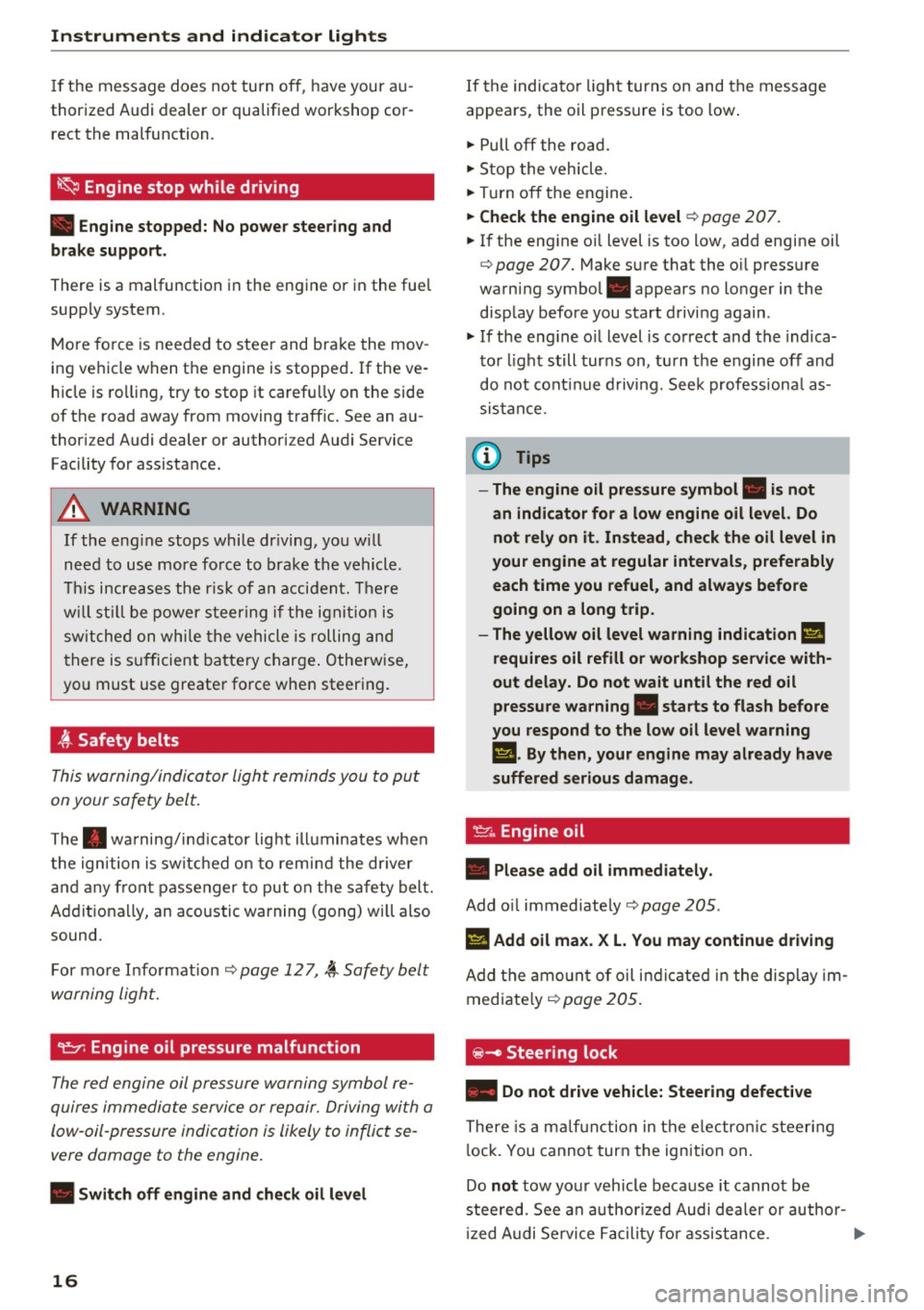
~ Engine stop while driving
• Engine stopped: No power steering and
brake support.
There is a malfunction in the en gine or in the fue l
supp ly system .
Mo re fo rce is nee ded to stee r and bra ke the mov
i ng vehicl e w hen t he engine is stoppe d. If the ve
h icle is ro llin g, try to stop it caref ully on the side
of the road away from moving traffic . See an au
thor iz ed Audi dealer or author iz ed A udi Service
F acility for assista nce .
A WARNING
-
If th e eng in e stops whi le driv ing, yo u w ill
n eed to u se mor e fo rce t o brak e the ve hicle.
T his i ncre ases the r is k of a n acci dent. Th ere
w ill still b e po wer steer ing if th e ignition is
s wi tched on w hile th e ve hicle is ro lling an d
t here is s ufficien t bat tery ch arge. O the rwise,
yo u must use greate r fo rce whe n steer ing.
4'-Safety belts
T his w arn ing/indi cator ligh t remind s y ou to put
on your safe ty belt.
T he . warni ng/in dica tor lig ht ill uminates whe n
the ig nition is sw itch ed on to remi nd the dr iver
and an y fr on t pa sse nger to pu t on the safe ty bel t.
Ad diti ona lly, an a co ustic warning ( gong) wi ll also
sound.
F or mor e In form ati on ¢
page 1 2 7, ~ S afety bel t
w arning ligh t.
~ Engine oil pressure malfunction
The red engine oil pressure warning symbol re
quires immed iate service or re pair. Driving wi th a
low- oil-pressure indi cation is likely to inflict se
vere damage to the engine .
• Switch off engine and check oil level
16
If the indica to r li gh t turns on and the message
a ppears, the oil p ress ure is too low .
.,. Pull off the ro ad .
.,. St op the vehicle .
.,. Tur n o ff th e engine .
.,. Check the engine oil level¢ page 207 .
.,. If the eng ine o il level is too low , add engine oil
¢
page 20 7 . M ake s ure t hat the o il press ure
warni ng symbo l. appears no lo nger in the
disp lay b efore you sta rt driving again .
.,. If the eng ine o il level is correc t and the indica
t o r li gh t still turns on, turn t he e ngine off and
do not co ntinu e drivi ng. Seek professiona l as
sis ta nc e.
(D Tips
- The engine oil pressure symbol. is not
an indicator for a low engine oil level. Do not rely on it . Instead, check the oil level in
your engine at regular intervals , preferably
each time you refuel , and always before
going on a long trip.
- The yellow oil level warning indication
Ell
requires oil refill or workshop service with
out delay. Do not wait until the red oil
pressure warning. starts to flash before
you respond to the low oil level warning
l!I. By then, your engine may already have
suffered serious damage.
·
~ Engine oil
• Please add oil immediately .
Add oil immediate ly ¢ pag e 205.
Ill Add oil max . X L. You may continue driving
Add th e am ount of oil i nd ic a te d in t he dis pla y im
med iate ly
¢ page 205.
@-Steering lock
• Do not drive vehicle: Steering defective
There is a mal func tion in the e le ctr onic st eer ing
l ock. You canno t tur n the ign ition on .
Do
not tow yo ur vehicl e bec ause it cannot be
stee red. See an authorized Audi dea ler or author
iz ed Audi Service Facili ty f or as sis tance .
....
Page 54 of 282
Seat s and sto rage
Seats and storage
General information
Why is your seat adjustment so important?
The safety belts and the airbag system can only
provide maximum protection if the front seats are correctly adjusted .
There are various ways of adjusting the front
seats to provide safe and comfortable support
for the dr iver and the front passenger . Adjust
your seat properly so that:
- you can easily and quickly reach all the switches
and controls in the instrument panel
- your body is properly supported thus reducing
physical stress and fatigue
- the safety belts and a irbag system can offer
maximum protection ¢
page 135.
In the following sections, you will see exact ly
how you can best adjust your seats.
There are spec ial regulat ions and instr uctions for
installing a c hild seat on the front passenger's
seat. Always follow the information regarding
child safety provided in ¢
page 159, Child safe
ty .
A WARNING
Incorrect seating position of the driver and all
other passengers can result in serious person
al injury.
- Always keep your feet on the floor when the
vehicle is in motion - never put your feet on
top o f the instr ument pane l, o ut of the win
dow o r on top of the sea t cushion. This ap
plies espe cially to the passenge rs.
If your
seat ing pos ition is inco rre ct, you increase
the risk of injury in the case of sudden brak
ing or an accident . If the airbag inf lates and
the seating position is incor rect, this could
result in personal injury or even death.
- It is important for both the driver and front
passenge r to keep a d istance o f at least
10 inches (25 cm) between themselves and
the steering wheel and/or instrument pan el. If you're s itting any closer than this, the
airbag system cannot pro tect you properly.
52
In addition, the front seats and head re
straints must be adjusted to your body
he ight so that they can give you maximum
protection .
- Always try to keep as much distance as pos
sible between yourself and the steer ing
wheel or instrument panel.
- Do not adjust the driver's or front passeng
er's seat while the veh icle is moving. Yo ur
seat may move unexpectedly, causing sud
den loss of vehicle contro l and personal in
jury. If you ad just yo ur seat while the veh icle
is moving, you a re o ut of po sition.
, Driver's seat
The correct seat position is important for safe
and relaxed driving .
We recommend that you adjust the dr iver's seat
i n the following manner:
.. Adjust the seat in fore and aft direction so that
you can easi ly push the pedals to the floor
while keep ing your knees slightly bent¢
A. in
Why is your seat adjustment so important? on
page 52 .
.. Adjust the bac krest so that whe n you s it w it h
your back agains t the backrest, yo u can s till
gras p the top of the steering wheel.
.. For adj ustab le head rest raints: adj ust the head
restraint so t he upper edge is as even as possi
ble with the top of your head . If that is not pos
sible, try to adjust the head restraint so that it
is as close to this posit io n as poss ible
¢ page 55 . Move the head restraint so that it
is as close to the back of the head as poss ible .
A WARNING
Neve r place a ny objec ts in the dr iver's foo t
well. An objec t could get into the pedal a rea
a nd interfere with pedal func tion. In c ase of
sud den bra king or an accident, you would not
be ab le to b rake or accelerate .
-
Page 55 of 282
Front passenger's seat
Always move the front passenger seat into the
rearmost position .
To avoid contact with the airbag while it is de
ploying, do not sit any closer to the instrument
panel than necessary and always wear the three
point safety belt provided adjusted correctly. We
recommend that you adjust the passenger's seat
in the following manner:
.. Bring the backrest up to an (almost) upright
posit ion . Do not ride with the seat reclined .
.. For adjustable head restraints: adjust the head
restraint so the upper edge is as even as poss i
ble with the top of your head. If that is not pos
sible, try to adjust the head restraint so that it
is as close to this position as possible
¢ page 55. Mov e the head restraint so that it
is as close to the back of the head as possible.
.. Place your feet on the floor in front of the pas
senger's seat.
Front seats
Controls
Moving the seat forward or back and adjusting
the height, backrest angle and seat angle.
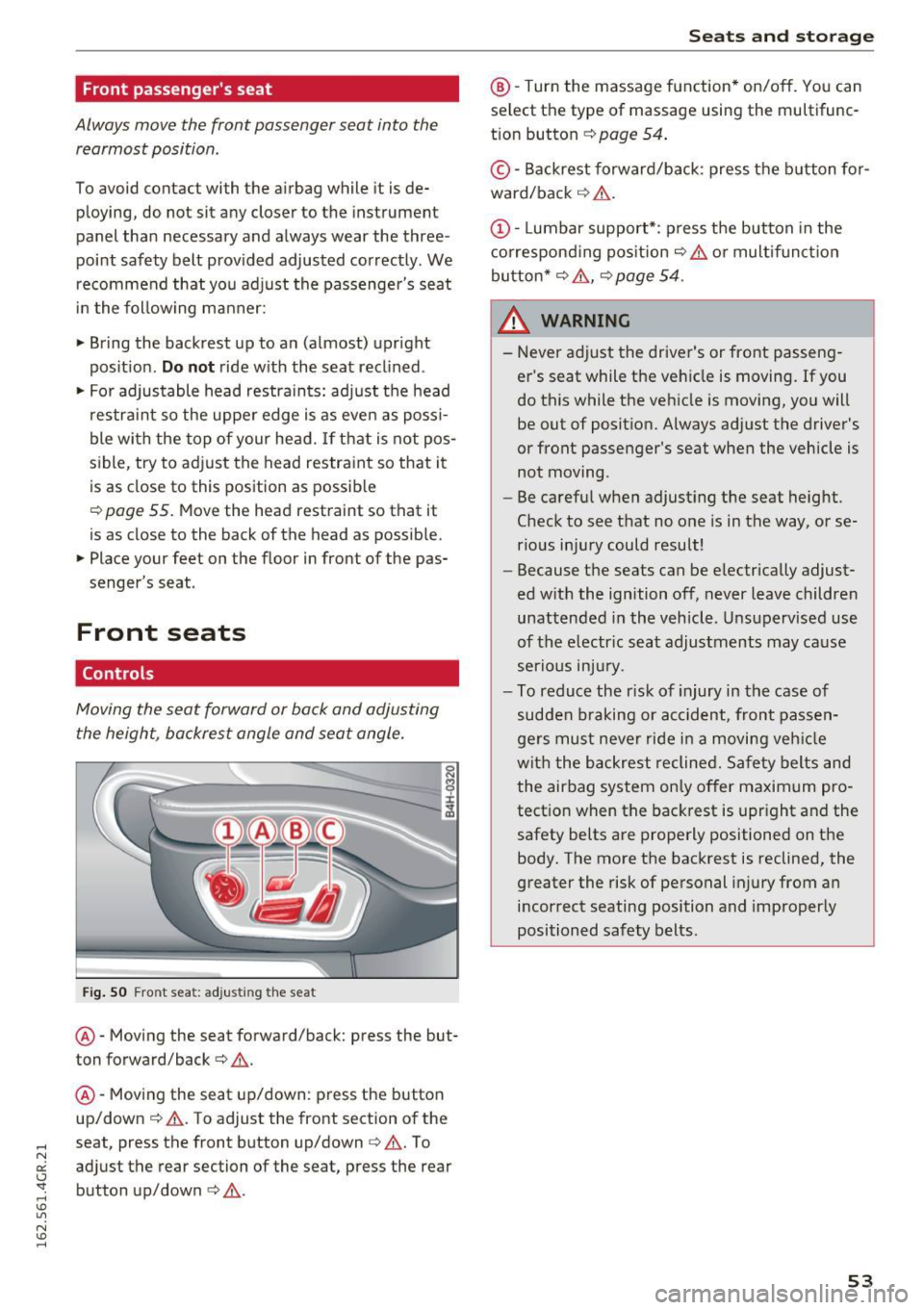
Fig. SO Front seat: adjusting the seat
@ -Moving the seat forward/back: press the but
ton forward/back¢
A.
@ -Moving the seat up/down: press the button
up/down ¢
A. To adjust the front section of the
seat, press the front button up/down¢
A. To
adjust the rear section of the seat, press the rear
button up/down
c> A .
Seats and storage
@-Turn the massage function* on/off. You can
select the type of massage using the multifunc
tion button
¢ page 54 .
© -Backrest forward/back : press the button for
ward/back ¢
A.
(D -Lumbar support*: press the button in the
corresponding position¢
A or multifunction
button*¢
A , ¢ page 54 .
& WARNING
=
-Never adjust the driver's or front passeng-
er 's seat while the vehicle is moving. If you
do this while the vehicle is moving, you will
be out of position. Always adjust the driver's
or front passenger's seat when the vehicle is
not moving.
- Be careful when adjusting the seat height.
Check to see that no one is in the way, or se
rious injury could result!
- Because the seats can be electrically adjust
ed with the ignition off, never leave children
unattended in the vehicle . Unsupervised use
of the electric seat adjustments may cause
serious injury.
- To reduce the r isk of injury in the case of
sudden braking or accident, front passen
gers must never ride in a moving vehicle
with the backrest reclined. Safety belts and
the airbag system only offer maximum pro
tection when the backrest is upright and the
safety belts are properly positioned on the body. The more the backrest is reclined, the
greater the risk of personal injury from an
incorrect seating position and improperly
positioned safety belts.
-
53
Page 56 of 282
Sea ts and stor age
Multifunction button
Applies to: ve hicles w ith memory funct ion
You con adjust the massage function, lumbar
support, side bolsters and seating surface using
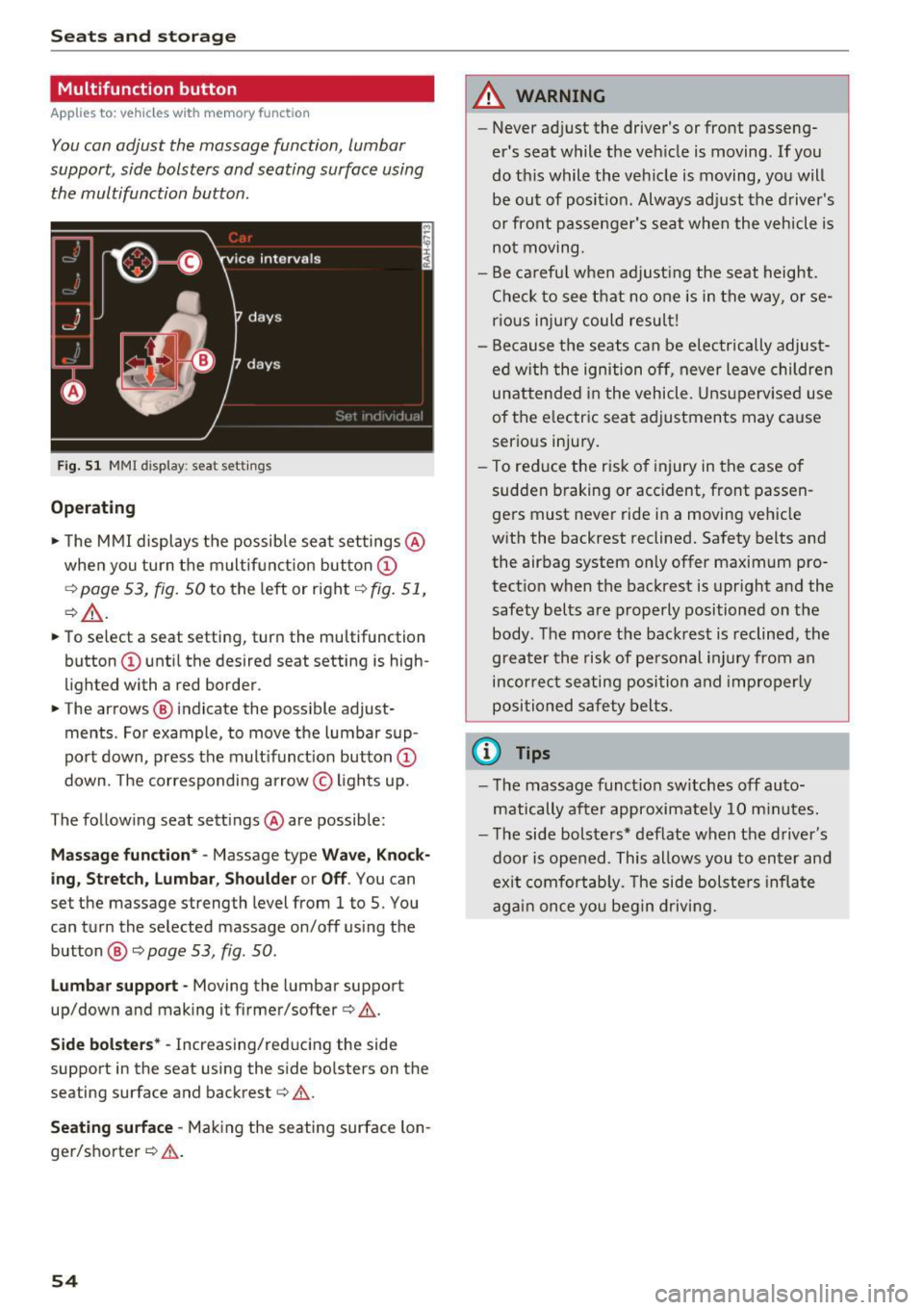
the multifunction button .
Fig . 5 1 MMI display: seat settings
Operating
.. The MMI displays the possible sea t settings @
when you turn the m ultif unct ion button
CD
¢ page 53, fig. 50 to the left or right¢ fig. 51,
¢ £ .
.. To select a seat setting, turn the multifunction
button
CD until the desired seat setting is high
lighted with a red border .
.. The arrows @ indicate the possible adjust
ments . For example, to
move the lumbar sup
port down, press the mult ifunct ion button
CD
down. The corresponding arrow © lights up.
The following seat sett ings @are possible:
Massage function* -Massage type Wave, Kno ck
ing, Stretch , Lumb ar, Shoulder or Off .
You can
set the massage strength level from 1 to S. You
can turn the selected massage on/off us ing the
button @¢
page 53, fig . 50 .
Lumbar support -Moving the lumbar support
up/down and making it firmer/softer¢&.
Side bolste rs* -Increasing/reducing the side
support in the seat using the side bo lsters on the
seating surface and backrest¢& .
Seating surfac e -Mak ing the seating surface lon
ger/shorter ¢& .
54
A WARNING
-Never adjust the driver's or front passeng
er's seat while the veh icle is moving. If you
do this while the veh icle is moving, you will
be out of posit ion . Always ad just the d river 's
or front passenger's seat when the vehicle is
no t moving.
- Be ca refu l when adjust ing the seat height .
Check to see t hat no one is in the way, or se
rio us inju ry could resu lt!
- Because the seats can be electrically adjust
ed w ith the ignition off,
never leave children
unattended in the vehicle . Unsupervised use
of the e lectric seat adjustments may cause
serious injury.
- To reduce the risk of injury in the case of
sudden braking or accident, front passen
ge rs must never ride in a moving veh icle
with the backrest reclined. Safety belts and
the airbag system only offer maximum pro
tect ion when the backrest is upr ight and the
safety bel ts are properly positioned on the
body. T he mo re the backrest is reclined, the
greater the risk of pe rsonal inju ry from an
incor rect seating posi tion and imprope rly
positioned safety belts .
(D Tips
- T he massage funct io n sw itches off auto
matically after approximate ly 10 m inutes.
- T he side bolsters* deflate when the driver's
door is opened . This allows you to enter and
ex it comfortab ly. The side bolste rs infla te
again once you begin driving.
Page 57 of 282
Armrest
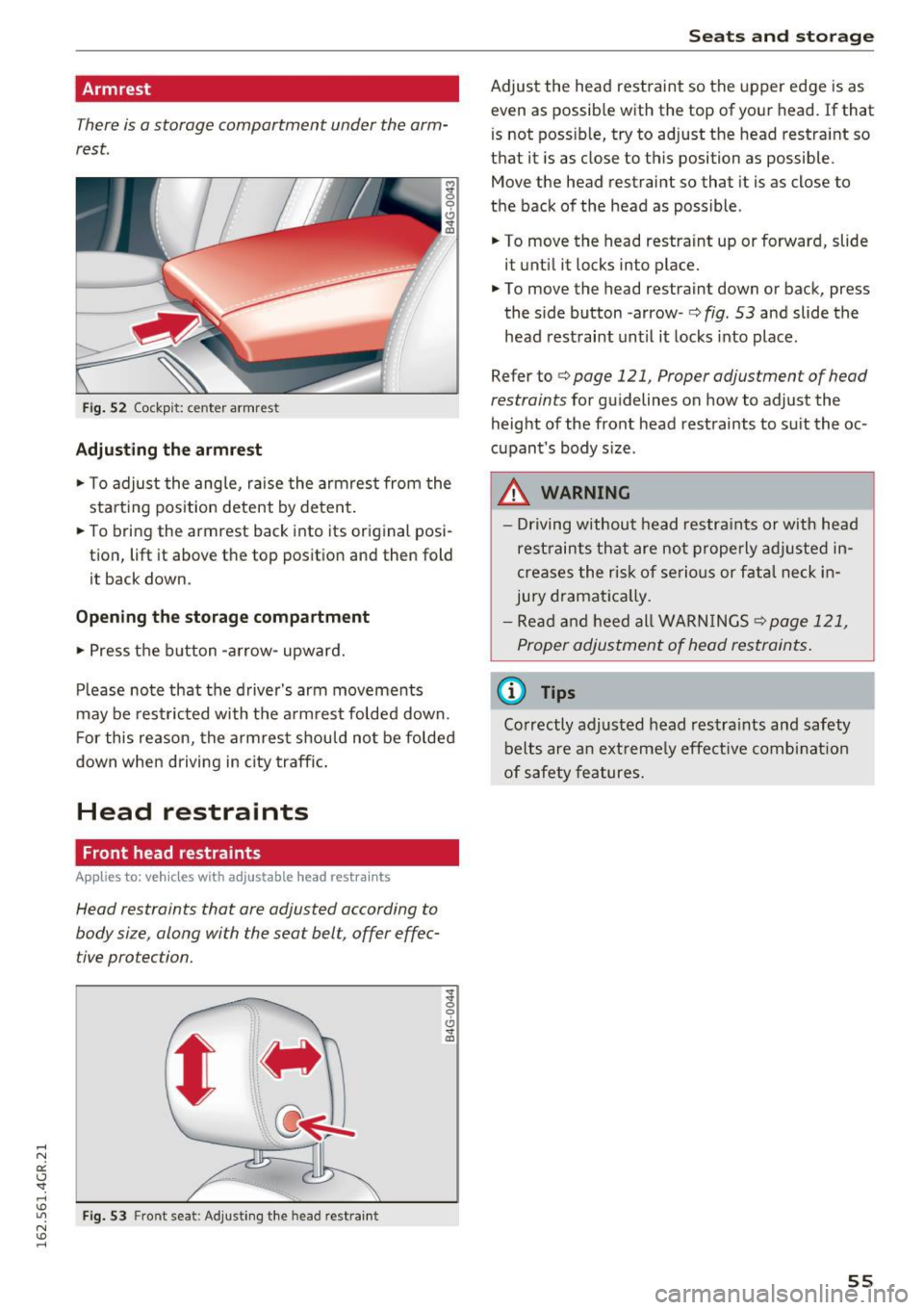
There is a storage compartment under the arm
rest.
~ 0
CJ ..,. ID
Fi g. 52 Cockpit: center armrest
Adjusting the armrest
... To adjust the ang le, raise the armrest from the
starting position detent by deten t.
... To bring the armrest back into its original posi
tion, lift it above t he top position and then fold
it back down .
Opening the storage compartment
.,. Press t he b utton -arrow- upward.
P lease no te that the driver 's arm movements
may be res tric ted with t he a rm rest folded down.
F or this reason, the armrest should no t be folded
down when driving in city traffic .
Head restraints
Front head restraints
Applies to: veh icles with adjustable head restraints
Head restraints that are adjusted according to
body size, along with the seat belt, offer effec
tive protection.
F ig. 53 F ront seat: Adjust ing t he head restra int
g
0
CJ ..,. ID
Seats and storag e
Adjust the head restraint so the upper edge is as
even as possib le with the top of your head. If that
is not poss ib le, try to adjust the head restraint so
that it is as close to this position as possible .
Move the head restraint so that it is as close to
the back of the head as possible.
... To move the head restraint up or forward, slide
it unti l it locks into place .
... To move the head restraint down or back, press
the s ide button -a rrow-
r::;, fig . 53 and slide the
head restraint un til it locks into place .
Refer tor::;,
page 121, Proper adjustment of head
restraints
for gu idelines on how to adjust the
height of the front head restraints to s uit the oc
cupant's body s ize .
.&, WARNING
-Driving w ithou t head res tra ints or with head
rest raints that are not properly ad justed in
creases the risk of se rio us or f atal neck in
jury dramat ica lly.
- Re ad and heed all WAR NINGS
r::;,page 121,
Proper adjus tment of head restraints .
@ Tips
Correctly adjusted head restra ints and safety
belts are an ext reme ly effe ctive combi nat ion
of safety features.
55
Page 66 of 282
Seats and storage
Enlarging cargo capacity of the vehicle
interior
The seat backs can be folded forward to enlarge
the cargo capacity.
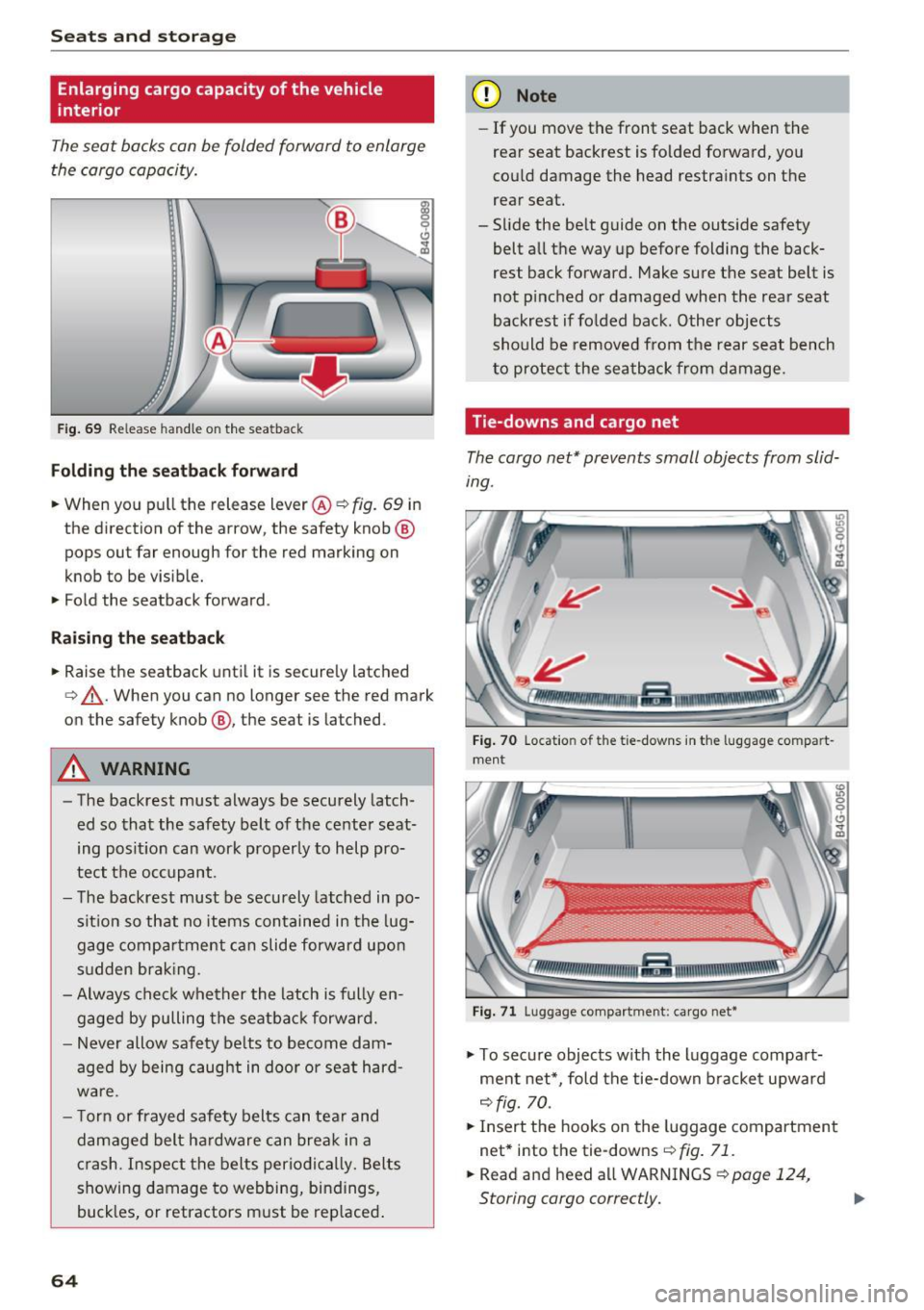
Fig. 69 Release h andle on the seatback
Folding the seatback forward
.,. When you pull the release lever@¢ fig. 69 in
the direction of the arrow, the safety knob @
pops out far enough for the red marking on
knob to be visib le.
• Fold the seatback forward.
Raising the seatback
• Raise the seatback until it is securely latched
¢ &, .When you can no longer see the red mark
on the safety knob@, the seat is latched.
A WARNING
-The backrest must always be securely latch
ed so that the safety belt of the center seat
ing position can work properly to help pro
tect the occupant.
- The backrest must be securely latched in po
sition so that no items contained in the lug
gage compartment can slide forward upon
sudden braking.
- Always check whether the latch is fully en
gaged by pulling the seatback forward.
- Never allow safety belts to become dam
aged by being caught in door or seat hard
ware.
- Torn or frayed safety belts can tear and
damaged belt hardware can break in a
crash. Inspect the belts periodically. Belts
showing damage to webbing, bindings,
buckles, or retractors must be replaced.
64
(D Note
- If you move the front seat back when the
rear seat backrest is folded forward, you
could damage the head restraints on the
rear seat.
- Slide the belt guide on the outside safety
belt all the way up before folding the back
rest back forward. Make sure the seat belt is
not pinched or damaged when the rear seat
backrest if folded back. Other objects
should be removed from the rear seat bench
to protect the seatback from damage .
Tie-downs and cargo net
The cargo net* prevents small objects from slid
ing .
Fig. 70 Locat ion of the tie -downs in the lugg age compart
ment
Fig. 71 Lugg age compa rtment: cargo net*
• To secure objects with the luggage compart
ment net*, fold the tie-down bracket upward
¢ fig. 70 .
• Insert the hooks on the luggage compartment
net* into the tie-downs ¢
fig. 71.
• Read and heed all WARNINGS ¢ page 124,
Storing cargo correctly. ..,.
Page 78 of 282
Driving
back. The braking force of the parking brake is
only released if sufficient drive power has been built up at the wheels.
(D Tips
For safety reasons, the parking brake is only
released automatically when the driver's safe
ty belt is buckled.
Emergency braking function
This is used if the conventional brake system
fails or locks up.
... To brake your vehicle in an emergency , pull the
~ switch and hold it pulled .
... As soon as you release the~ switch or acceler-
ate, the braking stops.
If you pull the switch(®) and hold it above a
speed of about 5 mph (8 km/h), the emergency
braking function is initiated. The vehicle is braked
at all four wheels by activating the hydraulic brake system. The brake performance is similar
to making an emergency stop¢.&..
In order not to activate the emergency braking by
mistake, an audible warning tone (buzzer)
sounds when the~ switch is pulled. As soon as
the ~ switch is released, or the accelerator pedal
is depressed, emergency braking stops .
A WARNING
Emergency braking should only be used in an
emergency, when the normal brake pedal has
failed or the brake pedal is obstructed. Using
the parking brake for emergency braking will
slow your vehicle down as if you had made a
full braking maneuver. ESC and the associat
ed components (ABS, ASR, EDL) cannot over
come the laws of physics. In corners and
when road or weather conditions are bad, a
full brake application can cause the vehicle to
skid or the rear end to break away, which in
creases the risk of an accident.
76
Speed warning system
' Introduction
The speed warning system helps you to stay un
der a specified maximum speed .
The speed warning system warns you if you are
exceeding the maximum speed that you have set.
You will hear a warning tone when your speed ex ceeds the stored value by approximately 3 mph
(3 km/h) . An indicator light. (USA models)/.
(Canada models) in the instrument cluster dis
play also turns on at the same time. The indicator
light./. turns off when the speed decreases
below the stored maximum speed.
Setting a threshold is recommended if you would
like to be reminded when you reach a certain
maximum speed. Situations where you may want
to do so include driving in a country with a gener
al speed limit or if there is a specified maximum
speed for winter tires.
(D Tips
Even though your vehicle is equipped with a
speed warning system, you should still watch
the speedometer to make sure you are not
driving faster than the speed limit.
' Setting the threshold
You can set, change and delete the warning
threshold in the Infotainment system.
... Select: the I CARI function button > (Car)* Sys
tems
control button > Driver assistance >
Speed warning .
You can set any threshold between 20 mph
(30 km/h) and 150 mph (240 km/h). Settings
can each be adjusted in increments of 5 mph (10
km/h).
Page 105 of 282
Driving the automatic transmission
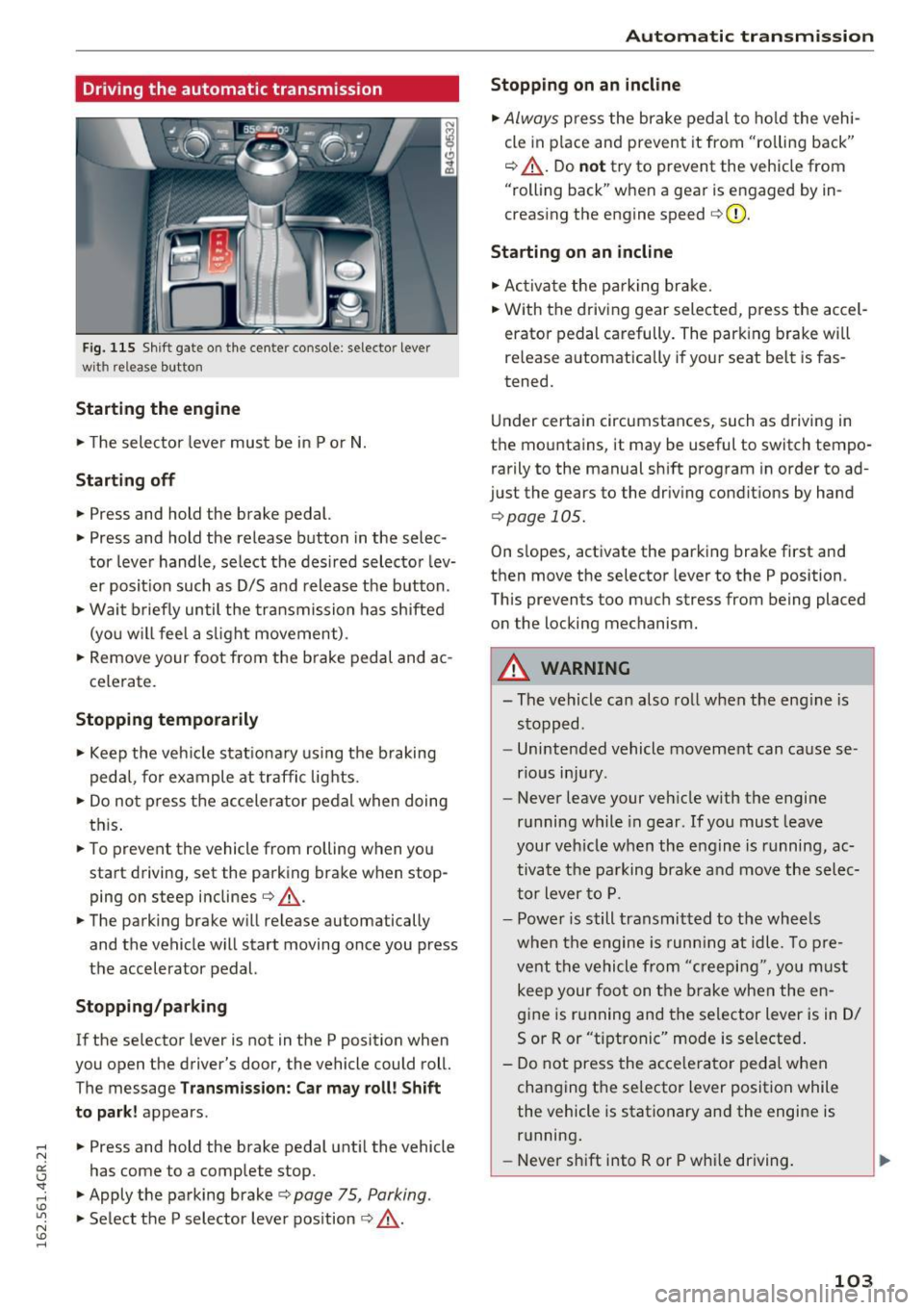
Fig. 115 Shif t gate o n the cente r conso le : selecto r lever
wi th release button
Starting the engine
.. The selector lever must be in P or N.
Starting off
.. Press and hold the brake pedal.
.. Press and hold the release button in the selec
tor lever handle, select the desired selector lev
er posit ion such as D/S and release the button .
• Wait briefly until the transmission has shifted
(you w ill feel a slight movement) .
.. Remove your foot from the b rake pedal and ac
celerate.
Stopping temporarily
.. Keep the vehicle stationary using the braking
pedal, for example at traffic lights.
.. Do not press the accelerator pedal when doing
this .
.. To prevent the vehicle from rolling when you
start driving, set the parking brake wh en stop
ping on steep inclines¢,& .
.. The parking brake will release au tomatically
and the vehicle will start moving once you press
the accelerator pedal.
Stopping/ parking
If the selector lever is not in the P position when
you open the drive r's door, the vehicle could roll.
The message
Transmission: Car may roll! Shift
to park!
appears .
.. Press and hold the brake pedal until the vehicle
has come to a complete stop .
.. Apply the parking brake¢
page 75 , Parking .
.. Select the P selector lever position ¢ ,& .
Automatic transmission
Stopping on an incline
.. Always press the brake pedal to hold the vehi
cle in pla ce and prevent it from "ro lling back"
¢ ,& . Do
not try to prevent the vehicle from
"rolling back" when a gear is engaged by in
creasing the engine speed ¢CI) .
Starting on an incline
.. Activate the parkin g brake .
.. With the driving gear selected, press the accel
erator pedal carefully. The parking brake will
releas e automatically if your seat belt is fas
tened.
Under certain circumstances, such as driving in
the mountains, it may be useful to switch tempo
rarily to the manual shift program in order to ad
ju st the gears to the driving conditions by hand
¢ page 105 .
On slopes, activate the parking brake first and
then move the selector lever to the P position .
This prevent s too much stress from being placed
on the locking mechanism.
A WARNING
=
- The vehicle can also roll when the eng ine is
stopped .
- Unintended vehicle movement can cause se
rious injury .
- Never leave your veh icle w ith the engine
running while in gear . If you must leave
your veh icle when the engine is running, ac
tivate the parking brake and move the selec
tor lever to P.
- Power is still transmitted to the wheels
when the engine is runn ing at idle. To pre
vent the vehicle from "creeping", yo u must
keep your foot on the brake when the en
gine is running and the selector lever is in D/
5 or R or "tiptronic" mode is selected .
- Do not press the accelerator pedal when
changing the se lector lever position while
the vehicle is stationary and the engine is running .
- Never shift into R or P whi le driving.
103