cruise control AUDI RS7 SPORTBACK 2016 Owners Manual
[x] Cancel search | Manufacturer: AUDI, Model Year: 2016, Model line: RS7 SPORTBACK, Model: AUDI RS7 SPORTBACK 2016Pages: 282, PDF Size: 70.78 MB
Page 4 of 282
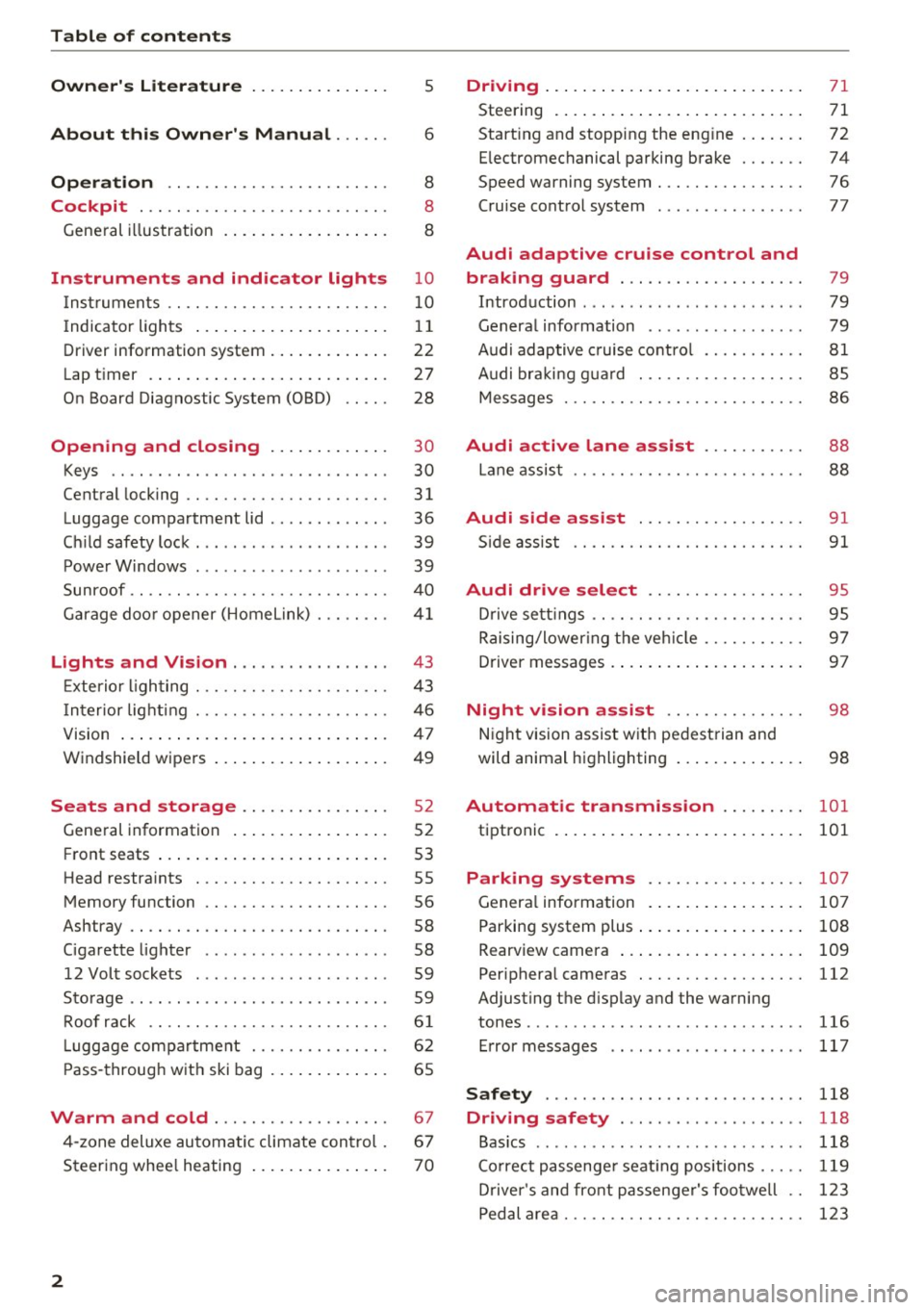
Table of content s
Owner' s Lit e rature
About thi s Own er' s Manual ... .. .
Opera tion .. .... .... .... ... .... .. .
Cockpit ... .. .. .... .. .... ... .... .. .
5
6
8
8
General illustration . . . . . . . . . . . . . . . . . . 8
Instruments and indicator lights 10
I nstruments . . . . . . . . . . . . . . . . . . . . . . . . 10
I ndicator lights . . . . . . . . . . . . . . . . . . . . . 11
Driver informat ion system . . . . . . . . . . . . . 22
Lap t imer . . . . . . . . . . . . . . . . . . . . . . . . . . 27
On Board D iagnos tic Sys tem (OBD) . . . . . 28
Opening and closing . . . . . . . . . . . . . 30
Keys . . . . . . . . . . . . . . . . . . . . . . . . . . . . . . 30
Cen tral locking . . . . . . . . . . . . . . . . . . . . . . 31
Luggage comp artment lid . . . . . . . . . . . . . 36
Ch ild safety lock . . . . . . . . . . . . . . . . . . . . . 39
Power Windows . . . . . . . . . . . . . . . . . . . . . 39
Sunroof. . . . . . . . . . . . . . . . . . . . . . . . . . . . 40
Garage doo r opener (Home link) . . . . . . . . 41
Lights and Vision . . . . . . . . . . . . . . . . . 43
E xterior l igh ting . . . . . . . . . . . . . . . . . . . . . 43
I nterior lighting . . . . . . . . . . . . . . . . . . . . . 46
V1s1on . . . . . . . . . . . . . . . . . . . . . . . . . . . . . 47
Windsh ield wipers . . . . . . . . . . . . . . . . . . . 49
Seats and storage . . . . . . . . . . . . . . . . 52
G eneral information . . . . . . . . . . . . . . . . . 52
F ront s eats . . . . . . . . . . . . . . . . . . . . . . . . . 53
Head rest raints . . . . . . . . . . . . . . . . . . . . . 55
Memory fun ction . . . . . . . . . . . . . . . . . . . . 56
Ash tray . . . . . . . . . . . . . . . . . . . . . . . . . . . . 58
C igarette lighter . . . . . . . . . . . . . . . . . . . . 58
12 Volt sockets . . . . . . . . . . . . . . . . . . . . . 59
Sto rage . . . . . . . . . . . . . . . . . . . . . . . . . . . . 59
Roof rack .. .. ...... .. .... ... .... .. .
L uggage compartment . ....... .. .. .. .
P ass- throug h w it h ski bag ... ... .. .. .. . 6
1
6 2
65
Warm and cold . . . . . . . . . . . . . . . . . . . 67
4-zone deluxe automatic climate control . 67
Steering whee l heat ing . . . . . . . . . . . . . . . 70
2
Driving .... . .. .. .. .. ... . .. .... ... .. 71
St ee ring . . . . . . . . . . . . . . . . . . . . . . . . . . . 71
Start ing and stopping the eng ine . . . . . . . 72
E le ct rome chan ical p ark ing brake . . . . . . . 74
Speed w arning sy stem . . . . . . . . . . . . . . . . 76
Cru ise control system . . . . . . . . . . . . . . . . 77
Audi adaptive cruise control and
braking guard . . . . . . . . . . . . . . . . . . . .
7 9
Introduction . . . . . . . . . . . . . . . . . . . . . . . . 79
Genera l information . . . . . . . . . . . . . . . . . 79
Audi adaptive c ruise contro l . . . . . . . . . . . 81
A udi braki ng g ua rd . . . . . . . . . . . . . . . . . . 85
Messages . . . . . . . . . . . . . . . . . . . . . . . . . . 86
Audi active lane assist . . . . . . . . . . . 88
La ne assist . . . . . . . . . . . . . . . . . . . . . . . . . 88
Audi side assist . . . . . . . . . . . . . . . . . . 91
S ide assist . . . . . . . . . . . . . . . . . . . . . . . . . 91
Audi drive select . . . . . . . . . . . . . . . . . 95
Drive se tt ings . . . . . . . . . . . . . . . . . . . . . . . 95
Raising/lower ing t he veh icle . . . . . . . . . . . 97
Driver messag es . . . . . . . . . . . . . . . . . . . . . 97
Night vision assist . . . . . . . . . . . . . . . 98
Night vision assist w ith pedest rian and
wild an imal highlighting . . . . . . . . . . . . . . 98
Automatic transmission . . . . . . . . . 101
tiptronic . . . . . . . . . . . . . . . . . . . . . . . . . . . 101
Parking systems . . . . . . . . . . . . . . . . . 107
Genera l info rmation . . . . . . . . . . . . . . . . . 107
Parking syst em plus . . . . . . . . . . . . . . . . . . 108
R earvi ew cam era . . . . . . . . . . . . . . . . . . . . 109
Periphera l cameras . . . . . . . . . . . . . . . . . . 112
Adjusting the d ispl ay and the w arning
tones ........ ... .. .. ............ .. .
E rror messages 1
16
117
Safety ........... .. ............... 118
Driving safety . . . . . . . . . . . . . . . . . . . . 11 8
Bas ics . . . . . . . . . . . . . . . . . . . . . . . . . . . . . 118
Co rrect passenge r seat ing positions. .. .. 119
D rive r's and front passenge r's foo twell . . 123
Pedal are a . . . . . . . . . . . . . . . . . . . . . . . . . . 123
Page 11 of 282
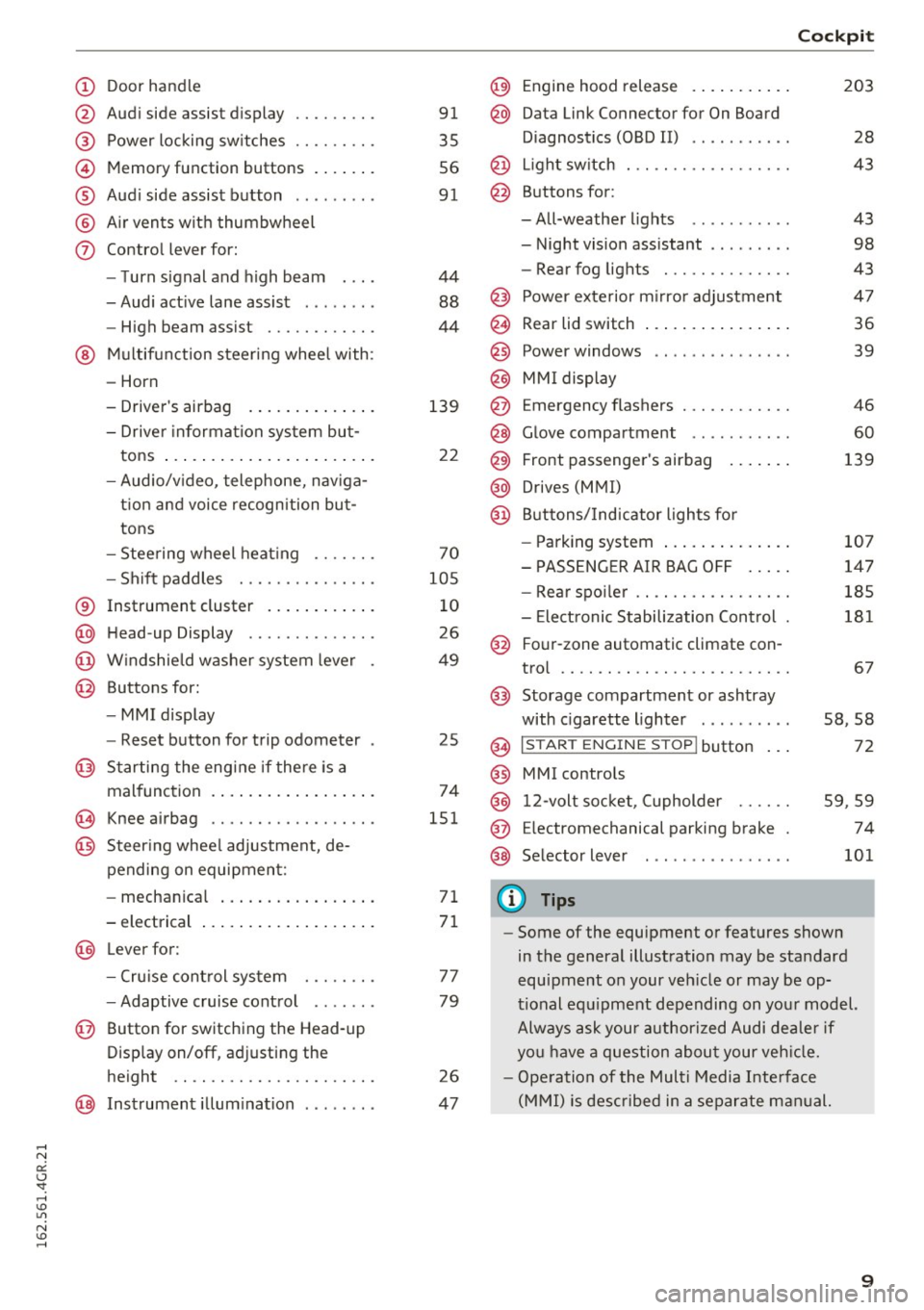
(!) Door handle
@
®
©
®
®
(j)
Audi side assist display
Power locking switches ...... .. .
Memory function buttons ...... .
Audi side assist button .. .. ... . .
Air vents with thumbwheel
Control lever for:
- Turn signal and high beam
- Audi active lane assist . .. ... . .
- High beam assist ......... .. .
@ Multifunction steering wheel with:
- Horn
- Driver's airbag
- Driver information system but-
tons ...................... .
- Audio/video, telephone, naviga
tion and voice recognition but
tons
- Steering wheel heating ...... .
- Shift paddles ............ .. .
® Instrument cluster ........... .
@ Head-up Display ............ . .
@ Windshield washer system lever
@ Buttons for:
- MMI display
- Reset button for trip odometer
@ Starting the engine if there is a
malfunction ................. .
~ Knee airbag .. ............. .. .
@ Steering wheel adjustment, de
pending on equipment:
- mechanical ................ .
- electrical
@ Lever for :
- Cruise control system ... .. .. .
- Adaptive cruise control ...... .
@ Button for switching the Head-up
Display on/off, adjusting the
height .. .. ............... .. .
@ Instrument illumination ....... .
91
35
56
91
44
88
44
139
22
70
105
10
26
49
25
74
151
71
71
77
79
26
47
@) Engine hood release .......... .
@ Data Link Connector for On Board
Diagnostics (OBD II) .... ...... .
@ Light switch . .. .............. .
@ Buttons for :
-All-weather lights - Night vision assistant .. ...... .
- Rear fog lights ............. .
@ Power exterior mirror adjustment
@ Rear lid switch ............... .
@
@
@ Power windows
MMI display
E mergency flashers
@ Glove compartment .......... .
@ Front passenger's airbag ...... .
@ Drives (MMI)
@ Buttons/Indicator lights for
- Parking system ............. .
- PASSENGER AIR BAG OFF .... .
- Rear spoiler .. .............. .
- Electronic Stabilization Control .
@ Four-zone automatic climate con-
trol .... .... .. .............. .
@) Storage compartment or ashtray
with cigarette lighter ......... .
@ I ST AR T ENGINE ST OP ! button
@ MMI controls
@
@
@ 12-volt socket, (upholder
E lectromechanical parking brake
Selector lever
(D Tips
Cockpit
203
28
43
43
98
43
47
36
39
46
60
139
107
147
185
181
67
58,58
72
59 ,59
74
101
- Some of the equipment or features shown
in the general illustration may be standard
equipment on your vehicle or may be op
tional equipment depending on your model.
Always ask your authorized Audi dealer if
you have a question about your vehicle.
- Operation of the Multi Media Interface
(MMI) is described in a separate manual.
9
Page 14 of 282
Instruments and indicator lights
-Whenever stalled or stopped for repair,
move the vehicle a safe distance off the
road, stop the engine, and turn on the
emergency flasher
c> page 46.
- The engine compartment of any motor vehi
cle is a potentially hazardous area. Before
you check anything in the engine compart
ment, stop the engine and let it cool down.
Always exercise extreme caution when work
ing under the hood
c> page 203.
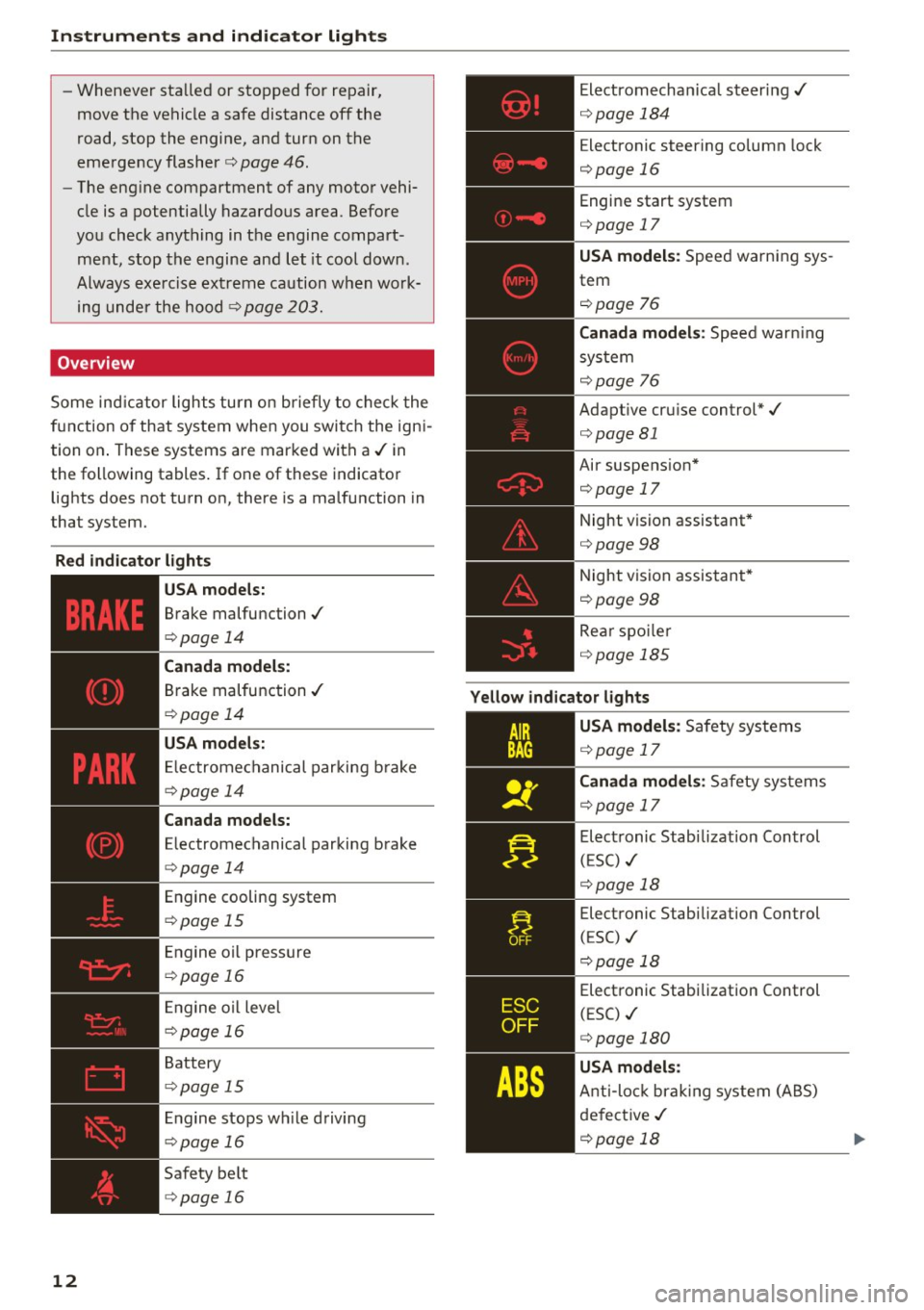
Overview
Some indicator lights turn on briefly to check the
function of that system when you switch the igni
tion on. These systems are marked with a../ in
the following tables. If one of these indicator
lights does not turn on, there is a malfunction in
that system.
Red indicator lights
12
-------------
US A models:
Brake malfunction../
c>page 14
Canada models:
Brake malfunction../
c>poge 14
USA models:
Electromechanical parking brake
c>page 14
Canada models:
Electromechanical parking brake
c>page 14
Engine cooling system
c>poge 15
Engine oil pressure
c>poge 16
Engine oil level
c>poge 16
Battery
c>page 15
Engine stops while driving
c>page 16
Safety belt
c>page 16
Electromechanical steering../
c>page 184
Electronic steering column lock
c>page 16
Engine start system
c>page 17
USA models: Speed warning sys
tem
c>poge 76
Canada models: Speed warning
system
c> poge 76
Adaptive cruise control*../
c>page 81
Air suspension*
c>page 17
Night vision assistant*
c>page 98
Night vision assistant*
c>poge98
Rear spoiler
~page 185
Yellow indicator lights
A IR
BAG
-------------
US A models: Safety systems
c>page 17
Canada models: Safety systems
c>poge 17
Electronic Stabilization Control
(ESC) ../
c>poge 18
Electronic Stabilization Control
(ESC) ../
c::>page 18
Electronic Stabilization Control
(ESC) ../
c::>page 180
USA models:
Anti-lock braking system (ABS)
defective ../
c>poge 18
Page 24 of 282
Instruments and indicator lights
CRUISE /11
(') Cru ise control
The warning/indicator light ltj;\9~1@ (USA models)/
El (Canada models) illuminates when the cruise
control is activated ¢
page 77.
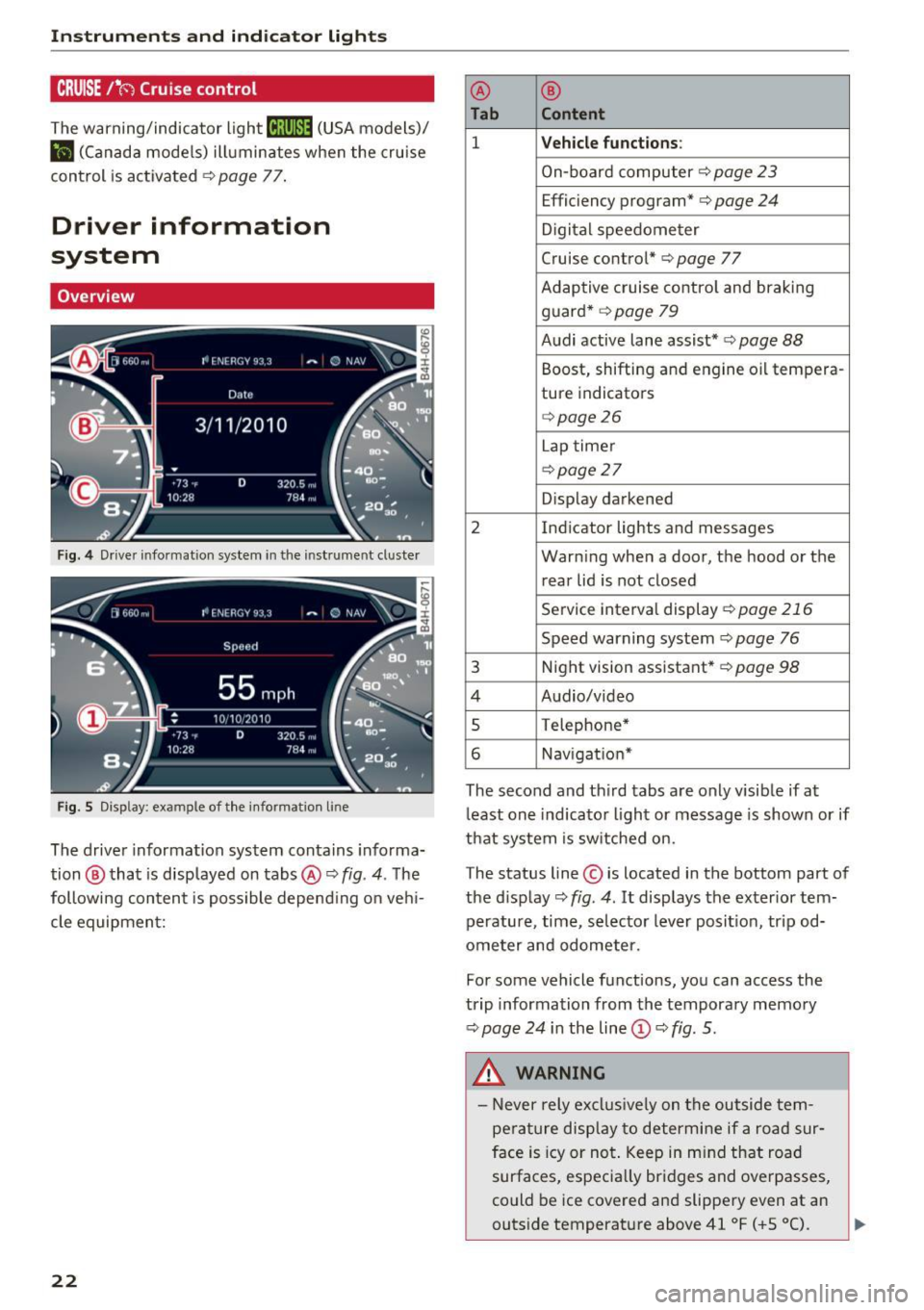
Driver information
system
Overview
Fig. 4 Driver informat ion system in the instrument cluster
Fig. S Disp lay: example of the in formation lin e
The driver information system contains informa·
tion @ that is displayed on tabs@¢
fig. 4. The
following content is possible depend ing on veh i
cle equipment:
22
@ ®
Tab Content
1 Vehicle functions :
On-board computer¢ page 23
Efficiency program*¢ page 24
Digital speedometer
Cruise control* ¢
page 77
Adaptive cruise control and braking
guard* ¢
page 79
Audi active lane assist* ¢ page 88
Boost, shifting and engine oil tempera-
ture indicators
¢page26
Lap timer
¢page 27
Display darkened
2 Indicator lights and messages Warning when a door, the hood or the rear lid is not closed
Service interval display
¢page 216
Speed warning system~ page 76
3 Night vision assistant* ¢ page 98
4 Audio/video
s Telephone*
6 Nav igat ion*
The second and third tabs are only visible if at
least one indicator light or message is shown or if
that system is switched on.
The status line © is located in the bottom part of
the display¢
fig. 4 . It displays the exterior tern·
perature, time, selector lever position, tripod·
ometer and odometer.
Fo r some vehicle functions, you can access the
trip information from the temporary memory
¢
page 24 i n the line©¢ fig. 5.
&_ WARNING
- Never rely exclusively on the outside tern·
perature display to determine if a road sur
face is icy or not. Keep in mind that road
surfaces, especially bridges and overpasses,
could be ice covered and slippery even at an
-
outside temperature above 41 °F ( +S 0
(). ~
Page 28 of 282
Instruments and indicator lights
Head-up display
Applies to: vehicles with Head-up display
Fig. 13 Example: indicators in the Head-up display
F ig. 14 Inst rument panel: knob for the Head-up display
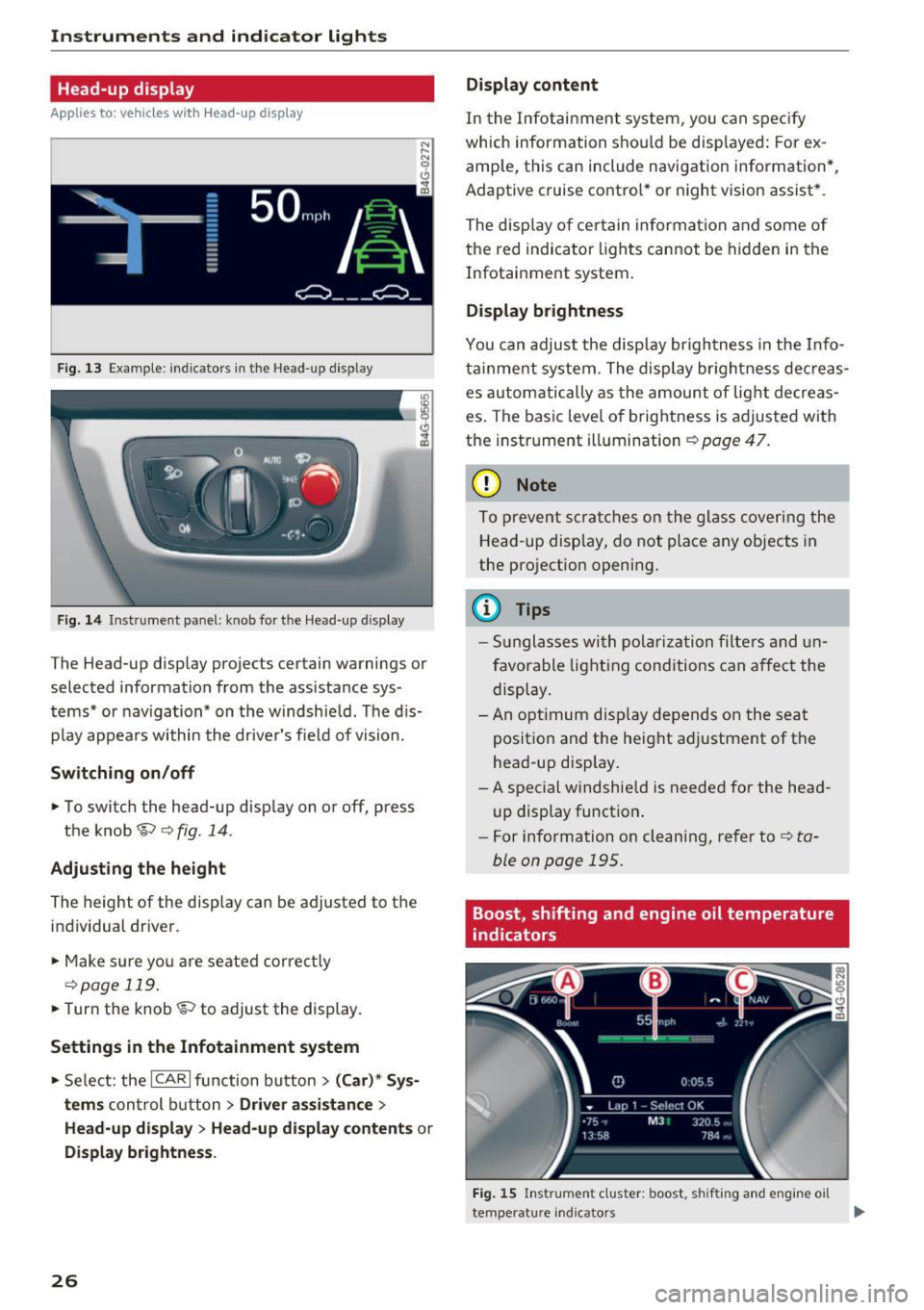
The Head-up display projects certain warnings or
selected information from the ass istance sys
tems* or navigation* on the windshie ld. The d is
p lay appears within the driver's fie ld of vision.
Switching on/off
• To switch the head-up disp lay on or off, press
the knob~
c:> fig. 14.
Adjusting the height
The height of the display can be adjusted to the
individual driver.
• Make sure yo u are seated correct ly
c:> page 119.
• Turn the knob~ to adjust the display.
Settings in the Infotainment system
• Select: the ICAR I function bu tton > (Car)* Sys
tems
control b utton > Driver assistance >
Head-up displ ay> Head-up di splay contents or
Display brightness .
26
Display content
In the Infotainment system, you can spec ify
which information shou ld be disp layed: For ex
amp le, this can include navigation information*,
Adaptive cruise contro l* or night vision assist *.
The display of certain information and some of
the red indicator lights cannot be hidden in the
Infotainment system.
Display brightness
You can adjust the display brightness in the Info
ta inment system . The display br ightness dec reas
es automatically as the amount of light decreas
es . The basic leve l of brightness is adjusted with
the instrument illumination
c:> page 47.
(D Note
To prevent scratches on the glass covering the
Head-up display, do not place any objects in
the projection opening.
(D Tips
- Sunglasses with polarization filters and un
favorable lighting conditions can affect the
display.
- An optimum display depends on the seat
position and the height adjustment of the
head-up display.
- A special windshie ld is needed for the head
up display function .
- For information on cleaning, refer to
c:> ta
ble on page 195.
Boost, shifting and engine oil temperature
indicators
Fig. 15 Instrument cluster: boost, shifting and engine oil
temperature indicators
Page 32 of 282
Opening and closing
Opening and closing
Keys
Key set
Fig. 19 Key set
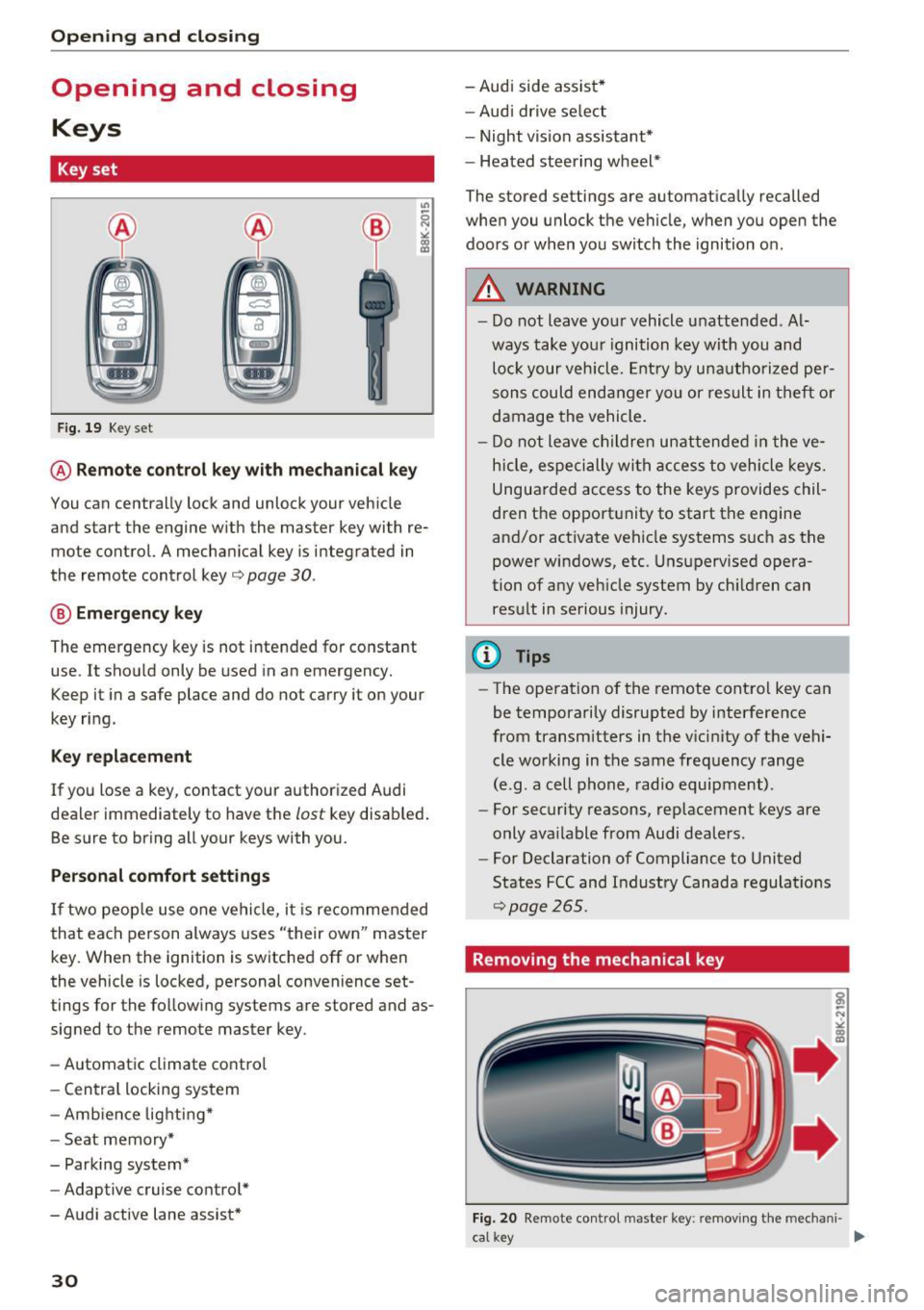
@ Remote control key with mechanical key
You can centrally lock and unlock your vehicle
and start the engine w ith the master key with re
mote control. A mechanical key is integrated in
the remote control key¢
page 30.
@ Emergency key
The emergency key is not intended for constant
use. It shou ld only be used in an emergency.
Keep it in a safe place and do not carry it on your
key ring.
Key replacement
If you lose a key , contact your authorized Audi
dealer immediately to have the
lost key disab led .
Be sure to bring all your keys with you.
Personal comfort settings
If two people use one vehicle, it is recommended
that each person always uses "their own" master
key. When the ignition is switched off or when
the vehicle is locked , personal convenience set
tings for the following systems are stored and as
signed to the remote master key .
- Automatic climate contro l
- Central locking system
- Amb ience lighting*
- Seat memory*
- Parking system*
- Adaptive cruise control*
- Audi active lane assist*
30
-Audi side assist*
- Audi drive se lect
- Night vision assistant*
- Heated steering wheel*
The stored settings are automatically recalled
when you unlock the vehicle, when you open the
doors or when you switch the ignition on.
A WARNING
-
-Do not leave your vehicle unattended. Al
ways take your ignition key with you and
loc k your vehicle . Entr y by unautho rized per
sons could endanger yo u or result in theft or
damage the vehicle.
- Do not leave children unattended in the ve
hicle, especially with access to vehicle keys.
Unguarded access to the keys provides chil
dren the opport unity to start the engine
and/or activate vehicle systems s uch as the
power windows, etc. Unsupervised opera
tion of any vehicle system by ch ildren can
result in serious injury .
(D Tips
-The operation of the remote control key can
be temporarily disrupted by interference
from transmitters in the v icinity of the vehi
cle working in the same frequency range
(e.g . a cell phone, radio equipment).
- For security reasons, replacement keys are
only ava ilable from Audi dealers .
- For Declaration of Compliance to United
States FCC and Industry Canada regulations
~page 265 .
Removing the mechanical key
Fig. 20 Remote contro l maste r key : removing the mec hani -
ca l key
Ill>-
Page 79 of 282
Cruise control system
Switching on
Applies to: vehicles with cruise control system
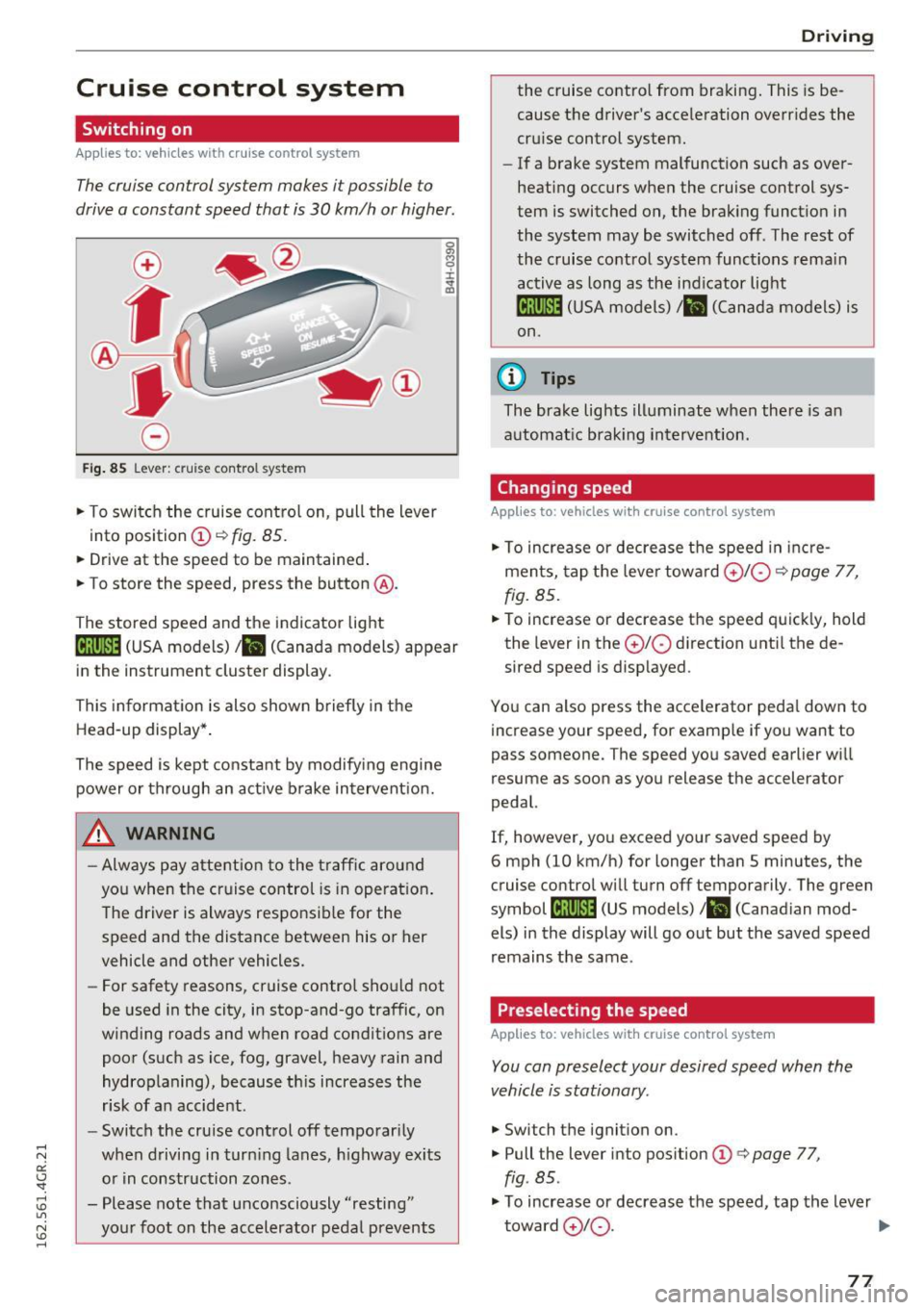
The cruise control system makes it possible to
drive a constant speed that is 30 km/h or higher.
0
f
®t
0
Fig . 85 Lever : cruise control system
.,. To switch the cruise control on, pull the lever
into position
(D ~ fig. 85.
.. Drive at the speed to be maintained .
.. To store the speed, press the button @.
The stored speed and the indicator light
tij;jl)~i4 (USA models)/ .. (Canada models) appear
in the instrument cluster display .
This informat ion is also shown briefly in the
Head-up display* .
The speed is kept constant by modify ing engine
power or through an act ive brake intervent ion.
_& WARNING
- Always pay attention to the traff ic around
you when the cruise control is in operat ion .
T he driver is always respo nsib le for the
speed and the distance between his or her
vehicle and other vehicles.
- For safety reasons, cruise control should not
be used in the city, in stop-and-go traffic, on
winding roads and w hen road condit ions are
poor (such as ice, fog, gravel, heavy rain and
hydroplaning), because th is increases the
r isk of a n accident.
- Switch the cruise control off temporar ily
when driving in turn ing lanes, h ighway exits
o r in construction zones .
- Please note that unconsciously "resting" yo ur foot on the accelerator pedal prevents
-
D rivi ng
the cruise co ntro l from bra king . This is be
cause the d river's accele ration overr ides the
cru ise control system.
- If a brake system malfunction such as over
heating occurs when the cruise control sys
tem is switched on, the brak ing funct io n in
the system may be switched off . The rest of
the cruise contro l system functions rema in
active as long as the ind icator light
ml1Jlm (USA models) / .. (Canada models) is
on.
(0 Tips
The brake lights illuminate when the re is an
automat ic brak ing intervent ion.
Changing speed
Applies to: vehicles with cruise control system
.,. To increase or dec rea se t he speed in inc re
ments, tap the leve r towa rd
0 10 ¢ page 77,
fig. 85 .
.. To increase or decrease the speed quick ly, hold
the lever in the
0 10 d irection unti l the de
sired speed is disp layed.
You can also press the accele rator peda l dow n to
increase your speed, for example if you want to
pass someone. The speed yo u saved earlier wi ll
resume as soon as you release the accelerator
pedal.
If, however, you exceed your saved speed by
6 mph (10 km/h) for longer than 5 minutes, the
cruise contro l will turn off temporarily . The green
symbol
li! j(9~14 (US models)/ .. (Canad ian mod
els) in the display will go out but the saved speed
remains the same.
Preselecting the speed
Applies to: vehicles with cruise control system
You can preselect your desired speed when the
vehicle is stationary.
.,. Switch t he ignition on .
.,. Pull the lever into pos ition
(D q page 77,
fig . 85.
.,. To increase or decrease t he speed, tap the lever
toward
0 10 . .,,_
77
Page 80 of 282
Driving
"'T o sto re the speed displayed, release the lever .
This f unction ma kes it possib le, for examp le, to
save the desired speed be fore dr iving on the
h ighway . Once on t he h ighway, act iva te the
cru ise control by pu lling the lever toward
(D .
Switching the system off
Applies to: veh icles w ith c ruise control
Temporary d eactivation
"' Press the brake peda l, o r
"' Press the lever into position @(not clicked i nto
place)
¢ page 77, fig. 85, or
"' Drive for longer than
5 minutes at more than
5 mph (10 km/h) above the stored speed .
Switching off completely
"' Press lever into position @(clicked into place),
o r
"' Switc h the ignition off .
The system retains the saved speed if you deact i
vate the cruise control temporarily. To resume
the saved speed, re lease the brake pedal and p ull
the lever to position
(D .
Sw itching the ign ition off erases the saved speed.
A WARNING
You should only ret urn to the saved s peed if it
is not too fast for the current tra ffic condi
tions - risk of an accident!
78
Page 81 of 282
Audi ada pti ve c ruise contr ol and br akin g gu ard
Audi adaptive cruise
control and braking
guard
Introduction
A ppl ies to: ve hicles with Audi adaptive cruise co ntro l
The adaptive cruise contro l system assists the
driver by regulat ing vehicle speed and helping to
maintain a set distance to the vehicle ahead,
within the limits of the system.
If the system de
tects a moving vehicle up ahead, adaptive cruise
control can brake and then accelerate your veh i
cle. This helps to make driving more comfortable
both on long highway stretches and in stop-and
go traffic.
The braking guard system can warn you about an impending collision and initiate braking maneu
vers¢
page 85.
Adaptive cruise control and braking guard have
technical limitations that you m ust know, so
please read this section carefully, understand
how the system works and use them properly at
all times.
General information
General information
App lies to: ve hicles with Audi adaptive cruise contro l
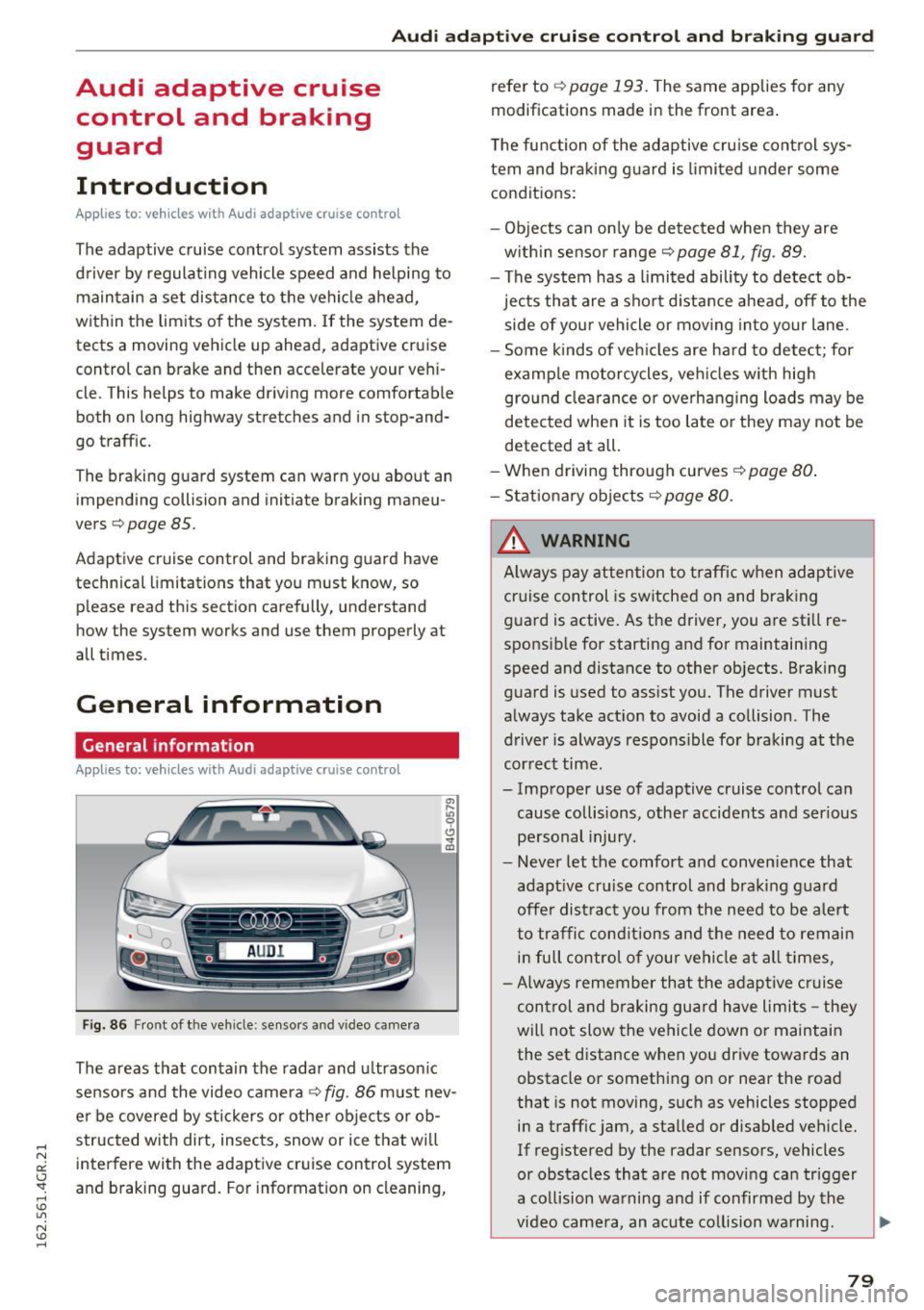
Fig. 86 Front of th e veh icle: sensors and vi deo camera
The areas that contain the radar and u ltrason ic
sensors and the video camera¢
fig. 86 must nev
er be covered by stickers o r other objects or ob
structed with dirt, insects, snow or ice that wi ll
interfere with the adaptive cruise control system
and braking guard. For information on cleaning, refer to
¢
page 193. The same applies for any
modifications made in the front area.
The function of the adaptive cru ise control sys
tem and braking g uard is limited under some
conditions:
- Objects can on ly be de tected when they are
w ith in sensor range¢
page 81, fig. 89.
- The system has a limited ability to detect ob
jects that are a short d istance ahead, off to the
side of your vehicle or mov ing into your lane .
- Some kinds of veh icles are hard to detect; for
examp le motorcycles, veh icles w ith high
gro und clea rance or overhanging loads may be
detected when it is too late o r they may not be
detected at all.
-When driving through curves
¢page 80 .
- Stat iona ry obje cts¢ page 80.
_& WARNING
A lways pay attention to traff ic when adaptive
cruise control is sw itched on and brak ing
guard is active . As the driver, you are still re
sponsible for starting and for maintaining
speed and distance to other objects. Braking
guard is used to assist you. The driver must
always take act ion to avoid a collision . The
driver is always respons ible for braking at the
cor rect time.
- Improper use of adaptive cruise control can cause collisions, other accidents and ser ious
pe rsonal injury.
- Never let the comfort and conven ience that
adapt ive cr uise control and braking g ua rd
offe r dist ract you from the need to be a lert
to traffic conditions and the need to remain
in full control of your vehicle at all times,
- Always remember that the adaptive c ruise
control and braking gua rd have limits -they
will not slow the vehicle down or maintain the set distance when you drive towards an
obstacle or something on or near the road
that is not moving, such as vehicles stopped
in a traffic jam, a stalled or disabled vehicle.
If reg istered by the radar sensors, vehicles
or obstacles that are not moving can trigger
a collision wa rning and if confirmed by the
video came ra, an acute co llision wa rning.
~
79
Page 82 of 282
Audi adapt ive crui se con trol a nd b rakin g guar d
-For safety reasons, do not use adaptive
cruise control when driving on roads with
many curves, when the road surface is in
poor condition and/or in bad weather (such
as ice, fog, gravel, heavy ra in and hydroplan
ing). Using the system under these condi·
tions co uld result in a collision.
- Switch adaptive cruise control off tempora
rily when driving in turn ing lanes, on ex
pressway exits or in construction zones. Th is
prevents the vehicle from accelerating to
the set speed when in these situat ions .
- The adapt ive cr uise control system will not
brake by itself if you put your foot on the ac
celerator peda l. Doing so can override the
speed and distance regu lation.
- When approaching stat ionary objects such
as stopped traffic, adaptive cruise control
will not respond and braking guard will have limited function.
- The adaptive cruise control system and
braking guard do not react to people, ani
mals, objects crossing the road or oncom ing
objects.
- The function of the radar sensors can be af
fected by reflective objects such as guard
rails, the entrance to a tunnel, heavy rain or
ice.
- Never follow a vehicle so closely that you
cannot stop your vehicle safely. The adap·
t ive cruise control cannot slow or brake the
vehicle safely when you fo llow another veh i
cle too close ly. Always remember that the
automatic braking function ca nnot br ing the
vehicle to a sudden o r emergency stop un
der these conditions .
- To prevent unintended operation, always
switch ACC off when it is not be ing used .
(D Note
The sensors can be displaced by impacts or
damage to the bumpe r, whee l housing and
unde rbody. That co uld affect the adaptive
cruise control system and braking guard .
Have your authorized Audi dealer or author
ized Audi Service Facility check their function.
80
In curves
Applies to: vehicles with A udi adaptive cruise control
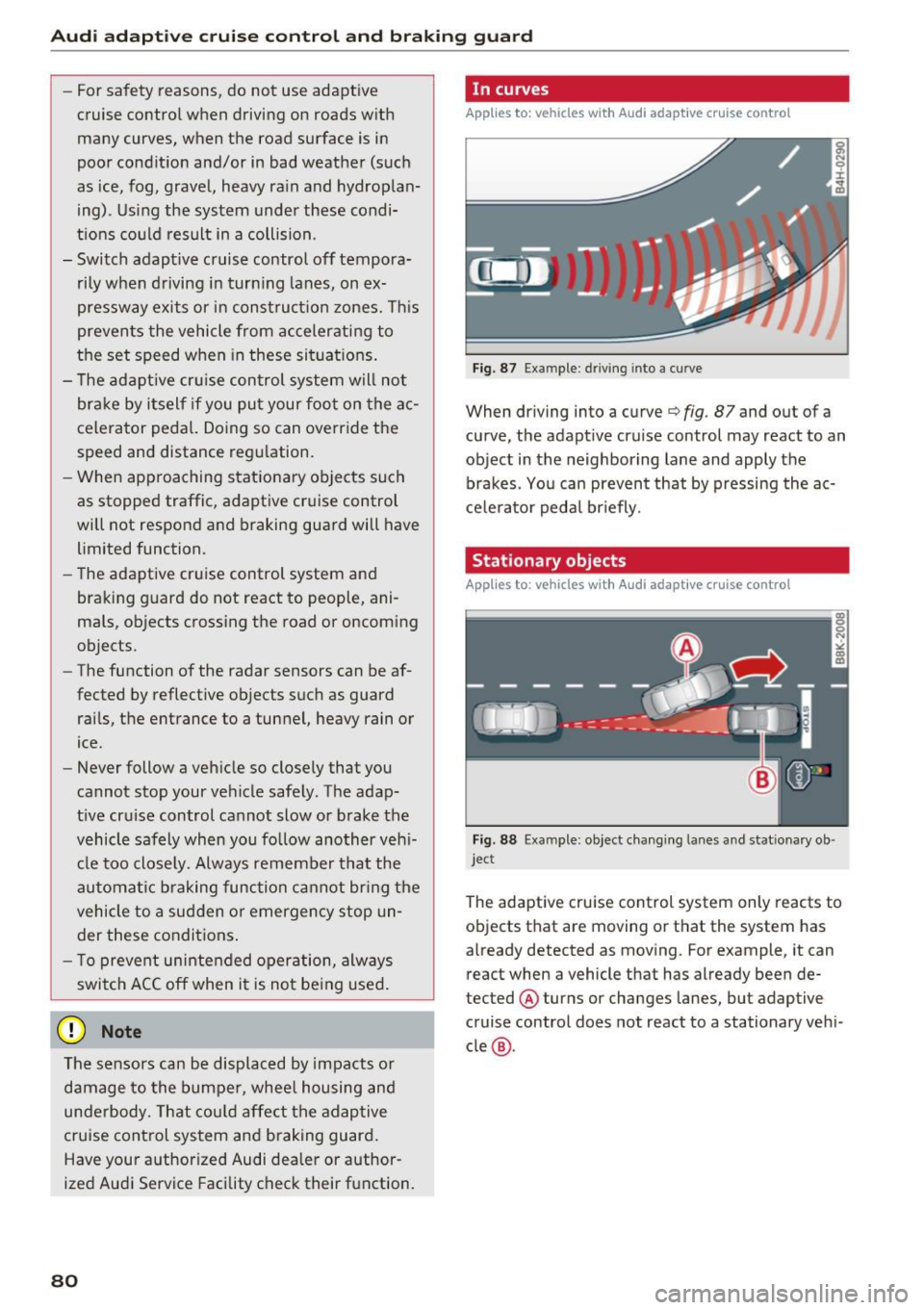
Fig. 87 Example : dr iving into a curve
When driving into a curve c:::> fig. 87 and out of a
curve, the adapt ive cruise control may react to an
object in the neighboring lane and apply the
brakes . You can prevent that by pressing the ac
ce lerator pedal br iefly.
Stationary objects
Applies to: vehicles with Audi adaptive cruise control
Fig. 88 Example: object chang ing lanes and stat ionary ob ·
jec t
The adaptive cruise control system only reacts to
objects that are moving or that the system has
already detected as moving . For example, it can
react when a vehicle that has already been de·
tected @ turns or changes lanes, but adaptive
cruise control does not react to a stationary vehi
cle @.