ECO mode AUDI S3 2009 User Guide
[x] Cancel search | Manufacturer: AUDI, Model Year: 2009, Model line: S3, Model: AUDI S3 2009Pages: 324, PDF Size: 76.02 MB
Page 29 of 324

Setting speed warning 1 ~ page 27.
Speed warning 2 ,,. / (Canada models)
Storing warning 2 is recommended if you always want to be
reminded of a certain speed, for example when you are traveling in
a country that has a general maximum speed limit, or if you do not
want to exceed a specified speed for winter tires.
The speed warning 2 symbol, /
,J. (Canada models) appears in the
display when you exceed the stored speed limit. Unlike warning 1,
it will not go out until the vehicle speed drops below the stored
speed limit.
Setting speed warning 2
~ page 27.
[ i ] Tips
Even though your vehicle is equipped with a speed warning system,
you should still watch the speedometer to make sure you are not
driving faster than the speed limit. •
Speed warning 1: setting a speed limit
Warning threshold 1 is set by the button.
Storing the maximum speed
-Drive at the desired maximum speed .
Contro ls and eq uip
ment
Fig . 19 Section of
instrument cluster:
Set/Check button
Driver information display
- Press the knob button~ fig. 19 until the~ page 26,
fig. 18 symbol appears.
Resetting the maximum speed
- Drive the vehicle at a speed of at least 3 mph (5 km/h)
- Press the knob for more than 2 seconds.
The speed warning symbol·-(USA models) /- (Canada models) will
appear briefly in the display when you release the button to indicate
that the maximum speed has been stored successfully.
The maximum speed remains stored until it is changed by pressing
the button again briefly or until it is deleted by a lengthy push on the
button. •
Speed warning 2: setting a speed limit
Switches in the wiper arm are used to operate warning
threshold 2.
To store maximum speed
- Turn off the ignition.
Vehicle care I I
Fig. 20 Wiper lever:
Trip computer controls
irechnical data
Page 31 of 324
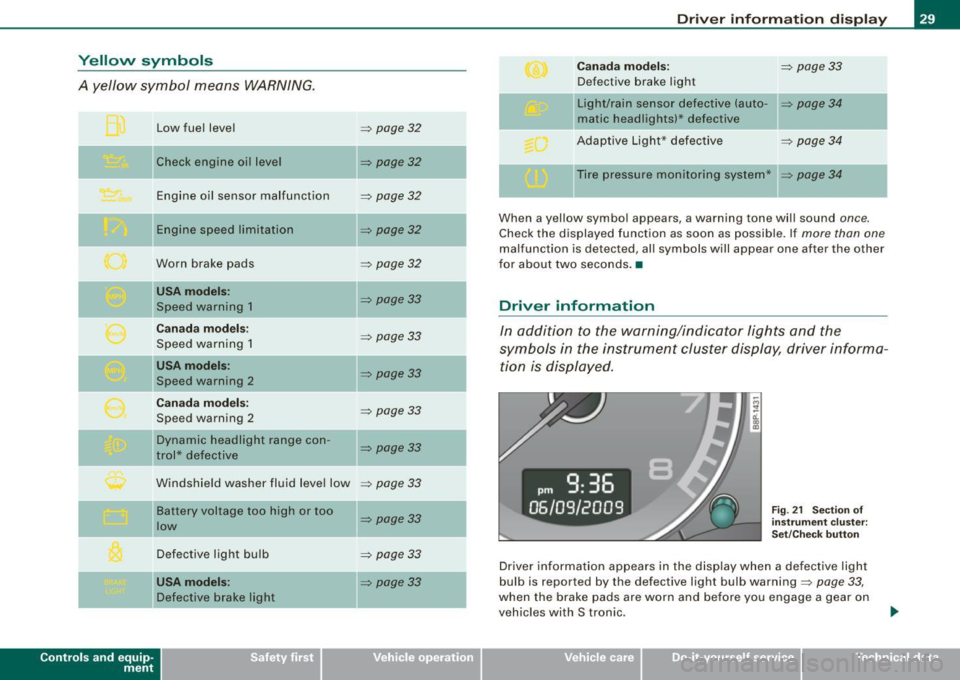
Yellow symbols
A yellow symbol means WARNING.
Contro ls and eq uip
ment
Low fuel level
Check engine oil level Engine oil sensor malfunction
E ng ine spee d limitation
Worn brake pads
USA mode ls:
Speed warning 1
Can ada m od els:
Speed warning 1
USA mod els:
Speed wa rning 2
C ana da m odels:
Speed warning 2
Dynamic headlight range con-
trol* defective
Windshield washer fluid leve l low
Ba ttery voltage too high or too
low
Defective light bulb
USA m odel s:
Defective brake light
=> page 32
=> page32
-
=> page32
=> page32
=> page32
=> page33
=> page33
=> page33
=> page33
=> page33
=> page33
=> page33
=> page 33
=> page33
-
-
Dri ver inf orm atio n di spl ay
Ca nad a m ode ls: => page33
Defective brake light
Light/rain sensor defect ive (auto-
=> page 34
matic headlights)* defective
Adapt ive Light* defective
=> page 34
Ti re pressure monitoring system* => page 34
When a yellow symbol appears, a warning tone will sound once .
Check the displayed function as soon as possible. If more than one
malfunction is detected, all symbols will appear one after the other
for about two seconds. •
Driver information
In addition to the warning/indicator lights and the
symbols in the instrument cluster display, driver informa tion is displayed.
Fi g. 2 1 Section of
in stru ment cl uster:
Set/C hec k b utto n
Driver information appears in the display when a defective light
bulb is reported by the defective light bulb warning=>
page 33,
when the brake pads are worn and before you engage a gear on
vehicles with S tronic.
Vehicle care I I irechnical data
Page 32 of 324
Driver inf ormati on displ ay
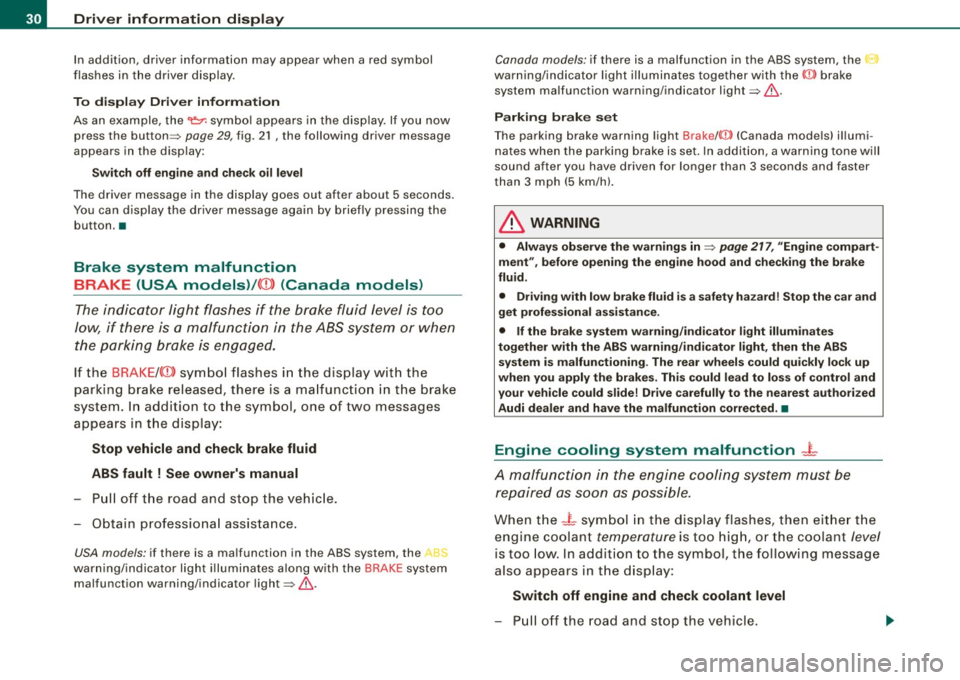
In addition, driver information may appear when a red symbol
fl ashes in the driver disp lay .
To disp lay Drive r inf orma tion
As an example, the~ symbo l appears in the disp lay. If you now
press the button=>
page 29 , fig. 21 , the following driver message
appears in the display:
Switc h off eng ine and ch eck oil leve l
The driver message in the disp lay goes out after about
5 seconds.
You can display the driver message again by briefly pressing the button .•
Brake system malfunction
BRAKE (USA models) /((D) (Canada models)
The indicator light flashes if the brake fluid level is too
low, if there is a malfunction in the ABS system or when
the parking brake is engaged.
If the BRAKE /((D) symbol flashes in the display with the
parking brake released , there is a ma lfunction in the brake
system. In addition to the symbol, one of two messages
appears in the display :
Stop vehi cle and che ck br ake fluid
ABS f ault
! S ee owner' s manual
- Pull off the road and stop the vehic le.
- Obtain professiona l assistance.
USA models : if there is a malfunction in the ABS system, the -
warning/indicator light i lluminates along with the BRAKE system
malfunction warning /indicator light=>&.
Canada models : if there is a malfunction in the ABS system , the
warning/ indicator light illuminates together with the ((])) brake
system malfunction warning/indicator light=>&.
Parking br ake se t
The parking brake warning light Brake/((])) (Canada mode ls} i llumi
nates when the parking brake is set. In addition, a warning tone will
sound after you have driven fo r longer than 3 seconds and faster
t han
3 mph (5 km/h}.
& WARNING
• Alwa ys observe the warning s in => pag e 217, "Engine compart
me nt", befor e op en ing the eng in e hood and ch ec king th e br ake
flu id.
• Driving w ith lo w brak e fluid is a sa fe ty hazar d! S top the car an d
g et prof es si onal a ssistance .
• If the br ake system wa rnin g/ ind icator l ight illum in ate s
t o geth er with th e AB S wa rning /indi cator light , then the AB S
sy stem i s ma lfuncti oni ng. Th e re ar w heels c ould quickly lock up
whe n you apply the brak es. Thi s could lead to l oss of control and
you r ve hicle cou ld slid e! Dr iv e ca re fully to th e nearest au thori ze d
Au di d ea le r and have th e malfun ction correct ed. •
Engine cooling system malfunction _}_
A malfunction in the engine cooling system must be
repaired as soon as possible.
When the - t symbol in the display flashes , then either the
engine coolant temperature is too high, or the coolant level
is too low . In addition to the symbol, the following message
also appears in the display :
Switch off engin e and ch ec k coolant level
- Pull off the road and stop the vehicle .
Page 35 of 324
Speed warning 1 C (USA models) /'" (Canada
models)
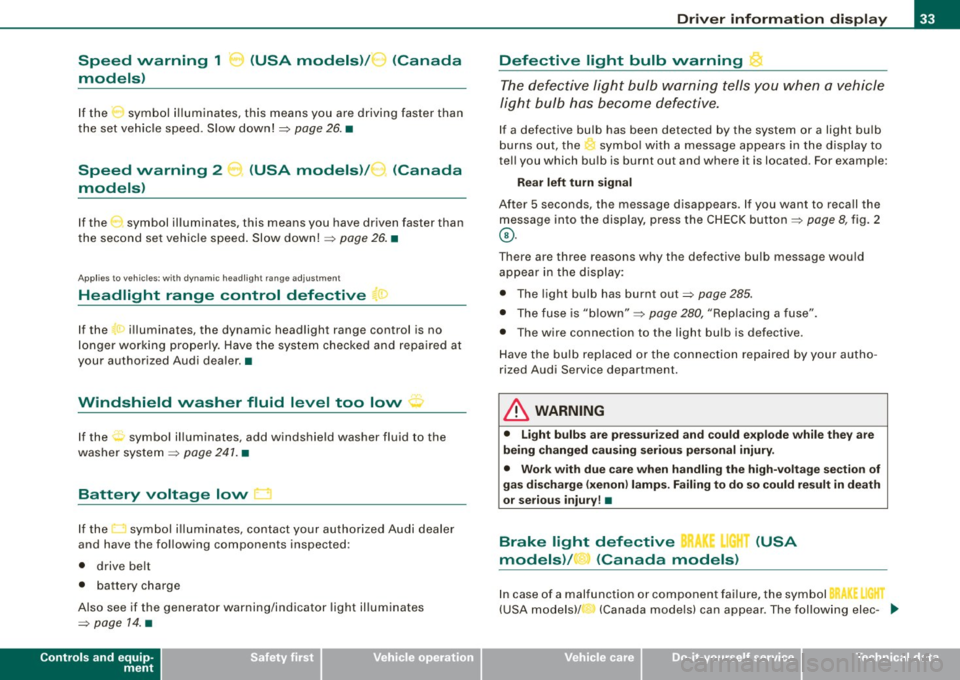
If the symbol illuminates, this means you are driving faster than
the set vehicle speed. Slow down!=>
page 26. •
Speed warning 2
models) (
USA models) / (Canada
If the symbol illuminates, this means you have driven faster than
the second set vehicle speed. Slow down! =>
page 26. •
App lies to vehicles: w ith dynamic headlight range adjustment
Headlight range control defective ~ >
If the ·r illuminates, the dynamic headlight range control is no
longer working properly. Have the system checked and repaired at
your authorized Audi dealer. •
Windshield washer fluid level too low ' · '
If the rt symbol illuminates, add windshield washer fluid to the
washer system=>
page 241. •
Battery voltage low D
If the t::J symbol illuminates, contact your authorized Audi dealer
and have the following components inspected:
• drive belt
• battery charge
Also see if the generator warning/indicator light illuminates
=>
page 14. •
Controls and equip
ment
Driver information display
Defective light bulb warning ~
The defective light bulb warning tells you when a vehicle
light bulb has become defective.
If a defective bulb has been detected by the system or a light bulb
burns out, the ' symbol with a message appears in the display to
tell you which bulb is burnt out and where it is located. For example:
Rear left turn signal
After 5 seconds, the message disappears. If you want to recall the
message into the display, press the CHECK button=>
page 8, fig. 2
©-
There are three reasons why the defective bulb message would
appear in the display:
• The light bulb has burnt out=>
page 285.
• The fuse is "blown" => page 280, "Replacing a fuse" .
• Th e wire connection to the light bulb is defective.
Have the bulb replaced or the connection repaired by your autho
rized Audi Service department.
& WARNING
• Light bulbs are pressurized and could explode while they are
being changed causing serious personal injury.
• Work with due care when handling the high-voltage section of
gas discharge (xenon) lamps. Failing to do so could result in death
or serious injury! •
Brake light defective BR !.I" (USA
models) / (Canada models)
In case of a malfunction or component failure, the symbol
(USA models)/ (Canada models) can appear. The following elec- .,_
I • •
Page 60 of 324
Clear vision
Igniti on ON , light swit ch at ::oo: or fD .
With the lights switched on, the brightness of instrument cluster
!i.e . needles, gauges and displays) and center console il lumination
can be adjusted.
0 Note
The instrument cluster and cent er console illumina tion (gauges and
needles) comes on when you swi tch on the igni tion and the
vehi cle
h eadlights are off .
Be aware of the following difference between
models built to US or Cana dian speci fica tions :
• USA model s: illumination of the in strument clu ster (gauges and
needle s), dash and center con sole around the gear shift lever i s
c o ntrolled by a light sensor lo cated in the instrument panel. The
i n strument panel ill umination will automatically become dimmer
a s th e daylight fades awa y and eventu ally w ill go out completel y
when outside l ight i s very low . Thi s is to remind you , the driver , to
swi tch on the headlight s befo re it get s to o dar k.
• Canada models: in strument panel illumination will stay bright
re gardle ss of the i ntens ity of ambient light . Al wa ys be aware of
change s in out sid e light conditi ons while you are d riving. Re spond
i n time t o fading daylight by turn ing the light swit ch to posit ion
fD
(or "AUTO" if your car is equipped with this feature) to turn on your
headlights . •
Ap plies to vehi cles: with b i-xeno n headli ghts
Bi-Xenon headlights*
After starting the engine, the bi -xenon headlights are automatica lly
adjus ted to the load and angle of the vehic le (for example , during
acce lerat ion and brak ing) . This prevents oncoming traffic fro m
experiencing unnecessary headlight g lare from your bi-xenon head
lights .
If the system is not operating properly, a warning symbol in the
Auto -Check Control is displayed ::::;,
page 33. •
Emergency flasher ~
The emergency flasher mak es othe r moto rists aware that
you or your vehicle are in an emergency situation.
1 1 Q
-
II D ll1
[ Ii J
a
l 'l
"' " "'
J
Fi g. 5 4 Cen ter
co nso le : em erge ncy
fl as her swi tc h
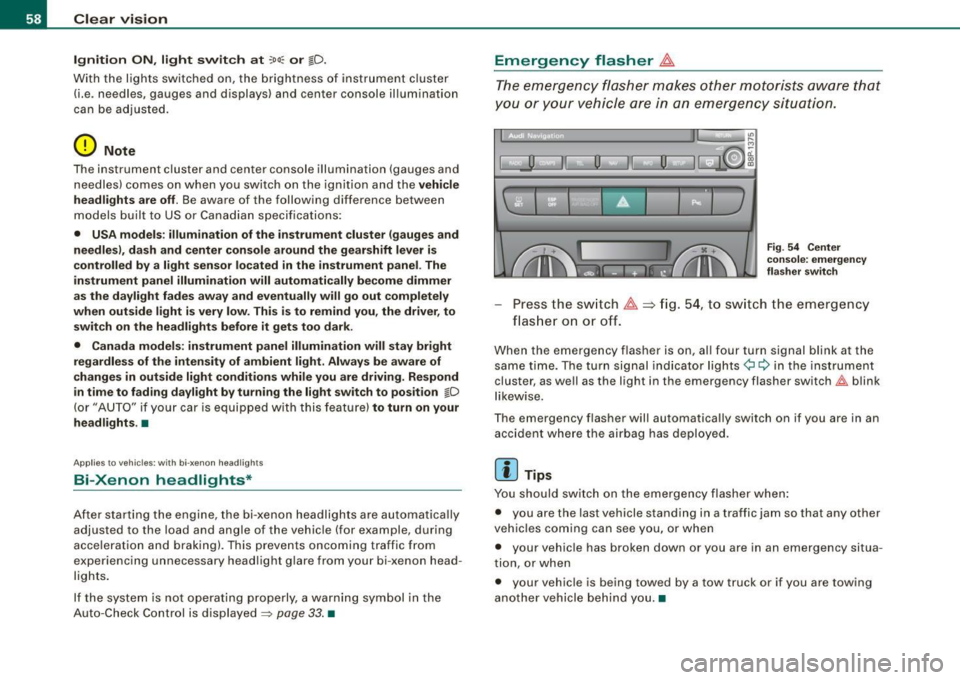
Press the sw itch ~==>fig. 54, to sw itch the emergency
flas her on or off.
When the emergency flasher is on, al l four turn signal blink at the
same time. The turn signal indicator lights¢ Q in the inst rument
cluster, as we ll as the light in the emergency flasher switch~ blink
l ikew ise.
The emergency flasher will automatically switch on if you are in an accident where the airbag has deployed .
[ i ] Tips
You should switch on the emergency flasher when :
• you are the last vehicle standing in a traffic jam so that any other
veh ic les coming can see you, or when
• your vehic le has broken down or you are in an emergency situa
tion, or when
• your vehicle is being towed by a tow truck or if you are towing
another vehicle behind you. •
Page 66 of 324
Clear vision Low wiper speed
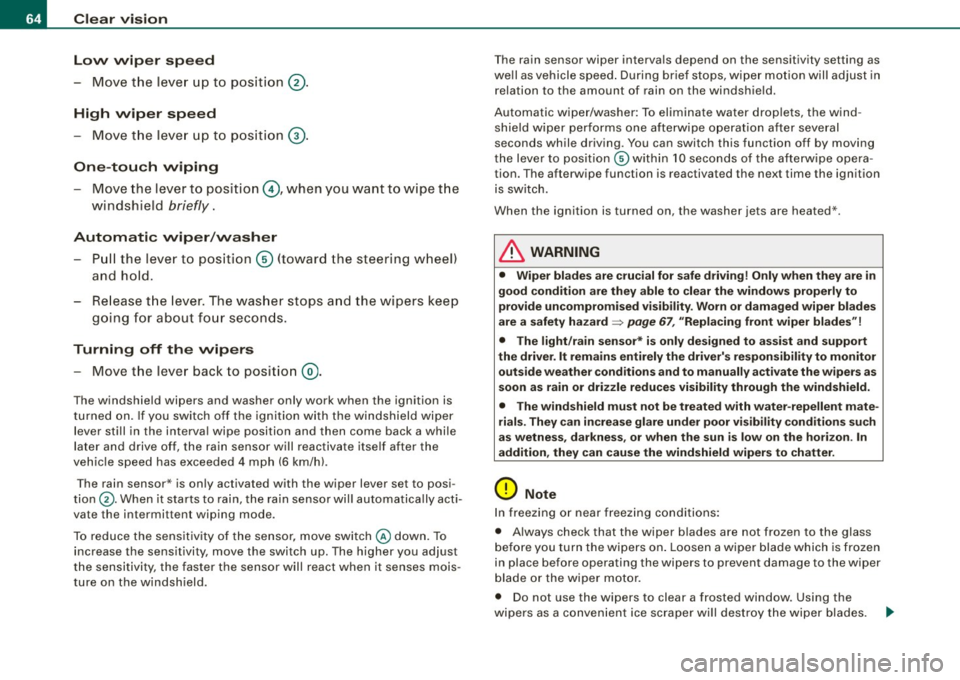
- Move the lever up to position @ .
High wiper speed
- Move the leve r up to pos ition G) .
One-tou ch wiping
Move the lever to position@, when you want to wipe t he
windshield
briefly .
Automatic wip er/ wash er
- Pull the lever to pos ition G) (toward the steering wheel)
and hold.
- Re lease t he lever . The was her stops a nd the wipers keep
g o ing for about fo ur secon ds.
Turning off th e wipers
- Move the lever back to position @.
The windshield wipers and washer only work when the ignition is
turned on . If you switch off the igni tion with the windshield wiper
lever still in the interva l wipe position and then come back a while
la ter and drive off, the rain sensor w ill reactiva te itse lf afte r the
veh ic le speed has exceeded 4 mph (6 km/hl.
The rain sensor* is only activated with the wiper lever set to posi
tion ®· When it starts to rain, the rain sensor wil l automatica lly acti
vate the intermittent wiping mode.
To reduce the sensitivity of the sensor, move switch @down. To
increase the sensitivity, move the switch up. The higher you adjust
the sensitivity, the faster the sensor will react when it senses mois
ture on the windsh ield. T
he rain sensor wiper interva ls depend on the sensitivity setting as
we ll as vehicle speed . During brief stops, wipe r mo tion will adjust in
relation to the amount of rain on the windshield.
Automatic wiper/washer: To eliminate water drop lets, the wind
shield wiper performs one afterwipe operat ion after several
seconds while driving. You can switch this function off by moving
t he lever to posit ion © within 10 seconds of the afterwipe opera
tion. The afterwipe function is reactivated the next time the ignition
is switch.
When the ignition is turned on, the washer jets are heated *.
& WARNING
• Wiper blade s are crucial for safe driving ! Only when they are in
good condition are they able to clear the window s properly to
provide uncompro mised v is ib ility. Worn or dam aged wiper bl ades
are a safety hazard =>
page 67 , "Replacing front wiper blade s"!
• The light /rain sen sor * is on ly de signed to a ssis t an d suppo rt
the driver . It remains en tirely the dr iver' s re spon sibility to monitor
out side weather cond ition s and to manuall y activate the wiper s as
s oon a s rain or dri zzle reduces visibility through the wind shield .
• The wind shield mu st not be t re ate d with water -r e pellent mat e
rial s. They can increa se glare under po or vi sibilit y conditions su ch
a s w etne ss, dar kne ss, or whe n the sun is lo w on t he hori zon . In
addition , they can cau se the windshield wipers to ch atter .
0 Note
In freezing o r near freez ing conditions:
• Always check that the wiper blades are not frozen to the glass
b efore you turn the wipers on . Loosen a wipe r blade which is fr ozen
in place before operating the wipers to prevent damage to the wiper
b lade or the wiper motor.
• Do not use the wipers to clear a frosted window . Using the
wipers as a conven ient ice scraper wi ll dest roy the wiper blades. .._
Page 71 of 324
& WARNING (continued)
• For safety reasons, the windshield wiper blades should be
replaced once or twice a year. •
Mirrors
Manual anti -glare adjustment
Standard setting
- Move the small lever (located on the bottom edge of the
mirror) to the front.
Anti-glare setting - Move the small lever (located on the bottom edge of the
mirror) to the rear. •
Applies to veh icles: w it h a utom ati cally dim mi ng in sid e m ir ro r
Automatically dimming inside mirror
The automatic dimming function can be turned on and off
if required.
Controls and equip
ment
Fig . 69 Inside rear
view mirror
Clear vision
Disabling auto dimming
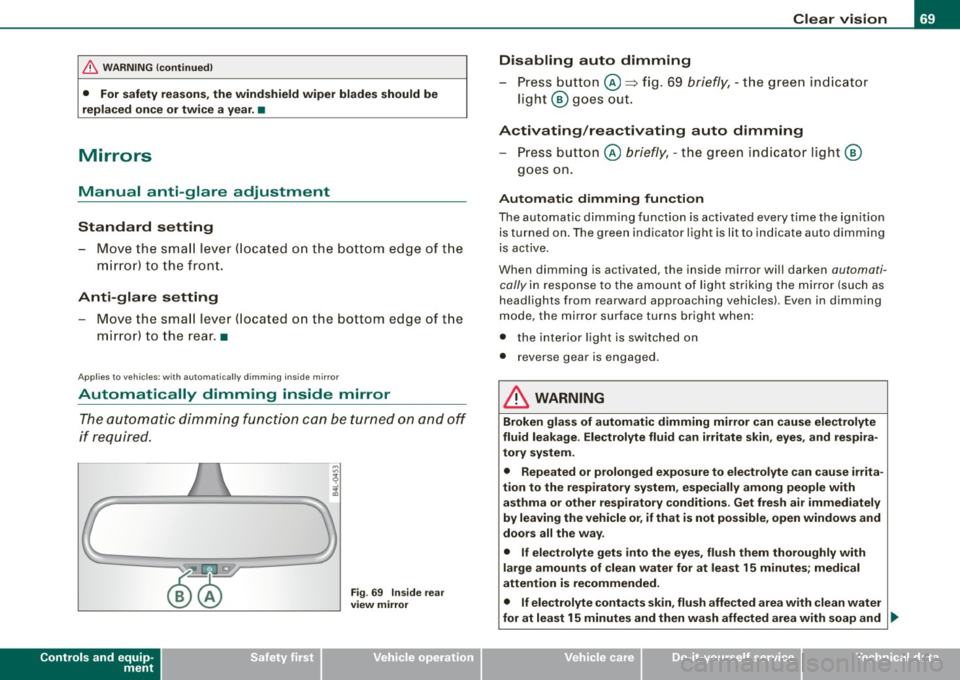
- Press button @=> fig. 69
briefly, -the green indicator
light ® goes out.
Activating/reactivating auto dimming Press button @
briefly, -the green indicator light ®
goes on.
Automatic dimming function
The automatic dimming function is activated every time the ignition
is turned on. The green indicator light is lit to indicate auto dimming
is active.
When dimming is activated, the inside mirror will darken
automati
cally
in response to the amount of light striking the mirror (such as
headlights from rearward approaching vehicles). Even in dimming
mode, the mirror surface turns bright when:
• the interior light is switched on
• reverse gear is engaged .
& WARNING
Broken glass of automatic dimming mirror can cause electrolyte
fluid leakage . Electrolyte fluid can irritate skin, eyes, and respira
tory system.
• Repeated or prolonged exposure to electrolyte can cause irrita
tion to the respiratory system, especially among people with
asthma or other respiratory conditions . Get fresh air immediately
by leaving the vehicle or, if that is not possible, open windows and
doors all the way.
• If electrolyte gets into the eyes, flush them thoroughly with
large amounts of clean water for at least 15 minutes; medical
attention is recommended.
• If electrolyte contacts skin, flush affected area with clean water
for at least 15 minutes and then wash affected area with soap and ._
I • •
Page 74 of 324
Clear vision
Digital compass
Applies to vehi cles: w ith di gital co mpass
Activating or deactivating the compass
The direction is displayed on the interior rear view mirror.
Fig. 71 In side rear
view mirror : digital
com pass activated
To activate or deactivate, hold the @ button down until
the red display appears or d isappears.
The digital compass only works with the ignition turned on. The
directions are displayed as initials :
N (North), NE (Northeast), E
(East),
SE (Southeast), S (South), SW (Southwest), W (West), NW
(Northwes t).
[ i J Tips
To avoid inaccurate dir ections, do not allow any remot e controls ,
e lectrical systems, or metal parts close to the mirror. •
Applie s to vehi cles : wi th digi tal compass
Setting the magnetic deflection zone
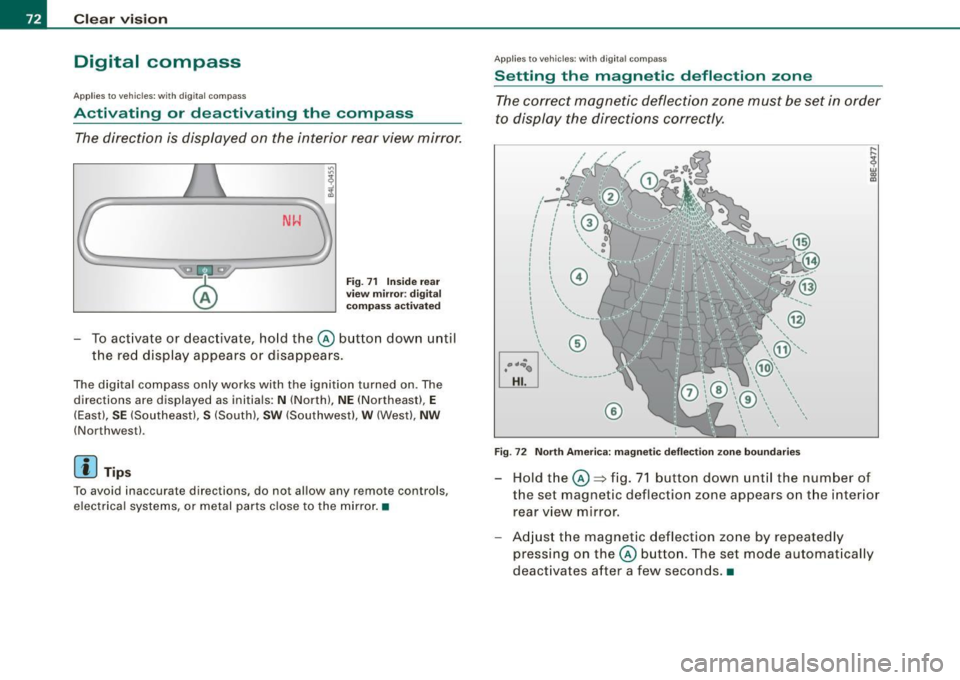
The correct magnetic deflection zone must be set in order
to display the directions correctly .
®
Fig. 72 North America: magnetic deflection zone boundaries
Hold the@=> fig. 71 button down until the number of
the set magnetic deflection zone appears on the interior rear view mirror .
Adjust the magnetic deflection zone by repeatedly
pressing on the@ button. The set mode automat ically
deactivates after a few seconds .•
Page 77 of 324
- Position the head restraint according to the occupant's height=> page
79. For maximum protection, the top of
the head restraint should be at least at eye level, prefer
ably higher and ideally level with the top of the head
=> page 131 , fig. 130.
& WARNING
Never place any objects in the driver's footwell. An object could
get into the pedal area and interfere with pedal function. In case
of sudden braking or an accident, you would not be able to brake
or accelerate! •
Front passenger's seat
Always move the front passenger seat into the rearmost
position.
To avoid contact with the airbag while it is deploying, do not
sit any closer to the instrument panel than necessary and
always wear the three-point safety belt provided adjusted
correctly. We recommend that you adjust the passenger's
seat in the following manner :
- Move the front passenger seat into the rearmost position
of the fore and aft adjustment range=>
& in "Why is
your seat adjustment so important?" on page
74.
-Bring the backrest up to an (almost) upright position. Do
not ride with the seat reclined.
- The ideal position for the head restraint is with the upper
edge of the restraint level with the top of your head
=> page
79. You should not lower the top of the restraint
below the level of your eyes.
Con tro ls and eq uip
ment
Seats and storage
- Place your feet on the floor in front of the passenger's
seat. •
Adjusting front seats manually
Applies to vehicle s: wi th manua l seat ad justme nt
Adjustment controls
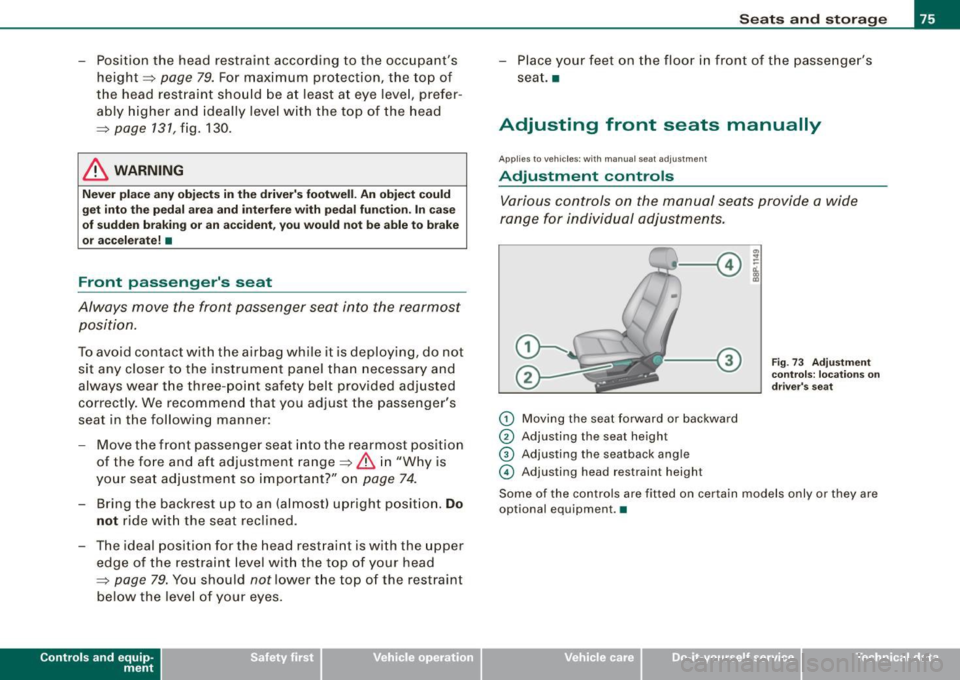
Various controls on the manual seats provide a wide
range for individual adjustments.
G) Moving the seat forward or backward
© Adjusting the seat height
© Adjusting the seatback angle
© Adjusting head restraint heigh t
Fig. 73 Adjustment
controls: locations on
driver's seat
Some of the controls are fitted on certain models only or they are
optional equipment. •
Vehicle care
I I irechnical data
Page 100 of 324
Warm and cold
Warm and cold
Climate controls
Description
The air conditioner is fully automatic and is designed to
maintain a comfortable and uniform climate inside the
vehicle.
We recomme nd the following s ettings:
- Select and set a temperature between 64
°F (+22 °C) and
84 °F (+28 °C).
- Press the !AUTO
I button.
With this setting, you attain maximum comfort in the least amount
of time . Change this set ting, as desired, to mee t your pe rsonal
needs.
The climate controls are a combination of heating, venti lation and
cooling systems, which automatica lly reduce humidity and coo l the
air inside your vehic le .
The air temperature, air flow and air distribution are automatically
regu lated to achieve and maintain the desired passenger compart
ment temperature as quick ly as possible.
The system automatically compensates for changes in the outside
temperature and for the intensity of the sun light entering the
veh ic le. We recommend you use the
Automat ic mode=> page 101
for year -round comfort.
P lease note the following :
Turn on the air conditioner to reduce humidity in the vehic le. This
a lso prevent the window s from fogging up. When the outside temperature is high and the air is very humid,
c
ondensat ion from the evaporator may drip under the vehicle . T his
is normal and does not indicate a leak.
I f the outside temperature is low, the fan normally only switches to
a higher speed once the engine coola nt has war med u p sufficiently .
T he air conditioner temporarily sw itches off when you drive off from
a standstill using fu ll throttle to save engine power.
The comp ressor also swi tches off if the coolant temperatu re is to o
high so that the engine can be adequate ly cooled under extreme
lo ads .
Air pollutants filt er
The air po llutants fi lter (a combined partic le filter and activated
charcoal fi lter) reduces or eliminates outside air pollution (dust, or
p ollen) from en ter ing the vehic le .
The air po llutants fi lter must be changed at the intervals specified
in your Warranty
& Maintenance bo oklet, so that the ai r conditioner
can proper ly work.
I f you drive your vehicle in an area with high air pol lution, the filter
may need to be changed m ore freque ntly tha n specified in your
Audi Warranty
& Maintenance booklet. If in doubt, ask your autho
r iz ed Aud i Service Adviso r fo r a dvice .
& WARNING
Redu ced vi sibility i s dangerou s and can cause accidents .
• For saf e driving it is very important that all window s be free of
ice , sno w and conden sation.
• Fully familiarize yourself with the proper use and fun ction of
the heating and ventil ation sy stem and especially how to defog
and defrost the windows. ...