tow AUDI S3 2009 User Guide
[x] Cancel search | Manufacturer: AUDI, Model Year: 2009, Model line: S3, Model: AUDI S3 2009Pages: 324, PDF Size: 76.02 MB
Page 67 of 324
• Before you take your vehicle to an automatic car wash , make sure
you have the windshield wiper system switched off !lever in position
Ol, otherwise the windshield wiper system could get damaged in the
car wash if it should suddenly come on.
[ i] Tips
• The rain sensor is part of the interval wiping system. Turning off
the ignition will also deactivate the rain sensor . To reactivate the
sensor, switch off the interval wiping function, then switch it back
on again.
• Worn or dirty windshield wiper blades cause smearing, which
can affect the operation of the light/rain sensor*. Check the condi
tion of your windshield wiper blades regularly .
• Applies to vehicles with light/rain sensor : When the wipers are
switched on manually and in rain conditions, the automatic head
lights* turn on~
page 53, "Sensor activated head- and tail light
control" or off during the day when the wipers are no longer oper
ating . The automatic headlights* function is available in this case
only when the light switch is in the "AUTO" position~
page 53,
fig. 48.
• Make sure the washer fluid reservoir in the engine compartment
is topped off before going on a long trip. Look up~
page 241 for
checking and filling the washer container .
• The wipers only operate with the hood complete ly c losed .•
Con tro ls and eq uip
ment
Clear vision
Rear window wiper
(Q
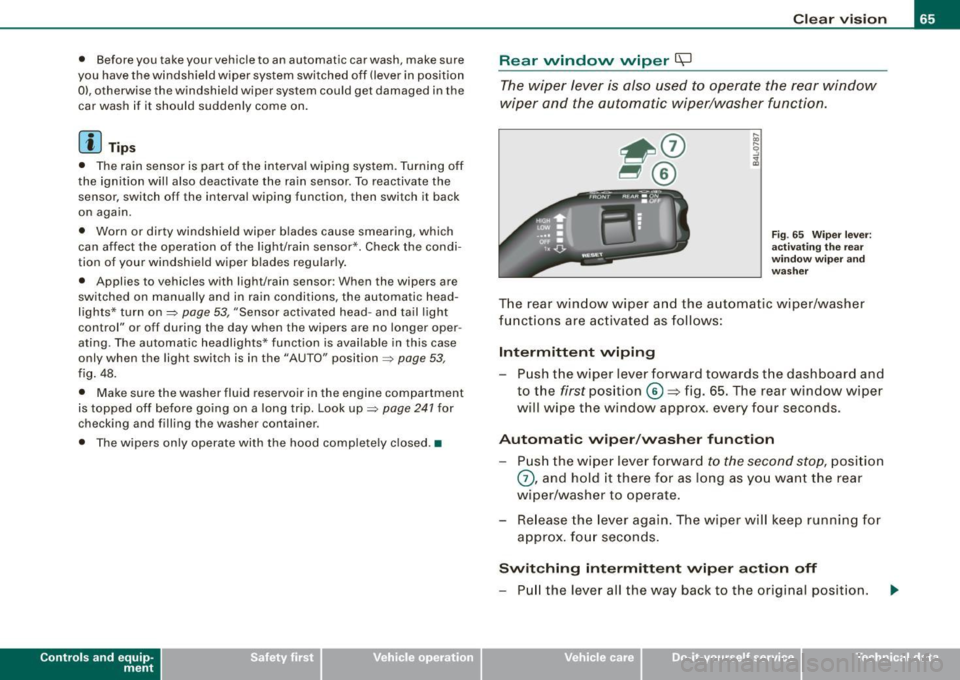
The wiper lever is also used to operate the rear window
wiper and the automatic wiper/washer function.
Fig. 65 Wiper leve r:
activating the rear
wi ndo w wipe r and
washer
The rear window wiper and the automatic wiper/washer
functions are activated as follows:
Intermittent wiping
Push the wiper lever forward towards the dashboard and
to the
first position ©=> fig. 65. The rear window wiper
will wipe the window approx. every four seconds.
Automatic wiper/washer function
Push the wiper lever forward to the second stop, position
0, and hold it there for as long as you want the rear
wiper/washer to operate.
Re lease the lever again. The wiper will keep running for
approx . four seconds.
Switching intermittent wiper action off
-Pull the lever all the way back to the original position.
Vehicle care I I irechnical data
Page 85 of 324
Luggage compartment
Increasing the size of the luggage
compartment
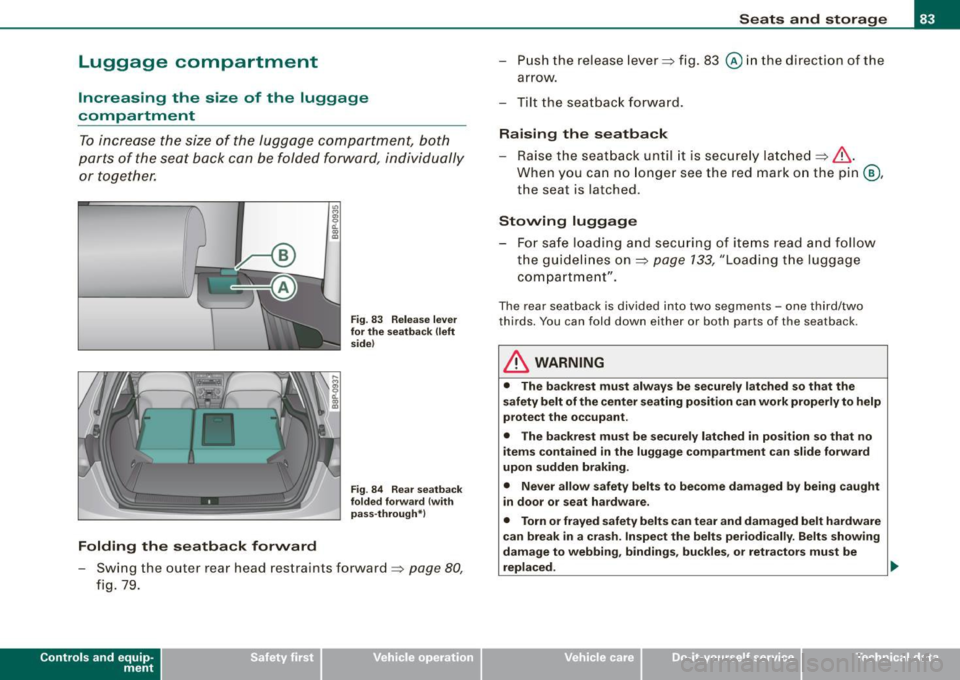
To increase the size of the luggage compartment, both
parts of the seat back can be folded forward, individually or together.
Folding the seatback forward
U')
"'
"' 0 a. ., CD
Fig . 83 Release lever
for the seatback (left
side)
Fig . 84 Rear seatback
folded forward {with
pass-through*)
- Swing the outer rear head restraints forward=> page 80,
fig. 79.
Con tro ls and eq uip
ment
Seats and storage
- Push the release lever=> fig. 83
@ in the direct ion of the
arrow.
- Tilt the seatback forward.
Raising the seatback
- Raise the seatback until it is securely latched=>& .
When you can no longer see the red mark on the pin@,
the seat is latched .
Stowing luggage
- For safe loading and securing of items read and follow the guidelines on=> page
133, "Loading the luggage
compartment".
The rear seatback is divided into two segments -one third/two
thirds. You can fold down either or both parts of the seatback .
& WARNING
• The backrest must always be securely latched so that the
safety belt of the center seating position can work properly to help
protect the occupant.
• The backrest must be securely latched
in position so that no
items contained in the luggage compartment can slide forward
upon sudden braking.
• Never allow safety belts to become damaged by being caught
in door or seat hardware.
• Torn or frayed safety belts can tear and damaged belt hardware
can break in a crash. Inspect the belts periodically. Belts showing
damage to webbing, bindings, buckles, or retractors must be
replaced.
~
Vehicle care I I Technical data
Page 86 of 324
Seats and storage
& WARNING
Always read and heed WARNINGS => & in uloading the luggage
c ompartment " on
page 133 .
0 Note
When folding the backre st back into place, make su re the safe ty belt
does not get caught, because it can be damaged . A damaged belt
can fail to p rov ide safe restraint. •
Fastening eyes
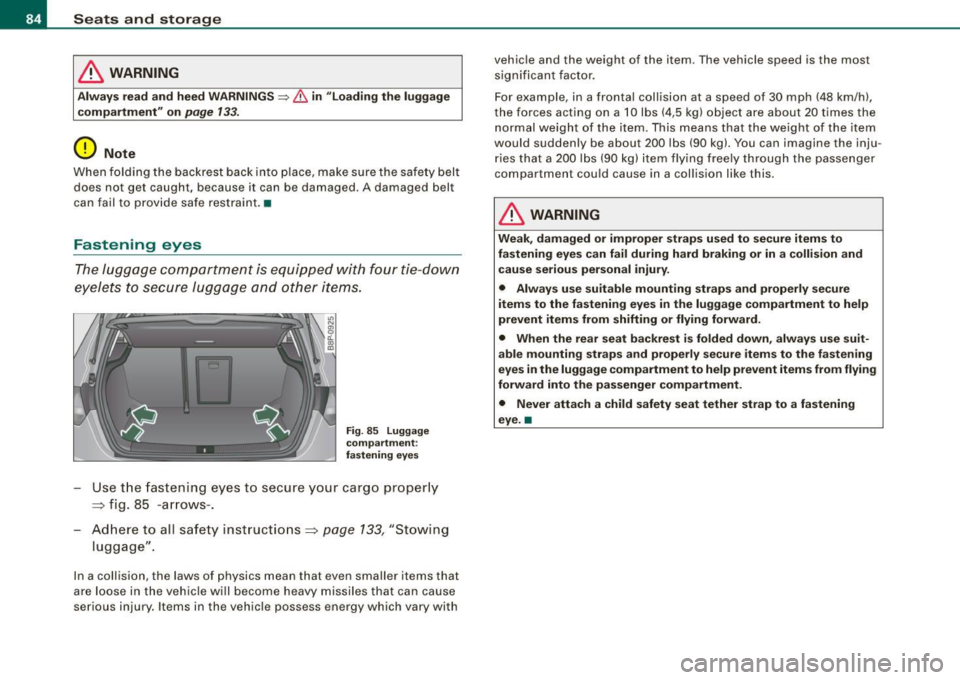
The luggage compartmen t is e qui pped with four tie -down
eyele ts to secure lug ga ge and o ther items .
Fig. 85 Lugg age
compartment :
fa stening eyes
Use t he fastening e yes to secu re you r ca rgo pr oper ly
=> fig. 85 -a rr ow s-.
- Ad here to all safet y instruc tions => page 133, "Stowing
lugg age".
In a collision, the laws of physics mean that even smalle r items that
a re loo se in t he vehi cle will bec ome he avy missiles that ca n ca use
se rious inju ry . I tems in the vehicle possess e nergy which vary with vehicle and the weight of the item
. T he vehicle speed is the most
significan t factor.
For exam ple, in a fronta l collision at a speed of 3 0 mph (48 km/h),
the forces acting on a 10 lbs ( 4,5 k g) object are about 20 times the
n ormal w eight of th e ite m. Th is mea ns that the weight of the it em
woul d suddenly be about 200 lbs (90 kg). You can imagine the inju
ri es th at a 20 0 lb s (90 kg) item fl ying fr ee ly t hroug h the passe nge r
compartment cou ld cause in a co llis ion li ke this.
& WARNING
Weak , damaged or improper straps used to secure items to
fastening eyes can fail during hard braking or in a collision and cause serious personal injury .
• Always use suitable mounting straps and properly secure
items to the fastening eyes in the luggage compartment to help
prevent items from shifting or flying forward.
• When the rear seat backrest is folded down , always use suit
able mounting straps and properly secure items to the fastening
eyes in the luggage compartment to help prevent item s from flying
forward into the passenger compartment .
• Never attach a child safety seat tether strap to a fastening
eye. a
Page 90 of 324
Seats and storage
-Place the empty sack in the hatch so that the end with the
zip fastener is in the luggage compartment.
- Load objects from the luggage compartment into the ski
sack.
Securing
- Insert the ski sack strap ~ page 87, fig. 93 @ into the
center seat belt buckle
® ·
- With skiing items, place the strap in the middle between
the bindings ~& .
- Pull the loose end of the strap tight in the direction of the
arrow.
Opening the safety strap buckle
- Take the long sides of safety strap buckle between thumb
and forefinger ~
page 87, fig. 93 @.
- Squeeze the buckle and pull it away from the cargo.
Stowing
- Raise the pass-through until it is securely latched. It is
secure when you can no longer see the red mark on the
latch in the luggage compartment.
- Carefully fold up the empty (dry) ski sack.
- Stow the ski sack in the luggage compartment so that it
cannot slide around.
& WARNING
• After loading, the ski sack must be secured with the strap .
• The safety strap must fit tightly around the cargo.
& WARNING (continued)
• Make certain that the safety strap lies in the middle between
the bindings of the ski equipment (refer also to printed message on the ski sack).
[ i] Tips
• Place skis with the tips pointing forward, snowboards and ski
poles with tip to the
rear in the ski sack.
• If there are several pairs of skis in the ski sack, make certain that
the bindings are at the same level.
• Be sure not to fold up or store the sack when it is still damp. •
Roof rack* installation
First things first
A roof rack can be used to carry additional luggage on the
roof. There are two different roof rack systems.
Separate roof racks are needed for vehicles without roof
rails. Vehicles with standard roof rails* need additional
cross bars to carry cargo. Both types of additional equip
ment are available at your authorized Audi dealer.
- Always read and follow the instructions provided by the
roof rack manufacturer when the roof rack system must
be installed.
If a roof rack or similar luggage carrying equipment is to be
installed, please note the following:
Vehicles without roof rails
• Your vehicle has aerodynamic rain gutters molded into the roof.
That is why only roof racks specially designed for the roof can be .,,
Page 109 of 324
___________________________________________________ O_ n_ t_h _e_ r_o _a_ d _ ___._
On the road
Steering
Adjusting the steering wheel column
The heigh t an d reac h of th e ste er ing wheel can b e
adjusted .
Fir st, adju st the dr iver 's se at corre ctly.
Fig . 112 Lever under
the steering column
- Push t he leve r~ fig. 112 down as far as it will go~& .
- Move the steering w heel to the desi red po sitio n.
Pu sh t he lever back up as f ar as it will g o.
The re m ust be at least 1 0 inches ( 25 cm) between your chest and the
c e nt er of t he stee ring wh eel. If you c ann ot si t mo re than 1 0 inche s
( 25 cm) from the stee rin g w hee l, see if adaptiv e equi pment is ava il
abl e to h elp you r each th e peda ls a nd incr ease the distanc e from th e
st eerin g whe el.
Fo r deta ile d informat ion o n how to a djust the drive r's seat, see
=> p age 77 , "Po wer seat ad ju stm ent".
Con tro ls and eq uip
ment
& WARNING
Improper use of steering wheel adjustment and improper seating
position can cause serious personal injury .
• Adjust the steering wheel column only when the vehicle is not
moving to prevent loss of vehicle control .
• Always make sure that the adjustment lever is securely pushed
up so that the position of the steering wheel cannot be changed
unintentionally when the vehicle is moving .
• Adjust the driver's seat or steering wheel so that there is a
minimum of 10 inches {25 cm ) between your breastbone and the
steering wheel=>
page 128 , fig. 128. If you cannot maintain this
minimum distance the airbag system cannot protect you properly.
• If physical limitations prevent you from sitting 10 inches (25
cm) or more from the steering wheel, check with your authorized
Audi dealer to see if adaptive equipment is available.
• Pointing the steering wheel toward your face decreases the
ability of the supplemental driver's airbag to protect you
in an
accident . Always make sure that the steering wheel is pointed
towards your chest.
• Always hold the steering wheel on the outside of the steering
wheel rim with your hands at the 9 o'clock and 3 o'clock positions
to help reduce the risk of personal injury if the driver's airbag
inflates.
• Never hold the steering wheel at the 12 o'clock position or with
your hands at other positions inside the steering wheel rim or on
the steering wheel hub. Holding the steering wheel the wrong way
can cause serious injuries to the hands, arms and head if the
driver's airbag inflates. •
Vehicle care
I I irechnical data
Page 111 of 324
___________________________________________________ O _n_ t_h _ e_ r_ o _ a_ d __ lfflll
Starting and stopping the engine
Starting the engine
The engine can only be started with on original Audi key
and the clutch pedal* depressed.
- Set the parking brake.
Move the selector lever to the neutral position (automatic
transmission): selector lever in P or N) =>
&.
- On vehicles with manual transmission, fully depress the
clutch pedal.
- Turn the ignition key to position@=>
page 108, fig. 113
- do not depress the gas pedal when starting the engine!
- Let go of the key as soon as the engine starts.
A cold engine may at first be loud after it has been started. This is
due to the hydraulic valves building up the oil pressure . This normal
and no need for concern.
If the engine does not star t immediately, stop trying after 10
seconds and then try to restart the engine about 30 seconds later.
& WARNING
Never start or let the engine run in a confined or enclosed area.
Exhaust fumes from the engine contain carbon monoxide, a color
less and odorless gas. Carbon monoxide can be fatal if inhaled .
• Never leave the engine idling unattended. An unattended
vehicle with a running engine poses a danger of personal injury or
theft.
Controls and equip
ment
0 Note
• Avoid high engine speeds, fast acceleration or heavy engine
loads while the engine is still cold. This could damage the engine!
• The engine cannot be started by pushing o r towing the vehicle.
~ For the sake of the environment
To avoid unnecessary engine wear and to reduce exhaust emis
sions, do not let your vehicle stand and warm up. Be ready to drive
off immediately after starting your vehicle. Maintain moderate
speed until the engine is completely warm. Remember, the engine
performs best at operating temperature. •
Stopping the engine
-Turn the ignition key to position@=> page 108 , fig. 113.
& WARNING
• Never turn off the engine until the vehicle has come to a
complete stop.
• The brake booster and servotronic only work when the engine
is running . With the ignition turned off, you have to apply more
force when steering or braking. Since you cannot steer and stop
normally, this can lead to accidents and serious injuries.
• The radiator fan can continue to run for up to 10 minutes even
after you have turned off the engine and removed the ignition key.
The radiator fan can also turn on again if the engine coolant heats
up because of intense sunlight or heat build-up in the engine
compartment. .,
I • •
Page 113 of 324
On the road -
----------------
-Switch off the engine a nd rem ove the igni tion k ey from
t h e ign iti on loc k.
Wha t el se you should do when parking your vehic le on
a n in cline o r de cline
Turn the steering whee l so that if the vehicle shou ld start to rol l, it
wil l ro ll into the curb.
I f you are parking on a
de cline (the front of your vehic le facing
downh ill), turn the front wheels to the right so that they po int
toward the curb.
If you are parking on an
in cline (the fon t of your vehicle facing
uphill), turn the front whee ls to the left so that they point away from
the cu rb.
Move the selector lever into the
P pos it ion (a utomatic tran smiss ion )
or move the gearshift lever into 1st. gear (manual trans mission) .
& WARNING
This is how you can reduce the r isk of injury when leaving your
v ehi cle .
• Never p ark the vehicle where it can come in contact with dry
gr ass, s pilled fuel or any other fl ammable mater ial s.
• Never allow anyone -espec ially small ch ildren -to remain in the
v ehi cle when it i s loc ked . Lo cked door s make it more diffi cult f or
rescuer s to acce ss the pa ssenger compartm ent in the event of an
eme rgen cy. Dang er to life!
• Never l eave children un supervi sed in the vehicle. Children
c ould relea se the p ark ing br ake or move the ge ars h ift le ver out of
gear. The vehicle could start to roll away and cau se an a ccident.
• No matter wh at the se ason i s, the temperat ure in a p arked
vehicle can reach dangerou s levels. •
Controls and equip
ment
Ap plies to vehic les: with hill hol d ass is t
Starting on hills
Hi ll hold assist makes it easier t o sta rt on hills .
The system is activated when the brake pedal is depressed
for a fe w
s econds .
After re leas ing the brake peda l, the brake power is held for a brief
moment to prevent the vehic le from rolling back when starting . At
t his time, you can easily beg in to m ove your vehicle.
& WARNING
• If you did not begin mov ing immediately afte r relea sing the
brake pedal , unde r certain circumst ances , the v ehi cle would begin
to roll ba ckw ard . Depres s the brak e pedal immedi ately or engag e
the hand brake .
• Should the engi ne stall , depres s the brake ped al immedi ately
or eng age the hand bra ke.
• In order to pre vent the vehi cle from rolling ba ck unintentionally
when starting in stop-and-go traffic , ke ep th e brake pedal
depre ssed for a few second s before driving off .
[ i ] Tips
You can find out if your vehicle is equipped with "Hill hold assist" at
an authorized Audi dealership .•
I • •
Page 116 of 324

• .___O_ n_ t_h _e _ r_o _a_ d __________________________________________________ _
CRUISE (US model)/ r,,f (Canadian model) will also light up in the
instrument cluster.
& WARNING
• Always pay attention to traffic even when the cruise control is
switched on. You are always responsible for your speed and the
distance between your vehicle and other vehicles.
• For safety reasons, the cruise control should not be used in the
city, in stop-and-go traffic, on twisting roads and when road condi
tions are poor (such as ice, fog, gravel, heavy rain and hydro
planing) -risk of accident.
• Turn off the cruise control temporarily when entering turn
lanes, highway exit lanes or in construction zones.
• Please note that inadvertently "resting" your foot on the accel
erator pedal causes the cruise control not to brake. This is because
the cruise control is overridden by the driver's acceleration.
[ i J Tips
• Vehicles with manual transmission : You can attain the set speed
only if the currently engaged gear allows it and the engine is not
stressed. Shifting to a higher or lower gear promptly will allow the
engine to run smoothly.
• The cruise control cannot maintain a constant speed when
driving downhill. The vehicle will accelerate under its own weight.
Downshift to a lower gear or use the brakes to slow down. •
Changing speed
- Press lever in the 0 or Q direction~ page 113, fig. 116
to increase or decrease your speed.
Release the lever to save that speed .
Change speed in increments of 1 mph (1 km/h) by lightly pressing
the lever. If you keep the lever pressed down, you will alter your
speed in 5 mph (10 km/h) increments.
You can also press the accelerator pedal down to increase your
speed, e .g. if you want to pass someone. The speed you saved
earlier will resume as soon as you release the accelerator pedal.
If, however, you exceed your saved speed by 5 mph (10 km/h) for
longer than 5 minutes, the cruise control will turn off temporarily.
The symbol will go out but the saved speed will be retained. •
Presetting your sp eed
You can preset your desired speed while the vehicle is not
moving.
- Turn on the ignition.
Pull lever into position
G) ~ page 113, fig. 116.
Press the lever in the
0 or Q direction to increase or
decrease your speed.
- Release the lever to save that speed.
This function makes it possible, for example, to save the speed you
want before driving on the highway. Once on the highway, activate
the cruise control by pulling the lever toward
G) . •
Switching th e system off
Temporary deactivation
Press the brake pedal, or
- Keep the clutch pedal pressed down
longer, or
Press the lever into position
0 (not clicked into place)
~ page 113, fig. 116, or ._
Page 124 of 324

-Tr
ansmi ssio n
..__ ______________ _
Applies to vehic les: with S Ironic® and with Tip tronic contro ls on the steering whee l
Steering wheel with Tiptronic ® controls
The selector paddles allow the driver to keep both hands
on the steering wheel when shifting gears.
Shifting up
Fig . 125 S port
s teer ing wheel w it h
se lector padd les
- Pu ll the right paddle, marked G) => fig . 125 briefly
towards you.
Shiftin g down
Pu ll the left paddle, marked O => fig. 125 briefly towards
you .
The selector paddles on the steering wheel are activated when the
selector lever on the center console is in
D, S, or in the manual posi
tion (Tiptronic mode).
You can also shift gears in the Tiptronic mode using the selector
lever on the center console.
[ i ] Tips
With the gear selector lever in either "D" or "S" the transmission wi ll
switch back to the automatic mode if you do not use the paddles
within approx . 30 seconds .•
Ap plies to vehicles: wi th S tronic®
Kick-down feature
The kick-down feature allows maximum acceleration .
If you depress the accelerator pedal fu lly beyond the full -throt tle
position, the transmission automatically downshifts one gear,
depending on vehic le speed and engine rpm. The upshift into the
next higher gear takes place as soon as the maximum specified
engine speed is reached.
& WARNING
Pleas e n ote t hat th e dr ive whee ls ca n sp in if th e kick -do wn i s used
o n a s mooth slipp ery road -ris k of skiddin g!•
Ap plies to vehic les: with S tron ic®
Launch Control Program
The Launch Control Program permits maximum accelera
tion.
In order to use Launch Control, the ASR (Anti-Slip Regu la
tion) must be disabled. When ASR is disabled, the ESP
warning/indicator light in the instrument cluster illumi
nates . So that Launch Control can be used, the engine must
be at operating temperature and the steering wheel must
not be turned.
- With the engine running, briefly press the ESP button.
The message "ASR off" appears in the instrument cluster
d isplay.
- Shift the gear lever to "S" or the tiptronic® position.
- Step on t he brake pedal with your left foot a nd keep the
brake pedal fully depressed fo r at least one second. _,,,
Page 126 of 324

• .___T_ r_a _n _ s_ m __ is_s_ i _o_ n ___________________________________________________ _
-Carefully pry the selector lever boot out of the trim using
a small screwdriver @.
- Pull both sides of the boot upward in the direction of the
arrows @.
- Fold the boot upward.
Emergency release for selector lever
-Press the release lever toward the center of the vehicle
with the screwdriver ~
page 123, fig. 127@ and hold it
in this position.
- Now press the lock button on the selector lever @and
move the selector lever to the N position.
- Clip the shift boot back into the shift gate.
If the vehicle has to be pushed or towed if the power supply fails
(e.g. battery is discharged), the selector lever must be moved to the
N position using the emergency locking device.
& WARNING
The selector must only be shifted from the P position if the hand
brake is firmly applied. Otherwise the vehicle would start moving
unexpectedly on a grade when the selector lever is shifted from
the P position -increasing the risk of an accident. •