display AUDI S3 2009 Owner's Manual
[x] Cancel search | Manufacturer: AUDI, Model Year: 2009, Model line: S3, Model: AUDI S3 2009Pages: 324, PDF Size: 76.02 MB
Page 34 of 324
Driver information display
low oil level warning . By then , your engine may alre ady have
suffered seriou s damage. •
Applies to vehic les: w ith eng in e spee d lim itat ion
Engine speed limitation 1<
Engine speed ma ximum XX.XX RPM
The J symbo l illuminate s when there is an engine cont rol malfunc
tion . T he indicator l ight
..J., in the instrument cluster also illum i
nates. The engine speed is limited to the speed displayed in the
d river in for mation system. Keep in mind tha t the engine speed w ill
not exceed the va lue displayed in the driver information system, for
example when downshifting.
Please go to an authorized Audi dealer or other qua lified workshop
to have the ma lf u nct ion re paired. •
Fuel supply too low
When th e L symbol illuminates, this mea ns th ere are about 2 .6
gallons (10 liters) of fuel left in the fuel tank . Time to refuel!
~ p age 220 .
If the symbol l ights up, eve n when there is ample fuel in the tank,
and the text
Tank system malfunction! Please contact workshop
appears i n the d is pl ay, ther e is a fau lt in the syste m. C ontac t a qual
ified workshop to have the fault rectified. •
Checking the engine oil level .2'..
~ Please add max. 1 qt of engine oil!
If th e sy mbol co mes o n, a dd 1 q uart (1 lit er) of oil a t the next
opportunity~
page 230 . •
Checking the engine oil level ~
When the symbol illuminates, c heck the engine oil level as soon
as po ssi ble~
page 22 9. Top off t he o il at your ear liest o pp o rt un ity
~ page 230 . •
Engine oil sensor defective ...
If the -symbol illuminates, contact your authorized Audi dea ler
an d h ave the oil se nso r ins pected. •
Worn brake pads
-Brake pads!
If the warn ing light illuminates, immediate ly contact your autho
riz ed Aud i dea ler o r qua lifi ed worksh op to have all bra ke pads
inspected. On USA models the warning light comes on together
with the wa rning ligh t
BRAKE . Both sets of brake pads on an ax le m ust
a lways be replaced at the same time .
& WARNING
Driving with bad brakes can cause a collision and serious personal
injury.
• If the warning light
C. and the warning l ight BRAKE1l with the
message Brake pads! comes on in the in strument cluster display ,
immediately conta ct your authorized Audi dealer or qualified
workshop to have all brake pads checked or replaced if necessary .•
1 1 BRAK£ : USA mod els only
Page 35 of 324
Speed warning 1 C (USA models) /'" (Canada
models)
If the symbol illuminates, this means you are driving faster than
the set vehicle speed. Slow down!=>
page 26. •
Speed warning 2
models) (
USA models) / (Canada
If the symbol illuminates, this means you have driven faster than
the second set vehicle speed. Slow down! =>
page 26. •
App lies to vehicles: w ith dynamic headlight range adjustment
Headlight range control defective ~ >
If the ·r illuminates, the dynamic headlight range control is no
longer working properly. Have the system checked and repaired at
your authorized Audi dealer. •
Windshield washer fluid level too low ' · '
If the rt symbol illuminates, add windshield washer fluid to the
washer system=>
page 241. •
Battery voltage low D
If the t::J symbol illuminates, contact your authorized Audi dealer
and have the following components inspected:
• drive belt
• battery charge
Also see if the generator warning/indicator light illuminates
=>
page 14. •
Controls and equip
ment
Driver information display
Defective light bulb warning ~
The defective light bulb warning tells you when a vehicle
light bulb has become defective.
If a defective bulb has been detected by the system or a light bulb
burns out, the ' symbol with a message appears in the display to
tell you which bulb is burnt out and where it is located. For example:
Rear left turn signal
After 5 seconds, the message disappears. If you want to recall the
message into the display, press the CHECK button=>
page 8, fig. 2
©-
There are three reasons why the defective bulb message would
appear in the display:
• The light bulb has burnt out=>
page 285.
• The fuse is "blown" => page 280, "Replacing a fuse" .
• Th e wire connection to the light bulb is defective.
Have the bulb replaced or the connection repaired by your autho
rized Audi Service department.
& WARNING
• Light bulbs are pressurized and could explode while they are
being changed causing serious personal injury.
• Work with due care when handling the high-voltage section of
gas discharge (xenon) lamps. Failing to do so could result in death
or serious injury! •
Brake light defective BR !.I" (USA
models) / (Canada models)
In case of a malfunction or component failure, the symbol
(USA models)/ (Canada models) can appear. The following elec- .,_
I • •
Page 37 of 324
Opening and closing
Keys
Key set
®
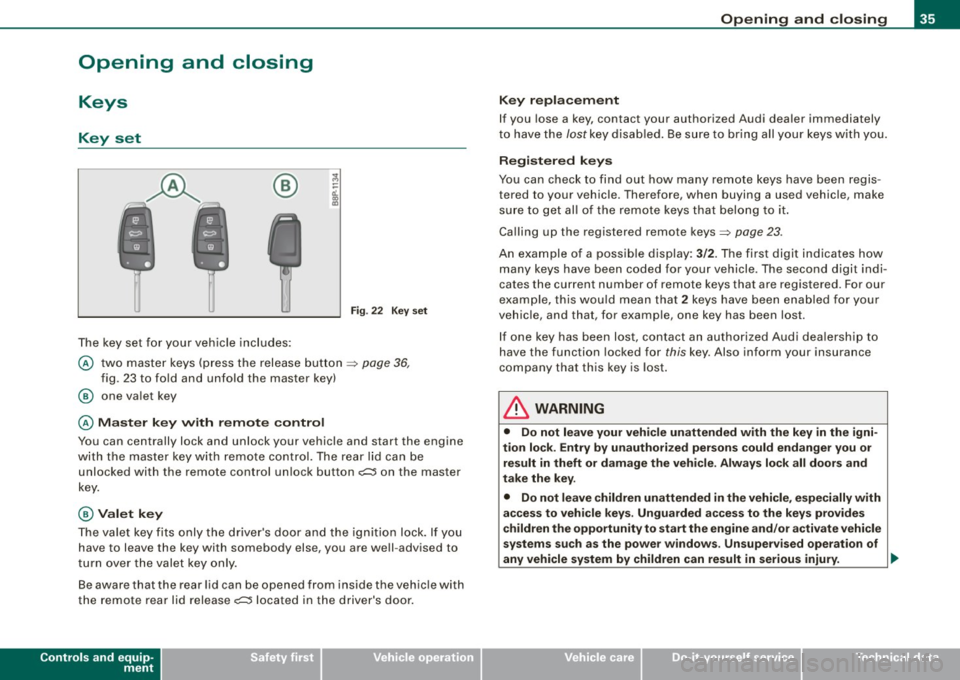
The key set for your vehicle includes:
Fig. 22 Key s et
@ two master keys (press the release button ~ page 36,
fig . 23 to fo ld and unfold the master key)
@ one va let key
@ M as ter key with rem ote control
You can centrally lock and unlock your vehicle and start the engine
with the master key with remote control. The rear lid can be
unlocked with the remote control un lock button
o;:::::::5 on the master
key.
@ Valet key
The va let key fits only the driver's door and the ignition lock. If you
have to leave the key with somebody else, you are well -advised to
turn over the valet key only .
Be aware that the rear lid can be opened from inside the vehic le with
the remote rear lid release
o;:::::::5 located in the driver's door.
Controls and equip
ment
Opening and clo sing
K ey repla cement
If you lose a key, contact your authorized Audi dea ler immediately
t o have the /ostkey disab led . Be sure to bring all your keys wi th you.
Registered keys
You can check to find out how many remote keys have been regis
tered to your vehic le. Therefore, when buying a used vehicle, make
su re to get a ll of the remote keys that belong to it .
Calling up the registered remote keys~
page 23.
An example of a possib le display: 3/2. The first digit indicates how
many keys have been coded for your vehicle . The second digit indi
cates the current number of remote keys that are registered . For our
exa mple, this wou ld mean that
2 keys have been enab led for your
vehicle, and that, for examp le, one key has been lost.
I f one key has been lost, co ntact an authorized Aud i dea lership to
have the function locked for
this key. Also inform your insurance
company that this key is lost .
& WARNING
• Do not leave your vehicle unattended with the key in the igni
tion lock . Ent ry b y unauth oriz ed persons could endanger you or
re sult in theft or damage the vehi cle . Always lock all door s and
t ak e the k ey.
• Do not leave children unattended in the vehicle , especially with
acce ss to veh icle key s. Unguarded a ccess to the key s pro vide s
c hildren the opportunity to sta rt the engine and /or a ctivate vehicle
sy stem s suc h a s the po wer window s. Un supervised operation of
any vehicle system by children can result in serious injury . ..,.
I • •
Page 39 of 324
Master key battery replacement
Each master key contains a battery housed under the
cover.
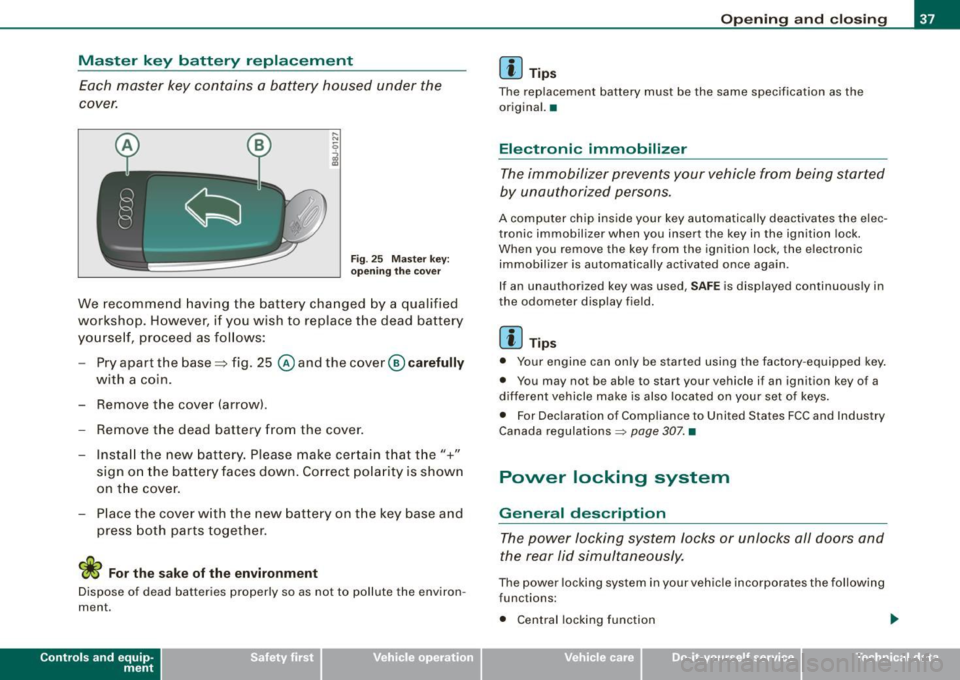
Fig . 25 Master key:
o peni ng the cover
We recommend having the battery cha nged by a qualified
workshop. H owever, if y ou wish to replace the dead ba ttery
yo urse lf, pr oceed as fol lows:
- Pry apart the base => fig. 25
@ and the cover@ carefully
with a coin.
- Remove the cove r (arrow) .
- Remove the dead battery from the cover .
- I nsta ll the new battery . Pl eas e mak e ce rtain t hat the" +"
sign on the batte ry faces down . Correct po la rity is shown
on t he cover .
- Place the cover w ith the new bat tery on t he key base and
press both parts together .
For the sake of the environment
Dispose of dead batteries proper ly so as not to pol lute the environ
men t.
Con tro ls and eq uip
ment
Op ening and clo sing
[ i ] Tip s
The replacement battery must be the same specification as the
origina l.•
Electronic immobilizer
The immobilizer prevents your vehicle from being started
by unauthorized persons.
A computer chip inside your key automatically deactivates the elec
tronic immobilizer when you insert the key in the ignition lock.
When you remove the key from the ign ition lock, the e lectronic
immobil izer is automatically activated once again.
If an unauthorized key was used ,
SA FE is displayed continuously in
the odometer display field .
[ i ] Tips
• Your engine can only be started using the fac tory -equipped key .
• You may no t be ab le to start your vehicle i f an ignition key of a
different vehicle make is a lso located on your set of keys .
• For Dec laration of Compliance to United States FCC and Industry
Canada regulations ~
page 307. •
Power locking system
General description
The power locking system locks or unlocks all doors and
the rear lid simultaneously.
The power locking system in your vehicle incorporates the following
func tions :
• Central locking function
Vehicle care
I I Technical data
Page 45 of 324

Closing the rear lid
- Pull it down and shut it firmly~ &-There is a recess in
the interior trim of the lid to make it easier to pull down.
& WARNING
• After closing the rear lid, always pull up on it to make sure that
it is properly closed. Otherwise it could open suddenly when the
vehicle is moving.
• To help prevent poisonous exhaust gas from being drawn into
the vehicle, always keep the rear lid closed while driving. Never
transport objects larger than those fitting completely into the
luggage area, because then the rear lid cannot be fully closed.
• Never leave your vehicle unattended especially with the rear lid
left open. A child could crawl into the car through the luggage
compartment and pull the lid shut, becoming trapped and unable
to get out. To reduce the risk of personal injury, never let children play in or around your vehicle. Always keep the rear lid, as well as
the vehicle doors, closed when not in use.
[ i] Tips
• If the rear lid is open or not properly locked when the ignition is
turned on, the door and rear lid warning appears in the instrument
cluster display.
• If the rear lid on a locked vehicle is unlocked with the middle
button
c:::5 on the remote key, the rear lid is automatically locked
again immediately after closing. This is indicated by the turn signals
blinking. •
Contro ls and eq uip
ment
Opening and closing
Emergency release for rear lid
If the rear lid cannot be opened, an emergency release is
provided.
Fig . 32 Rear and trunk
section: Access to
emergency release
Fig . 33 Rear lid interior
section: Emergency
release
The emergency release is located on the inside of the rear
lid . To release the rear lid, proceed as follows:
Fold down the right rear seat back~ fig. 32.
Take your ignition key and move through the opening
until your head and shoulders are in the trunk .
Now insert the key bit into the slot in the cover as shown
in
~ fig. 33 (D and pry the cover up carefully. ~
Vehicle care I I irechnical data
Page 55 of 324
• In cool or damp weather conditions the headlights may fog over
temporarily on the inside.
- The critical factor is the temperature difference between the
interior and the exterior of the headlight lens.
- With the main beams switched on, the light -emitting area will
be free of condensation after a short time, however the edges of
the glass may still be fogged .
- The rear lights and turn signals may also be affected.
- This physical phenomenon has no effect on the life of your
vehicle's lighting system .•
A pplies to vehic les : wit h ligh t sens or p ack age
Sensor activated head- and tail light control
In the "AUTO" position light sensors switch the head- and
tail lights on and off.
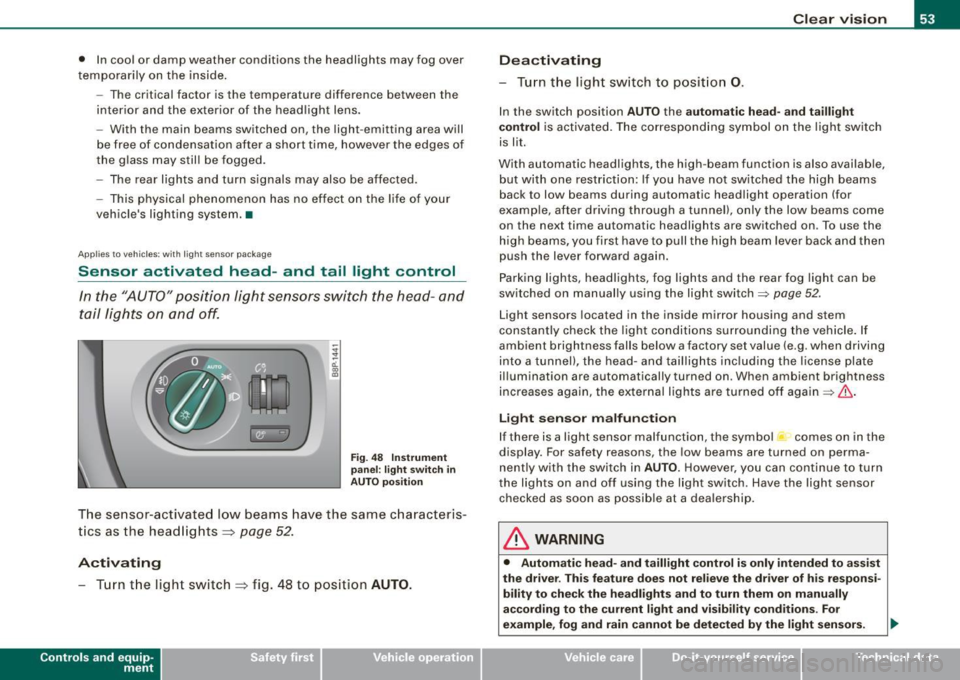
Fig. 48 Instrument
panel : light switch in
AUTO position
The sensor-activated low beams have the same characteris
tics as the headlights ~
page 52.
Activating
-Tur n t he light switch ~ fig . 48 to position AUTO.
Con tro ls and eq uip
ment
Clear vision
Deactivating
- Turn the light switch to position 0.
In the switch position AUTO the automatic head-and taillight
control
is activated. The corresponding symbol on the light switch
is lit.
With automatic headlights, the high -beam function is also available,
but with one restriction: If you have not switched the high beams
back to low beams during automatic headlight operation (for
examp le, after driving through a tunnel), only the low beams come
on the next time automatic headlights are switched on . To use the
high beams, you first have to pull the high beam lever back and then
push the lever forward again .
Parking lights, headlights, fog lights and the rear fog light can be
switched on manually using the light switch=>
page 52 .
Light sensors located in the inside mirror housing and stem
constantly check the light conditions surrounding the vehicle. If
ambient brightness falls below a factory set value (e .g . when driving
into a tunnel), the head-and taillights including the license plate
illumination are automatically turned on . When ambient br ightness
increases again, the external lights are turned off again=>
If:::..
Light sensor malfunction
If there is a light sensor malfunction, the symbol comes on in the
display. For safety reasons, the low beams are turned on perma
nently with the switch in
AUTO. However, you can continue to turn
the ligh ts on and off using the light switch . Have the light sensor
checked as soon as possible at a dealership.
& WARNING
• Automatic head -and taillight control is only intended to assist
the drive r. This feature does not relieve the driver of his responsi
bility to check the headlights and to turn them on manually
according to the current light and visibility conditions. For
example, fog and rain cannot be detected by the light sensors. .,
Vehicle care I I irechnical data
Page 56 of 324
Clear vision
& W ARNIN G (con tinued )
Conseq uently , alwa ys swit ch the headl ights i o on under these
weather condition s and when driving in the da rk .
• Cra she s ca n happen when you c annot see the road ahe ad and
when you c annot be seen by other motori sts .
• Alway s turn on the headlights so that you c an see ahead and
s o that ot hers can see you r ca r from the back.
[ i ] Tips
• In the AUTO mode, the low beams are turned off when the igni
tion is turned off. The remaining l ights are turned off when the key
is taken out of the igni tion lock.
• Do not attach stickers to the windshie ld in front of the sensors as
this can disable the automatic head- and tail light control and the
automatic glare -dimming of the rearview mirror(s) .
• Always observe the specific local regulations for your area when
to use your lights .
• In the event of a light sensor malfunction , the driver information
display will show the symbol . If a ligh t sensor malfunction is indi
cated, you must use the light switch to turn the low beams on and
off. •
App lies to t he market: USA mode ls
Applies to vehicles: with daytime ru nni ng lights and bi-xeno n ligh ts
Daytime running lights (DRL)
The daytime running lights are turned on autom atically
when the ignition is switched on .
®r @'
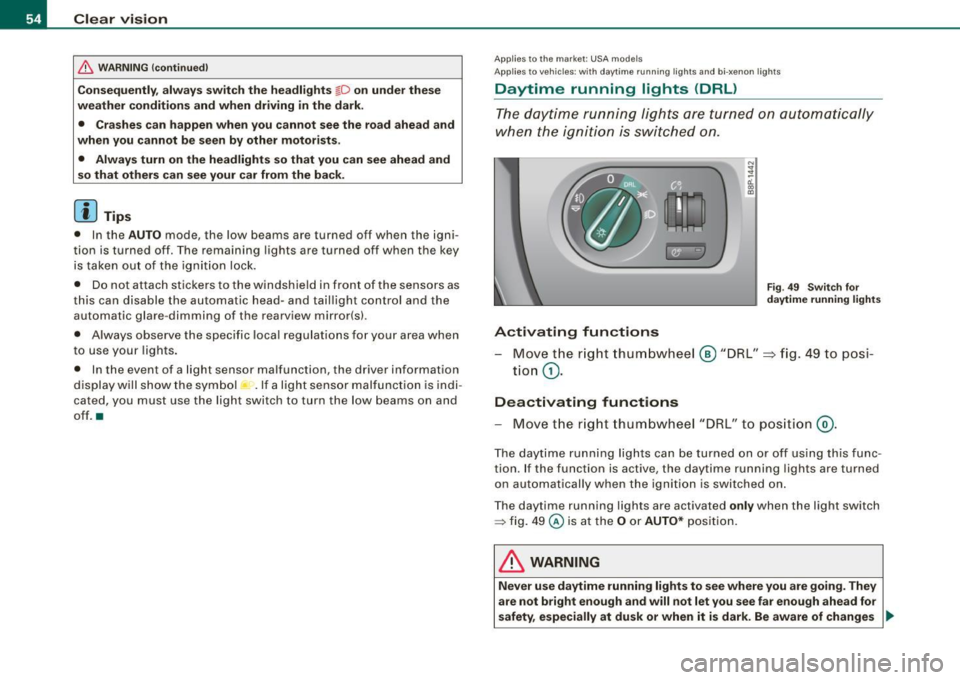
Activating functions
F ig . 4 9 Swit ch for
d ayt ime running li ghts
- Move the r ight thum bwhe el @ "DRL" =} fig. 49 to posi-
tio n
G).
Deactivating functions
- Move t he r ig ht thum bwhee l "DRL" to po siti on @ .
The day time running lights ca n be turned on or off using this func
tion. If the function is active, the daytime running lights are turned
o n aut omatically when the ignition is switched on.
The daytime running lights are activated
only when the light switch
=> fig . 49 @ is at the O or AUTO* posi tion.
& WARNING
Never u se dayt ime running light s to see where you are goin g. They
are not bright enough and will not let you see far e nough ahead for
safety , especially at dusk or when it is dark. Be aware of change s _..
Page 59 of 324

Coming home situ ation
In darkness, the activated system will turn on the headlights, side
marker lights, rear side marker lights, toil lights, and rear license
plate light as soon as the driver's door is opened from inside.
As long as one of the doors or the rear lid remains open, the set of
external lights will keep burning for about four minutes maximum.
To provide light for departure, the set of vehicle lights will keep
burning for about another 30 seconds after all doors and the rear lid
have been closed .
The time until the lights are switched off can be adjusted~ page 23.
Leaving home situation
As soon as the vehicle is unlocked by pressing the en button on your
remote control, the set of external lights is switched on.
The external lights are switched off as soon as the driver's door is
opened from outside . Even if you had the system readjusted to keep
the lights burning for an extended time for coming home, the
external lights will be turned off if you do not open the driver's door
within 60 seconds after unlocking . See chapter "Opening and
Closing" in your Owner's Manual. If the lights are switched off
before you reach the driver's door, press the@ button once more to
turn them on again .
[ i J Tips
• Do not attach any stickers to the windshield in front of the two
light sensors, as this would interfere with both the automatic oper
ation of the head lights and the automatic dimming of the inside
mirror(sl.
• If the vehicle is remotely unlocked and locked three times in
succession, leaving home will not turn on the lights a fourth time to
safeguard the battery and lights.
• If you wish to use the coming home/leaving home function regu
larly, you can leave it activated at all times without risking perma-
Contro ls and eq uip
ment
Clear vision
nent strain on the electrical system. As the system is controlled by
light sensors, it wi ll only be energized in darkness.
• Frequent use of the coming home/leaving home function for
approaching and departing a vehicle parked in the dark will strain
the battery . This applies particularly if only short distances are
driven between stops. Occasionally drive longer distances to make
sure the battery is recharged sufficiently .
• If the fog lights have been switched on by the coming
home/leaving home function, they will always be switched off when
you switch on the ignition .•
Instrument panel illumination
The illumination of the instruments, displays and the
center console can be adjusted.
"' ;
-a'.. co
"'
li8t ey)
Fig . 53 Instrument
panel illumination
You regulate the brightness of the instruments with the left
thumbwheel
<,;"o/ => fig. 53.
Ign ition ON, light switch at @.
With the ignition switched ON, the glow of instrument needles can
be adjusted to appear brighter or dimmer.
1)1,
Vehicle care I I irechnical data
Page 60 of 324
Clear vision
Igniti on ON , light swit ch at ::oo: or fD .
With the lights switched on, the brightness of instrument cluster
!i.e . needles, gauges and displays) and center console il lumination
can be adjusted.
0 Note
The instrument cluster and cent er console illumina tion (gauges and
needles) comes on when you swi tch on the igni tion and the
vehi cle
h eadlights are off .
Be aware of the following difference between
models built to US or Cana dian speci fica tions :
• USA model s: illumination of the in strument clu ster (gauges and
needle s), dash and center con sole around the gear shift lever i s
c o ntrolled by a light sensor lo cated in the instrument panel. The
i n strument panel ill umination will automatically become dimmer
a s th e daylight fades awa y and eventu ally w ill go out completel y
when outside l ight i s very low . Thi s is to remind you , the driver , to
swi tch on the headlight s befo re it get s to o dar k.
• Canada models: in strument panel illumination will stay bright
re gardle ss of the i ntens ity of ambient light . Al wa ys be aware of
change s in out sid e light conditi ons while you are d riving. Re spond
i n time t o fading daylight by turn ing the light swit ch to posit ion
fD
(or "AUTO" if your car is equipped with this feature) to turn on your
headlights . •
Ap plies to vehi cles: with b i-xeno n headli ghts
Bi-Xenon headlights*
After starting the engine, the bi -xenon headlights are automatica lly
adjus ted to the load and angle of the vehic le (for example , during
acce lerat ion and brak ing) . This prevents oncoming traffic fro m
experiencing unnecessary headlight g lare from your bi-xenon head
lights .
If the system is not operating properly, a warning symbol in the
Auto -Check Control is displayed ::::;,
page 33. •
Emergency flasher ~
The emergency flasher mak es othe r moto rists aware that
you or your vehicle are in an emergency situation.
1 1 Q
-
II D ll1
[ Ii J
a
l 'l
"' " "'
J
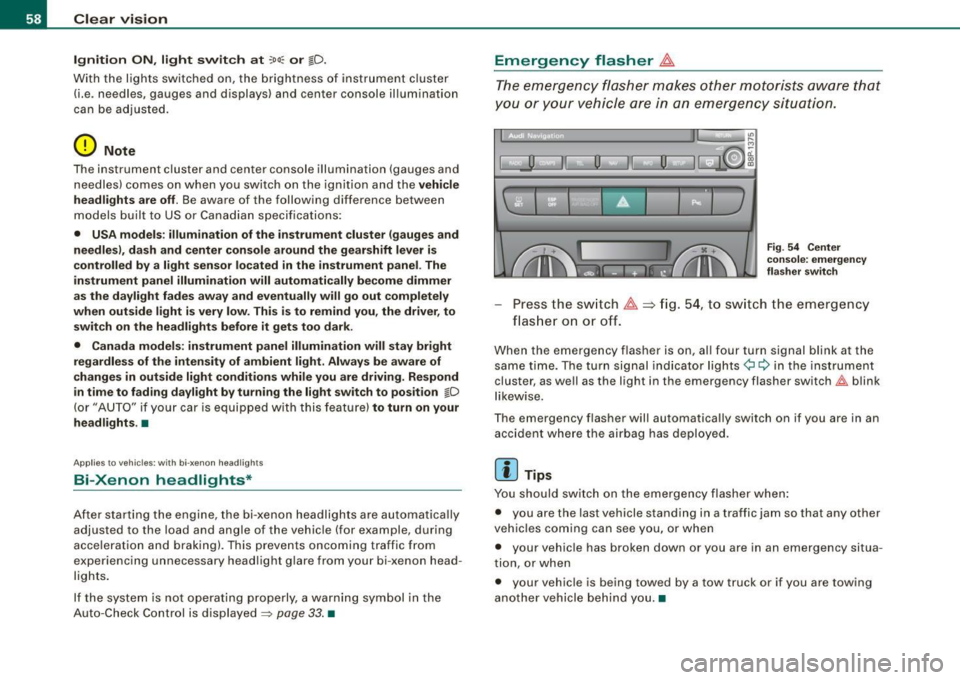
Fi g. 5 4 Cen ter
co nso le : em erge ncy
fl as her swi tc h
Press the sw itch ~==>fig. 54, to sw itch the emergency
flas her on or off.
When the emergency flasher is on, al l four turn signal blink at the
same time. The turn signal indicator lights¢ Q in the inst rument
cluster, as we ll as the light in the emergency flasher switch~ blink
l ikew ise.
The emergency flasher will automatically switch on if you are in an accident where the airbag has deployed .
[ i ] Tips
You should switch on the emergency flasher when :
• you are the last vehicle standing in a traffic jam so that any other
veh ic les coming can see you, or when
• your vehic le has broken down or you are in an emergency situa
tion, or when
• your vehicle is being towed by a tow truck or if you are towing
another vehicle behind you. •
Page 74 of 324
Clear vision
Digital compass
Applies to vehi cles: w ith di gital co mpass
Activating or deactivating the compass
The direction is displayed on the interior rear view mirror.
Fig. 71 In side rear
view mirror : digital
com pass activated
To activate or deactivate, hold the @ button down until
the red display appears or d isappears.
The digital compass only works with the ignition turned on. The
directions are displayed as initials :
N (North), NE (Northeast), E
(East),
SE (Southeast), S (South), SW (Southwest), W (West), NW
(Northwes t).
[ i J Tips
To avoid inaccurate dir ections, do not allow any remot e controls ,
e lectrical systems, or metal parts close to the mirror. •
Applie s to vehi cles : wi th digi tal compass
Setting the magnetic deflection zone
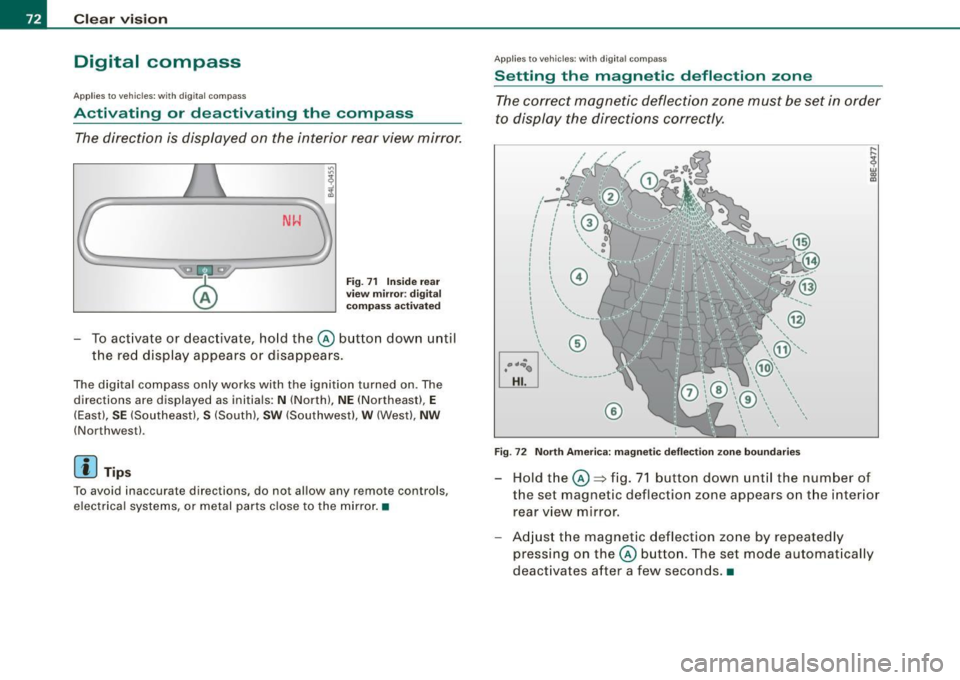
The correct magnetic deflection zone must be set in order
to display the directions correctly .
®
Fig. 72 North America: magnetic deflection zone boundaries
Hold the@=> fig. 71 button down until the number of
the set magnetic deflection zone appears on the interior rear view mirror .
Adjust the magnetic deflection zone by repeatedly
pressing on the@ button. The set mode automat ically
deactivates after a few seconds .•