brake light AUDI S3 2010 User Guide
[x] Cancel search | Manufacturer: AUDI, Model Year: 2010, Model line: S3, Model: AUDI S3 2010Pages: 320, PDF Size: 75.34 MB
Page 109 of 320
___________________________________________________ O_ n_ t_h _e_ r_o _a_ d _ ___._
Starting and stopping the engine
Starting the engine
The engine can only be st arted with your origin al Audi
key.
V ehi cle s with a gas oline engin e:
- Set the parking bra ke.
Fi g. 109 I gnit ion ke y
pos it io ns
- Move the selector lever to the neutra l position (automatic
transmission) : se lector lever in P or N) =>
&.
- On vehicles with manual transmission, fu lly depress the
c lutch pedal.
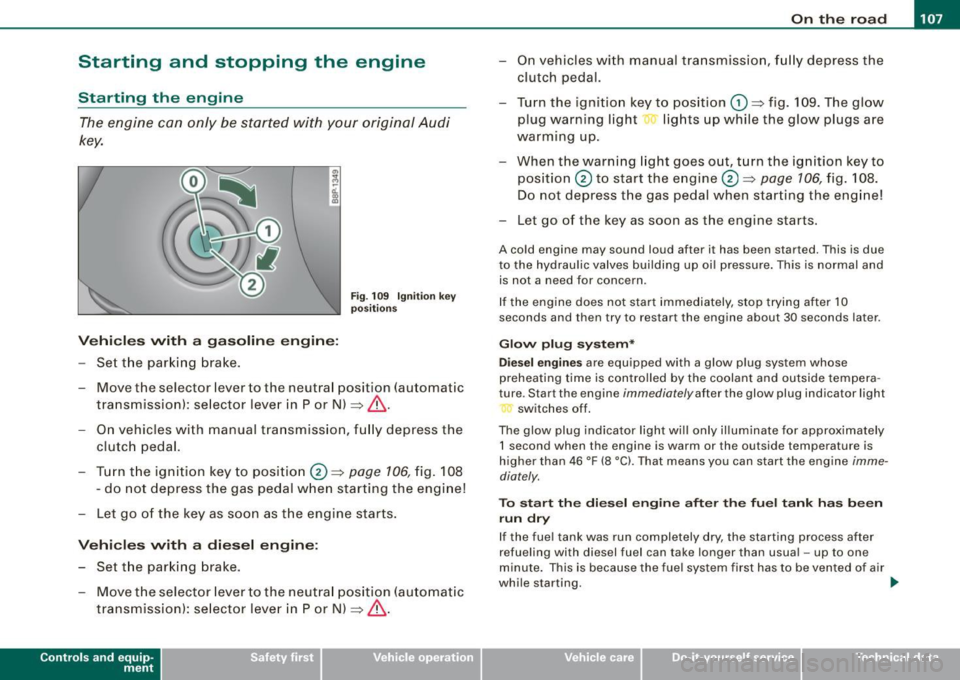
- Turn t he ign ition key to position@ =>
page 106, fig. 108
- do not depress the gas pedal when starting the engine!
- Let go of the key as s oon as the engine s tarts .
Vehicle s with a di esel engine :
- Set the parking brake .
- Move the selector lever to the neutra l position (automatic
transmission): se lector lever in P or N) =>
&.
Con tro ls and eq uip
ment
- On vehicles with manual tra nsm ission, f ully depress the
clutch pedal.
- Turn the ign ition key to position
G) => fig. 109 . The g low
plug warning light lig hts up while the glow plugs are
warming up .
- When the warning light goes out, turn the ignition ke y to
position @ to start the engine@=>
page 106, fig. 108 .
Do not depress the gas pedal when star ting the eng ine!
- Let go of the key as soon as the engine starts.
A co ld engine may sound loud after it has been started. This is due
to the hydrau lic va lves building up oi l pressure . This is normal and
is not a need for concern .
I f the engine does not start i mmediately, stop trying after 10
seconds and then try to res tart the engine about 30 seconds la ter .
Glow plug system *
D ie sel engin es
are equ ipped wi th a glow p lug system whose
preheating time is controlled by the coolant and outside tempera
ture . S tar t the engine
immediately after the glow plug indicator l ight
switches off .
The glow plug indicator light wi ll only il luminate for approximately
1 s econd when the engin e is warm or the outside temp erature is
higher than 46 °F (8 °C). That means you can start the engine
imme
diately .
To st art the di esel engin e after the fuel t ank ha s be en
run dr y
If the fue l tank was run completely dry, the starting process after
refuel ing with diesel fuel can take longer than usual -up to one
minute. This is because the fue l system first has to be vented o f air
while starting. _,.
Vehicle care I I irechnical data
Page 110 of 320

• ..__O_ n_ t_h _e _ r_o _a _ d __________________________________________________ _
& WARNING
Never start or let the engine run in a confined or enc losed area .
Exhaust fumes from the engine contain carbon monoxide , a color
le ss and odorless gas . Carbon monoxide can be fatal if inhaled .
• Never leave the engine idling unattended . An unattended
vehi cle with a runn ing engine poses a danger of personal injury or
theft.
0 Note
• Avoi d high engine speed s, fa st a ccele rati on or heavy eng ine
loads while the engi ne is sti ll cold. This cou ld damage the engine.
• The e ngi ne canno t be sta rt e d by pushing o r to w ing the vehicle.
~ For the sake of the environment
To avoid unnecessary engine wear and to re duce ex hau st emis
sions, do not let your vehicle stand and warm up. Be ready to drive
off immed iate ly afte r start ing y our veh icle. Maintain modera te
sp eed unt il the engine is completely warm. Remembe r, th e engine
performs best a t operati ng tempe ra ture .•
Stopping the engine
- Turn t he ignit ion key to position © ~ page 106 , fig. 108.
& WARNING
• Never turn off the engine until the vehicle has come to a
complete stop.
• The brake booster and servotroni c only work when the engine
is running . With the ignition turned off , you have to apply more
force when steering or braking . Since you cannot steer and stop
normally, this can lead to accidents and serious injuries .
& WARNING (continued )
• The radiator fan can continue to run for up to 10 minutes even
after you have turned off the engine and removed the ignition key .
The radiator fan can also turn on again if the engine coolant heats
up because of inten se sunlight or heat build -up in the engine
compartment .
0 Note
Do not stop the engine immediatel y after hard or extended driving.
Keep the eng ine runn ing f or ap proximate ly t wo minu tes to preven t
excessive heat build -up. •
Parking brake
Parking brake
Whe n the parking brake is s et, i t prev ent s th e v ehicl e f rom
rolli ng away un int entionally.
Setting the parking brake
Fig . 110 Center
console: Par king brake
s et
- Pull the park ing brak e lever all the way up.
Page 111 of 320
_________________________________________________ O _n_ t_h _e _ r_o _a _d __ lfflll
R elea sing th e parking br ake
- Pu ll the parking brake lever up slight ly and press the
release button at the same time~
page 108, fig. 110
-arrow-.
- Keep the release button pressed and lower the parking brake ~& .
If you should drive off with the parking brake sti ll set, a warning tone
will sound and the fo llowing wil l appear in the instrument cluster to
remind you to re lease the parking brake:
Parking brak e set
The parking brake warning comes on only after you have driven for
longer than 3 seconds and faster than 5 mph (5 km/h).
The parking b rake warning light Brake (USA)/ «D>
(CDN) illuminates
when the parking brake is set and you switch on the ignition .
& WARNING
Alway s re leas e the par king br ake completely . A p artiall y engaged
br ake w ill overheat the r ear brake s, reduce their effective ness and
ca use e xcessive w ear. T his co uld le ad to brake failur e and an acc i
dent .
0 Note
Only after the vehicle has come to co mplete stop, should you firm ly
set the parking brake and either move the gearshift lever into 1st .
gear (manual transmission) or move the selector lever into "P"
(Automatic transmission). •
Controls and equip
ment
Parking
To prevent a parked vehicle from rolling away, there are a
few things you should do.
When you park your vehic le, do the fo llowi ng:
- Stop the vehicle using the brake pedal.
- Set the parking bra ke firm ly .
- Move the selector lever into the
P pos ition ( automatic
tran smi ssion)
or m ove the gea rshi ft lever into 1s t. gear
(manual transmission ) ~ &.
- Switch off the engine and remove the ignitio n key from
t h e igniti on loc k.
Wh at else you should d o wh en p arking your vehicle o n
a n i ncline or dec line
Turn the steering wheel so that if the vehicle should start to roll, it
will ro ll into the curb.
I f you are parking on a
declin e (the front of your vehic le facing
downhill!, turn the front wheels to the right so that they point
toward the curb .
If you are parking on an incline (the font of your vehicle fac ing
uphill!, turn the front whee ls to the left so that they point
away from
the curb.
Move the selector lever into the P position ( autom atic tran sm iss ion)
or move the gearshift leve r into 1st. gear (manual tr ansmi ssion ).
& WARNING
Thi s is how you can redu ce the r isk of injury when leaving y our
vehi cle .
• Never p ark the vehi cle where it can come in conta ct with dr y
gra ss, spi lled fuel or any other fl amm able m ater ials . .,_
I • •
Page 113 of 320

----------------------------------------------~O~n~t:.!..h~e::...!..r~o~a~d~ _fflll
-Drive at the speed you wish to set .
- Press button
@ to set that speed.
The disp lay=> page 110, fig . 112 will show the set speed . The
display may vary depending on the type of disp lay in your vehicle .
T he indicator light
CRU ISE (US model)/ f,f (Canadian mod e ll wi ll also
light up in the instrument cluster .
& WARNING
• Alway s pa y att ention to traffic ev en when the crui se contr ol is
s w it ched on . You are al ways respo nsi ble for your spee d and the
di stance between your v ehic le and other ve hicle s.
• For sa fet y reas on s, the crui se contr ol s h o uld not be u sed in the
ci ty , in stop -and -go traffic , on t wis ting road s and when road condi
tion s are po or (s uch a s ic e , fo g, gra vel , he avy ra in and h ydro
planing ) - risk of accident .
• Turn o ff th e cru is e c ont rol tempor arily w hen ente ring tu rn
lanes , highway e xit lan es or in con stru ction zone s.
• Please n ote that in ad vertentl y "res ting " yo ur foot on the a ccel
erator pedal cau se s t he crui se control not to brak e. Thi s is becau se
th e c ruise c ontrol i s overridden by the dri ver's acceler ation .
[ i] Tips
• Vehicles with manual transmission : You can attain the set speed
only if the curren tly engaged gear al lows it and the engine is not
stressed. Shifting to a higher or lower gear promptly will allow the
engine to run smooth ly .
• T he cruise control cannot maintain a constant speed when
driving downhi ll. The vehicle wi ll acce lerate under its own weight .
Downshift to a lower gear or use the brakes to slow down .•
Controls and equip
ment
Changing speed
Press lever in the 0 o r O direction ~ page 110, fig. 111
to increase or dec rease your speed.
- Release the lever to save that speed .
Change speed in increments of 1 mph (1 km/h) by lightly pressing
the lever. If you keep the lever pressed down, you will a lter your
speed in 5 mph (10 km/hl increments .
You can a lso press the acce lerator pedal down to increase your
speed, e.g. if you want to pass someone. The speed you saved
earlier will resume as soon as you release the accelerator pedal.
I f , however, you exceed your saved speed by 5 mph ( 10 km/h) for
longer than 5 minutes, the cruise control will turn off temporarily.
The symbol wi ll go out but the saved speed wi ll be retained. •
Presetting your speed
You can preset your desired speed while the vehicle is not
moving.
Turn on the ignition.
P ull lever into posit ion
G) ~ page 110 , fig. 11 1.
Press the lever in the
0 or O direction to increase or
decrease your speed.
- Release the lever to save that speed .
This function makes it possible, for example, to save the speed you
want before driving on the highway . Once on the highway, activate
the cruise contro l by pulling the lever toward
G) . •
I • •
Page 116 of 320
....... _T _r_a _ n_ s_m _ i_s _s _i_o _n ______________________________________________________ _
S tronic transmission
Applies to vehicles: w ith S tronic®
Introduction
Your vehicle is equipped with a S tronic transmission, also called a
double -clutch system/transmission.
Power is transferred between the engine and the transmission by means of two independent clutches. They replace the torque
converter of conventional automatic transmissions and al low the
vehic le to accelerate without a noticeable break in the power flow .
With the aid of
ti pt ronic, the gears can optionally be shifted manu
ally => page 118 . •
Appl ies to vehicles: with S tronic®
Selector lever positions
All the selector lever positions are explained in this
section .
Fig. 114 Disp lay:
Selecto r lev er posi
t ions
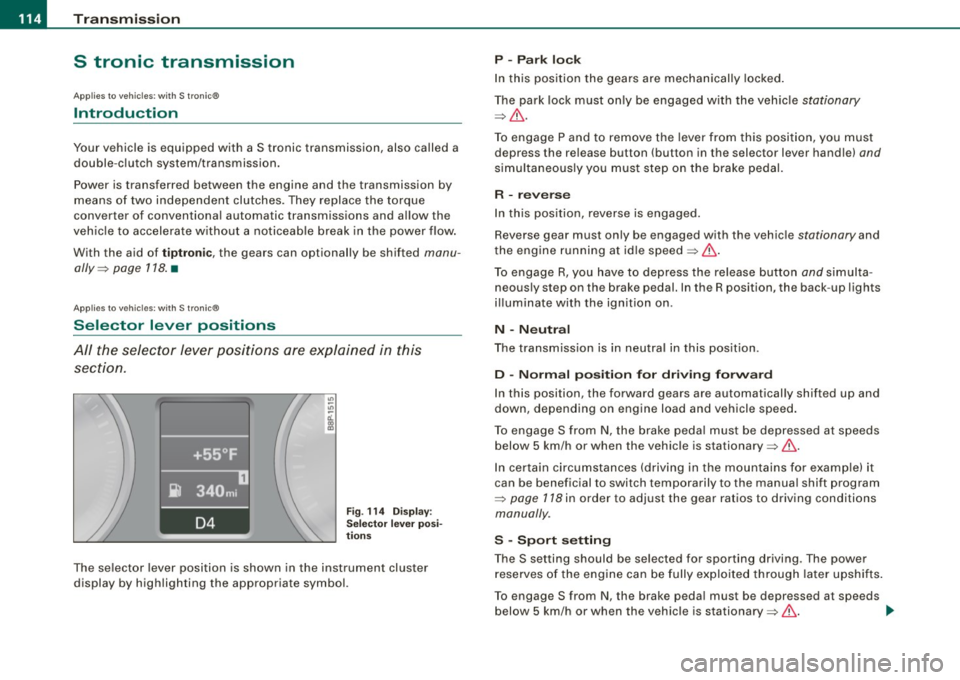
The se lector lever position is shown in the instrument cluster
display by highlighting the appropriate symbol.
P -Park lock
In this position the gears are mechanically locked .
The park lock must only be engaged w ith the vehic le
stationary
=> & .
To engage P and to remove the lever from this position, you must
depress the release button (button in the selector lever handle)
and
simultaneously you must step on the brake pedal.
R -reverse
In this position, reverse is engaged.
Reverse gear must only be engaged with the vehic le
stationary and
the engine running at id le speed =>& .
To engage R, you have to depress the release button
and simulta
neously step on the brake pedal. In the R position, the back -up lights
i ll uminate with the ignition on.
N -N eutra l
The transmission is in neutra l in this pos ition.
D -Norm al po siti on fo r dri vin g fo rw ard
In this position, the forward gears are automatical ly shifted up and
down, depending on engine load and vehicle speed.
To engage S from
N, the brake peda l must be depressed at speeds
below 5 km/h or when the vehicle is stationary=>& .
In certain circumstances (driving in the mountains for examp le) it
can be beneficial to switch temporarily to the manual shift program
=>
page 118 in order to adjust the gear ratios to driving conditions
manually .
S -S po rt setting
The S setting should be selected for sporting driving. The power
reserves of the engine can be fully exploited through later upshifts .
To engage S from N, the brake peda l must be depressed at speeds
below 5 km/h or when the vehicle is stationary=>& . .,_
Page 118 of 320

• ..__T_ ra_ n_s_ m_ i_ s _s_ i_ o _n ___________________________________________________ _
The selector lever lock is effective only when the vehicle is
stationary and at speeds below 5 km/h. At higher speeds, the lock in
the N position is automatically switched off.
The selector lever is not locked when rapid shifts are made through
t he N position (e.g . from R to Dl. This allows you to "rock" the vehicle
if it becomes stuck . If the lever is in the N position for more than
1 second with the brake pedal not depressed, the selector lock
engages automatically.
Release b utt o n
The release button in the selector lever handle prevents accidental
shifts in to certain selector lever positions. When you press the
re lease button, the selector lever lock is cancelled. In the illustra
t ion, the positions in which the release button has to be pressed are
highlighted in color=>
page 115, fig. 115.
Igniti on k ey remo val lock
The ignition key can only be remove after the ignition is switched off
if the selector lever is in P . As long as the ignition key is removed, the
selector lever is locked in P.
[ i J Tip s
If the selector lever does not engage, there is a malfunction . The
engine is disabled to prevent the vehicle from driving off uninten
tiona lly. To a llow the selector lever to engage again, proceed as
follows: Press and release the brake pedal. •
Applies to vehicle s: wi ths troni c®
Driving Notes
The forward gears are shifted up or down automatically .
Starting from stop
-Step on and hold the brak e peda l.
Fig. 116 Sectio n fr om
c en ter console :
Se lec tor lever w ith
r e lea se butt on
- Ho ld t he release butt on (but to n in se lector lever) down,
move t he s elector lev er to th e desire d posi tion, fo r
e xam ple D
=> page 114, and release t he b utto n.
- Re lease the brake pe dal and accelerate =>& .
Stopping temporarily
- Bring t he vehicle to a full stop wit h the brake, e.g. at
traffic signals.
- Do not accelerate.
Pa rking
- Step on and ho ld the brake pedal=> & .
- Apply the parking brake firmly.
- Hold the re lease button down, move the s elector lever to
P and re lease the button . _.,
Page 120 of 320

_L_T.:...:.. r.:::a :.:n.: S::::.. m:.:..: iS::.::: S::iO ::::.:. n.:.._ _____________________________________________________ _
& WARNING
Hill Descent Assist cannot overcome physical limitations, so it
may not be possible to maintain a constant vehicle speed under all
circumstances. Always be ready to apply the brakes. •
Appl ies to vehic le s: w ith S I roni c®
tiptronic operation
Tiptronic allows the driver to shift gears manually.
"' "' ..,
;;;: ., m
Fig . 117 Center
console: Manual
shifting (tiptronicl
Fig. 118 Display:
Manual shifting
(tiptronic)
Switching to manual
Push the selector lever to the right from D. As the trans
mission has switched,
6 5 4 3 2 1 appears in the display,
with the gear that is engaged highlighted.
Upshifting
Tap the selector lever forward (in the tiptronic setting)
~ fig. 117 0-
Downshifting
Tap the selector lever backward (in the tiptronic setting)
0-
Switching to manual can be carried out with the vehicle stationary
as well as moving.
When accelerating, the transmission shifts into the next gear in
gears 1, 2, 3, 4 and 5 shortly before the maximum permissible
engine speed is reached.
If you have selected a lower gear than the current one, the transmis
sion will only shift down when the engine cannot be overspeeded.
If kick -down is actuated, the transmission shifts into a lower gear
independently of speed and engine rpm .•
Page 121 of 320
____________________________________________________ T_ r_ a _n _s_ m_ i_ s _ s_ i_ o _ n _ ___.1111111
Ap plies to vehicl es: with S tro ni c® and w ith Tip tr onic cont rols o n the stee ring wh eel
Steering wheel with Tiptronic ® controls
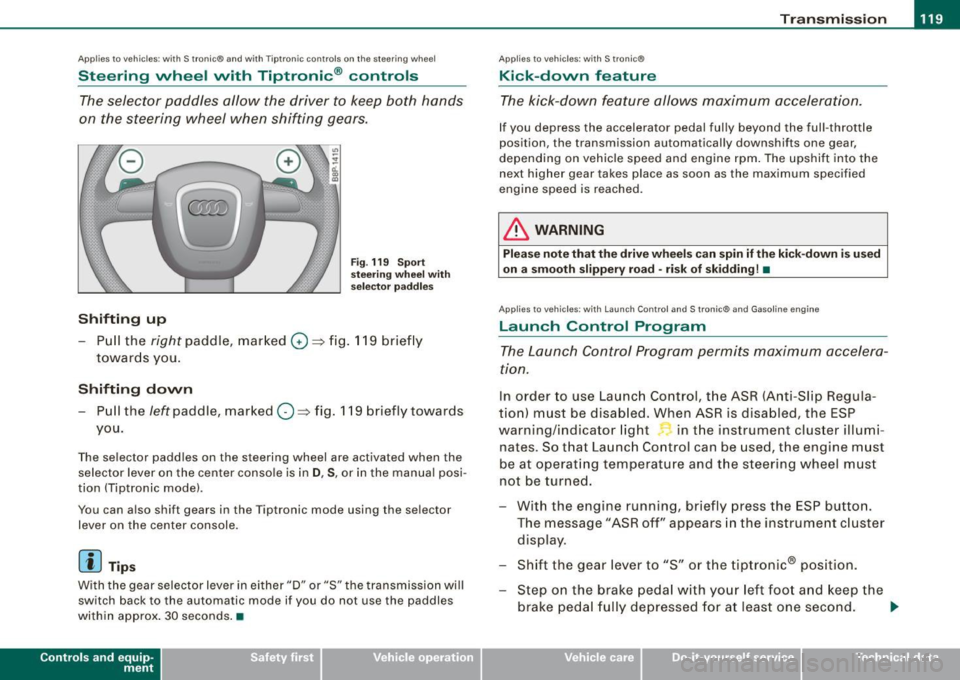
The selector paddles allow the driver to keep both hands
on the steering wheel when shifting gears.
Shifting up
Fig . 119 S port
s tee ring w he el w it h
selector pa ddles
-Pull the right paddle, marked 0 ==> fig. 11 9 briefly
towar ds you .
Shifting down
-Pull the left paddle, mar ked O ==> fig. 119 briefly towards
you.
The selector paddles on the steering wheel are activated when the se lector lever on the center console is in
D , S , or in the manua l posi
tion (Tiptronic mode) .
You can a lso shift gears in the Tiptronic mode using the se lector
lever on the center console .
[ i] Tips
With the gear selector lever in ei ther "D" or "S" the transmission wi ll
switch back to the automatic mode if you do not use the paddles
within approx . 30 seconds .•
Con tro ls and eq uip
ment
Ap plies to vehi cles: wit h S tr on ic ®
Kick -down feature
T he kick-down feature allows maximum acceleration.
If you depress the accelerator pedal ful ly beyond the ful l- throt tle
position, the transmission automatically downshifts one gear,
depending on vehic le speed a nd eng ine rpm . The upshi ft into the
next higher gear takes place as soon as the max imum specified
engine speed is reached .
& WARNING
Please note th at th e drive wheel s can spin if the kick -do wn is used
o n a s mooth slippery r oad -ri sk of sk idding! •
Applies to ve hicles: w it h L aunch Contro l and S tronic ® and Gaso line engine
Launch Control Program
The Launch Control Program permits maximum accelera
ti on.
In order to use Launc h Control, t he ASR (Anti-Slip Regula
tion) must be disab led . When ASR is disabled, the ESP
warning/indicator light in t he instrument cluster illumi
nates . So that Launch Control can be used, the engine must
be at operat ing temperature and the stee ring wheel must
not be turned.
- With the engine running, briefly press the ESP button.
The message "ASR off" appears in the instrument c luster
disp lay .
- Shift the gear lever to "S" or the tiptronic® pos ition.
- Step on the brake peda l w ith yo ur left foo t and keep the
brake peda l fully depressed for at least one second . _,.
Vehicle care I I Technical data
Page 122 of 320
• ..__T_ r_a _n_ s_ m_ is_ s_io _ n ______________________________________________________ _
- With your right foot, step on the accelerator to the wide
open throttle position or Kickdown. The engine speed
settles at about
3,200 rpm.
Take your left foot off the brake.
The S tronic® in your vehicle is electronically controlled. A special
Launch Control Program provides th e best acceleration from a
standing start .
& WARNING
• Always adapt your driving to the traffic flow.
• Only use Launch Control when road and traffic conditions allow
it and other drivers will not be endangered or annoyed by your
driving and the acceleration of the vehicle.
• Make sure that ESP remains enabled. With the ESP disabled,
the vehicle could brake away, particularly on a slick and slippery
road -risk of skidding!
• Once acceleration is finished, switch ASR on again by briefly
pushing the ESP button . •
Ap plies to ve hicles : wit h S t ro ni c®
Back-up program
In the event of a system malfunction, there is an back-up
program.
In the event of system malfunction, the automatic transmission
switches to th e fail -safe mode . All o f the selec tor lever pos ition
displays for the automatic transmission are highlighted with a light
background in the instrument clust er display. In some cases you
cannot drive in the reverse gear any more .
If the transmission swi tches to fail-safe mode, you should take the
vehicle to an authorized Audi dealership as soon as possible to have
the condition corrected .•
A pp lies to veh ic les: w ith s tro nic®
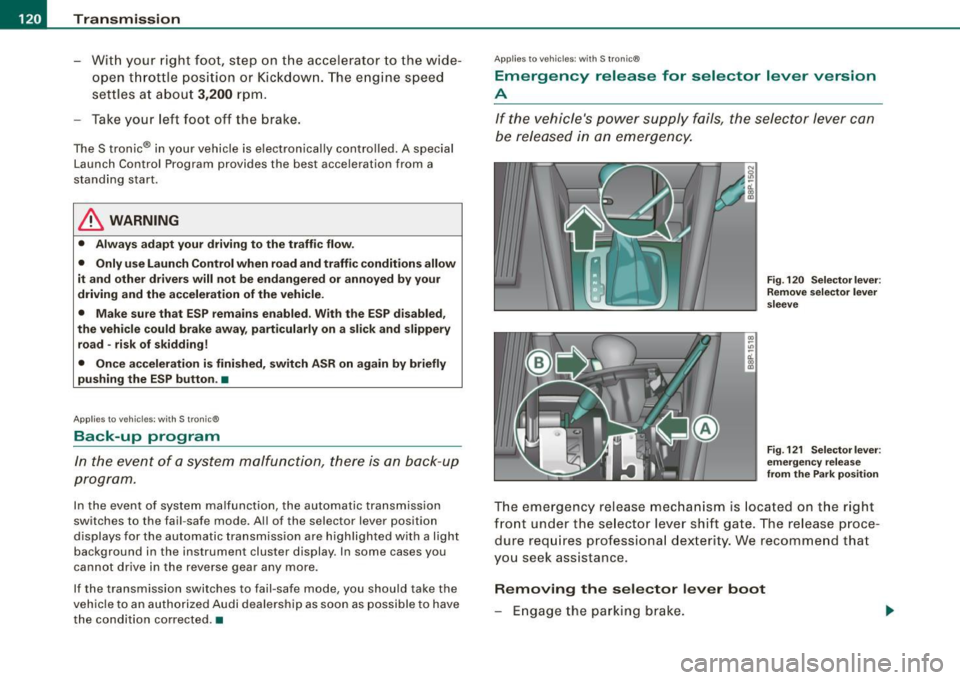
Emergency release for selector lever version
A
If the vehicle's power supply fails , the selector lever can
be released in an emergency.
Fig. 120 Selector lever :
Remove selector lever
sleeve
Fig . 121 Selector lever :
emergency release
from the Park position
The emergency release mechanism is located on the right
front under the selector lever shift gate. The release proce
dure requires professional dexter ity. We recommend that
you seek assistance.
Removing the selector lever boot
- Engage the parking brake.
Page 192 of 320

-Intelligent technology
----'""------- ~---------------------------------------
to the other drive wheel or wheels (all-whee l drivel. This is done up
to a speed of about 60 mph (100 km/h). Noises from the brake
system signal that wheel spin is being controlled.
Driving off
When driving off, always be sure to keep road conditions in mind as
you accelerate. If one drive wheel spins because it is on a surface
with less grip, gradually increase the pressure on the accelerator
pedal until the car starts to move. The wheel less able to transfer
power spins .
Overheating of brakes
To prevent the disc brake of the braked wheel from overheating if
subjected to excessive loads, the EDL cuts out temporarily. The
vehicle remains operational and behaves in the same way as a
vehicle without EDL.
As soon as the brake has cooled down, EDL switches on again auto
matically.
& WARNING
• When accelerating on slippery surfaces, such as on ice or snow,
always be careful when depressing the accelerator pedal. Even
with the EDL working, the drive wheels can spin and reduce your
ability to control your car. -Risk of crash!
• The increased safety afforded by EDL does not mean that you
can take safety risks. Always adapt your driving style to the road
conditions and traffic situation.
[ i] Tips
If a fault occurs in the ABS, the EDL is also not functioning. This is
indicated by the ABS warning light=>
page 16. •
Anti-Slip Regulat ion System (ASR)
The Anti-Slip Regulation System prevents the driven
wheels from spinning when the car is accelerating.
General notes
The Anti-Slip Regulation System (ASR) is integrated in the electronic
stabilization program (ESP) . When the vehicle starts up and acceler
ates, the wheels are prevented from spinning by adjusting the
engine power to match the amount of grip available from the road
surface.
How the system works
ASR performs automatically, i.e. without the driver's intervention.
With the aid of the ABS sensors=>
page 192, ASR monitors the
speed of the driven wheels. If the wheels start to spin, the engine
torque is reduced automatically until the tires find enough grip to
lock onto the road surface. The system is active across the entire
speed range.
Th e ASR works in conjunction with the ABS. If a malfunction should
occur in the ABS, the ASR will also be out of action.
Activating
The ESP is automatically activated when the engine is started and it
performs a self -test. You can activate a deactivated ASR if required
by pressing the=>
page 188, fig. 158 button. When it is activated,
the message
ESP/ASR on appears briefly in the display.
Deactivating
You can deactivate the ASR if required by pressing the button (for
less than 3 seconds)=>
page 188, fig . 158. With the ASR deactivated,
the ESP check light comes on, see=>
page 13. The message ASR off
appears in the display as well.
The ASR should normally be activated all the time . Only in certain
exceptional situations when some slip is desirable does it make
sense to deactivate the ASR. Examples:
• when driving with tire chains