lights AUDI S3 2010 User Guide
[x] Cancel search | Manufacturer: AUDI, Model Year: 2010, Model line: S3, Model: AUDI S3 2010Pages: 320, PDF Size: 75.34 MB
Page 19 of 320

qualified workshop=> &. With the eng ine not running (e .g . when
t he car is being towed), there is also no power assis t availa ble.
& WARNING
If there is a malfunction , the indi cator light for the electro -mechan
ical power assist illuminates . Seek profess ion al assistance . •
Controls and equip
ment
Instruments and warning /indi cator lights
I • •
Page 26 of 320
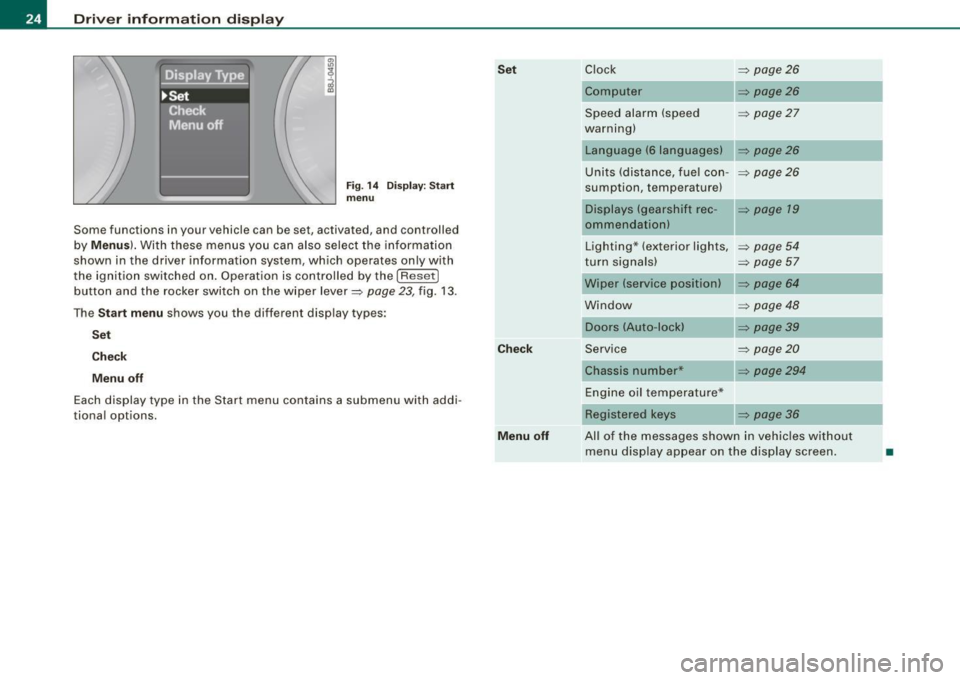
Driver informati on displ ay
Fig. 1 4 Display : Start
menu
Some func tions in your vehicle can be se t, act iva ted, and cont rolled
by
M enu s). With these menus you can also select the information
shown in the driver information system , which ope rates only with
the ignition switched on. Operation is controlled by the
! R ese t]
button and the rocker switch on the wiper lever=> page 23, fig. 13 .
The
S ta rt m enu shows you the diff erent disp lay types :
Set
C hec k
M enu off
Each display type in the Start menu con tains a submenu with addi
tional options.
Se t
C hec k
M enu off Clock
=> page 26
Computer => page26
Speed alarm (speed => page27
warning)
Language (6 languages)
Units (distance, fuel con- =>
page26
sumption, temperature)
Displays (gearshift rec -
=> page 19
ommendation)
Lighting * (exterior lights,
=>
page 54
turn signals) => page 57
Wiper (service position) => page 64
Window => page 48
Doors (Auto-lock)
Service
=>
page20
Chassis number* => page294
Engine oil temperature*
Registered
keys => page 36
All of the messages shown in vehicles without menu disp lay appear on the display screen.
•
Page 31 of 320
Yellow symbols
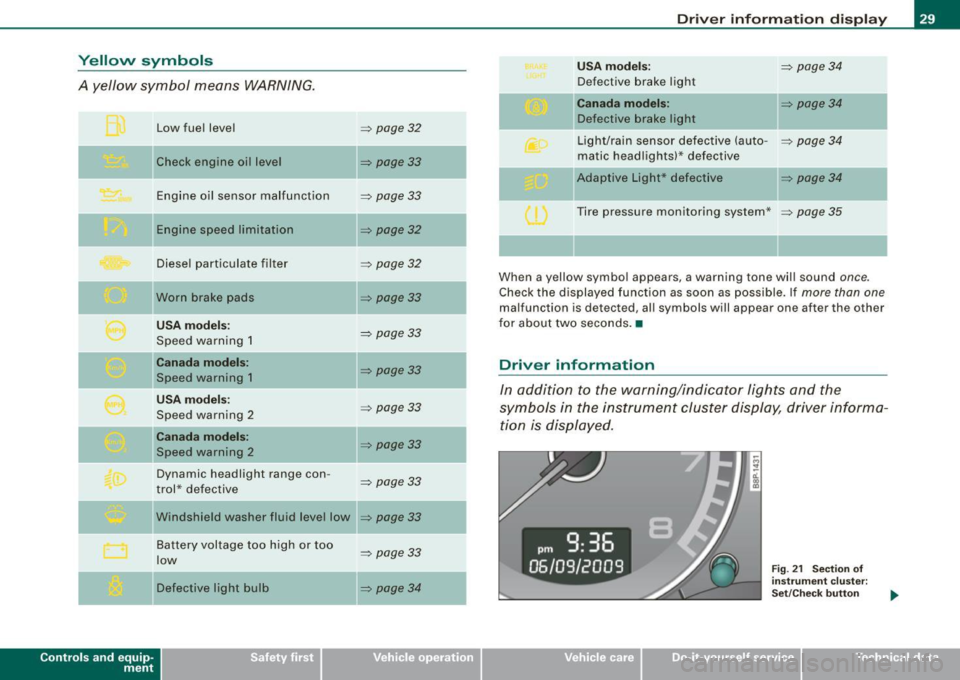
A yellow symbol means WARNING.
Contro ls and eq uip
ment Low fuel level
Check engine oi l level
Engine oil sensor malfunction
Engine speed limitation
Diesel particulate filter
Worn brake pads
USA models:
Speed warning 1
Canada models:
Speed warning 1
USA models:
Speed warning 2
Canada models:
Speed warning 2
Dynamic headlight range con -
trol * defective
W indshield washer fluid level low
Battery voltage too high or too
low
Defective light bulb
=> page 32
=> page33
-
=> page33
=> page32
=> page32
=> page33
=> page 33
=> page33
=> page33
=> page33
=> page33
=> page33
...
=> page 33
=> page34
-
-
-
Driver information display
USA models: => page34
Defective brake light
Canada models: => page 34
Defective brake light
Light/rain sensor defective (auto-
=> page 34
matic headlights)* defective
-Adaptive Light * defective => page34
Tire pressure monitoring system * => page 35
When a yellow symbol appears, a warning tone will sound once.
Check the displayed function as soon as possible. If more than one
malfunction is d etected, all symbols will appear one after the other
for about two seconds. •
Driver information
In addition to the warning/indicator lights and the
symbols in the instrument cluster display, driver informa tion is displayed .
Vehicle care I I
Fig. 21 Section of
instrument cluster:
Set/Check button
irechnical data
Page 33 of 320
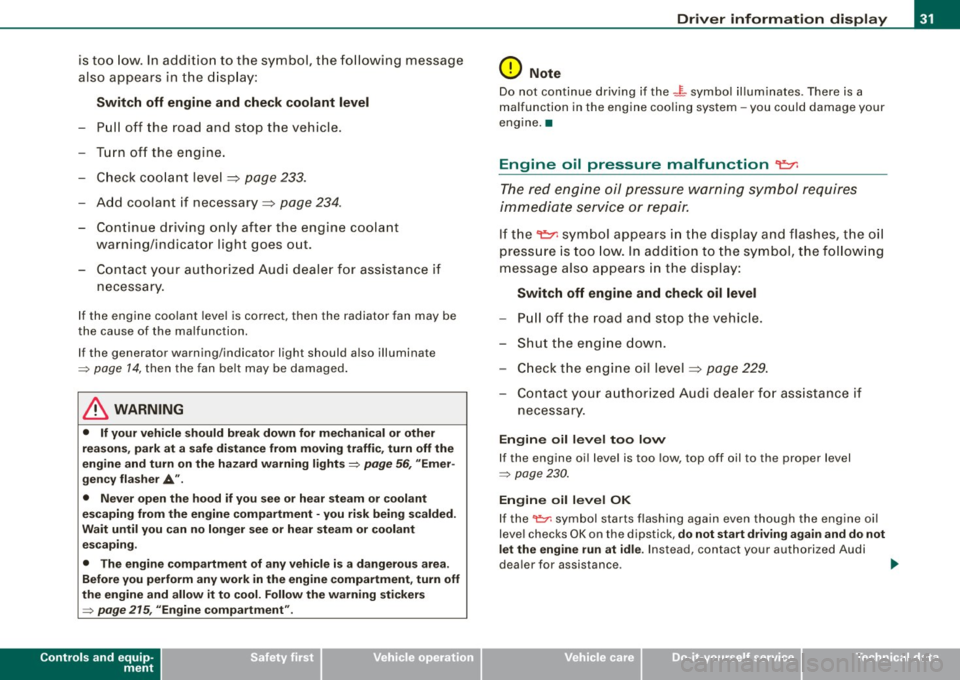
is too low. In addition to the symbol, the following message
also appears in the display:
Switch off engine and check coolant level
-Pull off the road and stop the vehicle.
- Turn off the engine.
- Check coolant level
=> page 233.
-Add coolant if necessary=> page 234 .
-Continue driving only after the engine coolant
warning/indicator light goes out.
- Contact your authorized Audi dealer for assistance if
necessary.
If the engine coolant level is correct, then the radiator fan may be
the cause of the malfunction.
If the generator warning/indicator light should also illuminate
=> page 14, then the fan belt may be damaged.
_& WARNING
• If your vehicle should break down for mechanical or other
reasons, park at a safe distance from moving traffic, turn off the
engine and turn on the hazard warning lights
=> page 56, "Emer
gency flasher A".
• Never open the hood if you see or hear steam or coolant
escaping from the engine compartment -you risk being scalded.
Wait until you can no longer see or hear steam or coolant escaping.
• The engine compartment of any vehicle is a dangerous area.
Before you perform any work in the engine compartment, turn off
the engine and allow it to cool. Follow the warning stickers
=> page 215, "Engine compartment".
Controls and equip
ment
Driver information display
0 Note
Do not continue driving if the -F-symbol illuminates . There is a
malfunction in the engine cooling system -you could damage your
engine. •
Engine oil pressure malfunction "I=:,:
The red engine oil pressure warning symbol requires
immediate service or repair.
If the 't::r. symbol appears in the display and flashes, the oil
pressure is too low. In addition to the symbol, the following
message also appears in the display:
Switch off engine and check oil level
-Pull off the road and stop the vehicle.
- Shut the engine down.
- Check the engine oil level=>
page 229.
-Contact your authorized Audi dealer for assistance if
necessary.
Engine oil level too low
If the engine oil level is too low, top off oil to the proper level
=> page 230.
Engine oil level OK
If the '1::7: symbol starts flashing again even though the engine oil
level checks OK on th e dipstick,
do not start driving again and do not
let the engine run at idle .
Instead, contact your authorized Audi
dealer for assistance . ..
I • •
Page 34 of 320
![AUDI S3 2010 User Guide Driver information display
[ i ] Tips
• The engine oil p re ss ure symbol 9:::r. is not an indicator for a low
engine oil level. Do not rely on it . In stead , check the oil lev](/img/6/57545/w960_57545-33.png "AUDI S3 2010 User Guide Driver information display
[ i ] Tips
• The engine oil p re ss ure symbol 9:::r. is not an indicator for a low
engine oil level. Do not rely on it . In stead , check the oil lev")
Driver information display
[ i ] Tips
• The engine oil p re ss ure symbol 9:::r. is not an indicator for a low
engine oil level. Do not rely on it . In stead , check the oil level in your
engine at regular interval s, preferably each time you refuel , and
alway s before going on a l ong trip.
• The yellow oil level warning indication · require s oil refill or
workshop service w ithout delay . Do not wait until the red oil pres
s ure warning symbol
9:::r. s tarts to flash before you respond to the
l ow oil level warning . By then , yo ur engine may already have
s uffered serious damage. •
Fuel supply too low f
When the symbol illuminates, t his mea ns there are about 2.6
gallons (10 liters) of fuel left in the fuel tank. Time to refuel!
~ page 279.
If the symbol lights up, even when there is ample fuel in the tank,
and the te xt
Tank system malfunction! Please contact workshop
appears in the disp lay, there is a fault in the syste m. Contact a qual
ified workshop to have the fault rectified .•
App lies t o vehic les: with engine sp eed lim itat ion
Engine speed limitation I
I Engine speed ma ximum XXXX RPM
The . symbo l illuminates when there is an engine control malfunc
t ion. T he ind icat or l ight
'IC in the instrument cluste r also il lum i
nates . T he engine speed is limited to the speed displayed in the
driver in for mation sys tem . Keep in mind tha t the engi ne s peed wi ll
not exceed the va lue d isplayed in the driver information system, for
exam ple when downshifting.
P lease go to an authorized Audi deale r or other qua lified workshop
to have the malfunction repaired. •
Applies to vehicles: with diese l engi ne and d iesel particu late filte r
Diesel particulate filter clogged
Particulate filter ! See owner's manual
If the indicator light in the instrument c luster comes on, the
diesel particulate fi lte r has become blocked with soot as the resul t
of constant short -distance driving . When the symbol illumi -
nates, you can alte r yo ur driving style to assist the filter self
clean ing process. Drive for app roxi mately 15 m inutes in 4th or 5th
gea r (automatic transmission with the selector lever in the S posi
t ion) at a minimum s peed of 37 mph (60 km/h) and an e ngine speed
of approximately 2 ,000 R PM . T he temperature increase that wil l
r esu lt from this ca n burn o ff the soot in the fil te r. The symbo l w ill
switc h off when the cleaning is successful.
I f the sy mbo l d oes not swi tch off, see you r aut hor ized deale r or
other qua lif ied workshop to have the prob lem correc ted .
As long as the indicator light remains on (diesel particulate filter
plugged), you can e xpect i ncreased fue l co nsu mption a nd possibly
a lso a loss of engine performance.
A message may a lso be displayed in the ins tru me nt cluste r
informing you or prompting necessary act ion .
For more information on the diese l particulate filter, refer to
~ page 797.
& WARNING
Always adapt your speed to the current weather, road and traffic
conditions. You should never disobey traffic laws in order to follow
driving recommendation s. •
Checking the engine oil level ~
· Ple ase add max. 1 qt of engine oil!
Page 36 of 320

Driver information display
Defective light bulb warning U
The defective light bulb warning tells you when a vehicle
light bulb has become defective.
If a defective bulb has been detected by the system or a light bulb
burns out, the symbol with a message appears in the display to
tell you which bulb is burnt out and where it is located. For example:
Rear left turn signal
After 5 seconds, the message disappears . If you want to recall the
message into the display, press the CHECK button=>
page 8, fig. 2
©-
There are three reasons why the defective bulb message would
appear in the display:
• The light bulb has burnt out=>
page 283.
• The fuse is "blown" => page 278, "Replacing a fuse".
• The wire connection to the light bulb is defective .
Have the bulb replaced or the connection repaired by your autho
rized Audi Service department.
& WARNING
• Light bulbs are pressurized and could explode while they are
being changed causing serious personal injury.
• Work with due care when handling the high-voltage section of
gas discharge (xenon) lamps. Failing to do so could result in death
or serious injury! •
Brake light defective " U'lf" (USA
models) / (Canada models)
In case of a malfunction or component failure, the symbol
(USA models)/ (Canada models) can appear . The following elec- trical components should be checked, repaired or replaced, as
necessary:
• Brake light bulbs
• All wiring connections
• Brake light switch
Contact your authorized Audi dealer for assistance if necessary.
[ i] Tips
The brake light switch is only inspected as part of the functional
check after the engine is started .•
A pplies to vehi cles : w it h a uto mati c he adl ights
Light /rain sensor defective _,
The indicator light indicates a defect in the automatic
headlights/automatic wiper system.
If the symbol illuminates, the light sensor has failed. For safety
reasons, the low beams are turned on permanently with the switch
in
AUTO. However, you can continue to turn the lights on and off
using the light switch . In the case of a defect in the rain sensor, the
windshield wiper lever functions are still available. Have the
light/rain sensor checked as soon as possible at an authorized Audi
dealer. •
Applies t o vehi cles: with Ad aptive Ligh t
Adaptive Light defective ~{)
C: Adaptive light defective
When this symbol J illuminates, it means that Adaptive Light is
defective. Go to a qualified workshop to have the headlights or the
control unit for the Adaptive Light repaired. •
Page 41 of 320
• Remote control feature=> page 37.
• Anti -theft alarm system => page 46.
All the doors and the rear lid are locked by the central locking
sys tem when you lock the veh icle.
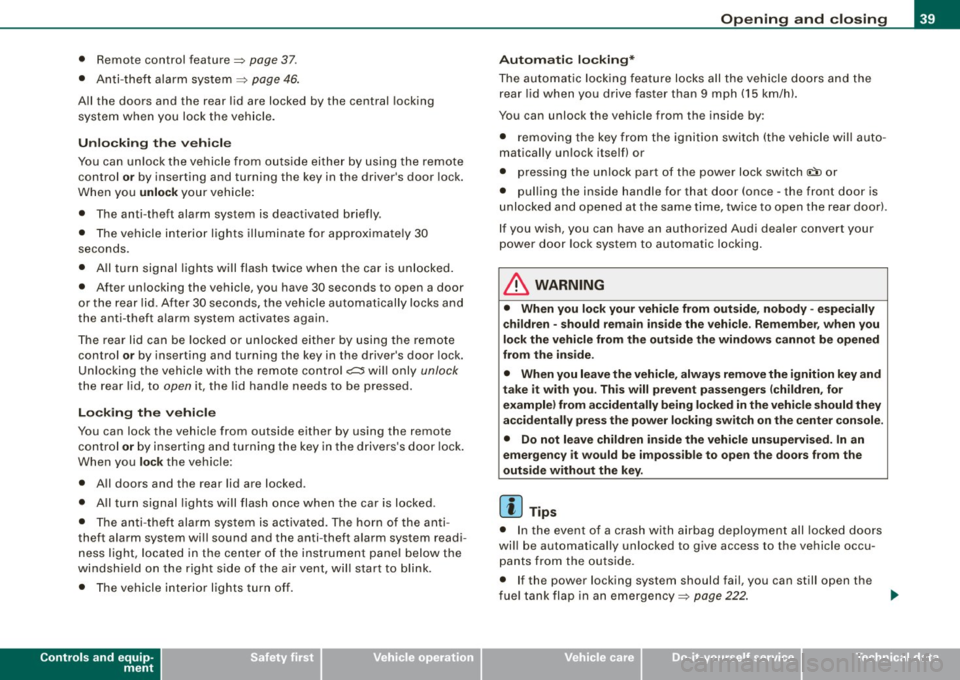
Unlo cking th e ve hicle
You can un lock the vehicle from outside either by using the remote
control
o r by inserting and turning the key in the driver's door lock.
When you
unlock your vehicle :
• The anti -theft alarm system is deactivated briefly .
• T he vehicle i nteri or lights illuminate fo r approxi mate ly 30
seconds .
• All tu rn signal lights will flash twice when t he car is unl ocked .
• After un locking the vehicle, you have 30 seconds to open a door
or the rear lid. After 30 seconds, t he vehicle automatically locks and
the anti-theft a larm system activates again.
The rear lid can be locked o r unlocked either by u sing the remote
control
or by inserting and turning the key in the driver's door lock.
Un loc king the vehicle with the remote control
c::::::::5 wi ll only unlock
the rear lid, to open it, the l id handle needs to be pressed.
Lo cking the vehi cle
You can lock the vehic le from outside either by using the remote
control
or by i nserting and tu rning the key in the drive rs's d oor l ock .
When you
lock the vehicle:
• All doors and the rear lid are locked .
• All turn signal lights w ill flash once when the car is locked .
• T he anti -theft alarm sys tem is activated. The horn of the anti
theft alarm system wi ll sound and the anti -theft alarm system readi
ness light, loca ted in the center of the instrument pane l below the
w indshie ld on the right side of the a ir vent, wil l start to b link.
• The ve hicle interior l ights tur n off .
Controls and equip
ment
Opening and clo sing
Automati c locking *
The a utoma tic locking feature l ocks all the vehicle do ors and t he
rear lid when you drive faster than 9 mph (15 km/h).
You can unlock the vehicle from the inside by :
• removi ng the key from the igniti on swi tch (the vehicle wil l a uto
matically un lock itself) or
• pressing the unlock part o f the power lock switch
l!:)) or
• pul ling the inside handle for that door (once -the front doo r is
unlocked and opened at the same time, twice to open the rear doo r).
I f you wish, you can have an authorized Audi dea ler convert your
p ower d oor lock system to auto matic l ocki ng .
& WARNING
• When you lock your vehicle from out side , nobody - especially
c hildren - should remain inside the vehi cle . Re member , when you
lock the vehicle from the out side the window s cannot be opened
from the inside .
• When you leave the vehicle , alway s remove the ignition key and
t a ke it with you . This will prevent passengers (children , for
example ) from accidentally being locked in the vehicle should they
accidentally press the po wer locking swit ch on the center c onsole .
• Do not leave children ins ide the vehicle unsupe rvised. In an
emergen cy it would be imposs ible to open the doors from the
out side without th e key.
[ i ] Tips
• I n the eve nt of a crash with airbag deployment all locked do ors
wi ll be automatically un locked to give access to the vehicle occu
p a nts from the outside.
• I f the power locking system should fail, you can still open the
f u el tank flap in an emergency =>
page 222 . ~
I • •
Page 42 of 320
Opening and closing
• You are well advised not to keep valuables inside an unattended
vehic le , visible or not . Even a properly locked vehicle cannot provide
the security of a safe! •
Unlocking and locking the vehicle with the
remote control
How the remote control works.
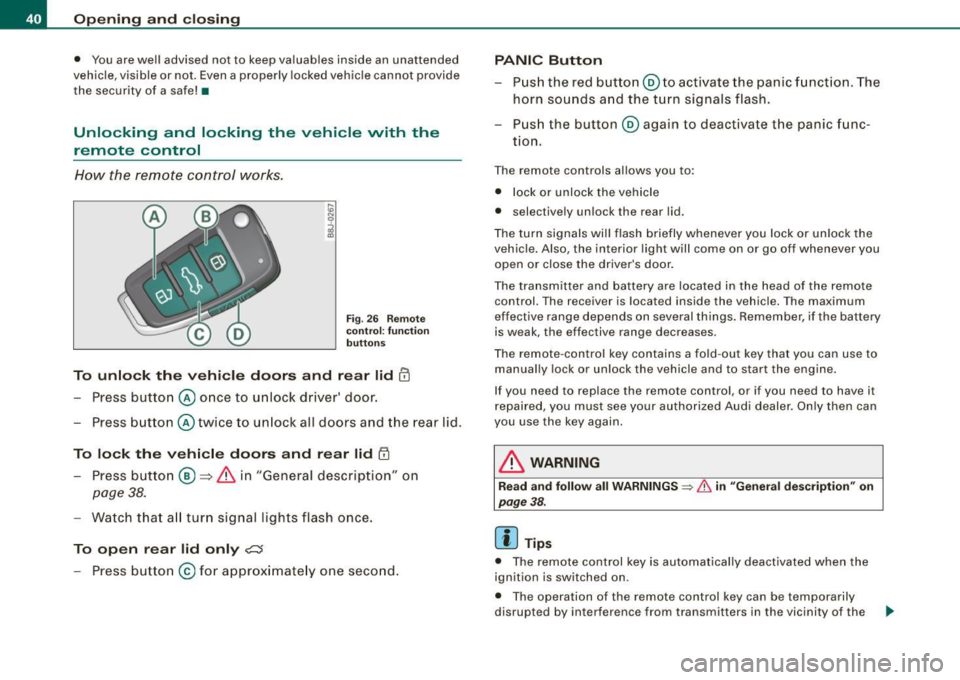
Fig. 2 6 R em ote
c on tro l: func tion
button s
To unlo ck the vehi cle doors and rear lid !TI
Press button @ once to unlock driver' door.
- Press button @ twice to un lock all doors and the rear lid .
To lock the vehi cle doors and rear lid l'.D
- Press butto n ® => & in "General descrip tion" on
page 38.
- Watch tha t all turn signal lights flash once.
To open rear lid only ?::$
- Press button @for approx imate ly one seco nd.
PANIC Button
- Pus h the red butto n@ to activate the panic f unct ion. The
horn sounds a nd the turn signals flash .
- Pus h the button ® aga in to deactivate the panic f unc-
tion.
T he remote controls al lows you to :
• l ock or unlock the vehicle
• se lective ly unlock the rear lid.
T he tu rn signa ls will flash briefly whenever yo u lock or un lock the
vehic le. Also , the interior light will come on or go off whenever you
open or close the driver's door.
The transmitter and battery are located in the head of the remo te
control. The receiver is located inside the vehicle. The maximum
effective ra nge depends on several things. R emember, if the battery
is weak, the effective rang e decreases .
T he rem ote -contr ol key con tains a fo ld -ou t key tha t you can use to
manually lock or unlock the vehicle and to s tart the engine.
I f you need to replace the remote contro l, or if you need to have it
r epaired, you must see your authori zed Audi dealer. On ly then can
you use the key again.
& WARNING
Read and follow all WARNINGS => & in "Genera l description " on
page
38.
[ i ] Tips
• The remote control key is automa tically deactivated when the
ignition is switched on .
• Th e opera tion of the remote control key can be temporarily
disrupted by interference from transmitters in the vicinity of the .,.
Page 43 of 320
vehicle working in the same frequency range (e.g. a cell phone, radio equipment).
• In order to make sure the locking function is working, you should
always keep your eye on the vehicle to make sure it is properly
locked .
• Do not use the remote control if you are inside the car, otherwise
you may unintentionally lock the vehicle , and then you would set off
the anti-theft alarm when you try open a door . In case this happens
anyhow, push the unlock bu tton
0 .
• Use the panic function only if you are in an emergency
situation. •
Resetting the remote control
The remote control must be reset if the vehicle does not
unlock.
-Press the unlock button III on the remote control.
- Manually unlock the driver's door lock with the mechan-
ical key within 30 seconds.
- Press either the lock-
!Ti or the unlock CD button to
complete the reset sequence. •
Contro ls and eq uip
ment
Opening and closing
Doors, power locks
Operating the locks vvith the fold-out key
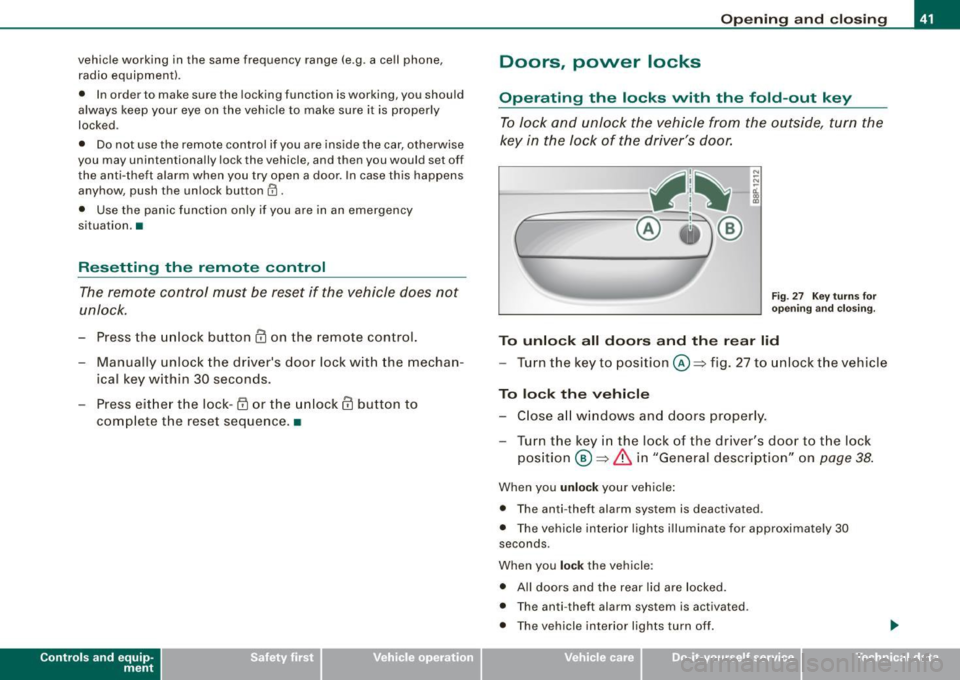
To lock and unlock the vehicle from the outside, turn the
key in the lock of the driver's door.
N
-N
-a:. gi
Fig. 27 Key turns for
opening and closing.
To unlock all doors and the rear lid
-Turn the key to position©=> fig. 27 to unlock the vehicle
To lock the vehicle
-Close all windows and doors properly.
- Turn the key in the lock of the driver's door to the lock
position
® => & in "General description" on page 38.
When you unlock your vehicle:
• The anti- theft alarm system is deactivated .
• The vehicle interior lights illuminate for approximately 30
seconds .
When you
lock the vehicle:
• All doors and the rear lid are locked .
• The anti -theft alarm system is activated .
• The vehicle interior lights turn off.
Vehicle care I I irechnical data
Page 55 of 320

Clear vision
Lights
Switching the headlights on and off ·'t!-·
"' ~ a'.. a,
"'
Fig. 46 In strument
pane l: lig ht switch
Fi g. 47 Instrument
pane l: Light swi tch
with dayti me running
ligh ts (DR L)
The light switch must not be overturned past the stops in
either direc tion.
Switching on automatic headlight control*
- Tur n the lig ht swi tch to AUTO* :::> fig. 46.
Con tro ls and eq uip
ment
Clear vision
Switching on the side marker lights
- Tur n t he lig ht sw itch to ~oo~ .
Switching on the headlights and high beam
-Turn the light sw itch to ;:o.
P ush th e high b eam lev er fo rward t owards th e ins tru
ment pan el
=:> page 57.
Switching off the lights
- Turn t he ligh t switch to 0.
The head lights on ly work when the ignition is switched on. While
sta rting the engine or whe n switching off the igniti on, the head
lights wil l go off and only the side marker lights wil l be on.
Daytime running lights (DRL ) (USA models )
The daytime running lights can be turned on or off using this func
t ion . If the f unc tion is ac tive, the dayt ime running lights a re tu rned
on automatically when the ignition is switched on.
The daytime runn ing lights are activated
only w hen the light switch
i s at the
AUTO* or DRL * positi on.
Daytime running lights (Canada models only )
The daytime running lights are activated only when the light switch
~ fig. 46 is either at the O or the ;oo: position. When the ignition is
switched on, there is a difference betwe en v ehicles with b i-xenon
lights and halogen lamps:
• On vehicles with bi-xe non lights only the daytime runni ng lamps
in the headlights will come on .
• On ve hic les with halogen lights the fron t fog lights, s ide marker
lights and tail lights come on automatically
~
Vehicle care I I irechnical data