lights AUDI S3 2010 Owner's Manual
[x] Cancel search | Manufacturer: AUDI, Model Year: 2010, Model line: S3, Model: AUDI S3 2010Pages: 320, PDF Size: 75.34 MB
Page 56 of 320

Clear vision
The daytime running lights function cannot be turned off .
Automatic headlight control *
In the switch position AUTO the automatic he adlight contro l is
turned on . The low beams are turned o n automatically through a
light sensor as soon as ambient brightness (e .g. when driving into a
t unnel) falls below a value preset at the factory. When ambien t
brightness increases again, the low beams are turned off again
aut omatically ==>&, .
In the
AUTO position the low beams are switched off automatically
when the ignition is turned off.
Light S ensor M alfun ction *
In the even t of a light sensor malfunct ion, the driver is notified in the
instrument cluster display :
Automatic headlights /automati c w ipers defe ctive
For safety reasons the low beams are turned o n permanently w ith
the switch in AUTO *. However , you can continue to turn the lights
on and off us ing the l ight switch . Have the lig ht sens or checked as
soon as possib le at a dealership .
Coming home /leaving home function *
The function is switched on when the switch is in the AUTO* posi
tion and the f unction is shown as ac tive in t he d river info rmat ion
system .
The
c oming home function illuminates the area around the vehicle
when the ignition is switched off a nd the driver's door is opened.
The length of time the lights remain on can be set in the menu
display
(Illumination > Exterior lights > coming home ).
The leaving home function illuminates the area around the vehicle
whe n unlocking it .
& WARNING
• Nev er use daytime run ning light s to see whe re you are going .
They are not bright enough and will not let you see far enough
ahead for safety , espe cially at du sk or when it i s da rk . Al way s
s w itch on the low beam s at du sk or when it i s dark .
• Automatic headlight s are only intended to assist the driver .
They do not relieve the driver of hi s responsibility to check the
head light s and to turn them on manually according to the cu rrent
light and visibility conditions . For example , fog and rain cannot be
detected b y the l ight sen sor s. S o alwa ys switch on th e headl ight s
under these weather conditions and when driving in the dark
io.
• Cra she s c an happen when you cannot see the road ahead and
when you cannot be seen by other motor ists.
- Alway s turn on the hea dlight s so that you can see ahead a nd
so that other s can see your car from the ba ck.
[ i ] Tips
• With the swi tch in AUTO front fog ligh ts cannot be turned on in
addition.
• The light sensor for head light contr ol is located in the rear view
mirror mount. Do not apply any stickers to the windshie ld in this
area to p revent malfunctions or failures.
• Some exterior lighting functions can be adjusted in the driver
informa tion system
==> page 23.
• I f you remove the ignition from the ignition lock while the head
l ights are still on, a bu zzer w ill sound as long as the driver's door is
open to remind you to turn off the lights.
• Always observe t he specific local regulations for your area as to
when to use your lights.
• With automatic headl ights, the high -beam function is also avai l
able, but with one restriction : If you have not switched the high
bea ms back to low beams duri ng automatic headlight operation (for
example , after driving through a tunne l), on ly the low beams come .,,_
Page 57 of 320

on the next time automatic headlights are switched on. To use the
high beams, you first have to pull the high beam lever back and then
push the lever forward again.
• In cool or damp weather, the inside of the headlights, turn
signals and tail lights can fog over due to the temperature differ
ence between the inside and outside. They will clear shortly after
switching them on. This does not affect the service life of the
lighting.
• Frequent use of the coming home/leaving home function for
approaching and departing a vehicle parked in the dark will strain
the battery . This applies particularly if only short distances are
driven between stops. Occasionally drive longer distances to make
sure the battery is recharged sufficiently. •
Applies to vehicles: with Adap tive Light
Adaptive light
When driving around bends, the relevant area of the road
is better illuminated.
Fig. 48 Adaptive light
when driving
The benefit of adaptive light is that the curve and the edge of the
road are better illuminated::::} fig . 48 . The adaptive light is controlled
automatically, depending on vehicle speed and steering wheel
angle.
Con tro ls and eq uip
ment
Clear vision
When driving around bends, the headlights are controlled
according to steering wheel angle. So that there is no black area
ahead of the vehicle, the two main beams pivot at different angles .
[ i] Tips
The system works above a speed of about 6 mph (10 km/hl. •
Front fog lights !O
Use the light switch to turn on the front fog lights.
Fig. 49 Fog light acti
vation: light switch
position on vehicles
WITHOUT sensor light
Switching on the front fog lights !D
Do not turn the light switch ·'ti-·~ fig. 49 toward the fog
light symbol
Turn the light switch to
~oo: or to io.
Pull the light switch to the first stop G).
When the front fog lights are on, the symbol }O next to the light
switch will illuminate.•
Vehicle care I I Technical data
Page 58 of 320
Clear vision
Instrument panel illumination
The ill umination of the instrumen ts, dis plays an d the
center cons ole c an be adjusted .
"' ;
a'.. ., m
Fig. 50 In stru men t
pan el illumi nat ion
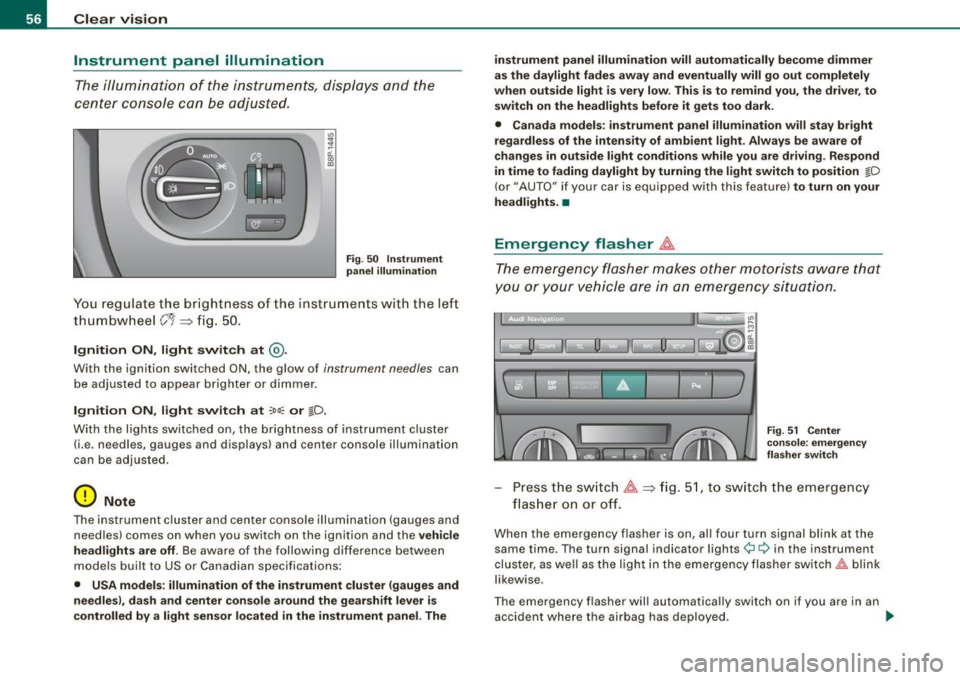
You re gul ate the br ight ness o f the ins tru ments wit h the lef t
th um bw heel
C'1 => fi g. 50 .
Ignition ON , light switch at @ .
With the ignition switched ON, the g low of instrument needles can
be adjuste d to a ppear brigh ter or dimmer .
Ignition ON , light switch at ~oo : or tD.
With the l ights switched o n, the brightness of instrument c luster
(i.e . ne edles, gauges and displays) and center console il lumination
can be adjusted.
0 Note
The instrument cl uster and cente r console illumination (gauges and
needles) comes on when you switch on the ignition and the
v ehi cle
headlights are off.
Be aware of the f ollowi ng differe nce betwee n
models built to US or Canadian specifications :
• USA model s: illumination of the instrument cluster (gauges and
needles ), dash and center console around the gearshift leve r is
contr olled by a light sensor l ocated in the instrument panel. The i
nstrument panel illumination will autom ati cally be come dimmer
as the daylight fades away and eventually will go out completely
when out side light i s very low . Thi s is to rem ind you , the dri ver , to
sw itch on the headlights before it gets too dark.
• Canada models : in strument panel illumin ation will sta y bri ght
regardle ss of the inten sity of amb ient light . Alway s be aware of
c hange s in outside light conditions while you are d riving . Re spond
in time to fading dayl ight by turning the light switch to position
tD
(or" AUTO" if your car is equipped with this feature) to turn on your
he adl ights. •
Emergency flasher ~
The emergency flasher makes other motorists aware that
you or your vehicle are in an emergency situation.
1 1 0. -II 0 Ii i
11
u
I ] '
' F ig . 51 Center
c o ns ole : em erge ncy
fla sher swit ch
Pr ess th e sw itch ~=>fig. 51, to sw itch the em ergency
flas her on or off.
When the eme rgency flasher is on, al l four turn sig nal blink at the
same time . The turn signal indicator lights
¢i ¢ in the instrument
clu ster, as well as the light in the emergency flasher switch~ blink
likewise .
The emergency flasher will automatically switch on if you are in an accident where the airbag has deployed . _,,.
Page 59 of 320

[ i J Ti ps
You should switch on the emergency flasher when:
• you are the last vehicle standing in a traffic jam so that any other
vehicles coming can see you, or when
• your vehicle has broken down or you are in an emergency s itua
tion, or when
• your vehicle is being towed by a tow truck or if you are towing
another vehicle behind you .•
Turn signals -¢ ¢ and high beam ~D lever
The lever on the left side of the steering column is used to
operate the turn signals and the high beam as well as the
headlight flasher .
-"' M
-w ... m
Fig. 52 Tu rn sign al and
hig h beam l ever
The turn signal and high beam lever has the following func
tions:
Turn sign als
¢ ¢
- Lift the lever up all the way:::::, fig. 52 G), to use the right
turn s ignals, or push the lever down all the way@ to use
the left turn signals.
Con tro ls and eq uip
ment
C lea r v is ion
Auto-blink
- Move the lever (up or down) just to the point of resis
tance to use the turn signals for as long as you need
them, for example when changing lanes .
- Briefly move the lever up or down just to the point of resistance and then release it to flash the turn signals
three times in succession. This feature allows to indicate
lane changes clearly and with minimum effort when
driving on highways.
Hi gh b eam
~D
- Push the lever forward 0 to switc h on the high beam.
- P ull the lever back towards y ou to sw itch off the high
beam.
H eadlight flasher
~D
Pu ll the lever toward the steering wheel G) to use the
headlight flasher .
Note s on these features
• The turn signals only work with the ignition switched on. The
indicator lights
¢i or ¢ in the instrument cluster:::::, page 11 also
blink .
• After you have turned a corner, the turn signal switches off auto
matically.
• The high beam works only when the headlights are on . The indi
cator light ~Din the instrument cluster illuminates when the high
beams are on.
• The headlight flasher works only as long as you hold the lever -
even if there are no lights switched on. The indicator light ~D in the
instrument cluster illuminates when you use the headlight flasher . .,
Vehicle care I I Technical data
Page 60 of 320

Clear vision
0 Note
Do not use the high beam or headlight flasher if you know that these
could be blinding oncoming traffic. •
Interior lights
Interior lights and glove compartment light
The interior lights include the both reading lights for the
driver and the front passenger.
Fig. 53 Control panel
above windshield : inte
rior light switches
Light switch => fig. 53 has the following functions:
Door contact activation
-Move the sw itch to the center position. The forward
dome light is turned on/off by the contact switches on
any of the doors .
Forward dome light on
-Move the switch to position I. The forward dome light
goes on and stays on regardless of door position.
Forward dome light off
- Move the sw itch to position 0 . The light w ill not go on
regardless of door position.
Glove compartment light
-Open the glove compartment -the light in the glove
compartment automatically illuminates as long as the
side marker lights or headlights are on. When you close
the glove compartment, the light goes off .
With the interior light switch at the door contact (center) position,
the forward dome light illuminates whenever you unlock the vehicle or op en a door . The dome light goes out after approximately 30
seconds after you have closed the door. Likewise , when you lock
your vehicl e or switch on the ignition, th e dome light goes out .
If you leave a door open, the dome light will go out after ten minutes
to conserve battery charge.
A dimmer automatically controls the brightn ess of th e lights when
they are switched on. •
Page 61 of 320

Applies to vehi cle s: wi th lig ht pac kag e
Interior lights and forward reading lights
The interior lights include the both reading lights for the
driver and the front passenger.
!: ........ : .. : ..... : ... ..... .......... ... : ... :. ~ .... ...... ............. ............. .......... =
® ;i~!;J';i~L '!
~ [;] ) B
• •
Fig . 54 Control panel
above windshield : inte·
rior light switches
Light switch @~ page 58, fig. 53 has the following func
tions:
Door contact activation
- Move the switch to the center position. The forward
dome light is turned on/off by the contact switches on
any of the doors.
Forward dome light on
-Move the switch to position I. The forward dome light
goes on and stays on regardless of door position.
Forward dome light off
- Move the switch to position 0. The light will not go on
regardless of door position.
Con tro ls and eq uip
ment
Clear vision
Forward reading lights
~
- Press the left or right switch ® to switch the left or right
forward reading light on or off.
Glove compartment light
Open the glove compartment -the light in the glove
compartment automatically illuminates as long as the
side marker lights or headlights are on. When you close
the glove compartment, the light goes off.
With the interior light switch at the door contact (center) position,
the forward dome light illuminates whenever you unlock the vehicle or open a door . The dome light goes out after approximately 30
seconds after you have closed the door. Likewise, when you lock
your vehicle or switch on the ignition , the dome light goes out.
If you leave a door open, the dome light will go out after ten minutes
to conserve battery charge.
A dimmer automatically controls the brightness of the lights when
they are switched on. •
Vehicle care I I irechnical data
Page 62 of 320
Clear vision
App lies to veh icles: w ith light pac kage
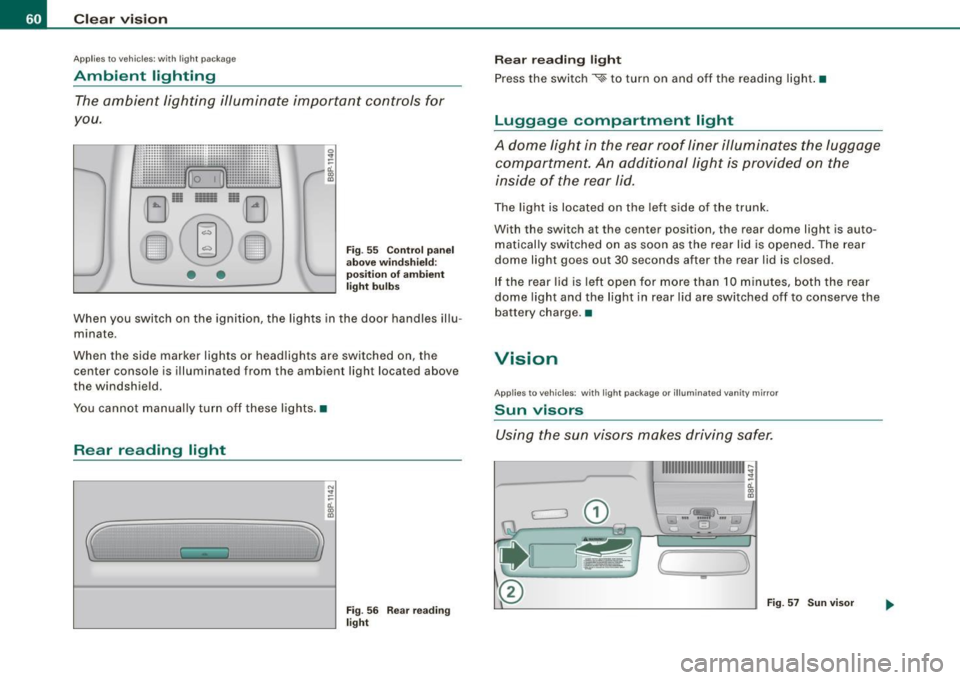
Ambient lighting
The ambient lighting illuminate important controls for
you .
...................... .............. : .... -:--:-,,. .. ""· ,--.----,
:: ... ,.:: ....... ,; .. ,:· .......... : .. :........ . ~
· 1mrnii rnJ B '1mirnirnii : · i
E]1~ 1~ e§r]
EJ(~ EID
• •
Fig. 55 Control panel
above windshield:
position of ambient
light bulbs
When you switch on the ignition, the lights in the door handles illu
m inate .
When the side marker ligh ts or headlight s ar e switched on, th e
center console is illuminated from the ambient light located above
th e windshi eld.
You cannot manually turn off these lights. •
Rear reading light
..
N
"' ::: ti..
~
Fig. 56 Rear reading
light
Rear reading light
Press the switch
~ to turn on and off the reading light. •
Luggage compartment light
A dome light in the rear roof liner illuminates the luggage
compartment. An additional light is provided on the
inside of the rear lid.
The light is located on the left side of the trunk.
With th e switch a t the ce nter pos ition , th e rear dome ligh t is auto
matically switched on as soon as the rear lid is opened. The rear
dome light goes out 30 s econds after th e rear lid is clos ed .
If the rear lid is left open for more than 10 minutes, both the rear
dome light and the light in rear lid are switched off to conserve the
batt ery charg e.•
Vision
Applies to vehic le s : w ith ligh t pa cka ge or illum inated van ity mirror
Sun visors
Using the sun visors makes driving safer.
{
-
)
Fig . 57 Sun visor
Page 65 of 320

The rain sensor wiper intervals depend on the sensitivity setting as
well as vehicle speed . During brief stops, wiper motion will adjust in
re lation to the amount of rain on the windshield.
Automatic wiper/washer : To eliminate water drop lets, the wind
sh ield wiper perfor ms one afterwipe operation a fter several
seconds while driving. You can switch this function off by moving
the lever to pos it ion © within 10 seconds of the afterw ipe opera
tion. The afterwipe func tion is reactivated the next time the ignition
is sw itch.
When the ignition is turned on , the washer jets are heated *.
& WARNING
• Wiper bl ade s are cru cial for safe driving! Only when they are in
good condition are they able to clear the windows properly to
provide un comp romised visibility . Worn or damaged wipe r blade s
are a safety hazard::::;,
page 65, "Replacing front wiper blade s"!
• The light /ra in se ns or* is only de signed to a ssis t and suppo rt
the driver. It remain s entirely the driver' s re spon sibility to monitor
outsi de w eather conditions and to manually a cti vate the wiper s as
soon a s rain or drizzle reduces vi sibility through the windshield .
• The windshield mu st not be treated with water -repellent m ate
rial s. They can in crea se glare under poor v isib ility condition s such
as wetne ss , dar kne ss, or when the sun is lo w on the horizon . In
addition , they can cau se the windshield wipers to chatter .
0 Note
In freezing or near freezing conditions:
• Always check that the wiper blades are not frozen to the glass
bef ore you turn the wipe rs on . Loosen a wiper blade which is frozen
in p lace before operating the wipers to prevent damage to the wiper
b lade or the wiper moto r.
• Do not use the wipers to clear a frosted window . Using the
wipe rs as a convenient ice scrape r will destr oy t he wipe r blades .
Controls and equip
ment
Cl ea r vision
• Before you take your vehicle to an automatic car wash, make sure
you have the w indshield wiper system switched off (lever in p ositi on
OJ, otherwise the windshield wiper system could get damaged in the
car wash if it should suddenly come on .
[ i ] Tips
• The windshie ld wipers are switched off when the ignition is
turned off . Activate the windshield wipers after the ign ition is
switched back on by moving the windshield wiper lever to any posi
tion.
• Wor n or dirty windshield wiper b lades cause smea ring, which
can affect the opera tion of the l ight/rain sensor*. Check the cond i
tion of your windshield wiper blades regula rly.
• The rain sensor is part of the interva l wiping system . T urning off
the ignition will also deactivate the rain sensor . To reac tivate the
sensor, switch off the interval w iping funct ion, then sw itc h it back
on again .
• App lies to vehicles with light/ rain sensor : When the wipers are
swi tched on manually and in ra in conditions, the automatic head
lights* turn on::::;,
page 53, "Switching the headlights on and off ·'A ·"
or off during the day when the wipers are no longer operating. The
automatic headl ights* function is ava ilable in this case only whe n
the light switch is in the "AUTO" position::::;,
page 53, fig. 46 .
• Make sure the washer fluid reservo ir in the engine compart ment
is topped off before going on a long trip . Look up::::;,
page 240 for
check ing and filling the washer conta iner.
• The wipers only o perate with the hood comp lete ly closed .•
I • •
Page 70 of 320

Clear vision
Disabling auto dimming
-Press b utto n © => page 6 7, fig. 66 briefly, -th e gr ee n
i nd ica to r li ght @ goes out .
Activating/reactivating auto dimming
Press butto n© br iefly, -the gr een in dicator l ight®
goes on.
Automatic dimming function
The au tomat ic dim ming f uncti on is act iva ted every tim e th e ignit ion
i s tur ned on . The green indi cator light is lit to i ndicate auto dimming
i s ac tive.
When d immin g is activat ed, the inside m irror will darken automati
cally in re spo nse to th e am ount of li ght striki ng the m irror (suc h as
headlights from rearward approachin g vehicles). Even in dimm ing
mod e, the m irror su rface turns br ig ht whe n :
• the interior lig ht is swi tc he d on
• r eve rse gea r is en gage d.
& WARNING
Broken glass of automatic dimming mirror can cause electrolyte
fluid leakage . Electrolyte fluid can irritate skin , eyes , and respira
tory system .
• Repeated or prolonged exposure to electrolyte can cause irrita
tion to the respiratory system, especially among people with asthma or other respiratory conditions . Get fresh air immediately
by leaving the vehicle or , if that is not possible, open windows and
doors all the way.
• If electrolyte gets into the eyes , flush them thoroughly with
large amounts of clean water for at least 15 minutes; medical
attention is recommended .
• If electrolyte contacts skin, flush affected area with clean water
for at least 15 minutes and then wash affected area with soap and
& WARNING (continued)
water; medical attention is recommended . Thoroughly wash
affected clothing and shoes before reuse .
• If swallowed and person is conscious , rinse mouth with water
for at least 15 minutes . Do not induce vomiting unless instructed
to do so by med ical professional. Get medical attention immedi
ately.
0 Note
Liq uid ele ctro lyte leak ed fro m a broke n mirror g lass will d am ag e any
plastic surfaces i t com es in contact with. Clean up sp ill e d e lectroly te
im med iately wi th cle ar w ater and a spo nge.
[ i ] Tips
• If you switch off the automatic dimming function on the inside
mirror, automatic dimming of the outside mirrors will likewise be
disabled .
• Check to make sur e there are no ob jects preventin g light from
r ea ch in g th e insi de mirr or.
• Do not attach any stickers to the windshield in front of the light
s en sor , as this wou ld interfer e w ith th e aut om atic operatio n of t he
headlights and the automatic d imming of the insid e mirror.
• B e aware th at automa tic d imming of the in side mi rror ca n only
operate pro perly if the rea r w indow sun blind* is retracted. •
Page 71 of 320

Outside mirrors
The outside mirrors a re electrically adjuste d (power
mirrors)
Adjusting the outside mirrors
l8 ::: ci. ., m
Fig . 67 Forwa rd
s e ctio n of dri ver 's
a rm re st : po wer m irr or
c ontrol s
Turn the adjust ing knob to=> fig. 67 © (driver 's side
outside m irror) to @ (front passenger's outside mirror) .
- Press the knob in the appropr iate direction to move the
mirror surface so that you have a good view to the rear.
Heat ed mirrors*
- T urn t he ro tary kno b to @ .
Folding both exterior mirrors*
- Rotate the knob to position @.
Depending on outside tempera ture and v ehic le speed, the mirror
surfaces are heated until the ignition is swi tched off -even if the
ro tary knob is no longer in position @.
Yo u are well -advised to fold * the outside mi rrors in when maneu
vering in tight spaces or when leaving the car parked c lose to other
vehic les .
Con tro ls and eq uip
ment
Clear vision
0 Note
• Curved mirro r surfaces (convex or spherica l* ) increase your fie ld
of view. Remember that vehicles or other objects will appear smaller
and far ther away than when seen in a flat mirror. If you use th is
mirror to estimate distances of fo llowing vehic les when changing
lanes, you cou ld estimate incorrectly and cause an accident .
[ i ] Tips
If the re shoul d be a malfunctio n in the electrical system, yo u ca n
still adjust the outside mirrors by pressing the edge of the mirror .•
Ap plies to vehi cles: with automa tic dim m in g for ou tsi de m irro rs
Automatic dimming for outside mirrors
The outside mirr ors are dimmed t ogether wi th the automatic
dimming of the inside mirror. When the ignition is switched on , the
mir ro rs darken automat ically depending on the light s triking the m
(e.g . headlights from the rear) .
When the interior lighting is switched on and when reverse gear is engaged, the mir rors are switched back to their o riginal b rightness
(not dimmed).
& WARNING
Broken glass of automati c dimming mirror can cause electrolyte
fluid leakage . Electrolyte fluid c an irritate skin , eyes , and respi ra
tory system .
• Repeated or prolonged e xpo sure to elect ro lyte can c au se irrita
tion to the respiratory system , e spe cially among people with
asthma or o ther re spiratory condition s. Get fresh air immediately
b y le aving the vehi cle or , if that i s not possibl e, open windows and
doors all the way . .,
Vehicle care I I Technical data