engine AUDI S3 2010 Owner's Manual
[x] Cancel search | Manufacturer: AUDI, Model Year: 2010, Model line: S3, Model: AUDI S3 2010Pages: 320, PDF Size: 75.34 MB
Page 34 of 320
![AUDI S3 2010 Owners Manual Driver information display
[ i ] Tips
• The engine oil p re ss ure symbol 9:::r. is not an indicator for a low
engine oil level. Do not rely on it . In stead , check the oil lev](/img/6/57545/w960_57545-33.png "AUDI S3 2010 Owners Manual Driver information display
[ i ] Tips
• The engine oil p re ss ure symbol 9:::r. is not an indicator for a low
engine oil level. Do not rely on it . In stead , check the oil lev")
Driver information display
[ i ] Tips
• The engine oil p re ss ure symbol 9:::r. is not an indicator for a low
engine oil level. Do not rely on it . In stead , check the oil level in your
engine at regular interval s, preferably each time you refuel , and
alway s before going on a l ong trip.
• The yellow oil level warning indication · require s oil refill or
workshop service w ithout delay . Do not wait until the red oil pres
s ure warning symbol
9:::r. s tarts to flash before you respond to the
l ow oil level warning . By then , yo ur engine may already have
s uffered serious damage. •
Fuel supply too low f
When the symbol illuminates, t his mea ns there are about 2.6
gallons (10 liters) of fuel left in the fuel tank. Time to refuel!
~ page 279.
If the symbol lights up, even when there is ample fuel in the tank,
and the te xt
Tank system malfunction! Please contact workshop
appears in the disp lay, there is a fault in the syste m. Contact a qual
ified workshop to have the fault rectified .•
App lies t o vehic les: with engine sp eed lim itat ion
Engine speed limitation I
I Engine speed ma ximum XXXX RPM
The . symbo l illuminates when there is an engine control malfunc
t ion. T he ind icat or l ight
'IC in the instrument cluste r also il lum i
nates . T he engine speed is limited to the speed displayed in the
driver in for mation sys tem . Keep in mind tha t the engi ne s peed wi ll
not exceed the va lue d isplayed in the driver information system, for
exam ple when downshifting.
P lease go to an authorized Audi deale r or other qua lified workshop
to have the malfunction repaired. •
Applies to vehicles: with diese l engi ne and d iesel particu late filte r
Diesel particulate filter clogged
Particulate filter ! See owner's manual
If the indicator light in the instrument c luster comes on, the
diesel particulate fi lte r has become blocked with soot as the resul t
of constant short -distance driving . When the symbol illumi -
nates, you can alte r yo ur driving style to assist the filter self
clean ing process. Drive for app roxi mately 15 m inutes in 4th or 5th
gea r (automatic transmission with the selector lever in the S posi
t ion) at a minimum s peed of 37 mph (60 km/h) and an e ngine speed
of approximately 2 ,000 R PM . T he temperature increase that wil l
r esu lt from this ca n burn o ff the soot in the fil te r. The symbo l w ill
switc h off when the cleaning is successful.
I f the sy mbo l d oes not swi tch off, see you r aut hor ized deale r or
other qua lif ied workshop to have the prob lem correc ted .
As long as the indicator light remains on (diesel particulate filter
plugged), you can e xpect i ncreased fue l co nsu mption a nd possibly
a lso a loss of engine performance.
A message may a lso be displayed in the ins tru me nt cluste r
informing you or prompting necessary act ion .
For more information on the diese l particulate filter, refer to
~ page 797.
& WARNING
Always adapt your speed to the current weather, road and traffic
conditions. You should never disobey traffic laws in order to follow
driving recommendation s. •
Checking the engine oil level ~
· Ple ase add max. 1 qt of engine oil!
Page 35 of 320

If the '-" symbol comes on, add 1 quart (1 liter) of oil at the next
opportunity =>
page 230. •
Checking the engine oil level r.,
When the symbol illuminates, check the engine oil level as soon
as possible=>
page 229. Top off the oil at your earliest opportunity
=>
page 230. •
Engine oil sensor defective -;...
If the symbol illuminates, contact your authorized Audi dealer
and have the oil sensor inspected.•
Worn brake pads ~ :;
rt. Brake pads!
If the warning light illuminates, immediately contact your autho
rized Audi dealer or qualified workshop to have all brake pads
inspected. On USA models the warning light? comes on together
with the warning light
BRAKE. Both sets of brake pads on an axle must
always be replaced at the same time.
& WARNING
Driving with bad brakes can cause a collision and serious personal
injury.
• If the warning light and the warning light
BRAKE11 with the
message Brake pads! comes on in the instrument cluster display,
immediately contact your authorized Audi dealer or qualified
workshop to have all brake pads checked or replaced if
necessary. •
11 BRAKE : USA models only
Controls and equip
ment
Speed warning
models) 1
· ,I'""'
Driver information display
(USA models> IP (Canada
If the ~ symbol illuminates, this means you are driving faster than
the set vehicle speed. Slow down!=>
page 26. •
Speed warning 2 r (USA models) /,.__, (Canada
models)
If the C) symbol illuminates, this means you have driven faster than
the second set vehicle speed. Slow down! =>
page 26. •
Applies to veh icles : wi th dynamic head light range ad justment
Headlight range control defective
If the illuminates, the dynamic headlight range control is no
longer working properly. Have the system checked and repaired at
your authorized Audi dealer. •
Windshield washer fluid level too low .-_j
If the ~ symbol illuminates, add windshield washer fluid to the
washer system =>
page 240. •
Battery voltage low ~
If the C symbol illuminates, contact your authorized Audi dealer
and have the following components inspected:
• drive belt
• battery charge
Also see if the generator warning/indicator light illuminates
=>
page 14. •
I • •
Page 36 of 320

Driver information display
Defective light bulb warning U
The defective light bulb warning tells you when a vehicle
light bulb has become defective.
If a defective bulb has been detected by the system or a light bulb
burns out, the symbol with a message appears in the display to
tell you which bulb is burnt out and where it is located. For example:
Rear left turn signal
After 5 seconds, the message disappears . If you want to recall the
message into the display, press the CHECK button=>
page 8, fig. 2
©-
There are three reasons why the defective bulb message would
appear in the display:
• The light bulb has burnt out=>
page 283.
• The fuse is "blown" => page 278, "Replacing a fuse".
• The wire connection to the light bulb is defective .
Have the bulb replaced or the connection repaired by your autho
rized Audi Service department.
& WARNING
• Light bulbs are pressurized and could explode while they are
being changed causing serious personal injury.
• Work with due care when handling the high-voltage section of
gas discharge (xenon) lamps. Failing to do so could result in death
or serious injury! •
Brake light defective " U'lf" (USA
models) / (Canada models)
In case of a malfunction or component failure, the symbol
(USA models)/ (Canada models) can appear . The following elec- trical components should be checked, repaired or replaced, as
necessary:
• Brake light bulbs
• All wiring connections
• Brake light switch
Contact your authorized Audi dealer for assistance if necessary.
[ i] Tips
The brake light switch is only inspected as part of the functional
check after the engine is started .•
A pplies to vehi cles : w it h a uto mati c he adl ights
Light /rain sensor defective _,
The indicator light indicates a defect in the automatic
headlights/automatic wiper system.
If the symbol illuminates, the light sensor has failed. For safety
reasons, the low beams are turned on permanently with the switch
in
AUTO. However, you can continue to turn the lights on and off
using the light switch . In the case of a defect in the rain sensor, the
windshield wiper lever functions are still available. Have the
light/rain sensor checked as soon as possible at an authorized Audi
dealer. •
Applies t o vehi cles: with Ad aptive Ligh t
Adaptive Light defective ~{)
C: Adaptive light defective
When this symbol J illuminates, it means that Adaptive Light is
defective. Go to a qualified workshop to have the headlights or the
control unit for the Adaptive Light repaired. •
Page 38 of 320
Opening and closing
Opening and closing
Keys
Key set
®
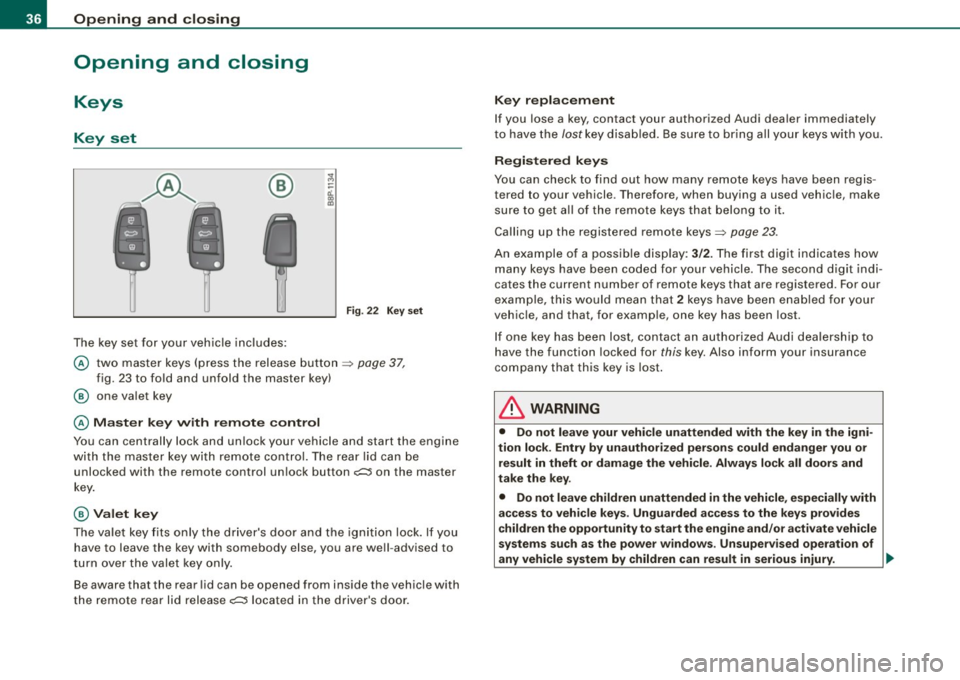
The key set for your vehicle includes:
Fig. 22 Key set
@ two master keys (press the release button => page 37,
fig. 23 to fold and unfold the master key)
@ one valet key
@ Master key with remote control
You can centrally lock and unlock your vehicle and start the engine
with the master key with remote control. The rear lid can be
unlocked with the remote control unlock button
c;:;::::5 on the master
key.
@ Valet key
The valet key fits only the driver's door and the ignition lock. If you
have to leave the key with somebody else, you are well -advised to
turn over the valet key only.
Be aware that the rear lid can be opened from inside the vehicle with
the remote rear lid release
c;:;::::5 located in the driver's door.
Key replacement
If you lose a key, contact your authorized Audi dealer immediately
to have the
lost key disabled. Be sure to bring all your keys with you.
Registered keys
You can check to find out how many remote keys have been regis
tered to your vehicle . Therefore, when buying a used vehicle, make
sure to get all of the remote keys that belong to it.
Calling up the registered remote keys=>
page 23.
An example of a possible display: 3/2. The first digit indicates how
many keys have been coded for your vehicle . The second digit indi
cates the current number of remote keys that are registered . For our
example, this would mean that
2 keys have been enabled for your
vehicle, and that, for example, one key has been lost.
If one key has been lost, contact an authorized Audi dealership to
have the function locked for
this key. Also inform your insurance
company that this key is lost.
& WARNING
• Do not leave your vehicle unattended with the key in the igni
tion lock . Entry by unauthorized persons could endanger you or
result in theft or damage the vehicle. Always lock all doors and
take the key.
• Do not leave children unattended
in the vehicle, especially with
access to vehicle keys . Unguarded access to the keys provides
children the opportunity to start the engine and/or activate vehicle
systems such as the power windows . Unsupervised operation of
any vehicle system by children can result in serious injury . ._
Page 40 of 320
Opening and closing
Master key battery replacement
Each master key contains a battery housed under the
cover.
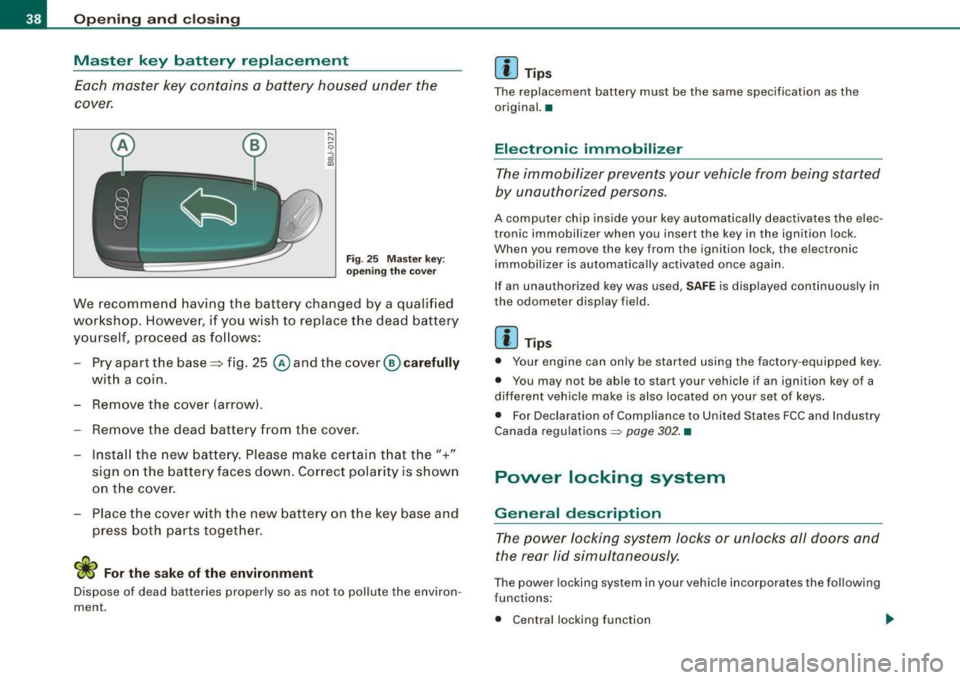
Fig . 25 Master key:
opening the cover
We recommend having the battery changed by a qualified
workshop. However, if you wish to replace the dead battery
yourself, proceed as follows:
- Pry apart the base::::::,fig. 25
@andthecover @carefully
with a coin.
- Remove the cover (arrow) .
- Remove the dead battery from the cover.
- Install the new battery. Please make certain that the"+"
sign on the battery faces down. Correct polarity is shown
on the cover.
- Place the cover with the new battery on the key base and
press both parts together.
For the sake of the environment
Dispose of dead batteries properly so as not to pollute the environ
ment.
[ i ] Tips
The replacement battery must be the same specification as the
original. •
Electronic immobilizer
The immobilizer prevents your vehicle from being started
by unauthorized persons.
A computer chip inside your key automatically deactivates the elec
tronic immobilizer when you insert the key in the ignition lock .
When you remove the key from the ignition lock, the electronic
immobilizer is automatically activated once again .
If an unauthorized key was used,
SAFE is displayed continuously in
the odometer display field.
[ i ] Tips
• Your engine can only be started using the factory -equipped key.
• You may not be abl e to s tart your vehicle if an ignition key of a
different vehicle make is also located on your set of keys.
• For Declaration of Compliance to United States FCC and Industry
Canada regulations ~
page 302. •
Power locking system
General description
The power locking system locks or unlocks all doors and
the rear lid simultaneously.
The power locking system in your vehicle incorporates the following
functions:
• Central locking function
Page 42 of 320
Opening and closing
• You are well advised not to keep valuables inside an unattended
vehic le , visible or not . Even a properly locked vehicle cannot provide
the security of a safe! •
Unlocking and locking the vehicle with the
remote control
How the remote control works.
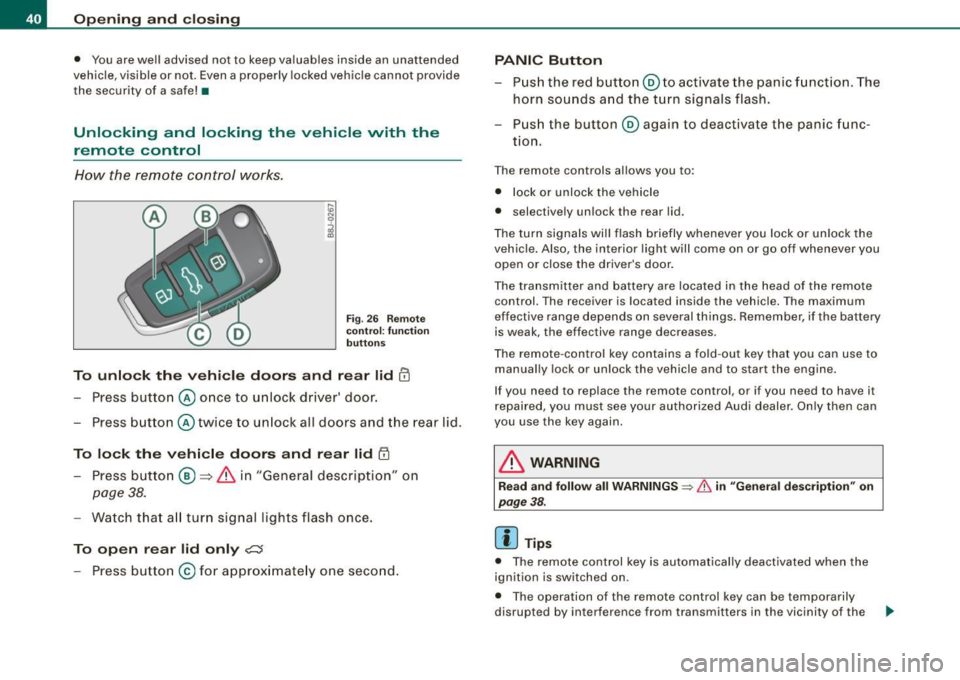
Fig. 2 6 R em ote
c on tro l: func tion
button s
To unlo ck the vehi cle doors and rear lid !TI
Press button @ once to unlock driver' door.
- Press button @ twice to un lock all doors and the rear lid .
To lock the vehi cle doors and rear lid l'.D
- Press butto n ® => & in "General descrip tion" on
page 38.
- Watch tha t all turn signal lights flash once.
To open rear lid only ?::$
- Press button @for approx imate ly one seco nd.
PANIC Button
- Pus h the red butto n@ to activate the panic f unct ion. The
horn sounds a nd the turn signals flash .
- Pus h the button ® aga in to deactivate the panic f unc-
tion.
T he remote controls al lows you to :
• l ock or unlock the vehicle
• se lective ly unlock the rear lid.
T he tu rn signa ls will flash briefly whenever yo u lock or un lock the
vehic le. Also , the interior light will come on or go off whenever you
open or close the driver's door.
The transmitter and battery are located in the head of the remo te
control. The receiver is located inside the vehicle. The maximum
effective ra nge depends on several things. R emember, if the battery
is weak, the effective rang e decreases .
T he rem ote -contr ol key con tains a fo ld -ou t key tha t you can use to
manually lock or unlock the vehicle and to s tart the engine.
I f you need to replace the remote contro l, or if you need to have it
r epaired, you must see your authori zed Audi dealer. On ly then can
you use the key again.
& WARNING
Read and follow all WARNINGS => & in "Genera l description " on
page
38.
[ i ] Tips
• The remote control key is automa tically deactivated when the
ignition is switched on .
• Th e opera tion of the remote control key can be temporarily
disrupted by interference from transmitters in the vicinity of the .,.
Page 48 of 320

Opening and closing
Anti -theft alarm system
The anti-theft alarm triggers an alarm if anyone attempts
to break int o the vehicle.
Fig. 36 Di ode po sitio n
i n the in str um ent p anel
T he an ti- t heft alarm system triggers an audible alarm and turns on
t he emergency flasher if an unauthorized interference with the
vehic le is sensed by the system .
How is the anti-th eft alarm sy ste m swi tched on ?
The anti-theft alarm system is switched on when you lock th e
dr iver's door manually using the fold -out key, or when you use the
remo te control. The sys tem is activated approximately 30 seconds
af ter the vehicle is locked . The indicator light => fig. 36 starts
flashing rapid ly for 30 seconds and then blinks slowly .
How is th e a nti-theft alarm system swi tch ed off?
The anti-the ft alarm sys tem is switched off wh en you use the remote
control to un lock your vehic le . If you do not open a do or within 30
seconds after you have unlocked with the remote control, the
vehic le will lock itself again auto matically.
If you lock just the driver's door using your key , the front
passenger 's door and the rear lid remain locked.
Wh en will th e anti th eft alarm s yst em b e trigg ered?
When the v ehicle is locked, the alarm system mo nitors and pro tects
the fo llowing parts of the vehicle :
• engine compartment
• l uggage compartment
• doors
• ignition
When the system is activa ted, the alarm will be triggered if one of
the doors, the engine hood or the rear lid are opened , or if the igni
tion is turned on or the radio removed.
The anti-theft alarm system wil l also go off when the battery is
disconnected .
You can also t rigger the alarm by pressing the PANIC button on your
remo te -contro l key . This wi ll a lert other people in case of emer
gency. Press the
PANIC bu tton again t o turn off the alarm.
How i s th e a nti-theft alarm switched off when
triggered?
The alarm system is switched off when you unlock the vehic le using
the remo te -control key o r when the ignition is switched on . The
alarm wi ll also switch itself off when it comes to the end of its cycle .
Emergen cy flashe r
The emergency flasher will b link briefly when the doors, engine
hood and rear lid are properly closed.
If the emergency flashers do not blink, check the doors , engine hood
and rear lid to make sure they are properly closed . If you close a
door, the hood or the rear lid with the anti -theft a larm switched on,
the emergency flashers wil l b link only after you have closed the
door or lid.
[ i ] Tips
Fo r the anti- theft a larm system to function proper ly, make sure a ll
vehic le doors and windows are closed before leaving the vehicle .•
Page 49 of 320

Power windows
Controls
Fig. 37 Driver's door :
power window
switches
The switches are located in the driver's door. The front passenger's
door has a own power window switch of its own.
To open/close If the respective switch is pushed or pulled, the
window will , respectively.
Switches for front door windows
@ operates the window in the driver's door.
@ operates the window in the front passenger's door.
Switches for rear windows
© operates the left rear window.
@ operates the right rear window.
Safety switch
© Safety switch for rear window operation.
& WARNING
• Do not leave children unattended in the vehicle, especially with
access to vehicle keys. Unsupervised use of the keys can result in
Con tro ls and eq uip
ment
Opening and closing
& WARNING !continued)
starting of the engine and use of vehicle systems such as power
windows, etc. which could result in serious injury.
• Remember -you can still open or close the power windows for
about ten minutes after the ignition is switched off. Only when
either of the front doors are opened are the power windows
switched off.
• Be careful when closing the windows . Check to see that no one
is in the way, or serious injury could result!
• Always remove the ignition key whenever you leave your
vehicle.
• If you lock your vehicle from the outside, no one, especially chil
dren, should remain in the vehicle.
• Do not stick anything on the windows or the windshield that
may interfere with the driver's field of vision. •
Switches in the driver's door
The driver con operate all windows.
In addition to the switches in the driver 's door, there is a
separate switch in each door for the power w indow in that
door~ fig. 37. If the respective switch is pushed or pulled,
the window will open or close. The power window switches
have a
two -position function:
Opening the windows
Push the switch to the
first stop and hold it there until the
window has lowered to the desired position.
Push the switch briefly to the
second stop : the window
will automatically open all the way.
~
Vehicle care I I irechnical data
Page 55 of 320

Clear vision
Lights
Switching the headlights on and off ·'t!-·
"' ~ a'.. a,
"'
Fig. 46 In strument
pane l: lig ht switch
Fi g. 47 Instrument
pane l: Light swi tch
with dayti me running
ligh ts (DR L)
The light switch must not be overturned past the stops in
either direc tion.
Switching on automatic headlight control*
- Tur n the lig ht swi tch to AUTO* :::> fig. 46.
Con tro ls and eq uip
ment
Clear vision
Switching on the side marker lights
- Tur n t he lig ht sw itch to ~oo~ .
Switching on the headlights and high beam
-Turn the light sw itch to ;:o.
P ush th e high b eam lev er fo rward t owards th e ins tru
ment pan el
=:> page 57.
Switching off the lights
- Turn t he ligh t switch to 0.
The head lights on ly work when the ignition is switched on. While
sta rting the engine or whe n switching off the igniti on, the head
lights wil l go off and only the side marker lights wil l be on.
Daytime running lights (DRL ) (USA models )
The daytime running lights can be turned on or off using this func
t ion . If the f unc tion is ac tive, the dayt ime running lights a re tu rned
on automatically when the ignition is switched on.
The daytime runn ing lights are activated
only w hen the light switch
i s at the
AUTO* or DRL * positi on.
Daytime running lights (Canada models only )
The daytime running lights are activated only when the light switch
~ fig. 46 is either at the O or the ;oo: position. When the ignition is
switched on, there is a difference betwe en v ehicles with b i-xenon
lights and halogen lamps:
• On vehicles with bi-xe non lights only the daytime runni ng lamps
in the headlights will come on .
• On ve hic les with halogen lights the fron t fog lights, s ide marker
lights and tail lights come on automatically
~
Vehicle care I I irechnical data
Page 65 of 320

The rain sensor wiper intervals depend on the sensitivity setting as
well as vehicle speed . During brief stops, wiper motion will adjust in
re lation to the amount of rain on the windshield.
Automatic wiper/washer : To eliminate water drop lets, the wind
sh ield wiper perfor ms one afterwipe operation a fter several
seconds while driving. You can switch this function off by moving
the lever to pos it ion © within 10 seconds of the afterw ipe opera
tion. The afterwipe func tion is reactivated the next time the ignition
is sw itch.
When the ignition is turned on , the washer jets are heated *.
& WARNING
• Wiper bl ade s are cru cial for safe driving! Only when they are in
good condition are they able to clear the windows properly to
provide un comp romised visibility . Worn or damaged wipe r blade s
are a safety hazard::::;,
page 65, "Replacing front wiper blade s"!
• The light /ra in se ns or* is only de signed to a ssis t and suppo rt
the driver. It remain s entirely the driver' s re spon sibility to monitor
outsi de w eather conditions and to manually a cti vate the wiper s as
soon a s rain or drizzle reduces vi sibility through the windshield .
• The windshield mu st not be treated with water -repellent m ate
rial s. They can in crea se glare under poor v isib ility condition s such
as wetne ss , dar kne ss, or when the sun is lo w on the horizon . In
addition , they can cau se the windshield wipers to chatter .
0 Note
In freezing or near freezing conditions:
• Always check that the wiper blades are not frozen to the glass
bef ore you turn the wipe rs on . Loosen a wiper blade which is frozen
in p lace before operating the wipers to prevent damage to the wiper
b lade or the wiper moto r.
• Do not use the wipers to clear a frosted window . Using the
wipe rs as a convenient ice scrape r will destr oy t he wipe r blades .
Controls and equip
ment
Cl ea r vision
• Before you take your vehicle to an automatic car wash, make sure
you have the w indshield wiper system switched off (lever in p ositi on
OJ, otherwise the windshield wiper system could get damaged in the
car wash if it should suddenly come on .
[ i ] Tips
• The windshie ld wipers are switched off when the ignition is
turned off . Activate the windshield wipers after the ign ition is
switched back on by moving the windshield wiper lever to any posi
tion.
• Wor n or dirty windshield wiper b lades cause smea ring, which
can affect the opera tion of the l ight/rain sensor*. Check the cond i
tion of your windshield wiper blades regula rly.
• The rain sensor is part of the interva l wiping system . T urning off
the ignition will also deactivate the rain sensor . To reac tivate the
sensor, switch off the interval w iping funct ion, then sw itc h it back
on again .
• App lies to vehicles with light/ rain sensor : When the wipers are
swi tched on manually and in ra in conditions, the automatic head
lights* turn on::::;,
page 53, "Switching the headlights on and off ·'A ·"
or off during the day when the wipers are no longer operating. The
automatic headl ights* function is ava ilable in this case only whe n
the light switch is in the "AUTO" position::::;,
page 53, fig. 46 .
• Make sure the washer fluid reservo ir in the engine compart ment
is topped off before going on a long trip . Look up::::;,
page 240 for
check ing and filling the washer conta iner.
• The wipers only o perate with the hood comp lete ly closed .•
I • •