engine AUDI S3 2010 User Guide
[x] Cancel search | Manufacturer: AUDI, Model Year: 2010, Model line: S3, Model: AUDI S3 2010Pages: 320, PDF Size: 75.34 MB
Page 17 of 320

Safety belts i
This warning/indicator light reminds you to put on your
safety belt.
Th e ,{f. warning/indicator light illuminat es when the ignition is
switched on to remind the driver and (on USA models only) any front
passenger to put on the safety belt. Additionally, an acoustic
warning (gong) will also sound.
For more Information:::::, page
135, "Safety belt warning light-*-"·•
Brake system
BRAKE (USA models) / (CD) (Canada models)
This warning/indicator light illuminates when the brake
fluid level is too low or when there is a malfunction in the
ABS, or when the parking brake is set.
The light illuminates when the ignition is turned on. It goes out after
the engine has been started and the parking brake is fully released.
This indicates that the brake warning light is functioning properly.
If the brake warning light does not light up when the engine is
cranking or the parking brake is applied, there may be a malfunction
in the electrical system. In this case, contact your Audi dealer. If the brake system warning/indicator light flashes, there is a brake
system malfunction.
If the ABS fails, the ABS warning /indicator light (USA
models)/
.J (Canada models) flashes together with the brake system
warning/indicator light:::::,& .
(USA models): If the warning light
BRAKE and the warning light
illuminate together, immediately contact your authorized Audi
dealer or qualified workshop to have all brake pads inspected
=:> page 33.
When the light comes on, an audible warning signal is also given.
Controls and equip
ment
Instruments and warning/indicator lights
Parking brake set
The BRAKE or CCi)) (Canada) warning/indicator light illuminates when
the parking brake is set:::::,&.
& WARNING
• USA models : If both the BRAKE warning light and the
warning light come on at the same time, the rear wheels could lock up first under hard braking. Lock-up of the rear wheel brakes
can cause loss of vehicle control and an accident. Have your
vehicle repaired immediately by your authorized Audi dealer or a qualified workshop. Drive slowly and avoid sudden, hard brake
application.
• Canada models: If both the brake warning light CCi)) and the ABS
warning light come on at the same time, the rear wheels could
lock up first under hard braking. Lock-up of the rear wheel brakes
can cause loss of vehicle control and an accident. Have your
vehicle repaired immediately by your authorized Audi dealer or a
qualified workshop. Drive slowly and avoid sudden, hard brake
application
• If the brake warning/ indicator light does not go out after a few
seconds and the parking brake released, or lights up while you are
driving, the fluid level in the brake fluid reservoir is too low. If you
believe that it is safe to do so, proceed immediately at low speed
to the nearest authorized Audi dealer or qualified workshop and have the brake system inspected.
• Always keep in mind that after several brake applications, you
will need greater pressure on the brake pedal to stop your vehicle .
Do not rely on strained brakes to respond with maximum stopping
power in critical situations. You must allow for increased braking
distances. The extra distance used up by fading brakes could lead
to an accident. •
I • •
Page 20 of 320
Driver informati on displ ay
Driver information display
Introduction
Introduction
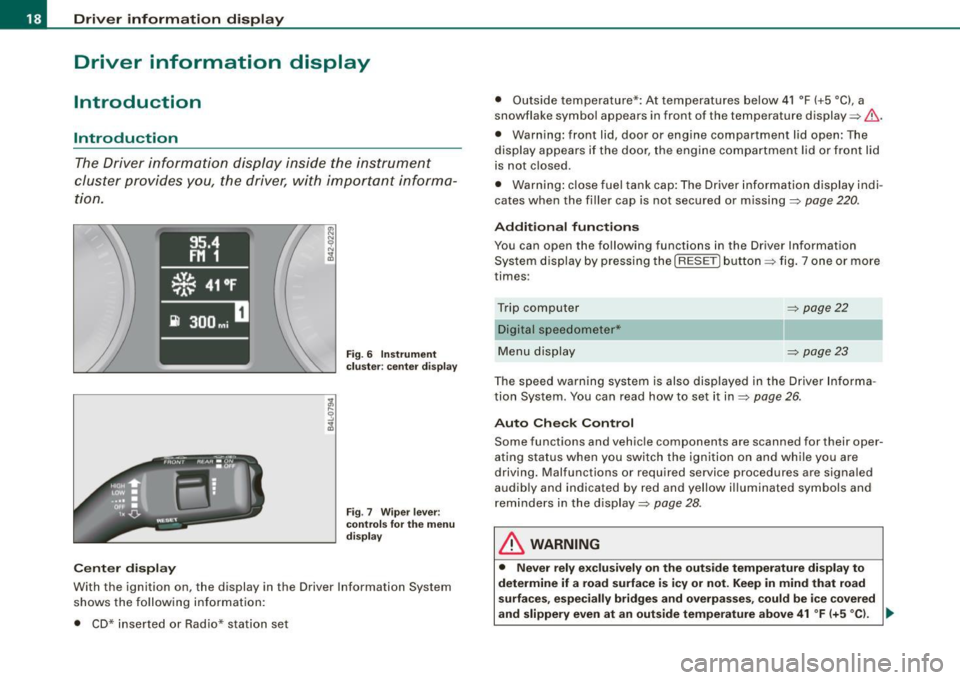
The Driver information display inside the instrument
cluster provides you , the driver, with important informa
tion.
Ce nter d isplay
Fig . 6 Inst rum ent
c lu ster : cente r dis pl ay
Fig .
7 Wiper lever :
co ntrol s for t he m enu
d isp lay
W ith th e ignition on, the displ ay in th e Driver Info rmation System
shows the follow ing information :
• CD* inserted or Radio* station set •
Outside tempe rature *: At temperatures below 41 °F ( +5 °C l, a
snowflake symbol appea rs in front of the temp erature display ~& .
• Warning: front lid , door or engine compartment l id open: The
display appears if the door, the engine compartment lid or front lid
is not closed .
• Warning : close fuel tank cap: The Driver information display indi
cates when the filler cap is not secured or missing~
page 220.
Additional fun ctions
You can open the following fun ctions in the Driver Information
System display by pressing the
I RESE T] button ~ fig. 7 one or more
times :
Trip computer Digital s peedometer*
Menu display
~ page22
~ page23
The speed warning system is also displayed in the Driver Informa
t ion System. You can read how to set it in~
page 26.
Auto Check Con trol
Some functions and vehicle componen ts are scanned for their oper
ating status when you switch the ignition on and wh ile you are
driving. Malfunc tions or required service procedures are signa led
audib ly and indicated by red and yel low illuminated symbols and
rem inders in the display~
page 28 .
& WARNING
• Never rely e xclusivel y on the outside temperature di spla y to
det ermine if a road surface is ic y or not. Keep in mind that road
s urface s, esp ec ia lly bridge s and overp asses, co uld be i ce cove red
and slippery even at an out side t emperatur e above 41 °F (+ 5
°C l. -.,
Page 21 of 320
& WARNING (continued)
• Always remember, even if the "snowflake" symbol (ice
warning) does not appear in the display, black ice could be on the
road.
• Always reduce your speed and drive with special care in cold
weather conditions when the chance of encountering icy road
surfaces increases.
[ i] Tips
• If the vehicle is stationary , or if you are driving at a very low
speed, the temperature shown in the display might be slightly
higher than the actual outside temperature. This is caused by the
heat being radiated from the engine.
• On vehicles with S tronic, the reminders do not appear in the
display until you select a gear .
• On vehicles with Audi Navigatio n system*, the displays may
differ from their normal appearance during navigation. •
Applies to ve hicles: with g ears hift indicator and manual transmi ssio n
Gearshift recommendation
This indicator can help conserve fuel.
Controls and equip
ment
+55°F
~ 340mi
3~4 Fig . 8 Gearshift
recommendation
Driver information display
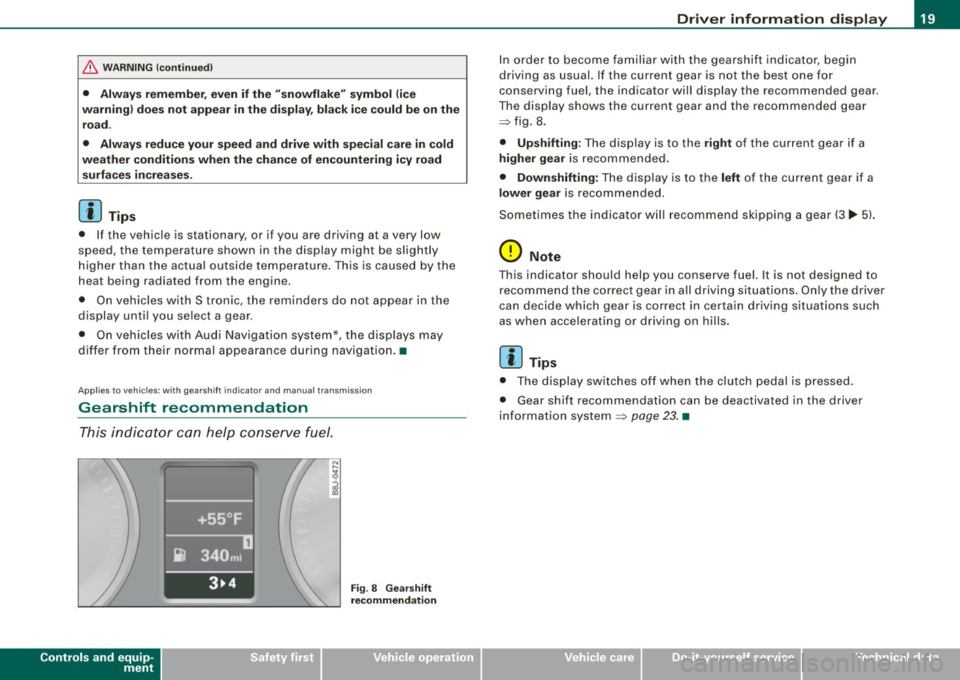
In order to become familiar with the gearshift indicator, begin
driving as usual. If the current gear is not the best one for
conserving fuel, the indicator will display the recommended gear .
The display shows the current gear and the recommended gear
=> fig. 8 .
• Upshifting: The display is to the right of the current gear if a
higher gear is recommended.
• Downshifting: The display is to the left of the current gear if a
lower gear is recommended.
Sometimes the indicator will recommend skipping a gear (3.,. 5l.
0 Note
This indicator should help you conserve fuel. It is not designed to
recommend the correct gear in all driving situations. Only the driver
can decide which gear is correct in cer tain driving situations such
as when accelerating or driving on hills.
[ i] Tips
• The display switches off when the clutch pedal is pressed.
• Gear shift recommendation can be deactivated in the driver
information system
=> page 23. •
I • •
Page 22 of 320
Driver information display
Service interval display
The service interval display reminds you when your next
service is due.
Fig. 9 Section of
instrument cluster:
Service interval display
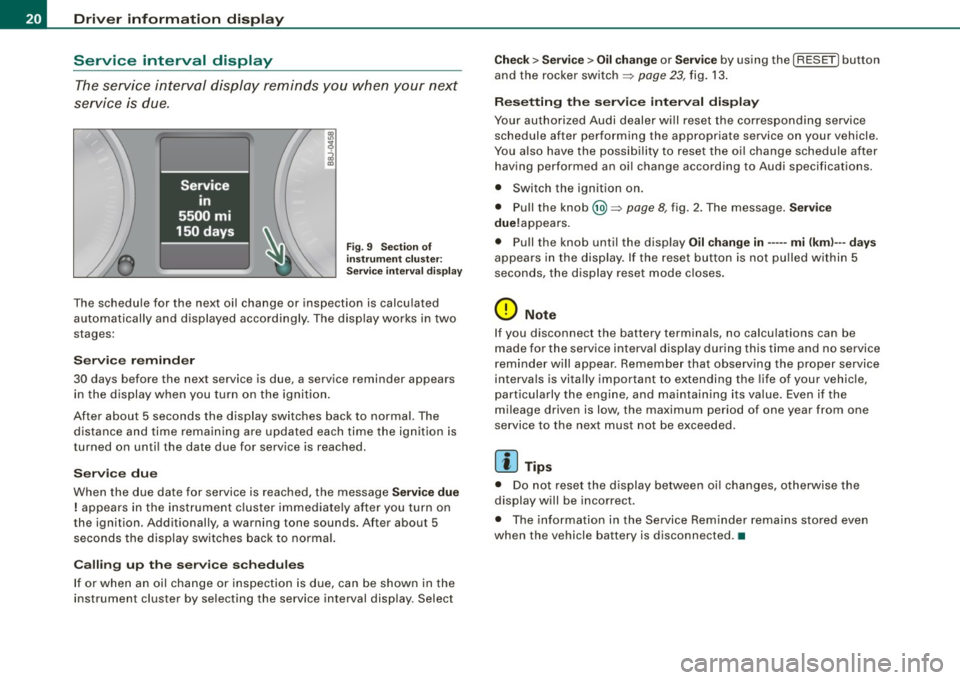
The schedule for the next oil change or inspection is calculated
automatically and displayed accordingly. The display works in two
stages:
Service reminder
30 days before the next service is due, a service reminder appears in the display when you turn on the ignition.
After about 5 seconds the display switches back to normal. The distance and time remaining are updated each time the ignition is
turned on until the date due for service is reached.
Service due
When the due date for service is reached, the message Service due
! appears in the instrument cluster immediately after you turn on
the ignition. Additionally, a warning tone sounds. After about 5 seconds the display switches back to normal.
Calling up the service schedules
If or when an oil change or inspection is due, can be shown in the
instrument cluster by selecting the service interval display . Select
Check > Service > Oil change or Service by using the [ RESET! button
and the rocker switch =>
page 23, fig. 13.
Resetting the service interval display
Your authorized Audi dealer will reset the corresponding service
schedule after performing the appropriate service on your vehicle.
You also have the possibility to reset the oil change schedule after
having performed an oil change according to Audi specifications.
• Switch the ignition on.
• Pull the knob @=>
page 8, fig. 2. The message. Service
due!appears .
• Pull the knob until the display
Oil change in----- mi (kml---days
appears in the display . If the reset button is not pulled within 5
seconds, the display reset mode closes .
0 Note
If you disconnect the battery terminals, no calculations can be
made for the service interval display during this time and no service
reminder will appear. Remember that observing the proper service
intervals is vitally important to extending the life of your vehicle,
particularly the engine, and maintaining its value. Even if the
mileage driven is low, the maximum period of one year from one
service to the next must not be exceeded.
[ i] Tips
• Do not reset the display between oil changes, otherwise the
display will be incorrect.
• The information in the Service Reminder remains stored even
when the vehicle battery is disconnected .•
Page 23 of 320
On-Board Diagnostic system (08D)
On-Board Diagnostics
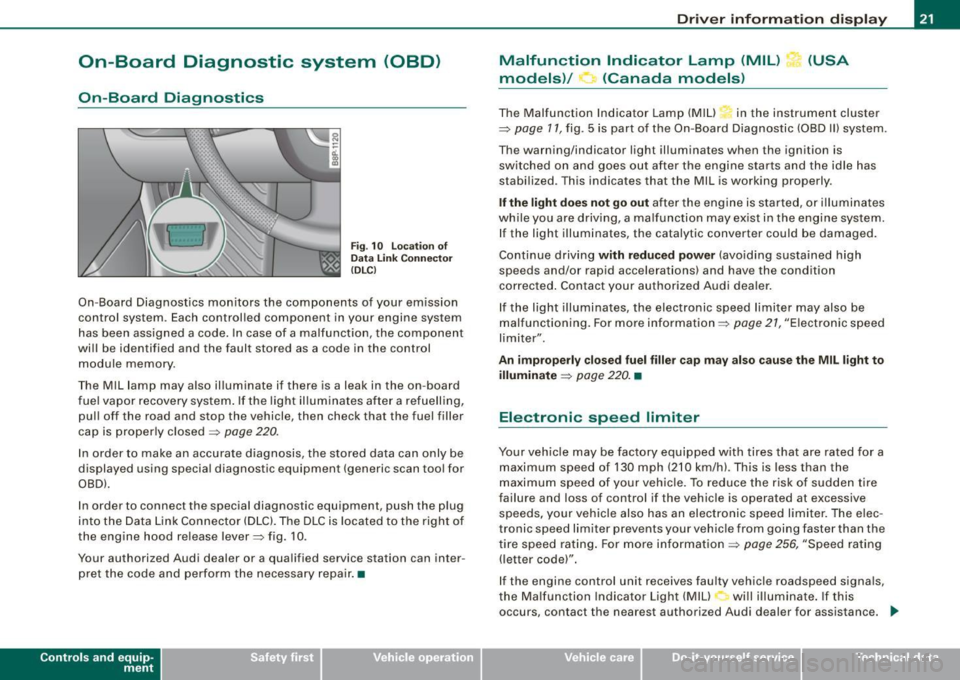
Fig. 10 location of
Data Link Connecto r
( DL C)
On-Board Diagnostics monitors the components of your emission
control system . Each controlled component in your engine system
has been assigned a code. In case of a malfunction , the component
will be identified and the fault stored as a code in the control
module memory .
The Mil lamp may also illuminate if there is a leak in the on-board
fuel vapor recovery system . If the light illuminates after a refuelling,
pull off the road and stop the vehicle, then check that the fuel filler
cap is properly closed
=> page 220 .
In order to make an accurate diagnosis, the stored data can only be
displayed using special diagnostic equipment (generic scan tool for
OBDl.
In order to connect the special diagnostic equipment, push the plug
into the Data Link Connector (DLC). The DLC is located to the right of
the engine hood re lease lever=> fig. 10.
Your authorized Audi dealer or a qualified service station can inter
pret the code and perform the necessary repair. •
Contro ls and eq uip
ment
Driver information display
Malfunction Indicator Lamp (MIL) (USA
models)/ (Canada models)
The Malfunction Indicator Lamp (MIU in the instrument cluster
=> page 11, fig . 5 is part of the On-Board Diagnostic (OBD II) system .
The warning/indicator light illuminates when the ignition is
switched on and goes out after the engine starts and the idle has
stabilized. This indicates that the Mil is working properly .
If the light does not go out after the engine is started, or illuminates
while you are driving, a ma lfunction may exist in the engine system.
If the light illuminates, the catalytic converter could be damaged.
Continue driving
with reduced power (avoiding sustained high
speeds and/or rapid accelerations) and have the condition
corrected . Contact your authorized Audi dealer.
If the light illuminates , the electronic speed limiter may also be
malfunctioning. For more information=>
page 21, "Electronic speed
limiter".
An improperly closed fuel filler cap may also cause the MIL light to
illuminate
=> page 220. •
Electronic speed limiter
Your vehicle may be factory equipped with tires that are rated for a
maximum speed of 130 mph (210 km/h) . This is less than the
maximum speed of your vehicle. To reduce the risk of sudden tire
failure and loss of control if the vehicle is operated at excessive
speeds, yo ur vehicle also has an electronic speed limiter. The elec
tronic speed limiter prevents your vehicle from going faster than the
tire speed rating. For more information
=> page 256, "Speed rating
(letter code)".
If the engine control unit receives faulty vehicle roadspeed signals,
the Malfun cti on Indicator Light (MIU will illuminate . If this
occurs, contact the nearest authori zed Audi dealer for assistance. _.,
Vehicle care I I irechnical data
Page 26 of 320
Driver informati on displ ay
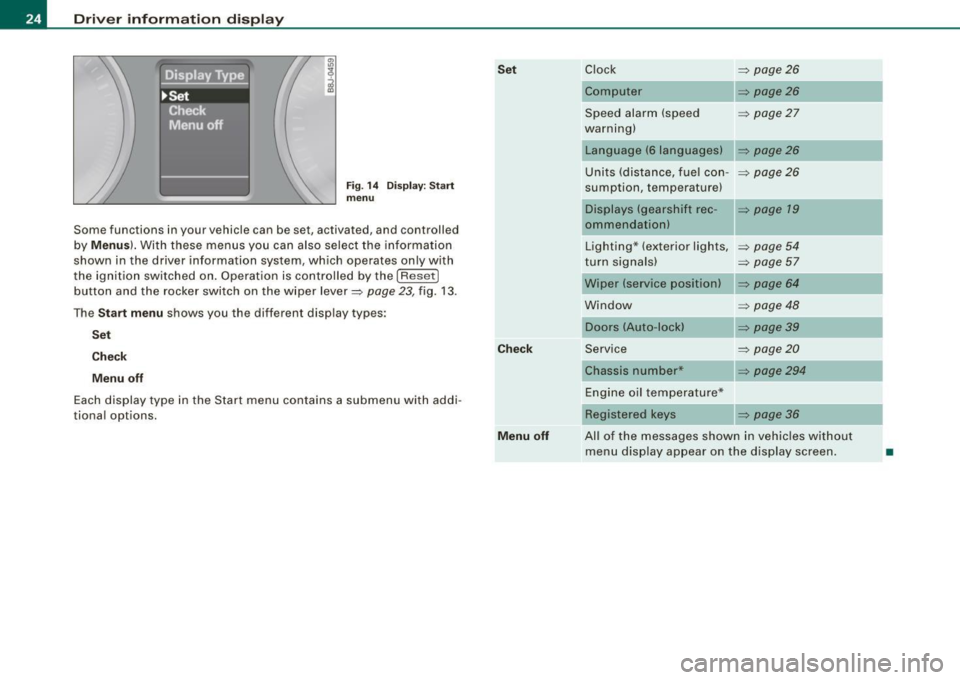
Fig. 1 4 Display : Start
menu
Some func tions in your vehicle can be se t, act iva ted, and cont rolled
by
M enu s). With these menus you can also select the information
shown in the driver information system , which ope rates only with
the ignition switched on. Operation is controlled by the
! R ese t]
button and the rocker switch on the wiper lever=> page 23, fig. 13 .
The
S ta rt m enu shows you the diff erent disp lay types :
Set
C hec k
M enu off
Each display type in the Start menu con tains a submenu with addi
tional options.
Se t
C hec k
M enu off Clock
=> page 26
Computer => page26
Speed alarm (speed => page27
warning)
Language (6 languages)
Units (distance, fuel con- =>
page26
sumption, temperature)
Displays (gearshift rec -
=> page 19
ommendation)
Lighting * (exterior lights,
=>
page 54
turn signals) => page 57
Wiper (service position) => page 64
Window => page 48
Doors (Auto-lock)
Service
=>
page20
Chassis number* => page294
Engine oil temperature*
Registered
keys => page 36
All of the messages shown in vehicles without menu disp lay appear on the display screen.
•
Page 30 of 320
Driver inf ormati on displ ay
- Briefly press the button in t he ins trument cluster
=>
page 27, fig . 19. T he odome ter and the digita l clock are
now illuminated .
- Press the button for at least
2 seconds. The currently
stored maximum speed appears in the display
or the
crossed out symbol for warning threshold
2, if no
maximum speed was set previously .
- Press the function selector switch in the wiper lever @
=>
page 27, fig. 20 up or down to change t he set value .
Values r un up or dow n in steps of
6.2 mph (10 km/h) .
To dele te max imum sp eed
-Turn off the ignition.
- Briefly press the button in t he instrument cluster
=>
page 27, fig . 19. The odometer and the digita l clock are
now illuminated.
- Press the butt on for at least 2 seconds. T he currently
stored maximum speed appears in the display.
- Press the rese t button in the wiper lever @=>
page 27,
fig. 20 unt il the crossed out speed warning symbo l for
warning threshold 2 appears in the display.
A few seconds after the adjustment is comp leted, the i llumination
for the odometer and the digital clock wil l go out .
[ i ] Tip s
This warning threshold can also be controlled through the trip
computer =>
page 25, "Navigating the menu". •
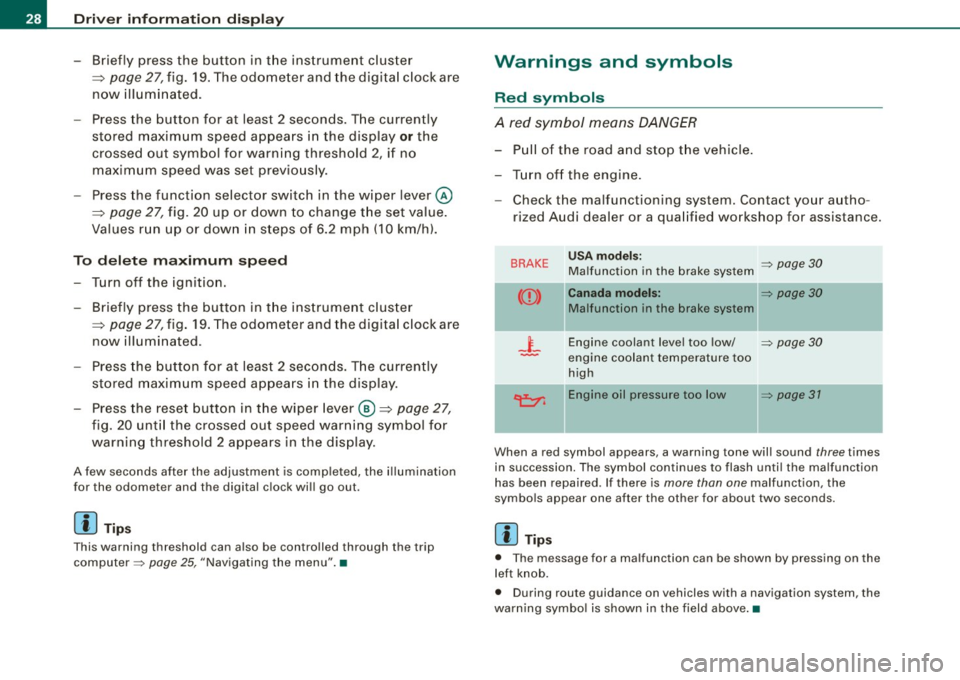
Warnings and symbols
Red symbols
A red symbol means DANGER
-Pull of the r oad and stop t he vehicle .
- Turn o ff the engine .
Check the malfunctioning system. Contact your autho
rized Audi dealer or a qua lified workshop for assistance .
BRAKE USA m odels: => page 30 Ma lfunction in the brake system
CCD > Ca na da m odel s: => page 30
Malfunction in the brake system
_t_ Engine coolant level too low/ => page 30
-engine coolant temperature too
high
~ Engine oil pressure too low => page 37
- --
When a red symbol appears, a warning tone will sound three times
in succession. The symbol continues to flash unti l the malfunction
has been repaired . If there is
more than one malfunction, the
symbols appear one after the other for about two seconds.
[ i ] Tip s
• The message for a malfunction can be shown by pressing on the
left knob.
• During route guidance on vehicles with a navigation system, the
warn ing symbo l is shown in the field above .•
Page 31 of 320
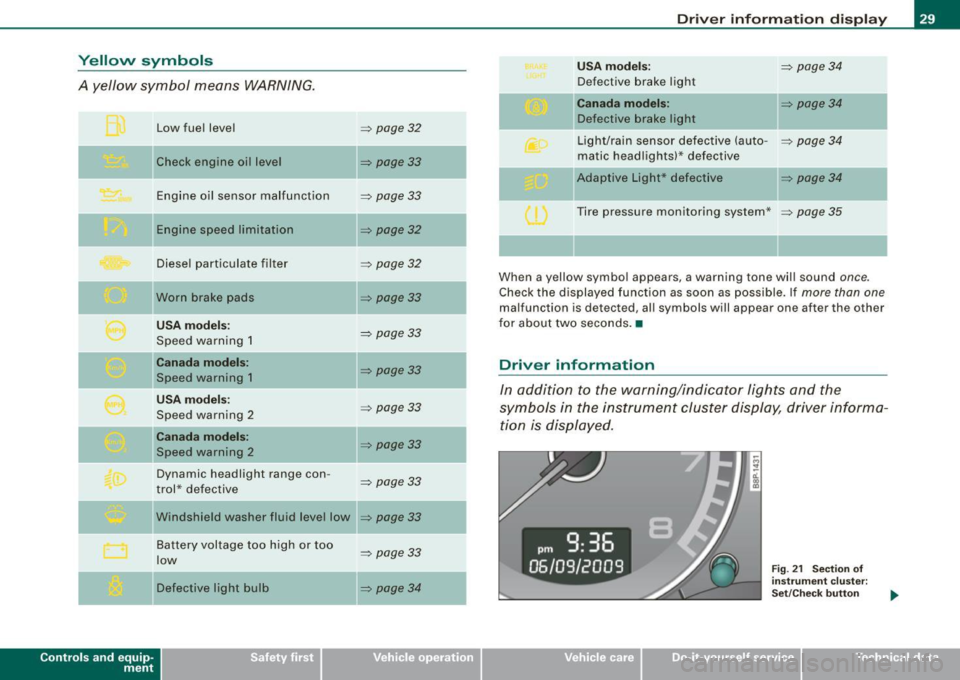
Yellow symbols
A yellow symbol means WARNING.
Contro ls and eq uip
ment Low fuel level
Check engine oi l level
Engine oil sensor malfunction
Engine speed limitation
Diesel particulate filter
Worn brake pads
USA models:
Speed warning 1
Canada models:
Speed warning 1
USA models:
Speed warning 2
Canada models:
Speed warning 2
Dynamic headlight range con -
trol * defective
W indshield washer fluid level low
Battery voltage too high or too
low
Defective light bulb
=> page 32
=> page33
-
=> page33
=> page32
=> page32
=> page33
=> page 33
=> page33
=> page33
=> page33
=> page33
=> page33
...
=> page 33
=> page34
-
-
-
Driver information display
USA models: => page34
Defective brake light
Canada models: => page 34
Defective brake light
Light/rain sensor defective (auto-
=> page 34
matic headlights)* defective
-Adaptive Light * defective => page34
Tire pressure monitoring system * => page 35
When a yellow symbol appears, a warning tone will sound once.
Check the displayed function as soon as possible. If more than one
malfunction is d etected, all symbols will appear one after the other
for about two seconds. •
Driver information
In addition to the warning/indicator lights and the
symbols in the instrument cluster display, driver informa tion is displayed .
Vehicle care I I
Fig. 21 Section of
instrument cluster:
Set/Check button
irechnical data
Page 32 of 320

Driver information display
Driver information appears in the display when a defective light
bulb is reported by the defective light bulb warning~
page 34,
when the brake pads are worn and before you engage a gear on
vehicles with S tronic.
In addition, driver information may appear when a red symbol
flashes in the driver display .
To display Driver information
As an example, the~ symbol appears in the display. If you now
press the button~
page 29, fig. 21 , the following driver message
appears in the display:
Switch off engine and check oil level
The driver message in the display goes out after about 5 seconds.
You can display the driver message again by briefly pressing the
button. •
Brake system malfunction
BRAKE (USA models) /((D) (Canada models )
The indicator light flashes if the brake fluid level is too
low, if there is a malfunction in the ABS system or when
the parking brake is engaged.
If the BRA KE/(CD) symbol flashes in the display with the
parking brake released, there is a malfunction in the brake
system. In addition to the symbol, one of two messages
appears in the display:
Stop vehicle and check brake fluid
ABS fault
! See owner's manual
- Pull off the road and stop the vehicle.
- Obtain professional assistance.
USA models: if there is a malfunction in the ABS system, the • c:::;
warning/indicator light illuminates along with the BRAKE system
malfunction warning/indicator light~
/.1.
Canada models: if there is a malfunction in the ABS system, the
warning/indicator light illuminates together with the
CCD) brake
system malfunction warning/indicator light~
/.1.
Parking brake set
The parking brake warning light Brake /«D> (Canada models) illumi
nates when the parking brake is set . In addition, a warning tone will
sound after you have driven for longer than 3 seconds and faster
than 3 mph (5 km/h).
& WARNING
• Always observe the warnings in~ page 215, "Engine compart
ment", before opening the engine hood and checking the brake
fluid.
• Driving with low brake fluid is a safety hazard! Stop the car and
get professional assistance.
• If the brake system warning/indicator light illuminates
together with the ABS warning/indicator light, then the ABS
system is malfunctioning. The rear wheels could quickly lock up
when you apply the brakes. This could lead to loss of control and
your vehicle could slide! Drive carefully to the nearest authorized
Audi dealer and have the malfunction corrected. •
Engine cooling system malfunction _t_
A malfunction in the engine cooling system must be
repaired as soon as possible.
When the J_ symbol in the display flashes, then either the
engine coolant temperature is too high, or the coolant level
~
Page 33 of 320
is too low. In addition to the symbol, the following message
also appears in the display:
Switch off engine and check coolant level
-Pull off the road and stop the vehicle.
- Turn off the engine.
- Check coolant level
=> page 233.
-Add coolant if necessary=> page 234 .
-Continue driving only after the engine coolant
warning/indicator light goes out.
- Contact your authorized Audi dealer for assistance if
necessary.
If the engine coolant level is correct, then the radiator fan may be
the cause of the malfunction.
If the generator warning/indicator light should also illuminate
=> page 14, then the fan belt may be damaged.
_& WARNING
• If your vehicle should break down for mechanical or other
reasons, park at a safe distance from moving traffic, turn off the
engine and turn on the hazard warning lights
=> page 56, "Emer
gency flasher A".
• Never open the hood if you see or hear steam or coolant
escaping from the engine compartment -you risk being scalded.
Wait until you can no longer see or hear steam or coolant escaping.
• The engine compartment of any vehicle is a dangerous area.
Before you perform any work in the engine compartment, turn off
the engine and allow it to cool. Follow the warning stickers
=> page 215, "Engine compartment".
Controls and equip
ment
Driver information display
0 Note
Do not continue driving if the -F-symbol illuminates . There is a
malfunction in the engine cooling system -you could damage your
engine. •
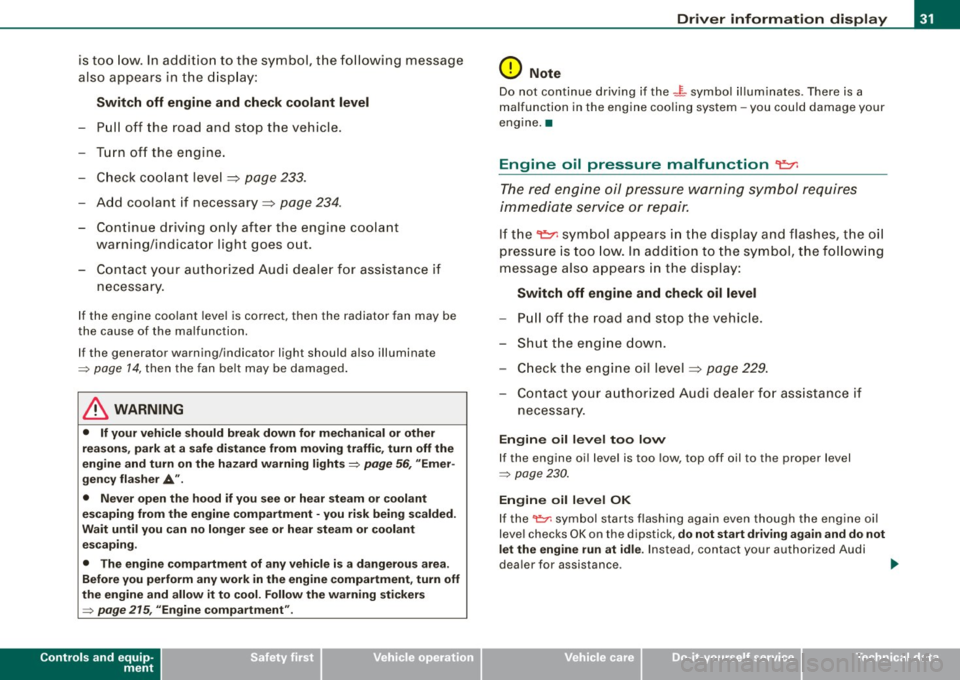
Engine oil pressure malfunction "I=:,:
The red engine oil pressure warning symbol requires
immediate service or repair.
If the 't::r. symbol appears in the display and flashes, the oil
pressure is too low. In addition to the symbol, the following
message also appears in the display:
Switch off engine and check oil level
-Pull off the road and stop the vehicle.
- Shut the engine down.
- Check the engine oil level=>
page 229.
-Contact your authorized Audi dealer for assistance if
necessary.
Engine oil level too low
If the engine oil level is too low, top off oil to the proper level
=> page 230.
Engine oil level OK
If the '1::7: symbol starts flashing again even though the engine oil
level checks OK on th e dipstick,
do not start driving again and do not
let the engine run at idle .
Instead, contact your authorized Audi
dealer for assistance . ..
I • •