lock AUDI S3 2010 Owner's Manual
[x] Cancel search | Manufacturer: AUDI, Model Year: 2010, Model line: S3, Model: AUDI S3 2010Pages: 320, PDF Size: 75.34 MB
Page 46 of 320
Opening and closing
Closing the rear lid
- Pull it down and shut it firmly~&. There is a recess in
the interior trim of the lid to make it easier to pull down.
& WARNING
• After closing the rear lid, always pull up on it to make sure that
it is properly closed. Otherwise it could open suddenly when the
vehicle is moving.
• To help prevent poisonous exhaust gas from being drawn into
the vehicle , always keep the rear lid closed while driving. Never
transport objects larger than those fitting completely into the
luggage area, because then the rear lid cannot be fully closed.
• Never leave your vehicle unattended especially with the rear lid
left open. A child could crawl into the car through the luggage
compartment and pull the lid shut, becoming trapped and unable
to get out. To reduce the risk of personal injury, never let children play in or around your vehicle. Always keep the rear lid, as well as
the vehicle doors, closed when not in use.
[ i ) Tips
• If the rear lid is open or not properly locked when the ignition is
turned on, the door and rear lid warning appears in the instrument
cluster display.
• If the rear lid on a locked vehicle is unlocked with the middle
button
cs on the remote key , the rear lid is automatically locked
again immediately after closing. This is indicated by the turn signals
blinking. •
Emergency release for rear lid
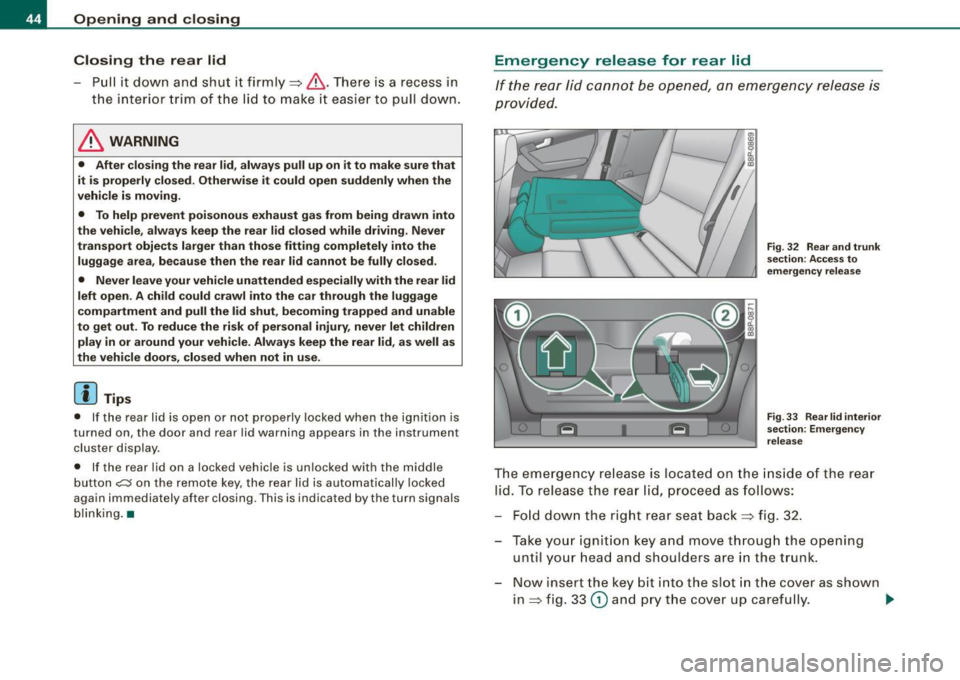
If the rear lid cannot be opened, an emergency release is
provided.
Fig. 32 Rear and trunk
section: Access to
emergency release
Fig. 33 Rear lid interior
section: Emergency
release
The emergency release is located on the inside of the rear
lid. To release the rear lid, proceed as follows:
- Fold down the right rear seat back~ fig. 32.
- Take your ignition key and move through the opening until your head and shoulders are in the trunk.
- Now insert the key bit into the slot in the cover as shown
in ~ fig. 33
(D and pry the cover up carefully. ..,.
Page 47 of 320

- Place the key in the round opening behind the cover@
and turn the key in the direction of the arrow. This
unlocks the lock and the rear lid opens a crack.
- Open the rear lid from the outside and put the ignition
key in a safe place. •
Manual door locking
If the power locking system fails (power failure), you will
need to lock the passenger door separately.
Fig. 34 Emergency
locking device in the
doors
An emergency door locking device is integrated in the rear
edge of the doors (only visible when the door is open) for
those doors without a lock cylinder.
- Open the door.
- Remove the plastic cap using the vehicle key=> fig. 34.
- Stick the key into the internal slot and turn the key about
90 degrees as far as it can go to the right (right-side doors) or to the left (left-side doors).
- Replace the plastic cap .
Contro ls and eq uip
ment
Opening and closing
After you close the door, you will no longer be able to open it from
the outside.
You can open it from the inside, however , by pulling on the door
latch,
once for the front doors and twice for the rear doors. •
Child safety lock
The child safety lock prevents the rear doors from being
opened from the inside.
,._ M
-
-a:. a, (0
Fig . 35 Rear doors:
child safety lock
The rear doors are equipped with a child safety lock. It is
operated with the veh icle key. The child safety lock is only
visible when the door is open.
- To
switch on the child safety lock, turn the ignition key in
the direction of the arrow.
- To
switch off the child safety lock, turn the ignition key in
the opposite direction of the arrow .
The child safety lock prevents the doors from being opened from the
inside when you have small children sitting in the rear. •
Vehicle care I I irechnical data
Page 48 of 320

Opening and closing
Anti -theft alarm system
The anti-theft alarm triggers an alarm if anyone attempts
to break int o the vehicle.
Fig. 36 Di ode po sitio n
i n the in str um ent p anel
T he an ti- t heft alarm system triggers an audible alarm and turns on
t he emergency flasher if an unauthorized interference with the
vehic le is sensed by the system .
How is the anti-th eft alarm sy ste m swi tched on ?
The anti-theft alarm system is switched on when you lock th e
dr iver's door manually using the fold -out key, or when you use the
remo te control. The sys tem is activated approximately 30 seconds
af ter the vehicle is locked . The indicator light => fig. 36 starts
flashing rapid ly for 30 seconds and then blinks slowly .
How is th e a nti-theft alarm system swi tch ed off?
The anti-the ft alarm sys tem is switched off wh en you use the remote
control to un lock your vehic le . If you do not open a do or within 30
seconds after you have unlocked with the remote control, the
vehic le will lock itself again auto matically.
If you lock just the driver's door using your key , the front
passenger 's door and the rear lid remain locked.
Wh en will th e anti th eft alarm s yst em b e trigg ered?
When the v ehicle is locked, the alarm system mo nitors and pro tects
the fo llowing parts of the vehicle :
• engine compartment
• l uggage compartment
• doors
• ignition
When the system is activa ted, the alarm will be triggered if one of
the doors, the engine hood or the rear lid are opened , or if the igni
tion is turned on or the radio removed.
The anti-theft alarm system wil l also go off when the battery is
disconnected .
You can also t rigger the alarm by pressing the PANIC button on your
remo te -contro l key . This wi ll a lert other people in case of emer
gency. Press the
PANIC bu tton again t o turn off the alarm.
How i s th e a nti-theft alarm switched off when
triggered?
The alarm system is switched off when you unlock the vehic le using
the remo te -control key o r when the ignition is switched on . The
alarm wi ll also switch itself off when it comes to the end of its cycle .
Emergen cy flashe r
The emergency flasher will b link briefly when the doors, engine
hood and rear lid are properly closed.
If the emergency flashers do not blink, check the doors , engine hood
and rear lid to make sure they are properly closed . If you close a
door, the hood or the rear lid with the anti -theft a larm switched on,
the emergency flashers wil l b link only after you have closed the
door or lid.
[ i ] Tips
Fo r the anti- theft a larm system to function proper ly, make sure a ll
vehic le doors and windows are closed before leaving the vehicle .•
Page 49 of 320

Power windows
Controls
Fig. 37 Driver's door :
power window
switches
The switches are located in the driver's door. The front passenger's
door has a own power window switch of its own.
To open/close If the respective switch is pushed or pulled, the
window will , respectively.
Switches for front door windows
@ operates the window in the driver's door.
@ operates the window in the front passenger's door.
Switches for rear windows
© operates the left rear window.
@ operates the right rear window.
Safety switch
© Safety switch for rear window operation.
& WARNING
• Do not leave children unattended in the vehicle, especially with
access to vehicle keys. Unsupervised use of the keys can result in
Con tro ls and eq uip
ment
Opening and closing
& WARNING !continued)
starting of the engine and use of vehicle systems such as power
windows, etc. which could result in serious injury.
• Remember -you can still open or close the power windows for
about ten minutes after the ignition is switched off. Only when
either of the front doors are opened are the power windows
switched off.
• Be careful when closing the windows . Check to see that no one
is in the way, or serious injury could result!
• Always remove the ignition key whenever you leave your
vehicle.
• If you lock your vehicle from the outside, no one, especially chil
dren, should remain in the vehicle.
• Do not stick anything on the windows or the windshield that
may interfere with the driver's field of vision. •
Switches in the driver's door
The driver con operate all windows.
In addition to the switches in the driver 's door, there is a
separate switch in each door for the power w indow in that
door~ fig. 37. If the respective switch is pushed or pulled,
the window will open or close. The power window switches
have a
two -position function:
Opening the windows
Push the switch to the
first stop and hold it there until the
window has lowered to the desired position.
Push the switch briefly to the
second stop : the window
will automatically open all the way.
~
Vehicle care I I irechnical data
Page 50 of 320

Opening and closing
Closing th e w ind ows
- Pull the switch up to the first stop and hold it there until
the window has risen to the desired position.
- Pull the sw itch qu ickly to the
second pos ition : the
window will automatically close all the way~
& in
"Contro ls".
Activating /deactivating rear windows
- Pus h th e switch t o the depressed position to activate the
rea r windows -the lig ht in the sw itch w ill go ou t.
- Briefly press the switch to
deactiv ate the rear windows -
the switch will re turn to the sa fe ty posit io n and the light
GI w ill illuminate.
The safety switch©=> page 47, fig. 37 in the arm rest on the driver's
door turns off the rear power windows. On ly when the safety switch
is depressed can the rear windows be opened or c losed. The symbol
in the safety switch illuminates when the power windows in the rear
doors are switched off (button NOT depressed) . This feature has
been provided for the safety of small chi ldren riding in the rear of
the vehicle .
[ i J Tips
The windows can still be opened and closed for about ten minutes
after the igni tion has been turned off . The power windows are not
shut off until one of the front doors is opened .•
Convenience close /open feature
You can cl ose or open the windo ws from outside when
y o u lock or unlock your car with the key.
Convenien ce open f eatur e
N ;;;
a:. ., (D
Fig . 3 8 K ey turn s for
o p ening and c losing
- Keep the key in the lock on the driver's door@ until all
windows and the panorama sliding/tilt roof* have
reached the des ired posit ion.
Convenience close feature
- Hold the k ey in t he lock of t he driver's door in t he closed
posit ion until a ll w indows and the pano rama s lid ing/tilt
roof* are c losed
~ & .
The automatic close function wi ll cease immed iatel y if the key is
released . For safety reasons it is not poss ible to open and c lose the
sunroof with the remote -control key.
& WARNING
• Be careful when closing the windows . Check to see that no one
is in th e w ay, or seriou s injury could re sult!
• Alway s read and heed WARNING=>
& in "General de scripti on "
on
pa ge 38. •
Page 52 of 320

Opening and closing
Closing completely
-Press the switch 0 => page 49, fig. 39 until the roof is
completely closed => & .
Closing partially
- Press the switch 0 => page 49, fig. 39 until the roof has
reached the desired position => & . If the roof is almost
closed and you interrupt the operation, the roof opens
automatically to a minimum setting; this is the smallest
possible opening that can be set.
If you park your vehicle in the sun, we recommend that you close the
sun blind. You should especially make certain that the panoramic
sliding sunroof is closed when the sun blind is closed when parked
or if there is a sudden rain shower.
The sun blind has two positions : completely open or completely
closed. The sun blind is manually operated.
& WARNING
Never close the panoramic sliding sunroof carelessly or without
watching -there is a risk of personal injury . For this reason , always
remove the ignition key when leaving the vehicle.
[ i J Tips
• When you park your vehicle, we generally recommend closing
the panoramic sliding sunroof and the sun blind.
• When the vehicle is parked, a wet roof should be dried lightly
with a soft cloth
before it is opened so that water does not drip into
the interior.
• In an emergency, the panoramic sliding sunroof can be closed
manually =>
page 50, "Emergency mechanical closing for the
panoramic sliding sunroof".•
Applies to vehicles: with panoramic sliding sunroof
Comfort closing
The open roof can also be closed from the outside.
-Hold the key in the driver's door lock in the lock position
until the roof is closed=>& .
& WARNING
Never close the panoramic sliding sunroof carelessly or without
watching -there is a risk of personal injury. •
Emergency mechanical closing for
the panoramic sliding sunroof
App lies to vehicles: with panoramic sliding sunroo f
Uncovering the light unit
In an emergency, the panoramic sliding sunroof can be
closed manually. Removal of the light unit requires some
dexterity.
Fig. 40 Light unit in
the headliner :
removing the glass
Page 54 of 320

Opening and closing
- Turn the two screws in the light unit in a counter-clock
wise direction to remove=>
page 51, fig. 42.
Pull the light unit out of the headliner by the front end
(arrow) =>
page 51, fig. 43.
Allow the light unit to hang by the wire. •
Applies to vehicles: w ith panoramic s liding sunroof
Closing the open sky roof manually
Fig. 44 Left end face of
the instrument panel:
fuse cover with hand
crank
Fig. 45 Light unit in
the headliner : crank for
emergency operation
You can close the panoram ic sliding sunroof using the hand
crank located on the inside of the fuse box cover.
- Install the flat blade in the screwdriver . - Use the screwdriver to remove the
fuse box cover
=> fig. 44.
- Remove the crank from the fuse box cover.
- Remove the blade from the screwdriver handle.
- Install the end of the screwdriver handle onto the short
side of the crank to help you turn it=> fig. 44
G).
- Push the long end of the crank@=> fig. 45 all the way
into the hexagonal hole@.
- Hold the crank down and turn it with the screwdriver
handle to close the roof.
- Install the light unit first and then the glass. For installa
tion, reverse the removal sequence.
- Return the crank to its location in the fuse box cover
=> fig. 44 and install the cover.
- Have the problem corrected.
[ i ] Tips
• To turn the crank for emergency closing more easily, you should
use the screwdriver handle as an aid. First, remove the screw driver
from the handle, then push the handle onto the crank.
• The crank should be turned slowly; turning it quickly only
increases the effort required. •
Page 56 of 320

Clear vision
The daytime running lights function cannot be turned off .
Automatic headlight control *
In the switch position AUTO the automatic he adlight contro l is
turned on . The low beams are turned o n automatically through a
light sensor as soon as ambient brightness (e .g. when driving into a
t unnel) falls below a value preset at the factory. When ambien t
brightness increases again, the low beams are turned off again
aut omatically ==>&, .
In the
AUTO position the low beams are switched off automatically
when the ignition is turned off.
Light S ensor M alfun ction *
In the even t of a light sensor malfunct ion, the driver is notified in the
instrument cluster display :
Automatic headlights /automati c w ipers defe ctive
For safety reasons the low beams are turned o n permanently w ith
the switch in AUTO *. However , you can continue to turn the lights
on and off us ing the l ight switch . Have the lig ht sens or checked as
soon as possib le at a dealership .
Coming home /leaving home function *
The function is switched on when the switch is in the AUTO* posi
tion and the f unction is shown as ac tive in t he d river info rmat ion
system .
The
c oming home function illuminates the area around the vehicle
when the ignition is switched off a nd the driver's door is opened.
The length of time the lights remain on can be set in the menu
display
(Illumination > Exterior lights > coming home ).
The leaving home function illuminates the area around the vehicle
whe n unlocking it .
& WARNING
• Nev er use daytime run ning light s to see whe re you are going .
They are not bright enough and will not let you see far enough
ahead for safety , espe cially at du sk or when it i s da rk . Al way s
s w itch on the low beam s at du sk or when it i s dark .
• Automatic headlight s are only intended to assist the driver .
They do not relieve the driver of hi s responsibility to check the
head light s and to turn them on manually according to the cu rrent
light and visibility conditions . For example , fog and rain cannot be
detected b y the l ight sen sor s. S o alwa ys switch on th e headl ight s
under these weather conditions and when driving in the dark
io.
• Cra she s c an happen when you cannot see the road ahead and
when you cannot be seen by other motor ists.
- Alway s turn on the hea dlight s so that you can see ahead a nd
so that other s can see your car from the ba ck.
[ i ] Tips
• With the swi tch in AUTO front fog ligh ts cannot be turned on in
addition.
• The light sensor for head light contr ol is located in the rear view
mirror mount. Do not apply any stickers to the windshie ld in this
area to p revent malfunctions or failures.
• Some exterior lighting functions can be adjusted in the driver
informa tion system
==> page 23.
• I f you remove the ignition from the ignition lock while the head
l ights are still on, a bu zzer w ill sound as long as the driver's door is
open to remind you to turn off the lights.
• Always observe t he specific local regulations for your area as to
when to use your lights.
• With automatic headl ights, the high -beam function is also avai l
able, but with one restriction : If you have not switched the high
bea ms back to low beams duri ng automatic headlight operation (for
example , after driving through a tunne l), on ly the low beams come .,,_
Page 60 of 320

Clear vision
0 Note
Do not use the high beam or headlight flasher if you know that these
could be blinding oncoming traffic. •
Interior lights
Interior lights and glove compartment light
The interior lights include the both reading lights for the
driver and the front passenger.
Fig. 53 Control panel
above windshield : inte
rior light switches
Light switch => fig. 53 has the following functions:
Door contact activation
-Move the sw itch to the center position. The forward
dome light is turned on/off by the contact switches on
any of the doors .
Forward dome light on
-Move the switch to position I. The forward dome light
goes on and stays on regardless of door position.
Forward dome light off
- Move the sw itch to position 0 . The light w ill not go on
regardless of door position.
Glove compartment light
-Open the glove compartment -the light in the glove
compartment automatically illuminates as long as the
side marker lights or headlights are on. When you close
the glove compartment, the light goes off .
With the interior light switch at the door contact (center) position,
the forward dome light illuminates whenever you unlock the vehicle or op en a door . The dome light goes out after approximately 30
seconds after you have closed the door. Likewise , when you lock
your vehicl e or switch on the ignition, th e dome light goes out .
If you leave a door open, the dome light will go out after ten minutes
to conserve battery charge.
A dimmer automatically controls the brightn ess of th e lights when
they are switched on. •
Page 61 of 320

Applies to vehi cle s: wi th lig ht pac kag e
Interior lights and forward reading lights
The interior lights include the both reading lights for the
driver and the front passenger.
!: ........ : .. : ..... : ... ..... .......... ... : ... :. ~ .... ...... ............. ............. .......... =
® ;i~!;J';i~L '!
~ [;] ) B
• •
Fig . 54 Control panel
above windshield : inte·
rior light switches
Light switch @~ page 58, fig. 53 has the following func
tions:
Door contact activation
- Move the switch to the center position. The forward
dome light is turned on/off by the contact switches on
any of the doors.
Forward dome light on
-Move the switch to position I. The forward dome light
goes on and stays on regardless of door position.
Forward dome light off
- Move the switch to position 0. The light will not go on
regardless of door position.
Con tro ls and eq uip
ment
Clear vision
Forward reading lights
~
- Press the left or right switch ® to switch the left or right
forward reading light on or off.
Glove compartment light
Open the glove compartment -the light in the glove
compartment automatically illuminates as long as the
side marker lights or headlights are on. When you close
the glove compartment, the light goes off.
With the interior light switch at the door contact (center) position,
the forward dome light illuminates whenever you unlock the vehicle or open a door . The dome light goes out after approximately 30
seconds after you have closed the door. Likewise, when you lock
your vehicle or switch on the ignition , the dome light goes out.
If you leave a door open, the dome light will go out after ten minutes
to conserve battery charge.
A dimmer automatically controls the brightness of the lights when
they are switched on. •
Vehicle care I I irechnical data