light AUDI S3 2010 Workshop Manual
[x] Cancel search | Manufacturer: AUDI, Model Year: 2010, Model line: S3, Model: AUDI S3 2010Pages: 320, PDF Size: 75.34 MB
Page 95 of 320

Glove compartment
The glove compartment is illuminated and can be Jocked.
"' 10 ., ~ a:. ., 03
To open glove compartment
Fig. 96 Glove compart
ment
Pull the handle=> fig. 96 in the direction of the arrow
push down lid to the fully open position.
To close glove compartment - Push the glove compartment lid upward until the lock
engages.
The light will illuminate when the parking/headlights are turned on
and the glove compartment is open.
In the glove compartment lid, you will find a place to store a pen and
a pad of paper.
& WARNING
To reduce the risk of personal injury in an accident or sudden stop,
always keep the glove compartment closed while driving . •
Con tro ls and eq uip
ment
Seats and storage
Ap plies to veh ic les: w it h stora ge compar tmen t in cente r console
Storage compartment for small objects Ca
I, __] II 0
l
l
I~ u
I
'
Fig . 97 Center console
storage compartment
To open the compartment, press the cover ta=> fig. 97.
To close the compartment, push the drawer all the way in
until it clicks in place.
An additional storage compartment21 for relatively small objects is
located in the center console next to the brake lever. •
2> Not available on vehicles with Audi Nav igat ion System.
Vehicle care I I irechnical data
Page 97 of 320

Applies to veh ic les : w it h stora ge net in lu ggage compa rtm ent
Side storage in the luggage compartment
There is a comportment with a net on the right side of the
luggage comportment.
•
Fig . 101 Side compart
ment in the luggage
compartment
The compartment is suitable for holding small items. •
Coat hooks
There is a coot hook above each rear door.
:I ,,
;:
J ' t
" ::·
/
}
· : : .: ,, 1
} Fig . 102 Coat hook
The coat hooks are located in the headliner above each rear door.
Con tro ls and eq uip
ment
Seats and storage
& WARNING
• Hang clothes in such a way that they do not impair the driver's
v1s1on.
• The coat hooks must only be used for light weight clothing. Do
not leave any heavy or sharp edged objects in the pockets which
may interfere with the side curtain airbag deployment and can
cause personal injury in a crash.
• Do not use coat hangers for hanging clothing on the coat hooks
as this can interfere with proper deployment of the side curtain
airbags in an accident.
• Do not hang heavy objects on the coat hooks, as they could
cause personal injury in a sudden stop. •
Vehicle care
I I Technical data
Page 98 of 320
Warm and cold
Warm and cold
Climate controls
Description
The air conditioner is fully automatic and is designed to
maintain a comfortable and uniform climate inside the
vehicle.
We recomme nd the following s ettings:
- Select and set a temperature between 64
°F (+22 °C) and
84 °F (+28 °C).
- Press the !AUTO
I button.
With this setting, you attain maximum comfort in the least amount
of time . Change this set ting, as desired, to mee t your pe rsonal
needs.
The climate controls are a combination of heating, venti lation and
cooling systems, which automatica lly reduce humidity and coo l the
air inside your vehic le .
The air temperature, air flow and air distribution are automatically
regu lated to achieve and maintain the desired passenger compart
ment temperature as quick ly as possible.
The system automatically compensates for changes in the outside
temperature and for the intensity of the sun light entering the
vehic le. We recomme nd you use the
Automati c mode~ page 99for
year -round comfort.
P lease note the following :
Turn on the air conditioner to reduce humidity in the vehic le. This
a lso prevent the window s from fogging up. When the outside temperature is high and the air is very humid,
c
ondensat ion from the evaporator may drip under the vehicle . T his
is normal and does not indicate a leak.
I f the outside temperature is low, the fan normally only switches to
a higher speed once the engine coola nt has war med u p sufficiently .
T he air conditioner temporarily sw itches off when you drive off from
a standstill using fu ll throttle to save engine power.
The comp ressor also swi tches off if the coolant temperatu re is to o
high so that the engine can be adequate ly cooled under extreme
lo ads .
Air pollutants filt er
The air po llutants fi lter (a combined partic le filter and activated
charcoal fi lter) reduces or eliminates outside air pollution (dust, or
p ollen) from en ter ing the vehic le .
The air po llutants fi lter must be changed at the intervals specified
in your Warranty
& Maintenance bo oklet, so that the ai r conditioner
can proper ly work.
I f you drive your vehicle in an area with high air pol lution, the filter
may need to be changed m ore freque ntly tha n specified in your
Audi Warranty
& Maintenance booklet. If in doubt, ask your autho
r iz ed Aud i Service Adviso r fo r a dvice .
& WARNING
Redu ced vi sibility i s dangerou s and can cause accidents .
• For saf e driving it is very important that all window s be free of
ice , sno w and conden sation.
• Fully familiarize yourself with the proper use and fun ction of
the heating and ventil ation sy stem and especially how to defog
and defrost the windows. ...
Page 100 of 320

Warm and cold
Controls
This overview will help y ou to familiarize yourself with the
air conditioning controls.
F ig. 10 3 Air cond it io ning co ntrols
The display shows the tempera ture selected and the blower setting.
You can set the temperature for the driver's side using the left rotary
switch © and the temperature for the passenger 's side with the
r ight switch
@ .
Functions are turned on and off by touching the buttons. The diode
in the butt ons il luminates when the function is active.
The grille between the buttons
8 / 8 and [AUTO I must remain
unobstructed; there are measurement sensors behind it.
• Do not seal off the grille .
• Do not clean the grille with a vacuum cleaner, otherwise the
sensors could be damaged.
But
t o n(s ) Function
Page
-
Switching the cooling system on/o ff => page 98
[AUTO I A utomatic operation
GG Blower speed setting
(in the
center)
Automatic recirculation mode
Defrost
Air direc ted to the windows
Air from the outlets
Air directed to the footwell
Rear window de fogge r
=> page 99
=> page 101
=> page 100
=> page 100
=> page 99
=> page 101
=> page 101
=> page 101
=> page 103
The buttons for setting the ai r flow direction~'~ and~ can also
be pushed in combination .•
App lies to vehicle s: wi th automat ic air condi tioner
Switching the air conditioner on /off !AC)
Press the [AC] button to switch the air cond itioner on or
off.
When the air conditioner is switched on, the indicator light in the
b utton is lit.
When the air conditioner is switched off, the cooling system is
switched off -the heating and ventilation system is regulated auto
matically. Sw itch ing of f the coo ling sys tem (compressor) saves fuel. ._
Page 101 of 320
Please keep in mind that with the air conditioner switched off, the
interior temperature cannot be lower than the outside temperature.
There is no cooling and the air is not dehumidified (danger of the
windows becoming fogged).
[ i ] Tips
if there is a defect in the air conditioner, the air conditioner cannot
be switched on. In this case, the diode in the button does not light
after being switched on. in the event of a system fault, please
contact an Audi or specialist garage. •
Switching the air conditioning on and off @
-Press the [AC] button to switch the air conditioner on or
off.
if there is a defect in the air conditioner, the air conditioner cannot
be switched on. In this case, the diode in the button does not light
after being switched on . in the event of a system fault, please
contact an Audi or specialist garage. •
Automatic mode [ AUTO I
The automatic mode is the standard setting for all
seasons.
Swit ching on AUTO
- Select temperature between 64 °F (+18 °C) and 84 °F
(+28 °C) .
- Press
[AUTO I~ page 98, fig . 103.
AUTO on ly works when you set the inside temperature between
64 °F (18 °C) and 84 °F (28 °C). If you se lect a tempe rature be low
Controls and equip
ment
W arm and cold
64 °F (18 °C), LO will appear in the disp lay. If you se lect a tempera
t ure above 84 °F (28 °C),
HI will appear in the display .
The system automatica lly compensates for changes in outside
temperature and for the intensity of the sun light .
[ i ] Tip s
By keeping the [AU TO l button on the driver's side pressed for
severa l seconds, the temperature of the passenger's side can be set
to the temperature of the driver's side or vice versa. The new
t emperature setting will be shown in the disp lay. •
Setting the temperature 1
Separa te tempera tures can be selected for the driver's
and fr ont passenger's side.
- Turn the rotary sw itch © on the driver's side and the
rotary switc h@ on the passenger's s ide left( -) or right
(+ ) to control the temperature ~ page 98, fig. 103.
There is a time de lay before the selected temperature is reached.
[ i ] Tip s
The temperature setting for the driver's side can be transferred to
the passenger's side~
page 99. •
Defrosting/defogging the windshield[@)
The windshield and side windows are quickly defrosted or
defogged
- Press [®I~ page 98, fig. 103 .
- Press[@] again or press
[AUTO I to switch off the
defros ter .
I • •
Page 105 of 320

___________________________________________________ W_ a_ r_m _ a_ n_d_ c_ o_ ld _ __.11111
<£> For the s ake of th e envir onm ent
By reducing the amount of fue l you use, you a lso reduce the amount
of pollutants emitted into the air. •
Key coded settings
When the ignition is switched on, the air conditioner
settings are automatically assigned to the key being used.
The air conditioner settings selected are automatically stored and
assigned to the key being used. When the vehicle is started, the air
conditioner automatical ly selects the settings assigned to that key .
This way every driver will maintain his/her own personal settings and does not have to reset them manually.
[ i ] Tip s
If a different driver uses your key and changes the air conditioner
sett ings, the latest adjustments wil l erase and replace the settings
you hav e stored. •
Rear vvindovv defogger QiP
The rear window defogger clears the rear window of
condensation.
Con tro ls and eq uip
ment
F ig . 105 Sw itch for
rear window defogge r
w ith air-co nditionin g
Press the CiiP switch to switch the rear wind ow defogger
on a nd off.
The defogger works only with the engine runn ing. When the
defogger is switched on, an indicator light in the switch comes on .
The rear window defogger switches off automatically after about 20 minutes.
<£> For the sake of the environment
Turn the defogger off when the rear window is c lear . When you save
electricity, you save fuel. •
Applie s to v ehic le s: wi th di ese l e ngin e
Additional heater
-Switch the Additional h eater to AUTO .
Vehicles with diesel engines are equipped with an additional heater
to warm the interior of the vehicle more quickly. The additional
heater switches itself on and off automatically when the outside
temperature is below 50 °F (10 °C) and the engine is running ,
depending on the coolant temperature, interior temperature and
the selected temperature. •
Vehicle care I I irechnical data
Page 108 of 320
• ..__O_ n_ t_h _ e_ r_ o_ a_ d ____________________________________________________ _
Ignition lock and ignition switch
Ignition lock
The engine can be started or turned off with the ignition
key.
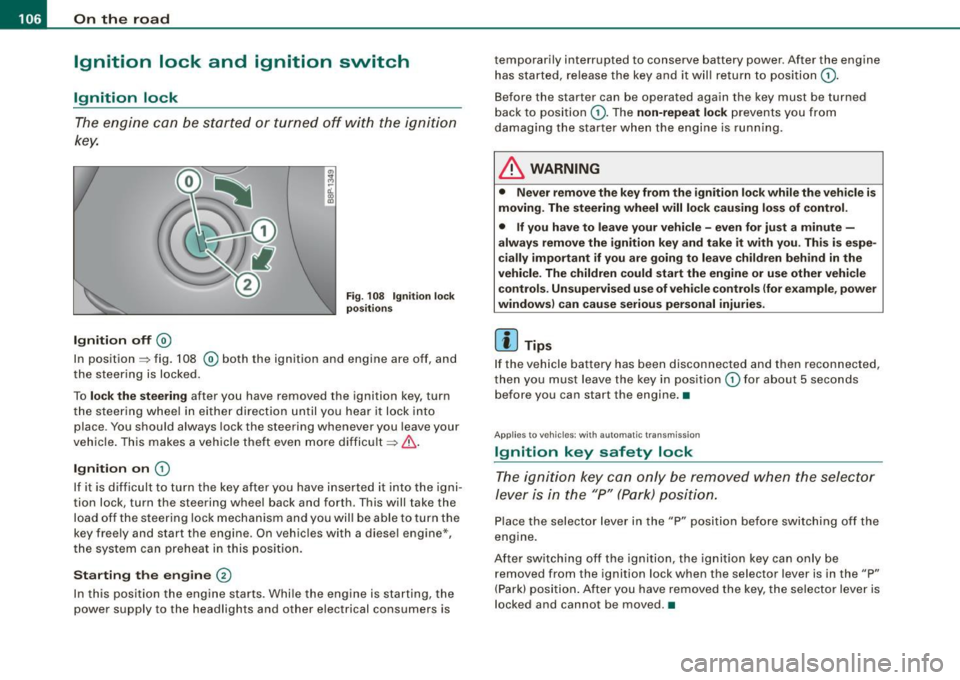
Ignition off ®
Fi g. 108 Ignit ion lock
p os ition s
In position => fig. 108 ® both the ignit ion and engine are off, and
the steering is locked .
To
lo ck the stee ring after you have removed the ignition key, turn
t he steering whee l in either direction until you hear it lock into
place . You should always lock the steering whenever you leave your
vehic le . This makes a vehicle theft even more difficult =>
& -
Ignition on CD
If it is difficult to turn the key after you have inserted i t into the igni
tion lock, turn the steering wheel back and forth . This will take the
load off the steering lock mechanism and you will be able to turn the
key freely and start the engine . On vehicles with a diesel engine*,
t he system can preheat in this pos ition.
St arting the engine
@
In this position the engine starts . Whi le the engine is starting, the
power supply to the headlights and other electrical consumers is temporarily interrupted to conserve battery power
. After the engine
has started, release the key and it will return to position
CD .
Before the starter can be operated again the key must be turned
back to position
CD -The non-repeat lock prevents you from
damaging the star ter when the engine is runn ing.
& WARNING
• Never remo ve the key from the ignition lo ck w hile the veh icle i s
moving. The steering whe el will lo ck caus ing lo ss of control .
• If you hav e to lea ve your vehicle -even fo r ju st a min ute -
alway s remove the ignition key and take it with you. Th is is espe
ci ally important if you are g oing to lea ve children behind in the
vehicle . The childr en co uld start the eng ine or u se other vehi cle
c on trols . Un supe rvis ed u se of veh icle c ont ro ls ( for e xamp le , po wer
windows) c an cause seriou s per sonal injuries .
[ i ] Tips
If the vehicle battery has been disconnected and then reconnected,
then you must leave the key in position
CD for about 5 seconds
before you can start the engine. •
Applies t o vehi cles : w ith autom atic trans mission
Ignition key safety lock
The ignition key can only be removed when the selector
le ver is in the "P" (Park) p osition.
Place the selector lever in the "P" posi tion be fore switching off the
engine .
After switching off the ignition, the ignition key can only be
removed from the ignition lock when the selector lever is in the "P"
(Park) position . After you have re moved the key, the selector lever is
l ocked and cannot be moved .•
Page 109 of 320
___________________________________________________ O_ n_ t_h _e_ r_o _a_ d _ ___._
Starting and stopping the engine
Starting the engine
The engine can only be st arted with your origin al Audi
key.
V ehi cle s with a gas oline engin e:
- Set the parking bra ke.
Fi g. 109 I gnit ion ke y
pos it io ns
- Move the selector lever to the neutra l position (automatic
transmission) : se lector lever in P or N) =>
&.
- On vehicles with manual transmission, fu lly depress the
c lutch pedal.
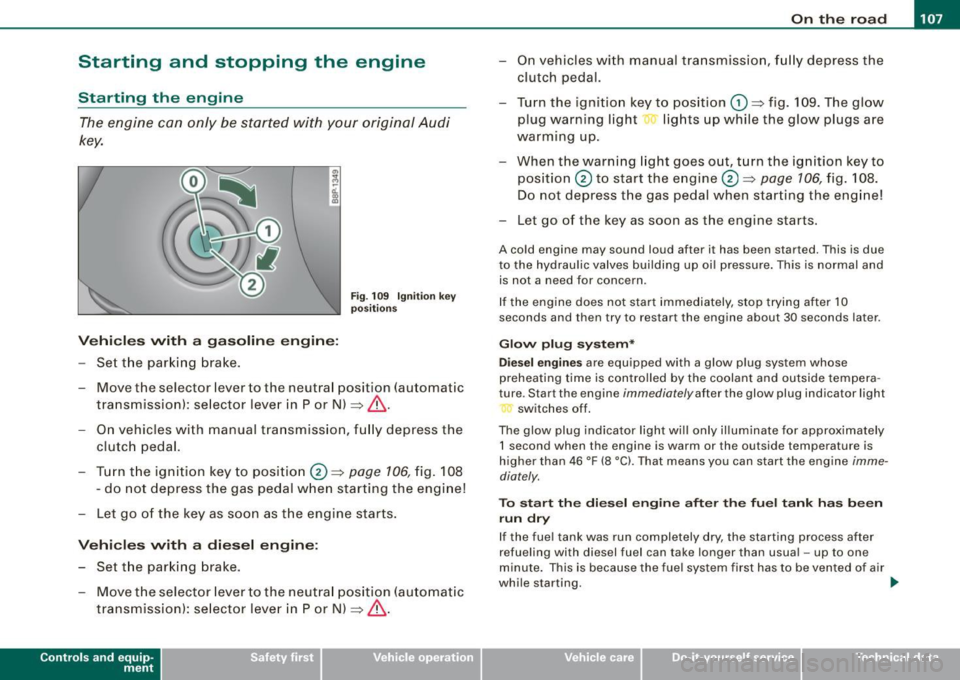
- Turn t he ign ition key to position@ =>
page 106, fig. 108
- do not depress the gas pedal when starting the engine!
- Let go of the key as s oon as the engine s tarts .
Vehicle s with a di esel engine :
- Set the parking brake .
- Move the selector lever to the neutra l position (automatic
transmission): se lector lever in P or N) =>
&.
Con tro ls and eq uip
ment
- On vehicles with manual tra nsm ission, f ully depress the
clutch pedal.
- Turn the ign ition key to position
G) => fig. 109 . The g low
plug warning light lig hts up while the glow plugs are
warming up .
- When the warning light goes out, turn the ignition ke y to
position @ to start the engine@=>
page 106, fig. 108 .
Do not depress the gas pedal when star ting the eng ine!
- Let go of the key as soon as the engine starts.
A co ld engine may sound loud after it has been started. This is due
to the hydrau lic va lves building up oi l pressure . This is normal and
is not a need for concern .
I f the engine does not start i mmediately, stop trying after 10
seconds and then try to res tart the engine about 30 seconds la ter .
Glow plug system *
D ie sel engin es
are equ ipped wi th a glow p lug system whose
preheating time is controlled by the coolant and outside tempera
ture . S tar t the engine
immediately after the glow plug indicator l ight
switches off .
The glow plug indicator light wi ll only il luminate for approximately
1 s econd when the engin e is warm or the outside temp erature is
higher than 46 °F (8 °C). That means you can start the engine
imme
diately .
To st art the di esel engin e after the fuel t ank ha s be en
run dr y
If the fue l tank was run completely dry, the starting process after
refuel ing with diesel fuel can take longer than usual -up to one
minute. This is because the fue l system first has to be vented o f air
while starting. _,.
Vehicle care I I irechnical data
Page 110 of 320

• ..__O_ n_ t_h _e _ r_o _a _ d __________________________________________________ _
& WARNING
Never start or let the engine run in a confined or enc losed area .
Exhaust fumes from the engine contain carbon monoxide , a color
le ss and odorless gas . Carbon monoxide can be fatal if inhaled .
• Never leave the engine idling unattended . An unattended
vehi cle with a runn ing engine poses a danger of personal injury or
theft.
0 Note
• Avoi d high engine speed s, fa st a ccele rati on or heavy eng ine
loads while the engi ne is sti ll cold. This cou ld damage the engine.
• The e ngi ne canno t be sta rt e d by pushing o r to w ing the vehicle.
~ For the sake of the environment
To avoid unnecessary engine wear and to re duce ex hau st emis
sions, do not let your vehicle stand and warm up. Be ready to drive
off immed iate ly afte r start ing y our veh icle. Maintain modera te
sp eed unt il the engine is completely warm. Remembe r, th e engine
performs best a t operati ng tempe ra ture .•
Stopping the engine
- Turn t he ignit ion key to position © ~ page 106 , fig. 108.
& WARNING
• Never turn off the engine until the vehicle has come to a
complete stop.
• The brake booster and servotroni c only work when the engine
is running . With the ignition turned off , you have to apply more
force when steering or braking . Since you cannot steer and stop
normally, this can lead to accidents and serious injuries .
& WARNING (continued )
• The radiator fan can continue to run for up to 10 minutes even
after you have turned off the engine and removed the ignition key .
The radiator fan can also turn on again if the engine coolant heats
up because of inten se sunlight or heat build -up in the engine
compartment .
0 Note
Do not stop the engine immediatel y after hard or extended driving.
Keep the eng ine runn ing f or ap proximate ly t wo minu tes to preven t
excessive heat build -up. •
Parking brake
Parking brake
Whe n the parking brake is s et, i t prev ent s th e v ehicl e f rom
rolli ng away un int entionally.
Setting the parking brake
Fig . 110 Center
console: Par king brake
s et
- Pull the park ing brak e lever all the way up.
Page 111 of 320
_________________________________________________ O _n_ t_h _e _ r_o _a _d __ lfflll
R elea sing th e parking br ake
- Pu ll the parking brake lever up slight ly and press the
release button at the same time~
page 108, fig. 110
-arrow-.
- Keep the release button pressed and lower the parking brake ~& .
If you should drive off with the parking brake sti ll set, a warning tone
will sound and the fo llowing wil l appear in the instrument cluster to
remind you to re lease the parking brake:
Parking brak e set
The parking brake warning comes on only after you have driven for
longer than 3 seconds and faster than 5 mph (5 km/h).
The parking b rake warning light Brake (USA)/ «D>
(CDN) illuminates
when the parking brake is set and you switch on the ignition .
& WARNING
Alway s re leas e the par king br ake completely . A p artiall y engaged
br ake w ill overheat the r ear brake s, reduce their effective ness and
ca use e xcessive w ear. T his co uld le ad to brake failur e and an acc i
dent .
0 Note
Only after the vehicle has come to co mplete stop, should you firm ly
set the parking brake and either move the gearshift lever into 1st .
gear (manual transmission) or move the selector lever into "P"
(Automatic transmission). •
Controls and equip
ment
Parking
To prevent a parked vehicle from rolling away, there are a
few things you should do.
When you park your vehic le, do the fo llowi ng:
- Stop the vehicle using the brake pedal.
- Set the parking bra ke firm ly .
- Move the selector lever into the
P pos ition ( automatic
tran smi ssion)
or m ove the gea rshi ft lever into 1s t. gear
(manual transmission ) ~ &.
- Switch off the engine and remove the ignitio n key from
t h e igniti on loc k.
Wh at else you should d o wh en p arking your vehicle o n
a n i ncline or dec line
Turn the steering wheel so that if the vehicle should start to roll, it
will ro ll into the curb.
I f you are parking on a
declin e (the front of your vehic le facing
downhill!, turn the front wheels to the right so that they point
toward the curb .
If you are parking on an incline (the font of your vehicle fac ing
uphill!, turn the front whee ls to the left so that they point
away from
the curb.
Move the selector lever into the P position ( autom atic tran sm iss ion)
or move the gearshift leve r into 1st. gear (manual tr ansmi ssion ).
& WARNING
Thi s is how you can redu ce the r isk of injury when leaving y our
vehi cle .
• Never p ark the vehi cle where it can come in conta ct with dr y
gra ss, spi lled fuel or any other fl amm able m ater ials . .,_
I • •