light AUDI S3 2010 Repair Manual
[x] Cancel search | Manufacturer: AUDI, Model Year: 2010, Model line: S3, Model: AUDI S3 2010Pages: 320, PDF Size: 75.34 MB
Page 113 of 320

----------------------------------------------~O~n~t:.!..h~e::...!..r~o~a~d~ _fflll
-Drive at the speed you wish to set .
- Press button
@ to set that speed.
The disp lay=> page 110, fig . 112 will show the set speed . The
display may vary depending on the type of disp lay in your vehicle .
T he indicator light
CRU ISE (US model)/ f,f (Canadian mod e ll wi ll also
light up in the instrument cluster .
& WARNING
• Alway s pa y att ention to traffic ev en when the crui se contr ol is
s w it ched on . You are al ways respo nsi ble for your spee d and the
di stance between your v ehic le and other ve hicle s.
• For sa fet y reas on s, the crui se contr ol s h o uld not be u sed in the
ci ty , in stop -and -go traffic , on t wis ting road s and when road condi
tion s are po or (s uch a s ic e , fo g, gra vel , he avy ra in and h ydro
planing ) - risk of accident .
• Turn o ff th e cru is e c ont rol tempor arily w hen ente ring tu rn
lanes , highway e xit lan es or in con stru ction zone s.
• Please n ote that in ad vertentl y "res ting " yo ur foot on the a ccel
erator pedal cau se s t he crui se control not to brak e. Thi s is becau se
th e c ruise c ontrol i s overridden by the dri ver's acceler ation .
[ i] Tips
• Vehicles with manual transmission : You can attain the set speed
only if the curren tly engaged gear al lows it and the engine is not
stressed. Shifting to a higher or lower gear promptly will allow the
engine to run smooth ly .
• T he cruise control cannot maintain a constant speed when
driving downhi ll. The vehicle wi ll acce lerate under its own weight .
Downshift to a lower gear or use the brakes to slow down .•
Controls and equip
ment
Changing speed
Press lever in the 0 o r O direction ~ page 110, fig. 111
to increase or dec rease your speed.
- Release the lever to save that speed .
Change speed in increments of 1 mph (1 km/h) by lightly pressing
the lever. If you keep the lever pressed down, you will a lter your
speed in 5 mph (10 km/hl increments .
You can a lso press the acce lerator pedal down to increase your
speed, e.g. if you want to pass someone. The speed you saved
earlier will resume as soon as you release the accelerator pedal.
I f , however, you exceed your saved speed by 5 mph ( 10 km/h) for
longer than 5 minutes, the cruise control will turn off temporarily.
The symbol wi ll go out but the saved speed wi ll be retained. •
Presetting your speed
You can preset your desired speed while the vehicle is not
moving.
Turn on the ignition.
P ull lever into posit ion
G) ~ page 110 , fig. 11 1.
Press the lever in the
0 or O direction to increase or
decrease your speed.
- Release the lever to save that speed .
This function makes it possible, for example, to save the speed you
want before driving on the highway . Once on the highway, activate
the cruise contro l by pulling the lever toward
G) . •
I • •
Page 115 of 320

Transmission -_______________ ___.
Transmission
Manual transmission
Applies to vehicles: with manual transmission
Gearshift lever
The clutch pedal must be depressed all the way before
you can start the engine.
The manual transmission in your Audi is equipped with an
interlock-feature.
- Depress the clutch pedal all the way.
- Start the engine with the gearshift lever in Neutral and
the clutch pedal depressed.
0 Note
Always depress the clutch pedal fully when changing gears. Do not
hold the vehicle on a hill with the clutch pedal partially depressed.
This may cause premature clutch wear or damage.
[ i J Tips
• Resting your hand on the gearshift lever knob while driving will
cause premature wear in the transmission.
• The back-up lights go on when you shift into Reverse with the
ignition on. •
Contro ls and eq uip
ment
App lies to vehicles: with 6-speed manual transmission
Gearshift pattern (6-speed manual
transmission )
Fig. 113 Gearshift
pattern: 6-speed
manual transmission
Drive in 6th gear for optimum fuel economy when cruising.
However, if more acceleration is required (when passing, for
example), shift down.
Engaging reverse gear (R)
- Move the shift lever all the way to the left, press it down,
then push it forward.
Especially after driving forward, stop the vehicle completely, shift
into
Neutral and rest the shift lever briefly in Neutral before shifting
into
Reverse. •
Vehicle care I I irechnical data
Page 116 of 320
....... _T _r_a _ n_ s_m _ i_s _s _i_o _n ______________________________________________________ _
S tronic transmission
Applies to vehicles: w ith S tronic®
Introduction
Your vehicle is equipped with a S tronic transmission, also called a
double -clutch system/transmission.
Power is transferred between the engine and the transmission by means of two independent clutches. They replace the torque
converter of conventional automatic transmissions and al low the
vehic le to accelerate without a noticeable break in the power flow .
With the aid of
ti pt ronic, the gears can optionally be shifted manu
ally => page 118 . •
Appl ies to vehicles: with S tronic®
Selector lever positions
All the selector lever positions are explained in this
section .
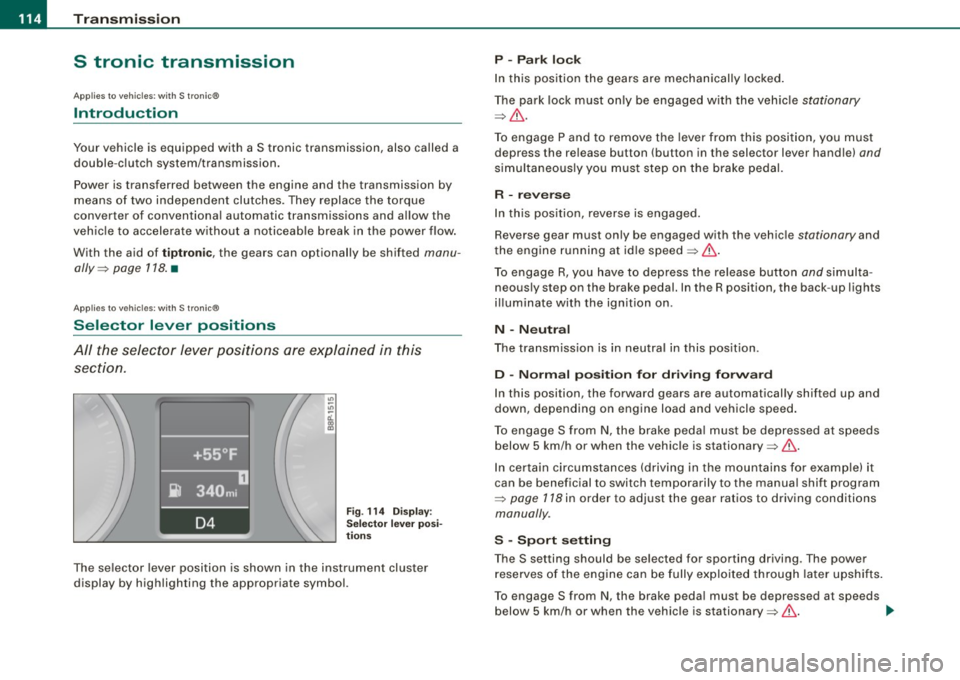
Fig. 114 Disp lay:
Selecto r lev er posi
t ions
The se lector lever position is shown in the instrument cluster
display by highlighting the appropriate symbol.
P -Park lock
In this position the gears are mechanically locked .
The park lock must only be engaged w ith the vehic le
stationary
=> & .
To engage P and to remove the lever from this position, you must
depress the release button (button in the selector lever handle)
and
simultaneously you must step on the brake pedal.
R -reverse
In this position, reverse is engaged.
Reverse gear must only be engaged with the vehic le
stationary and
the engine running at id le speed =>& .
To engage R, you have to depress the release button
and simulta
neously step on the brake pedal. In the R position, the back -up lights
i ll uminate with the ignition on.
N -N eutra l
The transmission is in neutra l in this pos ition.
D -Norm al po siti on fo r dri vin g fo rw ard
In this position, the forward gears are automatical ly shifted up and
down, depending on engine load and vehicle speed.
To engage S from
N, the brake peda l must be depressed at speeds
below 5 km/h or when the vehicle is stationary=>& .
In certain circumstances (driving in the mountains for examp le) it
can be beneficial to switch temporarily to the manual shift program
=>
page 118 in order to adjust the gear ratios to driving conditions
manually .
S -S po rt setting
The S setting should be selected for sporting driving. The power
reserves of the engine can be fully exploited through later upshifts .
To engage S from N, the brake peda l must be depressed at speeds
below 5 km/h or when the vehicle is stationary=>& . .,_
Page 118 of 320

• ..__T_ ra_ n_s_ m_ i_ s _s_ i_ o _n ___________________________________________________ _
The selector lever lock is effective only when the vehicle is
stationary and at speeds below 5 km/h. At higher speeds, the lock in
the N position is automatically switched off.
The selector lever is not locked when rapid shifts are made through
t he N position (e.g . from R to Dl. This allows you to "rock" the vehicle
if it becomes stuck . If the lever is in the N position for more than
1 second with the brake pedal not depressed, the selector lock
engages automatically.
Release b utt o n
The release button in the selector lever handle prevents accidental
shifts in to certain selector lever positions. When you press the
re lease button, the selector lever lock is cancelled. In the illustra
t ion, the positions in which the release button has to be pressed are
highlighted in color=>
page 115, fig. 115.
Igniti on k ey remo val lock
The ignition key can only be remove after the ignition is switched off
if the selector lever is in P . As long as the ignition key is removed, the
selector lever is locked in P.
[ i J Tip s
If the selector lever does not engage, there is a malfunction . The
engine is disabled to prevent the vehicle from driving off uninten
tiona lly. To a llow the selector lever to engage again, proceed as
follows: Press and release the brake pedal. •
Applies to vehicle s: wi ths troni c®
Driving Notes
The forward gears are shifted up or down automatically .
Starting from stop
-Step on and hold the brak e peda l.
Fig. 116 Sectio n fr om
c en ter console :
Se lec tor lever w ith
r e lea se butt on
- Ho ld t he release butt on (but to n in se lector lever) down,
move t he s elector lev er to th e desire d posi tion, fo r
e xam ple D
=> page 114, and release t he b utto n.
- Re lease the brake pe dal and accelerate =>& .
Stopping temporarily
- Bring t he vehicle to a full stop wit h the brake, e.g. at
traffic signals.
- Do not accelerate.
Pa rking
- Step on and ho ld the brake pedal=> & .
- Apply the parking brake firmly.
- Hold the re lease button down, move the s elector lever to
P and re lease the button . _.,
Page 120 of 320

_L_T.:...:.. r.:::a :.:n.: S::::.. m:.:..: iS::.::: S::iO ::::.:. n.:.._ _____________________________________________________ _
& WARNING
Hill Descent Assist cannot overcome physical limitations, so it
may not be possible to maintain a constant vehicle speed under all
circumstances. Always be ready to apply the brakes. •
Appl ies to vehic le s: w ith S I roni c®
tiptronic operation
Tiptronic allows the driver to shift gears manually.
"' "' ..,
;;;: ., m
Fig . 117 Center
console: Manual
shifting (tiptronicl
Fig. 118 Display:
Manual shifting
(tiptronic)
Switching to manual
Push the selector lever to the right from D. As the trans
mission has switched,
6 5 4 3 2 1 appears in the display,
with the gear that is engaged highlighted.
Upshifting
Tap the selector lever forward (in the tiptronic setting)
~ fig. 117 0-
Downshifting
Tap the selector lever backward (in the tiptronic setting)
0-
Switching to manual can be carried out with the vehicle stationary
as well as moving.
When accelerating, the transmission shifts into the next gear in
gears 1, 2, 3, 4 and 5 shortly before the maximum permissible
engine speed is reached.
If you have selected a lower gear than the current one, the transmis
sion will only shift down when the engine cannot be overspeeded.
If kick -down is actuated, the transmission shifts into a lower gear
independently of speed and engine rpm .•
Page 121 of 320
____________________________________________________ T_ r_ a _n _s_ m_ i_ s _ s_ i_ o _ n _ ___.1111111
Ap plies to vehicl es: with S tro ni c® and w ith Tip tr onic cont rols o n the stee ring wh eel
Steering wheel with Tiptronic ® controls
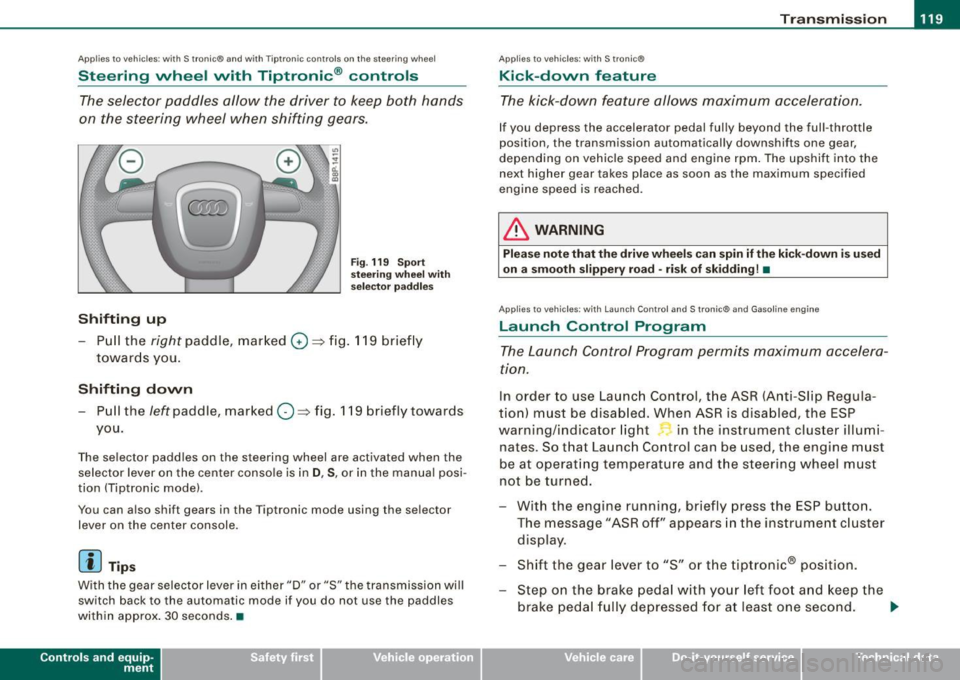
The selector paddles allow the driver to keep both hands
on the steering wheel when shifting gears.
Shifting up
Fig . 119 S port
s tee ring w he el w it h
selector pa ddles
-Pull the right paddle, marked 0 ==> fig. 11 9 briefly
towar ds you .
Shifting down
-Pull the left paddle, mar ked O ==> fig. 119 briefly towards
you.
The selector paddles on the steering wheel are activated when the se lector lever on the center console is in
D , S , or in the manua l posi
tion (Tiptronic mode) .
You can a lso shift gears in the Tiptronic mode using the se lector
lever on the center console .
[ i] Tips
With the gear selector lever in ei ther "D" or "S" the transmission wi ll
switch back to the automatic mode if you do not use the paddles
within approx . 30 seconds .•
Con tro ls and eq uip
ment
Ap plies to vehi cles: wit h S tr on ic ®
Kick -down feature
T he kick-down feature allows maximum acceleration.
If you depress the accelerator pedal ful ly beyond the ful l- throt tle
position, the transmission automatically downshifts one gear,
depending on vehic le speed a nd eng ine rpm . The upshi ft into the
next higher gear takes place as soon as the max imum specified
engine speed is reached .
& WARNING
Please note th at th e drive wheel s can spin if the kick -do wn is used
o n a s mooth slippery r oad -ri sk of sk idding! •
Applies to ve hicles: w it h L aunch Contro l and S tronic ® and Gaso line engine
Launch Control Program
The Launch Control Program permits maximum accelera
ti on.
In order to use Launc h Control, t he ASR (Anti-Slip Regula
tion) must be disab led . When ASR is disabled, the ESP
warning/indicator light in t he instrument cluster illumi
nates . So that Launch Control can be used, the engine must
be at operat ing temperature and the stee ring wheel must
not be turned.
- With the engine running, briefly press the ESP button.
The message "ASR off" appears in the instrument c luster
disp lay .
- Shift the gear lever to "S" or the tiptronic® pos ition.
- Step on the brake peda l w ith yo ur left foo t and keep the
brake peda l fully depressed for at least one second . _,.
Vehicle care I I Technical data
Page 122 of 320
• ..__T_ r_a _n_ s_ m_ is_ s_io _ n ______________________________________________________ _
- With your right foot, step on the accelerator to the wide
open throttle position or Kickdown. The engine speed
settles at about
3,200 rpm.
Take your left foot off the brake.
The S tronic® in your vehicle is electronically controlled. A special
Launch Control Program provides th e best acceleration from a
standing start .
& WARNING
• Always adapt your driving to the traffic flow.
• Only use Launch Control when road and traffic conditions allow
it and other drivers will not be endangered or annoyed by your
driving and the acceleration of the vehicle.
• Make sure that ESP remains enabled. With the ESP disabled,
the vehicle could brake away, particularly on a slick and slippery
road -risk of skidding!
• Once acceleration is finished, switch ASR on again by briefly
pushing the ESP button . •
Ap plies to ve hicles : wit h S t ro ni c®
Back-up program
In the event of a system malfunction, there is an back-up
program.
In the event of system malfunction, the automatic transmission
switches to th e fail -safe mode . All o f the selec tor lever pos ition
displays for the automatic transmission are highlighted with a light
background in the instrument clust er display. In some cases you
cannot drive in the reverse gear any more .
If the transmission swi tches to fail-safe mode, you should take the
vehicle to an authorized Audi dealership as soon as possible to have
the condition corrected .•
A pp lies to veh ic les: w ith s tro nic®
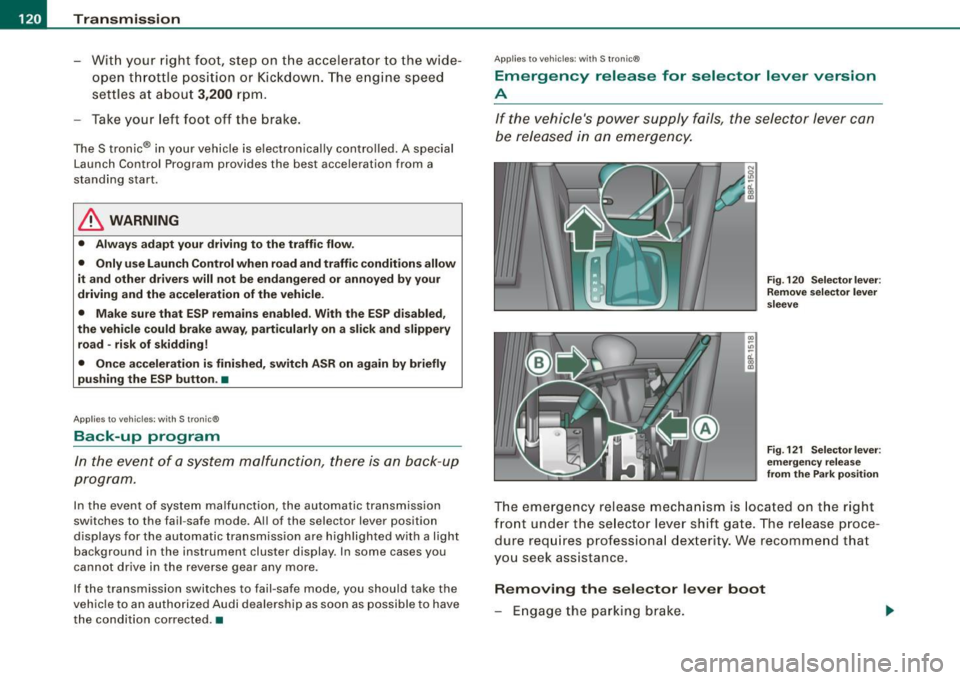
Emergency release for selector lever version
A
If the vehicle's power supply fails , the selector lever can
be released in an emergency.
Fig. 120 Selector lever :
Remove selector lever
sleeve
Fig . 121 Selector lever :
emergency release
from the Park position
The emergency release mechanism is located on the right
front under the selector lever shift gate. The release proce
dure requires professional dexter ity. We recommend that
you seek assistance.
Removing the selector lever boot
- Engage the parking brake.
Page 127 of 320
Driving Safely -
----------------
Important things to do before driv ing
Safety is everybody's job! Vehicle and occupant safety
always depends on the informed and careful driver.
For your safety and the safety of your passengers, before
driving always:
-Make sure that all lights and signals are operat ing
correctly.
- Make sure that the tire pressure is correct.
- Make sure that all windows are clean and afford good
visibility to the outside.
- Secure all luggage and other items carefully =>
page 92.
-Make sure that noth ing can interfere w ith the pedals.
- Adjust front seat, head restraint and mirrors correctly for your height .
- Instruct passengers to adjust the head restraints
according to their height.
- Make sure to use the right ch ild restraint correctly to
protect children =>
page 167, "Child Safety ".
- Sit properly in your seat and make sure that your passen
gers do the same=>
page 72, "General recommenda
tions".
- Fasten your safety belt and wear it p roperly. Also instruct
your passengers to fasten the ir safety belts properly
=>
page 135. •
Controls and equip
ment Safety first Vehicle operation
What impa
irs driving safety?
Safe driving is directly related to the condition of the
vehicle, the driver as well as the driver's ability to concen
trate on the road without being distracted.
The driver is responsible for the safety of the vehicle and all
of its occupants. If your ability to drive is impaired, safety
risks for everybody in the vehicle increase and you also
become a hazard to everyone else on the road =>& .There
fore:
Do not let yourself be distracted by passengers or by
using a cellular telephone .
NEVER drive when your driving ability is impaired (by
medications, alcohol, drugs, etc.).
- Observe all traffic laws, rules of the road and speed limits
and plain common sense .
- ALWAYS adjust your speed to road, traffic and weather
conditions.
- Take frequent breaks on long trips. Do not drive for more
than two hours at a stretch.
- Do NOT drive when you are tired, under pressure or when
you are stressed .
& WARNING
Impaired driving safety increases the risk of serious personal
injury and death whenever a vehicle is being used. •
Vehicle care Do-it-yourself service Technical data
Page 128 of 320

___ D_ r _i_v _i_n -=g =--- S_ a_ f_ e____, ly'----------------------------------------------------
Proper occupant seating positi ·ons
Proper seating position for the driver
The proper driver seating position is important for safe,
relaxed driving.
Fig . 124 The correct
distance between
driver and steering
wheel
Fig . 125 Correct head
restraint position for
driver
For your own safety and to reduce the risk of injury in the
event of an accident, we recommend that you adjust the
driver's seat to the following position:
- Adjust the driver's seat so that you can easily push the
pedals all the way to the floor while keeping your knee(s)
slightly bent=:>& . - Adjust the angle of the seatback so that
it is in an upright
position so that your back comes in full contact with it
when you drive.
- Adjust the steering wheel so that there is a distance of at
least 10 inches (25 cm) between the steering wheel and
your breast bone=:> fig. 124. If not possible, see your
authorized Audi dealership about adaptive equipment.
- Adjust the steering wheel so that the steering wheel and
airbag cover points at your chest and not at your face.
- Grasp the top of the steering wheel with your elbow(s)
slightly bent.
- Adjust the head restraint so that the upper edge is as
even with the top of your head as possible but no lower
than eye level and so that it is as close to the back of your
head as possible=:> fig. 125.
- Fasten and wear safety belts correctly=:>
page 139.
- Always keep both feet in the footwell so that you are in
control of the vehicle at all times.
For detailed information on how to adjust the driver's seat, see
=>
page 73, "Adjusting front seats manua lly" or=> page 74,
"Adjusting the power seat".
& WARNING
Drivers who are unbelted, out of position or too close to the airbag
can be seriously injured by an airbag as it unfolds. To help reduce
the risk of serious personal injury:
• Always adjust the driver's seat and the steering wheel so that
there are at least 10 inches (25 cm} between your breastbone and
the steering wheel. .,_
Page 137 of 320

Safety belts -----------------=------
Safety belts
General notes
Always wear safety belts!
Wearing safety belts correctly saves lives!
This chapter explains why safety belts are necessary, how
they work and how to adjust and wear them correctly.
- Read all the information that follows and heed all of the
instruct ions and WARNINGS.
& WARNING
Not wearing safety belts or wearing them improperly increases
the risk of serious personal injury and death.
• Safety belts are the single most effective means available to
reduce the risk of serious injury and death in automobile acci
dents . For your protection and that of your passengers , always
correctly wear safety belts when the vehicle is moving.
• Pregnant women, injured, or physically impaired persons must
also use safety belts . Like all vehicle occupants, they are more
likely to be seriously injured if they do not wear safety belts . The
best way to protect a fetus is to protect the mother -throughout
the entire pregnancy. •
Number of seats
Your Audi has a total of five seating positions: two in the front and
three in the rear. Each seating position has a safety belt.
Controls and equip ment Safety first
Vehicle operation
& WARNING
Not wearing safety belts or wearing them improperly increases
the risk of serious personal injury and death .
• Never strap more than one person, including small children,
into any belt. It is especially dangerous to place a safety belt over
a child sitting on your lap.
• Never let more people ride in the vehicle than there are safety
belts available.
• Be sure everyone riding in the vehicle is properly restrained
with a separate safety belt or child restraint. •
Safety belt warning light ~
Your vehicle has a warning system for the driver and front
seat passenger (on USA models only) to remind you about
t he importance of buckling-up.
Before driving off, always:
Fig. 128 Safety belt
warning light in the
instrument cluster -
enlarged
- Fasten your safety belt and make sure you are wearing it
properly.
1J,,
Vehicle care Do-it-yourself service Technical data