fog light AUDI S3 2010 Owners Manual
[x] Cancel search | Manufacturer: AUDI, Model Year: 2010, Model line: S3, Model: AUDI S3 2010Pages: 320, PDF Size: 75.34 MB
Page 9 of 320
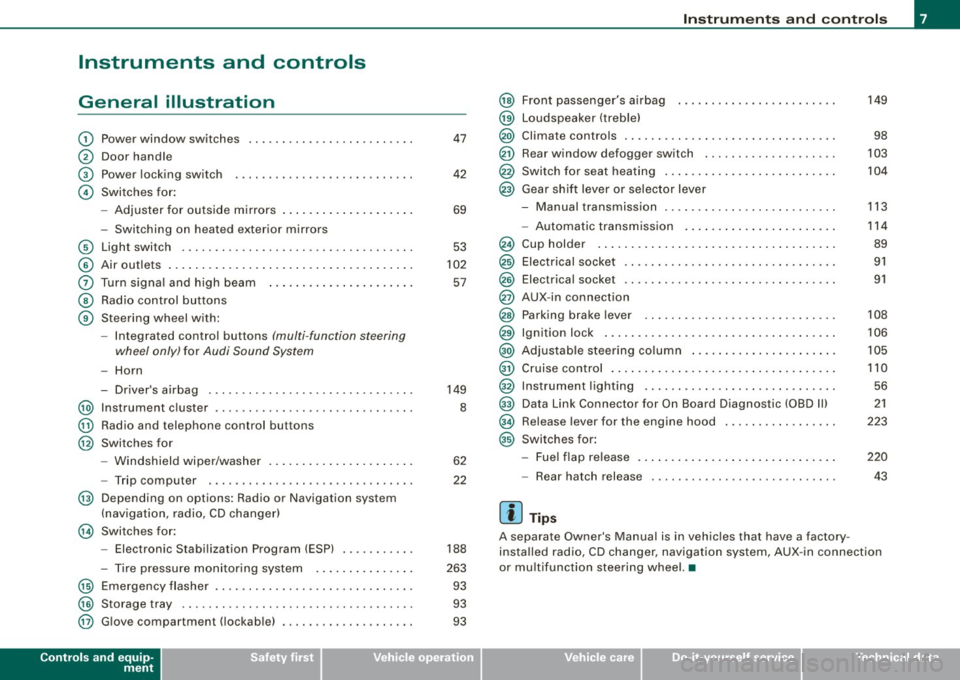
Instruments and controls
General illustration
G)
0
©
©
Power window switches
Door handle
Power locking switch
Switches for:
- Adjuster for outside mirrors .. ........ ... ...... .
- Switching on heated exterior mirrors
© Light switch .................................. .
© Air outlets .... .... ... .. ............... ........ .
0 Turn signa l and high beam ...... ............. .. .
@ Radio control buttons
@ Steering wheel with:
-Integra ted control buttons (multi -function steering
wheel only) for Audi Sound System
-Horn
- Driver's airbag .............................. .
@ Instrument cluster .................... ...... ... .
@ Radio and telephone control buttons
@ Switches for
- Windshield wiper/washer .... ... .. ...... ... ... .
- Trip computer .... ................... ....... .
@ Depending on options: Radio or Navigation system
(navigation, radio, CD changer)
@ Switches for:
- Electronic Stabilization Program (ESP) .......... .
- Tire pressure monitoring system .. ... .. .... ... .
@ Emergency flasher ............................. .
@) Storage tray .. ... .... ... ... ... .. .. .... ........ .
@ G love compartment ( lockab le) ..... ........ .... .. .
Controls and equip
ment
47
42
69
53
102
57
149
8
62
22
188
263 93
93
93
Instruments and controls
@
@
@
@
@
@
Front passenger's airbag
Loudspeaker (treble)
Climate controls .. ..... .. ..... ........... ...... .
Rear window defogger switch ...... ............ . .
Switch for seat heating .. ...... .... .... ......... .
Gear shift lever or selector lever
M I .. - anua transm1ss1on . ........... ....... .... .. .
- Automatic transmission ... ... ...... .... .... .. .
Cup holder ...... ...... ....... ...... .......... .
Electrical socket ............................... .
Elect rical socket ............................... .
AUX-in connection
Parking brake lever ............................ .
Ignition lock ........ ................ .... ...... .
Adjustable steering column ...... .... .... ..... .. .
Cruise control .. ........ ....... ...... .... ...... .
Instrument lighting ............................ .
Data Link Connector for On Board Diagnostic (OBD Ill
Release lever for the engine hood
Switches for:
- Fuel flap release .......... ...... .... ......... .
- Rear hatch release
[ i ] Tips
149
98
103
104
113
114
89
91
91
108
106
105
110 56
21
223
220
43
A separate Owner's Manual is in vehic les that have a factory
insta lled radio, CD changer, navigation system, AUX -in connection
or multifunction steering wheel. •
I • •
Page 55 of 320

Clear vision
Lights
Switching the headlights on and off ·'t!-·
"' ~ a'.. a,
"'
Fig. 46 In strument
pane l: lig ht switch
Fi g. 47 Instrument
pane l: Light swi tch
with dayti me running
ligh ts (DR L)
The light switch must not be overturned past the stops in
either direc tion.
Switching on automatic headlight control*
- Tur n the lig ht swi tch to AUTO* :::> fig. 46.
Con tro ls and eq uip
ment
Clear vision
Switching on the side marker lights
- Tur n t he lig ht sw itch to ~oo~ .
Switching on the headlights and high beam
-Turn the light sw itch to ;:o.
P ush th e high b eam lev er fo rward t owards th e ins tru
ment pan el
=:> page 57.
Switching off the lights
- Turn t he ligh t switch to 0.
The head lights on ly work when the ignition is switched on. While
sta rting the engine or whe n switching off the igniti on, the head
lights wil l go off and only the side marker lights wil l be on.
Daytime running lights (DRL ) (USA models )
The daytime running lights can be turned on or off using this func
t ion . If the f unc tion is ac tive, the dayt ime running lights a re tu rned
on automatically when the ignition is switched on.
The daytime runn ing lights are activated
only w hen the light switch
i s at the
AUTO* or DRL * positi on.
Daytime running lights (Canada models only )
The daytime running lights are activated only when the light switch
~ fig. 46 is either at the O or the ;oo: position. When the ignition is
switched on, there is a difference betwe en v ehicles with b i-xenon
lights and halogen lamps:
• On vehicles with bi-xe non lights only the daytime runni ng lamps
in the headlights will come on .
• On ve hic les with halogen lights the fron t fog lights, s ide marker
lights and tail lights come on automatically
~
Vehicle care I I irechnical data
Page 56 of 320

Clear vision
The daytime running lights function cannot be turned off .
Automatic headlight control *
In the switch position AUTO the automatic he adlight contro l is
turned on . The low beams are turned o n automatically through a
light sensor as soon as ambient brightness (e .g. when driving into a
t unnel) falls below a value preset at the factory. When ambien t
brightness increases again, the low beams are turned off again
aut omatically ==>&, .
In the
AUTO position the low beams are switched off automatically
when the ignition is turned off.
Light S ensor M alfun ction *
In the even t of a light sensor malfunct ion, the driver is notified in the
instrument cluster display :
Automatic headlights /automati c w ipers defe ctive
For safety reasons the low beams are turned o n permanently w ith
the switch in AUTO *. However , you can continue to turn the lights
on and off us ing the l ight switch . Have the lig ht sens or checked as
soon as possib le at a dealership .
Coming home /leaving home function *
The function is switched on when the switch is in the AUTO* posi
tion and the f unction is shown as ac tive in t he d river info rmat ion
system .
The
c oming home function illuminates the area around the vehicle
when the ignition is switched off a nd the driver's door is opened.
The length of time the lights remain on can be set in the menu
display
(Illumination > Exterior lights > coming home ).
The leaving home function illuminates the area around the vehicle
whe n unlocking it .
& WARNING
• Nev er use daytime run ning light s to see whe re you are going .
They are not bright enough and will not let you see far enough
ahead for safety , espe cially at du sk or when it i s da rk . Al way s
s w itch on the low beam s at du sk or when it i s dark .
• Automatic headlight s are only intended to assist the driver .
They do not relieve the driver of hi s responsibility to check the
head light s and to turn them on manually according to the cu rrent
light and visibility conditions . For example , fog and rain cannot be
detected b y the l ight sen sor s. S o alwa ys switch on th e headl ight s
under these weather conditions and when driving in the dark
io.
• Cra she s c an happen when you cannot see the road ahead and
when you cannot be seen by other motor ists.
- Alway s turn on the hea dlight s so that you can see ahead a nd
so that other s can see your car from the ba ck.
[ i ] Tips
• With the swi tch in AUTO front fog ligh ts cannot be turned on in
addition.
• The light sensor for head light contr ol is located in the rear view
mirror mount. Do not apply any stickers to the windshie ld in this
area to p revent malfunctions or failures.
• Some exterior lighting functions can be adjusted in the driver
informa tion system
==> page 23.
• I f you remove the ignition from the ignition lock while the head
l ights are still on, a bu zzer w ill sound as long as the driver's door is
open to remind you to turn off the lights.
• Always observe t he specific local regulations for your area as to
when to use your lights.
• With automatic headl ights, the high -beam function is also avai l
able, but with one restriction : If you have not switched the high
bea ms back to low beams duri ng automatic headlight operation (for
example , after driving through a tunne l), on ly the low beams come .,,_
Page 57 of 320

on the next time automatic headlights are switched on. To use the
high beams, you first have to pull the high beam lever back and then
push the lever forward again.
• In cool or damp weather, the inside of the headlights, turn
signals and tail lights can fog over due to the temperature differ
ence between the inside and outside. They will clear shortly after
switching them on. This does not affect the service life of the
lighting.
• Frequent use of the coming home/leaving home function for
approaching and departing a vehicle parked in the dark will strain
the battery . This applies particularly if only short distances are
driven between stops. Occasionally drive longer distances to make
sure the battery is recharged sufficiently. •
Applies to vehicles: with Adap tive Light
Adaptive light
When driving around bends, the relevant area of the road
is better illuminated.
Fig. 48 Adaptive light
when driving
The benefit of adaptive light is that the curve and the edge of the
road are better illuminated::::} fig . 48 . The adaptive light is controlled
automatically, depending on vehicle speed and steering wheel
angle.
Con tro ls and eq uip
ment
Clear vision
When driving around bends, the headlights are controlled
according to steering wheel angle. So that there is no black area
ahead of the vehicle, the two main beams pivot at different angles .
[ i] Tips
The system works above a speed of about 6 mph (10 km/hl. •
Front fog lights !O
Use the light switch to turn on the front fog lights.
Fig. 49 Fog light acti
vation: light switch
position on vehicles
WITHOUT sensor light
Switching on the front fog lights !D
Do not turn the light switch ·'ti-·~ fig. 49 toward the fog
light symbol
Turn the light switch to
~oo: or to io.
Pull the light switch to the first stop G).
When the front fog lights are on, the symbol }O next to the light
switch will illuminate.•
Vehicle care I I Technical data
Page 98 of 320
Warm and cold
Warm and cold
Climate controls
Description
The air conditioner is fully automatic and is designed to
maintain a comfortable and uniform climate inside the
vehicle.
We recomme nd the following s ettings:
- Select and set a temperature between 64
°F (+22 °C) and
84 °F (+28 °C).
- Press the !AUTO
I button.
With this setting, you attain maximum comfort in the least amount
of time . Change this set ting, as desired, to mee t your pe rsonal
needs.
The climate controls are a combination of heating, venti lation and
cooling systems, which automatica lly reduce humidity and coo l the
air inside your vehic le .
The air temperature, air flow and air distribution are automatically
regu lated to achieve and maintain the desired passenger compart
ment temperature as quick ly as possible.
The system automatically compensates for changes in the outside
temperature and for the intensity of the sun light entering the
vehic le. We recomme nd you use the
Automati c mode~ page 99for
year -round comfort.
P lease note the following :
Turn on the air conditioner to reduce humidity in the vehic le. This
a lso prevent the window s from fogging up. When the outside temperature is high and the air is very humid,
c
ondensat ion from the evaporator may drip under the vehicle . T his
is normal and does not indicate a leak.
I f the outside temperature is low, the fan normally only switches to
a higher speed once the engine coola nt has war med u p sufficiently .
T he air conditioner temporarily sw itches off when you drive off from
a standstill using fu ll throttle to save engine power.
The comp ressor also swi tches off if the coolant temperatu re is to o
high so that the engine can be adequate ly cooled under extreme
lo ads .
Air pollutants filt er
The air po llutants fi lter (a combined partic le filter and activated
charcoal fi lter) reduces or eliminates outside air pollution (dust, or
p ollen) from en ter ing the vehic le .
The air po llutants fi lter must be changed at the intervals specified
in your Warranty
& Maintenance bo oklet, so that the ai r conditioner
can proper ly work.
I f you drive your vehicle in an area with high air pol lution, the filter
may need to be changed m ore freque ntly tha n specified in your
Audi Warranty
& Maintenance booklet. If in doubt, ask your autho
r iz ed Aud i Service Adviso r fo r a dvice .
& WARNING
Redu ced vi sibility i s dangerou s and can cause accidents .
• For saf e driving it is very important that all window s be free of
ice , sno w and conden sation.
• Fully familiarize yourself with the proper use and fun ction of
the heating and ventil ation sy stem and especially how to defog
and defrost the windows. ...
Page 100 of 320

Warm and cold
Controls
This overview will help y ou to familiarize yourself with the
air conditioning controls.
F ig. 10 3 Air cond it io ning co ntrols
The display shows the tempera ture selected and the blower setting.
You can set the temperature for the driver's side using the left rotary
switch © and the temperature for the passenger 's side with the
r ight switch
@ .
Functions are turned on and off by touching the buttons. The diode
in the butt ons il luminates when the function is active.
The grille between the buttons
8 / 8 and [AUTO I must remain
unobstructed; there are measurement sensors behind it.
• Do not seal off the grille .
• Do not clean the grille with a vacuum cleaner, otherwise the
sensors could be damaged.
But
t o n(s ) Function
Page
-
Switching the cooling system on/o ff => page 98
[AUTO I A utomatic operation
GG Blower speed setting
(in the
center)
Automatic recirculation mode
Defrost
Air direc ted to the windows
Air from the outlets
Air directed to the footwell
Rear window de fogge r
=> page 99
=> page 101
=> page 100
=> page 100
=> page 99
=> page 101
=> page 101
=> page 101
=> page 103
The buttons for setting the ai r flow direction~'~ and~ can also
be pushed in combination .•
App lies to vehicle s: wi th automat ic air condi tioner
Switching the air conditioner on /off !AC)
Press the [AC] button to switch the air cond itioner on or
off.
When the air conditioner is switched on, the indicator light in the
b utton is lit.
When the air conditioner is switched off, the cooling system is
switched off -the heating and ventilation system is regulated auto
matically. Sw itch ing of f the coo ling sys tem (compressor) saves fuel. ._
Page 101 of 320
Please keep in mind that with the air conditioner switched off, the
interior temperature cannot be lower than the outside temperature.
There is no cooling and the air is not dehumidified (danger of the
windows becoming fogged).
[ i ] Tips
if there is a defect in the air conditioner, the air conditioner cannot
be switched on. In this case, the diode in the button does not light
after being switched on. in the event of a system fault, please
contact an Audi or specialist garage. •
Switching the air conditioning on and off @
-Press the [AC] button to switch the air conditioner on or
off.
if there is a defect in the air conditioner, the air conditioner cannot
be switched on. In this case, the diode in the button does not light
after being switched on . in the event of a system fault, please
contact an Audi or specialist garage. •
Automatic mode [ AUTO I
The automatic mode is the standard setting for all
seasons.
Swit ching on AUTO
- Select temperature between 64 °F (+18 °C) and 84 °F
(+28 °C) .
- Press
[AUTO I~ page 98, fig . 103.
AUTO on ly works when you set the inside temperature between
64 °F (18 °C) and 84 °F (28 °C). If you se lect a tempe rature be low
Controls and equip
ment
W arm and cold
64 °F (18 °C), LO will appear in the disp lay. If you se lect a tempera
t ure above 84 °F (28 °C),
HI will appear in the display .
The system automatica lly compensates for changes in outside
temperature and for the intensity of the sun light .
[ i ] Tip s
By keeping the [AU TO l button on the driver's side pressed for
severa l seconds, the temperature of the passenger's side can be set
to the temperature of the driver's side or vice versa. The new
t emperature setting will be shown in the disp lay. •
Setting the temperature 1
Separa te tempera tures can be selected for the driver's
and fr ont passenger's side.
- Turn the rotary sw itch © on the driver's side and the
rotary switc h@ on the passenger's s ide left( -) or right
(+ ) to control the temperature ~ page 98, fig. 103.
There is a time de lay before the selected temperature is reached.
[ i ] Tip s
The temperature setting for the driver's side can be transferred to
the passenger's side~
page 99. •
Defrosting/defogging the windshield[@)
The windshield and side windows are quickly defrosted or
defogged
- Press [®I~ page 98, fig. 103 .
- Press[@] again or press
[AUTO I to switch off the
defros ter .
I • •
Page 105 of 320

___________________________________________________ W_ a_ r_m _ a_ n_d_ c_ o_ ld _ __.11111
<£> For the s ake of th e envir onm ent
By reducing the amount of fue l you use, you a lso reduce the amount
of pollutants emitted into the air. •
Key coded settings
When the ignition is switched on, the air conditioner
settings are automatically assigned to the key being used.
The air conditioner settings selected are automatically stored and
assigned to the key being used. When the vehicle is started, the air
conditioner automatical ly selects the settings assigned to that key .
This way every driver will maintain his/her own personal settings and does not have to reset them manually.
[ i ] Tip s
If a different driver uses your key and changes the air conditioner
sett ings, the latest adjustments wil l erase and replace the settings
you hav e stored. •
Rear vvindovv defogger QiP
The rear window defogger clears the rear window of
condensation.
Con tro ls and eq uip
ment
F ig . 105 Sw itch for
rear window defogge r
w ith air-co nditionin g
Press the CiiP switch to switch the rear wind ow defogger
on a nd off.
The defogger works only with the engine runn ing. When the
defogger is switched on, an indicator light in the switch comes on .
The rear window defogger switches off automatically after about 20 minutes.
<£> For the sake of the environment
Turn the defogger off when the rear window is c lear . When you save
electricity, you save fuel. •
Applie s to v ehic le s: wi th di ese l e ngin e
Additional heater
-Switch the Additional h eater to AUTO .
Vehicles with diesel engines are equipped with an additional heater
to warm the interior of the vehicle more quickly. The additional
heater switches itself on and off automatically when the outside
temperature is below 50 °F (10 °C) and the engine is running ,
depending on the coolant temperature, interior temperature and
the selected temperature. •
Vehicle care I I irechnical data
Page 239 of 320

___________________________________________ C_ h_e _c_ k_ i_n _g _ a_n _d_ f_il _li _n _g __ fflllll
•
Di sco nnecting the batt ery
Some vehic le functions (power window regulators, for example) are
lost if the battery termina ls are disconnected. These functions have
to be relearned after the battery terminals are connected again . To
prevent this, the battery should only be disconnected from the
vehicle el ectrical system if absolutely necessary.
Vehic les not driven f or lo ng peri o ds a nd sho rt -di stan ce
o pera tion
The battery can a lso become discharged with the veh ic le stationary
by id ling current consumers . When the vehic le is sta tionary
(planned event) during the
cold t ime of the year, you should remove
the battery and store it in a nonfreezing area . This way you prevent
that the battery "freezes" and thereby is destroyed . During the
w arm er time of the year it is sufficient to disconnect the negative
terminal from the battery . Occasionally charge even a disconnected
battery .
Wint er opera ti on
During the winter months, battery capacity tends to decrease as
tempera tures drop . This is because more power is a lso consumed
while starting, and the headlights, rear window defogger, etc., are
used more often .
Avoid unnecessary power consumption, particularly in city traffic or
when trave ling only short distances. Let your authorized Audi dea ler
check the capacity of the vehicle battery before w inter sets in
=>
page 239. A well charged battery will not only prevent starting
problems when the weather is cold, but w ill also last longer.
Replacin g battery
The new battery m ust h ave the same capacity , voltage (12 volts),
amperage, construction and p lug sea ling, as the orig inal battery.
Specif ications are listed on the battery housing. Batteries special ly
developed by Audi fulfil l the maintenance, output, and safety
requirements.
When instal ling the battery, make sure the ignition and all electrica l
consumers are switched off=>
(D.
We recommend that you use maintenance -free or c y c le -resis
tant /leak -proof
batte ries according to the sta ndards TL 825 06 (from
December 1997) and VW 7 50 73 (from August 2001).
(D Note
• All work on the battery requires technical knowledge . Please
contact an Audi dealership or another authorized fac ility for ques
tions about the battery- danger of acid burns and exp losion hazard!
• The battery must not be opened! Do not try to change the
battery's liquid level, otherwise detonating gas wil l escape from the
bat tery -explosion hazard!
• The AGM battery in the luggage compartment cannot leak,
because the electrolyte for this battery is abso rbed in to a special
glass mat . This leak-proof battery must not be replace with a
conventiona l battery.
• Make sure the ventilation hose on the side of the battery is
connected, otherwise fumes or battery acid can leak out.
• Battery holder and terminals always have to be secured correctly .
• Before all work on the ba ttery follow the
warning s below=> & in
"Working on the battery" on
page 238.
mend your authorized Audi deale r change the battery for you .
Batteries contain sulfuric acid and lead and must always be
disposed of properly in comp liance with a ll environmental regula
tions . D isposing of vehicle batteries improperly is very dangerous to
the environment. Make sure that the removed batte ry cannot over
balance , otherwise sulfuric acid might escape! •
Vehicle care I t •
Page 282 of 320

1111.___F_ u_ s _ e_s _ a_n _ d_ b_ u_lb _ s _______________________________________________ _
Equipment Amps No. Equipment Amps
Manual headlight beam adjustment, automatic
14 Electronic Stabilization Program (ESP) (control 10
1
headlight beam adjustment, AFS control mod-10
module), shift gate automatic transmission
ule, engine components, light switch (switch
15 Interior lights, reading lights 10
lighting/illumination), diagnosis socket
Diagnostic connector, rain sensor, air condition-
Automatic transmission, control module for
16 ing (control module), tire pressure monitor dis-10
CAN data transfer (gateway), electro -mechanical
play (control module)
2 steering, shift gate automatic transmission, 10 17 Anti-theft alarm warning system 5 engine relay, fuel tank control unit, engine con -
trol unit, brakes control (ABS), Electronic Stabili-
18 Diagnose Starter 5
zation Program (ESP), Anti -Slip Regulation (ASR) 19 All Wheel Drive 10
3
Airbag 5 20 Not used
!! Air-conditioning (pressure sensor, air quality
sensor), button for Electronic Stabilization Pro -
21 Not used
gram (ESP), Anti-Slip Regulat ion (ASR), tire pres-
22 Blower fan 40
sure monitor display, oil level sensor, back -up 23 Driver's side power window, front 30
4 light switch, front seat heating , parking aid, 5
seat-occupancy recognition (on USA vehicles), 24 Power outlet front 20
garage door opener, automatic mirror dimming, 25 Rear window defogger 30
headlight assistant, heated windshield washer
26 Power outlet in luggage compartment 20 nozzles, air conditioning (control module)
-27 Fuel tank control module, fuel pump 15
5 AFS headlights (left side) 5
AFS headlights (right side) 5 28 Power window, rear 30
7
Not used 29 Not used
Not used
30 Not used
9 Navigation system, radio system 15 31 Not used
10 digital
radio, cell phone, TV equipment 7,5 32 Not used
11 Automa tic mirror dimming, headlight assistan t 10 33 Sliding/pop-up roof 20
Central locking (front doors) 10 34 Not used
13 Central locking (rear doors) 10 35 Not used
36 Lumbar support 10