brake light AUDI S3 2011 User Guide
[x] Cancel search | Manufacturer: AUDI, Model Year: 2011, Model line: S3, Model: AUDI S3 2011Pages: 320, PDF Size: 75.79 MB
Page 93 of 320
- Plug in appliance to be used.
The outlet may be used for 12-volt app liances w ith maxim um
cons umption of up to 100 watts, such as a flash light, small vacuum
cl eaner, e tc.
Before you purchase any accessor ies, always read and fo llow the
info rm ation in::::,
page 301, "Add it io na l acc essories and p arts
re placemen t".
& WARNING
The outlet plus any appliances plugged into it remain functional
even if the ignition is switched off or the ignition key is removed. Never leave children inside the vehicle without supervision .
0 Note
To avoid damaging the socket, only use plugs that fit properly.
(I) Tips
When the engine is off and accessor ies are st ill plugged in and are on,
the ve hicle battery can sti ll be drained .•
Storage
General overview
There are numerous pl aces to st ore items in your vehi cle .
Storage in t he center armrest
Storage in the rear armrest
::::, page 79
Glove com partment (Ai r ven tila tion in t he ::::, page 92
glove compartment*, CD changer*)
Controls and equip ·
ment Safety first
Seats and storage
Center console ::::,
page 92
Compartments in the door tr ims ::::, page 93
Storage in the footwell ::::, page 93
Compartments in luggage compartment ::::, page 94
Coat hooks
Some of the storage locations are only fo und o n specific vehicle
mode ls o r are op tio nal equ ipme nt.
& WARNING
• Always remove objects from the instrument panel. Any items
not put away could slide around inside the vehicle while dri ving or
when accelerating or when applying the brakes or when dri ving
around a corner.
• When you are driv ing make sure that anything you may have
placed in the center console or other stor age locations cannot fall
out into the footwells. In c ase of sudden braking you would not be
able to b rake, depres s the clutch or accelerate .
• Any pieces of clothing that you have hung up must not inter
fere with the driver's view. The co at hooks are designed onl y for
lightweight clothing . Never hang any clothing with hard, pointed
or hea vy objects in the pockets on the coat hooks. During sudden
braking or in an accident· especially if the airbag is deployed ·
the se objects could injure any passengers inside the vehicle. •
Vehicle care Technical data
Page 94 of 320

Seats and storage
Glove compartment
The glove compartment is illuminated and can be locked.
To open glove compartment
Fig. 94 Glove
compartment
- Pull the handle => fig. 94 in the direction of the arrow push
down lid to the fully open position.
To close glove compartment
-Push the glove compartment lid upward until the lock
engages.
The light will illuminate when the parking/headlights are turned on
and the glove compartment is open.
In the glove compartment lid, you will fi nd a place to store a pen and
a pad of paper.
& WARNING
To reduce the risk of personal injury in an accident or sudden stop,
always keep the glove compartment closed while driving. •
Applies to veh icles: with storage compartment in cente r con sole
Storage compartment for small objects Ca
Fig. 95 Center console
storage compartment
- To open the compartment, press th e cover Ce=> fig. 95.
- To close the compartment, push the drawer all the way in
until it clicks in place.
An additional storage compartment3> for relatively small objects is
located in the cente r console next to the brake lever. •
3
l Not available on vehicles wi th Aud i Naviga tion System .
Page 110 of 320
ffl..__O_ n_ t_ h_e _ ro_ a_d _______________________________________________ _
& WARNING
Never start or let the engine run in a confined or enclosed area.
Exhau st fume s from the engine contain carbon monoxide, a color
less and odorless gas. Carbon monoxid e can be fatal if inhal ed.
• Never leave the engine idling unattended . An unattended
vehicle with a runn ing engine poses a danger of personal injury or
theft .
0 Note
• Avoid high engine speeds, fast acceleratio n or heavy engine loads
w hile the engine is still cold. This cou ld damage the eng ine .
• Th e engine c annot be sta rted by p ush ing or tow ing the veh icle .
~ For the sake of the environment
To avoid unnecessary engine wear and to reduce e xhaust emissions,
do not let your vehicle stand and warm up . Be ready to dr ive off imme
diately after starting your vehicle. Maintain moderate speed unti l the
eng ine is comp letely warm . Remember, the engine performs best at
operat ing temperature. •
Stopping the engine
-Turn the ignition key to position @~poge 106, fi g. 107 .
& WARNING
• Nev er turn off the engine until the vehicle has come to a
c omplete stop.
• The brake booster and servotronic only work when the eng ine
i s running . With the ignition turned off , you have to apply more
force when steering or bra king. Since you cannot st eer and stop
normally , thi s can lead to accident s and serious injuries.
& WARNING (contin u ed )
• The radiator fan can continue to run for up to 10 minute s even
a fter you have turned off the engine and removed the ignition key.
The radi ator fan can also tur n on agai n if the engine coolant heats
up be cause of intense sunlight or heat build-up in the engine
compartment.
0 Note
Do not stop the engine immed iately after hard or extended driving.
Keep t he engine run ning for approximate ly two minutes to prevent
excessive hea t build-up. •
Parking brake
Parking brake
When the parking brake is set, it prevents the vehicle
from rolling a way unintentionally .
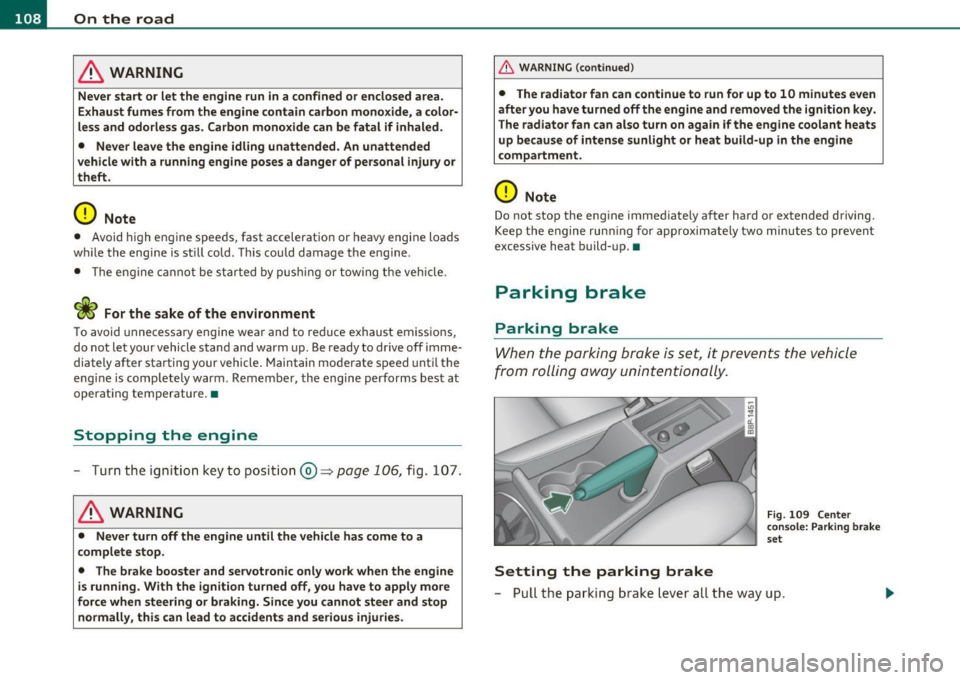
Setting the parking brake
Fig. 109 Cente r
c o ns ole : Pa rk ing brak e
s et
- Pull t he park ing b rak e l eve r all the way up .
Page 113 of 320
________________________________________________ ..::O :::.:.,: n:...t~ h :...!.::: e:...!.. ro~ a:_::d!..,_ __
- Drive at the sp eed yo u wish to set.
- Press button © to set that speed .
The disp lay=> page 110, fig . 111 w ill show the set speed. T he d is p lay
may vary depending on the type of display in your veh icle. The ind i
cator light
CRUISE (US mode l) I 0" (Canadian model) w ill also light up
in the instr ument cluster .
& WARNING
• Alway s pay attention to traffi c even wh en the cruise control i s
switch ed on. You are always responsible for your speed and the
distance between your vehicle and other vehicle s.
• For safety reasons , the cruise control should not be used in the
city, in stop-and-go traffi c, on twi sting road s and when road
conditions are poor (such as ice , fog, gravel, heavy rain and hydro
planing ) · risk of accident .
• Turn off the cruise control temporarily when entering turn
lanes, highway exit lane s or in con struction zone s.
• Please note that inadvertently "resting" your foot on the accel ·
erator pedal cau ses the crui se control not to brake . This i s becau se
the cruise control is ove rridden by the driver 's accele rat ion .
[ i ] Tips
• Vehicles with manual transmission : You can atta in the set speed
only if the curren tly engaged gear allows i t and the eng ine is no t
stressed . Shift ing to a higher or lowe r gear promptly w ill allow the
eng ine to run smooth ly .
• The cru ise contro l cannot ma inta in a constant speed when driving
downhil l. The vehi cle will accelerate under its own weigh t. Downshift
to a lower gear or use the brakes to slow down .•
Controls and equip
ment Safety first
Changing speed
- Press lev
er i n t he 0 or O directio n=:::;, page 110, fig. 110
to inc rease or d ecr eas e yo ur sp eed.
- Release the lever to save t hat speed .
Change speed in increments o f 1 mph (1 km/h) by lightly pressing the
lever. If you keep the leve r presse d down, yo u will alte r your s peed in
S mph (10 km/h) increments .
You can also press t he accelerator pedal down to increase your s peed,
e .g . if you want to p ass someone. The speed you save d earlier wi ll
resume as soon as yo u re lease the accelerator pedal.
If, however, you exceed yo ur saved speed by 5 mph (1 0 km/h) fo r
longer than S m inutes, the cruise contro l will turn off temporarily .
Th e symbo l will go out b ut the save d speed will be retaine d.•
Presetting your speed
You can preset your d esir ed sp eed whil e the vehicle is not
moving.
- Turn on the ignition.
- Pull leve r into positio n
CD~ page 110, fig . 110.
- Press the lever in the
0 or O di rec tion to increase or
d ecr eas e y our sp eed.
- Release the lever to save t hat spe ed .
Thi s fu nction makes it possible, for example, to save the speed yo u
w ant befo re drivi ng on the highway . Once on t he highw ay, act ivate
the cruise contro l by pu lling the leve r toward
(D . •
Vehicle care Technical data
Page 117 of 320
Transmission Ill
----------------
S tronic transmission
Applies to veh icles: w ith S tron ic ®
Introduction
Your vehicle is equipped with a S tronic transmission, also called a
double-clutch system/transmiss ion.
Power is transferred between the engine and the transm ission by
means of two independent clu tches. They replace the torq ue
converter of conventional automat ic transmiss ions and allow the
vehicle to a cce le rate witho ut a no ticeable b reak in the powe r flow .
With the a id of tiptroni c, the gears can optionally be shifted
manu
ally ~ page 119 . •
A ppli es to ve hicles : with S tro nic ®
Selector lever positions
All the selector lever positions are explained in this
section.
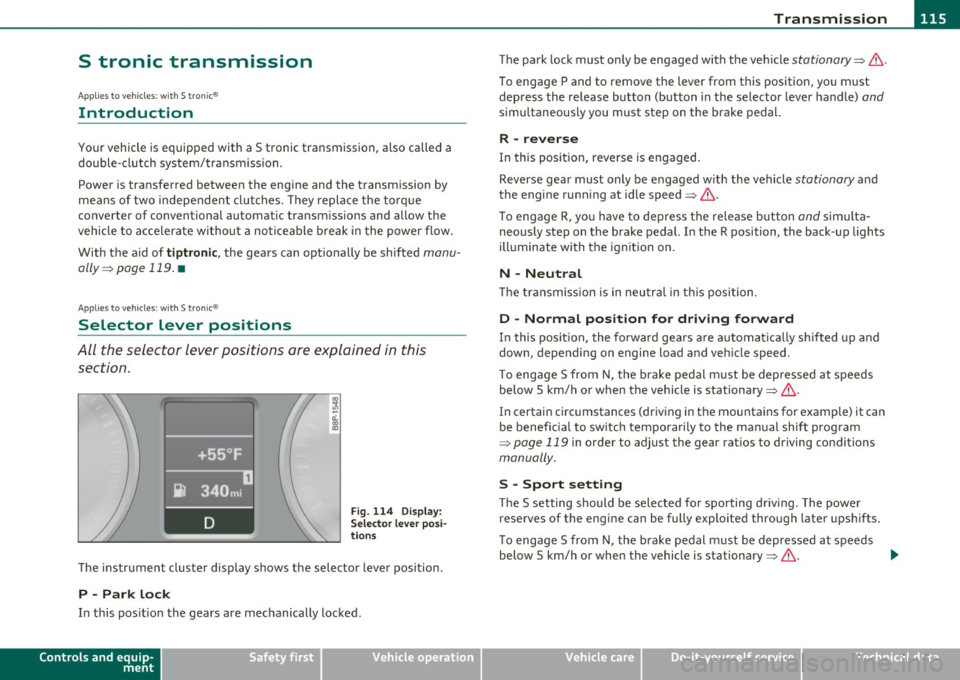
Fig. 114 D ispl ay:
Sel ect or le v er po si
t io ns
T he instr ument cluster display shows the selecto r lever position .
P -Park lock
In this pos it ion the gears are mechanically locked.
Controls and equip
ment Safety first The park
lock must on ly be engaged with the veh icle
stationary~ &.
To engage P and to remove the lever from this position, yo u m ust
depress the release bu tton (button in the selector lever handle)
and
simu ltaneously you must step on the brake pedal.
R -reverse
In this pos it ion, reverse is engaged.
Reverse gear must only be engaged with the vehicle
stationary a nd
the engine runn ing at idle speed~& .
T o engage R, yo u ha ve to dep ress t he release b utton
and s imulta
neously step on the brake pedal. In the R position, the back -up lights
ill uminate with the ign it ion on.
N -Neutral
Th e tra nsmiss ion is in neu tral in t his posi tion.
D -Normal position for driving forward
In this pos it ion, the forward gea rs a re a utoma tic a lly s hif ted up and
down, depending on engine load and ve hicle speed.
T o engage S from N, the brake pedal m ust be depressed at speeds
below 5 km/h or when the vehicle is stationary~&.
In certain circ umstances (driving in the mountains for example) it can
be benefic ia l to sw itc h t emporar ily to the ma nual shift prog ram
~ page 119 in order to adjust the gear rat ios to driving conditions
manually.
S -Spo rt setting
Th e S setting should be selected fo r spo rting dr iv ing. The power
reserves of the engine can be fully exploited through later upshifts .
T o engage S from N, the b rake pedal m ust be depresse d at speeds
below 5 km/h or when the vehicle is stationary~&. .,_
Vehicle care Technical data
Page 119 of 320
____________________________________________________ T _r_a _n_ s_m _ i_s _s_ i_ o _ n _ ___.fflll
The selector lever lock is effective only when the vehicle is stationary
and at speeds below 5 km/h. At highe r speeds, the lock in the N posi
tion is automatically switched off.
The selector lever is not locked when rapid shifts are made through
the N position (e.g . from R to D) . T h is allows you to "rock" the vehicle
if it becomes stuck. If the lever is in the N position for more than
1 second with the brake pedal not depressed, the selector lock
engages automatically.
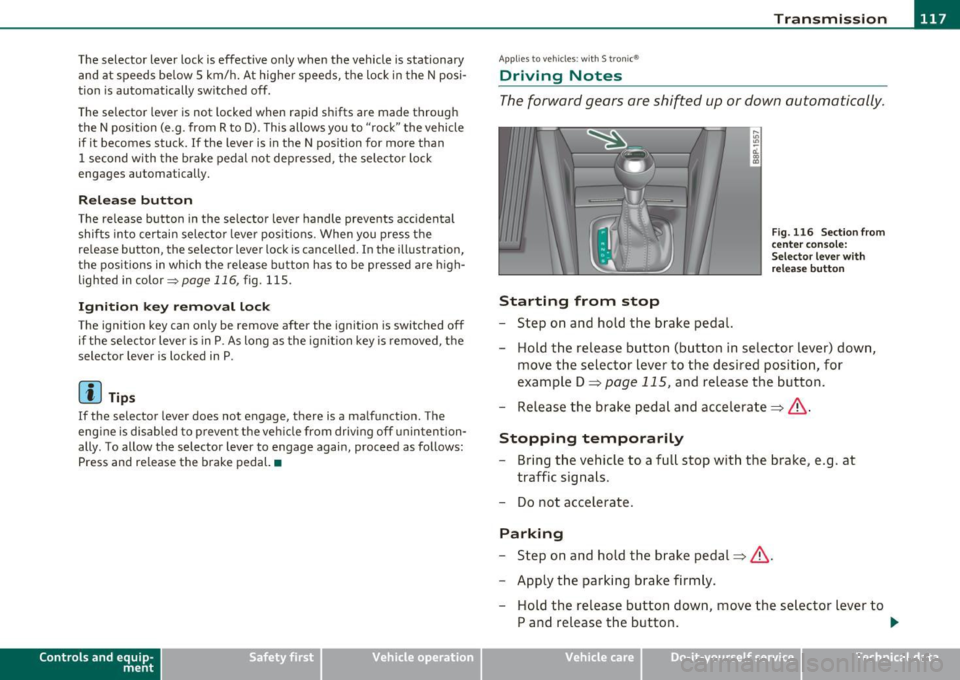
Release button
The release button in the selector lever handle prevents accidental
shifts into certain selector lever pos itions. When you press the
release button, the selector lever lock is cancelled. In the illustration,
the positions in which the release button has to be pressed are h igh
lighted in color::::>poge
116, fig . 115 .
Ignition k ey remo val l ock
The ignition key can only be remove after the ignition is switched off
if the selector lever is in P. As long as the ignit ion key is removed, the
selector lever is locked in P.
[ i ) Tips
If the selector lever does not engage, there is a malfunction . The
eng ine is disabled to prevent the vehicle from driv ing off unintention
ally. To allow the selector lever to engage again, proceed as follows:
Press and release the brake pedal.•
Contro ls a nd e quip
m en t Vehicle
OP-eration
Applies to vehicles : w ith S tronic®
Driving Notes
The forward gears are shifted up or down automatically .
Starting from stop
-Step on and hold the brake pedal.
Fig. 116 Section from
ce nter conso le:
Selector lever with
r elease button
- Hold the release button (button in selector lever) down,
move the selector lever to the desired position, for
example D =:;,
page 115, and relea.se the button.
- Release the brake pedal and accelerate=:;,& .
Stopping temporarily
-Bring the vehicle to a full stop with the brake, e.g . at
traffic signals.
- Do not accelerate .
Parking
-Step on and hold the brake pedal=:;,&.
- Apply the parking brake firmly.
- Hold the release button down, move the selector lever to
P and release the button. .,.
Vehicle care Do-it-yourselt service iTechnical data
Page 122 of 320
1111..__T_ r _a_ n_s_ m_ i_ s _s_ i_ o _ n _________________________________________________ _
Applies to veh icles : with S tro nic® and with Tiptron ic controls on the stee ring whee l
Steering wheel with Tiptronic ® controls
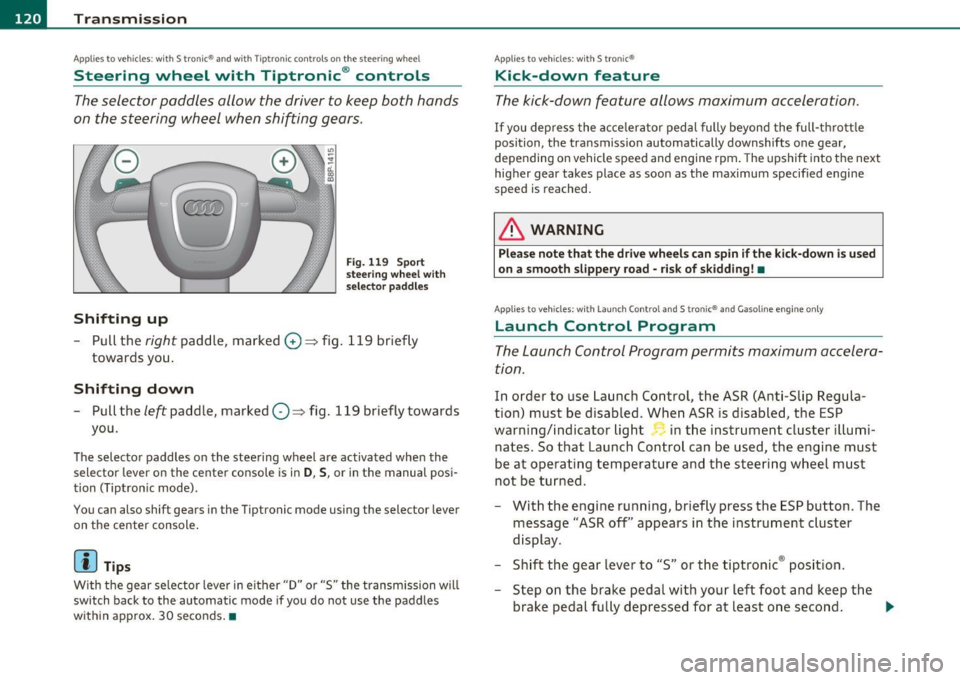
The selector paddles allow the driver to keep both hands
on the steering wheel when shifting gears.
Shifting up
Fig. 119 Sport
steering wheel with
selector paddles
-Pull the right paddle, marked G) => fig. 119 briefly
towards you .
Shifting down
-Pull the left paddle, marked O=> fig. 119 briefly towards
you.
The selector paddles on the steering wheel are activated when the
selector lever on the center console is in
D, S, or in the manual posi
tion (Tiptron ic mode).
You can also shift gears in the Tiptronic mode using the selector lever
on the center console.
[ i ] Tips
With the gear selector lever in either "D" or "S" the transmission will
switch back to the automatic mode if you do not use the paddles
within approx. 30 seconds .•
Applies to veh icles : with S tro nic®
Kick-down feature
The kick -down feature allows maximum acceleration.
If you depress the accelerator pedal fully beyond the full-thrott le
position, the transmission automatically downshifts one gear,
depending on vehicle speed and engine rpm. The upsh ift in to the next
higher gear takes place as soon as the maximum specified engine
speed is reached.
& WARNING
Please note that the drive wheel s can spin if the kick-down is u sed
on a smooth slippery road -risk of skidding! •
Applies to veh icles: w ith Lau nch Control an d S tron ic® and Gasoline engine only
Launch Control Program
The Launch Control Program permits maximum accelera
tion.
In order to use Launch Control, the ASR (Anti-Slip Regula
tion) must be disabled. When ASR is disabled, the ESP
warning/indicator light in the instrument cluster illumi
nates. So that Launch Control can be used, the engine must
be at operating temperature and the steering wheel must
not be turned.
- With the engine running, briefly press the ESP button. The
message "ASR off' appears in the instrument cluster
display.
- Shift the gear lever to "S" or the tiptronic ® posit ion.
- Step on the brake peda l with your left foot and keep the
brake pedal fully depressed for at least one second . _,,,
Page 192 of 320
Intelligent technologyL ______________________________________ _
the drive wheels on one axle is detected (e.g . on slippery ground on
one side),
the spinning wheel is braked, thereby transferring power to
the other drive wheel or wheels (all -wheel drive) . This is done up to a
speed of about 60 mph (100 km/h). Noises from the brake system
signal that wheel sp in is being controlled .
Driving off
When driving off, always be sure to keep road conditions in mind as
you accelerate . If one drive wheel spins because it is on a surface with
less grip, gradually increase the pressure on the accelerator pedal
until the car starts to move. The wheel less ab le to transfer power
spms .
Overheating of brakes
To prevent the disc brake of the braked wheel from overheating if
subjected to excessive loads, the EDL cuts out temporarily. The
vehicle remains operat ional and behaves in the same way as a vehicle
without EDL .
As soon as the brake has cooled down, EDL switch es on again auto
matically.
Electronic limited slip differential*
In vehicles w ith front wheel drive*, an electronic lim ited slip differen
tial engages when driving on curves. The brakes are applied spec ifi
cally to the front wheel that is on the inside of the curve. This mini
m izes sliding on the front wheels and enables precise and neutral
driving through curves. The electronic limited slip differential does
not engage when d riving in wet conditions or snow.
& WARNING
• When accelerating on slippery surfaces, such as on ice or snow,
always be careful when depressing the accelerator pedal. Even
with the EDL and the ele ctronic limited slip differential working,
the drive wheels can spin and reduce your ability to control your
ca r. -Risk of crash!
& WARNING (continued)
• The increased safety afforded by EDL and the electronic limited
slip differential does not mean that you can take safety risks .
Always adapt your driving style to the road conditions and traffic
situation.
[I) Tips
If a fau lt occurs in the ABS, the EDL is also not f unct ioni ng. This is
indicated by the ABS warning light=>
page 16.
Anti-Slip Regulation System (ASR)
The Anti-Slip Regulation System prevents the driven
wheels from spinning when the car is accelerating.
General notes
The Anti-Sl ip Regu lation System (ASR) is integrated in the electronic
stabili zation program (ESP) . When the vehicle starts up and acceler
ates, the wheels are prevented from sp inning by adjust ing the engine
power to match the amount of grip available from the road surface.
How the system works
ASR performs automatica lly, i.e. without the driver's intervention.
With the aid of the ABS sensors=>
page 192, ASR monitors the speed
of the driven wheels. If the wheels start to spin, the engine torque is
reduced automatically until the tires find enough grip to lock onto
the road surface. The system is active across the entire speed range.
The ASR works in conjunction with the ABS. If a malfunction shou ld
occur in the ABS, the ASR w ill also be out of action .
[I) Tips
To ensure that the ASR works properly, all four wheels must be fitted
with identical tires. Any differences in rolling radius of the tires can .,
Page 194 of 320
Intelligent technology
'-----------------------------------------------
& WA RNING (conti nu ed )
• Do not "ride the brakes " by re sting your foot on the pedal when
you do not intend to brake . Thi s may cause the brakes to overheat,
premature wear and increased stopping distance.
• Under certain climatic and operating condition s such as
pa ssing through water, dr iving in heavy rain or after washing the
vehicle, the effectiveness of the brake s can be reduced . In winter ,
ice can accumulate on the brake pads , linings , discs and drums .
Carefully apply brakes for a te st. Brakes will dry and ice coatings
will be cleaned off after a few careful brake applications.
• Driving for an extended period of time on salt-covered roads
without using your brakes can al so affect br aking efficiency. Clean
off accumulated salt coating from brake disc s and pads with a few
careful brake applic ations.
• If you damage the front spoiler , or if you in stall a different
spoile r, be sure the air flow to the front brakes is not obstructed.
Otherwi se th e brake system could overheat reducing the effective
ness of the entire brake system.
• Failure of one brake circuit will impair the braking capability
resulting in an inc reased stopping distance. Avoid driving the
vehicle and have it towed to the nearest authorized Audi dealer or
qualified wo rkshop .
.J
Brake booster
T h e brake booste r adds ext ra braking p ower.
The brake booster works with vacuum pressure which is created on ly
w hen the eng ine is ru nnin g=>&.
& WARNING
• Never let the vehicle roll to a stop with the engine shut off.
• If the brake boo ster i s not working , for example when towing
your veh icle , or because the brake booster has somehow been
& W ARNING (continued )
damaged , the brake pedal must be p ressed considerably harder to
make up for the la ck of booster assi stan ce. •
Functioning of Anti-Lock Brake System
{ABS)
ABS prevents the wheels from l ockin g up under br aking.
Th e ABS contr ibutes effectively to vehicle co ntrol s ince it prevents t he
w heels from
locking when the brakes are applied . This means that the
veh icle rema ins steerable and is less likely to skid .
With ABS you do not need to pump the brake. Just hold the brake
pedal down .
However, do no t expect that the ABS shortens bra king d istance under
all circumstances . When dr iv ing on grave l or on newly falle n snow on
top of icy s urfaces, braking d istance may be even longer, therefo re,
under these circumstances, it is especially important that yo u drive
slowly and with g re at c are.
How the ABS system works
An au tomatic c hec k is made when a speed of about 4 mp h (6 km/ h) is
reached. When t his happens, a pump ing noise can be heard.
If an ind ivi dual wheel begi ns to rot ate too s low ly in relat ion to ve hicle
speed and tends to loc k, t he ABS automatically reduces brake pres
s ur e to p revent t hat wheel from lo cking.
T hi s au tomatic adjustment p rocess w ill cause a
s light vibration of
the bra ke pedal and some noises to a lert you that vehicle speed must
be adapted to ex isting road and traffic co nditions .
& WARNING
Although the ABS is very effective, always remember that braking
capability is limited by tire traction. Always adjust your driving ...
Page 195 of 320

Intelligent technologyz..__~~-____________________________ __.
& WA RNING (c on tinued )
speed acco rding to the road and traffic conditions. Do not let the
e xtra safety afforded by th e ABS tempt you into taking extra risk s.
The ABS cannot overcome the laws of physics .
[ i J Tips
• If ABS is not funct ioning properly, a warning light will come on .
See ~
page 16 .
• If a fault occurs in the ABS, the EDL is also not functioning. This is
ind ic at ed by t he A BS w arni ng light. •
Brake assistant
The broke assistant is designed to achieve the optimum
br oking effect.
Th e b rake ass istant he lps to inc rease t he effective brak ing powe r and
thus to ac hieve a shorter stopping distance.
If the driver presses the
bra ke ped al ve ry qu ickly, the b rake assistant au toma tically bo osts the
brak ing force to the max imum level, up to the point where the anti
lo ck brak e function (ABS) in tervenes to stop the whee ls from l ocking.
You should then keep the brake pedal pressed unti l the vehicle has
bra ke d to t he require d spee d. T he bra ke ass istan t swi tches itse lf off
as soon as you re lease the b rake pedal.
Th e brake assistant will not be operative if there is a ma lfu nctio n in
t he A BS .
& WARNING
Please remember that the accident risk always increases if you
drive too fast , especially in corners or on a slippery road , or if you
follow th e vehicle ahead of you too closely. An increased accident
risk cannot be compensated even by the brake assistant, so always
maintain a safe speed .•
Controls and equip ment Safety first Vehicle operation
Electro-mechanical power assist
---
T
he elec tro-m echa nic al po wer as sist hel ps the dri ver
w he n steering .
The degree of power assist is electronically matched to vehicle speed.
Th e powe r steering system ass ists the dr iver so t hat he ca n stee r the
vehicle with reduced physical effort.
Power steering will not wor k if the engine is off. As a result, the
stee rin g wheel will b e ha rd to tu rn .
& WARNING
If the system deve lops a problem, you must seek qualified profes
sional as sistance.
0 Note
If the re is an elect ronic mal func tion, servotronic will s till f unction
li ke a conven tional power steering system, p rovid ing a constant
steering support fo rce that is no longer proportionate to the ve hicle
spee d. This is most noticeab le whe n tur ning the s teer ing whe el at low
speeds ( for example when park ing), -more effort will be required
t h a n usual.
• Be aware o f the d ifferent than usual steering response and adjust
your st eering force a ccordi ng ly.
• Have the prob lem checked and set r ight by an autho rize d Aud i
dealer as soo n as possib le.
• If a steering ma lf u nction occ urs, t his is signaled w ith the or. ~
indicator l igh ts a nd a wa rning tone, see .
[I] Tips
• If the powe r stee ring system shou ld fa il, or if the engine is not
run ning (for example, while being towed), you w ill still be ab le to
stee r the veh icle. However, more effort wi ll be required to do so . .,.
Vehicle care Do-it-yourself service Technical data