lock AUDI S3 2011 User Guide
[x] Cancel search | Manufacturer: AUDI, Model Year: 2011, Model line: S3, Model: AUDI S3 2011Pages: 320, PDF Size: 75.79 MB
Page 34 of 320
Driver information display
Brake system malfunction
BRAKE (USA models)/ {©) (Canada models)
The indicator light flashes if the brake fluid level is too
low , if there is a malfunction in the ABS system or when
the parking brake is engaged.
If the BRAKE /((D) symbol flas hes in the display wit h the
parking brake released, there is a malfunction in the brake
system. In addition to the symbol, o ne of two messages
appears in the display:
Stop vehicle and check brake fluid
ABS fault ! See owner's manual
- Pull off the road and sto p the ve hicle.
- Obtain professio nal assistance .
USA models: if there is a ma lfunct io n in the ABS system, the/.
w ar ning/ind ica tor ligh t illum inates along wi th the BRAKE system
ma lf u nction warning/indicator light~&.
Canada models: if there is a malfu nction in the ABS system, the
wa rning/ind icator ligh t illuminates togethe r with the ((i)) bra ke
system malfunction warn ing/indicator light~& .
Parking brake set
T he parking bra ke warning light Brake/((i)) (Canada mo dels) ill umi
nates when the pa rking brake is set. In addit ion, a warning tone will
so und after yo u have driven for longer than 3 secon ds and faster than
3 mph (5 km/h).
& WARNING
• Always observe the warning s in ~ page 218 , "Engine compart
ment" , before opening the engine hood and checking the brake
fluid.
& WARNING (c on tinued )
• Driving with low brake fluid i s a safety hazard! Stop the car and
get profe ssional assistance .
• If the brake sy stem warning/indicato r light illuminates
together with the ABS warning /indicator light, then th e ABS
system is malfunctioning. The rea r wheels could quickly lock up
when you apply the brakes . Th is could lead to lo ss of control and
your vehicle could slide! Dri ve carefully to the nea rest authorized
Audi dealer and hav e the malfunction corrected. •
Engine cooling system malfunction _L
A malfunction in the engine cooling system must be
rep aired as s oon as possible .
When t he -L symbol in th e d isplay flashes , then either the
engine coolant
temperature is too h igh , or the coolant level
is too low. In add it ion to the symbol , the fo llow ing message
also appears i n the d isplay:
Switch off engine and check coolant level
- Pull off th e road and stop the v ehicle.
- Tur n off the engine .
- Chec k coo lant level~
page 235 .
-Add co olan t if ne cessary ~ page 236.
-Con tinue drivi ng o nly a fter the e ngin e coolant
wa rnin g/ind icato r lig ht go es out .
- Con tact you r au tho rized Audi dealer fo r assis tance if
necessary .
If the eng ine coolant leve l is correct, then the radiator fa n may be the
c ause of the m alfun ction.
~
Page 36 of 320
Driver information display
Fuel supply too low I
When the symbol illuminates, this means there are about 2.6
gallons (10 liters) of fuel left in the fuel tank. Time to refuel!
=;, page 221.
If the symbol lights up, even when there is ample fue l in the tank, and
the text
Tank system malfunction! Please contact workshop appears
in the display, there is a fault in the system. Contact a qualified work
shop to have the fault rectified .•
App lies to veh icles: w ith eng ine speed limitat ion
Engine speed limitation ~
Engine speed maximum XXXX RPM
The symbol illuminates when there is an engine control malfunc
tion. The indicator light
C in the instrument cluster also illuminates.
Th e eng ine speed is limited to the speed displayed in the driver infor
mation system. Keep in mind that the engine speed will not exceed
the value disp layed in the driver information system, for example
when downshifting .
Please go to an authorized Audi dealer or other qualified workshop to
have the malfunction repai red. •
App lies to vehicles: with diesel eng ine and diesel particulate filter
Diesel particulate filter clogged
Particulate filter ! See owner's manual
If the indicato r light in the instrum ent cluster comes on, the
diesel particulate filter has become blocked with soot as the result of
constant short -distance driving. When the symbol illuminates,
you can alter your driving style to assist the filter self-cleaning
process. Drive for approximately 15 minutes in 4th or 5th gear (auto
matic transm ission w ith the selector lever in the 5 posit ion) at a min
imum speed of 37 mph (60 km/h) and an engine speed of approx
imate ly 2,000 RPM. The temperature increase that will result from
this can burn off the soot in the f ilter. The symbol will switch off when
the cleaning is successful. After a successfu l cleaning, there is no
need to bring the car to an authorized dealer or qualified workshop
because this is part of normal vehicle operation.
If the symbol does not switch off, see your authorized dealer or
other qualified workshop to have the problem corrected.
As long as the indicator light remains on (diese l particulate filter
plugged), you can expect increased fuel consumption and poss ibly
also a loss of engine performance.
For more information on the diesel particulate filter, refer to
=;, page 199.
& WARNING
Always adapt your speed to the current weather, road and traffic
conditions . You should never disobey traffic laws in order to
follow driving recommendations. •
Checking the engine oil level ~-
'LF. Please add max. 1 qt of engine oil!
If the ..:,; symbo l comes on, add 1 quart (1 liter) of oil at the next
opportun ity=-;,
page 232. •
Checking the engine oil level~
When the _ symbol illuminates, check the engine oil level as soon as
possible ~
page 231. Top off the oil at your earliest opportunity
=;, page 232. •
Page 40 of 320
Opening and closing
Opening and closing
Keys
Key set
®
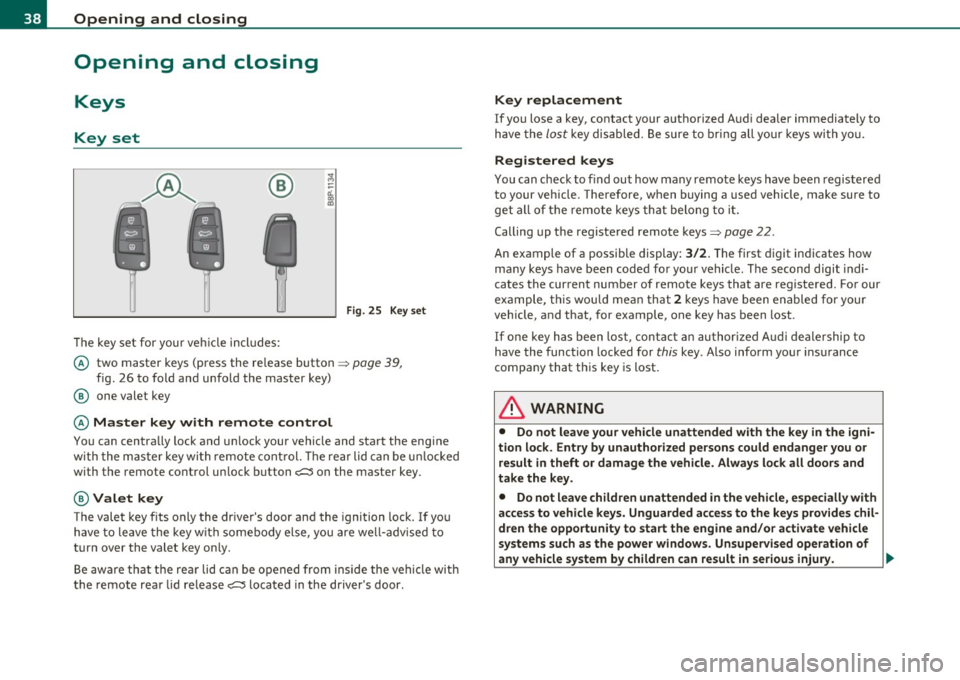
The key set for your ve hicle in cl ude s:
F ig. 2 5 Key set
© two master keys (press the re lease button => page 39,
fig. 26 to fo ld and unfold the master key)
@ one valet key
© Master key with remote control
You can centra lly lock and u nlock your vehicle and start the eng ine
w ith the mas ter key wi th remote cont rol. T he re a r lid can be u nlocked
w ith the remote control un lock button
c:::::5 on the master key .
@Valet key
The valet key f its only the driver's door and the ignition lock. I f yo u
have to leave the key w it h some bod y e lse, y ou are we ll-adv ise d t o
turn over the valet key on ly.
Be awa re t hat th e rear lid can be o pened from inside the veh icle with
the remote rear lid release
c:::::5 l ocated in the driver's door .
Key replacement
If you lose a key, contact your authorized Aud i dealer immediately to
h ave the
lo st key di sable d . B e sure to bri ng all you r keys wi th y ou.
Registered keys
You can check to find out how many remote keys have been regis tered
to your vehicle. Therefore, when buying a used veh icle, make sure to
get all of the remote keys th at belo ng t o it.
Calling up the registered remote keys=>
page 22.
An example of a possible display:
3/2. The first digit in dicates how
ma ny keys have been coded fo r you r vehicle . T he second digit indi
cates the current number of remote keys that are registered. Fo r our
example , thi s w ould m ean t hat
2 key s have been en abled for your
vehicle , and that, for example, one key has been lost .
If on e key h as been lost, con tact an a uthor ized A udi d eale rship to
hav e the func tion locked for this key . Also inform yo ur insurance
compa ny that t his key is lost .
& WARNING
• Do not leave your vehicle unattended with the key in the igni
tion lock. Entry by unauthorized persons could endanger you or
result in theft or damage the vehicle. Alway s lock all doors and
take the key.
• Do not leave children unattended in the vehicle, especially with
access to vehicle keys. Unguarded access to the keys provides chil
dren the opportunity to start the engine and/or a ctivate vehicle
systems such as the power windows. Unsupervised operation of
any vehicle system by children can result in se rious injury . ._
Page 41 of 320
![AUDI S3 2011 User Guide (]] Tips
• If you open the dr ivers doo r with the key left in the ign it ion loc k,
a chime will sound . This is your reminder to remove the key and lock
t he doo r.
• F](/img/6/57544/w960_57544-40.png "AUDI S3 2011 User Guide (]] Tips
• If you open the dr ivers doo r with the key left in the ign it ion loc k,
a chime will sound . This is your reminder to remove the key and lock
t he doo r.
• F")
(]] Tips
• If you open the dr iver's doo r with the key left in the ign it ion loc k,
a chime will sound . This is your reminder to remove the key and lock
t he doo r.
• For security reasons, replacement keys are only available from
au thorized A ud i deale rs .•
Master key with remote control
The remote control allows you to lock or unlock the
vehicle electronically.
Fig. 26 Fold-u p
m aster key w ith
re mote co ntrol
- To fold the key out and bac k in place, press the re lease
button==> fig. 26 .
The transmitter and battery are located in the head of the remote
cont rol. The receiver is located inside the veh icle. The maximum
effect ive ra nge depends on severa l things . Remember, if the battery
is weak, the effect ive range decreases.
If you need to replace the remote control, or if you need to have it
repaired, yo u mus t see your authori zed Aud i dealer. Only then can yo u
use the key again .
Contro ls a nd e quip ·
m en t Vehicle
OP-eration
Opening and closing
(]] Tips
• If the ignitio n is switched on, the remote con trol system is deacti
vated.
• T he remote control system can be affected by other systems oper·
ating in the same frequency range close to the veh icle, such as mobile
t elephones, te levision broadcasti ng stations, etc.
• For Declaration of Compliance to United States FCC and Industry
Canada regulations=:>
page 303 . •
Check light in remote master key
The check light in the r em ote m aster ke y indi cat es the
state of charge of the battery .
State of master key battery
Fig. 27 C hec k ligh t in
the maste r key
When a button is pressed, the check light flashes=:> fig . 27 (arrow) .
If the check light does not come on or flas h, the batte ry is dead and
has to be rep laced.
Battery replacement =>
page 40. •
Vehicle care Do-it-yourselt service iTechnical data
Page 42 of 320
Open ing and closing
Master key battery replacement
Each master key contains a battery housed under the
cover.
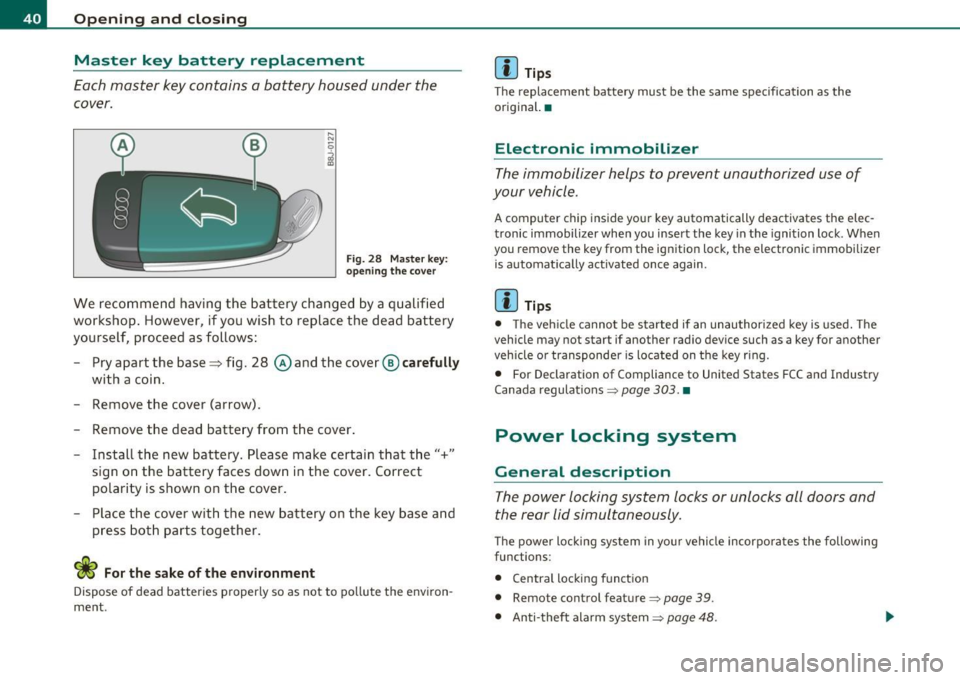
Fig. 2 8 Mas ter key :
opening the cover
We recommend having the battery changed by a qualified
workshop . However , if you wish to replace the dead battery
yourself, proceed as follows:
- Pry apart the base~ fig. 28 @and the cover @carefull y
with a coin .
- Remove the cover (arrow) .
- Remove the dead battery from the cover .
- Install the new battery. Please make certain that the"+"
sign on the bat tery faces down in the cover. Correct
polarity is shown on the cover.
- Place the cover with the new battery on the key base and
press both parts together.
For the sake of the environment
Dispose of dead batteries p roperly so as not to po llute the environ ·
ment .
[I] Tips
The replacement battery must be the same specification as the
original. •
Electronic immobilizer
The immobilizer helps to prevent unauthorized use of
your vehicle .
A computer chip inside your key automatically deactivates the elec
tronic immobilizer when you insert the key in the ignition lock . When
you remove the key from the ignition lock, the electron ic immobilizer
is automatica lly activated once again .
[I] Tips
• The veh icle cannot be started if an unauthorized key is used. The
vehicle may not start if another radio device such as a key for another
vehicle o r transponder is located on the key ring.
• For Declarat ion of Compliance to United States FCC and Industry
Canada regulations
~ page 303. •
Power locking system
General description
The power locking system locks or unlocks all doors and
the rear lid simultaneously.
The power locking system in you r vehicle incorpo rates the following
functions :
• Central locking funct ion
• Remote con trol feature ~
page 39.
• Anti -theft alarm system~ page 48.
Page 43 of 320
All the doors and the rear lid are locked by the central locking system
when you lock the vehicle.
The unlock ing and locking mode* can be changed in the driver infor
mation system~
page 22.
Unlocking the vehicle
You can unlock the vehicle from outside either by using the remote
control
or by inserting and turning the key in the driver's door lock .
When you
unlock your vehicle:
• Th e anti-theft alarm system is deactivated briefly.
• The vehicle interior lights illuminate for approximately 30
seconds .
• All turn signa l lights will flash twice when the car is unlocked .
• After unlocking the vehicle, you have 30 seconds to open a door or
the rear lid. Afte r 30 seconds, the vehicle automatica lly locks and the
anti-theft alarm system activates again.
The rear lid can be locked or unlocked either by using the remote
control or by inserting and turning the key in the dr iver's door lock.
Unlocking the vehicle with the remote control~ will only
unlock the
rear lid, to
open it, the lid handle needs to be pressed.
Locking the vehicle
You can lock the vehicle from outside either by using the remote
control
or by inserting and turning the key in the drivers's door lock.
When you
lock the vehicle:
• All doors and the rear lid are locked.
• All turn signal lights will flash once when the car is locked.
• Th e anti-theft alarm system is activated. The horn of the anti
theft alarm system will sound and the anti-theft alarm system readi
ness light, located in the center of the instrument panel below the
windshield on the right side of the air vent, will start to blink.
• Th e vehicle interior lights turn off.
Controls and equip
ment Safety first
Opening and closing
Automat
ic locking*
The automatic locking feature locks all the vehicle doors and the rear
lid when you drive faster than 9 mph (15 km/h).
You can unlock the vehicle from the inside by:
• removing the key from the ignition switch (the vehicle wi ll auto
matically unlock itself) or
• pressing the unlock part of the power lock switch
ll::D or
• pulling the inside handle for that door (once - the front door is
unlocked and opened at the same time, twice to open the rear door).
If you wish, you can have an authorized Audi dealer convert your
power door lock system to automatic locking.
& WARNING
• When you lock your vehicle from outside, nobody· especially
children - should remain inside the vehicle. Remember, when you
lock the vehicle from the outside the windows cannot be opened
from the inside .
• When you leave the vehicle, always remove the ignition key
and take it with you. This will prevent passengers (children, for
example) from accidentally being locked in the vehicle should
they accidentally press the power locking switch on the center
console.
• Do not leave children inside the vehicle unsupervised. In an
emergency it would be impossible to open the doors from the
outside without the key.
[ i ] Tips
• In the event of a crash with airbag deployment all locked doors
will be automatically unlocked to give access to the vehicle occupants
from the outside .
• If the power locking system sho uld fail, you can still open the fuel
tank flap in an emergency~
page 224 . .,_
Vehicle care Technical data
Page 44 of 320
Opening and closing
• You are well advised not to keep valuables inside an unattended
vehicle, v isible or not . Even a properly locked vehicle cannot provide
the security of a safe! •
Unlocking and Locking the vehicle with the
remote control
How the remote control works.
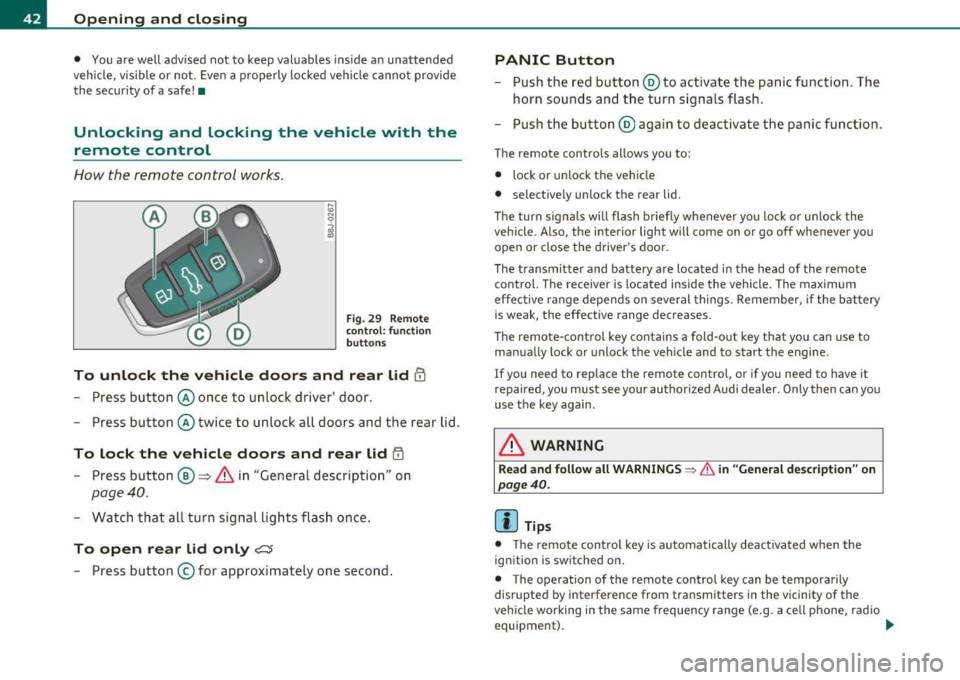
Fig. 29 Remote
control : function
buttons
To unlock the vehicle doors and rear lid !TI
- Press button @once to unlock d river' door.
- Press button @twice to unlock all doors and the rear lid.
To lock the vehicle doors and rear lid iTI
- Press button ®~ & in "General description" on
page 40.
-Watch that all turn signal lights flash once.
To open rear lid only?:$
-Press button © for approximately one second .
PANIC Button
-Push the red button @to activate the panic function. The
horn sounds and the turn signals flash.
- Push the button @ again to deactivate the panic function.
The remote contro ls allows you to:
• lock or unlock the vehicle
• selective ly unlock the rear lid.
Th e turn signa ls will flash briefly whenever you lock or unlock the
vehicle. Also, the interior light will come on or go off whenever you
open or close the driver's door.
The transmitter and battery are located in the head of the remote
control. The receiver is located inside the vehicle. The maximum
effect ive range depends on several things. Remember, if the battery
is weak, the effective range decreases.
Th e remo te-control key contains a fold-out key that you can use to
manually lock or unlock the vehicle and to start the engine.
If you need to replace the remote control, or if you need to have it
repaired, you must see your authorized Audi dealer . Only then can you
use the key again.
& WARNING
Read and follow all WARNINGS ~ & in "General description" on
page 40.
(I] Tips
• The remote contro l key is automatically deactivated when the
ignition is switched on .
• The operation of the remote control key can be tempora rily
disr upted by interference from transmitters in the vicinity of the
vehicle wo rking in the same frequency range (e.g. a cell phone, radio
equipment). _..
Page 45 of 320
• In order to make sure the locking funct ion is working, you should
a lways keep your eye on t he vehicle to ma ke sure it is p roperly lo ck ed.
• Do not use the remote contro l if you are inside the car, otherwise
yo u may u nintent ionally loc k the veh icle, and then you would set off
the ant i-theft a larm when you try open a door . In case t his happens
anyhow, push the unl ock button@.
• Use the panic function on ly if you are in an emergency situation. •
Resetting the remote control
The remote control must be reset if the vehicle does not
unlock .
- Press the unlock but ton en on the remote control.
- Manually un lock the driver's door lock with t he mechanical
key w ithin 30 seconds.
- Press either the lock-
rn or the unlock m b utton to
complete the reset sequence .•
Con tro ls a nd e quip
m en t Vehicle
OP-eration
Opening and closing
Doors, power locks
Operating the Locks with the fold-out key
To lock and unlock the vehicle from th e outside, turn the
key in the lock of the driver's door .
N
-N
-a:. gi
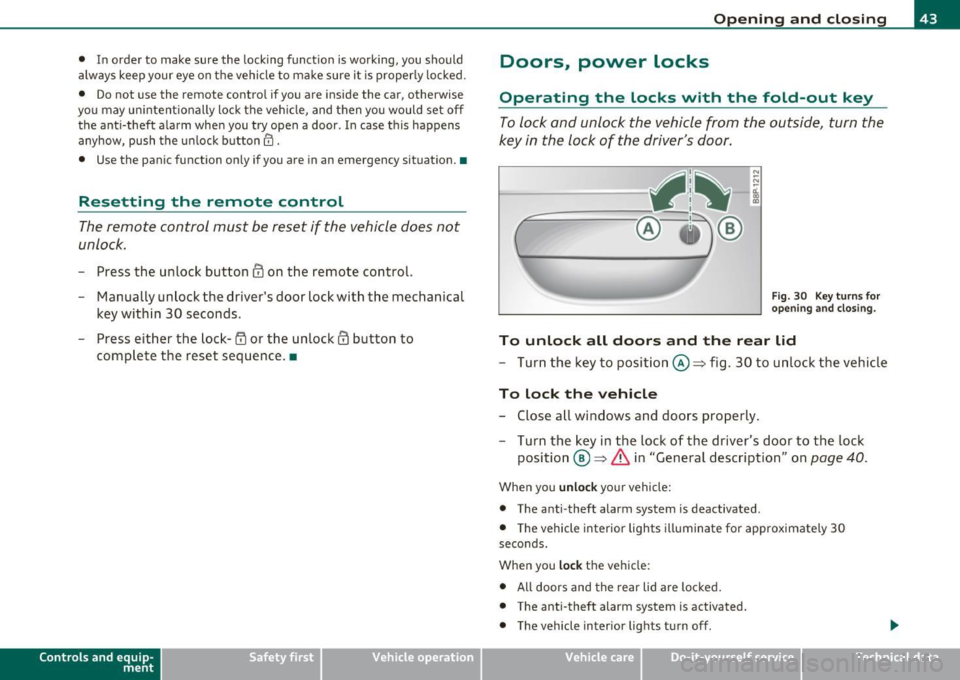
Fig. 30 Key turn s for
o pe ning and closing .
To unlock all doors and the rear lid
- Turn the key to positi on @ :::::> fig. 30 to unlock the vehi cle
To lock the vehicle
- Close all windows and doors properly .
- Tu rn t he key in the lock of the driver's door to the lock
posi tion @=>
& in "General descr iption" on page 40.
When you unlock yo ur vehicle:
• The a nti -theft alarm system is deactivated .
• Th e vehicle interior lights illumina te for approximate ly 30
seco nds.
When you
lock the vehicle:
• All doors and the rear lid are loc ked.
• The anti-theft alarm system is activated.
• The vehicle inter ior lights turn off .
Vehicle care Do-it-yourselt service iTechnical data
Page 46 of 320
Opening and closing
in. WARNING
Always read and heed WARNING~ & in "General description" on
page 40. •
Locking and unlocking the vehicle from
inside
The vehicle can be locked or unlock ed from the inside
usin g the power locking swi tches located i n the driver's
and the front passen ger 's door .
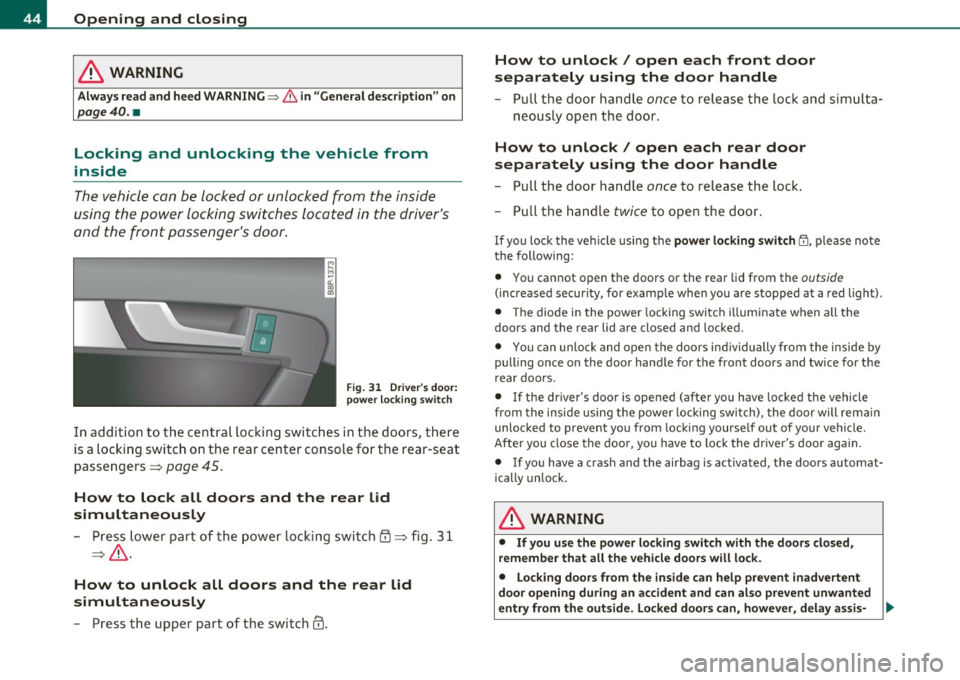
Fig . 3 1 Driv er's do or:
p ower locking switch
In add ition to the ce ntra l loc kin g swi tches in the doors , the re
is a locking switc h on the rear center console for the rear-seat
passe ngers=>
page 45 .
How to lock all doors and the rear lid
simultaneously
- Press lower pa rt of t he po wer locking sw itch {D ::::> fig. 3 1
=> & .
How to unlock all doors and the rear lid
simultaneously
- P ress the upper part o f th e swi tch@.
How to unlock/ open each front door
separately using the door handle
- Pull the doo r handle once to release th e lock and sim ult a-
neo usly o pen the door.
How to unlock/ open each rear door
separately using the door handle
- Pull t he door handle once to release the loc k.
- Pull the ha ndle
twice to o pen t he doo r.
If you lo ck the ve hicl e using t he power loc king switch 1'.I!, please note
the following:
• You cannot o pen the doors or the rear lid from the
outside
(increased security, for examp le whe n you a re stopped at a red light) .
• Th e diode in the power loc king switch illuminate when a ll the
doors and the rear lid are closed and loc ked.
• You can un lo ck and open t he doors in dividually from the inside by
pulling once o n the door hand le for the front doors and twice for t he
rea r doors.
• If the driver's door is opened (after yo u have locked the vehicle
fro m the inside using the power locking sw itch), the door will rem ain
unlocked to preve nt you from locki ng yourse lf out of yo ur vehicle.
After you close the doo r, you have to lo ck the drive r's door aga in .
• If you have a crash and the airbag is activated, the doors automat
ically unlo ck.
& WARNING
• If you use the power locking switch with the door s closed,
remember that all the vehicle doors will lock.
• Locking doors from the inside can help prevent inadvertent
doo r opening during an accident and can also prevent unwanted
entry from the outside . Locked door s can, however, delay assi s- .,,.
Page 47 of 320
& WARNING (continued)
tance to vehicle occupants and hold up rescue efforts from the
outside in an accident or other emergency.
(I) Tips
If the vehicle has been locked manually with the key or with the
remote control, the central locking switch is inoperative. •
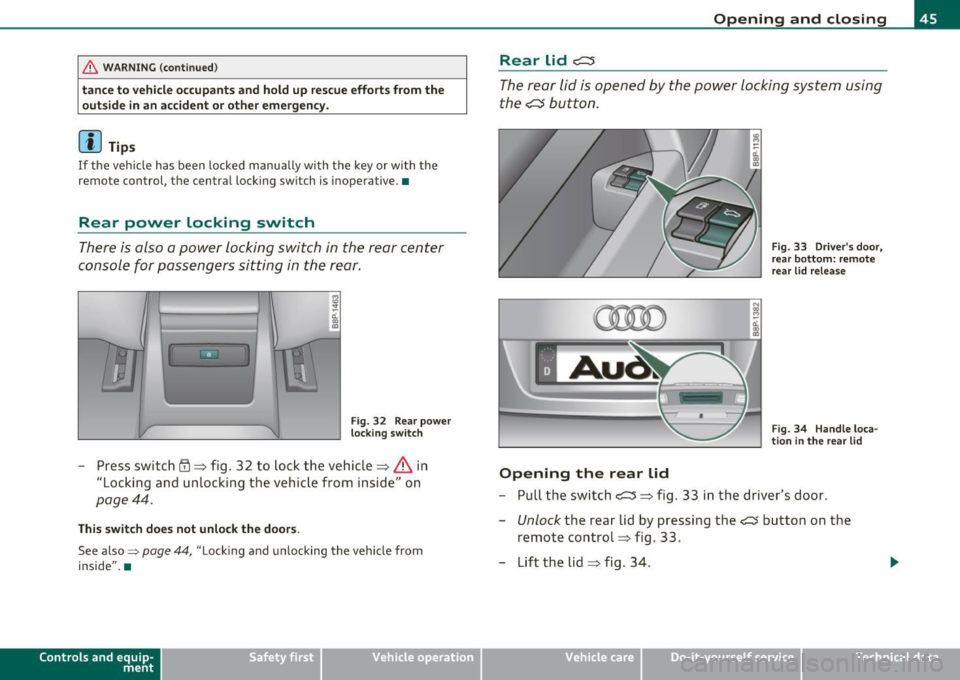
Rear power locking switch
There is also a power locking switch in the rear center
console for passengers sitting in the rear.
Fig. 32 Rear power
locking switch
-Press switch rD => fig. 32 to lock the vehicle=> & in
"Locking and unlocking the vehicle from inside" on
page 44.
This switch does not unlock the doors .
See also=> page 44, "Locking and unlocking the vehicle from
inside". •
Contro ls a nd e quip
m en t Vehicle
OP-eration
Opening and closing
Rear lid c:::::5
The rear lid is opened by the power locking system using
the
.c::s button.
Opening the rear lid
Fig. 33 Driver's door,
rear bottom: remote
rear lid release
Fig. 34 Handle loca
tion in the rear lid
- Pull the switch c::::5 => fig. 33 in the driver's door.
- Unlock the rear lid by pressing the~ button on the
remote control=> fig . 33.
- Lift the lid
=> fig. 34.
Vehicle care Do-it-yourselt service iTechnical data