lock AUDI S3 2011 Owner's Manual
[x] Cancel search | Manufacturer: AUDI, Model Year: 2011, Model line: S3, Model: AUDI S3 2011Pages: 320, PDF Size: 75.79 MB
Page 48 of 320
Opening and closing
Closing the rear lid
-Pull it down and shut it firmly => & . T here is a recess in
the interior trim o f the lid to make it easier to pull down.
& WARNING
• After closing the rea r lid , always pull up on it to make sure that
it is properly closed. Otherwise it could open suddenly when the
vehicle is moving .
• To help p re v ent poisonous exhaust ga s from being drawn into
the vehicle, always keep the rear lid closed while d riv ing. Never
transport objects larger than those fitting completely into the
luggage area, becau se then the rear l id cannot be fully closed.
• Never lea ve your vehicle unattended e specially with the re ar lid
left open . A child could crawl into th e car throu gh the luggage
compa rtment and pull the lid shut , bec oming trapped and un able
to get out . To reduc e the r isk of per sonal injury, never let children
play in or around your vehicle. Always keep the rear lid , as well as
the vehicle doors , clo sed when not in us e.
(I) Tips
• If the rea r lid is op en or not p roper ly locked when the ign ition is
turned on, the door and rear lid warning appears in the instrument
cl uster dis play.
• If the rear lid on a locked vehicle is unlocked with the middle
button
cs on the remote key, the rear lid is automat ically locked
again immediately after clos ing . This is indicated by the turn signa ls
blinking. •
Emergency release for rear lid
If the rear lid can not be opened, an emergency release is
p rovided.
Fig . 3 5 Rear and trunk
se ction : Acce ss to
em ergency relea se
Fig . 3 6 Rea r lid i nte
ri or se ct ion: Em er
ge ncy rele ase
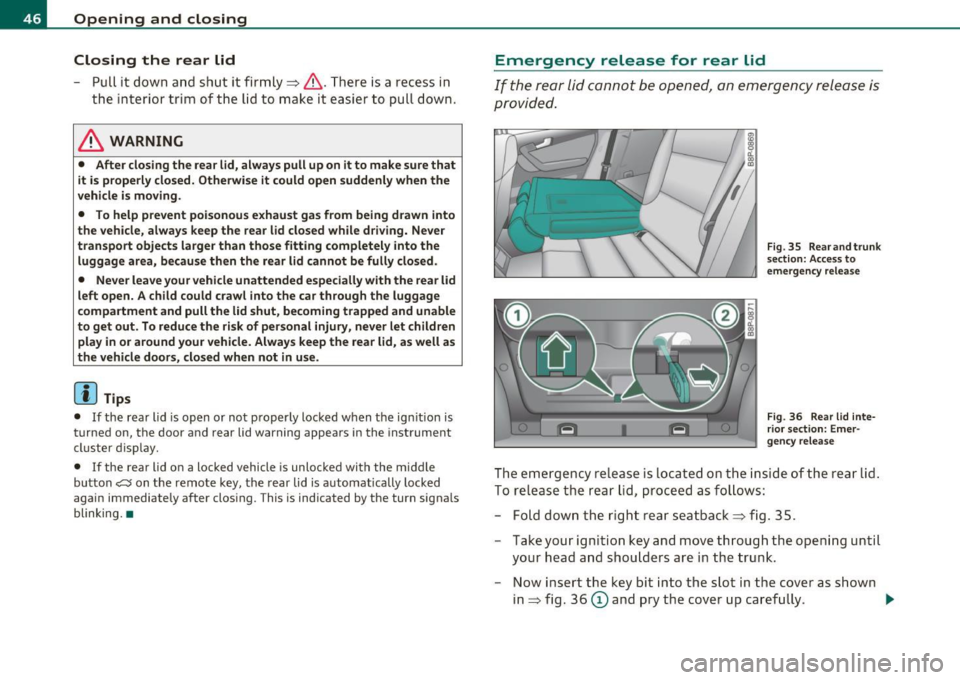
The em ergency re lease is located on the inside of the rear lid .
To re lease the rear lid, proceed as follows:
- Fold dow n the righ t rear se atba ck
=> fig . 35.
- Take you r igni tion key and move through the ope nin g u ntil
your head a nd shou lders are i n the tru nk.
- Now insert the key bit into the slot in the cover as shown
in => fig. 36
(D and pry the cover up caref ully . ..,.
Page 49 of 320

-Place the key in the round opening behind the cover@
and turn the key in the direct ion of the arrow . This unlocks
the lock and the rear lid opens a crack.
- Open the rear lid from the outside and put the ignition key
in a safe place. •
Manual door locking
If the power locking system fails (power failure), you will
need to lock the passenger door separately.
i a:.
"' "'
F ig. 3 7 Em ergency
lo cking devic e in the
doo rs
An emergency door locking device is integrated in the rear
edge of the doors (only visible when the door is open) for
those doors without a lock cylinder .
- Open the door.
- Remove the plastic cap using the veh icle key~ fig. 37 .
- Stick the key into the internal slot and turn the key about
90 degrees as far as it can go to the righ t (right-side doors)
or to the left (left-side doors).
- Replace the plastic cap.
Con tro ls a nd e quip
m en t Vehicle
OP-eration
Opening and closing
After you close the door, you will no longer be able to open it from the
outs ide.
You can open it from the inside, however, by pulling on the door latch,
once for the front doors and twice for the rear doors.•
Child safety lock
The child safety lock prevents the rear doors from being
opened from the inside.
,._ M
-
-a:. a, (0
Fig. 38 Rear doors:
c h ild safety loc k
The rear doors are equipped with a child safety lock. It is
operated with the vehicle key . The child safety lock is only
visible when the door is op en .
- To
switch on the child safety lock, turn the ignition key in
the direction of the arrow.
- To
switch off the child safety lock, turn the ignition key in
the opposite direction of the arrow.
The child safety lock prevents the doors from being opened from the
inside when you have small children sitting in the rear. •
Vehicle care Do-it-yourselt service iTechnical data
Page 50 of 320
Opening and closing
Anti-theft alarm system
The anti-theft alarm triggers an alarm if anyone
attempts to break in to the ve hicle .
Fig . 3 9 Dio de po sition
in the in strum ent
panel
The anti -theft alarm system trigge rs an audible a larm and turns on
t he emergency flasher if an unauthori zed i nter feren ce wi th th e
veh icle is sensed by t he system .
How is the anti-theft alarm system switched on?
The anti-theft alarm system is switched on when you lock the dr iver's
door m anually using t he fo ld-ou t key, o r whe n you use the remote
control. The sys tem is activated approximately 30 seconds after the
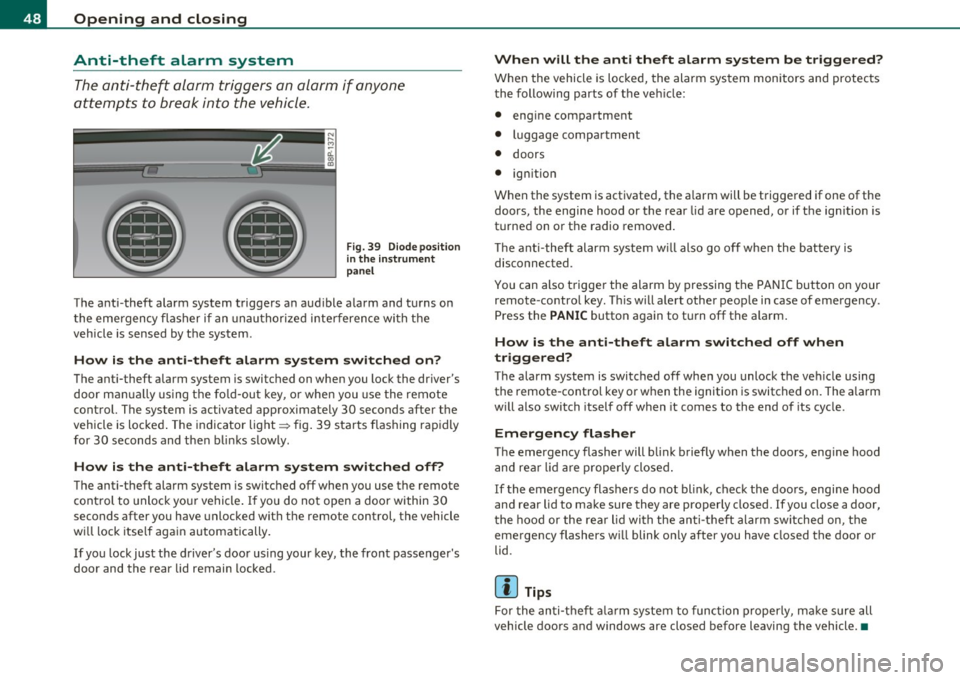
vehicle is lo cked. The indicato r lig ht ~ fig . 39 sta rts flash ing rapi dly
for 30 seconds and then blinks s lowly.
How is the anti -theft alarm sy stem switched off?
The anti-theft alarm sys tem is switched off when you use the remote
c on trol to unlock yo ur vehi cle. If you do no t open a door within 30
seconds after you have unlocked with t he remote control, the vehicle
w ill l ock itse lf aga in automat ically .
If you lock just the d river's door us ing your key, the front passenger's
door and the rear lid remain locked .
When will the anti theft alarm system be triggered?
When the vehicle is locke d, the alarm sys tem monitors and protects
t he following parts of t he veh icle:
• eng ine compa rtment
• luggage compartment
• doors
• ignition
When the system is activated, the a larm will be t rigge red if one of the
doors, the engine hood or the rear lid are opened, or if t he ign it ion is
t u rned on or t he radio removed .
Th e a nti-t hef t alarm system w ill also go o ff w hen the bat tery i s
disconnected.
You can also t rigge r the alarm by pressing the PA NI C but ton on your
remote -co ntro l key. T his w ill alert other peop le in case of emergency .
Press the
PANIC button aga in to t urn off the a la rm .
How is the anti-theft alarm switched off when
triggered?
T he a larm system is switched off when you unlock the ve hicle using
the remote-cont ro l key or when the ignition is switched on. The a la rm
w ill also switch itself off when it comes to the end of its cycle .
Emergency flasher
The emergency flasher will b link briefly when the doors, eng ine hood
and re ar lid ar e pr oper ly closed .
If the emergency flashers do not blink, check the doo rs , engi ne hood
and rear lid to ma ke sure they are properly closed. If you close a door,
t he hood or the rea r lid wi th the an ti- theft a la rm sw itched on, the
eme rgency flashers w ill blink on ly after you have closed the door or
lid .
[ i ] Tips
For the an ti-t heft a larm system to func tion p roperly, m ake su re all
vehicle doors and windows are closed before leaving the vehicle. •
Page 52 of 320
Open ing and closing
- By briefly pressing/pulling the switch again, the down
ward travel of the window can be stopped in any position
:::::, & in "Controls" .
Closing the windows
Pull the switch up to the first stop and hold it there until
the window has risen to the desired position.
- Pull the switch quickly to the
sec ond po sit ion : the window
will automatically close all the way:::::,
& in "Controls".
- By briefly pressing/pulling the switch again, the upward travel of the window can be stopped in any position=:>
&
in "Controls".
Activating/deactivating re ar windows
- Push the switch to the depressed position to acti vate the
rear windows -the light in the switch will go out .
- Briefly press the switch to
deacti vate the rear windows -
the switch will return to the safety position and the light
~ will illuminate.
The safety switch ©::::> page 49, fig. 40 in the armrest on the driver's
door turns off the rear power windows. Only when the safety switch
is depressed can the rear windows be opened or closed . The symbol in
the safety switch illuminates when the power windows in the rear
doors are switched off (button NOT dep ressed) . This featu re has been
prov ided for the safety of small children rid ing in the rear of the
vehicle.
[ i ] Tips
T he windows can still be opened and closed for about ten min utes
after the ign ition has been turned off. The power windows are not
shut off unti l one of the front doors is opened .•
Convenience close/open feature
You can close or open the windows from outside when you
lock or unlock your car with the key.
Convenience open feature
Fi g. 41 K ey turn s fo r
openi ng and closi ng
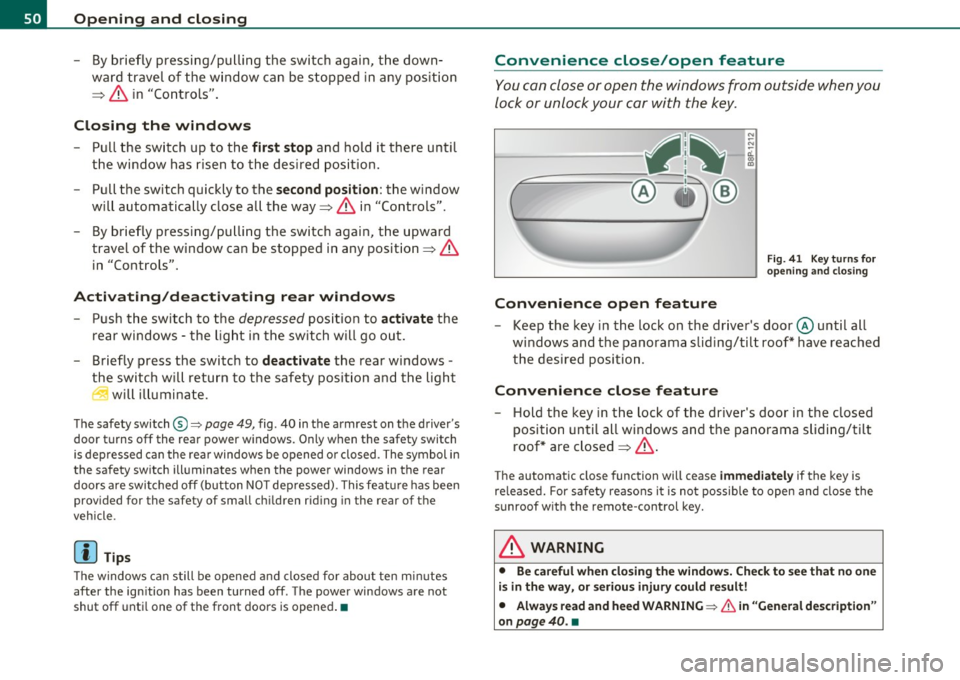
Keep the key in the lock on the driver's door @until all
windows and the panorama sliding/tilt roof * have reached
the desired position.
Convenience close feature
- Hold the key in the lock of the driver's door in the closed
position until all windows and the panorama sliding/t ilt
roof* are closed :::::,
&.
The automatic close function will cease immed iatel y if the key is
re leased. For safety reasons it is not possib le to open and close the
sunroof with the remote-control key.
& WARNING
• Be c areful when cl osing t he window s. C heck to see that no one
i s in the w ay, or seriou s injur y could re sult !
• Alwa ys read and h eed WARNING =>
& in "Gener al d esc ription "
on
pag e 40. •
Page 54 of 320
Opening and closing
Opening manually (manual operation)
- Press the switch (D => page 51, fig. 42, starting from the
"lift position" until the roof has reached the desired posi
tion.
Closing completely
- Press the switch @=> page 51, fig. 42 until the roof is
completely closed=>& .
Closing partially
- Press the switch @=> page 51, fig. 42 until the roof has
reached the desired position =>& . If the roof is almost
closed and you interrupt the operation, the roof opens
automatically to a minimum setting; this is the smallest
possible opening that can be set.
If you pa rk your vehicle in the su n, we recommend that you close the
sun blind . You should especially make certain that the panoramic
sliding sunroof is closed when the sun blind is closed when parked or
if there is a sudden rain shower.
The sun blind has two positions: comp letely open or completely
closed. The sun blind is manually operated.
& WARNING
Never close the panoramic sliding sunroof carelessly or without
watching -the re is a risk of personal injury. For this reason, always
remove the ignition key when leaving the vehicle.
[ i ] Tips
• When you park your vehicle , we generally recommend closing the
panoramic sliding sunroof and the sun blind . •
When the vehicle is parked, a wet roof should be dried lightly with
a soft cloth
before it is opened so that water does not drip into the
interior .
• In an emergency, the panoramic sliding sunroof can be closed
manually=>
page 53, "Emergency mechan ical closing for the
panoramic slidi ng sunroof". •
Appli es to vehicles : wit h pa norami c sli ding s unroo f
Comfort closing
The open roof can also be closed from the outside.
-Hold the key in the driver's door lock in the lock position
until the roof is closed=> &.
& WARNING
Never close the panoramic sliding sunroof carelessly or without
watching -there is a risk of personal injury.•
Page 56 of 320

Open ing and closing
App lies to veh icles : w ith panoramic sliding sunroof
Removing the light unit
Removing the light unit requires some dexterity .
1111111111111111111111111111111
.,
~ CL ., m
"' ~ CL ., m
Fig. 45 Light unit in
t he headliner:
removing screws in the
light unit
Fig. 46 Removing the
light unit
Installation of the light unit follows the steps used in
removal, but in reverse order.
- Install the Phillips head blade in the screwdriver.
- Turn the two screws in the light unit in a counter-clockwise direction to remove~ fig. 45.
- Pull the light unit out of the headliner by the front end
(arrow) ~ fig. 46 .
- Allow the light unit to hang by the wire. •
Applies to vehicles : w ith panoramic sliding sunroof
Closing the open sky roof manually
Fig. 47 Left end face
of t he inst rument
panel: fuse cove r wit h
hand crank
F ig. 48 Lig ht unit in
t h e hea dliner : cran k
for emergency opera
t io n
You can close the panoramic sliding sunroof using the hand
crank located on the inside of the fuse box cover .
- Install the flat blade in the screwdriver .
Use the screwdriver to remove the fuse box cover
~ fig . 47 .
- Remove the crank from the fuse box cover .
Remove the blade from the screwdriver handle .
Page 59 of 320

brightness increases again, the low beams are turned off again auto
matically =>& .
In the
AUTO position the low beams are switched off automatically
when the ignition is turned off.
Light Sensor Malfunction*
In the event of a light sensor ma lfunct ion, the driver is notified in the
instrument cluster display:
Automatic headlights/automatic wipers defective
For safety reasons the low beams are turned on permanently with t he
switch in
AUTO*. H owever, you can continue to turn the lights on and
off using the light switch. Have the light sensor checked as soon as
possible at a dealership.
Coming home/leaving home function*
The function is sw itched on when the sw itch is in the AUTO* position
and the function is shown as active in the driver information system.
The
coming home funct ion illuminates the area around the vehicle
when the ign it ion is switched
off and the driver's door is opened. The
length of time the lights rema in on can be set in the menu display
( Illumination > Exterior lights > coming home ).
The leaving home function illuminates the area around the vehicl e
when u nlocking it .
& WARNING
• Never use daytime running lights to see where you are going.
They are not bright enough and will not let you see far enough
ahead for safety, especially at dusk or when it is dark. Always
switch on the low beams at dusk or when it is dark.
• Automatic headlights are only intended to assist the driver .
They do not relieve the driver of his respon sibility to check the
headlights and to turn them on manually according to the current
light and visibility conditions. For example, fog and rain cannot be
Controls and equip
ment Safety first
Clear vision
& WARNING
(continued )
detected by the light sensors. So always switch on the headlights
under these weather conditions and when driving
in the dark io.
• Crashes can happen when you cannot see the road ahead and
when you cannot be seen by other motorists.
- Always turn on the headlights so that you can see ahead and
so that others can see your car from the back.
(I) Tips
• With the switch in AUTO front fog lights cannot be turned on in
addition.
• Th e light senso r for headlight control is located in the rear view
mirror mount . Do not apply any stickers to the windshield in this area
to prevent malfunctions or fail ures .
• Some exterior lighting functions can be adjusted in the driver
information system => page 22 ,
• If you remove the ignition from t he ignition lock whi le the head
lights are still on, a buzzer will sound as long as the driver's door is
open to remind you to turn off the lights .
• Always observe the specific local regulat ions for your area as to
when to use your lights.
• With automatic headlights, the high-beam funct ion is also avail
able, but with one restr iction:
If you have not switched the high
beams back to low beams during automatic headlig ht operation (for
example, after driving through a tunnel), only the low beams come
on the next time automatic headlights are switched on . To use the
high beams, you first have to pull the high beam lever back and then
push the lever forwa rd again .
• In cool or damp weather, the inside of the headlights, turn signa ls
and ta il lights can fog over due to the temperature difference
between the inside and outside. They will clear shortly after switching
them on. This does not affect the serv ice life of the light ing . _,,
Vehicle care Technical data
Page 63 of 320

Forward dome light off
-Move the switch to position 0. The light will not go on
regardless o f door positio n.
Glove compartment light
Open the glove compartment - the light in t he glove
compartme nt automatically illum inates as long as the
side marker lights or headlights a re on. When you close
the glove compartme nt, the light goes o ff.
With the interior light sw itch at the doo r contact (center) position,
t he forward dome light illum ina tes wheneve r you unlo ck the vehi cle
or open a door . The dome light goes out after approx imately 30
se conds after yo u have closed the door. L ikewise , whe n yo u lock your
vehicle or switc h on the ignition, the dome light goes out.
If yo u leave a door open , the dome light w ill go out after ten minutes
to conserve battery charge .
A dimmer automatically controls the br ightness of the lights when
t hey are swi tched on. •
Contro ls a nd e quip
m en t Vehicle
OP-eration
Clear vision
App lies to veh icles : w ith light packag e
Interior Lights and forward reading Lights
The interior lights include the both reading lights for the
driver and the front passenger .
Fig. 56 Co nt ro l pane l
a bove wind sh ield :
int erior li g ht swi tch es
Light switch ©~ page 60, fig. 5 5 has the fol low ing f unc
t ions:
Door contact activation
- Move the switch to th e center pos ition. The forward dome
light is turned on/off by the co ntac t swi tches o n any of the
doors.
Forward dome light on
- Move the switc h to position I. The fo rward dome light
goes on and stays on regardl ess of door pos it ion.
Forward dome light off
- Move the switc h to position 0. The light will not go on
regard less of door position .
Vehicle care Do-it-yourselt service Technical data
Page 64 of 320
Clear vision Forward reading lights
~
- Press the left or rig ht sw itch ® to switch the left or right
fo rward reading lig ht on or off.
Glove compartment light
Open t he glove compartment - the light in t he g love
compartment automatically illum inates as long as the
si de marker lights or he adlights are on. When you close
the glove compartment, the light goes off.
With the interio r light switch at the door contact (center) position,
t he forward dome light illum ina tes whenever you unlock the vehicle
or open a door . The dome light goes out after approxima tely 30
se co nds after yo u have clo sed the door. L ikew ise, whe n yo u lock your
vehicle or switch on the ignition, the dome light goes out.
If yo u leave a door open, the dome light will go out after ten minutes
to conserve battery charge.
A dimmer automatically controls the brightness of the lights when
t hey are swi tched on. •
Appli es to veh icles : w ith light package
Ambient lighting
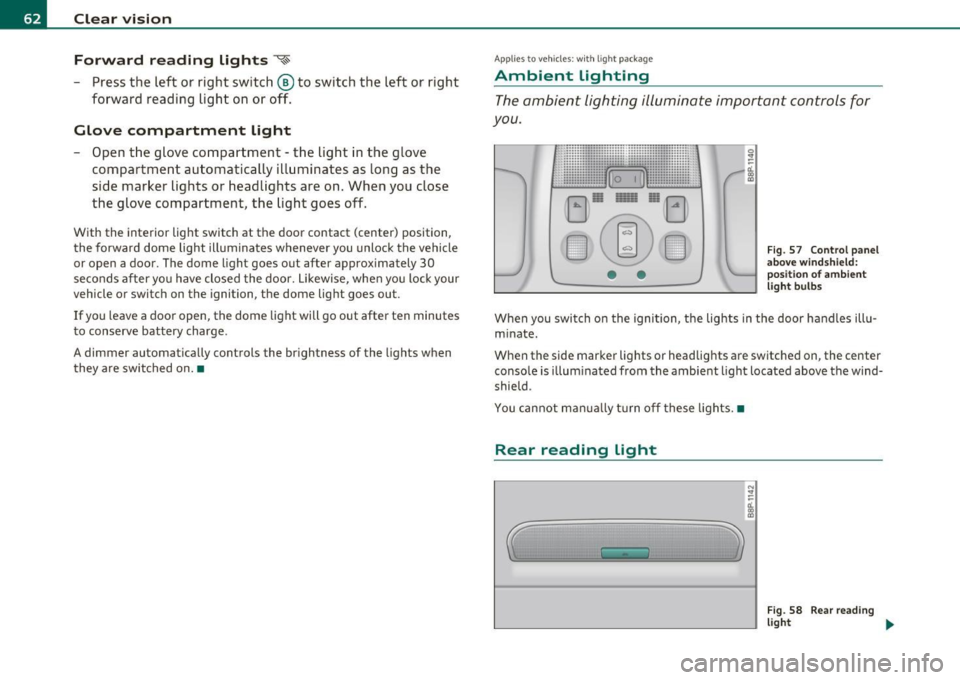
The ambient lighting illuminate important controls for
you.
• •
0 !!
-d. .,
"'
Fig . 5 7 Control pan el
a b ove wind shie ld :
p ositi on of am bie nt
l ig ht b ulbs
When you switch on the igni tion, the lights in the door ha nd les illu
m inate .
When the side marker lights or headlights are switched on, the center
conso le is illum inated from the ambient light located above the wind
shield .
You cannot ma nually t urn o ff these lights. •
Rear reading light
'
N !!
-d. .,
"'
Fig . 58 R ea r re ad ing
ligh t ...
Page 86 of 320
Seats and storage
& WARNING
For strength-related reasons , heavy objects must not be hung on
the hook s. Heavy objects are not adequately secured -thi s
increase s the risk of injury. •
Retractable luggage compartment cover
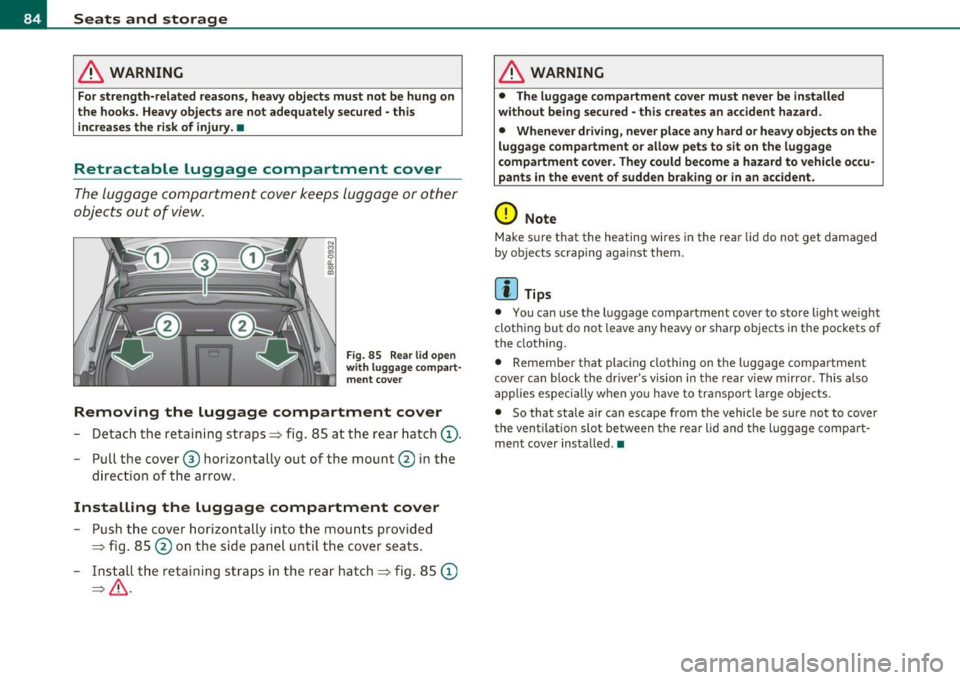
The luggage compa rtment cover keeps lugga ge or o ther
objects out o f view.
Fig. 85 Rea r lid ope n
w ith luggag e com part
me nt co ver
Removing the luggage compartment cover
- Detach the retaining stra ps => fig. 85 a t the rear hatch (D .
- Pull the cover ® hor izonta lly out of the mount @ in the
d irection of t he arrow.
Installing the luggage compartment cover
- Push t he cover hori zontally into t he m ounts pr ovid ed
=> fig. 85 @ on t he sid e panel u ntil t he cover seats.
- Ins tall t he re ta ining st ra ps in the rea r hatc h=> fig. 85
©
=> & .
& WARNING
• The luggag e compartment cover must never be insta lled
without being secured -this creates an accident hazard.
• Whenever dri ving , neve r place any hard or heavy objects on the
luggage compartment or allow pet s to sit on the luggage
compartment cover . They could become a hazard to vehicle occu
pants in the event of sudden braking or in an accident.
0 Note
M ake s ure that the heating wi res in the rear lid do not get damaged
by objects scrap ing aga inst them.
(I) Tips
• You can use the luggage compa rtment cov er to sto re light we igh t
cloth ing but do not leave any heavy or sharp objects i n the pockets of
the clothing.
• Remembe r th at plac ing clothing on t he luggage compa rtment
cove r can block the dr iver's vision in the rear view m irro r. This also
app lies especially when yo u have to trans po rt large objects.
• So that state air can escape from the vehicle be sure not to cover
the vent ilatio n slot between the rear lid and the luggage compart
m en t cover insta lled .•