tow AUDI S3 2011 User Guide
[x] Cancel search | Manufacturer: AUDI, Model Year: 2011, Model line: S3, Model: AUDI S3 2011Pages: 320, PDF Size: 75.79 MB
Page 84 of 320
Seats and storage
& WARNING
Always read and heed WARNINGS=> & in "Loading the luggage
compartment " on
page 131.
0 Note
• If you move the front seat back when the rea r seat backrest is
folded forward, you co uld damage the head restraints o n the rear
seat.
• When fo ld in g th e backrest back into place, make s ure the safety
belt does not get c aug ht, because it can be dama ged . A damaged belt
can fail to provide safe restraint. •
Fastening eyes
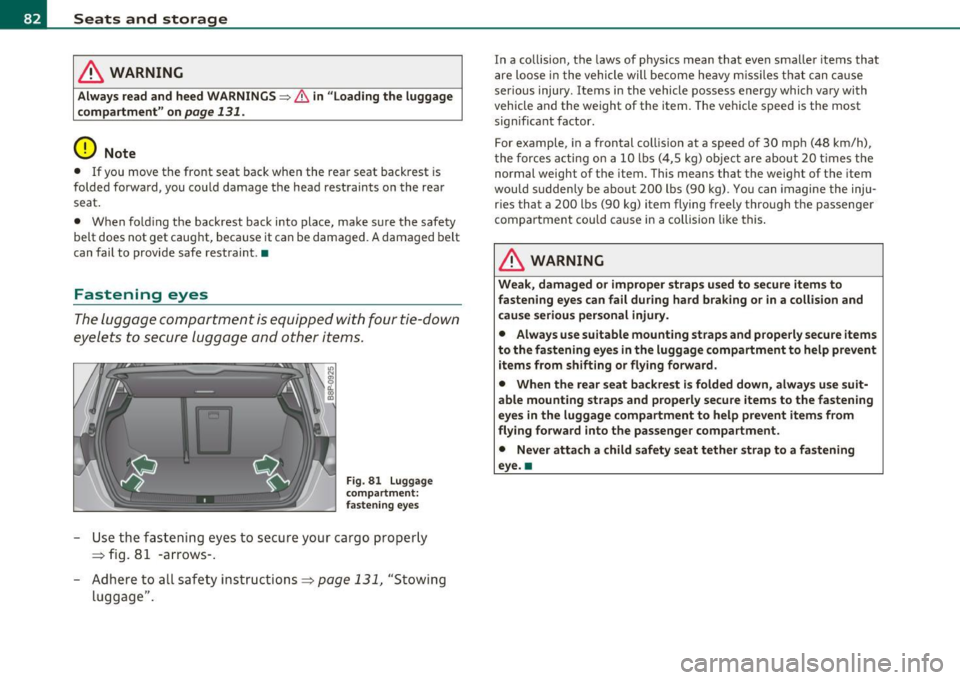
The lugga ge compa rtme nt is eq uipped with four tie- down
eyele ts to secu re l ug gage and o ther it em s.
Fig. 81 L uggage
compartm ent:
fastening eyes
- Use the fas ten ing eye s to se cu re your ca rgo pro pe rly
=:> fig . 81 -arrows- .
- Adhere to a ll safety instru ctions =:>
page 131, "Stowing
lugg age".
In a co llision, the laws of phys ics mean that even sma ller items that
a re loose in the vehicle will be come he avy missile s th at ca n caus e
ser ious injury. It ems in th e vehicle possess energy which va ry with
vehicle and t he weight of the item. The veh icle s peed i s the most
significant factor .
For example, in a frontal col lision at a speed of 30 mp h (4 8 km/h),
t he forc es a ct in g on a 10 lb s (4,5 kg) obje ct are about 20 time s th e
normal weight of t he item. This means that the weig ht of t he item
wou ld su dde nly be about 200 l bs (90 kg). Yo u can ima gine the inju
r ies that a 200 lbs (90 kg) item flying freely through the passenger
compar tment cou ld ca use in a colli sion like this .
& WARNING
Weak, damaged or improper straps used to secure items to
fastening eyes can fail during hard braking or in a collision and
cause serious personal injury.
• Always use suitable mounting straps and properly secure items
to the fastening eyes in the luggage compartment to help prevent
items from shift ing or flying forward .
• When the rear seat backrest is folded down, always use suit
able mounting straps and properly secure items to the fastening
eyes in the luggage compartment to help prevent items from
flying forward into the passenger compartment .
• Never atta ch a child safety seat tether strap to a fa stening
eye. •
Page 87 of 320
Applies to veh icles : w ith ski sac k
Ski sack
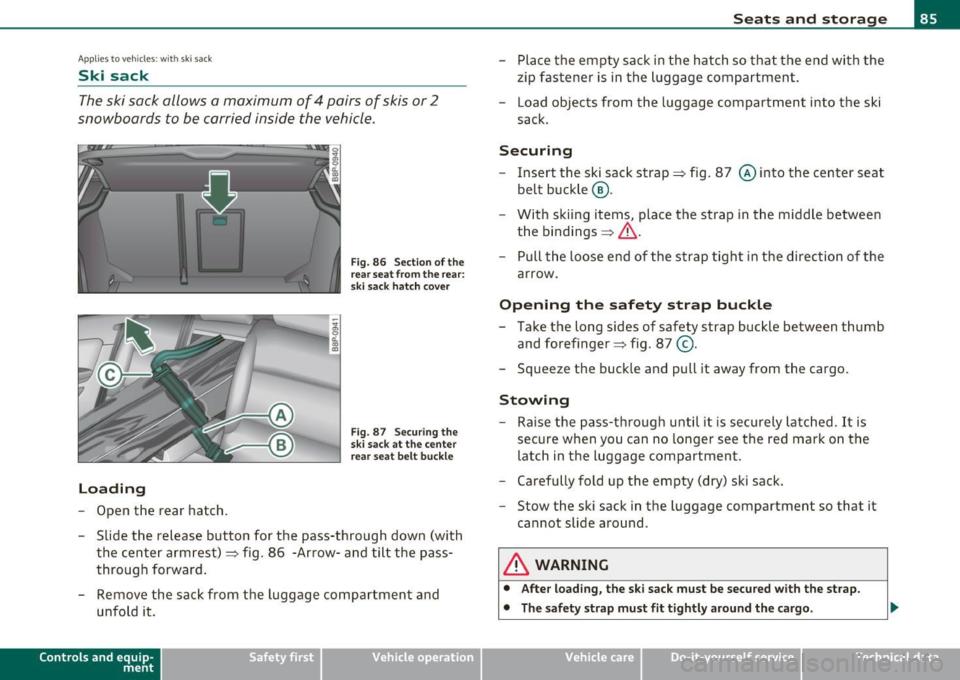
The ski sack allows a maximum of 4 pairs of skis or 2
snowboards to be carried inside the vehicle.
L oading
Open the rear hatch.
Fig. 86 Sect ion of the
rear sea t from the rear:
ski sack hatch cove r
Fig. 87 Sec uring th e
ski sack at the center
r ear seat belt buc kle
- Slide the releas e button for the pass-through down (with
the center armrest)=> fig . 86 -Arrow -and tilt the pass
through forward .
- Remove the sack from the luggage compartment and
unfold it.
Con tro ls a nd e quip
m en t Vehicle
OP-eration
Seats and storage
-Place the empty sack in the hatch so that the end with the
zip fastener is in the luggage compartment.
- Load objects from the luggage compartment into the ski
sack.
Securing
- Insert the ski sack strap=> fig. 87 © into the center seat
belt buckle ®·
- With ski ing items, place the strap in the middle between
the bindings =>
&-
- Pull the loose end of the strap tight in the direction of the
arrow .
Opening the safety strap buckle
-Take the long sides of safety strap buckle between thumb
and forefinger => fig . 87
@ .
- Squeeze the buckle and pull it away from the cargo.
Stowing
- Raise the pass-through until it is securely latched. It is
secure when you can no longer see the red mark on the
latch in the luggage compartment.
- Carefully fold up the empty (dry) ski sack .
- Stow the ski sack in the luggage compartment so that it
cannot slide around .
& WARNING
• Aft er loa din g, th e sk i sac k m ust be se cu red wit h th e strap .
• The saf ety s trap must fi t tig htly a rou nd the c argo .
Vehicle care Do-it-yourselt service Technical data
Page 107 of 320
___________________________________________________ O_ n_ t_h _e_ r_o _a_ d __ _
On the road
Steering
Adjustable steering wheel
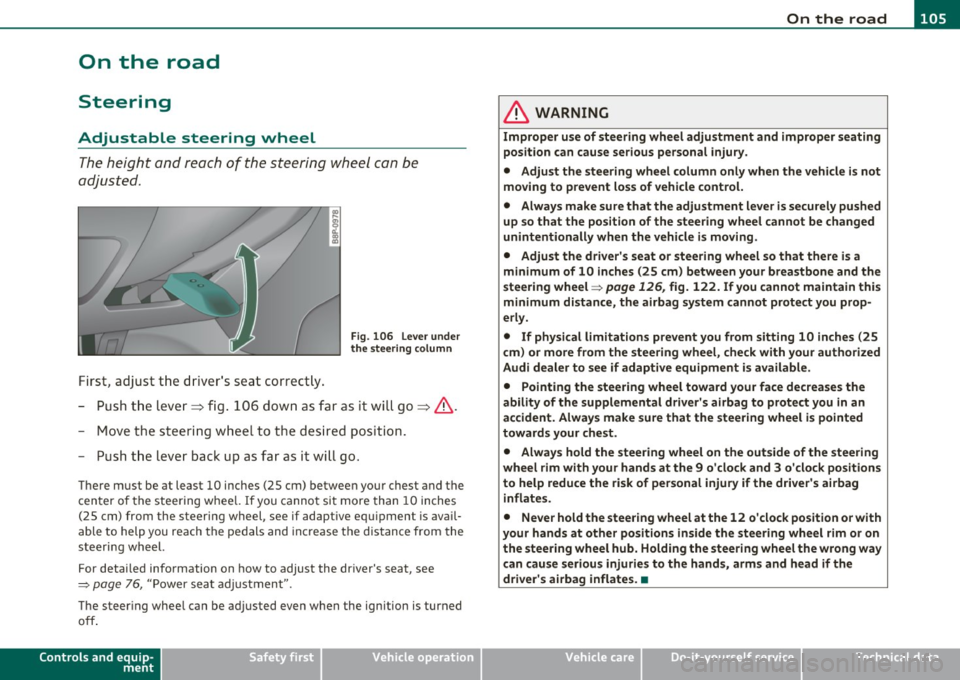
The height and reach of the steering wheel con be
adjusted .
First, adjust t he dr iver's seat correct ly.
Fi g. 106 Leve r und er
the s tee ring column
-Pu sh t he lever~ fig. 106 down as far as it wi ll go~ &.
- Move th e st eeri ng wheel to t he desire d position.
- Push t he lever back up as fa r as it wi ll go.
There must be at least 10 inches (25 cm) between your chest and the
c en ter of the steer ing w hee l. If you cannot si t more than 10 inches
(25 cm) from the steering wheel, see if adaptive equ ipment is avai l
able to help you reach the pedals and increase the distance from the
steeri ng wheel.
For detai led info rmation on how to adjust the dr iver's seat, see
=> page 76, "Power se at adj ustment".
The steer ing whee l can be adjusted even when the ignition is turned
off .
Controls and equip
ment Safety first
& WARNING
Improper use of steering wheel adjustment and improper seating
position can cause serious personal
injury .
• Adjust the steer ing whe el column only when the vehicle is not
moving to prevent loss of vehicle control.
• Always make sure that the adjustment lever is securely pushed
up so that the position of the steering wheel cannot be changed
unintentionally when the vehicle is moving .
• Adjust the dr iver 's seat or steering wheel so that there is a
m inimum of 10 inches (25 cm) between your breastbone and the
steering wheel=>
page 126, fig. 122. If you cannot maintain this
minimum distance, the airbag system cannot protect you prop
erly.
• If physical limitations prevent you from sitting 10 inches (25
c m) or more from the steering wheel, check with your authorized
Audi dealer to see if adaptive equipment is available .
• Pointing the steering wheel toward your face decrea ses the
ability of the supplemental driver's a irbag to prote ct you in an
accident. Always make sure that the steer ing wheel is pointed
towards your che st .
• Always hold the steering wheel on the outside of the steering
wheel rim with your hands at the 9 o'clo ck and 3 o'clock position s
to help reduce the risk of personal injury if the driver's airbag
inflates .
• Never hold the steer ing wheel at the 12 o 'clock position or with
your hands at other positions inside the steering wheel rim or on
the steering wheel hub. Holding the steering wheel the wrong way
can cause serious injurie s to the hand s, arms and head if th e
driver 's airbag inflates. •
Vehicle care Technical data
Page 110 of 320
ffl..__O_ n_ t_ h_e _ ro_ a_d _______________________________________________ _
& WARNING
Never start or let the engine run in a confined or enclosed area.
Exhau st fume s from the engine contain carbon monoxide, a color
less and odorless gas. Carbon monoxid e can be fatal if inhal ed.
• Never leave the engine idling unattended . An unattended
vehicle with a runn ing engine poses a danger of personal injury or
theft .
0 Note
• Avoid high engine speeds, fast acceleratio n or heavy engine loads
w hile the engine is still cold. This cou ld damage the eng ine .
• Th e engine c annot be sta rted by p ush ing or tow ing the veh icle .
~ For the sake of the environment
To avoid unnecessary engine wear and to reduce e xhaust emissions,
do not let your vehicle stand and warm up . Be ready to dr ive off imme
diately after starting your vehicle. Maintain moderate speed unti l the
eng ine is comp letely warm . Remember, the engine performs best at
operat ing temperature. •
Stopping the engine
-Turn the ignition key to position @~poge 106, fi g. 107 .
& WARNING
• Nev er turn off the engine until the vehicle has come to a
c omplete stop.
• The brake booster and servotronic only work when the eng ine
i s running . With the ignition turned off , you have to apply more
force when steering or bra king. Since you cannot st eer and stop
normally , thi s can lead to accident s and serious injuries.
& WARNING (contin u ed )
• The radiator fan can continue to run for up to 10 minute s even
a fter you have turned off the engine and removed the ignition key.
The radi ator fan can also tur n on agai n if the engine coolant heats
up be cause of intense sunlight or heat build-up in the engine
compartment.
0 Note
Do not stop the engine immed iately after hard or extended driving.
Keep t he engine run ning for approximate ly two minutes to prevent
excessive hea t build-up. •
Parking brake
Parking brake
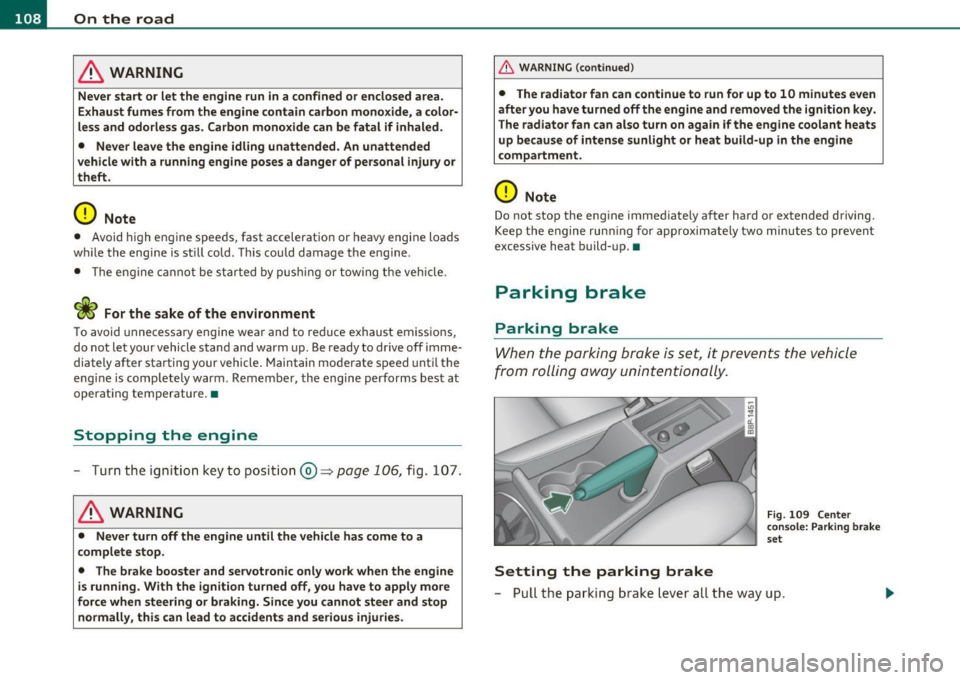
When the parking brake is set, it prevents the vehicle
from rolling a way unintentionally .
Setting the parking brake
Fig. 109 Cente r
c o ns ole : Pa rk ing brak e
s et
- Pull t he park ing b rak e l eve r all the way up .
Page 111 of 320
_________________________________________________ O_ n_t_ h _ e_ ro_ a_d __ _
Releasing the parking brake
- Pull th e parking brak e leve r u p sligh tly and pr ess the
r ele ase b utt on at t he sam e tim e:::::;,
page 108, fig. 10 9
-a rrow-.
- Keep the release button pressed and lower the par kin g
brake:::::;, &,.
If you should drive off w ith the park ing brake still set, a warning tone
wi ll sou nd and t he following will appear in t he ins trumen t cluster to
remind you to release the parking brake:
Parking brake set
Th e p arking br ake wa rning comes on on ly af ter you have d riven for
longer than 3 seconds and faster than 5 mph (5 km/h).
T he pa rk in g bra ke wa rning ligh t Brake (U SA)/
(CD) (C DN) i lluminates
w hen the park ing b rake is set and you sw itch on the ign ition.
& WARNING
Always release the parking brake completely. A partially engaged
brake will overheat the rear brakes , reduce their effectiveness and
cause excessive wear. This could lead to brake failu re and an acci
dent.
0 Note
O nly a fter the vehicle has co me to comp lete stop, sho uld you firmly
se t the par king brake and either move the gearshift lever into 1st .
gear (manual t ransm iss ion) or
move the se lector leve r into "P" (Auto
matic transm ission). •
Controls and equip
ment Safety first
Parking
To p
reven t a parked ve hic le fr om rolli ng away, th ere a re
a fe w thing s yo u s hould do.
Wh en you par k yo ur vehic le, do t he foll owing:
- Stop the veh ic le usi ng the brake pedal.
- Set t he parking bra ke firmly .
- Mov e th e s ele ctor lev er i nto the
P p osi tio n (automatic
transmission)
or mo ve the g ears hift leve r i nto 1st . gear
(manual transmission) :::::;, &,.
- Swit ch o ff t he eng ine and rem ove the igniti on key fr om
t he ign ition l ock .
What else you should do when parking your vehicle
on an incline or decline
T u rn t he st eer ing whee l so tha t if the vehicle s hould start to roll, it
will roll into t he curb.
If you are par king on a
decline (the front of your ve hicl e facing down
hill), turn the fron t w heels to t he rig ht so t hat they point
toward the
curb.
If you are pa rking o n an incline (t he fon t of yo ur vehi cle facing uphill),
turn the front wheels to the left so that they point
away from the
curb.
Move the se lector lev er into the P p os it ion (automatic transmission)
or move the gearsh ift lever i nto 1st . gear (manual transmis sion ).
& WARNING
This is how you can reduce the risk of injury when leaving your
vehicle.
• Never park the vehicle where it can come in contact with dry
grass, spilled fuel or any other flammable materials.
Vehicle care Technical data
Page 113 of 320
________________________________________________ ..::O :::.:.,: n:...t~ h :...!.::: e:...!.. ro~ a:_::d!..,_ __
- Drive at the sp eed yo u wish to set.
- Press button © to set that speed .
The disp lay=> page 110, fig . 111 w ill show the set speed. T he d is p lay
may vary depending on the type of display in your veh icle. The ind i
cator light
CRUISE (US mode l) I 0" (Canadian model) w ill also light up
in the instr ument cluster .
& WARNING
• Alway s pay attention to traffi c even wh en the cruise control i s
switch ed on. You are always responsible for your speed and the
distance between your vehicle and other vehicle s.
• For safety reasons , the cruise control should not be used in the
city, in stop-and-go traffi c, on twi sting road s and when road
conditions are poor (such as ice , fog, gravel, heavy rain and hydro
planing ) · risk of accident .
• Turn off the cruise control temporarily when entering turn
lanes, highway exit lane s or in con struction zone s.
• Please note that inadvertently "resting" your foot on the accel ·
erator pedal cau ses the crui se control not to brake . This i s becau se
the cruise control is ove rridden by the driver 's accele rat ion .
[ i ] Tips
• Vehicles with manual transmission : You can atta in the set speed
only if the curren tly engaged gear allows i t and the eng ine is no t
stressed . Shift ing to a higher or lowe r gear promptly w ill allow the
eng ine to run smooth ly .
• The cru ise contro l cannot ma inta in a constant speed when driving
downhil l. The vehi cle will accelerate under its own weigh t. Downshift
to a lower gear or use the brakes to slow down .•
Controls and equip
ment Safety first
Changing speed
- Press lev
er i n t he 0 or O directio n=:::;, page 110, fig. 110
to inc rease or d ecr eas e yo ur sp eed.
- Release the lever to save t hat speed .
Change speed in increments o f 1 mph (1 km/h) by lightly pressing the
lever. If you keep the leve r presse d down, yo u will alte r your s peed in
S mph (10 km/h) increments .
You can also press t he accelerator pedal down to increase your s peed,
e .g . if you want to p ass someone. The speed you save d earlier wi ll
resume as soon as yo u re lease the accelerator pedal.
If, however, you exceed yo ur saved speed by 5 mph (1 0 km/h) fo r
longer than S m inutes, the cruise contro l will turn off temporarily .
Th e symbo l will go out b ut the save d speed will be retaine d.•
Presetting your speed
You can preset your d esir ed sp eed whil e the vehicle is not
moving.
- Turn on the ignition.
- Pull leve r into positio n
CD~ page 110, fig . 110.
- Press the lever in the
0 or O di rec tion to increase or
d ecr eas e y our sp eed.
- Release the lever to save t hat spe ed .
Thi s fu nction makes it possible, for example, to save the speed yo u
w ant befo re drivi ng on the highway . Once on t he highw ay, act ivate
the cruise contro l by pu lling the leve r toward
(D . •
Vehicle care Technical data
Page 122 of 320
1111..__T_ r _a_ n_s_ m_ i_ s _s_ i_ o _ n _________________________________________________ _
Applies to veh icles : with S tro nic® and with Tiptron ic controls on the stee ring whee l
Steering wheel with Tiptronic ® controls
The selector paddles allow the driver to keep both hands
on the steering wheel when shifting gears.
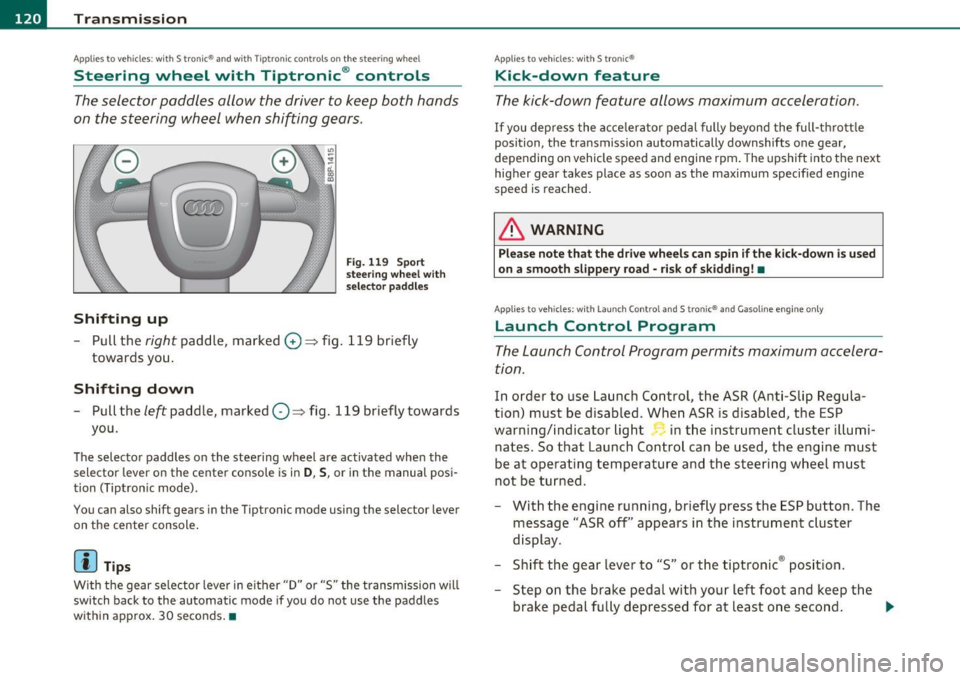
Shifting up
Fig. 119 Sport
steering wheel with
selector paddles
-Pull the right paddle, marked G) => fig. 119 briefly
towards you .
Shifting down
-Pull the left paddle, marked O=> fig. 119 briefly towards
you.
The selector paddles on the steering wheel are activated when the
selector lever on the center console is in
D, S, or in the manual posi
tion (Tiptron ic mode).
You can also shift gears in the Tiptronic mode using the selector lever
on the center console.
[ i ] Tips
With the gear selector lever in either "D" or "S" the transmission will
switch back to the automatic mode if you do not use the paddles
within approx. 30 seconds .•
Applies to veh icles : with S tro nic®
Kick-down feature
The kick -down feature allows maximum acceleration.
If you depress the accelerator pedal fully beyond the full-thrott le
position, the transmission automatically downshifts one gear,
depending on vehicle speed and engine rpm. The upsh ift in to the next
higher gear takes place as soon as the maximum specified engine
speed is reached.
& WARNING
Please note that the drive wheel s can spin if the kick-down is u sed
on a smooth slippery road -risk of skidding! •
Applies to veh icles: w ith Lau nch Control an d S tron ic® and Gasoline engine only
Launch Control Program
The Launch Control Program permits maximum accelera
tion.
In order to use Launch Control, the ASR (Anti-Slip Regula
tion) must be disabled. When ASR is disabled, the ESP
warning/indicator light in the instrument cluster illumi
nates. So that Launch Control can be used, the engine must
be at operating temperature and the steering wheel must
not be turned.
- With the engine running, briefly press the ESP button. The
message "ASR off' appears in the instrument cluster
display.
- Shift the gear lever to "S" or the tiptronic ® posit ion.
- Step on the brake peda l with your left foot and keep the
brake pedal fully depressed for at least one second . _,,,
Page 124 of 320
-Transmission •m ___________________ _
- Remove the screwdriver from the vehicle tool kit. Use the
flat side of the reversible screwdriver blade=:>
page 2 70.
- Carefully pry the cover out with the screwdriver and pull it
=:>
page 121, fig. 120 toward the shifter knob in the direc
tion of the arrow. The screwdriver must grip at the lower
edge of the cover to loosen it.
Emergency release for selector Lever
- Press the yellow release lever in the direction of the arrow
=:>
page 121, fig. 121 and hold it in that position.
- Press the release button in the selector lever@ and move
the lever into the N position .
- Clip the shift boot back into the shift gate.
If the vehicle has to be pushed or towed if the power supply fails (e.g.
battery is discharged), the selector lever must be moved to the N
position using the emergency locking device.
& WARNING
The selector must only be shifted from the P position if the hand
brake is firmly applied. Otherwise the vehicle would start moving
unexpectedly on a grade when the selector lever is shifted from
the P position -increasing the risk of an accident. •
Page 128 of 320
• ....__D_ r_iv _i_ n_, g=-- S_ a _ f_e _,Ly _ ______________________________________________ _
Proper occupant seating positions
Proper seating position for the driver
The proper driver seating position is important for safe,
relaxed driving.
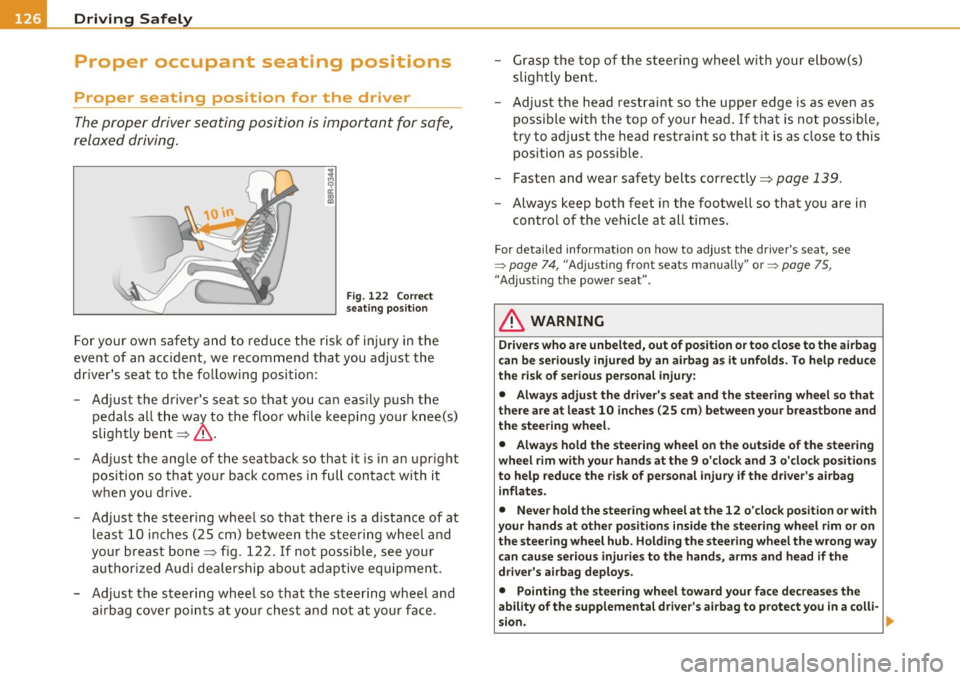
Fig. 122 Correct
seating position
For your own safety and to reduce the risk of injury in the
event of an accident, we recommend that you adjust the
driver's seat to the following position:
- Adjust the driver's seat so that you can easily push the
pedals all the way to the floor while keeping your knee(s)
slightly bent~& .
- Adjust the angle of the seatback so that it is in an upright
pos ition so that your back comes in full contact with it
when you drive.
- Adjust the steering wheel so that there is a distance of at least 10 inches (25 cm) between the steering wheel and
your breast bone~ fig . 122. If not possible, see your
authorized Audi dealership about adaptive equipment.
- Adjust the steering wheel so that the steering wheel and airbag cover points at your chest and not at your face. -
Grasp the top of the steering wheel with your elbow(s)
slightly bent.
- Adjust the head restraint so the upper edge is as even as
possible with the top of your head. If that is not possible,
try to adjust the head restraint so that it is as close to this
position as possible.
- Fasten and wear safety belts correctly~
page 139.
-Always keep both feet in the footwell so that you are in
control of the vehicle at all t imes.
F o r deta iled informat ion on how to adjust the d river 's seat, see
=>
page 74 , "Adjusting front seats manually " or => pag e 75,
"Adjus ting the power sea t".
& WARNING
Drivers who are unbelted, out of position or too close to the airbag
can be seriously injured by an airbag as it unfolds. To help reduce
the risk of serious personal injury:
• Always adjust the driver's seat and the steering wheel so that
there are at least 10 inches (25 cm) between your breastbone and
the steering wheel.
• Always hold the steering wheel on the outside of the steering
wheel rim with your hands at the 9 o'clock and 3 o'clock positions
to help reduce the risk of personal injury if the driver's airbag
inflates.
• Never hold the steering wheel at the 12 o'clock position or with
your hands at other positions inside the steering wheel rim or on
the steering wheel hub. Holding the steering wheel the wrong way
can cause serious injuries to the hands, arms and head if the
driver's airbag deploys.
• Pointing the steering wheel toward your face decreases the
ability of the supplemental driver's airbag to protect you in a colli·
sion. .,
Page 133 of 320

& WARNING (continued)
under the brake pedal and accelerator pedal causing a loss of
vehicle control. •
Stowing luggage
Loading the luggage compartment
All luggage and other objects must be properly stowed
and secured in the luggage compartment.
~ ... a'. ., m
Fig . 124 Safe load
positioning: heavy
cargo positioned as far
forward as possible.
Loose items in the luggage compartment can shift suddenly,
changing vehicle handling characteristics. Loose items can
also increase the risk of serious personal injury in a sudden
vehicle maneuver or in a collision.
- Distribute the load evenly in the luggage compartment.
- Always place and properly secure heavy items in the luggage compartment as far forward as possible
~ fig . 124.
- Secure luggage using the tie-downs provided~ page 82.
Safety first Vehicle OP-eration Driving
Safely
-
Make sure that the rear seatback is securely latched in
place.
& WARNING
Improperly stored luggage or other items can fly through the
vehicle causing serious personal injury in the event of hard braking or an accident. To help reduce the risk of serious personal injury:
• Always put objects, for example, luggage or other heavy items
in the luggage compartment.
• Always secure objects in the luggage compartment using the
tie-down eyelets and suitable straps.
& WARNING
Heavy loads will influence the way your vehicle handles. To help
reduce the risk of a loss of control leading to serious personal
injury:
• Always keep in mind when transporting heavy objects, that a
change in the center of gravity can also cause changes in vehicle
handling:
-Always distribute the load as evenly as possible.
- Place heavy objects as far forward in the luggage compart-
ment as possible.
• Never exceed the Gross Axle Weight Rating or the Gross Vehicle
Weight Rating specified on the safety compliance sticker on the
left door jamb. Exceeding permissible weight standards can cause
the vehicle to slide and handle differently.
• Please observe information on safe driving=>
page 124.
& WARNING
To help prevent poisonous exhaust gas from being drawn into the
vehicle, always keep the rear lid closed while driving . .,_
Vehicle care Do-it-yourselt service iTechnical data