ABS AUDI S3 2011 Owner's Manual
[x] Cancel search | Manufacturer: AUDI, Model Year: 2011, Model line: S3, Model: AUDI S3 2011Pages: 320, PDF Size: 75.79 MB
Page 218 of 320
-~_C_ le_ a_n_ i_ n_ g=- a_ n_d___. p_ ro_ t_e _c_ t_ i_o _n ___________________________________________ _
Applies to vehicles : w ith natural leather
Cleaning and caring for leather upholstery
and trim
Natural leather requires special care and attention.
Normal cleaning
-Clean so iled areas with a slightly moistened cotton or
woolen cloth .
More stubborn dirt
- More stubborn dirt can be removed using a cloth satu
rated with a mild soap solution (2 tablespoons mild liquid
soap).
- Never allow the soap solution to saturate the leather, and
make certain that no water soaks into the seams.
-Wipe off the soap solution with a soft, dry cloth.
Cleaning spots
- Remove fresh water-based spots (such as coffee, tea,
juices, blood) with an absorbent cloth or paper towel.
- Remove fresh
grease or oil-based spots (such as butter,
mayonnaise, chocolate) with an absorbent cloth or paper
towel, or use the cleaner from the leather care kit if the
spot has not yet penetrated into the surface of the
leather.
- Use an oil/grease dissolving spray, if
oil/grease spots
have dried on .
-Remove specific kinds of spots (ballpoint pen, felt marker,
fingernail polish, water-based paint, shoe polish, etc .)
with a spot remover specifically formulated for leather.
Leather care
- Every half year use an approved leather care product
(available from your authorized Audi dealer) to care for
the leather.
- Apply the product very sparingly .
- Wipe it off with a damp cloth .
If you have any questions about cleaning and caring for the leather in
your vehicle, it is best to contact your author ized Audi dealer, who will
be glad to help you and tell you about our fu ll range of leather care
products, such as:
• Leather cleaning and care kit
• Creams to care for colored leather
• Spot removers for ba llpoint pens, shoe polish, etc.
• Oil/grease dissolving spray
• New and upcoming products .
& WARNING
Always read and heed all WARNINGS and other information
~page 206.
0 Note
• Never use chemical so lvents (e.g. lighterfluid, turpentine), waxes,
shoe po lish or simi lar products on the leather surfaces in your Aud i.
• To avoid damage, hav e stubborn stains removed by a commercial
cleaning specialist .•
Page 240 of 320
___ C_h_ e_c _k _i_n -=g :a,__ a_n_ d_ f_ i_ l _li _n _,g;._ __________________________________________ _
warning/ind icator light will illum inate. Contact an au thorized A ud i
d ealer
immediately .•
Changing brake fluid
H av e th e b rake flu id chang ed by an exper ienced tech ni
ci an.
Br ake flui d abs orbs m oisture fro m the ai r. If t h e w ater con ten t in the
brake fl uid is too hig h, cor ros ion in th e brake system may res ult afte r
a p eriod of time. The boiling po int of t he br ake fl uid will al so decre ase
cons iderab ly and decrease brak ing perfo rma nce .
T he refo re, the brake fl uid m ust be c hanged
every two years . Always
use new brake fluid w hich conforms to Federal Motor Veh icle Stan
dard "F MVSS 1 16 DOT 4".
Th e b rake fl uid r eservo ir can be diffi cult t o re ach, there fore, we
recommend that you have the brake fluid changed by your author ized
Audi dealer . Your dealer ha s t he correc t tool s, the ri ght brake fl uid
and the know -how to do t his for you.
& WARNING
• Brake fluid is poisonous. It must be stored only in the closed
original container out of the reach of children!
• Brake failure can result from old or inappropriate brake fluid.
Observe these precautions :
- Use only brake fluid that meets SAE specification
J 1703 and
conforms to Federal Motor Vehicle Standard 116 . Always check
with your authorized Audi dealer to make sure you are using
the correct brake fluid. The correct type of brake fluid is also
indicated on the brake fluid reservoir .
- The brake fluid must be new. Heavy use of the brakes can
cause a vapor lock if the brake fluid is left in the system too
long . This can seriously affect the efficiency of the brakes as
well as your safety . This could result in an accident .
0 Note
Brake fluid will damage the paint of you r ve hicl e.
<£' For the sake of the environment
Beca us e of the prob le m of proper dispo sal of b ra ke fl uid as well as
the spec ia l too ls req uired and the necessary expe rtise , w e r ecom
me nd that you h ave t he brake fl uid chan ged by yo ur a uth oriz e d Audi
dea ler. •
Battery
General information
All wo rk on t he battery requires te chnica l k nowl ed ge !
Fig. 168 Engine
comp artment : Battery
with cover*
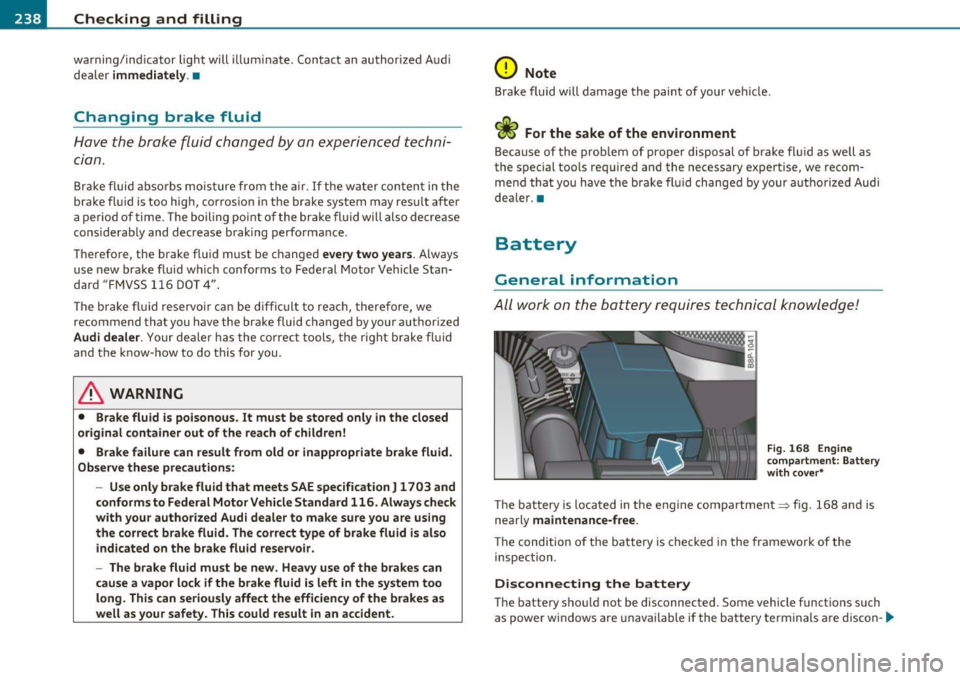
T he b att ery is lo cat ed in the e ng in e co mpar tmen t~ fig. 1 68 and is
nearly
maintenance-free.
Th e condition of the battery is che cked in the framewo rk of the
inspec tion .
Disconnecting the battery
The batte ry s ho ul d not be disconnected . Some vehicle funct io ns such
as powe r w indows are unavailable if the b attery te rminals a re discon -
~
Page 241 of 320

___________________________________________ C_ h_e _c _k_ i_n ~g_ a_n_ d_ f_ i_ll _i_n _g __ _
nected. These functions have to be relearned after the battery termi
nals are connected again. To prevent this, the battery should only be
disconnected from the vehicle electrical system if absolutely neces
sary.
Power window one-touch
up/down function
Reprogramming
~ page 51, "Reactivating the sys
tem after battery disconnection"
Master key with remote control Synchronization~
page 43
Digital clock ~ page 9
ESP indicator light The indicator light goes out after
driving a few meters
Vehicles not driven for long periods and short
distance operation
If you do not drive your vehicle for several days or weeks, e lectrical
consumers are gradually scaled back or switched off. Th is reduces
energy use and ensures the vehicle will be able to start after long
periods of time~
page 194. Some convenience functions such as
opening with the remote control key may not be available. These
convenience functions will be available again once you switch the
ignition on and start the engine. Even when consumers are switched
off, the battery will become deeply discharged by stand-by power
consumers if the vehicle is not driven for several months . Deep
discharging results in a chemica l reaction that destroys the inside of
the battery. The battery must be charged every month to prevent th is
~ page 241. Do not disconnect the battery or the anti-theft alarm
system* will not work.
Winter operation
Cold weather places higher demands on the battery. This results in
reduced starting abi lity. Have the battery checked and recharged if
necessary before the cold weather beg ins.
Avoid unnecessary power consumption, part icularly in city traffic or
when travel ing on ly short distances. Let your author ized Audi dealer
Safety first
check the capacity of the vehicle battery before winter sets in
~ page 241. A well charged battery will not only p revent start ing
problems when the weather is cold, but will also last longer.
(D Note
• All work on the battery requires techn ical knowledge. Please
contact an Audi dealership or another authorized facility for ques
tions about the battery- danger of acid burns and explosion hazard!
• The battery m ust not be opened! Do not try to change the
battery's liquid level, otherwise detonating gas will escape from the
battery - explosion hazard!
• The AGM battery in the luggage compartment cannot leak,
because the electrolyte for this battery is absorbed into a specia l
glass mat . This leak -proof battery must not be replace with a conven
tional battery .
• Make sure the ventilation hose on the side of the battery is
connected, otherwise fumes or battery acid can leak out.
• Battery holder and terminals always have to be secured correctly .
• Before all work on the battery follow the
warnings below~ & in
"Working on the battery" on
page 239. •
Working on the battery
All work on the battery requires technical knowledge! Be
especially careful when working on or near the battery!
Before you check anything in the engine compartment,
always
read and heed all WARNINGS~ & in "Working in
the engine compartment" on
page 226 .
Always heed the safety warnings, when working on the vehicle
battery or the vehicle electrical system to prevent injury .
Vehicle care Technical data
Page 267 of 320

________________________________________________ T_ i_ re _ s_ a_ n_d_ w_ h_ e_ e_l _s _ ........
As an added safety feature, your vehicle has been equipped with a tire
pressure monitoring system (TPMS) that ill uminates a low tire pres
sure telltale when one or more of your tires is signif icantly under
inflated . Accordingly, when the low tire pressure telltale illuminates,
you should stop and check your tires as soon as possible, and inflate them to the proper pressure. Driving on a significantly under-inflated
ti re causes the tire to overheat and can lead to tire fa ilure. Unde r
inf lation also reduces fuel efficiency and tire tread life, and may
affect the vehicle's handling and stopping ability.
Please note that the TPMS is not a substitute for proper tire mainte
nance, and it is the driver's responsibility to maintain correct tire
pressure, even if under -inflation has not reached the level to trigger
illumination of the TPMS low tire pressure te lltale.
Your vehicle has also been equipped with a TPMS malfunction ind i
cator to indicate when the system is not operating properly. The
TPMS malfunction indicator is combined w ith the low tire pressure
telltale . When the system detects a malfunction, the telltale will
flash for approximate ly one minute and then remain continuously
illuminated. This sequence will continue upon subsequent vehicle
start -ups as long as the malfunction exists.
When the ma lfunction indicator is illum inated, the system may not
be able to detect or signa l low tire pressure as intended. TPMS
ma lfunctions may occur for a var iety of reaso ns, includ ing the instal
lation of replacement or alternate tires or wheels on the vehicle that
prevent the TPMS from functioning properly. Always check the TPMS
malfunction telltale after replacing one or more tires or wheels on
yo ur vehicle to ensure that the replacement or alternate tires and
wheels allow t he TPMS to continue to funct io n properly .•
Vehicle OP-eration
App lies to vehicl es: wi th t ire p ress ure m onit ori ng syst em
Tire pressure indicator appears
The tire pressure indicator in the instrument cluster
informs you if the tire pressure is too low or if there is a
system malfunction.
Fig. 176 Display:
under inflation
warning
Fig . 17 7 Display:
System malfunction
Using the ABS sensors, the tire pressure monitoring system compares
the tire tread circumference and vibration characteristics of the indi
vidual tires.
If the pressure decreases in one or more tires, this is indi-
cated in the instrument cluster with a warning symbol and a
message ~ fig. 176 . The driver message in the display goes out after
5 seconds . The driver message can be displayed again by pressing the
I CHECK) button©~ page 8, fig. 2. If on ly one tire is affected, the
display will i ndicate its pos it ion. ._
Vehicle care Do-it-yourselt service iTechnical data
Page 268 of 320
-~_T_ ir_e_ s_ a_ n_ d_ w_ h_e_ e_ ls _______________________________________________ _
The ti re pr essure mon itor ing must be reset in the m enu display each
t im e th e pre ssur es a re adjust ed (e .g . w hen sw itching b etwee n parti al
and full load press ure) o r afte r ch angi ng or r eplac ing a tir e on yo ur
vehicle => page
26 7. You ca n find t he recommen ded tire pr essures
for your veh icle o n th e labe l o n the dr ive r's door pillar=> page
249 .
Tire tread circ umference and vibrat ion characterist ics ca n change and
c a us e a tir e pre ssure w arni ng if:
• t he tire pressure in one o r more tires is to o low,
• t he tire has st ru ctu ral damag e,
• the ti re press ure was changed , wh eels ro tate d or r ep laced but the
TPM S was not re set=> page
267 .
Warning symbols
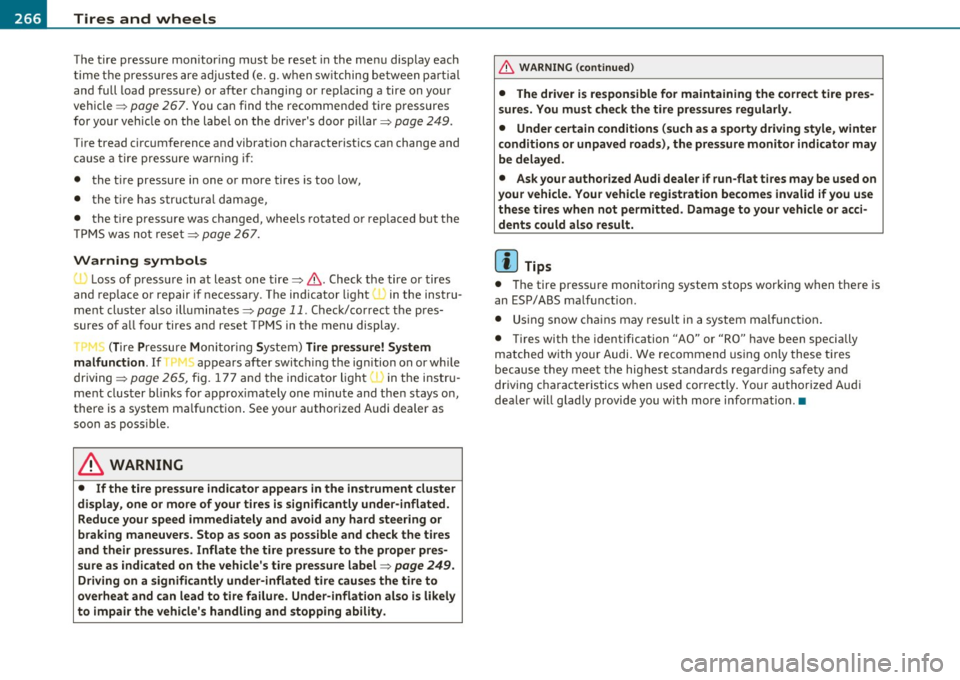
1..1' Loss of p ress ure in at least on e tir e => & . Check th e tir e or tir es
and rep lace or re pair i f necessary. T he in dicator lig ht (• in th e ins tru
men t cluster al so illu mina tes=> page
11. Che ck/co rrect the pre s
sures of a ll four tires an d reset TP MS in t he menu display.
rr :; (T ire Pre ss ure M on itor ing Syst em) Tire pressure! System
malfunction.
I f T ,.;> ap pears a fter swi tc hi ng t he ignition o n or w hile
dr iv ing => page
265 , fig. 177 a nd t he in dic ator lig ht 'in th e i nstr u
m en t clus ter bli nks fo r ap prox ima tely one minute and th en stays o n,
t h ere is a system ma lf u nct io n. S ee your authorized Audi dealer as
soon as poss ible.
& WARNING
• If the tire pressure indicator appears in the instrument cluster
display, one or more of your tires is significantly under-inflated. Reduce your speed immediately and avoid any hard steering or
braking maneuvers. Stop as soon as possible and check the tires
and their pressures . Inflate the tire pressure to the proper pres
sure as indicated on the vehicle's tire pressure label=>
page 249.
Driving on a significantly under-inflated tire causes the tire to
overheat and can lead to tire failure. Under-inflation also is likely
to impair the vehicle's handling and stopping ability.
& WARNING (co ntinued )
• The driver is responsible for maintaining the correct tire pres
sures . You must check the tire pressures regularly .
• Under certain conditions (such as a sporty driving style, winter
conditions or unpaved roads), the pressure monitor indicator may
be delayed.
• Ask your authorized Audi dealer if run-flat tires may be used on
your vehicle. Your vehicle registration becomes invalid if you use
these tires when not permitted. Damage to your vehicle or acci dents could also result.
[ i ] Tips
• Th e tire pressu re monito ring system stops wor king when the re is
a n E SP/ABS malfu nct io n.
• U sin g s now c hains may res ult in a system ma lf u n ct io n.
• Tire s with t he ident ification "AO" or "RO" have been specially
m atched w ith yo ur Audi. We recommend usin g onl y these t ires
b ecause they mee t the hig hest standards regard ing safe ty a nd
dr iving charac ter is ti cs when used cor rec tly . Yo ur au thori ze d Audi
dea ler will g lad ly provi de you wi th mor e info rmation. •
Page 285 of 320
_______________________________________________ F_u _s_ e_ s_ a_ n_ d_ b_u _ l_ b _ s __ _
Equipment No. II Equipment
Amps
Manual headlight beam adjustment, automatic Diagnostic connector, rain sensor, air condition-
headlight beam adjustment, AFS control mod-
16 ing (control module), tire pressure monitor dis-10
1 ule, engine components, light switch (switch 10 play (control module)
-lig hti ng/i llum i nation), diagnosis socket 1 7 Ant i-theft alarm warning system 5
Automatic transmission, control module for CAN 18 Diagnose Starter 5
data transfer (gateway), electro-mechanical
19 All Whee l Drive 10 steering, shift gate automatic transmission, 2 10 engine relay, fuel tank control unit, engine con-22 Blower fan 40
trol unit, brakes control (ABS), Electronic Stabili-23 Driver's side power window, front 30 zation Program (ESP), Anti-Slip Regulation (ASR)
3 Airbag 5 24 Power outlet front 20
Air-conditioning (pressure sensor, air quality sen-25 Rear window defogge r 30
sor), button for Electronic Stabilization Program 26 Power outlet in luggage compartment 20
(ESP), Anti-Slip Regulation (ASR), tire pressure 27 Fuel tank control module, fuel pump 15
monitor display, oil level sensor, back-up light
28 Power window, rear 30 4 switch, front seat heating, parking aid, seat-s
occupancy recognition (on USA vehicles), garage 33 Sliding/pop-up roof 20
door opener, automatic mirror dimming, head-
Lumbar support
10 light assistant, heated windshield washer noz-
zles, air conditioning (control module)
3 7 Hea ted seats, front 20
--
5 AFS headlights (left side) 5 38 Passenger side power window, front 30
AFS headlights (right side) 5 39 Specia l function interface 5
9
Navigat ion system, radio system 15 40 Starter 40
digital radio, cell phone, TV equipment 7,5 Rear window wiper 15
11
Automatic mirror dimming, headlight assistant 10 Body control module 20
12 Central locking (front doors) 10 47 Ce ll phone package (VDA interface) 5
13
Central locking (rear doors) 10
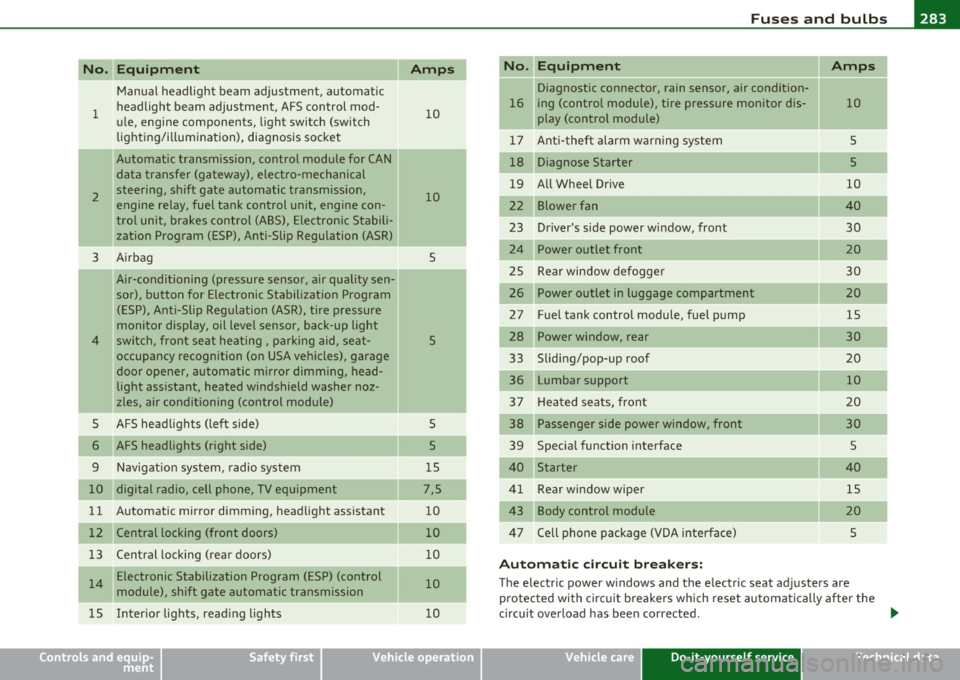
A uto m atic c ircu it bre ake rs :
14 Electronic Stabilization Program (ESP) (control 10 The electric power w indows and the electric seat adjusters are
module), shift gate automatic transmission protected with circuit b reakers which reset automatically after the
1 5 Inter ior lights, read ing lights 10 circuit overload has been corrected . ...
Safety first Vehicle care Do-it-yourself service Technical data
Page 286 of 320
lffll.,___F_ u_ s_e _ s_ a_n_d _b_u _ l_ b_s _______________________________________________ _
(I) Tips
• Whenever replacing a fuse, always consult the sticker on the
i ns ide of the fuse panel cover. It contains the most up-to-date infor
mation regarding the fuse arrangement . If in doubt , ask your autho
rized Audi Service advisor.
• Some of the equipment items listed are optiona l or only available
on certain model configurations. •
Fuse location, left side of engine
compartment
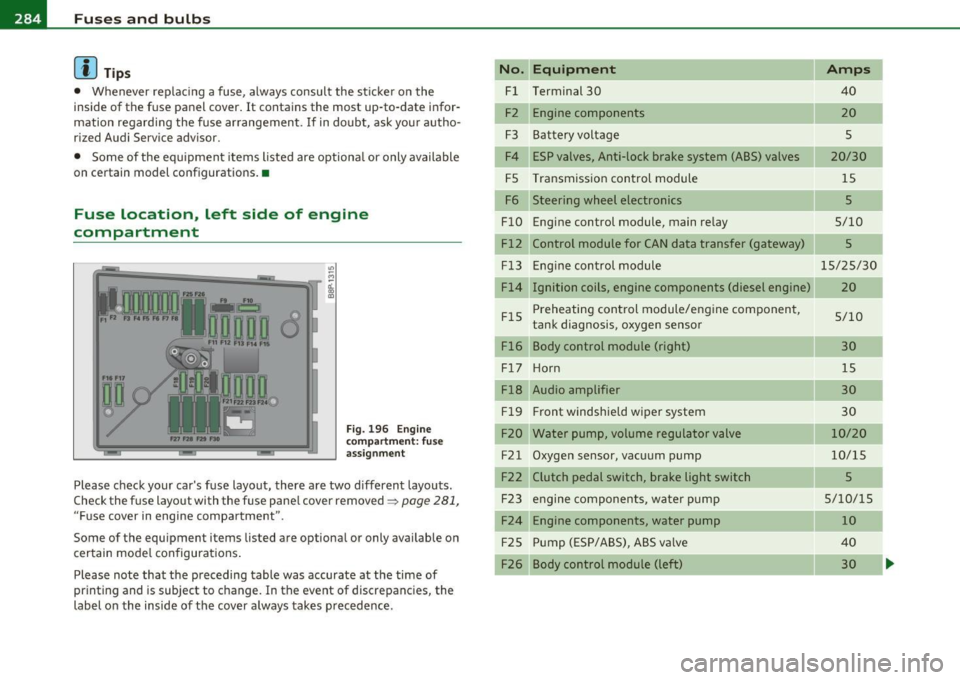
Fig. 196 Engine
compart ment: fuse
assignment
Please check your car's fuse layout, there are two different layouts.
Check the fuse layout with the fuse panel cover removed~
page 281,
"Fuse cover in engine compartment ".
Some of the equipment items listed are optional or only available on
certain model configurations .
Please note that the preceding table was accurate at the time of
printing and is subject to change . In the event of discrepancies, the
label on the inside of the cover always takes precedence .
No. Equipment
Fl Terminal 30
F2 Engine components
F3 Batteryvoltage
F4 ESP valves, Anti-lock brake system (ABS) valves
FS Transmission control module
F6 Steering wheel electronics
FlO Engine control module, main relay
Fl2 Control module for CAN data transfer (gateway)
Fl3
FlS
Fl6 Engine
control module
Ignition coils, engine components (diesel engine)
Preheating control module/engine component,
tank diagnosis, oxygen sensor
Body control module (right)
F l7 Ho rn
Fl8 Audio amplifier
Fl9 Front
windshield wiper system
F20 Water pump, volume regulator valve
F21 Oxygen sensor, vacuum pump
F22 Clutch pedal switch, brake light switch F23 engine components, water pump
F24 Engine components, water pump
F25 Pump (ESP/ABS), ABS va
lve
F26 Body control module (left)
Amps
40
20
s
20/30 15
5
5/10
5
15/25/30
20
5/10 30 15
30
30
10/20
10/15
5
5/10/15 10
40 30
Page 306 of 320

__ _:._A..:. l:.! p:.. h ::....:..:: a:.:b:.. e=-= t.:..:ic :.:a:.. l:.....:..: in~ d:...:e :..: x.:...._ ___________________________________________ _
A
ABS
See Anti-lock brake system ........ 192
AC (air conditioner) .. ... ....... ...... 97
Accessories ................ .... .. .. 301
Adapter for anti -theft wheel bolts . .... 27S
Adding Engine coolant ... ............... 236
E ngine oil ....................... 232
Windshield washer flu id ........ ... 243
Additional accessories .. ............. 301
Add itional heater
Climate controls ................. 102
Additives Engine oil .. .. .. .. .. .. .... .... ... 232
Adjustable steering wheel column . .... 105
Adjusting Steering wheel column . .. .. .. ..... 105
Adjusting front seats .............. .. . 73
Advanced Airbag System Components ............. .... ... 152
Fr ont airbags . .. ................. 150
How the components work together . 153
Monitoring .. ................. .. 156
PASS ENGER AIR BAG OFF light .. ... 157
Air conditioner ....... ............... 97
See also Climate controls ....... ... . 95
Air conditioning Switching on and off ..... .......... 97
Air distribution Climate controls .. .... ... ...... .. 100 Air outlets
Adjusting the outlets for rapid
defrosting/defogging ........... 101
Climate controls ............... .. 101
Air quality sensor .................... 99
Air recirculat ion .......... ... ... ... . 100
Climate controls . . . . . . . . . . . . . . . . . . 99
When shou ld I use the air recirculat ion? ..
99
Air rec irculat ion mode Side curtain airbags .
........... .. 164
When must the system be inspected? 156
All Wheel Drive .. .... .. ........... .. 194
Alloy wheels ............ .... ..... .. 212
All-wheel drive Winter t ires .. .. .... ..... ..... . .. 261
Alternator
See Genera tor ........... .. .. .. .. . 15
Aluminum alloy whee ls ....... ... .. .. 212
Ambient lighting .............. ...... 62
Climate controls .................. 99
6
Anti-glare inside day-night mirror.
. . . 3, 64
Airbag
Anti-lock brake system
Warning/indicator l ights . .. .. .. .. .. 15 k
How the ABS system wor s .. .... .. 192
Ai rbag System
Warning/indicator lights ... ........ 16
Weight-sensing mat ... .... .. ..... 168 ( )
Anti-Slip Regulation System ASR
Airbag system ................ .. 145, 162 H th t k l90
ow e sys em wor s ........ ... .
Advanced Airbag System .......... 149
159 Anti-theft systems
Care .................... .. .. .. .
Child restraints ...... ... .. .. .... . 169 Anti-Theft Alarm System ........... 48
Children ....... .. .. .. ...... .... .
168 Anti-theft whee
l bolts . ......... ... .. 275
Components (front airbags) . .. .... . 152
Danger of fitting a child safety seat on the front passenger seat ............ 147
Disposal ........ .... ..... .. .... . 159
Front airbags .............. ... .. . 149
How do the front ai rbags work? .. ... 154
How many airbags does my vehicle have? .
152
Important things to know ... ... .. . 145
Indicator light ................... 156
Monitoring .............. .. ... .. 156
Repairs ......... .... ..... .. .. ... 159
Side airbags ..................... 161 Armrest
Center armrest . .................. 79
Rear armrest .. .. ... .. . .. .. .. .. .. . 80
ASR How the Anti-Slip Regulation System works . ........... ...... .... .. 190
Asterisk What does it mean when something is
marked with an asterisk? . . . . . . . . . . . 5
Audi magnetic ride . ........... .. . 12, 112
Description .. ...... ............. 112
Indicator light .... .. ............. . 12
Page 317 of 320
Alphabetical index -________________ fWI
Tire specifications ........ .. .. ... . 258 Transmission Vehicle Identification Number (VIN) ... . 294
Tread depth ....... .............. 256 6-speed . .. ................ ... .. 114
Vehicle jack .. ............... .. 270,276
Uniform t ire quality grading ....... . 260 Manual transmission .............. 114
Vehicle literature ... .......... ...... .. 4
Winter tires ..................... 261 S tronic transmission . ............. 115
Vehicle-care products .. .. ..... .... .. . 206
Tires and vehicle load limits ........... 253 Transport Canada ................... 133
Tir es and wheels Tread Wea r Indicator (T WI) .. .. ....... 256
w
Checking tire pressure ............. 252
Trip computer ......... .............. 21
Cold tire inflation pressure ......... 249
Trip odometer ... .... .. .............. 10 Warning light
Dimensions .... .... .. .. ......... 257
What does it mean when dEF appears in Tire pressure monitoring
system ... .. 36
General notes ........... .... .. .. . 245
the trip odometer disp lay? .. .. .. .. . 10 Wa
rning lights . ...... ............. 8 , 11
Glossary of tire and loading terminology .
246
New tir es and wheels .......... .. . 257 Turn
sign als ... .. ... ........ ...... ... 59
Warning/indicator lights ........ .. . 14 Red symbols in the center display
.. .. 30
Yellow symbols in the center display . . 30
Warning/indicator l ights
Replacing .............. ...... .. . 258
Snow chains .............. .. .. ... 262
Tires and vehicle load limits .. .. .... 253
Wheel bolts ................ .. ... 263
Winter tires ..................... 261
u
Undercoating ... .... .... ........... 213
Unfastening safety belts ............. 142
Unidirect iona l tires ...... ... ......... 245 Airbag system ......
.......... .. .. 15
Anti -lock brake system (ABS) ........ 16
Brake system ..................... 15
Cruise control .................... 14
Electronic power control ... ......... 13
Tires/Wheels
Low aspect ratio tires ............. 264
Tir e pressure mon itoring system 13, 264
Torn or frayed safety belts ......... .. . 138 Uniform tire quality grading
.... ...... 260
Unlocking Power locking switch ............ .. . 44
Rear lid ................. .. .... ... 45 E
lectronic stabilization program (ESP) 14
Engine malfunction (diesel engine) ... 13
Generator . .. .... .. .... ........... 15
Glow plug system .. ............... 13
Touch-up paint ................ .. .. . 210
Remote control .. ... .... .......... 42 High beam
.. ..................... 14
T owing
Front eyelet ..................... 290 Using the fo
ld-out key .. .. .......... 43 Malfunction
Indicator Lamp (MIL) .... 14
Parking brake .. ...... .... ... . ... .. 15
Rear eyelet ...................... 290
T ow truck procedures ... .......... 289
V
Safety belt ................ ....... 15
Tire pressure monitoring system . .. .. 13
TPMS Vanity mirror ................
.... ... . 63 T
urn s ignals .............. ...... .. 14
Tire pressure monitoring system .... 265 Vehicle battery Warranty coverages
................. 299
Trailer towing ............. ...... .. . 202 Stationary .
.. .. ...... ........... 239 Washer
reservo ir ............ ... .. .. . 243
Operating instructions ......... .. . 203 Vehicle electrical system .. ............ 15 Wash
ing .................... ... ... 206
Tech nical requirements ....... 202, 203
Vehicle identification ........ .. .... .. 294 Automatic car wash
.......... ..... 207
Trailer towing tips .... ... .. .. ... .. 204
Vehicle identification label ............ 294 by hand .........
.. .. ...... .. .. . 207
Controls and equip
ment Safety first Vehicle operation
Vehicle care Do-it-yourself service Technical data