park assist AUDI S3 2015 User Guide
[x] Cancel search | Manufacturer: AUDI, Model Year: 2015, Model line: S3, Model: AUDI S3 2015Pages: 310, PDF Size: 76.15 MB
Page 118 of 310
116 Automatic transmission
with the eng ine runn ing (a t id le) in the P se
lector lever position . Then the indicator light
and the message turn off, drive to an author
ized A udi dealer or qualified repair facility im
mediately to have the malfunct ion corrected.
If the indicator lig ht and the dr ive r message
do not tur n off, do not cont inue dr iv ing. See
a n author ized Audi d eal er or author ized A udi
S ervi ce Fa cili ty for a ssis tance.
Di] Transmiss ion malfunction: you can con
tinue driving
Drive to an autho rized Aud i dea le r or a uthor
ized A udi Service Facility immed iate ly to have
the ma lf u nction corrected .
Di] Transmission malfunction: no reverse
gear (you can continue driving)
D rive to an authorized Aud i dea le r or a uthor
ized A udi Service Facility immediate ly to have
the ma lf u nct ion co rrected .
Di] Transmi ssion malfunction: You can con
tinue dri ving in D until engine off
Drive the ve hicle away from mov ing traff ic and
p ar k. See an au thori zed A udi d ealer or author
iz ed A udi Service F acility for assis tance .
Di] Transmi ssion overheating! Please adapt
driving style
Continue driving moderate ly. When t he in di
cato r ligh t turns off, you can continue dr iving
normally .
Di] Transmission : Please press brake pedal
and select gear again
If t h e tra nsmission mal functions beca use the
temperature is too h igh , a message appears
when t he transmission is coo led.
Selector lever emergency release
Applies to vehicles: with S tronic transmission
If the vehicle 's power supply fails, the selec
tor lever can b e released in an emergency.
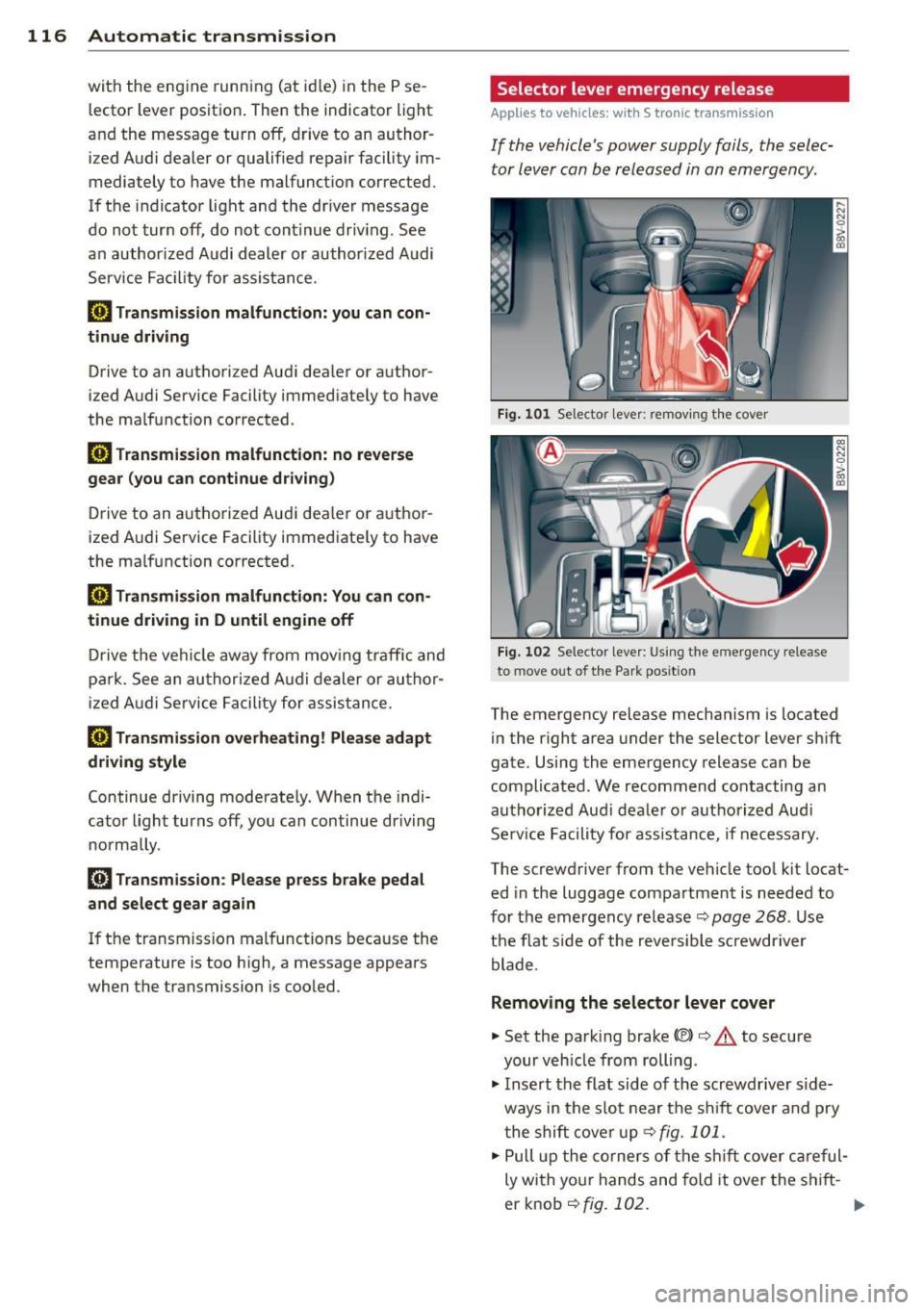
Fig. 101 Se lector leve r: remov ing t he cover
Fig. 10 2 Selector leve r: Us ing the emergency re lease
to move out of t he Park pos itio n
The emergency release mechanism is located
in the right a rea under the selector lever sh ift
gate. Using the eme rgency release ca n be
complicated. We recommend contacting an
au tho rize d Audi d eale r o r a uth o rized Aud i
Se rv ice Facility for assistance, if necessary.
The sc rewd river from t he ve hicle too l kit locat
ed in the luggage compartmen t is needed to
fo r the emergency release ¢ page
268 . Use
the f lat s ide of the reve rsible screwdriver
blade .
Removing the selector lever cover
"'Set the park ing brake «el)¢&. to secure
your veh icle from rolling .
"' Insert the flat side o f the scr ewdr ive r side
ways in the s lot near the s hift cove r and pry
t he shi ft cove r up <=> fig.
101 .
.,. Pull up the co rner s of the shift c over car eful
ly wi th yo ur hands and fold it over the s hift-
er knob ¢fig.
10 2. ..,.
Page 120 of 310
118 Parking systems
Parking systems
General information
Appl ies to vehicles: with rea r parking sys te m s/park in g
syste m plus/rearv iew camera
Depending on your vehicle's equipment, vari
ous parking aids will help you when parking
and maneuvering.
The
rear parking system is an audible parking
aid that warns you of obstacles
behind the ve
hicle
¢ page 119.
The parking system plus assists you when
parking by audibly and visually indicating ob
jects detected
in front of and behind the vehi
cle
¢ page 119.
The rearview camera shows the area behind
the vehicle in the MMI display . This display as
sists you when you are cross or parallel park ing. The parking system plus functions are al
so available ¢
page 120.
& WARNING
-Always look for traffic and check the area
around your vehicle by looking at it di
rectly as well. The parking system cannot
replace the driver 's attention. The driver
is always responsible when entering or
leaving a parking space and during simi
lar maneuvers .
- Please note that some surfaces, such as
clothing, are not detected by the system.
- Sensors and cameras have blind spots in
which people and objects cannot be de
tected . Be especially cautious of small
children and animals .
- Always pay attention to the area around
the vehicle -using the rearview mirror,
too.
- The sensors can be displaced by impacts
or damage to the radiator grille, bumper,
wheel housing and the underbody. The
parking system may become impaired as
a result . Have your authorized Audi deal
er or authorized service facility check
their function . -
Make sure the sensors are not obstructed
by stickers, deposits or other materials.
If they are, the sensor function could be impaired. For additional information on
cleaning, refer to¢
page 205.
(D Note
- Some objects are not detected or dis
played by the system under certain cir
cumstances:
- Objects such as barrier chains, trailer
draw bars, vertical poles or fences
- Objects above the sensors such as wall
extensions
- Objects with specific surfaces or struc
tures such as chain link fences or pow
der snow
- If you continue driving closer to a low-ly
ing object, it may disappear from the
sensor range. Note that you will no lon
ger be warned about this obstacle.
- The sensors can be displaced by impacts
or damage to the radiator grille, bumper,
wheel housing and the underbody. The
parking system may become impaired as
a result. Have your authorized Audi deal
er or authorized service facility check
their function .
(D Tips
- The system may provide a warning even
though there are no obstacles in the cov
erage area in some situations, such as:
- certain road surfaces or for long grass.
- external ultrasonic sources e.g. from
cleaning vehicles.
- heavy rain, snow, or thick vehicle ex
haust.
- We recommend that you practice park
ing in a traffic-free location or parking
lot to become familiar with the system.
When doing this, there should be good
light and weather conditions.
- You can change the volume and pitch of
the signals as well as the disp lay
¢ page 124.
Page 121 of 310
....,
N
0 > co
rl I.O
"' ....,
"' rl
-What appears in the MM I display is
somewhat time -de layed .
- The sensors mus t be kept clean and free
of snow and ice for the park assist to op
erate .
Rear parking system
Description
Applies to vehicles: with rear parking system
The rear parking system is an audible parking
aid .
Desc ripti on
There is a sensor in the rear bumper cover. If
these detect an obstacle, audib le signals warn
you .
Make sure the sensors are not covered by
stickers, deposits or any other obstructions as it may impair the sensor function. For infor
mation on cleaning, refer to ¢
page 205.
The range at which the sensors begin to meas
ure is approximately:
S ide rear 3 ft (0.90
m)
S ide center 5.2 ft (1.60 m)
The closer you get to the obstacle, the shorter the interval between the audib le signa ls . A
continuous tone sounds when the obstacle is
less than approximate ly 1 foot (0 .30 meters)
away. Do not continue backing up¢&.
in Gen
eral information on page 118,
¢ (D in General
information on page 118!
If the d istance to an obstacle remains con
stant, the volume of the distance warning
gradually drops after about four seconds (th is
is not apply in the continuous tone range) .
Activat ing
The par king system activates automatically
when the reverse gear is selected. Yo u will
hear a brief confirmation tone.
P arking systems 119
Parking system plus
Description
Applies to vehicles: with parking system plus
The parking system plus provides audio and
visual signals when parking .
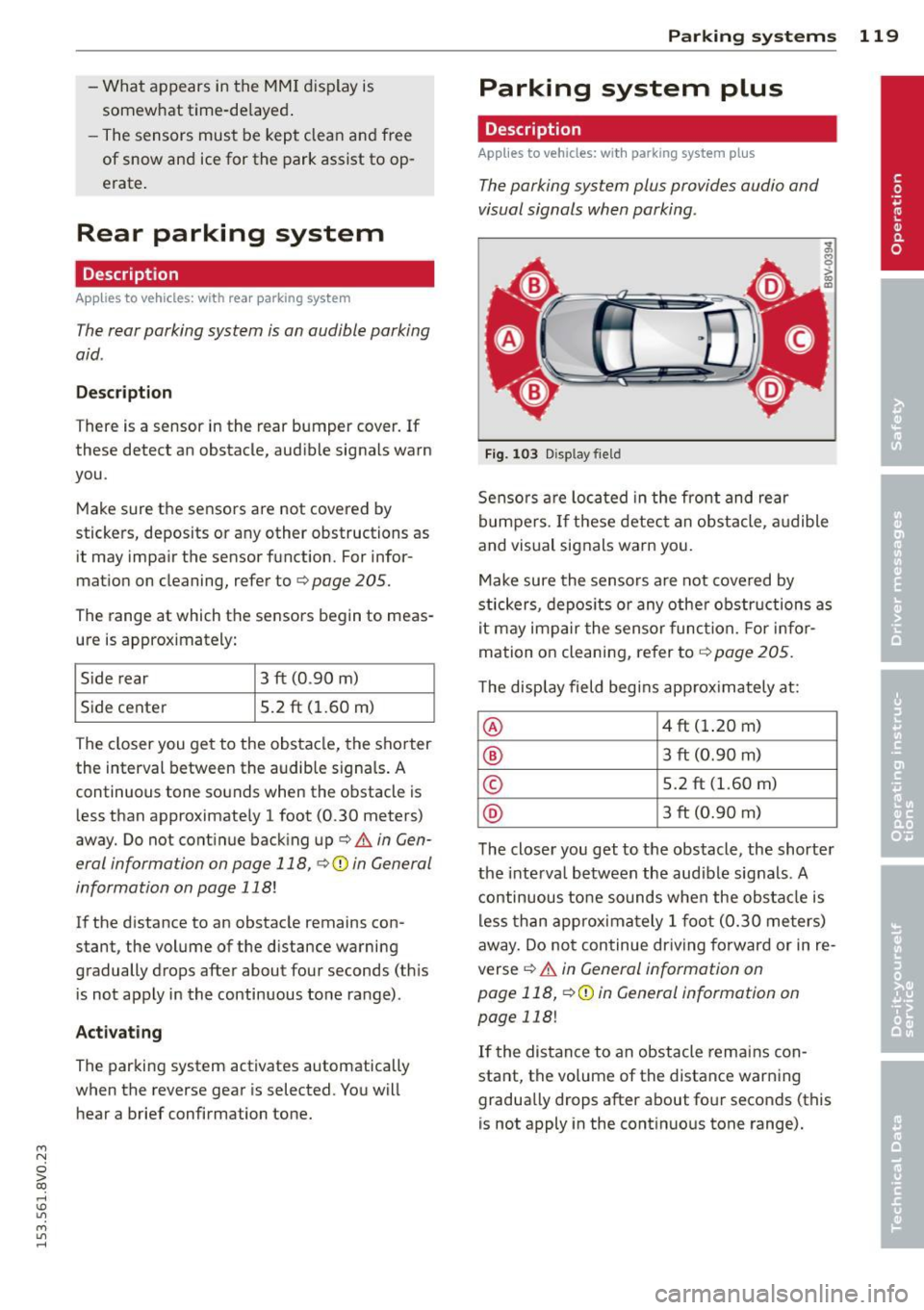
Fig. 103 Disp lay fie ld
Senso rs a re loca ted in the front and rear
bumpers. If these detect an obstacle, a udible
and visual signals warn you.
Make sure the sensors a re not covered by
stickers, depos its or any other obstr uctions as
it may impair the senso r func tion. For infor
mation on cleani ng, refer to¢
page 205 .
The display field begi ns app rox imately at:
@ 4 ft (1.20 m)
® 3 ft (0.90 m)
© 5.2 ft (1.60 m)
@ 3 ft (0.90 m)
T he close r you get to the obstacle, the shorte r
the inte rva l between the audible signals . A
continuous to ne sounds when the obs ta cl e is
less than approx ima tely 1 foot (0.30 meters)
away . Do no t continue dr iving forward or in re
verse
¢ &. in General information on
page 118,
¢ (D in General information on
page 118!
If the distance to an obstacle remains con
stant, the vo lume of the distance warning
gradua lly drops after about fo ur seconds (this
is not apply in the cont inuo us tone range) .
Page 123 of 310
....,
N
0 > co
rl I.O
"' ....,
"' rl
General information
Applies to vehicles: with park ing system p lus wit h rear
view ca mera
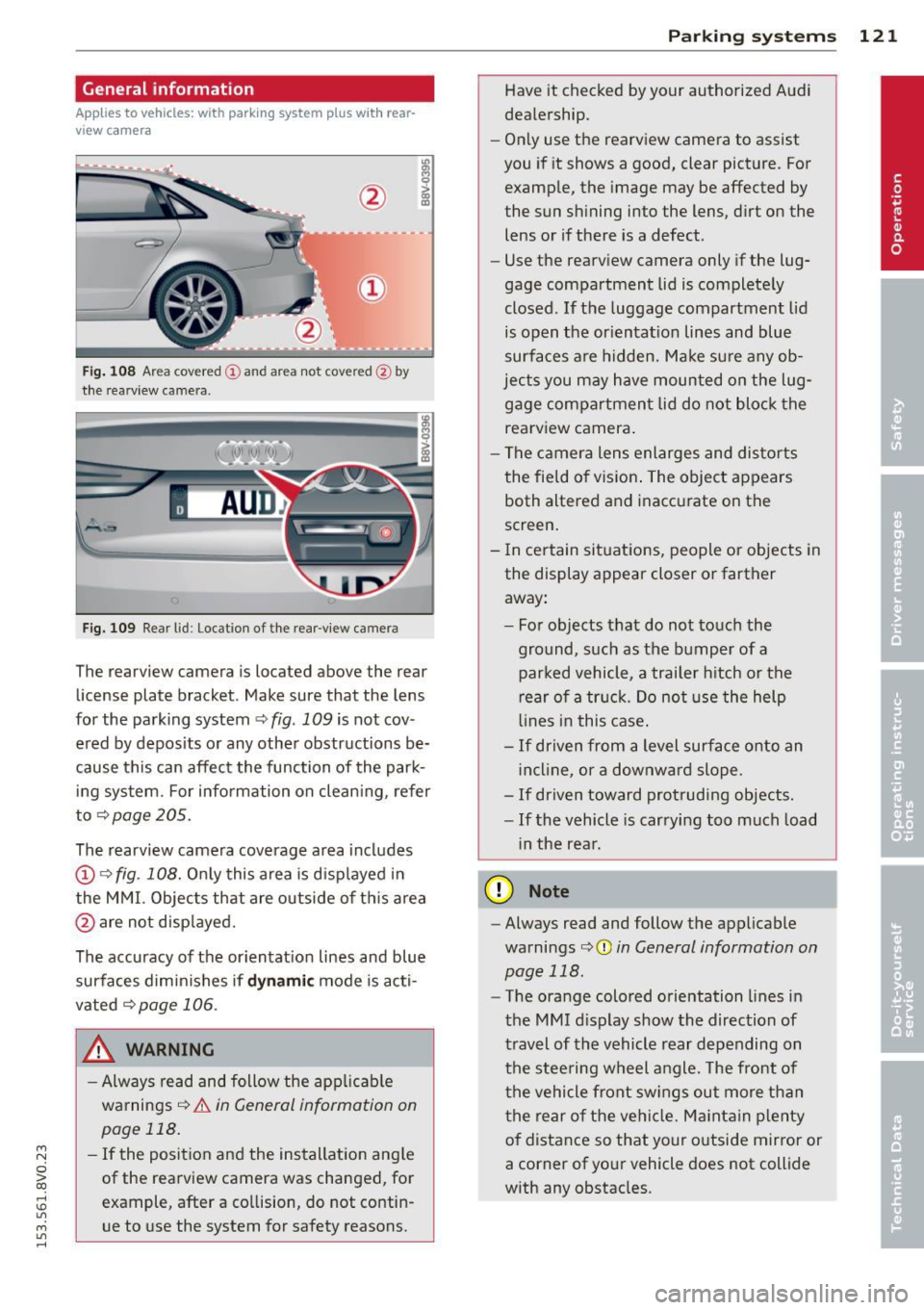
Fig. 108 Area covered
(D and area not covered @by
the rearv iew camera.
Fig. 109 Rear l id: Location of the rear-v iew camera
The rearview camera is located above the rear
license plate bracket . Make sure that the lens
for the parking system ~
fig. 109 is not cov
ered by deposits or any other obstructions be
cause this can affect the function of the park ing system. For information on cleaning, refer
to~page205.
The rearview camera coverage area includes
(D ¢ fig. 108. Only this area is displayed in
the MMI. Objects that are outside of this area
@ are not displayed.
The accuracy of the orientation lines and blue
surfaces diminishes if
dynamic mode is acti
vated
¢page 106.
_& WARNING
-Always read and follow the applicable
warnings¢
& in General information on
page 118.
- If the position and the installation angle
of the rearview camera was changed, for
example, after a collision, do not contin
ue to use the system for safety reasons .
Parking systems 121
Have it checked by your authorized Audi
dealership.
- Only use the rearview camera to assist
you if it shows a good, clear picture. For
example, the image may be affected by
the sun shining into the lens, dirt on the
lens or if there is a defect.
- Use the rearv iew camera only if the lug
gage compartment lid is completely
closed.
If the luggage compartment lid
is open the orientation lines and blue
surfaces are hidden. Make sure any ob
jects you may have mounted on the lug gage compartment lid do not block the
rearview camera.
- The camera lens enlarges and distorts
the field of vision. The object appears
both altered and inaccurate on the
screen.
- In certain situations, people or objects in
the display appear closer or farther away:
- For objects that do not touch the
ground, such as the bumper of a
parked vehicle, a trailer hitch or the
rear of a truck. Do not use the help
lines in this case.
-If driven from a level surface onto an
incline , or a downward slope.
- If driven toward protruding objects.
-If the vehicle is carrying too much load
in the rear.
(D Note
-Always read and follow the applicable
warnings
c:>(D in General information on
page 118.
- The orange colored orientation lines in
the MMI display show the direction of
travel of the vehicle rear depending on
the steering wheel angle. The front of
the vehicle front swings out more than
the rear of the vehicle. Maintain plenty
of distance so that your outside mirror or
a corner of your vehicle does not collide
with any obstacles.
Page 228 of 310
226 Checking and Fill in g
- Do not add any type of radiator leak sea l
ant to your ve hicle's engine coolant.
Adding rad iator repair fluid may adverse
ly affect the function and performance of
your cooling system and could result in damage not covered by your New Vehicle
Limited Warranty.
Adding coolant
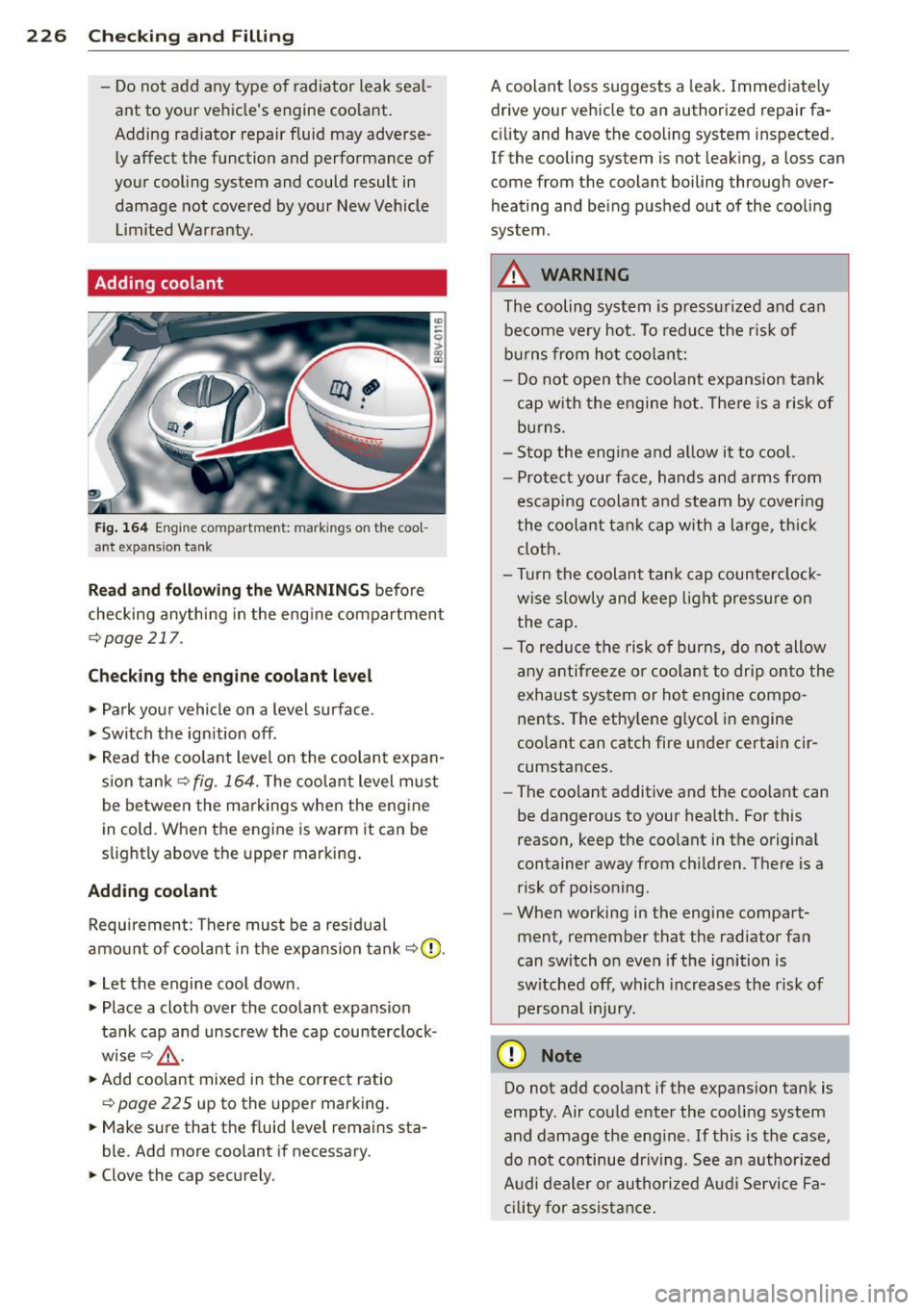
Fig . 164 Engine co mpa rtment: mark in gs on the coo l
ant expans ion tank
R ea d a nd f ollow ing th e W ARNING S before
checking anything in the eng ine compartment
¢ page 217.
Ch eck ing t he e ngi ne coolant level
"Park your vehicle on a level surface .
.. Switch the ign ition off .
" Read the coo lant level on the coolant expan
s ion tank ¢
fig. 164. The coo lant level must
be between the markings when the eng ine
in cold. When the engine is warm it can be
sl ightly above the upper marking .
Adding coolan t
Requirement : There must be a residual
amount of coolant in the expansion tank ¢(D .
.. Let the engine cool down.
" Place a cloth over the coolant expansion
tank cap and unscrew the cap counterclock
wise ¢&_ .
.. Add coolant mixed in the correct ratio
¢ page 225 up to the upper marking.
.. Make sure that the fluid level remains sta
ble. Add more coolant if necessary.
" Clove the cap securely. A coolant loss suggests a
leak. Immediately
drive your vehicle to an authorized repair fa
c ility and have the cooling system inspected.
If the cooling system is not leaking, a loss can
come from the coolant boiling through over
heating and being pushed out of the cooling
system.
A WARNING
The cooling system is press urized and can
become very hot. To reduce the r isk of
b urns from hot coolant:
- Do not open the coolant expansion tank
cap with the engine ho t. T here is a risk of
burns.
- Stop the eng ine and a llow it to cool.
- Protect your face, hands and arms from
escaping coolant and steam by covering
the coolant tan k cap with a large, th ick
cloth.
- Turn the coolan t tank cap counterclock
wise slowly and keep light pressure on
the cap .
- To reduce the risk of burns, do not allow
any antifreeze or coolant to drip onto the
exhaust system or hot engine compo
nents. The ethy lene g lycol in engine
coo lant can catch fire under certain cir
cumstances.
- The coolant additive and the coolant can
be dangerous to your health . For this
reason, keep the coo lant in the origina l
container away from ch ildren . There is a
risk of poisoning.
- When working in the engine compart
ment, remember that the rad iator fan
can switch on even if the ignition is
sw itched off, which increases the risk of
pe rsonal injury.
(D Note
Do not add coolant if the expansion tank is
empty . Air could enter the cooling system
and damage the eng ine .
If this is the case,
do no t continue dr iving. See a n author ized
A udi dealer or authori zed Aud i Service Fa
cility for assist ance.
Page 279 of 310
....,
N
0 > co
rl I.O
"' ....,
"' rl
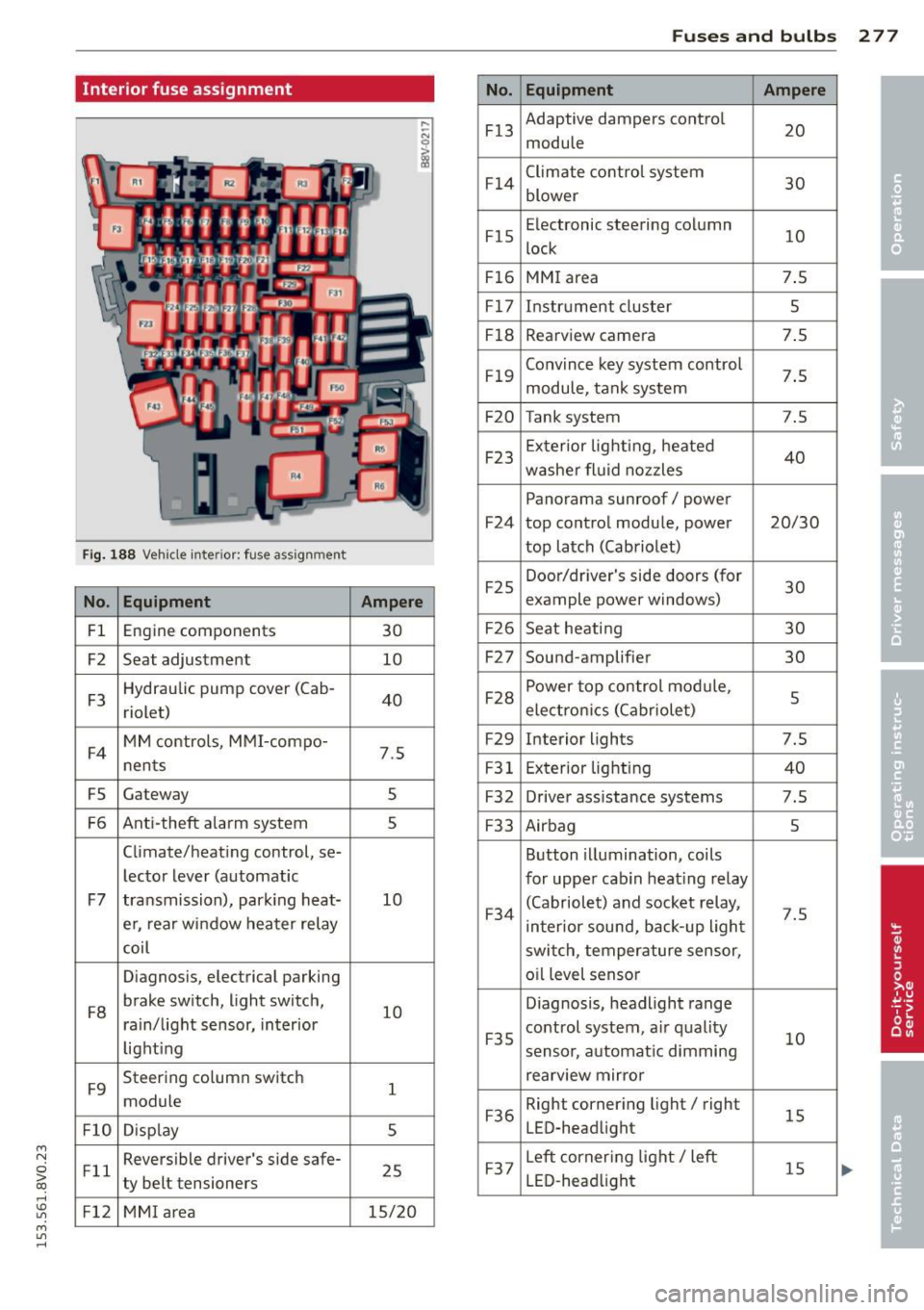
Interior fuse assignment
Fig. 188 Vehicle inter ior: fuse assignment
No . Equ ipment
Fl Engine components
F2 Seat adjustment
F 3 Hydraulic pump
cover (Cab-
riolet)
F4 MM controls, MMI-compo-
nents
FS Gateway
F 6 Anti-theft alarm system
Climate/heating control,
se-
lector lever (automatic
F7 transmission), park ing heat-
e r, rear window heater relay
coil
Diagnosis, electrical parking
F 8 brake
switch, light switch,
rain/light sensor, interior
light ing
F9 Steering
column switch
module
Fl0 Disp lay
Fll Reversible driver's
side safe-
ty belt tensioners
Fl2 MMI a rea
No .
Fl 3
Fl4
Fl5
Fl6
Fl7
Fl8
Fl9
F20
F23
F24
F25
Ampere
30 F26
10 F27
40 F28
F29
7.5
F31
s F32
5 F33
10 F34
10 F35
1 F36
5
25 F37
15/20
Fu se s and bulb s 2 77
Equipment Ampere
Adaptive dampers control
20
module
Climate control system 30
blower
Electronic steering column
10
lock
MM I area 7.5
Instrument cluster 5
Rearview camera 7.5
Conv ince key system control
7.5
module, tank system
Tank system 7.5
Ex terior lighting, heated
40
washer fluid nozzles
Panorama sunroof/ power
top control modu le, power 20/30
top latch (Cabriolet)
Door/dr iver's side doors (for
30
example power windows)
Seat heati ng 30
Sound-amplifier 30
Power top con trol module,
5
electron ics (Cabriolet)
Interior lights 7.5
Ex terior lighting
40
Driver assistance systems 7.5
Airbag 5
Button illumination, coils
for upper cab in heat ing relay
(Cabriolet) and socket relay,
7.5
interior sound, back-up ligh t
switch, temperature sensor, o il level sensor
Diagnosis, headlight range
control system, air quality
10
senso r, a utomat ic dimming
rearview mir ror
Right corner ing light/ right
15
LED-headlight
Left corner ing light/ left
15
LED -head light
Page 296 of 310
29 4 Index
Audi magnetic ride
refer to Adaptive dampers 106
Aud i Service Repa ir Ma nuals and Litera -
ture .. .. .... ............. .. .. .. .. . 289
AUTO Automatic climate control system ..... 70
Automatic headlights ......... .. .... 46
Auto Lock (centra l locking system) .... .. 36
Automatic belt retractor ............. 138
Automatic climate control system
refer to Climate control system (auto-
mat ic) ............................ 70
Automatic headlights ................. 46
Automatic post-collision braking system 190
Automatic transmission .............. 109
Driving t ips . .................. .... 111
E mergency mode .................. 115
H ill descent control ................ 113
I gnition key safety in terlock .. .. .... .. 74
Kick -down . .... . ...... ... ... ..... . 114
L aunch Contro l-Program ... .. .. .. .. . 1 15
malfunction . .. . ...... ... .. .. .... . 110
Selector lever emergency release . . . . . 116
Selector lever lock . . . . . . . . . . . . . . . . . 110
Selector lever posit ions ............. 109
Shifting manually . . . . . . . . . . . . . . . . . . 114
Steer ing whee l w ith shift paddles ..... 114
S t ron ic .. .. ..... ........ .. .. .. .. . 109
tiptronic . .. ............. .. .. .. .. . 114
Automatic wipe/wash system . . . . . . . . . . 50
Auto Safety Hotline ..... ... .. .. .... . 133
Auxiliary heater (vehicles w ith d iese l en-
g ines) .. .. .... ............. ...... .. 73
Average consumption ................. 28
Average speed . . . . . . . . . . . . . . . . . . . . . . . 28
B
Battery . .. .. ............. .. .. .. .. . 228
Charge level ... ... .... ... .. .. .... . 194
Charging . . . . . . . . . . . . . . . . . . . . . 20, 230
Energy management . ... .. .. .. .. .. . 194
Important warnings ............... 229
Indicator light . . . . . . . . . . . . . . . . . . . . . 20
Jump starting ............ .. .. .. .. . 280
Locat ion ... ... .... ...... ... ... .. . 229
Replacing the battery .............. 231 Winter operation
.... .. ..... .... . .. 228
Working on the battery . ..... ... .. .. 229
Before driving ..... ............. .... 125
Blended gasoline .. ............. .... 210
B lower
automatic Climate control system . ... . 71
Manua l climate control system ... .. .. . 69
Boos t .............................. 29
Booster seats . . . . . . . . . . . . . . . . . . . . . . 179
Boost p ressure indicator . ..... ... .. .. . 29
Brake fluid Changi ng the b ra ke fluid ........ .. .. 22 7
Checking the b rake fluid level ........ 22 7
What is the co rrect b rake fluid level? .. 2 2 7
What shou ld I do if the brake fluid warn -
ing light comes on? ..... .... ... .. .. 227
B rakes ..... .... .. .. ........... .... 191
B rake assist system . ........... .. .. 189
B rake booster ..................... 191
Indicator light ... .. ... ..... ... .. .. . 25
New brake pads . .... .. ..... ... .. .. 191
Brake system Brake fluid .... .. ............. .... 22 7
B rake fluid specifications fo r refill and re -
placement .... .. ... .. ..... ... .. .. 227
B rake pads . ..... .. .... .... ... .. .. 197
Fl uid reservoir ... .. ... ..... ... .. .. 227
Worn brake pads symbo l . . . . . . . . . . . . . 22
B rak ing
Emergency brak ing funct ion ... .. .. .. . 82
Indicator light ... ... .. ..... .... . .. . 18
Parking brake .... .. ... ..... ... .. .. . 80
Starting on inclines ............ .... . 82
B reak-in per iod ..................... 197
Brake pads . ..... ... .. ..... ... .. .. 197
T ires ... .. .... .. .. ... ..... ... .. .. 197
Bu lbs ......... ... .. .............. . 279
C
California Proposition 65 Warn ing .... . 218
Battery specific .................. . 230
Capacities AdBl ue ... .... .. ............. .... 215
Fuel tank .. .. .. .. ............. .. .. 288
Washe r fluid reservo ir .. ....... ... .. 288
Care ... .. .. .... .. .. .... . ..... ... .. 205
also refer to Cleaning .......... .. .. 205