tow AUDI S3 2015 User Guide
[x] Cancel search | Manufacturer: AUDI, Model Year: 2015, Model line: S3, Model: AUDI S3 2015Pages: 310, PDF Size: 76.15 MB
Page 86 of 310
84 Driving
-For reasons of safety, cruise control
should not be used in the city, in stop
and-go traffic, on winding roads and
when road conditions are poor (such as
ice, fog, gravel, heavy rain and hydro
planing) -you could have an accident .
- Switch the cruise control off temporarily
when driving in turning lanes, highway
exits or in construction zones.
- Please note that unconsciously "resting"
your foot on the accelerator pedal pre
vents the cruise control from braking.
This is due to the control system being
overridden by the driver's acceleration.
- If there is a brake system malfunction
such as overheating when the speed
warning system is switched on, the brak
ing function in the system will be deacti
vated. The remaining speed warning sys
tem functions will remain active, as long
as the
B (USA models)/ ii (Canada
models) indicator light is on.
@ Tips
- The cruise control system is ideal for
stretches with speed limits. The driver is
responsible for adhering to the correct
speed.
- The cruise control remains active when
shifting gears.
- The brake lights turn on when the brakes
are activated.
Switching on
Applies to vehicles: with cr uise contro l system
0
f
~
0
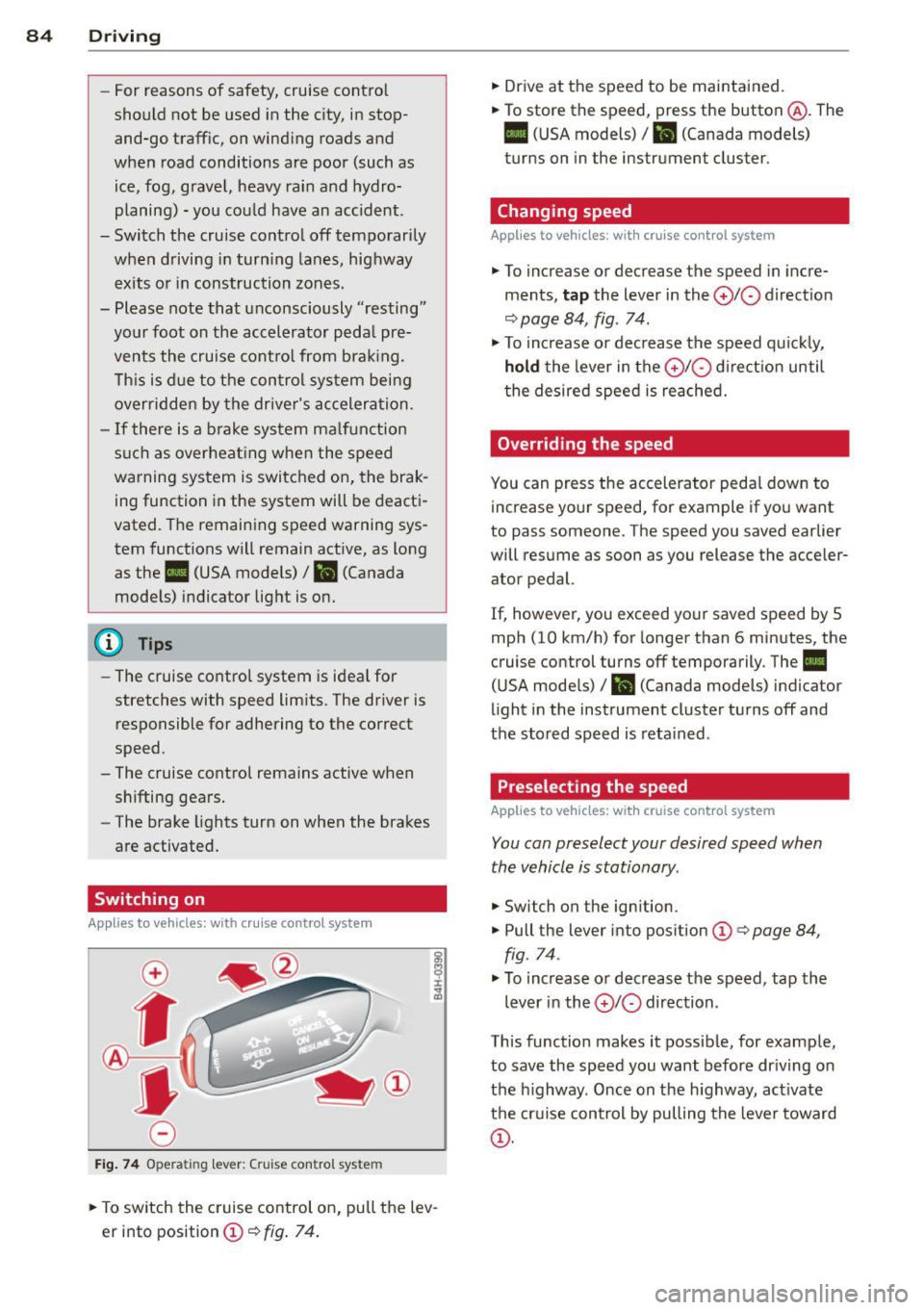
Fig. 74 Opera ting lever: Cruise control system
.,. To switch the cruise control on, pull the lev
er into position
CD¢ fig. 74.
.,. Drive at the speed to be maintained.
.,. To store the speed, press the button @. The
B (USA models)/ ii (Canada models)
turns on in the instrument cluster.
Changing speed
Applies to vehicles: with cruise control system
.,. To increase or decrease the speed in incre
ments,
tap the lever in the 0 10 direction
<:;>page 84, fig. 74 .
.,. To increase or decrease the speed quickly,
hold the lever in the 010 direction until
the desired speed is reached.
Overriding the speed
You can press the accelerator pedal down to
increase your speed, for example if you want
to pass someone. The speed you saved earlier
will resume as soon as you release the acceler ator pedal.
If, however, you exceed your saved speed by 5
mph (10 km/h) for longer than 6 minutes, the
cruise control turns off temporarily. The
II
(USA models) / Bl (Canada models) indicator
light in the instrument cluster turns off and
the stored speed is retained .
Preselecting the speed
Applies to vehicles: with cruise control system
You can preselect your desired speed when
the vehicle is stationary .
.,. Switch on the ignition .
.,. Pull the lever into position
CD¢ page 84,
fig . 74.
.,. To increase or decrease the speed, tap the
lever in the
010 direction .
This function makes it possible, for example,
to save the speed you want before driving on
the highway . Once on the highway, activate
the cruise control by pulling the lever toward
CD-
Page 90 of 310
88 Audi adaptive cruise control
What can adaptive cruise control do?
The ad aptive cruise co ntrol sys tem uses r ad ar
a nd a video came ra . T he r ada r is subject to
designated system limits ¢
page 86.
On ope n roads w ith no t raff ic, i t fun ctions like
a cruise co ntro l system . Th e stored s peed is
main taine d. When approach ing an object
ahead and the system detects it, the ada ptive
cr uise control system automatically brakes to
match that ob ject's speed and then maintains
the stored d istance. As soon as the system
does not detect an object ahead, adaptive
cru ise control accelerates up to the s to red
speed .
W ith in the lim its of the system, adaptive
cru ise contro l can brake in stop-and-go traff ic
u ntil t he vehicle is stationary and then begin
d riving aga in under certa in conditions
¢ page 90, Driving in stop-and-go traffic.
Which functions can be controlled?
When you sw itch adaptive cruise cont ro l on,
you can set the cur rent speed as the "control
speed" ¢
page 88, Switching on/off .
When driving, you can stop cruise control
¢
page 90 or change the speed ¢ page 89
at any time .
You can a lso adjust the following settings :
- D istan ce
¢page 91
- D riving p rogram ¢ page 92
-Driving mode ¢ page 92
l) Spee d lim it s depe nd o n th e cou ntry and t he s pee dom
e te r.
Switching on/off
Applies to vehicles: wit h Audi adapt ive cr uise contro l
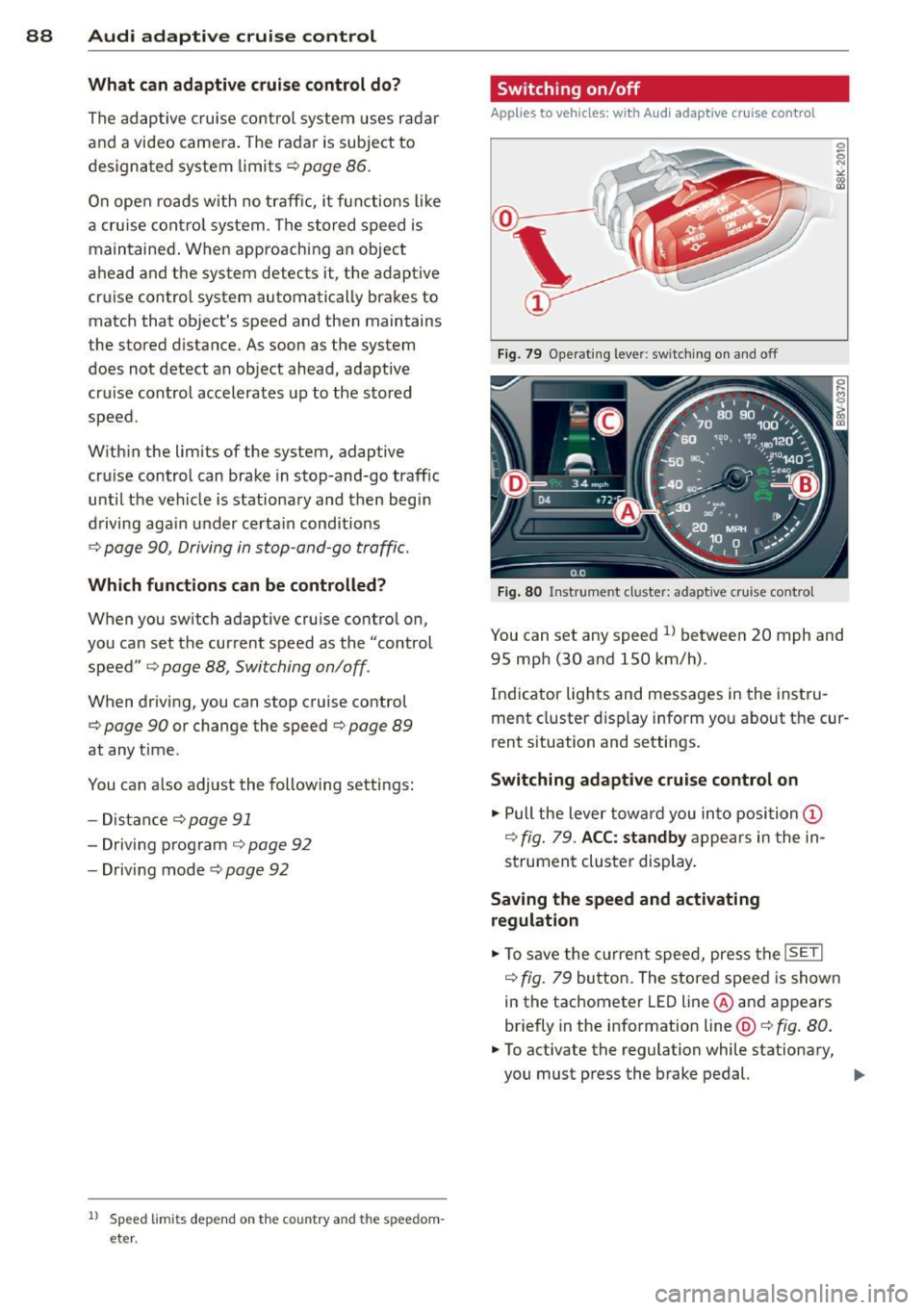
Fig . 79 Opera ting leve r: sw itc hin g on and off
Fig. 80 Instrume nt cluster: adaptive cru ise control
You can set any speed ll betwee n 20 mph and
95 mp h (30 and 150 km/h).
Ind icator lights and messages in the inst ru
me nt cluster d isp lay inform yo u about the cur
rent s ituation and settings.
Switching adaptive cruise control on
.,. Pull the lever tow ard you in to position (D
¢ fig . 79 . ACC: standby a ppears in the in
s trument cluster display.
Saving the speed and activating
regulation
.,. To save the c urre nt spee d, press t he ISETI
¢ fig. 79 bu tto n. The stored speed is show n
in the tachometer LE D line @and appears
briefly in the info rmation line@¢
fig. 80 .
• To activate the regulation while stationary,
you must press the brake pedal.
IJJ,-
Page 93 of 310
....,
N
0 > co
rl I.O
"' ....,
"' rl
.. press the brake peda l.
.. To resume the stored speed, move the lever
into position @.
Inte rrupting crui se contr ol wh en stopped
.. Push the lever away from you into position
@ . The message ACC : s ta ndb y appea rs .
.. To resume cru ise control, press the brake
pedal and pull the lever toward you into po
sit ion @.
A WARNING
It is dangerous to activate cru ise contro l
and resume the stored speed when the
current road, traffic or weather conditions
do not permit th is . This could result in a
crash.
Setting the distance
Applies to vehicles: with Audi adaptive cruise control
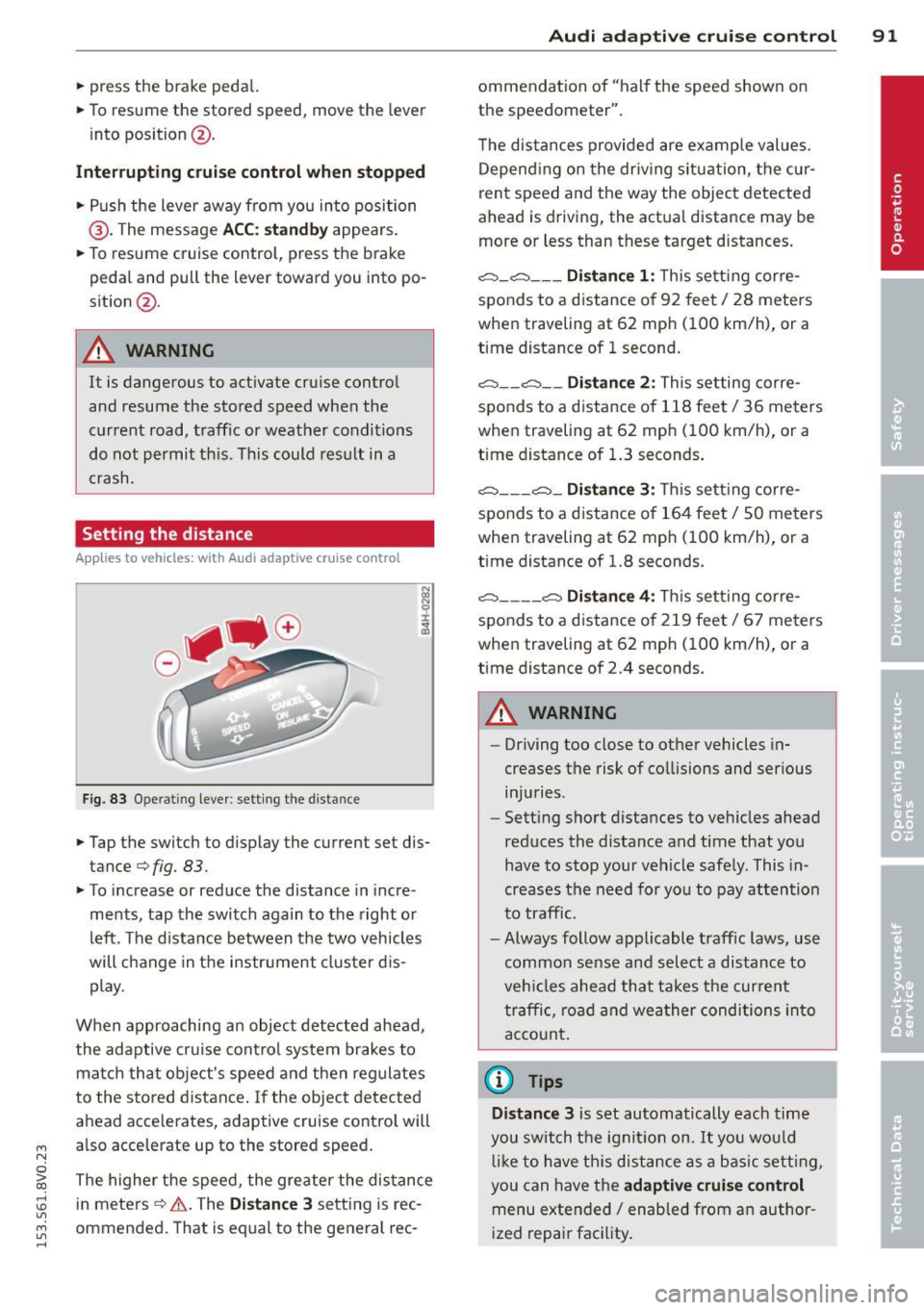
Fig. 83 O perat ing lever : setting the d istance
.. Tap the switch to display the current set dis
tance¢
fig. 83.
.,. To increase or reduce the distance in incre
ments, tap the switch again to the right o r
left . T he d istance between the two vehicles
will change in the instr ument cluster d is
play.
When approaching an object detected ahead ,
the adaptive cru ise cont ro l system brakes to
matc h that object's speed and then regulates
to the stored distance . If the object detected
ahead acce lerates, adaptive cru ise control will
also acce lerate up to the stored speed .
The highe r the speed, the greater the distance
in meters ¢.&. . The
Dist ance 3 sett ing is rec
ommended. That is equal to the general rec -
Audi adapti ve crui se control 91
ommendation of "hal f the speed shown on
the speedometer" .
T he distances provided are examp le values.
Depend ing on the dr iv ing situation, the cur
rent speed and the way the object detected
ahead is driving, the act ual distance may be
more or less than these target d istances .
c::;, _c::::, ___ Distance 1 : Th is sett ing corre-
sponds to a distance o f 92 feet/ 28 meters
when traveling at 62 mph ( 100 km/h), or a
time distance of 1 second.
c::;, __ c::::, __ Distanc e 2: This setting corre
sponds to a distance o f 118 feet/ 36 meters
when traveling at 62 mph ( 100 km/h), or a
time distance of 1.3 seconds .
c::;, ___ c::;,_ Dista n ce 3 : This sett ing corre-
sponds to a distance o f 164 feet/ 50 meters
when traveling at 62 mph ( 100 km/h), or a
t ime distance of 1.8 seconds.
c::;, ____ c::::, Dista n ce 4: T his sett ing corre-
sponds to a distance o f 219 feet/ 67 meters
when traveling at 62 mph ( 100 km/h), or a
time distance of 2.4 seconds.
A WARNING
-
- Driving too close to other vehicles in
creases the risk of co llisions and ser ious
inju ries .
- Sett ing s hort dista nces to veh icles ahead
reduces the distance and time that you
have to stop your vehicle safe ly. This in
creases the need for yo u to pay attention
to traffic.
- Always follow applicable traff ic laws, use
common sense and select a distance to
veh icles ahead that takes the cur ren t
traffic , ro ad and weather conditions into
acco unt .
@ Tips
Distance 3 is set automatically each time
you swi tch the ignit ion on.
It yo u wou ld
l ik e to have th is distance as a b asic setti ng,
you can have the
adaptive crui se cont rol
menu extended/ enabled from an author
i zed repair fac ility .
Page 104 of 310
102 Audi side assist
Audi side assist
Side assist
Description
App lies to vehicles: with Audi side assist
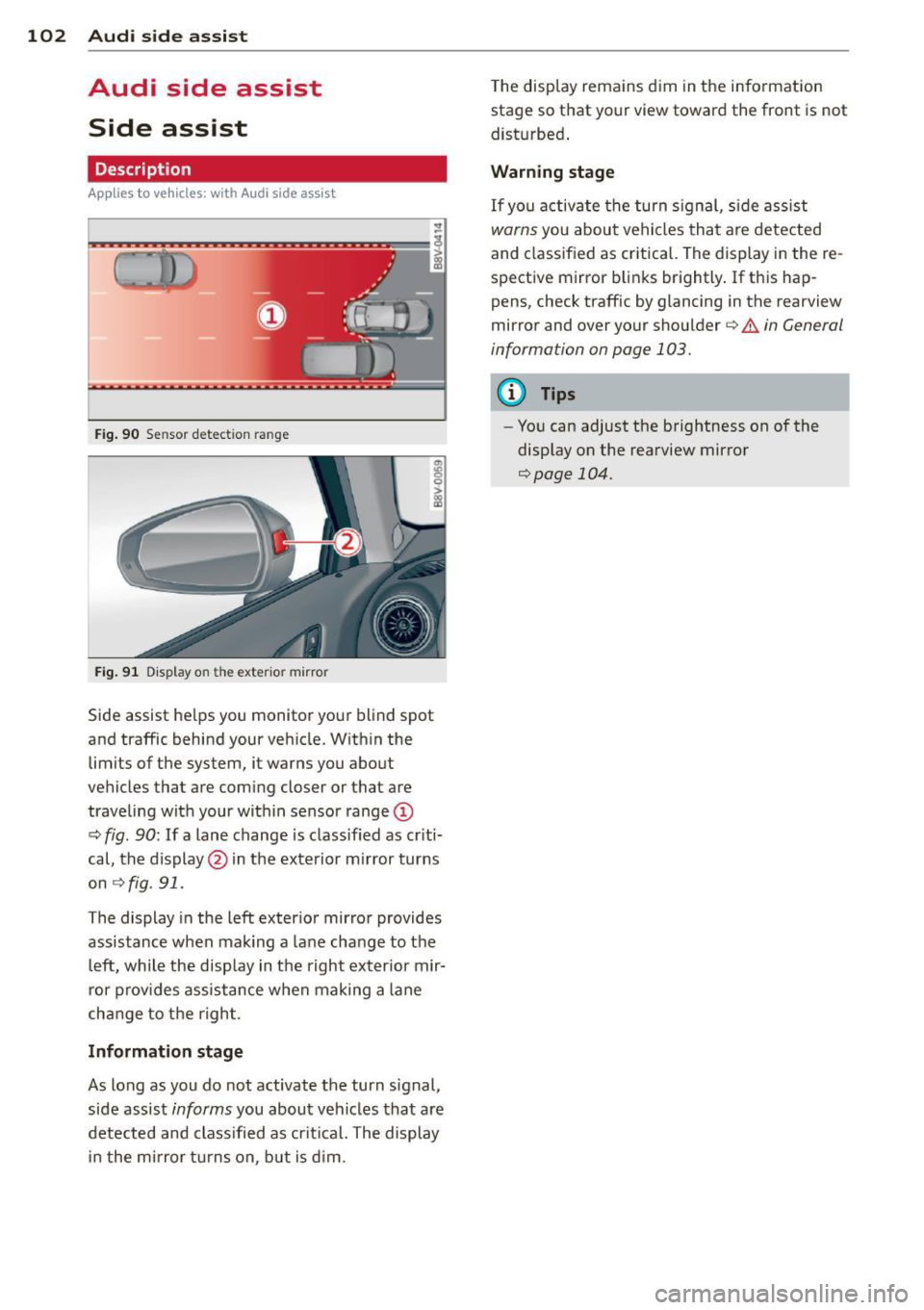
Fig . 90 Sensor detect ion ra nge
Fig. 91 Display o n the exterio r mirror
Side assist he lps you monitor your blind spot
and traffic behind your veh icle. Within the
limits of the system, it warns you about
vehicles that are coming closer or that are
traveling with your within sensor range@
c:> fig. 90: If a lane change is classified as criti
cal, the display@in the exterior mirror turns
on c:>fig . 91.
The display in the left exterior mirror provides
assistance when mak ing a lane change to the
le ft, while the display in the right exter ior mir
ror provides assistance when making a lane
cha nge to the right.
Information stage
As long as you do not activate the turn signal,
side assist informs you about vehicles that are
detected and class ified as critical. The display
in the mirror turns on, but is dim. T
he display remains dim in the information
stage so that your view toward the front is not
disturbed .
Warning stage
If you activate the turn signal, side assist
warns you about vehicles that are detected
and classified as critical. The display in the re
spective mirror blinks brightly . If this hap
pens, check traffic by glancing in the rearview
mirror and over your shoulder
c:> .&. in General
information on page 103.
(D Tips
- You can adjust the brightness on of the
display on the rearview mirror
c:>page 104.
Page 114 of 310
112 Automatic tran smi ssio n
Stopp ing /p ark ing
If the selector lever is not in the P position
when you open the driver's door, the vehicle
could ro ll. In vehicles with a convenience key*,
the following message appears:
Sh ift to P,
othe rwise veh icle c an roll a way. Door s do not
lock if le ver is not in P.
You will also hear a
warn ing tone.
"' Press and ho ld the brake pedal¢.&_ .
"' Set the parking brake.
"'Se lect the P selector lever pos ition.
St opp ing on an incline
• Always press the brake pedal to hold the ve
hicle in p lace and prevent it from "rolling
back"
¢ .&_ . Do n ot try to prevent the vehi
cle from "roll ing back" when a gear is en
gaged by increasing the eng ine speed
¢ (D.
Starting on an inclin e in vehicl es w it h out
Hill Hold *
"'Set the parking brake.
"' With the driving gear selected, press the ac
celerator pedal carefully . The parking brake
will release automat ically if your safety belt
is fastened.
St arting on an incline i n vehicle s with Hill
Hold*
"' With the driving gear selected, remove your
foot from the brake pedal and press the ac cele rato r pedal ¢
page 82, Hill hold.
Under certain circumstances, (such as driving
in the mountains or towing a tra iler), it may
be usefu l to sw itch temporarily to the manual
shift p rogram in order to adjust the gears to
the dr iving condit ions by hand
¢ page 114.
When parking on a level surface, simply place
the selector lever in the P pos ition. On in
clines , activate the parking bra ke first and
then move the selector lever to the P pos it ion
¢ page 80 . This prevents the locking mecha
nism from being loaded too heavi ly and will
make it easier to move the selector lever out
of the P position.
A WARNING
- The vehicle can roll even when the en
g ine is switched off.
- Unintended vehicle movement can lead
to serious injuries .
- Never leave your vehicle with the engine running while in gear. If you must leave
your veh icle when the engine is running,
set the parking brake and move these
lector lever to the P position .
- Power is still transferred to the wheels
when the engine is runn ing at idle. To
prevent the vehicle from "c reeping", you
must keep you r foot on the brake when
the engine is running and the selector lever is in the D, Sor R position or "tip
tronic" mode is selected . -
-Do not inadvertently press the accelera
tor peda l when the vehicle is stationary.
Otherwise the vehicle wi ll start to move
immediate ly, even if the parking brake is
set. Th is could result in a crash.
- Do not press the accelerator pedal when
changing the se lector lever position
while the veh icle is stationary and the
engine is running.
- Never engage the R or P selector level positions while dr iv ing. It could cause a
crash .
- Before driving down a steep slope, re
duce your speed and shift into a lower
gear with "tiptronic" .
- Do not ride the brakes or press the brake
pedal too often or too long when driving
downhill . Constant braking causes the
brakes to overheat and substantially re
duces braking pe rformance, increases
b rak ing distan ce or causes complete fa il
ure of the brake system.
- I f you must stop on an in cl ine, always
hold the vehicle i n place with the foot
brake or park ing brake to p revent it from
rolling back .
- Never hold the vehicle on an incline with
a slipping clutch . The clutch opens auto
matica lly when it becomes too hot from
Page 115 of 310
M N
0 > co ,...., \!) 1.1'1
M 1.1'1 ,....,
the overload. The ml indicator light
turns on and a message appears
Q page 115 when the clutch is overload
ed .
-If the engine must run while you are
working in the eng ine compartment with
the hood open, make sure a gear is not engaged . T he selecto r leve r must be
firmly in the P pos ition and locked in
pla ce and t he pa rking brake must be set
Qpage217. Otherwise, the veh icle
cou ld beg in moving when the eng ine
speed is high, even with the parking
brake set.
W Note
- When stopping on an incline, do not try
to ho ld the vehicle in place by pressing
the accelerator peda l w hile a dr iving gear
i s selected. This can cause the automatic
transmission to overheat and can dam
age it. Set the parking b rake or press the
brake pedal to p revent the veh icle from
ro lling .
- Allow ing the ve hicle to roll when the en
gine is stopped and the selector lever is
i n the N position will damage the auto
matic transmission beca use it is not lu
b ricated unde r tho se c ircumstances.
- The t ransm ission can overheat and be
damaged under certa in d riving and traf
fi c condition s suc h as frequent s tarts ,
creeping for a long time , or s top-and-go
traff ic. W hen the
ml or . indicator
light turns on, stop the vehicle at the
next oppo rtunity and let the t ransmis
s ion coo l
Qpage 115.
-Allow ing the ve hicle to roll when the en
gine is stopped w ill damage the S tron ic
transmission because it is not lubricated
Q page 282 , Emergency towing with
commercial tow truck .
@ Tips
For safety reasons, the park ing brake re
leases automatically only when the driver's
door is closed and dr iver 's safety belt is
fastened.
Automa tic tran sm iss ion 113
Hill descent control
App lies to vehicles : wi th 5 tronic tra nsmi ssio n
Hill descent control assists the driver when
driving down hills .
Hill descent control is activated when these
l ector lever is in the D or S position and you
press the brake peda l. The transmission auto
matically selects a gear that is suitable for the
i ncl ine. Hill descent cont ro l t ries to ma inta in
t h e speed ac hieved a t the t ime of b raking,
within physic al and tec hnical lim it a tions. If
may sti ll be ne cessa ry to adju st the speed
with t he b rakes . Because hi ll descent control
cannot sh ift down farthe r than 3rd gear, it
may be necessary to sh ift into t iptronic mode
in very steep areas. In this case, shift into 1st
o r 2nd gear in tiptro nic mode to use the en
gine's brak ing force to relieve the brakes .
Hill descent control switches off once the hi ll
levels out or you press the accelerator pedal.
On vehicles with a cruise contro l system*
Q page 83, hill descent control is also activat
ed when the speed is set .
A WARNING
-
Hill descent control cannot overcome
physical lim itations, so it may not be ab le
to maintain a co nsta nt speed unde r all
conditions . A lways be ready to apply the
b rakes .
•
Page 117 of 310
M N
ci > co ,...., \!) ..,.,
M ..,., ,....,
Launch Control-Program
App lies to vehicles: with launch control
The Launch Control Program enables maxi
mum acceleration.
Requirement : The engine must be at operat
ing temperature and the steering wheel must
not be turned .
.. With the engine running, press the
!.$OFFI
button briefly one time 1) .
.. Pull the selector lever back out of the 0/S
position briefly to select the S position, or
press it toward the right into the t ipt ronic
pos ition or select the
d ynamic driv ing mode
i n drive select*
~ page 106.
.. Press the brake peda l firmly with your left
foot and hold it all the way down for at least
1 second.
.. At the same time, press the gas peda l all the
way down with your right foot unti l the en
gine reaches and stays at a high RPM level.
.. Remove your left foot from the brake.
A WARNING
- Always adapt your driving to the traffic
flow.
- Only use Launch Control when road and
t raff ic conditions a llow it and other driv
ers wi ll not be endangered or impacted
by yo ur driving and the veh icle's acceler
a tion.
- Please note tha t the dr ive whee ls can
spin and the vehicle can brea k away
when sport mode is switched on, espe
c ially when the road is sl ippery.
- Once the vehicle has started moving,
press the
I.$ OFF I button br iefly to turn
the sport mode off.
(j) Tips
- The transm ission tempe rat ure may in
crease significantly after using the
l ) In vehicles with a dr iver info rmat ion system, an ESC
light in the in stru m ent cl us ter stays on contin uo usly
and the m essage
Stabilizatio n cont rol (ESC): spor t.
W arning! Restricted stability
appears temporarily.
Automa tic tran sm iss ion 115
Launch Control Program . If that hap
pens, the program may not be availab le
for a few m inutes. It will be ava ilable
again after a cool-down per iod.
- When accelerating using the Launch
Contro l Program, all vehicle parts are
subject to heavy loads. Th is can lead to
increased wear .
Emergency mode
Applies to vehicles: with S tronic transm ission
In the event of a system malfunction, there is
an emergency program.
If all of the selector lever positions are high
li ghted with a light backgro und in the instru
ment cluster d isplay, there is a system mal
funct ion and the S tronic transmission is run
ning in the emergency program . The vehicle
can still be driven in emergency mode, but on
ly w ith reduced speed and not in all gears. In
some cases, the veh icle
c ann ot driv e in re
v e rs e .
(D Note
If the transmission runs in emergency
mode, drive to your author ized Audi dealer
or q ua lified repa ir facil ity immed iate ly to
have the ma lf u nction corrected.
Transmission malfunction
• Tran smiss ion malfuncti on! Please stop
the vehicle and select P
T here is a malfunction in the transmiss ion .
Park the vehicle securely and do not continue
driv ing. See an authorized Audi dealer or au
thorized Audi Service Facility for assistance.
• Tran smi ssion overh eatin g! Plea se stop
the vehicle!
The transm iss io n is too hot and can become
damaged . Stop and let the transmission cool .,.
•
Page 119 of 310
M N
0 > co ,...., \!) ..,.,
M ..,., ,....,
Selector lever emergency release
"'Press and hold the yellow release button
with the screwdr iver
¢ fig. 102.
"' Press the release button in the selector lever
@ and move the lever into the N position.
"' Clip the shift cover back into the shift gate
after using the emergency release.
If the ve hicle must be pushed or towed due to
a power failure (for example, the battery is
dead), the selector lever must f irst be moved
to the N position using the emergency release
mechanism.
A WARNING
Only move the selector lever out of the P
position when the parking brake is set. If
that does not work, secure the vehicle with
the brake pedal. Otherwise, the vehicle
could start to move unintentiona lly when
the selector lever is moved out of the P po
sition .
Automatic transmission 11 7
•
Page 123 of 310
....,
N
0 > co
rl I.O
"' ....,
"' rl
General information
Applies to vehicles: with park ing system p lus wit h rear
view ca mera
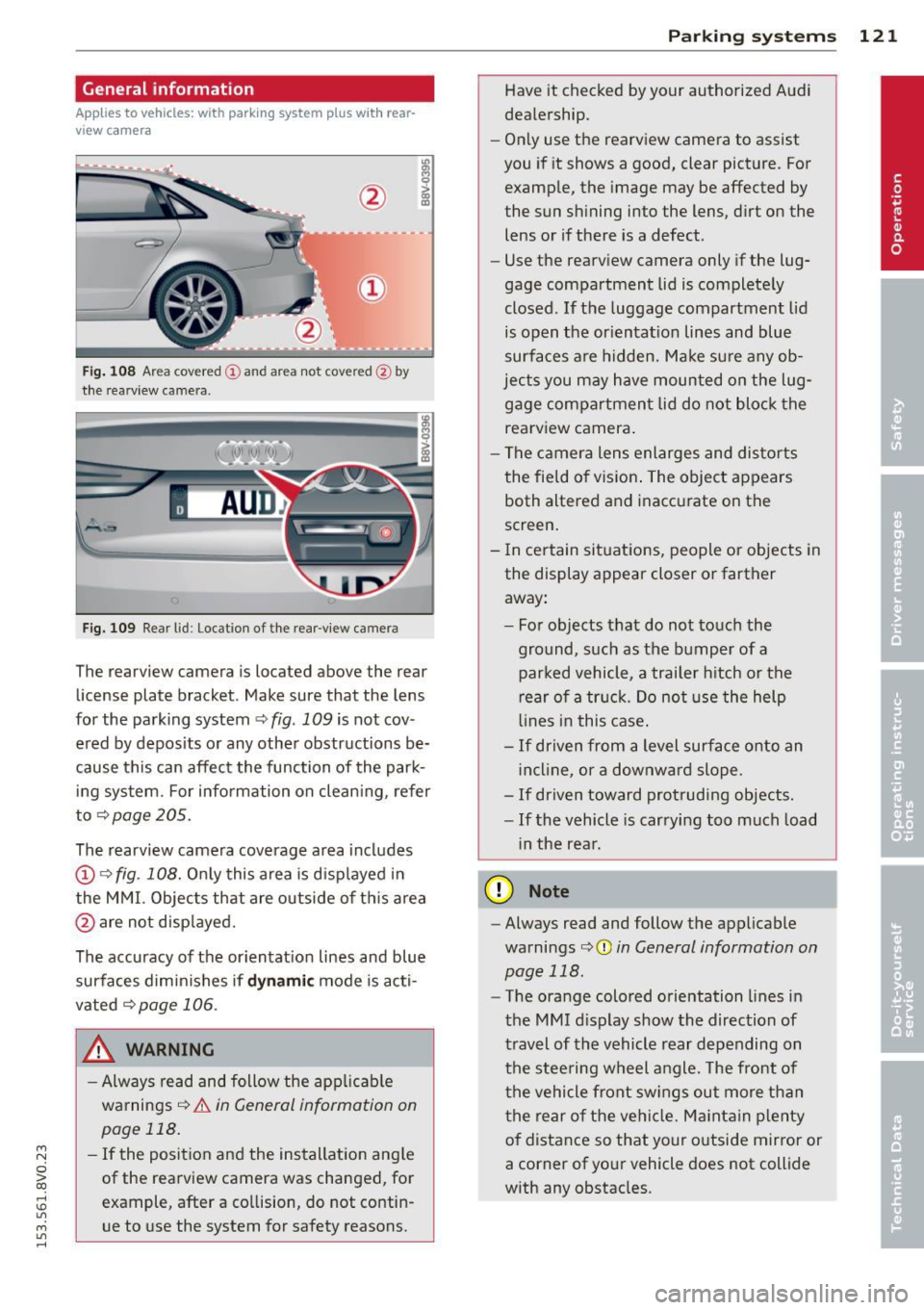
Fig. 108 Area covered
(D and area not covered @by
the rearv iew camera.
Fig. 109 Rear l id: Location of the rear-v iew camera
The rearview camera is located above the rear
license plate bracket . Make sure that the lens
for the parking system ~
fig. 109 is not cov
ered by deposits or any other obstructions be
cause this can affect the function of the park ing system. For information on cleaning, refer
to~page205.
The rearview camera coverage area includes
(D ¢ fig. 108. Only this area is displayed in
the MMI. Objects that are outside of this area
@ are not displayed.
The accuracy of the orientation lines and blue
surfaces diminishes if
dynamic mode is acti
vated
¢page 106.
_& WARNING
-Always read and follow the applicable
warnings¢
& in General information on
page 118.
- If the position and the installation angle
of the rearview camera was changed, for
example, after a collision, do not contin
ue to use the system for safety reasons .
Parking systems 121
Have it checked by your authorized Audi
dealership.
- Only use the rearview camera to assist
you if it shows a good, clear picture. For
example, the image may be affected by
the sun shining into the lens, dirt on the
lens or if there is a defect.
- Use the rearv iew camera only if the lug
gage compartment lid is completely
closed.
If the luggage compartment lid
is open the orientation lines and blue
surfaces are hidden. Make sure any ob
jects you may have mounted on the lug gage compartment lid do not block the
rearview camera.
- The camera lens enlarges and distorts
the field of vision. The object appears
both altered and inaccurate on the
screen.
- In certain situations, people or objects in
the display appear closer or farther away:
- For objects that do not touch the
ground, such as the bumper of a
parked vehicle, a trailer hitch or the
rear of a truck. Do not use the help
lines in this case.
-If driven from a level surface onto an
incline , or a downward slope.
- If driven toward protruding objects.
-If the vehicle is carrying too much load
in the rear.
(D Note
-Always read and follow the applicable
warnings
c:>(D in General information on
page 118.
- The orange colored orientation lines in
the MMI display show the direction of
travel of the vehicle rear depending on
the steering wheel angle. The front of
the vehicle front swings out more than
the rear of the vehicle. Maintain plenty
of distance so that your outside mirror or
a corner of your vehicle does not collide
with any obstacles.
Page 129 of 310
M N
0 > co ,...., \!) 1.1'1
M 1.1'1 ,....,
is not possible, try to adjust the head re
straint so that it is as close to this position
as possible. Move the head restraint so that
it is as close to the back of the head as pos
sible.
.. Fasten and wear safety belts correctly
Q page 138.
.. Always keep both feet in the footwell so
that you are in control of the vehicle at all
times.
For detailed information on how to adjust the
driver's seat, see
Q page 58.
.&, WARNING
Drivers who are unbelted, out of position
or too close to the airbag can be seriously
injured by an airbag as it unfolds. To help
reduce the risk of serious personal injury:
- Always adjust the driver's seat and the
steering wheel so that there are at least
10 inches (25 cm) between your breast
bone and the steering wheel.
- Always adjust the driver 's seat and the
steering wheel so that there are at least
4 inches (10 cm) between the knees and
the lower part of the instrument panel.
- Always hold the steering wheel on the
outside of the steering wheel rim with
your hands at the 9 o'clock and 3 o'clock positions to help reduce the risk of per
sonal injury if the driver's airbag inflates.
- Never hold the steering wheel at the
12 o'clock position or with your hands at
other positions inside the steering wheel
rim or on the steering wheel hub. Hold
ing the steering wheel the wrong way
can cause serious injuries to the hands,
arms and head if the driver's airbag in
flates.
- Pointing the steering wheel toward your
face decreases the ability of the supple
mental driver's airbag to protect you in a
collision.
- Always sit in an upright position and nev
er lean against or place any part of your
body too close to the area where the air
bags are located.
-
Driving safety 127
-Before driving, always adjust the front
seats properly and make sure that all passengers are properly restrained .
- For adjustable head restraints: before
driving, always also adjust the head re
straints properly.
- Never adjust the seats while the vehicle is moving. Your seat may move unexpect
edly and you could lose control of the ve hicle .
- Never drive with the backrest reclined or
tilted far back! The farther the backrests are tilted back, the greater the risk of in
jury due to incorrect positioning of the safety belt and improper seating posi
tion .
- Children must always ride in child seats
Q page 170 . Special precautions apply
when installing a child seat on the front
passenger seat ¢
page 144.
Proper seating position for the front
passenger
The proper front passenger seating position
is important for safe, relaxed driving.
For your own safety and to reduce the risk of
injury in the event of an accident, we recom
mend that you adjust the seat for the front
pass enger to the following position :
.. Adjust the angle of the seatback so that it is
in an upright position and your back comes
in full contact with it whenever the vehicle is
moving.
.. Fo r adjustable head restraints: adjust the
head restraint so the upper edge is as even
as possible with the top of your head. If that
is not possible, try to adjust the head re
straint so that it is as close to this position
as possible
¢ page 129. Move the head re
straint so that it is as close to the back of
the head as possible .
.. Keep both feet flat on the floor in front of
the front passenger seat.
.. Fasten and wear safety belts corr ectly
¢ page 138.
•
•
•