turn signal AUDI S3 2015 User Guide
[x] Cancel search | Manufacturer: AUDI, Model Year: 2015, Model line: S3, Model: AUDI S3 2015Pages: 310, PDF Size: 76.15 MB
Page 104 of 310
102 Audi side assist
Audi side assist
Side assist
Description
App lies to vehicles: with Audi side assist
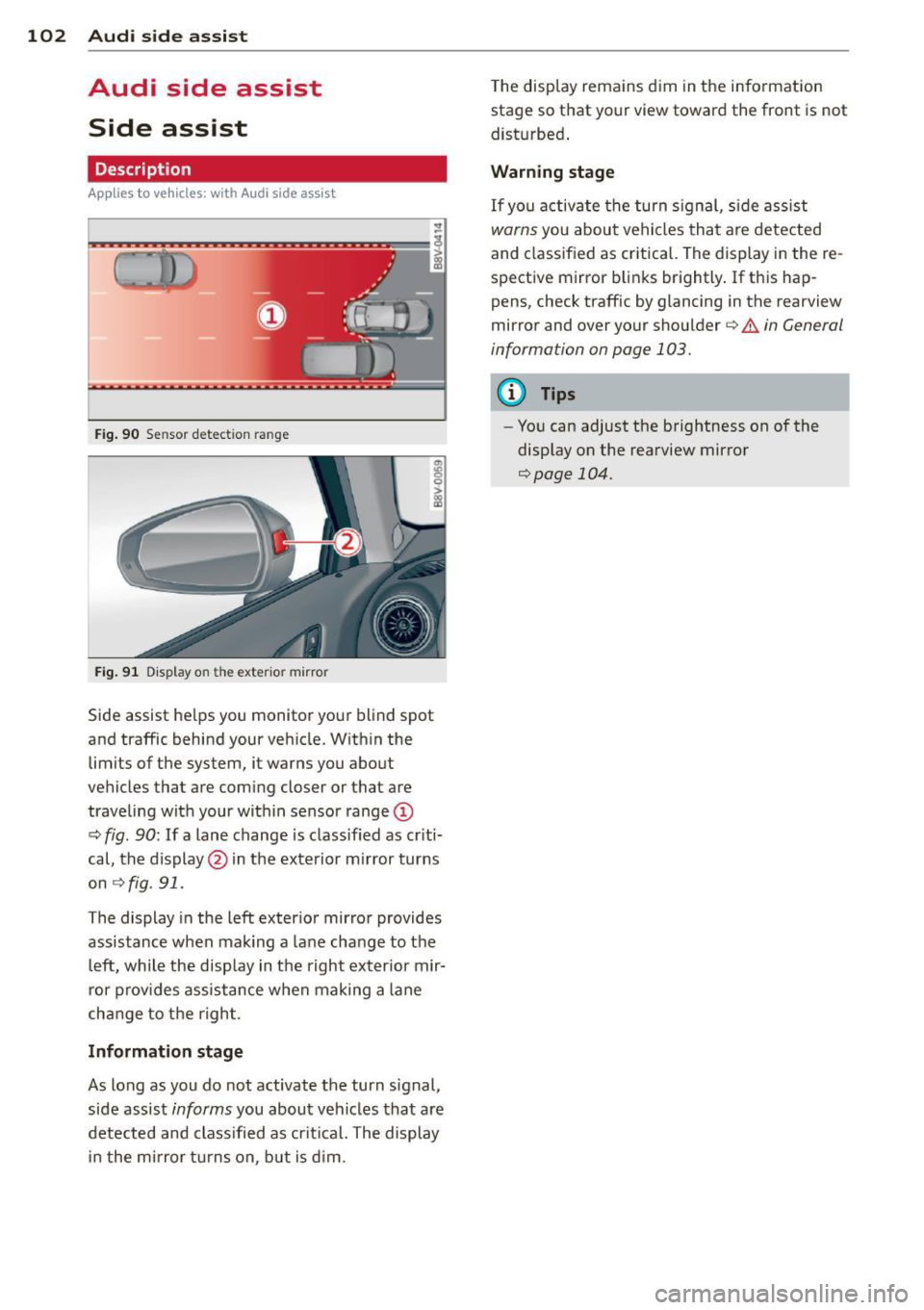
Fig . 90 Sensor detect ion ra nge
Fig. 91 Display o n the exterio r mirror
Side assist he lps you monitor your blind spot
and traffic behind your veh icle. Within the
limits of the system, it warns you about
vehicles that are coming closer or that are
traveling with your within sensor range@
c:> fig. 90: If a lane change is classified as criti
cal, the display@in the exterior mirror turns
on c:>fig . 91.
The display in the left exterior mirror provides
assistance when mak ing a lane change to the
le ft, while the display in the right exter ior mir
ror provides assistance when making a lane
cha nge to the right.
Information stage
As long as you do not activate the turn signal,
side assist informs you about vehicles that are
detected and class ified as critical. The display
in the mirror turns on, but is dim. T
he display remains dim in the information
stage so that your view toward the front is not
disturbed .
Warning stage
If you activate the turn signal, side assist
warns you about vehicles that are detected
and classified as critical. The display in the re
spective mirror blinks brightly . If this hap
pens, check traffic by glancing in the rearview
mirror and over your shoulder
c:> .&. in General
information on page 103.
(D Tips
- You can adjust the brightness on of the
display on the rearview mirror
c:>page 104.
Page 106 of 310
104 Audi side assist
-If vehicles are approaching or being
left behind very quickly. The display
may not turn on in time.
- In poor weather conditions such as
heavy rain, snow or heavy mist.
- On very wide lanes, in tight curves, or if
there is a rise in the road surface.
Vehicles in the adjacent lane may not
be detected because they are outside
of the sensor range.
- Audi side assist cannot detect all vehicles
under all conditions, which can increase
the risk of accidents.
- Please note that side assist only displays
approaching vehicles or vehicles in your
blind spot if your vehicle is traveling at
least 19 mph (30 km/h).
- In certain situations, the system may not
work or its function may be limited. For
example:
- The display may not turn on at the
right time if vehicles are approaching
or passing very quickly.
- In poor weather conditions, such as
heavy rain, snow or fog.
- In very wide lanes, in tight curves or
when there are slopes in the roadway,
vehicles in the neighboring lanes may not be detected because they are out
side of the sensor range.
The sensors can be displaced by impacts or damage to the bumper, wheel housing and
underbody. This can affect the system. Have your authorized Audi dealer or au
thorized service facility check their func
tion.
{D) Tips
- If the window glass in the driver's door
or front passenger's door has been tint
ed, the display in the exterior mirror may
be misinterpreted .
- For an explanation on conformity with
the FCC regulations in the United States and
the Industry Canada regulations, re
fer to~
page 292.
Switching on and off
Applies to vehicles: with Aud i s ide ass ist
The system and be switched on and off in the
MMI.
.. Select: the I MENU I button >Car> Systems*
control button > Driver assistance > Audi
side assist.
With Off, the system is switched
off.
An activated system will signal every time the ignition is switched on by turning the displays
in the exterior mirrors on briefly.
Adjusting the display brightness
Applies to vehicles: with A udi side ass ist
The display brightness can be adjusted in the
MMI.
.. Select: the I MENU I button >Car> Systems*
control button > Driver assistance > Audi
side assist.
The display brightness adjusts automatically
to the brightness of the surroundings, both in
the information and in the warning stage. In
very dark or very bright surroundings, the dis play is already set to the minimum or maxi
mum level by the automatic adjustment. In
such cases, you may notice no change when
adjusting the brightness, or the change may
only be noticeable once the surroundings
change.
Adjust the brightness to a level where the dis
play in the information stage will not disrupt
your view forward. If you change the bright
ness, the display in the exterior mirror will
briefly show the brightness level in the infor
mation stage. The brightness of the warning
stage is linked to the brightness in the infor
mation stage and is adjusted along with the
information stage adjustment. .,_
Page 125 of 310
....,
N
0 > co
rl I.O
"' ....,
"' rl
Parallel parking
Applies to vehicles: with parking system p lus wit h rear
view ca mera
This view may be used when parallel parking
along the side of a street.
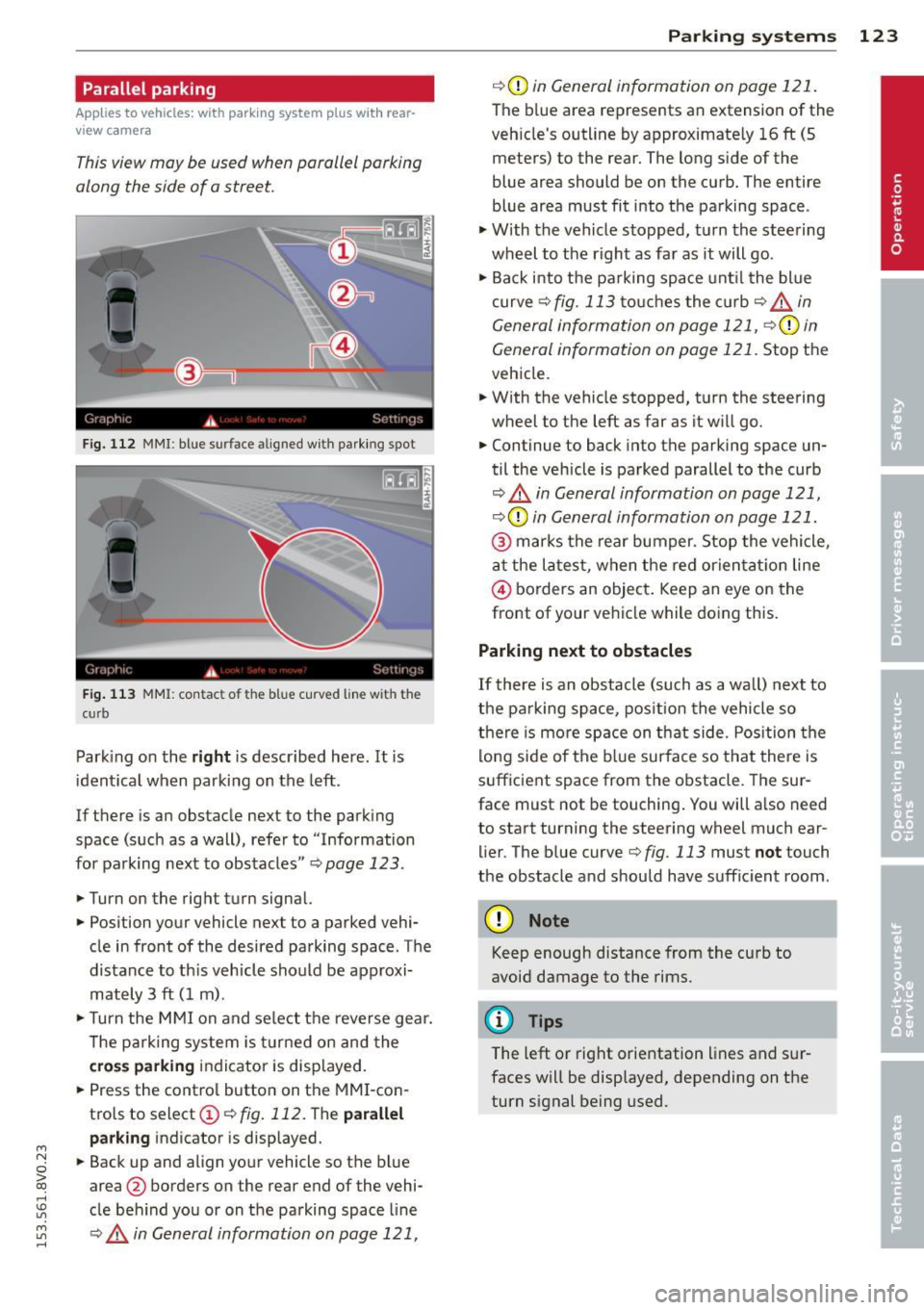
Fig. 112 MMI : blue su rface aligned wit h parking spot
Fig. 113 MMI: contac t o f t he b lue curved line w it h th e
c urb
Parking on the right is described here . It is
identical when parking on the left.
If there is an obstacle next to the parking
space (such as a wall), refer to " Information
for parking next to obstacles "¢
page 123.
.. Turn on the right turn signal.
.. Position your vehicle next to a parked vehi
cle in front of the desired parking space . The
distance to th is veh icle should be approxi
mately 3 ft (1 m) .
.. Turn the MMI on and select the reverse gear.
The parking system is turned on and the
cross parking indicator is displayed.
.. Press the control button on the MMI-con
trols to select@¢
fig. 112. The parallel
parking
indicator is displayed .
.. Back up and align your vehicle so the blue
area @ borders on the rear end of the vehi
cle behind you or on the parking space line
¢.&. in General information on page 121,
Parking systems 123
¢(Din General information on page 121.
The blue area represents an extension of the
veh icle's outline by approximate ly 16 ft (5
meters) to the rear. The long side of the
blue area should be on the curb. The entire
blue area must fit into the parking space .
.,. With the vehicle stopped, turn the steering
wheel to the right as far as it will go .
.. Back i nto the parking space unt il the blue
curve
¢ fig. 113 touches the curb¢,&_ in
General information on page 121, ¢(Din
General information on page 121.
Stop the
vehicle .
.. With the vehicle stopped, turn the steering
wheel to the left as far as it w ill go.
.. Continue to back into the parking space un
til the vehicle is parked parallel to the curb
¢ .&. in General information on page 121,
¢ (Din General information on page 121.
@ marks the rear bumper. Stop the vehicle,
at the latest, when the red orientat ion line
© borders an object . Keep an eye on the
front of your vehicle while doing this.
Parking next to obstacles
If there is an obstacle (such as a wall) next to
the parking space, position the vehicle so
there is more space on that side. Position the
lo ng side of the blue surface so that there is
sufficient space from the obstacle . The sur
face must not be touching. You will a lso need
to start turning the steering wheel much ear lier. The blue curve
¢ fig. 113 must not touch
the obstacle and should have sufficient room .
(D Note
Keep enough distance from the curb to
avoid damage to the rims.
@ Tips
The left or right orientation lines and sur
faces will be displayed, depending on the
turn s ignal being used.
Page 150 of 310
148 Airbag system
-Take the child restraint off the front pas
senger seat and install it properly at one
of the rear seat positions if the
PASSEN
GER AIR BAG OFF
light does not stay on .
- Have the airbag system inspected by
your Audi dealer immediately.
- Always carefully follow instructions from
child restraint manufacturers when in
stalling child restraints .
A WARNING ,.
If, in exceptional circumstances, you must
install a forward or rearward-facing child
restraint on the front passenger's seat:
- Improper installation of child restraints
can reduce their effectiveness or even
prevent them from providing any protec
tion.
- An improperly installed child restraint
can interfere with the airbag as it de
ploys and seriously injure or even kill the
child -even with an Advanced Airbag
System.
- Always carefully follow the manufactur
er's instructions provided with the child
safety seat or carrier.
- Always make sure that there is nothing
on the front passenger seat that will
cause the capacitive passenger detection
system in the seat to signal to the Airbag
System that the seat is occupied by a person when it is not, or to signal that it
is occupied by someone who is heavier
than the person actually sitting on the
seat. The presence of additional objects
could cause the passenger front airbag
to be turned on when it should be off, or
could cause the airbag to work in a way
that is different from the way it would have worked without the object on the
seat.
Front airbags
Description of front airbags
The airbag system can provide supplemental
protection to properly restrained front seat occupants .
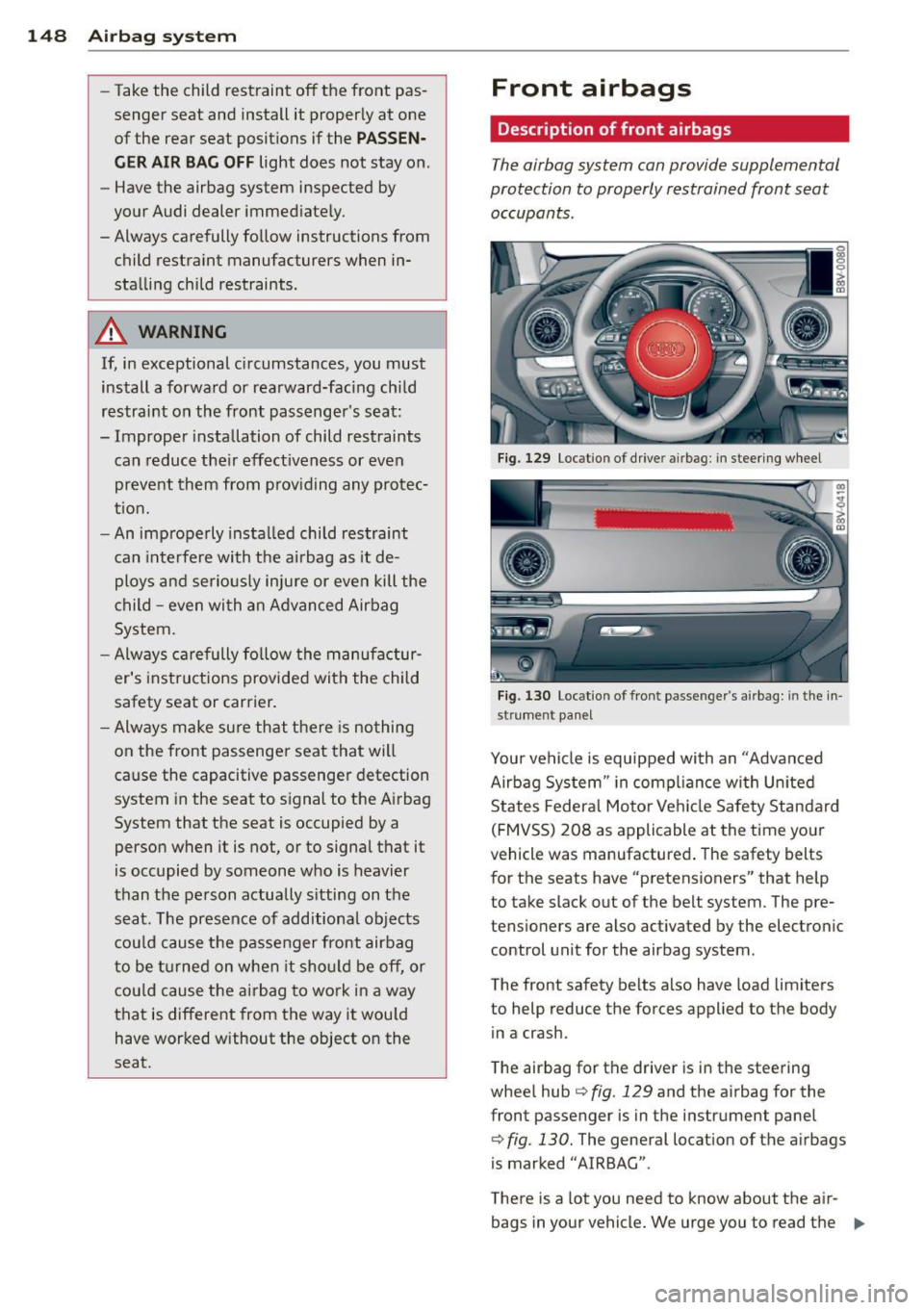
Fig. 129 Loc atio n of drive r ai rb a g : i n steering wheel
Fig. 130 Loc atio n of fro nt passe nge r's airbag: in the in
st rumen t panel
Your vehicle is equipped with an "Advanced
Airbag System" in compliance with United
States Federal Motor Vehicle Safety Standard
(FMVSS) 208 as applicable at the time your
vehicle was manufactured . The safety belts
for the seats have "pretensioners" that help to take slack out of the belt system. The pre
tensioners are also activated by the electronic control unit for the airbag system.
The front safety belts also have load limiters to help reduce the forces applied to the body
in a crash.
The airbag for the driver is in the steering
wheel hub
c:> fig. 129 and the airbag for the
front passenger is in the instrument panel
c::;, fig. 130. The general location of the airbags
is marked "AIRBAG".
There is a lot you need to know about the air
bags in your vehicle. We urge you to read the
II>
Page 154 of 310
152 Airbag sys te m
cause the capacitive passenger detection
system in the seat to s ignal to the A irbag
System that the seat is occupied by a person when it is not, or to signal that it
is occupied by someone who is heavier
than the person actually s itting on the
seat. The presence of additional objects
cou ld cause the passenger front airbag
to be t urned on when it sho uld be off, or
cou ld cause the airbag to work in a way
that is different from the way it wou ld
have worked without the object on the
seat.
- Make sure that the
PA SSENGER AIR BAG
OFF
light comes on and stays on all the
t ime whenever the ignition is switched
on.
Advanced Airbag System components
The front passenger seat in your vehicle has a
lot of very important parts of the Advanced
A irbag System in it . These parts include the
capacitive passenger de tect ion system, wir
ing, b ra ck ets, and more. The cont ro l unit
monitors the system on the front passenger
seat when the ign ition is switched on and
turns the airbag indicato r light on when a
malfunction in the one of the system compo
nents is detected¢
page 157 . Because the
fro nt passenger seat contains important parts
of the Advanced Airbag System, you must
take care to prevent it from being damaged .
Damage to the seat may prevent the Ad
vanced A irbag System for the front passenger
se at from doing i ts job in a c rash.
The front Advanced Airbag System
consists of the following:
- Crash sensors in the fro nt of the ve hicle that
m easure ve hicle accelera tion/de celera tion
to provide info rmation to the Advanced Air
bag System abo ut the seve rity of the crash.
- An electronic cont ro l u nit, with integrated
c rash sensors for front and side impacts.
The cont ro l unit "decides" whether to fire
the front airbags based on the information received from the crash sensors. The contro l unit also "decides" whether the sa
fety belt
pretensioners sho uld be activated.
- An Advanced A irbag w ith gas generato r for
the driver inside the steering wheel h ub.
- An Advance d Airbag w ith g as generato r in
side the inst rument panel for the front pas
senger.
- A capacit ive passenger detection system un
de rneath the front passenger seat cover .
This system meas ures the electrical capac i
tance of the person in the seat. The informa
tion registered is sent cont inuo usly to the
electronic control un it to regu late deploy
ment of the front Advanced A irbag on the
passe nger side .
- An airbag monitor ing system and indicator
light in the instrument cluster¢
page 156 .
-A sensor in each front seat registers the dis
tance betwee n the respective seat and the
steer ing whee l o r inst rument panel. The in
formation registered is sent cont inuous ly to
t he ele ct ron ic contro l unit to regula te de
p loyment of the front Adva nced A irb ags .
- The
PASSENGER AIR BAG OFF light comes
on and stays on in the center of t he instr u
ment p anel ¢
page 217 and t ells yo u when
the fron t Advanced Airbag on the passenge r
side has been turned off.
- A sensor in the safety be lt latch for the driv
er and for the front seat passenger that
senses whether t hat safety belt is latched or
not and transmits this information to the
electronic control un it.
A WARNING
Damage to the front passenger seat can
prevent the front airbag from wor king
p roperly.
- Improper repair or d isassembly of the
front passenge r and dr iver sea t will pre
vent the Advanced Airbag System from
functioning p roperly.
- Repairs to the front passenge r seat must
be pe rformed by qualified and p roperly
trained workshop personnel.
- Never remov e the front passenger o r
d river seat from the vehicle.
-
Page 159 of 310
_& WARNING
An airbag system that is not functioning
properly cannot provide supplemental pro
tection in a frontal crash.
- If the airbag indicator light¢
page 21
turns on when the vehicle is being used,
have the system inspected immediately
by you r auth o riz ed Aud i dea le r. It is pos
sible that the airb ag will inf late when it
is not s upposed to, or w ill not inflate
when it sho uld .
PASSENGER AIR BAG OFF light
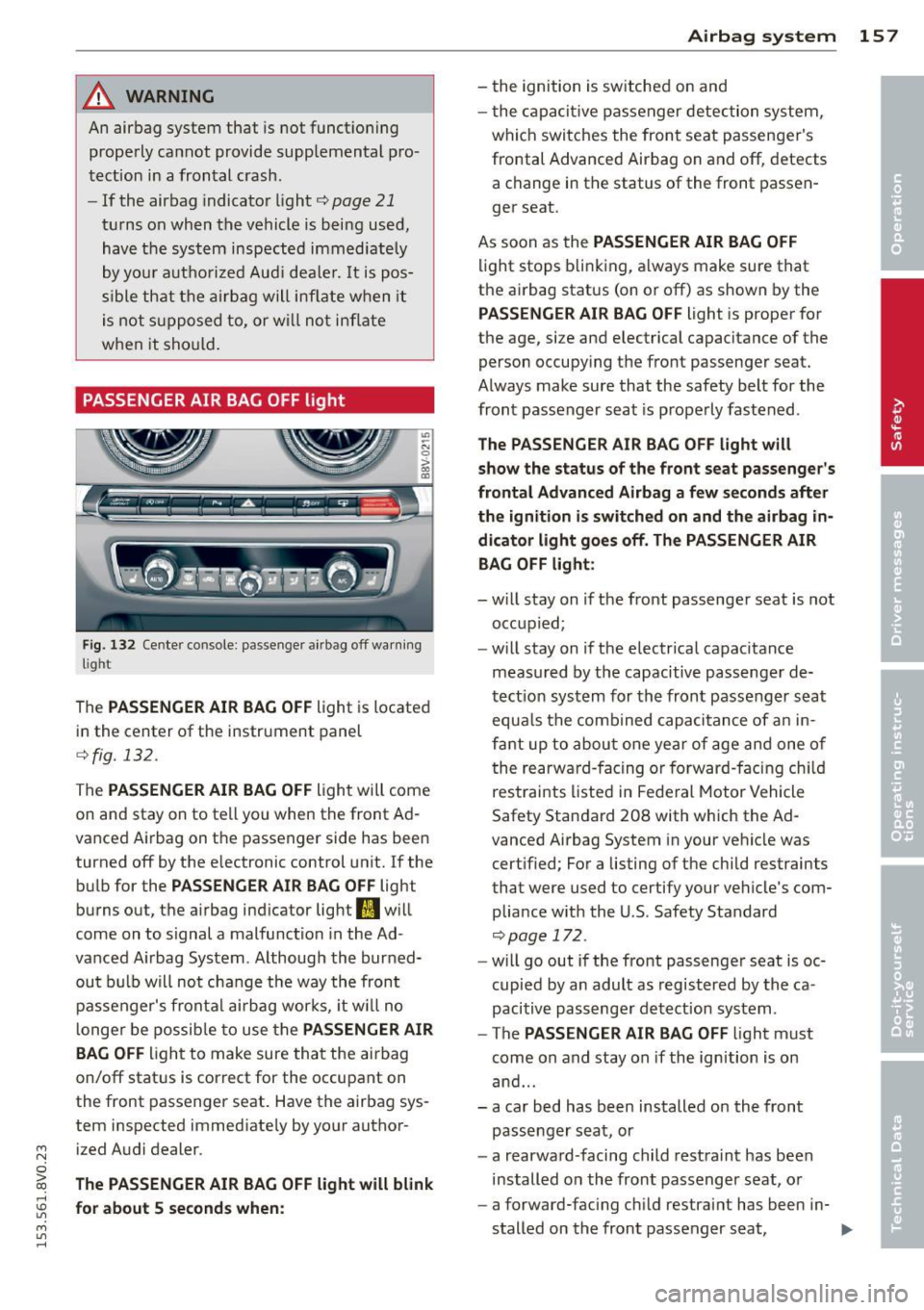
Fig. 13 2 Center console: passenger a irbag off warnin g
light
The PASSENGER AIR BAG OF F light is located
in the center of the instrument panel
¢fig. 132.
The PASSENGER AIR BAG OFF light will come
on and stay on to tell yo u when the front Ad
vanced A irbag on t he passenger side has been
turned off by the e lectronic control unit. If the
bulb for the
PASSENGER AIR BAG OFF light
burns out, the a irbag indicator light
fl w ill
come on to signal a malfunction in the Ad
vanced A irbag System . Although the bur ned
out b ulb will not cha nge the way the front
passenger's frontal airbag wor ks, it w ill no
l onge r be possib le to use the
PASSENGER AIR
BAG
OFF light to make sure that the airbag
on/off stat us is correct for the occupant on
the front passenger seat. Have the airbag sys
tem inspected immed iate ly by your author-
~ ized Audi dealer.
0
iii The PASSENGER AIR BAG OFF light will blink rl
:5: for about 5 seconds when :
M l/1 rl
Airba g sy stem 15 7
- the ignition is sw itched on and
- t he capaci tive passenger detec tion system,
which switches the front seat passenger's
frontal Advanced Airbag on and off, detects a change in the status of the front passen
ger seat.
As soon as the
PASSENGER AIR BAG OFF
light stops blink ing, a lways make sure that
the ai rbag status (on or off) as shown by the
PASSENGER AIR BAG OFF light is proper for
the age, size and electrical capacitance of the
person occupying the front passenger seat.
Always make sure that the safety belt for the
front passenger seat is properly fastened.
The PASSENGER AIR BAG OFF l ight will
show the status of the front sea t passenger 's
fronta l Advan ced Airbag a fe w se conds after
th e ignition i s sw itched on and th e airbag in
dicator light goes off. The PASSENGER AIR
BAG
OFF light :
- will stay on if the front passenger seat is not
occupied;
- will stay on if the electrical capacitance
meas ured by the capacitive passenge r de
tect io n system for the fron t passenger s eat
equa ls the comb ined capacitance of an in
fa nt up to about one year of age and one of
t he rearwa rd- facing or forward-fa cing ch ild
restraints listed in Fede ral Motor Vehicle
Safety Standard 208 with which the Ad
vanced Airbag System in your vehicle was
cert ified; For a listing of the child restraints
that were used to certify your vehicle's com
pliance w ith the U.S. Safety Standard
~page 172 .
-will go out if the fro nt passenge r seat is oc
cupied by an adult as registered by the ca
pacitive passenger detection system .
- The
PASSENGER AIR BAG OFF light must
come on and stay on if the ignition is on
and ...
- a car bed has been installed on the front passenger seat, or
- a rearwa rd-facing child rest ra int has been
installed on the front passenger seat, or
- a forward-facing child restrai nt has been in-
stalled on the front passenger seat, .,,.
Page 175 of 310
M N
0 > co ,...., \!) ..,.,
M ..,., ,....,
passenger seat, that the front passenger air
bag is turned off, and that the airbag status is
always correctly signaled by the
PASSENGER
AIR BAG OFF
li ght.
Many types and models of child restraints
have been avai lable over the years, new mod
e ls are introduced regular ly incorporating new
and improved designs and older models are
taken out of production. Child restraints are
not standardized. Ch ild restra ints of the same
type typically have different we ights and s izes
and d ifferent "footprints", the size and shape
of the bottom of the child restraint that sits
on the seat, when they are installed on a veh i
cle seat . These differences make it virtually
imposs ible to certify compliance with the re
quirements for advanced airbags with each
and every child restraint that has ever been
sold in the past or will be sold over the course
of the useful life of your vehicle.
F or this reason, the United States National
Highway Traffic Safety Administration has
published a list of specific type, makes and
models of child restraints that must be used
to certify compliance of the Advanced Airbag
System in you r vehicle with the supp ress io n
requirements of Federal Motor Vehicle Safety
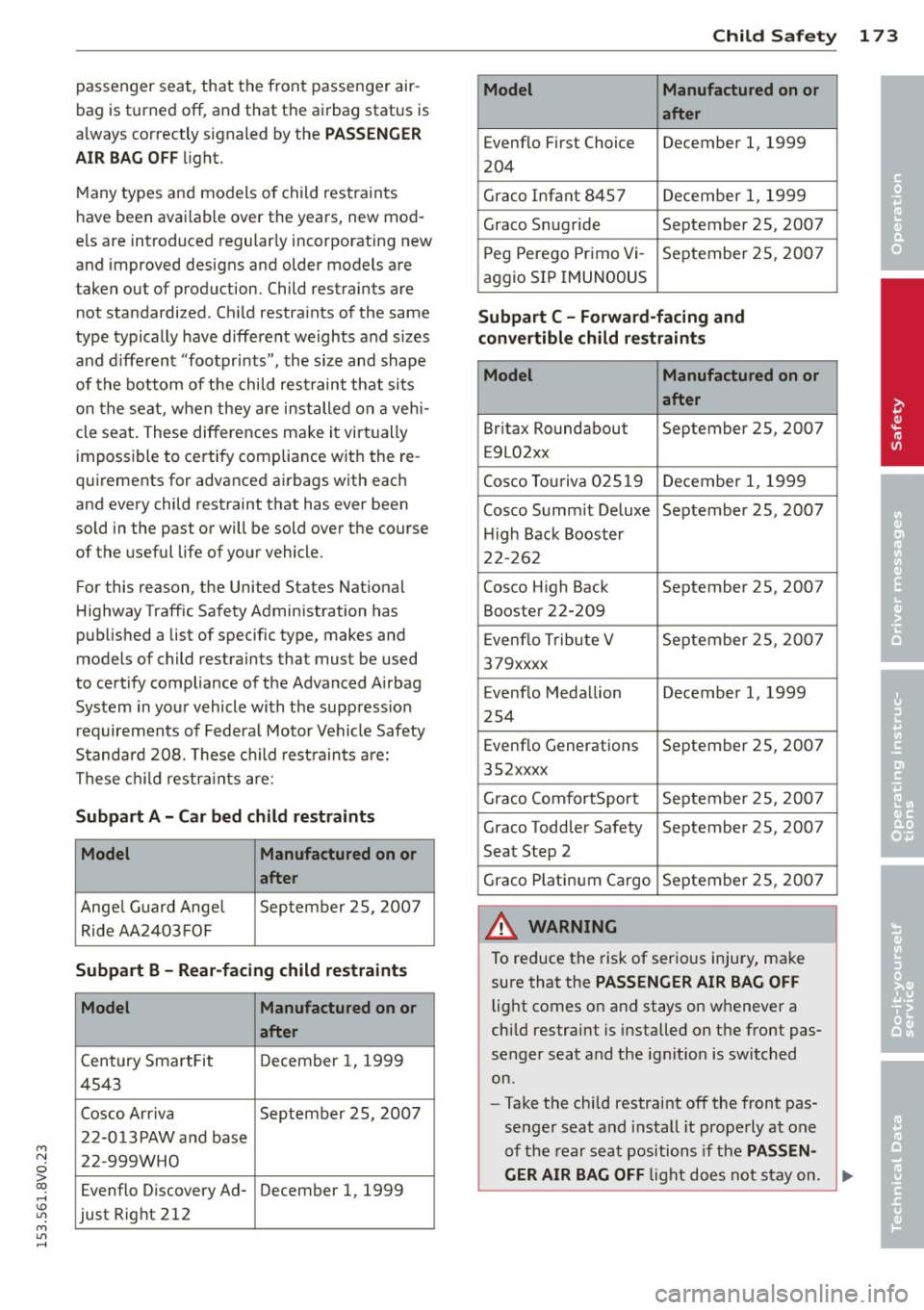
Standa rd 208. These child rest raints are:
These c hild restr aints are:
Subpart A -Car bed child rest raints
Model Manufactured on or
after
Angel G uard Ange l September 25, 200 7
Ride AA2403 FOF
Subpart B -Rear -facing child restraints
Model Manufactured on or
after
Century SmartFit December 1, 1999
4543
Cosco Arriva September 25, 2007
2 2-0 13PAW a nd base
22-999WHO
Evenflo Discovery Ad- December 1, 1999
just Right 212
Child Sa fet y 173
Model Manufactured on or
after
Evenflo First Choice December 1, 1999
204
Gr aco Infant 8457 December 1, 1999
Graco Snug ride September 25, 2007 P eg Perego Pr imo Vi-
September 2 5, 2007
aggio SIP IMUNOOUS
Subpart C -Forward-facing and
convertible child re straint s
Model Manufactured on or
after
Br itax Roundabout September 25, 2007
E9L02xx
Cosco Touriva 025 19
December 1, 1999
Cosco Summit Deluxe September 25, 2007 H igh Back Booster
22- 262
Cosco High Back September 25, 2007
Booster 22-209
E venflo T ribute V September 2 5, 2007
379xxxx
Evenflo Medallion December 1, 1999
254
Evenf lo Generations
September 25, 2007
352xxxx
Graco ComfortSport September 2 5, 200 7
Graco Toddler Safety September 25, 2007
Seat Step 2
Gr aco P lat inum Cargo September 25, 2007
_& WARNING
To reduce the risk of serious injury, make
sure that the
PASSENGER AIR BAG OFF
light comes on and stays on whenever a
chi ld restraint is installed on the front pas
senger seat and the ignit ion is switched
on.
- Take the chi ld restraint off the front pas
senger seat and install it prope rly at one
of the rear seat positions if the
PASSEN -
GER AIR BAG OFF
li ght does not stay on. ~
•
•
•