brake AUDI S3 2015 Owner's Manual
[x] Cancel search | Manufacturer: AUDI, Model Year: 2015, Model line: S3, Model: AUDI S3 2015Pages: 310, PDF Size: 76.15 MB
Page 85 of 310
M N
0 > co ,...., \!) 1.1'1
M 1.1'1 ,....,
moment after re leasi ng the b rake peda l. Dur
i n g this time, you can easily be gin to move
your veh icle.
A WARNING
- The intelligent technology of Hill Hold
cannot overcome the lim itations im
posed by natural phys ica l laws . The in
c reased comfort offered by Hill Hold
sho uld not cause you to ta ke safety risks .
- Hill Hold cannot hold the veh icle in all
hill start situat ions (for examp le, if the
ground is slippery or icy).
- If you do not begin movi ng immediately
after releasing the b rake pedal, the vehi
cl e could begin to roll backwa rd under
c ertai n circumst ances. Press the bra ke
peda l or set the par king b rake immed i
ately .
-If the engine "sta lls", p ress the brake
peda l or set the par king b rake immedi
ately .
- Star ting on in cli nes in s top-and-go traf
fic: To hel p prevent the vehicle from roll
ing back when starting, press and hold
the brake pedal for several seconds when
the vehicle is stationary.
@ Tips
You can find out if your vehicle is equipped
wit h Hill Hold by check ing at an authorized
Aud i dea le r or q ualified repa ir facility.
Speed warning system
Introduction
The speed warning system helps you to stay
under a specified maximum speed.
-
The speed warning system warns you if you
are exceeding the max imum speed that you
h ave set . Yo u will hea r a warn ing tone when
your speed exceeds the stored va lue by ap
p rox imately 3 mph (3 km/ h). The . (USA
models)/ . (Canad a mo dels) indicator l igh t
and the message
Speed limit e xceeded! ap
pear in the instr ument cluster disp lay at the
same time. The./. indicator light turns
Drivin g 83
off when the speed dec reases be low the stor
ed maximum speed .
Setting a t hreshold is recommended if you
would like to be rem inded when you reach a
ce rtain maxim um speed. S ituations whe re you
may want to do so incl ude driving in a co untry
with a genera l speed limit o r if the re is a
specified maximum speed for winter tires .
(D Tips
Regardless of the speed warning system,
you should a lways monitor your speed us
i ng the speedometer and make sure yo u
are follow ing the lega l speed limit .
Setting the threshold
You can set, change and delete the threshold
in the MMI.
.,.. Select: the
I MENU I button > Car > Systems*
cont ro l button > Driver assistance > Speed
warning .
You can set any threshold between 20 mph
(30 km/h) and 150 mph (240 km/h) . Settings
can each be adj usted in increments of 6 mph
(10 km/h).
Cruise control system
Description
Applies to veh icles: w ith c ruise control system
The cru ise con trol system makes it poss ib le to
drive at a cons tant speed start ing at 15 mph
(20 km/h).
T he speed is kept const ant by modifying en
gine powe r or throug h an ac tive brake inte r
vention .
.&_ WARNING
-Always pay attention to the t raffic
around you when the cruise contro l is in
operation. You are always responsible for
your speed and the distance between
your veh icle and other vehicles .
llll-
•
Page 86 of 310
84 Driving
-For reasons of safety, cruise control
should not be used in the city, in stop
and-go traffic, on winding roads and
when road conditions are poor (such as
ice, fog, gravel, heavy rain and hydro
planing) -you could have an accident .
- Switch the cruise control off temporarily
when driving in turning lanes, highway
exits or in construction zones.
- Please note that unconsciously "resting"
your foot on the accelerator pedal pre
vents the cruise control from braking.
This is due to the control system being
overridden by the driver's acceleration.
- If there is a brake system malfunction
such as overheating when the speed
warning system is switched on, the brak
ing function in the system will be deacti
vated. The remaining speed warning sys
tem functions will remain active, as long
as the
B (USA models)/ ii (Canada
models) indicator light is on.
@ Tips
- The cruise control system is ideal for
stretches with speed limits. The driver is
responsible for adhering to the correct
speed.
- The cruise control remains active when
shifting gears.
- The brake lights turn on when the brakes
are activated.
Switching on
Applies to vehicles: with cr uise contro l system
0
f
~
0
Fig. 74 Opera ting lever: Cruise control system
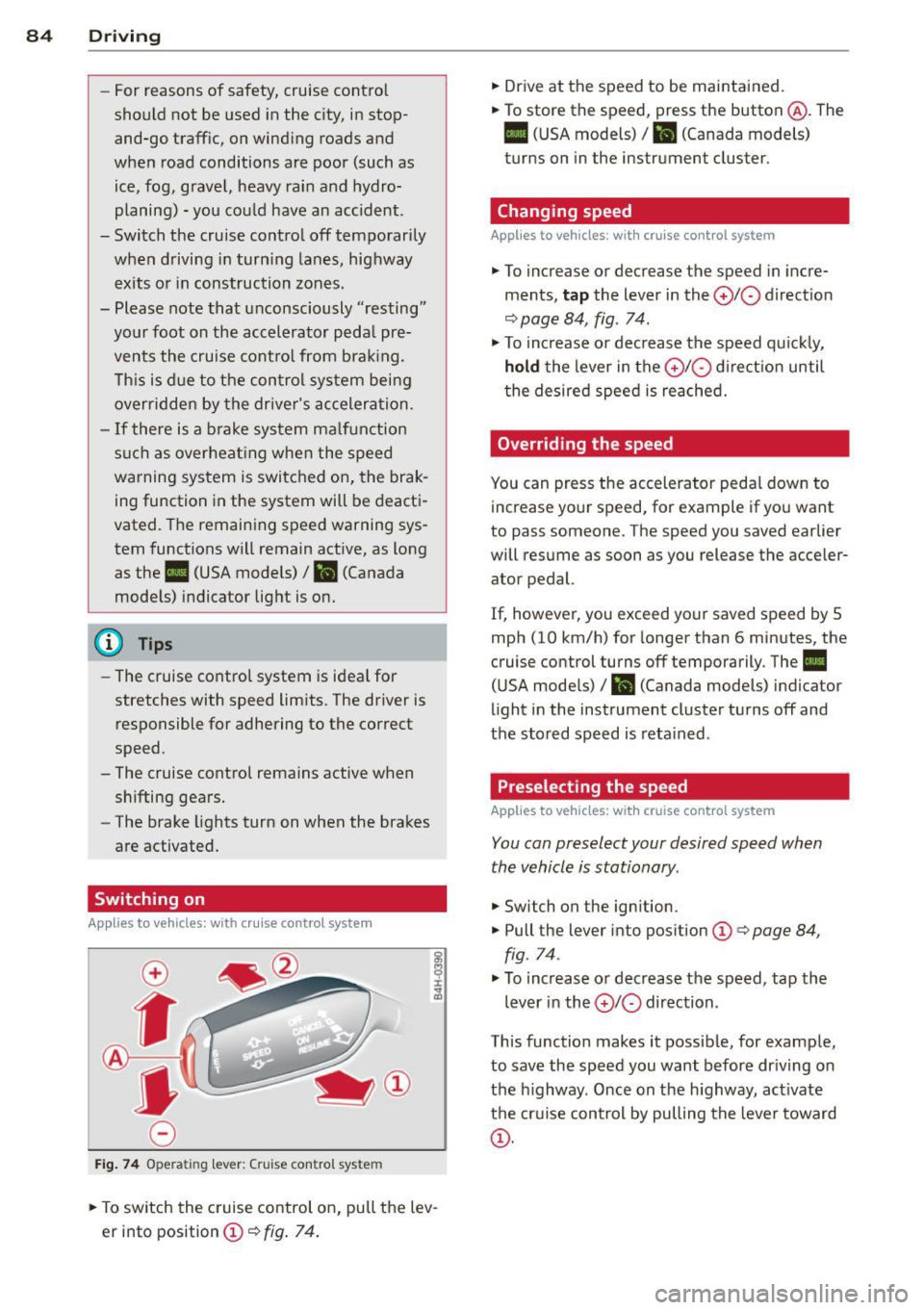
.,. To switch the cruise control on, pull the lev
er into position
CD¢ fig. 74.
.,. Drive at the speed to be maintained.
.,. To store the speed, press the button @. The
B (USA models)/ ii (Canada models)
turns on in the instrument cluster.
Changing speed
Applies to vehicles: with cruise control system
.,. To increase or decrease the speed in incre
ments,
tap the lever in the 0 10 direction
<:;>page 84, fig. 74 .
.,. To increase or decrease the speed quickly,
hold the lever in the 010 direction until
the desired speed is reached.
Overriding the speed
You can press the accelerator pedal down to
increase your speed, for example if you want
to pass someone. The speed you saved earlier
will resume as soon as you release the acceler ator pedal.
If, however, you exceed your saved speed by 5
mph (10 km/h) for longer than 6 minutes, the
cruise control turns off temporarily. The
II
(USA models) / Bl (Canada models) indicator
light in the instrument cluster turns off and
the stored speed is retained .
Preselecting the speed
Applies to vehicles: with cruise control system
You can preselect your desired speed when
the vehicle is stationary .
.,. Switch on the ignition .
.,. Pull the lever into position
CD¢ page 84,
fig . 74.
.,. To increase or decrease the speed, tap the
lever in the
010 direction .
This function makes it possible, for example,
to save the speed you want before driving on
the highway . Once on the highway, activate
the cruise control by pulling the lever toward
CD-
Page 87 of 310
M N
0 > co ,...., \!) ..,.,
M ..,., ,....,
Switching off
Applies to vehicles: with cruise contro l system
Temp orar y de acti vation
.. Press the brake pedal, or
.. Press the lever into pos ition @ (not clicked
i nto place) ~
page 84, fig. 74, or
Switchin g off completel y
.. Press the lever into pos ition @ (clicked into
place), or
.. Switch the ign ition off .
The speed you stored will be retained if the
cru ise control has been sw itched off tempora
rily. To resume the stored speed, release the
brake pedal and pull the lever into posit ion
@ .
The stored speed is erased when the cru ise
control is switched off completely or the ign i
tion is sw itched off .
.8, WARNING
You should only resume the stored speed if
it is not too h igh fo r exis ting traffic condi
tions. Otherwise you risk an accident .
@ Tips
-If the brakes become too heated while
driving, the cruise cont ro l switches off .
If
this happens while dr iv ing downh ill, you
can re lieve the brakes by shifting into a
l ower gear .
- When the cr uise control is act ivated, ESC
spo rt mode cannot be switched on.
Dri vin g 85
•
Page 88 of 310
86 Audi adapti ve cruise control
Audi adaptive cruise
control
Introduction
Applies to vehicles: with Audi adaptive cruise co ntrol
The adaptive cruise control system is a combi
nation of speed and distance regulation. It as
sists the driver by both regulat ing the speed
and maintaining a distance to the object
ahead, within the abilit ies of the system. If
the system detects an object, adaptive cru ise
con trol can brake and acce le rate your veh icle.
This makes driving more comfortable both on
long stretches of highway and in stop-and -go
traffic.
General Information
General information
Applies to vehicles: with Audi adaptive cruise control and
Audi pre se nse front
Fi g. 75 Front of veh icle: sensor
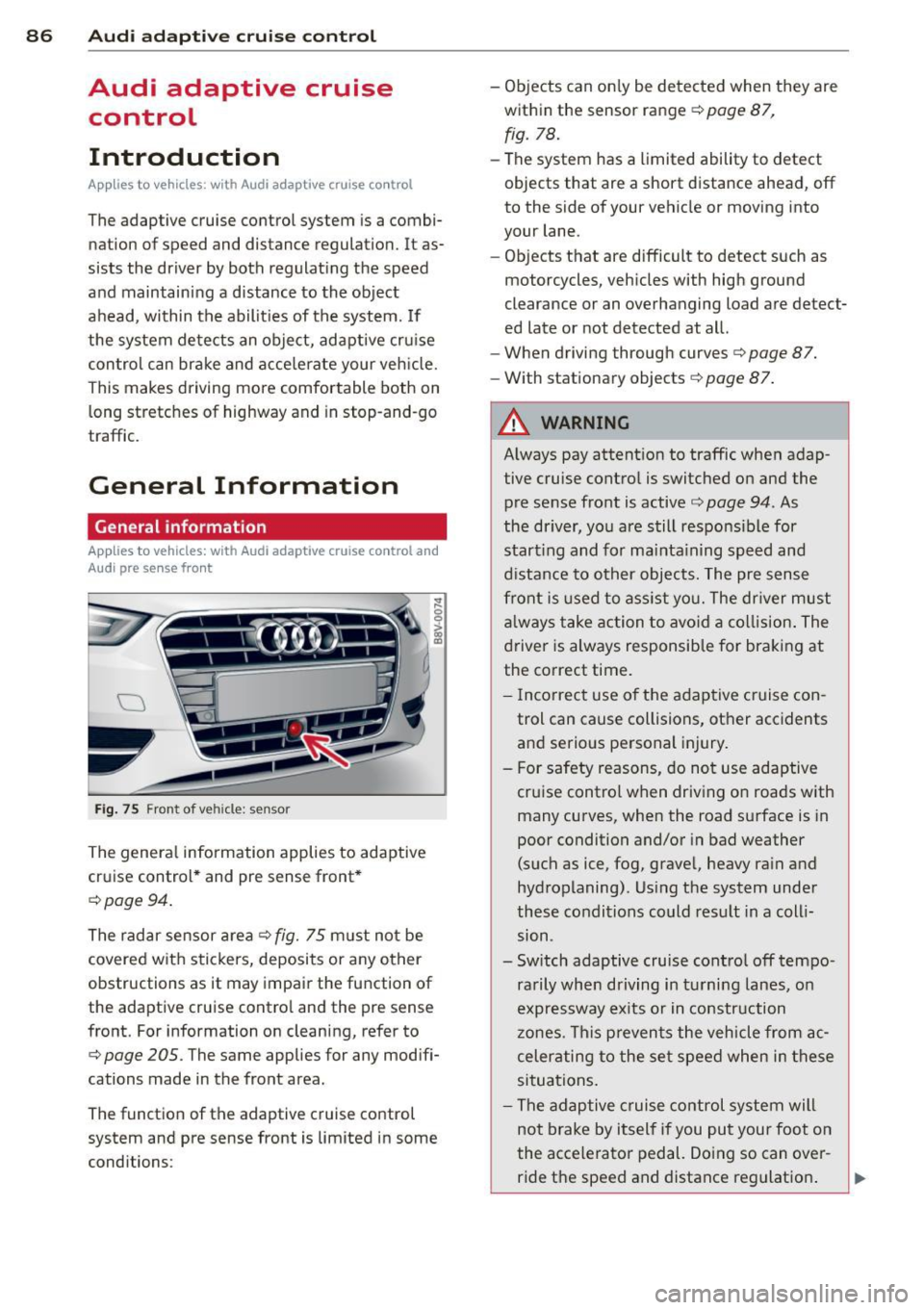
The genera l information applies to adaptive
cruise control * and pre sense front *
c:;, page 94.
The radar sensor a rea c::> fig. 75 m ust not be
covered w ith stickers, deposits or a ny other
obstructions as it may impair the function of
the adaptive cruise control and the pre sense
front. For information on cleaning, refer to
c:;, page 205. The same applies for any modifi
cations made in the front area.
The function of the adaptive cruise control
system and pre sense front is limited in some
conditions : -
Objects can on ly be detected when they are
within the sensor range
c::> page 87,
fig. 78.
-The system has a limited ability to detect
objects that are a short distance ahead, off
to the side of your vehicle or moving into
your lane.
- Objects that are difficult to detect such as
motorcycles, vehicles with high ground
clearance or an overhanging load are detect
ed late or not detected at all.
- When driving through curves
c::>page 87.
-With stationary objects c::> page 87.
A WARNING
-
Always pay attent ion to traffic when adap
tive cruise control is switched on and the
pre sense front is active
c::> page 94. As
the driver, yo u are still responsible for
start ing and for mainta ining speed and
d istance to other objects. The pre sense
front is used to ass ist you. The dr iver must
a lways take action to avo id a collision . The
driver is always responsible for braking at
the correct time.
- I ncorrect use of the adaptive cruise con
trol can cause collisions, other accidents
and serio us personal injury.
- For safety reasons, do not use adaptive cruise control when driving on roads with
many curves, when the road surface is in
poor condition and/or in bad weather
(such as ice, fog, gravel, heavy rain and
hydroplaning). Us ing the system unde r
these conditions could result in a coll i
sion .
- Switch adaptive cruise control off tempo rarily when driving in tu rni ng lanes, o n
expressway ex its or in construction
zones. This prevents the vehicle from ac
celerating to the set speed when in these
situations .
- The adaptive c ruise control system will
not brake by itself if you put your foot on
the accelerator pedal. Doing so can over-
ride the speed and distance reg ulation . ..,_
Page 89 of 310
....,
N
0 > co
rl I.O
"' ....,
"' rl
-When approaching stationary objects
such as stopped traffic, adaptive cruise
control will not respond and pre sense
front will have limited function.
- The adaptive cruise control system and
pre sense front do not react to people,
animals, objects crossing the road or on
coming objects.
- The function of the radar sensors can be
affected by reflective objects such as
guard rails, the entrance to a tunnel,
heavy rain or ice.
- Never follow a vehicle so closely that you
cannot stop your vehicle safely. The
adaptive cruise control cannot slow or
brake the vehicle safely when you follow
another vehicle too closely. Always re
member that the automatic braking
function cannot bring the vehicle to a
sudden or emergency stop under these
conditions.
- To prevent unintended operation, always
switch ACC off when it is not being used.
(D Note
The sensor can be displaced by impacts or
damage to the bumper, wheel housing and
underbody. The adaptive cruise control
and pre sense front may become impaired
as a result. Have an authorized Audi dealer
or authorized Audi Service Facility check
their function.
In curves
Applies to vehicles: with Audi adaptive cruise control and
Audi pre se nse front
Fig. 76 Example: driv ing into a curve
Audi adaptive crui se control 87
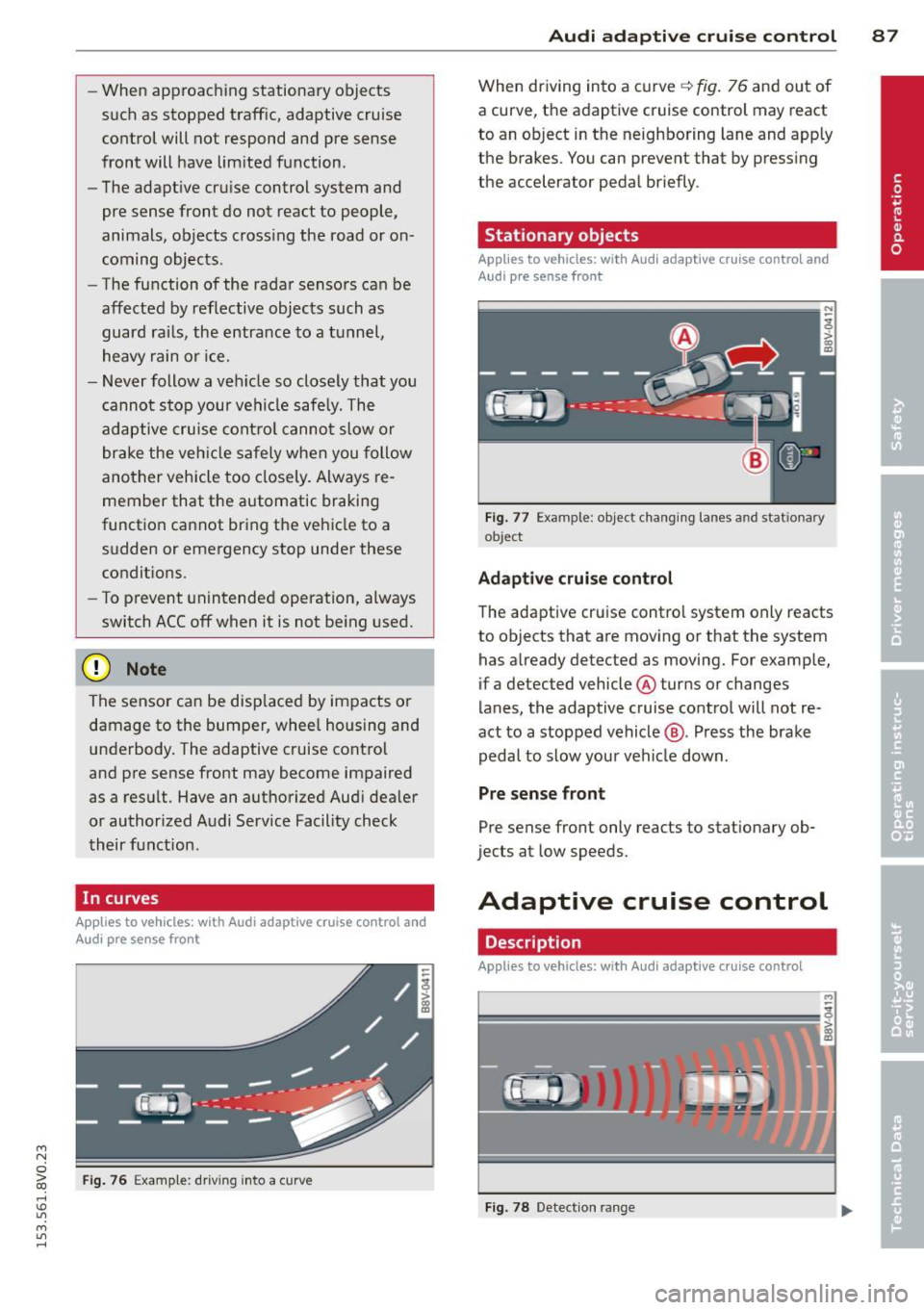
When driving into a curve q fig. 76 and out of
a curve, the adaptive cruise control may react
to an object in the neighboring lane and apply
the brakes. You can prevent that by pressing
the accelerator pedal briefly.
Stationary objects
Applies to vehicles: with Audi adaptive cruise control and
Aud i pre sense front
Fig. 77 Example : object changing lanes and stat ionary
ob ject
Adaptive cruise control
The adaptive cruise control system only reacts
to objects that are moving or that the system
has already detected as moving. For example,
if a detected vehicle @turns or changes
lanes, the adaptive cruise control will not re
act to a stopped vehicle@. Press the brake
pedal to slow your vehicle down .
Pre sense front
Pre sense front only reacts to stationary ob
jects at low speeds.
Adaptive cruise control
Description
Applies to vehicles: with Audi adaptive cruise control
=--=~----
?!!!! = ';! ~~~~
Fig. 78 Detection ran ge
Page 90 of 310
88 Audi adaptive cruise control
What can adaptive cruise control do?
The ad aptive cruise co ntrol sys tem uses r ad ar
a nd a video came ra . T he r ada r is subject to
designated system limits ¢
page 86.
On ope n roads w ith no t raff ic, i t fun ctions like
a cruise co ntro l system . Th e stored s peed is
main taine d. When approach ing an object
ahead and the system detects it, the ada ptive
cr uise control system automatically brakes to
match that ob ject's speed and then maintains
the stored d istance. As soon as the system
does not detect an object ahead, adaptive
cru ise control accelerates up to the s to red
speed .
W ith in the lim its of the system, adaptive
cru ise contro l can brake in stop-and-go traff ic
u ntil t he vehicle is stationary and then begin
d riving aga in under certa in conditions
¢ page 90, Driving in stop-and-go traffic.
Which functions can be controlled?
When you sw itch adaptive cruise cont ro l on,
you can set the cur rent speed as the "control
speed" ¢
page 88, Switching on/off .
When driving, you can stop cruise control
¢
page 90 or change the speed ¢ page 89
at any time .
You can a lso adjust the following settings :
- D istan ce
¢page 91
- D riving p rogram ¢ page 92
-Driving mode ¢ page 92
l) Spee d lim it s depe nd o n th e cou ntry and t he s pee dom
e te r.
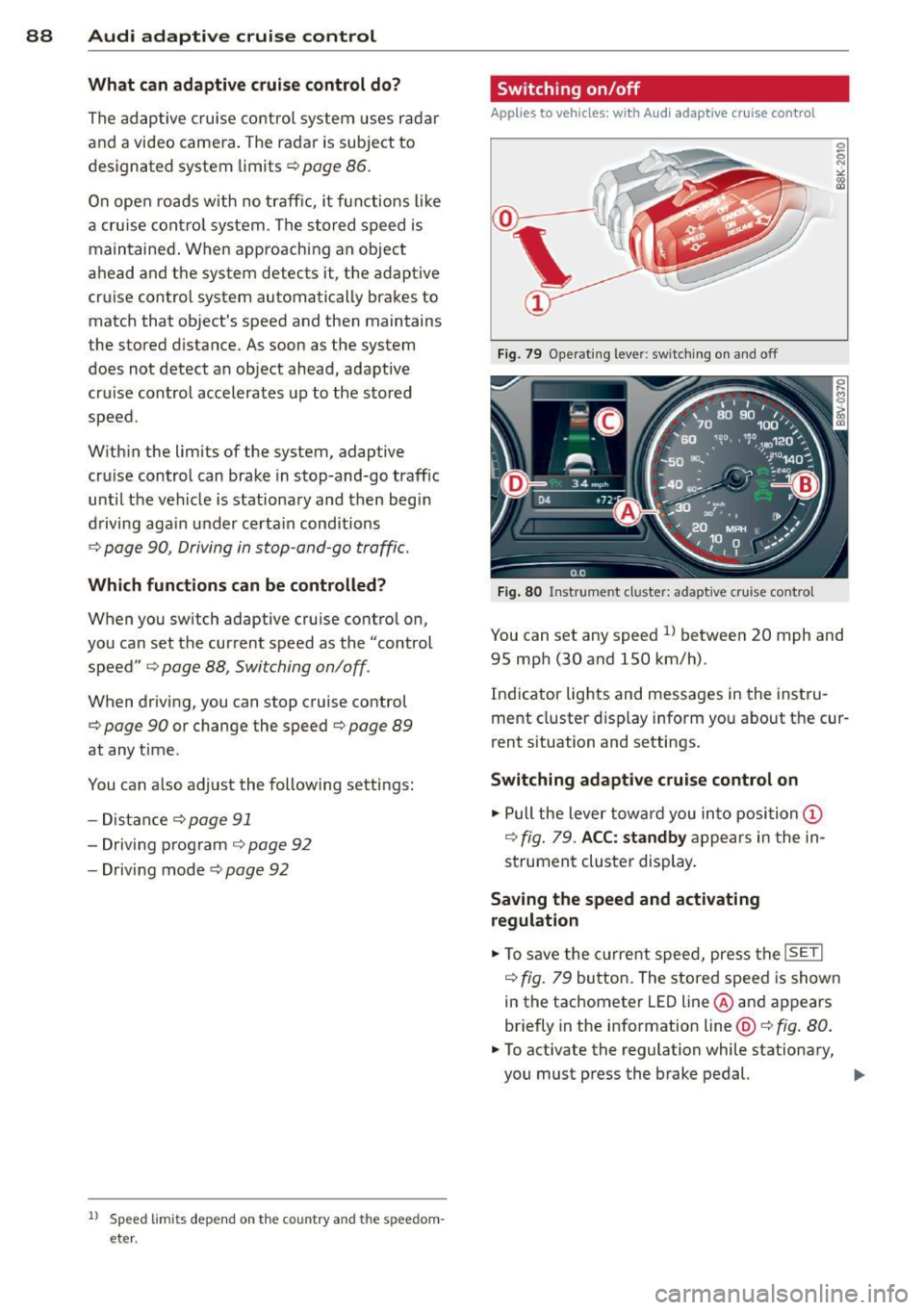
Switching on/off
Applies to vehicles: wit h Audi adapt ive cr uise contro l
Fig . 79 Opera ting leve r: sw itc hin g on and off
Fig. 80 Instrume nt cluster: adaptive cru ise control
You can set any speed ll betwee n 20 mph and
95 mp h (30 and 150 km/h).
Ind icator lights and messages in the inst ru
me nt cluster d isp lay inform yo u about the cur
rent s ituation and settings.
Switching adaptive cruise control on
.,. Pull the lever tow ard you in to position (D
¢ fig . 79 . ACC: standby a ppears in the in
s trument cluster display.
Saving the speed and activating
regulation
.,. To save the c urre nt spee d, press t he ISETI
¢ fig. 79 bu tto n. The stored speed is show n
in the tachometer LE D line @and appears
briefly in the info rmation line@¢
fig. 80 .
• To activate the regulation while stationary,
you must press the brake pedal.
IJJ,-
Page 91 of 310
....,
N
0 > co
rl I.O
"' ....,
"' rl
Switching adaptiv e cruis e control off
• Push the lever away from you into position
@ until it clicks into p lace. The message
ACC: off appears.
The stored speed in the L ED line is erased .
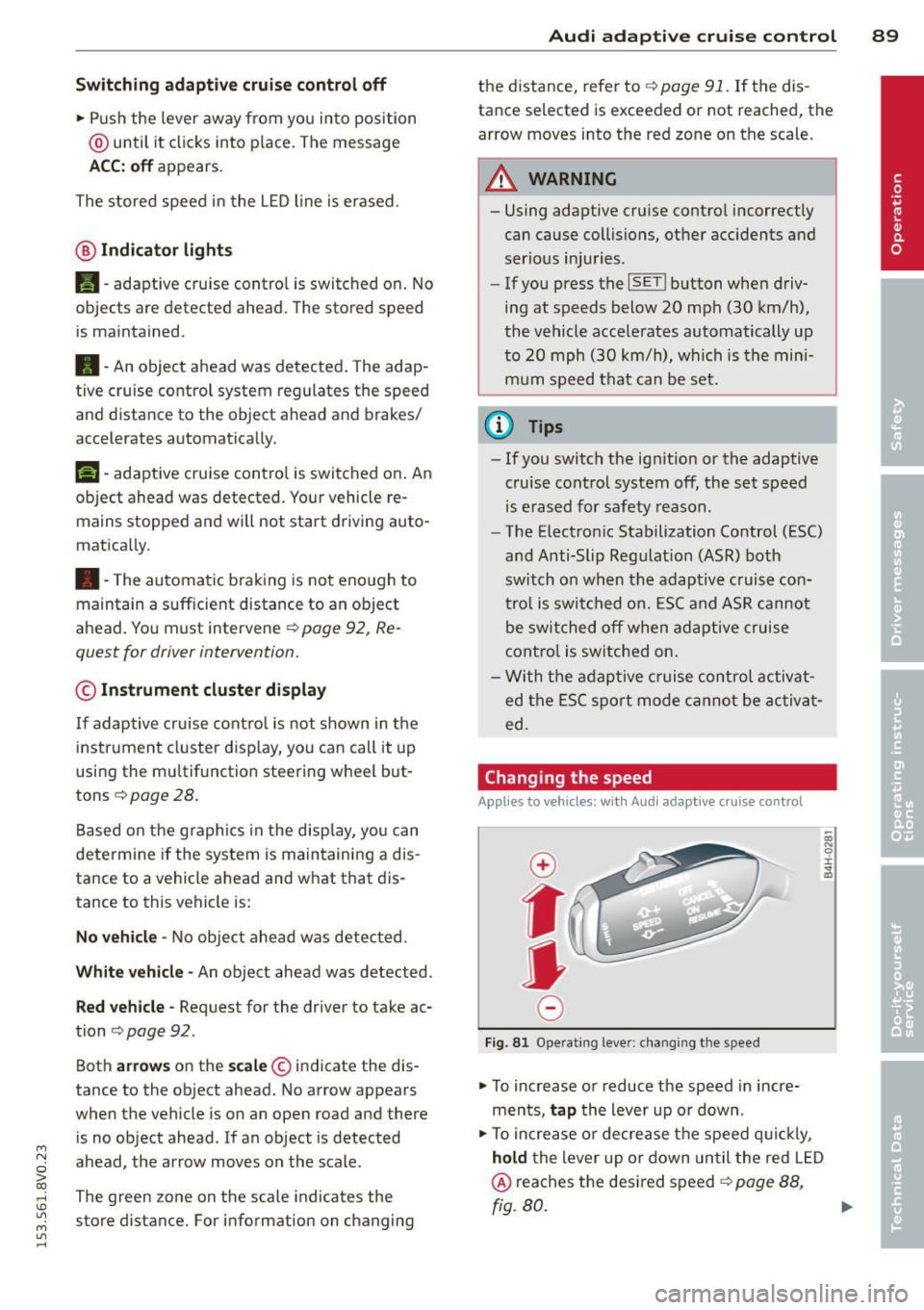
@ Indicato r light s
Ill-adaptive cru ise control is switch ed on . No
objects ar e detected ahead. The stored spe ed
is maintained .
B-An object ahead was detected . The adap
tive cruise contro l system regulates the speed
and d istance to the object ah ead and brakes/
accelerates automatica lly.
$ -adaptive cruise contro l is switched on . An
object ahead was detected. Yo ur vehicle re
mains stopped and will not start driving auto
matica lly.
• -The automatic braking is not eno ugh to
maintain a sufficient distance to an ob ject
ahead . Yo u must int ervene ¢
page 92 , R e
quest for driver intervention.
© Instrument cluster display
If adaptive cruise cont ro l is not shown in the
instr ument cluster d isp lay, you can call it up
using the multifunction steering wheel b ut
tons ¢
page 28 .
Based on the g raphics in the display, yo u can
determ ine if the system is maintaining a dis
tance to a vehicle ahead and what that dis
tance to this vehicle is:
N o vehicle -No object ahead was detected .
White vehicl e -An object ahead was detected .
Red vehicle -Request for the driver to take ac
tion ¢
page 92 .
Both arrows on the scale© in dicate the dis
tance to the object ahead. No arrow appears
when the vehicle is on an open road and there
is no object ahead.
If an object is detected
ahead, the arrow moves on the scale.
The green zone on the scale indicates the
store distance. Fo r information on changing
Audi ad apti ve crui se control 89
the distance, refer to r::!> page 91. If the dis
tance selected is exceeded or not reached, the
arrow moves into the red zone on the scale.
_& WARNING
- Using adaptive cru ise contro l incorrectly
can cause collisions, other acc idents and
ser ious inju ries .
- If you press t he
~IS-E T ~I button when driv
ing at speeds below 20 mph (30 km/h),
the vehicle acce lerates automatically up
to 20 mph (30 km/h), wh ich is the mini
m um speed that can be set.
(D Tips
- If you switch the ig nit ion or the adaptive
cruise cont ro l system off, the set speed
is e rased for safety reason .
- The Elect ronic Stabilization Control (ESC)
and Anti-Slip Regulat ion (ASR) both
switch on when the adaptiv e cruis e con
tr ol is swi tched o n. ESC and AS R canno t
be switched off when ad aptive cruise
cont ro l is switched on .
- Wi th t he adap tive c ruise control activat
ed the ESC sport mode cannot be ac tiv at
ed.
Changing the speed
Applies to vehicles: wit h Audi adaptive cru ise control
0
f
JJ
0
Fi g. 81 Operati ng leve r: c ha ngi ng the s pee d
• To increase o r reduce the speed in incre
ments,
tap the lever up o r down .
• To increa se o r de crea se t he speed q uickl y,
hold the lever up or down until the red L ED
@ reaches the desired speed r::!> page 88,
rg. 80. ~
Page 92 of 310
90 Audi adaptive cruise control
After each change, the new stored speed ap
pears briefly in the information line
c::> page 88, fig. 80@.
Driving in stop-and-go traffic
Applies to vehicles: with Audi adaptive cruise control
The adaptive cruise control system assists you
in stop-and-go traffic. If an object that is de
tected ahead stops, your vehicle will brake
and stay at a stop, within the limits of the sys
tem.
Starting with adaptive cruise control
1
l
If you veh icle brakes to a stop because an ob
ject is detected ahead, ACC autom. go ap
pears briefly in the instrument cluster display
Your veh icle is in automat ic start mode.
As long as the message ACC autom. go is dis
played and the object detected ahead starts
to move, your vehicle w ill cont inue driving
c::> & .
You can activate ACC autom. go again for a
short time by pulling the lever to posit ion @
r::;, page 90, fig . 82
The start mode ACC autom. go ends when the
brake pedal is pressed .
Criteria for switching off
The adaptive c ruise control switches off for
safety reasons when stationary:
- when the dr iver's door is open,
- when the veh icle is stationary for more than
3 minutes,
- when the dr iver's safety be lt is not fastened .
,&. WARNING
If the message ACC autom . go1l appears,
the vehicle continues driving, even if there
is an obstacle between your vehicle and
the object ahead. This increases the risk of
an accident.
ll This is not available in some co un tri es .
(D Tips
If adaptive cruise contro l is active and your
vehicle does not start driving even though
the message ACC autom. go
1l appears ,
you can start by tapp ing the accelerator
pedal.
- If an obstacle is detected when driving
w ith adaptive cru ise control, the system
w ill request you to begin driving
r::;, page 92 . You vehicle will beg in driv
ing more slowly. This can also happen in
situations where there is no visible ob
stacle.
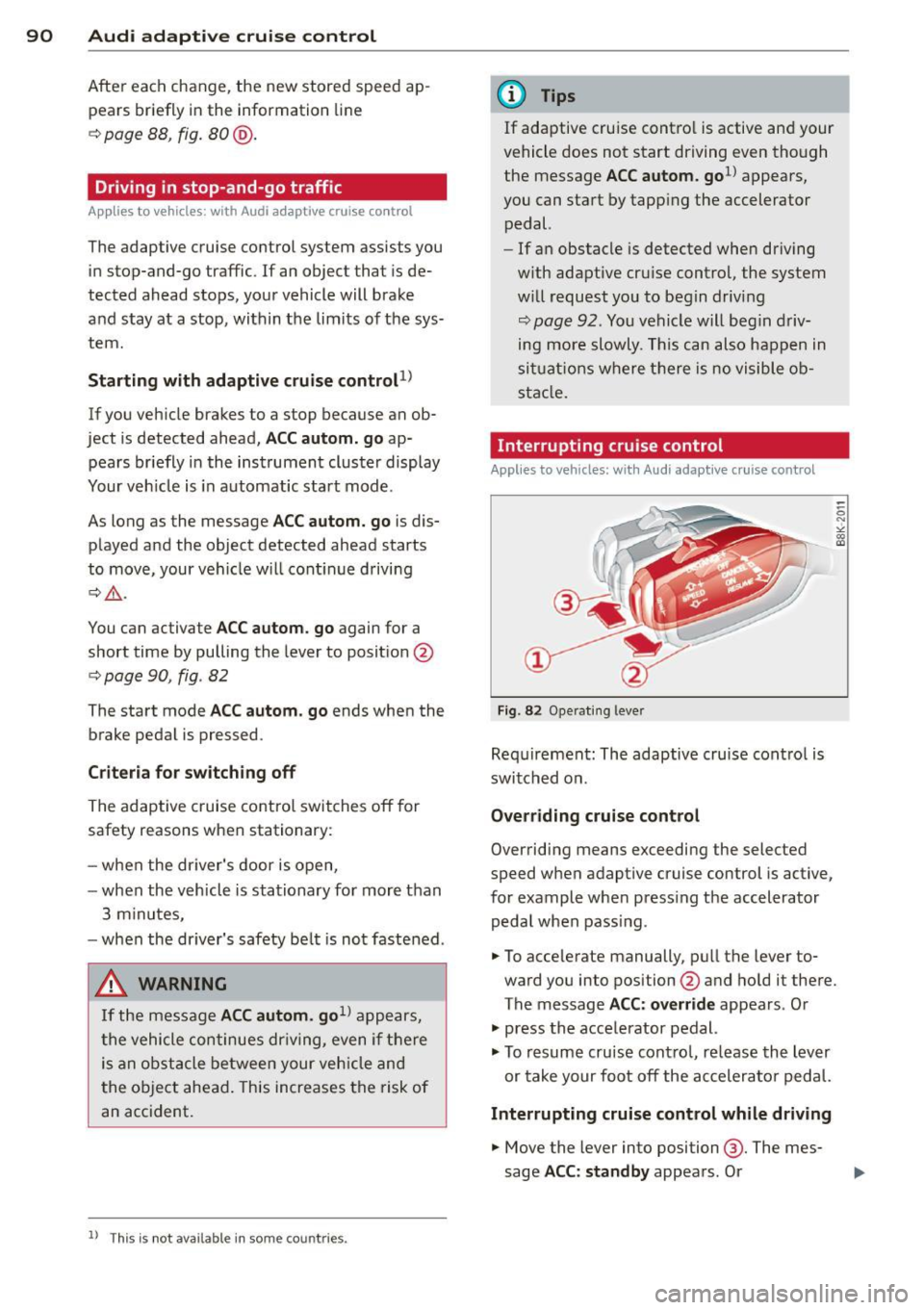
Interrupting cruise control
Applies to vehicles: wit h Aud i adapt ive c ru ise control
Fig. 82 Operating leve r
Requirement: The adaptive cruise cont ro l is
switched on.
Overriding cruise control
Overriding means exceeding the selected
speed when adaptive cruise control is active,
for example when press ing the accelerator
peda l when pass ing.
.. To accelerate manually, pull the lever to
ward you into position @and hold it there.
The message ACC: override appears. Or
.. press the acce lerator pedal.
.. To resume cruise control, release the lever
or take your foot off the accelerator pedal.
Interrupting cruise control while driving
.. Move the lever into position @. The mes
sage ACC: standby appears. Or
Page 93 of 310
....,
N
0 > co
rl I.O
"' ....,
"' rl
.. press the brake peda l.
.. To resume the stored speed, move the lever
into position @.
Inte rrupting crui se contr ol wh en stopped
.. Push the lever away from you into position
@ . The message ACC : s ta ndb y appea rs .
.. To resume cru ise control, press the brake
pedal and pull the lever toward you into po
sit ion @.
A WARNING
It is dangerous to activate cru ise contro l
and resume the stored speed when the
current road, traffic or weather conditions
do not permit th is . This could result in a
crash.
Setting the distance
Applies to vehicles: with Audi adaptive cruise control
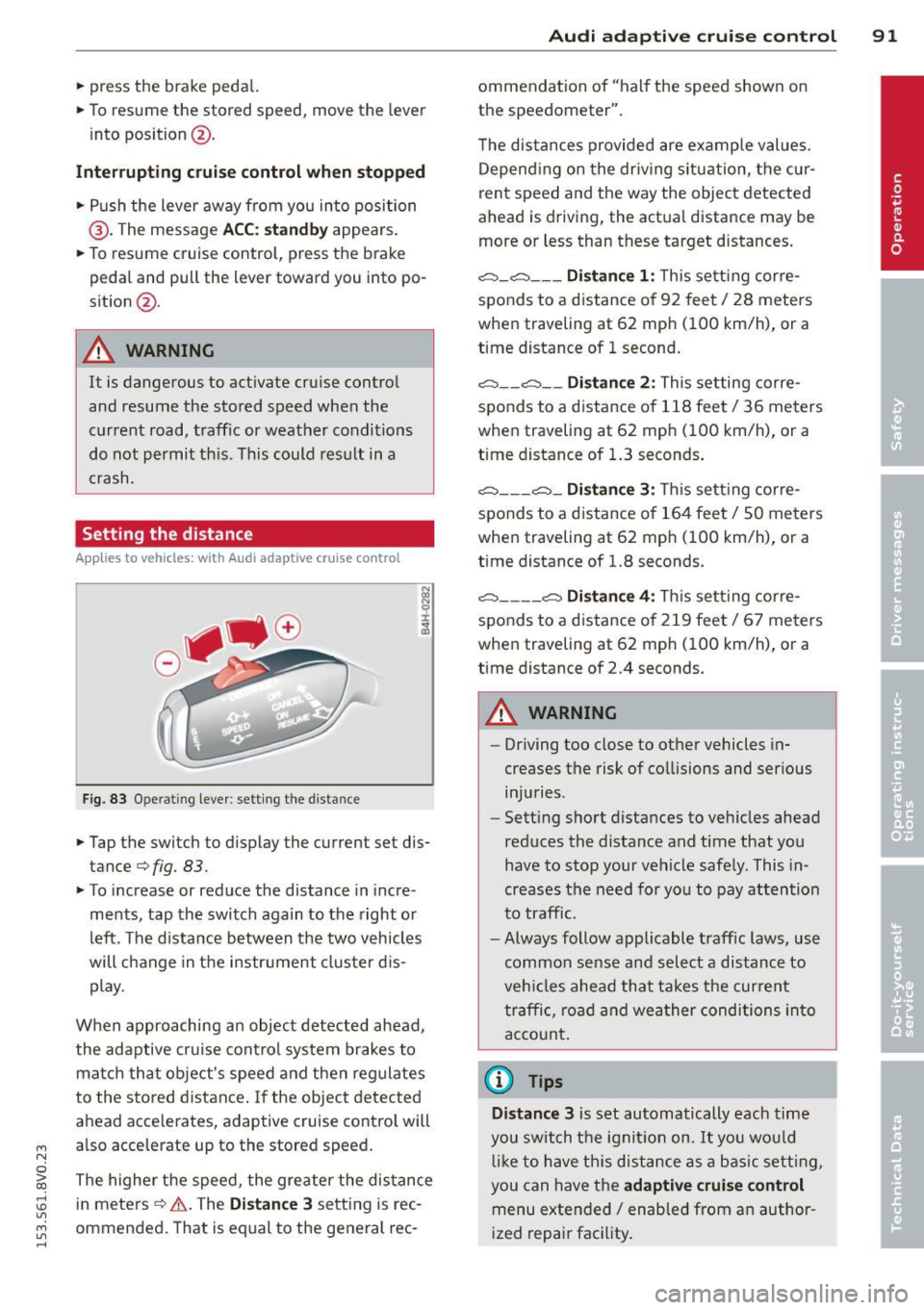
Fig. 83 O perat ing lever : setting the d istance
.. Tap the switch to display the current set dis
tance¢
fig. 83.
.,. To increase or reduce the distance in incre
ments, tap the switch again to the right o r
left . T he d istance between the two vehicles
will change in the instr ument cluster d is
play.
When approaching an object detected ahead ,
the adaptive cru ise cont ro l system brakes to
matc h that object's speed and then regulates
to the stored distance . If the object detected
ahead acce lerates, adaptive cru ise control will
also acce lerate up to the stored speed .
The highe r the speed, the greater the distance
in meters ¢.&. . The
Dist ance 3 sett ing is rec
ommended. That is equal to the general rec -
Audi adapti ve crui se control 91
ommendation of "hal f the speed shown on
the speedometer" .
T he distances provided are examp le values.
Depend ing on the dr iv ing situation, the cur
rent speed and the way the object detected
ahead is driving, the act ual distance may be
more or less than these target d istances .
c::;, _c::::, ___ Distance 1 : Th is sett ing corre-
sponds to a distance o f 92 feet/ 28 meters
when traveling at 62 mph ( 100 km/h), or a
time distance of 1 second.
c::;, __ c::::, __ Distanc e 2: This setting corre
sponds to a distance o f 118 feet/ 36 meters
when traveling at 62 mph ( 100 km/h), or a
time distance of 1.3 seconds .
c::;, ___ c::;,_ Dista n ce 3 : This sett ing corre-
sponds to a distance o f 164 feet/ 50 meters
when traveling at 62 mph ( 100 km/h), or a
t ime distance of 1.8 seconds.
c::;, ____ c::::, Dista n ce 4: T his sett ing corre-
sponds to a distance o f 219 feet/ 67 meters
when traveling at 62 mph ( 100 km/h), or a
time distance of 2.4 seconds.
A WARNING
-
- Driving too close to other vehicles in
creases the risk of co llisions and ser ious
inju ries .
- Sett ing s hort dista nces to veh icles ahead
reduces the distance and time that you
have to stop your vehicle safe ly. This in
creases the need for yo u to pay attention
to traffic.
- Always follow applicable traff ic laws, use
common sense and select a distance to
veh icles ahead that takes the cur ren t
traffic , ro ad and weather conditions into
acco unt .
@ Tips
Distance 3 is set automatically each time
you swi tch the ignit ion on.
It yo u wou ld
l ik e to have th is distance as a b asic setti ng,
you can have the
adaptive crui se cont rol
menu extended/ enabled from an author
i zed repair fac ility .
Page 94 of 310
92 Audi adaptive cruise control
Setting the driving program
App lies to vehicles: with Audi adaptive cruise co ntrol
A adapt ive cru ise con trol driving progr am is
ad ju st abl e on vehicle s wi tho ut Aud i dr ive se
l ec t*.
"' Se lect in the M MI: the
I MENU I button > Car
> Systems * control button > Driver assi s
tance > Adaptive cruise control > Driving
program > Comfort/Standard /Dynamic .
Selecting the driving mode
Applies to vehicles: with Audi adaptive cruise co ntrol
The adaptive cruise contro l driv ing program is
ad justab le for ve hicles w ith Aud i dr ive se lect
using the driving mode.
"' Se lect th e des ired driv ing mode
Comfort ,
Auto , Dynamic or Individual *
wit h the knob
t:;, page 106 .
Request for driver intervention
App lies to vehicles: with Audi adaptive cruise co ntrol
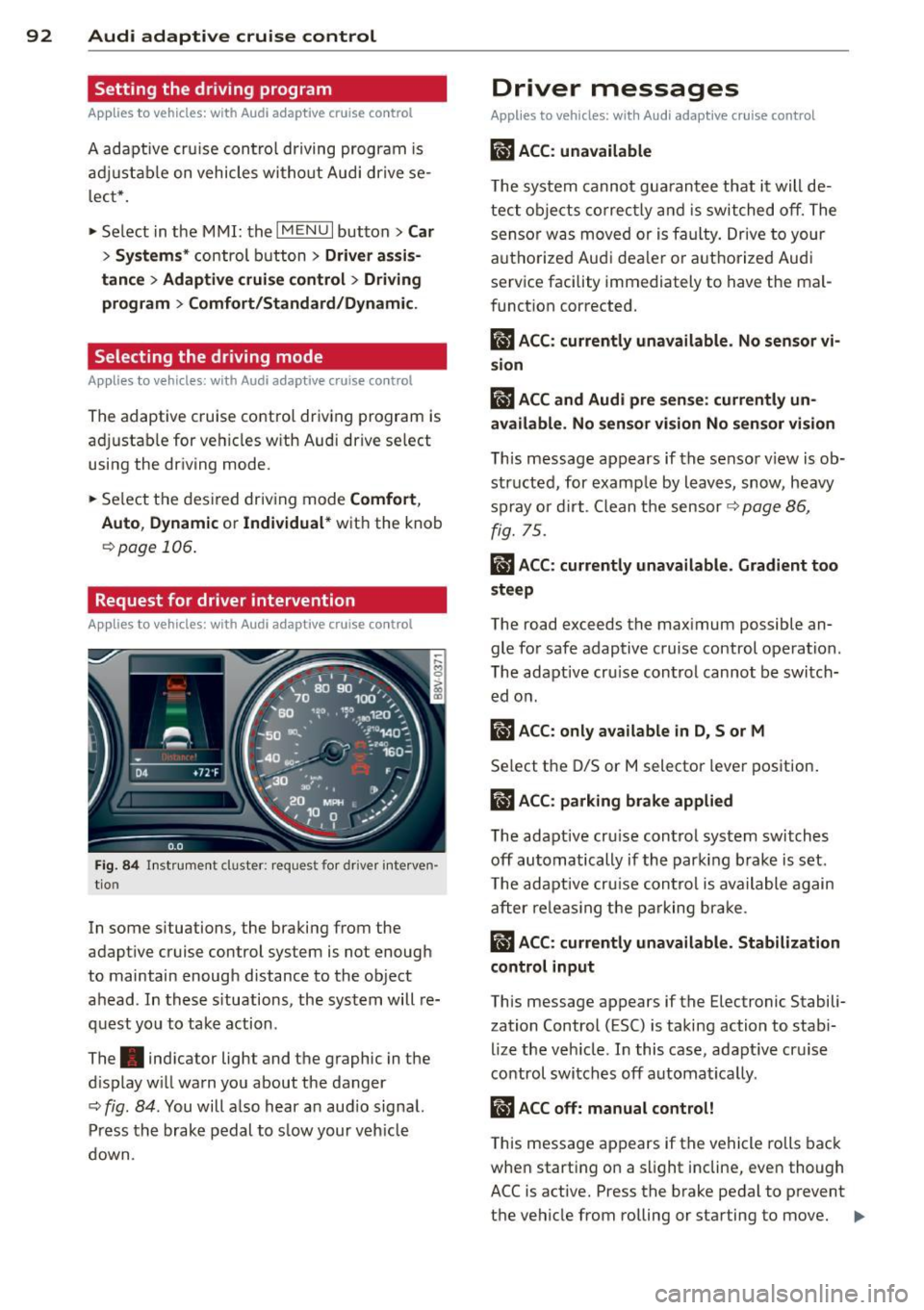
Fig . 84 In strum ent cluster: request fo r d rive r in terven
ti on
In some s ituations , the braki ng from the
adapt ive cruise control system is not enough
to maintain enough d istance to the object
ahead. In thes e situations, the system will re
quest yo u to take action .
The . indicat or light and the graphic in the
d isplay w ill wa rn you about the danger
t:;, fig . 84 . You will a lso hear an aud io signa l.
Pr ess the brake pedal to s low y our veh icl e
down.
Driver messages
Applies to vehicles: wit h Aud i adapt ive c ru ise control
IIJ ACC : unavailable
The system cannot gu arantee that it will de
tect o bject s cor rectly and i s switched off. The
sens or was move d or is fa ulty. Drive to your
autho rized Audi dea le r or a uth ori zed Audi
service facility immediately to have the ma l
f unct ion corrected.
Ill ACC: currently unavailable . No sensor vi
sion
fl ACC and Audi pre sense : currently un
available. No sen sor vision No sen sor vi sion
T h is message appears if the senso r view is ob
structe d, for examp le by l eaves, snow, heavy
s pr ay or d irt . C lean t he sensor
t:;, p age 86 ,
fig. 75.
ill ACC: currently unavailable. Gradient too
steep
The road exceeds t he max imum possible an
gle fo r safe adaptive cruise control operation.
T he adapt ive cr uise control cannot be switch
ed o n.
ill ACC: only available in D, Sor M
Se lect the D/S or M selector leve r position .
ill ACC: parking brake applied
The adapt ive cr uise control system switch es
off automa tically if th e parki ng br ake is set.
T he adapt ive cru ise con tro l is ava ilable again
aft er re leas ing t he pa rking br ake.
ill ACC: currently unavailable. Stabilization
control input
This message appears if the Electronic Stabili
zation Control (ESC) is taking action to stab i
l ize the veh icle. I n this case, adapt ive cr uise
control switches off automat ica lly .
ill ACC off: manual control!
This message a ppears if t he vehicle ro lls back
whe n start ing on a s light incline, even though
ACC is active. Press the b rake pedal to prevent
the vehicle from rolling or starting to move.
IIJ,